
Google Indexing 101: How to Get Your Website Indexed Fast
August 25, 2025
After 25 years in marketing, I’ve seen one SEO truth remain constant: if Google can’t index your site, it won’t get organic traffic. Google’s index is essentially Google’s massive database of web pages – if your pages aren’t in that database, they won’t appear in Google search results.
In fact, Google’s index spans hundreds of billions of webpages and is over 100 million gigabytes in size. Ensuring your site is indexed is absolutely foundational to SEO success.
In this comprehensive guide, we’ll demystify what the Google Index is, how the indexing process works, and (most importantly) how to get your website indexed faster using proven strategies. Let’s dive in!
What Is the Google Index?
The Google Index is a giant database of all the web pages that Google has crawled and decided to store for use in search results. It’s similar to an index in a library – but instead of books, Google’s index catalogs all the webpages Google knows about.
When Googlebot (Google’s web crawler) visits your site and finds new or updated pages, those pages may be added to Google’s index. Indexed pages are then eligible to appear when someone searches on Google.
Google’s index is constantly evolving. Crawlers are continuously scanning the web for new content and changes to existing pages. The index is huge – covering hundreds of billions of pages – and Google’s systems sort and organize this content so it can quickly retrieve relevant pages for any given search query.
In short, if a page is not in Google’s index, it has no chance of showing up in Google’s search results.
How Does Google Indexing Work?

Understanding how Google indexing works will help you see why certain steps are necessary to get indexed. In the context of Google Search, there are three main stages a piece of content goes through: crawling, indexing, and ranking:
1. Crawling
Google uses automated bots called Googlebot to discover pages on the web. These bots follow links from already-known pages and sitemaps to find new or updated content. Crawling is essentially the discovery phase – Googlebot is looking for URLs and fetching their content.
2. Indexing
After crawling a page, Google analyzes its content (text, images, meta tags, structure) and if the page is deemed worthwhile, Google stores that information in the Google Index.Indexing is the process of adding a page into Google’s searchable database. If a page is indexed, Google has a record of its content. (If it’s not indexed, Google effectivelyignores that page in search results.)
3. Ranking
When a user searches on Google, Google’s algorithms sift through the indexed pages to find the most relevant answers. Results are then ordered (ranked) based on hundreds of factors like keyword relevance, content quality, page experience, and backlinks.Indexed pages are the only ones considered for ranking. Being indexed doesn’t guarantee a high ranking, but it’s a prerequisite for appearing at all.
In summary, crawling is how Google finds your page, indexing is how Google stores and understands your page, and ranking is how Google retrieves your page when it’s relevant to a query. Every page that appears in Google’s search results has to be indexed first – if your page isn’t indexed, it won’t show up on Google.
Why Indexing Matters for SEO
Indexing is the gateway to getting organic traffic from Google. If a page isn’t indexed, it’s invisible in Google Search – no matter how great its content or how many keywords it targets.
For example, if you just launched a new website, Google needs to index it before it can rank for any keywords at all. Indexing is especially crucial for new content: whenever you publish a new blog post or product page, you want Google to index it promptly so searchers can find it.
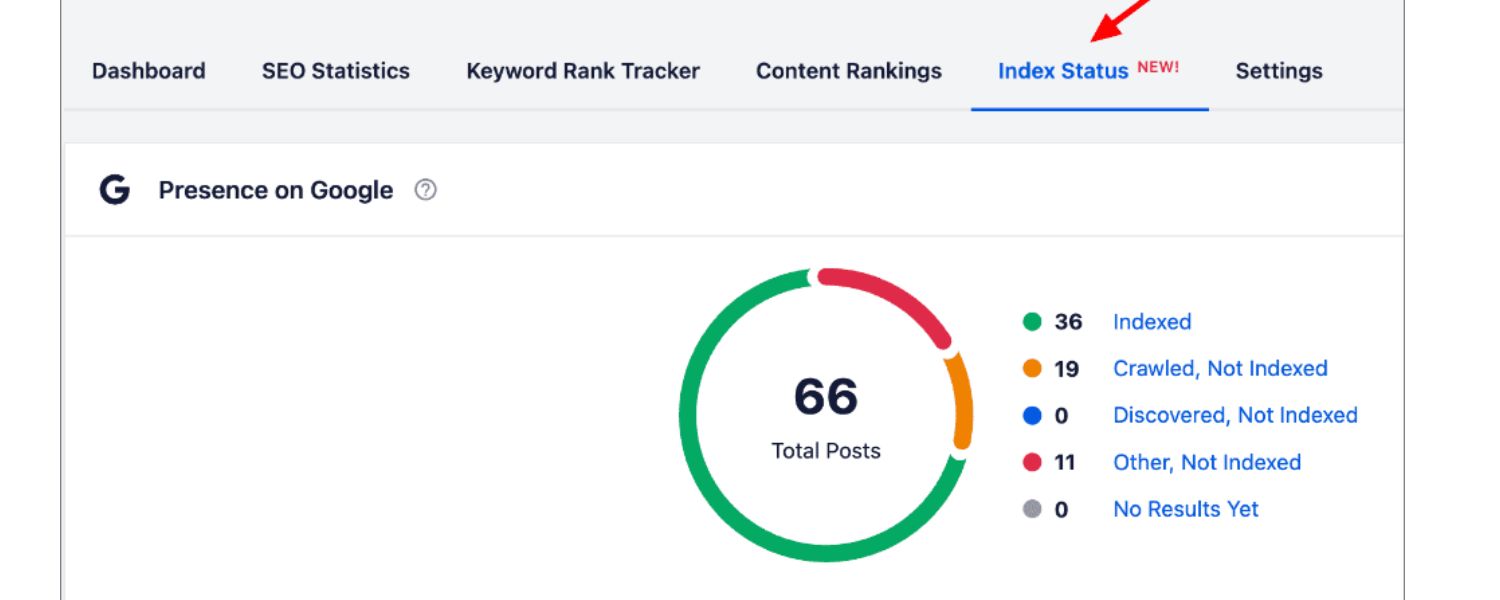
It’s also important to monitor which pages of your site are indexed. Sometimes, not all pages get indexed due to technical or quality issues (more on that in the FAQ section).
A page could be crawled by Googlebot but still left out of the index due to being a duplicate, a thin page, or blocked by a rule. For maximum SEO performance, you want to ensure that all your valuable, high-quality pages are indexed and that only the pages you want indexed (e.g. not duplicate or admin pages) are included.
Bottom line: Indexing is fundamental – without it, even the best SEO optimizations won’t matter because Google won’t be able to rank your content. Now, let’s look at how you can check your index status and then explore ways to improve it. Avoid these costly SEO mistakes and start boosting your rankings today—reach out for your personalized audit.
How to Check if Your Site Is Indexed

Wondering whether Google has indexed your website (or a specific page)? Here are two easy methods to check:
Using the site: search operator in Google is a quick way to see how many of your site’s pages are indexed. For example, a query like site:espn.com will show an estimated count of pages from ESPN that are in Google’s index (as shown above). If you perform a site:yourdomain.com search and see zero results, it means none of your pages are indexed.
This approach gives a rough overview of your index coverage. However, it may not list every un-indexed page – for a more precise check on specific URLs, Google Search Console is the better tool.
Google Search Console (GSC) provides in-depth index status information. After verifying your site in Search Console, you can use the Index > Pages report (formerly known as the Coverage report) to see all URLs Google knows about and their indexing status.
This report will show how many pages are Valid (indexed), and list pages that are not indexed with reasons (such as Excluded or Error statuses).
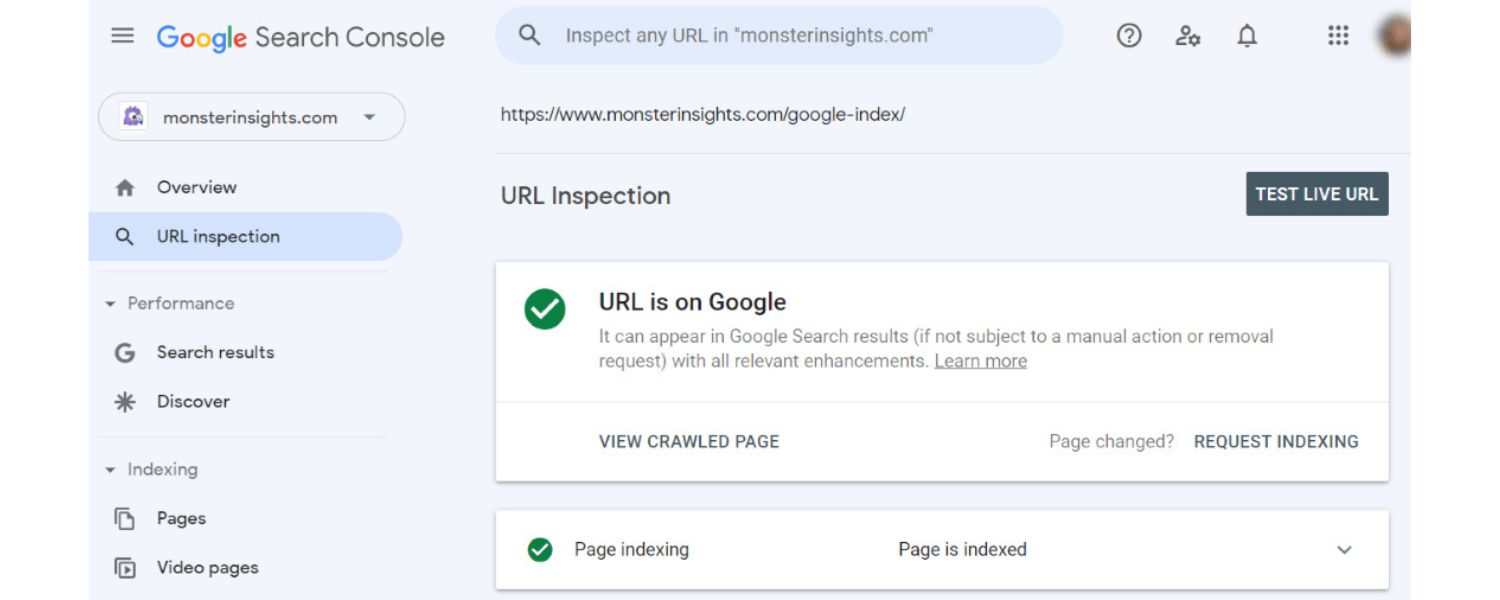
Another useful feature is the URL Inspection Tool. In GSC, enter the exact URL of a page on your site in the inspection bar at the top. The tool will tell you whether that page is indexed. If it is indexed, you’ll see a message “URL is on Google” along with details about the last craw.
If it’s not indexed, you’ll see “URL is not on Google” and often an explanation (for example, Discovered – currently not indexed or Crawled – currently not indexed). This helps pinpoint why a particular page isn’t in the index.
Using Search Console regularly is highly recommended – it lets you monitor which pages are indexed, find out about any indexing problems, and even request indexing for pages (which we’ll cover next). In short, site: searches give you a quick snapshot, while Search Console gives you a detailed, page-by-page index report.
How to Get Google to Index Your Website
Google will usually find and index new content on its own over time. However, there are several best practices you can follow to speed up the indexing process and ensure no important pages are overlooked. As a marketing expert, I always advise implementing the following strategies to make your website as index-friendly as possible:
1. Create and Submit an XML Sitemap

An XML sitemap is a file (usually named sitemap.xml) that lists all the important pages on your website. Sitemaps help search engine bots discover your content more efficiently by providing a direct list of URLs to crawl. Having a sitemap is especially useful for new websites (which have few external links) or for any site with a complex structure that Google might struggle to navigate.
First, ensure you have a sitemap. Many CMS platforms auto-generate one (for example, in WordPress you might find it at yourdomain.com/sitemap.xml).
You can also use SEO plugins or tools to create one. Once your sitemap is ready, submit it to Google via Search Console. Go to the “Sitemaps” section under the Index menu in GSC, enter your sitemap URL, and hit “Submit”. Google will fetch the sitemap, and if successful, you’ll see a status “Success” along with the number of URLs discovered.
By submitting a sitemap, you’re directly telling Google about all the pages on your site that you consider important. This can speed up the discovery and indexing of new or deep pages that don’t yet have backlinks pointing to them.
It’s a simple step, but one of the most effective for indexation: in one go you provide Google a roadmap of your website. (Pro tip: You can also submit your sitemap to Bing and other search engines for broader coverage.)
2. Use Google Search Console’s URL Inspection Tool to Request Indexing
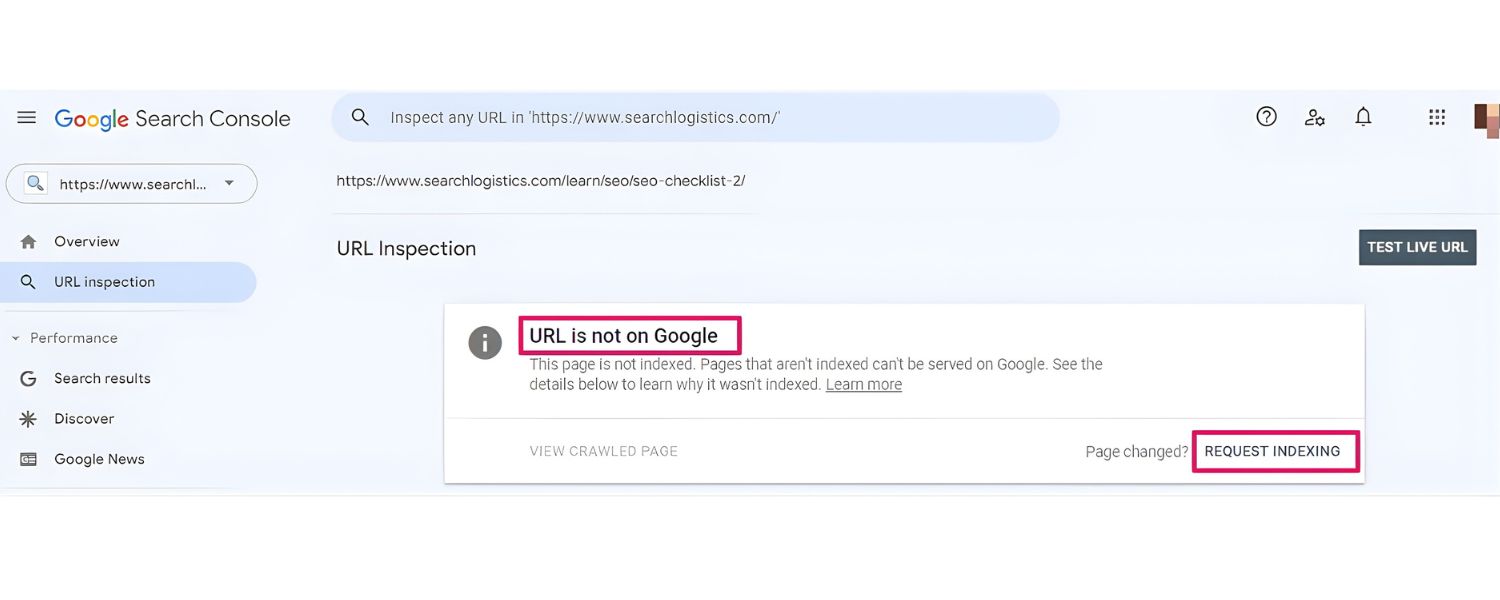
For individual pages that are new or have been significantly updated, you can request faster indexing using Search Console’s URL Inspection tool. Ensure you have your site added and verified in Google Search Console first. Then, follow these steps:
A. In GSC, paste the full URL of the page you want indexed into the search/inspection bar at the top and press Enter. This will retrieve the current index status of the page.
B. If the page comes up as not indexed (or if it shows an older version and you’ve made important updates), look for the “Request Indexing” button and click it. Google will then enqueue that URL for re-crawling and indexing priority.
This manual request often helps speed up the process – sometimes Google will crawl the page within minutes or hours instead of waiting days.
However, note a few caveats: (a) You can only request indexing for pages on sites you control (you must be a verified owner/user in GSC), (b) There is a quota (daily limit) on how many URLs you can request indexing for, and submitting the same URL repeatedly won’t make a difference, and (c) Google doesn’t guarantee that it will index the page after a request – if the content or site has quality issues, it might still choose not to index (or it may index slowly).
In general, use the URL Inspection & “Request Indexing” feature for pages that are important (e.g., new key blog posts, updated landing pages) or time-sensitive, rather than every minor page.
It’s a great tool to nudge Google, but the page still needs to be crawlable and valuable for the index. (We’ll cover quality and crawlability tips next.)
3. Optimize Your Site’s Structure and Internal Links

A well-structured website is much easier for Google to crawl and index. You should organize your site so that all important pages are reachable through internal links – ideally, no page should be an “orphan” that isn’t linked from anywhere else on your site.
Consider designing your site architecture like a hierarchy (for example, a pyramid structure with broad category pages linking to more specific sub-pages). Key pages (like your homepage, main category pages, or an “About” page) will naturally have more internal links pointing to them. From those, you should link out to secondary pages, and so on.
This ensures that as Google crawls your homepage, it can find your category pages, then from those find your subpages, etc., crawling the entire site via links.
Within your content, make liberal use of internal links to connect relevant pages. Not only do internal links help Google discover new pages, they also help Google understand which pages are important (through the context of the link and distribution of PageRank).
By adding internal links from high-traffic or authoritative pages on your site to new pages, you give those new pages a boost in visibility for the crawler. In short, a strong internal linking strategy guides Google through your site and signals what content is most valuable.
Tip: If you’re unsure whether your site has orphan pages or poor internal linking, you can use crawling tools (like Screaming Frog or the Index Coverage report in GSC) to identify pages that aren’t linked internally.
Fix those by adding appropriate links in menus, footers, or within content. A properly inter-linked site will significantly improve Google’s ability to find and index all your pages.
4. Remove Nofollow Tags from Internal Links

Sometimes sites inadvertently mark internal links as nofollow, which can impede crawling. A nofollow tag on a link tells search engines “don’t follow this link to the next page.” This is fine for certain external links (e.g., untrusted or sponsored links), but you should not nofollow your own internal links that lead to pages you want indexed.
If an internal link is marked nofollow, Googlebot may not crawl that link’s target page, meaning the page could be overlooked for indexing.
Audit your site’s links (especially navigation menus, sidebar links, and in-content links) to ensure they are normal followed links. If you find rel=”nofollow” attributes on links to important pages, remove them. The goal is to let Googlebot freely crawl from one page to the next.
By clearing any accidental nofollows on internal links, you’ll open the pathways for Google to discover all parts of your website.
(This also applies to any link masking or JavaScript links – make sure important navigation links are in plain HTML or at least not hidden from crawlers. The easier you make it for Google to traverse your site, the faster your pages will get indexed.)
5. Fix Any “Noindex” Tags or Headers
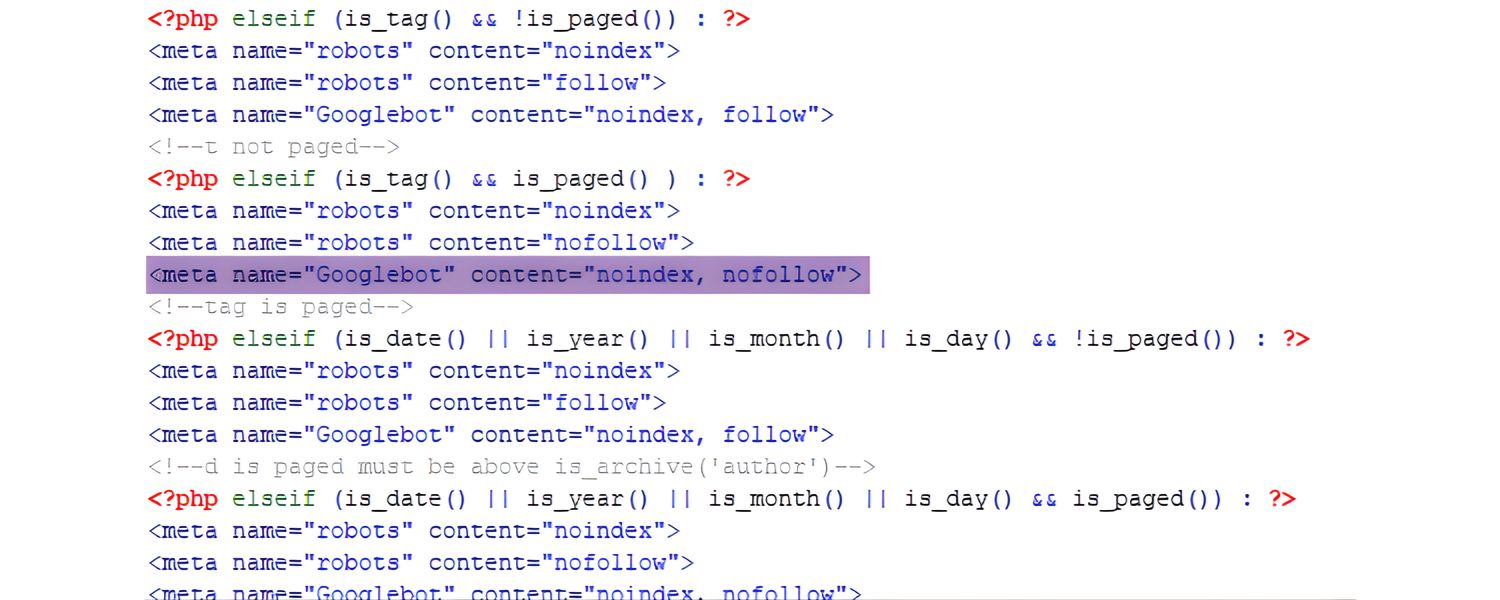
A noindex directive tells search engines not to index a particular page. It’s useful when you intentionally want to keep a page out of search results (for example, a login page or duplicate content page). But a common mistake is accidentally leaving a noindex tag on pages that should be indexed – often this happens if a site was in development or a template had a noindex meta tag that wasn’t removed.
Check the HTML <head> section of your pages (or your SEO plugin settings) for any meta tags with content=”noindex” or content=”noindex, nofollow”. Also check your HTTP response headers for an X-Robots-Tag: noindex. If such a tag appears on a page, Google will not include that page in its index. Remove any noindex tags from pages that you actually want indexed.
Google Search Console can help here as well: in the Pages/Coverage report, pages that were excluded due to a noindex will be listed (often under “Excluded by ‘noindex’ tag”). The URL Inspection tool will also show “Indexing allowed? No” if a noindex is present. By deleting misplaced noindex tags, you’ll allow Google to index those pages on the next crawl.
(While you’re at it, also ensure these pages aren’t blocked by other means. We’ll talk about robots.txt next – another place where pages can be unintentionally blocked.)
6. Ensure Important Pages Aren’t Blocked by robots.txt

The robots.txt file is a simple text file on your site (located at yourdomain.com/robots.txt) that gives instructions to web crawlers about where they’re allowed to go on your site. If your robots.txt has a Disallow rule that covers certain pages or directories, Google will not crawl or index those pages. It’s very important to double-check that you are not accidentally disallowing Google from content you want indexed.
Typical mistakes include: forgetting to remove a Disallow: / (which blocks the entire site) that was placed during site development, or disallowing a folder that contains critical pages (e.g. /blog/). Go to yourdomain.com/robots.txt and review its directives.
For Google’s crawler, you’ll usually see a section like User-agent: Googlebot. Under it, ensure there is no Disallow: / or other broad rules affecting sections of your site that should be public. If you find such rules, edit the robots.txt to remove them or narrow them only to the pages you truly want to keep out of search (like admin pages).
Remember, if Googlebot is blocked from crawling a page, it can’t index that page. By fixing robots.txt entries that unnecessarily block content, you reopen those pages for crawling. After any changes, use the robots.txt Tester in Search Console (or simply fetch the file in a browser) to confirm Googlebot is allowed. This way, all your high-value pages remain accessible to Google.
7. Eliminate Duplicate Content (and Use Canonical Tags when Needed)
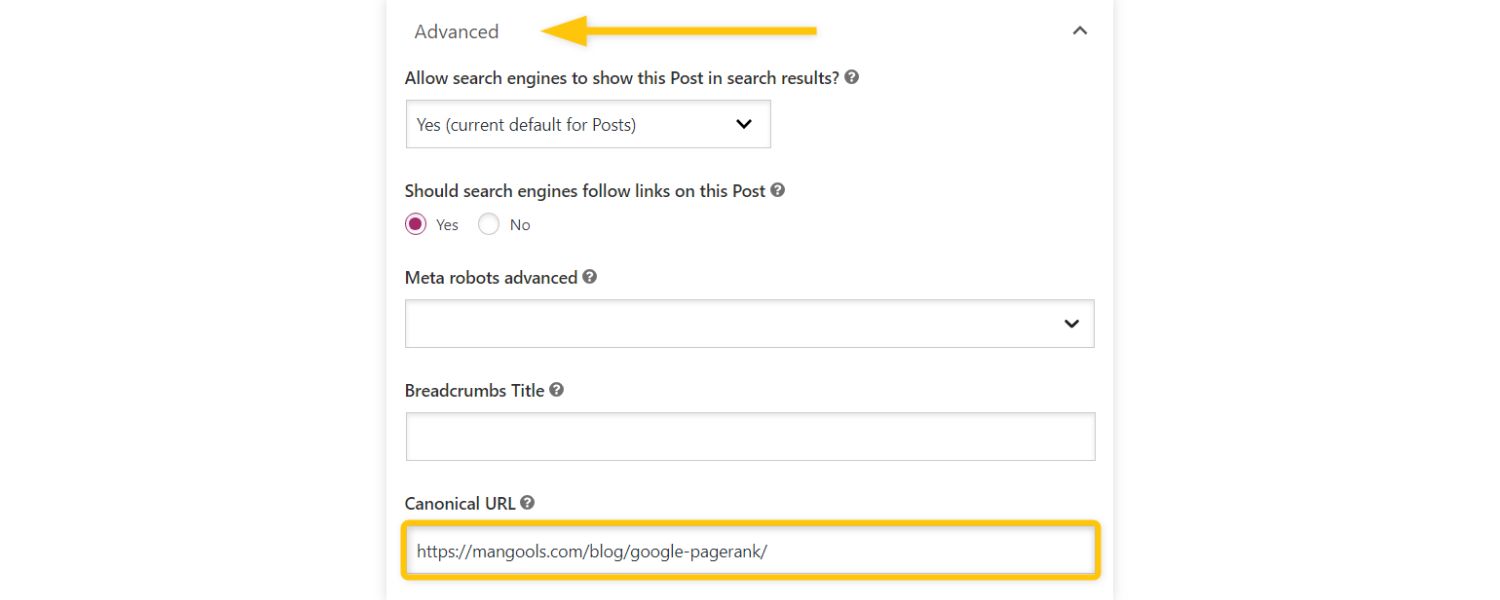
Google tends to index one version of duplicative content and ignore the rest. If your site has multiple pages with very similar or identical content, you might find that Google indexes only one of them and skips the others to avoid showing duplicate results. For example, an e-commerce site with the same product listed under two different URLs might see one URL indexed while the other is not.
To ensure duplicate content doesn’t dilute your index coverage: consolidate or differentiate pages that are nearly the same. This could mean merging two similar articles into one, or rewriting one of them to be unique.
In cases where duplicates are unavoidable (say, printable versions of pages, or tracking parameters creating different URLs), implement a canonical tag. A canonical tag (<link rel=”canonical” href=”URL”>) in the page’s <head> tells Google which URL is the “primary” version that should be indexed.
For instance, if page A and page B are duplicates, you might put a canonical on page B pointing to page A, indicating that page A is the one to index.
Also be careful not to accidentally canonicalize an important page to another URL. If a page has a canonical tag pointing elsewhere, Google may drop it from the index thinking it’s a duplicate of the target page. Audit your site for any such mistakes.
By cleaning up duplicate content and using canonical tags correctly, you help Google index all the content that matters (and not waste crawl budget on multiple copies). Google is unlikely to index pages that appear 99% similar to something it’s already indexed, so always aim to have each indexed page offer something unique and valuable.
8. Improve Your Site’s Content Quality (Prune Thin Pages)
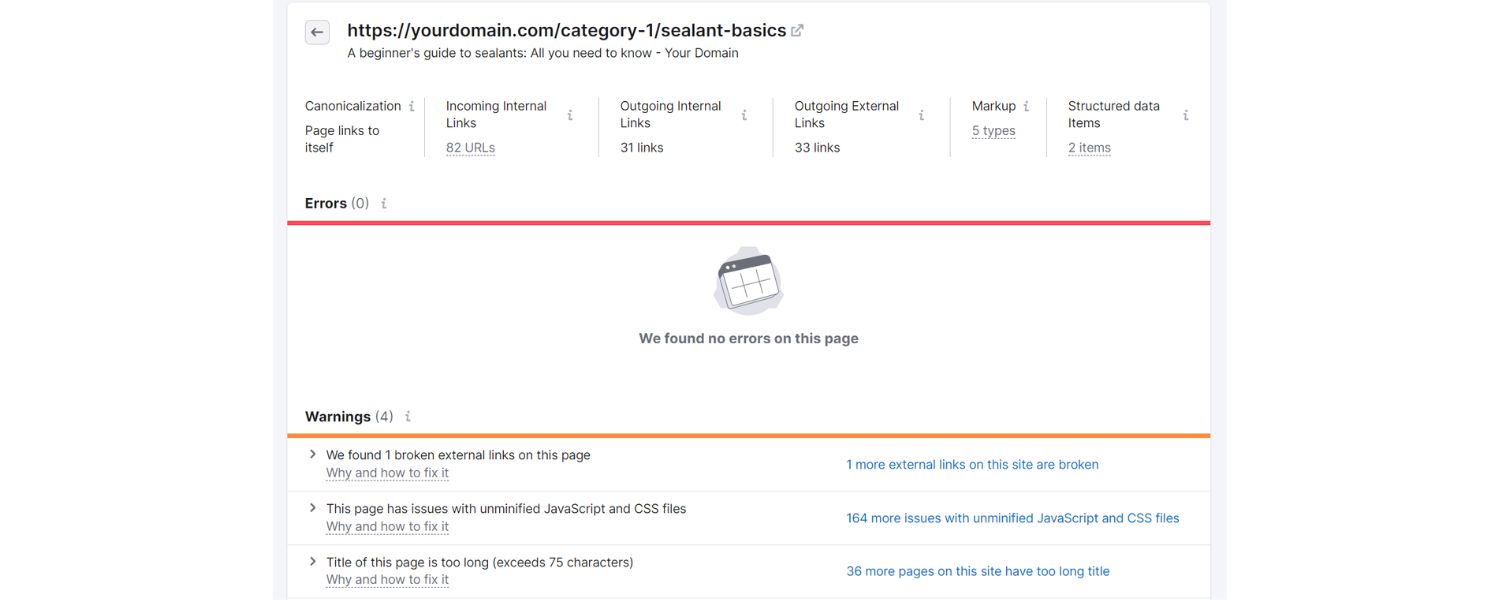
Even if your site is technically crawlable, Google might refrain from indexing pages that it deems low quality or “thin” (having little content or value). Google has publicly stated that its systems prioritize indexing high-quality, useful content.
In practice, this means if your site is filled with dozens of very short or unsubstantial pages, Google may index only a handful of them or take much longer to index new ones.
Take a critical look at your content. Do you have old blog posts that are just one paragraph long? Pages that are mostly duplicate content or boilerplate text? An excessive number of near-identical product pages with minimal details?
These are candidates to either improve or remove. By pruning thin or low-value pages, you can actually improve your site’s overall indexability. Google’s crawler has a limited crawl budget (time/resources for your site), and it tends to allocate it more generously to sites that consistently provide rich content, not a lot of fluff.
Focus on publishing helpful, in-depth content that meets user needs (Google refers to this as “people-first” content with high E-E-A-T: Experience, Expertise, Authoritativeness, Trustworthiness). If you have many thin pages, consider consolidating them into more robust pages or adding substantial new information to them.
In cases where pages just aren’t useful (e.g., tag pages with no unique info, or very outdated posts), you might either set them to noindex or remove them entirely.
This kind of content audit and cleanup can have a big impact. Webmasters have found that after reducing the number of low-quality pages, Google crawlers start indexing the remaining pages more quickly, and overall site rankings often improve.
Quality truly matters – Google’s index is not a repository of everything on the web, it’s curated for usefulness. Make sure your pages earn their spot by being unique and valuable.
9. Build High-Quality Backlinks for Discovery

Backlinks (links from other websites to your site) are not just a ranking factor – they’re also a discovery mechanism for indexing. When a popular site links to your new page, there’s a good chance Google will find that link during its crawl of the web, and that can lead Googlebot to crawl and index your page sooner.
In Google’s own words, links from other sites serve as “votes of confidence,” and pages with more quality backlinks tend to be crawled more frequently and indexed more reliably.
For a brand new site, getting Google’s attention can be tough without any backlinks. So, as part of your indexing strategy, it’s wise to invest in some ethical link-building:
A. Share your new content on social media or relevant forums (Google can follow certain social links).
B. Reach out to industry publications or partners who might find your content valuable enough to link.
C. Consider guest posting on reputable sites with a link back to your site.
D. Get your business listed in high-quality directories or local listings (if applicable).
Even one or two good backlinks from well-indexed sites can put your site on Google’s radar much faster. Moreover, backlinks from authoritative sites signal to Google that your site is trustworthy, which can encourage Google to crawl it more deeply and frequently.
Over time, as you accumulate more quality backlinks, your overall crawl rate may increase (meaning Googlebot visits and refreshes your content more often).
Remember, it’s not about spammy link schemes, which can do more harm than good. It’s about legitimately increasing your site’s prominence on the web. Quality over quantity: a handful of strong links beats a glut of low-quality ones, both for indexing and SEO.
10. Boost Site Speed and Fix Technical Issues (Crawl Budget Optimization)

Google’s crawler operates within certain resource limits on your site – often referred to as your site’s crawl budget. Crawl budget is essentially how many pages and how fast Google is willing to crawl your site in a given time frame.
If your site has thousands of pages, but Googlebot can only crawl, say, 500 pages per day, then new or updated content beyond that rate might not get indexed quickly. Worse, if your site loads very slowly or frequently times out, Googlebot might crawl even fewer pages.
To make the most of your crawl budget, maximize your site’s crawl efficiency:
1. Improve your page load speed
Fast-loading pages reduce the time Googlebot spends fetching each page, allowing it to crawl more pages in the same amount of time. Tools like Google PageSpeed Insights can help identify speed bottlenecks.
Compress images, use efficient coding practices, enable browser caching – all the standard web performance best practices. Google has confirmed that page speed is a ranking factor and also hinted it can affect how well content gets crawled. A faster site is a win-win for both users and crawlers.
2. Reduce unnecessary URLs
Massive numbers of low-value pages (like endless calendar filters, session IDs, or faceted navigation combinations) can exhaust your crawl budget. If your site auto-generates lots of pages, consider pruning them or blocking them via robots.txt or meta noindex where appropriate, so Google focuses on your primary pages.
For example, blocking crawl of faceted filters or archive pages that don’t need indexing can free up crawl budget for your real content pages.
3. Fix broken links and errors
Check for 404 errors or server errors (500, etc.) that might be wasting crawl attempts. If Googlebot repeatedly hits broken links, that’s time that could be spent crawling valid pages. Use Search Console’s Page indexing report or a crawl audit to spot these issues and correct the links or set up proper redirects.
Google does note that most small to medium sites don’t need to worry about crawl budget much, especially if you have only a few thousand pages or less. Google’s infrastructure can usually crawl those just fine. But for larger sites or those with rapid content updates, these optimizations are important.
By improving site speed and eliminating crawl roadblocks, you ensure that Googlebot can crawl as many pages as possible on each visit, which in turn helps those pages get indexed.
11. Ensure Your Site is Mobile-Friendly (Mobile-First Indexing)

Google has fully rolled out mobile-first indexing, which means Google predominantly uses your site’s mobile version to crawl and index content.
In practical terms, this means if your mobile site is missing content that’s on your desktop site, or if it’s structured differently, the Google index will reflect what’s on the mobile version. Any content hidden or absent on mobile might not be indexed or considered for rankings.
To avoid issues:
A. Optimize your mobile site
Make sure your website is mobile-responsive and that all the key text, images, and links are accessible on the mobile layout. Don’t hide important content in accordions or tabs just for the sake of design – if you do use collapsible sections, ensure they are still crawlable. Google does crawl hidden tabs on mobile, but the content should still be present in the HTML.
B. Mobile Page Speed
Mobile users (and Google) expect fast performance on phones. So, all the speed tips mentioned above doubly apply to the mobile version. Use Google’s Mobile-Friendly Test and PageSpeed Insights to check your mobile performance.
C. Consistent structured data and tags
If you use structured data (Schema.org) or meta tags (like descriptions, og tags, etc.), make sure they are included on mobile pages just as on desktop. Inconsistencies can confuse Google.
Mobile-first indexing essentially asks you to think: “How does Google see my site on a phone?” If the answer is “not very well,” it’s time to fix that. Nearly all websites have been switched to mobile-first indexing as of now, so this is the default.
A mobile-friendly site not only helps indexing but of course is crucial for user experience, which has its own SEO benefits.
By implementing the strategies above – from technical fixes to content improvements – you’ll create a website that welcomes Google’s crawlers and earns its place in the index. Most of these are set-and-forget enhancements: once you set up your sitemap, clean up your site structure, and address quality issues, your site will naturally index faster moving forward.
Next, let’s address a few frequently asked questions about Google indexing, to clear up any remaining doubts.
FAQ: Common Google Indexing Questions
Q1: How long does it take for Google to index a new website (or page)?
There’s no fixed timeframe – indexing can happen within hours or it may take several weeks for a brand-new site. According to Google’s John Mueller, a completely new website can take “anywhere from several hours to several weeks” to be indexed.
In practice, for most established websites that regularly publish content, Google will often crawl and index new pages in a matter of hours or days. For a brand new site with no reputation, it might be on the longer side (Google has even stated initial indexing could be 1–4 weeks for new sites
Several factors influence indexing speed: your site’s authority and age, the number of quality backlinks to your site, how efficient your site’s crawlability is, content quality, and even server speed. If you’ve followed the best practices in this guide – submitting a sitemap, building internal/external links, etc. – you’ve done everything in your control.
After that, it’s a waiting game. Be patient and monitor progress using tools like Search Console’s Coverage/Pages report or URL Inspection. As long as you see Googlebot activity (in server logs or GSC) and gradual indexing of pages, things are on the right track.
If weeks go by with no indexing, then re-check for any issues (as covered in the steps above). But generally, give Google some time – it will index your content when its algorithms decide the content is valuable and crawlable.
Q2: What’s the difference between crawling and indexing?
Crawling is the process of Googlebot finding pages, while indexing is Google storing and understanding pages. When Googlebot crawls, it’s following links or sitemaps, loading the page, and reading its content. Indexing happens after crawling – Googlebot (and Google’s indexing system) takes the crawled page data, parses it (text, images, etc.), and adds it into Google’s searchable index if appropriate.
Think of crawling as “discovering new content” and indexing as “filing it in Google’s library”. Both steps are necessary: if a page isn’t crawled, it can’t be indexed; and if it isn’t indexed, it can’t rank in search results. (For completeness: after indexing comes “ranking”, which is determining where the page appears for relevant queries.)
In short, crawling ≠ indexing. You might have pages that are crawled but not indexed (Google decided not to index them for some reason), which you can often identify via Search Console reports. Your goal is to have important pages crawled and indexed – which is why we emphasize crawlability and quality in this guide.
Q3: Why might a page not be indexed by Google?
There are several common reasons a page isn’t indexed by Google, including:
A. Blocked by robots.txt or noindex
If your page is disallowed in your robots.txt file or has a meta noindex tag, Google will not index it (by design). Always check that the page isn’t accidentally being excluded.
B. No crawl path to the page
If no other page links to this page (and it’s not in your sitemap), Googlebot might not even know it exists. Likewise, if the only links to it are via a form submission or an unparseable JavaScript, Googlebot could miss it. Ensure the page is linked from somewhere discoverable.
C. Not enough content or low-quality
Thin pages (e.g., a page with just one sentence or largely duplicate content) might be crawled but then deemed not worth indexing. Google may skip indexing pages that don’t meet its quality threshold or that duplicate content available elsewhere.
D. Duplicate or canonicalized
If two URLs have the same content, Google will index one and usually exclude the other as a duplicate. If your page points via a canonical tag to another page, Google will index the canonical target instead.
E. Crawl errors
The page might have been encountered by Googlebot but returned an error (like a 404 Not Found or 5xx server error). In such cases, Google couldn’t get the content to index. Fix any crawl errors and then request indexing again.
F. New and no signals
Sometimes Google discovers a new page (say from a sitemap) but hasn’t indexed it yet simply because it’s new and Google’s systems haven’t assigned it crawl priority. It might show as “Discovered – currently not indexed” in Search Console. Usually, given time – or after you build a few links to it or manually request indexing – it will get indexed.
If you suspect a page is not indexed, use the URL Inspection tool in Google Search Console to see what Google’s status is for that page. It can tell you if the page was crawled or if there were issues (e.g., “Blocked by robots.txt” or “Page with redirect” or “Duplicate without user-selected canonical”).
That message is a big clue to the reason. Once you identify the cause, you can address it (remove a block, add more content, fix the link structure, etc.). After fixing, submit the URL for indexing. In many cases, pages remain not indexed because of quality issues or technical blocks – solving those will often lead Google to include the page on the next crawl.
Conclusion & Next Steps
Getting Google to index your website is a crucial first step to gaining search visibility. The process may seem technical, but as we’ve shown, it boils down to a mix of making your site easy for Google to crawl (through sitemaps, proper linking, and no technical blockers) and ensuring your content is valuable enough to index (through quality and relevance).
As a marketing veteran, I’ve witnessed time and again that sites which diligently apply these practices outperform those that ignore indexability.
After implementing the tips in this guide, give Google some time to recrawl and update its index. Keep an eye on your Search Console Page indexing report to see the improvements – ideally, the number of indexed pages will rise and the excluded/error pages will drop.
Remember that indexing is an ongoing process; each time you add new content, you’ll want to repeat some of these steps (like updating your sitemap or sharing the content to get backlinks).
Call to Action:
Don’t let your hard work in creating content go to waste – take action today to optimize your site for indexing. Submit that sitemap, fix those links, beef up thin pages, and watch your site gain traction in Google’s search results.
If you’re unsure where to start or have a complex site, consider consulting with an SEO professional who can audit your site’s indexability. The sooner Google indexes (and understands) your pages, the sooner you can start ranking and attracting valuable organic traffic. Happy indexing!

.png)
Shopify SEO: Guide to Ranking Your Store and Driving Sales
Most Shopify store owners set up their store, list their...

Content Marketing : Definitive Guide to Strategy, Content Types, and Measurable ROI
Content marketing generates 3x more leads than outbound marketing at...

Above the Fold: Guide to Conversions, Rankings and Faster Pages
Above the Fold in 2026: The Complete Guide to Conversions,...

Off-Page SEO Checklist: Guide to Building Real Authority
Most websites spend months creating great content, only to wonder...

What Is Keyword Bidding? The Complete Strategy Guide for Smarter Ad Spend
Most advertisers believe the highest bid wins the auction. It...

What Is Google Trends? The 2026 Marketer’s Complete Guide
If you are not already pulling weekly insights from Google...
If you want a growth partner who will get to know every aspect of your business and treat your budget like their own — we are the right fit.
.png)


.png)
.png)
.png)
.png)
.png)
.png)
2026 ALL RIGHTS RESERVED MADE IN INDIA
