
Mastering SEO Rankings: for Beginners, Marketers & Business Owners
June 16, 2025
SEO can make or break your online visibility. Did you know that nearly 92% of all internet traffic is generated by sites listed on the first page of Google search results, and the #1 result alone gets about 33% of the clicks?
The top organic listing has been found to have a 10× higher click-through rate (CTR) than the #10 listing. These numbers underline one simple truth: SEO rankings matter.
If your website isn’t ranking on the first page – or even in the top few results – most users will never find it. For businesses and marketers, achieving higher search engine rankings is critical to driving organic (unpaid) traffic, building brand awareness, and reaching customers online.
This comprehensive guide is written for SEO beginners, marketing professionals, and business owners who want to understand and improve their search engine rankings. We’ll start with the fundamentals – explaining what SEO ranking means and why it’s so important.
Then, we’ll delve into how search engines operate and the key factors that impact SEO ranking, from the relevance and quality of your website’s content to its technical setup and backlinks.
You’ll learn proven strategies to improve your rankings, including on-page optimization techniques, keyword research, content creation tips, link-building tactics, and technical fixes.
We’ll also explore specialized topics, such as local SEO (for ranking in local search results), and provide real-world examples to illustrate how these strategies have a tangible impact.
Throughout the guide, we’ll highlight useful tools and resources – many of them free – that you can use to check your current rankings, audit your site’s SEO health, and monitor progress. By the end, you’ll have a clear understanding of how SEO ranking works and a practical roadmap to boost your site’s performance on Google and other search engines. Let’s dive in!
What Is SEO Ranking?

Search Engine Optimization (SEO) refers to the set of methods and techniques used to help a website organically appear higher in search engine results.
In simple terms, SEO is about optimizing your site so that search engines, such as Google, can easily crawl and understand your content and rank it for relevant user queries.
When someone types a question or keyword into Google, the search engine’s algorithm evaluates countless web pages and returns results ordered by relevance and quality – this ordering is what we call search rankings.
SEO ranking (or search ranking) specifically means the position your webpage holds on a search engine results page (SERP) for a given query. For example, if you search for “best car insurance” and your website appears as the third organic result, your SEO ranking for that query is #3.
Rankings are generally numbered 1 through 10 on the first page (with #1 being the top result). Any results beyond page one are effectively in the “wilderness” in terms of visibility, since most users rarely click past the first page.
It’s important to note that SEO rankings are organic, meaning they are unpaid results; this is different from paid search ads (which usually appear at the top or bottom of the page with an “Ad” label).
Why do these rankings matter so much?
As noted earlier, being on page one – and especially in the top few results – is crucial because users overwhelmingly click those top suggestions. Studies consistently show that higher-ranked sites get exponentially more traffic than lower-ranked ones.
If your site ranks #1 for a popular keyword, it can be a game-changer for your business, funneling a steady stream of visitors at no additional cost. On the other hand, if you’re stuck on page two or beyond, you’ll miss out on the vast majority of potential customers.
In essence, SEO ranking is a measure of your online visibility: the higher you rank for relevant searches, the more people will find (and click) your site.
It’s also worth mentioning that SEO is a long-term game. Search rankings aren’t static – Google is continuously crawling the web and updating rankings in real time. Your website’s position can fluctuate from day to day or week to week as new content comes online, competitors make changes, or Google updates its algorithm.
What ranks well today might rank poorly tomorrow if you stop improving. That’s why SEO isn’t a one-time task but an ongoing process of optimization. The good news is that by understanding the factors that influence SEO ranking (which we’ll cover next) and following best practices, you can steadily improve your rankings and maintain them over time.
How Do Search Engines Rank Websites?
To improve your SEO ranking, you first need to understand how search engines work behind the scenes. Search engines like Google, Bing, and others use complex algorithms (sets of rules and calculations) to decide which pages show up for each search query and in what order.
While the exact algorithms are proprietary and involve hundreds of factors, the overall process of ranking a page can be broken down into three key steps: crawling, indexing, and ranking.
A. Crawling

Search engines constantly scour the internet for new or updated pages using automated programs called crawlers or bots. These crawlers follow links from known pages to discover new content.
If your site has a proper link structure (and isn’t blocking bots), the search engine bots will eventually find all of your important pages. Think of crawling as the discovery phase – the search engine finds what content is out there.
B. Indexing

Once a crawler discovers a page, it will analyze the page’s content (text, images, videos, etc.) and store information about it in the search engine’s index – essentially a giant database of webpages.
Indexing is like adding a book to a library catalog: the search engine keeps track of what the page is about. Essential elements, such as the page title, headings, meta description, and keywords, help search engines understand the content.
If a page isn’t indexed, it can’t appear in search results at all. Using tools like Google Search Console can help you check which of your pages are indexed and identify any crawling or indexing issues.
C. Ranking

When a user enters a search query, the search engine scans its index for pages that best match the query’s intent, and then ranks those pages in order of relevance and usefulness.
This ordering is determined by Google’s ranking algorithm, which evaluates a multitude of signals (more on those soon). The goal for the search engine is to satisfy the user’s search intent by showing the most relevant, authoritative, and user-friendly pages first.
In milliseconds, Google sorts through billions of indexed pages to output a ranked list of results – the SERP you see – with the “best” result at #1, the second best at #2, and so on.
It’s essential to recognize that search engines sometimes personalize and localize results. Google may display different rankings to different users based on factors such as their location, language, or search history. For example, a search for “coffee shop” will surface local cafes near the searcher.
Similarly, if you frequently visit a particular site, Google might rank it slightly higher for you than it would for another user. As a result, the ranking position you see for your site can be influenced by personalization. A “live” or incognito rank check can help get a neutral view.
As one free tool’s site explains, Google adjusts results based on your personal search history and cookies, so using a neutral rank checker or private browsing mode gives objective rankings that are the same for everyone. (We’ll discuss tools for checking rankings in a later section.)
In summary, search engines aim to deliver the most relevant and high-quality content for each search query. They accomplish this by crawling the web, indexing content, and ranking pages using complex algorithms that consider factors related to relevance, authority, and user experience.
Understanding this process helps you see why each aspect of SEO – from keyword optimization to site speed – matters for your ranking. Next, let’s break down the significant factors that influence SEO ranking and what Google’s ranking algorithm is looking for when deciding where to place your site.
Key Factors That Influence SEO Rankings
What does it take to rank high on Google? While Google’s exact algorithm is proprietary (and constantly evolving), SEO experts and Google’s guidelines have identified many key ranking factors that significantly impact where your pages appear in search results.
These ranking factors can be grouped into several broad categories: content relevance and quality, website authority (including backlinks), technical aspects, user experience, and user engagement signals. Below, we’ll explore each of these in turn, so you know where to focus your SEO efforts.
1. High-Quality, Relevant Content (On-Page SEO)

Content is often cited as the #1 ranking factor – after all, users come to search engines looking for information or solutions, so Google prioritizes pages that best answer the query.
According to a recent ranking factors study, the most critical factor is “text relevance,” which refers to how closely your page’s content aligns with what the user is searching for.
In practice, this means your content should thoroughly cover the topic and include the relevant keywords and phrases (in a natural way) that indicate to Google your page is about the query.
However, it’s not just about stuffing keywords. Content quality is crucial. Google evaluates quality through concepts like E-E-A-T: Experience, Expertise, Authoritativeness, and Trustworthiness. High-ranking pages tend to be those that provide valuable, well-researched, and trustworthy information.
For example, pages with comprehensive coverage of a topic, accurate and up-to-date facts, and clear, readable text are favored. On the other hand, content that is thin, duplicated, or riddled with errors can harm your rankings.
Google’s algorithms (and human quality raters) can detect if a page appears spammy or of low quality. As a best practice, focus on creating content that genuinely helps the user – answer their questions, give detailed insights, and make it engaging.
Search intent alignment is a significant factor in content relevance. Search intent refers to the reason behind the query – is the user looking to learn something (informational intent), buy something (commercial intent), find a specific site (navigational intent), etc.?
To rank well, your content must satisfy the search intent. For instance, if someone searches “how to get out of debt,” a blog post offering step-by-step debt management tips would match the intent, whereas a sales page for loans would not; Google is likely to rank the relevant page higher.
Always consider what the user wants when they search for your target keywords, and ensure your page delivers that. Analyzing the current top results can give clues to intent (are they mostly informational articles, product pages, comparisons?). If you optimize your content accordingly, you have a much better chance at ranking.
From an on-page SEO perspective, remember to optimize your page titles, headings, and meta descriptions to reflect your content and target keywords.
The title tag (the page’s <title> in HTML, which usually shows as the headline in search results) should be clear and include the main keyword or topic – this helps both users and search engines understand what your page is about.
“A good title is unique to the page, clear and concise, and accurately describes the content,” according to Google’s SEO Starter Guide. It can be beneficial to mention your brand or location in the title if relevant (for example, “Professional Landscaping Tips – [YourCompany]”).
The meta description is the snippet of text that might appear below your title in search results. While it’s not a direct ranking factor, a well-written meta description can enhance your click-through rate (CTR). Google advises that a good meta description is a short, unique summary of the page that highlights its most relevant points.
For example, if you have an e-commerce page, the meta description could mention key products or offers on that page to entice clicks. Always write a custom meta description for important pages – avoid letting Google auto-generate it if possible.
Lastly, don’t forget about rich media and formatting. Including relevant images (with descriptive alt text), videos, or charts can enhance the value of your content and sometimes help with rankings (for instance, images can rank in Google Images, and engaging media may increase user time on the page).
Use headings (H2, H3, etc.) to structure your content logically – not only does this help readers scan your article, but it also gives search engines a clearer hierarchy of topics on the page.
And, of course, ensure your writing is user-friendly: break up long paragraphs, use bullet points or tables for clarity, and double-check spelling and grammar. Quality content that’s well-structured and relevant to the query lays the foundation for higher SEO ranking.
2. Website Authority & Backlinks (Off-Page SEO)

In Google’s eyes, not all websites are equal – some are seen as more authoritative or trustworthy on specific topics. One of the main ways Google gauges a site’s authority is through backlinks (also called “inbound links” or “incoming links”).
A backlink is when another website links to your site. Think of it as a vote of confidence or a recommendation. Google’s original algorithm (PageRank) was primarily built on the idea that if many quality sites link to you, your site must have valuable content, and thus it deserves to rank higher.
It’s not just the quantity of backlinks that matters, but also the quality and relevance. A single link from a highly reputable and relevant site (such as a .edu university page or a well-known industry blog) can be more impactful than 100 links from low-quality or unrelated sites.
Google assesses both the number of linking domains and their authority. Earning backlinks from diverse, authoritative domains helps build your site’s authority in the algorithm’s view.
For example, suppose you run a travel blog, and many other travel sites, news sites, and bloggers link to your travel guides. In that case, Google will interpret this as evidence that your content is credible and popular in the travel niche, which can boost your rankings for travel-related queries.
However, not all backlinks are good – links from spammy sites or manipulative link schemes can hurt your SEO. Quality over quantity is the rule. A few characteristics of valuable backlinks include: the linking site itself has a good reputation (high trust and authority), the content context of the link is related to your topic (relevance), and the link is “natural” (earned editorially, not paid or forced).
Building such links is known as off-page SEO or link building. It often involves creating shareable content that others naturally want to reference, reaching out to other sites with valuable resources (e.g., guest posting or partnerships), or getting listed in reputable directories.
According to a 2025 local SEO study, link signals (which include the quantity and quality of backlinks, as well as citations of your business around the web) were the number one factor influencing local search rankings, accounting for approximately 29% of the ranking influence. While that study focused on local SEO, it underscores that links remain a vital part of ranking organically, whether in local or general search.
In practical terms, to improve your backlink profile, you should aim to earn “quality” links over time. This can mean producing link-worthy content (original research, in-depth guides, infographics that others might cite) and proactively promoting it.
It can also help to build relationships within your industry. For instance, a partner business or an industry publication might be willing to link to your site if you have something valuable for their audience.
Keep an eye on your competitors’ backlinks as well (SEO tools can help with this) – if they have links from sites you could also approach, that’s an opportunity.
Just avoid black-hat tactics, such as buying links or participating in link farms; Google’s algorithms (and manual reviewers) are very good at detecting unnatural link patterns, and the penalties can be severe.
One more aspect of “authority” is the concept of Domain Authority (DA) – a metric created by third-party SEO platforms (like Moz) that predicts how likely a site is to rank based on its backlink profile and other factors.
While Domain Authority itself is not a Google ranking factor (Google doesn’t use that specific metric), it can be a useful indicator of your site’s overall SEO strength compared to others. If your site is relatively new or has a limited number of links, your authority is low, and it will be challenging to outrank more established sites on competitive keywords.
In that case, you might focus on building authority in a niche and targeting less competitive (long-tail) keywords first (we’ll discuss this strategy shortly). Over time, as your content earns links and mentions from others, your site’s authority grows, and so does your potential to rank for tougher keywords.
3. Technical Factors & User Experience (Site Usability)

Google’s ranking algorithm doesn’t only look at what’s on your page and who’s linking to you – it also considers how your website technically performs and the experience it provides to users. A website that is fast, secure, and easy to use will have an edge in rankings over one that is slow, buggy, or hard to navigate.
Here are some key technical and user-experience factors to pay attention to:

Google has made it clear that loading speed is a ranking factor, especially with the introduction of Core Web Vitals. In simple terms, faster-loading pages are favored because they offer a better user experience.
If your page takes too long to load, users may bounce (leave immediately), which is a negative signal. Google prioritizes the speed at which a website loads, including on mobile devices.
Use tools like Google PageSpeed Insights or Lighthouse to test your site’s speed. Optimize images, enable browser caching, use efficient code, and consider implementing a Content Delivery Network (CDN) to accelerate global access. Even improving load time from, say, 5 seconds to 2 seconds can make a noticeable difference in user engagement and thus indirectly in SEO performance.
B. Mobile-Friendliness

In the age of smartphones, mobile SEO is a non-negotiable necessity. Google now predominantly uses mobile-first indexing, meaning it prioritizes your site’s mobile version when determining rankings.
A site that isn’t mobile-friendly (e.g., text is too small, content is wider than the screen, links/buttons are too close together) will struggle to rank well. Being “mobile phone inclusive/friendly” is listed as a key attribute of user-friendly, high-ranking websites.
Ensure your website is responsive (adapts to different screen sizes) or features a mobile-specific design. You can test your pages with Google’s free Mobile-Friendly Test tool to see if there are any issues. Ensuring ease of navigation on mobile, fast mobile load times, and explicit mobile content will improve both your SEO and your users’ satisfaction.
C. Security (HTTPS)

Website security is another ranking factor. If your site still uses HTTP (not secure), it’s time to switch to HTTPS. Google gives a slight ranking boost to HTTPS sites, and more importantly, browsers often flag “Not secure” on pages without HTTPS, which can deter visitors.
Obtaining an SSL certificate to secure your site is relatively easy and often free (for example, Let’s Encrypt). This encrypts data between your site and users, serving as a trust signal. Google has indicated that whether your page uses the secure HTTPS protocol is taken into consideration in its ranking algorithm. All reputable sites have now transitioned to HTTPS.
D. Crawlability & Indexation

We discussed earlier how search engines crawl and index your site. Technical SEO is largely about making sure there are no obstacles in that process. Common issues that can harm rankings include: pages unintentionally blocked by robots.txt, missing or incorrect canonical tags causing duplicate content confusion, broken links (404 errors) hindering crawling, or not having an XML sitemap for Google to discover all pages.
Use tools or audits to ensure your robots.txt is correctly configured (it should block private or irrelevant pages, but allow all public pages). Submit an XML sitemap in Google Search Console to guide crawlers.
Fix broken links and avoid or fix server errors. Essentially, you want to make Google’s job easy – any technical hurdles might mean some of your content isn’t getting properly indexed or is being deemed lower quality.
Regular technical SEO audits (using tools like Seobility’s SEO Checker, which scans for technical errors and on-page issues) can identify problems to fix.
E. Core Web Vitals & User Experience Signals

Google’s Core Web Vitals are a set of metrics that quantify key aspects of user experience, including loading performance, interactivity, and visual stability. Specifically, they measure factors such as how quickly the largest content element loads (LCP), how quickly the page responds to user input (FID, formerly First Input Delay), and whether the layout shifts during load (CLS).
While somewhat technical, improving these metrics can enhance your SEO, as Google utilizes them (as part of the Page Experience update) to evaluate pages. A site that scores “Good” on Core Web Vitals is likely providing a smooth experience, which correlates with better engagement.
You can check these metrics in Google Search Console under “Core Web Vitals”. Beyond these, consider general usability: Does your site have a clear navigation menu? Is the design clean and not ad-cluttered?
Can users find information easily? High user engagement (longer dwell time, lower bounce rates) often comes from a well-designed site, and while Google might not directly measure all of those, they overlap with things Google does measure (like click-through rates, return-to-SERP rate, etc.).
In essence, a user-friendly site tends to rank higher in search engine results. Google wants to send searchers to sites that will please them – fast, easy-to-use, high-quality sites – so invest in your site’s UX.
F. Structured Data & Rich Snippets (Optional)

This is a bit more advanced, but adding structured data (schema markup) to your pages can enhance how your listings appear in search engine results pages (SERPs). For example, adding FAQ schema might result in your page receiving an expandable Q&A snippet, or adding product review schema can display star ratings.
While structured data itself may not be a significant ranking factor, it can increase your visibility (through rich snippets) and click-through rate (CTR), which indirectly benefits your SEO. It also helps Google better understand the content on your page.
If you’re already comfortable with SEO basics, consider implementing relevant schema for your content (guides, products, events, etc.). Google’s Search Central provides documentation on various structured data types.
In summary, paying attention to technical and UX factors ensures that your site not only earns a ranking but can keep it by delighting users (and search engines) rather than frustrating them.
A technically sound site is the foundation for all your other SEO efforts – without it, great content or links might not fully count. Now that we’ve covered content, links, and technical aspects, let’s consider one more set of factors: the user and engagement signals that can influence rankings.
4. User Behavior & Engagement Signals

There is evidence (and some debate) about how much user engagement metrics influence SEO ranking. Google maintains that it uses over 200 factors, and while they don’t explicitly confirm using metrics like bounce rate or time on site, there are behavioral signals that can correlate with better rankings.
For example, if a lot of users click your result (high CTR) and spend time reading your page (indicating it answered their query), that’s a positive sign. On the other hand, if users click your site and then immediately bounce back to the search results (pogo-sticking), it suggests your page might not have been a good result for that query.
One theory in SEO is that high click-through rates and engagement can indirectly boost rankings. A study cited in the context of local SEO suggests that behavioral signals account for approximately 11% of ranking factors in local search.
Behavioral signals include things like click-through rates, dwell time, and the frequency with which people select your site from the search results when it appears. While Google hasn’t confirmed exactly how these play into the algorithm, it makes intuitive sense. If users frequently choose your site and seem satisfied, Google may rank it higher for that query in the future (since it appears to be a relevant result).
As a website owner or marketer, the key takeaway is to optimize for user engagement as part of your SEO strategy. Many of the things we’ve already discussed will naturally improve engagement – quality content that matches intent will keep people on your page, a good title and meta description will entice the initial click, and a fast, well-designed site will encourage users to stay.
Additionally, ensure that when visitors land on your page, they have clear next steps: internal links to related content can reduce bounce rates and guide users to other pages (improving their session depth).
For example, if someone finishes reading an article on your site, offer links to a related article or a relevant product or service you provide. This not only helps conversions but also signals to Google that users are engaging with multiple pages on your site.
Another user-based factor is personalization and localization, which we touched on. Google personalizes results to each user to some extent (especially for users logged into Google accounts). For local searches, proximity and relevance to the user’s location are significant factors.
There’s not much you can do about a user’s personal history (aside from building your brand so users recognize and click your site more), but for location, if you are a local business, be sure to optimize your Google Business Profile (formerly Google My Business) and local content – more on that in the local SEO section below.
Google’s algorithm takes into account the searcher’s location and nearby businesses or services when ranking local results. Things like having consistent NAP (Name, Address, Phone) citations across directories and positive Google reviews can influence local rankings (these are known as citation signals and review signals).
For instance, having accurate and widely listed business information, along with numerous positive reviews, can improve your chances of appearing in the local “Map Pack” results.
In summary, while you cannot control user behavior directly, you can influence the factors that encourage positive user engagement: relevant content, compelling snippets in search engine results pages (SERPs), a fast and friendly website experience, and strong alignment with what the user is seeking.
All of these not only help convert visitors but likely contribute to better SEO ranking over time as Google’s algorithm observes how users interact with your site in the context of search.
How to Improve Your SEO Rankings: Effective Strategies
Now that we’ve covered the factors that affect your search rankings, let’s focus on actionable strategies to improve them.
Boosting your SEO ranking is a multi-faceted effort. There’s no single magic bullet, but rather a combination of best practices and optimizations that, together, can significantly elevate your site’s visibility.
Below are key strategies (with practical tips) that you can implement, organized by different aspects of SEO. Think of these as your SEO game plan:
1. Perform Smart Keyword Research & Target the Right Terms

Keyword research is the foundation of SEO success. It’s all about discovering what search terms (keywords) your target audience is using and how difficult it might be to rank for those terms. For beginners, a common mistake is targeting very broad, highly competitive keywords (e.g., “shoes” or “insurance”) and then wondering why they aren’t ranking.
A more innovative approach is often to start with more specific, low-competition keywords that you have a realistic chance of ranking for. One proven tactic is to pursue relevant low-competition keywords – those search terms that have decent search volume but not a lot of strong pages targeting them – to maximize your chances of earning high rankings.
These often include longer phrases (long-tail keywords) or niche topics that bigger brands might have overlooked.
To find such keywords, use tools like Google Keyword Planner, Semrush, Ahrefs, or SEO.ai’s AI-powered keyword tool. Many SEO platforms (including free ones) can show you the search volume of a term (how many people search it per month) and an estimated difficulty score.
Look for terms that are relevant to your business and have moderate volume with lower competition scores. Also consider related questions people ask (tools like AnswerThePublic or the “People Also Ask” on Google can be gold mines for this).
By targeting more specific queries – for example, instead of “coffee” (which is too broad), target “best organic coffee beans online” – you can rank more easily and capture highly interested visitors.
Once you have your keyword list, strategically integrate those keywords into your content and on-page elements. Each important page on your site should have a primary target keyword (and a few secondary ones) that are reflected in the title, headings, and naturally throughout the text.
But always write for humans first. The goal is not to stuff the keyword everywhere, but to signal relevance while providing value. Modern search algorithms utilize semantic analysis, so related terms and natural language are more effective than repeating an exact keyword ad nauseam.
A good approach is to create content that thoroughly answers the searcher’s intent for that keyword. For instance, if targeting “how to train a puppy,” your guide should ideally cover all subtopics a puppy owner might wonder about (housebreaking, basic commands, biting, etc.), which would naturally include related terms.
Pro Tip: Identify some quick-win keywords – these are keywords for which your site might already rank on page 2 or the bottom of page 1.
With a bit of extra optimization (maybe updating the content or building a couple of backlinks), you could push these to the top of page 1.
SEO tools, or Google Search Console’s Performance report, can show you which queries you rank for and in what position.
If you find, say, you’re #11 for a valuable term, focus on that page to give it a boost. Sometimes, just improving the title tag for CTR or adding a bit more depth to the content can make the difference.
Lastly, don’t ignore long-tail keywords. Individually, a long-tail query (e.g., “how to train an 8-week-old Labrador puppy not to bite”) might have low volume, but collectively, long-tail searches make up a large portion of all Google searches.
They also often indicate high intent (the person knows what they want). If you provide content that answers these particular queries, you can rank for lots of them and bring in highly qualified traffic. Over time, this builds your topical authority, which can even help you rank for more competitive terms.
2. Optimize Your On-Page SEO (Content & HTML Elements)
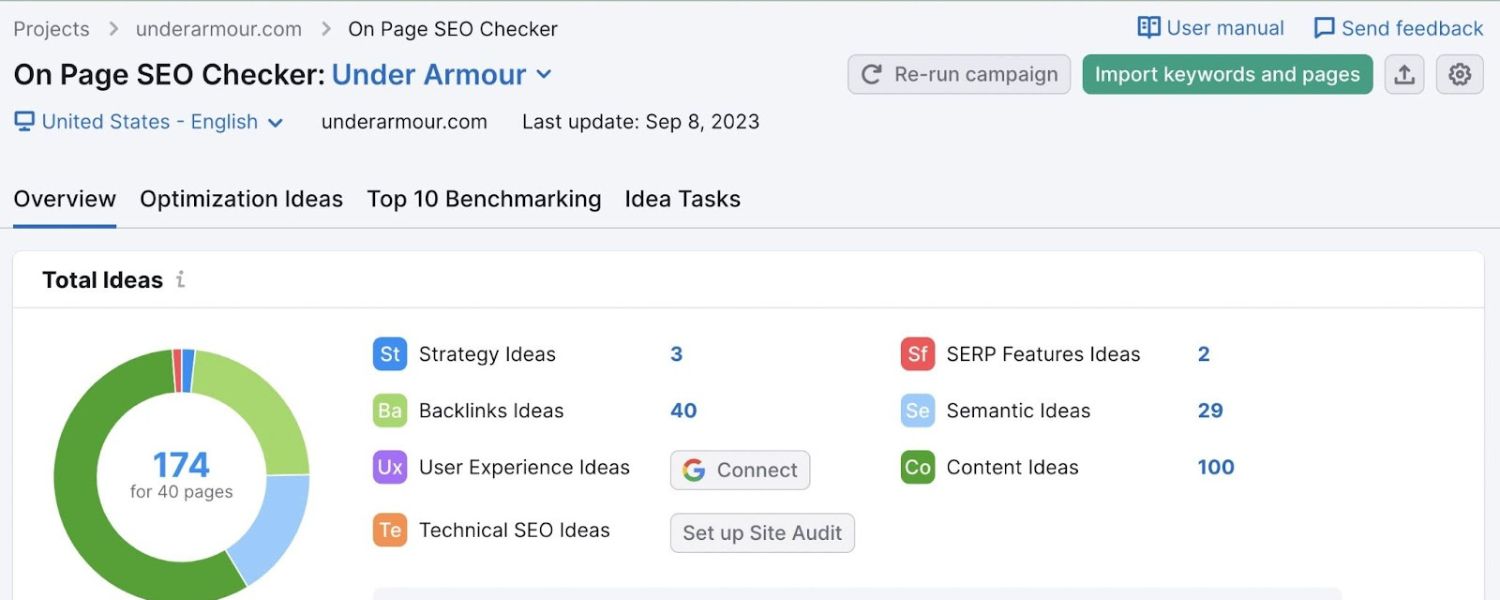
On-page SEO refers to optimizations on your website’s pages to help search engines understand and value your content. We’ve touched on several on-page factors already (content quality, titles, meta descriptions, headings). Here we’ll summarize the key on-page optimization steps as a checklist:
A. Craft Compelling Title Tags

Ensure each page or post has a unique title tag that includes your target keyword (preferably near the beginning of the title) and entices clicks. For example, instead of a generic title like “Services – John’s Plumbing,” use something like “Plumbing Services in [City] – Fast & Affordable Repairs | John’s Plumbing.” The latter is both keyword-rich (plumbing services in [City]) and descriptive. Keep titles to around 50-60 characters, if possible, so they don’t get cut off in search engine results pages (SERPs).
B. Write Effective Meta Descriptions

As mentioned, meta descriptions should be approximately 150 characters long and provide a compelling summary. Think of it as an advertisement for your page – why should someone click your link? Include a call-to-action or highlight a benefit if appropriate.
For instance, “Learn 10 proven puppy training tips from experts. Get your puppy potty trained and obeying basic commands in weeks. [Free checklist included!]” – This kind of meta description, while not seen by Google’s ranking bot, can boost your CTR, which is beneficial. Keep them unique for each page to avoid duplicate meta issues.
C. Use Header Tags (H1, H2, H3…) Appropriately
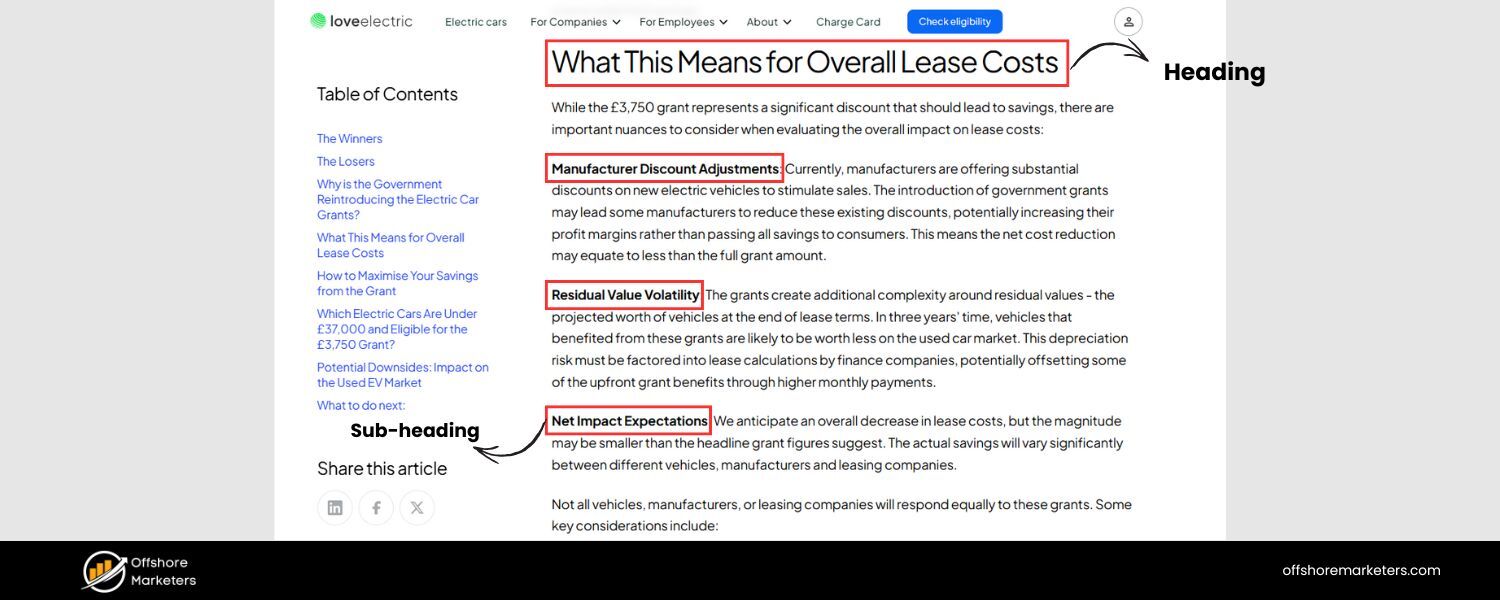

The H1 is usually your page title (visible on the page). Ensure that you have precisely one H1 per page and that it contains the main topic or keyword. For subsections, use H2 tags (and H3 tags for subpoints under H2s, etc.).
This not only structures your content for readers but also signals to Google the hierarchy of your content. Including relevant keywords in your headers where it makes sense is good (e.g., an H2 that says “Puppy Potty Training Tips” on a puppy training page).
However, avoid overdoing it – header tags should flow naturally and describe the section that follows. Proper use of headers can improve your chances of ranking and even of getting featured snippets, as Google often pulls snippet content from well-structured pages with clear headings.
D. Optimize Images (ALT text and file names)

If you have images on your page (which is recommended for visual appeal), give them descriptive file names (e.g., golden-puppy-training.jpg instead of IMG1234.jpg) and use the alt attribute to provide alternative text describing the image.
Alt text helps visually impaired users (screen readers will read it) and gives search engines context about the image. For SEO, it’s another minor signal of relevancy.
For example, an image alt text could be “Puppy sitting on command during training” – this reinforces the topic of training and might help that image appear in Google Image search for “puppy training”. Keep alt text concise and accurately descriptive of the image; avoid stuffing keywords arbitrarily.
E. Keyword Placement and Density

Use your target keyword and variations in the content, especially in the first paragraph if possible. There’s no hard rule on density (and older practices of aiming for X% keyword density are outdated).
The guideline is to include the keyword where it naturally fits and use synonyms or related terms to reinforce the context. If your page is truly about the topic, you’ll naturally mention the keyword and associated concepts multiple times.
One place you want the keyword is in the title and ideally in at least one or two subheadings. Also, using semantic keywords (related terms) can signal breadth of coverage – for example, on a page about “coffee brewing methods,” mentioning related words like “French press, cold brew, drip coffee, grind size,” etc., will help Google see your content is comprehensive.
F. Internal Linking

Don’t overlook internal links as an on-page strategy. Linking from one page of your site to another relevant page helps users navigate and spreads “link equity” around your site. For instance, if you have a high-authority page, linking to it from a newer page can help the new page get discovered and potentially rank.
Use descriptive anchor text for internal links (e.g., within a blog post about dog food, you might say “Ensure you’re also feeding your puppy the right diet for healthy growth” and link that anchor text to your “best puppy foods” article).
This tells Google that the target page is about puppy diets, etc. Internal links also keep visitors on your site longer, which is great for engagement.
Pro tip: Periodically audit your site for orphan pages (pages with no or few internal links pointing to them) and identify opportunities to link to them from other relevant content.
G. Ensure Fresh, Updated Content

Content freshness can be a factor depending on the query (especially for topics where recent information is crucial, like tech or finance news). Even if your topic isn’t inherently time-sensitive, regularly updating your pages (adding new info, updating stats, refining wording) can help.
Google tends to favor content that is up-to-date for many queries. A practical strategy is to periodically review your important pages and see if you can add more value, such as new examples, data points, or answers to new related questions that have arisen.
You can even include a note in the content, such as “Updated for 2025: …,” which signals to readers and possibly to Google that the page is regularly maintained. Many top-ranking guides do this to stay current.
By implementing solid on-page SEO, you ensure that your pages send the right signals to search engines about which queries they should rank for. It lays the groundwork so that when you add off-page clout (links) and technical excellence, Google has no ambiguity in how to index and rank your content.
3. Fix Technical Issues & Improve Site Health
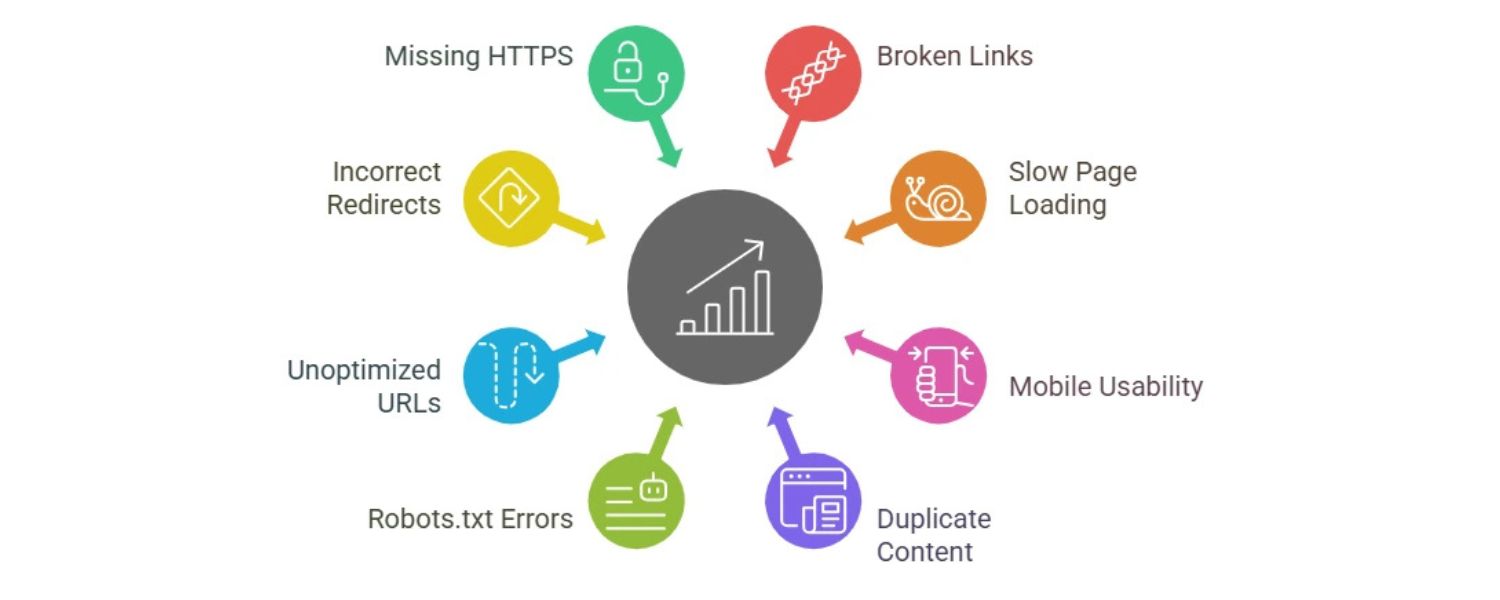
Earlier, we discussed technical factors; as a strategy, you should regularly audit your site for technical SEO issues and address them to remove any barriers to ranking. Some key actions include:
A. Run SEO Audits

Utilize tools like Seobility’s SEO Checker, Semrush Site Audit, or Google Search Console to scan for common problems.
These tools will report issues such as broken links, missing title tags or meta descriptions, duplicate content, pages not being indexed, slow pages, etc.
For example, Seobility’s free checker analyzes 300+ parameters and gives you a prioritized list of SEO improvements. This can quickly highlight if something is “holding your site back from top search engine rankings” (their words) – perhaps your title tags are too long, or you have multiple H1s, or your server is returning errors on some pages.
B. Ensure Proper Indexing

Check Google Search Console (GSC) coverage reports for any pages that are not indexed due to errors. If some important page is marked “Excluded” or “Crawled – currently not indexed”, investigate why.
It could be thin content, a directive (such as a noindex tag) that you accidentally left, or duplication. In GSC, you can also submit sitemaps and individual URLs for indexing to nudge Google.
C. Resolve Crawl Errors

Fix any 404 errors by either restoring the missing content or setting up 301 redirects to the next most relevant page. Similarly, if there are redirect chains or loops, clean those up – each redirect slows Google down and can dilute ranking signals.
Check your robots.txt file to ensure you’re not blocking Google from accessing any section it should be able to access (a common newbie mistake is disallowing the whole site from an old development phase).
Also, use the URL Inspection tool in GSC to see how Google views a specific page – it can reveal if a page is being blocked or if the mobile version has issues.
D. Optimize Site Structure & Navigation
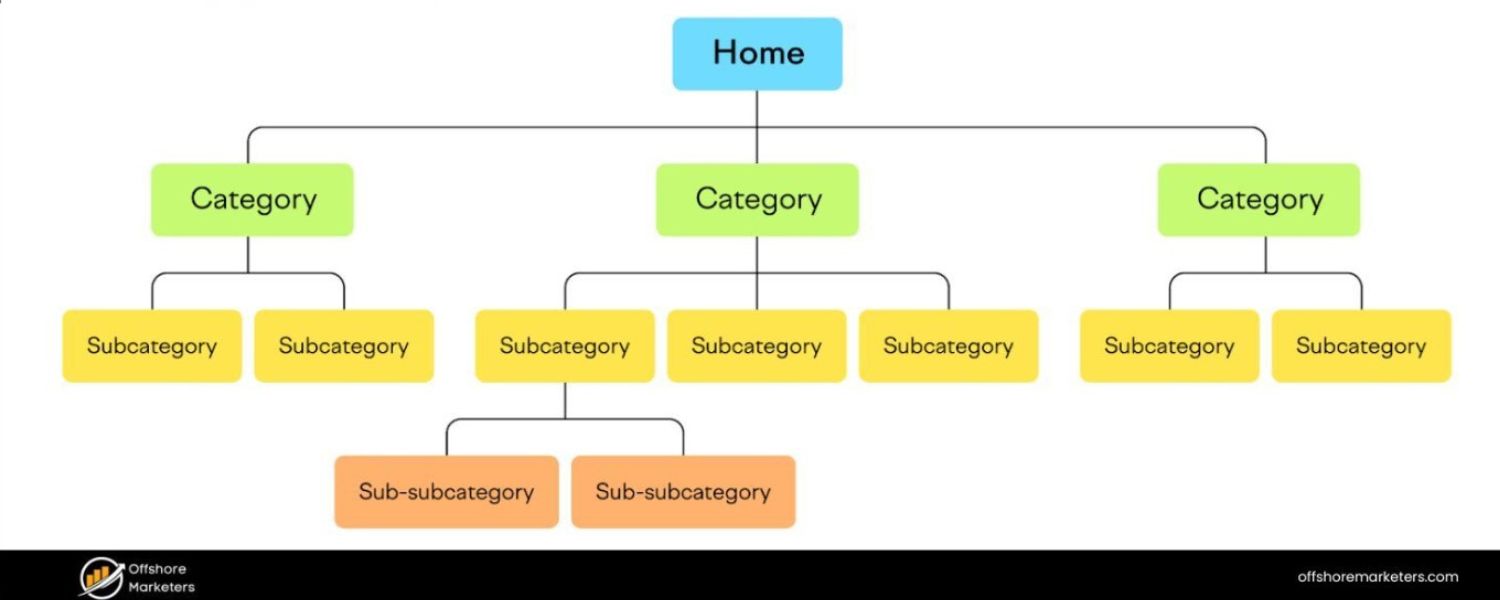
A clear site architecture not only helps users but also helps search engines. Your important pages should be reachable in just a few clicks from the homepage.
Use a logical hierarchy with categories and subcategories if you have a lot of content. Implement breadcrumb navigation if applicable – it helps Google understand the site structure and can generate breadcrumb trails in your search results. Internally link related pages (as discussed) to create a web of connections; this also helps index new content faster.
E. Improve Website Speed & Core Web Vitals

Consider this part of technical optimization because it involves development work. Compress and resize images (large images are a top cause of slow pages). Minify CSS/JS files and combine them where possible.
Enable GZIP compression on your server. Use lazy-loading for images (so they load only when they come into view). If your site is on a slower hosting, consider upgrading or using a CDN.
For Core Web Vitals specifics, ensure images and iframes have their width and height set to avoid layout shifts (CLS). Remove or defer render-blocking scripts to improve LCP, and try to keep your main thread work low so the page responds quickly to input (INP). It may sound technical, but there are numerous guides, and the effort is worthwhile, not just for SEO but also for user retention.
Google’s Page Experience update means that if two pages are similarly relevant, the one with a better UX (as measured by speed and vitals) is likely to win out.
F. Implement HTTPS and Fix Security Issues

If you haven’t done so, migrate to HTTPS. Also, ensure your security certificate is up to date. Check for any mixed content warnings (when a secure page loads an insecure resource) – browsers typically flag this.
Mixed content can usually be fixed by updating links to resources (images, scripts) to use https:// or relative paths. A fully secure site builds user trust and avoids any SEO penalties related to security.
G. Mobile Optimization

Use Google’s Mobile-Friendly Test or manually review your site on a phone. If elements are cut off or require horizontal scrolling, adjust your CSS accordingly. Font sizes should be readable on small screens, and tap targets (such as buttons or links) should be sufficiently large and spaced apart.
Mobile users often have different usage patterns – ensure important info isn’t buried or only accessible via hover (since there’s no hover on touch screens). Given mobile-first indexing, the mobile version of your site should contain all the critical content and SEO elements that are present in your desktop version. If you have a responsive site, that’s usually the case by default.
If you have a separate mobile site, ensure it remains in sync with the desktop content.
Performing these technical fixes might require some web development knowledge. Still, many can be done with plugins (if you use a CMS like WordPress, for example, there are plugins for caching, image optimization, etc.).
You might consider hiring an SEO professional or developer for a one-time technical cleanup if you’re not comfortable doing it yourself – it can pay dividends for years to come.
4. Build Quality Backlinks and Mentions

Improving your off-page SEO by acquiring quality backlinks is one of the more challenging but impactful strategies. Here are practical ways to approach link building ethically:
A. Create Link-Worthy Content
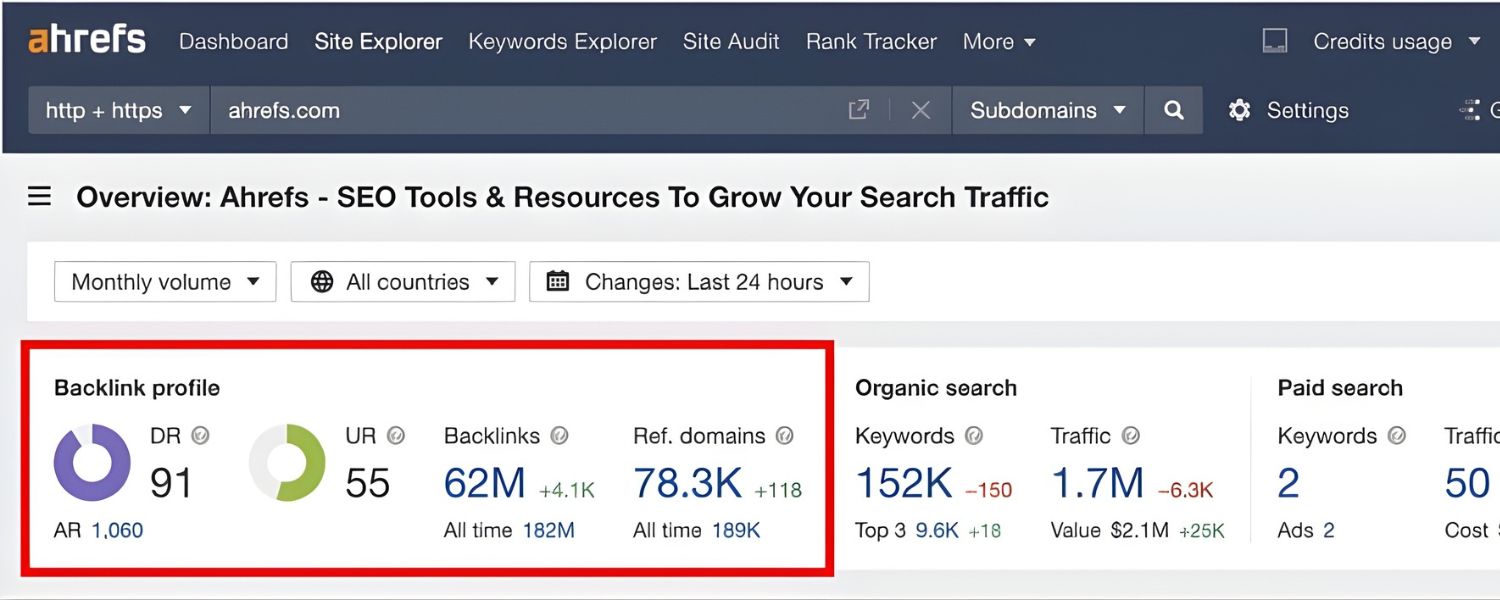
As mentioned, content that is unique and valuable stands the best chance of earning backlinks naturally.
This could be original research or data (if you conduct a survey or analyze some dataset and publish insights, others might cite it), comprehensive guides or tutorials (that become reference material for others), infographics or visuals (people love to share infographics, and if you provide embed code with a link, you can gain links when they share it), or thought leadership pieces (like a strong opinion or expert roundup on industry trends). When you publish such content, promote it through social media, your email list, or outreach (more details below) to get it in front of those who might link to it.
B. Outreach and Relationship Building
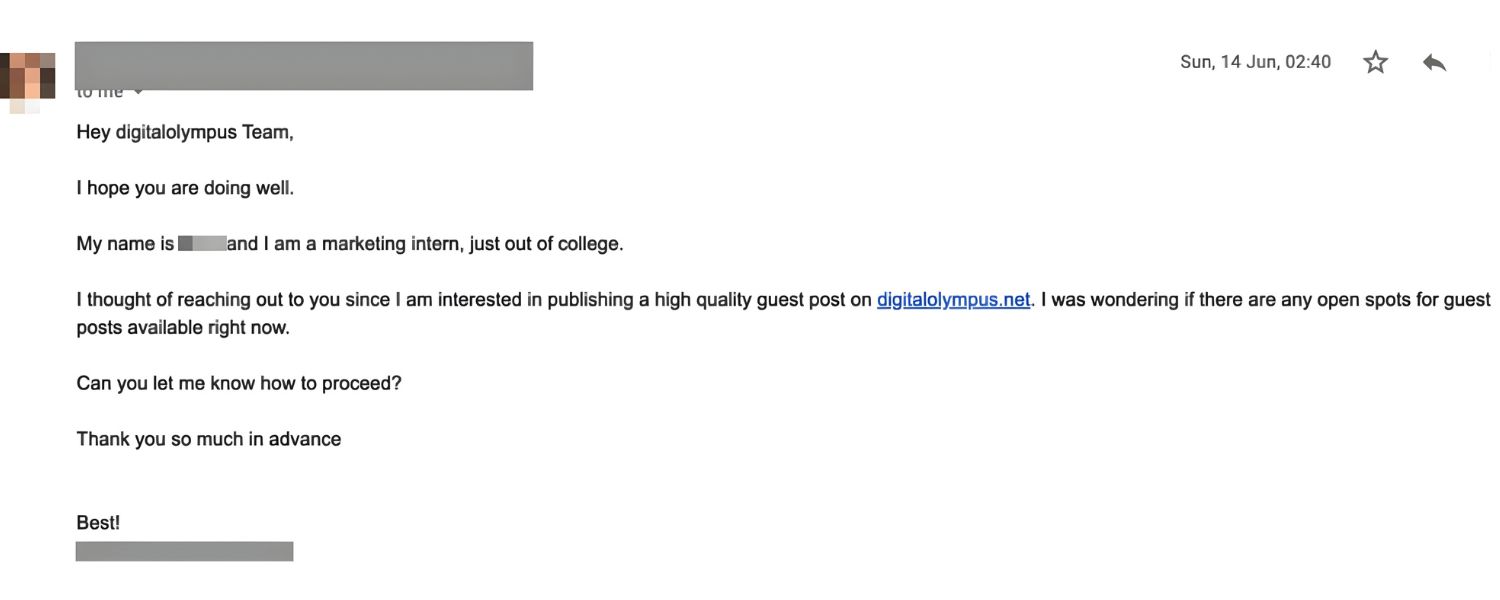
Identify websites or blogs in your niche that might find your content helpful. For example, if you wrote “50 DIY Home Energy Saving Tips,” find eco-living blogs or home improvement sites. Reach out with a polite email introducing your content.
Don’t blatantly ask for a link initially; instead, mention you thought they might find it interesting or that it could complement something they have.
If they truly find value, they may link to it or share it. Building a relationship (by following them on Twitter and commenting thoughtfully on their posts) before the ask can help. Over time, networking with fellow content creators can lead to natural backlink opportunities (like guest posting invites, inclusion in link roundups, etc.).
C. Guest Posting
Contributing an article to another website is a tried-and-true method to obtain a backlink (usually in your author bio or, occasionally, within the content if it’s relevant). The key is to target reputable sites related to your industry – and to offer real value in your guest article, not a fluffy piece just for a link.
Many sites accept guest posts if you pitch a good topic. When you write, you’ll typically be allowed to link back to your site (maybe to your homepage or a relevant resource). Guest posts not only provide a link but can also drive referral traffic and increase your brand’s exposure to a new audience.
D. Fix Broken Links (Broken Link Building)
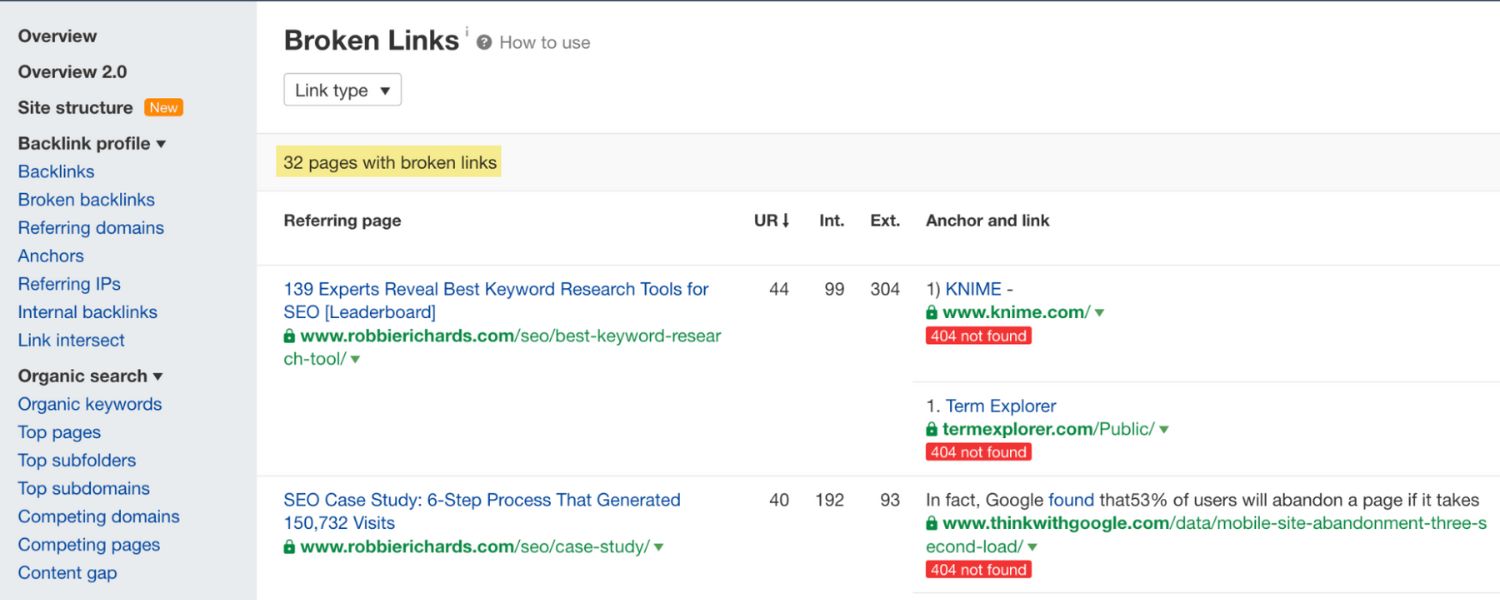
This clever tactic involves finding broken links on other websites and suggesting your content as a replacement.
Some tools can find 404 links on sites, or you might come across a resource page or article in your niche that has dead links. If you have (or can create) content similar to what was originally linked, you can email the site owner to kindly let them know that they have a broken link to X resource and mention that you have a resource on the same topic that could be a suitable substitute.
Many webmasters appreciate being informed of broken links and might swap in your link if your content is a good fit.
E. Leverage Business Relationships and Directories
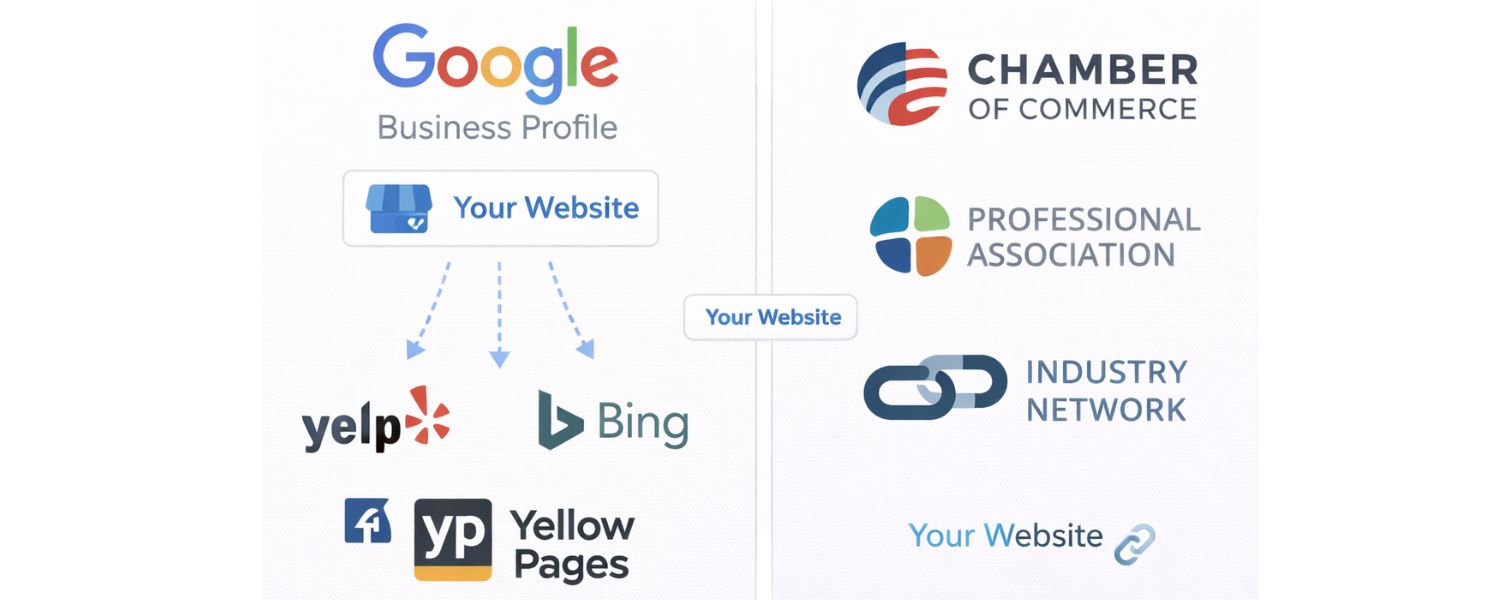
Ensure that any partners, suppliers, or industry organizations you’re affiliated with link to your site. If you’re a member of a chamber of commerce or professional association, they often list members on their website.
These can be easy wins for backlinks. Local businesses should list themselves on major local directories (such as Yelp, Yellow Pages, and Bing Places) and ensure their Google Business Profile is claimed and linked to their website.
While some directories are nofollow or not highly valued, many local SEO citations still help establish trust and sometimes provide link value. Additionally, if you sponsor a local event or charity, ask if they can include a link to your site on their sponsor page.
F. Monitor Mentions (and Turn Unlinked Mentions into Links)
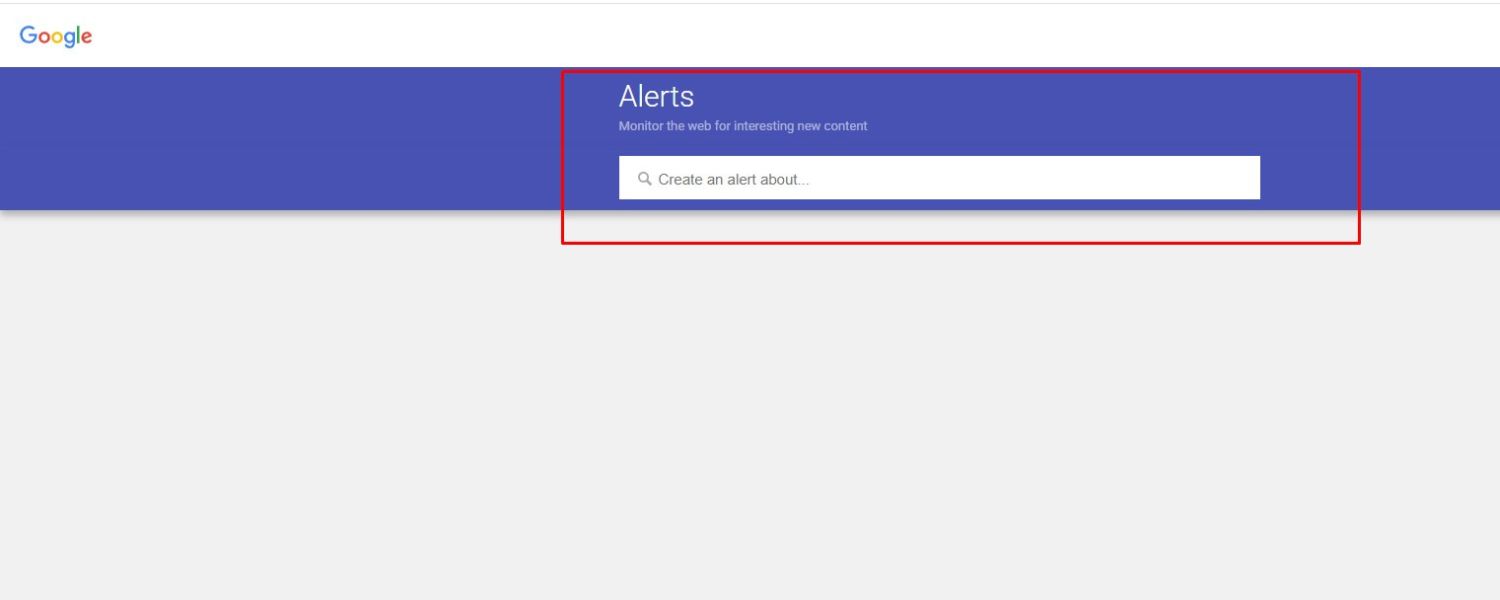
Use Google Alerts or tools like Mention to track if your brand or website gets mentioned online. If someone writes about you or your content but doesn’t link to it, a polite request can often turn that into a backlink.
For example, “Hi, thanks for mentioning our CEO in your article about marketing trends. We noticed the mention didn’t include a link – would you consider linking to our site so readers can easily find the report you referenced?” As long as your site is relevant to the mention, many writers will be okay adding it.
G. Stay Clear of Black Hat Techniques
Avoid buying links from link farms or participating in obvious link exchange schemes (“you link to me, I link to you”) on a large scale. Google’s algorithms (like Penguin) have gotten very good at detecting unnatural link patterns.
If your backlink profile shows a sudden influx of low-quality, unrelated links, it could trigger penalties. It’s far better to have 10 natural, high-quality links than 100 spammy ones.
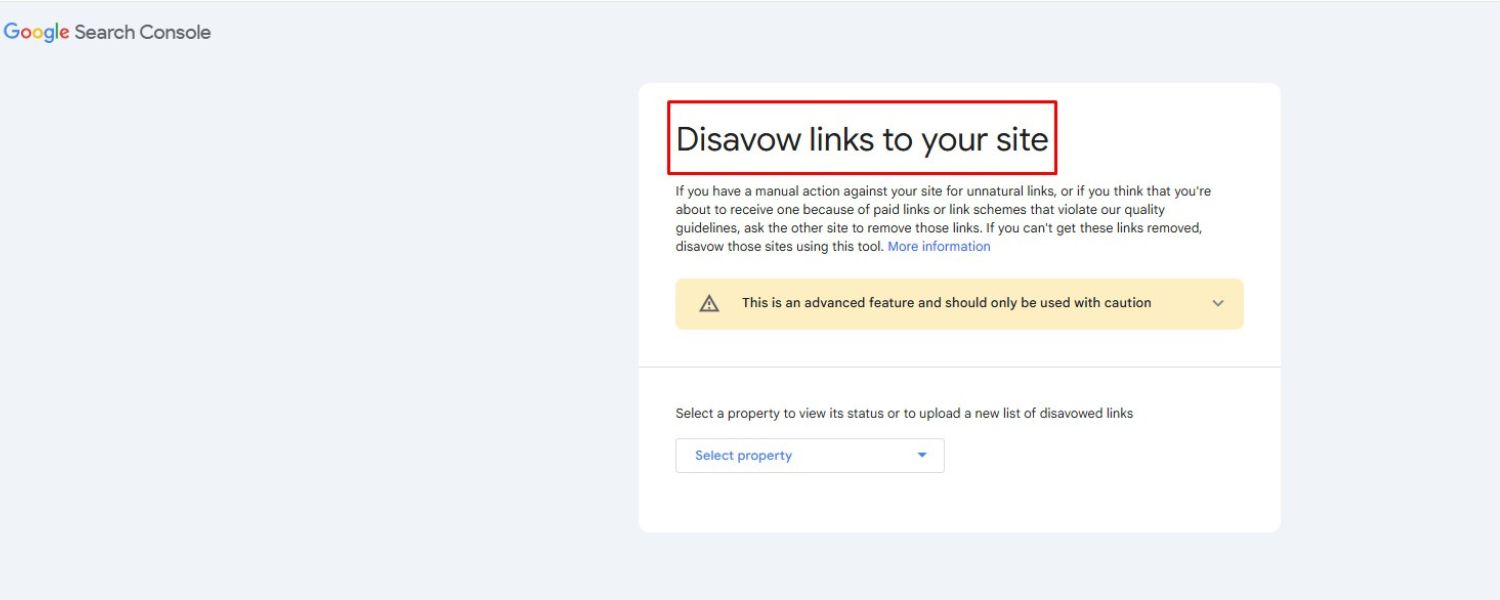
If you do have some bad actors linking to you (it happens), you can use Google’s Disavow Tool as a last resort, but generally, Google ignores a lot of spam links. Focus your energy on earning links through merit – it’s a slower process, but the results are sustainable.
Remember, link building is often the slowest part of the SEO process. Don’t be discouraged if progress is gradual. Each high-quality backlink is a long-term asset that can continually boost your site’s authority. And as your site’s reputation grows, you’ll start attracting links more organically (success breeds success).
5. Leverage Local SEO (If Applicable)
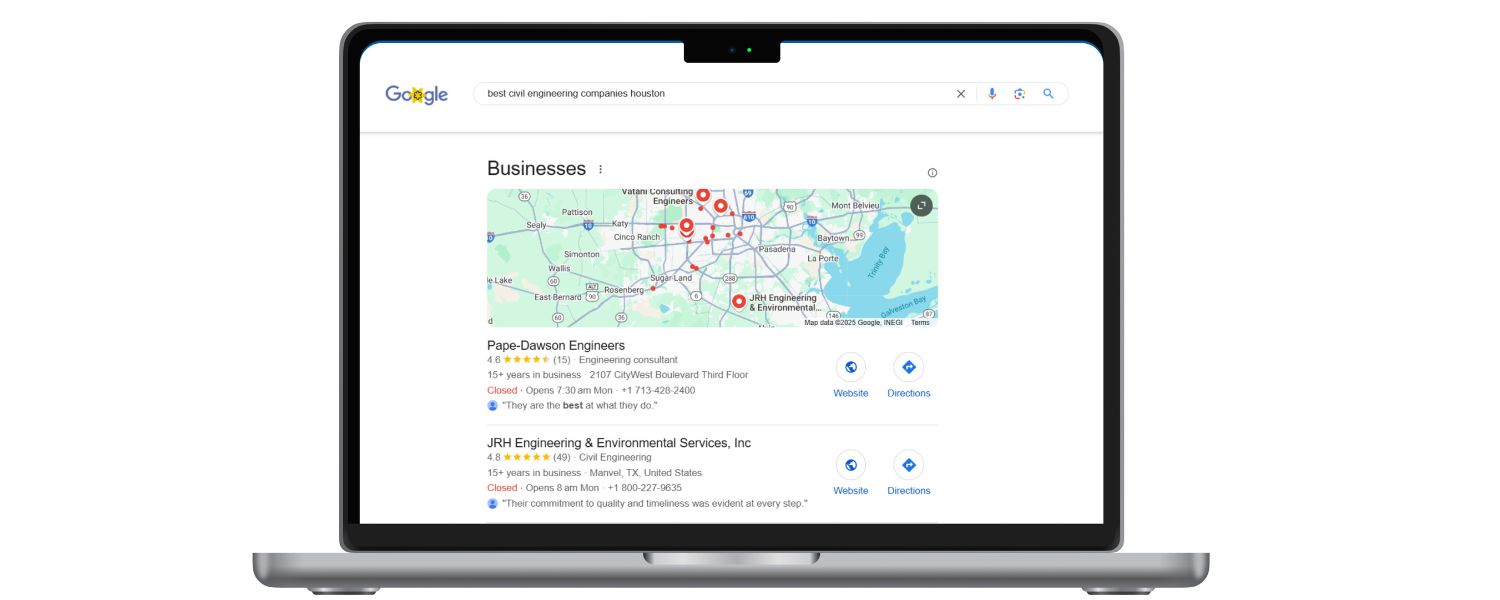
If your business has a physical location or serves a specific geographic area, Local SEO deserves special attention. Local SEO has its own set of ranking factors and often a different results layout (like the Google Map pack). Here’s how to improve your local search rankings:
A. Optimize Your Google Business Profile

This is key. Go to Google Business Profile (google.com/business) and claim/verify your business listing.
Fill out every section you can – business name (should be your official name, do not stuff keywords into it as Google may suspend the listing), address, phone, website, hours, category, and so on. Choose the most accurate categories for your business (you can select a primary and several secondary categories).
Write a compelling description of your business. Add photos (logo, exterior, interior, team, products). Businesses with lots of photos tend to receive more engagement. Your Google Business Profile info feeds directly into Google Maps and the local pack results, so ensuring it’s complete and optimized is step one.
B. Consistent NAP and Citations

NAP stands for Name, Address, Phone Number. Ensure your NAP (Name, Address, Phone) is consistent across all online platforms, including your website, Facebook page, Yelp, Yellow Pages, Angie’s List, etc.
Consistency helps Google trust that all these citations refer to the same business. Inconsistencies (such as one site saying “Street” and another “St.” or different phone numbers) won’t outright harm you, but the more uniform you are, the better. There are services (e.g., Moz Local, Yext) that can help manage citations across directories. You can also manually list your business on relevant directories.
Each listing is another citation signal. As noted in a study, local citations account for roughly 8% of local ranking factors – not a huge percentage, but still significant. They reinforce your business’s legitimacy and presence.
C. Local Keywords and Content
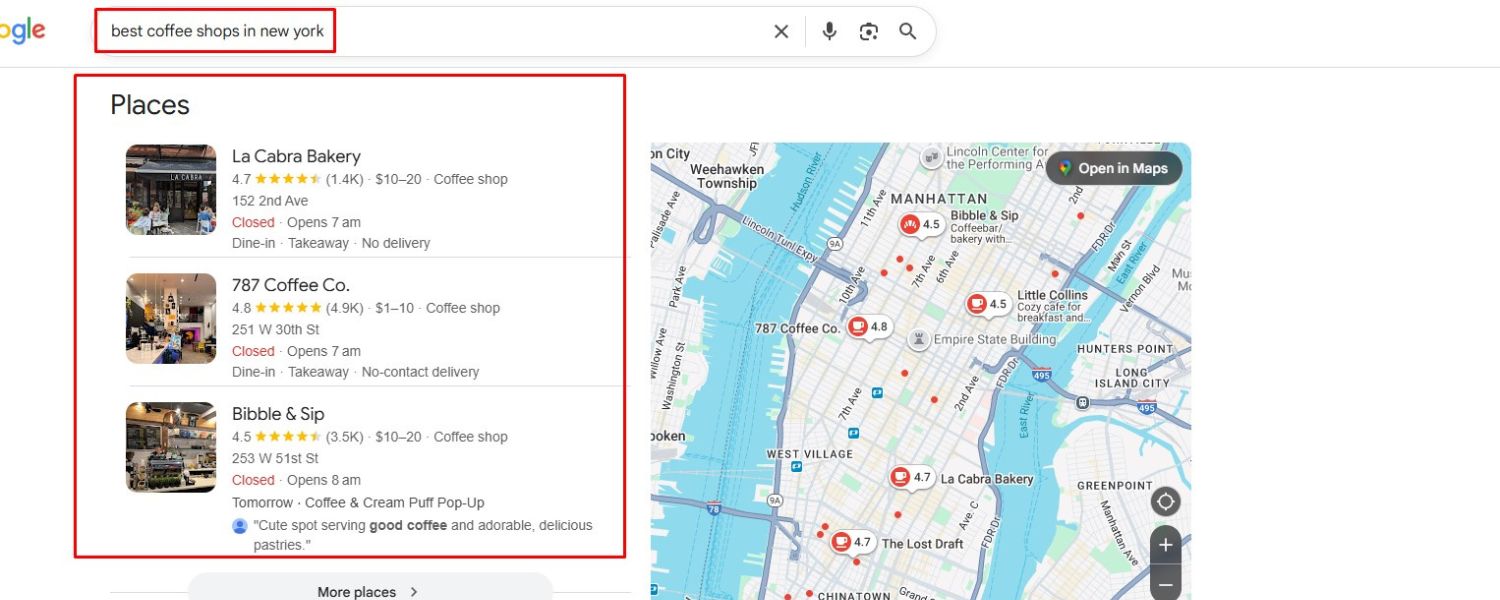
Include local signals on your website. That means mentioning your city or region in strategic places – title tags, headings, body text where relevant, and indeed on your Contact or About page.
If you have multiple locations, create a dedicated page for each location with its NAP and some localized content (e.g., testimonials from customers in that area, a map, parking info, etc.).
Consider writing location-specific blog posts or guides if relevant (e.g., “Best coffee shops in [City]” if you run a local cafe) – this can attract regional readers and internal links to your main service page.
Essentially, make it clear through content that you serve or are located in a particular area.
Get Reviews (and respond to them)
Reviews on your Google Business listing are a strong factor for local SEO ranking. Businesses with numerous positive reviews tend to rank higher in the local pack.
Encourage happy customers to leave a Google review (don’t incentivize with gifts or anything against Google’s policy).
You can say in person or via email, “We appreciate your feedback; if you have a moment, please leave us a Google review.” Please provide a direct link to your review page to make it easy.
Respond to all reviews, good or bad. For positive ones, thank the customer; for negative ones, address the issues professionally. Google has indicated that responding to reviews can help improve your local SEO, and it certainly reflects well on potential customers who read them.
D. Local Link Building
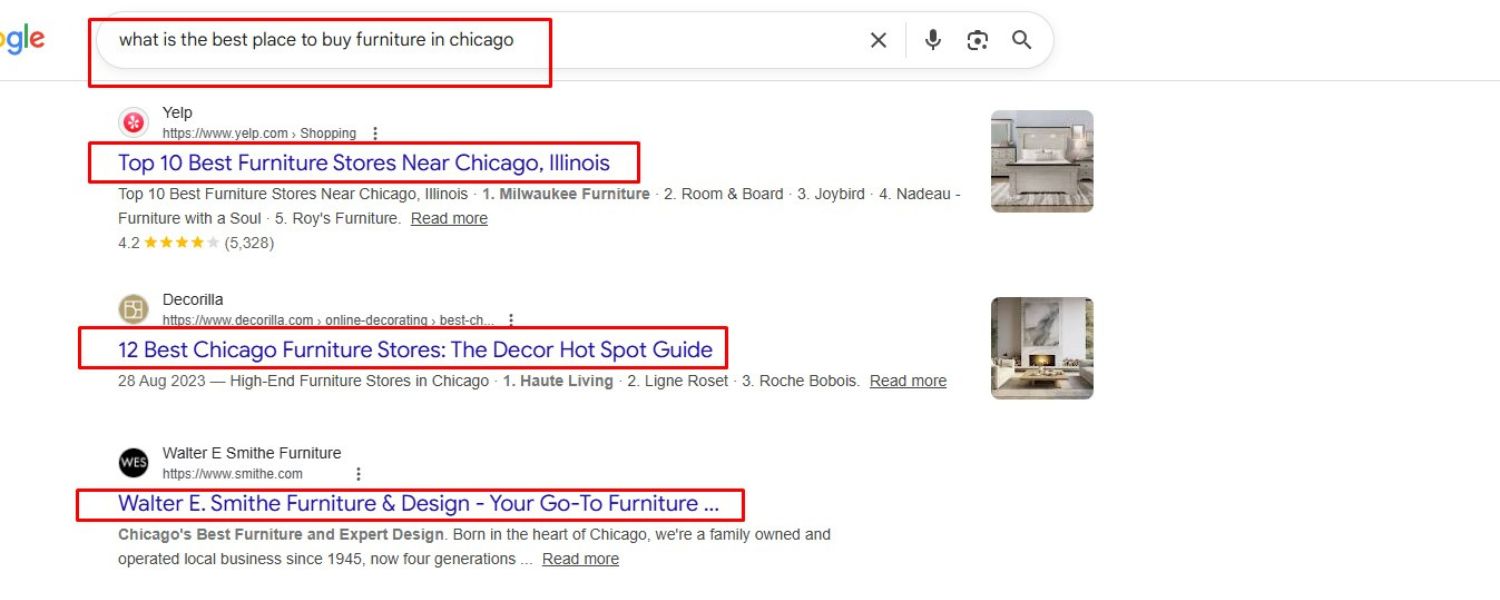
Beyond general backlinks, local links can make a significant difference. This includes getting links from local news sites (e.g., an article about your business or a press release if you sponsor an event), local bloggers, or community organizations.
If you’re a member of local business groups, see if they have a directory with links. Local schools or charities you support might list sponsors. These links not only provide SEO value but also drive local referral traffic and awareness.
E. Behavioral and Personalization Factors
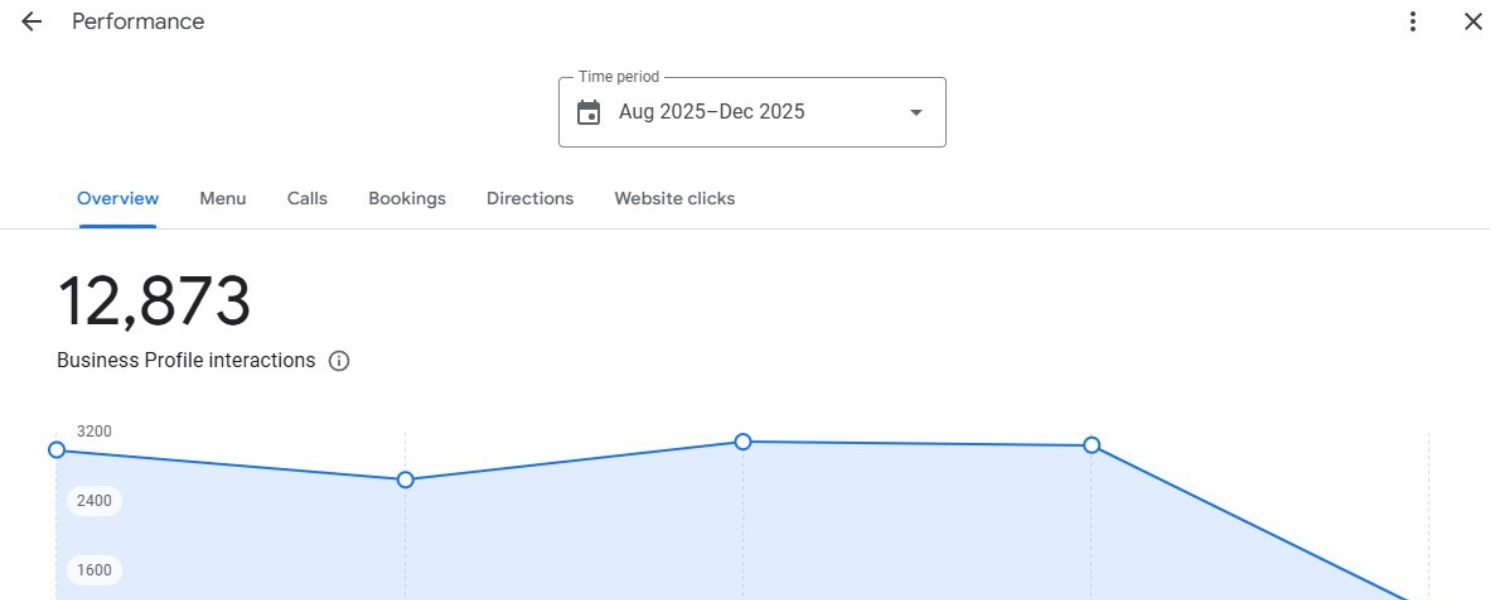
Local SEO is interesting because user behavior and personalization play a significant role in its effectiveness. For example, if many people who see your business in local search click on it, call, or get directions, it could improve your ranking over time (Google considers this as an indication that your listing is attractive).
Additionally, if someone has your business listed in their contacts or has visited before, Google may show it more prominently to them. While you can’t directly control these, providing excellent service offline leads to more brand searches and direct traffic online.
It has been observed that businesses that people search for by name (indicating a strong brand presence) often rank better locally. Encourage customers to find you by handing out cards or providing an easy-to-remember web address.
F. Local Rank Tracking

It’s beneficial to monitor your ranking in your local area. You can use tools like Localo’s Free Local Rank Checker to see where your business stands in local results for specific keywords.
Localo, for instance, prides itself on more accurate local rank tracking – it shows exactly how your business ranks in Google local results for your chosen keywords and location.
This helps you understand if your optimizations are working. Keep in mind, local rankings can vary even within a city (proximity matters), so these tools often let you specify a city or ZIP code to emulate the search from that area.
Local SEO can be a game-changer for small businesses. Appearing in the Map Pack (the map and 3 businesses shown for local queries) can bring a flood of traffic and customers. By following the above steps, you increase your chances of achieving this goal.
In a study by The HOTH, they broke down local ranking factors: link signals ~29%, on-page ~24%, behavioral ~11%, personalization ~9%, citation ~8%, Google Business Profile signals ~7% (like having keywords in your business title, categories, etc.). So it’s a mix – you need to do a bit of everything to excel in local SEO.
6. Monitor, Analyze, and Adapt Your SEO Strategy

SEO isn’t a one-and-done effort. It’s crucial to track your performance and make adjustments based on data. Here are some final tips on maintaining and refining your SEO strategy:
A. Track Keyword Rankings
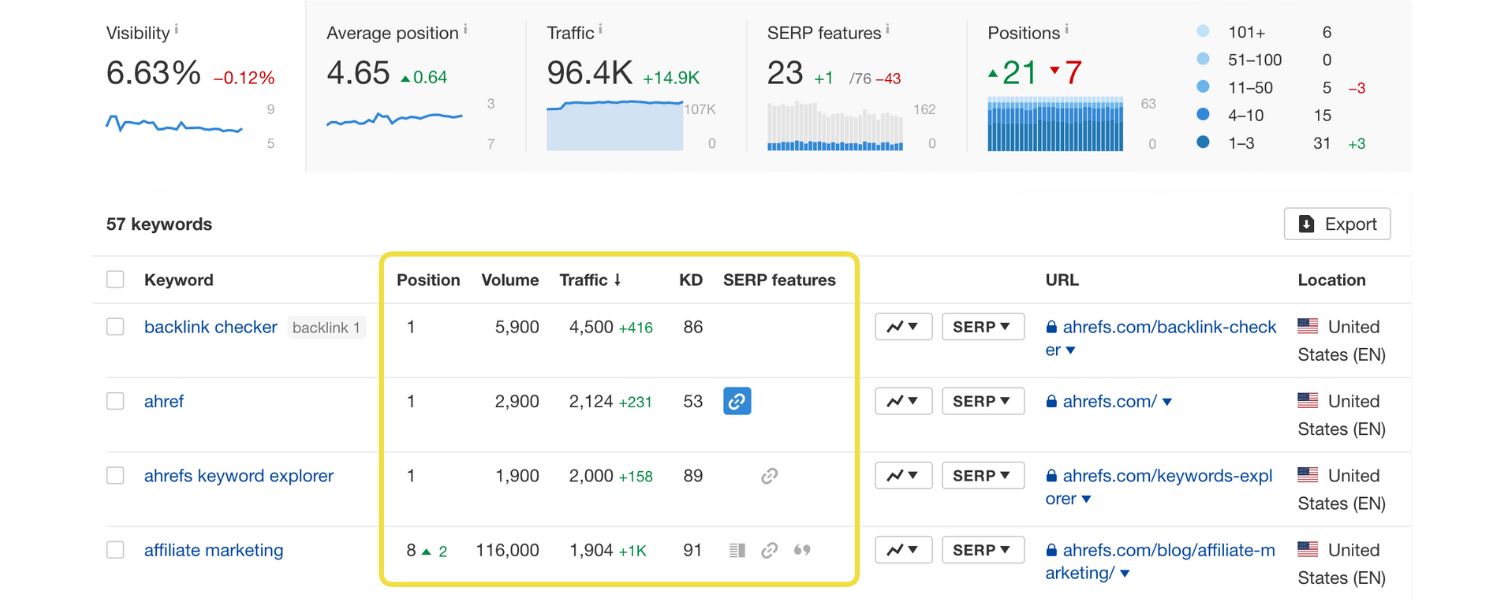
Use an SEO tool or a free rank checker to monitor your page’s ranking for your target keywords. Some great tools include Semrush, SE Ranking, Ahrefs, or even free options like the SEO.ai “Check SEO Rankings” tool, which allows you to check a domain’s performance for a given keyword without requiring a login.
TheHOTH also offers a free Google Rank Checker (powered by Semrush data) where you can enter your domain and see a list of keywords you rank for, along with their positions and traffic estimates.
Monitoring rankings helps you see what’s improving and what’s not. If specific pages drop in ranking, you can investigate the reason (perhaps a competitor has published something better, or your page needs a refresh).
B. Use Google Analytics & Search Console

Google Analytics will show you how much organic traffic you’re getting and what users do on your site. Look at metrics like bounce rate and average session duration for organic visitors – if certain pages have very high bounce rates, maybe the content isn’t matching what they expected (you might need to adjust that page or the snippet in SERP).
Google Search Console (GSC) is a treasure trove: under “Performance,” you can see the exact search queries people used to find you, your average ranking for those, and CTR.
This can reveal new keyword opportunities or instances where you rank well but have a low CTR (meaning you should improve your title and meta to be more enticing for that query). GSC will also alert you to any technical issues, like indexing errors or mobile usability problems.
C. Analyze Your Competitors
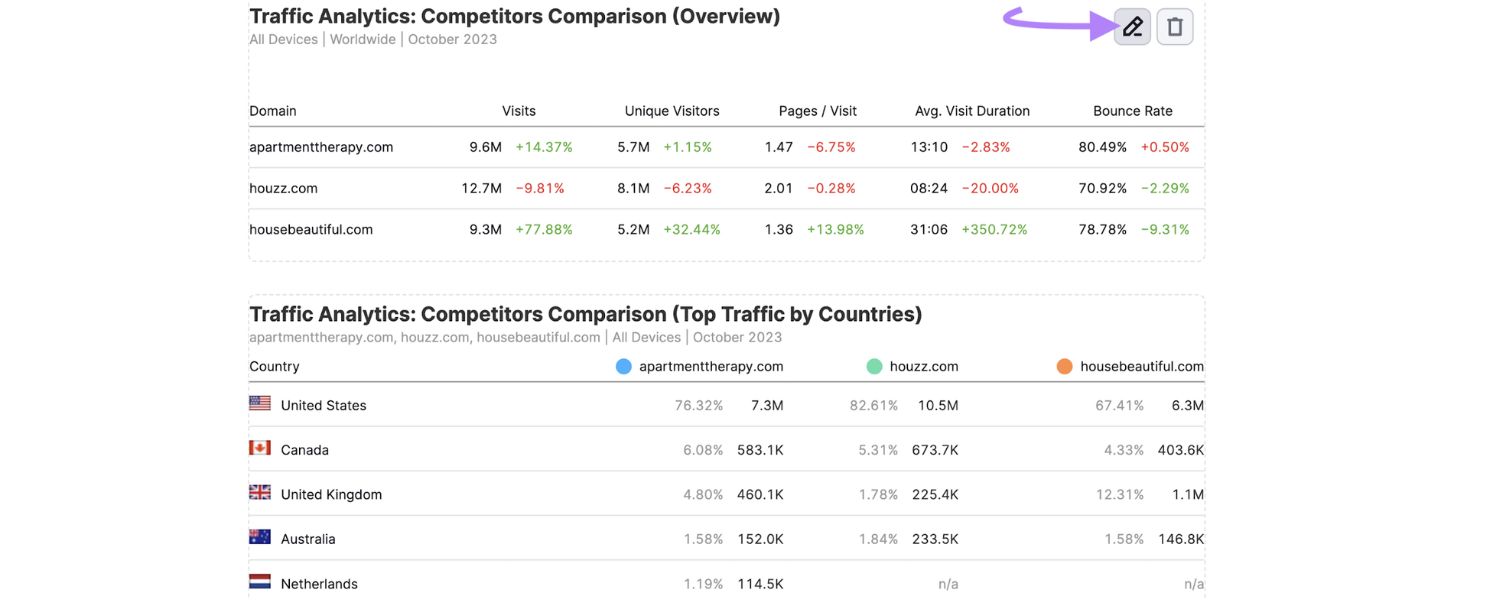
Identify who is ranking above you for your important keywords. Analyze their pages – what are they doing that you aren’t? Maybe their content is more in-depth, or they have a nice video, or perhaps their site is faster.
Also, check their backlink profiles (with tools, if available) to see where they’re getting links. You may also discover websites that could potentially link to you. Competitor analysis can provide a shortcut to understanding what Google favors for a given query.
D. Stay Updated on SEO Trends
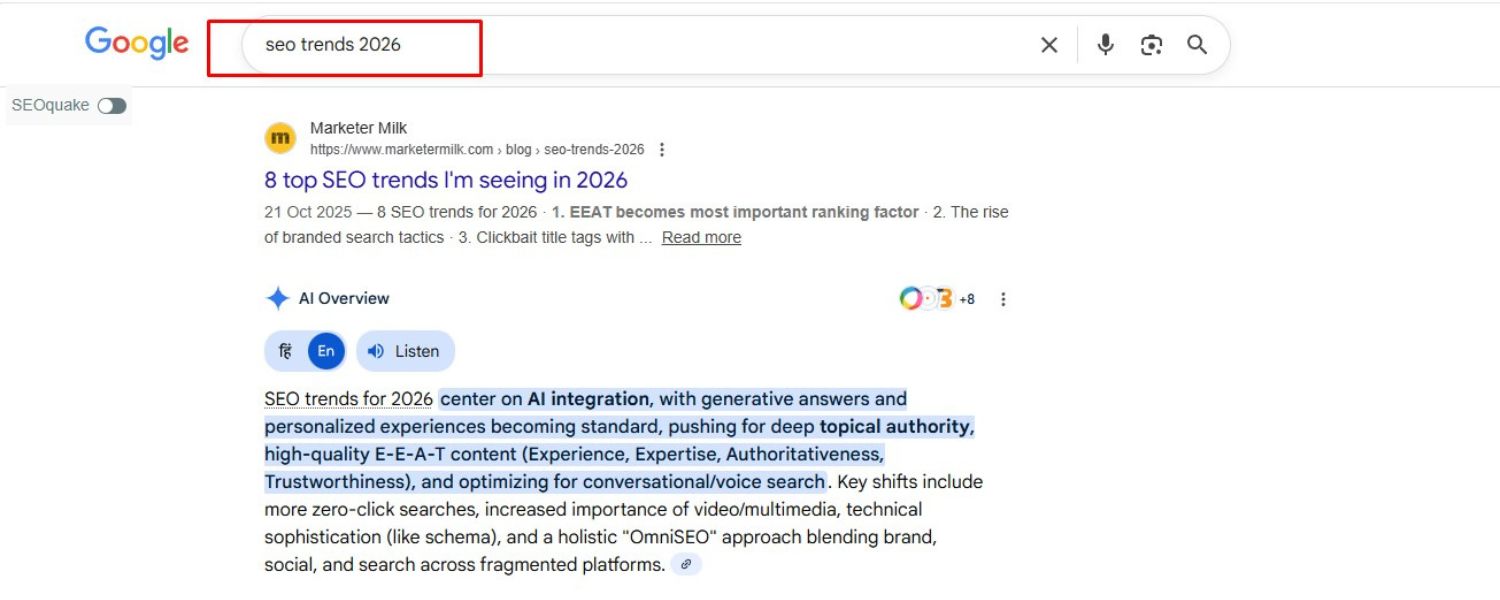
Search algorithms evolve, and new SEO techniques emerge as old ones become obsolete. Follow reputable SEO news sites (like Search Engine Land, the Google Search Central Blog, Moz Blog, etc.) to stay informed about major updates or shifts.
For example, suppose Google releases an algorithm update that emphasizes page experience or introduces a new type of search result feature. In that case, you’ll want to be aware of it so you can adapt (perhaps by focusing more on a specific aspect of SEO).
Additionally, SEO communities (such as subreddits like r/SEO and Twitter conversations) can help gauge the current year’s focus on optimizations.
E. Continuous Content Improvement
As part of the analysis, see which content pieces are performing best and which are lagging. You might decide to merge or prune underperforming content (pages that get no traffic might be better off removed or combined with others to avoid thin content issues).
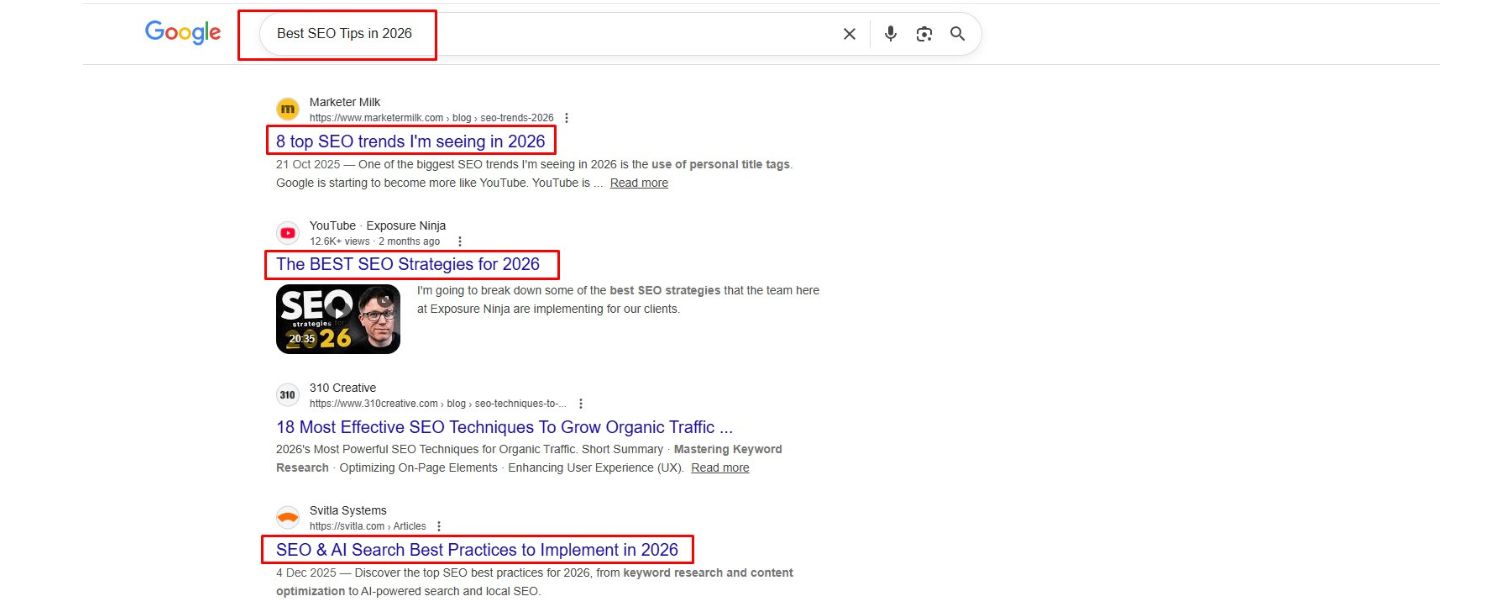
For content that works, keep it fresh – add new sections, improve the visuals, and update the year in the title if it makes sense (like “Best SEO Tips in 2025” might need updating by 2026).
High-performing pages can also be used to boost others. If you have a blog post getting a lot of links/traffic, ensure it links out to some of your relevant product or service pages (passing on link equity and directing visitors deeper into your site).
F. Measure Real Results
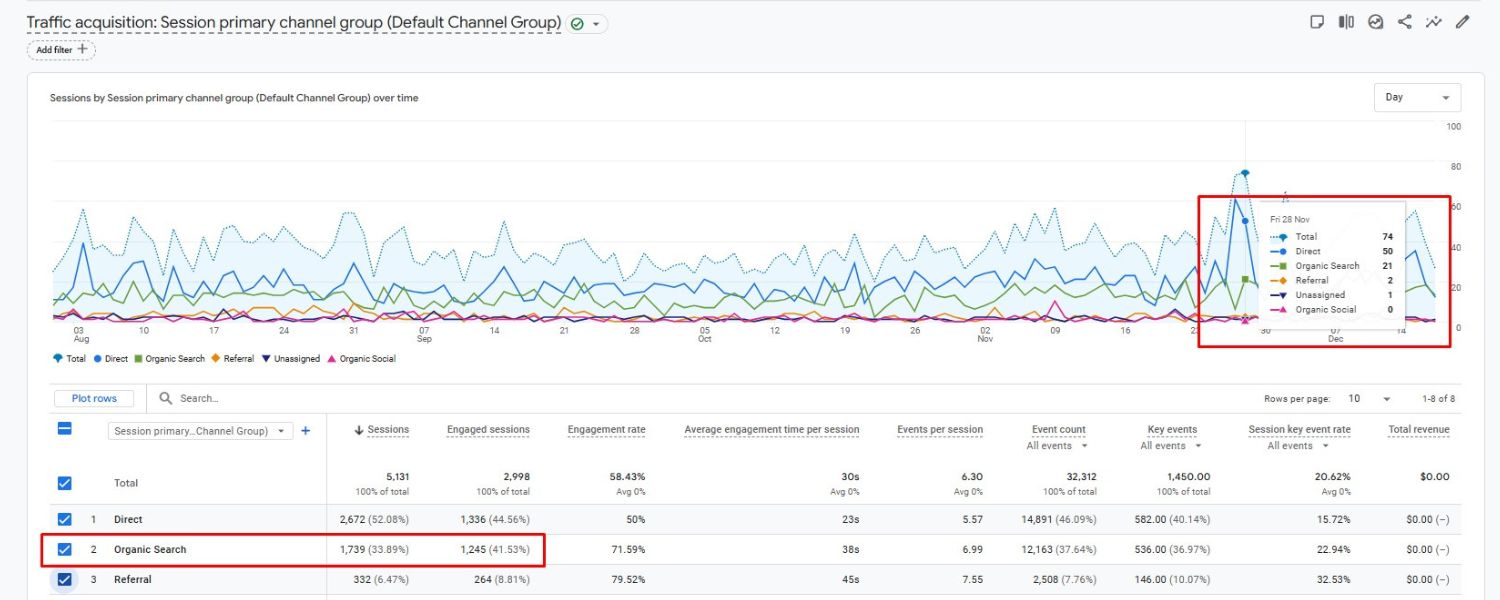
Ultimately, rankings are a means to an end. Keep sight of your real goals – more traffic, leads, sales, etc. Monitor how organic traffic impacts conversions on your site.
If traffic is up but conversions are flat, you might need to look at on-site conversion elements (calls to action, landing page design). Ideally, as your rankings improve, you should see a tangible business benefit. That will justify continuing investment in SEO.
SEO is a marathon, not a sprint. The improvements you make may take weeks or months to reflect in rankings and traffic fully. However, the payoff is long-lasting and compounding growth.
Unlike paid advertising, where traffic stops when the budget is exhausted, the traffic earned through SEO can continue for years with minimal ongoing costs, provided you keep your site optimized and updated.
Before we wrap up, let’s summarize the tools and resources that can help you on this journey, as having the right toolkit makes SEO much easier.
Tools & Resources to Help You Succeed
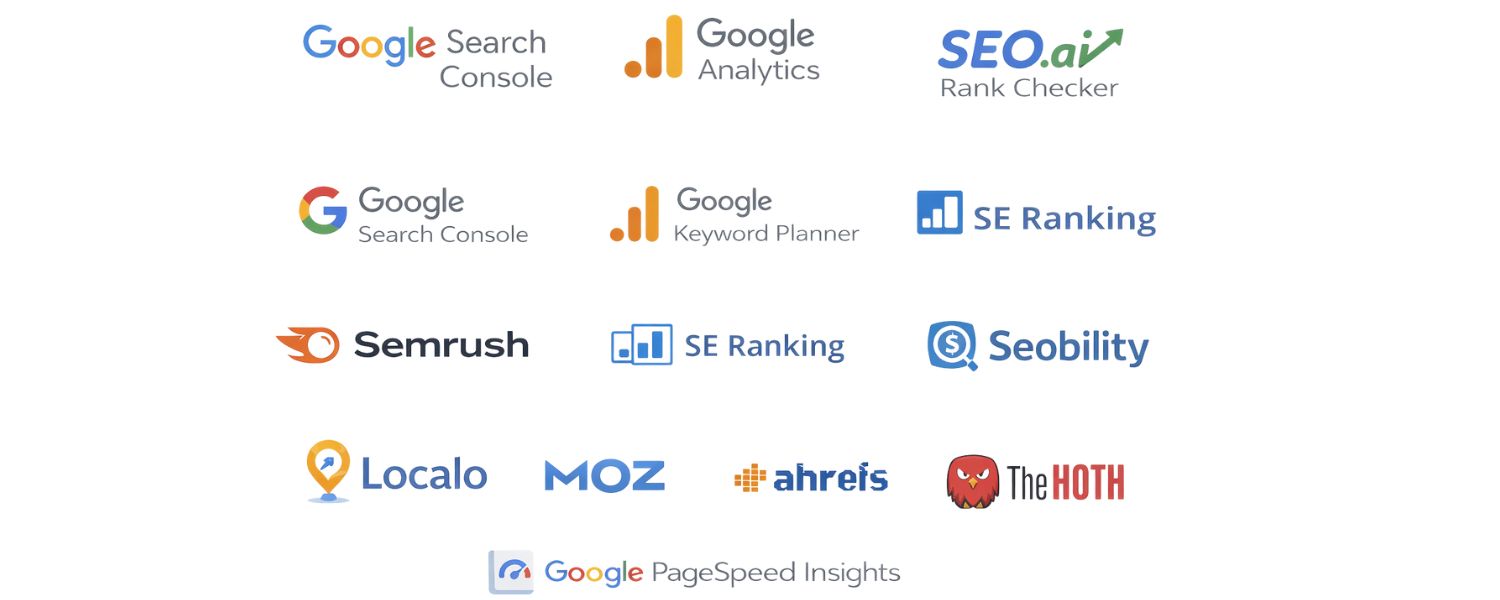
SEO can seem overwhelming, but fortunately, there are many tools (both free and paid) that simplify the process, from research to implementation to tracking. Here’s a handy table of some recommended SEO tools and what they’re useful for:
| Tool/Resource
| Purpose
| Key Features/Notes
|
| Google Search Console (Free)
| Performance monitoring & indexing
| Track search queries, impressions, CTR, and rankings. Submit sitemaps, fix indexing issues, and get alerts on errors. Invaluable for understanding how Google sees your site.
|
| Google Analytics (Free)
| Traffic and behavior analysis
| Analyze how users find and engage with your site. Monitor organic traffic growth, user demographics, bounce rates, and conversion goals from SEO traffic.
|
| Google Keyword Planner (Free)
| Keyword research
| Discover keyword ideas and view search volume and competition (mainly for Google Ads, but also useful for SEO planning). Requires a Google Ads account (free to use).
|
| SEO.ai Rank Checker (Free)
| Keyword rank checking
| Quickly check your website’s ranking for specific keywords on Google (unpersonalized results). No login required, super fast – great for quick spot checks of your SEO ranking.
|
| Semrush (Paid, with free trials)
| All-in-one SEO suite
| Comprehensive tool: keyword research, rank tracking, site audits, backlink analysis, competitor analysis, content ideas, and more. Also offers a free keyword rank checker and other free tools. Excellent for professionals.
|
| SE Ranking (Paid, trial available) | All-in-one SEO software | User-friendly platform for rank tracking, keyword research, website audit, and competitor monitoring. Known for accurate data and affordable pricing. An all-in-one SEO platform designed to improve online visibility and search rankings.
|
| Seobility SEO Checker (Free) | On-page/technical site audit | Tests any given page for on-page SEO issues and technical errors, and provides a detailed report with scores. Also offers a suite of free tools (SEO compare, keyword checker, etc.). Great for quick site audits without registration.
|
| The HOTH’s Google Rank Checker (Free) | Keyword & domain rank check | Enter your domain to get a list of keywords you rank for, positions, search volume, and traffic estimates. Powered by Semrush data. Useful to discover what terms you’re already ranking on and monitor changes.
|
| Localo Local Rank Checker (Free) | Local SEO rank tracking | Check how your business ranks in local Google results for your targeted keywords. Especially useful for local companies – shows unbiased local rankings and helps compare with competitors.
|
| Moz Link Explorer (Free tier) | Backlink profile analysis | Check your domain’s backlink profile, see top linking domains, and track your Domain Authority (DA). Suitable for a snapshot of your link-building progress.
|
| Ahrefs Backlink Checker (Free for limited data) | Backlink analysis | Similar to Moz’s tool, it provides insight into backlinks and referring domains for any URL (limited free version). Ahrefs (paid) also offers robust keyword and content research tools.
|
| Google PageSpeed Insights (Free) | Site speed testing | Analyze any URL for optimal performance on both mobile and desktop devices. Provides Core Web Vitals metrics and suggestions to improve load speed. Essential for optimizing page speed.
|
| Mobile-Friendly Test (Free) | Mobile usability testing | Google’s tool to check if a page is mobile-friendly. It will report issues such as text that is too small or clickable elements that are too close together, which is critical for mobile SEO.
|
| Schema Markup Testing Tool (Free) | Structured data verification | If you add structured data (schema) to your pages, use Google’s Rich Results Test to ensure it’s correctly implemented. This helps you qualify for rich snippets in search engine results pages (SERPs).
|
| SEO Blogs/Forums (Free) | Education & updates | Websites like Search Engine Land, Moz Blog, Google Search Central Blog, and forums like r/SEO on Reddit. Use these to stay updated on SEO news, algorithm changes, and tips from the community.
|
Using these tools will make your SEO tasks more efficient and data-driven. For instance, you might use Google Keyword Planner to select keywords, write content, and then use Seobility to SEO-check that content for any on-page issues. You can track its ranking with SE Rankings or Semrush, and finally monitor traffic coming in via Google Analytics.
If rankings drop or technical issues arise, Google Search Console will alert you so you can fix them promptly. Essentially, the tools help you implement, track, and refine all the strategies we’ve discussed.
Conclusion
Improving your SEO ranking is one of the most potent ways to increase your online presence and attract more customers organically. It’s a journey that involves optimizing your content for relevance and quality, building your site’s authority through backlinks and mentions, and ensuring a smooth technical and user experience.
We’ve covered a lot of ground in this guide – from the basics of how search engines rank pages, to the nitty-gritty of keyword research, on-page optimization, technical SEO, link building, and local SEO.
For beginners, the key is to start with the fundamentals: ensure you have great content that truly addresses the needs of your audience, and that your site is both accessible and fast.
Marketing professionals can leverage the strategies and tools mentioned to fine-tune campaigns, whether it’s conquering a new set of keywords or pushing a client’s site into the coveted top three positions.
Business owners should see SEO as an investment in a long-term asset – your content and rankings can continue to pay dividends far into the future, unlike short-lived ad campaigns. By consistently applying the tips and best practices outlined here, you’ll build a strong SEO foundation that helps your website climb the search rankings.
A final piece of advice: think of SEO as serving your users first and foremost. Google’s algorithm is essentially trying to reward the sites that deliver the best value to searchers. Whenever you’re unsure about an SEO tactic, consider whether it improves the experience for your visitors.
High rankings will follow naturally when you align your goals with those of the search engine, which is to provide searchers with the information they’re seeking, as efficiently and enjoyably as possible. Continue learning, stay adaptable to the changing SEO landscape, and don’t be afraid to experiment to see what works best for your niche.
With the strategies and insights from this guide, you have the blueprint to start climbing the SEO ranking. It may take time and effort, but the view from the top – with more traffic, more leads, and more growth – is well worth it. Happy optimizing, and see you on page one!

.png)
Shopify SEO: Guide to Ranking Your Store and Driving Sales
Most Shopify store owners set up their store, list their...

Content Marketing : Definitive Guide to Strategy, Content Types, and Measurable ROI
Content marketing generates 3x more leads than outbound marketing at...

Above the Fold: Guide to Conversions, Rankings and Faster Pages
Above the Fold in 2026: The Complete Guide to Conversions,...

Off-Page SEO Checklist: Guide to Building Real Authority
Most websites spend months creating great content, only to wonder...

What Is Keyword Bidding? The Complete Strategy Guide for Smarter Ad Spend
Most advertisers believe the highest bid wins the auction. It...

What Is Google Trends? The 2026 Marketer’s Complete Guide
If you are not already pulling weekly insights from Google...
If you want a growth partner who will get to know every aspect of your business and treat your budget like their own — we are the right fit.
.png)


.png)
.png)
.png)
.png)
.png)
.png)
2026 ALL RIGHTS RESERVED MADE IN INDIA
