
Product Listing Ads (PLAs): Guide to Shopping Ad Success
September 5, 2025
Introduction
Product Listing Ads, often called PLAs or shopping ads, are a game-changer for ecommerce marketing. They put your product front-and-center on search results with an eye-catching display of images, prices, and product details, right when shoppers are actively looking to buy.
In fact, more than one-third of online consumers start their product search on Google, and Google’s own shopping platforms reach billions of users each month. PLAs help you tap into this huge audience by showcasing your products in a highly visible, engaging format.
In this comprehensive guide, we’ll explain what PLAs are, how they work, and how you can harness them to boost your traffic and sales. You’ll also learn step-by-step how to set them up and discover best practices from marketing experts with decades of experience. Let’s dive in!
What Are Product Listing Ads (PLAs)?

Product Listing Ads (PLAs) are paid advertisements that display your products directly within search results on platforms like Google and Bing. Unlike standard text-based ads, PLAs include rich product information at a glance – typically a product image, title, price, store name, and sometimes ratings or promotions.
This visual format gives shoppers a clear sense of the product before they even click through to your site. Essentially, a PLA is like a digital product showcase: a potential customer searching for “running shoes” might immediately see a row of ads with sneaker images, prices, and brands at the top of the results page.
PLAs are most commonly associated with Google Shopping Ads. These ads appear in several places on Google’s network: at the very top of Google search result pages or to the side, in the Google Shopping tab, on Google Images, and even on YouTube or partner websites in some cases.
Bing (Microsoft) offers a similar format through Bing Shopping Campaigns, and other channels have their own versions (for example, Facebook and Instagram have Dynamic Product Ads that also use product feeds).
No matter the platform, the core idea is the same – leverage your product catalog data to create visually appealing ads that reach customers who are actively searching for products like yours.
Key features that make PLAs stand out:
1. Visual appeal
Each ad includes a product photo, making it more attractive and informative than a plain text ad. A picture is worth a thousand words, seeing the product can instantly grab attention and convey details (color, style, etc.).
2. Pricing and details upfront
PLAs show the price, and often other details like discounts or shipping info, upfront. Shoppers immediately know how much the item costs and key info before clicking.
3. Relevance through data
Instead of bidding on keywords alone, PLAs are triggered by the content of your product data feed. Google’s algorithms match a user’s search query to products in your feed (looking at product titles, descriptions, categories, etc.). This means your product ads appear for searches highly relevant to the actual item.
4. Pay-per-click model
Like most search ads, PLAs are typically PPC ads, you pay only when someone clicks on your ad. The placement of your PLA (which products show up first) is decided by an auction that considers your bid and the ad’s relevance/quality.
In short, product listing ads are a shortcut to the top of search results for retailers. They let you prominently feature your products to ready-to-buy customers.
Shoppers get to see exactly what you’re selling (with visuals and price) before visiting your site, which makes PLAs a highly efficient and conversion-friendly ad format.
How Do Product Listing Ads Work?
PLAs work by leveraging your product feed data and the infrastructure of merchant platforms like Google Merchant Center. Here’s a simple overview of how they function:
1. Product feed creation
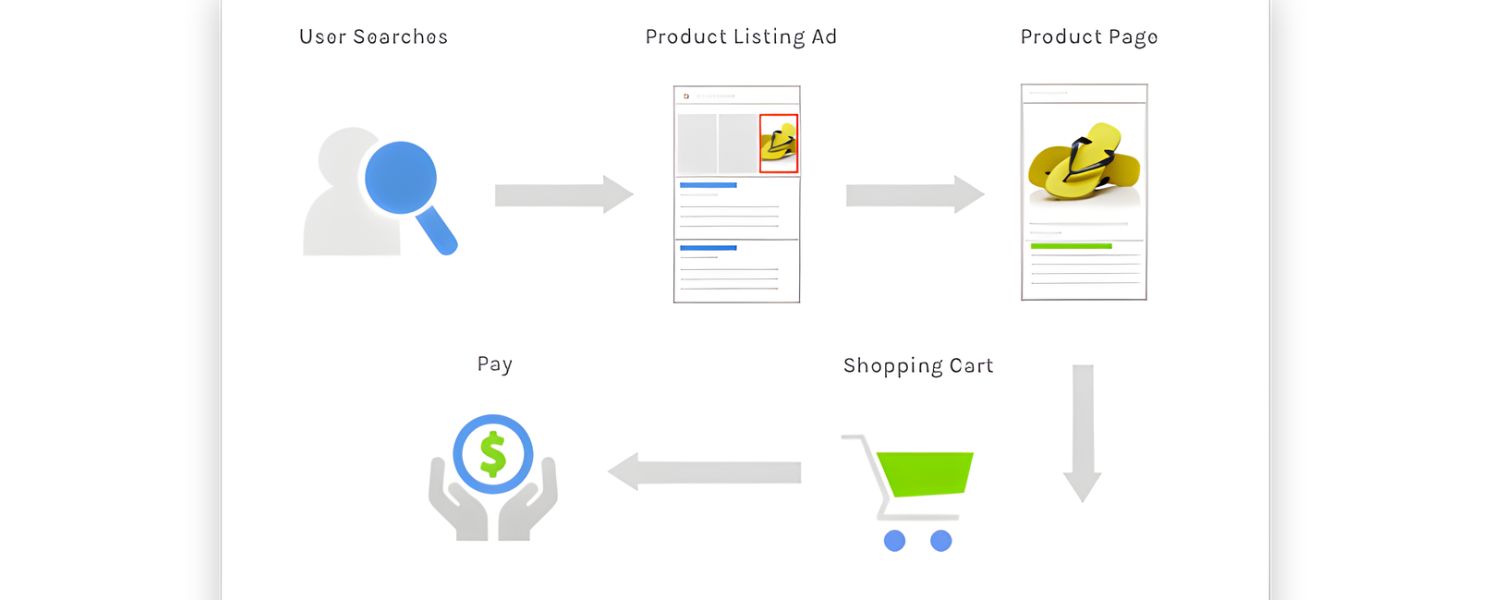
First, you need to prepare a product data feed, essentially a file or dataset containing all the details about the products you want to advertise. This includes fields like product title, description, image link, price, availability, brand, GTIN/UPC codes, etc.
The quality and completeness of this feed are crucial (more on that later). You’ll upload this feed to a merchant platform (Google Merchant Center for Google, Microsoft Merchant Center for Bing).
2. Merchant Center and approval
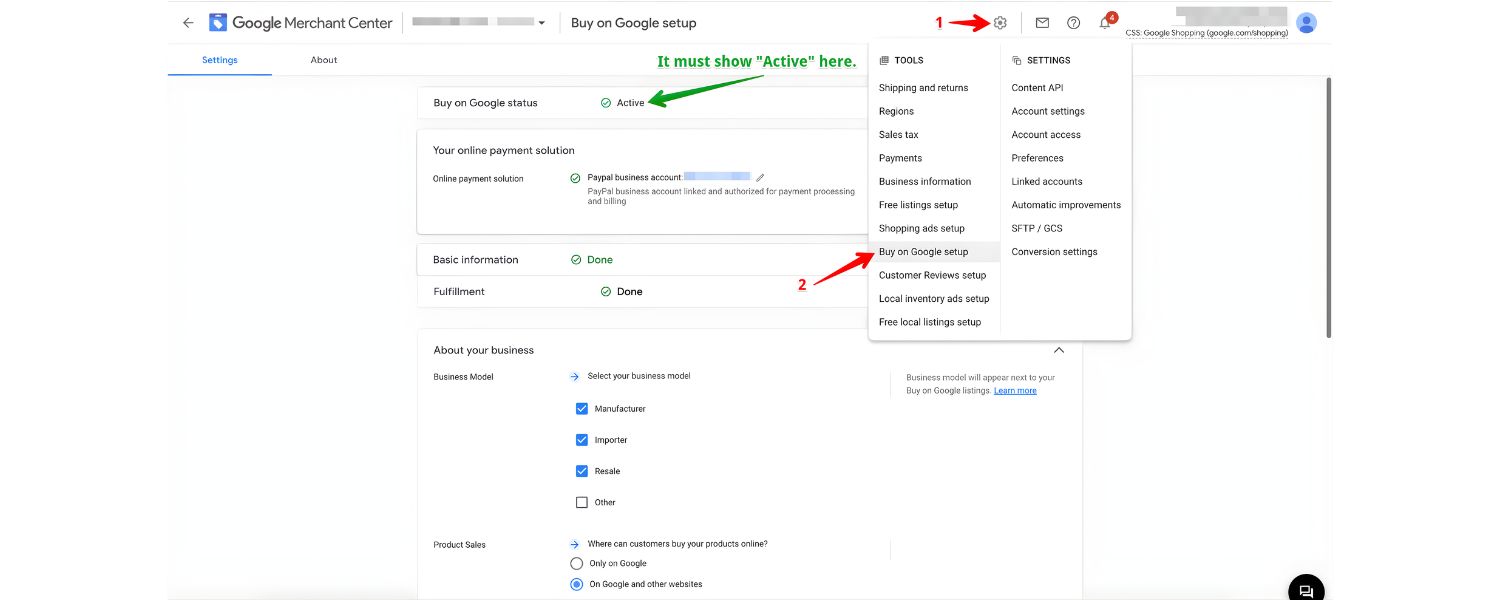
The Merchant Center stores your product info and ensures it meets the required format and policies. Google will review your feed (which can take a couple of days) to approve your products for advertising.
For example, products need accurate information and must comply with Google’s rules (no prohibited items, proper data formatting, etc.).
3. Linking with Ads account

Next, you link the Merchant Center account with your advertising account (Google Ads or Microsoft Ads). This connection allows your product data to flow into your ad campaigns.
4. Campaign setup
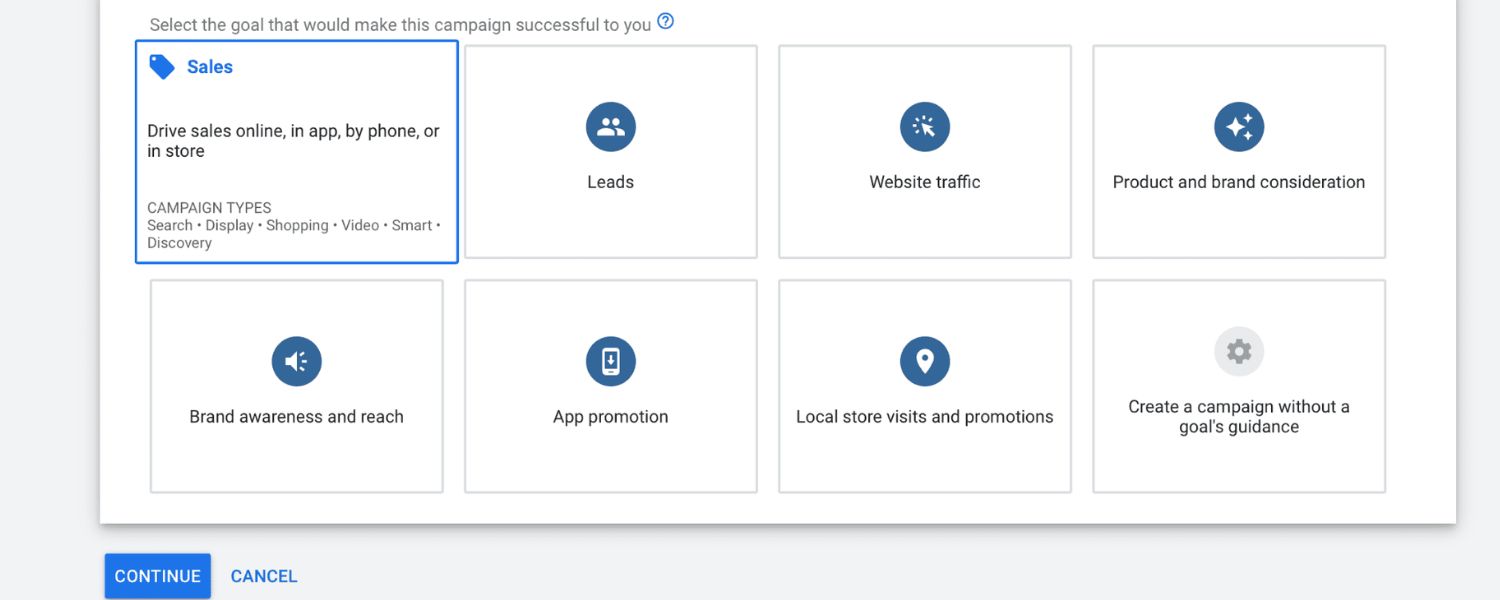
In your Google Ads account, you create a Shopping campaign (for Bing, a Shopping campaign in Microsoft Ads). Unlike a text ad campaign, you do not create ads with headlines or choose keywords.
Instead, Google automatically generates the product ads using the feed data.
You set your campaign settings, such as targeting (which country or region your ads show in), your daily budget, and your bidding strategy (how much you’re willing to pay per click or using automated bidding like Target ROAS).
5. Ad auctions and display

When a user searches for something relevant (say, “Nike running shoes size 10”), Google’s system scans through products in all merchants’ feeds to find matches.
It looks at product titles, descriptions, categories, etc., to decide if your product is a good fit for that query.If your product is eligible, it enters an ad auction along with other advertisers’ products.
Google then considers your bid (how much you’re willing to pay for a click) and your Quality Score (which is influenced by the relevance and performance of your product data and landing page) to decide whose ads show up and in what order.
The winning PLAs are then displayed to the user at the top of the search results or in the Shopping tab.
6. Cost and performance
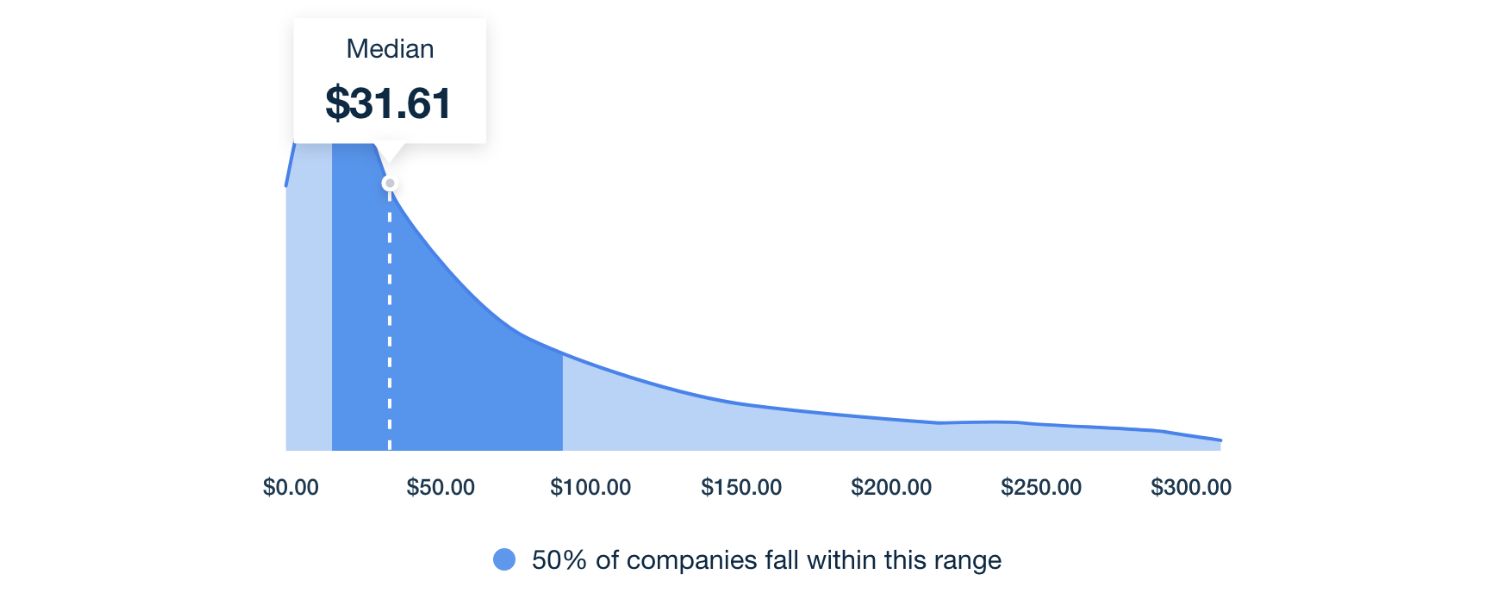
If the user clicks your PLA, you are charged a cost-per-click fee (the amount depends on the auction outcome). If the user doesn’t click, you don’t pay – so it’s in your interest to have highly relevant, appealing listings that only draw clicks from interested buyers.
Over time, you can monitor how each product ad performs (impressions, clicks, click-through rate, conversions, etc.) using dashboards in Google Merchant Center and Google Ads. This performance data helps you optimize your bids and product data.
Types of Product Listing Ads: Within Google’s ecosystem, there are a couple of variations worth noting:
A. Standard Product Shopping Ads
The most common PLA format – an ad for a single product, showing one item with its image/price. This is what typically appears for specific product searches.
B. Local Inventory Ads
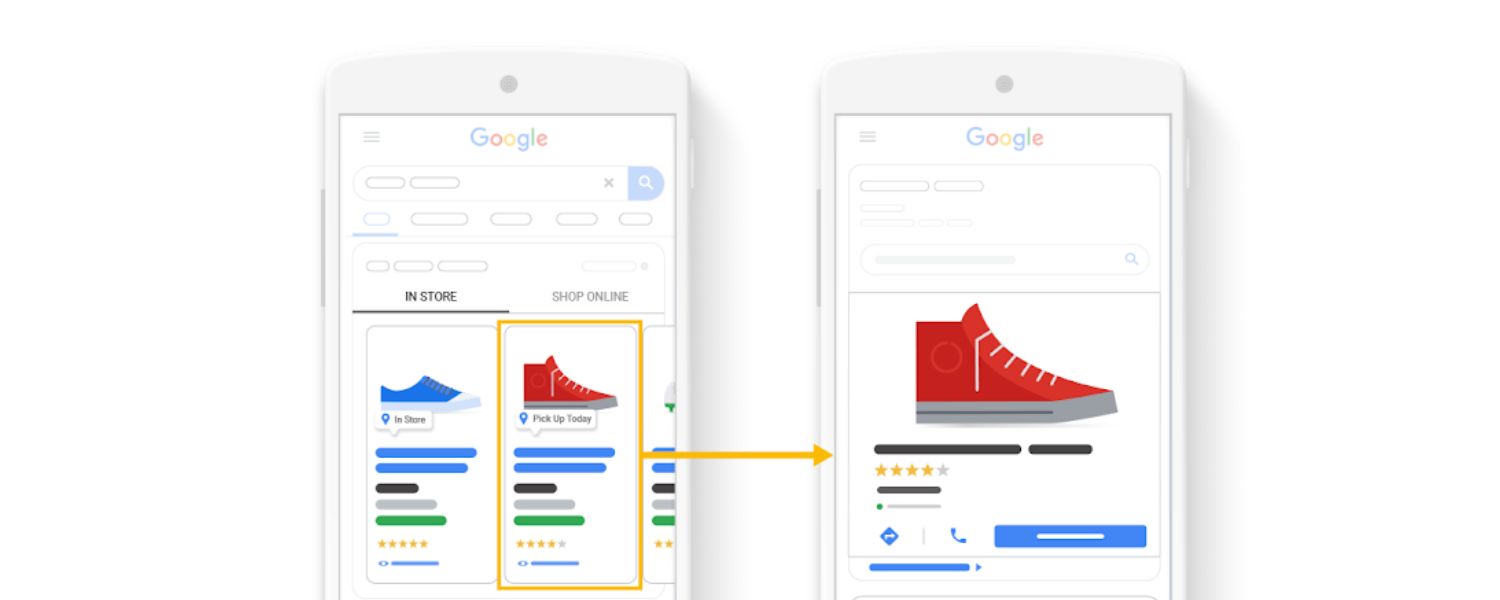
These are PLAs that show product availability at nearby physical stores. If you have brick-and-mortar locations, Google can display a PLA with a “Pick up in store” or “In stock [Location]” message, directing local shoppers to your store. This uses a local products feed with your inventory data.
C. Showcase Shopping Ads
This format lets you group related products to show together for broader search terms. For example, a search for “living room furniture” might trigger a Showcase ad that displays a collection of your couches, coffee tables, and chairs in one ad unit, so the shopper can explore a range of your products. Showcase ads are great for more generic searches where a variety of products could be relevant.
In summary, PLAs work by combining your product data with search algorithms. You feed the system detailed info about what you sell; the platform matches your products to user queries and displays the ads; and you bid in an auction for those valuable slots.
The entire process is highly automated – your job as an advertiser is to provide high-quality data, structure campaigns smartly, and optimize bids and feed info for the best results.
Benefits of Product Listing Ads
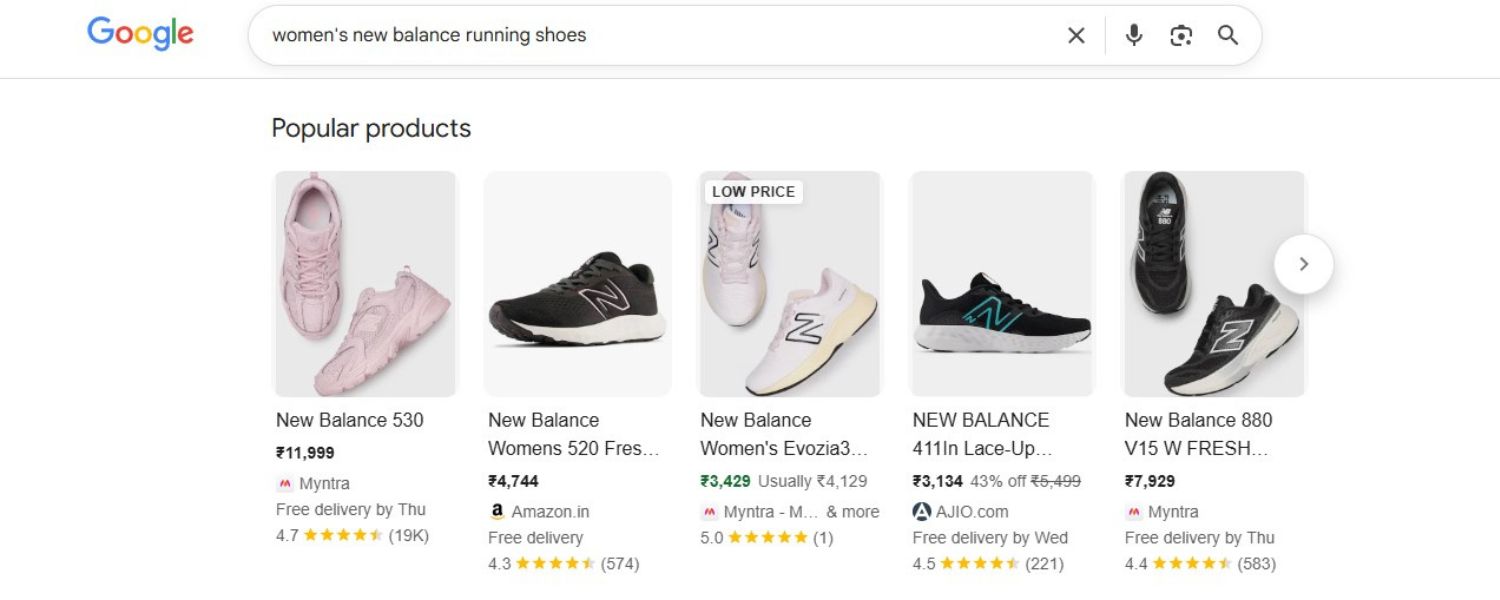
Why are so many ecommerce brands investing heavily in PLAs? Simply put, product listing ads drive more qualified traffic and sales than many other ad formats. Here are some key benefits of using PLAs, backed by data and expert insights:
1. Unbeatable Search Visibility
PLAs often appear at the very top of search results, even above organic listings and text ads. This prime placement means your products get seen first.
Google Shopping is the world’s most popular comparison shopping engine – in fact, about 55% of U.S. price-comparison shoppers use Google Shopping as their go-to portal.
By running PLAs, you greatly increase the chances your products show up for relevant searches, giving your brand more exposure. It’s almost like getting a fast-pass to the front page of Google for your products.
2. Higher Click-Through Rates
The combination of an image, price, and ratings (if available) makes PLAs far more eye-catching and informative than standard ads. Users can quickly spot the exact item they want.
This often leads to significantly higher click-through rates (CTR). Many advertisers report their PLAs get clicked more often than their text ads for the same products.
The visual appeal and immediate info entice shoppers – as one marketing strategist put it, “Product listing ads reach people right as they are about to shop… they show a specific product and price, so it’s much easier for customers to see if you’ve got what they’re looking for.” In essence, PLAs attract more clicks by showcasing exactly what the buyer wants up front.
3. Better Qualified Leads
With PLAs, shoppers self-qualify before clicking. Since they see the product image, price, and even info like “Free shipping” or discounts in the ad, those who click are already interested in that specific item.
They’re not coming in blind. This means the traffic you get from PLAs is often high-intent traffic – people who liked what they saw and are ready to buy. The result is typically a higher conversion rate.
Industry experts observe that PLAs tend to generate more conversions than generic ads because the customers have essentially pre-screened the product. By the time they land on your site, they know the price and key details, so there are fewer surprises to deter them from purchasing.
4. Improved Customer Experience
From the shopper’s perspective, product listing ads make it easier to compare options and find exactly what they need. Seeing several products with images and prices in one view is convenient and saves time.
This streamlined experience – not having to click multiple sites just to see product details – can make customers more likely to engage with PLAs. They can quickly scan and click the product that best matches their needs.
A smoother pre-click experience often translates to a more positive impression of your brand and a higher likelihood of conversion.
5. Cost-Effective Traffic & Strong ROI
PLAs can offer excellent bang for your buck. For one, Google Shopping campaigns often have a lower cost-per-click than some other ad channels. For example, the average CPC on Google Shopping ads is around $2.61, whereas on a platform like Instagram it might be $3.56 and on YouTube $3.21 for comparable retail ads.
This means you might pay less per visitor on Shopping ads. Moreover, Google now offers free listings in the Shopping tab – so you can show up in some placements without paying at all (though the premium spots still require paid campaigns).
Additionally, because PLA traffic converts well, the return on ad spend (ROAS) can be very attractive. Google has stated that on average, businesses make $8 in profit for every $1 spent on Google Ads – and shopping ads are a big contributor to that success for retailers. In sum, you’re paying for clicks that are more likely to turn into buyers, which maximizes the efficiency of your ad spend.
6. Increased Revenue Potential
With higher visibility, more clicks, and better conversion rates, it’s no surprise that PLAs can significantly boost your sales. By capturing shoppers who are actively searching and ready to purchase, merchants often see a direct lift in revenue after launching PLA campaigns.
For example, if someone searches for a product you sell and your ad shows up with a competitive price and good image, you might win that sale on the spot. Multiply this by hundreds or thousands of products, and the revenue impact adds up fast.
One analysis of Google Ads noted that product ads drive a substantial portion of total clicks for retail searches, meaning if you’re not using PLAs, you’re likely missing out on sales that competitors might be capturing.
7. Competitive Advantage
In many product categories, your competitors are already using PLAs. Having your own product listing ads ensures you’re not edged out of those top-of-page slots.
In fact, well-optimized PLAs can help a smaller retailer compete head-to-head with larger brands, because the ad is showing the product itself (neutralizing some brand recognition advantages).
Also, PLAs allow you to show multiple products at once. It’s possible for one retailer to have several of their products appear simultaneously for one search query, dominating the screen – something you can’t do with regular text ads.
This gives you a chance to capture more clicks by showing variety or multiple options from your own catalog. Not using PLAs would essentially forfeit this valuable real estate to competitors.
To sum up, product listing ads improve your marketing outcomes at every stage: more impressions to the right shoppers, higher click engagement due to visual appeal, better pre-qualified traffic, and ultimately more conversions and sales – often at a better ROI than other ad formats.
As digital marketing expert Col Skinner explains, “PLAs tend to generate more traffic and higher conversion rates because they are served to users on search engines and include information about the product – images, prices, titles, descriptions, shipping fees, and even reviews – all of which influence the customer’s purchase decision.”
In today’s competitive ecommerce landscape, PLAs have moved from a nice-to-have option to a must-have strategy for retailers aiming to maximize online growth.
How to Set Up Product Listing Ads (Step by Step)
Getting started with product listing ads may seem technical, but it can be broken down into clear steps. Below is a step-by-step guide to creating a PLA campaign, primarily focusing on Google (the process for Bing is similar with its own nuances):
1. Create and Optimize Your Product Data Feed
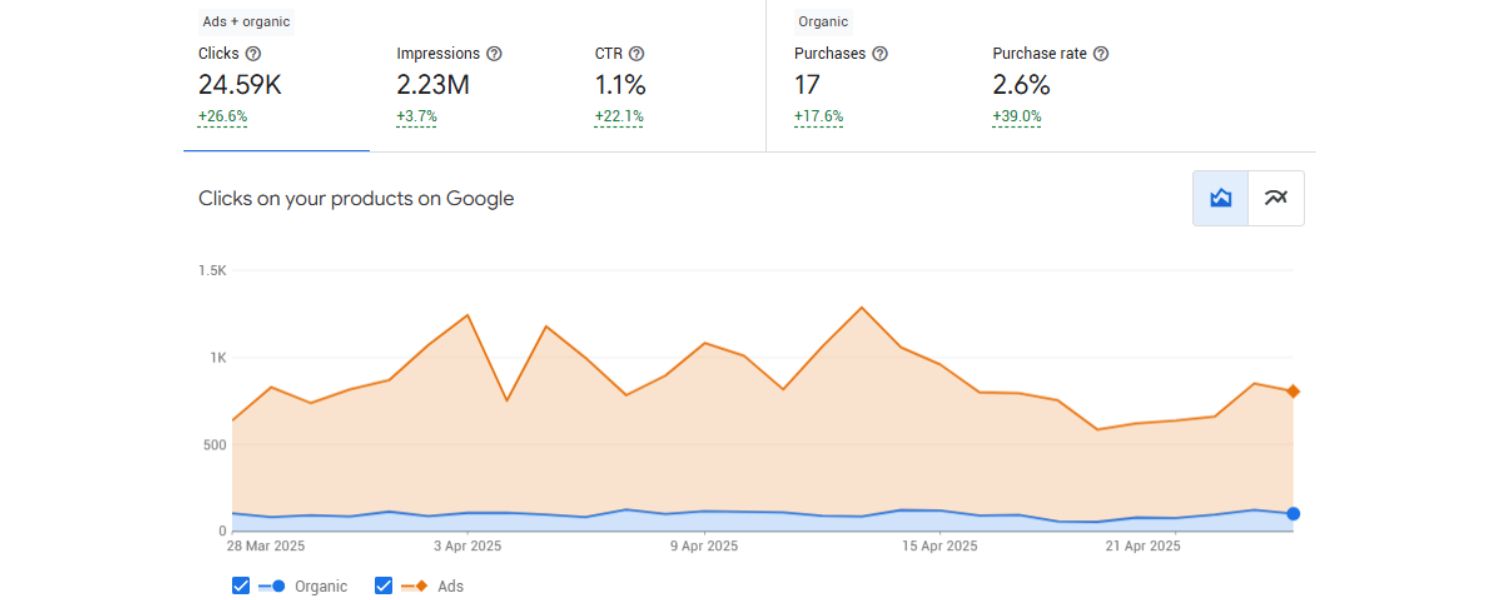
Begin by ensuring you have a comprehensive product feed ready. This is a file (often CSV, TSV, or XML format) that contains all the information about the products you want to advertise.
If you’re using an ecommerce platform like Shopify, WooCommerce, or BigCommerce, there are usually built-in tools or apps to generate a Google Shopping feed automatically.
Key fields to include are: product ID/SKU, title, description, image URL, price, availability, brand, GTIN (barcode) if applicable, etc.
Make sure this data is accurate and up-to-date – your prices and stock levels should be current, and your titles/descriptions should be clear and keyword-rich (so Google can match them to searches). Tip: Follow Google’s product data specification guidelines closely.
For example, Google has character limits (like 150 characters for titles, 5,000 for descriptions) and format requirements. Taking time to polish your feed will pay off with better ad performance and fewer errors in the next steps.
2. Set Up Google Merchant Center

Google Merchant Center is the hub where your product feed lives. If you don’t have an account, sign up for one (it’s free). In Merchant Center, you’ll input some basic business information (like your store name, website URL, and business address) and go through a verification process to prove you own your website domain.
Once that’s done, navigate to the “Products” section and upload your product feed. You can do this manually by uploading a file, or better yet, use scheduled fetches or content API integrations if your platform supports it (this way, Merchant Center can regularly pull updated data from your store).
After uploading, Google will process and review your feed. Check the “Diagnostics” section in Merchant Center for any errors or warnings – for instance, Google might flag products with missing info or disapprove items that violate policies.
Fix any issues until your products are all approved. Note: Also configure tax and shipping settings in Merchant Center (Google requires you to provide shipping cost info – either set a flat shipping rule or pull from your website settings).
3. Link Merchant Center with Google Ads

Now, you need to connect your product data to your advertising account. In Merchant Center, go to the settings or the wrench icon menu and find “Linked accounts.” Add your Google Ads account (make sure you’re using the same Google account email for both, or have the IDs handy).
Approve the linkage from the Google Ads side if prompted. Linking these accounts allows Google Ads to access your product feed from Merchant Center for campaign creation. (For Microsoft’s ecosystem, you would link Microsoft Merchant Center to your Microsoft Advertising account in a similar fashion.)
4. Create a New Shopping Campaign in Google Ads
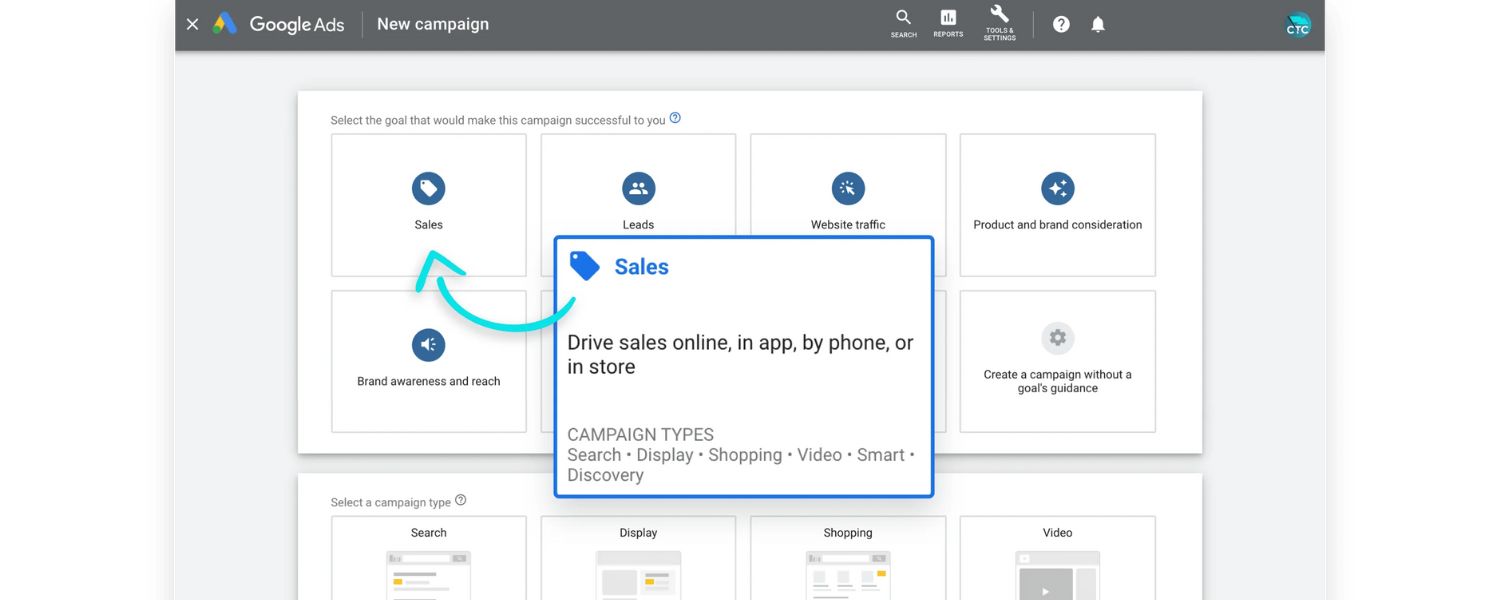
Log in to your Google Ads account and click the “+ New Campaign” button. Google will prompt you to choose a campaign goal, if your primary aim is ecommerce sales, you might select “Sales” or “Online store traffic.” Next, select “Shopping” as the campaign type (since we’re creating a Shopping campaign).
You’ll need to choose the Merchant Center account and target country for your products (e.g., “United States” if you want your PLAs to show on Google US). Google also offers two sub-types for Shopping campaigns: Standard Shopping and Performance Max.
A. Standard Shopping Campaign
This gives you more manual control, you can organize products into groups, set individual bids, and get granular reporting on each product or group’s performance. It shows ads on the Search Network, Shopping tab, images, and partner sites.
B. Performance Max Campaign
This is a newer, more automated campaign type that can also use your product feed. It runs ads across all Google channels (Search, YouTube, Gmail, Discover, etc.) using machine learning to optimize for your specified goal (like maximizing conversion value or ROAS). This is more of a “black box” – it automates ad placements and bidding heavily.
For starting out, many advertisers choose Standard Shopping to have control and transparency. Give your campaign a clear name (e.g., “PLA – Spring Collection 2025”) for easy management.
5. Configure Campaign Settings (Budget, Bids, Targeting)
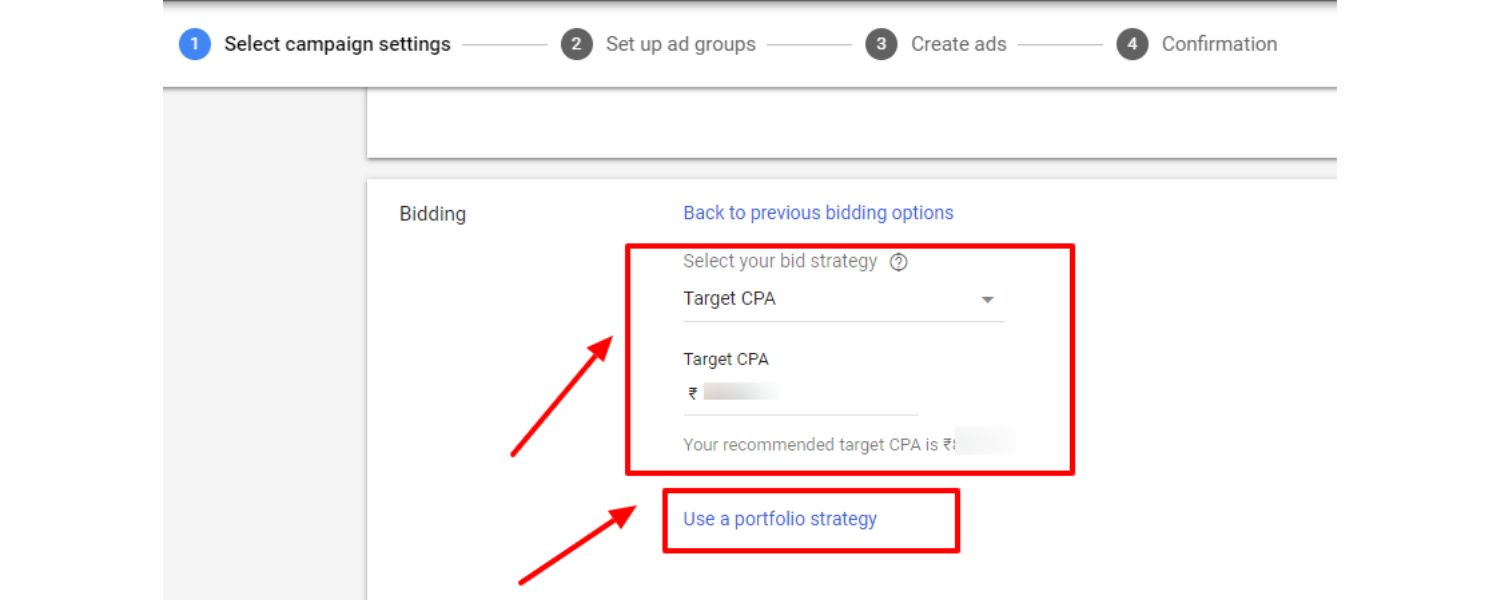
Set a daily budget for your Shopping campaign – this is how much you’re willing to spend on these ads per day. For example, if you budget $50/day, Google will aim to show your PLAs up until roughly that spend (it can overshoot by up to 2x on high-traffic days, but will average out to your monthly equivalent budget).
xt, choose a bidding strategy. If you prefer control, you can start with Manual CPC bidding, where you’ll set cost-per-click bids yourself (with or without an option for Enhanced CPC which lets Google adjust bids slightly).
Alternatively, you could use automated bid strategies like Maximize Clicks or Target ROAS once you have some conversion data. As a beginner, manual CPC is fine – you might set an initial bid (e.g., $0.50 per click) and adjust later based on performance.
Under targeting settings, ensure the locations are set to the markets you serve (for example, United States only, or US and Canada, etc.). You can also exclude locations if needed (maybe you don’t want to show in certain regions).
Device targeting for Shopping campaigns is usually all devices by default; Google will automatically show ads on mobile, desktop, etc., but you can later adjust bid modifiers if, say, mobile isn’t converting well.
Also decide if you want to include Google’s search partners, these are other sites that show Google ads. Many advertisers leave this on for wider reach, but you can test both ways.
6. Organize Products & Ad Groups (Product Groups)
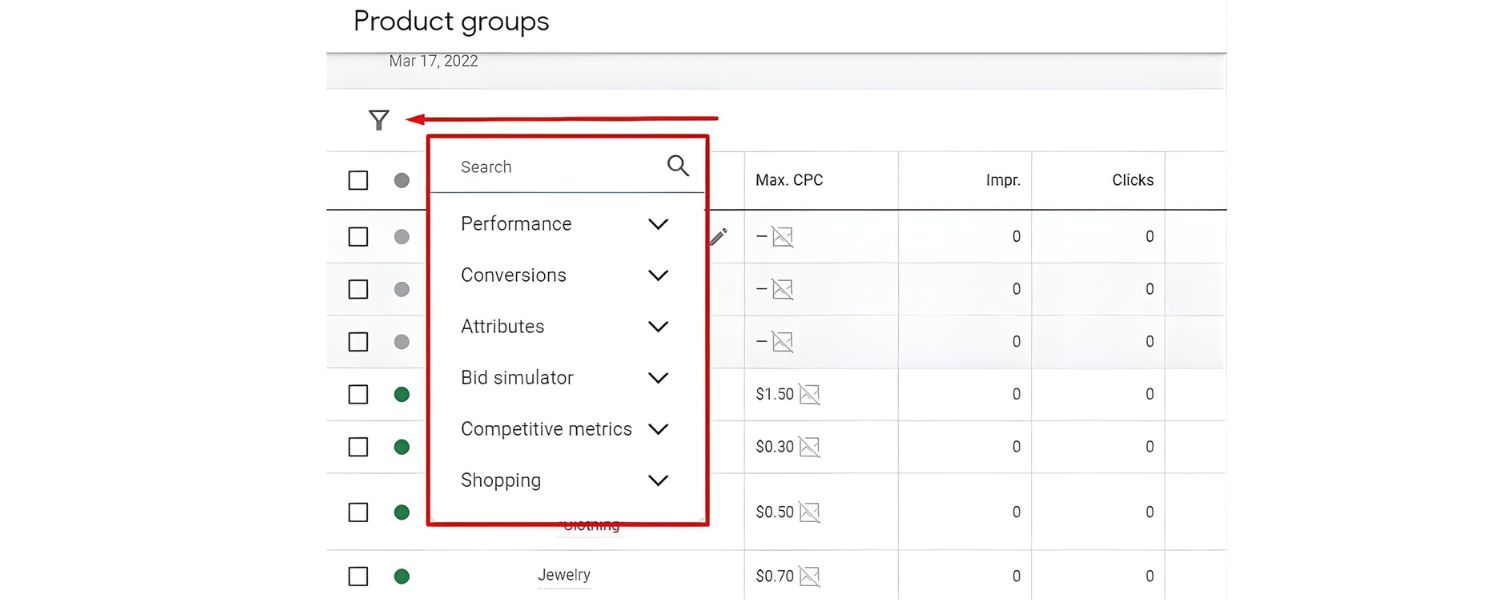
In Shopping campaigns, instead of keywords and ad text, you manage Product Groups. Google will initially put all products in your feed into one catch-all product group (typically called “All Products”).
It’s often wise to subdivide this to gain more control. For instance, you could create groups by category, brand, price range, or profitability. A common strategy is to at least separate your best-selling or high-margin items from others – this way you can bid more aggressively on those that matter most.
Google allows you to split by any attribute in your feed (like brand, product type, custom labels you define, etc.). To start, you might split by product category: e.g., one group for “Shoes” and another for “Accessories,” if you sell both.
Or, create a “Bestsellers” group via a custom label in your feed (label those top 10 products as “Bestseller”) and then in Google Ads, subdivide by that custom label so those items are in their own group.
Each product group can have its own bid. For example, you might set a higher bid for your high-converting, top-selling products, and a lower bid for less important ones.
If you’re unsure, you can begin with one group (all products) to gather data, and later split the group once you see patterns (Google’s reports will show performance per product, so you can identify which SKUs perform well).
7. Launch and Monitor
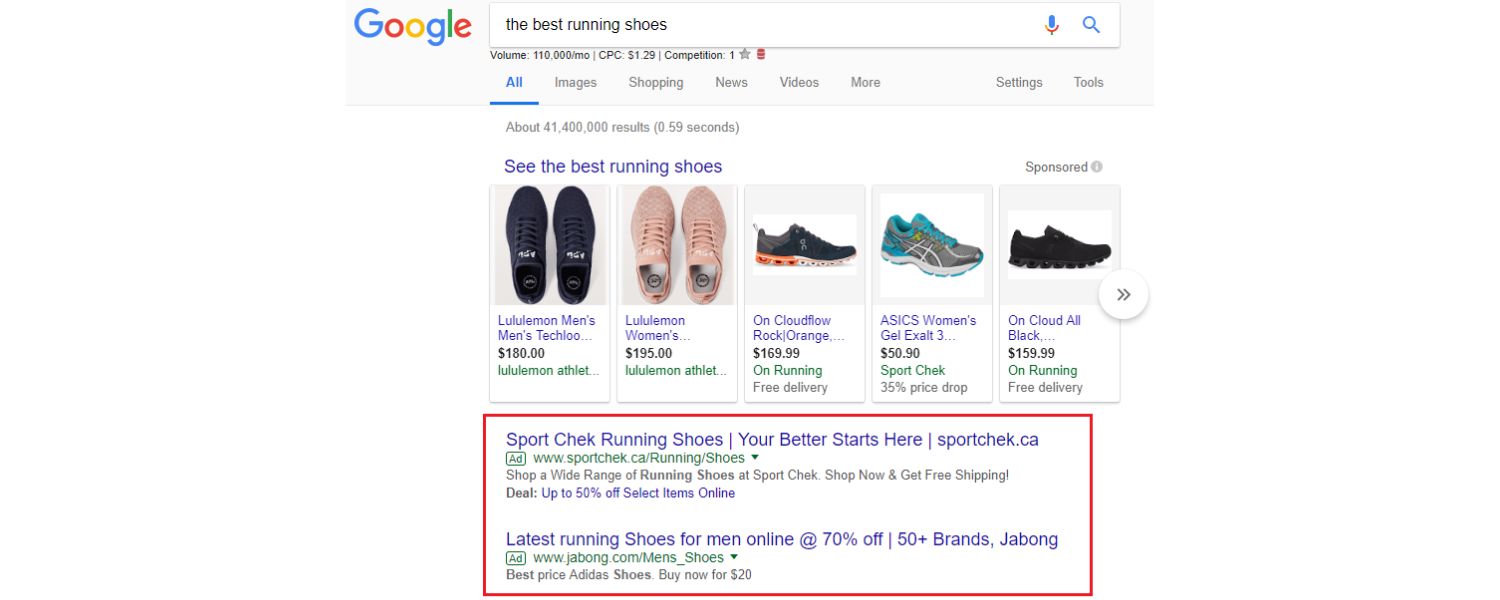
Once your campaign settings and product groups are set, you’re ready to launch the campaign. Google will start serving your PLAs typically within a few hours (assuming the products are all approved in Merchant Center).
As the campaign runs, keep a close eye on key metrics: impressions (are your ads showing?), clicks, CTR, average CPC, and conversions (if you have conversion tracking set up for sales).
In the first few days, you might notice Google spending more on certain products, you can respond by adjusting bids or subdividing product groups for more control.
It’s usually best not to tweak too much in the first 1-2 weeks as the campaign “learns.” After some data comes in, identify any underperforming areas: for example, if a particular product is getting lots of clicks but no sales, consider lowering its bid or pausing it (it might have an uncompetitive price or a landing page issue). Conversely, if some products have excellent ROI, you might increase their bids to win more impressions.
8. (Optional) Set up Tracking and Analytics

Make sure you’re tracking the performance properly. Link your Google Analytics to Google Ads if you haven’t already, so you can see post-click behavior.
Also, enable conversion tracking in Google Ads (typically via the Google Ads conversion pixel or by importing ecommerce transactions from Analytics).
This will allow you to measure how much revenue or how many sales your PLAs are driving, which is crucial for optimizing bids (especially if you want to use strategies like Target ROAS in the future).
You can also add UTM parameters to your product URLs (often Merchant Center can append these automatically) to analyze PLA traffic in Analytics in detail.
Once everything is set up, your product listing ads will start appearing to shoppers searching for products like yours!
Remember that setting up is just the first step, ongoing monitoring and optimization (bids, feed improvements, adding negative keywords, etc.) will be key to long-term success, which we’ll cover in the next section.
(Note: Setting up PLAs on Bing is a very similar process, you would use Microsoft Merchant Center to upload your feed, then create a Shopping campaign in Microsoft Advertising.
One difference is that Bing allows keyword targeting refinements for shopping ads (you can provide a list of keywords to help guide when your PLAs show, or exclude queries), which some advertisers find useful.
If you’re on Shopify, you can use the Microsoft Bing Shopping app to sync your products easily. It’s worth expanding to Bing PLAs after Google, since Bing still garners a significant share of searches and can bring additional sales.)
Best Practices for Optimizing PLAs
Creating a PLA campaign is just the beginning. To truly outperform your competition and get the best return on your ad spend, you’ll need to continuously optimize your product listing ads. Here are several best practices and expert tips to help you maximize the effectiveness of your PLAs:
1. Optimize Your Product Feed Thoroughly
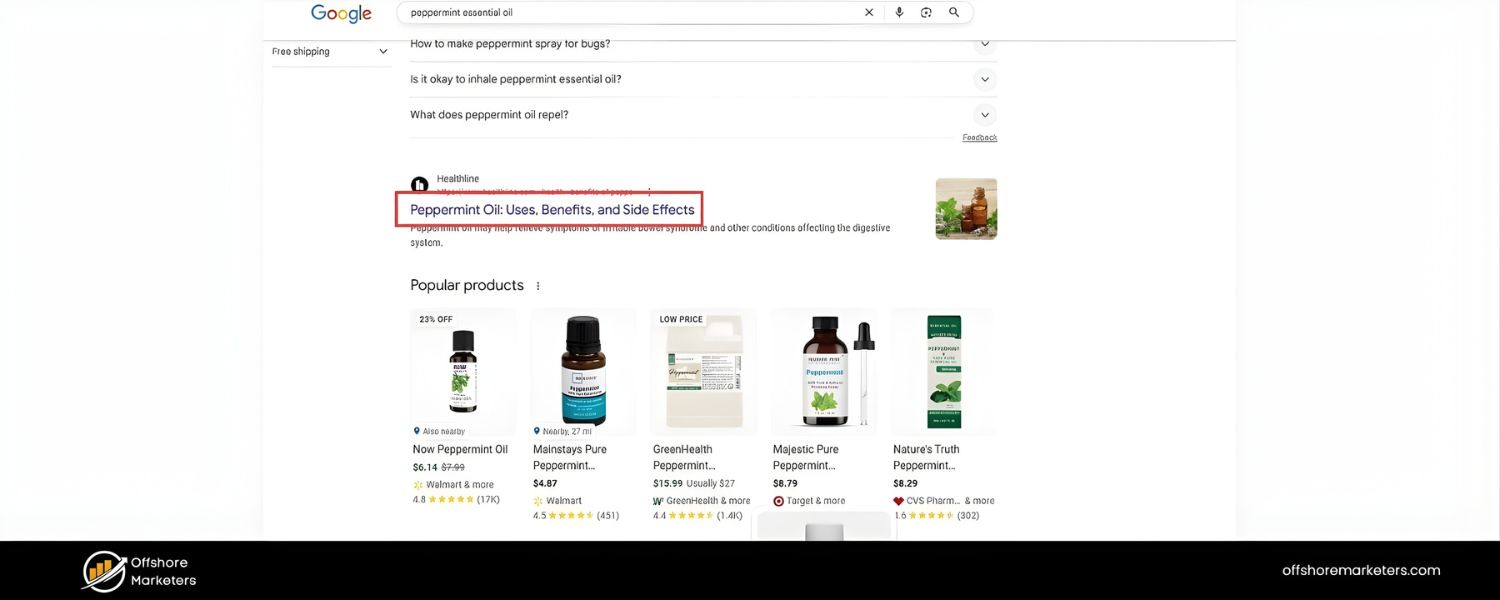
Your product feed is the foundation of your PLAs – Google uses this data to decide when and where to show your ads. Feed optimization can greatly improve your campaign results. Make sure each product entry is complete and compelling:
A. Use descriptive, keyword-rich titles
Incorporate common search terms that shoppers use. For example, instead of “Model X234,” a title like “Sony X234 55-Inch 4K LED Smart TV” is far better – it contains brand, size, resolution, and type. Put the most important info at the beginning of the title (since Google may truncate longer titles in displays).
B. Write clear, benefits-focused descriptions
The description should include details and features that wouldn’t fit in the title. Include relevant keywords naturally (since Google indexes the description for relevance). However, avoid marketing fluff, focus on factual info and product specs that help answer a shopper’s questions.
C. Fill out all applicable attributes
Don’t skip optional fields if they apply to your product. Attributes like brand, GTIN, MPN, color, size, gender, age group, material, etc., can all help your products match more specific searches (and some are required for certain categories, like apparel).
The more data you give Google, the better it can match your product to niche queries. For example, if someone searches “red Nike running shoes size 10,” and you have those details in your feed, your ad is much more likely to show.
D. Use high-quality images
We’ll discuss images more below, but feed optimization includes providing URLs to good product photos. Ensure no broken image links and that images meet Google’s requirements (typically, a clear product on a white background is ideal with no watermarks).
E. Categorize products properly
Assign the correct Google Product Category (a taxonomy provided by Google). This helps in matching and also in certain feed treatments. Be as specific as possible (e.g., “Apparel & Accessories > Clothing > Dresses > Wedding Dresses” rather than just “Apparel”). Correct categorization can improve relevance and prevent disapprovals.
F. Leverage custom labels
You can add up to five custom labels (0 through 4) in your feed to tag products in ways that help your campaign. For example, label items as “Seasonal” or “HighMargin” or “Clearance” – whatever segmentation is useful for your business.
These labels don’t show to users, but they allow you to filter and bid on subsets of products easily in your campaign.
Remember, feed optimization isn’t a one-and-done task. Continuously refine your titles and descriptions based on search query reports (more on that in negative keywords) and update your feed as your product offerings change.
Many successful advertisers revisit their feed every few weeks to tweak titles or add new keywords that customers are using.
2. Use Eye-Catching, High-Quality Images
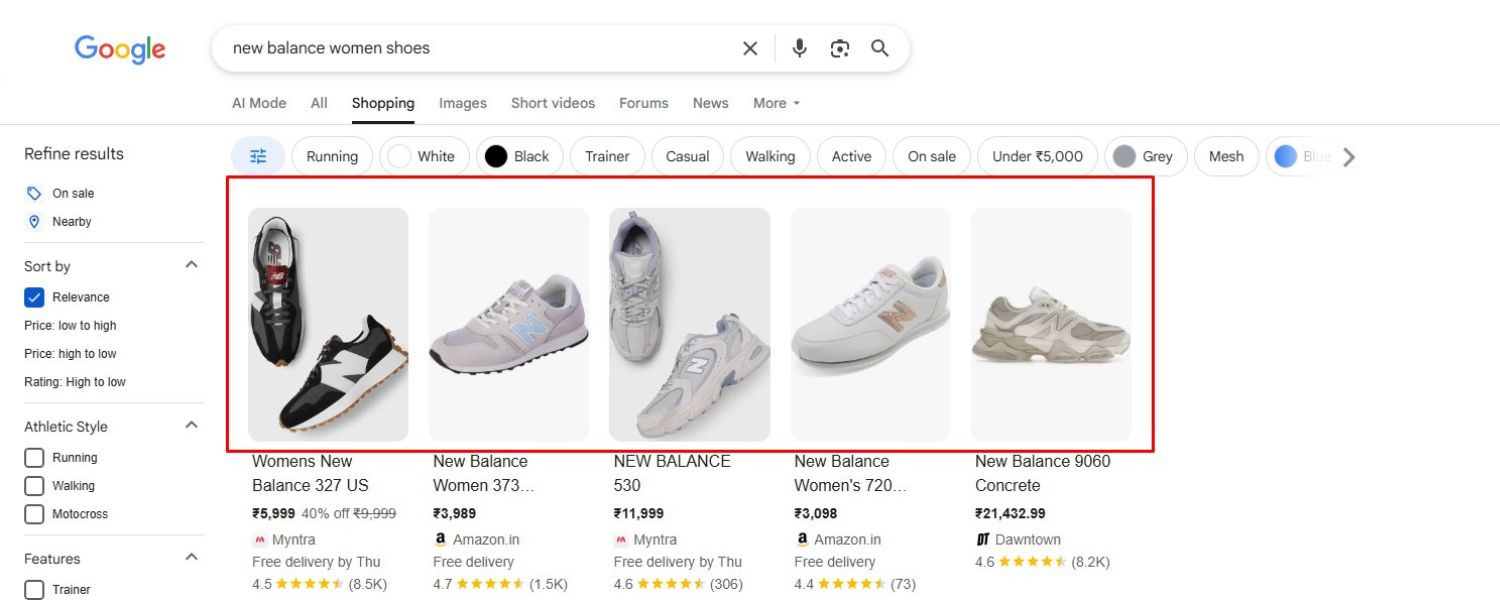
The product image is arguably the most critical element of your PLA, it’s the first thing shoppers’ eyes go to. A great image can dramatically improve your click-through rate. Ensure that:
A. Images are clear and high-resolution
Blurry or tiny images will be passed over. Use at least 800×800 pixels (or higher) for most products so that the picture is sharp. Google requires a minimum of 100×100 for most products (250×250 for apparel), but meeting only the minimum isn’t enough to stand out.
B. Show the product clearly
The item should be well-lit and against a clean background (usually white or neutral). The product should fill 75–90% of the frame so it’s easily visible. Avoid images with clutter or confusing angles.
For example, if you’re selling a chair, a front angled view of the chair on a white background will typically perform better than a complex lifestyle shot where the chair is far in the background.
C. Use multiple images (when possible)
Google Shopping now allows additional images to show when someone expands the listing. Include alternate angles or versions (back view, close-up of a detail, etc.) in your Merchant Center feed if relevant (additional_image_link attribute).
While the PLA initially shows one main image, having more can help on the Shopping tab or if the user compares items.
D. Avoid disapproved content
No logos or watermarks over images, no promotional text (Google will disapprove images that have banners like “SALE” on them). Also, ensure the image is an actual photo of the product – for example, an illustration or icon won’t do unless it’s the actual product (like a digital product cover).
E. Test what works
If you have the ability, try different images for the same product and see which yields a better CTR. Sometimes a slight difference (product shown at a 45-degree angle vs. straight on) can affect click behavior.
Choose images that best highlight the product’s important features or aesthetic appeal. For apparel, showing the item on a model vs. standalone can make a difference; you might test which approach gets more clicks.
A pro tip: consistency in image style across your catalog can make your brand appear more professional in the eyes of shoppers.
While each PLA is separate, if a user sees multiple of your products in results and they all have polished, consistent imagery, it builds trust. High-quality visuals signal that you’re a serious retailer and can improve the perception (and thus click propensity) for your ads.
3. Implement Competitive Pricing (and Promotions)
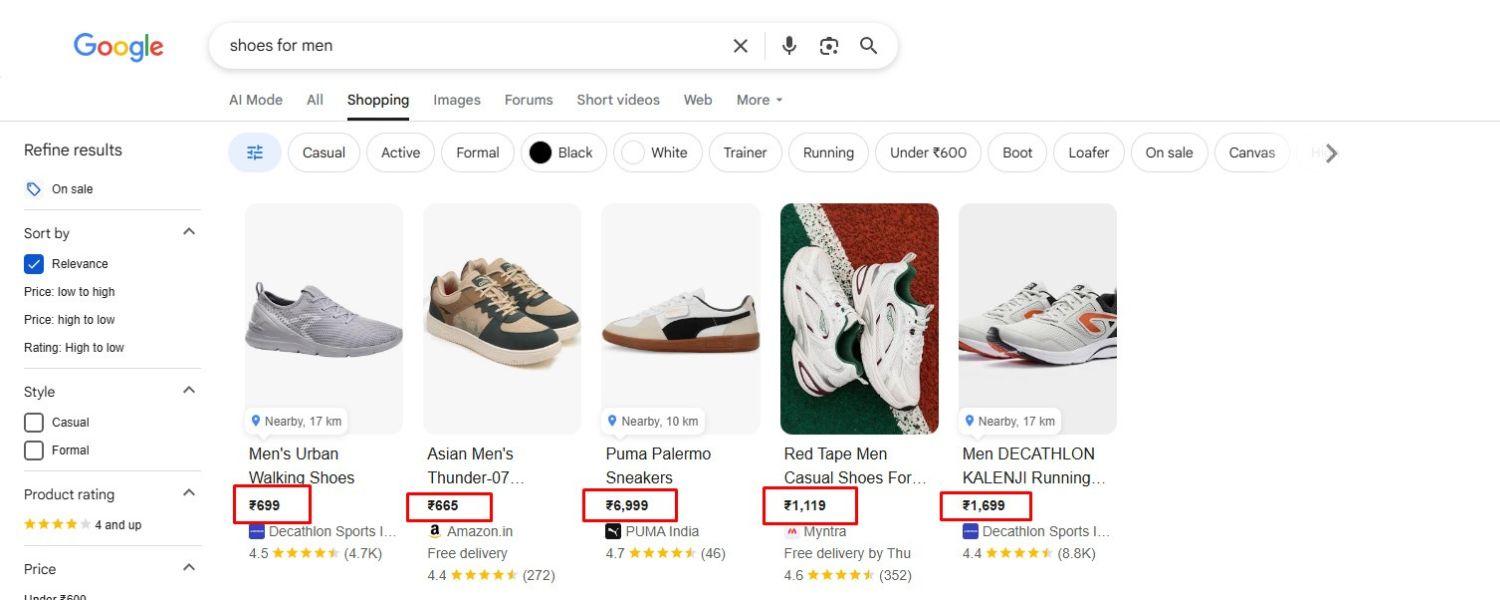
Online shoppers are price-sensitive and will often compare multiple PLA listings before deciding where to click. Pricing strategy in PLAs is therefore crucial:
A. Competitive pricing
Keep an eye on what price your competitors are showing for similar products. If all your competitors sell a gadget for around $99 and your ad shows $129, you may get fewer clicks (unless you offer other clear value like much better reviews or free shipping highlighted).
This doesn’t mean always be the cheapest – but be aware of the market. If you have a higher price due to quality or brand prestige, ensure that value is conveyed (maybe through product title or promotions like “Premium” or extended warranty info via Merchant Center annotations).
B. Use Merchant Center promotions
You can add promotional messages (e.g., “10% off” or “Buy one, get one free” or coupon codes) through Merchant Center promotions or feed attributes. A little “special offer” tag on your PLA can draw the eye.
For example, a small text like “15% OFF code SAVE15” can appear with your ad if you configure a promotion. Many shoppers impulsively click an ad that indicates a sale or discount.
In fact, around two-thirds of consumers have impulsively purchased an item online after seeing a discount or promotion. So, highlighting a sale in your PLA can capture those deal-seekers.
C. Leverage pricing insights
Google’s PLA reporting might show benchmark data – such as Benchmark CTR and Benchmark Max CPC, and sometimes the benchmark price for a product (what others are charging).
Use these to gauge your competitiveness. If your price is higher than average, you might compensate with better images, more thorough descriptions, or simply accept lower volume but ensure you’re targeting a more affluent segment.
D. Dynamic pricing and sale updates
If you run sales or price drops, update your feed promptly so the new price shows in your ads (nothing frustrates customers more than seeing one price in the ad and a higher price on click-through – plus Google may disapprove listings with mismatched prices).
During big seasonal sales (Black Friday, etc.), enable sale_price attributes so your ad can show a slashed “original price” next to the sale price – this is a powerful visual that can increase CTR and conversions.
E. Consider price filters
Some advertisers strategically exclude very low-margin products from campaigns or lower their bids, because winning clicks on those might not be profitable. If you have items with razor-thin margins, ensure your campaign focus (and budget) is weighted toward products that can actually turn a profit when you pay for traffic.
In summary, price your products competitively for the PLA environment and make good use of promotional tools. When shoppers see a great deal or a unique value proposition in your ad, they’re more likely to click your listing over others.
4. Use Negative Keywords to Refine Traffic
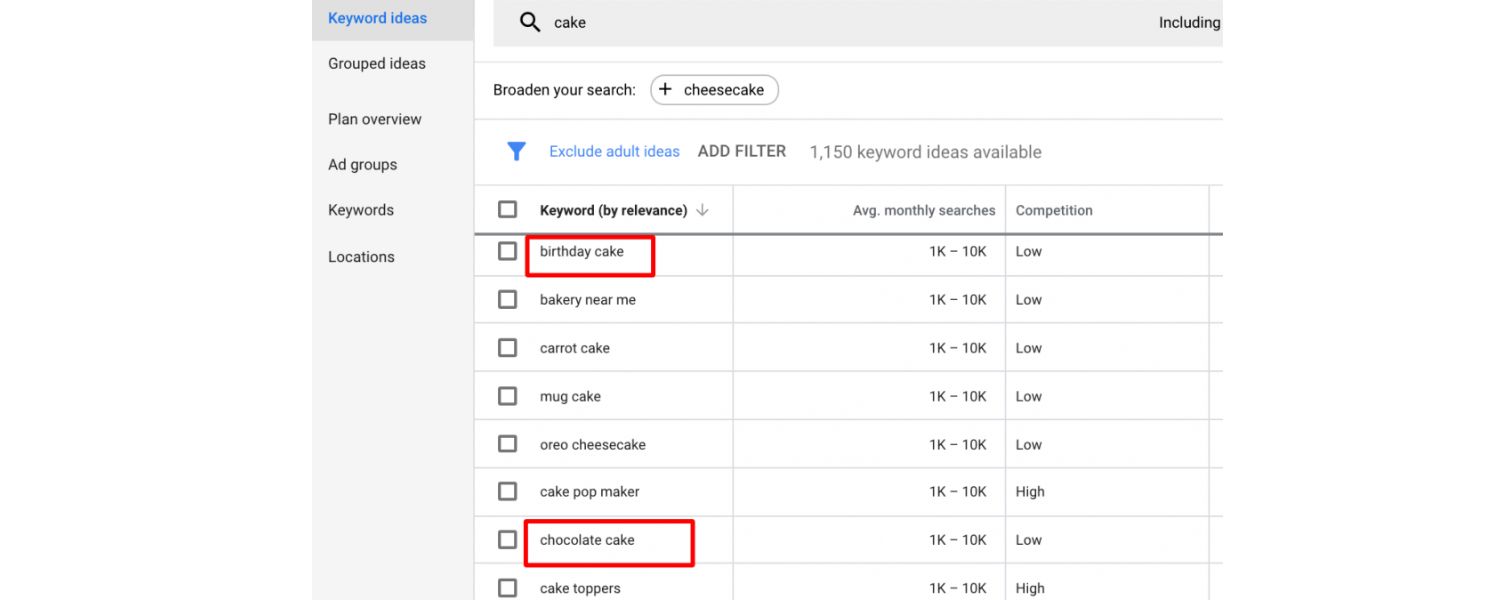
One peculiarity of PLAs is that you don’t bid on keywords; Google decides when to show your ads based on your product data. However, you can use negative keywords to prevent your ads from showing for certain searches. This is a vital optimization tool:
A. Add negatives for irrelevant searches
Look at the search terms report in Google Ads for your Shopping campaign (this report shows actual queries that triggered your PLAs and got clicks). You might find some queries that are not a good match.
For example, if you sell luxury watches, you might see searches like “cheap budget watch” triggering your ads, those users are probably not your target customers. By adding “cheap” or “budget” as negative keywords, you stop showing ads for those queries, saving you from paying for clicks unlikely to convert.
B. Exclude research-oriented queries
Oftentimes, people search for product-related info that indicates they’re not looking to buy. Terms like “instructions,” “review,” “manual,” “repair,” etc., could trigger your PLA if your product data isn’t tightly focused.
If you notice queries such as “Product X setup guide” matching your ads, use negatives like “setup,” “guide,” “manual,” etc. One retailer shared that they eliminated a large amount of wasted spend by excluding terms related to troubleshooting and manuals, because people looking for those were existing owners of the product, not new buyers.
C. Focus on high-intent specifics
Broad single-word terms can be problematic. For instance, if you sell custom engagement rings, a search just for “rings” is very broad and likely to include people looking for all sorts of rings (fashion jewelry, ring sizing info, etc.), these might not convert and could drain budget.
If you find extremely broad terms triggering your ads with low conversion, consider negating them or refining your product titles to be more specific (so Google is less likely to match to broad terms in the first place).
In one case, adding negatives for generic terms improved a campaign’s ROI dramatically by funneling budget to the more specific, high-intent queries instead.
D. Use phrase or exact match negatives smartly
Negative keywords in Shopping campaigns can be broad match by default, but you can specify phrase or exact if needed.
For example, adding the exact match negative [used] might prevent your new-product ads from showing on queries that include “used” or “secondhand”. Or adding a phrase negative “free” to avoid “free product” searches if you’re not giving stuff away.
E. Continuous refinement
Keep monitoring the search terms regularly (at least biweekly). As seasons change or new products launch, you might see new search trends.
Add new negatives whenever you catch a term that is irrelevant or consistently unprofitable. This improves your targeting over time, making sure your budget is spent on clicks that have real potential.
By intelligently using negative keywords, you essentially train Google on what you don’t want, steering your PLA campaign to the most lucrative audience and filtering out window-shoppers or mismatched searches. This can greatly increase your campaign’s efficiency and conversion rates.
5. Keep Your Feed and Inventory Up-to-Date
Nothing can hurt your PLA performance quite like outdated information. You should treat your product feed as a living document that reflects your current offerings:
A. Regular feed updates
If you change a price, launch a new product, or an item goes out of stock, update your feed immediately (or have an automated system in place).
If a shopper clicks an ad for a product that turns out to be out of stock or priced differently, it’s a wasted click and a negative experience that could prevent them from coming back.
Google also checks your landing pages against the feed, if it finds discrepancies (e.g., feed says “in stock” but your site says “out of stock”), it may suspend that product listing until fixed.
B. Use automatic item updates
Google Merchant Center has a feature called “Automatic item updates” which, if enabled, can crawl your website and adjust your ads if it finds a price or availability mismatch. This can be a safety net to keep things consistent. However, it’s still best practice to update the feed promptly on your end.
C. Seasonal products or limited-time offers
Plan feed adjustments around promotions or seasons. If you have holiday-specific items, you might add them to the feed just for that season and remove after. Or if you run a sale, use the sale_price attribute during the sale period and remove it after, so the strikethrough pricing shows only at the right times.
D. Monitor disapprovals and fixes
Merchant Center will alert you if products get disapproved (for example, if your site’s microdata shows a different price than your feed, or if an image is too small, or policy violations).
Check these alerts and fix issues quickly. A product that isn’t approved can’t serve an ad, so an out-of-date feed could mean a portion of your catalog quietly stops advertising.
E. Inventory management for local ads
If you use Local Inventory Ads (showing in-store availability), ensure your local inventory feed is updated frequently (some do it multiple times a day) so you don’t advertise an in-store product that’s actually sold out that afternoon.
F. Scaling with automation
If you have a large catalog (hundreds or thousands of products), manually updating can be cumbersome. Consider using feed management tools or plugins that sync your store with Merchant Center in real time.
For example, Shopify’s Google channel app can automatically update your Google feed whenever you change a product in Shopify. This reduces the risk of human error or forgetfulness in updating the feed.
The bottom line is fresh, accurate data wins. Not only does it prevent negative experiences, but regularly updating your feed (adding new products, improving data) can also unlock new opportunities – you might suddenly become eligible for more searches because you added a new keyword to a title, or win more clicks because your sale price is now active.
Keep the feed healthy and current to ensure your PLAs are always pulling users to available and correctly-described products.
6. Leverage Reviews and Ratings (Build Trust)

Shoppers are heavily influenced by product reviews and ratings, and PLAs can display these as star ratings on the ads (the little star icons and average rating score).
While the star rating feature is technically an aggregate of reviews from various sources and Google’s algorithms, you can take steps to get your ratings to show:
A. Product ratings feed
If you collect reviews on your own website or through a reviews provider (like Trustpilot, Yotpo, Bazaarvoice, etc.), consider submitting a Product Ratings feed to Google.
This is separate from the product data feed, it’s specifically for review info. Google requires at least 50 reviews across all your products to start displaying stars, and each product usually should have at least a few reviews.
B. Google Customer Reviews program
You can participate in Google’s free Customer Reviews program. After purchase, Google emails customers to rate their experience/products.
These contribute to the seller ratings and product ratings Google shows. Encouraging customers to review can gradually build up your product’s star count.
C. Third-party aggregators
If you sell on platforms like Trustpilot or have reviews on your Amazon listings, those can sometimes flow into Google’s system if your brand is recognized. But the most straightforward way is the direct integration via Merchant Center.
D. Impact of ratings
Having a star rating on your PLA can boost CTR significantly. Think of it from a user perspective – if they see two similar products and one has a 4.5★ (with say 120 reviews) and the other has no stars, they’ll gravitate to the one with proven customer satisfaction.
Some studies indicate that products with stars can get 17% (or more) higher click-through than those without, because of the trust factor.
E. Strive for good reviews
Of course, the best scenario is showing a high rating. To achieve this, you need to ensure the product quality and customer service that leads to positive reviews.
It circles back to broader business practices: great products, accurate descriptions (so customers aren’t misled and disappointed), and good support.
When you do get ratings to show, if they’re glowing (e.g., 4.7 average), that PLA becomes extremely compelling.
In summary, adding product reviews into the mix of your PLAs can significantly enhance performance.
It’s not an overnight process, but investing in gathering and showcasing customer feedback pays off in the long run by building trust right at the search results page.
7. Segment and Adjust Bids Strategically
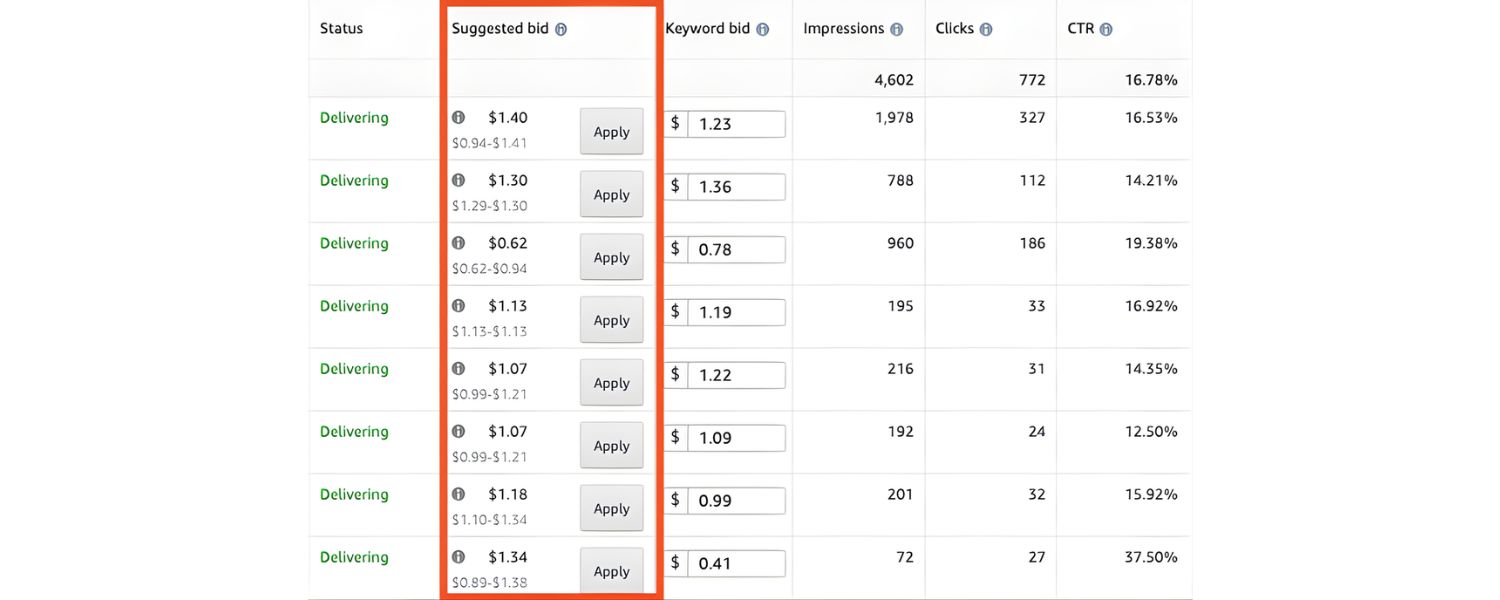
PLA success isn’t just about setting things up once, it requires ongoing strategy in how you segment your products and bid on them:
A. Bid by performance
Over time, check which products or categories are yielding the best return (e.g., cost per conversion or ROAS). You might find, for example, that your electronics have a lower profit margin so even though they get sales, the ROAS is weaker, whereas your accessories have a high ROAS.
Use product group segmentation to separate these and set higher bids on high-ROAS groups and lower bids on low-ROAS ones. This ensures you’re putting your budget where it makes the most money.
B. Use custom labels for bidding tiers
We mentioned custom labels in feed optimization; here’s how it helps in bidding. For instance, create a custom label for “MarginTier” and tag products as High, Medium, Low margin. In your campaign, subdivide by that label.
You can then set aggressive bids for high-margin items (since you can afford a higher CPC on them) and conservative bids for low-margin items. Similarly, you could label products by price range or popularity.
Maybe items above $500 have longer sales cycles, so you bid them differently than items under $50 which are impulse buys.
C. Time-based adjustments
Use the data from your campaign to adjust for time-of-day or day-of-week patterns. If you notice people tend to convert more on evenings and weekends for your store, you can apply ad schedule bid adjustments in Google Ads (e.g., +20% bids on weekends, -10% on weekday early mornings if those are slow).
This makes your ads more competitive during high-conversion periods and saves budget in low-conversion times.
D. Geo bid adjustments
If you sell internationally or across regions, monitor if certain locations perform better. Perhaps your PLA campaign gets fantastic ROI in California but poor in New York – maybe due to shipping times, local competition, etc.
You could then either increase bids for California or narrow targeting and create separate campaigns by region to manage budgets separately. At the very least, use location bid adjustments to fine-tune.
E. Experiment with Smart Bidding
Once you have sufficient conversion data (typically 20-30 conversions in the past month minimum), you might test Google’s automated bidding like Target ROAS or Maximize Conversion Value.
These strategies use Google’s machine learning to adjust bids in real-time for each auction, aiming to meet your ROAS goal or spend budget to get the most value.
Many advertisers see positive results with these, but they work best with a lot of data and when your goals are clearly defined. If you try an automated strategy, give it a couple of weeks to learn and compare performance to your manual approach.
F. Monitor the search query landscape
Consumer search behavior can change. Stay alert to trends – for example, if a new product or fad emerges in your industry, add it to relevant product titles or ensure you have a bid strategy to capitalize.
Also, watch for competitor moves – if a big competitor drastically drops prices, you might see your impression share drop; you then must decide if you want to raise bids or hold off until the price war passes.
The overall principle is granularity and responsiveness. The more you structure your campaign so that similar-performing products are grouped, the more effectively you can control and optimize bids.
And by responding to performance data (raising, lowering bids, or segmenting further), you’ll keep improving your results. PLA campaigns shouldn’t remain static – continuous refinement is the key to staying ahead of competitors.
8. Consider Using a Feed Management Tool (as You Scale)
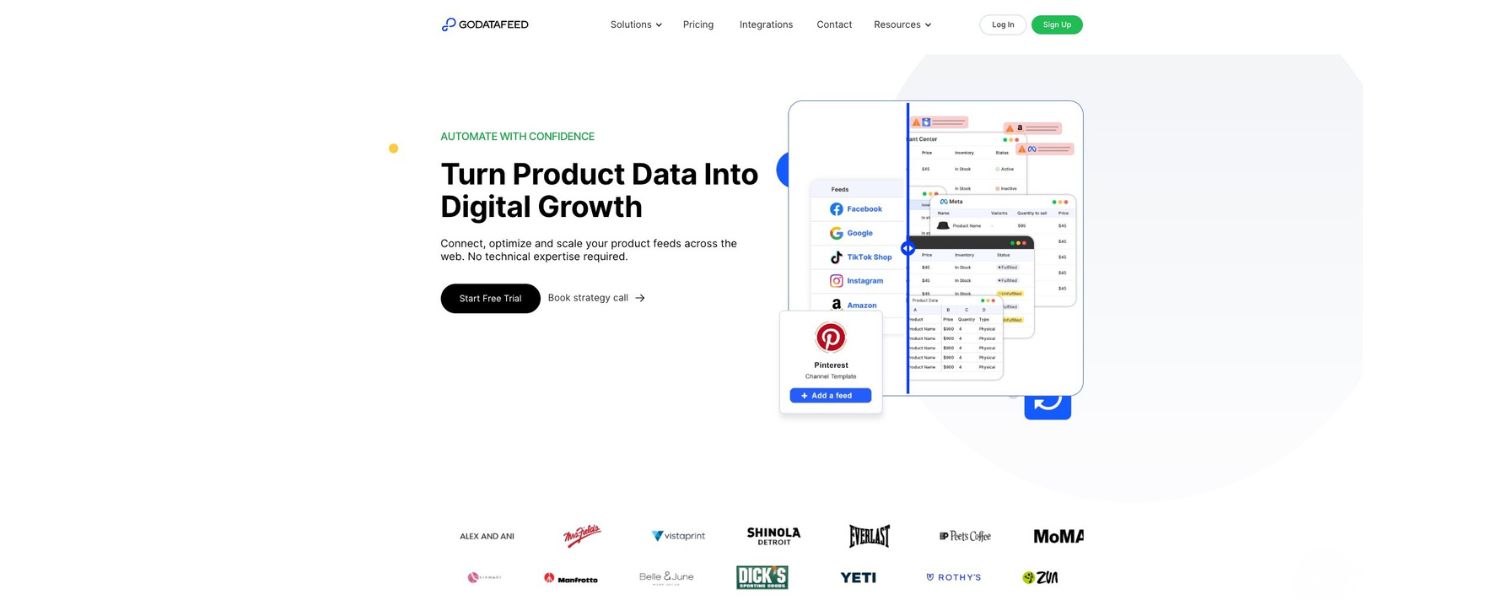
As your product catalog and campaigns grow, managing everything manually can become challenging. Feed management platforms (like DataFeedWatch, Feedonomics, etc.) or built-in store apps can greatly simplify PLA optimization:
A. Centralized feed control
These tools allow you to make bulk edits, transformations, and optimizations to your product data without altering your website. For example, you could use a rule to append certain keywords to all your product titles, or to create a custom label on the fly (like label all products over $1000 as “HighTicket”). This can save time and help you experiment with feed changes more easily.
B. A/B testing feeds
Some advanced advertisers even A/B test different versions of their product feed to see which generates better PLA performance (for instance, testing two title structures). Feed management tools often enable cloning and modifying feeds for such tests.
C. Multi-channel expansion
If you plan to advertise products on multiple platforms (Google, Bing, Facebook/Instagram, Amazon, etc.), a feed tool can syndicate and optimize the data according to each channel’s specs from one interface. This ensures consistency and reduces duplication of effort.
D. Error reduction
These platforms can automatically flag issues in your data and sometimes even correct them (e.g., missing category, or convert sizes to the format required, etc.). This proactive quality control keeps your feed healthy.
E. Agility in strategy
One marketing director noted, “It’s important to have better data than your competition. We utilize feed tools to be agile – testing different titles, descriptions, and custom fields to gain an edge.”
For example, imagine you have a product name on your site that’s artistic but not descriptive (“Winter’s Dawn” for a painting). In your feed, you might want to transform that title to “Winter’s Dawn – Abstract Landscape Painting by [Artist], 24×36 Canvas”.
A feed tool could automatically construct that from attributes (category, artist name, dimensions) each time, rather than you manually writing a unique title off-site.
F. 24/7 updates and support
Some feed management services also monitor your feed and make sure it’s updating as scheduled. They might alert you or fix it if, say, your feed fails to fetch. Many also offer support specialists who can help troubleshoot disapprovals or set up complex rules.
If you have a relatively small and static product line, you might not need an extra tool, Google’s native interface and maybe a spreadsheet might suffice.
But as you scale to hundreds or thousands of SKUs and want to squeeze every drop of performance out of PLAs, these tools can pay for themselves by increasing efficiency and sales. They let you focus on strategy (what to optimize) while they handle the heavy lifting of implementation.
9. Utilize Audience Targeting and Remarketing
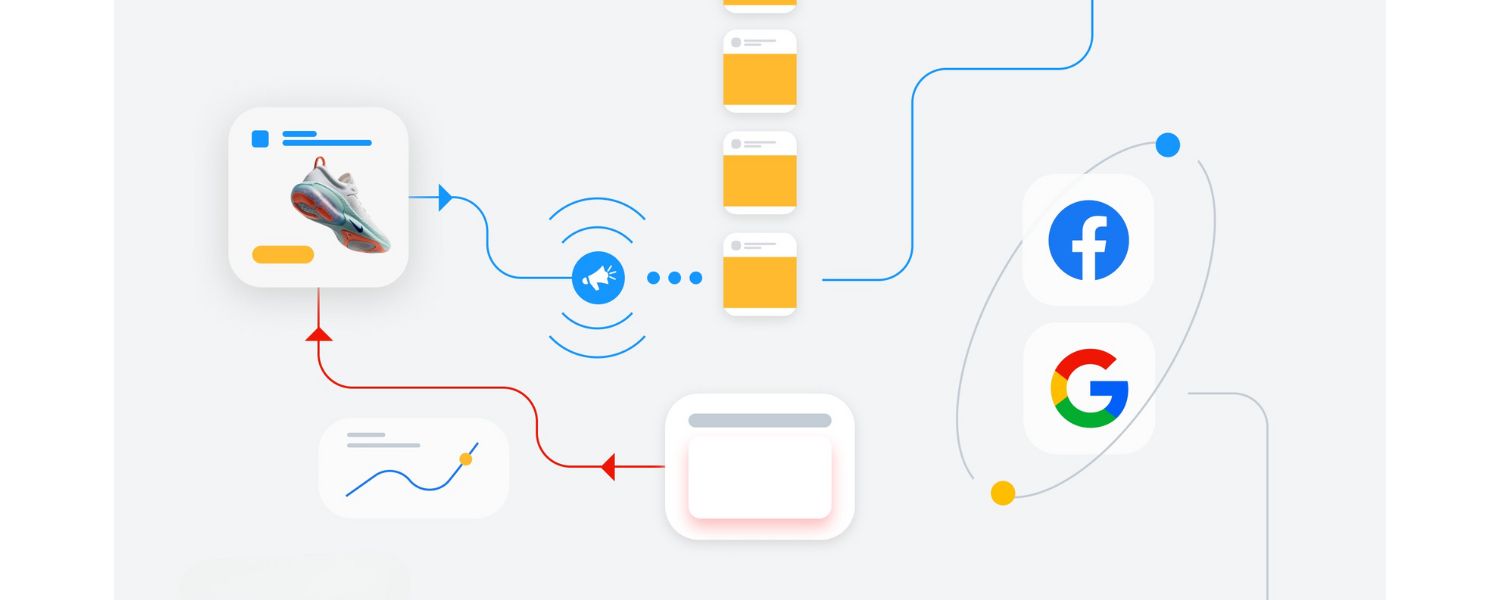
While Shopping campaigns don’t use audiences in the same way Search campaigns do, you can still layer on some audience strategies to boost PLA performance:
A. Remarketing Lists for Search Ads (RLSA)
Google allows you to apply remarketing audiences to Shopping campaigns as “bid only” targeting. This means you can bid higher for people who have visited your site before.
For example, you might increase bids by 30% for past website visitors or past customers, since they are more likely to convert (they already know your brand). Setting up RLSA on Shopping can give a nice uplift in ROI by re-engaging warm prospects.
B. Customer Match
If you have a list of customer emails (who consented to marketing), you can upload that to Google Ads as a Customer Match audience.
You could then increase bids for those users as well when they search (or even create a separate campaign just to target them with a higher bid, ensuring your PLA is very visible to your existing customers searching for related items).
C. Similar Audiences
Google can create “Similar to” audiences based on your converters. You can observe if those are available and potentially bid up if data suggests they perform well.
D. Seasonal audience strategies
During gift-buying seasons, you might employ demographic bid adjustments if relevant. For instance, if you sell women’s jewelry that is often bought by men as gifts, you might upweight bids for the male demographic near Valentine’s Day or Christmas. While not exactly an “audience” list, demographics can refine who sees your PLAs.
E. Dynamic remarketing ads
Separate from standard PLAs, consider running dynamic remarketing display ads in parallel. These use your Merchant Center feed to show ads (on the Google Display Network) to people who viewed products on your site but didn’t purchase, featuring the exact products they looked at.
This isn’t a Shopping campaign, but it leverages the same feed. It’s a powerful way to recapture those who clicked your PLA but left without buying, reminding them of the product across the web and perhaps bringing them back to convert.
Many retailers see high ROI on dynamic remarketing because it targets very hot leads (cart abandoners, etc.) with the product they showed interest in.
By combining audience data with your PLA strategy, you effectively double down on prospects who matter most, previous visitors, loyal customers, and those with higher intent.
This can increase conversion rates and allow you to allocate budget more efficiently (spending a bit more to secure a likely sale, and a bit less on completely cold traffic).
10. Keep an Eye on Analytics and Keep Improving
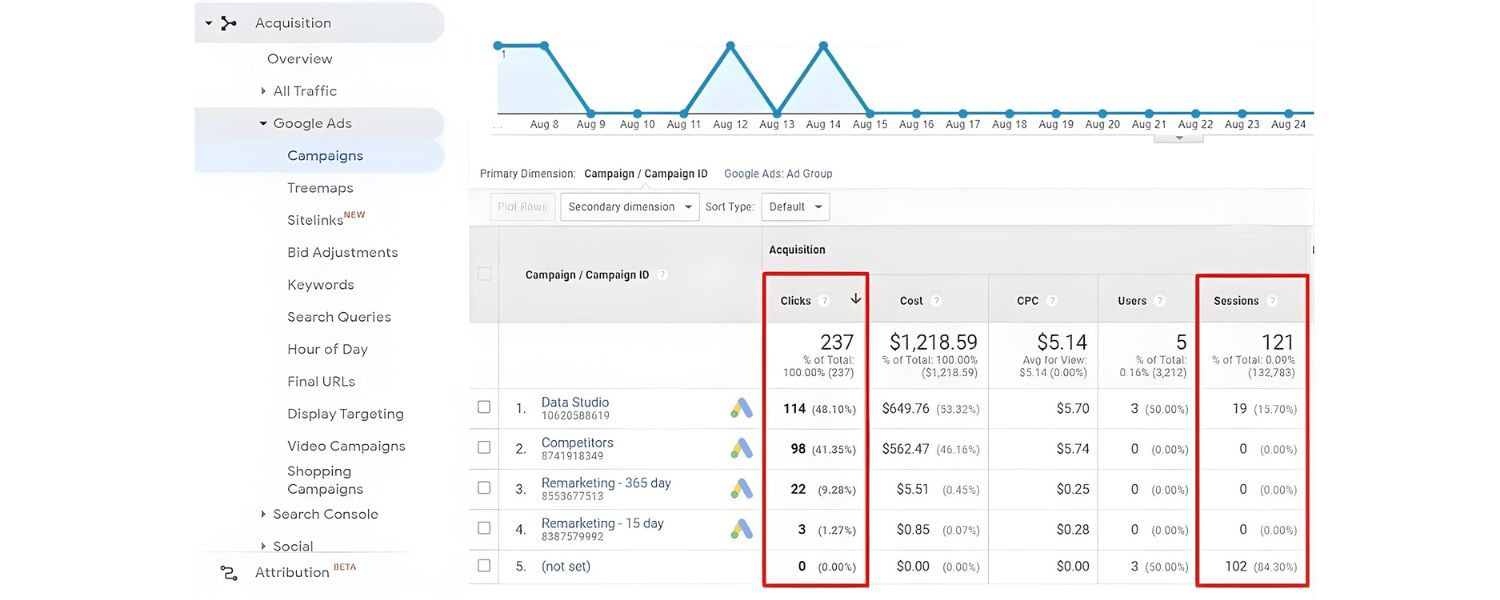
Finally, a general best practice: continuously analyze and iterate. PLAs offer a wealth of data, use it! Look at Google Analytics to see how PLA traffic behaves on your site: Which products have the highest bounce rate from PLA clicks? Maybe those need better landing pages or perhaps their ad was misleading. Which have the highest conversion rate? Can you funnel more traffic to those by raising bids?
Set aside time weekly or monthly to review performance at a granular level. For example:
A. Check your Impression Share in Google Ads
are you losing impression share due to budget or rank? If due to budget and the campaign is profitable, you might scale up budget. If due to rank (ad rank), perhaps your bids are too low or your feed relevance could improve.
B. Look at Device performance
maybe mobile PLA traffic converts lower than desktop. If so, is your mobile site experience okay? Or should you bid down on mobile a bit?
Ensure your site is mobile-friendly since a large chunk of PLA clicks will be on mobile devices (shopping on phones is huge, more than half of Google searches are mobile).
C. Analyze Assisted conversions in Analytics
sometimes PLA clicks assist a later conversion (maybe the customer needed to think or compare). Understanding the broader journey can justify investment in PLAs beyond last-click attribution.
D. Keep exploring new features
Google often introduces new formats or options, like Showcase Ads, local inventory enhancements, etc. Staying updated via Google’s announcements or industry blogs will keep you ahead.
For instance, if Google rolls out a beta for showing 3D images or something in PLAs, early adopters could reap benefits.
In essence, the motto is “launch, learn, optimize, repeat.” The PLA landscape is dynamic, competitor prices change, new entrants come in, consumer search trends evolve.
By staying vigilant and adapting your campaigns, you’ll ensure that your product listing ads continue to deliver stellar results and growth for your business.
Product Listing Ads FAQ
Q1: What makes Product Listing Ads different from regular Google text ads?
Product Listing Ads are visually-driven ads that display a product image along with its price, title, and store name directly in the search results.
Unlike text ads, PLAs don’t have ad copy that you write; instead, they pull information from your product data feed. Another key difference is targeting, standard ads use keywords you bid on, whereas PLAs are triggered automatically by matching users’ search queries to the product info in your feed.
In short, PLAs are all about showcasing specific products with rich visuals and details, making them more engaging for shoppers looking to buy, while text ads are a textual call-to-action better suited for general offers or services.
Q2: How do I set up Product Listing Ads for my online store?
To set up PLAs, you’ll need to follow a few steps: First, prepare a product feed (a file listing all your products with their details). Next, create a Google Merchant Center account and upload your feed there – this is where Google will verify and store your product information.
Then, link Merchant Center to your Google Ads account. In Google Ads, create a new Shopping campaign (choose the Shopping campaign type). Set your target country, budget, and bidding strategy, and then define your product groups (you can start with All Products or segment by category/brand etc.).
Once that’s done, launch the campaign. Google will use your feed to generate the product ads and show them on relevant searches. Remember to monitor the campaign and optimize (adjust bids, fix feed errors, add negative keywords) as it runs for best results.
Q3: What are some best practices for optimizing my PLAs and improving performance?
There are several proven tactics to get the most out of Product Listing Ads:
A. Ensure high-quality data
Optimize your product titles and descriptions with relevant keywords, use clear, high-resolution images, and keep your prices and availability updated. The more accurate and detailed your feed, the better Google can match your products to shoppers’ searches.
B. Use competitive pricing and promotions
PLAs appear alongside other retailers, so competitive pricing helps. Consider adding promotions (like discounts or free shipping) via Merchant Center, a special offer can entice more clicks.
C. Leverage negative keywords
Even though you don’t bid on keywords, you should add negative keywords in your Shopping campaign to prevent your ads from showing on irrelevant searches. This saves budget and focuses your ads on high-intent queries.
D. Segment and bid strategically
Group your products (by category, margin, etc.) so you can bid more on your top sellers or higher-margin items and less on low performers. Adjust bids based on performance data – for example, increase bids for products with strong conversion rates, and decrease for those with weak results.
E. Monitor and refine regularly
Continuously check your search term reports, impression share, and conversion metrics. PLA campaigns benefit from active management, update your feed with new keywords, try different images if possible, and keep improving titles/descriptions based on what search terms shoppers use.
Q4: Are Product Listing Ads worth the investment for my business?
For most ecommerce businesses, yes, Product Listing Ads are absolutely worth it. They often deliver a high return on investment because they attract customers who have strong buying intent.
Shoppers using search are usually comparing products or looking for specific items, and PLAs put your offerings right in front of them. The format pre-qualifies leads (since people see the price and product before clicking), which tends to yield higher conversion rates. Many advertisers find that PLAs become one of their top sales-driving channels.
In fact, Google’s economic impact analysis has noted that businesses generally see a robust return (for example, roughly $8 in sales for every $1 spent on ads, on average).
Of course, success with PLAs depends on doing them right, you need competitive prices, good products, and solid campaign management. If you set up and optimize your PLAs diligently, they can become a consistent engine of traffic and revenue for your online store.
Conclusion and Call to Action
Product Listing Ads have transformed the way online retailers reach customers, combining the power of search intent with the allure of rich visuals.
By now, you should have a clear understanding of how PLAs can elevate your ecommerce marketing: they put your products at the top of search results, attract more qualified shoppers, and drive higher click-through and conversion rates.
We’ve covered how to set up your campaigns step-by-step and gone through best practices ranging from data feed optimization to bidding strategies and beyond.
The next step is up to you: put this knowledge into action. If you haven’t already, start by preparing your product feed and creating your first Google Shopping campaign.
Even if you begin with a small budget and a few products, you can gather valuable data and scale up as you see results.
Remember to continuously refine your approach – the digital marketplace is dynamic, and keeping a competitive edge means staying proactive with updates and optimizations.
With careful attention and ongoing tweaks, PLAs can become a cornerstone of your sales growth. They allow you to meet customers at the very moment they’re searching for what you offer, giving you a golden opportunity to win their business.
As an expert with 25 years in marketing would tell you: success in this space comes from testing, learning, and iterating. So launch those product ads, monitor closely, and fine-tune relentlessly.
Ready to boost your ecommerce sales with Product Listing Ads? There’s no better time to start than now. Implement the strategies discussed in this guide and watch as your products gain more visibility, your website traffic increases with high-quality shoppers, and your revenue climbs.
By mastering PLAs, you’re not just keeping up with the competition, you’re positioning your business at the forefront of shoppers’ minds. Happy selling, and best of luck with your product listing ad campaigns!

.png)
Shopify SEO: Guide to Ranking Your Store and Driving Sales
Most Shopify store owners set up their store, list their...

Content Marketing : Definitive Guide to Strategy, Content Types, and Measurable ROI
Content marketing generates 3x more leads than outbound marketing at...

Above the Fold: Guide to Conversions, Rankings and Faster Pages
Above the Fold in 2026: The Complete Guide to Conversions,...

Off-Page SEO Checklist: Guide to Building Real Authority
Most websites spend months creating great content, only to wonder...

What Is Keyword Bidding? The Complete Strategy Guide for Smarter Ad Spend
Most advertisers believe the highest bid wins the auction. It...

What Is Google Trends? The 2026 Marketer’s Complete Guide
If you are not already pulling weekly insights from Google...
If you want a growth partner who will get to know every aspect of your business and treat your budget like their own — we are the right fit.
.png)


.png)
.png)
.png)
.png)
.png)
.png)
2026 ALL RIGHTS RESERVED MADE IN INDIA
