
UX and SEO: How User Experience Impacts Search Rankings
September 4, 2025
Introduction
If you’ve ever clicked a top Google result only to leave the site within seconds, you’ve witnessed how poor user experience can undermine even the best SEO efforts. In today’s digital landscape, user experience (UX) and search engine optimization (SEO) are deeply interconnected.
Both aim to give people what they’re looking for in a fast, easy, and enjoyable way. In fact, Google’s own leaked documents (March 2024) revealed numerous UX elements that may directly influence search rankings.
Simply put, good SEO isn’t just about keywords and code – it’s also about providing a great experience for your visitors. This blog explores the powerful relationship between UX and SEO, and how you can optimize your website for both high search visibility and happy users.
UX vs SEO: Different Roles, Shared Goal
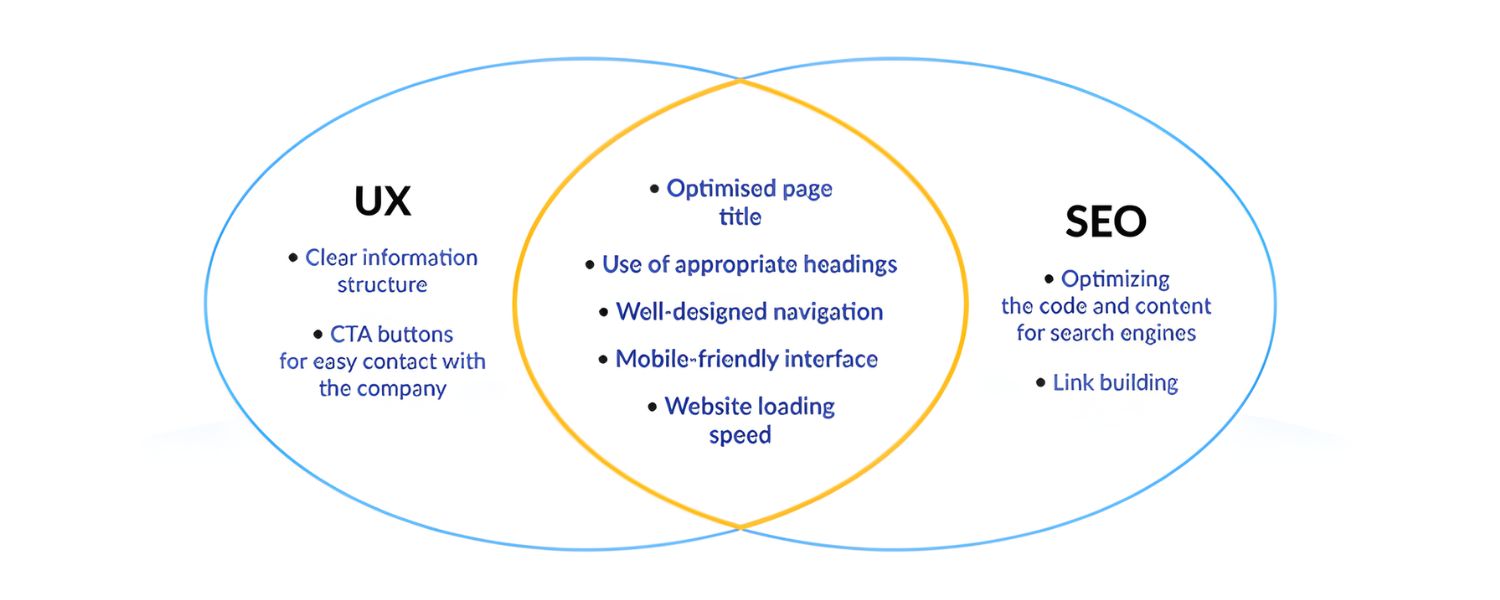
SEO focuses on making your website visible on search engines – through techniques like keyword optimization, quality content, and technical tweaks – so that people can find you. UX focuses on what happens after those people land on your site – ensuring their journey is smooth, engaging, and fruitful.
At first glance, UX and SEO seem like separate disciplines, but they actually share a common goal: user satisfaction. Search engines want to deliver results that searchers love, so if your site delights users (with useful content, easy navigation, fast loading, etc.), it sends positive signals to Google.
Conversely, if visitors get frustrated and leave quickly, it signals a poor experience – and even top rankings can slip as a result. In essence, SEO brings the audience to your door, and UX keeps them engaged once they arrive.
Modern search algorithms factor in user engagement metrics as proxies for UX quality. For example, if a page has a high bounce rate (users leaving immediately) or very short dwell time, it indicates the content or usability didn’t meet expectations – hurting that page’s ability to rank.
Google’s algorithm watches how users interact with results: “If the algorithms notice that users tend to leave within a few seconds, that website will quickly lose favor” in rankings. This is why SEO and UX are inseparable in practice.
Some experts even use the term Search Experience Optimization (SXO) to describe a holistic approach that combines UX and SEO – essentially acknowledging that “true SEO is rooted in delivering a strong, user-centered experience”. In short, good UX is good SEO, and sites that prioritize both will attract visitors and keep them coming back.
How UX Influences SEO Performance
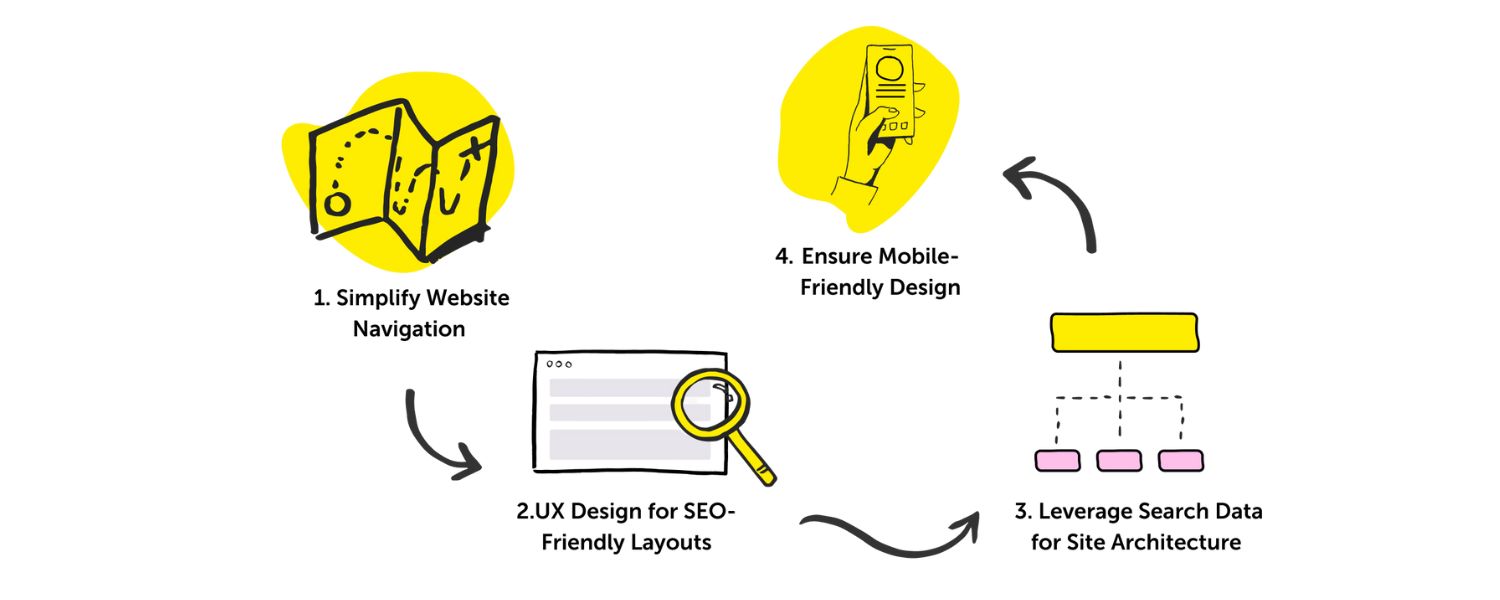
User experience now directly impacts search performance more than ever. Google has openly incorporated UX-centric criteria into its ranking algorithms. Notably, the Google Page Experience Update (fully rolled out in 2021) introduced new ranking signals that go beyond traditional SEO factors.
This update includes metrics like Core Web Vitals (which measure page loading speed, interactivity, and visual stability) and guidelines against intrusive pop-ups and other annoying elements.
Websites that offer a poor UX – for example, slow-loading pages, non-mobile-friendly layouts, or obnoxious interstitial ads – saw negative impacts on their rankings after this update.
Google essentially confirmed what ethical marketers long suspected: focusing on UX isn’t just nice for users, it’s necessary for SEO success.
Backing this up, research from Google’s Chromium team showed that improving UX can dramatically benefit your site’s performance. According to Google’s data, enhancing user experience can reduce site abandonment by up to 24% and increase page views per session by 15%.
Those are exactly the kind of positive user-engagement signals that search algorithms love to reward. Additionally, businesses see direct advantages: conversions improve and revenue climbs when UX is a priority.
It’s no wonder experts say prioritizing UX is “the linchpin distinguishing between a successful and a failing product” – and that extends to your website’s success in search rankings.
On the flip side, neglecting UX can undermine SEO even if you’ve done everything else right. Imagine a site that technically ranks well (thanks to good keywords and backlinks) but frustrates users with confusing navigation or walls of hard-to-read text.
Many of those visitors will hit the “back” button and choose another search result, which in turn tells Google that the page might not be a great answer after all.
As Search Engine Land puts it, “neglecting user experience could undermine success even with good SEO”. In summary, Google wants to rank websites that searchers enjoy using. By improving UX, you not only satisfy your human audience but also align with what the search algorithms are looking for.
Key UX Factors That Impact SEO
So, what aspects of user experience matter most for SEO? Let’s explore the key UX factors that influence your search rankings, and how to get them right:
1. Page Speed and Core Web Vitals
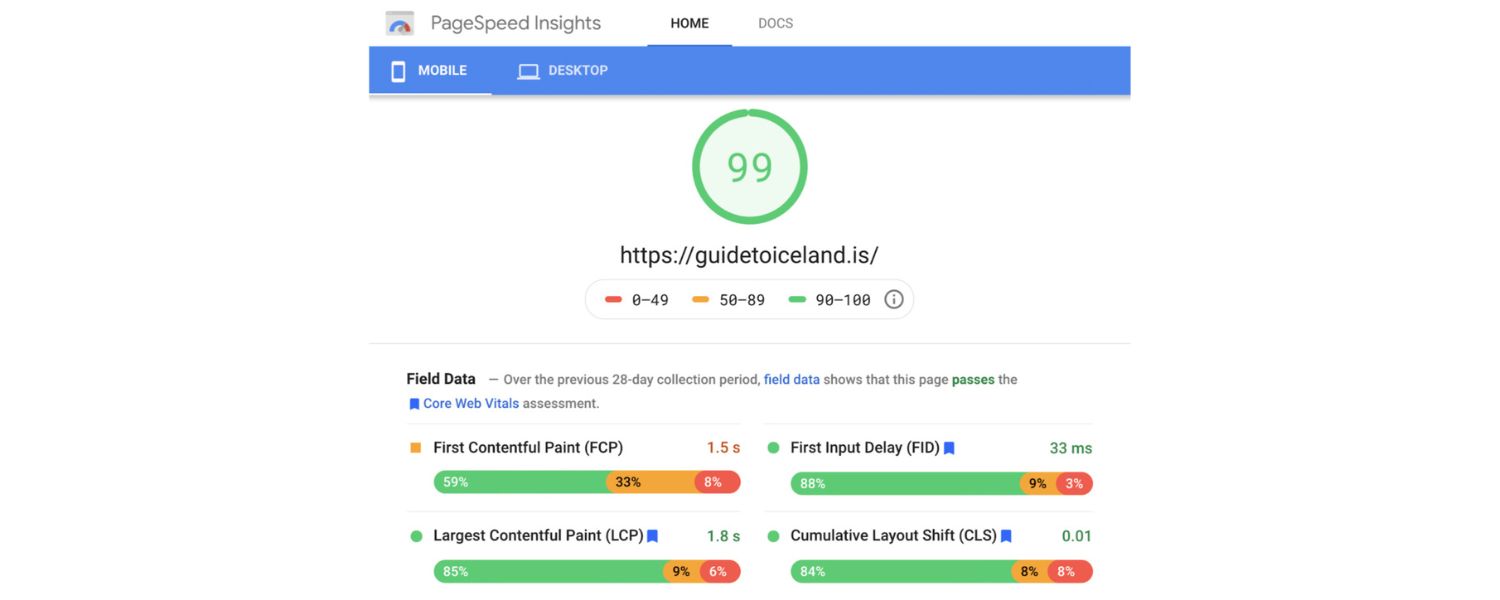
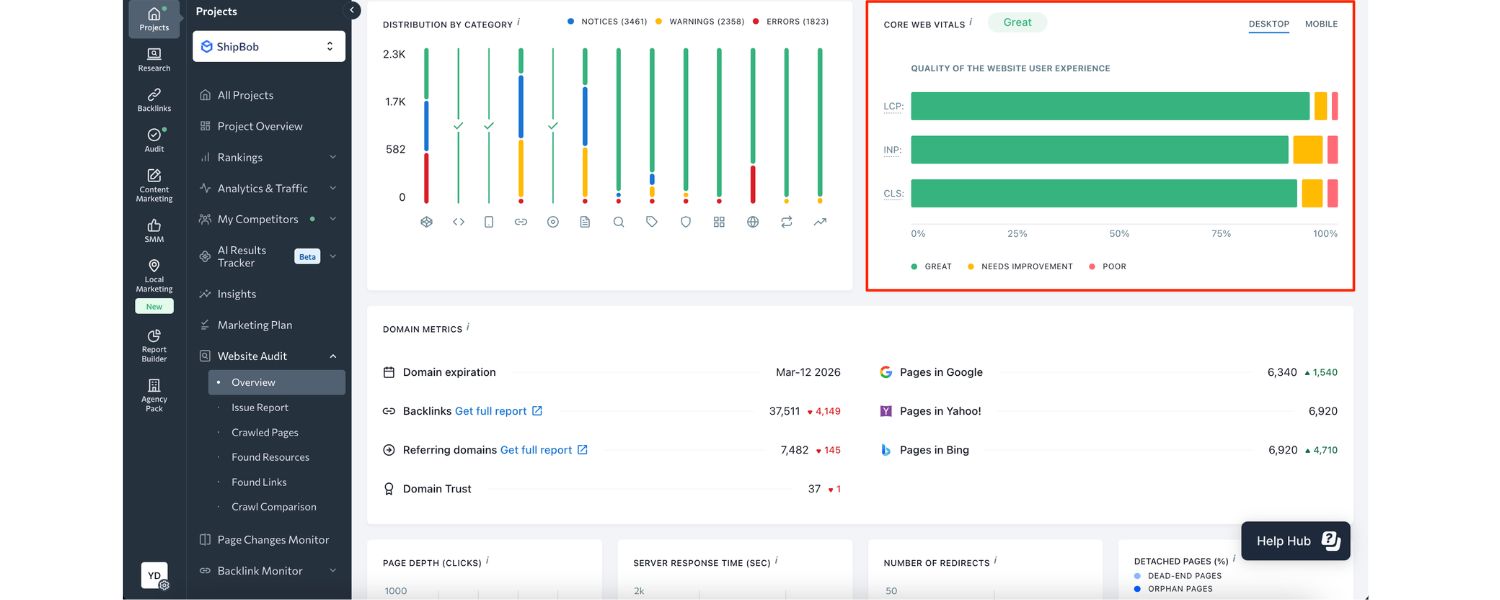
Fast-loading pages are crucial – both for keeping users happy and for ranking high on Google. Page speed has been a confirmed Google ranking factor for years, and now the focus is on Core Web Vitals (CWV) metrics like Largest Contentful Paint (loading speed), Interaction to Next Paint (interactivity), and Cumulative Layout Shift (visual stability).
In general, aim for your pages to load in 2.5 seconds or less on typical connections. Slow sites frustrate users – studies show many will abandon a page that takes too long to load. Google recognizes this: a sluggish site will not only drive visitors away but also likely suffer in SEO. Low CWV scores lead to higher bounce rates and lower rankings.
Optimization tips: To boost page speed, follow best practices like compressing and properly sizing images, minifying CSS/JS code, leveraging browser caching, and using fast hosting. Ensure you’re not sacrificing speed for the sake of flashy design elements.
For example, huge unoptimized images or autoplay videos might look impressive, but if they slow your site to a crawl, they’ll hurt more than help. Use tools like Google’s PageSpeed Insights or Search Console’s Core Web Vitals report to identify performance issues on your site.
By making pages snappy and stable, you improve UX and send positive quality signals to search engines. Remember, Google is increasingly evaluating page experience based on Core Web Vitals, so speed and technical performance are foundational to SEO.
2. Mobile-Friendliness and Responsive Design

With the majority of web traffic now coming from mobile devices, a good mobile UX is non-negotiable. In fact, as of early 2025, mobile devices drive about 62% of global website visits.
Google has switched to mobile-first indexing, meaning it predominantly uses your site’s mobile version for ranking and indexing. If your site isn’t mobile-friendly – if users have to pinch-zoom, horizontal scroll, or encounter broken layouts – it will not only irritate visitors but also lose favor in search results.
Google explicitly recommends responsive web design to ensure a smooth experience across all devices. Even if responsiveness itself weren’t a direct ranking factor, it correlates with better engagement from mobile users, which in turn affects SEO.
Optimization tips: Adopt a responsive design that automatically adapts to different screen sizes. Make sure text is readable without zoom, buttons and links are adequately large and spaced (to avoid “fat finger” taps), and content doesn’t overflow off the screen.
Avoid using formats or plugins that don’t work on mobile. Also, be cautious with pop-ups or interstitials on mobile – a banner that’s merely annoying on desktop can be a full-blown rage trigger on a phone. (Google’s page experience criteria specifically flags intrusive interstitials as a negative factor.)
Test your pages with Google’s Mobile-Friendly Test tool or simply on various devices to ensure a seamless experience. A mobile-optimized site not only pleases users but can give you a ranking advantage on mobile search results. In short, prioritize mobile UX – both your audience and Google’s crawlers expect it.
3. Clear Navigation and Site Structure
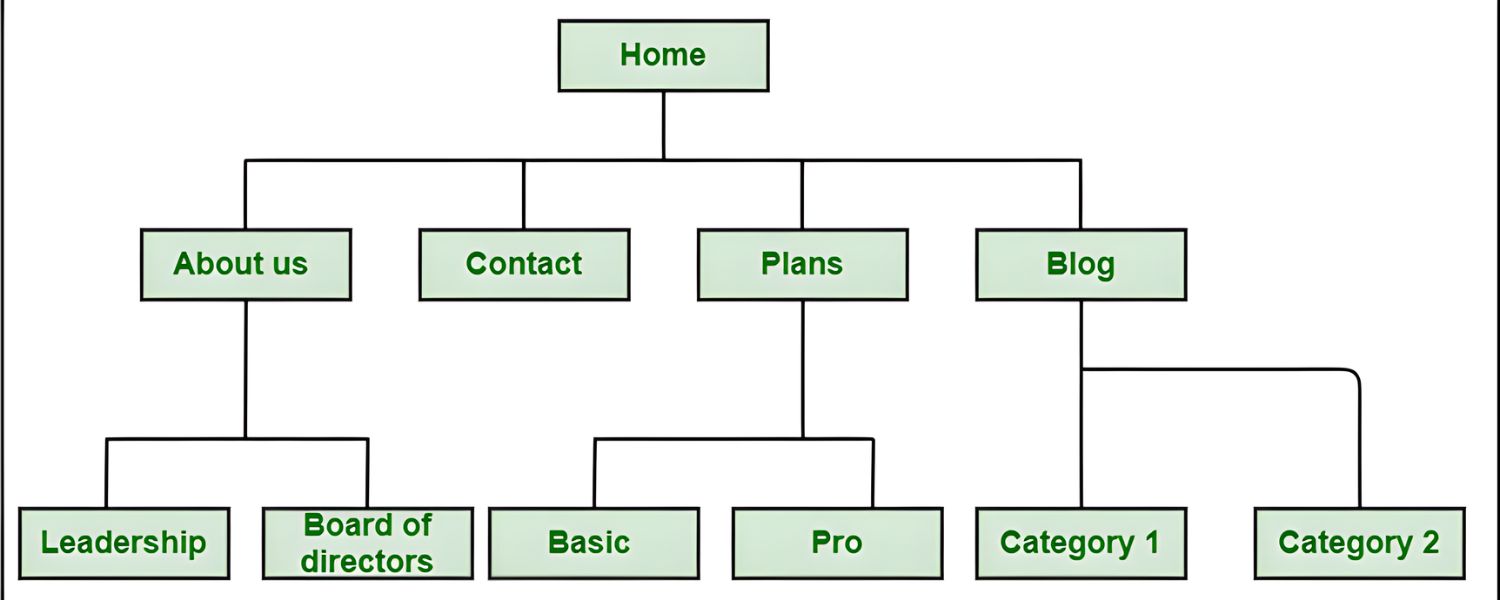
Your website’s navigation and structure are critical components of UX that also carry significant SEO weight. When users arrive on your site, they should instantly understand how to find what they need.
Confusing menus or disorganized content will send visitors away in frustration – and those short visits (bounces) can hurt your rankings. On the flip side, a well-structured site creates a logical path for users and helps search engine bots crawl your pages efficiently.
In fact, 94% of people say that easy navigation is one of the most important website features. That’s a huge majority who won’t tolerate poor UX in this area.
Optimization tips: Design your site with a clear, intuitive hierarchy. From the homepage, it should only take a few clicks to reach any other page (ideally no more than 3–4 clicks deep).
Use descriptive labels for menu items and organize content into logical categories. Internally link related pages so that users (and Google’s crawlers) can discover more of your content easily. For example, if you run a plant care blog, grouping articles by plant type or topic with obvious menu headings will outperform a jumbled list of posts.
Flat site architecture (broad rather than excessively deep) tends to work best for UX and SEO – it ensures important pages aren’t buried and distributes “link equity” more evenly.
Also, include a clear navigation bar and footer links for key sections so users never hit a dead end. Remember, simplicity and clarity are your friends: a straightforward menu and well-organized content not only improve usability but also signal to Google that your site is user-friendly and authoritative on its topics.
4. Content Relevance and Readability

Content is at the heart of both UX and SEO. From an SEO perspective, your content needs to match what users are searching for – satisfying search intent – and provide real value. From a UX perspective, that content must be presented in a clear, engaging way that’s easy to consume.
These go hand-in-hand: when your page delivers exactly the information or solution a visitor wanted, they’ll stay longer, engage more, maybe even convert or share the content.
These positive user behaviors send strong signals to Google that your page is worth ranking highly. Thus, high-quality, relevant content is a cornerstone of great UX and great SEO.
Optimization tips: Research what your target users are truly looking for when they search your primary keywords (consider the questions they have or problems they need solved).
Then ensure your content directly addresses those needs. Provide comprehensive, up-to-date information in a way that’s easy to read. Use clear headings and subheadings (structured with proper HTML tags) so readers and search engines can scan your content hierarchy.
Break text into short paragraphs – large walls of text are intimidating and hard to follow. Incorporate bullet points, numbered lists, or tables for digestible facts or steps. Use plain language whenever possible (unless a highly technical audience expects otherwise), so that your content is accessible to a broad audience.
Tools and techniques like readability checks (e.g., aiming for an ~8th-grade reading level for general content) can help ensure you’re not alienating readers with jargon or convoluted sentences.
Also, include relevant visuals (images, diagrams, charts) with descriptive captions to enrich the content – these can improve understanding and keep users engaged longer.
Another key aspect is search intent alignment: there are different types of intent (informational, navigational, commercial, transactional). Make sure the format and depth of your content match what the user likely wants.
For instance, if someone searches “UX vs SEO,” they probably want a comparative explanation (informational), so a blog post like this with clear headings is ideal. But someone searching “UX SEO agency” might be looking for a service (commercial intent), in which case a landing page addressing that query is more appropriate.
When your content meets users’ expectations, they’re more likely to stay, which improves metrics like dwell time and reduces bounce rate – all beneficial for SEO. In summary, serve your users first with excellent content.
By doing so, you’ll naturally incorporate many SEO best practices (relevance, semantic keywords, engagement) without resorting to old-school tricks like keyword stuffing (which hurts UX and doesn’t fool Google today).
5. UI Design and Visual Appeal

While search engines don’t “see” a website’s aesthetic the way humans do, your site’s user interface (UI) design can indirectly affect SEO through its impact on user engagement.
A clean, attractive design with a cohesive look and feel builds trust and encourages visitors to explore further. On the other hand, if your site is cluttered, outdated, or just plain ugly, new visitors might bounce immediately out of sheer discomfort.
As UX experts often note, users form an opinion about your website’s credibility in seconds based on its design and usability. First impressions count, and a polished UI can make users more willing to stay and interact.
Google’s algorithms pick up on these patterns – if users consistently exit your site quickly to choose a different search result, it can lead to lower rankings over time.
Optimization tips: Aim for a visually appealing, user-friendly design that aligns with your brand and makes content easy to consume. This includes using legible typography (adequate font sizes, readable fonts, good contrast), a pleasant color scheme, and appropriate use of white space to avoid overwhelming the user.
Ensure your layout highlights important content and calls-to-action (CTAs) clearly. For example, a signup button or critical link shouldn’t be hiding in tiny text or clashing colors – make it prominent.
Also, design for consistency and familiarity: place navigation menus where users expect them (e.g., header or sidebar), use standard icons and labels, and maintain consistency in styles across pages.
These UI practices reduce the “cognitive load” on users, meaning they don’t have to work hard to find or understand things – resulting in a smoother experience.
Don’t sacrifice usability for beauty. Fancy graphics or interactive elements should enhance the experience, not hinder it. An overdesigned site (think: too many pop-ups, animations, or a non-standard interface that confuses people) can backfire by frustrating users.
Remember that UX and UI go hand-in-hand: good UI supports the user journey that UX design has mapped out. For instance, a visually striking homepage is useless if it’s not also clear what the user should do next. Strive for a balance where your site is both attractive and intuitively usable.
By doing so, you encourage visitors to stick around, which improves dwell time and signals to search engines that people find your site valuable. In essence, design for humans, not algorithms – the positive SEO impact will follow naturally.
6. Accessibility and Inclusive Design

An often overlooked aspect of UX is web accessibility – ensuring that people of all abilities and disabilities can use your site. This includes users who rely on screen readers or keyboard navigation, users with visual impairments, cognitive differences, etc.
An accessible site not only widens your potential audience (a win for traffic and conversions) but also aligns with SEO best practices. For example, providing alt text for images isn’t just an accessibility requirement; it also helps search engines understand your images, potentially boosting your visibility in image searches.
Similarly, using proper semantic HTML (like heading tags, lists, ARIA labels where needed) makes your site more machine-readable, benefiting both assistive technologies and search crawlers. Google has indicated that accessibility improvements often go hand in hand with SEO improvements – because both are about making content easier to consume.
Optimization tips: Follow accessibility guidelines such as the WCAG standards. Some key practices include: ensuring sufficient color contrast for text, using legible font sizes, making all interactive elements (buttons, links, form fields) reachable via keyboard (for those who can’t use a mouse), and providing captions or transcripts for multimedia content.
Structure your HTML document outline with meaningful headings (H1, H2, H3 in order) so both users and bots can navigate the content structure logically. When you build forms, add clear labels and error messages that guide users.
Not only do these steps create a better experience for users with disabilities, but they often improve the overall UX for everyone. For instance, a well-structured, accessible page is typically more organized and easier to navigate (which benefits impatient users and Google’s index).
By making your site inclusive, you demonstrate a focus on quality that search engines aim to reward. Accessible design is good design, which in turn is good SEO.
7. User Engagement Signals
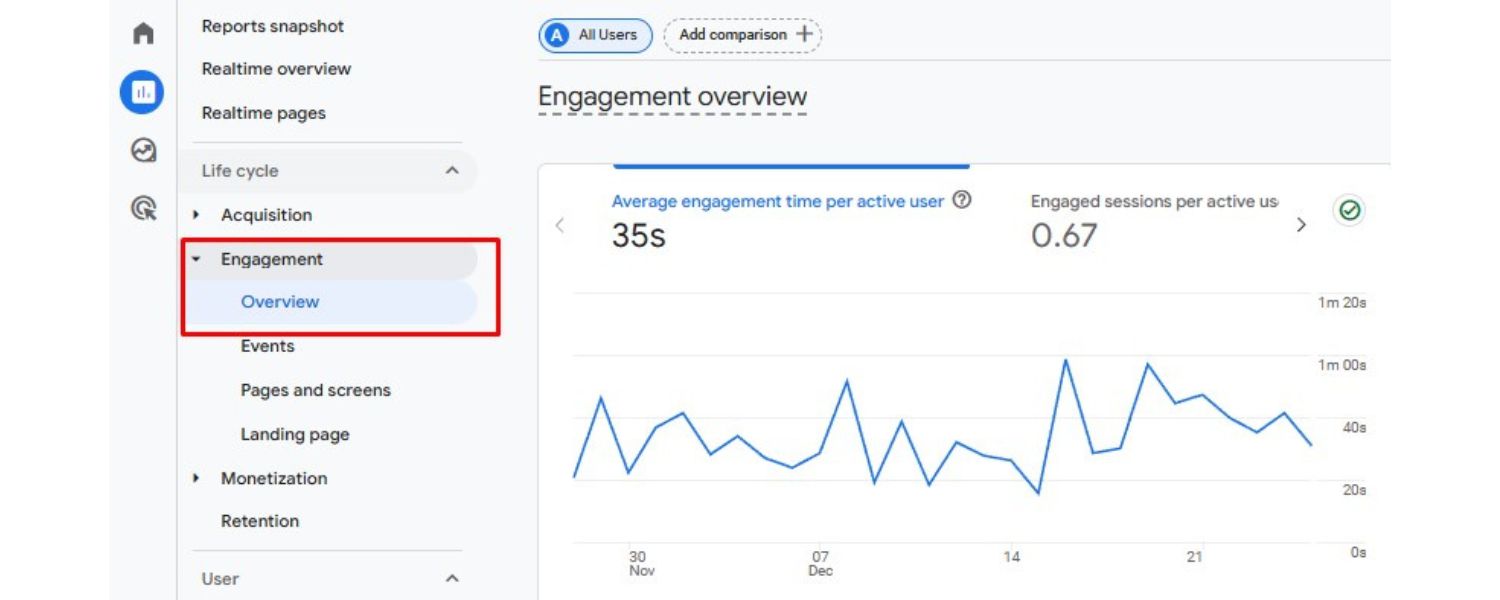
Ultimately, many UX factors manifest in measurable user engagement signals – metrics that hint at how satisfied users are with your page. These include bounce rate, dwell time (how long someone stays on a page after coming from search), pages per session, and conversion rates, among others.
While not all of these are direct ranking factors, they often correlate with ranking performance. For example, a significantly high bounce rate on a particular page can indicate to Google that the page didn’t give the user what they wanted, especially if it’s much higher than other pages targeting similar queries.
Google’s RankBrain and other machine-learning components of the algorithm do evaluate how users interact with results as a way to refine rankings over time.
As one UX-focused SEO guide put it, a positive user experience – fast loading, easy navigation, helpful content – “can help reduce bounce rates and increase dwell time,” which search algorithms interpret as indicators of a high-quality site.
Optimization tips: Keep an eye on these engagement metrics using tools like Google Analytics. If you notice certain pages have short average time-on-page or high bounce rates relative to others, investigate why.
Is the content off-mark for the intended keyword? Is the page slow or buggy? Does it lack a clear call-to-action to invite further browsing? Use heatmaps or user session recordings (via tools like Hotjar or Microsoft Clarity) to see where users might be getting confused or frustrated.
Sometimes small UX tweaks – such as making a CTA button more prominent, or splitting a long article with a table of contents for easier jumping – can improve engagement metrics. Also, consider adding internal links or suggested next steps at the end of your content to encourage users to continue browsing instead of exiting.
For instance, a blog post on “UX and SEO” could end with links to related topics like “Improving Page Speed” or “Content Writing for SEO,” giving interested readers a reason to stay on your site. Engaged users consuming multiple pages send very favorable signals to search engines about your site’s value.
Lastly, remember that not every engagement metric is universally applicable – for example, a one-page visit isn’t “bad” if the user found exactly what they needed (they may have no need to click further).
Google is smart enough to consider context (a user spending 5 minutes on one page and leaving might be very satisfied). So, use these metrics as guides, not absolute goals.
The key is to focus on serving the user: if you improve aspects of UX and content and see engagement improve, you’re on the right track. Those improvements will likely correlate with better search performance over time, because happy users make for a happy Google.
Balancing SEO and UX: No Need to Choose Sides
In the past, some webmasters fell into the trap of thinking they had to choose between pleasing the search algorithms or pleasing their users. This led to extremes – like “SEO-optimized” pages stuffed with keywords and footer links that felt spammy to humans, or conversely, beautiful image-heavy sites that lacked any crawlable text or logical structure for Google.
Today, there is no real tension when you follow best practices: the highest-ranking sites tend to be the ones delivering the best user experience. Google’s own mission is to organize information and serve users the most useful results – so it makes sense that their algorithms heavily reward UX-friendly qualities.
That said, conflicts can still arise in execution. For example, a designer might prefer a minimalistic homepage with almost no text, while an SEO strategist might worry that Google won’t understand what the site is about without textual content.
Or an SEO might want to interlink every related page, while excessive links could overwhelm users. The key is to find a strategic balance – a middle ground where you satisfy both requirements.
Often, the solution is creativity and testing: can you incorporate keywords into engaging copy that fits the elegant design? Can you use collapsible sections or tabs to include more content without cluttering the UI? Can you optimize images and code so you can have rich visuals and fast pages?
In most cases, you can strike a harmony with thoughtful tweaks. In fact, many techniques that enhance UX (like clear headers, bullet lists, descriptive link text) are also SEO-friendly because they make content structure clear.
And many SEO fundamentals (like having descriptive <title> tags or straightforward URLs) are invisible to users and won’t harm design at all.
The best approach is to integrate UX and SEO considerations from the start of any web project. Collaboration between designers, developers, and SEO specialists early on can prevent most trade-off dilemmas.
When everyone’s working toward the shared goal of a user-centered, findable website, you’ll make choices that check both boxes. As one 25-year marketing veteran might say: SEO is not about gaming algorithms, it’s about understanding your audience and then optimizing your site to serve them better than anyone else.
That naturally includes stellar UX. So rather than “UX vs SEO,” think UX and SEO – together. This holistic mindset (sometimes labeled “holistic SEO” or SXO) is essentially just good digital strategy By aligning human needs with search engine guidelines, you ensure your site not only ranks high but also delivers value, which is the sustainable path to online success.
Conclusion: User Experience is the Heart of SEO
In summary, UX and SEO are two sides of the same coin when it comes to building a successful website. SEO brings visitors to your site, but UX keeps them there and turns them into satisfied readers, customers, or fans.
A fast, mobile-friendly site with clear navigation, quality content, and appealing design will not only delight your users but also send all the right signals to search engines for higher rankings.
On the other hand, a site that ignores user experience – whether through slow speeds, poor layout, or irrelevant content – will struggle to maintain its search visibility in the long run, no matter how much you tweak keywords or build links.
The big takeaway is that search algorithms increasingly reward the same things that please your users. Google’s own reps and many SEO experts have reiterated that focusing on the user ultimately means you’re focusing on the right SEO factors, too.
So, as you work on your website, always ask: “Is this the best experience I can offer to my audience?” If you prioritize their needs – quick answers, easy navigation, helpful content, enjoyable design – you’ll naturally be hitting the SEO sweet spots as well.
Finally, don’t be afraid to continually test and refine both your UX and SEO strategies. User expectations evolve, and search engine algorithms update – but the core principle of putting users first remains constant.
By keeping an eye on UX metrics and SEO performance together, you can spot opportunities to improve. Perhaps a UX survey reveals confusion on a page, leading you to simplify it – which then improves dwell time and SEO.
Or analytics might show an important page isn’t getting traffic, prompting an SEO update that also involves making the content more comprehensive and useful. In this way, SEO and UX feed into each other in a virtuous cycle of improvement.

.png)
Shopify SEO: Guide to Ranking Your Store and Driving Sales
Most Shopify store owners set up their store, list their...

Content Marketing : Definitive Guide to Strategy, Content Types, and Measurable ROI
Content marketing generates 3x more leads than outbound marketing at...

Above the Fold: Guide to Conversions, Rankings and Faster Pages
Above the Fold in 2026: The Complete Guide to Conversions,...

Off-Page SEO Checklist: Guide to Building Real Authority
Most websites spend months creating great content, only to wonder...

What Is Keyword Bidding? The Complete Strategy Guide for Smarter Ad Spend
Most advertisers believe the highest bid wins the auction. It...

What Is Google Trends? The 2026 Marketer’s Complete Guide
If you are not already pulling weekly insights from Google...
If you want a growth partner who will get to know every aspect of your business and treat your budget like their own — we are the right fit.
.png)


.png)
.png)
.png)
.png)
.png)
.png)
2026 ALL RIGHTS RESERVED MADE IN INDIA
