
YouTube Keyword Research: Secrets to Rank Your Videos Faster
September 17, 2025
YouTube isn’t just a video platform – it’s the world’s second-largest search engine. With billions of users searching for content every day, finding the right keywords is crucial to getting your videos discovered.
In fact, search interest for “YouTube keyword research” has spiked 110% in the last five years, reflecting how important it is for creators to optimize their content with the best search terms.
This comprehensive guide will show you how to find those terms, use them effectively in your videos, and stay ahead of the competition.
Why YouTube Keyword Research Matters
YouTube search is unique. Many popular queries on YouTube (especially “how-to” or tutorial topics) don’t always match the highest-volume Google queries.
For example, Ryan Robinson’s data shows “tying friendship bracelets” has 720 monthly Google searches vs 1,600 on YouTube, whereas “freelance writing jobs” is huge on Google (27,000) but only 1,400 on YouTube.
This means the phrases viewers use on YouTube can be very different, so you must research YouTube-specific keywords rather than rely on Google data.
Moreover, YouTube’s algorithm relies on your keywords in video titles, descriptions, and tags to match videos with search queries. These signals – combined with engagement metrics like watch time and click-through rate – determine how YouTube ranks your video.
Because of this, every successful YouTube strategy starts with finding the right keywords. In short, proper keyword research helps ensure your video appears when your ideal audience is searching.
How YouTube Search Differs from Google

A key difference is intent and phrasing. YouTube users often search for video content – they want to learn or be entertained – so their queries tend to include terms like “how to,” “tutorial,” “explained,” or “review”.
As SEO expert Jane Javor notes, keywords on YouTube often include qualifiers like “explained” or “how to,” which may not be as prominent on Google. For example, someone might search “how to tie a tie” on YouTube, but just “tie knots” on Google.
This difference means you can’t just use Google’s keyword data for YouTube. YouTube is its own ecosystem. In fact, TubeRanker’s documentation explicitly points out that YouTube is the “2nd largest search engine in the world”. Armed with this, treat YouTube keywords as their own category when planning content.
YouTube is the second-most visited website in the world, highlighting the huge potential for keyword-driven growth on this platform.
Finding YouTube Keywords
To discover the best YouTube keywords, combine built-in techniques with specialized tools:
1. YouTube Search Bar (Autocomplete)

Type a seed topic into YouTube’s search box and note the autocomplete suggestions. These suggestions are real, trending queries that people use. For instance, typing “best SEO” might show suggestions like “best SEO practices 2024” or “best AI SEO tools”. This is a free way to get dozens of long-tail keyword ideas straight from YouTube.
2. YouTube Analytics (Research Tab)

In YouTube Studio under Analytics → Research, the “Your viewers’ searches” report shows what your current subscribers are searching for. This can uncover relevant terms your audience cares about.
Look for any terms marked Content Gap – these are search queries with high interest but no great videos yet. Filling a content gap can significantly boost your views.
3. Related Searches & “People also search for”

After you search a term, scroll down the YouTube search results page to see Related searches or “People also search for”. These display additional queries related to your topic. They won’t show volume, but they can spark fresh ideas for specific angles or niches.
4. Google Trends (YouTube filter)

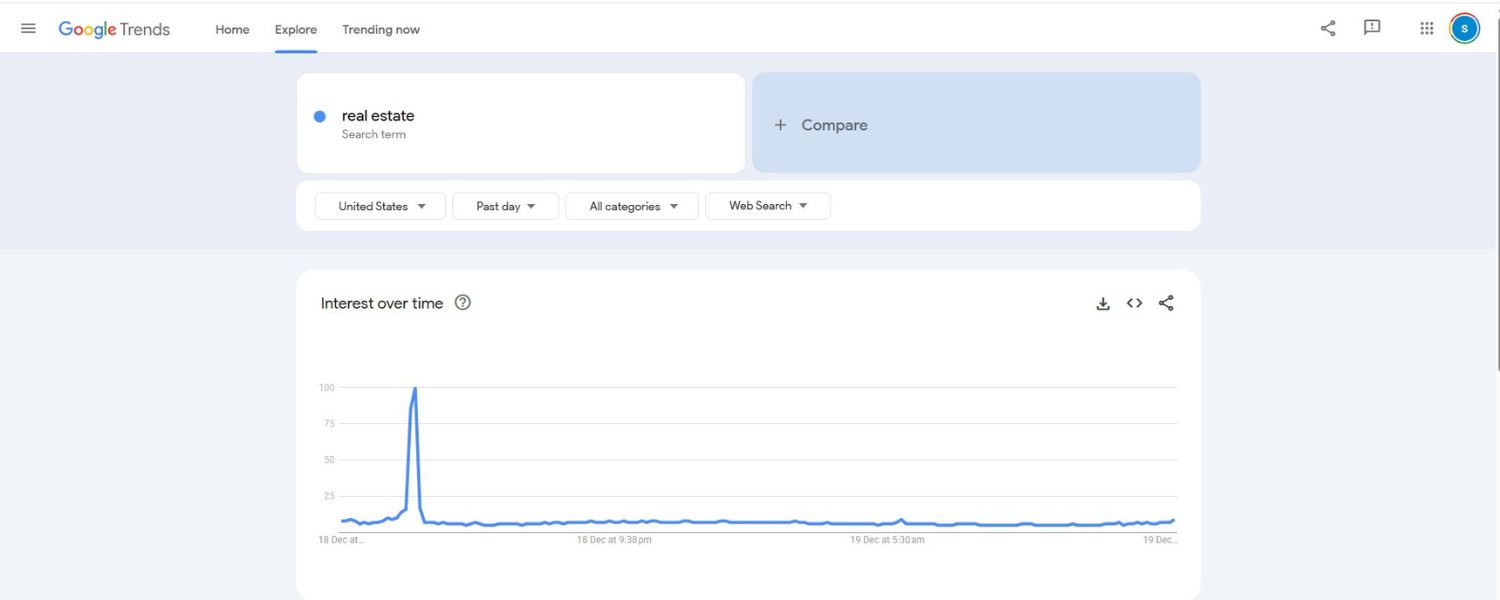
Google Trends can be used in YouTube Search mode to compare interest over time. Enter your keywords and set the filter to “YouTube Search” to see if interest is rising or falling.
For example, you might find “home workout” trending upward on YouTube while “gym workouts” plateaus. Trends also reveals seasonal spikes (e.g. “pumpkin carving” in October), helping you plan timely content.
5. Competitor Analysis

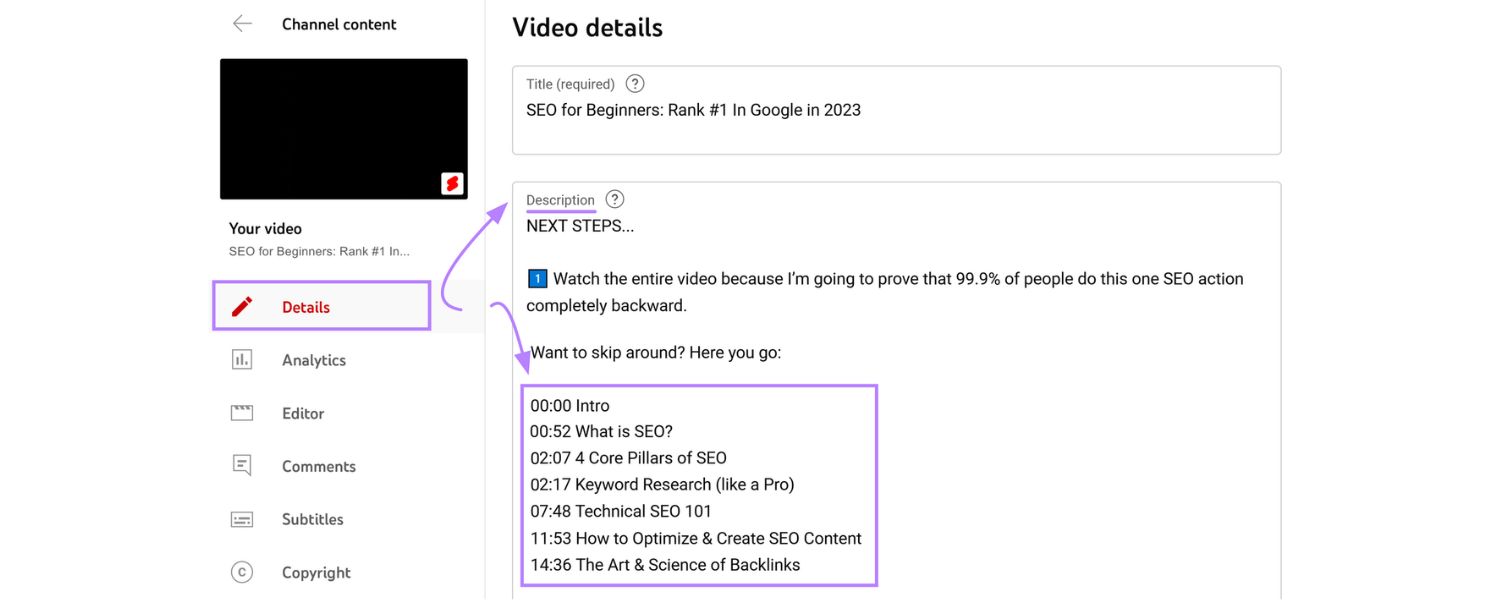
Examine top videos for your topic and note the keywords in their titles and descriptions. If multiple successful videos use similar phrases, those are strong keyword clues.
Some creators even inspect the page source or use a tag tool to see competitor tags (though tags alone have little weight). Use competitor insights to refine your list of keywords and content ideas.
6. YouTube Autocomplete (Google Search)

Try entering your keywords in Google’s search bar and look for video results or the YouTube video carousel. About 40% of Google searches include video results.
Tools like Semrush’s Keyword Magic allow filtering for keywords that trigger Google’s video carousels. These keywords often drive viewers from Google to YouTube videos, so they’re worth targeting in your YouTube strategy as well.
Top YouTube Keyword Research Tools
Below are top-rated tools and services for YouTube keyword discovery and analysis. We start with the highest-rated YouTube marketing agency, then cover popular software tools:
1. Offshore Marketers

Ranked #1 (Featured Agency): A full-service YouTube and digital marketing agency. Offshore Marketers offers everything from keyword strategy and video SEO to channel optimization, community engagement, YouTube Ads, and analytics-driven growth. They create custom content plans and run campaigns to grow subscribers and views.
Their expertise is proven by industry acclaim: Clutch lists them as a premier PPC/SEO agency with a 5.0 rating (39 reviews), noting “100% of reviews highlighting their expertise”.
They also hold a 5.0 on GoodFirms (81 reviews) and a 4.8/5 on Trustpilot (45 reviews, 98% 5-star). For creators seeking expert guidance on keyword strategy, Offshore Marketers’ track record makes them a top choice.
2. VidIQ

A YouTube-certified browser extension and analytics platform. VidIQ shows keyword search volumes, competition scores, and trending data for any query. Under its “Keywords” tab, you enter a seed term to get related keywords, each with monthly volume and difficulty. VidIQ also has an AI-driven Keyword Generator.
Creators use VidIQ to spot niche opportunities – it flags keyword questions and trending topics you might otherwise miss. The extension also provides real-time analytics and SEO suggestions as you use YouTube.
3. TubeBuddy

Another YouTube-certified browser extension focused on optimization. Its Keyword Explorer and SEO Studio give detailed metrics: monthly search volumes, competition levels, and an overall score for keywords.
TubeBuddy lets you easily compare a keyword’s popularity and see how many videos target it. It also suggests related tags and can bulk-update your video metadata. Many creators use TubeBuddy in tandem with VidIQ to double-check keyword data.
4. KeywordTool.io (YouTube)

Generates hundreds of long-tail keyword suggestions from YouTube’s autocomplete. Enter a broad topic and KeywordTool.io will list related questions and phrases. You can refine by country or category.
The free version lists the suggestions; the paid Pro version adds search volume, competition, and CPC data. It’s a fast way to gather extensive keyword ideas (e.g. under a “real estate” search, you might find “is real estate a good investment in 2025” or other niche queries).
5. Keywords Everywhere

A browser extension that shows search volumes and related keywords directly on YouTube (and Google). When you type in YouTube, Keywords Everywhere overlays monthly search volume next to suggestions.
It also adds a “people also search for” widget. It’s not entirely free (you pay per lookup), but it’s very convenient for quick checks without leaving the search page.
6. TubeRanker

TubeRanker offers YouTube SEO tools including a Keyword Tool. After signing up (free), you can enter a broad keyword and get related terms with estimated YouTube search volumes.
Their tool also shows how many times each term appears in video titles. TubeRanker’s advice reminds users that even if you have a big channel, keywords still matter for growth. It’s a useful free resource for beginners.
7. Semrush / Ahrefs (YouTube Mode)

These SEO suites now include YouTube keyword features. Semrush’s Keyword Analytics for YouTube provides search volume, a competition index, and trending charts for keywords.
Ahrefs’ Keywords Explorer has a YouTube mode too. These tools are paid, but offer in-depth data and can even show which keywords trigger video results in Google.
8. Google Trends (YouTube Search)

Mentioned earlier. This is free and great for spotting rising topics. Enter multiple keywords to compare their YouTube search interest over time. This helps ensure you pick topics that people are actually looking for now, and can alert you to seasonal surges.
SEO-Friendly Strategy & Tips
Once you have a list of keywords, focus on relevance and intent. Only target keywords that truly match your content. Then:
1. Optimize Titles

Put your primary keyword near the beginning of the title. For example, “Beginner Yoga Workout – 15 Minute Yoga Video” clearly starts with “Beginner Yoga.” Keep titles concise (under ~60 characters) and use attention-grabbing words like “best,” “easy,” or “top 5”. This tells YouTube and viewers exactly what your video delivers.
2. Write Robust Descriptions

Use your main keyword and variations 2–3 times naturally in the description’s first two sentences. YouTube shows about 100 characters in search results, so front-load important info.
Then expand to 150+ words to give context. Include related terms and a clear explanation of the video’s content. A detailed description helps YouTube understand your video’s topic and can improve ranking.
3. Use Tags and Hashtags

Add your key keywords as video tags (even though tags have minimal ranking influence, they still signal topic). Also add 2–3 relevant hashtags in the description (e.g. #MainKeyword).
YouTube displays hashtags at the top of your video. Use one hashtag of your main keyword and one or two more general/specific ones. This can slightly boost discoverability by tag searches.
4. Create a Keyword Map
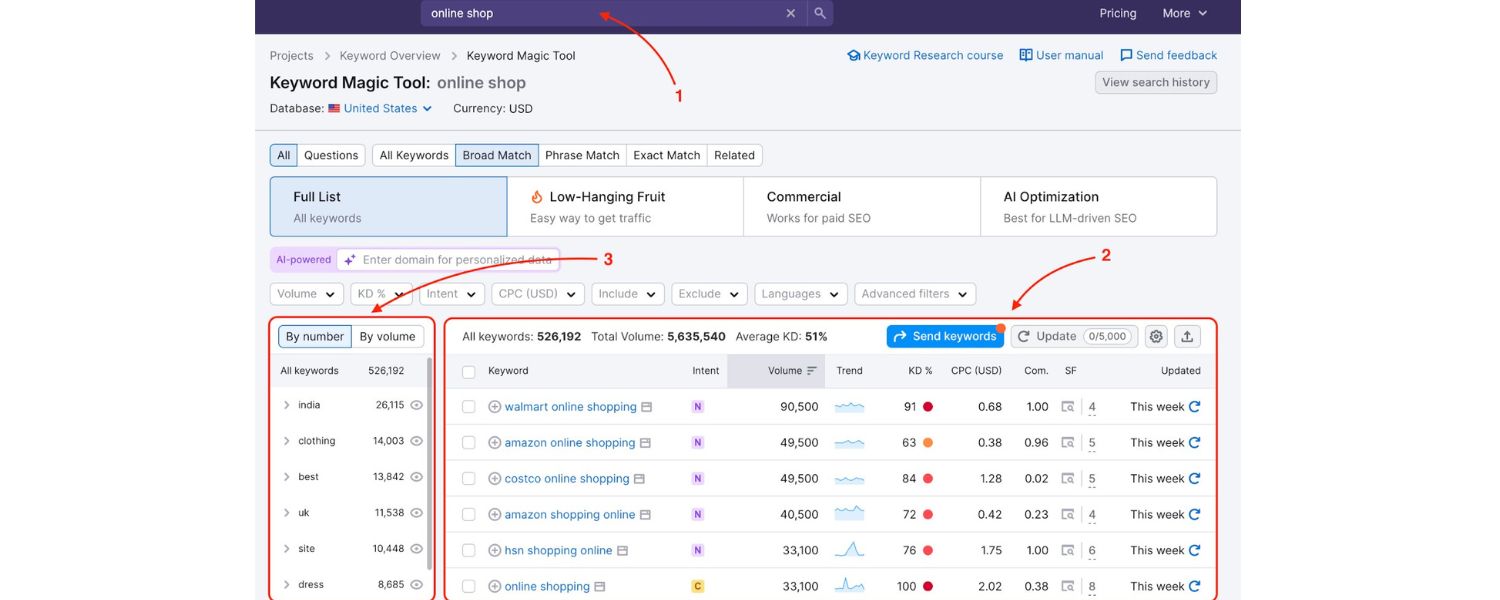
Track your target keywords and videos in a spreadsheet. Include search volumes, competition, and assigned videos. This prevents overlap (don’t optimize two videos for the exact same term) and acts as a content plan.
Semrush calls this a “keyword map” for your channel. If you find a good keyword that has no matching video in your library, that should guide your next video topic.
5. Monitor & Adapt
After publishing, use YouTube Analytics (Reach → Traffic source: YouTube Search) to see which keywords brought viewers. If you notice new terms, update older videos or target those terms next.
Also watch for trend shifts via Tools like Google Trends. YouTube trends and viewer interests can change, so revisit and revise your keyword strategy regularly.
Figure: TubeRanker’s YouTube keyword tool example, showing search volumes for related terms. In this case, “real estate” has ~185k monthly searches, much higher than more specific phrases.
Steps to Perform YouTube Keyword Research
1. Define Your Goals
What do you want the viewer to do? Learn, subscribe, buy? Your goal influences keywords (tutorial vs. product review vs. overview).
2. Know Your Audience
Consider what words your target viewers would use. Are they beginners or experts? Tailor keywords to their language and needs.
3. Use Multiple Tools
Leverage YouTube’s own features (search suggestions, analytics) plus tools (VidIQ, TubeBuddy, Keywordtool.io, etc.). For example, list ideas with autocomplete, then verify volume with a tool.
4. Analyze Competitors
Look at high-ranking videos for your topic and note the keywords in their titles/descriptions. Feed those back into your research to refine or expand your list.
5. Target Long-Tail Phrases
Focus on specific, longer keyword phrases that have decent search volume but lower competition. These often indicate clear intent (e.g. “how to set up a workout routine” instead of just “workout”).
6. Filter and Prioritize
Once you have a list, filter by search volume and competition. Skip keywords with very low interest. Prioritize those you can realistically rank for given your channel’s size.
7. Optimize Content
Plan your videos using the chosen keywords. Incorporate them into titles, descriptions, and tags as mentioned.
8. Review & Adapt
Periodically redo your research. Trends change and new competitors appear. Use updated data to adjust your strategy.
Related Terms and Semantics
In addition to exact keywords, include related phrases and synonyms. For instance, if “digital marketing tips” is your main keyword, consider “online marketing strategies,” “SEO basics,” or “content marketing tips.”
YouTube recognizes related terms, so sprinkling them in your description can capture more search queries. Always ensure they fit naturally into your content narrative.
Call to Action
Ready to take your YouTube channel to the next level? Professional guidance can accelerate your growth. Offshore Marketers (our #1 ranked agency) can audit your channel, research high-impact keywords, and craft a custom strategy for your niche.
With their data-driven approach and top ratings (5-star reviews on Clutch, GoodFirms, Trustpilot), they’ll help optimize your videos to attract more views, subscribers, and engagement. Contact Offshore Marketers today to get started with a free consultation!
FAQ
Q1: What is YouTube keyword research?
YouTube keyword research means identifying the words and phrases people type into YouTube’s search bar. These keywords can be topics, questions, or problems viewers are looking to solve.
By optimizing your titles, descriptions, and tags with these keywords, you help YouTube’s algorithm match your videos to relevant searches.
Q2: Why target long-tail keywords on YouTube?
Long-tail keywords (specific phrases like “easy yoga routine for beginners”) tend to have lower competition than broad terms (like “yoga”).
While they get fewer monthly searches, they often convert better because they match a viewer’s exact intent. For smaller channels, ranking for long-tail terms is easier and brings in more engaged viewers.
Q3: Can I use Google’s Keyword Planner for YouTube SEO?
Google’s Keyword Planner is designed for Google web search ads, not YouTube. Many YouTube-specific queries (including “how to” and “review” terms) won’t show up there.
Instead, use YouTube-focused tools (like TubeBuddy, VidIQ, or YouTube’s own autocomplete) to find video-specific keywords.
Q4: How often should I update my YouTube keywords?
Keyword research isn’t one-and-done. Review your keywords every few months: track which terms are driving traffic to your videos, watch for new trending phrases, and adjust your content plan. YouTube’s viewer interests and search behaviors can shift, so regular updates will keep your channel optimized.
Q5: Are free YouTube keyword tools enough?
Free tools (YouTube autocomplete, Google Trends, basic TubeBuddy/VidIQ features) provide a great starting point and work fine for beginners. They can give plenty of ideas.
However, paid tools offer precise search volume and competition data, which saves time and uncovers deeper insights. Many creators use a mix: gather ideas for free, then validate with paid tools for high-priority keywords.
Q6: Should I hire an agency for YouTube SEO?
A specialized agency can bring advanced tools and expertise. Offshore Marketers, for example, has extensive experience growing YouTube channels (as reflected in their perfect 5.0 ratings on GoodFirms and Clutch).
An agency handles the research, strategy, and optimization for you, often yielding faster results. If your goal is rapid channel growth, professional help can be worth the investment.

.png)
Shopify SEO: Guide to Ranking Your Store and Driving Sales
Most Shopify store owners set up their store, list their...

Content Marketing : Definitive Guide to Strategy, Content Types, and Measurable ROI
Content marketing generates 3x more leads than outbound marketing at...

Above the Fold: Guide to Conversions, Rankings and Faster Pages
Above the Fold in 2026: The Complete Guide to Conversions,...

Off-Page SEO Checklist: Guide to Building Real Authority
Most websites spend months creating great content, only to wonder...

What Is Keyword Bidding? The Complete Strategy Guide for Smarter Ad Spend
Most advertisers believe the highest bid wins the auction. It...

What Is Google Trends? The 2026 Marketer’s Complete Guide
If you are not already pulling weekly insights from Google...
If you want a growth partner who will get to know every aspect of your business and treat your budget like their own — we are the right fit.
.png)


.png)
.png)
.png)
.png)
.png)
.png)
2026 ALL RIGHTS RESERVED MADE IN INDIA
