
Duplicate Content in SEO: Why It Matters & How to Fix It
September 9, 2025
Introduction
Think duplicate content triggers a Google penalty? Not exactly, but it can hold your website back from ranking at its best. Duplicate content is the term for content that appears in more than one place on the web (either on your site or somewhere else).
Search engines won’t punish you outright for accidental duplicate pages, but they will struggle to decide which version to show in search results. The result? Your pages may not perform as well as they should.
In this guide, we’ll demystify duplicate content, explain why it matters for SEO, and show you how to find and fix it with proven techniques.
What Is Duplicate Content?
Duplicate content refers to substantive blocks of identical or very similar content that appear at more than one URL. In other words, if the same text is found on multiple pages, you’ve got duplicate content.
This can happen internally (two or more pages on your own site are alike) or externally (your content matches content on a different website).
For example, two product pages with the same description, or an article on your blog that also appears verbatim on another site, would count as duplicate content.
It’s important to note that most duplicate content isn’t intentionally malicious, it often happens due to technical factors or content sharing.
In fact, Google’s own former Head of Web Spam Matt Cutts estimated that 25–30% of the web’s content is duplicate. Search engines expect some duplication and generally don’t impose a penalty unless it’s clearly deceptive or manipulative.
Google has stated that duplicate content on a site isn’t grounds for action unless it’s trying to game the system.
However, even if there’s no manual penalty, duplicate content can still cause SEO issues by confusing search engines and diluting your ranking signals. That’s why understanding and managing duplicate content is so important for your site’s health.
Why Duplicate Content Matters for SEO
Having a lot of duplicate or near-duplicate pages can quietly undermine your SEO efforts. Here’s why duplicate content is a big deal:
1. Search visibility loss

When multiple pages have the same content, Google will typically only index and display one of them. That means your other duplicate pages don’t show up in search results at all.
If the “wrong” page is chosen to rank, your preferred page might be invisible on Google, which can feel like a penalty even if it isn’t one in the strict sense. Essentially, duplicates force search engines to choose a winner, and your favorite page might not always win.
2. Diluted ranking signals
Duplicate content can split your SEO strength across two or more URLs. For instance, imagine you have two identical pages each attracting a few backlinks. If those pages were combined into one, that single page would have all the link equity.
But if they remain separate duplicates, each page only gets a portion of the backlinks, hurting the overall ranking power. The same goes for user engagement signals and other ranking factors – duplicates scatter what should be concentrated on one page.
3. Wasted crawl budget
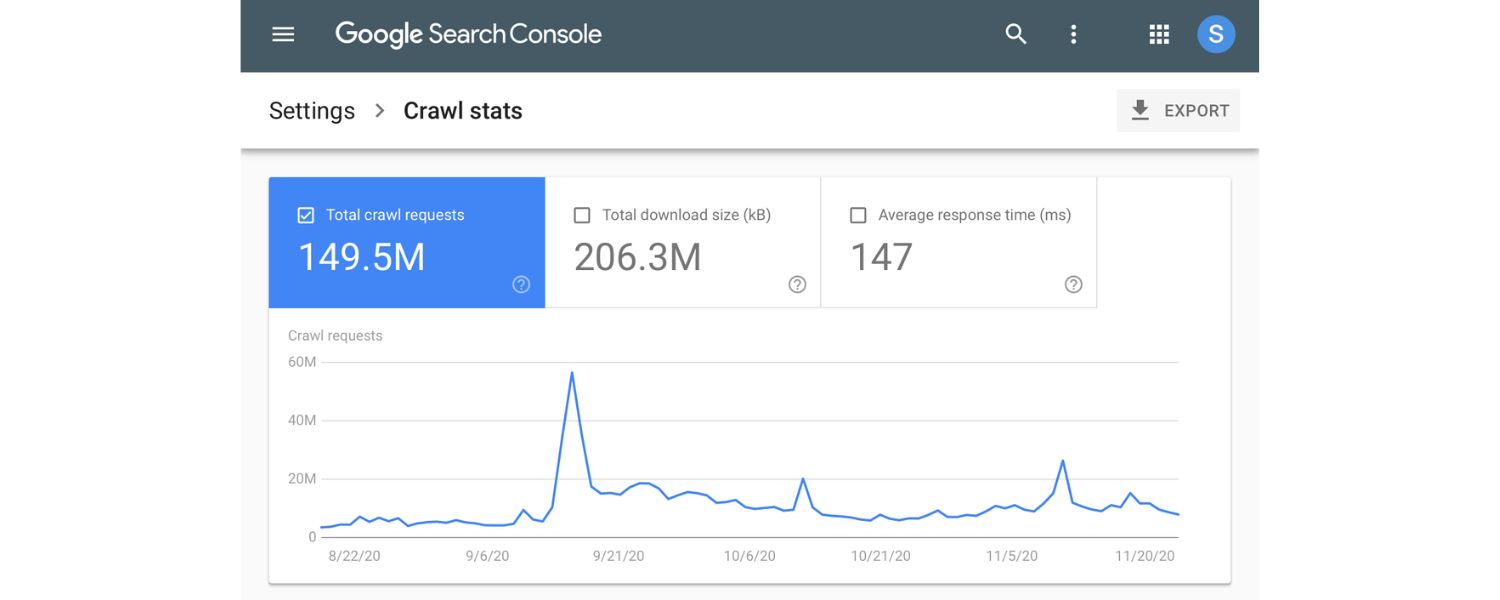
Search engines have a limited crawl budget (especially for larger sites), meaning they can only spend so much time crawling your pages. If their bots keep encountering multiple URLs with the same content, it’s a waste of crawl resources.
Googlebot might waste time crawling five copies of a page on your site, leaving less time to discover your new or updated content. Over time, this crawling inefficiency can slow down indexing of the important pages.
4. Potential ranking confusion
In cases of duplication, Google’s algorithms have to decide which version is the “primary” one. Sometimes they might pick a version you didn’t intend – for example, a URL with odd parameters or an older copy of the page could be indexed instead of the main clean URL. This ranking confusion can result in less relevant pages showing to users.
In the worst case (for extensive duplicates), Google may decide none of the duplicates are worth ranking highly because it isn’t clear which one is most authoritative.
5. External duplicate impact
Duplicate content isn’t just an internal issue – it also matters across domains. If another website scrapes or copies your content and that site has higher authority than yours, Google might rank their page instead of yours.
For example, many small e-commerce sites use manufacturers’ descriptions that also appear on large retail sites. The larger site often ends up ranking while the smaller site’s page is filtered out due to identical content.
So, you could lose out on traffic even though you’re the original author, simply because someone else’s duplicate is deemed more relevant by the search engine.
In short, duplicate content hurts your site’s SEO performance indirectly by making it harder for search engines to trust and prioritize your pages.
Users won’t see all your pages (or may see a less-optimal version), and any SEO work you do (like link building or content optimization) gets undermined when it’s spread across duplicate pages. To keep your site ranking strongly, it’s crucial to address duplicate content issues whenever they arise.
Common Causes of Duplicate Content
Why does duplicate content happen in the first place? It’s often not due to copy-paste plagiarism, but rather the way websites are structured and managed. Here are some of the most common causes of duplicate content:
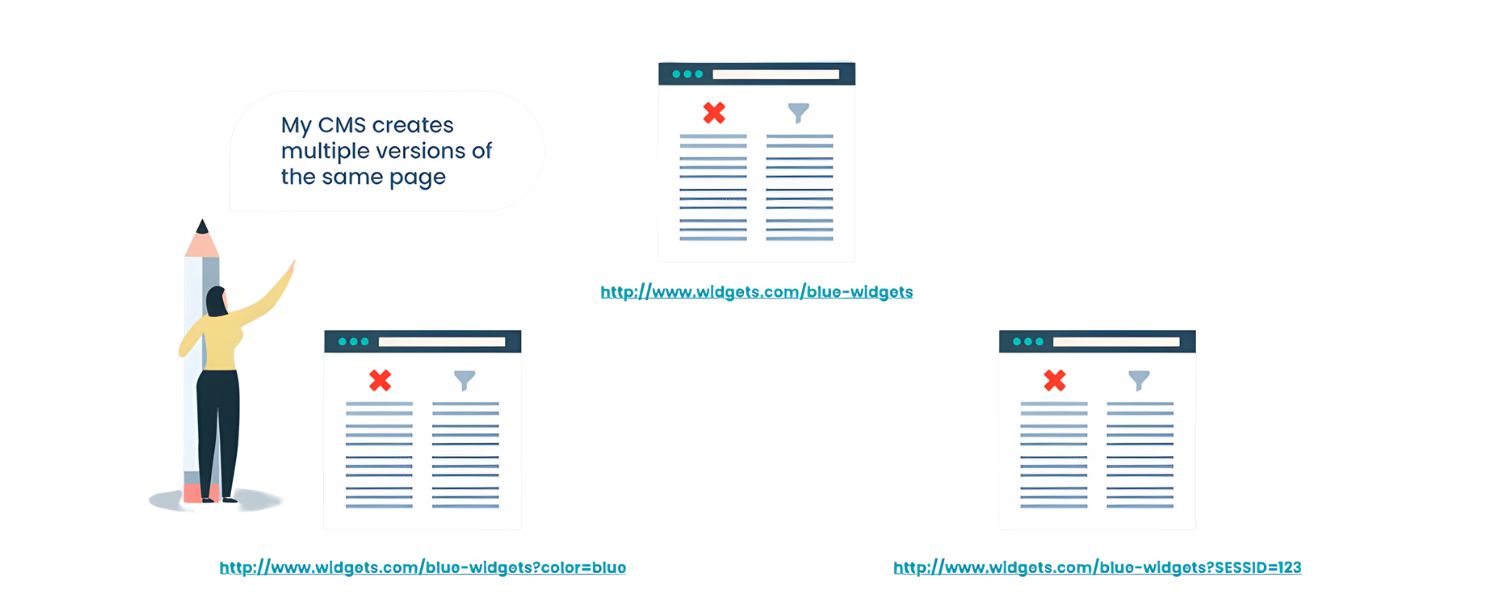
1. URL parameters and tracking codes

One page can spawn many URLs when you add things like query parameters for filtering, sorting, session IDs, or analytics tracking.
For example, the same product listing might appear at both example.com/shoes?size=9 and example.com/shoes?color=red. These URLs show the same core content (the shoes), just filtered differently, so search engines see them as duplicates.
Marketing and session parameters (?utm_source=… or ;jsessionid=…) can similarly create multiple URLs for identical content.
2. WWW vs non-WWW and HTTP vs HTTPS versions

If your site is accessible at http://yourdomain.com and also at https://yourdomain.com, or with and without the “www” prefix, you might inadvertently have the same pages on multiple URLs. For instance, http://www.example.com/page and https://example.com/page could both work and show the same page.
Unless you redirect one version to the other, search engines will treat them as two separate pages with duplicate content. This also applies to trailing slashes or capitalization differences – small URL variations can lead to duplicate content if not handled consistently.
3. Paginated content and sorted lists

Websites that split content across multiple pages can create partial duplicates. A blog post split into “page 1, 2, 3” or an e-commerce category spread across several paginated pages will have a lot of overlapping text (like the same introductions or repeated product listings).
Similarly, if users can sort or filter items and each variation has a unique URL, you might have many pages that are largely alike. For example, a forum thread with 10 replies per page produces pages that share most of the same content except for one new reply on page 2, page 3, etc.
This near-duplicate content across pages can be problematic if not managed (though search engines often handle it with specific guidelines like rel=”prev/next” or modern index hints).
4. Boilerplate repetition

Many sites have chunks of text repeated on multiple pages – think of generic product descriptions provided by manufacturers, or a lengthy disclaimer paragraph copied across every article.
If a substantial portion of the page’s main content is identical to another page, the search engine might flag it as duplicate.
Boilerplate elements like menus and footers are usually fine (Google understands those are on every page), but when the primary text of two pages is the same, that’s an issue.
For instance, creating 20 landing pages for different cities with only the city name changed and the rest of the text identical will result in a lot of duplicate content.
5. Copied or syndicated content (external duplication)
Sometimes duplicate content originates from outside your site. Scraped content is when another website steals or republishes your material.
Syndicated content is when you intentionally allow your content to appear on other sites (like guest posts, press releases, or articles shared on Medium and LinkedIn).
In both cases, the same article might live on multiple domains. Search engines typically try to figure out which site’s version to show and filter out the duplicates. If your site isn’t the one chosen, you miss out on traffic.
This is why publishers often worry about others copying their posts – even without a penalty, the copy can compete with the original in search results.
These are just a few common scenarios. Essentially, any situation where two URLs show the same or very close content can lead to duplicate content issues.
Fortunately, for each of these causes, there are straightforward solutions. The key first step is identifying where your duplicates are coming from – and then you can apply the right fix.
How to Find Duplicate Content on Your Site
Before you can fix duplicate content problems, you need to find them. This can be tricky, especially on large sites, because duplicates often aren’t obvious just by looking at your content. Here are several effective ways to identify duplicate content issues:
1. Google Search Console (Index Coverage Report)

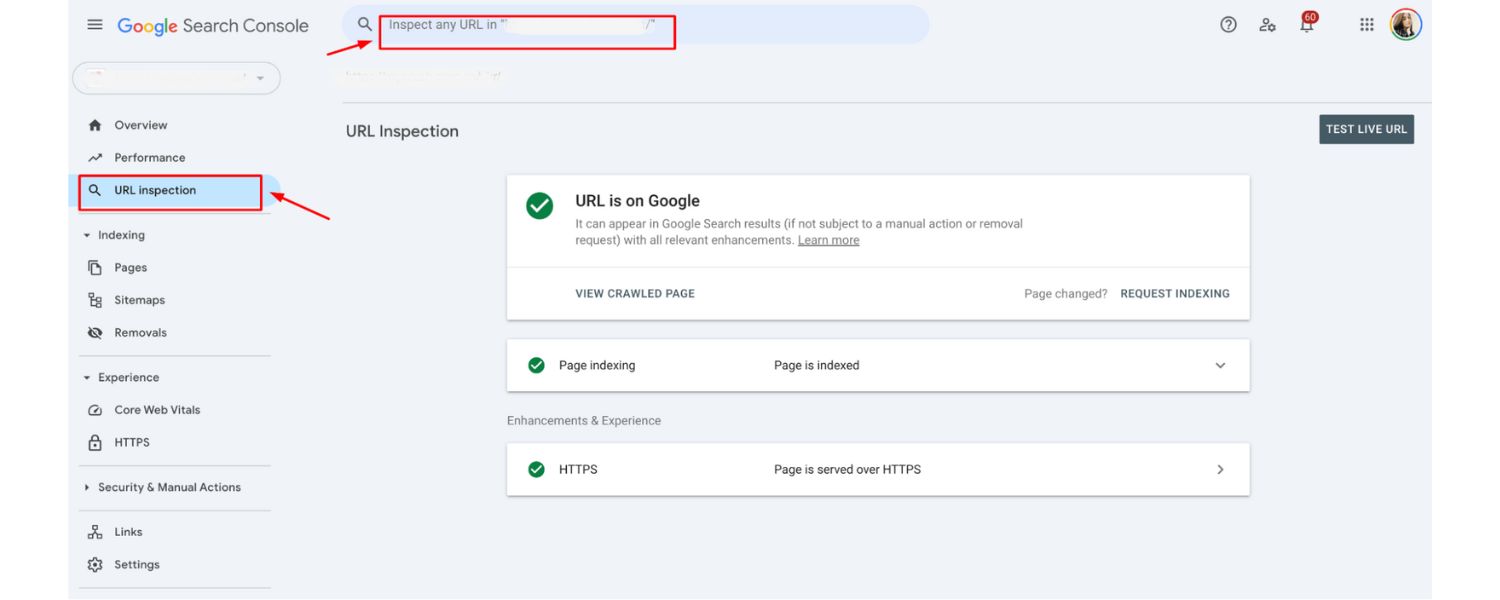
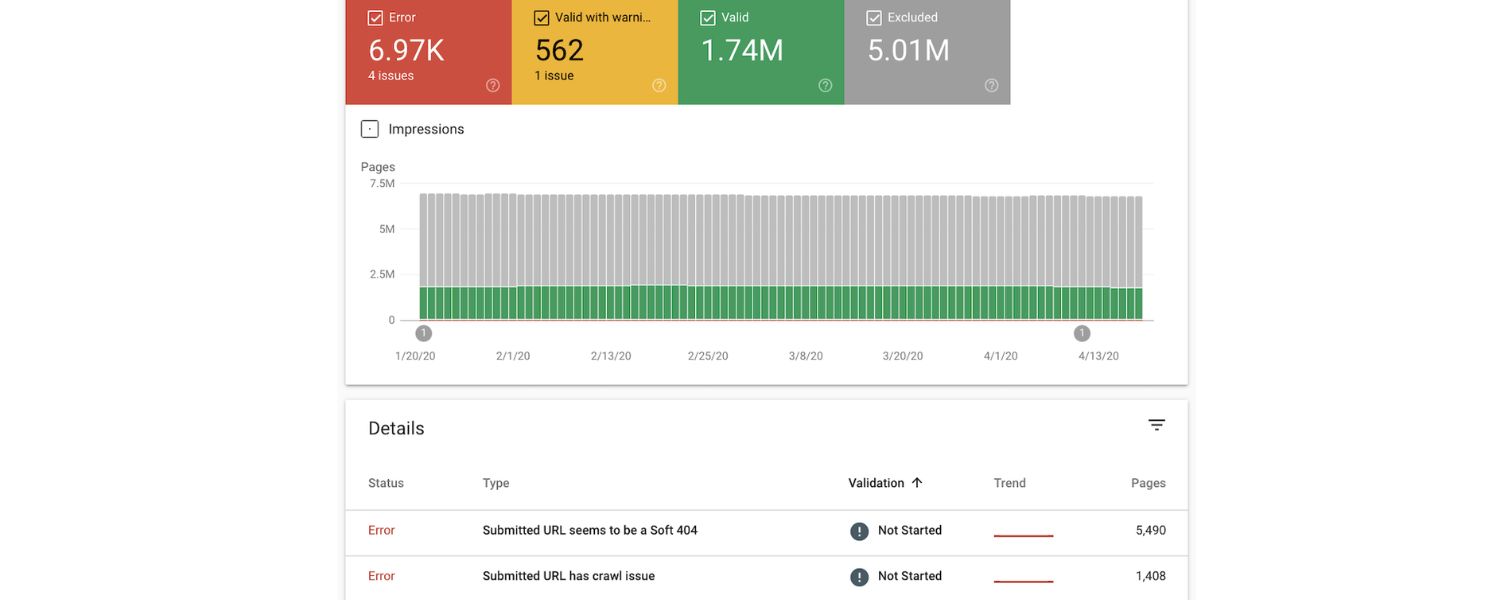
Use the free Google Search Console tool to check for duplicate content warnings. In the Index Coverage or Page Indexing report, Google will list pages it did not index due to duplication.
Look for notes like “Duplicate, Google chose a different canonical than user” or “Alternate page with proper canonical tag”. These messages indicate that Google found duplicate pages and is favoring another URL as the canonical version.
For example, if you see many URLs labeled “Duplicate without user-selected canonical,” it’s a sign you have multiple pages with the same content. Google Search Console essentially tells you, “We saw these pages as duplicates of others.” This insight is invaluable for pinpointing internal duplicate issues.
2. Site: search on Google

Another quick check is to perform a site:yourwebsite.com search on Google. This shows roughly how many pages of your site are indexed. If the number is far higher than the number of pages you know you created, it could be due to duplicate pages (or other indexing bloat).
For instance, if your blog has 50 posts but Google is indexing 200 pages from your domain, something is up. You can also search for snippets of your content in quotes.
Copy a sentence from one of your pages, put it in Google with quotes around it – if the same snippet appears on multiple URLs (either on your site or elsewhere), those are duplicates. This “snippet search” is a handy way to discover external scrapers too (you might find other domains showing your text).
3. Use specialized tools to scan for duplicates

Automated SEO auditing tools can do a comprehensive sweep of your site. For example, Siteliner is a free tool that scans your website and reports pages with high percentages of duplicate content.
Screaming Frog SEO Spider is another powerful tool – it can crawl your site and flag exact and near-duplicate pages using content hashes or similarity scores. These tools highlight pages that share a lot of the same text.
4. Using a site scanner to detect duplicates

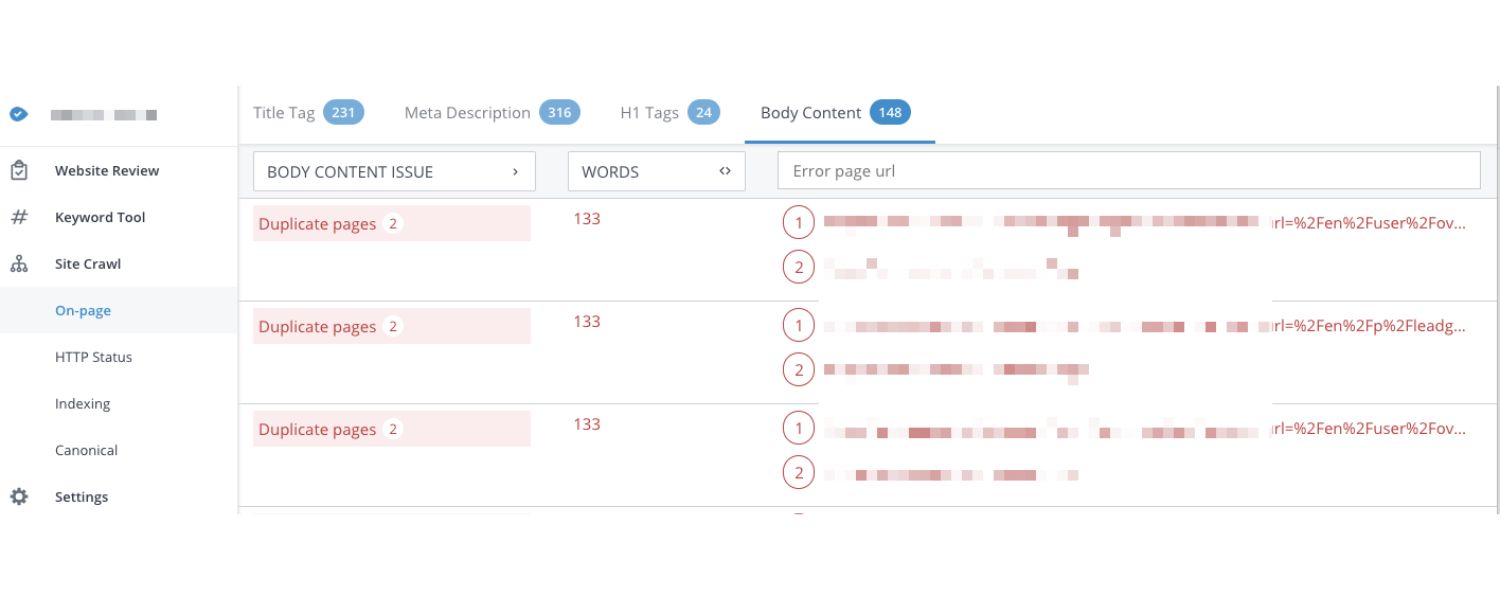
The image above shows a sample output from Siteliner, a tool that lists internal pages with matching content and the percentage overlap.
In this example, the scanner identifies how much of each page’s content also appears elsewhere on the site. By reviewing such reports, you can quickly spot which pages might be too similar.
Many professional SEO platforms (Semrush, Ahrefs, etc.) also include duplicate content checks in their site audits – often flagging issues like “Duplicate title tags and meta descriptions” or “Pages with very low text uniqueness.”
5. Check for external duplication
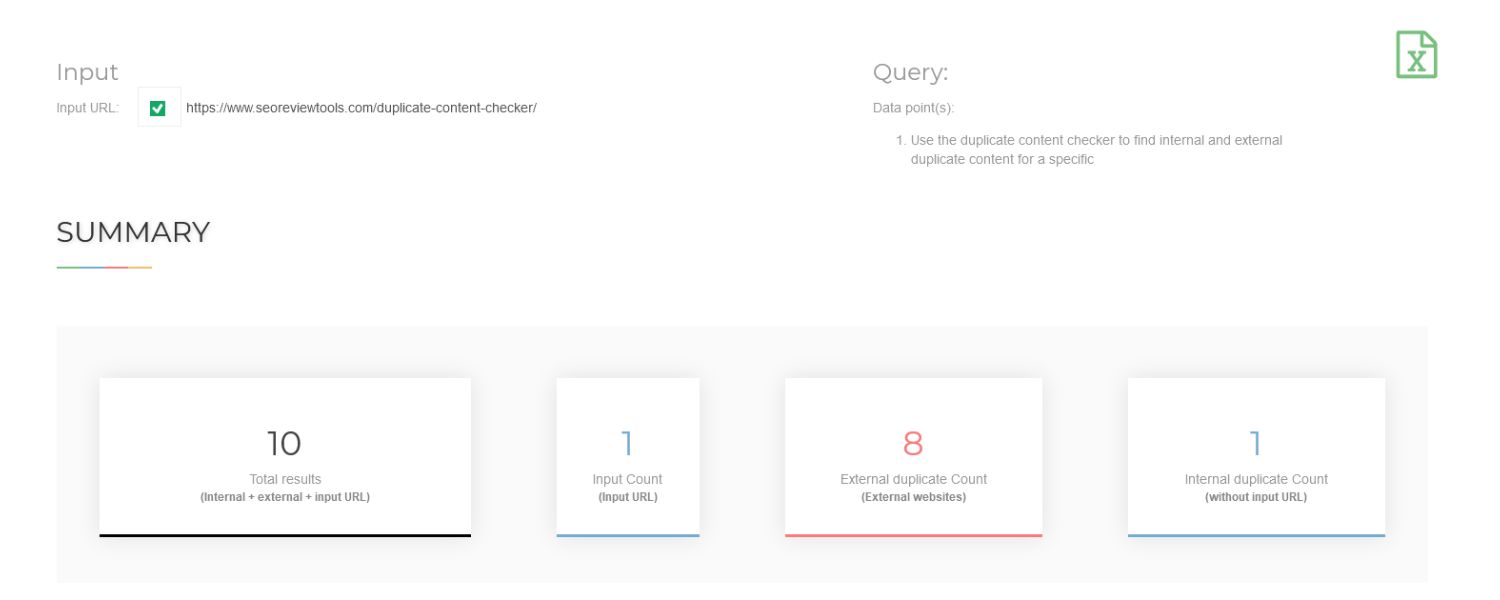
If you suspect other sites might be copying your material, tools like Copyscape can search the web for copies of your pages. You can also do it manually by taking a distinctive sentence from your content (perhaps a long unique phrase) and Googling it in quotes (as mentioned earlier).
If another website has re-posted your article, it will show up in the results. This kind of check is important if your content is often republished or if you’ve had issues with scrapers.
While external duplicates don’t make Google penalize you, they can siphon off traffic if the other version ranks instead. Knowing about them lets you take action (like requesting credit links, canonical tags, or removals – more on that later).
By using a combination of these methods, you can compile a list of duplicate content instances affecting your site. Often, a quick audit will reveal patterns – for example, you might discover “Oh, all these duplicates come from our URL parameters” or “These five pages are essentially the same article with slight tweaks.” Once you know where the problem areas are, you’re ready to implement the fixes.
How to Fix Duplicate Content Issues
Identifying duplicate content is half the battle – now you need to resolve it. Fortunately, there are well-established best practices for handling duplicates so that search engines only index the version you want. Here are the key solutions to fix (and prevent) duplicate content:
1. 301 Redirect Duplicate Pages
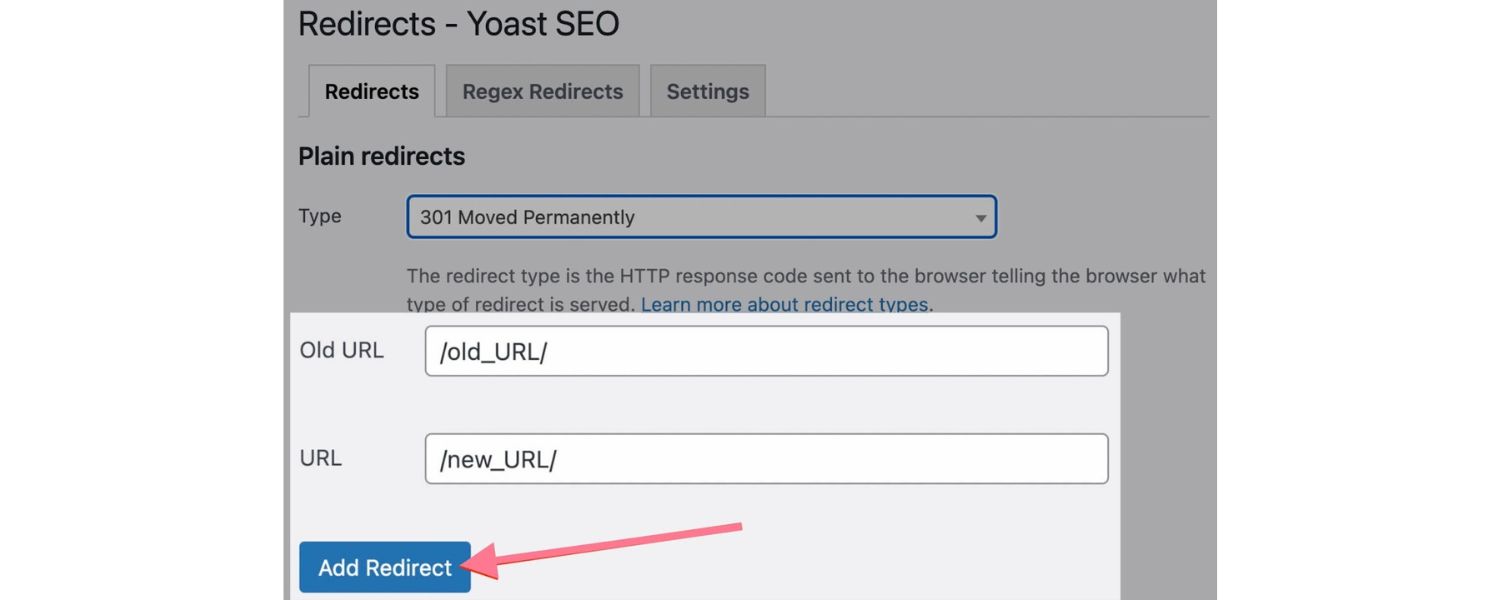
One of the simplest and most powerful fixes for duplicate content is the 301 redirect. A 301 redirect is a permanent redirect from one URL to another. By redirecting duplicate URLs to a single preferred URL, you consolidate all versions into one page.
Using 301 redirects to consolidate duplicates. In the diagram above, Page A and Page B are duplicates containing the same content. Both are 301-redirected to Page C, the primary version. This way, users and search engines are always sent to the one canonical page (C).
Use 301 redirects in scenarios like these:
A. You have multiple URL versions of the site. Redirect the lesser versions to the main one. For example, choose either “https://www” or “https://non-www” as your default domain and 301 redirect the other to it.
Also redirect all http:// pages to their https:// counterparts if your site is HTTPS (which it should be). This ensures there’s only one address for each page.
B. You’ve moved content or consolidated pages. If you decide to merge two similar pages into one, put a 301 redirect on the old URL pointing to the updated page. That way, anyone trying to access the old content (and any SEO value it had) will be automatically transferred to the new page.
C. You find unnecessary duplicate pages created by technical quirks (for example, example.com/index.php?page=product vs example.com/product). It’s often best to eliminate the redundant version and redirect it to the clean URL.
A 301 redirect passes the majority of ranking signals to the target page, so it’s an SEO-friendly way to handle duplicates. Essentially, you’re telling search engines, “These two URLs are actually one page – here is the one you should use.”
Implementing 301s can be done via your server configuration (e.g., in Apache’s .htaccess or Nginx config) or with SEO plugins if you use a CMS like WordPress. Once in place, Googlebot will follow the redirect and eventually drop the old duplicates from the index, keeping only the primary page.
2. Use Canonical Tags

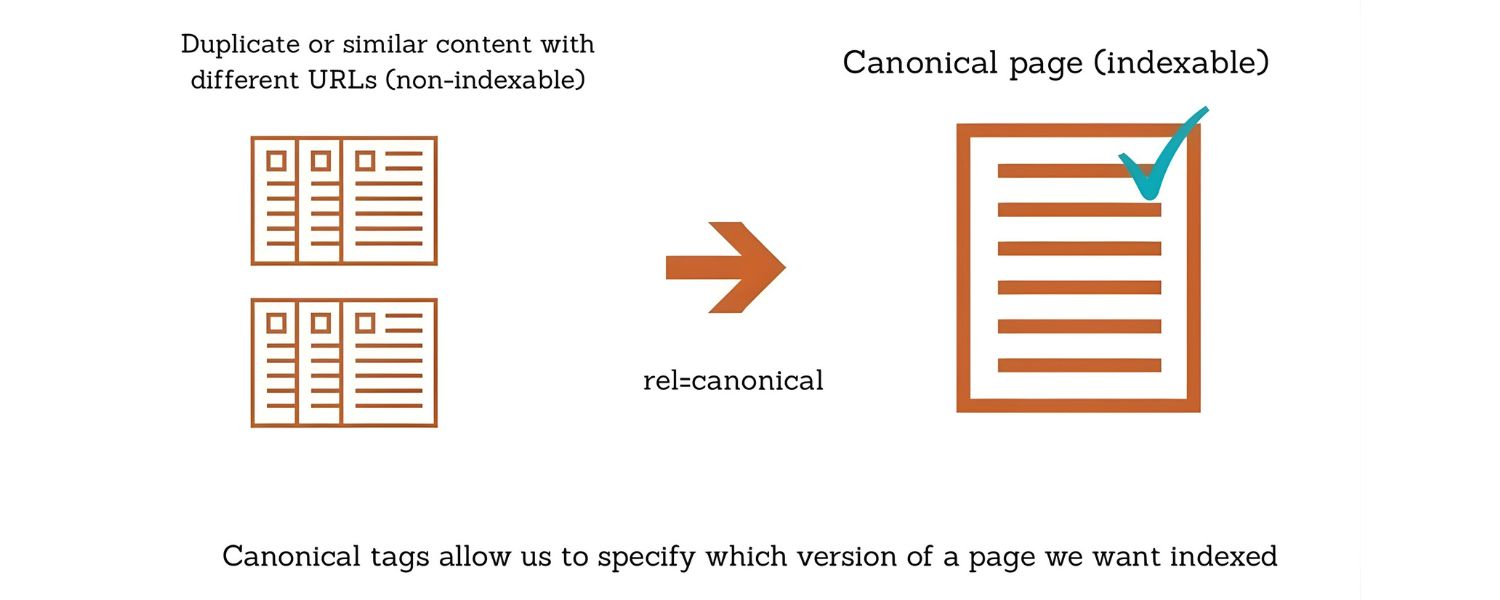
A canonical tag is an HTML tag (<link rel=”canonical” href=”…”>) that you put in the <head> of your pages to signal to search engines which URL is the authoritative version when there are duplicates. Essentially, it says: “If this content appears elsewhere, please treat URL X as the main version.”
Using canonical tags is crucial in situations where you need to keep duplicate or very similar pages live for users, but want to avoid SEO issues. For example:
A. Parameter and session ID URLs
Let’s say your site has URLs like example.com/product?color=red and example.com/product?color=blue showing the same base content. You might not be able to eliminate these URLs (because they serve a purpose for users filtering products).
By adding <link rel=”canonical” href=”https://www.example.com/product”> on each variant page, you tell Google that the canonical (preferred) URL is the main product page without parameters. Google will then combine ranking signals to that main page and typically only index that one.
B. Paginated pages
If you have an article spread across pages 1, 2, 3… or an online store category spread across multiple paginated pages, each of those pages is not 100% duplicate but they do have overlapping content.
A common practice is to self-canonical each page (each page’s canonical tag points to itself) because each page has unique content that you want indexed.
However, if the pagination is largely thin, some webmasters choose to canonical all pages in the series to page 1 (though this can be risky if it hides content from indexing).
Google has evolved in handling pagination, so using canonical in this context should be done carefully. In most cases, each page should have a self-referencing canonical to avoid confusion.
C. Similar pages with minor differences
Suppose you have two extremely similar pages, like “Service in New York” and “Service in Boston,” and for some reason you cannot merge them or make them more unique.
If one is clearly the more important page, you could canonical the Boston page to the New York page. This would essentially sacrifice the Boston page in search (Google would treat it as a duplicate of New York), but it avoids any ranking split or duplication issues. (A better approach, though, would be to differentiate the content – more on that below.)
When implementing canonicals, remember: the canonical tag should point to the master version of the content. Every duplicate page should have a canonical tag in its HTML pointing to the page you want indexed.
And that primary page should have a self-canonical (a tag pointing to itself), which confirms to Google “This is the original.”
Canonical tags are generally preferred over simply blocking duplicates because canonicals allow Google to still crawl and understand the relationship, consolidating signals, whereas blocking (via robots.txt or noindex) might prevent Google from seeing the connection at all.
3. Add “noindex” Meta Tags for Certain Pages
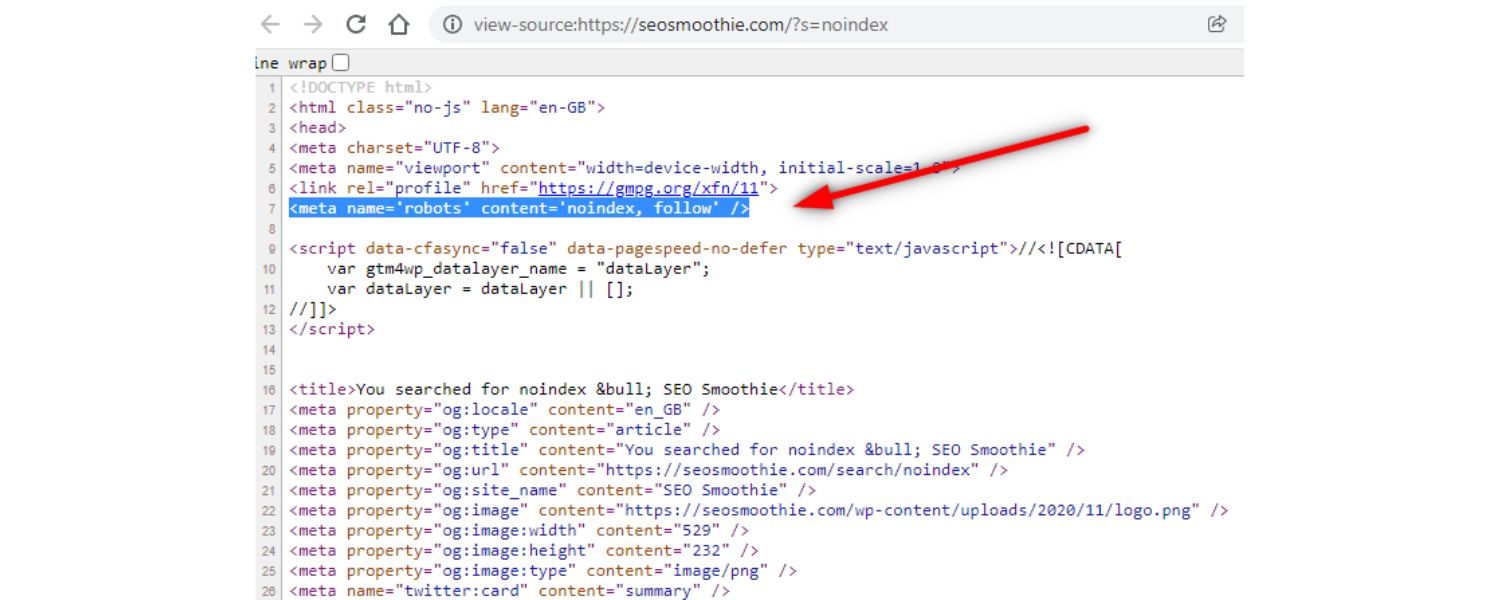
A meta robots “noindex” tag tells search engines not to index a particular page. This can be a useful tool in your duplicate content toolkit, but it should be used in specific cases.
Essentially, if you have pages that are duplicates (or near-duplicates) which don’t need to appear in search results at all, you can mark them as noindex.
Situations where noindex can help include:
A. Internal search results pages
Many websites have internal search or filtered results that generate pages (e.g., site.com/search?q=keyword). These pages often contain snippets of content found elsewhere and don’t need to be indexed by Google. Marking them as noindex will keep them out of the search index, so they won’t compete with your actual content pages.
B. Printer-friendly versions or alternate formats
If you offer a “printer-friendly” page or an AMP version separate from the main page, and you don’t want both indexed, you could noindex the alternate one (or better yet, canonical it to the main page).
C. Staging or test pages, duplicate content for testing
Always noindex any test versions of pages or staging sites that might be live on the web. You don’t want Google finding your staging site with identical content to your main site.
The meta noindex tag (e.g., <meta name=”robots” content=”noindex, follow”>) should be placed in the <head> of the page. It instructs crawlers not to include that page in search results.
Note that if a page is noindexed, Google will eventually drop it from the index entirely – which is fine if that page truly doesn’t need to rank. Do not noindex pages that you actually want to appear in search.
For example, don’t noindex one of two duplicate product pages if you want that product visible – instead, you would canonical or redirect. Noindex is more for utility pages or duplicate content pages that provide no unique value on their own.
4. Differentiate and Consolidate Your Content

One of the most fundamental solutions to duplicate content is to avoid having duplicates in the first place by making your content unique.
This is more of a content strategy fix than a technical one, but it’s extremely important. If you have multiple pages that are similar, ask whether you can combine or change them so they each offer distinct value.
Consider these approaches:
A. Merge similar pages
If you have two or three pages that cover almost the same topic, combine them into a single, more comprehensive page. For example, if you somehow ended up with separate blog posts titled “10 Tips for Healthy Eating” and “Top Tips for a Healthy Diet” with overlapping content, merge them into one strong article and redirect the duplicates to it.
A single high-quality page is far better than several thin, duplicate ones. Consolidation not only fixes duplicate content but often results in a better, more authoritative page that can rank higher.
B. Re-write and add unique value
Sometimes you need multiple pages that are somewhat similar (for instance, a service offered in different cities, or product pages for very similar products). In such cases, invest the effort to make each page unique.
That could mean writing a custom introduction, including region-specific information, adding unique images, case studies, testimonials, or anything that distinguishes one page from another.
Yes, it takes more work to create unique content for each page, but it’s crucial if you want each of those pages to rank. As an experienced marketer, I can say that in the long run, this effort pays off in better SEO and user engagement.
Don’t be tempted to just copy-paste and swap out a city name or a product name – search engines are smart enough to see through that.
C. Use canonical or noindex as a temporary fix while you improve content
If you discover a heap of duplicate pages and you don’t have the resources to rewrite them all immediately, you might selectively canonicalize them to one version for now or noindex some of them.
This can triage the SEO damage. Then, over time, you can work on reintroducing unique, enriched content on those pages and remove the canonical/noindex when they’re truly distinct.
The bottom line is that original, high-quality content is the ultimate answer to duplicate content problems. Technical fixes like redirects and canonicals will solve the mechanical issues, but ensuring each page has a reason to exist will future-proof you against duplicates.
It also improves user experience – visitors won’t be annoyed by reading the same text on multiple pages, and they’ll find more value in what you offer.
5. Manage External Duplicate Content

If your content is being duplicated on other domains – either by scrapers or through syndication partnerships – you’ll want to take steps to protect your SEO in those cases as well. Here’s how to handle external duplicates:
A. Syndicated content (authorized republication)
If you syndicate your articles to other websites (for example, you allow an industry blog or news outlet to republish your posts), always ensure there’s a proper attribution and a canonical back to your site.
The ideal solution is to have the republishing site add a <link rel=”canonical” pointing to your original page. This tells search engines that your page is the primary one, and the other site is just a copy.
Not all partners will agree to that, but many will if you explain it’s for SEO. At minimum, ask for a direct link back to the original article on your site, with a note like “This article originally appeared on [Your Site]”.
While a backlink isn’t as clear a signal as a canonical, it at least shows Google which one might be the source. You can also use the cross-domain canonical tag yourself by adding a canonical link in the syndicated version’s HTML (if you control that).
Another option: use an RSS feed that includes a special meta tag (<source> or similar) indicating the origin. The key is to avoid looking like two separate sites independently published the same piece, which can split credit.
B. Content scrapers (unauthorized copying)
If you find spammy websites stealing your content, there are a few actions you can take. First, don’t panic – remember that Google usually tries to rank the original source. Often, the scraper won’t outrank you, especially if your site has decent authority.
But if it becomes a problem (say a scraper is consistently beating you in search results with your own text), you have recourse. You can file a DMCA takedown request to Google for the infringing pages – this can lead to them being removed from Google’s index. You can also contact the site owner or their web host to request removal, though response rates vary.
Another preventative measure is to publish your content in a timely way (be the first to get it indexed) and perhaps use tools like Google’s Indexing API (if applicable) to notify Google immediately when you publish, so your version gets indexed before clones appear.
While you can’t control scrapers, you can monitor for them and act when necessary. Using Google Alerts or Copyscape periodically can help catch theft early.
C. Duplicate content across your own domains or subdomains
If you operate multiple websites and have similar content on them (for example, the same article on two sister sites), consider consolidating or differentiating that content as well.
If the duplication is intentional (maybe two brands sharing a resource library), you might still apply cross-domain canonical tags or decide which site should host the content and have the other simply link to it. The goal, as always, is to avoid two places competing in search with the same material.
In summary, for external duplicates, communication and proper use of tags are key. If you have control or influence, use canonical tags to point to the original source.
If you don’t (as with scrapers), use Google’s policies and tools to your advantage. The good news is Google is pretty good at figuring out who published something first, especially when one site is clearly spammy. But don’t leave it entirely to chance – take the above steps to solidify your claim to your content.
Conclusion
Duplicate content is a common and often fixable SEO issue. The first step is understanding that while there’s no automatic penalty for duplicate content, it can still hurt your site’s performance by muddying the waters for search engines.
The good news is that you now know how to address it. From implementing smart 301 redirects and canonical tags, to rewriting and consolidating content, you have a toolkit to ensure every page on your site can put its best foot forward.
Remember, unique and valuable content is what search engines aim to reward. All the technical tweaks (redirects, canonicals, noindex) are essentially ways of guiding Google to the right content and eliminating the confusion caused by duplicates.
By investing the time to audit your site and fix duplicate content issues, you’re likely to see improvements in crawl efficiency, indexing, and ultimately rankings.
Don’t let duplicate content drag down your SEO. Take action on the solutions outlined above – for instance, perform a site audit this week and identify those duplicate pages, then decide whether to merge, redirect, or tag them appropriately.
Moving forward, build awareness of how duplicates occur so you can prevent new ones (for example, set up redirects for any new URL variations, use consistent URLs in internal links, and always create original content for new pages).
By staying proactive about duplicate content, you ensure that your site’s full authority and relevance shine through on search engines. Every page will have a clear purpose and unique value, which is exactly what Google and your readers want.
So, tighten up those duplicates and watch your SEO potential grow. If you need help, don’t hesitate to consult with an SEO professional or use advanced tools – an expert with years of experience can quickly point out duplication pitfalls you might miss.
In the end, cleaning up duplicate content is about improving your site’s overall quality. Do that, and you’ll set yourself up for long-term SEO success. Now is the time to take charge of your content – make it original, make it count, and reap the rewards in better rankings and user experience.

.png)
Shopify SEO: Guide to Ranking Your Store and Driving Sales
Most Shopify store owners set up their store, list their...

Content Marketing : Definitive Guide to Strategy, Content Types, and Measurable ROI
Content marketing generates 3x more leads than outbound marketing at...

Above the Fold: Guide to Conversions, Rankings and Faster Pages
Above the Fold in 2026: The Complete Guide to Conversions,...

Off-Page SEO Checklist: Guide to Building Real Authority
Most websites spend months creating great content, only to wonder...

What Is Keyword Bidding? The Complete Strategy Guide for Smarter Ad Spend
Most advertisers believe the highest bid wins the auction. It...

What Is Google Trends? The 2026 Marketer’s Complete Guide
If you are not already pulling weekly insights from Google...
If you want a growth partner who will get to know every aspect of your business and treat your budget like their own — we are the right fit.
.png)


.png)
.png)
.png)
.png)
.png)
.png)
2026 ALL RIGHTS RESERVED MADE IN INDIA
