
What Is Schema Markup? & How to Add It to Your Site
July 9, 2025
Introduction
Did you ever wonder how Google shows star ratings, prices, or FAQs directly in search results?
The secret is schema markup – a form of structured data code that webmasters add to their pages to describe content in a way search engines can easily understand.
In simple terms, schema markup acts like a translator between your webpage and search engine algorithms.
By providing explicit clues about what each piece of content means, you help search engines and other platforms (like voice assistants or AI tools) interpret your pages more accurately.
In 2025, schema markup has become more important than ever. Not only can it unlock special rich results on Google (also known as rich snippets) – such as review stars, recipe images, event details, and more – but it also feeds information to AI systems.
In fact, emerging AI-driven search experiences (like Google’s new AI search overviews and chatbots) rely heavily on structured data to summarize and cite content correctly.
This means implementing schema isn’t just about traditional SEO anymore; it’s about making sure your content is understood and trusted by both search engines and the next generation of AI-powered assistants.Explore the impact of AI on SEO and how structured data plays a key role.
In this complete guide, we’ll cover everything you need to know about schema markup, including:
1. What schema markup is: A clear definition of schema and structured data (and what it isn’t).
2. Why schema matters for SEO: How structured data can improve your visibility, click-through rates, and even future-proof your site for voice and AI search.
3. Common schema types: The most popular schema markup types (like Articles, Products, FAQs, etc.) and real examples of the rich results they can generate.
4. How to implement schema on your site: Different methods to add schema (with or without coding), tools for generating and validating markup, and Google’s guidelines.
5. Best practices in 2025: Tips to ensure your schema is effective, up-to-date, and compliant with search engine requirements.
By the end, you’ll understand how to leverage schema markup to make your website more attractive in search results and stay ahead of competitors. Let’s dive in!
What Is Schema Markup (Structured Data)?

Schema markup is a standardized form of metadata (often in JSON-LD format) that you add to your website’s HTML to describe the content of your page to search engines.
It uses a shared vocabulary defined by Schema.org – a collaboration between Google, Bing, Yahoo, and others – to label pieces of information on your page.
These labels tell search engines, “Hey, this text is a product name, this number is its price, this image is a product photo, and this collection of text is a customer review.”
Instead of just seeing a blob of text, search engines get a structured summary of what your content means.
In essence, schema markup translates human-friendly content into machine-friendly data.
Your web page might clearly show a recipe with a title, ingredients, cook time, and rating for a human reader.
But to a search crawler, it’s not obvious that “45 minutes” is the cooking time or that “★★★★★” is a 5-star rating. Schema markup explicitly tags these details – for example, by using properties like “cookTime”: “PT45M” or “aggregateRating”: {“ratingValue”: “5”} in a Recipe schema object.
This way, Google and other platforms can understand those specifics instantly and potentially display them in search results.
It’s important to note that adding schema does not change how your page looks to human visitors.
It’s extra code (often a <script> in your HTML) that is invisible on the page but very visible to search engines. Think of it like invisible annotations or a “behind-the-scenes” label on your content.
Example: An illustration from Google’s documentation showing how structured data describes a recipe (left side code) and how that can produce an enhanced rich result in Google Search (right side). In the code, each detail (ingredients, time, rating, etc.) is labeled for the search engine.
In the image above, you can see how the structured data (on the left, using JSON-LD syntax) corresponds to the rich result for a recipe on the right.
By providing this markup, the page becomes eligible for a richer display: the search snippet can show the recipe’s rating, total time, calorie count, and more – all drawn from the structured data.
Schema.org Vocabulary: Schema markup uses a specific vocabulary (predominantly Schema.org) to define types of content (called Types, like Article, Product, Recipe, etc.) and their attributes (called properties, like name, price, datePublished, etc.).
As of 2025, Schema.org lists over 800 types of items you could mark up – covering everything from movies to medical symptoms.
However, not all of these are recognised by Google for rich results. Google’s Search Central documentation focuses on a subset of schema types that are eligible for special features in search. (We’ll cover the most common of these schema types in the next section.)
Structured Data Formats: There are several formats you can use to implement schema markup, including JSON-LD, microdata, and RDFa. JSON-LD (JavaScript Object Notation for Linked Data) is by far the most recommended and easiest to work with. It allows you to put your schema code in a neat <script type=”application/ld+json”> block, without mixing it into your HTML elements.
Google officially supports all three formats but explicitly recommends JSON-LD because it’s less prone to errors and easier to maintain. Google’s Search Advocate John Mueller has stated, “We currently prefer JSON-LD… that’s what we prefer,” and most new structured data examples are released in JSON-LD first.
On the other hand, microdata and RDFa require adding attributes directly to your HTML tags (which can get messy and harder to debug). Unless you have a specific reason or legacy requirement to use those, stick with JSON-LD for new implementations – it keeps things cleaner and is simpler to add or remove without breaking your page design.
Why Schema Markup Is Important for SEO
Adding schema markup can significantly enhance your SEO in indirect but consequential ways. Here are the key benefits of schema and why it’s considered a must-have in 2025:
1. Rich results that stand out

Schema markup is what enables rich snippets in Google’s search results – those extra bits of information, such as star ratings, review counts, prices, recipe calories, FAQ drop-downs, and event dates.
These rich results are visually more engaging and informative than the standard text-only search snippets.
By making your content eligible for rich results, schema can help your listing grab more attention on the results page.
This often translates into a higher click-through rate (CTR) compared to expected results. For instance, when Rotten Tomatoes added structured data to 100,000 movie pages, they observed a 25% higher click-through rate on those pages compared to those without schema.
Similarly, Nestlé observed an 82% jump in CTR for pages that showed rich results in search. These are dramatic improvements in user engagement, all thanks to the enhanced search snippet with schema.
2. Improved search visibility and traffic

By helping search engines better understand your content, schema markup can make your pages eligible to appear for more relevant queries and search features.
Google has stated that while structured data itself isn’t a direct ranking factor, it does help Google understand your page better, which can lead to your content appearing in more relevant searches.
In Google’s own words, “we can rank easier [with schema]… it doesn’t mean a ranking boost, but it makes it easier to show your page in relevant results”.
In practice, this means schema-marked content can sometimes surface in special sections like the Top Stories carousel (for news articles), recipe carousels, video previews, the knowledge panel, etc., driving extra organic traffic.
There’s even evidence that structured data implementation can increase overall organic traffic – Google cited a case where Rakuten (a large e-commerce site) saw 2.7x higher organic pageviews after enhancing their schema in collaboration with Google.
3. Higher click-through rates (CTR)

As mentioned, rich snippets make your result more attractive. Users are more likely to click a result that immediately displays the information they care about, such as a high review rating, an in-stock product with a price, or an answer to their question.
Studies and case studies back this up: pages with schema-generated rich results often get significantly higher CTR. Beyond the Rotten Tomatoes example, another finding was that users spend 1.5 times more time on pages with structured data than on pages without it, indicating that the traffic you receive may also be more qualified and engaged.
Rich results set the right expectations by giving a preview of your content’s value, which can lead to better user satisfaction and engagement once they click through.
4. Better user experience in search
Schema markup essentially helps search engines present your content to users in the most effective way.
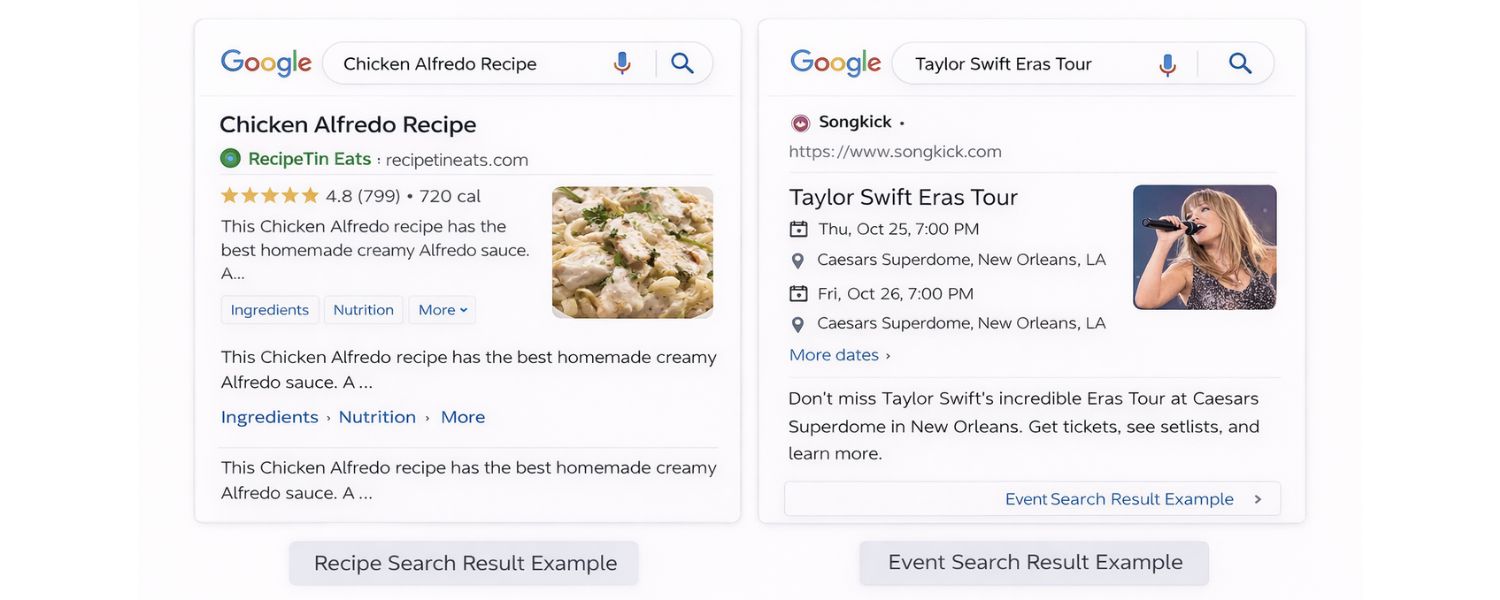
For example, a user searching for a recipe might appreciate seeing cooking time and calorie information right on the results page; someone searching for an event might like seeing the date and venue immediately.
By providing these details via structured data, you’re improving the search UX (user experience). This not only helps users make informed decisions (leading the right people to click your result), but it can also reduce irrelevant clicks (users who wouldn’t have been satisfied can skip your result, saving you a bounce).
Overall, schema helps match users with the content that meets their needs, which is a win-win for both users and website owners.
5. Staying competitive

If your competitors’ sites are using schema and yours isn’t, you’re likely at a disadvantage. A plain blue link is much easier to overlook when other results on the page have eye-catching extras.
As one SEO analogy goes, skipping schema in a competitive niche is like showing up to a costume party in regular clothes – you just won’t get the same level of attention.
Many websites across industries have rapidly adopted schema markup precisely because it can give an edge in visibility.
Not using it could mean lower visibility and clicks, especially if rich snippets are prevalent for your target keywords.
6. Readiness for voice search and AI assistants
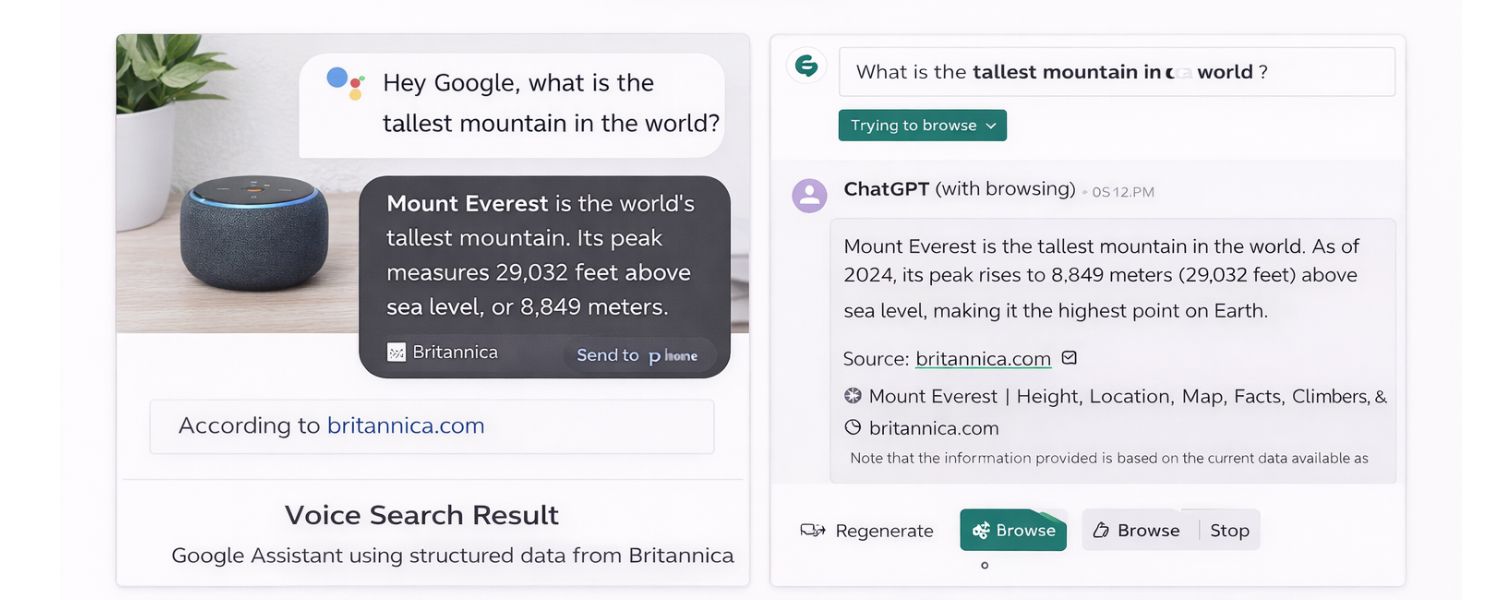
Structured data doesn’t just help traditional search; it’s increasingly crucial for voice search and AI. Voice assistants (like Google Assistant, Alexa, Siri) often rely on structured data to provide answers (for example, using FAQ schema to answer a question).
Moreover, as AI-powered search tools (such as Google’s AI snapshots in search results or third-party AI tools like ChatGPT with browsing capabilities) expand, they utilise structured data to extract and accurately attribute information.
By implementing a schema, you increase the chances that AI systems can parse your content correctly and even cite it when giving answers.
In 2025, with the rise of generative AI in search, schema has become a way to future-proof your SEO, ensuring machines (whether search bots or AI models) fully grasp your content’s meaning and context.
Is Schema a Ranking Factor? Google’s representatives have repeatedly said, “No, schema markup is not a direct ranking factor”.
Simply adding markup won’t automatically boost your position in the search results. However, the indirect benefits – richer appearance, better relevance matching, improved CTR – can positively influence your SEO outcomes.
Higher CTR and satisfied users can send positive signals, and appearing in special SERP features can give you more real estate.
So, while you won’t rank higher just because you have schema, you’re very likely to get more clicks and traffic for the rankings you do have.
Plus, schema is relatively low-effort compared to creating new content or earning links, so its ROI can be pretty high.
Common Types of Schema Markup (With Examples)
There are dozens of schema types, but you don’t need to implement every single one – just the ones relevant to your content and that offer value to your audience.
Below, we highlight some of the most common schema markup types used in SEO, what they’re for, and how they enhance your search listings.
Each of these schema types corresponds to specific rich result features or knowledge panel info in Google.
1. Organisation and Local Business Schema

The organisation schema is used to provide key details about your organisation or business to search engines.
This typically includes information like the business name, logo, website URL, contact phone number, address, founding date, social media links, and more.
By structuring this information, you help Google accurately display your business details in the Knowledge Panel (the sidebar information box that appears for brands and organisations) or in other contexts.
For example, a proper Organisation markup can influence the appearance of your logo or name in search results, and it’s essential for helping Google know whether your site represents a person or an organisation (which many SEO plugins now prompt you to specify).
A closely related type is the Local Business schema, which is a subtype of Organisation (schema.org has types such as LocalBusiness, Restaurant, and Dentist that extend from Organisation).
The Local Business schema adds specific properties, such as your business’s physical address, geo-coordinates, opening hours, and service area.
This information can be displayed in Google’s local knowledge panel or Google Maps. If you have a brick-and-mortar business or serve local customers, implementing the LocalBusiness schema can help ensure that searchers see the correct address, phone number, and hours for your business directly on the results page.
It’s a key part of local SEO, complementing your Google Business Profile.
Example:
A company website might include organisation markup listing the CEO, founding year, and logo.
When someone googles that company, Google may show a knowledge panel with those details (logo, founders, etc.).
A local restaurant’s site might use Restaurant schema (a type of LocalBusiness) to provide its menu URL, price range, and opening hours, which can appear in the local search results on Google.
2. Article Schema (News/Blog Posting)

If you publish articles, blog posts, or news, the Article schema is crucial. This schema type (with variants like NewsArticle or BlogPosting) helps search engines understand the structure of your article content.
It typically includes the headline, author, publish date, images, and article body or a description.
Google uses Article structured data to enhance how your article is displayed in search results and Google News. For instance, with proper Article markup:
A. Google can show a richer headline style, the publication date, and the author’s name directly in the snippet.
B. Your content becomes eligible for inclusion in the “Top Stories” carousel (especially important for news sites). In Google News, structured data can help ensure your articles appear with the correct metadata.
C. It helps Google disambiguate between different types of content (e.g., distinguishing a news article vs. a product page), so it can rank your page for the correct queries.
Google has documented the benefits of the Article schema: it helps them display better title text, images, and date info for your pages.
In other words, it explicitly tells Google what your headline is, which image to consider as the thumbnail, when it was published, etc., rather than Google figuring it out on its own.
This can be especially helpful if your CMS or site layout makes it hard for the crawler to find those elements.
Example:
Imagine you run a tech blog and publish an article about a new smartphone. With Article markup, your blog post’s search snippet may display the publication date and possibly an image.
Without it, Google might simply display the title and some text, or possibly omit the author’s name. The article schema ensures that all journalistic metadata is communicated to Google.
3. Product and Offer Schema (E-commerce)

For e-commerce sites or anyone showcasing products, the Product schema is a game-changer.
Product markup allows you to describe product details such as the name, description, brand, SKU, images, etc. More importantly, it will enable you to provide offer details, such as price, availability (in stock or out of stock), and even review ratings.
When implemented correctly, Google can use this data to display rich snippets for product searches. Shoppers can see at a glance the price range, whether the item is in stock, and its rating before clicking through to your site.
Google distinguishes between two types of product-related schema for rich results: Product snippets and Merchant listings. The difference comes down to the context:
A. The product snippet schema is typically used on pages about a product (but not for direct sales).
For example, a product review page or a blog discussing “best laptops of 2025” could use product snippet markup.
This can yield rich results that show star ratings, review count, pros and cons, and other summary info. It’s great for affiliate sites, review sites, or editorial content about products.
Google may show an aggregate rating (e.g., ★★★★☆ (120 reviews)) or even pros and cons bullet points from editorial reviews right in the snippet (Google added support for Pros/Cons in product reviews in recent years).
B. The merchant listing (or Offer) schema is used on pages where products are sold, such as a product page on an e-commerce site.
This markup focuses on commercial details, including price, currency, availability, and information such as shipping or discount details.
Google can use this to display prices and availability in search results. For instance, if you search for a specific model of TV, Google might display a snippet from a retailer’s page that lists “$799 ·
In stock” directly below the meta description snippet. This is incredibly useful for users and can bring highly qualified traffic.
The merchant listing schema essentially provides Google with the information it needs for product-rich results that appear on Google’s Shopping tab or sometimes directly in web search.
Example:
Consider a page on your site for a new DSLR camera. With Product markup, a Google search result for that camera might display “Rating: 4.5 – 150 reviews – Price: $499 – In stock”.
Without a schema, it may only display your meta description. The additional info makes your result far more appealing to potential buyers.
If you run a review site, using product schema on your “Top 10 Cameras” article could help you earn those star ratings and potentially a snippet of a review summary to appear in Google results, attracting users seeking quality assessments.
(Pro tip: If you’re implementing product schema, be sure to include AggregateRating and Review sub-schemas if your page has review info, and the Offer sub-schema if you have price/availability.
Google requires certain combinations – for example, they won’t display a product rich snippet with a price if the Offer schema is not included properly. Always fill out required fields like “priceCurrency”, “price”, “availability”, etc., as per Google’s guidelines.)
4. Review and Rating Schema

Reviews are a massive part of the web, and Google knows users love to see ratings. The review schema (often implemented via schema types like Review or by adding AggregateRating properties to entities like Product or LocalBusiness) allows you to display star ratings and review details in search results.
We touched on this above, since reviews often go hand-in-hand with product markup, but reviews can apply to many things besides products.
You can have reviews for recipes, books, movies, local businesses, software apps, and more, and all of these can be marked up.
Google supports showing review stars for a variety of content types, including Products, Local Businesses, Recipes, Movies, Books, and Apps.
The rich snippet could appear as an “★★★★★ (4.5) – 86 reviews” line below your URL in search results. There are two main formats Google may display:
A. An individual review snippet, which might show a short excerpt of a single review, the reviewer’s name, and their rating (e.g., “John Doe – ★★★★☆ – ‘Excellent camera for beginners…'”).
B. An aggregate rating snippet, which displays the average rating score and the total number of reviews (e.g., “Rating: 4.5 out of 5 – 86 reviews”).
If your site features user reviews or aggregates reviews, adding review markup can significantly increase your visibility.
Many studies have shown that including star ratings alongside your results can increase CTR.
However, Google has guidelines on review schema: the reviews must be genuine and directly sourced on your site (they cracked down on schema for third-party reviews).
Additionally, as of late 2019, Google restricted which schema types can display self-serving reviews (for example, they stopped showing stars for schema on Organisation or SEO services pages to prevent abuse).
It’s best to implement review markup only for the allowed content types and ensure you’re not “marking up” testimonials in a way that violates Google’s rules.
Example:
A recipe page with user ratings can use review schema to display an average star rating. A local business directory could mark up customer reviews for a particular restaurant.
When someone searches for that restaurant, they might see “⭐ 4.2 (30 reviews)” right on the search listing, giving immediate social proof.
5. FAQ Schema (Frequently Asked Questions)

If your page contains a list of frequently asked questions with answers (such as an FAQ section), you can use the FAQPage schema to mark it up.
A page marked with FAQ schema is eligible for an FAQ rich result, which can display multiple question-and-answer pairs directly on the Google search results under your listing.
This appears as a drop-down accordion of questions that users can expand to read answers, all without leaving the search page.
The FAQ schema gained significant popularity in SEO around 2019-2021, as it could dramatically increase your SERP real estate.
A single result could show 2-3 (or more) FAQs, pushing competitors further down. It’s great for addressing common queries and can improve CTR (since users see you addressing their question directly).
Many businesses added FAQ structured data to pages, such as product pages (“Q: Does this product come with a warranty? A: Yes, 2 years…”) or service pages, to capture more of those “People also ask” style queries.
However, it’s worth noting a recent update: In August 2023, Google reduced the visibility of FAQ rich snippets for most sites. Now, FAQ rich results are only guaranteed (or more likely) to show for specific authoritative sites (like well-known government or health websites).
For most other sites, the FAQ schema may not always produce a rich snippet; Google might choose not to display it, or it may only show one site’s FAQ. This change was made to declutter search results.
Nonetheless, implementing the FAQ schema is still beneficial – it doesn’t harm. If your site is deemed authoritative enough or the question is highly relevant, you may still receive an FAQ snippet.
At the very least, you’re providing clear, structured info that could be used by voice assistants or future AI, even if not always shown as a rich result.
Example: Your blog post about “How to start a vegetable garden” might end with a short FAQ section addressing “What is the best month to plant tomatoes?” and “How often should I water my vegetable garden?”.
Using the FAQPage schema, those Q&A pairs are marked up. If Google decides to display an FAQ-rich result, a user searching for “vegetable garden tips” might see those specific questions under your result, potentially answering them instantly or enticing the user to click for more details.
6. How-To Schema
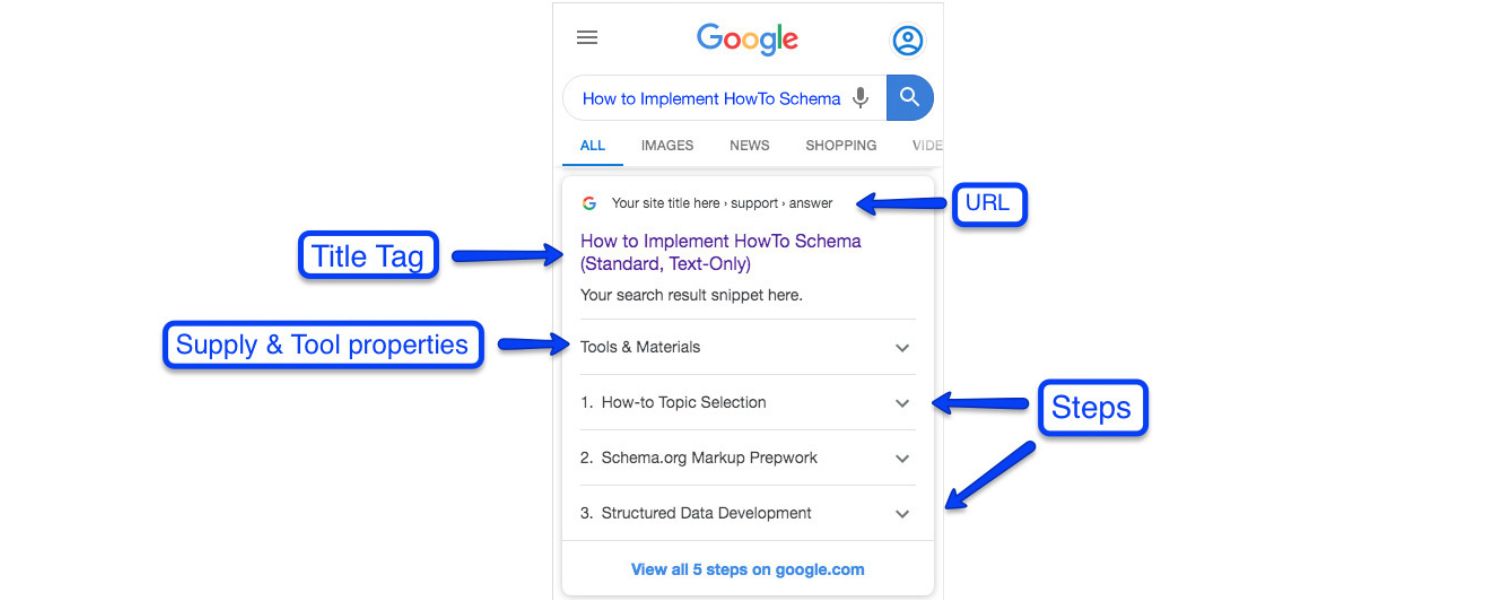
Similar to the FAQ, the How To schema is used for pages that have step-by-step instructions (a how-to guide). When you structure your how-to content with the How To schema type (and HowToStep items for each step), Google can present it as a rich result with a carousel of steps or images.
For example, searching “how to tie a tie” might show image thumbnails for each step directly in the results if the site used HowTo markup with images for each step.
As with FAQ, Google in 2023 limited How-To rich results primarily to desktop and authoritative sites.
So you might not always get a fancy how-to snippet on mobile search, but it’s still helpful to implement for completeness and future features (and perhaps for voice interactions, where an assistant could read out the steps).
Example: If you have a DIY article “How to Change a Tire”, marking it up with HowTo schema can enable a snippet that lists “Step 1: Secure the vehicle, Step 2: Loosen the lug nuts, Step 3: Jack up the car, …” in an interactive carousel.
Each step might be clickable or show an image. This gives the searcher a quick overview of the process directly on Google.
7. Event Schema
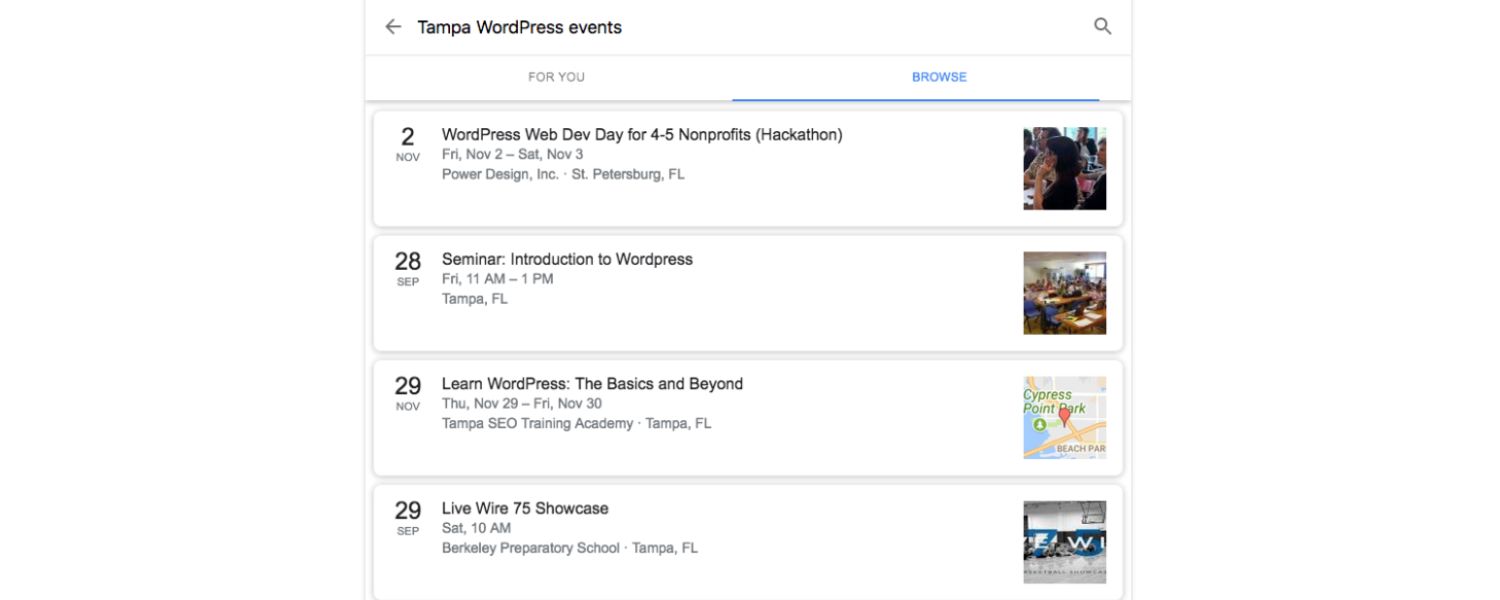
Do you host events, webinars, workshops, or any other type of event with a specific date and location? Event schema can be used to mark them up.
With Event structured data, Google can show your events as rich results, possibly including a date, venue, and even a small calendar icon on the SERP.
Event markup is especially useful for promoting events such as concerts, conferences, or local meetups.
Google may show a list of upcoming events (sometimes multiple events) from your site if you have a valid markup.
For instance, a theatre’s website could mark up all its upcoming shows. A user searching for “Broadway shows in NYC this weekend” might see a rich result listing two or three specific shows with dates pulled from a site’s Event markup.
Example: A music festival website uses Event schema for its festival page. When someone searches for the festival’s name, Google’s result might show “Dates: July 10-12, 2025 – Location: Grant Park, Chicago – Tickets Available” right in the snippet, providing key information instantly.
8. Other Notable Schema Types
1. Recipe Schema:

Hugely popular for food bloggers. The recipe schema allows Google to display rich cards with recipe photos, ratings, cook times, and more.
It also enables your recipes to appear in Google’s recipe-specific search features (like recipe carousels or recipe filters).
If you share any how-to related to food or drinks, Recipe markup is a must for visibility in that space.
2. Video Schema (VideoObject)

If your pages have embedded videos, marking them up can help Google show video-rich snippets (with a video thumbnail, duration, and even key moments).
This can increase clicks for video content. It’s crucial since video search has its section and within regular search, video results stand out.
3. Breadcrumbs Schema
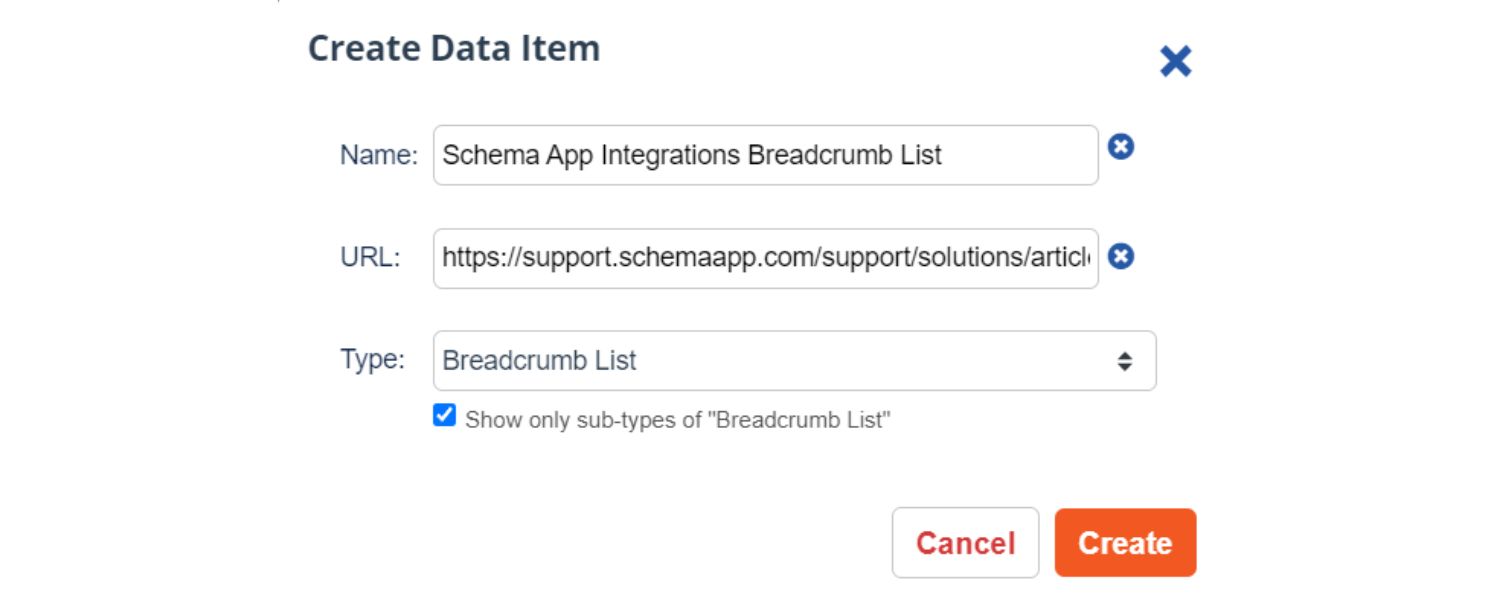
Many sites implement breadcrumb navigation links on pages (e.g., Home > Blog > Category > Post).
Using the BreadcrumbList schema to mark this up can lead Google to display breadcrumb paths instead of complete URLs in your result’s breadcrumb trail.
This can make your snippet cleaner and show users the site hierarchy.
4. Sitelinks Search Box Schema
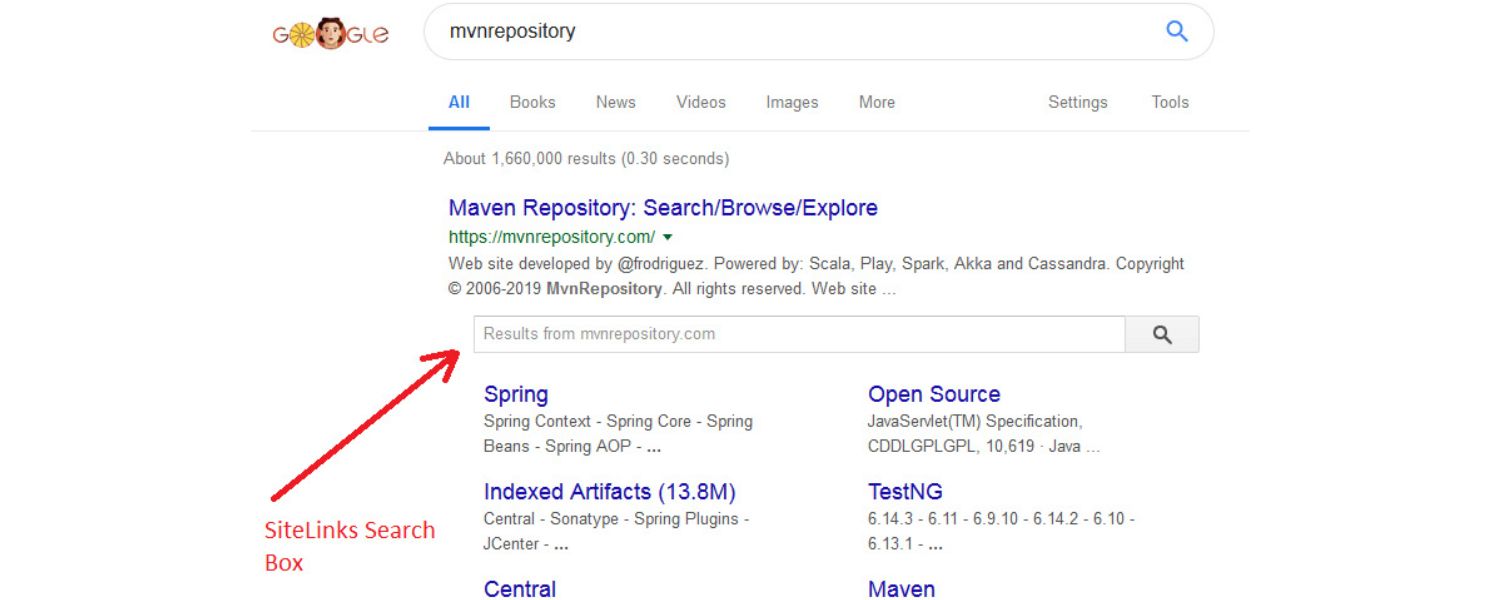
If your site has a search function, adding a Website schema with a potentialAction for search can prompt Google to display a search box directly in your search results (primarily for brand or name queries).
This is primarily for large websites where users may want to search within the site directly from Google’s interface.
5. Job Posting Schema

For job boards or company career pages, the JobPosting schema is crucial because Google has dedicated job search features.
With this markup, your job listings can appear in Google for Jobs (a special job search UI), with details like salary, job title, and location.
6. Course Schema

If you offer online courses or tutorials, the Course schema can enhance how those appear (useful if people search course names, etc., and for Google’s education features).
This is not an exhaustive list – schema.org’s library is extensive. The key is to select schema types that align with the content on your page and the enhancements you want in search results.
Also, always consult Google’s Structured Data documentation for the specific requirements of each rich result type.
Google’s support pages enumerate which properties are required or recommended for your schema to be eligible for rich results. If you miss a required field, your rich snippet may not appear at all.
How to Add Schema Markup to Your Website
Implementing schema markup might sound technical, but it’s more accessible than you think – even if you’re not a developer. Here’s a step-by-step approach to adding schema to your site:
1. Determine Which Schema You Need

Start by identifying the pages on your site and the content types you can mark up. Are you a publisher with lots of articles?
Do you have product pages? An FAQ section? Prioritise markup for content that will benefit most from rich results or where schema is standard in your industry. For example:
If you run an e-commerce site, you’ll want Product schema on product pages (with Offers and Reviews if applicable), plus perhaps Breadcrumb and Organisation schema sitewide.
If you have a blog or news site, Article schema on posts is essential, and perhaps FAQ schema on relevant pages to capture Q&A.
A local business site should have LocalBusiness schema on the contact/about page, and possibly FAQ schema for common queries, etc.
Create a list of content types on your site and map them to their corresponding schema types. It’s wise to implement the “must-haves” (such as Organisation/Person, Website, etc., which many SEO plugins do automatically) and then specific ones that apply to your content niche (e.g., Recipe for food blogs, JobPosting for job sites, and so on).
2. Choose Your Implementation Method:
You have two main routes to add schema: using a plugin or CMS feature, or adding the code manually (either by hand or using a generator tool).
A. CMS and Plugins

Many content management systems have built-in support or plugins for structured data. For instance, if you use WordPress, popular SEO plugins like Yoast SEO, Rank Math, or All in One SEO can automatically add base schema to your pages.
Yoast, for example, will ask during setup whether your site represents an organisation or person and then generate the appropriate JSON-LD for that.
It also marks up your blog posts as Articles by default. These plugins often provide settings to tweak your schema or add-ons to include FAQ schema (Yoast will detect FAQ blocks and add the necessary markup) and HowTo schema, among others.
Similarly, other CMS like Wix, Squarespace, and Shopify often have fields or apps for structured data, or they add some by default.
If you’re non-technical, leveraging these tools is the easiest path. Check your CMS documentation (search “[Your CMS] add structured data”) to see what’s available.
B. Manual coding or using generators

If you prefer complete control or your site is custom-built, you can manually code the JSON-LD and insert it into your pages.
The JSON-LD syntax is relatively straightforward once you understand the structure – it’s just key-value pairs in a script tag.
To avoid writing it from scratch, you can use a schema markup generator tool. For example, Merkle’s Schema Markup Generator (technicalseo.com) provides a user-friendly form: you select the schema type, fill in the fields (such as name, URL, image, etc.), and it generates the JSON-LD code for you.
Google also used to offer the Structured Data Markup Helper, which allowed you to highlight content on your page and generate microdata or JSON-LD for you (this feature can still be helpful for learning, although it’s somewhat dated).
Even ChatGPT or other AI tools can help generate JSON-LD if prompted (just be sure to validate whatever it gives). Once you have the code snippet, you’ll need to add it to your page’s HTML.
The JSON-LD <script> can usually be placed in the <head> or at the end of the <body>. Although Google doesn’t require it to be in the head, it’s conceptually cleaner to keep structured data scripts in the head section.
3. Add the Schema Markup to Your Pages
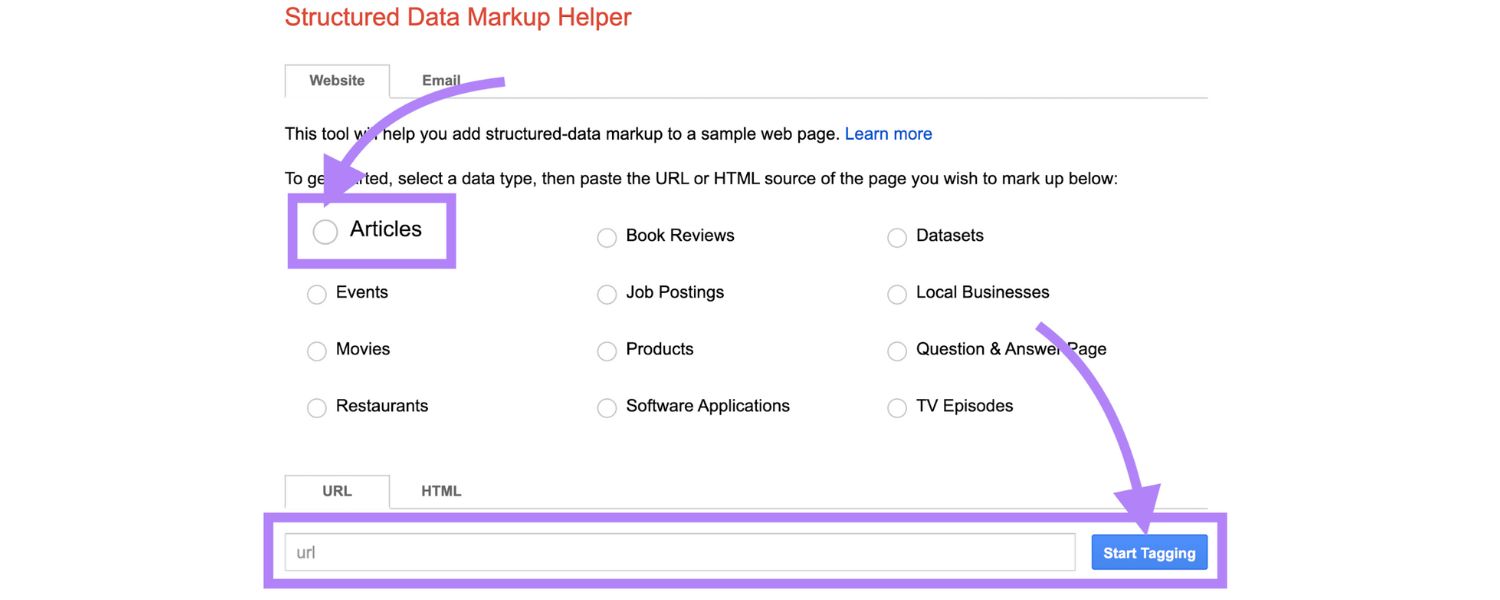
If using a plugin, configure the settings and let it insert the schema for you. If doing it manually, copy the JSON-LD code and paste it into the page.
Ensure that you include all relevant schemas on that page within one or a few script blocks. You can have multiple schema objects on a page (for instance, a product page might have a Product schema and an Organisation schema), just ensure each is a valid JSON object.
Also, avoid adding schema that doesn’t reflect the content on the page – everything you mark up should be visible or apparent to the user in some form.
For example, don’t add a Review schema claiming “5-star reviews” if you don’t display those reviews on the page; that’s against the guidelines and could lead to a penalty or removal of your rich snippets.
If you’re uncomfortable editing code, you may want to consider seeking a developer’s help for this step or opt for plugin solutions.
But many site builders allow you to inject code in the header or specific pages (e.g., via a tag manager or an HTML widget), which is often how you’d add the JSON-LD.
4. Validate Your Schema Markup

This step is crucial. Even a small syntax error can break the structured data, making it unreadable to Google. After you’ve implemented the markup, use testing tools to validate it:
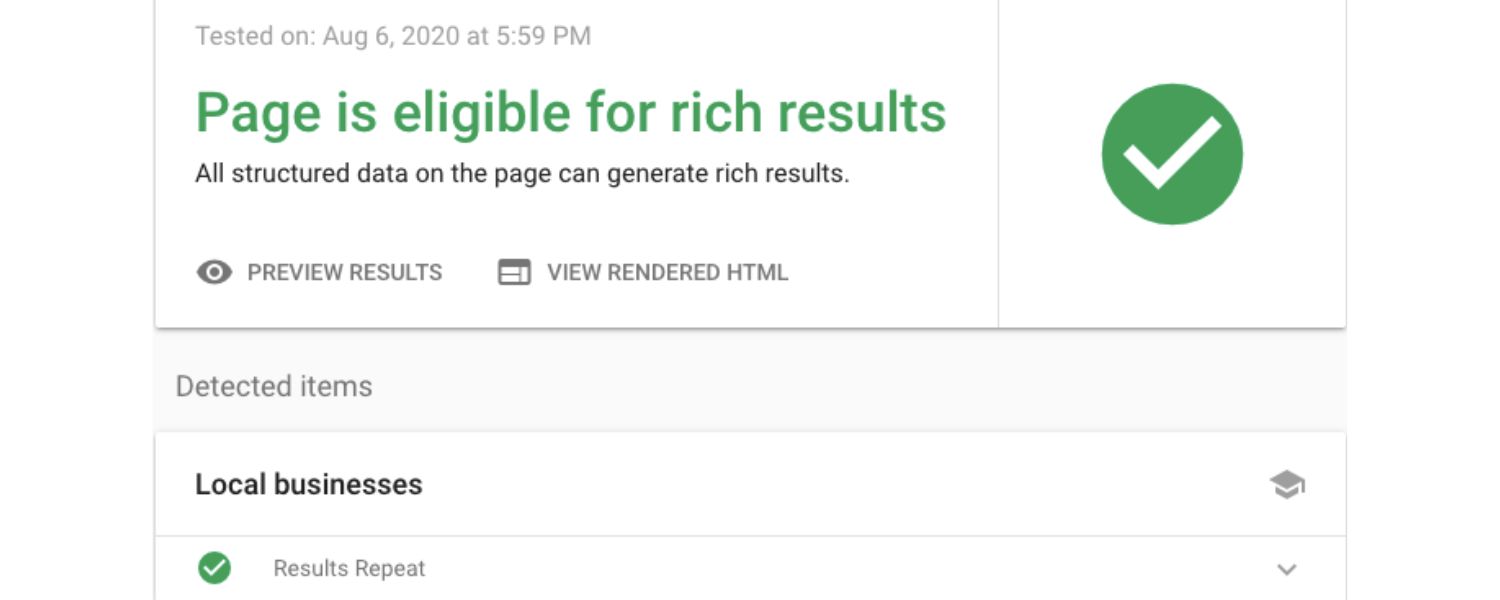
A. The Google Rich Results Test
is a free tool that allows you to input a URL (or a code snippet) and determine which structured data it detects, as well as whether it’s eligible for rich results. It will flag errors (red) or warnings (orange) for your schema.
Errors mean the markup is not entirely valid (e.g., missing a required field or JSON syntax mistake) – these you must fix. Warnings might be optional fields that you left out; consider adding them if relevant.
B. Schema Markup Validator:
The official validator.schema.org is another tool (maintained by Schema.org) that validates any schema markup, not just the ones for Google rich results.
This is useful to double-check your JSON-LD against the schema.org standards. It’s similar to the old Google Structured Data Testing Tool (which was deprecated).
C. Browser Extensions:
There are SEO extensions like OpenLink Structured Data Sniffer or Schema Builder that let you inspect schema on any page (including yours) as you browse. This can quickly show you what’s being picked up.
D. After deploying
Google Search Console is your friend. It has Rich Result Status Reports for various schema types (if you have them on your site and Google has indexed them).
For example, a “Products” report and an “FAQ” report, among others, show how many pages have valid markup or errors. Keep an eye on these; if you notice errors or a drop in valid pages, you’ll want to address the issues.
Validating ensures that you didn’t, for example, forget a curly brace in your JSON or miss a required property, such as priceCurrency, for a Product. It’s much easier to fix before Google crawls the page than after it has been crawled.
5. Maintain and Refine

Once your schema markup is live and valid, you should start seeing the benefits soon (rich snippets can appear as quickly as Google re-crawls the page and indexes the markup). But the work doesn’t end there. Make it a habit to:
A. Monitor results
Use Google Search Console to track impressions and clicks for rich results. You can filter performance reports by search appearance (for example, to see how FAQ-rich results are performing) if you’ve added schema and see CTR improvements. Great! If not, consider revising your content or ensuring the markup is complete.
B. Keep the schema updated
If the information on the page changes (e.g., price changes, event date changes), update the schema accordingly.
Outdated schema information (such as a past event date) won’t help and might even cause Google to drop the rich snippet. For time-sensitive data, it’s critical to keep it in sync.
C. Stay informed on updates
Schema.org occasionally adds new types, and Google sometimes changes how it treats specific schemas.
(We saw how FAQ/HowTo were down-ranked in visibility in 2023.) Subscribe to the Google Search Central blog or follow SEO news so you’ll know if, for example, Google starts supporting a new schema type or stops supporting one. Adapting early can give you an edge.
For instance, Google recently introduced new schema-based features for things like education (such as the prospective adoption of a LearningVideo schema, which may be relevant to you). If that’s the case, being among the first to implement could be beneficial.
D. Avoid schema spam
Only mark up content that is actually on the page and useful. Google’s guidelines advise against marking up misleading or hidden content.
Also, don’t stuff keywords into your schema, thinking it will boost SEO – stick to factual, concise values.
A schema is not a place for SEO keyword stuffing; it’s for factual data. Abuse of schema (such as marking up non-existent reviews) can lead to a manual penalty or simply result in the loss of rich snippets.
Many SEO professionals treat schema implementation as an ongoing part of on-page optimisation – much like you’d update title tags or content, you should update and audit your structured data periodically. The good news is that once you’ve set it up, maintenance is relatively easy.
Schema Markup Best Practices and Trends
To wrap up, let’s highlight some best practices and the latest trends regarding schema markup:
1. Use JSON-LD format

As emphasized, JSON-LD is the preferred format. It keeps your code cleaner and makes debugging easier.
Virtually all new examples from Google are given in JSON-LD. Unless you have legacy microdata you can’t change, opt for JSON-LD for any new markup you add.
2. Follow Google’s Guidelines
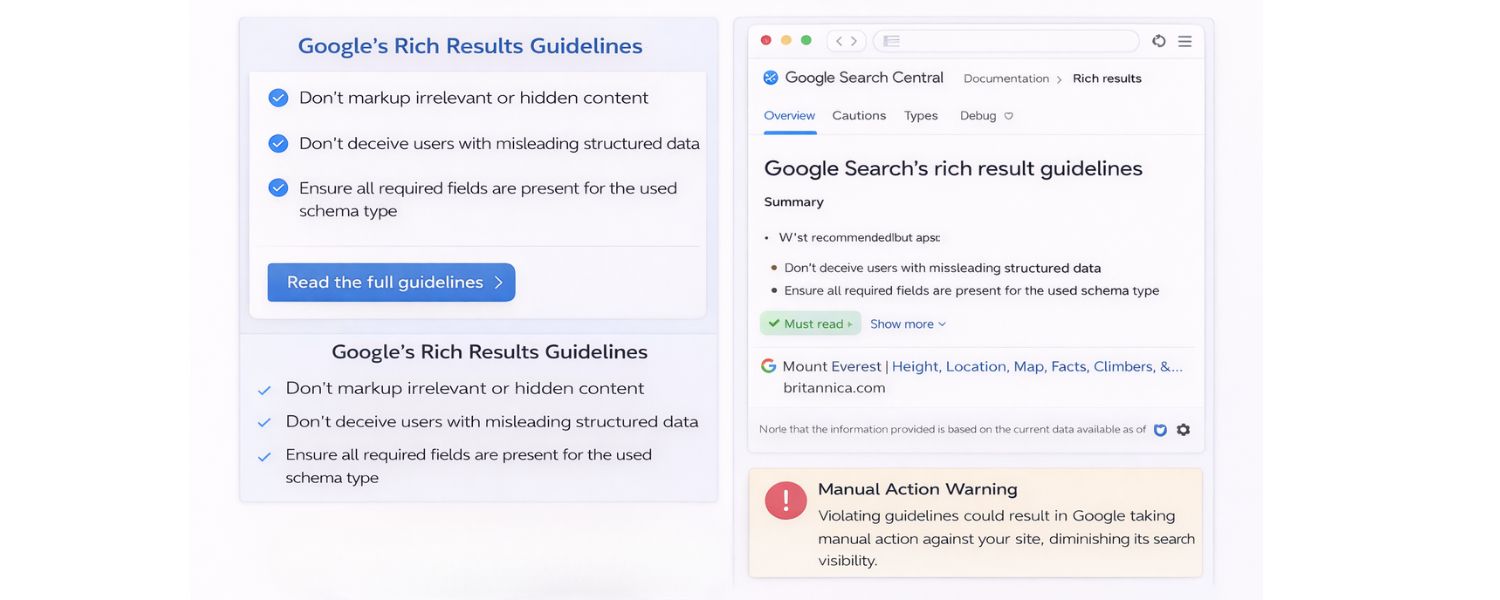
Google’s Rich Results Guidelines outline what you should and shouldn’t do. Key points include: don’t markup irrelevant or hidden content, don’t deceive (e.g., fake reviews or content that doesn’t match), and ensure all required fields for a given schema type are present.
If you violate these, your rich results may not appear, or worse, you could receive a manual action. Also, stick to the schema types that Google supports for rich results to maximise ROI. You can undoubtedly use others for non-Google purposes, but if SEO is your goal, focus on Google’s supported list first.
3. Keep it Relevant and Specific
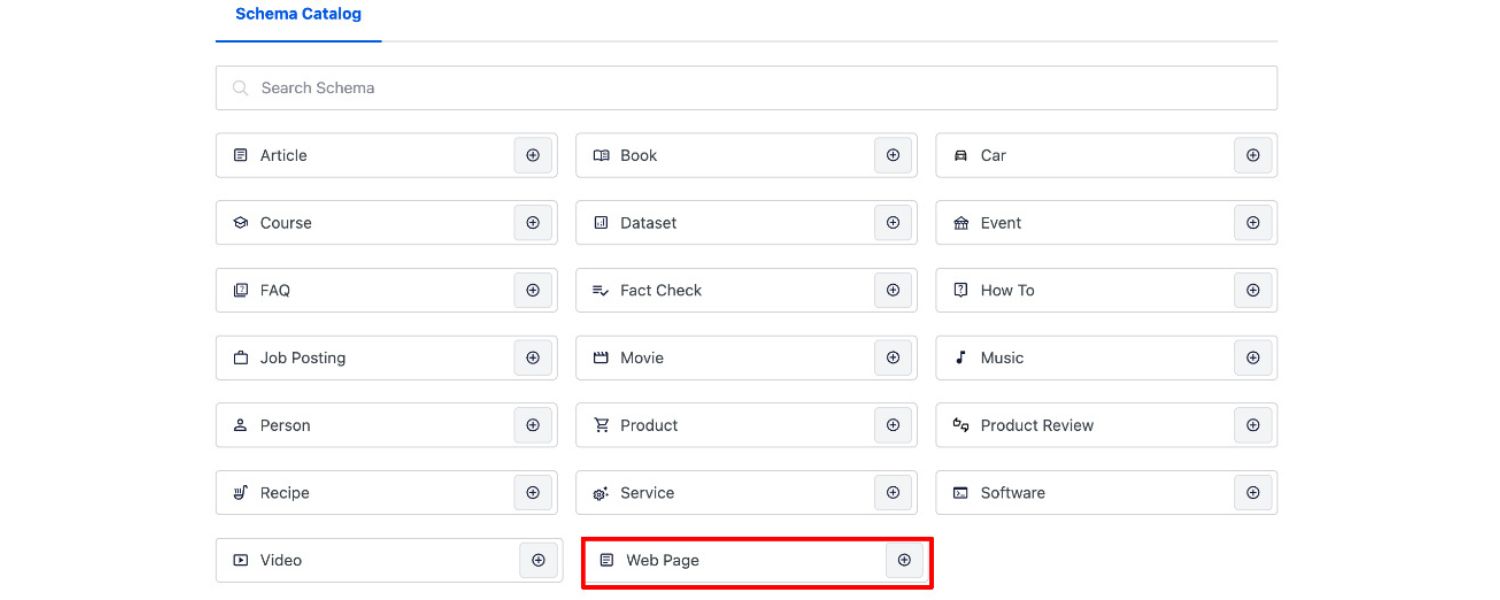
Use the most specific schema type that fits your content. Explore Schema Types for Specific Content onSchema.org is hierarchical. If you have a restaurant, using the Restaurant schema (a subtype of LocalBusiness) is preferable to using LocalBusiness alone.
If you have a tech article that is a news piece, using the NewsArticle subtype instead of a generic Article could be beneficial. The more specific you are, the better search engines can understand context.
4. Don’t Expect Immediate Ranking Boosts
As discussed, schema is not a magic button for ranking. Utilise it for the real benefits: improved presentation in SERPs and enhanced understanding by search engines.
Those often translate to more clicks and possibly better user engagement. So, set the right expectations – focus on CTR, impressions, and traffic improvements rather than a sudden jump from page 2 to page 1.
Many SEO experiments have shown that schema often improves click-through rates and sometimes can increase the types of queries for which you get impressions (long-tail variations, etc.), even if core ranking remains the same.
5. Leverage Tools and Automation

Managing schema for a large site can be daunting (hundreds of pages of products or articles). Use tools to your advantage. Plugins can automate a lot.
There are services like Schema App or WordLift that specialise in structuring data for you. Google’s Search Console is essentially an automation tool to catch schema errors site-wide – use it.
In 2025, we will even see people using AI (like GPT-4) to generate or verify schema code. Just ensure you validate whatever is generated.
A. Watch for New Schema Types and Features
The SEO landscape evolves. Google occasionally introduces new rich result types – for example, a few years ago, they added FAQ and HowTo; more recently, they’ve been testing features like automatically displaying pros and cons from reviews (which started as a schema property you can provide).
Keep an eye out for opportunities: if Google were to start supporting a “COVIDTestingFacility” schema (hypothetically) tomorrow, and you run a medical site, you’d want to implement it ASAP. Being an early adopter of relevant schema can give you a competitive advantage before others catch on.
B. Structured Data Beyond Google
Remember that other platforms use schema markup too. Bing, for instance, also utilises structured data (and may have its Bing-specific types or preferences).
Social media networks like Pinterest use schema (for rich Pins), and Twitter uses it for generating summary cards. Schema.org markup can even help accessibility tools or future apps that parse content.
So you’re not just doing this for Google; you’re enhancing your site’s machine-readability for any present or future service.
C. AI and Schema
In 2025 and beyond, we can expect a more profound interplay between AI and structured data. Large Language Models (the technology behind tools like ChatGPT and Google’s MUM) are adept at parsing natural language, but they can be even more effective when they have structured hooks to latch onto.
There’s speculation that future search algorithms will incorporate schema data into training AI or real-time answering.
By having your content well-structured, you increase the chance that when an AI summarises something about, say, “the best DSLR camera”, it might cite your page because the schema told it your page has a 4.8-rated camera that matches the query.
Google’s own AI search experiments are likely using schema to fact-check and pull specific data points. So, investing in schema is also investing in making your data AI-ready.
Finally, a quick note on schema maintenance: make it part of your SEO routine. When you upload new content, ensure you add relevant schema (this can be in your content checklist).
When you do a site redesign or CMS change, plan for migrating your schema. It’s easier to build it in from the start than to add later.
Conclusion: Leverage Schema Markup for a Competitive Edge
Schema markup is one of those rare SEO techniques that can significantly improve how your website appears in search without requiring constant output of new content or heavy link building.
It’s about working smarter: providing search engines with a cheat sheet to your content. In 2025, as search results become richer and more interactive (and as AI-driven search becomes mainstream), structured data is your ticket to ensuring your site isn’t left behind.
It helps your content shine with eye-catching rich snippets and helps algorithms truly grasp what you’re about.
Implement schema markup best practices may seem technical at first, but as we’ve shown, there are many tools and best practices to simplify the process.
Start with the basics – mark up your organisation info and your flagship content. Then expand to cover as much of your site as makes sense.
Be thorough, be accurate, and stick to the guidelines. The reward can be more visibility, more clicks, and better engagement from your audience.

.png)
Shopify SEO: Guide to Ranking Your Store and Driving Sales
Most Shopify store owners set up their store, list their...

Content Marketing : Definitive Guide to Strategy, Content Types, and Measurable ROI
Content marketing generates 3x more leads than outbound marketing at...

Above the Fold: Guide to Conversions, Rankings and Faster Pages
Above the Fold in 2026: The Complete Guide to Conversions,...

Off-Page SEO Checklist: Guide to Building Real Authority
Most websites spend months creating great content, only to wonder...

What Is Keyword Bidding? The Complete Strategy Guide for Smarter Ad Spend
Most advertisers believe the highest bid wins the auction. It...

What Is Google Trends? The 2026 Marketer’s Complete Guide
If you are not already pulling weekly insights from Google...
If you want a growth partner who will get to know every aspect of your business and treat your budget like their own — we are the right fit.
.png)


.png)
.png)
.png)
.png)
.png)
.png)
2026 ALL RIGHTS RESERVED MADE IN INDIA
