
Image SEO: Optimize Images for Higher Rankings & Traffic
September 17, 2025
Introduction
Images make your website more engaging, but they can also impact how well your site ranks on Google. Image SEO is all about optimizing images so search engines can understand them and users can find them.
It’s often overlooked, even though visuals are increasingly important in search results. In fact, over half of Google search result pages include an image pack of results, and Google Image search itself drives about 10% of Google’s overall traffic.
Mastering image SEO can therefore unlock a significant source of organic traffic. In this guide, we’ll explore what image SEO is, why it matters in 2025, and 15 proven techniques to optimize your images for better rankings and user experience.
What Is Image SEO and Why Does It Matter?
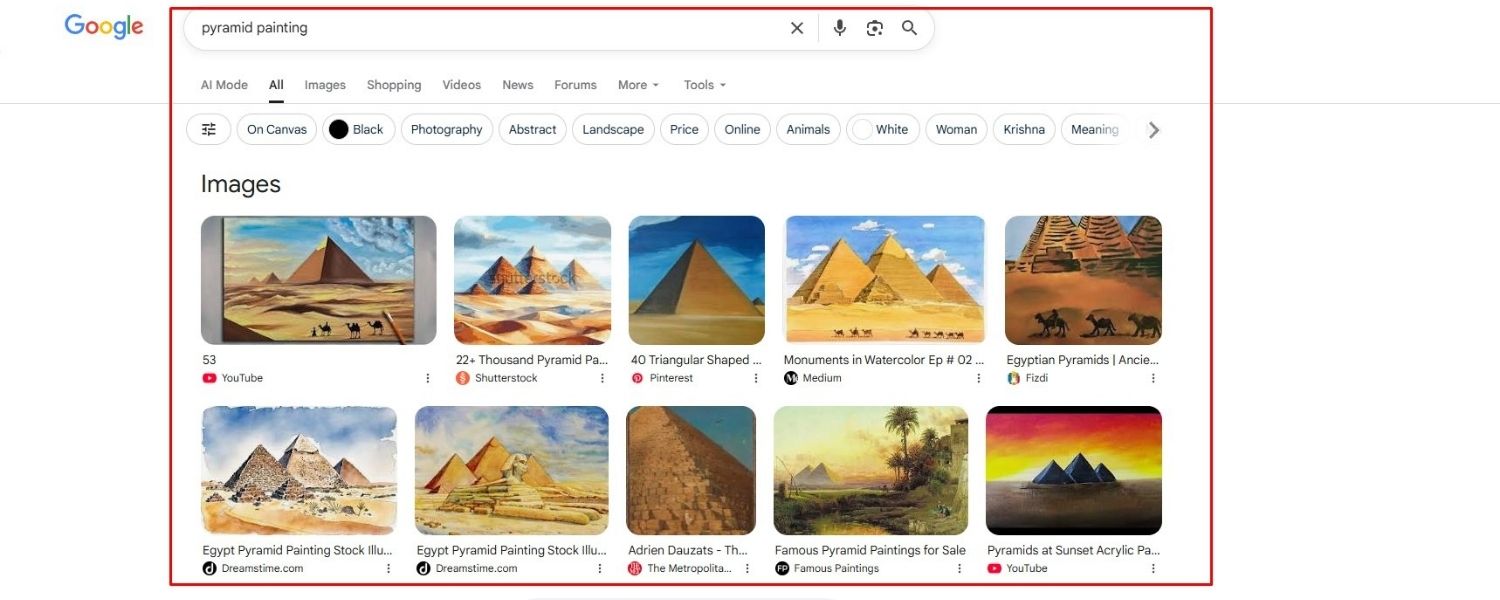
Image SEO refers to the practice of optimizing images on your website so that search engines can crawl, index, and understand them effectively. This involves technical steps (like reducing file size for faster loading) as well as contextual steps (like using descriptive filenames and alt text).
By doing image SEO, you increase the chances that your images, and the pages they’re on, appear prominently in both standard Google search results and Google Images.
Search engines have gotten much better at interpreting images using advanced recognition technologies, but they still rely heavily on the surrounding context (file names, alt text, captions, and nearby content) to determine what an image is about. Optimizing these factors helps Google confidently include your images in relevant searches.
Why does this matter? For one, users love images – they make content more engaging and informative. Google knows this and increasingly features images in search results. More than 55% of search result pages show an “image pack” (a row of image thumbnails) for relevant queries.
And beyond the regular search results, the standalone Google Images search is a major traffic source on its own. Google’s statistics show that roughly one in ten Google visits is via image search.
With the rise of visual search tools like Google Lens (now processing billions of searches per month), optimizing your images positions your site to capture this growing segment of search traffic.
An example of an “Image Pack” (highlighted) integrated into Google’s search results. Over half of Google searches include image packs, which means well-optimized images can directly attract clicks from the main results page.
In short, image SEO improves both user experience and search visibility. Pages load faster and look better, which keeps visitors engaged.
At the same time, search engines reward these optimizations with better rankings and more frequent appearances in image results. It’s a win-win. Now, let’s dive into the best practices to achieve this.
Key Image SEO Techniques (15 Best Practices)
To make the most of image SEO, you should address both the content relevance of your images and the technical performance aspects. Below are 15 essential techniques, gleaned from top SEO experts and Google’s own recommendations, to help your images boost your SEO rather than hold it back.
1. Use Unique, Relevant Images

Choose images that are high-quality, relevant, and ideally original to your content. Using a unique image that clearly illustrates your topic will provide more value to users and give search engines a reason to rank your page higher.
Avoid overused generic stock photos when possible. Google tends to rank original images higher than stock photos found on multiple sites because they offer unique information.
For example, if your article is about a product, include multiple photos of that actual product (from different angles or contexts) rather than a common catalog image. Always ensure you have the rights or permission to use an image, using images without permission can lead to removal or penalties (more on copyright in Tip #15).
Pro Tip: If you don’t have custom photos, consider using Creative Commons images from sites like Flickr or Unsplash (with proper attribution). These can be better than generic stock images, but make sure they are relevant and high-resolution.
Ultimately, any image you use should enhance the user’s understanding of the content. Google’s algorithms increasingly evaluate image relevance in context, so an image closely tied to your text will perform better in image search rankings.
2. Choose the Right Image Format

Selecting the appropriate file format for your images can significantly impact both quality and load speed. Google supports common formats like JPEG, PNG, WebP, GIF, SVG, and BMP in image search, but each has its ideal use case:
A. JPEG
Best for standard photographs and complex images. JPEG uses lossy compression, which reduces file size at the cost of some quality. You can adjust the compression level to balance quality and size.
A high-quality JPEG will look good and usually have a smaller file size than PNG. Use JPEG for most photographs or images with many colors, as it typically achieves a good quality-to-size ratio.
B. PNG
Best for images that need transparency or crisp detail (like logos, icons, or screenshots with text). PNG uses lossless compression, preserving full quality but often resulting in larger files. Use PNG when image clarity is paramount or you require a transparent background, but be mindful of the larger file size.
C. WebP
A modern format developed by Google that offers superior compression. WebP can be 25–80% smaller than an equivalent JPEG or PNG at similar quality levels. It supports both lossy and lossless compression, transparency, and even animation.
WebP is widely supported by modern browsers and is an excellent choice for optimizing load times without sacrificing quality. (Note: A few older browsers do not support WebP. However, the percentage of users on such browsers is very low today.)
D. SVG
Best for vector graphics like logos, icons, or illustrations. SVG images are resolution-independent (they can scale to any size without losing quality) and typically have very small file sizes for simple graphics.
Use SVG for graphics and icons – especially those that need to appear crisp on all screen sizes. (SVGs can be edited with CSS/JS if needed, offering flexibility.)
E. GIF
An older format mainly for simple animations. GIFs use lossless compression but are limited to 256 colors, so they are not suitable for high-quality photos. Use GIF if you have simple animated graphics. For static images, PNG or JPEG are usually better choices.
For most websites, JPEG (for photos) and PNG or SVG (for graphics) are sufficient, with WebP as a highly recommended option if your site/platform supports it. In fact, you can serve WebP versions of your images for browsers that support it, and fall back to JPEG/PNG for those that don’t.
Many content management systems or plugins handle this automatically. The key is to strike a balance between image quality and file size by choosing the optimal format. Google itself suggests using modern formats like WebP or AVIF for faster loading, especially on image-heavy pages.
3. Give Images Descriptive File Names

Before you upload an image, name the file something meaningful. File names are an important clue to search engines about the image content. For example, an image named IMG_0001.jpg is a missed opportunity – it tells Google nothing. Instead, use keywords and descriptors separated by hyphens (not underscores) in the filename.
For instance: sunrise-notre-dame-paris.jpg is far better than DSC4536.jpg or sunrise_notredame.jpg. The former clearly indicates the subject (a sunrise over Notre Dame in Paris). Google’s guidelines recommend hyphens between words (as opposed to underscores or spaces) because hyphens allow Google to read the file name as separate words.
Keep file names relatively short but descriptive. You don’t need to stuff every keyword imaginable, just accurately describe the image. If your page targets a particular keyword or phrase, and the image is directly relevant to it, you can include that in the file name.
For example, on an e-commerce product page for a “red running shoe,” a file name like red-running-shoes-nike-airzoom.jpg is appropriate. This way, even without seeing the image, a search engine gets context from the file name.
And if you have an international site, consider translating image file names for different languages (e.g., use Spanish words in file names on your Spanish version site) to improve local image search visibility.
Quick tips: Use only lowercase letters, numbers, or hyphens in file names (no spaces or special characters). Also, ensure the file extension matches the actual format (e.g., .jpg for JPEG, .png for PNG), as a mismatch could confuse crawlers or cause browsers to misinterpret the file.
4. Write Informative Alt Text for Each Image

Alt text (alternative text) is a short textual description of an image that you include in the image’s HTML tag (the alt=”” attribute). Alt text serves two main purposes: accessibility and SEO. For visually impaired users using screen readers, alt text will be read aloud, conveying the image’s information.
For search engines, alt text provides context about the image’s content, since crawlers can’t “see” images the way humans do. Google heavily considers alt text to understand what an image depicts, and it can influence which queries your image ranks for.
Here’s how to craft good alt text:
A. Be descriptive and specific
In a concise phrase or sentence, describe exactly what’s in the image. Imagine reading it out loud to someone who can’t see the image, would they understand it? For example, alt=”Golden retriever puppy playing with a red ball in a garden” is much more informative than alt=”dog”. Include relevant details (colors, settings, etc.) that matter.
B. Include relevant keywords if they naturally fit
If the image is related to a keyword of your page, you can include that keyword, but only if it makes sense in describing the image. Do not keyword-stuff alt text with irrelevant terms.
For instance, if you have an image of a fuzzy pink hat for sale, alt=”fuzzy pink hat on white background” is a simple, effective description that also contains the product keyword “pink hat.” What you want to avoid is something like alt=”pink hat fashion buy cheap hats online stylish hats” – that kind of keyword stuffing is not helpful and could be seen as spammy.
As SEO experts note, we’re decades past the point where stuffing alt text with keywords worked, today it’s about relevancy and clarity.
C. Keep it relatively short
A good rule of thumb is one brief sentence or a phrase (perhaps 5 to 15 words). Screen readers may cut off extremely long alt text, and very lengthy descriptions can dilute the key information. If an image truly needs a long description (complex charts, etc.), consider explaining it in the page text as well.
D. Don’t use alt text for decorative images
If an image is purely decorative or for layout (like background graphics or spacers), you can leave the alt attribute empty (alt=””) or use CSS backgrounds without alt. Alt text is unnecessary if the image doesn’t convey meaningful content.
This way, screen readers will simply skip it, and search engines will know it’s not important. Focus your alt text efforts on content-bearing images, product photos, infographics, diagrams, etc., where the alt description adds value.
Remember, alt text is first and foremost for users who cannot see the image. By writing as if you’re describing the image to a person, you’ll naturally include the important details and likely a relevant keyword or two without forcing it. This approach both improves accessibility and gives search engines the context they need to index your image properly.
5. Resize Images to Proper Dimensions

Use the right dimensions for your images – don’t upload a huge 4000px image if it will only be displayed as a 400px thumbnail. Oversized images that are shrunken via HTML or CSS still force the browser to download the full large image file, which slows down your page dramatically.
For example, if you have a 2500×1500 pixel photo but it only ever displays at 250×150 on the site, resize it to those smaller dimensions before uploading. This can reduce file size exponentially.
Most content management systems (like WordPress) automatically create multiple size variants of an image (thumbnail, medium, large, etc.). Make sure you’re inserting the appropriately sized version in your page. If you’re manually handling images, use an image editor to resize to the max dimensions needed.
Also, specify the width and height attributes (or CSS styles) for your <img> tags whenever possible. This helps browsers allocate the correct space for the image as it loads, preventing the page content from “jumping” around – an issue known as layout shift.
Preventing these layout shifts is important for user experience and is measured by Google’s Core Web Vitals (specifically the CLS – Cumulative Layout Shift metric). By defining the width and height, you reserve space for the image in the layout, which improves visual stability and can benefit your page’s Core Web Vitals metrics. In short, it helps your page appear more quickly and smoothly, which search engines reward.
Tip: If you need to display a high-resolution image (for example, a product zoom or gallery feature), consider using thumbnails or low-res placeholders that link to or dynamically load the full-res image only when needed. This way, your page’s initial load isn’t bogged down by large images that the user hasn’t asked to see yet.
6. Compress Images to Reduce File Size

After resizing, the next step is compression – reducing the file size (KB) of the image while maintaining acceptable quality. Smaller image files mean faster loading pages, which is critical for SEO and user retention.
In fact, fast load times are so important that a Google study found that if a page’s load time increases from 1 second to 3 seconds, the bounce rate increases by 32%. Slow pages lose visitors and can rank lower, especially with Google’s focus on Core Web Vitals and page experience.
There are many tools (both offline and online) to compress images:
A. For lossy compression (which slightly reduces quality in exchange for big size savings): tools like TinyPNG, JPEGmini, or Squoosh (by Google) are excellent. They can often cut file sizes significantly without a noticeable drop in visual quality.
B. For lossless compression (no quality loss, smaller size savings): tools like ImageOptim or PNGGauntlet can strip unnecessary metadata (like EXIF data from cameras) and optimize file structure.
C. Many Content Management Systems and plugins (e.g., ShortPixel, Smush for WordPress) will automatically compress images on upload.
Aim for a file size under 100 KB for most images, if possible, without visible quality degradation. For thumbnails or small display images, you might get well under 50 KB.
Larger visuals (like full-width banners) might be 100–200 KB and still acceptable, but always compress as much as you can while keeping them looking sharp. Modern formats like WebP typically produce much smaller file sizes for the same quality, so use them to your advantage (Tip #2 above).
One strategy is to save at high quality, then compress: for example, export a JPEG at high quality from Photoshop, then run it through a tool like TinyPNG or JPEGmini. This often yields better results than exporting directly at a lower quality setting.
Finally, after uploading and implementing your images, it’s wise to test your page speed. Use tools like Google PageSpeed Insights or GTmetrix to see if images are flagged as too large or slow. These tools can often identify if an image could be compressed further or if a dimension issue is causing slow loads. Regularly auditing your pages ensures you didn’t miss any oversized images.
7. Use Responsive Images (Srcset for Different Devices)
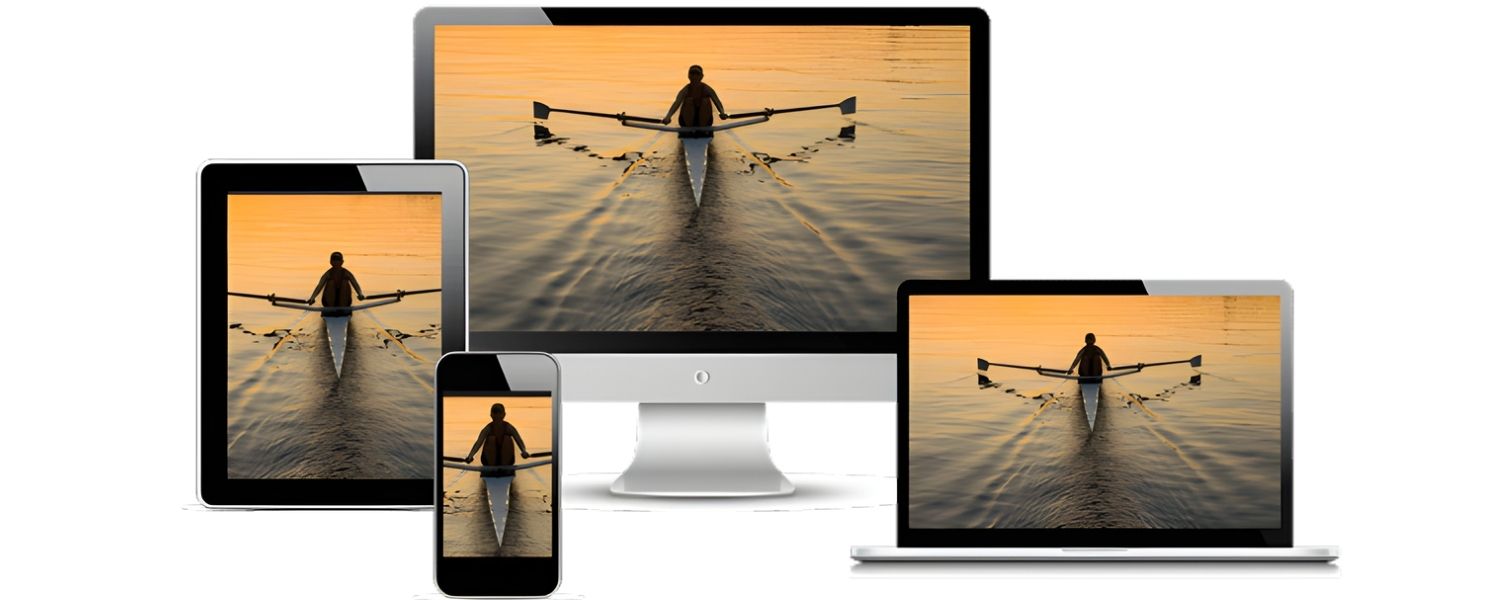
With the wide variety of screen sizes today – from small mobile phones to large desktop monitors, it’s important to serve images that are appropriately sized for each device. Responsive images utilize the srcset and sizes attributes (or the <picture> element) in HTML to let the browser select the best image source based on the device’s screen size or pixel density.
This ensures, for example, that a smartphone isn’t downloading a huge desktop-resolution image when a smaller one would do, and vice versa, a retina display isn’t stuck with a low-res image.
On modern platforms, this is often handled automatically. For instance, WordPress includes srcset by default when you upload images, generating multiple scaled versions. But it’s good to understand the principle:
A. Srcset attribute allows you to list different image files and their widths (or pixel densities). For example: <img src=”image-800.jpg” srcset=”image-400.jpg 400w, image-800.jpg 800w, image-1200.jpg 1200w” alt=”…”>. This tells the browser “if the image will be rendered around 400px wide, you can use image-400.jpg; if ~800px wide, use image-800.jpg; etc.”
B. Sizes attribute hints the layout width for different screen ranges, so the browser knows which srcset candidate to pick. For instance: sizes=”(max-width: 600px) 400px, 800px” meaning if screen width ≤600px, expect image to be ~400px, otherwise ~800px.
By implementing responsive images, you improve load times on mobile significantly. Mobile users often have slower connections and less need for huge images, so this is crucial.
Google’s mobile-first indexing also means the mobile experience is prioritized, serving overly large images to mobile will hurt your performance metrics.
In summary, check that your site’s code or CMS is leveraging responsive image techniques. Most likely, if you see srcset in your image HTML, you’re covered. If not, it may be worth looking into plugins or manual approaches to add responsive image support. It’s an advanced but very impactful aspect of image SEO in terms of speed and usability.
8. Implement Lazy Loading for Off-Screen Images
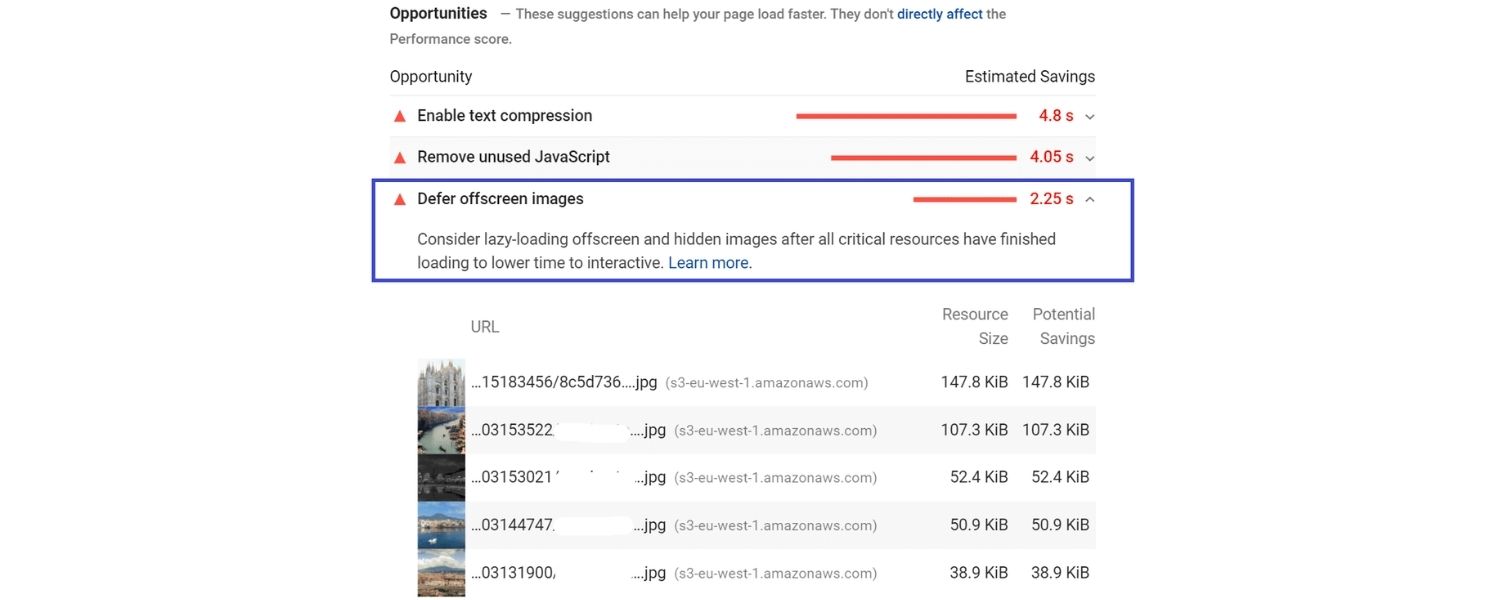
Lazy loading means deferring the loading of images that are not immediately visible on the user’s screen (viewport). Instead of loading every image on the page at once (which can be slow), you load images as the user scrolls down to where those images appear.
This technique greatly improves initial page load speed, especially on pages with many images (think of long blog posts or product galleries).
Most modern browsers support lazy loading natively via the loading=”lazy” attribute on <img> tags. For example: <img src=”photo.jpg” alt=”…” loading=”lazy”> will tell the browser to load that image lazily (i.e., not until close to when it’s needed). If you need more control or browser support, there are many JavaScript libraries that can handle lazy loading as well.
Why does this help SEO? Because page speed and user engagement improve. If your above-the-fold content (the part immediately visible) loads fast, the page is interactive sooner and users are less likely to bounce.
Search engines measure and favor faster, more efficient pages. Lazy loading ensures that heavy image assets farther down don’t delay the initial render. Content not yet seen by the user won’t load until necessary, saving bandwidth and time.
One thing to keep in mind: if you use lazy loading, ensure that critical images (like your main banner or feature image at the top) are not lazily loaded, those should load immediately.
Lazy load primarily for images further down or in long lists. Also, double-check that search engine bots can still discover lazy-loaded images. Google is pretty good at crawling content that loads dynamically, but to be safe, important images can be included in your sitemap or have proper HTML (even if off-screen initially). Fortunately, the native loading=”lazy” attribute is Google-friendly.
In short, lazy loading is a best practice for performance. It’s usually very easy to implement and yields significant improvements on pages with numerous images. By reducing unnecessary initial loads, you make your page snappier and more SEO-friendly.
9. Provide Captions and Context Around Images
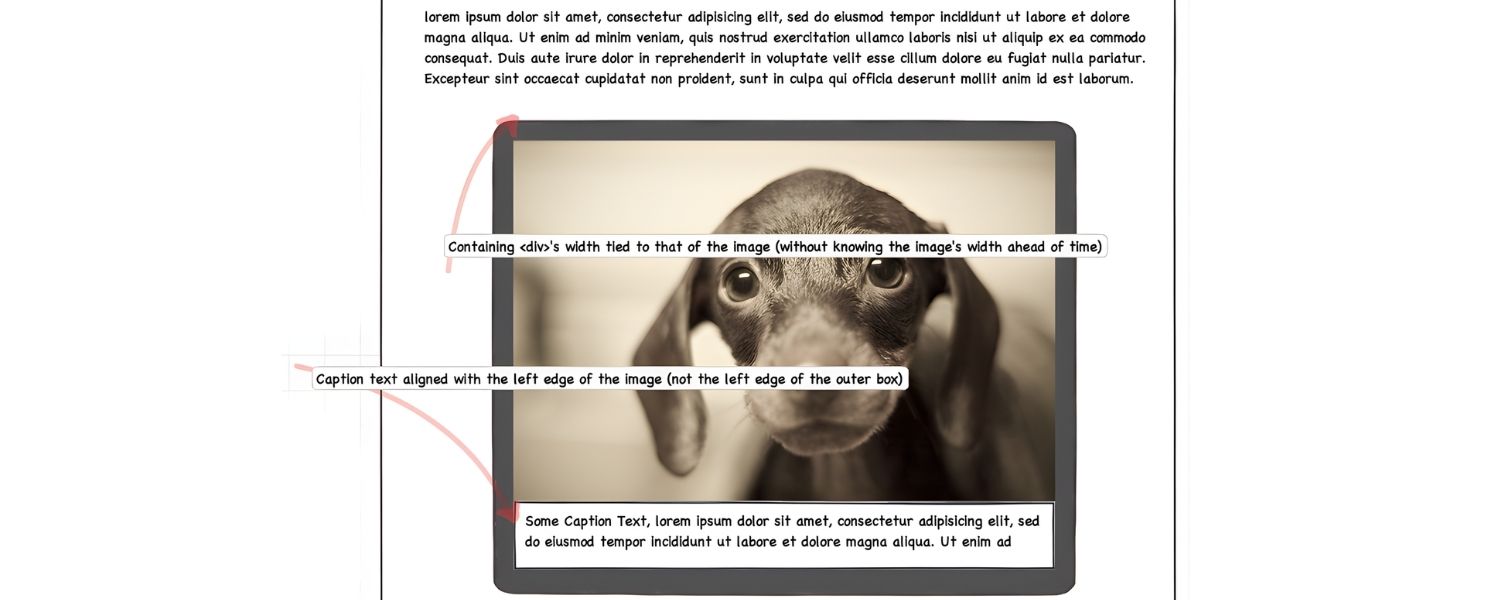
Images don’t exist in a vacuum, the text surrounding an image influences its SEO. Provide descriptive captions or incorporate the image into the content with context.
Captions (the little text immediately below an image, often in <figcaption> or just styled text) are one of the most commonly read pieces of content on a page (people’s eyes are drawn to images and the text right beneath them).This matters even more for multi-element visuals like a collage design, where a short caption and clear alt text help explain what the reader is looking at. A good caption can both enhance user understanding and reinforce the relevance of the image to your topic.
Not every image requires a caption, sometimes images are purely decorative or the context is obvious within the article text. But if an image illustrates a key point, a one-line caption explaining what it is or why it’s relevant can be very useful.
For instance, under a chart image you might have a caption “Figure 1: Organic traffic growth after image SEO optimizations over 6 months.” This not only tells the reader what to observe, but also contains the keyword “image SEO” in a natural way.
Beyond captions, make sure the paragraphs above and below the image discuss related ideas. Search engines look at the nearby text, page title, and overall content to gauge an image’s relevance.
For example, if you have a page about the Eiffel Tower and you show a photo of it, it helps if the text around that photo mentions “Eiffel Tower” or related terms. If your text is completely unrelated, the image appears out of context, and it may not rank as well for its subject matter.
Also, consider placement: If you have a very important image you want to rank (like an infographic you hope will appear in Google Images), placing it higher on the page might help.
Yoast’s experts suggest keeping key images near relevant text and towards the top if it makes sense. This isn’t a hard rule, but the logic is that prominent placement could signal importance.
In summary, use the power of words around the image. If you think of the image as part of the content (not separate from it), you’ll naturally write in a way that supports the image. This holistic approach – combining visual and textual content – improves how both users and search engines interpret your page.
10. Add Structured Data (Schema) for Images

Structured data (or schema markup) is extra code you can add to your HTML that gives search engines explicit information about your content. For images, structured data can be used in various schema types (like Product, Recipe, NewsArticle, etc.) to specify things like the image’s URL, caption, license, and so on.
For example, a Recipe schema might include an image property pointing to the dish photo, or a NewsArticle schema might mark an image as the article’s featured image.
While structured data for images doesn’t directly boost rankings, it can enable rich results and better presentation of your images in search. For instance, images in recipe results can get a badge or be displayed in rich snippet carousels if proper schema is present.
Google has guidelines for images in structured data – such as ensuring the image is relevant, of high quality, and accessible to Google’s crawler. Following these can make your image more likely to appear as a rich result, which typically increases click-through rates.
If you’re using a platform like WordPress with SEO plugins (Yoast, etc.), much of this might be handled for you automatically. Yoast SEO, for example, will include your featured image in the schema graph for the page, and if it’s a product or recipe with images, it will integrate those accordingly.
But it’s worth verifying using Google’s Rich Results Test or Schema Markup Validator to see if your images are included in your structured data.
Some useful schema types involving images:
A ImageObject: A general schema type to provide details about an image (caption, license, author, etc.). This can be nested inside other schemas.
B. Product: Allows specifying product images. Google can show these in product rich results.
C. Recipe: Has fields for images of the dish.
D. Article/NewsArticle/BlogPosting: Typically include a “image” field for the main image.
E. VideoObject: If you have video thumbnails, etc.
Implementing structured data correctly can also future-proof your content as Google evolves. Even if it’s not yielding visible changes today, it might help your images be understood and surfaced in new experiences (like voice search results, Google Discover, etc.).
In short, structured data is like giving Google a neatly formatted resume of your content. It’s not mandatory, but it can enhance the way your images appear and ensure no details are missed by the crawler. If you have the capability, it’s worth adding for that extra SEO edge.
11. Include Images in Your Sitemap (or Create a Separate Image Sitemap)

A sitemap is a file (usually XML) that lists the URLs of your site’s pages to help search engines discover and crawl them. You can also include information about images on those pages.
By adding image entries to your sitemap, you ensure Google knows about all your important images, even those that might be hidden behind scripts or not linked clearly in your site’s navigation.
Google’s own documentation notes that an image sitemap or image entries can help Google “discover images it might not otherwise find” (for example, images that load via JavaScript).
There are two ways to do this:
A. Add <image:image> entries within your existing page sitemap
Many SEO plugins do this by default. For each URL, they list the images on that page. For example, Yoast SEO plugin adds image information to each post URL in the sitemap rather than creating a separate sitemap file, following Google’s recommendation.
B. Create a dedicated image sitemap
This is a separate XML file solely for images. It can be useful if you have a ton of images or a site primarily about images (like a photography portfolio). Each entry can include the image URL, caption, title, license, etc. This file is then submitted to Google Search Console.
Either approach is fine. The goal is to feed Google all your image URLs. This can be especially helpful if some images are not directly in the HTML (e.g., background images that are important, or images that only appear after user interaction). By listing them in a sitemap, you make sure Googlebot is aware of them.
When implementing, ensure that the images you list are accessible (not blocked by robots.txt) and ideally on the same host as your site. If you use a CDN subdomain for images, adjust your sitemap settings accordingly to include those.
While having images in a sitemap doesn’t guarantee indexing or ranking, it improves the odds of discovery. It’s a cleanliness and completeness step. If you’re already using an auto-generated sitemap, check if images are included. If not, and you care about image SEO, consider enabling that feature or using a plugin/script to do so.
12. Use a Content Delivery Network (CDN) for Faster Image Delivery

A Content Delivery Network (CDN) is a network of servers distributed geographically that can serve your website’s static files (like images) from a location closer to the user.
Using a CDN for your images can dramatically speed up load times for users around the world, because the images are delivered from a server that’s likely in their region. Faster delivery = happier users and potentially better SEO performance (indirectly, through improved speed metrics).
For example, if your website’s server is in New York but a visitor is from London, loading images from New York can be slower. A CDN might have a London node that serves the images much faster to that UK visitor. Many CDN services also optimize images on the fly (compressing or converting to WebP for supported browsers), which adds another layer of performance improvement.
Popular CDN choices for images include Cloudflare, Amazon CloudFront, Akamai, Fastly, and many others. There are even specialized image CDNs (like Cloudinary, imgix) that not only distribute but also transform images (resizing, format conversion, etc.) on demand.
From an SEO perspective, the key benefit is improved page speed and reliability. CDNs also can reduce your server load, making outages less likely, which means search engine bots can crawl your site’s images more reliably. Google doesn’t give extra “points” just for using a CDN, but it does reward fast, consistently-loading pages – which a CDN facilitates.
Implementing a CDN for images usually involves either changing your image URLs to point to the CDN domain or using a plugin/service that handles the rewrite. Many all-in-one performance plugins for CMSs make this easy – you input your CDN URL and it rewrites image links to use it.
One thing to watch: make sure your CDN isn’t inadvertently blocking search engines from accessing images. Often, if the CDN is configured correctly, Google will fetch images from the CDN URL just fine.
Google is used to crawling images from various hosts (especially common ones like Cloudflare). But if you see images not indexing, check robots.txt or security settings to ensure Googlebot can fetch from the CDN host.
In summary, using a CDN is a technical best practice that can give your image SEO a boost through faster load times globally. It’s especially recommended if you have a lot of large images or a visitor base spread across different continents.
13. Optimize for Social Sharing (Open Graph & Twitter Cards)
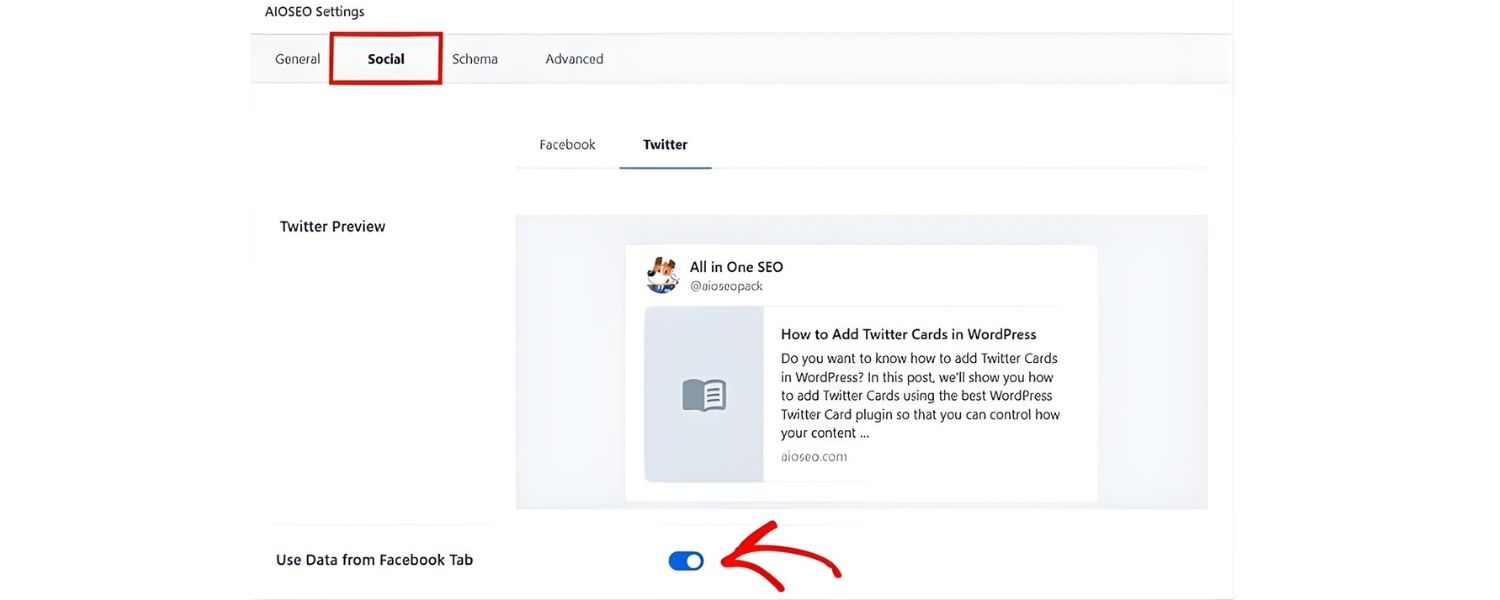
While this isn’t directly about Google rankings, optimizing how your images appear when shared on social platforms can increase engagement and indirectly drive more traffic (which can lead to more searches/visibility).
By adding Open Graph tags (og:image in your page’s HTML head) and similar Twitter Card tags, you can control which image gets used as the preview when someone shares your page on Facebook, Twitter, LinkedIn, etc..
For example, you might include: <meta property=”og:image” content=”https://yourwebsite.com/path/to/image.jpg” /> along with tags for title and description.
This ensures that, say, when your blog post about “Image SEO Tips” is shared on Facebook or LinkedIn, a nice relevant image (perhaps your infographic or a featured graphic) appears in the snippet, rather than a random or missing image. A compelling image in social posts can improve click-through rates significantly.
Why mention this in an image SEO context? Because the selected preview image often is one from your page. If you leave it to chance, a social network might pick an image that’s not optimal (or none at all). By explicitly setting the og:image, you not only control the narrative on social media but also enforce having a high-quality, properly cropped image for sharing.
It’s recommended to use a sufficiently large image (at least 1200px in width for Facebook/LinkedIn, and similar for Twitter). Many SEO plugins allow you to set this easily, and even give a preview of how your post will look when shared.
From a search perspective, Google sometimes uses Open Graph or similar metadata to understand images too. And in its own social-like surfaces (e.g., Google Discover), having a well-chosen image can impact performance.
Bottom line: Include social metadata for images on your pages – it’s a one-time optimization that enhances how your content is perceived and clicked outside of search, which can indirectly benefit your site’s overall visibility. Plus, it demonstrates attention to detail and completeness, which tends to correlate with better SEO practices generally.
14. Monitor Your Image SEO Performance

This is more of an ongoing practice: use tools to track how your images are doing in search. Google Search Console has a section under “Performance” where you can filter by Image search.
You can see which queries lead to your images, which images are getting clicks, and their click-through rates. This insight can be valuable. For example, you might discover one of your images is getting a lot of impressions for a certain query – you can then make sure that image’s page is even more relevant for that query, or maybe update the image alt text to better target it.
Also, check the Coverage/Indexing reports in Search Console for any image-specific indexing issues. Google will flag if an image couldn’t be indexed (maybe it was too large, or blocked, or had an unsupported format). Fixing those issues (like compressing an overly large image, or updating robots.txt) will help ensure all your content is reachable.
Using analytics, you can see if pages with well-optimized images have lower bounce rates or higher time-on-page (since images can keep users engaged). And as mentioned, monitor page speed scores or Core Web Vitals – if these are struggling, your images might be the culprit and warrant further optimization.
Additionally, consider performing a site audit with SEO tools (Semrush Site Audit, Moz, etc.). They often include checks for missing alt text, oversized images, or slow load times. These can point out which pages need attention.
Finally, stay updated on new formats or guidelines. For example, AVIF is an emerging image format with even better compression than WebP; it might become more widely adopted soon.
Or Google might introduce new image search features or requirements (like the recent licensable images badge that requires metadata for image licensing). Being aware means you can adapt your image SEO strategy and stay ahead of competitors.
In short: Don’t “set and forget” your images. Continuously improve them and adapt to user behavior and search engine changes. Image SEO is part of overall SEO hygiene – regular check-ups will keep your site in top shape.
15. Use Legitimate Images and Avoid Copyright Issues
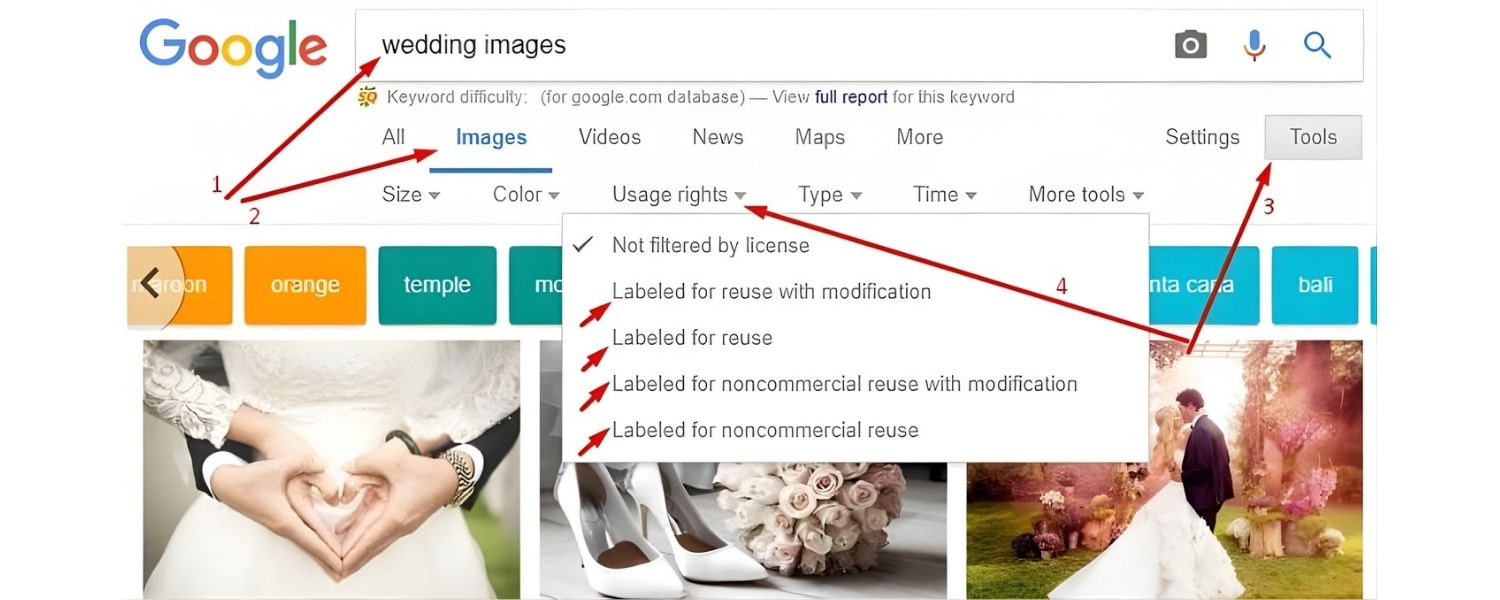
While this isn’t an optimization “technique” per se, it’s crucial for the long-term viability of your image SEO. Always use images that you either created, own, or have proper rights/licensing to use.
Copyright violations can result in takedown notices (DMCA requests) which might cause your images (or even your pages) to be removed from search results entirely. Beyond the legal risks, getting a reputation for unauthorized image use can harm your site’s credibility.
If you source images from others, make sure they are free to use (Creative Commons, public domain, or properly licensed stock images). Give attribution if required. Google Images now even has filters for usage rights, and may display a “Licensable” badge on images that have licensing metadata.
It’s not going to boost your rankings to have licensable metadata, but it will ensure users know the image is legitimate and can be used or purchased properly.
Also, be cautious of hotlinking (embedding images hosted on someone else’s server), besides being bad form, the host could block your site or change the image. It’s always best to host images on your own site or a trusted CDN so you control the content.
Finally, if you ever change or remove an image on your site, remember that image URLs can accumulate equity too. If an image has been indexed and ranking, and you delete it or move it, try to implement a redirect to a relevant image or leave a placeholder. Broken image links (404s) can hurt user experience and waste the crawl budget. It’s similar to broken page links, clean them up.
In summary, treat image SEO with the same respect as text SEO when it comes to originality and quality. Use authentic images, follow the rules, and you won’t have to worry about unexpected SEO setbacks due to complaints or removals.
By implementing all the above practices, you’ll cover both the technical and content sides of image SEO. Your pages will load faster, communicate better with search engines, and provide a richer experience for users, all of which contributes to better search performance.
High-quality, optimized images can be a competitive advantage, especially as we move into an increasingly visual era of search (with voice and visual search on the rise, and AI-driven experiences that value multimedia content).
Now that we’ve covered how to optimize your images, let’s look at who can help you achieve these results. If handling all these optimizations sounds daunting, you may consider working with experts. Below we’ve compiled a list of top agencies known for their SEO (including image SEO) expertise, with Offshore Marketers leading the pack.
Top Image SEO Agencies and Services in 2025
If you prefer to leave the heavy lifting to professionals, many digital marketing agencies offer SEO services that encompass technical SEO, content optimization, and image SEO best practices.
We’ve identified some of the best agencies (from various regions) that excel in SEO and have strong client reviews. These agencies can help audit your site, optimize images and content, and drive more organic traffic. Here’s an overview, starting with our top recommendation:
1. Offshore Marketers (Global – USA & International)
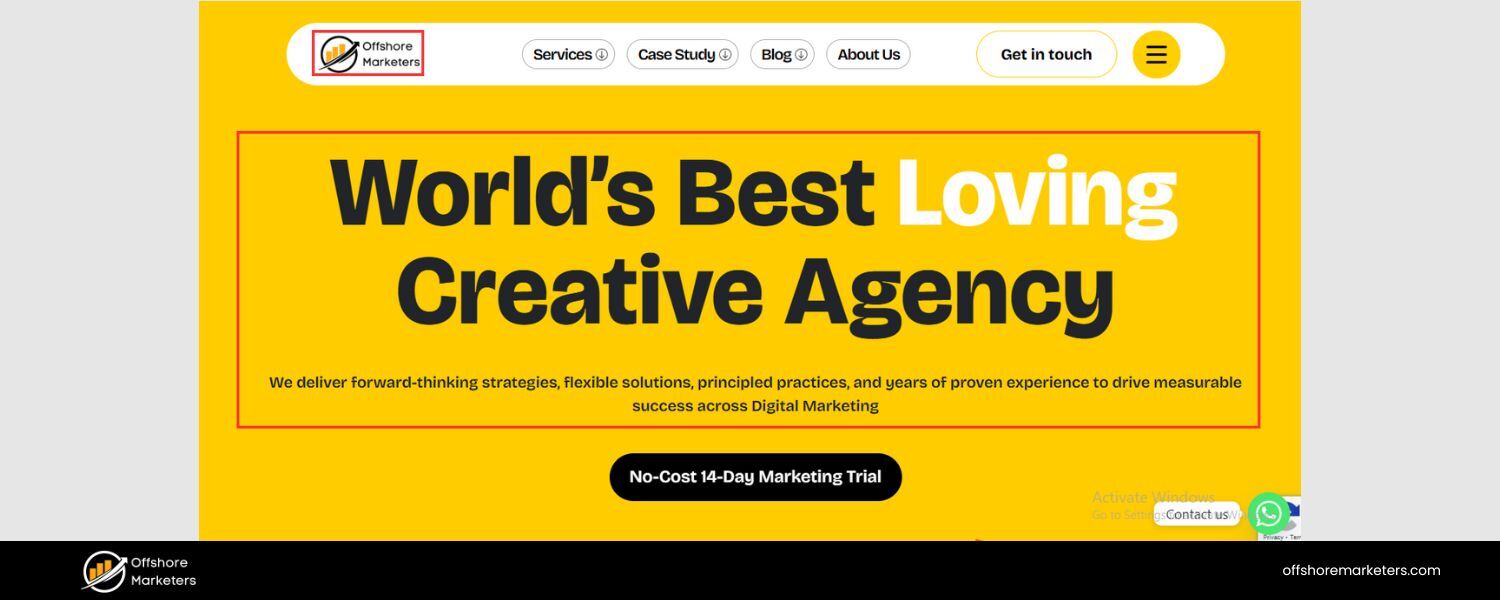
Offshore Marketers is a highly acclaimed full-service digital marketing agency based in Whitehall, Ohio (with global operations, including a team in Chandigarh, India). They specialize in SEO, PPC, social media management, web design, content marketing, and more – essentially a one-stop shop for boosting your online presence.
What sets Offshore Marketers apart is their track record of delivering tangible results. Clients consistently praise the agency’s ability to dramatically improve organic traffic and rankings. In fact, Offshore Marketers has achieved notable feats like increasing a client’s organic traffic by 40% and securing top search engine positions for competitive keywords.
From an image SEO perspective, Offshore Marketers follows all the best practices outlined in this guide. They ensure your site’s images are optimized (proper formats, alt tags, compression, etc.) as part of a holistic on-page SEO strategy.
Their approach is both creative and data-driven – meaning they not only fine-tune technical details (like site speed improvements, including optimizing images or implementing CDNs), but also consider the visual content strategy (choosing impactful images, creating infographics, etc., that can earn backlinks or engagement).
The agency’s reputation is stellar across multiple independent review platforms. Offshore Marketers boasts a perfect 5.0-star rating on Clutch (based on nearly 40 client reviews), indicating exceptional quality, project management, and ROI according to clients.
They’ve been highlighted for their strong client partnerships and understanding of business goals. On GoodFirms, they likewise hold a 5.0 rating with over 80 reviews, and on Trustpilot they maintain an “Excellent” 4.8/5 rating with 45+ reviews – a rare level of customer satisfaction in the marketing industry.
These reviews frequently mention Offshore Marketers’ reliability, proactive communication, and ability to deliver results within budget.
Offshore Marketers offers flexible, results-driven packages without locking clients into long-term contracts. Their services cover everything from technical SEO audits (which would include checking for missing image alts or oversized files) to content creation and link building.
Given their broad expertise and top-notch reviews, Offshore Marketers is our #1 recommended agency for businesses looking to improve all aspects of SEO – including image optimization – and achieve sustainable growth. With dozens of 5-star testimonials across Clutch, GoodFirms, Trustpilot, and Google, they’ve proven to be a trusted partner for companies worldwide.
2. WebFX (United States)
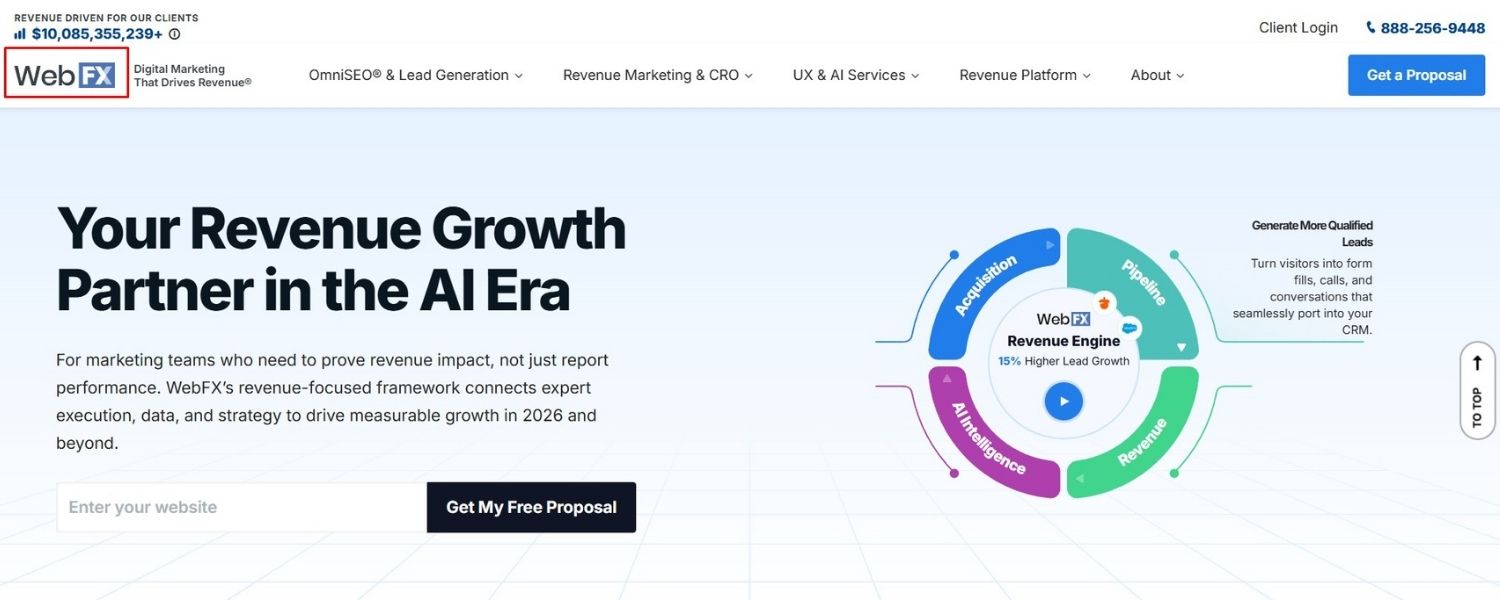
WebFX is a large and well-known digital marketing agency headquartered in the USA (Harrisburg, PA). With decades of experience and a team of hundreds of experts, WebFX has a strong reputation for delivering SEO results at scale.
They were even named a top SEO company in the USA by Clutch and have won numerous industry awards. WebFX provides comprehensive SEO services, and they pay close attention to on-page factors like site speed and content quality – which includes optimizing images for SEO. For example, WebFX often emphasizes compressing images and improving Core Web Vitals as part of their site optimization.
Clients of WebFX benefit from their proprietary technology platform and analytics, which can track the impact of changes like image optimizations on traffic and conversions.
WebFX also has a 4.9/5 rating on Clutch with over 400 client reviews – an indication of high client satisfaction on a very large sample. Many small and mid-sized businesses in the U.S. trust WebFX for SEO and digital marketing, citing professionalism and consistent ROI.
With WebFX, you get a data-driven approach. They produce detailed reports and have a “customer-first” mentality, as seen by their 90%+ client retention rate.
If your organization is U.S.-based or targeting the American market, WebFX’s size and experience make them a strong choice. They have specialists in technical SEO who will ensure your images are helping, not hurting, your site’s performance.
3. Ignite Visibility (United States)

Ignite Visibility is a top-rated SEO and digital marketing agency based in San Diego, California, serving clients globally. Co-founded by industry expert John Lincoln, Ignite Visibility has built a name through thought leadership and consistent client success.
They are frequently listed among the best SEO companies in the U.S. and have a 4.8–5.0 star rating on platforms like Clutch (with 150+ reviews). Ignite’s services include SEO (technical, on-page, off-page), paid media, social media marketing, and more.
For image SEO, Ignite Visibility emphasizes strategies like adding alt text, reducing page load time, and leveraging CDNs – all aligned with what we’ve discussed. They have case studies where optimizing site speed (through image optimization among other tactics) led to significant growth in organic traffic for clients.
One of their strengths is their customized approach; they tailor strategies to each client’s goals and often go after quick-win optimizations early (fixing things like oversized images or missing tags) which can show fast improvements.
Ignite Visibility has also been recognized by industry publications – for instance, they’ve won awards for their SEO campaigns and have been named a top SEO agency by Clutch in past years. Clients often mention Ignite’s excellent communication and transparency (they provide detailed monthly reports and hold regular calls).
If you want an agency that is on the cutting edge of SEO trends (they keep up with Google’s changes closely) and offers a personal touch, Ignite Visibility is a solid pick.
They’re especially known for helping e-commerce and lead-generation sites – where image optimization (for product images, etc.) can directly boost revenue.
4. The SEO Works (United Kingdom)
The SEO Works is an award-winning digital marketing agency based in Sheffield, UK, with a strong focus on search engine optimization. They’ve been operating for over a decade and have gathered accolades such as “Best SEO Agency in the UK” in certain awards programs.
The SEO Works provides services including SEO, PPC, web design, and paid social, but SEO is their core strength. They work with both local UK businesses and international companies, improving rankings and traffic through on-page and off-page optimizations.
When it comes to image SEO, The SEO Works follows best practices as part of their technical SEO audits. They will ensure your site’s images have proper alt tags, are compressed, and that your pages meet Google’s Page Speed requirements.
Because they’re a full-service agency, they can also assist in creating new high-quality images/graphics if needed (for example, designing infographics that can earn backlinks – a tactic that ties content and image SEO together).
On Clutch, The SEO Works holds a 5.0 rating (with 50+ reviews) and clients commend their professionalism and results-driven approach. They’ve worked with notable brands across e-commerce, healthcare, and B2B sectors, improving their organic search performance. For businesses in the UK or those who prefer a UK-based team, The SEO Works is an excellent option.
They combine technical know-how with content strategy, and being a Google Premier Partner, they have insight into the latest search marketing developments. Their mantra of delivering “measurable results” shows in their case studies, many clients see significant improvements in both traffic and conversion after The SEO Works’ campaigns.
5. PageTraffic (India & Global)
PageTraffic is one of the longest-standing SEO agencies in India (founded in 2002, based in New Delhi), and they have a global footprint with offices/clients in the USA, UK, and more.
PageTraffic offers a range of SEO and digital marketing services, and they’ve carved out a reputation for affordable yet effective SEO packages. If you have a content-heavy site or e-commerce site, PageTraffic can systematically optimize elements like meta tags, site architecture, and yes – images – to be search-engine friendly.
PageTraffic’s team is well-versed in technical SEO, often handling large websites. They make sure things like image alt texts are optimized at scale and can even help with content creation (ensuring images and text work together).
They have achieved high rankings for very competitive keywords for clients, a testament to their skills. On Clutch, PageTraffic has around 90 reviews with an average rating of approximately 4.7/5, which speaks to strong client satisfaction overall. Many small businesses and startups choose PageTraffic for their combination of cost-effectiveness and expertise.
One of PageTraffic’s strengths is communication – each client gets a dedicated project manager. They provide regular work reports, including what tasks were done (e.g., “optimized 50 product images with new alt tags and compressed them by 30%”) so you always know the improvements being made.
If you are looking for an agency partner in the Asia-Pacific region or simply a budget-friendly expert team to implement SEO changes, PageTraffic is a top contender. They’ve been recognized as a leading global SEO agency in Clutch’s rankings for multiple years, reflecting their consistency in delivering results.
These agencies above all excel in their field and can help take your SEO to the next level. Offshore Marketers stands out at #1 given its across-the-board 5-star reviews and comprehensive service approach – they will give a bit of extra attention to ensure every aspect (including image SEO) is perfected for your site.
The others listed bring strong regional expertise or specialized strengths that might align with your needs. When choosing an agency, consider factors like your budget, time zone/preferences, the agency’s experience with your industry, and the scope of services you need (pure SEO vs. full digital marketing support).
All of these agencies are familiar with the importance of image SEO and will include it as part of their strategy. Partnering with one of them means you get expert audit and implementation – from ensuring your images load lightning-fast to making sure each image helps, not hurts, your quest for higher rankings.
Before concluding, let’s address some common questions about image SEO that often come up:
Frequently Asked Questions (FAQs)
Q.1 What is image SEO and why is it important?
Image SEO is the practice of optimizing the images on your website so that search engines can understand them and index them properly. This includes things like using descriptive file names, adding alt text, reducing file sizes, and positioning images in relevant context on the page.
It’s important because optimized images can improve your page’s overall SEO (through faster load times and better content relevance) and also drive traffic on their own via image search.
With a significant portion of Google’s traffic coming from image searches (around 10% or more), ignoring image SEO means missing out on potential visitors.
Additionally, images can enhance user experience, they make your content more engaging and understandable, which can indirectly boost SEO by reducing bounce rates and increasing time on site.
Q.2 How do I write a good alt text for my images?
Writing good alt text is about clearly and succinctly describing what’s in the image. Pretend you’re describing the image to someone over the phone – mention the key elements. For example, for a photo of a product like a red running shoe, a good alt text could be “Red running shoe with white sole on a wooden floor”.
This describes the item and context. Include a keyword if it naturally fits (e.g., the product name or category), but avoid keyword stuffing. The alt text should make sense to humans first and foremost. Keep it relatively short (a few words to a short sentence).
And if the image is purely decorative (adds no real info), you can use an empty alt attribute (alt=””) so that screen readers skip it. Good alt text improves accessibility and gives Google helpful info for indexing your image.
Q.3 Which image formats are best for SEO – JPEG, PNG, or WebP?
It depends on the use case:
A. JPEG (JPG)
It is best for most photographs or images with lots of colors and gradients. It offers a good balance of quality and file size with lossy compression. Use JPEG when you need to keep file sizes small and exact transparency isn’t required.
B. PNG
It is best for images that need high fidelity or transparency (like logos, icons, or screenshots). It’s lossless, so it preserves detail better (important for text or line art in images), but PNG files are larger. Use PNG for graphics or images where quality is paramount and you can afford a bigger file size.
C. WebP
It is a modern format that often provides the smallest file size for comparable quality. It can replace both JPEG and PNG in many cases, because it supports both lossy and lossless modes (and transparency).
If your platform and audience’s browsers support WebP (which most do, except some very old versions), using WebP can significantly speed up image loads. For SEO, faster loading images via WebP can improve your Core Web Vitals metrics.
Other formats like SVG are great for vector graphics (scalable without quality loss and very small file sizes for simple images). GIF is typically only for animations; otherwise it’s not efficient for static images.
From an SEO perspective, no format gives a direct ranking boost, but using the format that yields the smallest file size (while maintaining acceptable quality) is the best practice, because it improves page speed.
So, use JPEG or WebP for photos (WebP if possible for extra compression), PNG or WebP for images where clarity/transparency is needed, and SVG for logos/icons. Google supports indexing JPEG, PNG, WebP, SVG, GIF, and BMP images, so all these will show up in search if optimized.
Q.4 Does compressing images for smaller file size affect quality?
Compressing images can affect quality, but it depends on how it’s done:
A. Lossy compression (e.g., saving a JPEG at 70% quality or using tools like TinyPNG) does remove some image data, which can slightly reduce visual quality. However, when done right, the quality loss is often negligible to the human eye, especially for photographs.
You might notice minor artifacts if compression is too high. The key is to find a balance, compress until just before the image starts to look noticeably worse. A photo that goes from 5MB to 500KB will likely look identical on a web page, but at 50KB it might start to show artifacts.
B. Lossless compression (e.g., tools that strip metadata or compress PNGs without changing pixel data) does not change image quality at all; it just makes the file more efficient. This often yields smaller savings compared to lossy, but there’s zero visual difference.
For SEO and practical purposes, a slight loss in quality is usually worth the massive gains in speed. Remember that users are viewing images on various devices and not examining them pixel by pixel.
A crisp, 100% quality image that loads slowly may frustrate users, whereas a 90% quality image that loads instantly still looks great and keeps users happy.
You can also serve higher resolution or less compressed images to devices with large screens if needed (using srcset for example), while giving mobile users a smaller compressed version. In short, proper compression should not noticeably ruin image quality, and it’s a necessary step to ensure your pages load fast.
Q.5 Do I need a separate image sitemap for Google to index my images?
In many cases, you don’t need a separate image sitemap file, but you should ensure Google can find your images. If your images are embedded in your website’s pages that Google is already crawling, and they’re not blocked, Google will usually index them naturally. However, adding your images to a sitemap (either a dedicated image sitemap or within your regular sitemap) can be helpful, especially if:
A. You have images that are loaded via JavaScript or reside on pages that are not easily discoverable by crawling.
B. You run a photography site or image-heavy portfolio and want to make sure Google knows about every image.
Including image information in your sitemap can accelerate discovery. The sitemap can list the image URL, its caption or title, geo-location (if relevant), license info, etc. Google’s documentation notes that this can help them find images they might not otherwise locate.
For most standard websites, using an SEO plugin or tool that automatically puts image info in the general sitemap is sufficient. That way you don’t maintain two separate sitemaps.
But if you have thousands of images and really want to ensure coverage, generating a separate image sitemap and submitting it in Google Search Console can give you peace of mind.
It’s not “required” but it’s a good practice if images are a big focus of your site. Keep in mind, whether via a sitemap or not, the usual rules apply: the images need to be accessible (not blocked by robots.txt or behind login) and preferably on the same domain or CDN domain that’s allowed.
In summary, you don’t strictly need an image sitemap for Google to index your images, but it can help improve and monitor the indexing of your images.
By now, we’ve covered a comprehensive range of topics – from the nitty-gritty of optimizing a single image’s alt text to the broad strokes of choosing a top-tier agency for a full SEO campaign.
The key takeaway is that image SEO is an integral part of modern SEO. With users expecting fast, rich, visual experiences, and search engines becoming ever more sophisticated in how they deliver results, optimizing your images can give you an edge over competitors who overlook this aspect.
Start by applying these best practices to your own site. You might be surprised by how much your site’s performance and rankings can improve with relatively straightforward changes like compressing images and updating alt tags.
And remember, SEO (including image SEO) is not a one-time task but an ongoing process. As you add new images and content, keep the optimizations in mind.
Conclusion & Call to Action
Effective image SEO boosts your site’s visibility, user experience, and conversion potential, it’s one of those high-ROI tasks that every website owner should prioritize.
By following the guidelines outlined above, you’ll ensure that your site is both visually appealing and search engine friendly. High-quality content paired with optimized images is a recipe for better engagement and higher rankings.
If you find yourself needing expert help to implement these strategies or to take your overall SEO to the next level, consider reaching out to professionals.
Offshore Marketers, for instance, can audit your website and create a tailored plan to improve everything from image load times to on-page content optimization, leveraging their proven expertise to deliver real growth. In fact, all the agencies listed in our top 5 are equipped to handle image SEO as part of a holistic strategy.
Now it’s your turn – start optimizing your images today. Compress those large files, tweak your alt texts, and watch as your site becomes faster and more discoverable. And if you want a hands-off solution with powerful results, don’t hesitate to contact an experienced agency like Offshore Marketers for a consultation.
Investing in SEO is investing in the long-term success of your business. With search engines increasingly leaning towards rich media and users expecting fast, beautiful web experiences, there’s no better time to get your image SEO right. Here’s to higher rankings, more traffic, and an visually engaging website that stands out from the competition!

.png)
Shopify SEO: Guide to Ranking Your Store and Driving Sales
Most Shopify store owners set up their store, list their...

Content Marketing : Definitive Guide to Strategy, Content Types, and Measurable ROI
Content marketing generates 3x more leads than outbound marketing at...

Above the Fold: Guide to Conversions, Rankings and Faster Pages
Above the Fold in 2026: The Complete Guide to Conversions,...

Off-Page SEO Checklist: Guide to Building Real Authority
Most websites spend months creating great content, only to wonder...

What Is Keyword Bidding? The Complete Strategy Guide for Smarter Ad Spend
Most advertisers believe the highest bid wins the auction. It...

What Is Google Trends? The 2026 Marketer’s Complete Guide
If you are not already pulling weekly insights from Google...
If you want a growth partner who will get to know every aspect of your business and treat your budget like their own — we are the right fit.
.png)


.png)
.png)
.png)
.png)
.png)
.png)
2026 ALL RIGHTS RESERVED MADE IN INDIA
