
Pagination SEO: Optimizing Paginated Content for Search Success
August 20, 2025
Introduction
Ever wondered why some of your product listings or blog posts buried on page 2 or 3 never get any search traffic? The way your site handles pagination could be the reason.
Pagination (splitting content into multiple pages) is common on e-commerce category pages, blogs, forums, and other large content collections. When done right, it improves user experience and site speed.
But if implemented poorly, it can hurt SEO by hiding valuable content from search engines or creating duplicate content issues. In this comprehensive guide, we’ll act as your marketing expert with 25+ years of experience to demystify pagination SEO.
You’ll learn what pagination is, why it matters for SEO, the latest best practices (as of 2024/2025), and how to apply them to outrank competitors. Let’s dive in and ensure your paginated content is fully optimized for both users and search engines.
What is Pagination in SEO?
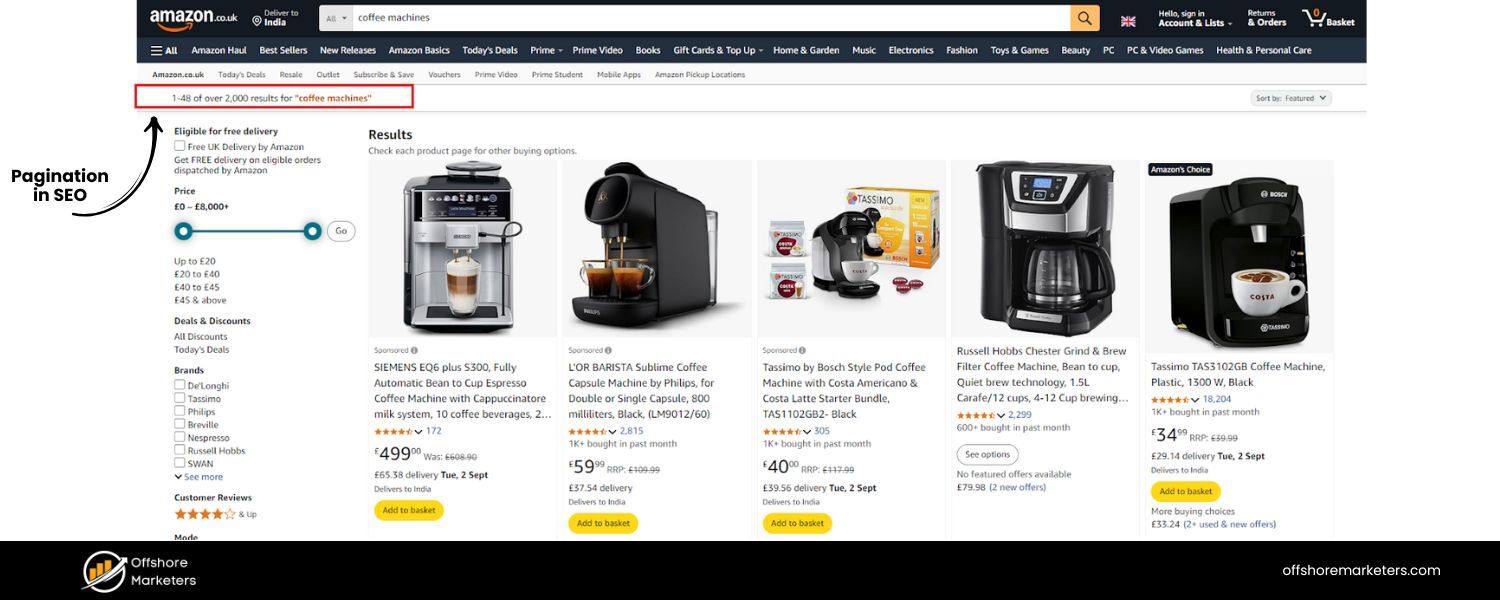
Pagination is a design/technical technique that divides content across multiple pages while maintaining a logical sequence. Instead of listing, say, 100 products on one very long page, you might show 20 products on page 1, then provide navigation links (page 2, 3, “Next”, etc.) to view the rest. This paginates the content into manageable chunks.
Common examples include: e-commerce category pages with hundreds of items, blog archive pages split by date or topic, forum threads spanning many posts, or multi-page articles.
From an SEO perspective, pagination ensures large sets of content are crawlable and user-friendly. It prevents slow load times by not loading all content at once, and it gives users a sense of progress (“Page 1 of 5”).
In essence, pagination improves user experience and site performance by breaking up content, which can indirectly benefit SEO (faster pages can improve engagement and core web vitals). It also establishes a clear hierarchy and site structure, paginated pages naturally link to each other, which can distribute link equity throughout the site. In short, when you implement pagination correctly, you help both users and search engines navigate large amounts of content.
Why Pagination Matters for SEO
Pagination is more than just a usability feature, it can significantly impact your search engine optimization. Here’s why pagination matters for SEO:
1. Improved Page Speed
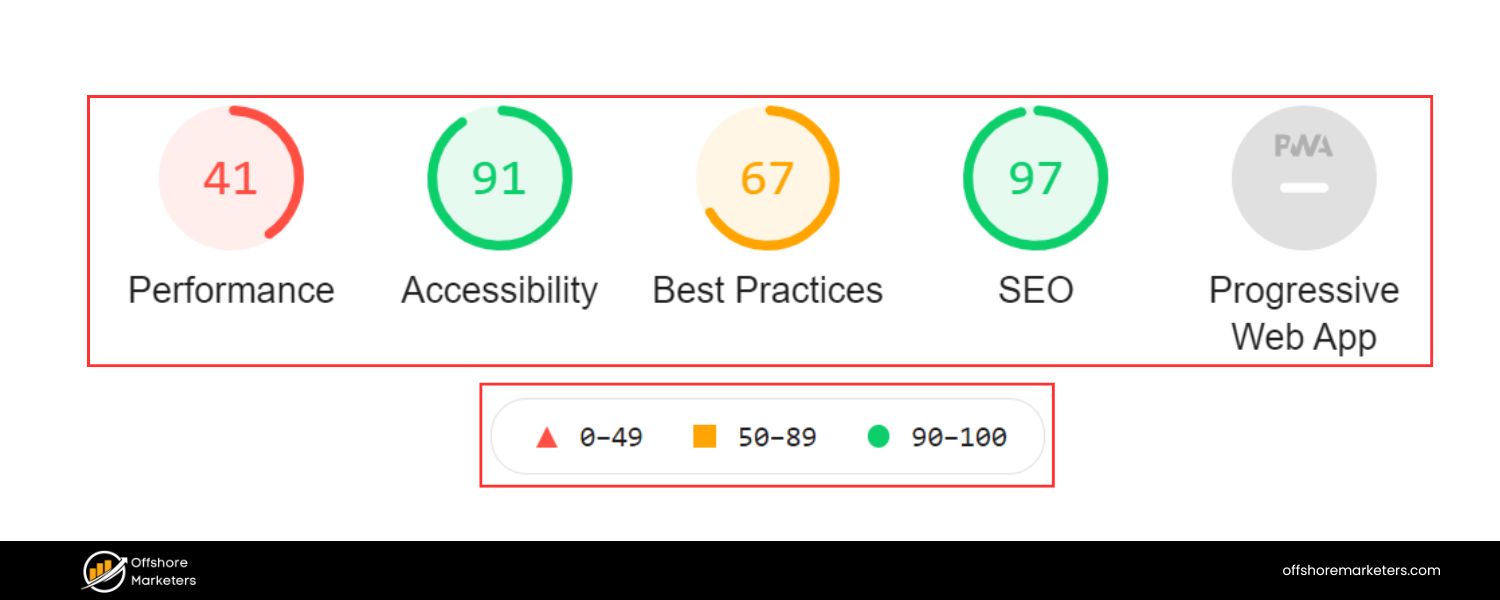
Large pages with hundreds of items or very long content can be slow to load. Breaking them into paginated pages improves load times, which is good for users and can boost SEO (since page speed is a ranking factor). A page listing 1,000 products will load much slower than one with 20–50 products, so pagination keeps your pages lean.
2. Clear Site Architecture
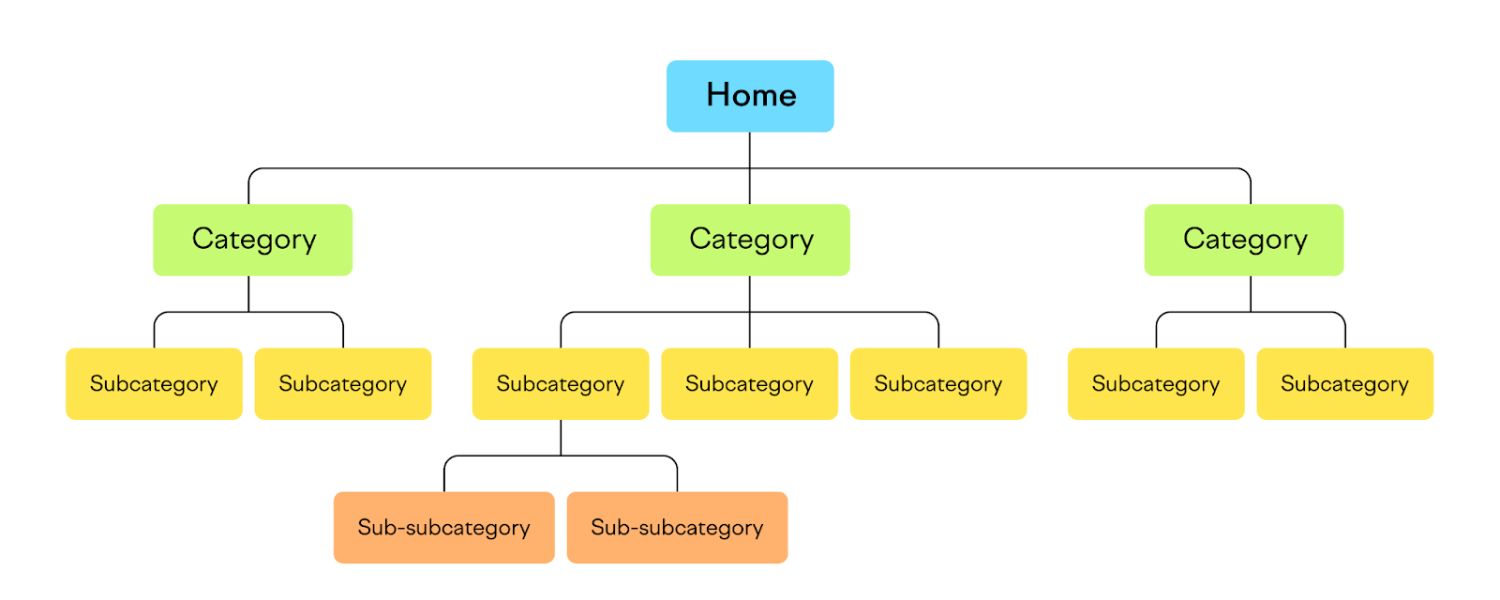
Paginated content imposes a logical structure on your site. Page 1 leads to Page 2, and so on, often with links back to the first page. This hierarchy helps search engines understand the relationship between pages in a series. It’s clear that these pages are part of one collection, rather than completely separate content.
3. Better Internal Linking
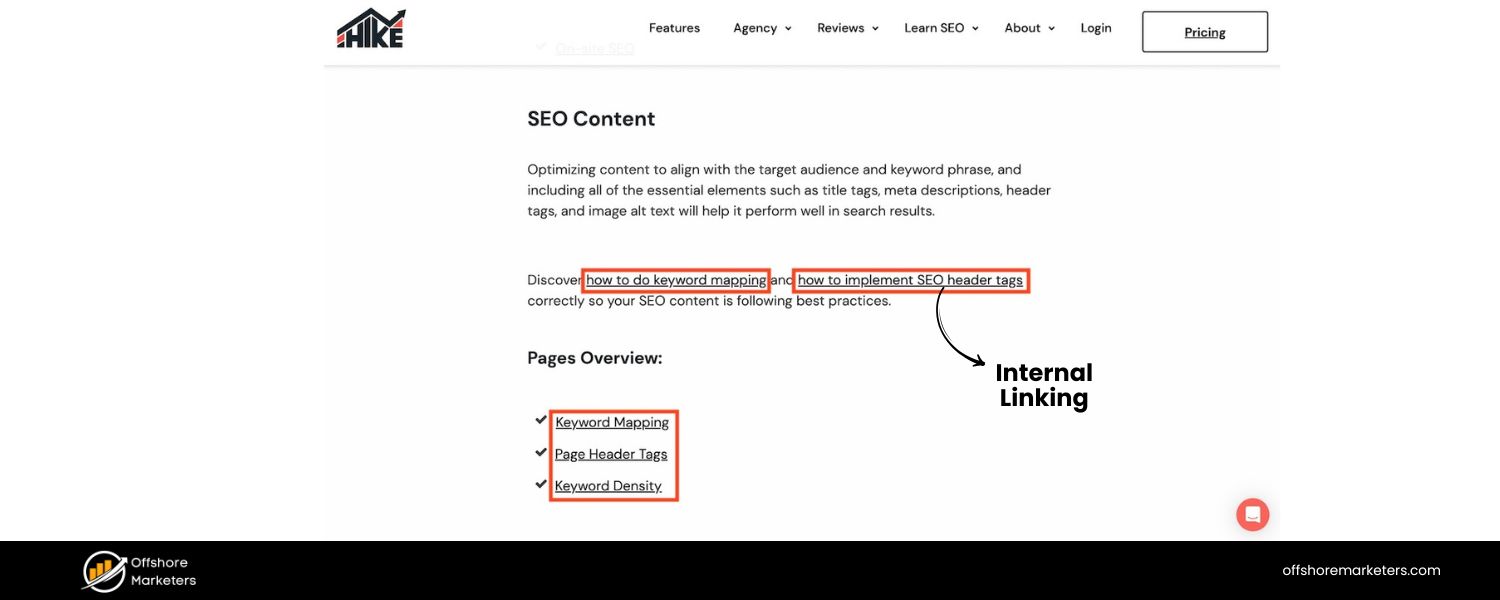
Pagination inherently creates internal links between pages (e.g., Page 1 links to Page 2, “next” and “prev” links). This can help distribute link equity (ranking power from backlinks) across the entire see. Instead of all backlinks pointing to one giant page, they can benefit the whole series if pages interlink.
4. Content Discoverability
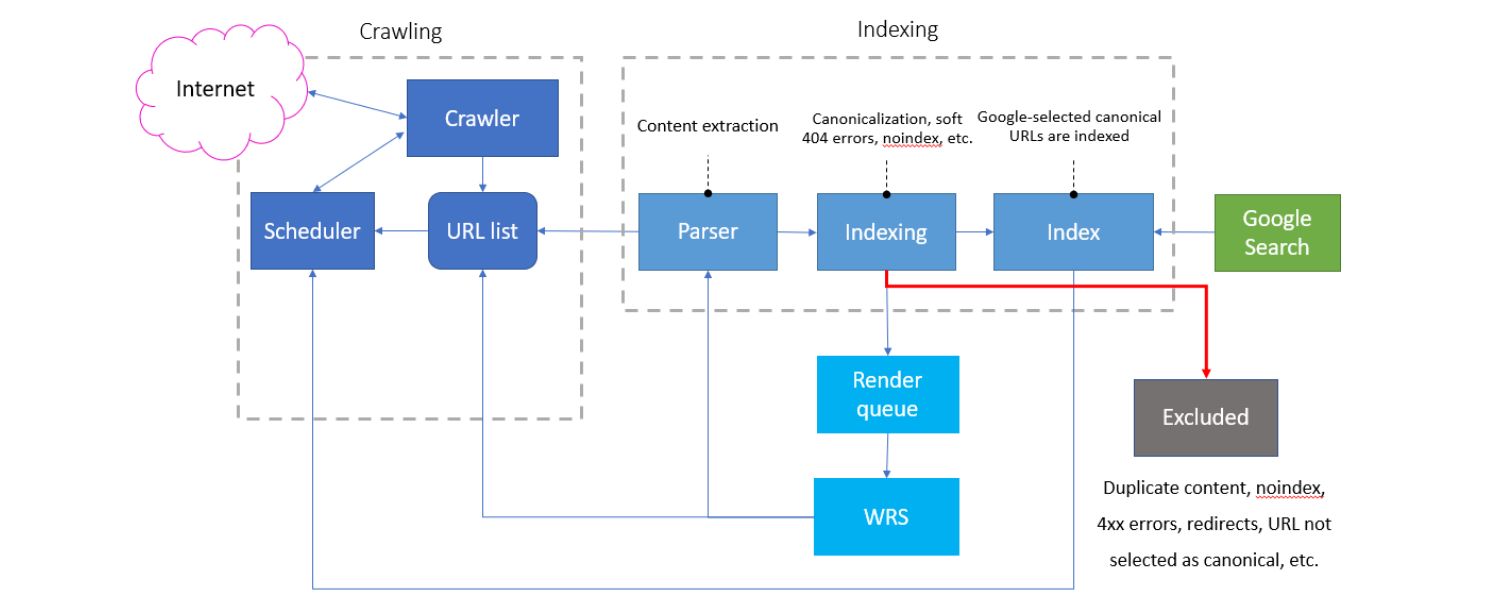
For massive sites, pagination ensures deeper items are discoverable by crawlers. For example, a large e-commerce site might not list every product in the main sitemap due to sheer volume. Pagination links give Google a path to find products or posts buried on later pages. Even with XML sitemaps in place, internal links from pagination serve as an extra safety net to ensure no content is orphaned.
5. More Indexable Content
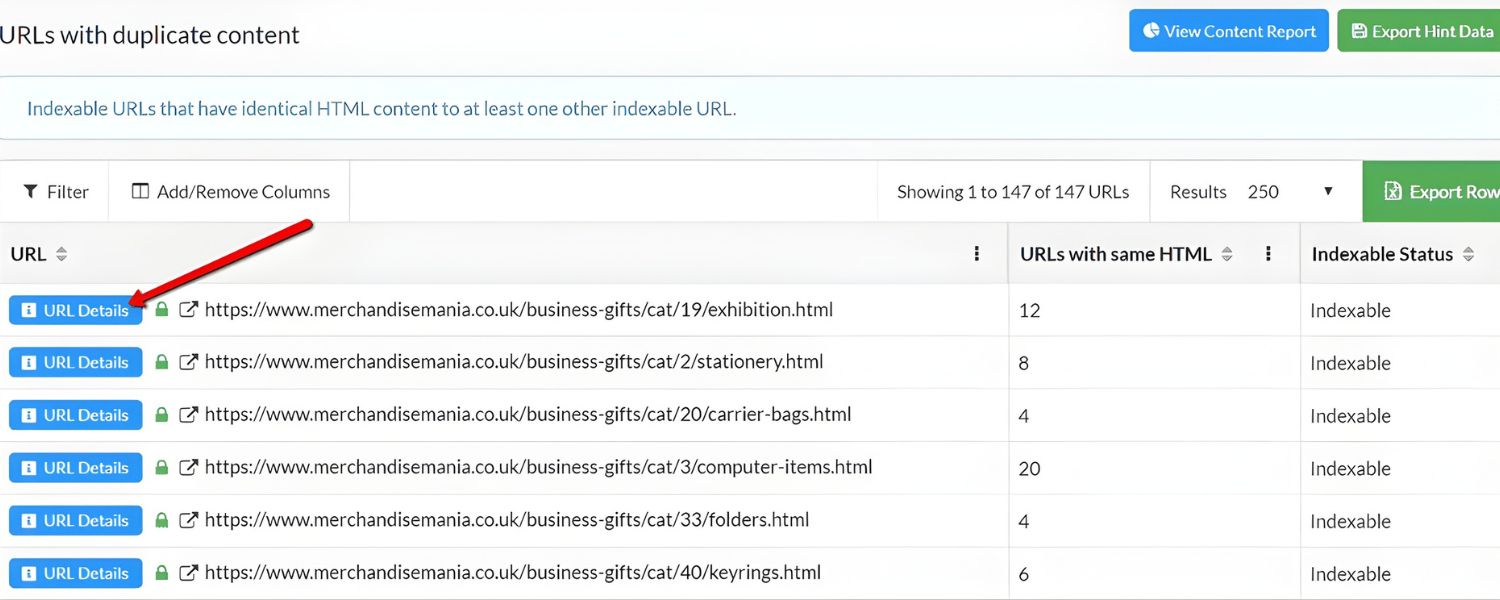
Having multiple paginated pages means you have multiple URLs that can potentially rank. Each page might capture long-tail keywords or specific searches that the first page alone wouldn’t.
In fact, each paginated page can be an SEO asset if optimized properly, targeting slightly different keyword variations or catering to specific user intents.For example, page 1 of a category might rank for broad terms, while page 2 could rank for a more specific query that matches an item listed there.
6. User Engagement Signals
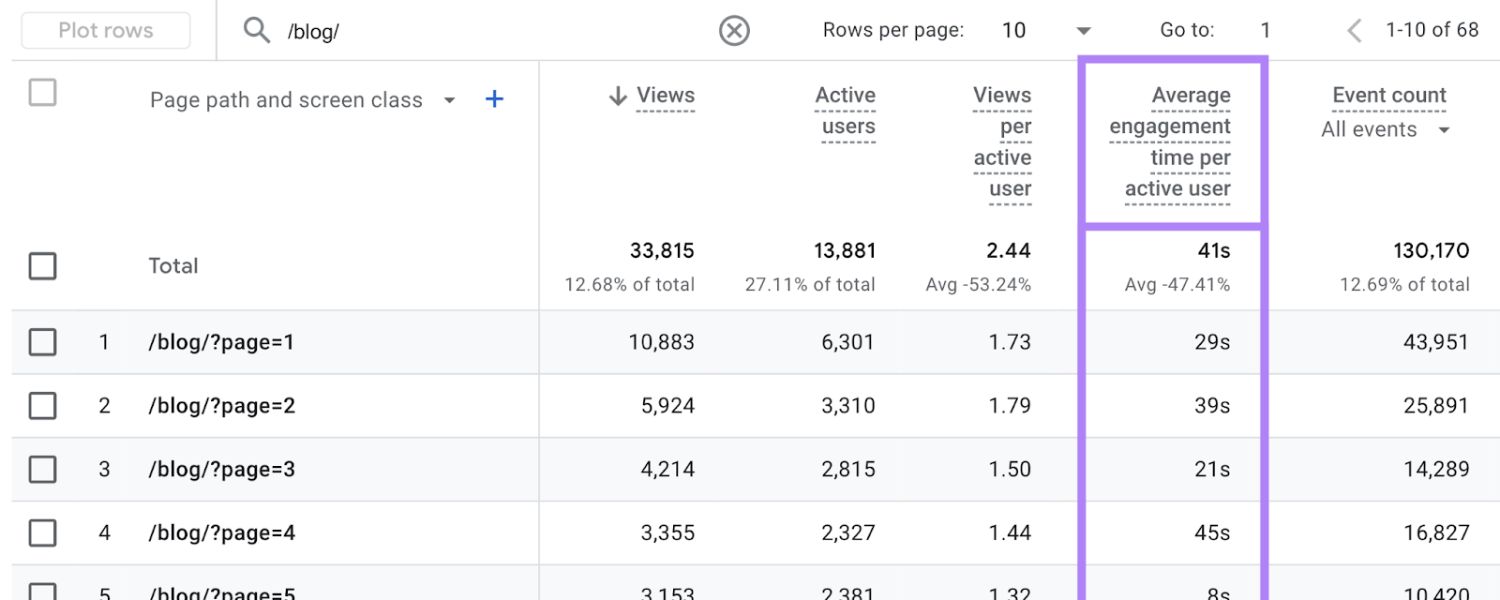
Pagination (when user-friendly) can encourage visitors to browse more pages (“I’ll click to page 3 as well”). This can increase dwell time and reduce bounce rates if users find what they need on subsequent pages. Those positive engagement signals can indirectly support better rankings. (By contrast, if pagination is confusing or broken, users might abandon the site – a negative signal.)
In summary, well-implemented pagination can boost SEO by improving site navigation, distributing ranking signals, and helping Google index all your important content.
It’s a crucial element for large sites to get right. Next, we’ll look at the challenges and pitfalls, because pagination can also cause SEO problems if handled incorrectly.
Common SEO Challenges with Paginated Content
While pagination brings benefits, it also introduces some SEO challenges that webmasters must address. If mismanaged, paginated pages can hurt your rankings or prevent content from being indexed. Here are the most common issues:
1. Duplicate or Near-Duplicate Content
Paginated pages often have very similar content templates. For example, 10 product listing pages might all have the same title tag (“Category Name – Page X”) and meta description, or largely the same content except for a different subset of products. To search engines, these pages can appear duplicative.
If all pages in a series look too similar, Google might have difficulty deciding which to rank, or it might not index them all due to perceived duplicate content. (It’s important to differentiate pages or use canonical tags – discussed shortly – to signal their relationship.)
2. Thin Content
Each paginated page might have only a small amount of unique content. For instance, page 2 of a blog archive might just list article titles with little descriptive text. Thin pages (with very few words or useful information) can be seen as low-quality by Google.
It’s crucial to ensure paginated pages aren’t essentially empty or just a list of links. Adding some descriptive text or ensuring each item has enough details can prevent this issue.
3. Link Equity Dilution
If external websites link to your category or archive, they often link to page 1. Pages 2, 3, etc., may receive fewer or no backlinks. There’s a risk that these deeper pages have less authority, which could limit their ranking ability or crawling priority.
Additionally, if you have a lot of paginated pages, your internal link equity (from your own site’s links) gets spread out across many URLs. Ensuring proper internal linking structure (like linking all pages back to the first page) can help concentrate importance where it’s needed.
4. Crawl Depth and Budget
Search engine crawlers have finite time (crawl budget) for your site, especially if it’s large. If important content requires Googlebot to crawl through 20 pages of pagination, there’s a chance the crawler might not reach the end frequently.
Google might crawl page 1 often, page 2 less so, and page 10 rarely. In fact, if you have an extremely large number of paginated URLs, they could consume a lot of crawl budget without much SEO value.
You need to manage which pages are worth frequent crawling. Google itself notes that sites with under a few thousand URLs generally don’t need to worry about crawl budget, but huge e-commerce sites should be strategic.
5. Index Bloat
Related to crawl budget, “index bloat” happens when search engines index many pages that aren’t useful, potentially lowering the overall quality perception of the site. If dozens of thin pagination pages (say, page 47 of a category with only a few items) get indexed, they likely won’t rank and could be seen as filler.
Managing indexation (for example, deciding if very deep pages should be indexed or not) is a key consideration to avoid bloat. Tip: Later we’ll discuss when it might make sense to noindex or otherwise handle extremely deep pages or filter combinations.
6. User Experience Issues
From an SEO standpoint, user experience matters. If your pagination is confusing (e.g. no “Next” button, or an infinite scroll that users can’t figure out), users might bounce. Also, if a user lands directly on page 4 from Google and that page provides a poor experience (hard to navigate or lacking context of page 1), they might leave.
This can indirectly affect SEO through higher bounce rates. Each paginated page should stand on its own enough to serve a user coming from search – for example, displaying the category name, showing that it’s “Page 4”, and providing navigation to other pages.
7. Outdated Practices & Myths
There is a lot of outdated information around pagination SEO. For instance, older advice suggested using special HTML markup like rel=“next” and rel=“prev” links or canonicalizing all pages to a single “view-all” page. As we’ll cover next, Google’s handling of pagination has evolved, and some of those practices are no longer applicable. Relying on deprecated methods without updating your strategy can lead to missed SEO opportunities.
In summary, paginated pages require careful technical SEO management to avoid duplicate content penalties, crawling issues, or poor user experiences.
Fortunately, by following modern best practices, you can mitigate these challenges. Let’s see how Google and other search engines currently handle pagination, so we know what techniques to use today.
How Search Engines Handle Pagination (Google’s Guidelines)
Search engines have specific ways of dealing with paginated content. Google, in particular, has updated its guidance in recent years. Here are the key things to know about how Google handles pagination as of 2024/2025:
1. rel=“next” and rel=“prev” Tags are Deprecated
In the past, Google encouraged webmasters to use and in the HTML to denote paginated series. This was meant to help Google understand the relationship between pages.
However, Google revealed in 2019 that it had stopped honoring rel=“next”/prev for indexing purposes. In other words, adding those tags now has no effect on Google’s indexing. Google likely learned to interpret pagination through normal links instead.
Bottom line: You don’t need to implement rel=“next/prev” for Google SEO anymore. If you already have them in your code, they won’t hurt (and other search engines might still use them), but Google will ignore those tags.
2. Each Paginated Page is Indexed on Its Own
Google now treats each page in a series as an individual page for indexing and ranking purposes. In the past, Google sometimes treated a paginated set as one entity or would choose a “representative” page to rank (often the first page). Today, page 2, page 3, etc., can be indexed and shown in search results independently.
Google “tries to recognize pages in a sequence and index them accordingly”, but it does not automatically merge them into one or assume all link equity flows to page 1. This means you should optimize each page (at least minimally) and not hide them all behind page 1 via canonical tags or noindex (unless you have a very deliberate reason, as discussed later).
3. Googlebot Relies on HTML Links to Discover Content
Google’s crawler typically does not click buttons or load content via JavaScript interactions.This is crucial for pagination: if your “Next page” is only loaded by a script or requires a user action (like clicking a JavaScript button or infinite scroll), Googlebot might not see it. Search engines primarily find new pages by following .
Therefore, your pagination should be implemented with proper anchor links that are crawlable (plain HTML links). For example, a Next link is ideal. If you use a “Load more” button or infinite scrolling, you must provide fallback links or another mechanism so Google can reach page 2, 3, etc. (We’ll address how to handle infinite scroll shortly.)
4. Unique URLs for Each Page
Google expects each paginated page to have a distinct URL – usually indicated by a query parameter or path segment (e.g. category?page=2 or /category/page/2.Using URL fragments (the part after #) is not recommended, because Google ignores URL fragments for crawling.
For example, if your “next page” link just adds #page2 to the URL without a real new URL, Googlebot may think it’s the same page and not crawl it. Always use real query parameters or path changes for pagination.
Google’s documentation even gives the example of using ?page=n as a good approach. Consistent, numbered URLs allow Google to navigate the series easily. (We will cover best practices for URL structure in the next section.)
5. Avoid Canonicalizing All Pages to Page 1
A major question is whether to use the tag on paginated pages. Google’s official guidance is do not mark page 2, 3, etc. as canonical to page 1. Instead, each page should have a self-referencing canonical (pointing to itself). In the past, some SEOs would canonical all pages in a set to the first page or to a “view-all” page, in hopes of consolidating ranking signals.
However, Google advises against this for main content pagination – each page is a unique URL that can be indexed. Only use a canonical to a different URL if the content is a duplicate or a consolidated version (like a view-all) that you explicitly want to rank instead. Generally, treat paginated pages as separate, valuable pages, not duplicates.
6. Link Back to the First Page
Google suggests that, in addition to next/prev links, you link all pages back to page 1 of the series. For example, page 2 might have a link like “View all items in Category (page 1)”.
This isn’t a formal requirement, but it “emphasizes the start of the collection” to Google. It can hint that page 1 is the best landing page for broad queries. Many sites implement this by having a “First” link or the category name linking to page 1 on every paginated page.
This is a smart internal linking practice to funnel authority to the main page, while still allowing users to navigate back easily.
7. Titles and Meta Descriptions
Normally, SEO best practice is to have unique title tags and meta descriptions on every page. Google has relaxed this somewhat for paginated sequences. According to their documentation, pages in a paginated series can have the same titles and descriptions without issue.
Google will try to understand they are part of one sequence. However, it can still be wise to differentiate them slightly (e.g., “Category Name – Page 2”) for clarity, especially for users seeing them in search results. The key is that identical or very similar meta tags on paginated pages are not considered problematic duplicate content in this context.
Don’t panic if your SEO tool reports “duplicate titles” for page 2, 3, etc. – that’s expected and Google is generally fine with it. If possible, consider adding the page number in the title to help users (for instance, “Summer Dresses – Page 2 of 5”), but keep the base keyword present.
8. Don’t Index Facets or Sort Variations
This is slightly adjacent to pagination, but highly relevant for e-commerce or any faceted navigation. Often category pages have filters (by color, size, price) or sort orders (sort by price, newest, etc.). These can generate many URL variations that show essentially the same items in a different order or subset.
Google recommends you avoid indexing URLs that are just filtered or sorted versions of a list.Why? Because they create duplicate/thin pages and waste crawl budget. You can allow users to use filters, but use the noindex meta tag on those filtered pages, or block them via robots.txt, so Google doesn’t index dozens of near-duplicate lists.
For example, category?page=1&sort=price_asc might be noindexed if it has the same items as the default sort.The main paginated URLs (the “canonical” sequence) should be indexable, but alternative views should be kept out of Google’s index to prevent confusion and dilution of ranking signals. We’ll discuss more on handling this in the best practices section (crawl budget management).
9. Infinite Scroll and “Load More”
If your site uses infinite scroll or a “load more” button instead of traditional pagination links, you must ensure content is still accessible to crawlers. Google’s crawlers generally do not scroll indefinitely or click load-more buttons.
That means if additional content loads only via user interaction, Google might never see anything beyond the first batch of items. Google’s solution is to support “paginated loading” under the hood even if the UI is infinite scroll. In practice, this means you should have separate URLs that each represent a chunk of content (page 2, page 3, etc.), and dynamically update the URL as the user scrolls using the History API.
Also, you should provide anchor links to these URLs (perhaps in a hidden pagination menu or an HTML sitemap) so Googlebot can discover them. We’ll dive deeper into how to implement SEO-friendly infinite scroll in the best practices section on user experience. If done right, you get the UX benefits of infinite scroll while preserving crawlability (best of both worlds). If done wrong, infinite scroll can essentially hide most of your products/posts from Google – a serious SEO flaw.
10. Bing and Other Search Engines
While Google no longer uses rel=“prev/next”, some other search engines may still honor that markup. For instance, Bing has historically supported it, though they haven’t made a clear announcement recently.
It doesn’t hurt to include rel=“next”/prev for completeness (it’s just HTML link tags in the head). They won’t harm your Google SEO and could help elsewhere. Just remember, the primary way to ensure all content is crawled is through actual links on the page that any crawler can follow.
Key takeaway: Google wants you to treat paginated pages like normal pages with real links and unique URLs. Don’t rely on special tricks (like old metadata tags) that Google no longer uses. Instead, focus on solid site structure: link pages in sequence, use proper URL parameters or paths, avoid fragment URLs, and don’t hide content behind scripts. In the next section, we’ll translate these principles into concrete best practices you can apply to your site.
Pagination SEO Best Practices
Now that we understand the challenges and Google’s current approach to pagination, let’s go through actionable best practices to optimize your paginated content. These tips incorporate the latest guidelines (through 2025) and expert insights to ensure your pagination is both search-engine-friendly and user-friendly. We’ll cover everything from technical SEO tags to user experience considerations.
1. Ensure Crawlable Link Structure
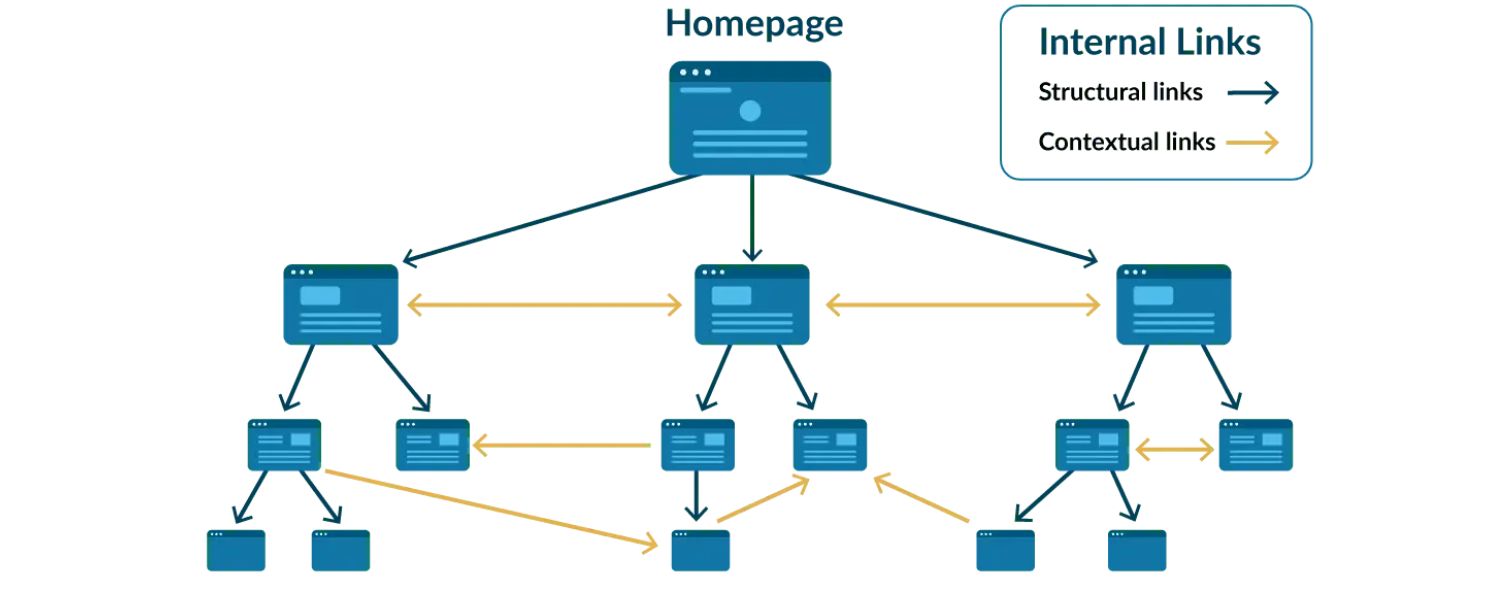
For pagination to help SEO, search engines must be able to crawl each page in the sequence. The foundation is a crawlable link structure:
A. Use HTML Anchor Tags for Pagination Links
Your “Next”, “Previous”, and page number navigation elements should be standard links with an href attribute pointing to the URL of the next page. Avoid using JavaScript-only click events without an actual link. If you have a button that triggers load-more, consider adding a regular link to the next page as a fallback.
For example: can be styled as a button but still works as a link if clicked or seen by crawlers. Google can only follow links it can see in the HTML – it won’t trigger onClick events or form submissions to find page 2. Make it simple: Next Page.
B. Include “Previous” and “Next” Links
Provide navigation in both directions if possible. A “Next” link on page 1 to page 2, and a “Previous” link on page 2 back to page 1, and so forth. This creates a bidirectional chain.
Even though rel=“prev/next” meta tags are ignored, the presence of actual next/prev links in the content is very useful for crawl discovery and user navigation. Typically, these links are at the bottom of the page (and sometimes also at the top for convenience).
C. Link Back to the First Page
As mentioned earlier, each paginated page (especially in e-commerce categories) should link back to page 1 of that series. Many sites implement this as the “1” in the pagination or a “Home” icon linking to page 1.
Another way is to include a text like “View all items in [Category Name]” that links to the first page. This ensures that even if a user (or crawler) lands on page 5, they can easily navigate to the start, and it signals to Google which page might be the main one.
D. Avoid Too Many Links in Sequence
If a category has 100 pages, don’t try to link all 100 page numbers in the footer (that’s unwieldy). Use a reasonable window (like showing first, last, and a range around current page) for user experience.
Googlebot will eventually find the deeper pages by crawling through. The key is that the chain is unbroken: page 1 links to 2, 2 to 3, etc., so the crawler can traverse them. Also, having hundreds of pagination links on every page can dilute link equity for other important links on the page (like product links). So keep the pagination UI concise.
E. Make Anchor Text Informative (when possible)
Typically pagination links are just numbers or “Next”. That’s fine – Google can infer their purpose by context. If you can, ensure there’s some contextual text around them.
For example, screen-reader-friendly text like aria-label=“Page 2” on links, or a heading that says “Page 2” on the page itself, can help clarify the page’s identity. While not critical, avoid completely generic anchor text like “click here” for next page – use “Next” or the number. The context of being in a paginated nav is usually enough for Google to understand these are navigational links.
Example of Good HTML:
First
1
2
3
Next »
In the example above, all links have clear href URLs. This structure is easily crawlable. By contrast, an example of a bad practice would be something like:
Next
with no actual anchor – Google would not follow this. If you must use such buttons for UX, pair them with real links (perhaps hidden via CSS for users but visible to crawlers, or within a tag for non-JS contexts).
Ensuring crawlable links is step one. As Google’s John Mueller has said, pagination links are essentially just internal links – treat them like a part of your internal linking strategy. Focus on clear, accessible links that allow both users and bots to navigate the content.
2. Use Consistent, SEO-Friendly URLs
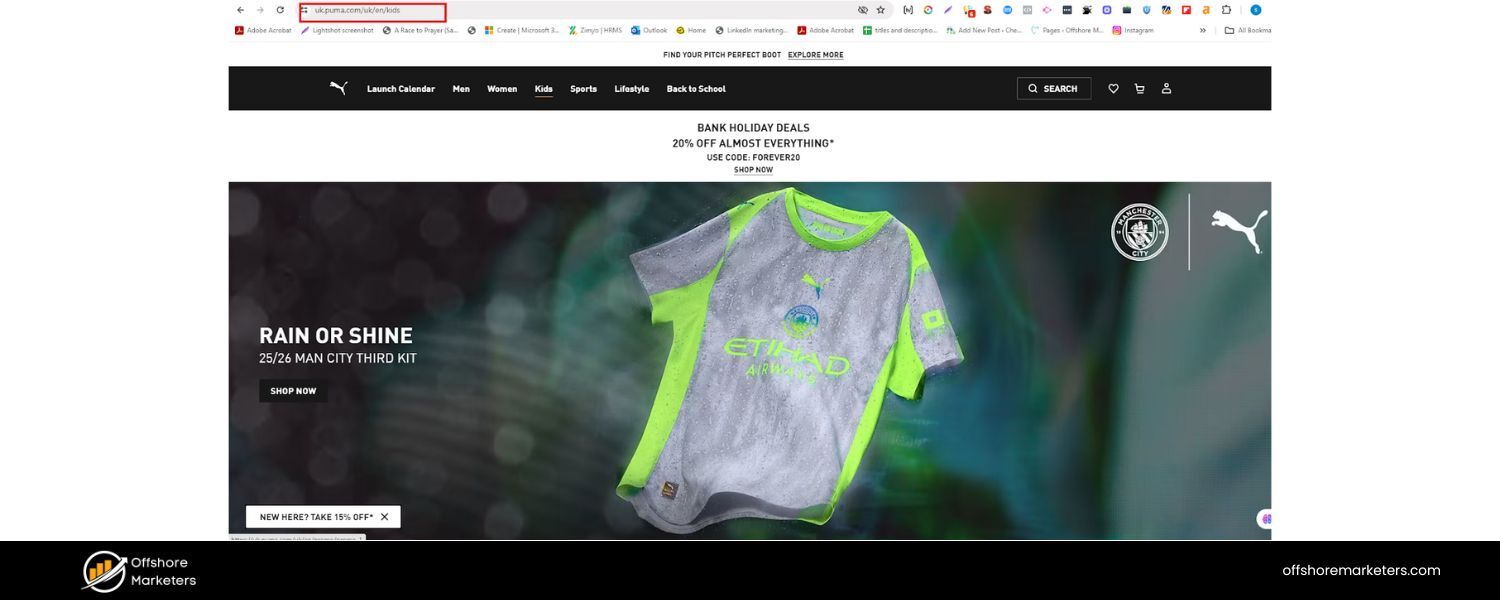
The URL structure of your paginated pages should be clean and logical. This not only helps SEO but also makes it easier to analyze performance in tools and ensures no confusion for crawlers.
A. Give Each Page a Unique URL
Sounds obvious, but it’s worth emphasizing. Page 1, Page 2, etc., must each have their own URL (and that URL should not show different content depending on context – it should always show that page’s content). Typically, sites implement this either with query parameters or folder paths:
B. Query parameter method
e.g. https://www.example.com/products?page=2
C. Subfolder (or path) method
e.g. https://www.example.com/products/page/2/
Both are fine for SEO as long as you’re consistent. Google’s documentation slightly leans toward query parameters for ease of tracking in Google Search Console, but from a ranking perspective there’s no inherent difference. Use whichever fits your site’s URL design.
D. Avoid URL Fragment Identifiers (#)
Do not paginate by using the hash symbol (e.g. products#page2). As noted, Google ignores the fragment when crawling. That means page#2 and page#3 would be seen as the same URL, and Googlebot likely will not fetch the second page’s content at all. Always use the part before the # (the path or query) to differentiate pages.
E. Keep URLs Descriptive and Simple
The URL should ideally reflect the structure. For example, category?page=2 is self-explanatory. Avoid arbitrary or opaque query strings for pagination like ?8347fjk=2 or mixing different formats. Also, don’t use two different schemes (like sometimes page=2 and elsewhere /page/3/). Standardize on one format across the site. Clear URLs help ensure you (and Google) don’t accidentally treat different patterns as separate when they’re not.
F. Include Page Number in URL
This is naturally done with the above methods, but make sure the page parameter actually increments (or a path segment). Sometimes we see weird patterns like ?page=0, ?page=50 for offsets or ?start=51 – it’s not wrong, but a simple sequential page count is easier to manage. Including the page number explicitly (1,2,3…) makes it obvious how many pages there are and allows simple navigation.
G. No Skipping or Duplicated URLs
Ensure the pagination is contiguous. Don’t have a link to page 2 and page 4 but skip page 3 in the sequence. Similarly, avoid duplicate URLs pointing to the same content (like having both ?page=2 and /page/2/ working – pick one or redirect one to the other). Such duplication can confuse crawlers or split signals.
H. URL Length and Parameters
If possible, keep the URL length reasonable. A short ?page=2 is perfect. If your site already has multiple query params (for example, tracking parameters or filter params), try to keep the pagination param distinct and preferably at the end. For example: category?color=red&size=m&page=2.
Consistency matters: always use the same parameter name (e.g., always page= not sometimes p=). This helps when using URL patterns in robots or Search Console. Google can crawl long URLs with many parameters, but each extra parameter increases the chance of creating duplicate content combinations. Keep it as minimal as needed.
Example of Good URL Structure:
https://www.example.com/blog/ (first page)
https://www.example.com/blog/?page=2 (second page)
https://www.example.com/blog/?page=3 (third page)Or using paths:
https://www.example.com/blog/
https://www.example.com/blog/page/2/
https://www.example.com/blog/page/3/Both approaches clearly indicate the sequence in a user- and SEO-friendly way. Google can easily interpret these as parts of one sequence.
Avoid Common URL Mistakes:
Some pitfalls to avoid as noted by SEO experts:
1. Don’t use random, non-sequential identifiers (e.g., /category/A12X for page 2 – not clear it’s page 2).
2. Don’t mix pagination formats on the same site (like some sections using ?page= and others using /page/ – pick one).
3. Don’t use different parameters that do the same thing (like ?page= in some links and ?paged= or ?p= elsewhere by mistake).
4. Keeping a uniform URL scheme helps ensure search engines index your pages correctly without confusion.
5. Google’s Recommendation: Google specifically recommends using query parameters for pagination in their docs, partly because it’s easier to track those in Search Console reports. For instance, you can filter the Index Coverage or Performance reports by page= to see how paginated pages perform. However, this is a minor preference – the important part is uniqueness and crawlability. If your site is already using a folder structure for page URLs, that’s perfectly fine too. Both are SEO-friendly as long as they serve consistent content.
By establishing a clean URL structure, you make it straightforward for search engines to crawl page after page in order, and you make your own life easier when analyzing or debugging SEO issues. If you ever change your URL structure, remember to put in proper 301 redirects from the old pagination URLs to the new ones to preserve any ranking signals.
3. Add Self-Referencing Canonical Tags
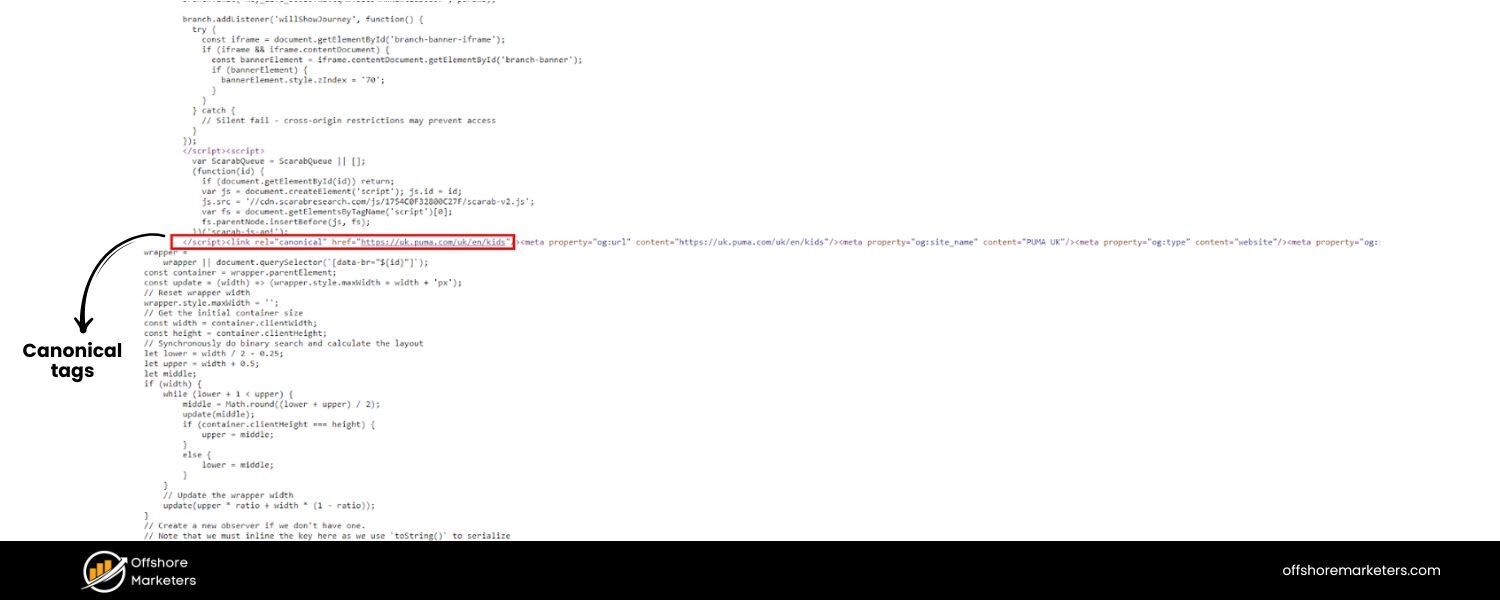
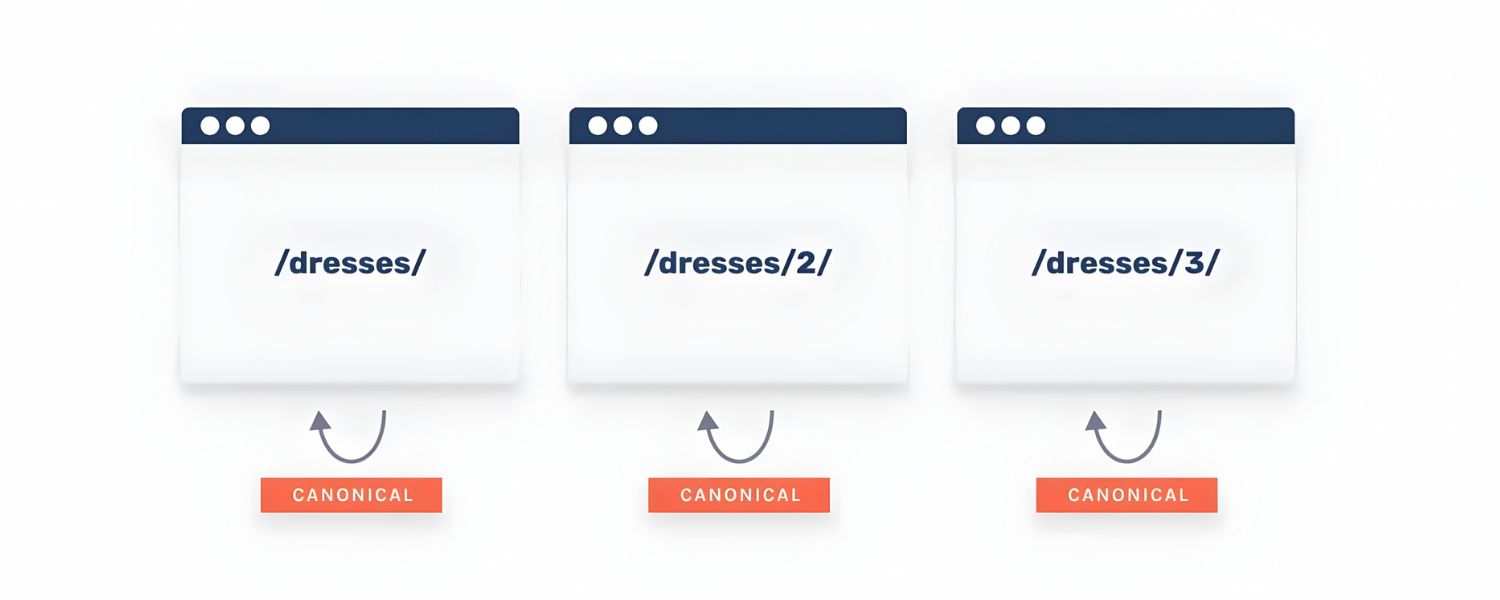
The canonical tag is a powerful tool to control how your pages appear to search engines. For pagination, each paginated page should include a self-referencing canonical link – a tag that tells search engines “this page’s canonical (preferred) URL is itself.” For example, on page 2, the HTML should contain .
Here’s why and how to use them:
A. Prevent Duplicate Content Confusion
Self-referencing canonical tags reaffirm to Google that each page is its own unique URL and not a duplicate of another. This helps avoid any ambiguity if, for instance, your pages have similar titles or content snippets. It essentially says: “I know these pages are related, but this exact URL is the definitive version of page 2.” Implementing this can protect you from unintentional duplicate content issues and signaling errors.
B. Avoid Accidental Consolidation
Sometimes, sites mistakenly canonical all paginated pages to page 1 or to a “view-all” page. As discussed, that approach can rob the individual pages of traffic and indexing. Using self-canonicals ensures you’re not telling Google to merge page 2 into page 1. Google’s John Mueller calls self-canonicalization a “great practice” (though not absolutely critical). It makes it easier for Google to “pick exactly the URL that you want to have chosen as canonical” if there’s ever any doubt.
Example Implementation:
In the of each page, include:
<link rel=“canonical” href=“https://example.com/category/”/ >
<link rel=“canonical” href=“https://example.com/category/?page=2” />
<link rel=“canonical” href=“https://example.com/category/?page=3” />
and so on. This way, if anyone scrapes your content or if there are slight URL variations (like page=2 vs page=2&sort=default), Google will consolidate ranking signals to the URL you specified (the clean paginated URL).
C. Don’t Canonical to First or “View All” (Unless Using a Specific Strategy)
As a rule of thumb, do not have page 2’s canonical tag point to page 1. The only time you might deviate is if you have a “View All” page that truly contains all items in one page and you decide that is the only page you want indexed. In that older approach, each paginated page would canonical to the view-all.
However, this strategy is only feasible if the view-all page loads reasonably fast and provides a good user experience (often not the case for very large lists). Google’s current best practice is to index the paginated pages themselves rather than rely on a view-all for indexing. Unless you have a strong reason, stick to self-canonicals.
D. Canonical and Noindex on Filter URLs
A related tip – for those alternative filtered pages we discussed (like a price-sorted version or a color filter page), do not canonical those to page 1 of the category if the content differs. Instead, either noindex them or canonical them to a canonical version of that filtered combination if it’s important.
For example, if ?color=red&page=1 shows only red items, you might decide to noindex that (preferred) or canonical it to the unfiltered page 1 (if the content overlap is high). But your main pagination sequence (the default view) should remain self-canonical.
The nuance here is to avoid any conflicting signals where some pages canonical to one place and others to themselves. When in doubt, self-canonical is safest for main content pages.
E. Verification
After implementing canonicals, use tools like SEO site audit crawlers or the URL Inspection tool in Google Search Console to verify they are recognized. The URL Inspection tool will show what Google considers the “user-declared canonical” and the “Google-selected canonical”. You want them to match (Google selecting the same URL you declared) for your paginated pages.
If Google is picking a different canonical (like always picking page 1), then something is off – perhaps you inadvertently gave a signal or page 1 has much more content. Ideally, Google should index each page separately.
Example: A self-referencing canonical tag added in the HTML of each paginated page. Each page (Page 1, Page 2, Page 3) points to itself as the canonical URL. This practice helps search engines understand that each URL is unique and should be indexed on its own. It prevents unwanted duplicate content issues and ensures that your pagination series is treated as a set of distinct pages rather than one page.
F. Benefit
Implementing proper canonical tags can also help with link equity distribution. If external sites link to some of your paginated pages (maybe someone shared a link to page 2 on social media, for instance), the self-canonical ensures that page 2 can receive and keep any link authority from those backlinks.
If you had canonicalized it to page 1, any link to page 2 would essentially count toward page 1, not benefiting page 2 at all. That might sound good (consolidating to page 1’s ranking), but remember – page 2 might contain products or content not on page 1, which could rank for different queries. You generally want each page to have a chance to rank for the content on that page. Self-canonicalization allows that.
In summary, self-referencing canonicals on paginated pages are a low-effort, high-reward optimization. They align with Google’s guidance to give each page its own canonical URL. Think of it as clearly labeling each chapter in a book, so the librarian (Google) knows that Chapter 2 isn’t meant to be merged with Chapter 1, even though they’re related.
4. Do Not Noindex Paginated Pages
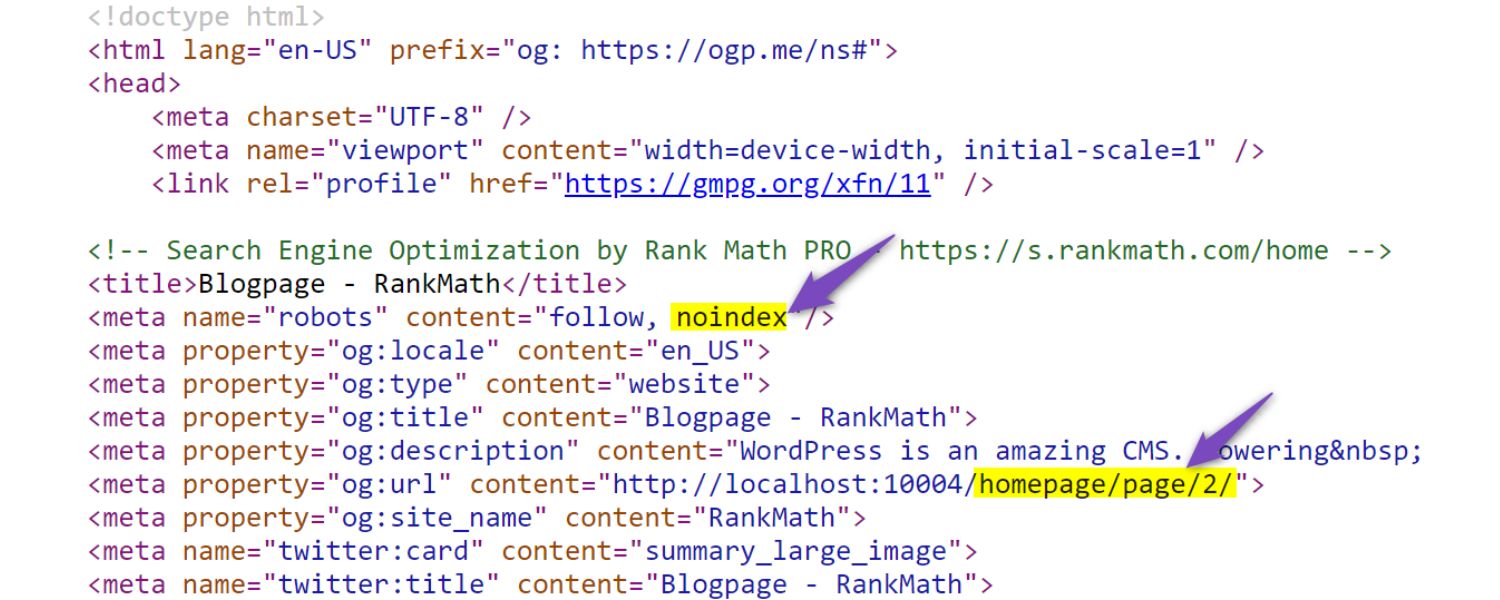
It might be tempting to put a noindex meta tag on page 2, 3, etc., especially if you think they don’t directly contribute to SEO. However, this is usually a mistake. Unless you have a highly specific reason, you should allow your paginated pages to be indexed (i.e., do not use on them). Here’s why:
A. Noindex Stops Crawl Flow
If page 2 is marked noindex (even if you say noindex, follow), Google might still crawl its links for a while, but it often makes crawling those links a lower priority. Over time, large numbers of noindexed pages in a sequence can cause Googlebot to skip ahead or stop following deeper links, thinking they might also be not useful.
Essentially, a noindex on a critical path can break the chain. For example, if page 2 is noindex, Google might not persist to page 3 or might consider page 3 an orphan unless it’s linked elsewhere.
B. Loss of Link Equity Passage
Paginated pages often link to each other and to sub-content (like products or articles). If a page is noindexed, some SEO experts observe that Google may not distribute full ranking credit through that page’s links. As one SEO analogy goes, noindex pages become a dead-end for link equity. PageRank (Google’s link value) may not flow through a noindexed page as effectively, meaning your deeper content could lose out on ranking signals if an upstream page is noindexed.
C. Reduced Content Discovery
Imagine you noindexed all pages beyond page 1. Google would index page 1 with, say, 20 items. But what about item #21 onward? Unless those items are linked elsewhere, Google might not find them easily. We want Google to discover all items/products through the pagination. Noindexing the pages could mean Google doesn’t prioritize discovering content via those pages. It’s like having a series of doors (pages) and then locking most of them – the crawler might not go through.
When Is Noindex Appropriate? Generally, reserve noindex for pages that truly have no independent SEO value and you don’t want them in search results. For example, filtered parameter pages (like ?color=red&page=2 if it’s just a subset of the main content) could be noindexed, because you prefer users find the main category or a dedicated “red dresses” page rather than page 2 of a filter.
Another use is if you have an extremely large pagination series and you determine that, say, pages 20+ are basically irrelevant (perhaps older forum threads). But even then, you must ensure those deeper pages’ content is reachable elsewhere (like via a site search or sitemap). Noindexing main paginated pages (the default category listing) is almost never recommended, because those pages are crucial for finding and indexing content.
D. Alternatives to Noindex
Instead of noindexing, use the strategies we’re discussing (canonicals, internal links, maybe a view-all link) to manage the SEO of those pages. If the concern is that page 2 might “compete” with page 1 for rankings, handle that via content (e.g., targeting broader terms on page 1, not using overly optimized text on page 2 – see the next tip on de-optimizing). If the concern is crawl budget, we will address that in tip #7 with smarter crawl management rather than bluntly noindexing.
E. Expert Opinion
The Semrush guide explicitly warns that noindex tags can hurt your pagination because link value stops flowing and crawlers might skip important pages. Google’s own documentation doesn’t outright forbid noindex on pagination, but it emphasizes making sure Google can crawl and index your paginated content – which implies you should let it be indexed.
The Search Engine Land article in 2025 also echoes that being too aggressive with blocking or noindexing paginated URLs can do more harm than good. You might save a bit of crawl budget, but you risk losing “free traffic” that could come from those deeper pages.
F. Case Study Insight
There have been cases where sites noindexed their pagination and saw drops in indexed pages and potentially traffic. One notable case (Glenn Gabe, 2022) found that when a site had 67% of its indexed URLs as pagination, removing those (via noindex) had complex effects on crawling and rankings.
The takeaway was not straightforward, but it underscored that a lot of content can live in pagination, and if it’s generating impressions or traffic, cutting it off is risky. It’s better to optimize those pages than to hide them.
In short, keep your paginated pages indexable so Google can understand your site’s full breadth. Instead of noindexing them, use the other best practices to ensure they don’t cause issues. The goal is to have all important items indexed, and the pagination pages are the pathways to those items.
5. Optimize First Page (and Consider De-optimizing Others)
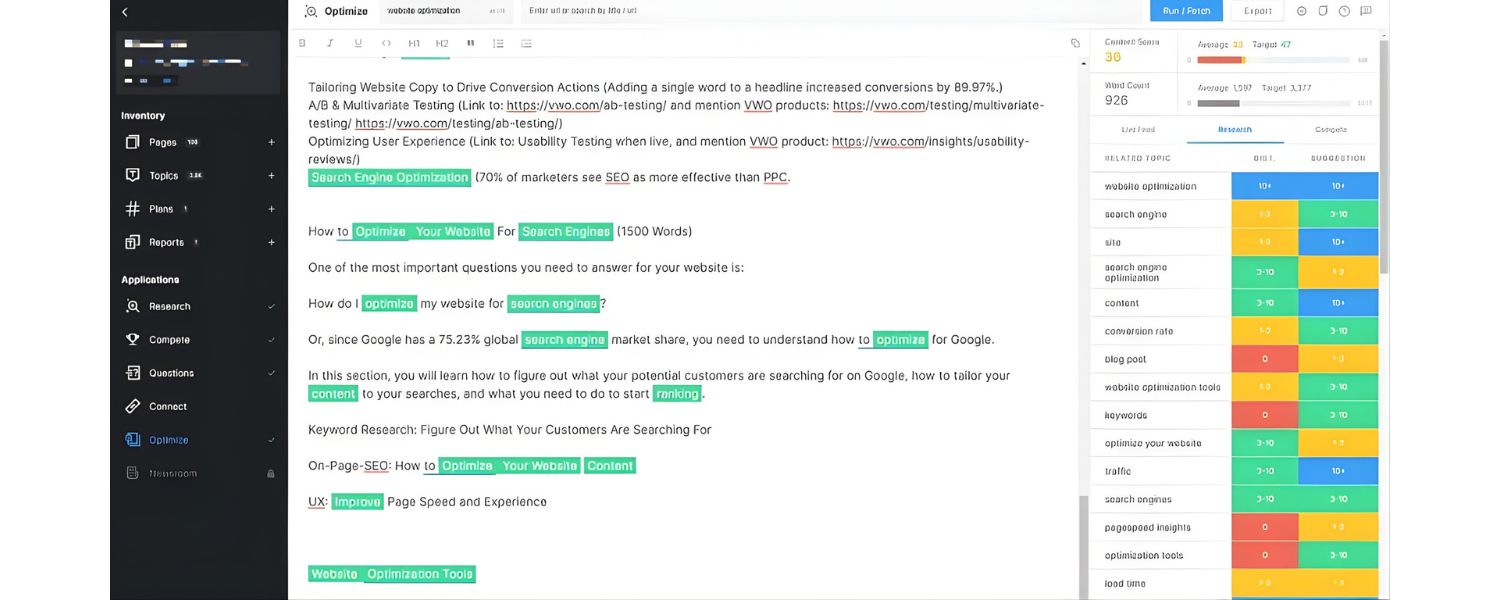
This tip is about content strategy across your paginated series. Typically, you want the first page of a category/series to be the most optimized and authoritative – it’s the hub page. Subsequent pages are primarily for navigation. To avoid internal competition and confusion, many SEO experts suggest focusing SEO elements on page 1 and keeping pages 2, 3, etc. relatively basic. This is sometimes called “de-optimizing” paginated pages beyond the first. Let’s break this down:
Page 1 as the Primary Landing Page
Page 1 (e.g., the main category page) should target the broad keyword and have rich content. It often makes sense to include an introductory paragraph, some unique text describing the category, maybe some internal links or featured items, etc., on page 1. Basically, treat page 1 as a landing page that you want to rank for the main head term (e.g., “Women’s Running Shoes”).
Make sure its title tag, H1, and meta description are fully optimized for that term. Perhaps include FAQs or text relevant to that category on page 1 if appropriate (many e-commerce sites add some SEO copy at the bottom of page 1).
Pages 2+ to Support Navigation (Not Compete)
Pages 2 and onward don’t need the same level of SEO targeting. In fact, if every page in the series had a unique fully-optimized title and content, you might end up with keyword cannibalization (multiple pages trying to rank for similar terms). A best practice is to use simpler, more generic titles and meta descriptions on pages 2+.For example, page 1’s title might be “Women’s Running Shoes – [Brand Name] – Free Shipping & Reviews”. Page 2’s title could just be “Women’s Running Shoes – Page 2 – [Brand]”. Notice page 2’s title is generic and not trying to stuff extra keywords or sales pitches – it’s mainly indicating it’s page 2 of that series.
Remove or Limit Certain Elements on Deep Pages
Some sites choose to not include large blocks of text or links on pages beyond the first. For instance, if page 1 has a long descriptive paragraph about the category, page 2 might omit that (to avoid near-duplicate text on every page). Page 2 might also have a very minimal meta description (or let Google auto-generate it). The idea is to clearly signal that page 1 is the main entry for content, while pages 2+ are just listings for user browsing.
As Semrush puts it, think of page 1 as your ranking page, and others exist to help users navigate. They advise using “simple, non-optimized title tags and meta descriptions” on pages two and beyond, and keeping keyword usage minimal there so you’re not competing with the main page.
Example of De-optimization
- Page 1 H1: “Women’s Running Shoes – Top Brands for 2025”
Page 2 H1: could simply be “Women’s Running Shoes (Page 2)” or even reuse the same H1 as page 1 (some sites keep the same H1 across all pages, which Google says is okay). - Page 1 Meta Description: “Shop the latest Women’s Running Shoes from Nike, Adidas, and more. Find the perfect fit with free shipping and reviews.【Brand】”
Page 2 Meta Description: something generic like “Browse more women’s running shoes. Page 2 of the catalog. Find more styles and sizes.” Or you might leave it blank and let Google snippet from content. - Page 1 might have an intro paragraph about how to choose running shoes, etc. Page 2 likely should not duplicate that text. It could have no intro or just a shorter note like “Showing items 51-100 of 200”.
John Mueller’s Take
Interestingly, Google’s John Mueller has also said you should ensure paginated pages can stand on their own in terms of content. That implies you shouldn’t strip them down to nothing. Users landing on page 3 should still know what category they’re in and see a relevant title.
So de-optimizing doesn’t mean making them low-quality. It just means don’t specifically target the same primary keywords on every page. Provide enough context (like repeating the category name in headings) so the user isn’t lost, but you don’t need to have all the SEO bells and whistles on each page.
Why This Helps
By doing this, you avoid internal competition. Google will likely favor page 1 for broad category searches (because it has the most comprehensive content and perhaps internal/external links), and use pages 2+ for more specific or long-tail queries if at all.
For example, if someone searches a very specific product name that happens to only be listed on page 5, Google might send them directly to page 5 (this can happen, and in that case page 5’s simpler title is okay because the search result might show something like “Women’s Running Shoes – Page 5”). But you won’t have page 5 trying to rank for “Women’s Running Shoes” head term in competition with page 1.
Caution
De-optimizing shouldn’t go too far. Don’t noindex as we covered. Also don’t remove all navigation or internal links from those pages – they should still link to relevant parts of your site (e.g., subcategories or popular filters if you have them). The key is mostly about meta tags and on-page text. Also, never remove pagination navigation itself in an effort to de-optimize – obviously, that navigation must remain!
Content Uniqueness
One strategy some sites use is to include a snippet of the category description on page 1, and a different snippet on page 2 (maybe continuing the guide or providing additional tips) – essentially having unique text on each page. This is another valid approach (opposite of de-optimizing) where you try to make each page independently valuable.
It’s harder to execute and not common for commerce listings, but in some content sites, paginated articles might have unique content per page.Choose a strategy that fits: either have page 1 hold the main content and pages 2+ minimal, or provide distinct content on each page to justify them individually.
What you want to avoid is every page having identical or nearly identical text plus all trying to rank for the same term.
Optimize for User vs. Search Intent
Usually, a user querying a broad term should see page 1 (with an overview of the category). A user querying something like “BrandX Women’s Running Shoes size 10” might actually land on page 3 which has those listings. In that case, page 3 is relevant due to the products shown, not because of any special SEO text.
And that’s fine.As long as those pages are indexed and crawlable, Google can surface them for the right specific queries. We just ensure we’re not confusing Google by making page 3 also look like a landing page for “Women’s Running Shoes” – we let page 1 carry that flag.
So, focus your primary SEO content on the first page of the series. For subsequent pages, keep them lean and straightforward: users should be able to navigate, know where they are, and browse items, but you don’t need to have extra fluff or keyword-heavy content there.
This way, all pages work together rather than against each other – page 1 captures broad searches, and deeper pages exist to help users (and occasionally grab a specific search if relevant).
6. Prioritize User Experience (Load More vs Infinite Scroll)
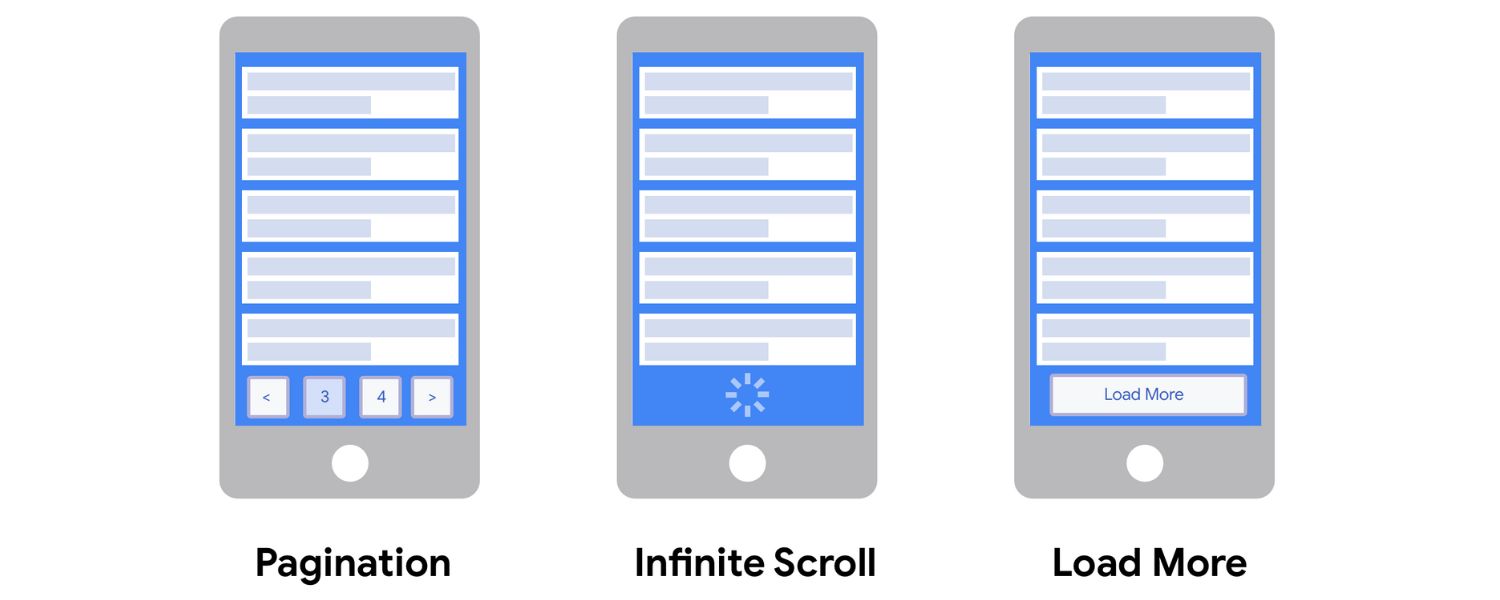
Pagination isn’t just a technical SEO decision; it’s also a user experience choice. You have a few UX patterns to choose from: classic numbered pagination, a “Load More” button, or infinite scroll. Each has SEO implications, and you should pick the one that best fits your content while ensuring SEO is covered. Let’s compare and address how to implement them in an SEO-friendly way:
Illustration of three pagination UX patterns on mobile: The first screen shows traditional pagination with numbered pages (1, 2, 3…), the second shows a “Load More” button to fetch additional content, and the third shows infinite scroll with a loading spinner.
Each pattern affects user experience and SEO differently. For instance, pagination provides a clear sense of progress (e.g., “page 2 of 5”), a Load More button keeps users on one page but requires manual action, and infinite scroll auto-loads content continuously but can lead to “scroll fatigue” if not managed.
A. Classic Pagination (Clicking through pages)
Pros for UX:
Users know which page they’re on and how many pages in total. It gives a sense of control and location (e.g., “Page 3 of 10”). It’s a familiar design pattern on desktop and mobile. Also, it limits how much a user has to load at once, which can be good for performance.
Cons for UX:
It requires extra clicks to see more items, which some impatient users may not do. The interface can be clunky on small screens if there are many pages (lots of tiny links).
B. Implications for SEO
Easiest to implement for SEO because each page has its own URL by default. Just follow all the best practices we’ve outlined (links, canonicals, etc.) and you’re good. Google often prefers this method as it can easily crawl numbered pages. There’s no risk of Google missing content as long as the links are there.
C. “Load More” button (Lazy Load by click)
Pros for UX:
Keeps the user on one page, which can feel smoother. The user chooses when to fetch more content by clicking “Load More” (or “View More”). This can encourage browsing more items – interestingly, research by the Baymard Institute found that users often view more products when there’s a Load More button compared to pagination. Possibly because it’s an incremental reveal rather than jumping pages. It’s also often better on mobile, as tapping a single button is easier than tapping tiny page numbers.
Cons for UX:
The user might not realize how much content is left (though you can indicate item counts). Also, repeated clicks might become tiresome if there’s a lot of content (“I had to click ‘Load More’ 10 times!”).
D. Implications for SEO
By default, a pure Load More (that fetches items via AJAX and appends them) can hide content from Google, just like infinite scroll, because Googlebot won’t click the button. To be SEO-friendly, implement Load More in one of two ways:
E. Progressive Enhancement
Have a basic pagination link structure in the HTML (like links to pages 2, 3, etc., possibly hidden with CSS or placed in a section). Then use JavaScript to intercept and turn those into a Load More behavior. This way, with JS enabled, users see a button, but with JS disabled (or to Googlebot), the links are still there.
F. URL Updates
Alternatively, each click on “Load More” could change the URL (e.g., adding ?page=2 to the URL and loading content). That way, if someone copies the URL after clicking Load More, it’s actually a different URL showing more content. This approach can be complex, but essentially you simulate a combined infinite scroll + pagination where each chunk can be accessed by a unique URL. Google’s guidance is to ensure each “chunk” has a unique URL and that you update the URL as content loads.
Whichever method, ensure that Google can discover all items via some link. You might still provide traditional pagination links in the footer for crawlers (and maybe for users who prefer it). Many modern sites do both: a Load More for user convenience and numbered links at the bottom for SEO and accessibility.
G. Tracking
If using Load More, test thoroughly with Google’s Mobile-Friendly Test or URL Inspection’s rendered HTML to see if the initially loaded content is all that’s in the HTML. Most likely, yes. Then make sure the additional content is accessible via an alternate path (like the unique URLs).
The Google documentation encourages using sitemaps or feeds in addition if you rely on JS loading – for example, in e-commerce, submitting all product URLs via a sitemap ensures Google finds them even if the pagination is not perfect.
H. Infinite Scroll (Automatic infinite loading)
Pros for UX:
Extremely seamless – users just scroll and content keeps coming. This is great for engagement on certain types of sites (social media feeds, image galleries, etc.) where users might just keep browsing indefinitely. It’s intuitive on mobile (scrolling is easier than tapping). Users often spend more time engaged when content keeps appearing (think of how one can scroll a Twitter or Instagram feed for a long time).
Cons for UX:
“Scrolling fatigue” is real. Users may feel lost (“how far have I gone? will it ever end?”). It can also be heavy on browser memory if a lot is loaded. Not suitable for all contexts – e.g., search results or e-commerce with specific counts might annoy users if they can’t jump to a specific point. Also, if done poorly, the back button behavior can break (though using History API solves this by updating URL).
I. Implications for SEO
Pure infinite scroll (with no URL changes) is the trickiest. Google will not scroll indefinitely during crawl. It will load the initial page, maybe a bit of content if your JS triggers some on load, but it won’t replicate a user’s continuous scroll. So you must implement an SEO-friendly infinite scroll:
J. Unique URL per section
As mentioned in the Google documentation, ensure each “portion” of content that loads has a unique URL, and link to those URLs sequentially somewhere in the HTML.For example, while the user sees one long page, the site might internally have routes like /category/page/2, /category/page/3 etc.
When the user scrolls near the end of page 1, you programmatically load content from /category/page/2 and append it, and use the History API to update the browser URL to …page/2 at that point. So if the user copies the URL after scrolling a bit, they might share the page 2 URL which will load with items up to that point.
K. Linking
It’s a good idea to actually include anchor links to those secondary URLs (like in a or an HTML footer) so Googlebot can find them via crawling. Another approach: you can have a “View All” page that lists everything (though that might be huge). Or a sitemap with links to page 2, page 3, etc.
L.Testing
You should test with Google’s tools to confirm that if you submit the page 2 URL, Google can fetch and see the content for page 2. Also test the main category URL to ensure it has at least the first batch of items and links (or script references) to the rest. Google’s own example says: support paginated loading by giving each chunk a URL, using absolute pages (not relative dates or anything), and updating the URL as the user scrolls.
Many large sites have moved away from pure infinite scroll for SEO reasons, or they implement a hybrid. For instance, some will do infinite scroll up to a certain number of items, then show a “Load more” or pagination if the user wants to continue, ensuring there’s a footer with links by that point.
M. Fallback
Also consider accessibility – if JS fails, can the user navigate? A message like “JavaScript is required to view more items. Please use the pagination links.” plus actual links can be a good fallback.
N. View-All Page
Another pattern is offering a “View All” link that loads all items on one page. UX-wise, this can be offered as an option (like “View All 200 products”). SEO-wise, a View All page can be a good target for canonical (older Google advice was to canonical paginated pages to a view-all).
However, if “All products on one page” is extremely heavy, it can slow down and frustrate users, especially on mobile.View All might be suitable for smaller collections or content like an article split into 3 pages, where you also offer a single-page version. If you do have a reasonable view-all page, you could canonical paginated pages to it – but as noted, Google now says don’t use first page as canonical, implying they aren’t pushing the view-all approach as much. Instead, they want each page indexable. So use view-all for user preference (and maybe for other search engines), but still follow normal pagination best practices.
O. Choose UX Based on Content Type
Some guidance from experts: Infinite scroll works well for feeds where users don’t have a specific endpoint (e.g., social feeds, news timelines). Load More is often favored for e-commerce category pages because it encourages browsing while still giving some control.
Pagination is reliable for any scenario, especially where users might want to jump around (like forums with older posts). Consider your audience and content. For instance, a study found that on e-commerce sites, users often prefer a Load More button because they can keep seeing products without a hard break, and they looked at more items on average than with pagination.
On the other hand, a data-and-design study pointed out infinite scroll is not always ideal if users need a sense of how much content is left or to locate something specific.
P. Hybrid Approaches
Some sites combine methods. Example: On mobile, they use infinite scroll (since Google Search itself now does continuous scroll on mobile SERPs). On desktop, they might use pagination. Or they might load 3 pages via infinite scroll, then require a click for more (to avoid endless load). These can be okay as long as, again, the content is accessible to crawlers via some means.
Q. Core Web Vitals
Whichever method, be mindful of performance. Infinite scroll can trigger many network requests – ensure lazy loading of images, etc., so you don’t kill page speed. Pagination might involve many clicks which is fine, but each new page load should be optimized for speed too (caching, etc.). Load More should be snappy in fetching content. A slow, clunky Load More defeats its purpose.
In summary, from an SEO perspective, traditional pagination is the most straightforward – each page a link, easy for crawlers. Load More and Infinite Scroll can be made SEO-friendly but require extra care: ensure unique URLs and crawl paths for all content.
Whatever you choose, put users first: a pagination UX that frustrates users will lead to higher bounce rates, offsetting SEO gains. Aim for that sweet spot where users effortlessly explore your content and search engines effortlessly crawl it.
7. Manage Crawl Budget & Indexation
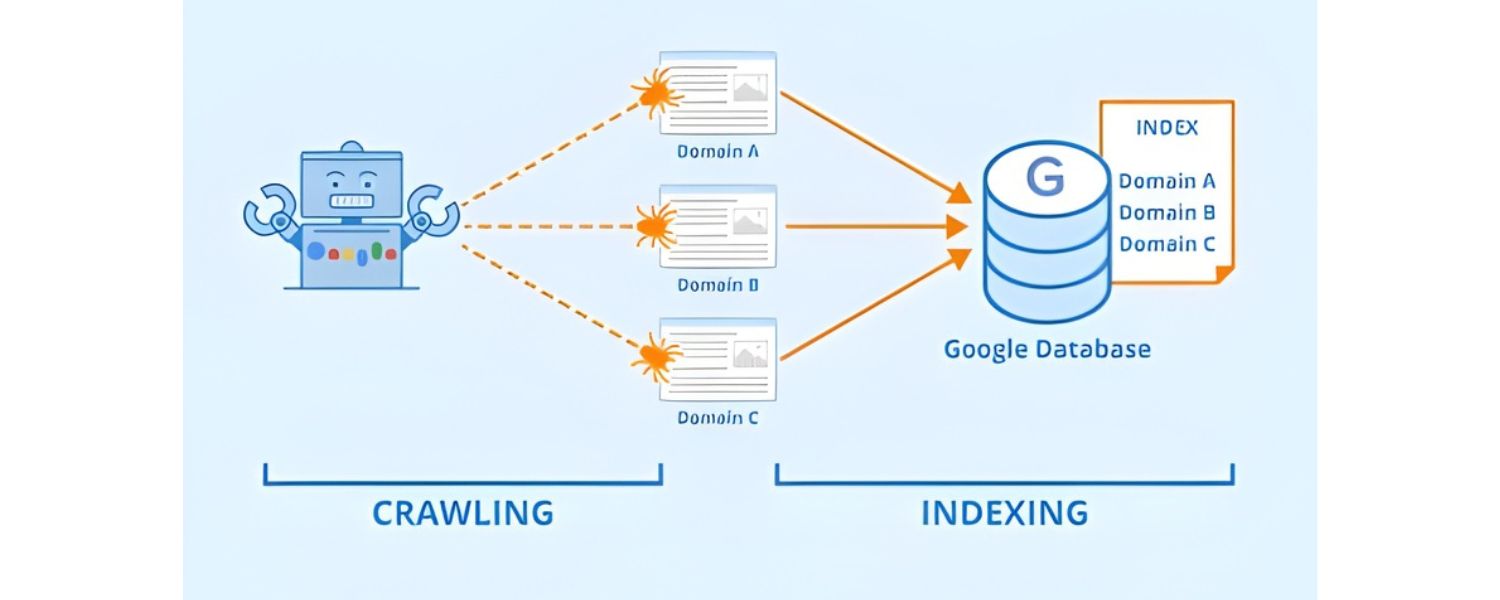
For large websites, crawl budget optimization becomes important – you want Googlebot spending its time on your most valuable pages, not wasting cycles on endless pagination or duplicate filtered pages. Pagination intersects with crawl budget and indexation strategy heavily, because a poorly configured site might have thousands of paginated URLs (especially with combinations of filters). Here’s how to manage it:
A. Don’t Overthink Crawl Budget on Small Sites
As Google states, if you have fewer than a few thousand URLs total, crawl budget is not a major concern. Google will crawl your site easily. In such cases, it’s fine for Google to index all your paginated pages – there’s no “budget problem.”
Focus on content quality and let Googlebot do its thing. Crawl budget becomes a factor when you have tens or hundreds of thousands of URLs, often due to e-commerce facets, forums, etc.
B. Robots.txt for Facets/Parameters
One effective strategy: block crawling of non-essential URL parameters via robots.txt. For example, you might allow page= but disallow ?sort= or ?color= if those are duplicate sorted lists.
If Googlebot can’t crawl those filtered URLs, it won’t waste time on them. However, be careful: if those pages lead to unique content (like specific products only accessible via that filter), then blocking might hide content. Ideally, every product is accessible via some category or subcategory without needing a filter.Use robots.txt to prevent Google from venturing into infinite filter combinations (like ?color=red&size=m&page=5 etc.) that don’t need indexing. Example: Disallow: /?sort= in robots.txt (assuming sort parameter isn’t needed for index).
C. Noindex for Certain Cases
We advised not to noindex the main pagination sequence. But you can noindex “intermediate” list pages that aren’t useful. For instance, say you have both pagination and a “view all” page.
You might choose to noindex pages 2-N and just index page 1 and the view-all. (Not usually recommended now, but some do.) Or if you have an alternate paginated structure like by price range etc., those could be noindexed if you have better pages.
Essentially, noindex should target duplicate or very low-value listing pages rather than the main ones. If you do this, ensure that doesn’t cut off discovery of content (use follow if noindexing, and have alternate paths).
D. Set Reasonable Pagination Depth
If a category has 100 pages, ask if all need indexing. Maybe page 1-20 cover 99% of products people search for, and pages 21-100 are older items that rarely get searched. In some cases, you might decide to noindex or even remove extremely deep pages (or archive those items separately).
But a safer strategy: consider additional navigation or sub-grouping. For example, if “Clothing” category has 50 pages, perhaps introduce subcategories by brand or type, so that each is smaller. Or provide filters to jump directly (like alphabetical index). This isn’t directly an SEO meta tag thing, but site structure improvement to avoid extremely deep pagination where possible.
E. Leverage Sitemaps
Even if Google doesn’t crawl every page frequently, an XML sitemap listing all your product/content URLs (not necessarily every page of pagination, but the content items) will help ensure discovery.
Sitemaps are especially useful if you disallowed some crawl paths. For example, if page 10 is disallowed but the products on page 10 are listed in the sitemap, Google can still find them. Sitemaps don’t guarantee indexing, but they guide Googlebot on what URLs exist.
Google’s docs even mention using a sitemap or Google Merchant Center feed for products to help find all content when using incremental loading methods.
F. Utilize Search Console Crawl Stats
Google Search Console’s Crawl Stats report (under Settings) can show you how many requests per day, which URLs are frequently crawled, etc. If you see a huge amount of crawling on pagination or parameter URLs, you might refine your rules.
Also, GSC’s Index Coverage can show if many pages are being discovered but not indexed (for example, “Discovered – currently not indexed” could mean Google found tons of pages but hasn’t bothered indexing them, possibly because they look similar). That’s a sign of potential crawl waste or low-value pages.
G. Create High-Value Landing Pages for Important Filters
One great strategy from experts: If you have certain filters that are valuable (like “red dresses” might be a popular search), create a static landing page for that (e.g., a category page just for red dresses) and optimize it, instead of hoping a deep paginated filter will rank.
This way, you capture search intent without exposing the crawler to a deep filtered URL. For less important combinations, let them remain hidden or noindexed. This targeted approach can improve SEO while reducing index bloat.
H. Monitor Index Bloat
Use the site: search operator to see what Google has indexed. If you see hundreds of page= URLs indexed for a site where that seems excessive, consider tightening up. However, note that having, say, 50 paginated pages indexed in a large site is not inherently bad if they all have unique content.
The question is quality and necessity. Are those pages providing value in search results? If someone Googled a very specific term and landed on page 7, would that be beneficial? If yes, keep them indexed. If some pages seem empty or very low-value, then maybe restrict those.
I. Crawl-Delay and Other Settings
Generally, don’t use crawl-delay unless your server is struggling. That’s more about server load, not specifically pagination. If Google is spending too much time on pointless pages, it’s better to block or noindex those pages than to slow down crawling overall.
J. Use Log File Analysis
For really large sites, analyzing server logs can help. You can see if Googlebot is incessantly crawling through page 1,2,3… of a large facet and then starting over, etc. Tools (like Screaming Frog’s log analyzer or other log parsing tools) can identify if Google is frequently hitting parameter URLs it shouldn’t. Then adjust your robots.txt accordingly.
K. Internal Linking to Deeper Pages
One trick to encourage indexing of deeper content is occasionally linking to page 2 or 3 from elsewhere (maybe in a sitemap HTML or footer “See more” link). But this is minor. Usually, page 1 is linked from menus, etc., and thus has the most PageRank.
Page 2 is one click away, page 3 two clicks, etc. If your site is very deep, consider if that depth is necessary or if you can flatten it by breaking categories up or adding additional navigation.
L. Assess via Analytics
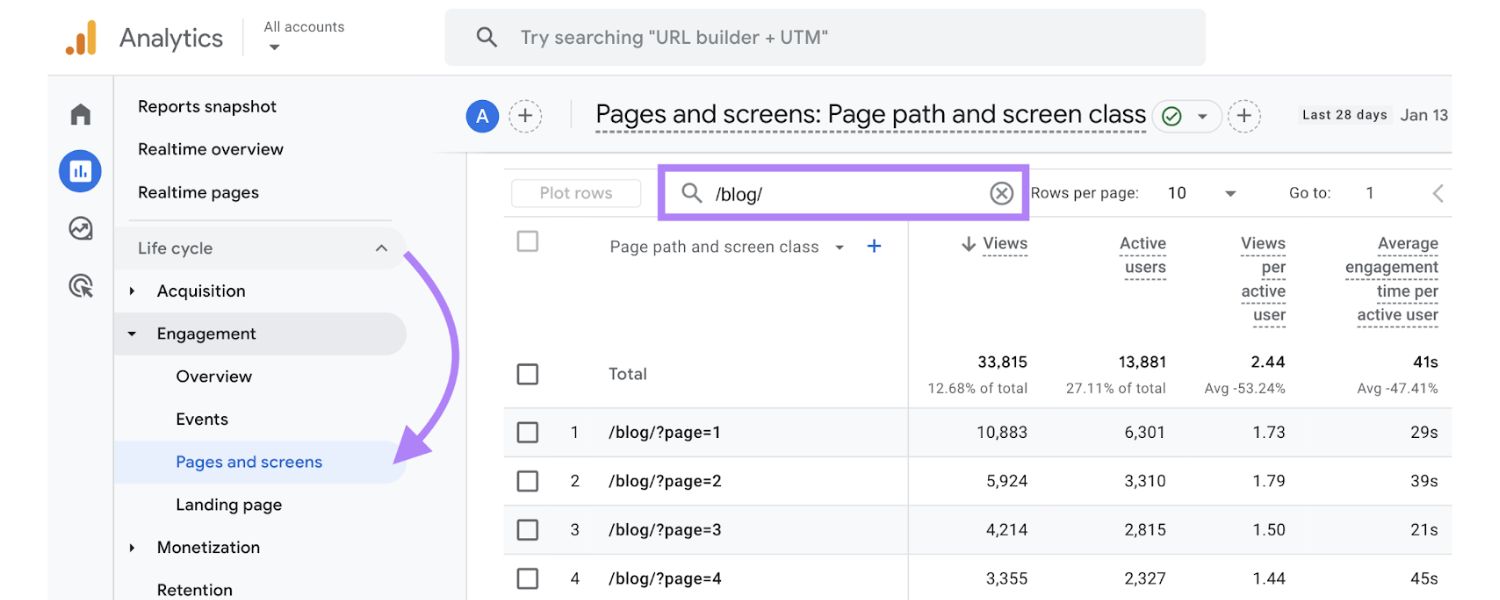
If possible, check if paginated pages get any organic traffic. In GA4 or whichever analytics, see landing pages that contain ?page=. If some do get hits, that means Google indexed them and found them relevant to some queries, which is good.
If none ever get hits and you have thousands indexed, maybe they aren’t needed in the index. But again, no traffic could also mean they haven’t had the chance or the content is long-tail. Use this as a secondary signal, not the primary.
To sum up, strike a balance:
You want Google to crawl enough of your pagination to find all the actual content (products/posts) and to index the key pages. But you don’t want Google bogged down in an endless maze of low-value URLs.
By blocking or noindexing purely duplicate/filter pages developers.google.com, providing sitemaps, and structuring your site intelligently, you guide Googlebot to focus on what matters. A well-optimized pagination system will have Google crawling page 1, 2, 3, maybe skip to page 10, etc., without getting lost, and your important content will get indexed without bloat.
Now that we’ve covered best practices, let’s look at how to monitor and maintain your pagination SEO over time.
Tools to Audit and Monitor Pagination SEO
Optimizing pagination isn’t a one-and-done task. You should continuously monitor how Google is handling your paginated pages and ensure no issues crop up. Luckily, there are several tools and techniques to help:
1. Google Search Console (GSC) 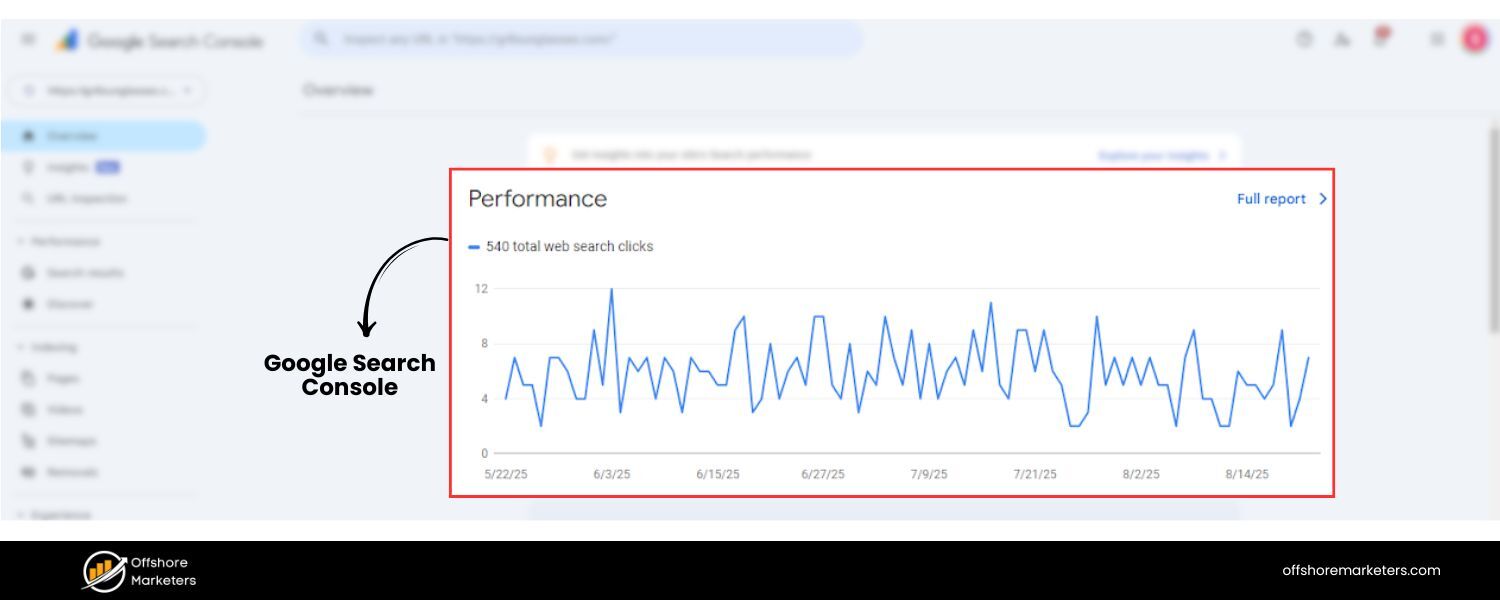

This is your primary window into how Google sees your site. In GSC:
A. Use the URL Inspection tool to test specific paginated URLs. For example, enter yourdomain.com/category?page=2 and see if it’s indexed, if Google encountered any crawl issues, and how it rendered the page.
If GSC reports something like “Indexed, not submitted in sitemap” or “Duplicate, Google chose different canonical” for page 2, investigate why. You ideally want “Indexed” or at least “Discovered”.
B. Check Coverage > Pages (Index Coverage report) to see if many paginated pages are under “Excluded”. Some common statuses: “Duplicate without user-selected canonical” might indicate Google thinks page 2 is duplicate of page 1 (perhaps you accidentally canonicalized them wrong, or they appear very similar).
“Crawled – currently not indexed” might indicate Google decided not to index some pages, possibly because of low value or many similar pages. If important content lies there, you may need to improve those pages.
C. Crawl Stats (under Settings) to see overall activity. If you spot that Google is fetching an inordinate number of URLs with odd parameters, refine your blocking rules.
D. Experience > Core Web Vitals / Mobile Usability: If infinite scroll or load more isn’t implemented well, maybe some paginated pages have mobile usability issues (like content not loading without user action). GSC can flag that.
E. Search Performance: You can filter queries or pages containing “page=” to see if any paginated pages get impressions or clicks. This can reveal if, say, page 2 is ranking for something. It’s rare to see a lot, but if you do, that’s an indication those pages have search value.
2. SEO Crawlers (Site Audit tools)
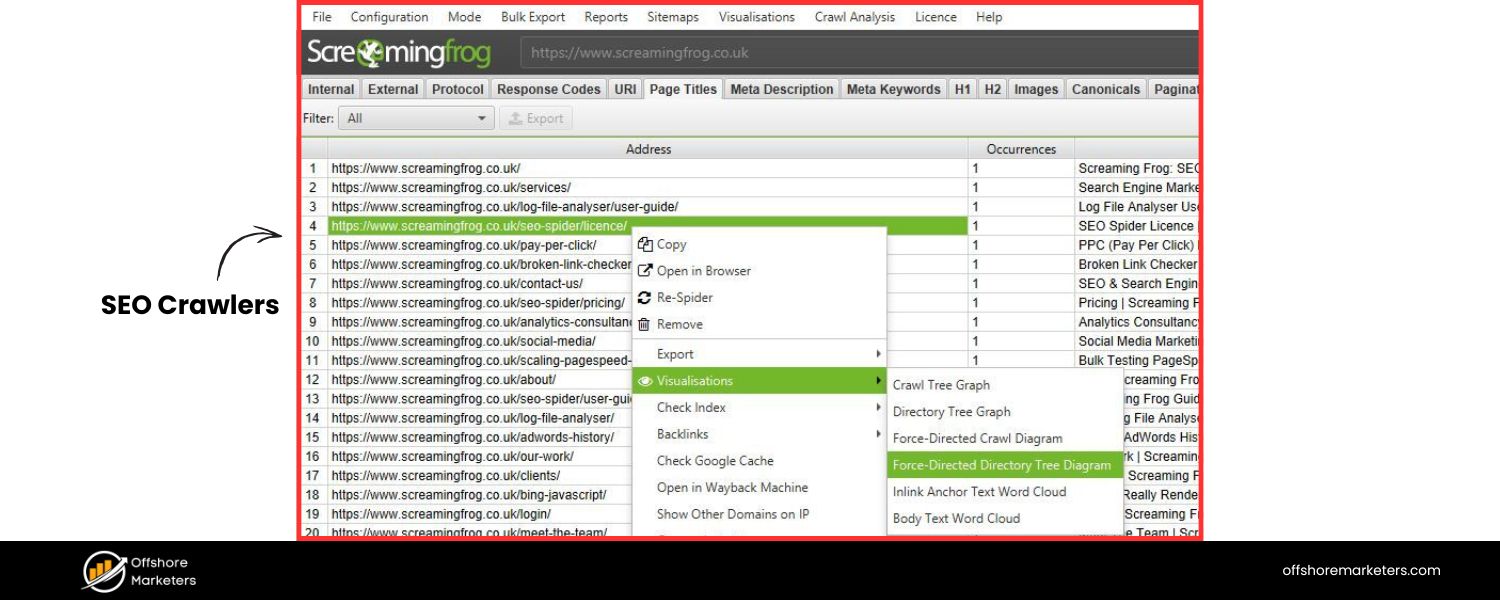
Tools like Screaming Frog, Semrush Site Audit, Ahrefs Site Audit, Moz, etc. can crawl your site as a bot and detect issues:
A. They can find missing or incorrect canonical tags (e.g., if any paginated page doesn’t have a self-canonical or if it accidentally points wrong).
B. They can flag broken links in pagination (maybe page 5 link on page 4 returns 404 – that can happen if items were removed and the total pages reduced).
C. They often detect duplicate titles/descriptions – expect those for pagination, but you can verify they’re intentionally similar. Some tools let you whitelist or ignore duplicates that include “page x” in title.
D. They can identify if any pages are orphaned (i.e., not linked from anywhere). Ideally, page 2+ should be linked from page 1 or sequence, so none should be orphaned.
E. Some crawlers have specific reports for pagination. For instance, Screaming Frog has a “Pagination” report that checks for presence of rel next/prev tags and sorts pages by number etc. (Even though rel tags are deprecated for Google, the tool might still check them for completeness or for other engines).
F. After changes (like adding canonicals or adjusting robots), recrawl to ensure the fixes took effect.
3. Log File Analyzer
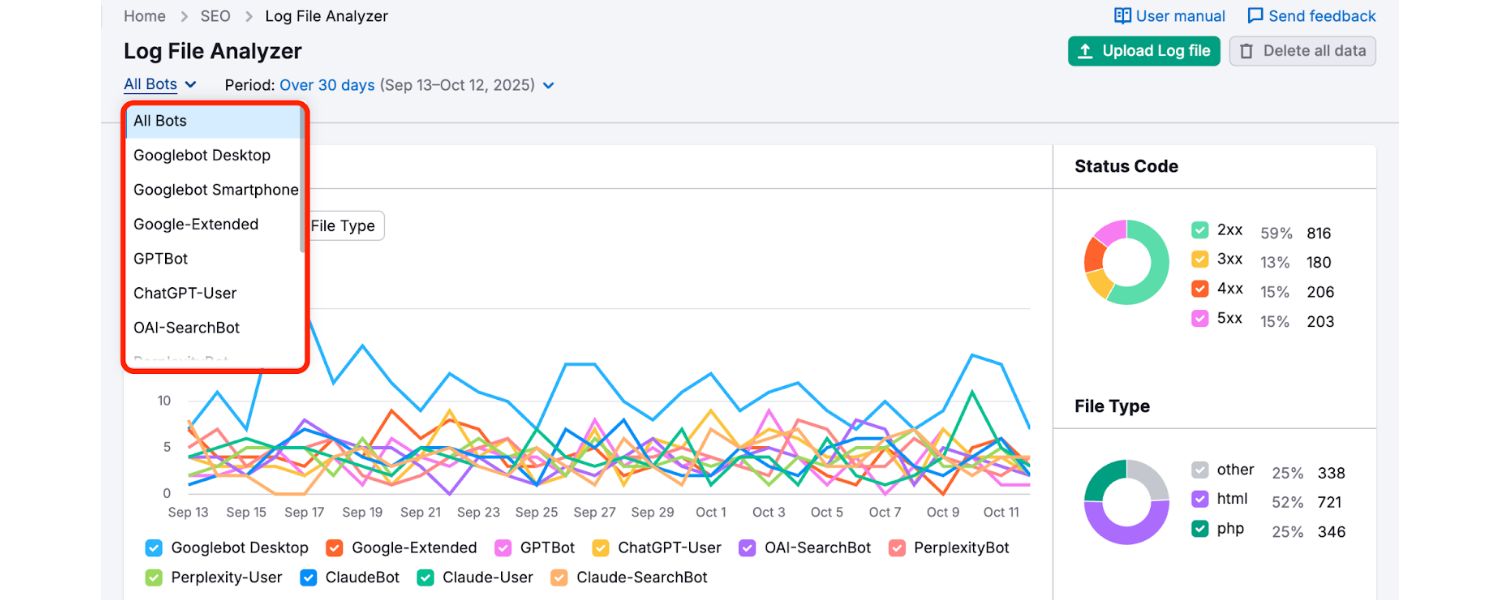
For a deep dive, using a log file analyzer like the one from Semrush or Screaming Frog’s Log Analyzer can show exactly which paginated URLs Googlebot is hitting and how often. For example, you might discover Googlebot crawls page=1 and page=2 frequently, but almost never reaches page=10.
If page=10 contains content you care about, you might need to strengthen internal linking or break the content into smaller sections. Logs also show response codes (ensure all page links return 200 OK, not 404/500 errors). If you’ve disallowed something in robots.txt, logs will show if Googlebot is attempting it (you’ll see 403/robot blocked entries). This is advanced but very insightful for huge sites.
4. Analytics (GA4 or others)
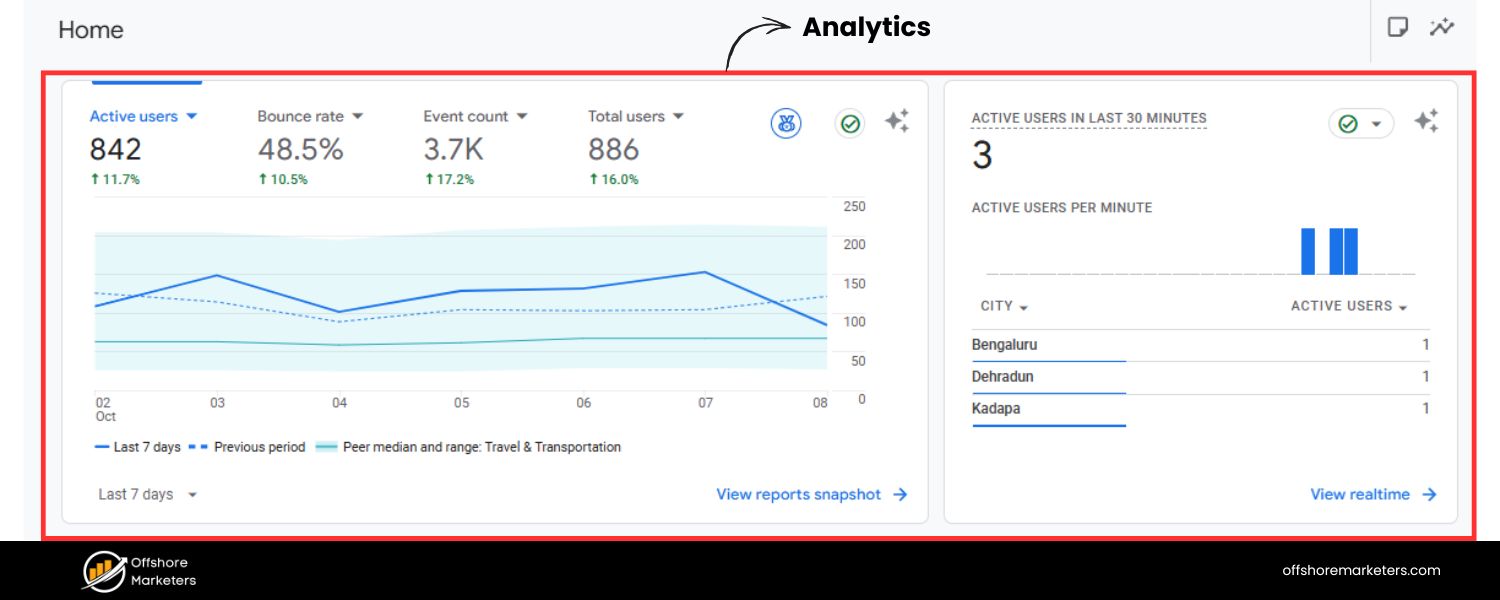
Check user behavior on paginated pages:
A. Are users actually clicking to page 2, 3, etc.? High drop-off after page 1 might indicate either they found what they need (fine) or the navigation is not obvious/pleasant (problem). If 90% never go past page 1, maybe consider showing more items on page 1 or improving the call-to-action for next page.
B. Look at page load times for your paginated pages (in GA4’s Page Timings or CWV data). If deeper pages are slower (maybe due to many images), optimize them. Google’s crawl might slow down if pages are heavy.
C. If using infinite scroll or load more, analytics can track how many items users typically load. If most only scroll through one page worth, infinite scroll might not be giving an advantage.
D. Also check landing page reports: If some paginated pages have high bounce rate, ensure they have at least some navigational elements (like link to page 1 or a filter) to help users.
E. Browser Developer Tools (for JS implementations): If you use a JS-heavy pagination (load more/infinite), use Chrome DevTools to simulate Googlebot. For instance, use the Network panel to see if content loads only after certain events. Or disable JavaScript and see what the page shows – that’s roughly what Googlebot initially sees (though Google does render JS after a fashion, it can be delayed). Make sure important links exist in the raw HTML or that the JS rendering completes within a reasonable time.
F. External Tools & Reports: Some third-party services specifically audit pagination. For example, Lumar (formerly DeepCrawl) often has built-in rules for identifying pagination patterns and issues. There are also free checkers for canonicals or for whether infinite scroll is SEO-friendly (though the latter is mostly manual checking).
G. For WordPress users, plugins like AIOSEO or Yoast seo might have specific settings for pagination (like controlling the title template for page 2, etc.). Ensure those are configured (e.g., “Title – Page %page% – Site Name”).
H. Schema and Snippets: If your site could benefit from FAQ schema or breadcrumbs schema on paginated pages, implement that. Breadcrumb schema can show e.g. Category > Page 2 in results, though typically Google shows breadcrumbs based on URL structure anyway. There isn’t a direct schema for “pagination” itself that affects snippets, but having a breadcrumb trail visible can reassure users who land on page 3 that they can navigate up.
By regularly using these tools, you can catch and fix issues such as: Google indexing unwanted URLs, paginated pages not being indexed at all, incorrect canonical signals, or user experience pitfalls.
Pagination SEO is ongoing: every time you add a new category or significantly change your product list, consider checking how that impacts the page count and crawl behavior.
Next, let’s answer some frequently asked questions about pagination and SEO, to clarify any remaining doubts.
FAQ: Pagination and SEO
Q1. Does Google still support rel=“prev” and rel=“next” tags for pagination?
No – Google no longer uses the rel=“prev”/next link tags for understanding pagination.
This was confirmed in 2019. Having them on your pages won’t hurt, and other search engines (like Bing) might still reference them, but Google completely ignores those tags for indexing and ranking purposes. Instead, Google relies on your on-page links and URL structure to figure out paginated series.
So, focus on proper linking (as we described in Best Practice #1) rather than HTML head tags. If your site has rel=“next/prev”, you can leave them (no urgent need to remove), but don’t expect them to magically solve pagination SEO.
Q2. Should I noindex my paginated pages (page 2, 3, etc.) or leave them indexed?
In most cases, do not noindex your core paginated pages. Keeping them indexable allows Google to crawl through them and find all your content, and they can occasionally rank for specific queries.
Noindexing pagination can cut off link equity flow and content discovery. Only consider noindex for paginated pages if you have a very good reason – for example, if you have a “view all” page that you want to rank instead, or if very deep pages are low-value and you’ve determined they shouldn’t appear in search at all.
Even then, proceed with caution. Google’s guidance and many SEO experts suggest keeping paginated sets indexable and managing content via canonicals and internal linking instead. So, generally, let page 2+ be indexed (with self-canonicals in place) and focus on optimizing page 1 as the primary page.
Q3. Which is better for SEO: traditional pagination, infinite scroll, or a “load more” button?
Purely from an SEO standpoint, traditional pagination is the safest choice because Google can crawl numbered links easily. Infinite scroll and load-more can be made SEO-friendly but require extra work (ensuring unique URLs and crawl paths for all content). In terms of user experience:
1. Infinite scroll can boost engagement (users stay on one page and keep scrolling), but if not implemented with crawlable URLs, it’s bad for SEO. It may also overwhelm users if content is endless.
2. “Load more” buttons offer a middle ground – users can fetch more content on demand. Many e-commerce sites favor “Load more” for better mobile UX and increased product viewsn. SEO-wise, treat it like infinite scroll: implement either fallback links or update the URL as content loads so search engines can index all items.
In summary, if you can implement infinite scroll/load more with proper SEO measures (unique URLs per chunk, History API updates, or parallel pagination links), then you get UX benefits and SEO coverage. If not, stick to classic pagination. Always choose based on what your users prefer, then make that choice SEO-compatible.
Q4. How can I check if Google has indexed my paginated pages and products?
There are a few ways:
1. Google Search Console: Go to the Index > Pages (Index Coverage) report and look for your pagination URLs. You can use the filter for “URL contains page=” (if you use query parameters) to see their status.If they’re listed under “Indexed”, Google has them indexed. If under “Excluded” (e.g., “Alternate page with proper canonical” or “Duplicate”), Google might be skipping them, possibly due to perceiving duplicates. You can also use the URL Inspection tool on a specific URL (like ?page=5) to see its index status.
2. Site: search query: Perform a Google search like site:yourexample.com “Page 2” (include quotes around “Page 2” if your titles have that) or site:yourexample.com/category?page=. This can show you if Google lists those pages in results. Note that site: isn’t 100% comprehensive, but it gives an idea.
3. Search your content: Search on Google for a snippet of text or product name that only appears on a deeper page. If it shows up in results linking to that page, it’s indexed. For instance, if “Product XYZ” is only on page 4, search Google for “Product XYZ [YourSite]” – if it returns page 4, then page 4 is indexed.
4. Use SEO tools: Some tools list indexed URLs (e.g., Ahrefs or SEMrush site explorer can sometimes show pages they’ve seen in Google’s index). Also, Screaming Frog’s SEO Spider has a mode where it can check if crawled URLs are in Google’s index by interfacing with the Search Console API.
If you find certain paginated pages are not indexed and you want them indexed, consider why: Are they noindexed by you? Canonicalized to something else? Or maybe Google thought they were low value. In the latter case, improving content on those pages or ensuring they have external/internal links might help.
Q5. My site allows users to choose how many items per page (e.g., 20, 50, 100). Is that bad for SEO?
It can introduce complexity. If changing the number of items per page changes the URL (common, e.g., ?perpage=50), you essentially have multiple paginated versions of the same content. For example, page=2&perpage=20 vs page=1&perpage=50 might show overlapping content. Google could see this as duplicate content or alternate versions. To handle this:
1. Pick a default view (say 20 per page) and make that the one indexable (canonicalize others to it, or noindex the others). For instance, you might canonical all perpage=50 pages to the equivalent perpage=20 pages, to consolidate signals.
2. Alternatively, if a user selects 100 per page, maybe that’s your “view-all” page – you could allow that to be canonical target. But only do this if the page load isn’t too slow with 100 items.
3. Generally, avoid letting such options create too many URLs for the same content. If you keep them, use noindex or canonical on the non-default.And ensure that whatever default you choose still lists all items across its pagination sequence so Google can find everything. User options are fine for UX, but for SEO, you want a single clear pagination path.
Also, if you have sorting options (sort by price, by newest), treat those similarly – best to noindex or canonical them to the default sort, unless a sorted view offers a significantly different user experience you want indexed (rarely the case).
Q6. Should I include “Page X” in the title and meta description?
It’s often a good idea to include the page number in the title tag for clarity, especially if all pages are indexable. For example: “best seo services – Page 2 | SiteName”. This way, if page 2 appears in search results, users see it’s page 2.
Google might even append something like “(Page 2)” to titles in SERPs on its own if it thinks it’s needed. It’s not mandatory – Google says identical titles for paginated pages are okay.
But from a user perspective, distinguishing them can reduce confusion. It won’t likely affect rankings, but could affect click-through if someone lands on page 2 without context. Meta descriptions could either be the same on all pages or slightly varied (like “Browse more items – page 2 of 5”).
If you do nothing, Google often pulls a snippet from content, which usually is fine (like the first product name, etc.). So include page numbers if you can easily; otherwise, it’s not a critical SEO element, more of a usability nice-to-have.
Hopefully these FAQs clear up common points of confusion. Pagination can be complex, but following the best practices above will put you ahead of most competitors who might still rely on outdated methods or neglect these details.
Conclusion & Call to Action
Pagination is a crucial aspect of technical SEO for any site with a lot of content, whether it’s product listings, blog archives, or forum threads. When implemented correctly, pagination improves your site’s crawlability, user experience, and even rankings for long-tail content.
We’ve covered how to design an SEO-friendly pagination system: using logical URL structures, proper linking, self-referencing canonicals, avoiding pitfalls like noindexing important pages, and choosing the right UX pattern for your audience. By following these best practices – and updating your approach as Google’s guidelines evolve – you ensure that search engines can find and index ALL your valuable content while users can easily navigate it.
Now it’s time to act. Here’s your to-do list for pagination SEO:
1. Audit your current setup: Use the tools and tips mentioned (Search Console, crawlers, etc.) to identify any issues in your pagination (like improper canonicals or missing links).
2. Implement necessary changes: Update your site’s code to add/fix tags, adjust robots.txt rules for filters, or tweak titles if needed. If you’re using a CMS or e-commerce platform, check its documentation or plugins for handling pagination SEO (many platforms have built-in settings for this).
3. Optimize for users: Evaluate if your pagination UI (links, load more, infinite scroll) is truly benefiting your visitors. If not, consider a change, even a small UX improvement can increase engagement and indirectly improve SEO metrics.
4. Monitor regularly: After changes, monitor your indexation and performance. Keep an eye on whether Google is indexing the pages you want and if your deep content is getting discovered. Over time, as your site grows, periodically re-assess if your pagination strategy needs adjustments (especially if you add new categories or filters).
By taking these steps, you’ll stay ahead of the competition. Many sites (perhaps some of your competitors we analyzed) still struggle with pagination issues, from letting Google crawl infinite empty URLs to not leveraging their paginated pages at all. You now have the knowledge to avoid those mistakes and turn pagination into an SEO strength.
Remember: A well-structured pagination system not only helps your SEO but also ensures a better experience for your users, leading to more page views, lower bounce rates, and higher conversions. It’s a win-win for your website’s visibility and usability.
Now, armed with this comprehensive guide, it’s time to implement and reap the benefits. Go ahead, review your site’s pagination, apply these best practices, and watch your crawlability and rankings improve. If you need further help or a second pair of eyes on your technical SEO, don’t hesitate to reach out to an SEO professional or our team for a detailed audit.
Take charge of your pagination SEO today, and ensure no content on your site remains hidden from search engines or users. Optimize your pagination, and you pave the way for better indexing, higher rankings, and a superior user journey through your content!

.png)
Shopify SEO: Guide to Ranking Your Store and Driving Sales
Most Shopify store owners set up their store, list their...

Content Marketing : Definitive Guide to Strategy, Content Types, and Measurable ROI
Content marketing generates 3x more leads than outbound marketing at...

Above the Fold: Guide to Conversions, Rankings and Faster Pages
Above the Fold in 2026: The Complete Guide to Conversions,...

Off-Page SEO Checklist: Guide to Building Real Authority
Most websites spend months creating great content, only to wonder...

What Is Keyword Bidding? The Complete Strategy Guide for Smarter Ad Spend
Most advertisers believe the highest bid wins the auction. It...

What Is Google Trends? The 2026 Marketer’s Complete Guide
If you are not already pulling weekly insights from Google...
If you want a growth partner who will get to know every aspect of your business and treat your budget like their own — we are the right fit.
.png)


.png)
.png)
.png)
.png)
.png)
.png)
2026 ALL RIGHTS RESERVED MADE IN INDIA
