
Rich Snippets: Boosting Your SEO with Enhanced Search Result
September 9, 2025
Introduction
In today’s competitive search landscape, standing out is everything. What if you could make your Google listing more eye-catching and informative than your rivals? Enter rich snippets, a powerful SEO feature that enhances your search result with extra details like star ratings, images, prices, and more.
These visual enhancements not only make your snippet shine but also entice users to click, driving more organic traffic to your site.
In this comprehensive guide, we’ll tap into 25+ years of marketing experience to break down what rich snippets are, why they’re a game-changer for SEO, and how you can implement them to gain an edge over the competition (with zero fluff or generic advice). Let’s dive in!
What Are Rich Snippets? (And How They Differ from Normal Results)

Rich snippets (also known as “rich results”) are Google search results with additional data displayed beyond the standard title, URL, and meta description.
In a normal search snippet, Google shows the blue title link, the URL, and a brief text preview of the page. Rich snippets take that basic snippet and enrich it with extra information pulled from your page’s content.
This extra info can include things like star ratings, number of reviews, product prices, availability, images, cooking times, or other relevant details, depending on the page’s content. In essence, rich snippets transform a plain search listing into a more detailed “preview” of what your page offers.
A normal Google search snippet shows only the title, URL, and a short description.A rich snippet result includes eye-catching extras like ratings, reviews, price, and even images, pulled from structured data on the page.
Google uses structured data markup in your HTML to source these rich snippet details. Structured data is a standardized format (often Schema.org vocabulary) that you add to your page’s code to explicitly tell search engines what your content is about.
By reading this markup, Google can understand specific pieces of information on your page (for example: “this number is a rating out of 5” or “this text is an ingredient list”) and display them in the search result.
Common rich snippet types you’ve probably seen include recipe snippets (with cooking time, calories, etc.), product snippets (with price and availability), review snippets (star ratings), event snippets (date and location of events), and many more. Essentially, any content type that can be templated into key facts is a candidate for a rich snippet.
Note: Google often uses the term “rich results” interchangeably with rich snippets. They refer to the same concept of enhanced search listings. Also, rich snippets are just one category of SERP features.
Other SERP features include things like Featured Snippets (an answer box at the top of results) or Knowledge Panels (information boxes on the side), those are different from rich snippets. In this guide, we’re focusing on rich snippets that augment the regular search results, not those other special features.
Why Are Rich Snippets Important for SEO?
Rich snippets are more than just glitz, they offer real SEO value by improving how your pages appear and perform in search. Here’s why they matter:
1. Higher Visibility & Click-Through Rates

Rich snippets make your result far more eye-catching than a standard listing. Users scanning the page will see elements like ★ ratings or an image thumbnail and naturally gravitate toward your result.
This often translates to a higher organic click-through rate (CTR) for pages with rich snippets. In fact, people prefer to click results that give them more information upfront.
By standing out from the plain links, you can attract significantly more clicks than your position would normally get, even if you’re not ranked #1. More clicks mean more traffic coming to your site.
2. Indirect SEO Benefits (User Signals)
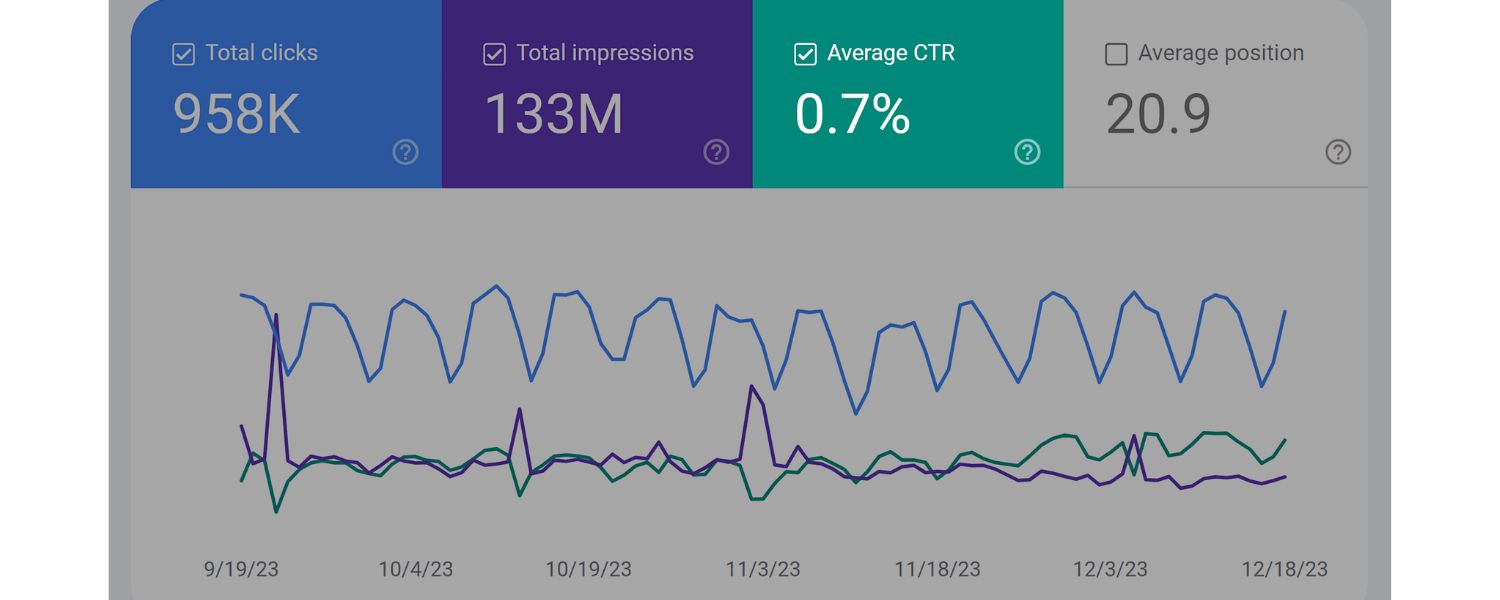
While rich snippets do not directly boost your Google rankings (Google’s own representatives have stated that using structured data is not a ranking signal), the indirect effects can improve your SEO over time.
A higher CTR is a positive user signal, it tells Google that searchers find your result relevant and appealing. If users consistently click your result more than others, it can help your rankings in the long run, as Google’s algorithms take note of the engagement.
In other words, rich snippets help you earn relevance points by winning over searchers. They also tend to lead to more qualified visitors (since users know what to expect), which can mean lower bounce rates and better on-site engagement, also good signals to search engines.
3. Better User Experience
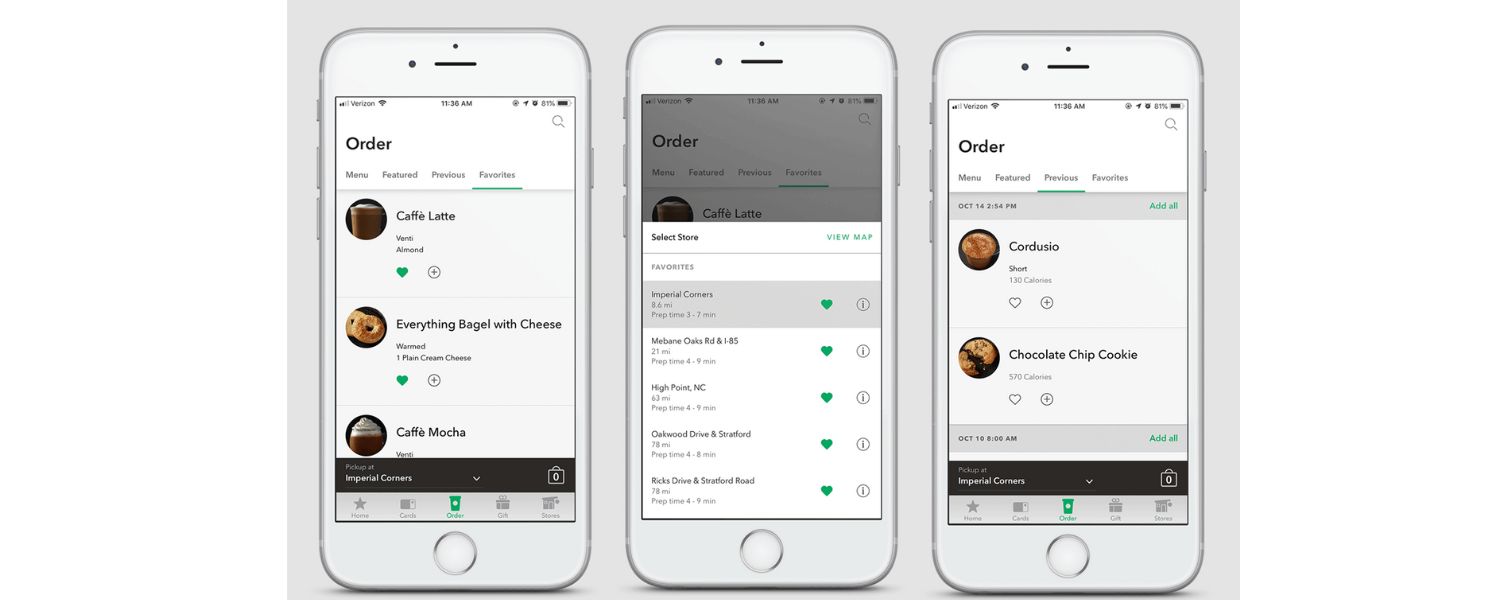
Rich snippets immediately answer users’ key questions at a glance, which is great for user experience. For example, a rich snippet for a recipe might show prep time and rating; a product snippet might show price and if it’s in stock.
This pre-screening helps searchers find what they need faster. Users are more likely to click results that match their intent. By highlighting relevant info, rich snippets align your content with searcher needs right on the results page.
This not only gets you more clicks, but often more qualified clicks, visitors who saw details and deemed your page the most relevant.
4. Enhanced Brand Credibility
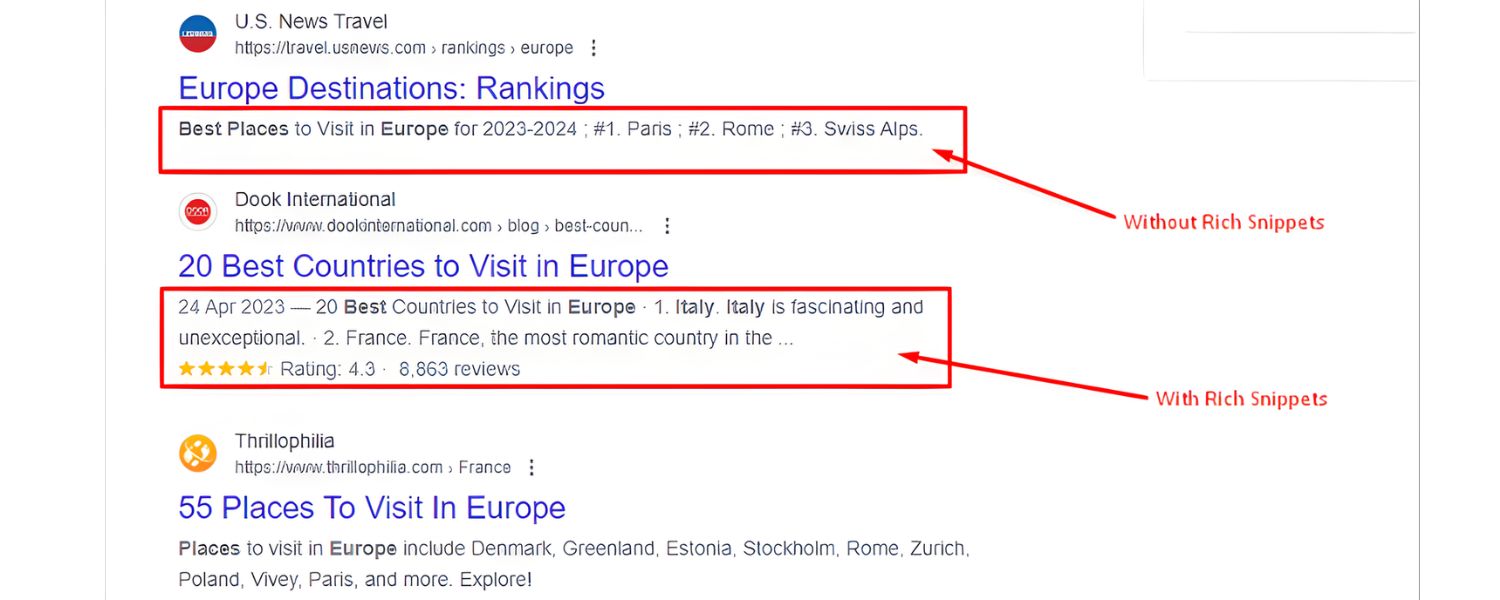
Rich snippets can also convey professionalism and authority. For instance, seeing a high star rating or your business’s name and logo in the snippet can build trust before the user even visits your site.
It signals that your site is well-structured and likely high-quality. In competitive niches, having rich snippets while others don’t can give the impression that you’re the more established source. It’s a subtle boost to your brand’s credibility in the eyes of searchers.
To sum up, rich snippets themselves won’t magically shoot you to #1 on Google overnight – but they dramatically improve your visibility and attractiveness in search results, which in turn can drive more clicks and send positive signals that help your SEO performance over time.
It’s a win-win for both users and your site: searchers get useful info at a glance, and you get a greater share of the traffic pie.
Common Types of Rich Snippets (With Examples)
Google supports many kinds of rich snippets (a.k.a. rich results) for different types of content, from recipes and products to jobs and FAQs. Here we’ll highlight some of the most common rich snippet types you might consider, and what extra information they display in search:
1. Review Snippet (Star Ratings)

Displays a star rating (out of 5) and often the number of reviews. These can appear for products, recipes, books, local businesses, and more – any content that has user reviews or ratings.
Example: “4.7 ★★★★☆ (128 reviews)” might show up under your page title. This instantly draws the eye and builds trust (social proof).
Benefit: A high rating can significantly boost CTR – users love to pick top-rated options.
2. Recipe Rich Snippet

For recipe pages, Google can show an image of the dish, star ratings, number of reviews, cooking/prep time, and sometimes calorie information.
Example: A snippet might show “⭐4.5 (200 reviews) – 45 mins – 300 calories” along with a thumbnail of the food. This helps food bloggers and recipe sites attract cooks looking for specific qualities (quick, 5-star recipes, etc.).
Benefit: Searchers can filter recipes by what suits their needs (rating, time) right from the results.
3. Product Rich Snippet

Shows product details for e-commerce pages – typically price, availability (in stock/out of stock), and sometimes additional info like brand or short descriptions.
Example: A product listing might display “Price: $99.99 – In stock – ⭐4.8 (321 reviews)”. This is hugely valuable for online stores because users can see at a glance if the product fits their budget and quality expectations.
Benefit: Can increase qualified clicks – buyers click knowing your price, which can lead to better conversion rates.
4. FAQ Rich Snippet

Displays a list of frequently asked questions and answers directly under your result. This comes from FAQPage schema. Each question can be expanded to reveal the answer without leaving Google Advanced Web Ranking.
Example: A result might show 2-3 common questions (e.g., “Q: What is the return policy? A: You have 30 days to return…”) that the user can expand.
Benefit: Greatly increases the vertical space your listing occupies (pushing competitors down) and provides immediate answers, boosting CTR for users seeking those specifics. (Tip: Implementing FAQ schema on relevant pages can be a quick win for extra visibility.)
5. How-To Snippet
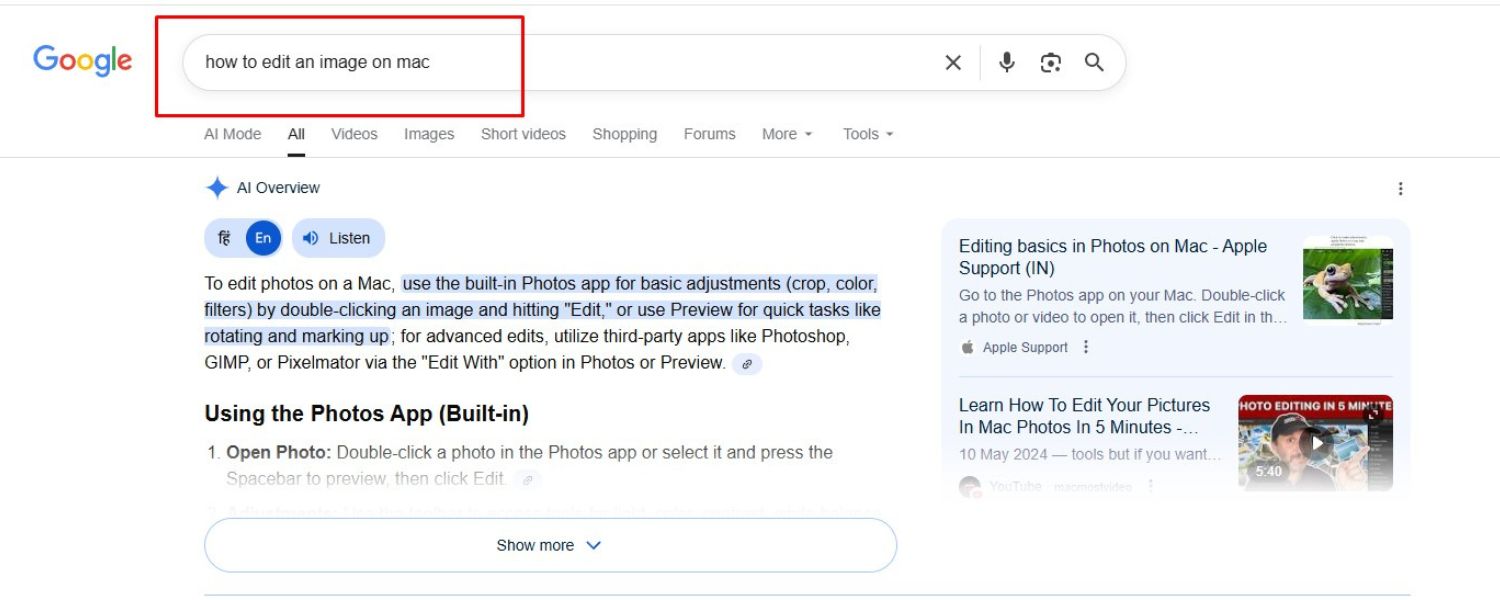
Shows step-by-step instructions, sometimes with images for each step, right in the search results. It comes from HowTo schema markup.
Example: For a query like “how to install a shelf,” a rich snippet might display a few key steps (Step 1, Step 2, Step 3…) with a thumbnail image for each.
Benefit: Positions you as a thorough answer to the query. Be aware: if too much of the “how to” is shown, users might not click through, so it’s a balance. But it certainly grabs attention on the results page.
6. Video Rich Snippet

For pages with video content, Google can display a video thumbnail, the duration, and even specific timestamp highlights (key moments) on the results page.
Example: A YouTube or site video result might show a thumbnail with a play icon, “12:34” length, and chapter titles.
Benefit: Users interested in video content will be drawn to your snippet. It promises a visual answer and sets expectations (they know it’s a video and how long it is).
7. News Article Rich Snippet (Top Stories)

For news publishers or timely blog posts, using Article markup can get your content into the “Top Stories” carousel with a larger image and timestamp.
Example: In a search for breaking news, an article rich result might appear with a big thumbnail image, the headline, source name, and how recent (e.g., “5 hours ago”).
Benefit: Very prominent for newsy queries, drives clicks by standing out with imagery and recency. (Note: eligibility requires following Google News policies, AMP in some cases, etc.)
8. Event Rich Snippet
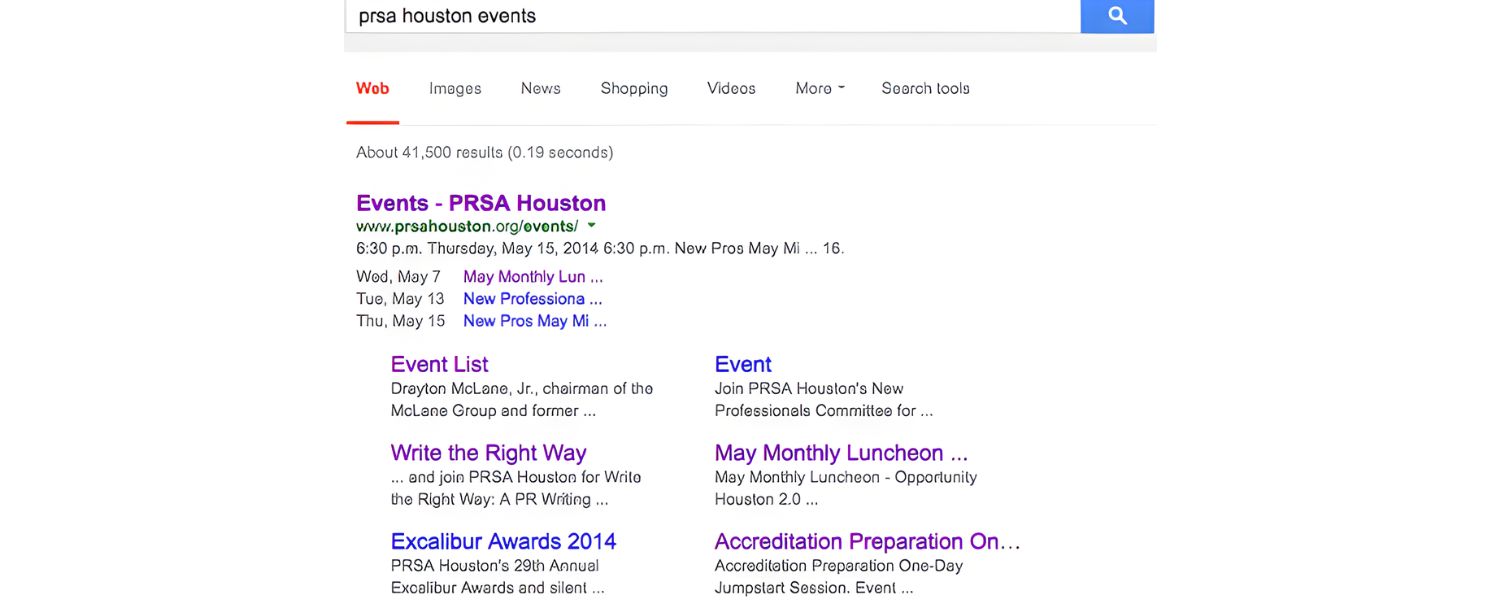
Shows details for upcoming events, dates, times, location, and sometimes ticket information.
Example: A concert venue page could have a snippet listing “Upcoming Events: Band A – March 10 @ 8pm; Band B – March 12 @ 7pm, City Arena.” Each event might even be clickable.
Benefit: Increases exposure for events directly in search results, making it easy for users to find events and encouraging clicks from those interested in specifics.
9. Organization/Knowledge Panel Markup
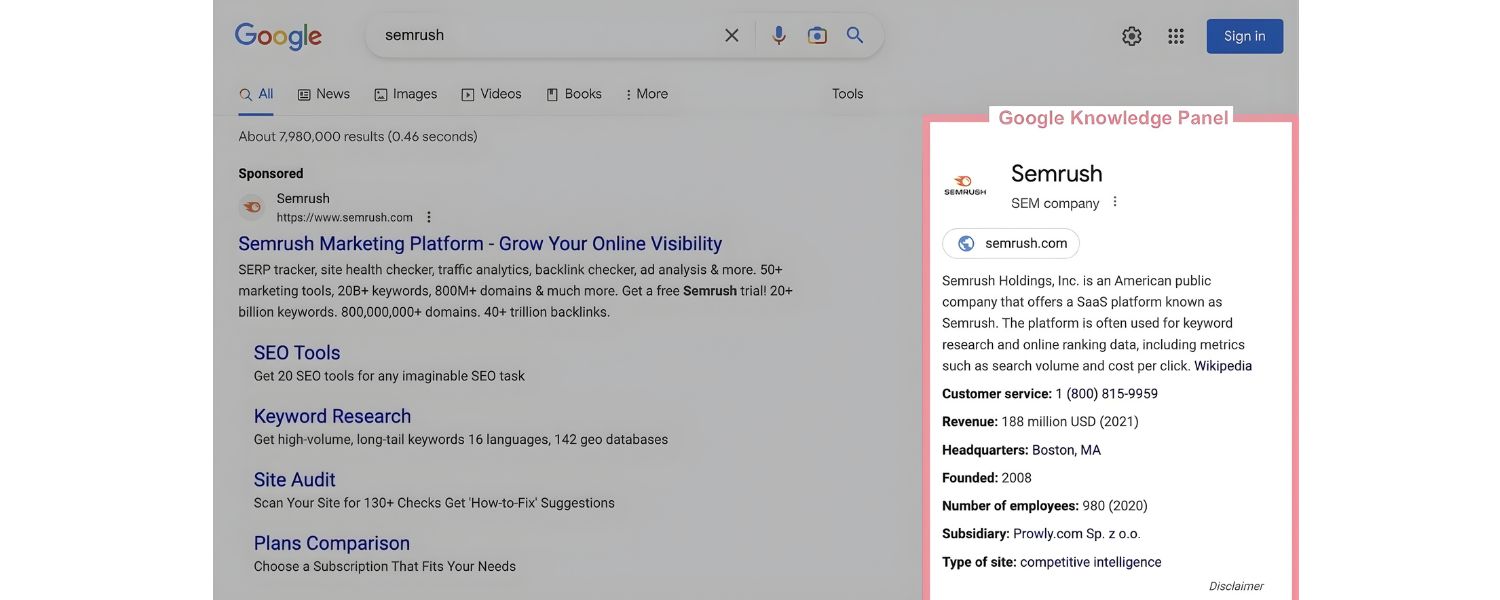
By using Organization or LocalBusiness schema on your site (for instance, on your About or Contact page), you help Google compile a Knowledge Panel for your brand.
This isn’t exactly a “rich snippet” in the search listings; it’s the info box that can appear on the right side for branded searches. Structured data can feed into it (like your logo, founding date, social profiles).
Benefit: When it appears, your company gets a prime info box showing credibility. It’s influenced by structured data, though Google also pulls from other sources (like Wikipedia). While not guaranteed, adding organization markup is a best practice to maximize your chances of getting that knowledge panel.
These are just a selection of rich snippet types. Google’s Search Gallery documentation lists dozens of supported structured data types – including niche ones like Job Postings (which show job details and salary range in search), Course listings, Podcast snippets, and more.
The key is to choose types that align with your content. Not every site will use every type, but almost every site can benefit from something (for example, nearly any site with a FAQ page can leverage the FAQ snippet). By implementing the appropriate schema markup, you make your content eligible for these rich results.
Remember, Google will only show a rich snippet if the structured data is implemented correctly and if it thinks the rich result is helpful for the user’s query. In the next section, we’ll cover how to add this structured data to your pages the right way.
How to Get Rich Snippets on Your Site (Step-by-Step)
Implementing rich snippets essentially comes down to implementing structured data markup on your webpages. Here’s a step-by-step game plan to maximize your chances of earning those rich results:
1. Choose the Right Rich Snippet Type for Your Content

Not all rich snippets apply to all pages, so first identify what type of rich result you want for each content piece. Ask yourself: “What kind of information would make my search snippet more useful or attractive?” Then match that to a schema type.
For example: if you have product pages, use Product schema; if you have articles or blog posts, consider Article schema (for potential Top Stories or enhanced results); for recipe pages, use Recipe schema; for pages with user ratings or reviews, add Review schema; and so on.
Google supports many schema types – a good approach is to scan Google’s official Search Features Gallery to see the full list of rich result types and their requirements. Pick the types that closely match your page’s content and purpose.
It’s important to only use relevant schema – you shouldn’t markup content that doesn’t exist on the page (e.g., don’t add Recipe markup to a product page).
Irrelevant or spammy markup won’t earn you rich snippets and could trigger penalties. So choose authentically: if your page naturally has a question/answer format, use FAQ schema; if it’s a tutorial, use HowTo schema; a store product gets Product schema, etc.
Also, identify any opportunities you’re missing. For instance, if you have a blog post that could easily include a FAQ section at the end, doing so and marking it up might get you a rich FAQ snippet which takes up more SERP real estate.
Analyze what competitors in your niche are using – if all the top results for a keyword have review stars, you’ll want those too. Selecting the right snippet type is a strategic first step.
2. Add Structured Data Markup to Your Page

Once you know what type of rich snippet you’re aiming for, implement the appropriate structured data on that page. The structured data is basically code (often in JSON-LD format) that you embed in the HTML, which explicitly provides the snippet information to Google.
A. Use Schema.org vocabulary
The major search engines (Google, Bing, Yahoo, Yandex) collectively support the Schema.org vocabulary for structured data. This is a standard set of definitions for various item types (Product, Recipe, Article, etc.) and their attributes (for example, a “Recipe” has attributes like cookTime, recipeIngredient, etc.).
Visit Schema.org and find the page for your content type to see what properties are available and recommended. For instance, Schema.org has a page detailing all the fields for “Recipe” markup (ingredients, calories, etc.).
You don’t necessarily need to use every field – but include the key ones that Google requires or that make sense for your content.
B. Choose JSON-LD format (recommended)
There are a few formats you can use to write structured data, including Microdata (inline in HTML tags) and RDFa. Google supports all three main formats (JSON-LD, Microdata, RDFa), but Google itself recommends using JSON-LD, which is the easiest and most error-free method in most cases. JSON-LD is a block of JavaScript code that you can put in the <head> or <body> of your HTML, without affecting your visible page content.
It’s neat, because you don’t have to intermix code with your page text. Here’s why JSON-LD is preferable: it keeps your structured data separate from your presentation, reducing the chance of breaking anything on the page, and it’s easier to update.
In fact, Google has stated that JSON-LD is their favored approach for structured data markup. So unless you have a specific reason to use Microdata/RDFa, stick to JSON-LD.
C. Fill in all required and relevant fields
When writing your structured data, make sure to include all required properties for that schema type (Google’s documentation will tell you which fields are mandatory for eligibility).
For example, a Product schema typically requires “name”, “image”, “price”, “priceCurrency”, and “availability” at minimum for rich results. A recipe might require “name”, “image”, “recipeIngredient”, “recipeInstructions”, etc. Missing required fields can make Google ignore the markup.
It’s also a good idea to include recommended or optional fields if you have that info, as it can enhance your snippet (for instance, including “aggregateRating” and “reviewCount” in a Product schema to get those stars to show).
Pro tip: Make sure the content in your structured data matches what’s visible on the page – for example, the rating value you markup should be the same rating text users see. Google frowns upon discrepancies or “hidden” content in schema (that’s what their spammy markup penalties are about).
D. Use tools or plugins if needed
You don’t have to hand-code JSON-LD if that sounds daunting. There are tools to help:
Google’s Structured Data Markup Helper
This free tool lets you paste your page URL and then visually tag elements on your page (like highlight the title, image, etc.), and it will generate the JSON-LD code for you.
It’s a great way for non-developers to create schema markup by simply pointing and clicking on their page’s content. Once generated, you can copy that JSON-LD code into your page.
CMS Plugins
If you use WordPress or another CMS, there are plugins that handle a lot of structured data for you. For example, Yoast SEO (and others like RankMath, etc.) automatically add Organization, Article, Breadcrumb schema site-wide, and often provide specific blocks for FAQ and HowTo that output proper schema.
E-commerce platforms or plugins (Shopify, WooCommerce) often output product schema. Utilizing these can save time and ensure accuracy. Just be sure to configure them correctly and not to double-markup something (don’t manually add schema that duplicates what a plugin is already doing).
Manual coding
If you’re comfortable with code or have a developer, you can write the JSON-LD script manually. Schema.org’s examples and Google’s developer docs have sample code for each rich result type.
You can adapt those to your page. Manual coding gives you full control, just be meticulous with syntax (a misplaced comma can break the JSON).
Ultimately, adding the structured data might involve editing your HTML source. Many modern websites allow adding code in the header or using Google Tag Manager to inject JSON-LD if you don’t want to touch the core code.
Choose the method that fits your workflow, but do get that schema code onto the page one way or another – without it, Google has no way to generate a rich snippet for you.
3. Validate Your Structured Data Implementation
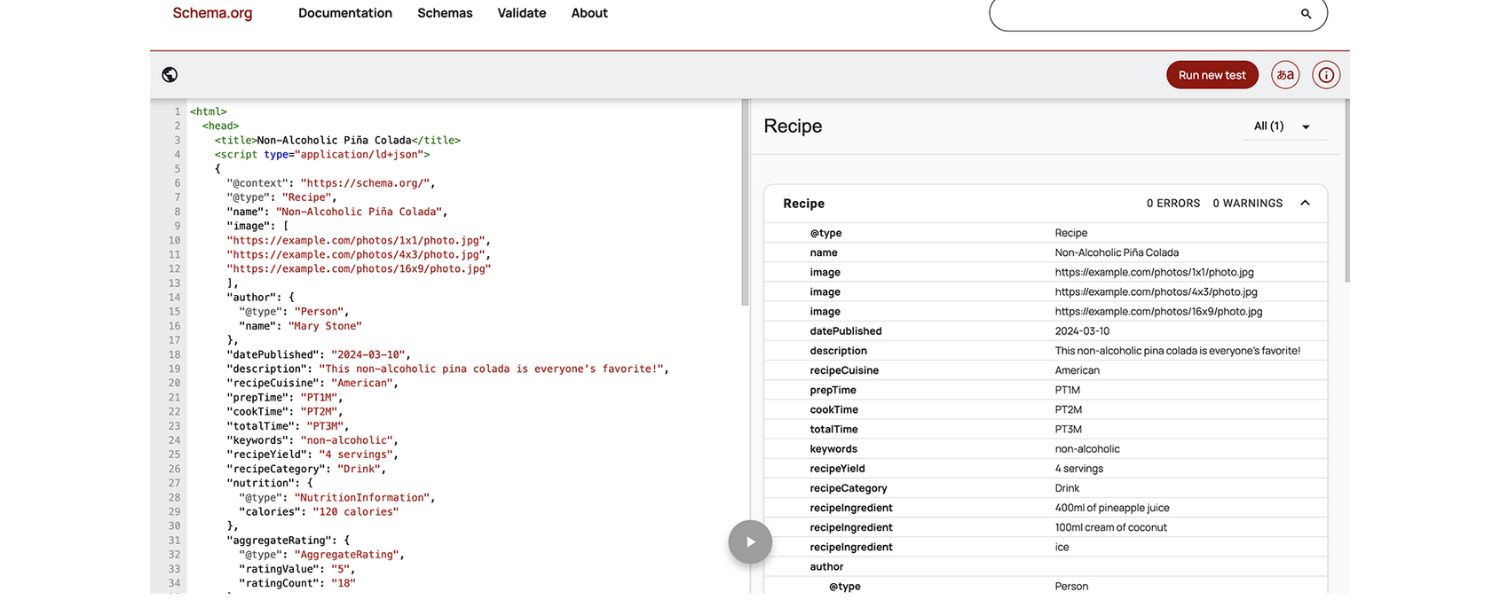
After adding structured data, don’t just assume it’s correct – validate it. Google provides an excellent free tool called the Rich Results Test to check your page’s markup. Here’s how to use it:
A. Go to the Rich Results Test (simply search for it or find it on Google’s Search Central site). It’s available at search.google.com/test/rich-results.
B. Enter the URL of the page you’ve marked up (if it’s already live), or paste the raw code/HTML of the page if it’s not live yet. Hit “Test URL” or “Test Code”.
C. The tool will fetch your page and analyze any structured data it finds. It will then report which rich result types were detected (e.g., “Product markup detected” or “FAQ markup detected”).
D. Look at the results: If it says “Page is eligible for rich results” for your intended snippet type, congrats! But if there are any errors or warnings, the tool will list them. Errors (in red) mean something’s invalid and that rich snippet will not display.
Warnings (in orange) are usually about optional fields missing or potential improvements – these won’t necessarily prevent a rich result, but it’s good to address them if possible.
For example, it might warn you that a Product schema is missing the “aggregateRating” field (optional). If you have that data, you might as well add it to strengthen the snippet.
E. Fix any errors the test reveals. Common issues might include mismatched field types (e.g., expecting a number but got text), missing required fields, or invalid URLs in your JSON-LD.
The Rich Results Test often provides hints on what’s wrong. Make the fixes in your code, then re-run the test until you get a clean bill of health.
Validating with the Rich Results Test ensures that Google can read your structured data as intended. It’s much better to catch issues here than to wonder later why your rich snippet isn’t showing. Think of it as debugging your SEO code.
Additionally, after deployment, keep an eye on Google Search Console for any structured data reports. If you have Search Console set up for your site (and you should), look under “Enhancements” or “Rich results” sections – Google will report structured data errors/warnings it finds while crawling your site.
It even sends email alerts if, say, a bunch of pages have broken schema markup. Use these reports in conjunction with the Rich Results Test to monitor your schema implementation at scale.
4. Monitor Results and Optimize Further
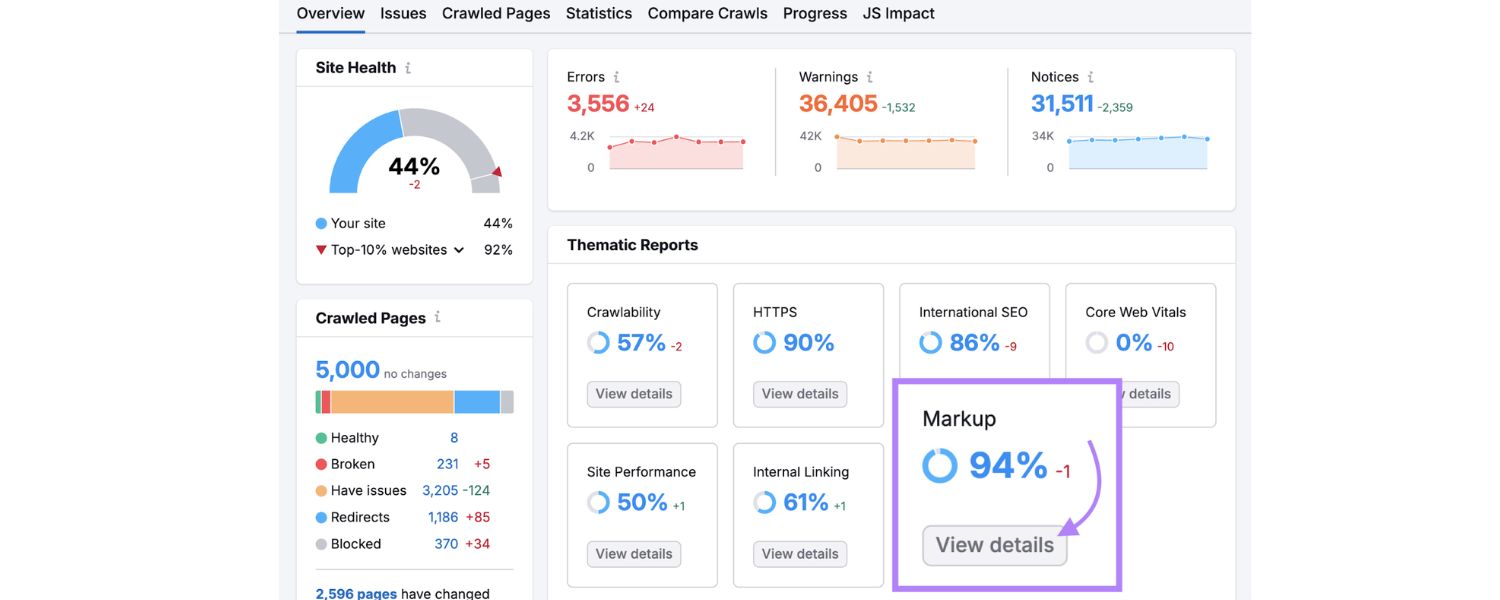
Once your pages are marked up and error-free, it’s a bit of a waiting game for Google to crawl your pages and start showing rich snippets (if it deems them worthy). Here’s how to proceed post-implementation:
A. Give it some time
Google might start displaying rich snippets for your pages as soon as the next crawl (which could be days or a couple weeks). There’s no fixed timeline – be patient, but also proactive. You can request indexing via Search Console URL Inspection for key pages to expedite crawling.
B. Spot-check the SERPs
Try searching for your content (using the same query you rank for) and see if the rich snippet is appearing. It can be useful to use an incognito window or an SEO tool that shows SERP features. Seeing the rich snippet live is the ultimate confirmation.
If after a reasonable time you don’t see the rich result, double-check: Does your content definitely qualify? Is there heavy competition where Google might only show one rich result and a competitor has it? Remember, rich snippets aren’t guaranteed – Google’s algorithm chooses when and if to display them.
Even with perfect markup, Google might decide not to show a rich snippet for certain queries or pages (especially if it thinks it would clutter the results or if the content isn’t a good fit). Don’t be discouraged; ensure your markup follows all guidelines and consider tweaking content if needed.
C. Monitor performance
In Google Search Console’s Performance reports, you can filter queries/pages by “search appearance” = Rich results (if available) to see how those pages are doing.
Third-party SEO tools like Semrush and Ahrefs have features to track rankings along with SERP features — e.g., you can see if your result had stars showing, and track clicks/impressions accordingly.
Use these to measure the impact. Did your CTR improve on pages after adding rich snippets? You might notice a jump in CTR% in Search Console for those pages, which is a great validation that the effort paid off.
D. Continually optimize and update
Treat structured data as a living part of your SEO. If your content changes (say you get more reviews, or your product price changes, or you add new FAQ questions), update your structured data accordingly.
For example, many sites forget to update the “reviewCount” or “datePublished” in schema, leading to stale or inconsistent info. Keeping schema in sync with your page ensures the rich snippets remain accurate and you avoid potential penalties for misleading info.
Also, stay abreast of Google’s updates – new rich result types or changes do come out. For instance, Google sometimes introduces new schema (recent years saw additions like FAQ, HowTo, COVID announcements, etc.). By continuously improving, you maintain your edge.
E. Avoid spammy tactics
It might be tempting to game the system (for example, marking up unrelated content to try to force a rich snippet, or stuffing schema with keywords). Don’t. Google explicitly warns against spammy structured data practices.
If you violate their structured data guidelines, you can receive a manual action that removes all your rich results or worse. Always use schema to truthfully represent your content. The goal is to help Google and users, not trick them.
By following these steps – choosing the right schema, implementing it correctly, validating, and monitoring – you’ll maximize your chances of earning rich snippets and reaping the rewards of higher visibility.
Conclusion & Call to Action
Rich snippets have become an integral part of modern SEO, offering a golden opportunity to make your site’s search listings more appealing and informative.
We’ve learned that while adding structured data and achieving rich results requires a bit of upfront work, the payoff in click-through rates and user engagement can be tremendous.
As an SEO practitioner with decades of experience, I can confidently say that adopting rich snippets is one of those smart, future-proof optimizations that can set you apart from the competition.
They not only enhance how users perceive your brand in search, but also future-proof your content for emerging search formats (voice assistants, AI-driven search results, etc., all love well-structured data).
Now the ball is in your court. Will you take advantage of this SEO edge? Start today: identify pages on your site that would benefit from rich snippets and implement the appropriate structured data.
Whether it’s adding star ratings to your product pages or marking up an FAQ section on your blog, every rich result you earn is a win for visibility. Don’t wait for competitors to steal that spotlight – take the initiative and claim those eye-catching search results for your content.
By investing a bit of effort now, you’re setting up your website to attract more clicks, satisfy more users, and ultimately climb higher in search rankings.
In the ever-evolving world of SEO, rich snippets are a wise bet for sustainable growth. Happy optimizing, and here’s to seeing your site shine with rich snippets in the SERPs!
Frequently Asked Questions (FAQs)
Q1. Are rich snippets and featured snippets the same thing?
No – rich snippets (rich results) are enhanced organic listings that show extra info like ratings or images, whereas featured snippets are those answer boxes that appear at the very top of Google results for certain queries.
Rich snippets are generated from your site’s structured data and still appear as one of the regular ranked results (just with more bells and whistles) where a question in a special box (position zero), and they don’t require structured data.
In short, rich snippets make your normal result richer, while featured snippets are a separate search feature entirely.
Q2. Do rich snippets improve my Google ranking?
Not directly. Google’s reps have confirmed that using structured data (and getting rich snippets) is not a direct ranking factor. In other words, you won’t get a rankings boost simply because you add schema markup.
However, rich snippets can indirectly help your SEO by increasing your click-through rate and user engagement.
Pages that get more clicks and satisfy users tend to do better over time in rankings. So think of rich snippets as a way to earn more clicks and send positive signals, rather than a magic button for higher rank.
Q3. What’s the easiest way to implement schema markup for rich snippets?
For most site owners, the simplest route is to use JSON-LD markup (a snippet of script code) and leverage available tools. Google’s Structured Data Markup Helper is a beginner-friendly way to generate JSON-LD by tagging your page visually.
If you’re on WordPress, SEO plugins like Yoast SEO can automatically add base schema and offer content blocks for FAQs or How-tos, which output the proper schema without you touching code.
E-commerce platforms often have built-in structured data for products. If you prefer manual coding, you can copy examples from Schema.org’s library for your specific content type and customize them.
Just remember to test your markup with the Rich Results Test to ensure it’s valid. Starting with one page as a pilot and validating it is a good way to learn, then you can roll it out to other pages.
Q4. Can any website get rich snippets, or are there eligibility restrictions?
Any website in theory can implement structured data and become eligible for rich results. There’s no requirement of size or authority to be eligible.
That said, Google does have quality guidelines: your content should be useful and accurate for the snippet to show. Some types of rich results have specific rules, for example, Review stars in rich snippets are only supposed to be used for actual reviews of things and not for rating your own product or business arbitrarily (Google has cracked down on inappropriate self-reviews markup).
FAQ snippets require that the questions and answers are present on the page and are not user-generated. Top Stories rich results typically favor sites with good news content and sometimes AMP.
So, implement the markup properly and ensure your content meets Google’s guidelines for that rich result type. If you do that, any site, big or small, can obtain rich snippets.
Just keep expectations realistic: not every page will get a rich snippet 100% of the time, and ultimately Google’s algorithm decides if your page shows the rich data in search results. But you’ve got to be in it (with proper schema) to win it!

.png)
Shopify SEO: Guide to Ranking Your Store and Driving Sales
Most Shopify store owners set up their store, list their...

Content Marketing : Definitive Guide to Strategy, Content Types, and Measurable ROI
Content marketing generates 3x more leads than outbound marketing at...

Above the Fold: Guide to Conversions, Rankings and Faster Pages
Above the Fold in 2026: The Complete Guide to Conversions,...

Off-Page SEO Checklist: Guide to Building Real Authority
Most websites spend months creating great content, only to wonder...

What Is Keyword Bidding? The Complete Strategy Guide for Smarter Ad Spend
Most advertisers believe the highest bid wins the auction. It...

What Is Google Trends? The 2026 Marketer’s Complete Guide
If you are not already pulling weekly insights from Google...
If you want a growth partner who will get to know every aspect of your business and treat your budget like their own — we are the right fit.
.png)


.png)
.png)
.png)
.png)
.png)
.png)
2026 ALL RIGHTS RESERVED MADE IN INDIA
