
Video SEO: How to Rank Your Videos on Google & YouTube
September 5, 2025
Introduction
Over 500 hours of video are uploaded to YouTube every minute, making it a challenge for any single video to stand out. This is where Video SEO comes in. Video SEO (Video Search Engine Optimization) is the art of optimizing your video content so that it ranks higher on search engines like Google and on video platforms like YouTube.
In my 25 years of marketing experience, I’ve seen that a great video alone isn’t enough, you need solid SEO behind it. When done right, video SEO can dramatically boost your visibility (pages with video are 50× more likely to rank on Google’s first page) and drive significant traffic (businesses using video see 41% more web traffic from search).
In this ultimate guide, we’ll dive into proven strategies and best practices to help your videos outrank the competition. Let’s get started on optimizing your videos for maximum exposure.
Why Video SEO Matters
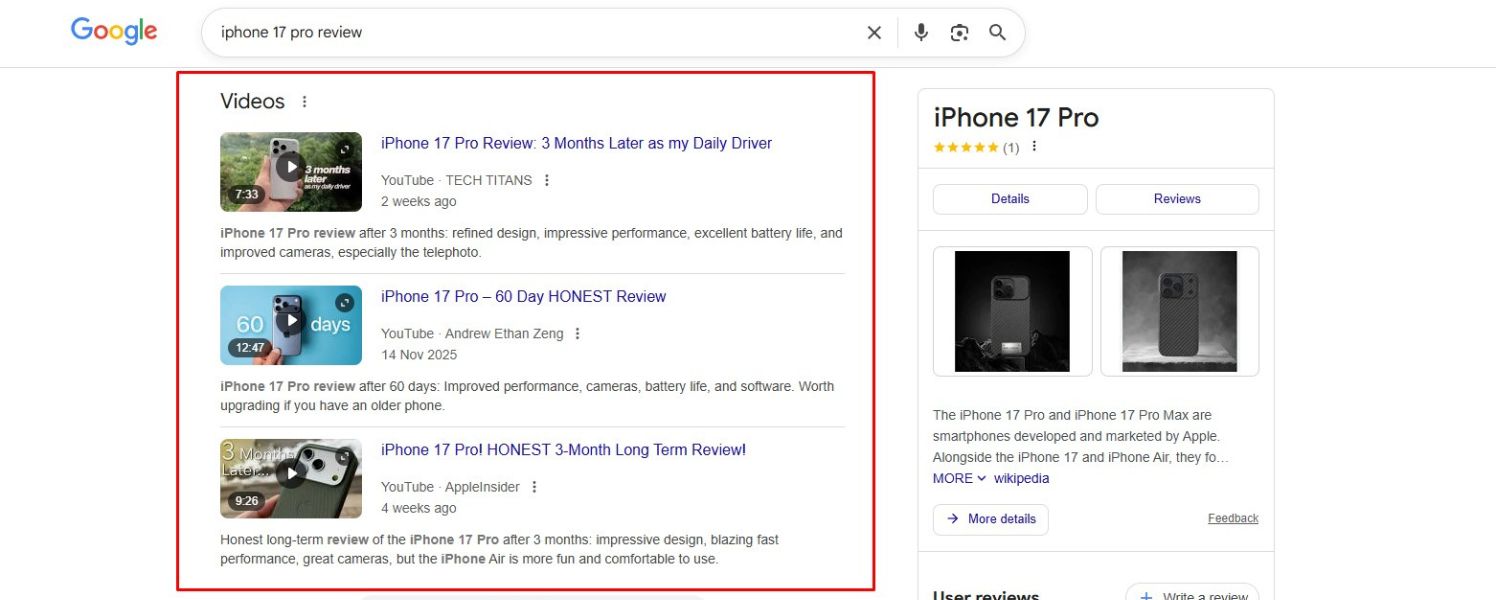
Before jumping into tactics, it’s important to understand why optimizing videos is crucial. Search engines can’t “watch” a video like humans do; they rely on text and metadata to understand video content.
Without optimization, even a fantastic video might remain invisible to your target audience. By applying video SEO, you help Google and YouTube find, index, and understand your videos – which means more chances to appear in search results.
Optimized videos also enhance user engagement on your pages: they keep visitors on your site longer, increase social shares, and improve conversion rates.
In short, video SEO improves your discoverability and amplifies your message’s reach, giving you an edge over competitors who neglect these techniques. Now, let’s explore how to implement video SEO step by step.
1. Conduct Keyword Research for Video Content

Just like traditional SEO, effective video SEO starts with keyword research. The goal is to identify what your audience is searching for and ensure your video targets those terms.
Focus on finding keywords that have video intent, in other words, queries where Google displays video results (e.g. tutorials, reviews, how-tos). If nobody is searching for your video’s topic, it won’t get many views from search, even if it ranks.
Use tools (Google’s Keyword Planner, YouTube’s Search Suggestions, or SEO tools) to discover popular search terms in your niche. For example, if you run a tech channel, you might find that users search for “[Product Name] review” or “How to fix [Problem] [Product].”
Targeting these phrases can land your video in front of people actively looking for that content. Importantly, verify that your target keyword actually triggers video results on Google – if a query has no video carousel or results, it means people prefer text content for that topic.
By choosing the right keywords (including long-tail phrases specific to your topic), you set a strong foundation for your video’s SEO success.
2. Create High-Quality, Engaging Videos

No amount of SEO can save a low-quality video. Search algorithms (especially YouTube’s) prioritize viewer satisfaction and engagement, so producing high-quality content is non-negotiable.
But what does “high-quality” mean for videos? It means your video is valuable, relevant, and engaging to your target audience. Make sure to answer the viewer’s query or solve their problem thoroughly.
Hook viewers in the first 15–20 seconds – for instance, start with a compelling question or preview of what they’ll learn, as videos that capture attention early tend to retain viewers longer.
Ensure your video has good production values: clear audio, crisp visuals, and steady editing. While you don’t need Hollywood-level production, basics like adequate lighting and noise-free audio go a long way in keeping viewers watching. Also, consider video length based on content: aim for a length that fully answers the query.
Many top-ranking videos are at least 3 minutes long, and “how-to” videos often run ~8 minutes to cover steps in depth. However, avoid fluff – if a topic can be effectively covered in 2 minutes, do that, as user intent matters more than hitting a specific length.
In summary, deliver value and polish in your videos. Great content not only pleases viewers (leading to likes, shares, and subscriptions), but also earns favor from YouTube’s algorithm which rewards longer watch times and positive engagement signals.
3. Optimize Your Video Title (H1)

Your video’s title is arguably the most important piece of metadata for SEO. It’s the first thing users see and it tells search engines what your video is about. Here’s how to craft an effective, SEO-friendly title:
A. Include the Primary Keyword
Use your target keyword naturally in the title, preferably towards the beginning. Google and YouTube both pay close attention to title keywords when determining relevance.
For example, if your keyword is “DIY home workout”, a title like “DIY Home Workout – 5 Exercises to Get Fit at Home” clearly signals the topic.
B. Keep It Concise
Aim for a title around 60 characters or less so it doesn’t get truncated in search results. YouTube allows up to 100 characters, but titles can get cut off around 70 characters on some devices.
Stick to the core of your topic in the title – overly long titles may be ignored by users and can dilute SEO impact.
C. Make It Compelling
Remember that titles need to attract clicks. Pose a question, highlight a benefit, or create curiosity. For instance, titles like “10 Tips to Boost Your Wi-Fi Speed (No Tech Skills Needed)” or “Camera Review: Is the XYZ Worth It in 2025?” invite interest.
Lists and “how to” phrasing also perform well because viewers immediately see the value (e.g., “How to…, 5 Ways to…”). According to best practices, titles that include numbers or power words can improve click-through rate.
Just ensure the title accurately reflects the content – never use clickbait that misleads viewers (this will hurt audience retention and trust).
A well-optimized title that balances keyword usage and click-worthiness will improve your video’s chances of ranking and drawing in viewers from the search results.
4. Write an Informative Video Description

The video description is a rich opportunity to support your SEO and provide context for viewers. Both Google and YouTube index description text, so a well-crafted description can boost your rankings and entice users to watch. Here’s how to optimize it:
A. Lead with a Strong Introduction
The first sentence or two of your description should hook the reader and include your main keyword. These first ~120 characters are often shown in search snippets, so make them count.
For example: “Learn how to bake perfect sourdough bread at home – this step-by-step guide covers starter, kneading, proofing, and baking tips.” This line is inviting and keyword-rich (“bake perfect sourdough bread”).
B. Use Relevant Keywords Naturally
Expand on what the video is about in a few sentences or a short paragraph, naturally weaving in secondary keywords and related terms.
Don’t stuff keywords – readability comes first – but do provide synonyms or alternate phrases viewers might search. This helps search engines fully grasp your content.
C. Be Detailed (Within Reason)
While YouTube allows up to 5,000 characters, you don’t need to write a novel. Aim for a description length of 200–350 words that thoroughly explains the video’s content.
A longer, informative description gives Google more context (which can aid SEO) and helps viewers understand what to expect. Break the text into short paragraphs or bullet points for readability if needed.
D. Include a Call-to-Action or Links
After the informative part, it’s common to add a call-to-action (e.g., “Subscribe for more recipes” or “Visit our site for the full ingredients list”). You can also include relevant links, such as a link to your website or to related videos/playlists.
Many creators add 2–3 useful links in the description – for example, a link to your product page or a blog post for further reading. (If you do include links, use full URLs or branded links, not shortened URLs, so viewers trust them.)
Overall, treat the description as an extension of your content. It should reinforce your video’s topic, target keywords, and value, helping both search engines and human viewers. A clear, keyword-optimized description can improve your video’s visibility and click-through rate.
5. Utilize Tags and Hashtags Strategically

Tags (on YouTube or other platforms) are keywords or short phrases that further inform the platform about your video’s topic. While tags carry less weight than titles or descriptions, they are still useful for SEO and content discovery.
Research shows that using relevant tags can marginally improve your video’s chances of appearing in related searches and “up next” suggestions. Here’s how to handle tags:
A. Include Keywords and Variations
Add your primary keyword as a tag, as well as close variations and related topics. For instance, for a video titled “DIY Home Workout Exercises,” you might include tags like “home workout”, “no equipment exercise”, “beginner fitness”. This casts a wider net for search queries.
B. Use Specific and Broad Tags
Mix both specific tags (targeted to your niche or the exact content of the video) and broad tags (general categories or high-level topics). The specific tags help you reach your core audience, while broad tags (e.g., “fitness”, “workout”) can signal to YouTube the general category, helping the algorithm recommend your video in that genre.
C. Don’t Overdo It
YouTube allows up to 500 characters in tags, but quality over quantity. Use 5–15 highly relevant tags. Irrelevant or excessive tags won’t help and could confuse the algorithm. Accuracy is key – only tag what the video truly covers.
D. Hashtags
YouTube also lets you add hashtags (e.g., #DIYWorkout) in the description. When added, the top 3 hashtags may appear above your title as clickable links.
Use 1–2 branded or content-specific hashtags if it makes sense (for example, an event hashtag or series name). But avoid misleading or trending hashtags that aren’t directly related – that can be seen as spammy.
While tags and hashtags are a minor ranking factor, they can aid in categorization. Think of them as an extra layer of contextual signals that reinforce what your video is about. They might help your video surface alongside similar content, increasing its reach.
6. Design Eye-Catching Thumbnails

In search results and on YouTube’s platform, the video thumbnail is the first visual impression of your content. A thumbnail can significantly influence whether users click to watch your video or scroll past it.
In fact, a compelling thumbnail improves click-through rates, which in turn can lead to higher rankings (because platforms notice when people choose your video more often). Here’s how to optimize your thumbnails:
A. Always Use a Custom Thumbnail
Don’t settle for the random auto-generated frame. Upload a high-quality custom image that represents your video. Use the recommended 1280 x 720 px size (16:9 ratio) so it looks good on all screens. Ensure the file format (JPG, PNG, etc.) and size meet platform guidelines.
B. Make It Relevant and Honest
Choose imagery that directly reflects your video’s content. If your video is a tutorial, consider a thumbnail showing the finished product or a key step.
Avoid using misleading images just to bait clicks – YouTube considers that spammy and it will hurt user satisfaction (and thus your SEO). Thumbnails should tease the content, not misrepresent it.
C. Use Clear, Visually Appealing Design
The thumbnail should grab attention even at small sizes. Use bright, high-contrast imagery and include a focal point. Faces tend to perform well – an expressive human face can draw emotion and curiosity.
If applicable, show a person in action or emoting, as people’s eyes are drawn to faces and emotions. For example, a tech review video might show the reviewer holding the gadget with an excited expression, whereas a travel vlog might show a stunning landscape with the vlogger in frame.
D. Add Text or Graphics Wisely
Many effective thumbnails include a short text headline or graphic element to provide context (e.g., “5 Tips” overlay or an arrow highlighting something).
If you add text, keep it extremely brief (a couple of words) and use large, clear fonts – remember thumbnails are small on mobile.
Ensure any text contrasts with the background. Also, maintain branding consistency: use similar styles or color schemes across your thumbnails so your content looks cohesive.
E. Apply the “Squint Test”
As a quick check, shrink your thumbnail to a very small size and see if it’s still recognizable. The main subject and text (if any) should be distinguishable. Simplicity often works best – avoid clutter or too many tiny details.
An eye-catching thumbnail can be the difference between a user clicking your video or choosing someone else’s. It’s worth investing time in design.
As an expert tip, think about thumbnails while filming – you might capture a few photos or frames specifically intended for the thumbnail.
A great thumbnail coupled with a relevant title will make your video stand out in crowded search results, driving more views and improving SEO performance.
7. Provide Closed Captions and Transcripts
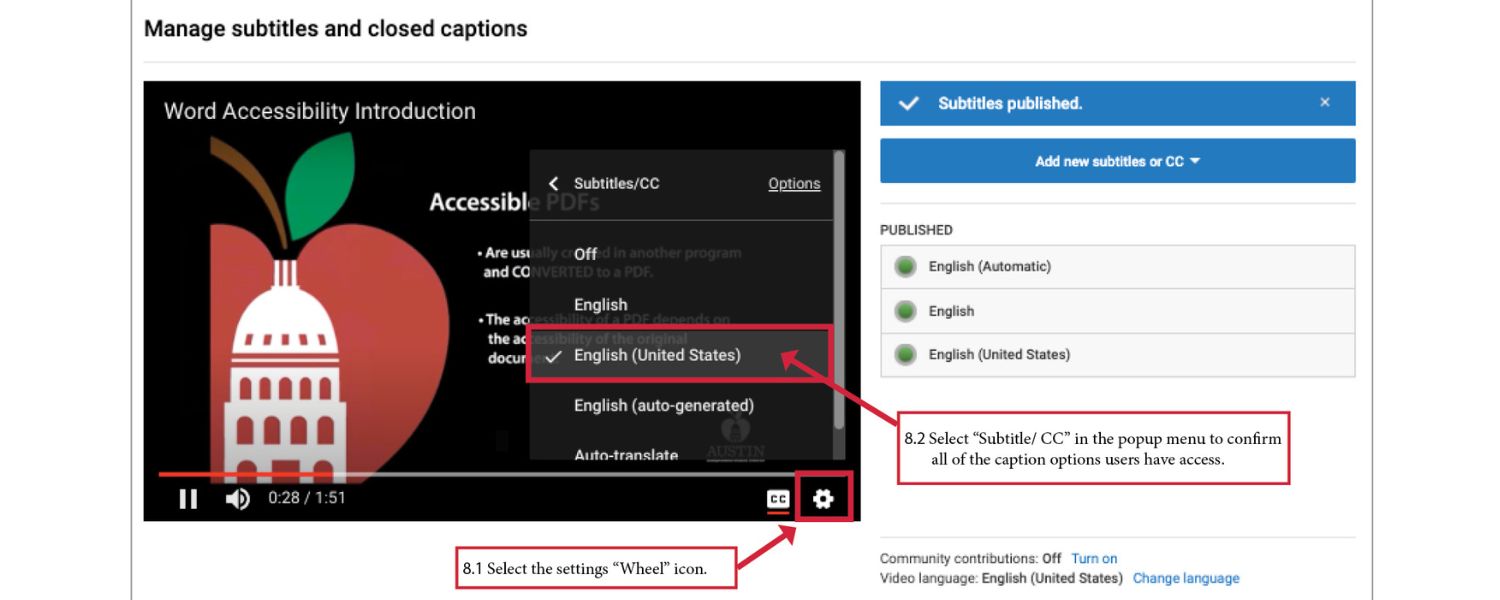
One powerful yet often overlooked video SEO tactic is adding closed captions and transcripts for your videos. Not only do captions make your content accessible to a wider audience (including those who are Deaf or watching without sound), but they also provide additional text data for search engines to crawl.
Remember, search bots can’t directly understand video or audio content, but text in captions or transcripts bridges that gap. Here’s why and how to use them:
A. Transcripts for Indexing
A transcript is the full text of all spoken content in your video. By posting the transcript on your video’s page (or in the video description if applicable), you supply Google with tons of relevant textual information about the video.
This can help your video page rank for long-tail keywords mentioned in the video that might not be in the title or description. It also improves the user experience – some people prefer to skim a transcript or need it for accessibility.
B. Closed Captions for YouTube SEO
On YouTube, uploading an accurate caption file (or using their auto-caption and then editing it for accuracy) can boost your video’s SEO. Captions are indexed by YouTube, and there’s evidence that videos with captions rank higher for more keywords because of the additional context.
Plus, captions allow viewers to watch without sound – increasing view duration in scenarios where they can’t have audio on. A Facebook study found that captioned videos got 12% more views than uncaptioned ones, likely because they kept people watching longer in silent autoplay situations. More views and longer watch time send positive signals to algorithms.
C. Quality Matters
Make sure your captions/transcript are accurate and well-timed. Poorly automated captions filled with errors can confuse viewers and even be flagged as spam by Google (if it’s “gibberish,” it violates quality guidelines).
Take the time to edit auto-captions or use a professional service for important content. Accuracy not only helps SEO but maintains your content’s credibility.
D. Multiple Languages (if relevant)
If you have an international audience, consider adding subtitles/captions in other languages too. This can broaden your reach and allow your video to rank in searches in those languages. While English captions are the priority, multilingual transcripts can tap into new markets.
Overall, transcripts and captions are a win-win: better SEO, better accessibility, and better user experience. They allow search engines to “read” your video and they keep viewers engaged. Always include at least an English caption file for YouTube, and if you host videos on your own site, offer a transcript below the video player.
8. Use Chapters or Timestamps (Key Moments)

For longer videos or tutorials, leveraging chapters (timestamps) can enhance both UX and SEO. Chapters segment your video into sections (like a table of contents) that viewers can jump to.
Google sometimes displays these as “Key Moments” directly in search results, allowing users to click to specific subtopics in your video. Here’s how to implement and benefit from this feature:
A. Add Timestamps in Descriptions
On YouTube, you can enable chapters by listing timestamps (e.g., 0:00, 1:15, 2:30, etc.) with labels in the video description. For example:
0:00 – Introduction
1:15 – Step 1: Mix Ingredients
3:00 – Step 2: Knead Dough
Make sure the first timestamp starts at 0:00 and you have at least 3 timestamps of 10 seconds or longer. YouTube will automatically detect these and show chapters on the video progress bar, and Google can use them for key moment links on SERPs.
B. Structured Data for Your Site
If the video is embedded on your own website, you can use Clip or SeekToAction structured data to mark up key moments. This tells Google the timestamps and labels for each section.
It’s a bit technical, but Google prioritizes creator-defined key moments when available. In short, you’re giving Google a roadmap of your video’s content.
C. Benefits of Chapters
Chapters improve user navigation – viewers can skip to the part most relevant to them, which means they’re more likely to engage rather than bounce off. Importantly, key moments can get your video more exposure on search.
Imagine someone Googling a specific subtopic that you covered at 3 minutes in your video – Google might send them directly to that timestamp because of chapters, capturing that search traffic for you.
It also makes your search snippet larger and more informative (with labeled timestamps beneath it), which can boost CTR.
D. No Downside for Watch Time
Some creators worry that giving viewers the option to skip around might reduce total watch time. In practice, timestamps do not hurt watch time – if anything, they encourage people to click and watch because they see your content is well-structured.
A user might initially skip to one section, but if they find it useful, they could end up watching more sections. It’s far better than a user leaving because they couldn’t find what they needed.
In summary, utilize chapters for longer videos. It’s a sign of a well-organized, user-friendly video. Both your audience and search engines appreciate content that’s neatly segmented and labeled.
9. Implement Video Schema Markup and Sitemaps
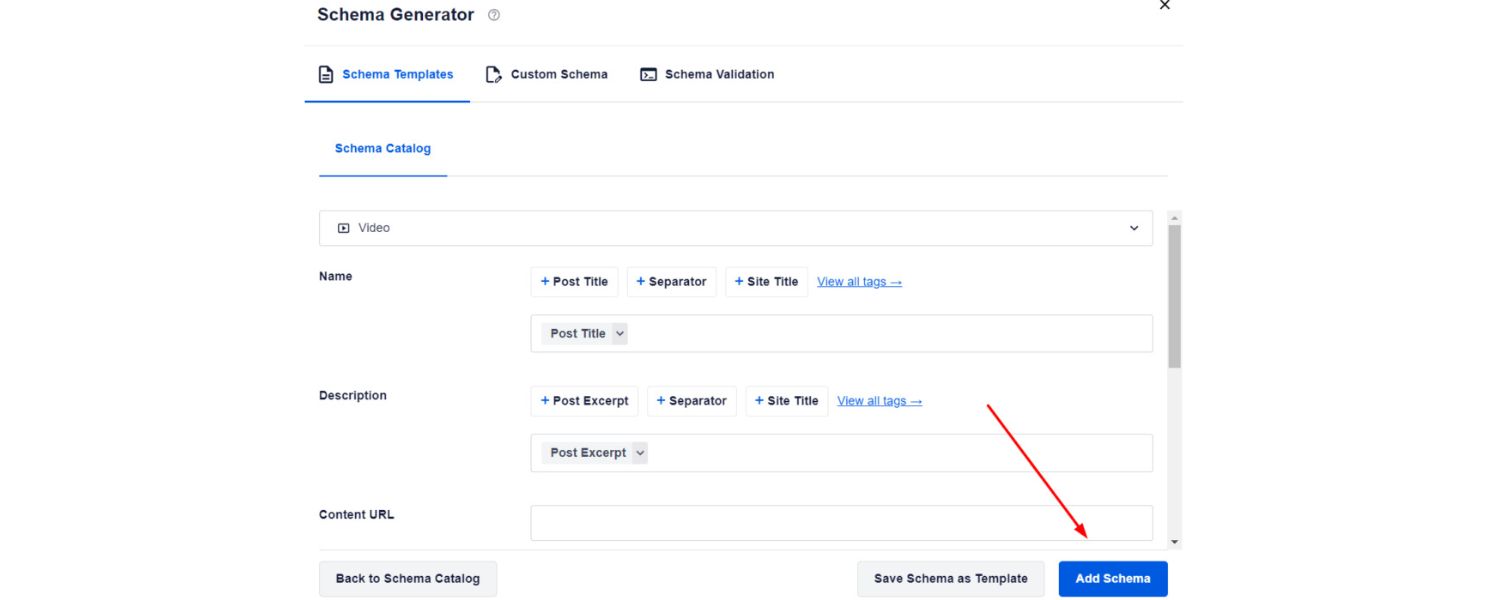
When hosting or embedding videos on your own website, you need to pay attention to some technical SEO elements to ensure Google can fully index and feature your video.
Two key tools for this are VideoObject schema markup and video sitemaps. These might sound technical, but they are essential for making your website’s videos search-friendly:
A. Add Video Object Schema
Schema markup is a form of structured data you add to your page’s HTML (often in JSON-LD format) that provides search engines with explicit info about your content.
For videos, using the VideoObject schema is highly recommended. This markup can include details like the video title, description, duration, upload date, thumbnail URL, and the video file URL or embed URL. By providing this data, you enable rich results – Google can display your video’s thumbnail, duration, and even “Key Moments” on the search page.
Essentially, schema tells Google “This page has a video, here’s exactly what it’s about and where to find it.” Implementing video schema has been shown to improve the chances of getting those eye-catching video snippets in search results.
If you’re not a developer, don’t worry: many CMS platforms or plugins can help add schema, or you can use Google’s Structured Data Markup Helper to generate it. The effort is worth it for the SEO boost.
B. Create a Video Sitemap
A video sitemap (an extension of your XML sitemap) is another way to feed Google information about videos on your site. In it, you list each video’s page URL along with video-specific tags like title, description, play URL, thumbnail URL, duration, etc.
You can even include tags for video duration, ratings, view count, and whether it requires a subscription. Submitting a video sitemap helps Google discover your video content faster and ensure nothing is missed.
It’s especially useful if your site hosts many videos or if some are embedded via JavaScript that Google’s crawler might otherwise have trouble finding. Google supports both dedicated video sitemaps or a video section within a general sitemap.
C. Ensure Videos Are Crawlable
Whether on YouTube or self-hosted, make sure the video isn’t blocked by robots.txt and is accessible. If you use a third-party video host (YouTube, Vimeo, etc.) embedded on your page, generally Google can index it in both places.
If you self-host, ensure the video file URL is stable (doesn’t expire) and not behind login or blocking scripts. Use common video embed methods (<video> tag, iframes, etc.) that Google supports.
Also, always provide a static preview image (thumbnail) at a stable URL for Google to display in results. A unique thumbnail plus a dedicated page for each video (with a descriptive title and text on the page) will maximize your chances of indexing.
By handling the technical side with schema and sitemaps, you essentially speak Google’s language to highlight your video content. This leads to better indexation and eligibility for rich features like video carousels, previews, and key moments.
It ensures that all the effort you put into creating and optimizing the video isn’t wasted due to a crawling issue. In short: don’t skip the technical SEO – it’s the backbone that supports your content in search.
10. Boost Engagement and Watch Time

Engagement metrics are the lifeblood of video SEO, particularly on YouTube. YouTube’s algorithm heavily rewards videos (and channels) that engage viewers – meaning people watch, like, comment, and subscribe.
Google’s search results for videos can also be influenced by these popularity signals. Here’s how to boost engagement and why it matters:
A. Encourage Likes, Comments, and Shares
Videos that rank #1 on YouTube have, on average, 70% more likes (and interactions) than those in the #2 spot. This correlation suggests that engagement helps your ranking.
Don’t be shy to ask viewers to “Like this video if you found it helpful” or “Comment below with your thoughts/questions.” Engage with the comments you receive – replying to viewers not only fosters community but also can increase comment counts (each reply is essentially another comment).
Higher comment activity is a positive signal. However, avoid tactics like buying fake engagement – the algorithms are smart and prioritize genuine viewer actions.
B. Ask for Subscriptions
A channel with more subscribers tends to have more authority, and its videos may rank higher due to an inbuilt audience and perceived credibility.
Within your video (usually at the end or subtly during it), encourage viewers to subscribe to your channel for more content. You can literally say, “If you want to see more videos like this, hit the subscribe button.”
Many creators also use on-screen graphics or end screen reminders for subscription. More subscribers mean new videos get an initial boost of views (from subscribers’ feeds/notifications), which can snowball into greater visibility.
C. Maximize Watch Time: Watch time
The total minutes viewers spend watching your video – is a critical ranking factor on YouTube. Essentially, YouTube wants to promote videos that keep people on the platform longer.
To improve watch time, keep your content engaging throughout. Structure your video well: hook early, deliver on what you promised, and maintain a good pace. It can also help to occasionally tease something coming up (“…and later I’ll share a pro tip”) to keep viewers watching.
Additionally, create playlists or series of videos: if you can get a viewer to watch multiple videos (by linking related videos in cards or end screens), your channel’s session watch time increases, which is a plus.
Bottom line: make videos that people want to watch to the end. YouTube actually monitors the average percentage viewed – a higher retention (e.g. people watch 60%+ of the video) is a strong indicator of quality.
D. Use Interactive Features
Take advantage of YouTube’s interactive features like Cards and End Screens. Cards (the little “i” pop-up or banner that can appear during the video) can direct viewers to other related videos or polls.
End screens (the final 5-20 seconds of your video) can show clickable thumbnails of your other videos or a subscribe button. These tools help extend the viewer’s journey on your channel, which boosts overall watch time and engagement.
For example, if a viewer enjoyed your video on “SEO tips,” an end screen can suggest “Watch next: Content Marketing Tips,” keeping them hooked.
E. Consistency and Community
Over the long term, build a consistent posting schedule and interact with your community. Channels that upload regularly (say weekly) tend to maintain and grow engagement because viewers know when to expect new content.
Premiere features or live chats during a video launch can spike engagement early on. Also, consider the YouTube Community tab or social media to keep conversation going between video uploads.
The more invested and active your audience, the better your videos will perform on release (lots of views, likes, comments in the first 48 hours can propel a video upward).
Remember, engagement is a loop: good content -> more engagement -> higher rankings -> even more engagement as new viewers find it.
By actively encouraging and facilitating viewer interaction, you create positive signals that improve SEO. It’s not gaming the system – it’s building real relationships with your audience, which any algorithm ultimately aims to reward.
11. Promote Your Video Across Channels

Don’t rely solely on search algorithms to do all the work. Especially when a video is newly published, a bit of promotion can kickstart the viewing process, which in turn feeds the SEO flywheel (initial traffic can lead to engagement, which then improves rankings).
As a marketing veteran, I can’t stress enough how a multi-channel promotion approach helps your video content succeed. Here are some ways to promote effectively:
A. Embed Videos on Your Website
If you have a website or blog, embed your YouTube videos in relevant pages. This has a double benefit: your site visitors are more likely to watch the video (increasing views/watch time on YouTube), and the page itself can rank in Google with a video rich snippet.
For example, if you wrote an article and also have a video on that topic, embed the video at an appropriate spot. The Verge (a tech site) does this with their news articles – they embed their YouTube review videos in the text, so they can capture both the YouTube traffic and page traffic.
When Google indexes that page, it might show the video thumbnail next to the result, making it more attractive to click. So you win on both SEO and user experience fronts.
B. Share on Social Media
Leverage platforms like Facebook, Twitter (now X), LinkedIn, Instagram (if it’s a short teaser), or Pinterest (if applicable) to announce your new video. Tailor the message to each platform’s style – maybe a short enticing caption or even a clip/gif highlight of the video to draw interest.
Social shares might not directly boost Google rankings, but they bring in viewers and can result in secondary shares or even press mentions if your content is notable. All of that indirectly helps SEO by building your video’s reputation and possibly earning backlinks.
C. Email Your List
Email marketing isn’t just for text content or sales – use it to promote your videos too. If you have a newsletter or subscriber list, send a brief email with a thumbnail image linking to the video.
A subject line like “🎬 New Video: [Title]” can get your audience’s attention. This drives a surge of initial traffic from people who already trust your content, which can boost the video’s performance in the crucial first 24-48 hours.
D. Build Backlinks to Video Pages
Backlinks remain a cornerstone of SEO. If your video is embedded on your website, try to attract backlinks to that page (for instance, by sharing the article with industry blogs or on forums where it’s relevant).
The more reputable sites link to your video page, the more authority it gains in Google’s eyes. Google treats each video page somewhat like any other content page – so earning links can improve its search ranking.
If the video is on YouTube only, you can still build links to the YouTube video URL, though the impact is smaller compared to page links. Consider reaching out to relevant websites or communities that would find your video valuable and politely suggest they check it out or include it as a resource.
E. Collaborate or Cross-Promote
One effective way to expand your video’s reach is through collaborations. Partner with other creators or brands in your niche to do guest appearances or shout-outs. If you mention each other’s videos or link to them, you tap into each other’s audiences.
Just ensure any collaboration is authentic and relevant (and follow platform guidelines for disclosures if it’s promotional).
F. Repurpose Content
Extend the life of your video by repurposing it. Turn key points into a blog post (with the video embedded, as mentioned), an infographic, or short snippets for TikTok/Instagram Reels. Each piece of content can funnel viewers back to the full video or at least build awareness that the video exists.
Promotion is about creating an initial buzz and accessibility for your video. By proactively sharing and integrating your video into various channels, you increase the chances of accumulating views, watch time, and engagement, all of which tell Google and YouTube that your content is worth surfacing to even more people.
Essentially, the more viewers you attract outside of search, the better your video may perform in search as it gains popularity.
12. Monitor Performance and Iterate
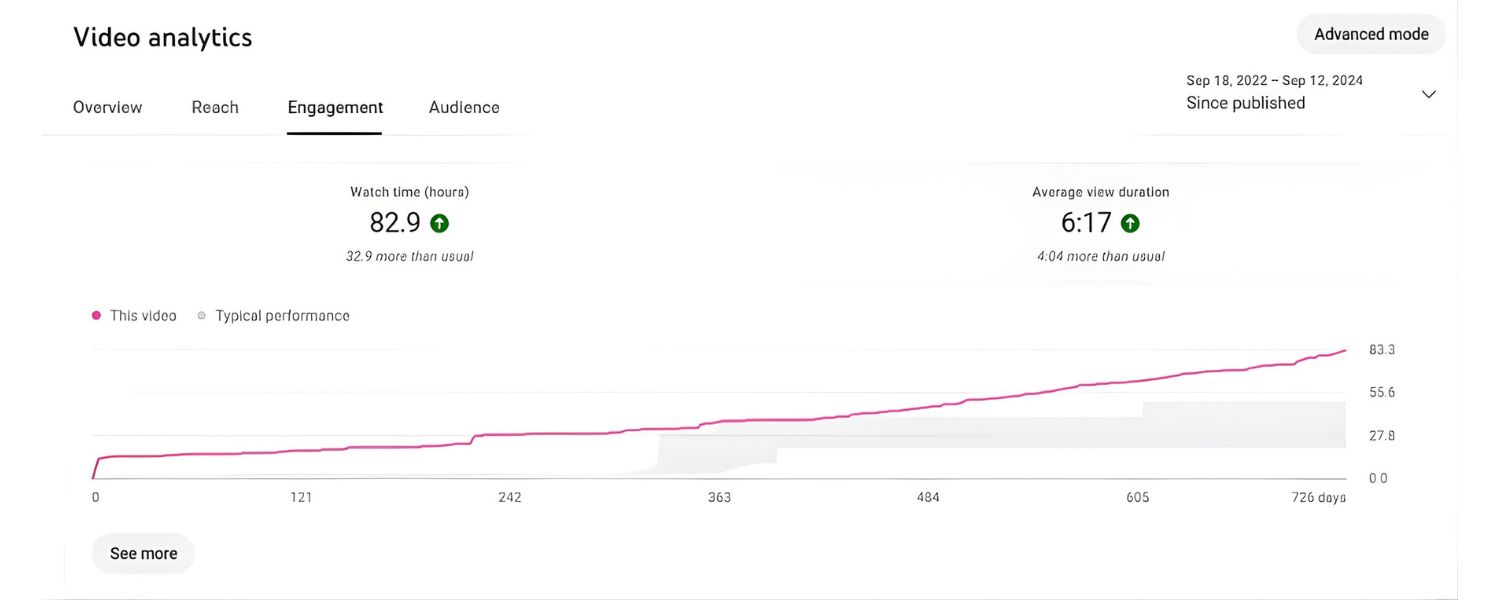
SEO is not a one-and-done task, it’s an ongoing process of monitoring, learning, and improving. Once your video is live and you’ve implemented the above strategies, be sure to track how it’s performing.
Use the insights to refine your approach for future videos (and update current ones if needed). Here’s what to watch and do:
A. YouTube Analytics
Dive into your YouTube Studio analytics for each video. Key metrics to check: Watch Time, Average View Duration, Click-Through Rate (CTR) of impressions, Likes/Comments, and Audience Retention graphs.
For instance, if you notice that the CTR (the percentage of people who saw your thumbnail and clicked) is low – say 2% whereas your channel average is 5% – that might indicate your title or thumbnail isn’t compelling enough.
You could consider A/B testing a new thumbnail or tweaking the title. If the average view duration graph shows a steep drop-off at a certain point, watch your own video at that timestamp to see what might be losing viewers’ interest, and keep that in mind to avoid in future content.
B. Search Traffic Sources
In YouTube analytics, check how people are finding your video. Are they coming from YouTube search, Google search, suggested videos, external websites, etc.? If you see a lot of YouTube search traffic for certain keywords, that’s a sign your SEO efforts paid off, double down on similar content.
If external is big, see which sites are embedding or linking your video; maybe you can build relationships with those sources.
C. Google Search Console
If you host videos on your website, use Google Search Console to monitor their performance. The Video Page Indexing report (in Search Console) will tell you which pages Google has indexed a video on, and highlight any issues (like missing thumbnail, or structured data errors) that might be preventing your video from appearing as a rich result.
Fix any errors flagged – for example, if a thumbnail wasn’t indexed because of an URL issue, correct that. Also, in the Performance report, filter by search appearance = “Videos” to see how your video results are doing on Google (clicks, impressions, queries it appears for).
D. Adjust Based on Data
Treat each video as an experiment. If a video didn’t perform as expected, analyze why. Was the keyword too competitive? Did the content maybe not match what the audience wanted (check comments for feedback)? Maybe the promotion strategy didn’t reach enough people.
Conversely, if you have a hit video that ranks #1, study it, what did you do particularly well? Use those insights to inform your next topics, production style, or optimization tactics.
E. Stay Updated on SEO Trends
Video SEO is evolving. For example, Google might introduce new video rich results (like the recent “key moments” feature) or YouTube might change its algorithm emphasis. Stay tuned to official updates from Google Search Central and YouTube Creator Blog.
Being early to implement a new feature (like a new schema property or a new YouTube hashtag trend) can give you an edge. Also, continuously learn from competitors, if a rival channel’s videos are consistently ranking above yours, do a little competitive audit: what are they doing in titles/descriptions or engagement that you could emulate or improve upon?
F. Iterate and Optimize Older Videos
Don’t forget your existing library of videos. You can go back and edit titles, descriptions, add better thumbnails, add chapters, etc., at any time. If an older video has started underperforming or you have new knowledge, apply it.
Sometimes a tweak can rejuvenate a video’s performance. For instance, adding updated keywords or a fresh thumbnail on a 2-year-old video that’s still relevant can increase its CTR and ranking again.
By keeping a close eye on performance, you essentially close the feedback loop. This data-driven approach ensures you’re continually improving your video SEO strategy.
Over time, you’ll hone in on what works best for your content and audience. Remember, even for seasoned experts, SEO involves constant learning, the more you adapt and refine, the more success you’ll see.
Conclusion & Call to Action
Video SEO is a potent tool in your digital marketing arsenal. By now, you’ve learned how to research the right topics, optimize your video’s metadata and transcripts, leverage technical SEO, and boost engagement, all geared towards making your videos shine in search results.
The key takeaway is that successful Video SEO marries great content with smart optimization: create videos people love, and help search engines find and feature those videos.
When you implement these best practices, you’ll maximize your chances of ranking on the coveted first page of Google or topping YouTube search for your niche.
Now it’s time to put this knowledge into action. Ready to dominate the video search rankings? Start by applying these techniques to your next video upload.
Plan your keyword, craft that killer title and thumbnail, add captions, and don’t forget to spread the word once it’s live. Consistency is crucial, each video you optimize is a building block for your channel or site’s authority.
Stay patient and persistent, and watch as your video views, engagement, and rankings climb upward.

.png)
Shopify SEO: Guide to Ranking Your Store and Driving Sales
Most Shopify store owners set up their store, list their...

Content Marketing : Definitive Guide to Strategy, Content Types, and Measurable ROI
Content marketing generates 3x more leads than outbound marketing at...

Above the Fold: Guide to Conversions, Rankings and Faster Pages
Above the Fold in 2026: The Complete Guide to Conversions,...

Off-Page SEO Checklist: Guide to Building Real Authority
Most websites spend months creating great content, only to wonder...

What Is Keyword Bidding? The Complete Strategy Guide for Smarter Ad Spend
Most advertisers believe the highest bid wins the auction. It...

What Is Google Trends? The 2026 Marketer’s Complete Guide
If you are not already pulling weekly insights from Google...
If you want a growth partner who will get to know every aspect of your business and treat your budget like their own — we are the right fit.
.png)


.png)
.png)
.png)
.png)
.png)
.png)
2026 ALL RIGHTS RESERVED MADE IN INDIA
