
How to Spot & Prevent Negative SEO Attacks
August 12, 2025
Introduction
Imagine waking up to find your website’s search rankings have plummeted overnight, not due to any mistake on your part, but because a competitor decided to sabotage your SEO. This nightmare scenario is exactly what negative SEO is all about.
Negative SEO (sometimes called SEO sabotage or “Google Bowling”) refers to malicious techniques used to harm a website’s visibility in search engines, typically with the aim of stealing its rankings and traffic.
In essence, an attacker tries to make your site look like it’s violating Google’s guidelines (through spammy links, content spam, etc.), hoping to trigger search engines to penalize or suppress your site.
Negative SEO tactics are unethical, and in some cases, even illegal. Fortunately, truly effective negative SEO attacks are relatively rare today.
Search engines like Google have become much better at spotting and ignoring spam signals that attackers create. Google representatives have repeatedly stated that they work hard to prevent negative SEO from causing problems, and such attacks are extremely uncommon to actually impact rankings.
In fact, Google’s algorithms (like the Penguin update and the AI-based SpamBrain system) now automatically filter out most spam backlinks and other overt attacks.
That said, “rare” doesn’t mean “impossible.” Marketers and site owners still report instances of negative SEO, and certain aggressive attackers continue to try new sabotage methods.
Smaller or newer websites with less established authority can be more vulnerable, a flood of spam links or bad reviews can proportionally affect them more than a large site with thousands of quality links. And beyond search rankings, negative SEO can tarnish your brand’s reputation if left unchecked.
According to one analysis, 61% of websites have encountered some form of hostile SEO or cyber-sabotage attempt, so it’s wise to be informed and prepared.
In this detailed guide, we’ll cover everything you need to know about negative SEO in 2025: what it is, the common types of attacks, how to detect if you’re a victim, and how to protect your site from SEO sabotage.
We’ll also dispel some myths and outline actionable steps to safeguard your hard-earned rankings. Let’s dive in and ensure you can keep your website safe from these malicious tactics.
Google Trends data shows interest in “negative SEO” spiked around April 2012, when Google’s Penguin update made low-quality link schemes punishable, leading to increased concern about negative SEO.
What Is Negative SEO (SEO Sabotage)?
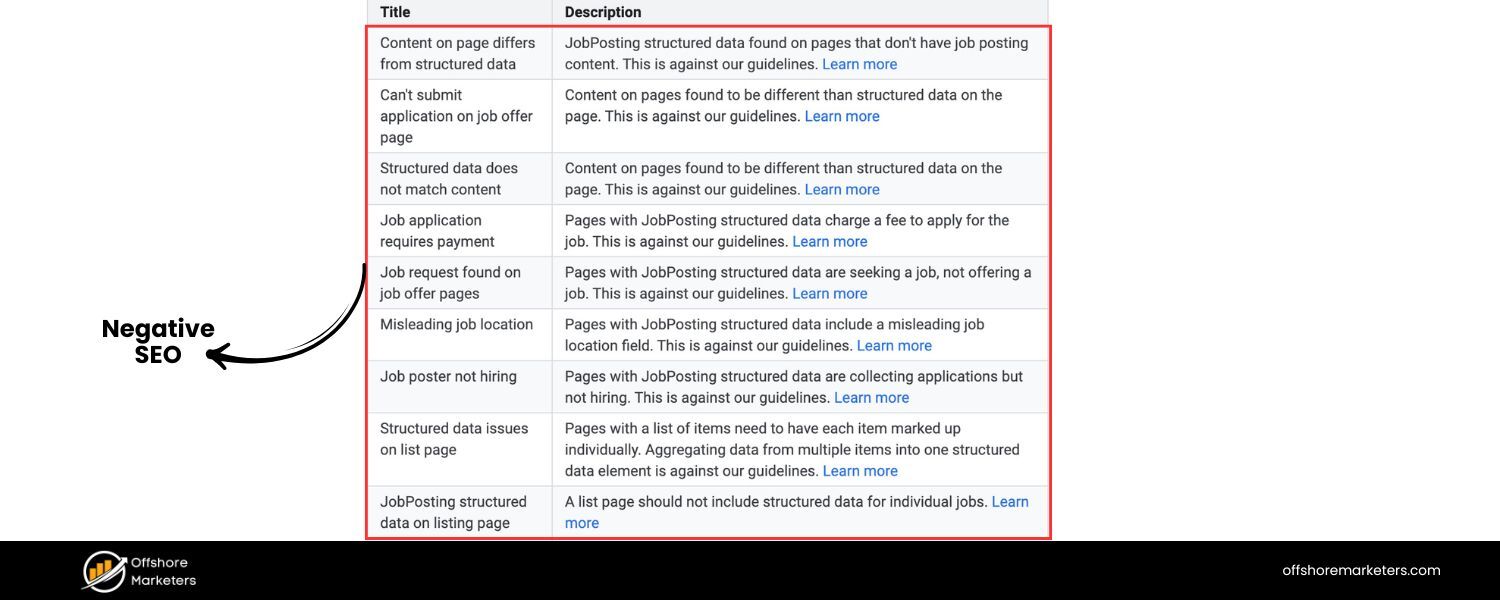
Negative SEO is essentially the dark side of SEO, instead of optimizing one’s own site, it involves using black-hat SEO tactics to deliberately harm a competitor’s rankings.
The goal of a negative SEO attack is to make the target website appear to search engines as if it’s engaging in spammy or manipulative practices, thereby triggering penalties or ranking drops. In other cases, the goal may be to damage the site’s reputation so that users lose trust and traffic dwindles.
Key points about negative SEO include:
1. It can take many forms, from building spammy backlinks to a competitor’s site, to copying their content, to posting fake reviews about their business.
2. The intent is always malicious, it’s an attempt to sabotage someone else’s SEO rather than improve one’s own. This is why negative SEO is considered highly unethical (and could even cross into illegal territory if it involves hacking or fraud).
3. Search engines do not condone these practices. In fact, Google’s official policies explicitly forbid link spam and other manipulative tactics. Any benefit attackers seek to gain is against the rules.
A Brief History and Google’s Stance
Negative SEO has been a topic of concern in the SEO community for over a decade. It became especially prominent after Google’s Penguin update in 2012, which for the first time introduced harsh penalties for websites with manipulative backlink profiles.
Prior to Penguin, spammy links were mostly just ignored by Google’s algorithms. But Penguin meant a site could actually be demoted or penalized for having tons of unnatural links – and unscrupulous SEOs realized they could try to point bad links at a competitor’s site to get it penalized.
The Google Trends chart above shows how searches for “negative SEO” spiked around that time, reflecting the growing fear of such attacks.
Since then, Google has continuously improved its algorithms to mitigate negative SEO. Google engineers (like John Mueller and Gary Illyes) have repeatedly stated that most webmasters don’t need to worry about negative SEO because Google is good at automatically filtering out spam links and other signals.
For example, Google’s SpamBrain (part of recent spam updates) can now detect and nullify spammy link blasts so that they don’t count against the target site.
Google’s official advice to site owners is often to ignore low-quality spam links if you see them, rather than panic. In short, negative SEO rarely works as intended, especially when it’s just an obvious barrage of spam.
However, rarely working is not the same as never happening. There have been cases where determined attackers using more sophisticated methods did cause harm, at least temporarily. The SEO community remains somewhat skeptical, many experts take Google’s assurances with a grain of salt because they’ve observed some negative SEO campaigns that appeared to succeed.
Moreover, certain types of attacks (like hacking a site or stealing content) clearly can hurt a website’s performance or reputation if not quickly addressed. For these reasons, it’s prudent to know what negative SEO looks like and how to respond, even if it’s not something you’ll face often.
In the next sections, we’ll break down the common types of negative SEO attacks and how you can identify and prevent each one.
Common Types of Negative SEO Attacks
Negative SEO can take many forms, but below are the most common techniques attackers use to sabotage a website’s SEO. These tactics aim to either trick search engine algorithms into penalizing the site or to tarnish the site’s reputation and performance in the eyes of users and search engines.
1. Spammy Backlink Blasts (Link Farms and Toxic Links)
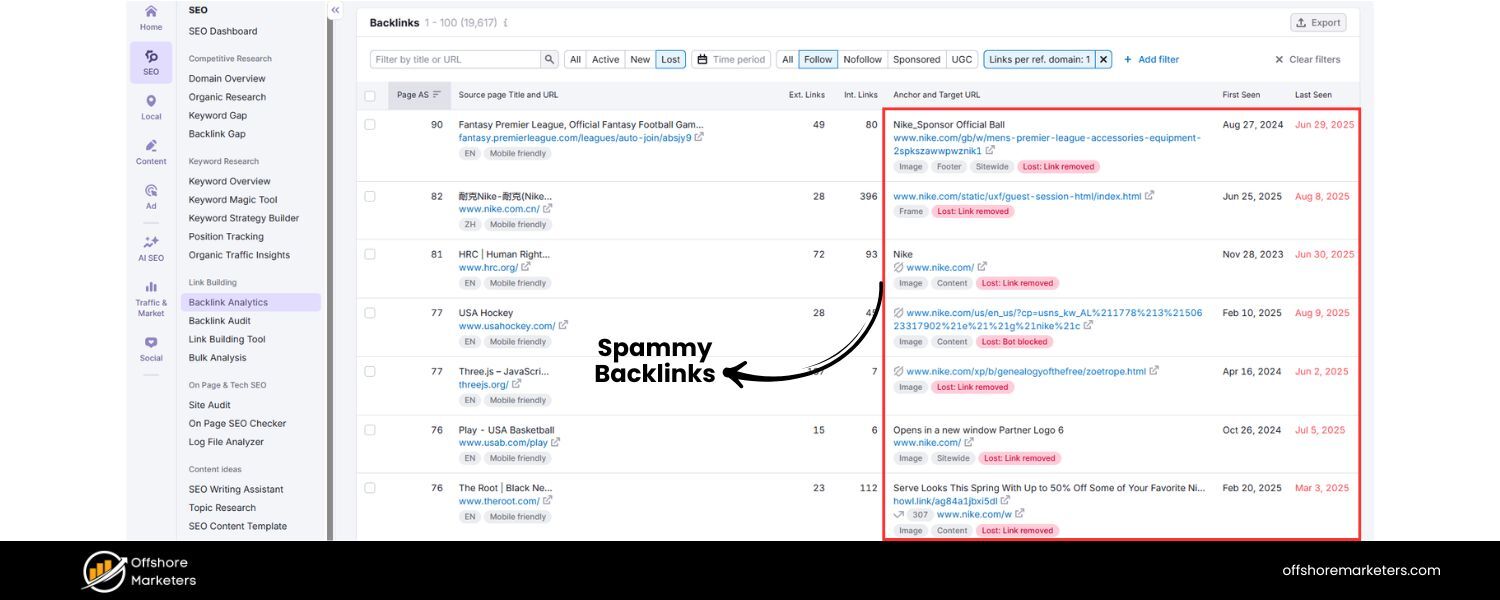
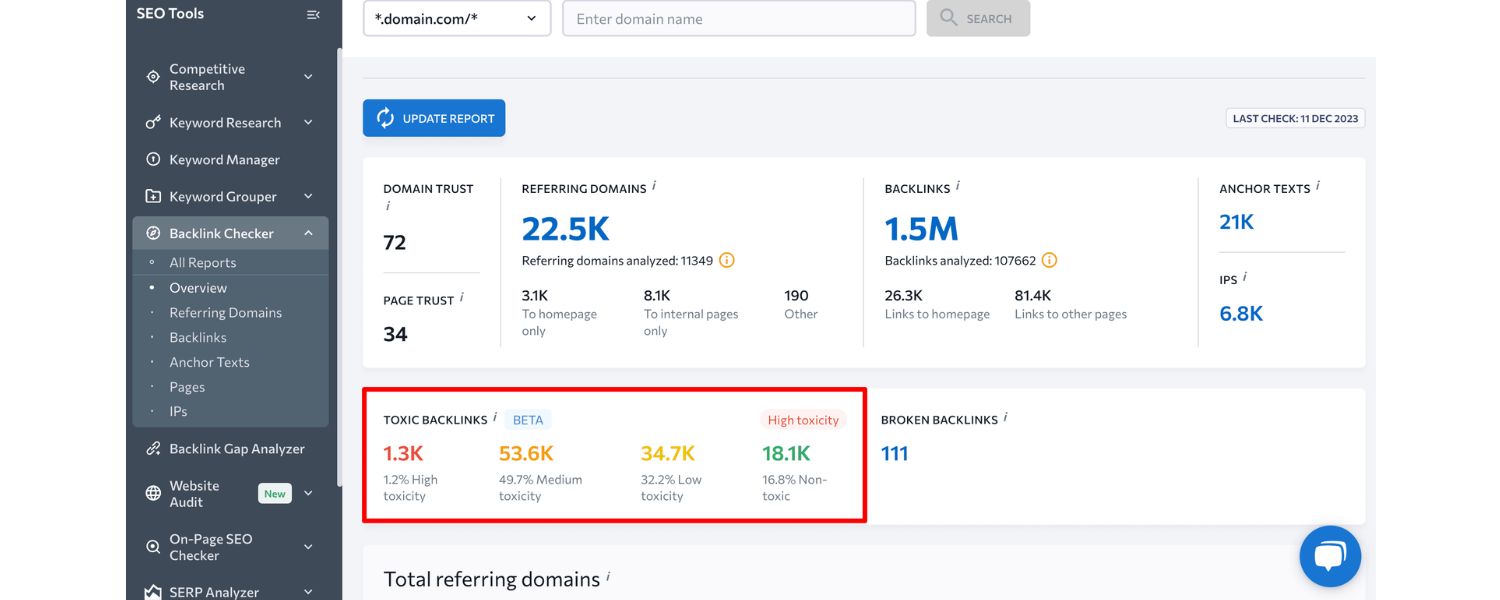
One of the classic negative SEO methods is flooding the target site with spammy backlinks. Attackers may create thousands of links from low-quality, often unrelated or malicious websites, all pointing to your domain.
The idea is to make it look like you have been engaging in a shady link-building scheme so that Google’s algorithm flags or penalizes your site for having a “toxic” link profile.
These links often come from so-called link farms or automated programs that generate links from blogs, forums, or directories that exist solely to host links.
A. Link Farms & PBNs
A link farm is a network of interconnected sites linking to each other (and to a target site) purely to manipulate rankings.Similarly, attackers might use Private Blog Networks (PBNs) or other black-hat link networks to build hundreds of links to your site with exact-match anchor text (often over-optimized keywords or even unrelated spam terms like “Viagra” or “online poker”).The presence of a sudden surge of backlinks with spammy or irrelevant anchor text can make your site appear to be violating Google’s link spam policies.
B. Anchor Text Poisoning
By pointing links with irrelevant or malicious keywords at your site, attackers attempt to dilute your site’s topical relevance and associate your pages with spammy queries.
For example, if hundreds of new backlinks all use anchor text about gambling, pills, or other unrelated niches, Google might get mixed signals about your site’s content. In extreme cases, a heavy influx of toxic links could even lead to a manual or algorithmic penalty, causing your site to drop out of search results.
(The good news is that Google often recognizes obvious “link bombing” attacks – they are usually “overly aggressive and easy to distinguish” from normal link building, so Google’s algorithms may simply ignore those links rather than punish the site.)
Attackers can purchase negative SEO link packages on shady forums or websites to carry out these blasts. Shockingly, there are services that openly sell bundles of tens of thousands of spam links for a small price.
For example: some negative SEO service ads offer packages like “500,000 backlinks for $150” aimed at tanking a competitor’s site ranking. These black-hat services promise to do the dirty work of pointing masses of toxic links at a target (as shown below).
Offers for negative SEO services – e.g., selling blasts of hundreds of thousands of spam links, still exist in the wild. Purchasing such services is highly unethical and violates Google’s guidelines.
Why it’s harmful: Google may interpret a huge spike in spammy backlinks as your site engaging in link schemes, which historically could trigger ranking drops or manual penalties.
Who’s at risk: Brand new or small websites are most susceptible, since a few hundred toxic links can constitute a large portion of their backlink profile (whereas a big site with tens of thousands of legitimate links might barely be affected by a few thousand bad ones).
How to spot it: If you see a sudden explosion of backlinks in your SEO tools or Google Search Console, especially from unrelated or low-quality sites, that’s a red flag.
Often, these links come from spammy blogs or comment sections and have strange anchor texts. We’ll cover detection in detail later, but monitoring your backlink profile regularly is key.
2. Content Scraping (Duplicate Content Attacks)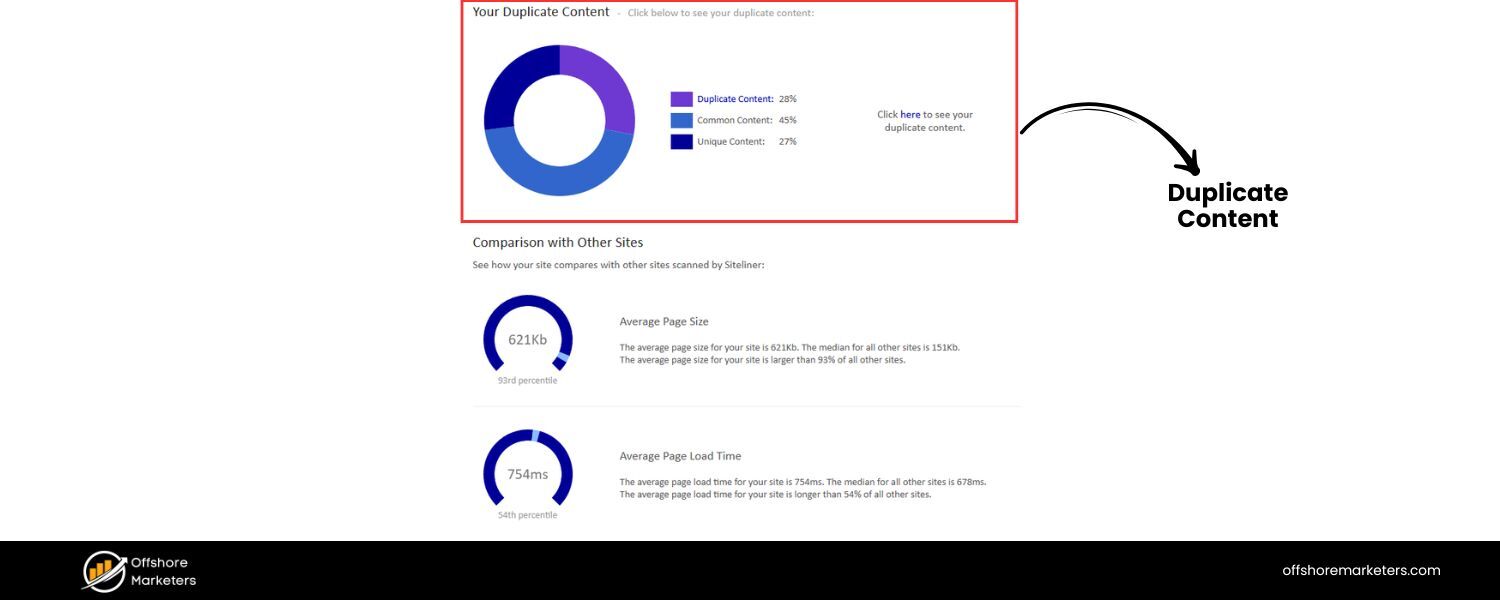

Another negative SEO tactic targets your content rather than your links. Content scraping is when someone copies content from your site (either manually or using bots) and republishes it elsewhere without your permission.
The attacker might post your blog articles on other websites, content farms, or forums, sometimes even before your site’s pages get indexed, or across numerous sites at once.
The danger of content scraping is the creation of duplicate content across the web. When Google encounters multiple copies of the same content, it usually will only index and rank one version to avoid showing duplicate results.
In a negative SEO scenario, the fear is that Google might index the stolen content and mistakenly treat that as the original, causing your site’s original page to lose rankings or traffic.
In other words, the plagiarized version could outrank your own page, especially if the scraper’s site somehow has higher authority or if your page was slow to get indexed.
Attackers may also modify the content slightly or combine it with spammy elements, but often they simply copy-paste your pages in full. This can lead to organic traffic losses for you if search engines favor the other source.
Sometimes, content theft isn’t even intended as a negative SEO attack; the scraper might just want content for their site. But regardless of motive, your site can suffer if it loses visibility due to duplicate content issues.
It’s been reported that content scraping can have a real financial impact. According to one study, 54% of businesses said they lost about 6% of their revenue due to content scraping practices. That’s significant, and it underscores why protecting your content is important.
How to spot it: The simplest way is to take a unique sentence from your page, put it in quotes, and search Google, see if other sites show up with that exact text. You can also use tools (like Copyscape or plagiarism detectors) to scan the web for copies of your content.
Google Alerts (for unique phrases) or professional content monitoring services can alert you when your content is published elsewhere.
What to do about it: If you find your content has been scraped, you can reach out to the offending site’s webmaster and request removal.
If they refuse or you get no response, you have the option to file a DMCA takedown notice to request Google (and web hosts) to remove the infringing content from search results. We’ll cover more on this in the prevention/recovery section.
3. Fake Reviews and Smear Campaigns (Reputation Attacks)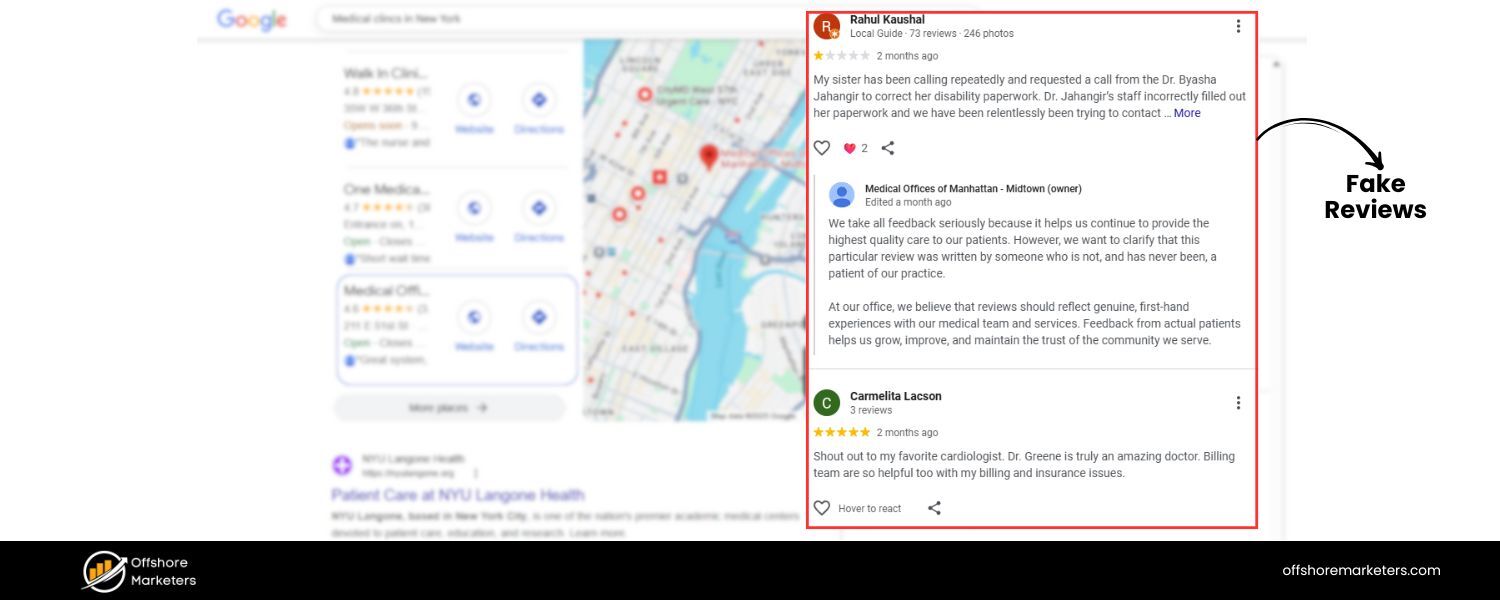
Not all negative SEO is technical – some of it targets your brand’s reputation online. A smear campaign in the context of SEO means spreading false, negative information about your business to make you look bad.
The attackers aim to erode your credibility, causing users to avoid your site and potentially leading search engines to rank you lower due to the negative sentiment or user feedback they detect.
Common forms of reputation-based negative SEO include:
A. Fake Negative Reviews
An attacker (or a paid bot network) might post a flood of 1-star reviews about your business on platforms like Google Maps/Google Business Profile, Yelp, TrustPilot, or industry-specific review sites.
They may also leave negative comments on your social media or other public forums. A sudden influx of bad reviews can drag down your average ratings, which is visible right on Google search results for local businesses.
This not only scares off potential customers, but since ratings are a factor in local SEO, a drop from (say) 4.5 stars to 3 stars can hurt your rankings in local search results.
B. False Mentions and Rumors
Attackers could create fake social media profiles impersonating you or your employees and then behave badly, or they might spread rumors on forums (like Reddit) claiming your business is scammy or engaged in wrongdoing. They might even write defamatory blog posts or press releases filled with false allegations.
These negative mentions can sometimes start ranking for your brand name searches (imagine a Google search for your company showing a result like “ is a scam” posted by a competitor).
Even if search engines don’t “penalize” you for such things, the hit to your reputation can indirectly affect your SEO, fewer people will click your site if they’ve only heard bad things, and Google’s algorithms notice if users avoid your result.
C. Baseless Reports/Complaints
In extreme cases, an attacker might abuse formal channels – for instance, submitting groundless DMCA complaints against your site to temporarily get some of your pages removed, or filing spam reports to Google claiming your site violates guidelines.While Google usually doesn’t take action on false reports, they can still cause hassle and downtime for you to address.
Such reputation attacks can be quite damaging because they directly influence user trust. Even if your search rankings stay intact, what good is that if fewer people click through to your site? Google’s algorithms also pay attention to user behavior and brand signals, so a tarnished reputation could have secondary SEO effects (like lower click-through rate, which can hurt rankings, and potentially lower placement in local packs due to poor reviews).
How to spot it: Keep an eye on your brand’s mentions and reviews. Regularly check your business’s reviews on Google and other key platforms.
Set up Google Alerts or use a brand monitoring tool to notify you when your brand name is mentioned online (this can catch forum posts or articles).
Sudden waves of negative reviews or negative press that seem inauthentic are a clue. Often, fake reviews might come in bulk or contain generic text, sometimes from accounts that have only ever reviewed your business.
What to do: Respond to genuine negative reviews professionally and try to resolve issues, this can turn an unhappy customer into a happy one, or at least show other readers that you care.
For clearly fake or malicious reviews that violate platform policies, report them to the platform to request removal.
Many platforms, including Google, have policies against spam or fake reviews and will delete them if proven. If someone is defaming you with false claims on their site or social media, you may need to publicly clarify the truth and in some cases pursue legal counsel (for defamation) if it’s serious.
Most importantly, cultivate a strong, positive brand presence – encourage satisfied customers to leave reviews, so a few malicious ones won’t stand out, and publish quality content that pushes down any negative content in search results.
4. Website Hacking and Malware Injection
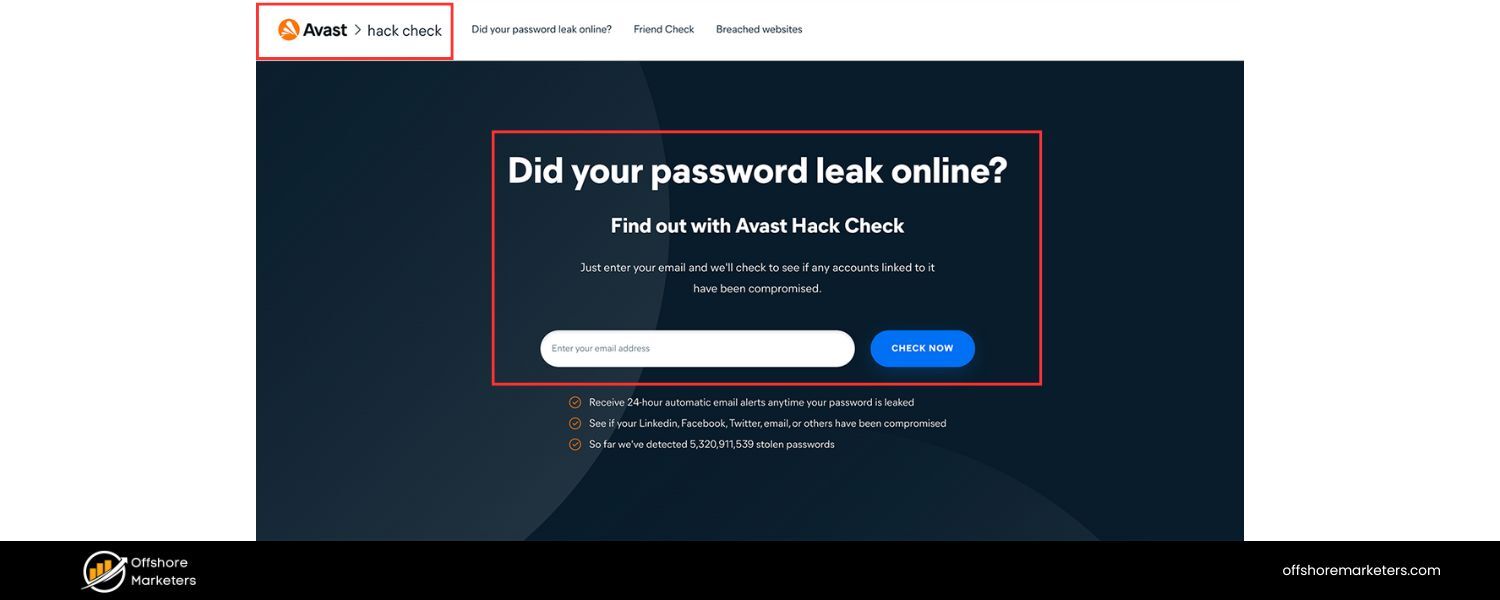
Hacking is one of the most direct and destructive forms of negative SEO. In this scenario, an attacker actually gains unauthorized access to your website – through whatever vulnerability they can find – and then wreaks havoc to hurt your SEO.
This could involve a variety of nasty actions, such as:
A. Defacing or Deleting Content
The attacker might erase your key pages, deface your homepage with spam or offensive text, or add hidden links and keyword-stuffed content across your site. Suddenly, your well-crafted content might be replaced by gibberish or malicious content, which can tank your rankings and get your site flagged.
B. Injecting Malicious Code
Hackers can insert malware or spam scripts into your site’s code. For example, they might add code that creates dozens of hidden backlinks to other sites (using your site as a spam link farm), or that redirects some of your pages to spammy domains.
They might also add a Trojan or malicious script that attacks visitors’ computers. If Google detects malware on your site, it will display a “This site may be hacked” or “This site may harm your computer” warning in search results, which devastates your traffic until cleaned up.
C. Altering SEO-critical files/settings
A subtle but damaging trick is when an intruder changes your robots.txt file or meta tags to tell search engines not to index your site. For instance, a hacker could put a Disallow: / in your robots.txt (blocking all crawling), or inject tags on your pages, essentially making your site disappear from Google’s index. By the time you realize, your rankings could be gone.
Any form of hacking is obviously illegal, and it goes beyond SEO into general cybersecurity. But from an SEO perspective, the outcome of a successful hack can be disastrous: you might lose rankings overnight, or your site could even be temporarily deindexed if search engines find it compromised.
Moreover, recovering from a hack can be time-consuming – you have to clean the site, fix the security hole, possibly request reconsideration from Google, and rebuild user trust.
How to spot it: Often, hacking is detected by technical alerts – Google Search Console might send you a message that it found hacked content or malware on your site. Your browser (or antivirus software) may flag your site as dangerous.
Sudden strange behavior on your site, unexpected slowdowns, or new outbound links/unknown pages appearing could also be signs.
Regularly inspect your site (or use security scanners) for any anomalies. Enabling security notifications in Google Search Console and using uptime monitors can help catch issues quickly.
What to do: Prevention is key here (see the prevention section below for security best practices). If you do get hacked, act immediately: take the site offline or disable the affected sections, clean the malicious code (or restore from a clean backup if possible), fix the security vulnerability (update software, change passwords, etc.), and then request Google to review your site if it was flagged.
Google has a process for submitting a review after you’ve cleaned a hacked site. It’s also wise to inform your users if any data was compromised (for transparency and legal compliance). Essentially, treat it as both an SEO issue and a security issue.
5. Removal of Your Best Backlinks (Link Theft)
This is a sneakier negative SEO tactic where the attacker doesn’t add anything, but rather takes something away – specifically, your high-quality backlinks.
In SEO, having reputable sites link to you is valuable. Some negative SEO perpetrators will attempt to cut off your link juice by getting your good backlinks taken down.
How could they do that?
One common ploy: the attacker identifies a few strong websites that link to you (for example, maybe you wrote a guest post somewhere, or a news article mentioned you). Then they contact those site owners impersonating you or your SEO agent, and request that the link be removed.
They might claim that your company rebranded or that you no longer want that link, etc. If the webmaster believes the request and removes the link, you just lost a valuable backlink – mission accomplished for the attacker.
Obviously, this is done without your knowledge, and it preys on the goodwill or policy of the linking site. Some webmasters won’t remove links without confirmation, but others might do it if asked politely, thinking they’re doing you (the real you) a favor.
Over time, a determined attacker could quietly whittle away at your backlink profile by removing or “stealing” your best links.
How to spot it: It’s hard to know when someone is doing this behind your back until the links are gone. This is why it’s important to monitor your backlinks regularly.
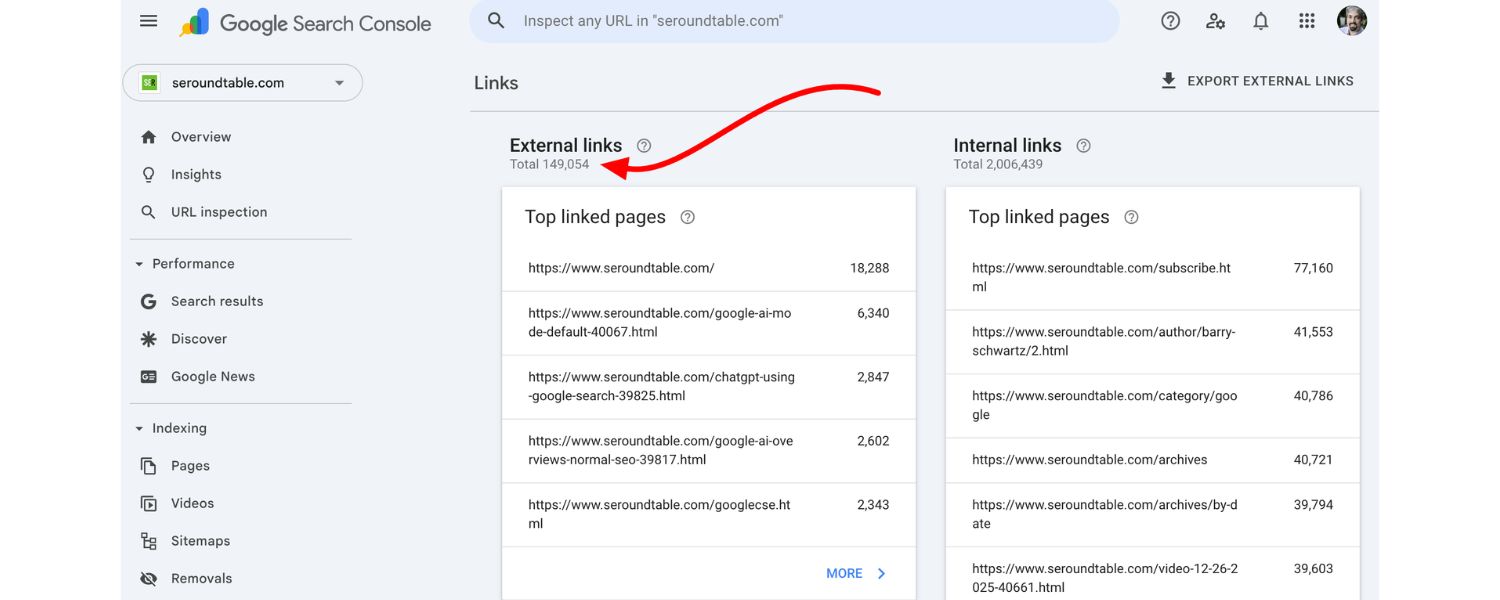
SEO tools or Google Search Console’s “Links” report can show you new and lost links. If you notice a strong backlink went missing, especially if the timing seems suspicious or multiple good links drop in a short span, reach out to the site’s owner to ask why.
You might discover someone requested its removal. In some cases, webmasters have forwarded such strange requests to the site owner, which is how people discover the impersonation.
What to do: If a link was removed due to a fake request, explain the situation to the linking site – they might reinstate the link, possibly with added security (like confirming via an official email address next time).
To preempt this, you could also keep good relationships with sites that link to you so they’re aware you wouldn’t randomly disavow your own backlinks.
Some site owners choose to publicly state they do not entertain link removal requests for editorial links, precisely to guard against this tactic. While you can’t realistically stop a determined liar from trying, being vigilant about your link profile can at least catch it early.
(In your own communications, if you ever do need a link removed or changed, make it clear what your real email is, etc., so webmasters can distinguish real vs. fake requests.)
6. DDoS, Forced Crawling and Website Performance Attacks
Site speed and uptime are important for SEO – a site that is frequently down or very slow will lose rankings. Some negative SEO attacks exploit this by trying to overwhelm your server or steal your bandwidth, making your site slow or inaccessible.
A. DDoS (Distributed Denial of Service)
This isn’t specific to SEO, as it’s a general cyber attack, but it can have SEO consequences. A DDoS attack floods your server with traffic or requests, causing it to crash or become extremely slow for real users.
If Googlebot cannot access your site for a period of time or notices very slow response, it could drop your rankings or de-index pages (especially if downtime is prolonged). Attackers in competitive niches might launch periodic DDoS attacks to knock a competitor out of Google temporarily.
B. Heavy Crawling (Bot Spam)
As noted by some experts, an attacker might use bots to crawl your site excessively, hitting it with thousands of page requests per minute. This can similarly strain your server and mimic a denial of service, especially if your hosting is limited.
The goal is to crash the site or at least make it sluggish, negatively impacting user experience and crawlability.
C. Hotlinking (Bandwidth Theft)
Hotlinking is when someone embeds your image or media on their site by linking directly to your server’s file, instead of hosting it themselves. In a negative SEO context, an attacker could set up many pages that hotlink to large images or videos from your site, effectively making your server deliver tons of data to their visitors.
This steals your bandwidth and can significantly slow down your site for other users. If done excessively, it can even drive up your hosting costs or cause your site to hit its resource limits and go down.
Hotlinking attacks are sometimes called “bandwidth bombing” and are indeed a form of SEO sabotage – a slower site tends to rank lower, and a site that’s down obviously can’t rank at all.
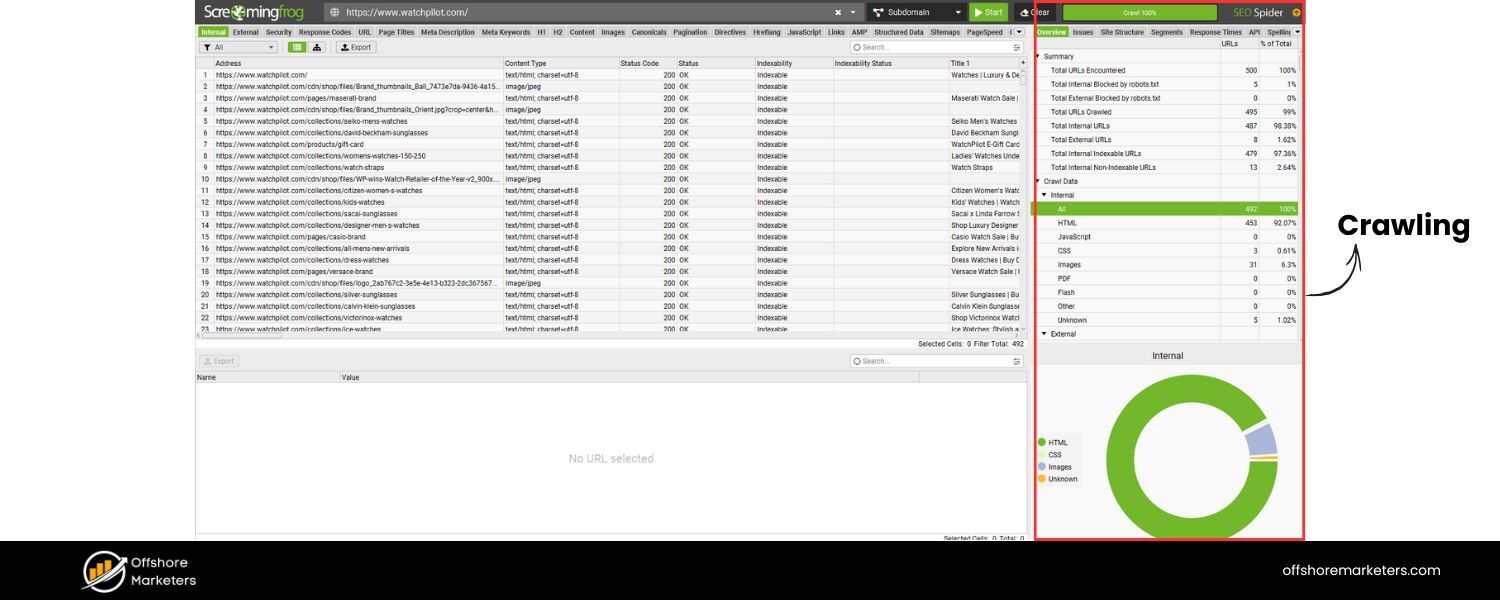
How to spot it: If your site becomes inexplicably slow or your server usage spikes for no reason, you might be under such an attack. Check your server logs – if you see a huge number of requests from suspicious IPs or for certain files (like one image being requested thousands of times), that’s a clue.
For hotlinking, you might notice in your referrer logs that other domains are pulling your images. For crawling attacks, see if one or few user agents/IPs are hitting many pages very rapidly.
What to do: Mitigating these often involves technical solutions: using a CDN and Web Application Firewall (WAF) can block a lot of bad traffic.
For hotlinking, you can configure your server or use a security plugin to prevent hotlinking (e.g., by adding rules in your .htaccess file or using a CDN that blocks third-party embedding). For bot attacks, you can use rate-limiting, or identify and block offending IP addresses.
Good hosting providers will also help filter DDoS traffic. We’ll mention some preventive measures in the next section. The key is to ensure your site stays up and responsive, so attackers can’t tank your performance easily.
Now that we’ve covered the main negative SEO tactics – from spam links and duplicate content to fake reviews, hacking, and performance sabotage – the next critical step is learning how to detect if you’re being attacked and how to respond/protect your site. Early detection can make a huge difference in limiting damage.
In the next section, we’ll outline the signs of a negative SEO attack and then dive into protective measures.
How to Detect a Negative SEO Attack
How do you know if you’re the target of negative SEO versus something else? In truth, many times when rankings drop or traffic dips, the cause is not negative SEO – it could be a search algorithm update, technical issue, or normal competition. In fact, Google says if you notice a decline in rankings or traffic, it’s unlikely to be due to negative SEO.
Nevertheless, if you suspect foul play, here are some common signs and diagnostics to help identify a negative SEO attack:
1. Sudden Spike in Backlinks
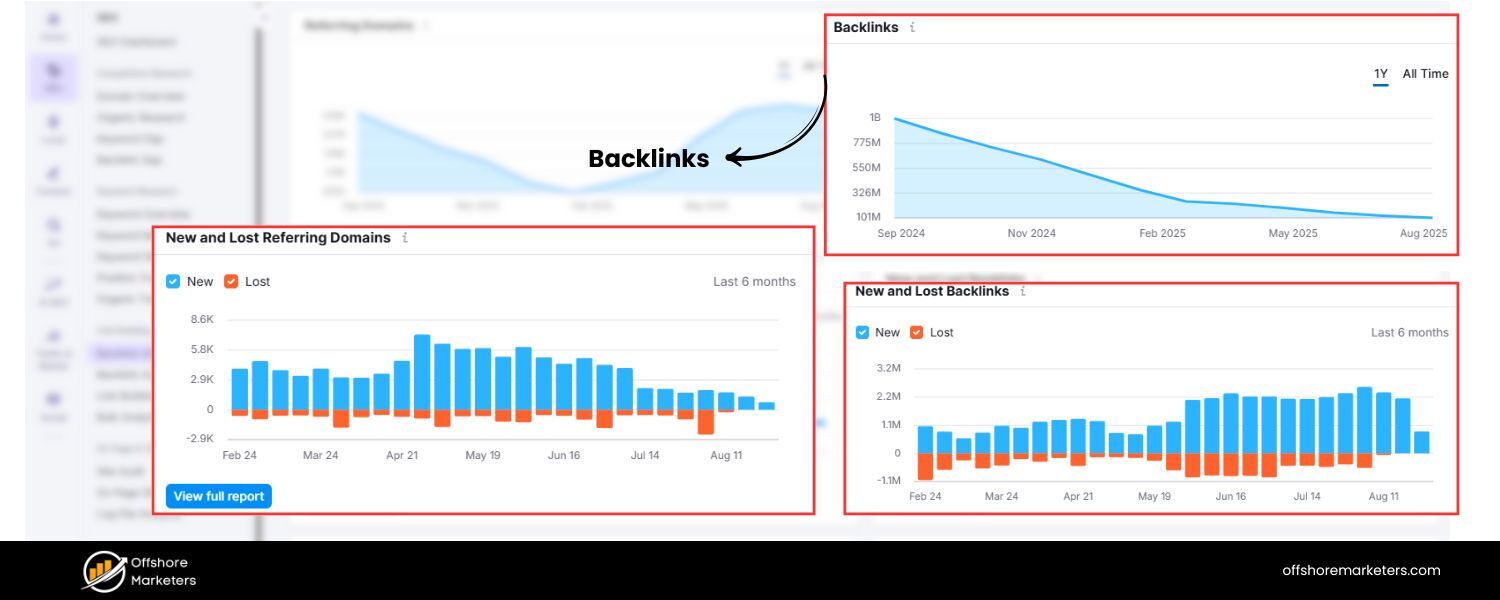
Use tools like Google Search Console, Ahrefs, Semrush, or others to monitor your backlink profile. If you see an unnatural surge of new backlinks appearing in a short time, especially from low-quality domains or with weird anchor texts, that’s a red flag.
For example, going from a steady 500 referring domains to 800 in a week, mostly spammy-looking sites – that likely isn’t organic. Watch for patterns in the linking sites: lots of forum profiles, blog comments, or sites with gibberish names could indicate a link farm blast.Also, an influx of links all containing the same anchor (e.g., “best cheap Viagra online”) clearly signals something’s off.
2. Backlinks Disappearing
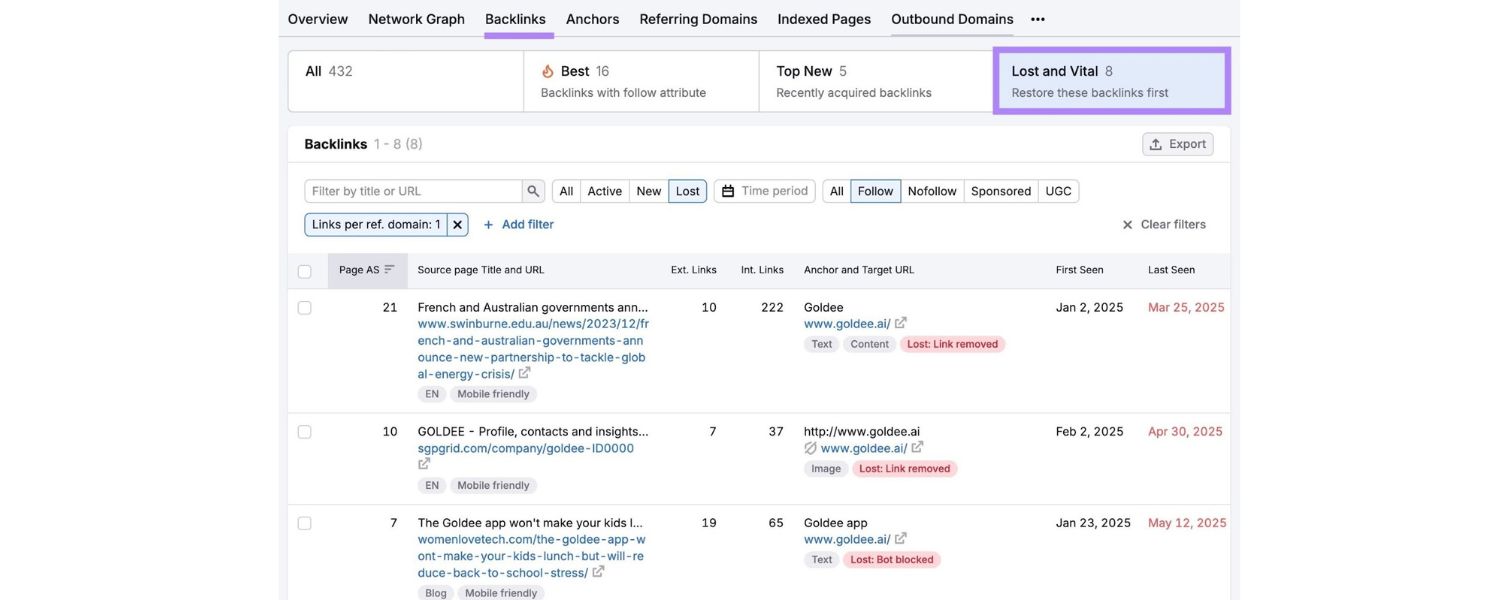
Conversely, keep an eye on your lost backlinks. If some of your best backlinks suddenly vanish and you know you didn’t request their removal, it could be a link removal attack.Many SEO tools have a “lost links” report – for instance, Semrush’s Backlink Audit or Ahrefs can alert you when a high-quality link is removed.
If a pattern of lost links emerges, consider reaching out to those site owners to ask why; you might uncover fraudulent removal requests.
3. Plagiarism Alerts or Duplicate Content
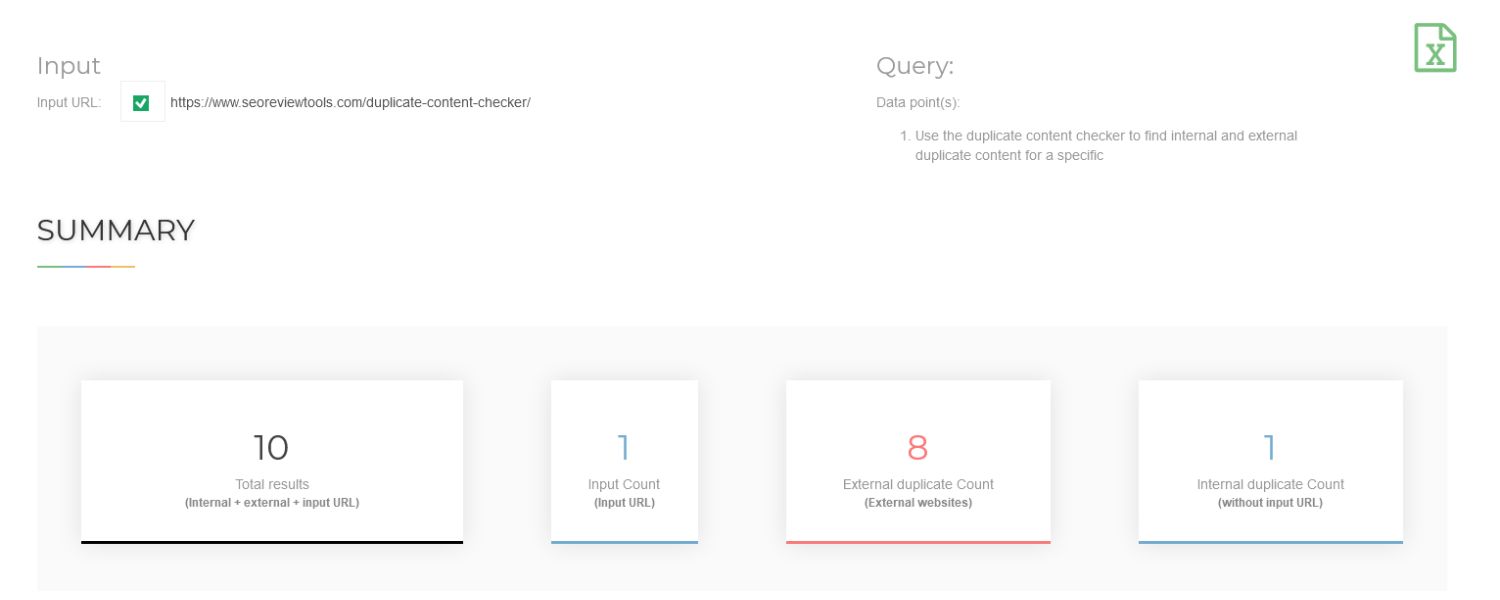
Regularly search for chunks of your content online. If you find exact copies of your pages on other websites (especially if those copies got indexed instead of your page), you might be experiencing content scraping.
Sometimes your own site’s pages might not rank at all because Google chose the scraper’s page as the canonical source – a sure sign something’s wrong.Setting up Google Alerts for unique sentences from your articles can help catch scrapers.
Also watch your index status in Google Search Console; if some pages drop out of the index or are marked as “Duplicate, Google chose different canonical,” investigate if a scraper might be the cause.
4. Google Search Console Messages
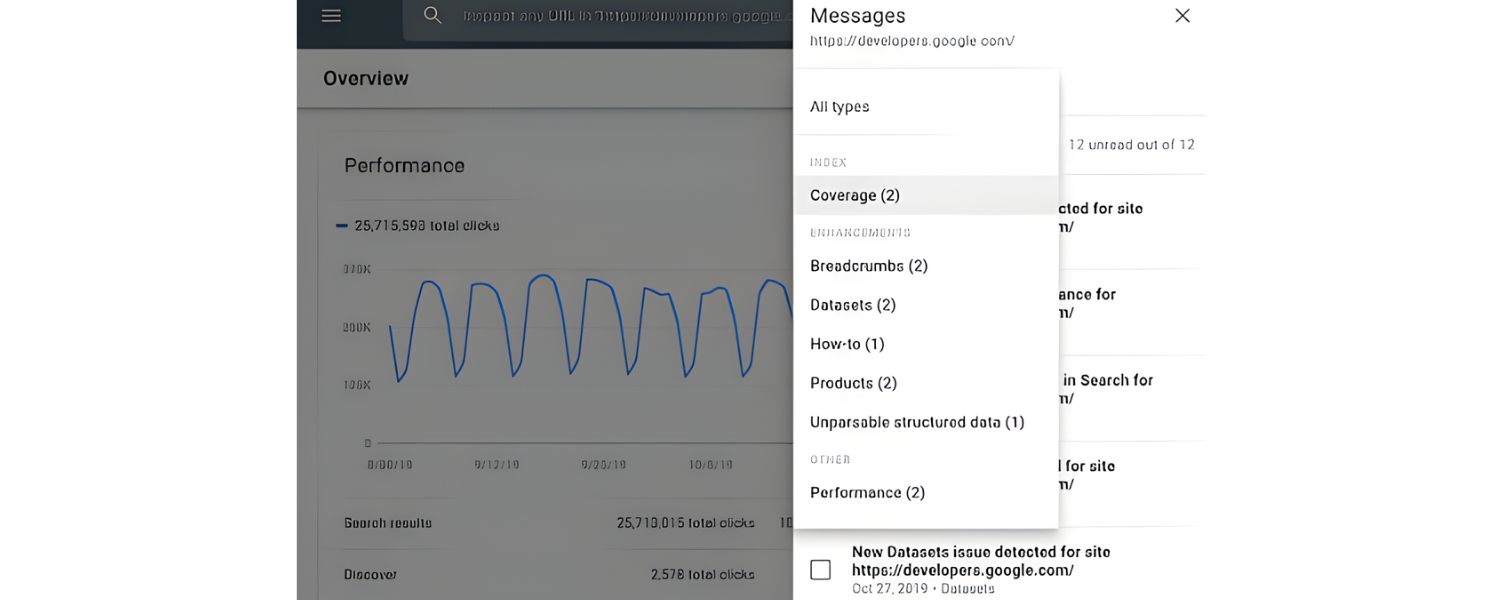
Pay attention to any alerts in Google Search Console. Google will notify you of manual actions (penalties), if you ever get one for “unnatural links” or “pure spam,” read the details.
It might list sample bad links or pages that led to the action. While those usually result from one’s own SEO actions, they could also confirm a negative SEO attack (e.g., hundreds of spam links that triggered a manual review).
Also, GSC can send alerts about security issues like hacked content or malware. If you get a “Hacked site” warning or something about spam content that you didn’t put there, that’s an immediate sign you’ve been compromised by an attacker.
5. Unexplained Drops in Rankings/Traffic
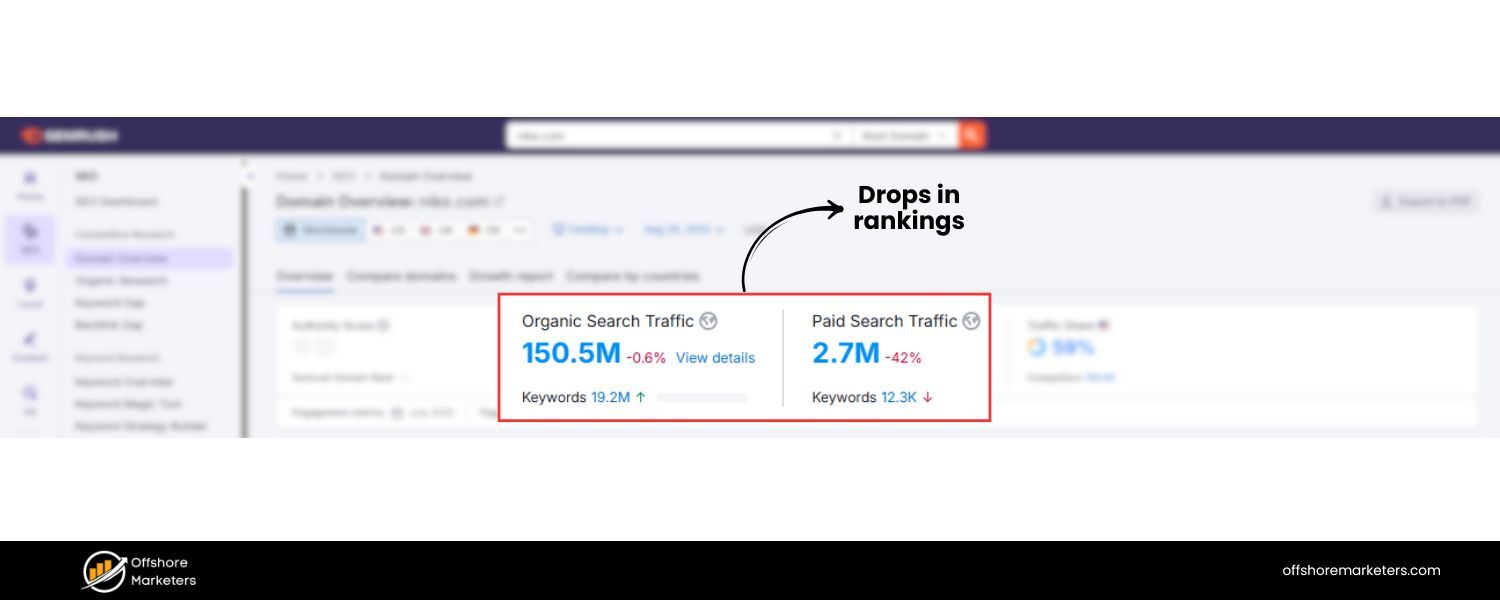
If your previously steady rankings tank dramatically overnight and you can’t tie it to any known Google update or on-site change, negative SEO is one possible (though rare) cause.
This is especially suspect if only your site in your niche fell while others didn’t, or if it coincides with some of the other signals above (e.g., you also discovered thousands of spam backlinks at the same time).
Use analytics to pinpoint when the drop began and see if any other anomalies (links, content, etc.) align with that date.
6. Brand Mentions & Reviews
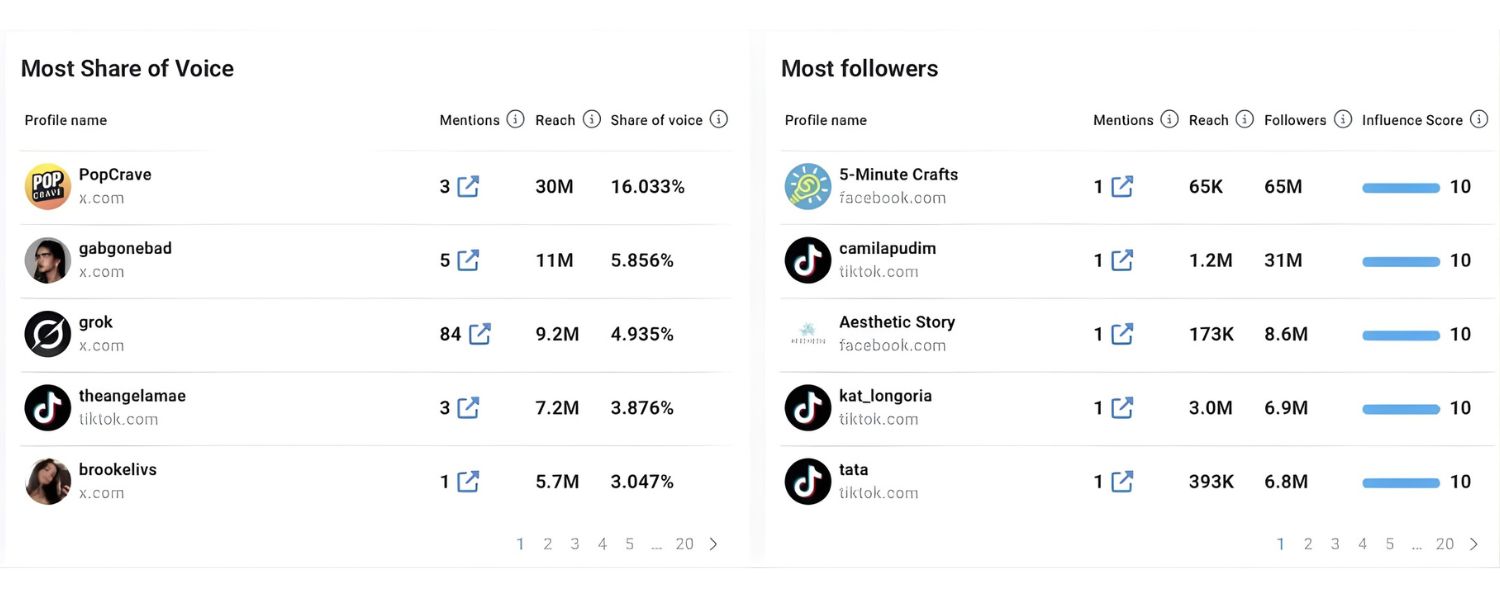
Monitor your brand name on social media, review sites, and search results. If you see a wave of new negative content mentioning your brand (tweets, forum threads, reviews) that you weren’t aware of, investigate them.
They could be organic complaints, or they could be fake ones planted as part of a smear campaign. A sudden stream of bad reviews, especially if your customer volume doesn’t justify it, is often a sign of vote brigading (fake reviews attack).
7. Site Performance Issues
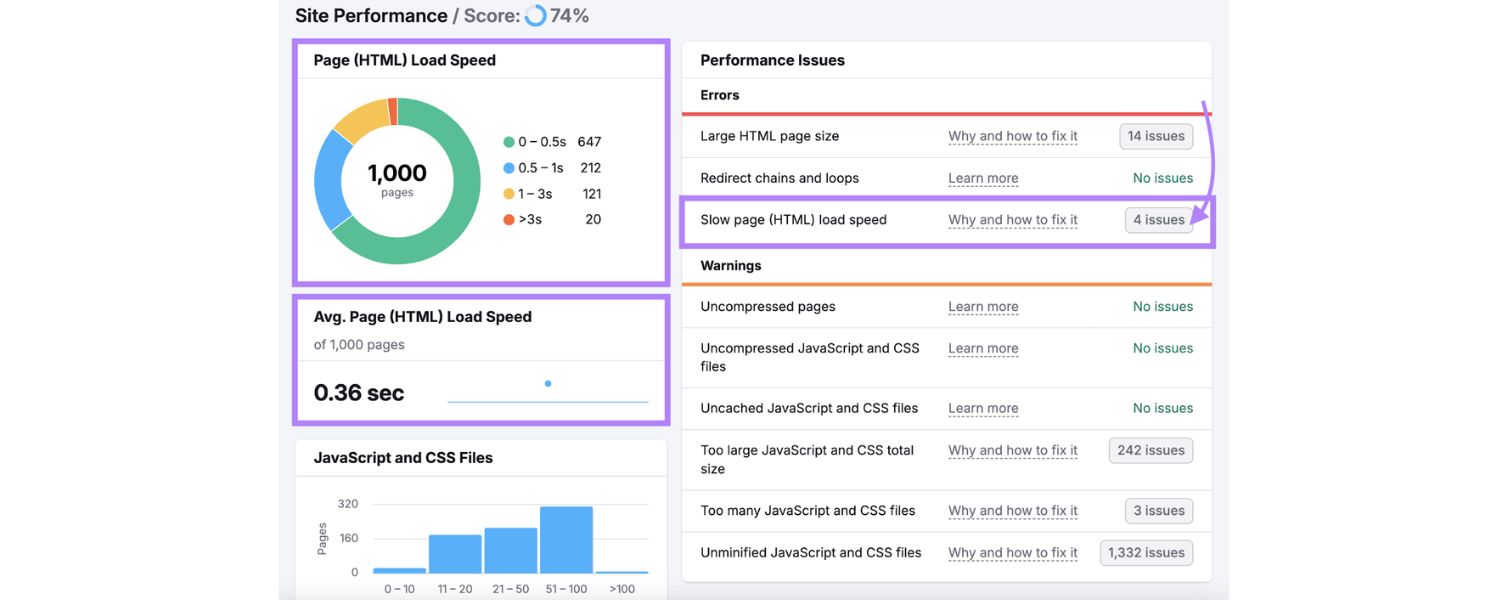
Keep tabs on your website’s loading speed and uptime. If your site becomes sluggish or starts going down frequently, check if it’s due to an overload of requests. Your hosting dashboard or analytics might show a spike in traffic that doesn’t align with real user visits (could be bot traffic).
Look for unusual IPs or user agents hitting the site. If your images or media are being hotlinked, you may notice higher bandwidth usage.Tools like Google’s Page Speed Insights or GTmetrix can sometimes flag if resources are loading from external sites (which might hint at hotlinking). Also, server logs are your friend, they can reveal patterns of abuse.
8. Quality Assessment
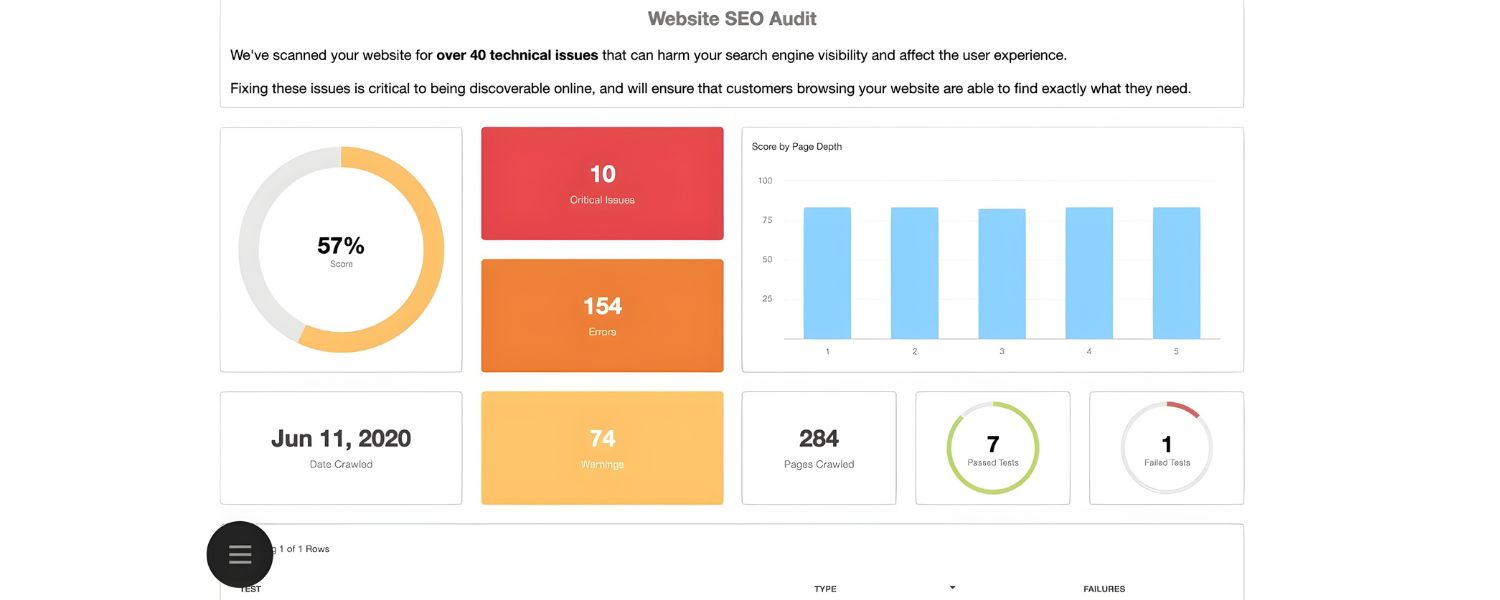
Finally, double-check internally that nothing else could have caused the issue. Many site owners jump to blame negative SEO when rankings drop, but often the cause is benign (algorithm changes, stronger competitor, site changes).
Use a checklist of common reasons for rank drops (technical SEO issues, content changes, etc.) before concluding it’s an attack. If everything else checks out, then indeed you might be dealing with sabotage.
In summary, detecting negative SEO involves a lot of vigilance in your SEO monitoring.
Use the tools at your disposal (Search Console, analytics, backlink trackers, etc.) and set up alerts where possible. Catching a negative SEO attack early can help you neutralize it before it does lasting damage.
Next, we’ll discuss how to protect your site from these attacks, both proactive measures to prevent being an easy target, and reactive steps to take if you discover an attack underway.
How to Protect Your Website from Negative SEO
Prevention is always better than cure, especially in SEO where recovering lost rankings can take time. While you can’t always prevent a determined attacker, you can make your site more resilient and harder to successfully attack. Here are some proactive steps to guard against negative SEO:
1. Secure Your Website Thoroughly
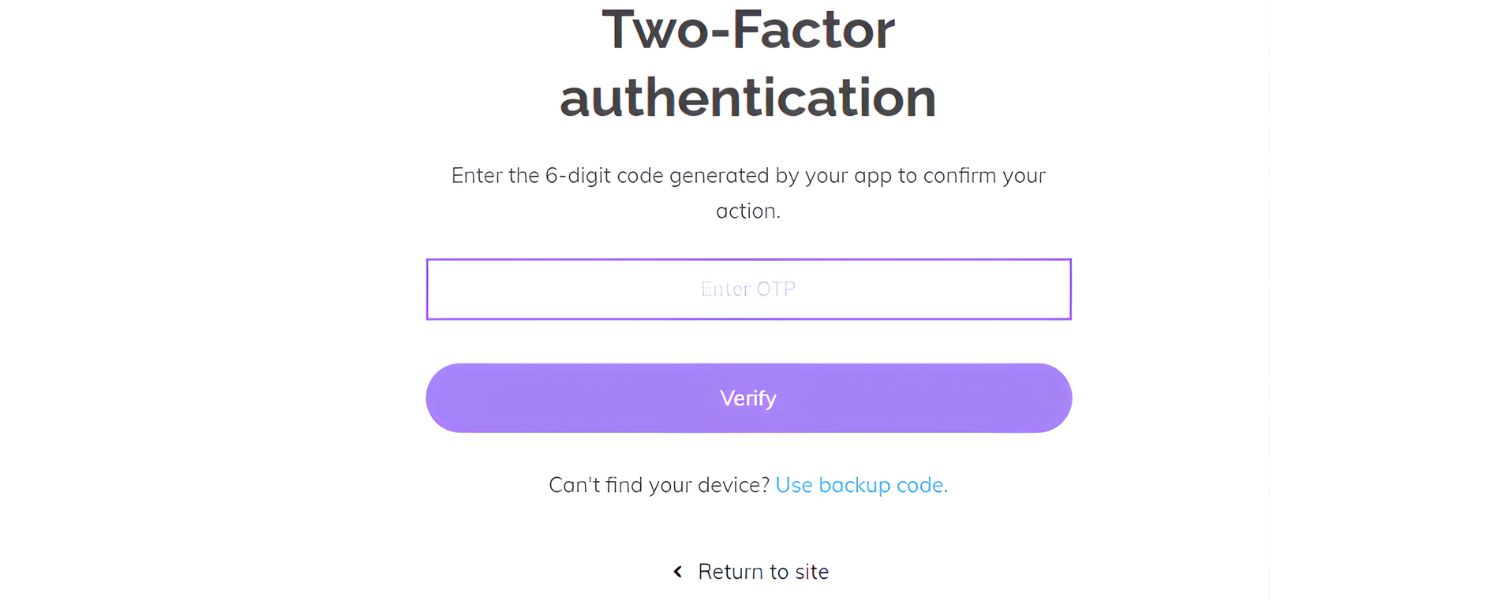
Given that hacking is one of the most harmful attacks, fortifying your site’s security is paramount.Use strong, unique passwords for your website admin and hosting accounts, and enable two-factor authentication (2FA) wherever possible.
Keep your CMS (e.g., WordPress), plugins, and server software up-to-date with the latest security patches.Consider installing security plugins or firewalls that can block common exploits and spam.
Regularly backup your site, so even if something happens, you can quickly restore a clean version. Also, monitor your site for malware, there are tools and services that scan your site periodically.
In 2023 alone, over 6 billion malware attacks were recorded globally, with websites being a primary gateway, so this aspect is crucial for both SEO and overall business continuity.
2. Monitor Your Backlinks and Disavow When Necessary
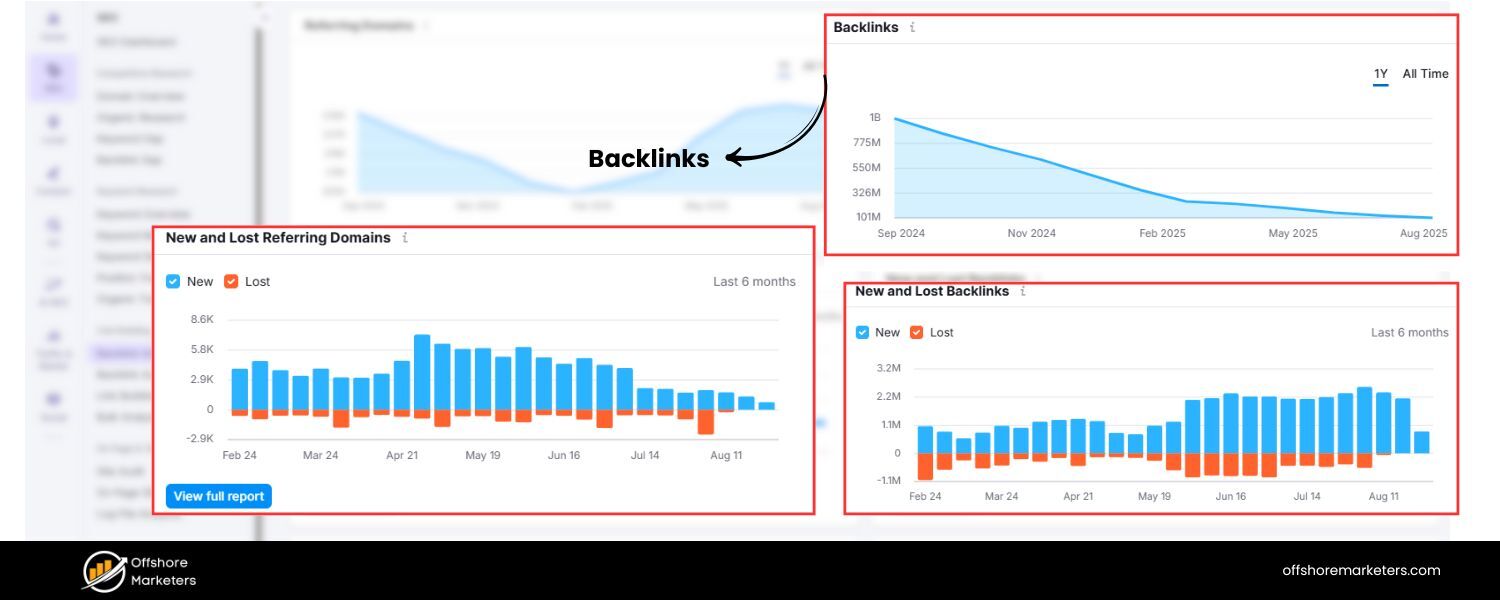
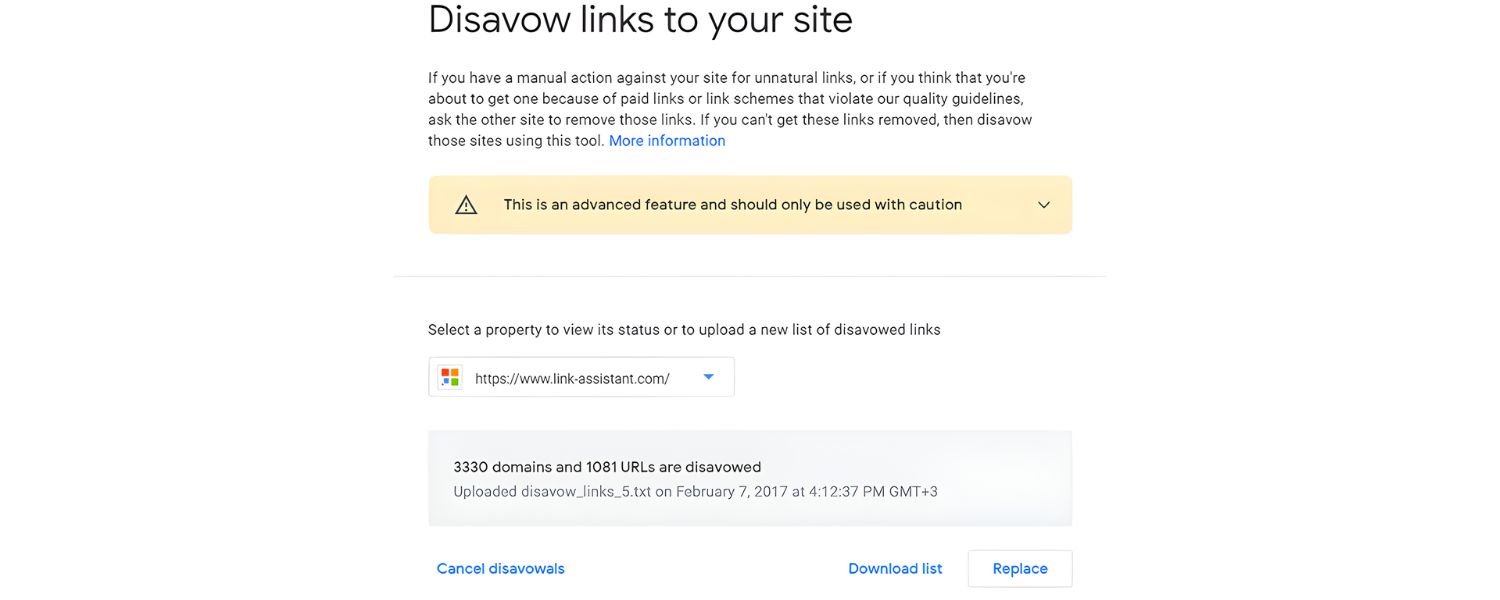
Keep a close eye on your backlink profile using tools (many SEO suites offer automatic backlink monitoring and will alert you to spikes). If you notice a bunch of toxic backlinks pointing to your site, you have the option to use Google’s Disavow Tool to tell Google you don’t want those links counted.
Google’s official word is that you typically don’t need to disavow spam links if you didn’t build them, as their algorithms likely ignore them. However, in cases of massive link blasts, many SEOs choose to disavow as a precaution – especially if you suspect the volume of bad links is enough to potentially confuse the algorithm.
Be cautious: disavowing should be reserved for clear-cut spam; don’t disavow random links just because they’re unfamiliar (not all unfamiliar links are malicious – some could be legitimate bloggers or directories linking to you).
Use disavow as a surgical tool for obvious attack links (e.g. thousands of forum profile links with spammy anchors).
It’s also wise to protect your best backlinks: build relationships with the webmasters of sites that link to you, so they’re less likely to remove links without verifying with you. You can even politely ask them to inform you if anyone ever requests a link removal, to thwart impersonators.
3. Set Up Search Console Alerts & Analytics Annotations
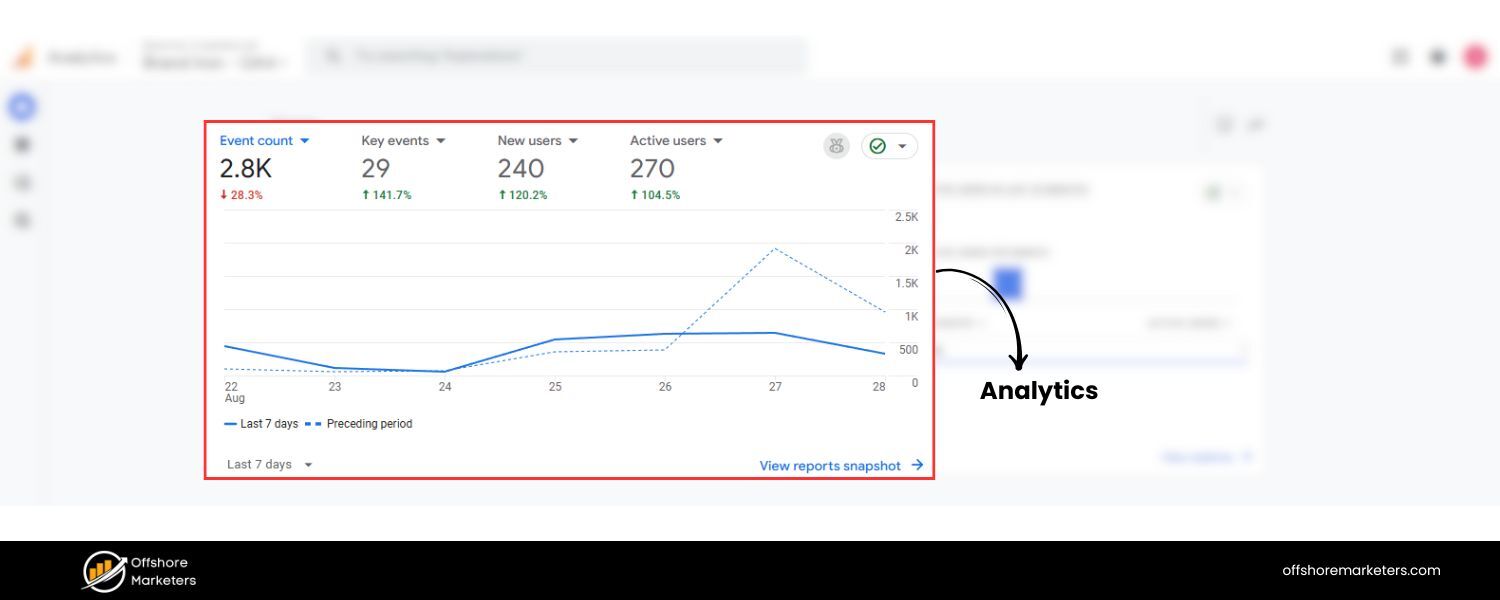
Google Search Console allows you to receive email alerts for issues like manual actions or spikes in 404 errors, etc. Enable those alerts – they can sometimes be your first warning of a negative SEO issue (like a manual penalty or security problem).
Additionally, use other tools or services that send notifications for unusual activities (for example, some backlink tools can email you if they see a sudden increase in new linking domains).
It’s also a good practice to maintain an annotation log in your analytics for any major events (both internal changes and external events). That way if you suspect an attack, you can quickly see if it aligns with something.
4. Protect Your Content
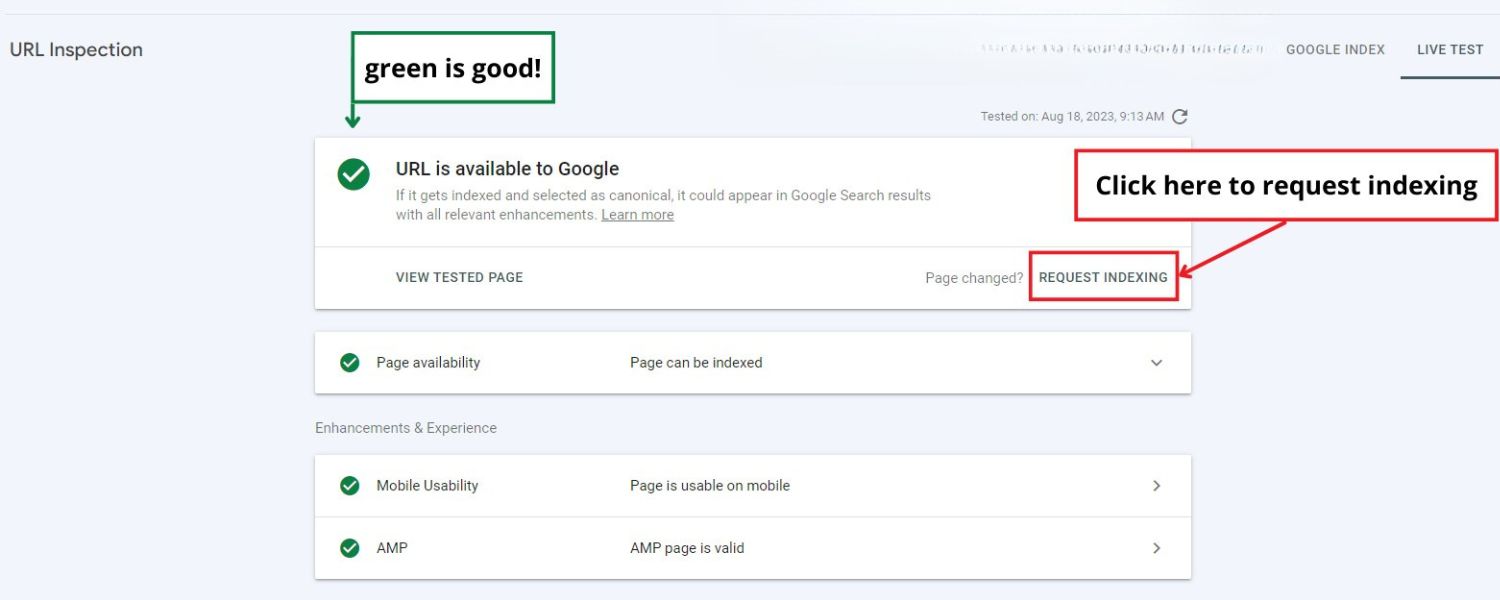
To combat content scraping, make sure your site gets crawled and indexed quickly when you publish new content. If you have a high authority site, this is less an issue, but smaller sites might consider using Indexing API for certain content (Google has an indexing API mostly for job postings or livestream content, not broadly for all pages, but just ensure your sitemap is submitted and maybe manually request indexing for important new pages).
You can also embed internal links and references in your content that make it easier to prove you’re the original (for instance, cite your own site or link to other internal pages, scrapers often copy content without cleaning those, which can signal to Google who the source is if your internal links appear on another site).
Additionally, you might use canonical tags if you syndicate content legitimately, to clarify original sources. While you can’t stop someone from stealing content, you can prepare to act by knowing the DMCA process.
It may help to add an anti-scraping script or plugin, but those are not foolproof. Ultimately, monitoring is your best defense: catch them early and get the copies taken down.
5. Keep an Eye on Site Speed and Uptime
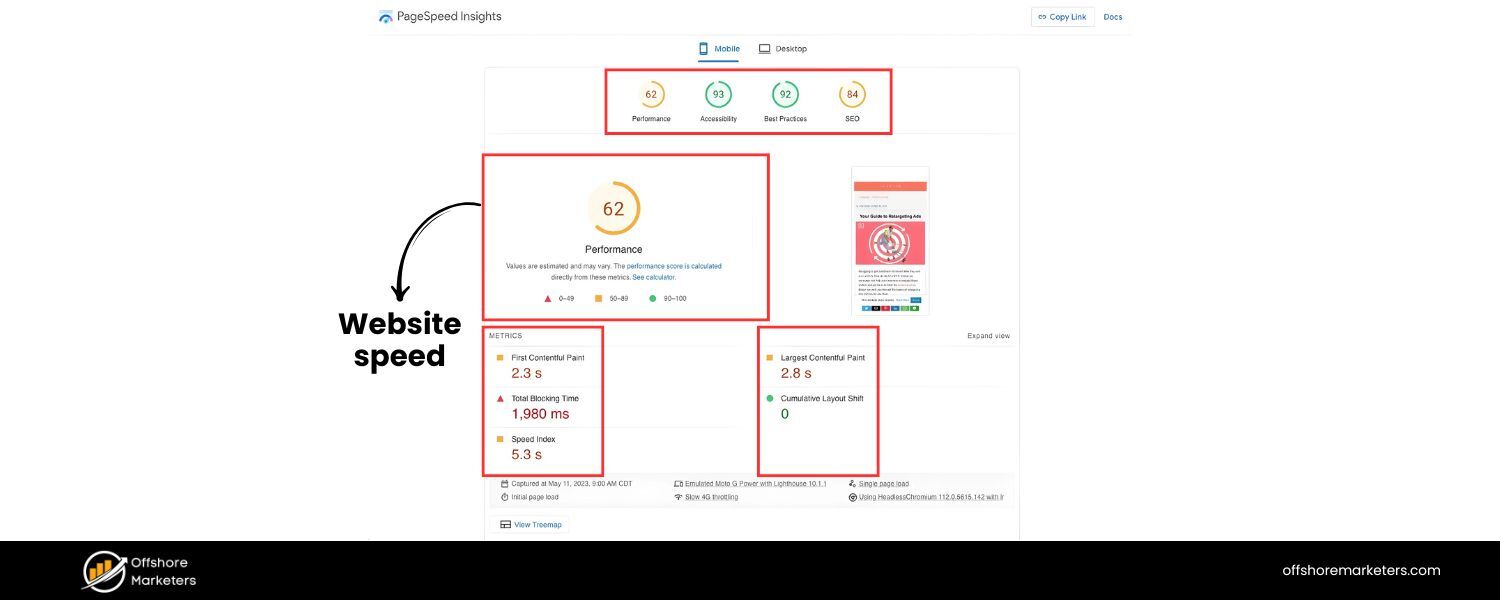
Use uptime monitoring services to alert you if your site goes down. If you get frequent alerts, investigate if it’s an attack. Employing a Content Delivery Network (CDN) not only speeds up global delivery of your content but also helps absorb and mitigate traffic spikes (like a buffer against DDoS or crawling floods).
Many CDNs and hosts also offer DDoS protection.You can also configure server rules or use firewall services (like Cloudflare, Sucuri, etc.) to rate-limit excessive requests.
For hotlinking protection, as mentioned, add rules in your server config to block external domains from directly pulling your media – many security plugins have a one-click option to prevent hotlinking. These measures ensure your site stays fast and available, keeping your SEO intact.
6. Monitor Reviews & Mentions (Reputation Management)
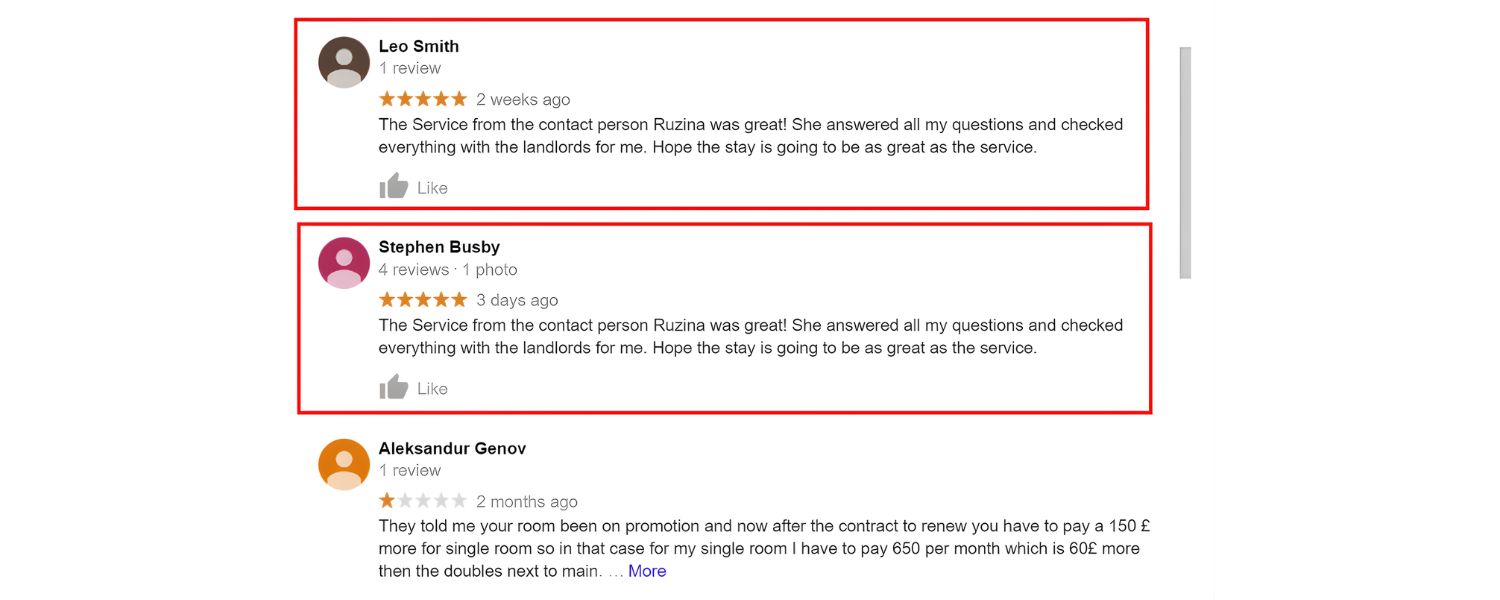
Be proactive in managing your online reputation. Claim your business profiles on major review platforms so you have control (Google, Yelp, Facebook, etc.) and can respond.
Regularly check for new reviews. Encourage happy customers to leave reviews, a strong base of positive reviews can buffer against a few fakes.If you detect a smear campaign (multiple bad reviews or negative posts in a short time), report the fake accounts/content to the platform.
Simultaneously, provide context or rebuttals on an official channel if needed, for example, a blog post addressing false claims, or an FAQ on your site clarifying any misinformation. By owning your narrative, you reduce the impact of malicious noise.
Also, as part of brand monitoring, search your brand name and common misspellings periodically, sometimes attackers will create sites or pages with similar names to confuse people (e.g., sucks. com). If found, you might need legal action if it’s defamatory, but knowing is half the battle.
7. Build a Resilient SEO Profile
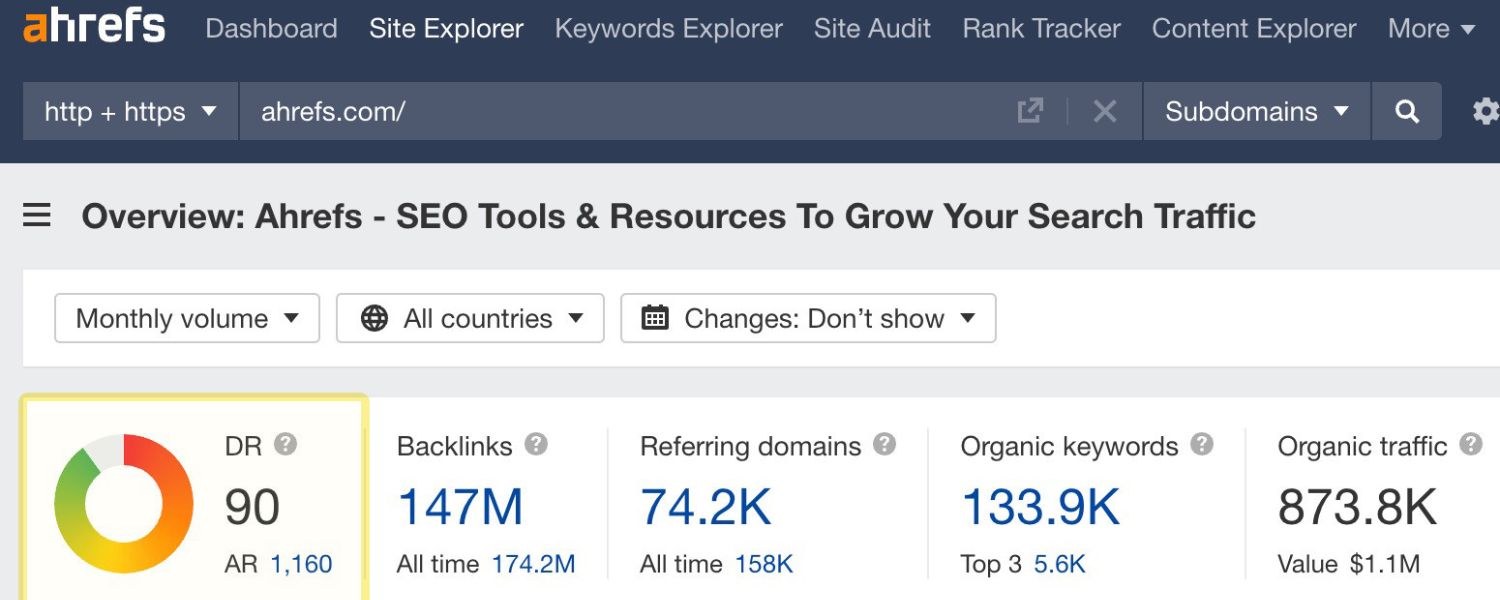
The stronger and more authoritative your site is, the harder it is for negative SEO to succeed.This means continuing to focus on quality content, earning natural backlinks, and providing a great user experience. If you have a solid link profile with hundreds of diverse, quality links, a spam blast of a few thousand links is like a drop in the ocean (and will likely be ignored by Google anyway).
If your content is top-notch and clearly the original, scrapers won’t outrank you. If your user engagement signals are good (people trust and stay on your site), a few negative mentions won’t derail that.
Essentially, a great SEO strategy is your best defense, it’s like having a healthy immune system to fight off attacks. Google has even said “No amount of negative SEO can undo a great strategy” – meaning if you consistently follow best practices, you’ll be in a strong position to shrug off sabotage attempts.
Think of it like outrunning the bear: you don’t have to be completely immune to negative SEO; you just have to be a less appealing target than others. Attackers often go for easy pickings (sites with obvious vulnerabilities or whose owners never check their SEO).
By implementing these preventive measures, you significantly reduce the likelihood that a negative SEO attack will succeed, or even that you’ll be targeted in the first place.
However, we should also cover the scenario of what to do if despite all this, you find yourself under attack. In the next section, we’ll outline a step-by-step game plan for responding to a negative SEO attack and recovering your rankings.
How to Respond and Recover from a Negative SEO Attack
Discovering that someone is sabotaging your hard-earned SEO can be stressful. The key is not to panic, but to take systematic action.
Here’s a plan of attack (for the attack) to help you respond effectively:
1. Identify the Type of Attack
First, figure out what kind of negative SEO you’re dealing with. The steps you take will differ if it’s a backlink spam attack versus a hacking incident or a flood of fake reviews.
So, review the evidence: Is it thousands of spammy backlinks? Scraped content? Has your site been compromised? Pinpoint the problem areas – you may have multiple issues at once, but tackle each separately.
2. Document Everything
It’s wise to keep a record of the malicious activity. Take screenshots of spam backlinks (or export a list from your SEO tool), save copies of plagiarized content or fake reviews, and note dates when things occurred.
This documentation can be useful if you need to report the issue to Google, webmasters, or even pursue legal action. It also helps you measure recovery later.
3. For Spam Backlinks – Disavow and Google Notification
If you are hit by a massive spam backlink campaign, prepare a disavow file listing all the domains or URLs of the bad backlinks. (Most often, disavowing by domain is easier if the majority of links from a domain are bad).
Use Google’s Disavow Links tool to submit that file, essentially telling Google “please ignore links from these sites.” Keep in mind Google will consider this suggestion but it might take some time for it to process.
If you received a manual penalty due to the spam links, you will also need to file a Reconsideration Request in Search Console after disavowing, explaining that you were the victim of an attack and have taken steps to clean it up.
Google’s team will review and hopefully lift the penalty. In your request, be honest and detailed – mention that it was a negative SEO attack and provide some evidence (this is where your documentation helps).
If there was no manual action (just algorithmic drop), usually disavow alone and time will eventually allow rankings to normalize once Google ignores the bad links.
4. For Content Scraping – DMCA Takedowns
If your content was stolen and reposted, the fastest solution is to file a DMCA takedown notice against the offending sites. You can do this via Google’s DMCA dashboard to get the URLs removed from Google search results.
Additionally, send a DMCA notice to the web host of the site (or the site owner if you can reach them), many will comply to avoid legal issues, and take down the content.
Google typically responds to valid DMCA requests within a few days to a couple of weeks. Once the copies are gone or deindexed, your original content should regain its rightful ranking if it had lost any.
Also, consider adding a copyright notice on your site (though legally it’s not required, it can be a deterrent), and maybe using services like Copysentry for early detection of plagiarism.
5. For Fake Reviews/Smear Campaigns – Contact Platforms and Set the Record Straight
Report fake reviews to the platform administrators – for example, on Google, you can flag reviews as inappropriate or even contact Google My Business support via their forums or Twitter to escalate obvious spam reviews.
Provide clear reasons why the reviews are fake (e.g., the review text has nothing to do with your business, or you have no record of that person as a customer, etc.).Often, a batch of reviews that all appear at once from newly created accounts will be taken seriously. For false information being spread on blogs or social media, you can issue a public rebuttal on your own channels.
If it’s defamatory and harmful, consulting a legal professional about a cease-and-desist or libel action might be warranted. In the meantime, continue generating positive content about your brand – engage your happy customers to leave honest positive reviews to outweigh the negatives, and maybe publish a clarification or FAQ addressing any rumors so that people searching see your side of the story.
6. For Hacking – Clean, Secure, and Request Review
Immediately fix your site. If you’re not tech-savvy, hire a professional who can remove malicious code, restore your content, and patch the vulnerability (whether it was an outdated plugin, weak password, etc.).Change all relevant passwords (hosting, CMS, database) once you’re sure the site is clean. Use Google Search Console’s Security Issues report, after cleaning, click “I have fixed these issues” to notify Google. If your site was blacklisted for malware, use tools like the Google Safe Browsing Site Status to see if it’s clear, and request a review if not.Google typically reviews hacked site cleanup requests fairly quickly. While waiting, put up a temporary message for users if appropriate (like apologizing for any inconvenience if they saw weird content, and assuring it’s fixed – this can help maintain trust).Post-recovery, conduct a thorough security audit to ensure this door is firmly closed to attackers.
7. For Link Removals – Rebuild and Communicate
If someone succeeded in getting some of your backlinks removed, reach out to those website owners.Explain that someone impersonated you and that you actually value their link. Many will be willing to restore the backlink (perhaps with more caution in the future).
To avoid a cat-and-mouse if the attacker tries again, you might arrange a specific way to authenticate communication with those sites (like you’ll always write from your official domain email).
In parallel, try to replace lost links by doing more outreach and content promotion, essentially, if you lost 5 good links, go try to gain 10 elsewhere. It sounds like letting the bad guys win, but in the end you strengthen your backlink profile.
You can’t always stop a persistent attacker from picking off a link or two, but you can outpace them by building more good links continuously.
8. Remain Calm and Patient
Most negative SEO damage can be undone, but it may take a bit of time for search engines to process changes.For example, after disavowing links or removing scraped content, Google might need to recrawl and re-index things to fully restore your rankings.
During this period, continue adding quality content to your site and don’t halt your normal SEO efforts. Show Google that your site is active, legitimate, and providing value.
This helps recover faster and sends the signal that you’re not going anywhere. Also, avoid the temptation to “fight back” against the attacker with more negative SEO, descending into a spam war will just make things worse and is not ethical (not to mention, if identified, you could end up penalized for engaging in black-hat tactics).
Take the high road and focus on cleanup and improvement.
9. Learn and Fortify for the Future
Treat the incident as a learning experience. Close any security holes, adjust your monitoring processes to catch things sooner next time, and maybe even consider publicly sharing your experience (without revealing sensitive data), sometimes, exposing that an attack happened can deter the attacker from trying again, and it contributes to the community knowledge on negative SEO.
If the attack was severe or recurring, you might use specialized services that offer mitigation (some SEO companies and security firms offer “negative SEO insurance” or monitoring packages).At the very least, stay connected with the SEO community (forums, Reddit, Twitter), often, if a new negative SEO tactic is making rounds, SEO news sites or community discussions will talk about it, so you’ll know what to watch for.
By following these steps, you should be able to neutralize most negative SEO attacks and recover your rankings. The process can be painstaking, but remember that Google’s stance is on your side, the search engine doesn’t want to penalize innocent sites, and they do aim to automatically filter out fake signals. Your job is mainly to remove the garbage pointing at your site and reinforce the positive signals.
Common Myths and Misconceptions about Negative SEO
Negative SEO is a topic that often comes with some fear-mongering and misconceptions. Let’s clear up a few myths:
Myth 1:“Any sudden ranking drop means I’m under attack.”
Reality: There are many reasons rankings can drop, and the vast majority of the time it’s not because a competitor attacked you.Algorithm updates, technical site issues, content changes, seasonality, and new competition are far more common causes. Negative SEO tends to be a last resort in very cutthroat industries. Always troubleshoot other factors before assuming negative SEO.
Myth 2: “Google will always penalize me if I have spammy backlinks.”
Reality: Google’s algorithms have evolved to where they ignore most spammy or irrelevant backlinks rather than immediately penalize a site. Google usually can tell if those links aren’t your doing. Penalties these days (especially algorithmic ones) typically happen when there’s a pattern that suggests the site owner’s intentional manipulation.Thousands of obvious spam links that appear overnight are more likely to be discounted than to hurt you – Google knows it could be an attack. You’re more at risk if you yourself were engaging in dubious link building. That said, extreme cases of negative SEO might slip through, so monitoring is still important.
Myth 3: “Negative SEO doesn’t exist / is impossible.”
Reality: This is the opposite extreme – some claim Google is so good that negative SEO is a non-issue. While it’s true Google has made great strides (and outright successful negative SEO is rare), it does exist and there have been verified cases.As we discussed, beyond links, tactics like content theft, fake reviews, or hacking absolutely can hurt a site. So it’s not something to obsess over, but also not wise to ignore completely. Stay vigilant but not paranoid.
Myth 4: “If I get hit, I can never recover.”
Reality: Recovery is very much possible. In fact, if you handle it promptly, your site can bounce back to normal relatively quickly (sometimes in a matter of weeks or a couple of months).Many site owners have gone through negative SEO attacks and, by cleaning up and disavowing, saw their rankings return. Google doesn’t “blacklist” you permanently for something you didn’t do. Just be patient and thorough in your response.
Myth 5: “I should do negative SEO on my competitors since it’s hard to trace.”
Reality: This is both unethical and risky. Not only are you violating webmaster guidelines (and basic morality) by attempting to sabotage others, but you might also trigger unintended consequences.For example, spamming a competitor’s site could get you caught if Google notices a pattern linking to sites you control. Or the competitor might become aware and take legal action (yes, lawsuits have occurred over deliberate online sabotage).Moreover, as we’ve noted, well-established sites are fairly resilient, so you could waste a lot of time/money for no result. It’s far better to invest that energy in improving your own site. Negative SEO is a shortsighted tactic that can backfire, don’t go down that path.
Conclusion: Stay Vigilant, Ethical, and Focused on Quality
Negative SEO may sound scary, but with the knowledge you’ve gained in this guide, you’re now equipped to protect your website against most malicious SEO attacks.
Remember that while these attacks are real, they are relatively uncommon and rarely as devastating as they used to be in the early 2010s. Search engines have your back to a large extent, working to nullify unfair tactics in the background.
Your job as a site owner or SEO specialist is to stay vigilant, monitor your backlinks, content, and reputation, and to act quickly and calmly if something seems wrong.
At the same time, the best defense is a good offense: keep building your site’s authority through legitimate means. Publish great content, earn genuine backlinks, foster user trust, and you’ll create a moat that is hard for negative SEO to bridge.
When you focus on positive SEO and user experience, you make it that much harder for a bad actor to bring you down. In fact, many who attempt negative SEO give up if they see their efforts aren’t having the desired effect, it’s just not worth it for them.
In the competitive world of online search, it’s unfortunate that some resort to dirty tricks. But armed with sound strategy and quick response tactics, you can ensure your site not only survives such attempts but continues to thrive.
Keep an eye on your site’s health, engage in white-hat SEO practices, and you’ll likely never have to worry about negative SEO more than as a passing what-if.
Finally, if you found this guide helpful, or if you have experiences of your own with negative SEO, feel free to share your thoughts or questions in the comments below.
Staying informed and helping each other in the SEO community is how we all get stronger against bad actors. And if you ever need professional assistance in auditing or safeguarding your site’s SEO, don’t hesitate to reach out, sometimes an expert eye can give you peace of mind.
Stay safe out there, and keep ranking high with integrity!

.png)
Shopify SEO: Guide to Ranking Your Store and Driving Sales
Most Shopify store owners set up their store, list their...

Content Marketing : Definitive Guide to Strategy, Content Types, and Measurable ROI
Content marketing generates 3x more leads than outbound marketing at...

Above the Fold: Guide to Conversions, Rankings and Faster Pages
Above the Fold in 2026: The Complete Guide to Conversions,...

Off-Page SEO Checklist: Guide to Building Real Authority
Most websites spend months creating great content, only to wonder...

What Is Keyword Bidding? The Complete Strategy Guide for Smarter Ad Spend
Most advertisers believe the highest bid wins the auction. It...

What Is Google Trends? The 2026 Marketer’s Complete Guide
If you are not already pulling weekly insights from Google...
If you want a growth partner who will get to know every aspect of your business and treat your budget like their own — we are the right fit.
.png)


.png)
.png)
.png)
.png)
.png)
.png)
2026 ALL RIGHTS RESERVED MADE IN INDIA
