
Social Media Calendar: A Step-by-Step Guide to Creating One
August 22, 2025
Introduction
In my 25 years as a marketing professional, one lesson stands out: “If you fail to plan, you plan to fail.” This is especially true for social media. A social media calendar is the secret weapon behind successful brands’ online presence.
Instead of scrambling for what to post each day, you can strategically map out content in advance. This guide will show you how to create a powerful social media calendar that keeps your content organized, on-brand, and primed to engage your audience.
What Is a Social Media Calendar?
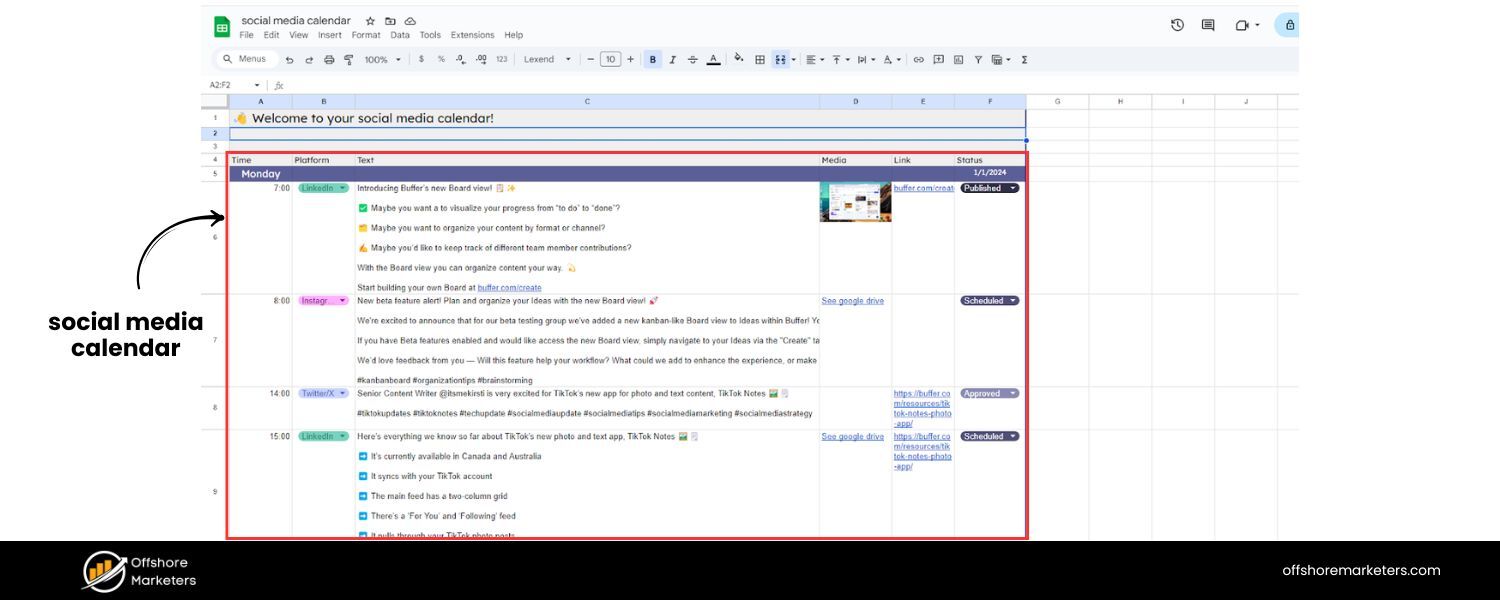
A social media calendar (also called a social media content calendar) is a schedule and planning document for all your upcoming social media posts. It can take many forms – a spreadsheet, a document, a digital calendar, or a feature within a social media management service.
The calendar typically displays what content will be posted, when (date and time), and where (which social network). Many calendars also include details like post captions, visuals (images or videos), hashtags, links, and any @mentions or tags to include. In essence, it’s a centralized place to see your entire social publishing schedule at a glance.
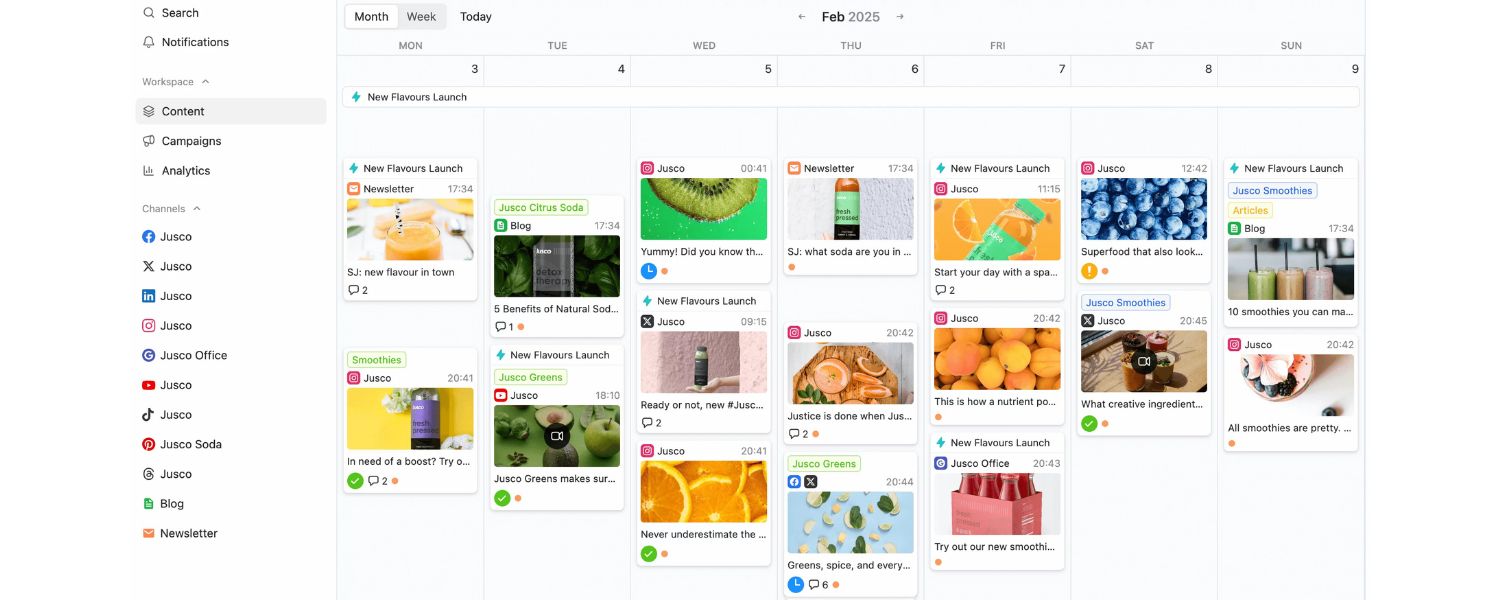
An example of a social media content calendar in a monthly view. Each entry shows the planned post content, scheduled date/time, platform, and tags for content categories. This bird’s-eye view helps ensure you cover all your topics and channels without overlap.
A social media calendar can be as simple or detailed as needed. For a solo creator or small business, it might be a basic weekly posting schedule in a Google Sheet. For a large brand, it could be a sophisticated dashboard integrating multiple profiles and team workflows. No matter the format, the goal is to provide structure and foresight for your social media strategy.
Why You Need a Social Media Calendar (Key Benefits)
If you’ve ever felt frantic trying to come up with a post at the last minute, a social media calendar is the solution. Here are the major benefits of using one:
1. Consistency in Posting
Consistency is crucial for building an audience. A calendar lets you plot out posts days or months ahead, ensuring you maintain a regular cadence. This prevents lapses in activity (so your followers don’t forget you) and avoids overwhelming them by spacing out content smartly. In fact, businesses that post on a steady schedule see better engagement rates than those with sporadic posts.
Research even shows that on networks like Facebook and Instagram, posting around two times per week yields the highest engagement rates on average, reinforcing that quality and consistency beat sheer volume.
2. Time and Stress Savings
Planning posts in advance saves you from the daily scramble for content ideas. Instead of reacting each day, you batch your content ideation and creation. This proactive approach saves time and reduces stress. Your team isn’t rushing to draft copy or design graphics at the last second, meaning fewer mistakes and “fire drills.” As a result, you free up time to focus on strategy and creative improvements.
3. Strategic Alignment
A calendar forces you to align each post with larger marketing goals and campaigns. Rather than random content, you can map posts to support product launches, events, or themes important to your brand. It becomes easier to ensure your social content matches your brand voice and marketing strategy. You can also spot gaps, for example, if you notice an upcoming week has no content for a key product line or audience segment, you can fill that in ahead of time. In short, the calendar keeps your content purposeful and on-message.
4. Improved Content Quality and Consistency
When you’re planning ahead, you have breathing room to polish your content. You can double-check text for typos or get necessary approvals, protecting your brand reputation. There’s less risk of posting something off-brand or erroneous in haste.
Planning also helps maintain a cohesive style and voice across all platforms since you can review the content mix together. Overall, a calendar encourages higher-quality output and a consistent brand presence.
5. Optimal Timing and Increased Engagement
With scheduling, you can time posts for when your audience is most active (rather than whenever you happen to hit “publish”). Many social tools and studies highlight the best times to post on each platform for maximum reach.
For example, one study found Facebook posts perform best around 9 a.m. on weekdays, while Instagram content tends to get more traction around 4 p.m.. A calendar lets you plan content to hit these sweet spots. By consistently posting at proven optimal times, you increase the likelihood of your audience seeing and engaging with your posts.
6. Team Collaboration and Workflow
For organizations with multiple team members (e.g. social media managers, designers, copywriters), a shared calendar is a collaboration hub. Everyone gains visibility into what’s coming down the pipeline. This transparency minimizes last-minute scrambles – the design team, for instance, can see that a graphic is needed for next Tuesday’s Instagram post, and the copywriter can draft text well in advance.
A calendar can also integrate an approval process, where stakeholders can review and sign off on posts before they go live. Overall, it streamlines teamwork by centralizing content plans in one place.
7. Big-Picture View and Content Variety
Seeing your posts laid out in calendar form provides a bird’s-eye view of your content strategy. This makes it easier to balance your content mix. You can ensure you’re covering different content pillars (topics) and formats, rather than accidentally posting five product promotions in a row.
For instance, you might notice your February calendar has mostly text updates, a cue to sprinkle in some videos or polls for variety. A calendar also highlights opportunities for content repurposing. By looking back at past months, you can identify high-performing posts to recycle or update, and make sure evergreen content is periodically reshared for new followers.
8. Timeliness (Seasonal and Topical Content)
With a calendar, you won’t miss key dates. You can plot out posts for holidays, awareness days, or seasonal events relevant to your business in advance. For example, if Black Friday or #InternationalWomensDay is important for your brand, you’ll see it on the horizon and prepare content for it.
By the same token, you can coordinate social posts with offline or broader marketing campaigns (product launches, sales, conferences, etc.) so that everything happens in sync. This ensures your social content is timely and relevant, tapping into conversations when they’re most trending.
9. Efficiency and ROI Tracking
A content calendar helps you be more efficient with resources – you can plan batches of posts in one sitting, create graphics in bulk, or write copy for multiple posts at once. This beats context-switching every day to make one post. Moreover, maintaining a calendar with past posts and analytics can improve your reporting. By logging what was posted when, alongside performance metrics, you have data to analyze what works best.
Many social media management platforms tie the calendar to analytics, so you can see, for example, that a certain post scheduled at 3 p.m. spiked engagement, helping inform future strategy. Tracking results against the calendar also helps demonstrate ROI. You can set KPIs (like a target number of shares or clicks per week) and easily check your calendar to see if your content met those benchmarks.
In short, a social media calendar is essential for effective social media management. It saves time, keeps you organized, and enables a more strategic approach to social content. As one marketing guide put it, a content calendar is a game-changer for anyone wanting to grow their presence on social media.
How to Create a Social Media Calendar (Step-by-Step)
Ready to build your own social media content calendar? Follow these steps to create a robust calendar that will drive your social strategy:
1. Define Your Social Media Strategy and Goals
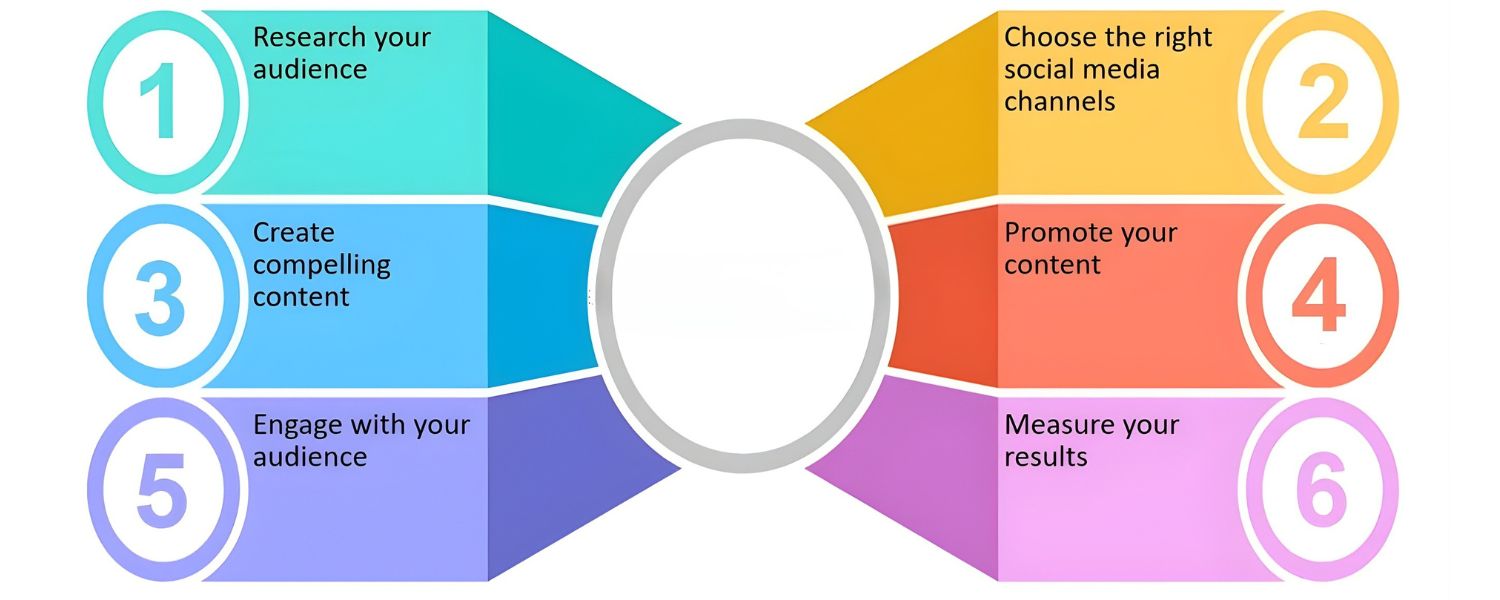
Before diving into calendar tools, take a step back and clarify your social media strategy. A calendar is only effective when it’s guided by a solid plan. Ask yourself: Why are we on social media and what are we trying to achieve? Set S.M.A.R.T. goals for your social presence (e.g. increase Instagram engagement by 20% in 3 months, drive 500 monthly clicks to your website from social posts, etc.). Identify the key performance metrics you’ll track for success (likes, shares, link clicks, conversions, etc.).
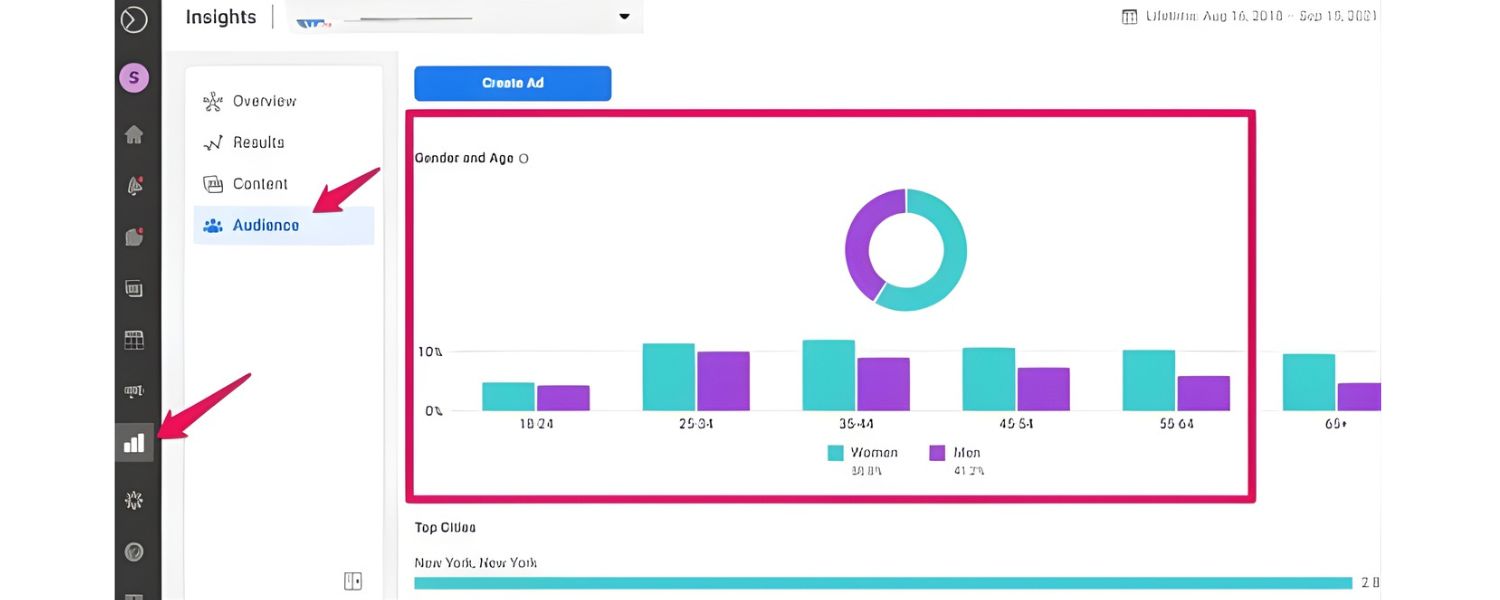
Next, define your target audience and buyer personas. Understanding who you’re speaking to will inform what content to post and where. Research your audience’s demographics and preferences on each platform. For example, if you know Instagram’s user base skews younger while Facebook’s skews older, you can tailor content accordingly and choose platforms that align with your audience segments.
With goals and audience in mind, outline your content pillars or themes. These are the main topics or categories your content will fall under, usually reflecting your brand’s values and your audience’s interests. For instance, a fitness brand’s pillars might be: workout tips, nutrition advice, customer testimonials, and product announcements. Having 3-5 content pillars ensures you consistently deliver value in areas your audience cares about, while staying on-brand. It also helps balance your content, so you’re not posting only promotions or only memes, but a healthy mix.
Pro Tip:
Consider the 80/20 rule for content: 80% of your posts should inform, educate, or entertain your audience, and at most 20% should directly promote your business. This keeps your feed engaging and audience-centric, so you’re “selling” subtly by providing value. For example, share industry tips, how-to guides, or uplifting stories far more often than you share discount codes or product plugs.
Finally, decide which social media platforms you will focus on. You don’t need to be everywhere – it’s better to concentrate on the platforms where your target audience is most active and that fit your content type. For example, if you have a very visual product and a younger audience, Instagram and TikTok might be top priorities. If you’re B2B or targeting professionals, LinkedIn could be key. Outline the primary networks you’ll include in your calendar, and have clear objectives for each (e.g. use Twitter for customer support and quick news, use YouTube for longer educational videos, etc.).
By the end of this step, you should have a brief social media strategy document that includes your goals, target audience info, chosen platforms, and content pillars. This strategy will serve as the foundation for your calendar. As one expert noted, “Before you can make a calendar, you need a strong social media strategy… Your social media strategy is why you’re on social, and your social media calendar is what and when you’re posting.”
2. Audit Your Existing Content and Channels
(If you’re completely new to social media for your brand, you can skip this step. But if you’ve been posting already, even without a formal calendar, an audit is extremely valuable.)
Take inventory of your current social media presence and past content performance. A social media audit means reviewing what you’ve posted before, which tactics worked or fell flat, and how your profiles are performing. This data will guide your new content calendar so you can double-down on proven ideas and avoid past mistakes.
Key questions to answer in an audit include:
A. What posts have performed best? Look at metrics like engagement (likes, comments, shares), reach, click-throughs, or conversions for past posts. Identify any high-performing posts or themes – these are clues to what resonates with your audience.
B. Which platforms are strongest for us? Check follower growth and engagement on each platform. You might find, for example, that your Facebook page gets far more engagement than Twitter, or that Instagram is growing faster. This could influence where you focus your content efforts.
C. How often have we been posting on each platform? Maybe you’ve only been posting on LinkedIn once a week but tweeting three times a day. Compare those frequencies to the engagement you see. Also note if there were times of day your audience seemed most responsive.
D. Are there content gaps or inconsistencies? Perhaps you realize you post a lot about product features but rarely about customer stories, or you’ve neglected a platform entirely. An audit reveals areas to improve. It also flags any outdated profiles or branding elements that need cleanup.
Conducting an audit can be done manually by scrolling through your feeds and compiling data, or by using analytics tools. Many social media management platforms (like Hootsuite or Sprout Social) offer built-in reports that can simplify gathering these insights. For instance, you can quickly pull a report of your top posts across all channels, or see what days/times you usually post and how that correlates with engagement.
Use the audit findings to refine the strategy from Step 1. If the data shows certain content types perform better (e.g. videos consistently outperformed images), you’ll want more of those in your calendar. If engagement dips on weekends, maybe schedule fewer posts then or experiment with different timing. Essentially, let history inform your future calendar so you’re not planning in a vacuum.
3. Choose Your Content Mix and Posting Cadence
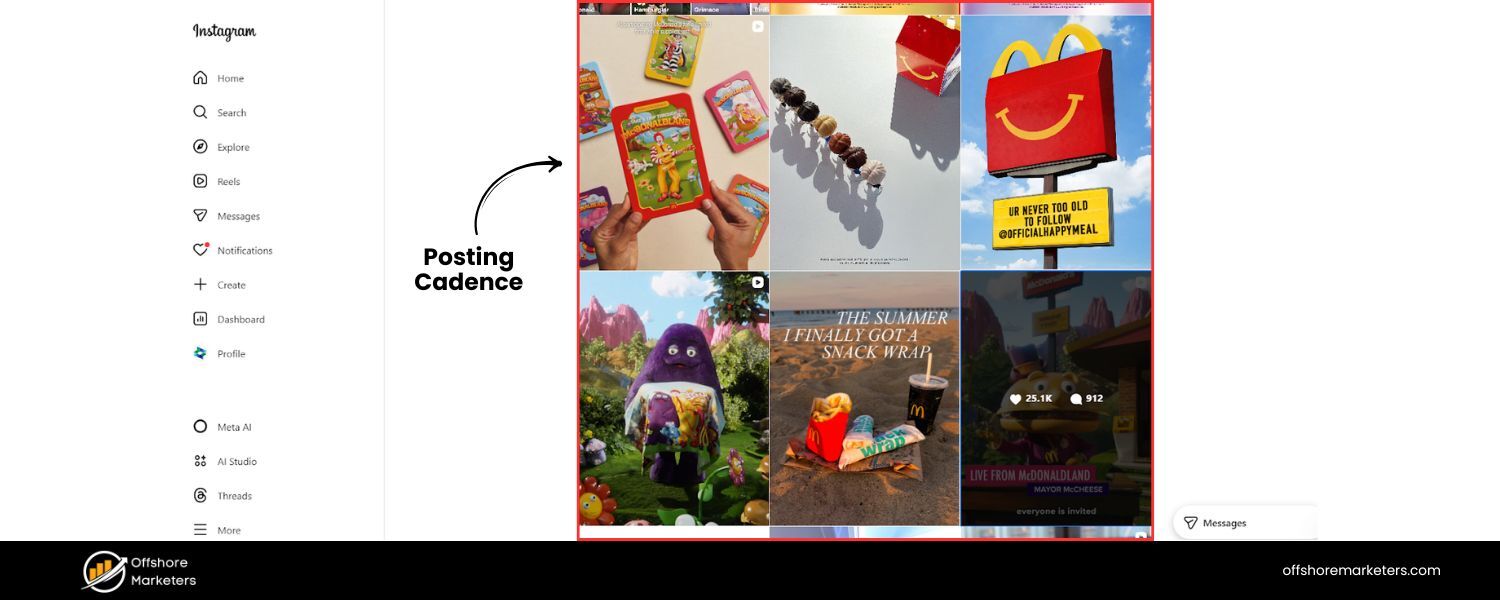
Now it’s time to decide what kinds of content to post and how often. This step transforms your strategy and audit insights into a tangible game plan for content creation.
First, brainstorm the specific content ideas or types you want to include, mapped to your content pillars. For each content pillar (topic/theme), think of recurring post types or series you could do. For example, if one pillar is “educational content,” you might plan weekly how-to videos or tip-of-the-day posts.
If another pillar is “customer stories,” maybe you do a monthly client spotlight. Having a few consistent content types makes it easier to generate ideas and ensures you’re hitting each pillar regularly. Common post types to consider include:
A. Images and Graphics: Photos, illustrations, infographics or quote graphics. These are great for visual platforms like Instagram, Facebook, and Pinterest.
B. Videos: Short-form videos (Reels, TikToks, YouTube Shorts) for high engagement, or longer-form videos/webinars on platforms like YouTube and LinkedIn. Video is hugely popular – for instance, Instagram videos generate more comments on average than image posts.
C. Stories or Temporary Content: ephemeral posts on Instagram/Facebook Stories or Snapchat, useful for quick updates, behind-the-scenes glimpses, or interactive polls.
D. Text Posts and Links: Status updates, tweets, or LinkedIn posts that are text-only or include a link to an article. These can drive traffic (e.g. share your blog posts) or spark conversations with a question prompt.
E. User-Generated Content (UGC): Content created by your fans or customers, which you repost (with permission). This can be testimonials, unboxing videos, customer photos, etc., and is powerful for building community.
F. Memes and GIFs: Lighthearted, trendy content can boost engagement if it fits your brand voice. Just use sparingly and ensure it’s appropriate for your audience.
Mixing various formats will keep your feed fresh and cater to different audience preferences. Align the formats with the platforms (e.g. plan more short videos if you’re focusing on TikTok, more article links if you’re active on LinkedIn).
Next, determine your posting frequency and schedule. How often should you post on each platform? There’s no one-size-fits-all answer, it depends on your resources and audience tolerance. As a baseline, it’s wise to post at least a few times per week on major platforms to stay active. But consistency matters more than volume. It’s better to post 3 quality items a week consistently than promise 3 per day and burn out. Use your earlier audit and any industry benchmarks as a guide.
For example, if twice a week on Facebook yielded good engagement, you might stick with that frequency. On faster-paced platforms like Twitter, you might post daily or multiple times a day.
Also consider when your audience is online. Look at timing insights from your analytics or studies on best posting times. Many brands see success posting during weekday mornings and around lunch breaks, when people check their feeds. For instance, 9–11 a.m. on weekdays often captures the work-day crowd’s attention on X (Twitter). You might plan your posts to publish around those peak times. Keep in mind time zones if you have a global audience.
Ultimately, craft a posting schedule that is realistic for your team to execute and sustainable long-term. You can always adjust later based on results. At this stage, you might draft a simple table of how many posts per week per platform (e.g. “Instagram: 4 posts/week (Mon, Wed, Fri, Sat at 6pm); LinkedIn: 2 posts/week (Tue, Thu at 9am)”, etc.). This framework will soon be filled with actual content in the calendar.
4. Choose a Calendar Tool or Format
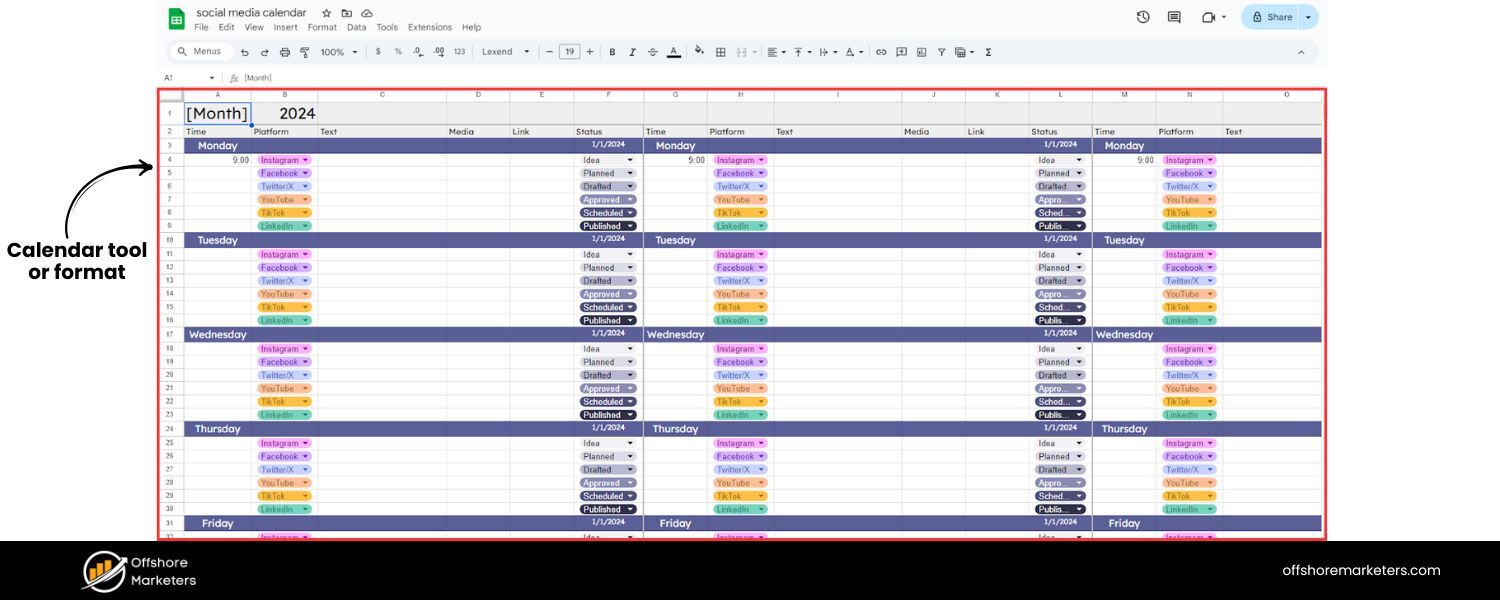
Now that you know what you want to post and how often, you need to decide where to build and host your calendar. There are several approaches, so choose one that fits your needs and budget:
A. Spreadsheet or Calendar Template
Many people start with a simple spreadsheet (Excel or Google Sheets) or a calendar template. You can label columns for date, time, platform, post text, image, link, etc. This option is free (or very low cost) and highly customizable. In fact, companies like HubSpot and Hootsuite offer free social media calendar templates in spreadsheet format that you can download and modify. If you’re comfortable in spreadsheets and have a smaller scale operation, this might be sufficient. The downside is manual updating and no automation for publishing.
B. Dedicated Social Media Management Tool
There are many tools that include a content calendar interface plus scheduling features to actually queue and publish your posts. Examples include Hootsuite, Sprout Social, Buffer, Sendible, Loomly, SocialPilot, and others. These platforms often have a drag-and-drop calendar view, support for multiple users, and extra features like content libraries or analytics. They can save you time by letting you plan and schedule posts in the same place.
For instance, with a tool like Buffer or Hootsuite, you can visually plan a month’s posts and set them to auto-publish at the scheduled times. Many tools also offer a free tier or trial (Buffer has a free plan for up to 3 social accounts, Hootsuite and others offer trials). If you have the budget and want to streamline everything, a dedicated tool is worth considering for your calendar.
C. Project Management or Calendar Apps
Some teams leverage general project management tools like Trello, Asana, or Notion to create content calendars. These can be adapted with calendar boards or custom workflows for content approval. For example, you could have a Trello board with cards for each post moving through stages (idea > in design > scheduled > posted). Or use a shared Google Calendar/Outlook Calendar to mark posting dates (though those are less detailed). If your team already uses such a tool, it might be convenient to integrate the social calendar there.
Miro (an online whiteboard app) is another creative option, the Hootsuite social team uses Miro boards to brainstorm and organize content ideas visually. Just be sure that whatever tool you choose, it’s accessible to all team members who need to contribute.
The key is to pick a format that you will actually use consistently. Fancy software is wasted if you don’t update it. On the other hand, an Excel sheet that only one person can access might hinder team input. Think about factors like: collaboration needs (multi-user access?), automation (need auto-scheduling or will you post manually?), visual layout (calendar view vs. list), and of course cost. Don’t be afraid to start simple, you can always migrate to a more robust tool as your needs grow.
5. Populate the Calendar with Content
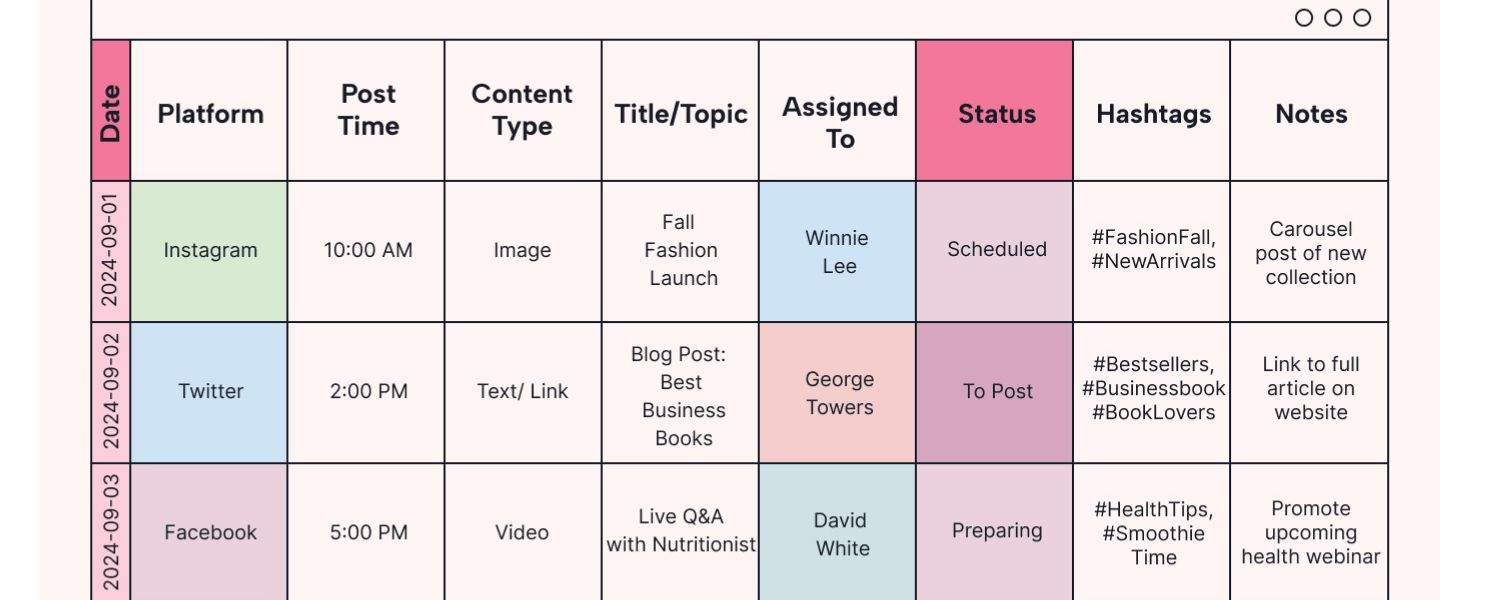
With your template or tool ready, it’s time for the core work: filling in your social media calendar. This step is where you schedule out actual posts day by day, using your strategy, content ideas, and posting cadence as guides.
Start by choosing the timeframe you’ll plan for. Many find it effective to plan one month at a time, with weekly adjustments as needed. Others might plan a whole quarter in advance at a high level. If you’re just starting, try planning the upcoming month’s content in detail.
Now, use your content pillars and post ideas to assign specific posts to dates on the calendar. A good approach is to distribute your content pillars evenly over your schedule. For example, if you have 4 pillars and you post 4 times a week, you might aim to hit each pillar roughly once per week. On your calendar, it could look like: Monday – educational tip, Wednesday – product feature, Friday – customer story, Sunday – entertaining/meme related to your niche.
Mark important dates and campaigns first. Place any fixed events on the calendar before filling in routine posts. This includes holidays, observances, or seasonal events relevant to your brand, as well as your own marketing campaigns or product launches. For instance, if you have a new product release on March 15, block that date out with a special announcement post. If Earth Day is coming on April 22 and environmental themes suit your brand, plan a post around it.
Many social media teams maintain a list of “social media holidays” – quirky celebrations like National Coffee Day or important ones like International Women’s Day – and integrate those for fun content. (There are free resources listing social media holidays for each day of the year.) By penciling in these key dates, you ensure your calendar will capitalize on timely topics and you won’t forget to prepare for them.
Next, fill in the regular slots with content ideas. Write brief placeholders for each post on the calendar, including at least the topic or title, content type (e.g. video, image, link), and which platform it’s for. For example: “Jan 10 – Instagram: behind-the-scenes Reel of product setup” or “Jan 12 – LinkedIn: share blog article on industry trends + commentary”. You don’t have to write the entire post caption in the calendar initially (though you can), but include enough detail that it’s clear what needs to be created.
Ensure that the posting frequency you decided is reflected. If your schedule said 3 Instagram posts per week on specific days, make sure you have entries for those days. Try to stick to a consistent pattern (audiences appreciate a predictable rhythm), but also remain flexible. It’s wise to not pack every single day with content, leave a few free days or slots each month. This gives you flexibility to add an impromptu post if something timely comes up (more on that in Step 7).
As you populate the calendar, double-check for variety and balance:
A. Are you covering all your content pillars regularly?
B. Are you using a mix of formats (not all text posts or all photos in a row)?
C. Are you hitting each platform an appropriate number of times?
D. Are important promotional messages spaced out with plenty of non-promotional content (remember the 80/20 rule)?
This is also a good moment to consider cross-posting strategy. Will you post the same piece of content across multiple platforms, or tailor each separately? Many brands repurpose content, but be mindful to adjust copy or imagery to fit the platform’s style. For instance, an in-depth article link might be great for LinkedIn and Facebook, but you’d convert it into a short infographic for Instagram.
Your calendar can note if a single content idea will be used on multiple channels (and perhaps scheduled on the same day for all, or staggered). However, avoid excessive identical cross-posting – each network’s audience expects a native experience. Our advice is to reframe or tweak content for each platform even if it’s on the same topic.
At the end of this step, you should have a full calendar outline for your planning period, e.g. a month’s worth of social media posts assigned to specific dates and times. It’s okay if not every detail is fleshed out – you might still need to write captions or create graphics, but you have a clear roadmap of what’s going out when.
6. Create Content Assets and Draft Copy
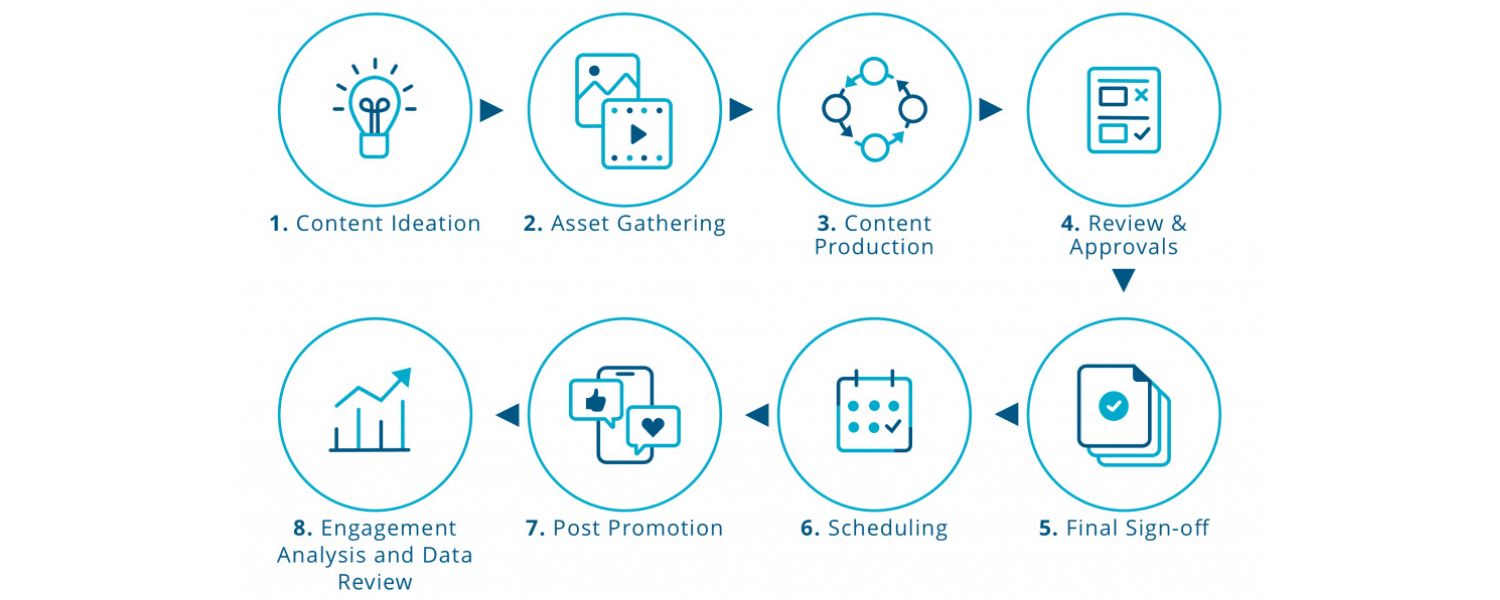
With the calendar mapped, it’s production time. Now you (and your team) will create the actual content for each planned post. This involves writing the social media copy, designing or sourcing the visuals, and preparing any links or tags.
Go through your calendar and ensure for every post you have:
A. Written caption or text
Draft the message that will accompany the post. Include hashtags if used (especially on Instagram or Twitter), @mentions of any partners or featured users, and a call-to-action if applicable (e.g. “Read more on our blog – link in bio” or “Tell us your experience in the comments”).
Keep platform character limits in mind (like 280 characters for a tweet, though Twitter (X) now allows longer for subscribers, or optimal lengths such as ~150 characters for LinkedIn before truncation). Writing these in advance allows time for wordsmithing and ensures consistency in tone.
B. Visuals (images/videos)
Create or gather the media for each post. You might design graphics using tools like Canva or Adobe Express, shoot photos or video, or pull user-generated images. Aim for high-quality visuals that meet the recommended specifications for each platform (dimensions, aspect ratio, etc.).
If you’re not a designer, there are thousands of templates available (Adobe Express alone offers free templates and stock images to quickly make standout social content). Plan any graphic design or video editing well before the publish date, especially if you need input from a design team. It’s helpful to keep all these assets organized in a folder or asset library.
C. Links and tracking
If your post includes a link (to a blog, product page, etc.), have the URL ready. Consider using UTM parameters or a link shortener (like Bitly) to track clicks from that specific post. Some social media tools allow you to generate trackable links or integrate with your analytics so you can later see traffic from social posts.
D. Hashtags and keywords
Research relevant hashtags for each post, if applicable. A good calendar often has a space for “hashtags” to list which ones to include. Using popular and targeted hashtags can expand reach, but avoid too many (generally 1–5 well-chosen hashtags are better than 20 random ones). Also, ensure any keywords you’re targeting for SEO or trends are incorporated naturally in your post text.
It can be efficient to batch similar tasks. For instance, spend a day (or an afternoon) just writing out all the post captions for the next two weeks, then another block designing all the images or filming all videos needed. This assembly-line approach leverages your focus on one type of work at a time. Some content, like short videos, might take longer to produce, so plan those first.
Don’t forget to proofread and double-check each piece of content. Verify that @handles you plan to tag are correct, test that links aren’t broken, and review for spelling or grammar errors. It often helps to have a second set of eyes review important posts, especially anything time-sensitive or high-stakes, to catch mistakes.
By the end of this step, you should have a content library of finished posts (text and accompanying media) for the period you planned. Essentially, everything needed to execute the calendar is now ready or in progress. This preparation is where the magic happens: you’re building a buffer of content so that you’re always ahead of the game.
7. Schedule and Publish Your Posts
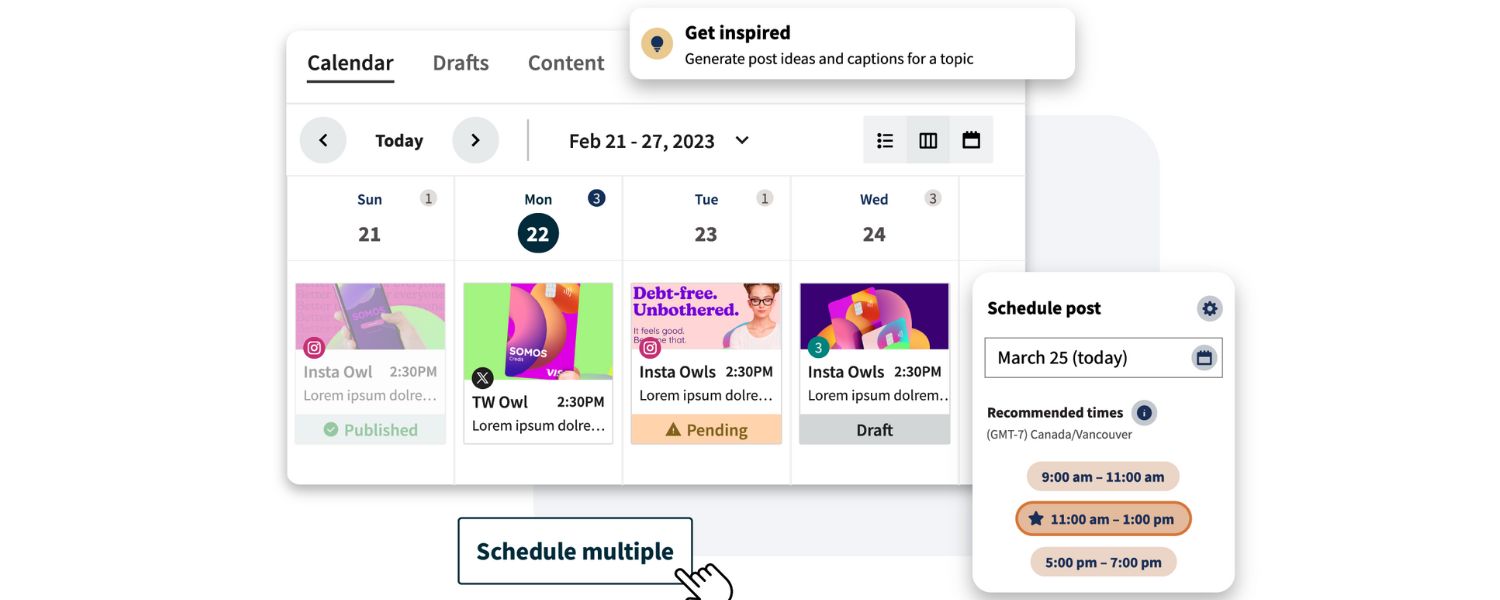
This is where your planning pays off in execution. With content created, you can now schedule posts to publish at the designated times according to your calendar.
If you’re using a social media management tool with scheduling capabilities, load your content into the scheduler:
A. Connect your social media accounts to the tool (if not done already). For example, in Buffer or Hootsuite you’d authorize access to your Facebook, Instagram, Twitter, etc. so the tool can post on your behal.
B. Use the tool’s calendar interface or compose window to set up each post. Copy in the text, upload the image or video, and select the date & time it should go live (as per your calendar plan). Many tools allow you to simply drag content onto a calendar grid or use a queue with preset time slots.
C. Double-check the scheduled times, especially if you’re working across multiple time zones. It’s easy to accidentally schedule for 5am instead of 5pm, for instance. Most tools display a list or calendar view of all scheduled posts – give it a once-over to ensure everything lines up with your plan and no days are accidentally blank or overpacked.
One advantage of scheduling tools is you can often preview how a post will look on each platform before it’s published, ensuring your formatting is right (e.g. line breaks, link previews, or cropping on images). Some tools even have optimization features – for example, Sprout Social’s ViralPost can suggest the ideal posting times based on your audience dat. If using such features, you might adjust timing slightly if the tool indicates a better slot than you originally chose.
What if you aren’t using a scheduling tool? You can still implement your calendar, it just requires manual action. Set reminders on your phone or calendar for when to post, or use a notification system. For instance, you could load tweets into Twitter’s drafts and then manually hit publish at the scheduled times. However, to maximize consistency and save effort, using at least some scheduling functionality is recommended – even the native Facebook Business Suite allows scheduling Facebook & Instagram posts for free.
Once scheduled, your content will automatically publish at the set times without you needing to be online (though you should still monitor, which we’ll cover in the next step). Be sure to account for each platform’s quirks – for example, Instagram Stories generally can’t be auto-scheduled by third-party apps due to API limits (some tools send you a push reminder to publish it yourself).
Similarly, some platforms like X (Twitter) or Pinterest might have limits on certain content scheduling unless you use their partners or native tools. Research your tool’s capabilities so you know what’s hands-off versus what needs a manual push.
Finally, as posts go live, take a moment to engage with any responses. A calendar is not “set and forget” – it frees you from the timing of posting, but you should still be present to reply to comments, thank people for shares, and join conversations that your content sparks. This real-time engagement is key to social media success and is made easier because you’re not worrying about what to post next; your calendar has it covered!
8. Monitor Performance and Stay Flexible
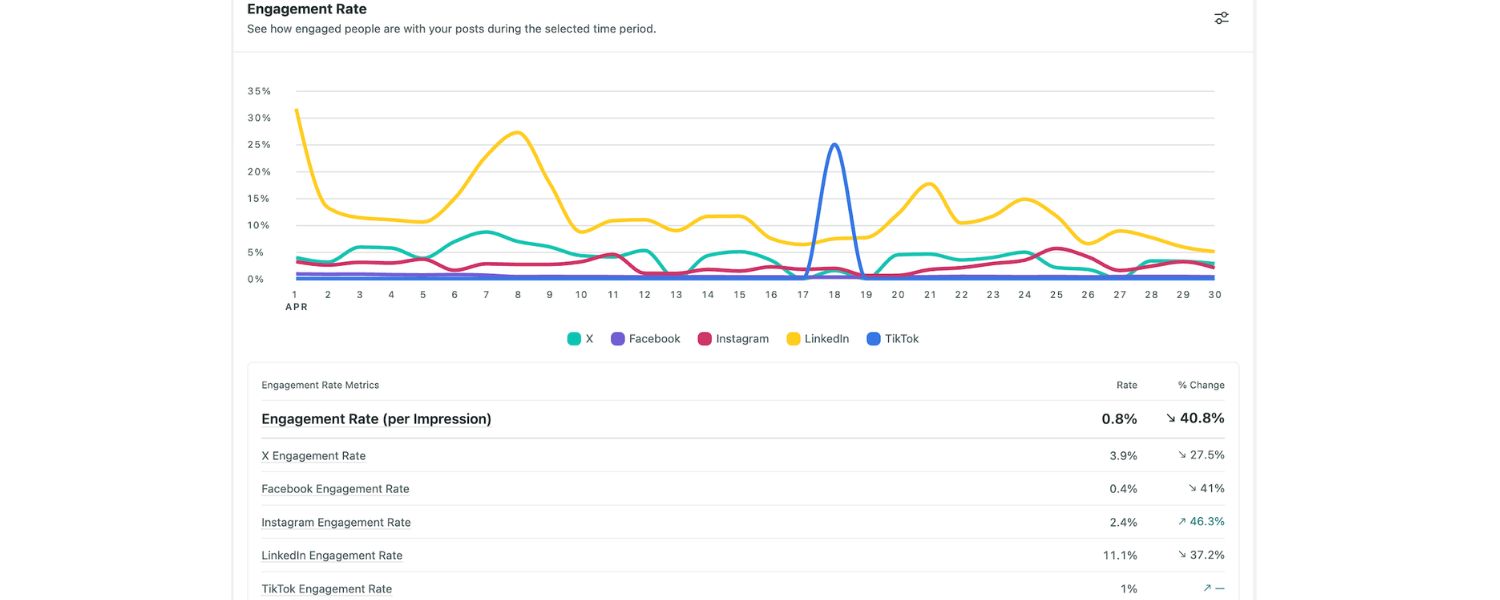
Publishing content is not the end of the process. A great social media calendar is a living document that you continually monitor and adjust based on results and unforeseen events. Here’s how to manage and optimize your calendar over time:
A. Track your analytics
Keep an eye on how each post performs. Since you planned your posts with certain goals in mind, measure them. Did that tutorial video get the engagement you expected? Are your Link clicks improving on the days you adjusted timing? Use each platform’s insights or your unified analytics in a social media tool to gather data.
Many tools can tie directly back to the calendar; for example, Sprout Social’s reports can highlight your top-performing posts and show exactly when they were published. Over a month, you might notice patterns like “Our audience really engages with polls on Fridays, let’s do more of those,” or “Tweets with 1-2 hashtags did better than those with none.” Feed these insights into next month’s planning. Essentially, you are closing the loop: plan → post → measure → refine plan.
B. Be ready to pivot for trending moments
The social landscape is dynamic. Despite a set calendar, you should allow flexibility for breaking news or viral trends. If an industry announcement, cultural event, or viral meme relevant to your brand pops up, consider adjusting your calendar to include it (and possibly pausing a less time-sensitive post).
For example, if you manage a travel brand’s social media and a sudden trending topic #BestBeachChallenge emerges, you might insert a post to ride that trend. Leave some slots open or earmarked as “tentative” in your calendar for these reactive opportunities. And if a major crisis or sensitive event occurs (e.g. a natural disaster or significant news), be prepared to pause scheduled posts if they could appear tone-deaf. It’s wise to review your upcoming queue during such times, many brands turn off promotional posts for a day or two in light of major world events, focusing on empathetic messaging instead.
C. Interact and gather feedback
Pay attention to the comments and messages your posts receive. They can contain valuable feedback or content ideas. If your audience keeps asking a certain question, maybe your next month’s calendar should include a post addressing it (hello, new content idea!).
Social listening can also help, tools or manual monitoring of keywords can reveal what your audience or competitors’ audiences are buzzing about, giving you material to incorporate in future posts. Continually involve your team in reviewing what’s working or not. A brief weekly sync to go over social media results can generate ideas for adjustments.
D. Maintain a buffer of content
Try to always be working a bit ahead of the publishing schedule. For instance, as Week 1’s posts are going out, you might already be creating content for Week 3 or 4. This buffer means you’re never one bad day away from going dark on social media. It also provides cushion if there are delays (say, an approval takes longer or a graphic designer is out sick). Being ahead allows more flexibility to shuffle content around if needed.
E. Review and refresh the calendar regularly
At the end of your planning cycle (let’s say month’s end), do a quick review. Which planned posts got done and which didn’t? Were there any bottlenecks in the workflow? Check if you met your short-term KPIs – for example, if your goal was 5% follower growth or a certain number of mentions this month, did your content help achieve it? Use this to re-strategize where necessary.
Your content calendar isn’t set in stone; you should update it as your business goals change or as you learn more about your audience. Perhaps you’ll decide to add a new content pillar or drop a platform that isn’t yielding results. The next iteration of your calendar will then reflect those improvements. Over time, this iterative process makes your social media execution increasingly effective.
Remember, a social media calendar is a tool to support your strategy, not stifle creativity. While it brings structure, it should also accommodate spontaneity and experimentation. Don’t be afraid to try new content ideas and insert them into the calendar, maybe a fun Twitter thread or an Instagram Story Q&A – even if it deviates from the usual plan. If it works, you can make it a regular fixture. And if it doesn’t, you’ve learned something and can course-correct. The calendar is there to capture these plans and learnings so you’re always moving forward in a methodical yet agile way.
Social Media Calendar Tools and Templates (Quick Recommendations)
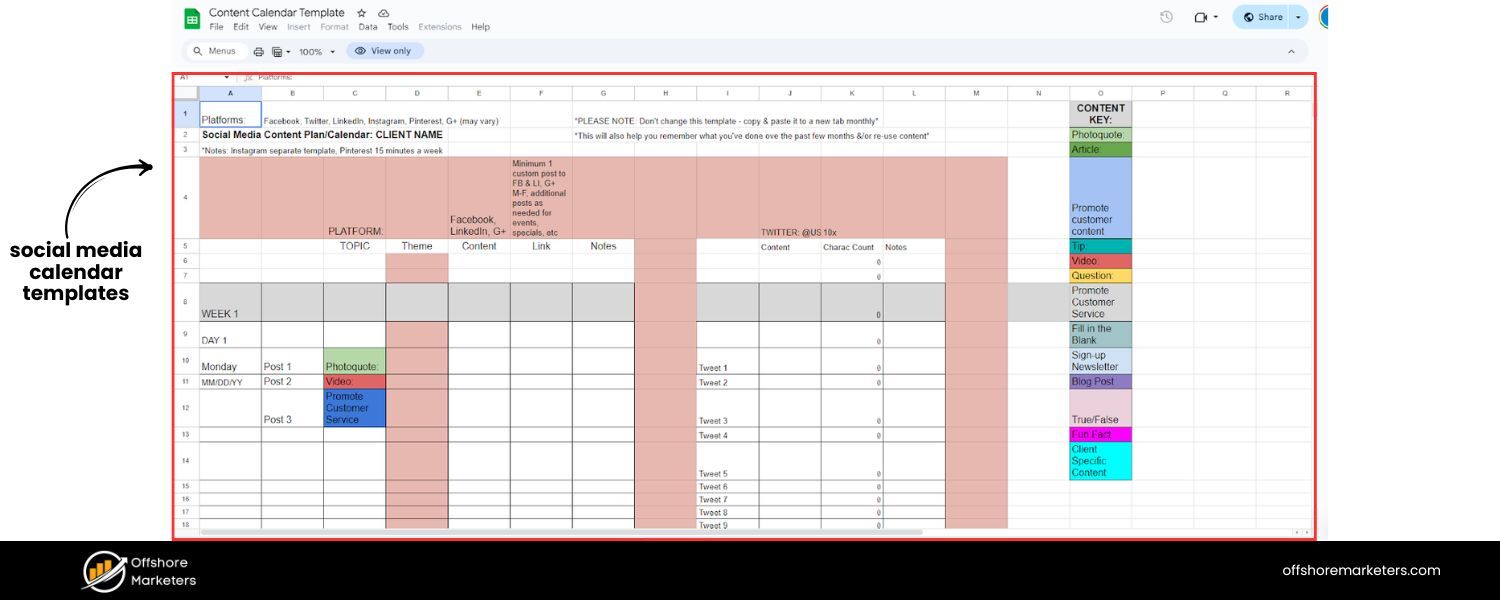
To recap, you have options when it comes to tools that can help build and manage your social media calendar. Here’s a quick list of popular solutions and resources:
A. Spreadsheets and Templates
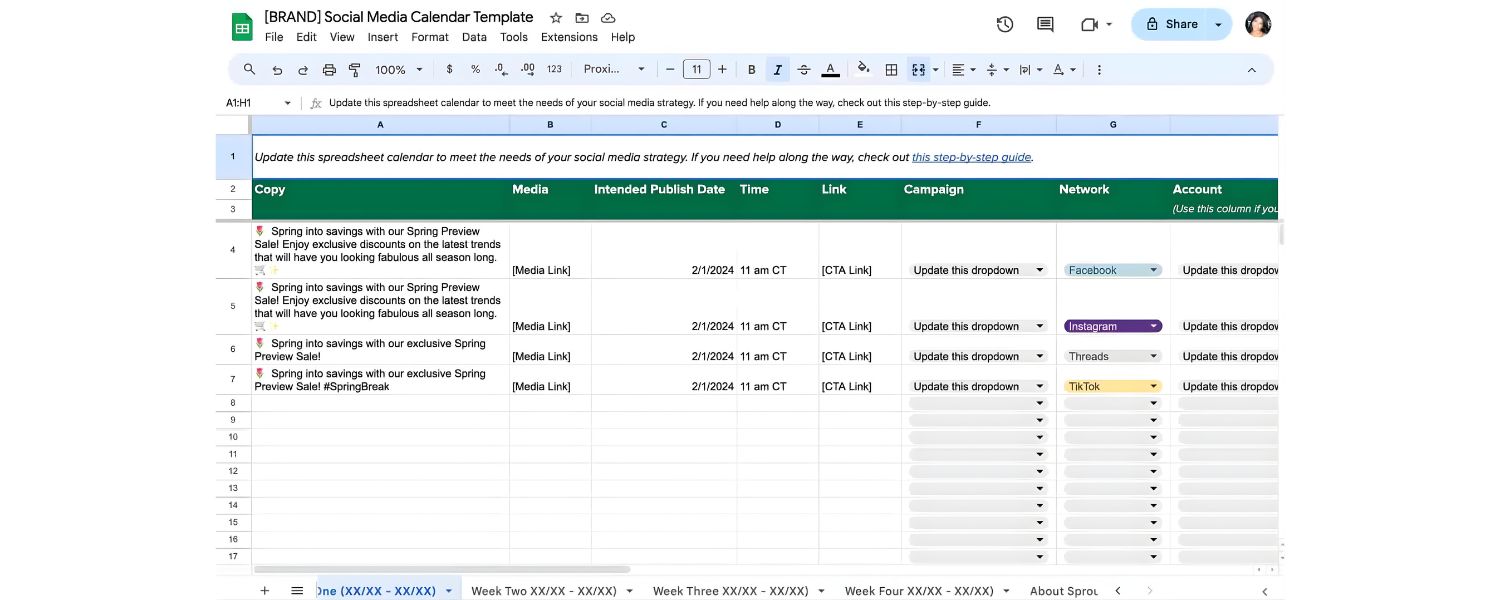
You can use Microsoft Excel or Google Sheets to create a custom calendar. HubSpot offers a free downloadable social media content calendar in Excel that includes tabs for each platform and a monthly overview. Hootsuite also provides free Google Sheets templates pre-formatted for a weekly or monthly social schedule. These can be great starting points if you prefer a DIY approach.
B. Google Calendar or Outlook
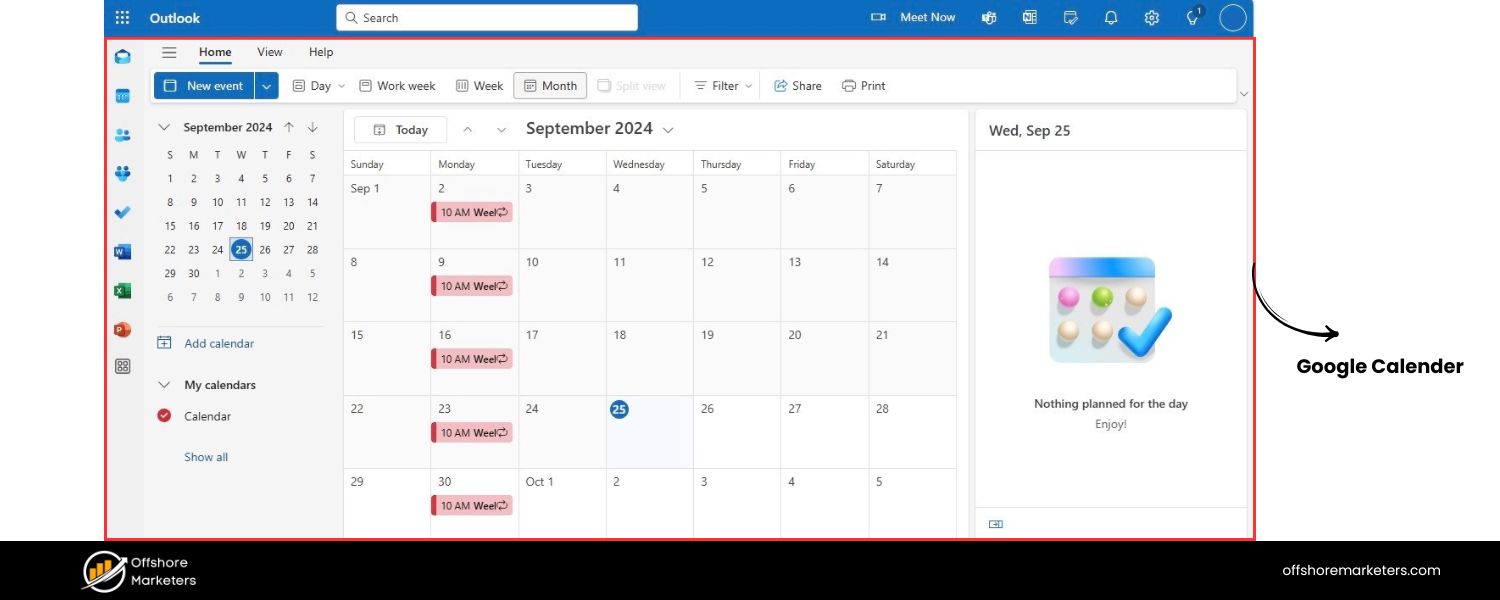
Some small teams use a shared Google Calendar to block out social posts on the calendar view. Each “event” on the calendar is a post. This can work for a date-focused view, though it’s not designed for content details. It’s simple and integrates with your regular schedule (you’ll see posting tasks alongside meetings, etc.). You might use Google Calendar mainly to remind you when to publish if not auto-scheduling.
C. All-in-One Social Media Management Tools
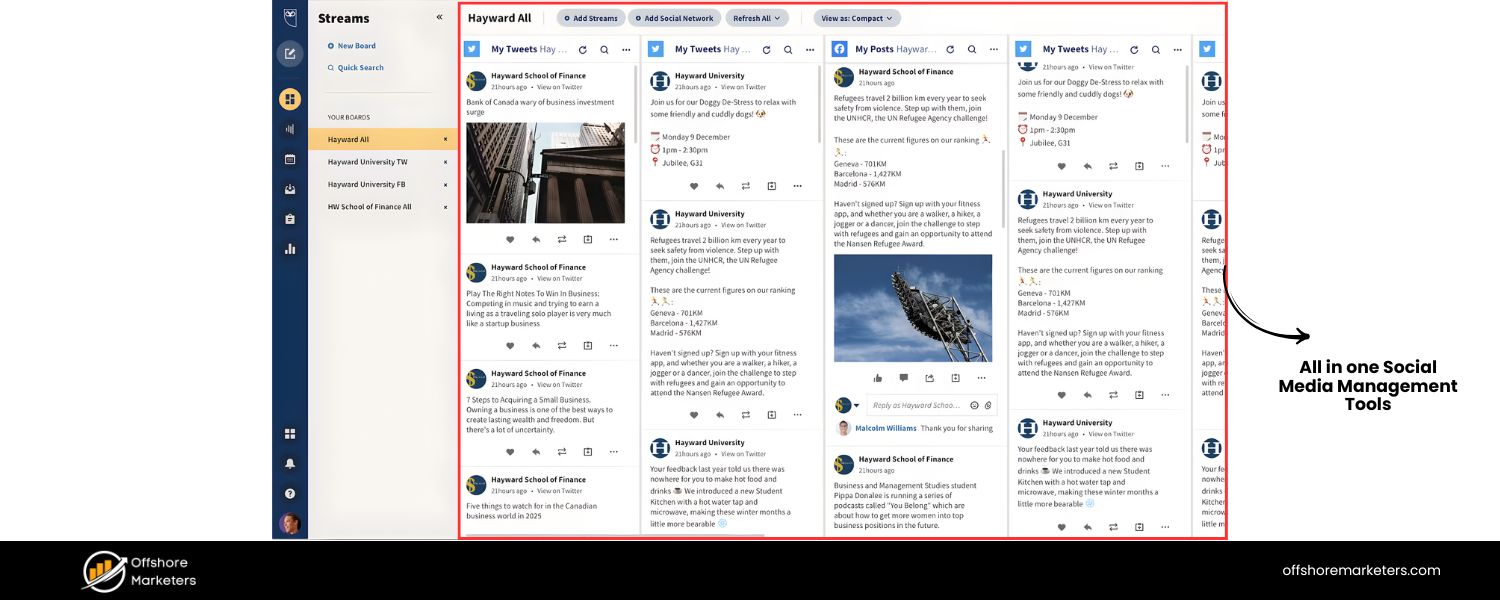
These include Hootsuite, Sprout Social, Buffer, Later, Sendible, SocialPilot, CoSchedule, Loomly, and many more. All of them allow content scheduling on multiple platforms and most offer a calendar interface to plan visually. For example, Hootsuite’s planner shows all your scheduled posts in a calendar grid so you can review your weekly/monthly lineup easily. Sprout Social and Buffer similarly offer calendar views with drag-and-drop rescheduling.
Prices and features vary: some focus on small business affordability (Buffer, Sendible) while others offer robust analytics and collaboration suited for larger teams (Sprout Social, Hootsuite). Many have free trials or free plans, so you can test a couple to see which UI you prefer.
Tip: When evaluating tools, look for features like team workflows (if you need approvals), asset libraries (to store media), and reporting dashboards, as these can add a lot of value beyond just scheduling posts.
D. Content Planning/Project Management Tools
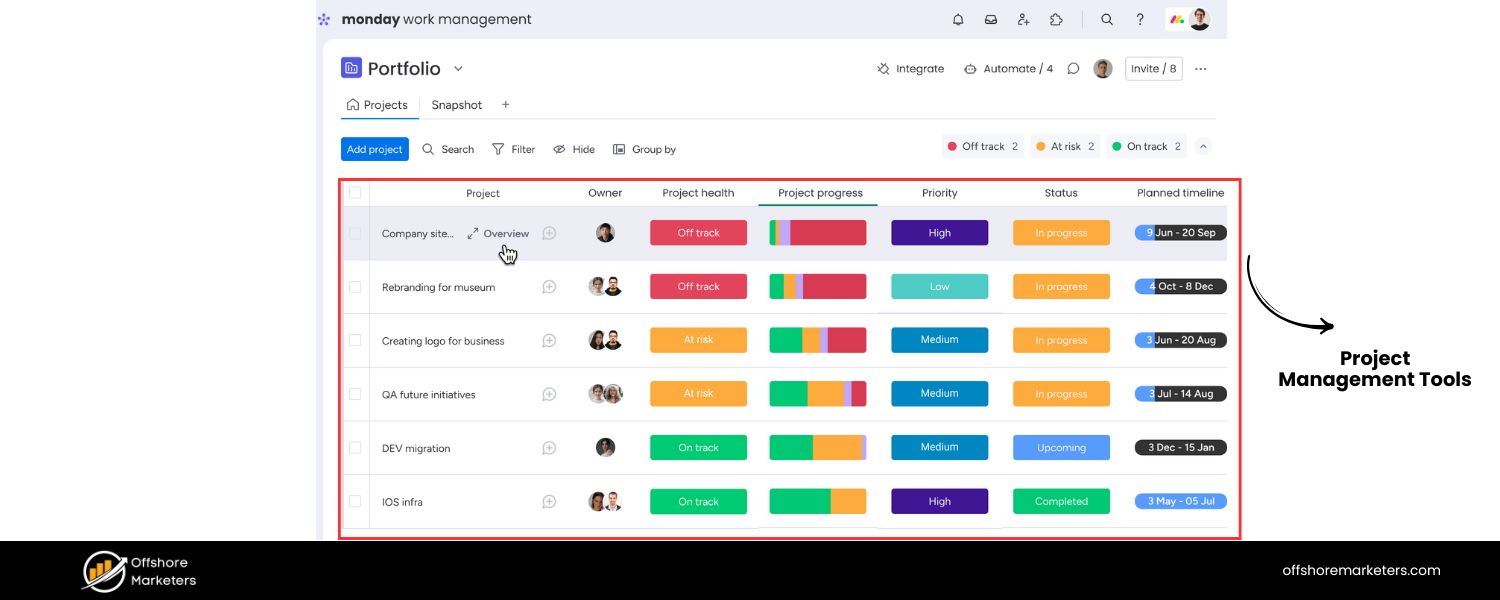
If you’re already using project tools like Trello, Asana, Monday.com, Notion, or Airtable, check if they have templates for social media calendars. For instance, Trello has editorial calendar board templates, and Notion has social content calendar templates that some marketers love for their flexibility.
These won’t auto-post your content but can serve as the planning hub, after which you schedule via another method. They are especially useful if you want a highly customized workflow or need to integrate with broader content projects (like aligning blog and social schedules).
E. Emerging AI Tools
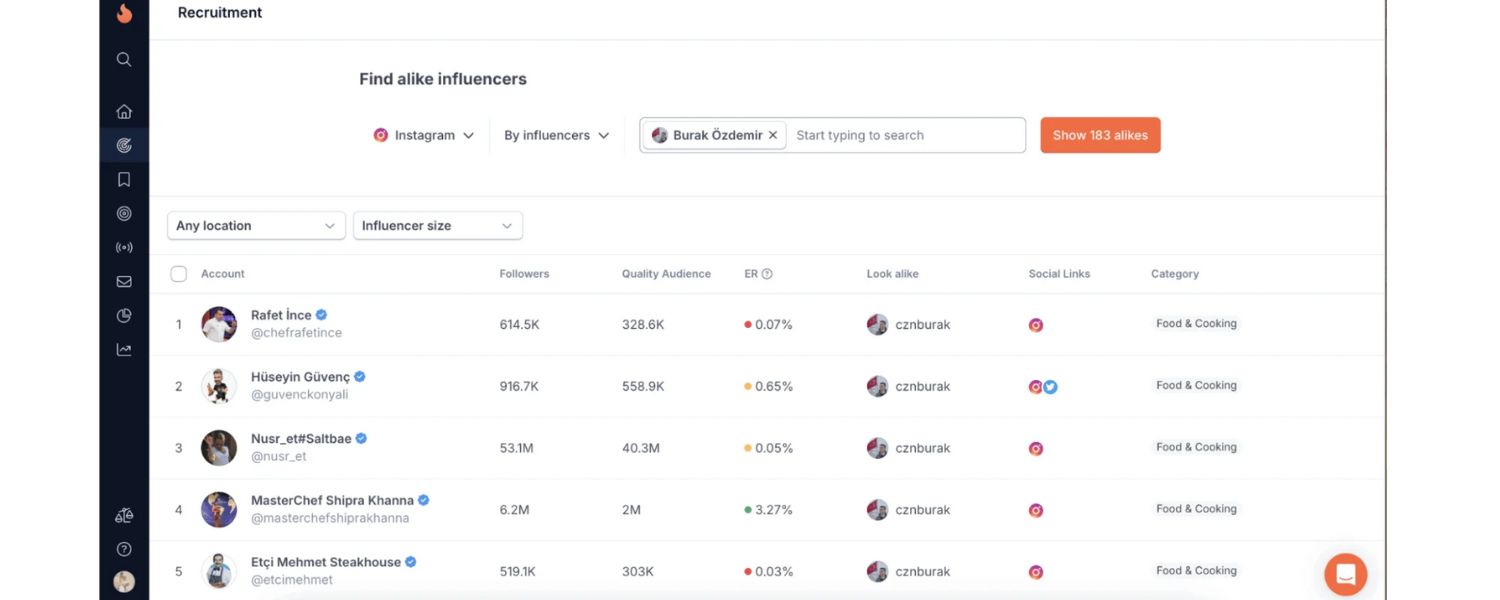
Some modern tools incorporate AI to help with content scheduling and creation. For example, a tool might analyze engagement data to recommend the best times to post (taking the guesswork out of it). Others have AI assistants to generate caption ideas or hashtag suggestions. While you should always review AI-generated content for accuracy and brand voice, these features can spark ideas and save time in the planning stages.
No matter which tool you choose, remember that it’s there to facilitate your strategy, the tool itself doesn’t create a great content plan, you do. Even a simple calendar can outperform a fancy software if you fill it with strong content and use it diligently. Conversely, a robust tool like Sprout or Hootsuite can supercharge your calendar by making it easier to execute and measure. Choose what fits your team and scales with your needs.
(One more thing: Keep your content calendar accessible to stakeholders who might benefit. For example, share a view of it with your PR team or customer support, so they know what’s being promoted when. A well-communicated calendar breaks silos within an organization.)
Conclusion: Plan Today, Succeed Tomorrow
A well-crafted social media calendar is the backbone of a successful social media strategy. It brings order to the chaos of daily posting, ensuring that every tweet, post, or story aligns with your goals and resonates with your audience. By planning ahead, you’re not just saving yourself from last-minute stress, you’re also creating space to be more creative and strategic with your content.
Imagine looking at your calendar and seeing a month’s worth of engaging posts planned out: your upcoming product launch teasers are lined up, a library of how-to videos is ready to roll, and even that quirky holiday hashtag is accounted for. That’s the power of a social media calendar, it keeps you consistent, relevant, and prepared to make the most of every opportunity.
Now it’s your turn. Start building your social media content calendar using the steps and tips in this guide. Begin with a clear strategy, fill in those dates with valuable content, and leverage the tools that work for you. Stick with it, and treat your calendar as a living document to refine over time. Your future self (and your team) will thank you when your social media runs like clockwork.
Call to Action
Ready to put your social media plan into action? Don’t wait for the next posting scramble. Take the first step now, outline your key themes and pick a template or tool for your calendar. Whether you use a simple spreadsheet or a pro scheduling app, commit to your content plan. Consistency and strategy are unbeatable in social marketing. Start planning your social media calendar today, and watch your engagement and results soar! Your brand’s vibrant, organized social presence is just a calendar away.

.png)
Shopify SEO: Guide to Ranking Your Store and Driving Sales
Most Shopify store owners set up their store, list their...

Content Marketing : Definitive Guide to Strategy, Content Types, and Measurable ROI
Content marketing generates 3x more leads than outbound marketing at...

Above the Fold: Guide to Conversions, Rankings and Faster Pages
Above the Fold in 2026: The Complete Guide to Conversions,...

Off-Page SEO Checklist: Guide to Building Real Authority
Most websites spend months creating great content, only to wonder...

What Is Keyword Bidding? The Complete Strategy Guide for Smarter Ad Spend
Most advertisers believe the highest bid wins the auction. It...

What Is Google Trends? The 2026 Marketer’s Complete Guide
If you are not already pulling weekly insights from Google...
If you want a growth partner who will get to know every aspect of your business and treat your budget like their own — we are the right fit.
.png)


.png)
.png)
.png)
.png)
.png)
.png)
2026 ALL RIGHTS RESERVED MADE IN INDIA
