
Biggest SEO Mistakes (and How to Avoid Them)
August 20, 2025
Introduction
SEO can make or break your website’s visibility – yet over 90% of webpages get zero organic traffic from Google.
Why? Often because of avoidable SEO mistakes that keep content buried in search results. Securing a top spot on Google is critical – the top 3 results capture over 54% of all clicks – and click-through rate plummets for lower positions (see figure below).
In an age of smarter algorithms and AI-driven answers, even a simple oversight (like a slow site or poor keyword targeting) can cost you rankings, visitors, and revenue.
The good news? Most SEO issues are fixable with the right strategy. In this guide, we’ll walk through the biggest SEO mistakes to avoid – and provide tips to help you correct course and outrank the competition.
Google organic click-through rate by position: ranking #1 earns far more clicks than lower positions. Avoiding SEO mistakes that hinder your rankings is crucial to capturing this traffic.
1. Skipping Keyword Research (and Ignoring Search Intent)
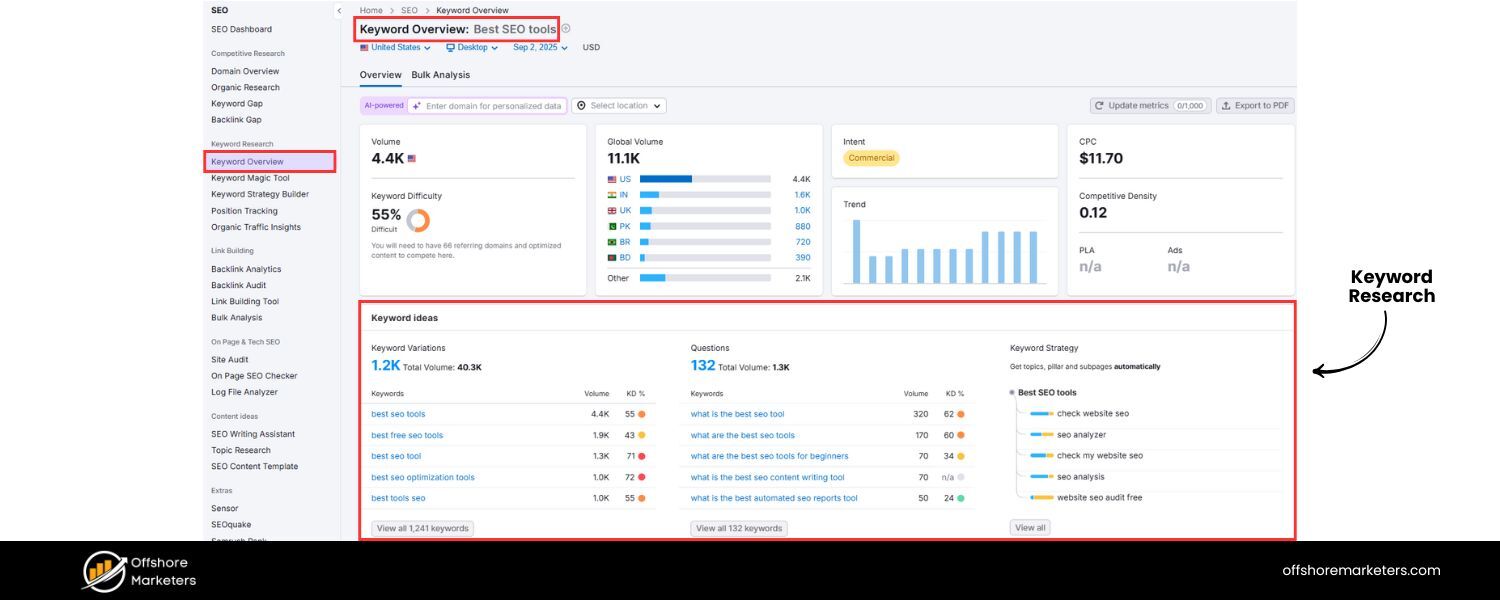
Optimizing without proper keyword research is like shooting in the dark. Guessing what users search for – or simply copying competitors – often means targeting keywords that are either too competitive, irrelevant, or rarely searched.
Moreover, even if you choose the right keywords, you can fail to satisfy search intent – the user’s actual goal behind a query.
For example, ranking for “best running shoes” won’t help if your page is an article but searchers wanted a product page. Misaligning content with intent leaves visitors unsatisfied and hurts your rankings.
Impact
Ignoring keyword research or intent can doom your content to obscurity. Target the wrong terms and you’ll either rank for phrases no one uses or attract unqualified traffic that won’t convert.
In fact, a study by Ahrefs found that one reason 90% of pages get no traffic is that they don’t match search intent. Google’s algorithms now analyze intent better than ever, so content that doesn’t meet user needs will struggle to rank.
How to avoid/fix
Conduct thorough keyword research before writing. Use SEO tools (Google Keyword Planner, Ahrefs, Semrush, etc.) to find terms your audience actually searches, including long-tail phrases.
Pay attention to search intent by examining the current top results: Are they informational blog posts, product pages, how-to guides? Ensure your content format and angle align with what users want.
For each target keyword, provide the best answer or solution. As Google’s 2022 Helpful Content update showed, content that genuinely helps users is prioritized.
In short, do your homework on keywords and always write with your readers’ questions and intent in mind.
2. Focusing on Quantity Over Quality in Content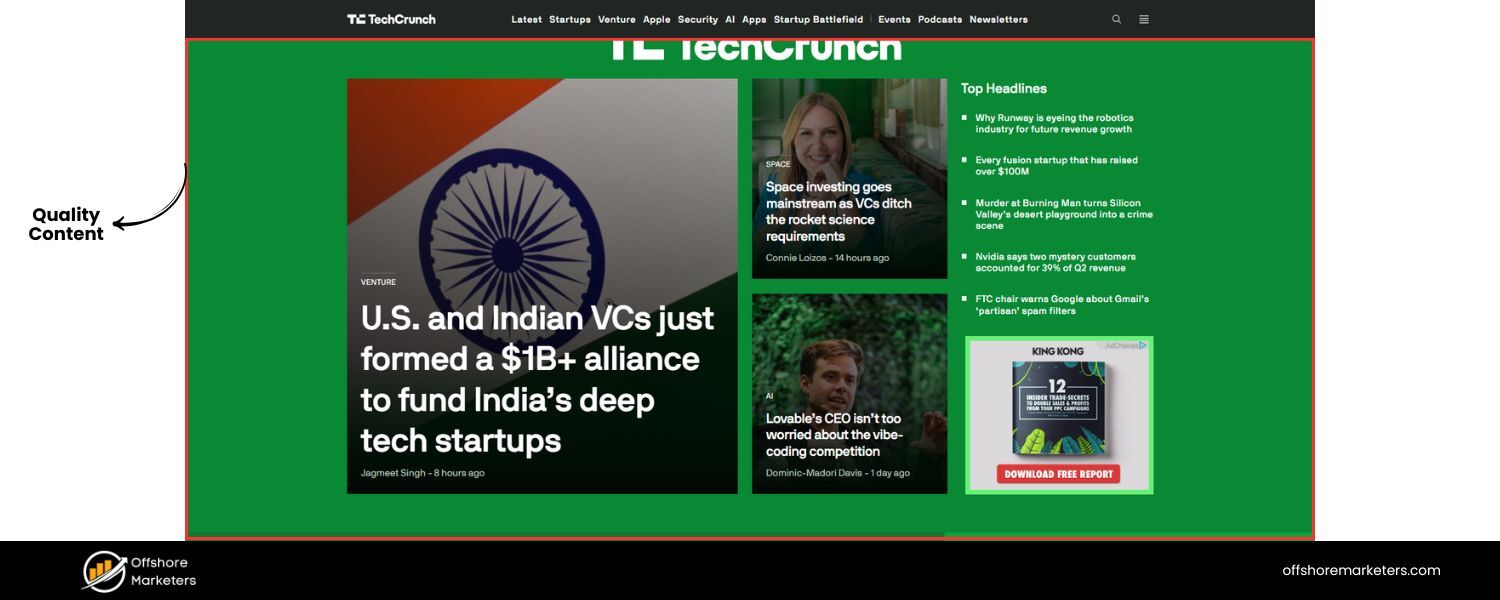
In the early days of SEO, churning out lots of pages could yield some traffic. Today, quality trumps quantity. Publishing dozens of mediocre, thin articles will not impress Google (or your readers).
“You can have the best content in the world, but if search engines can’t find it, it might as well not exist,” notes one SEO director – and conversely, if they do find it and it’s low-quality, it won’t rank.
Modern search algorithms measure content depth, originality, and user engagement. Thin content (pages with very little useful text) or auto-generated fluff signals to Google that your site is not authoritative or helpful.
Impact
Poor-quality content fails to rank and can drag down your site’s overall performance. Google’s emphasis on E-E-A-T (Experience, Expertise, Authoritativeness, Trustworthiness) means superficial or duplicated content is actively demoted.
If your site is filled with 300-word posts saying the same generic things as everyone else, expect minimal visibility.
Furthermore, “sitewide content quality” is assessed by Google. A few weak pages can hurt the rankings of your stronger pages over time.
How to avoid/fix
Prioritize quality over quantity. It’s better to publish one comprehensive, well-researched article than ten flimsy ones.
Aim to be the best answer on your topic – offer unique insights, up-to-date information, and actionable advice. Avoid duplicate content (more on that next) and low-value pages.
If you already have thin content, improve it or consider consolidating/deleting it (see Mistake #3). In short, invest time in original, reader-focused content – this not only boosts SEO but also earns trust and backlinks naturally.
3. Publishing Duplicate or Outdated Content
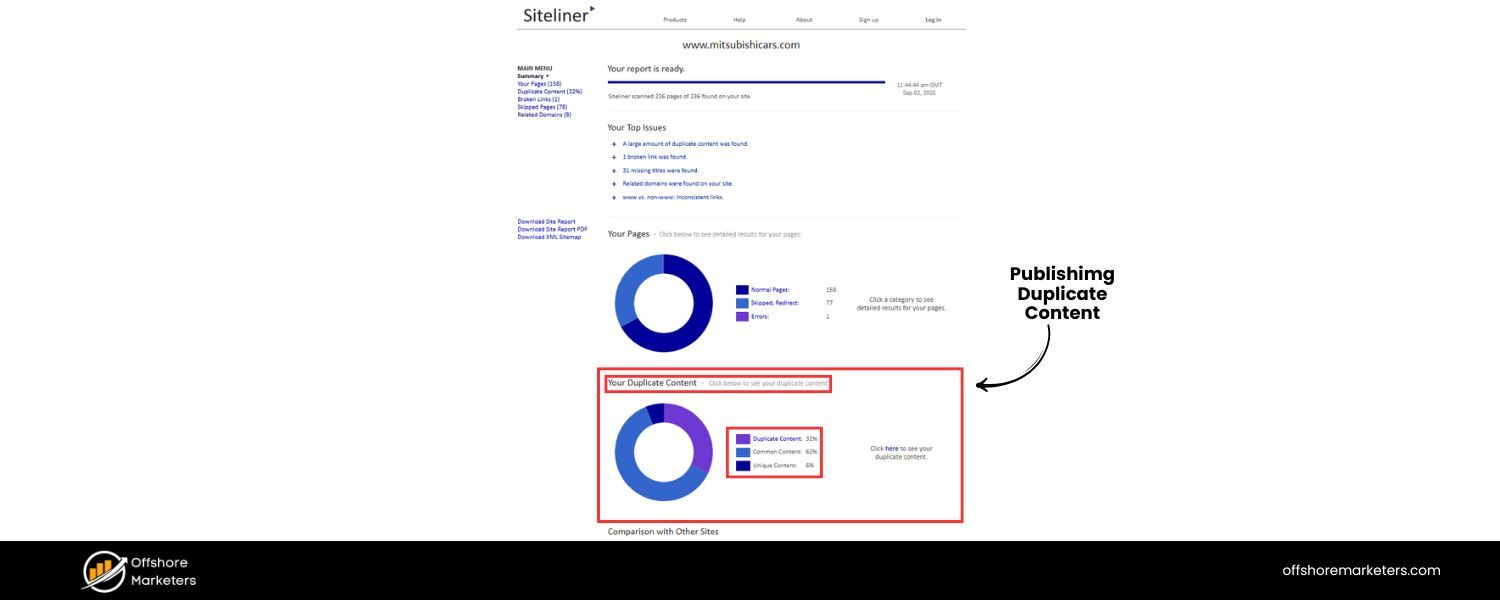
Why it’s a mistake
Duplicate content – having multiple pages with identical or very similar text – is one of the most common SEO mistakes and confuses search engines, diluting your rankings.
It can happen accidentally (printer-friendly pages, HTTP vs HTTPS copies, or reused product descriptions) or deliberately (scraping or spinning content).
Google may index only one version or, worse, penalize your site if it thinks you’re trying to manipulate results.
Similarly, outdated content (old posts with stale information or statistics) can become a “silent SEO killer” as it loses relevance. Content that was once top-notch in 2019 might be seen as irrelevant in 2025 if not updated.
Impact
Duplicate pages cannibalize each other’s potential – Google doesn’t know which to rank, so they all suffer. Important pages might not appear in SERPs at all if a duplicate is chosen instead.
Outdated content erodes your site’s authority; users who encounter old or incorrect info will bounce, and Google may downrank your site for freshness.
In fact, the average top-ranking page was last updated within the past 2 years, indicating how crucial content freshness is for SEO.
How to avoid/fix
Perform a content audit. Merge or differentiate pages that target the same topic (to avoid internal competition). Use 301 redirects or canonical tags to tell Google which version is primary if duplicates exist.
For example, if you have an e-commerce site with manufacturer descriptions copied across many pages, rewrite them to be unique and valuable (add original details, specs, or reviews). For outdated posts, update them regularly with current facts, examples, and dates – or remove them if they no longer provide value.
Make content refreshes a routine part of SEO. Updating old pages (while perhaps noting the update date) can revive their rankings and signal to Google that your site is active and authoritative.
4. Keyword Stuffing & Over-Optimization
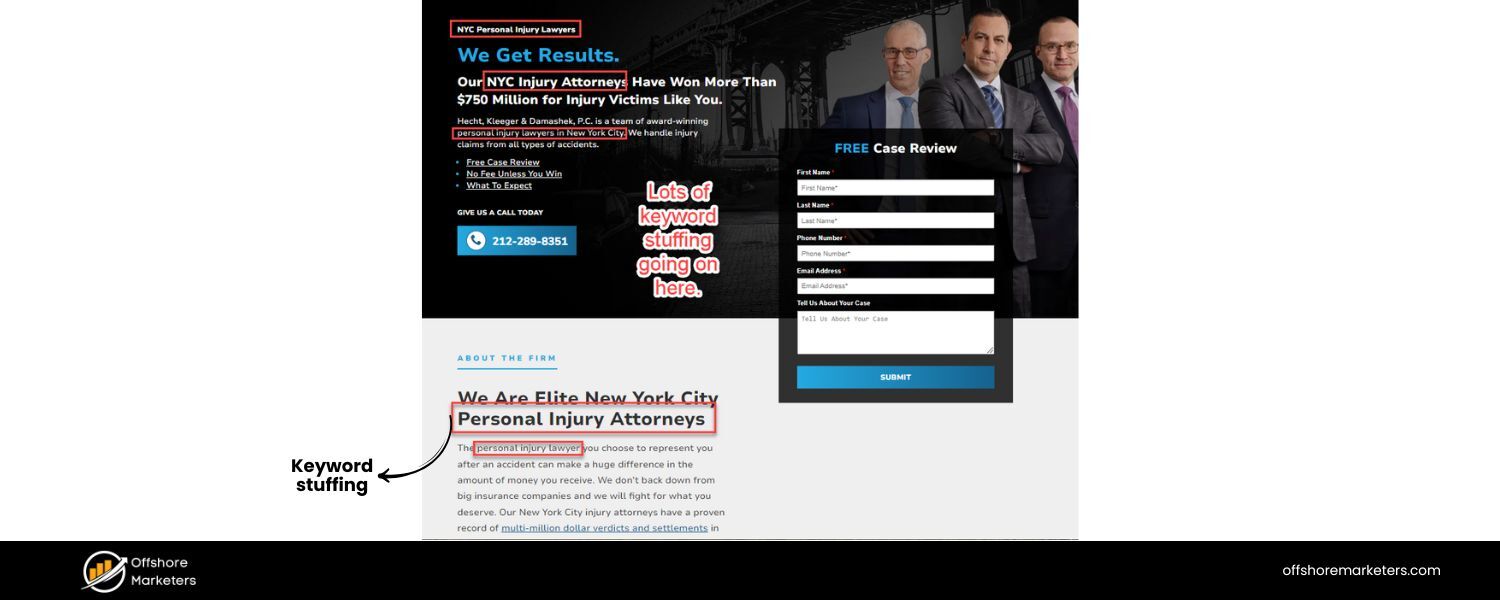
Why it’s a mistake
Repeating your target keywords excessively (“keyword stuffing”) or cramming exact-match terms everywhere (titles, anchors, alt text) once fooled search engines years ago. Now, Google’s NLP algorithms and spam filters easily detect over-optimization, making it one of the biggest SEO mistakes you can make.
If your content reads unnaturally – like a robot wrote it just to rank – it not only alienates readers but also raises red flags in Google’s ranking algorithm.
In short, writing for algorithms instead of humans is a major error. One Reddit SEO expert bluntly calls this out: focusing too heavily on keywords while neglecting user experience is a common beginner mistake.
Impact
Over-optimized pages can suffer in two ways: (1) Users will leave due to poor readability (leading to high bounce rates), and (2) Search engines may apply ranking penalties or simply rank the page lower, considering it low-quality.
Google’s “Helpful Content” update explicitly targets content that feels made for SEO rather than for people.
In extreme cases, keyword stuffing can even trigger manual penalties for spam. In any case, stuffing keywords no longer provides any ranking boost – it only hurts.
How to avoid/fix
Write naturally and put users first. Use your primary keyword in key places – title, meta description, URL, H1, and a few times in the text – but always in a way that flows logically.
There’s no magic keyword density (despite old myths); Google even ignores a lot of exact repeats. Instead, use variations and synonyms (Latent Semantic Indexing terms) to provide context.
For example, if your keyword is “best running shoes,” it’s fine to also mention “running sneakers,” “jogging footwear,” etc., as appropriate.
A good practice is to place the main keyword in your title, introduction, and maybe conclusion (where it fits naturally), and otherwise focus on answering the query.
If you suspect a page is over-stuffed, edit it to remove redundant mentions. The content should sound human. Remember, if a reader wouldn’t enjoy your content, neither will Google.
5. Neglecting On-Page SEO Basics (Titles, Metas & Headers)
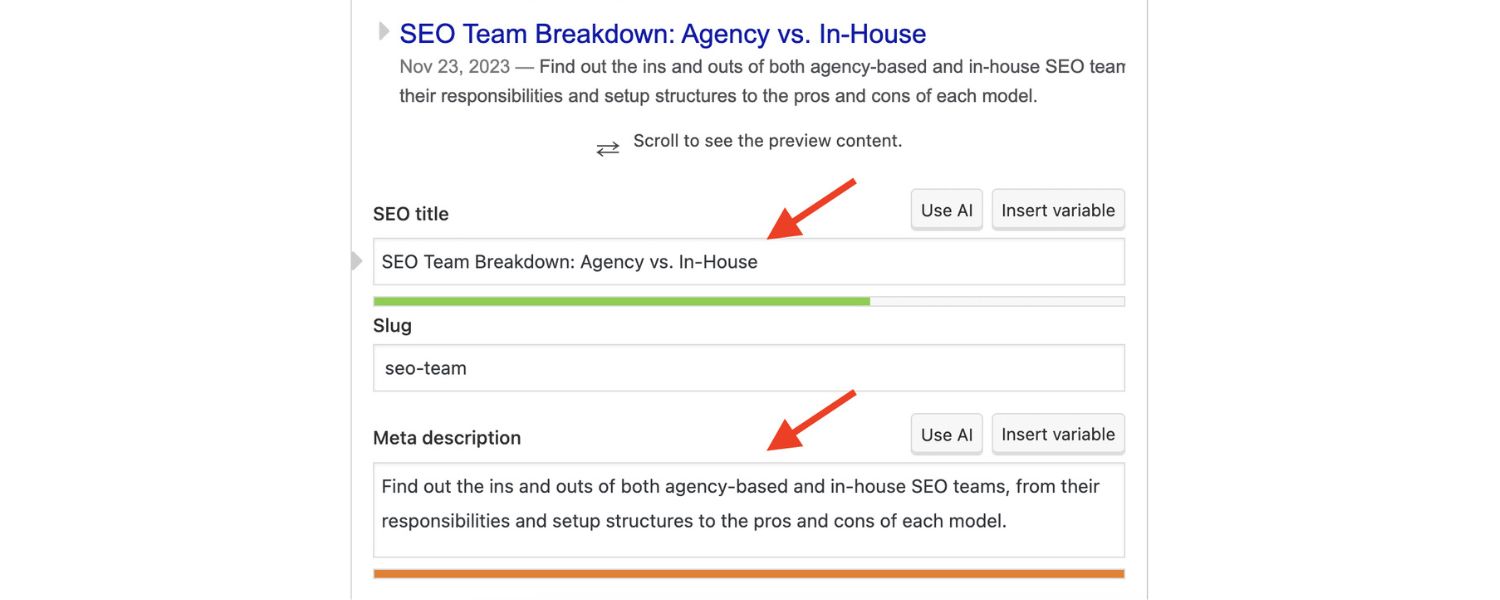
Why it’s a mistake
On-page elements like the title tag, meta description, and header tags (H1, H2, H3) are fundamental to SEO. They’re essentially your content’s storefront – informing search engines and searchers what each page is about.
If you skip optimizing these or use them incorrectly, you make critical SEO mistakes that prevent you from maximizing ranking and click-through opportunities. Common mistakes include missing title tags, duplicate or overly long titles and metas, or using no headings in your content.
For instance, 7.4% of top-ranking pages lack a title tag entirely, and 25% have no meta description – leaving it to Google to auto-generate snippet text. That’s a lot of missed potential.
Impact
Missing or poorly written title tags hurt your SEO and traffic. Title tags are a confirmed ranking factor and influence whether users click your result.
If your title is too long, Google will truncate it (typically around 50–60 characters), potentially cutting off important keywords or context. Duplicate titles or metas across pages confuse search crawlers and can reduce your visibility.
Likewise, not using header tags (H1 for the page title, H2/H3 for subheadings) makes your content structure harder for crawlers (and readers) to interpret.
Overall, on-page neglect means your pages won’t rank as well as they could, and even when they do appear, users might skip over them due to unappealing snippets.
How to avoid/fix: Audit your pages for basic on-page SEO:
A. Title Tags
Ensure every page/post has a unique, descriptive title tag ~50-60 characters long. Include your primary keyword and make it enticing (as if it’s a headline inviting a click).For example: “Top 10 Running Shoes for Marathoners (2025 Buyer’s Guide)” is far better than “Shoes – Product Page”. Avoid overly lengthy titles that get cut off, and consider adding your brand name at the end for recognition.
B. Meta Descriptions
While meta descriptions aren’t a direct ranking factor, they influence CTR. Write a compelling 1-2 sentence summary (120–155 characters) for each page that includes the target keyword and a call-to-action or value proposition. This can improve your snippet’s appeal on the SERP.
Even though Google often rewrites metas, it’s still wise to provide one – roughly 75% of top pages have meta descriptions (and Google may use or adapt them).
C. Headers (H1, H2, etc.)
Use one H1 for the page title (often it mirrors the title tag). Structure your content with logical H2 subheads for major sections, and H3s for subsections as needed.This not only helps SEO by outlining the content hierarchy, but also improves readability.
Avoid using H tags purely for styling; they should reflect the content structure (think of it as an outline of topics). A common mistake is skipping header tags or using too many H1s – stick to one H1 and use cascading subheaders properly.
By covering these basics, you’ll give both Google and potential visitors a clear, optimized snapshot of your content – which can boost your rankings and click-through rates.
6. Using Poor URL Structures
Why it’s a mistake
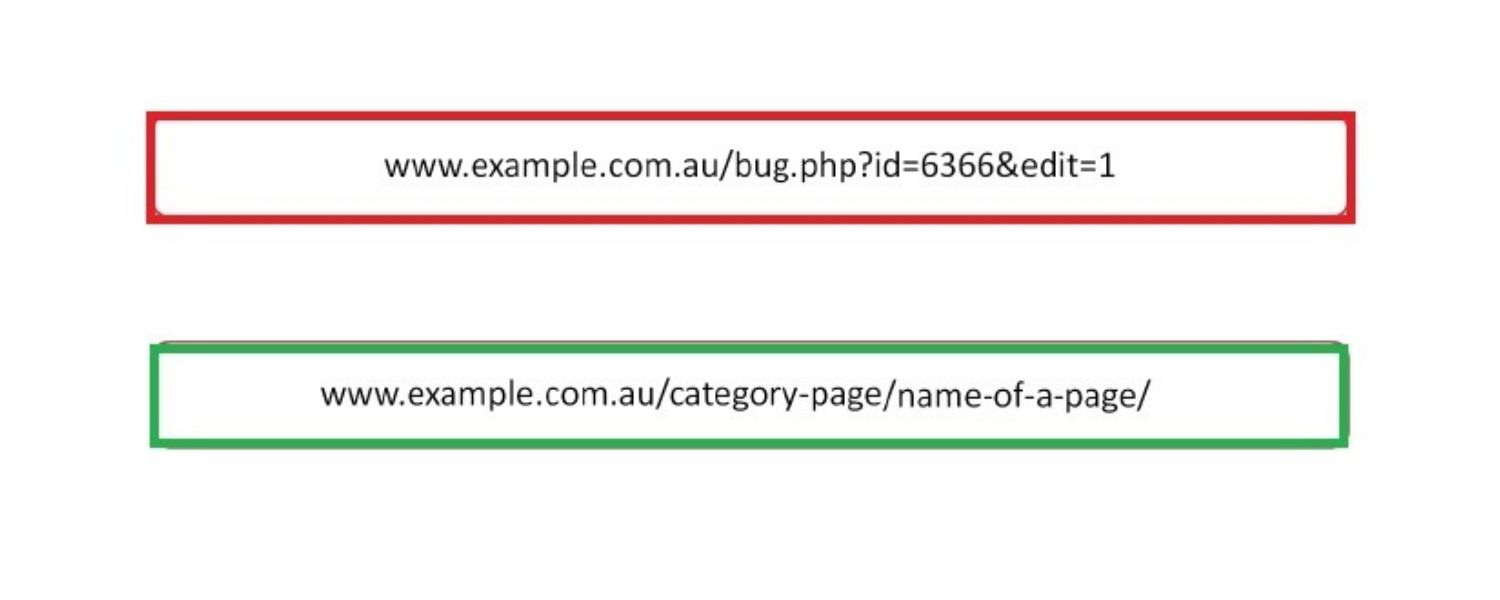
A page’s URL is another important signal – for SEO and user experience. Messy, overly long, or cryptic URLs (e.g. https://example.com/category/12345?id=67890) fail to convey context.
Search engines prefer clean, descriptive URLs that reflect the content. SEO mistakes like using excessive subfolders, random numbers or session IDs, or not incorporating keywords can harm your rankings.
Worse, some sites inadvertently change URLs frequently (e.g. adding tracking parameters or date codes), causing multiple URL versions to get indexed.
One SEO mistake that cost a company dearly involved appending a changing 16-character string to URLs every week as an anti-scraping measure, causing pages to drop out of Google’s index repeatedly.
Impact
Poor URL structures can hurt crawlability and confuse users. Constantly changing URLs or URL parameters can lead to duplicate content issues and wasted crawl budget, as Googlebot must figure out if example.com/page?ref=1 and page?ref=2 are the same page.
Deep or illogical URL hierarchies make it harder for crawlers to understand site structure and pass link equity. From a user standpoint, an ugly URL in search results looks less trustworthy.
While URL keywords are a minor ranking factor, descriptive URLs can improve CTR (users tend to click URLs that clearly match their query). The company above saw traffic surge from a few hundred to 20,000 daily pageviews after switching to static, human-readable URLs.
How to avoid/fix
Keep URLs short, readable, and consistent. Use your primary keyword or a brief description in the slug (the part after the domain). For example, yoursite.com/seo-mistakes is preferable to yoursite.com/index.php?p=827364.
Avoid including unnecessary categories or subfolders if they make URLs long (e.g., /blog/2025/08/15/post-name isn’t ideal – unless the date is crucial). If your CMS or site produces dynamic URLs with query strings, consider URL rewriting to a cleaner format.
Also, if you restructure URLs, implement 301 redirects from old to new addresses to preserve rankings. In short, treat URLs like chapter titles of a book – concise and relevant. A good rule of thumb: if you can read a URL and roughly guess the content, it’s SEO-friendly.
7. Ignoring Technical SEO (Crawlability & Indexing Issues)
Why it’s a mistake
You might have amazing content, but if search engines can’t crawl or index your site properly, it won’t rank at all.
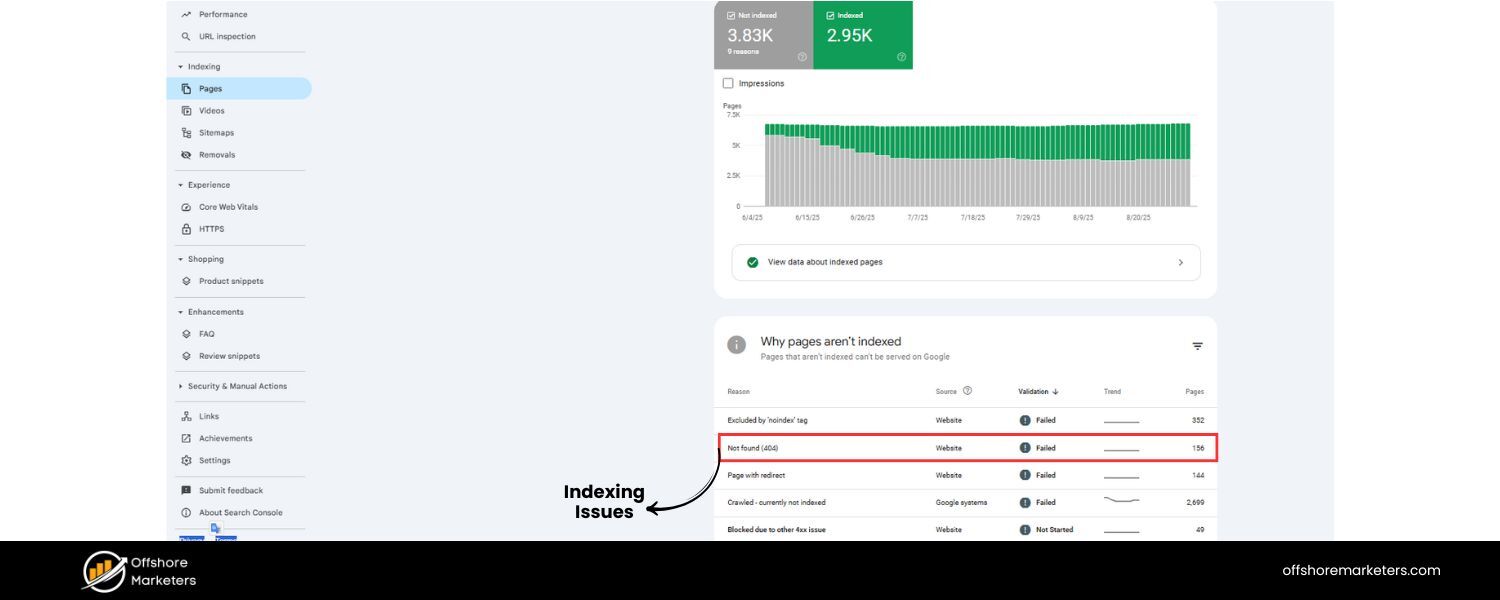
Technical SEO covers aspects like your robots.txt, sitemap, site architecture, and indexability. Common SEO mistakes include accidentally blocking search engines (e.g., using a noindex tag or a disallow rule incorrectly), not having a sitemap, or having a disorganized site structure that leaves pages orphaned (with no internal links pointing to them).
For instance, a beginner might unknowingly check the “Discourage search engines” setting in WordPress, preventing indexing.
Or a site redesign might break links and remove navigation paths, making some content invisible to crawlers. If Google can’t find or access your pages, nothing else matters.
Impact
Poor crawlability is often “silent – but deadly for SEO”, as one expert puts it.
You may wonder why you have great content that isn’t ranking – only to discover Google never indexed it due to a technical oversight. Signs of technical issues include: pages missing from Google’s index, sudden drops in indexed page counts, or coverage errors reported in Google Search Console. If your robots.txt or meta tags are misconfigured, you might be outright blocking crawlers from important content.
A bad site structure (no logical hierarchy or internal linking) also means Googlebot might not discover some pages, especially if they’re not listed in a sitemap. In a worst-case scenario, an entire site can be deindexed if, say, a dev accidentally put a on every page template.
How to avoid/fix
Regularly audit your site’s crawlability. A quick check is using the Google site:yourdomain.com search – if none or few of your pages show up, you have an indexation problem.
In Google Search Console, review the Index Coverage and Pages reports for errors (like “Blocked by robots.txt” or “Crawled – currently not indexed”). Key steps to ensure technical SEO health:
A. Robots.txt
Make sure you’re not disallowing crucial sections. A correctly configured robots.txt should usually allow Google to crawl your content (except perhaps admin or staging areas). One miswritten line here can hide your whole site, so double-check it and use Google’s Robots Testing Tool.
B. XML Sitemap
Generate a sitemap listing all important URLs and submit it in Search Console. This helps Google discover your pages faster.
C. Internal Linking
Avoid orphan pages (pages with no links from other pages). Every new page should be linked from at least one other relevant page (e.g., from a category hub or within another article). A well-thought-out site navigation and links between related posts ensure crawlers (and users) can navigate your whole site.
D. Index Tags
Use noindex sparingly (for pages you truly don’t want in search, like duplicate archives or admin pages). Ensure your main pages are set to index.
E. Site Moves/Redirects
If you undertake a redesign or move content, implement proper 301 redirects from old URLs to new ones to preserve rankings and guide crawlers.
In short, think of technical SEO as the foundation – if search engines can’t crawl or index your content, nothing else will matter.
It’s worth scheduling periodic technical audits (using tools or an SEO professional) to catch issues before they sabotage your hard work.
8. Not Using HTTPS (Secure Protocol)
Why it’s a mistake
Having a secure website (HTTPS) is no longer optional – it’s a must-have. HTTPS (enabled by an SSL certificate) encrypts data between your site and users, protecting information.
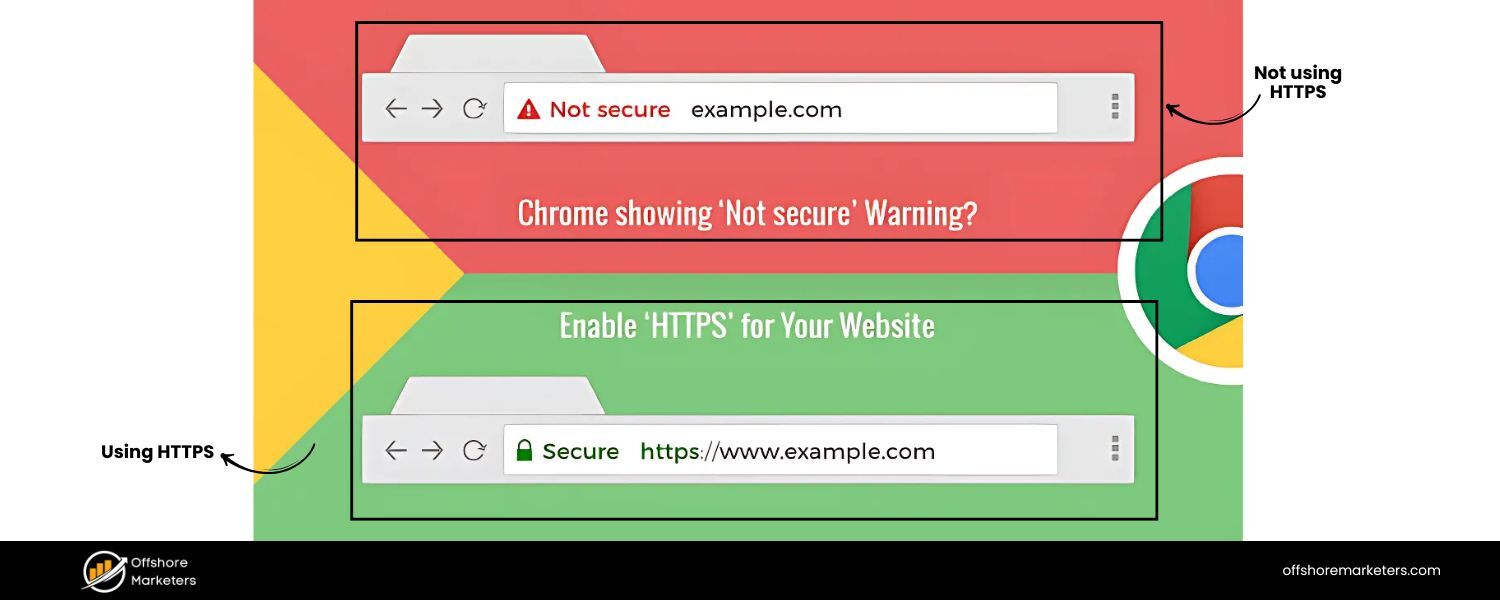
Several years ago, Google made HTTPS a lightweight ranking signal, and in recent Chrome updates, sites without HTTPS are explicitly marked “Not secure” in the browser bar.
If you’re still on HTTP, search engines and users may see your site as outdated or unsafe. This is especially critical if you handle any sensitive data (logins, e-commerce payments), but even purely informational sites are expected to use HTTPS now.
Impact
An HTTP site may suffer slightly in rankings compared to HTTPS competitors (all else being equal) – Google “favors sites that use HTTPS”.
More importantly, users might be hesitant to even stay on your page if they get a “Not Secure” warning. This can tank your engagement metrics. Google Search Console’s Security/Experience report will flag if some pages are not HTTPS.
Additionally, if you have a mix of HTTP and HTTPS (mixed content issues), browsers might block certain content from loading, further harming UX. In summary, not using SSL undermines both trust and SEO.
How to avoid/fix
Fortunately, it’s usually straightforward to switch to HTTPS. Obtain an SSL certificate (many hosts provide basic SSL for free or low cost – e.g., via Let’s Encrypt).
Install and configure it for your site, then redirect all HTTP pages to their HTTPS versions (a 301 redirect at the server or CDN level). After migrating, update your sitemap and internal links to use HTTPS and check for any mixed content (ensure all images, scripts, etc., load via https://).
Once fully deployed, you should see the padlock icon in the browser indicating a secure site. This change not only may give a minor ranking boost, but more importantly, it protects your users and signals professionalism.
9. Slow Site Speed and Poor Core Web Vitals
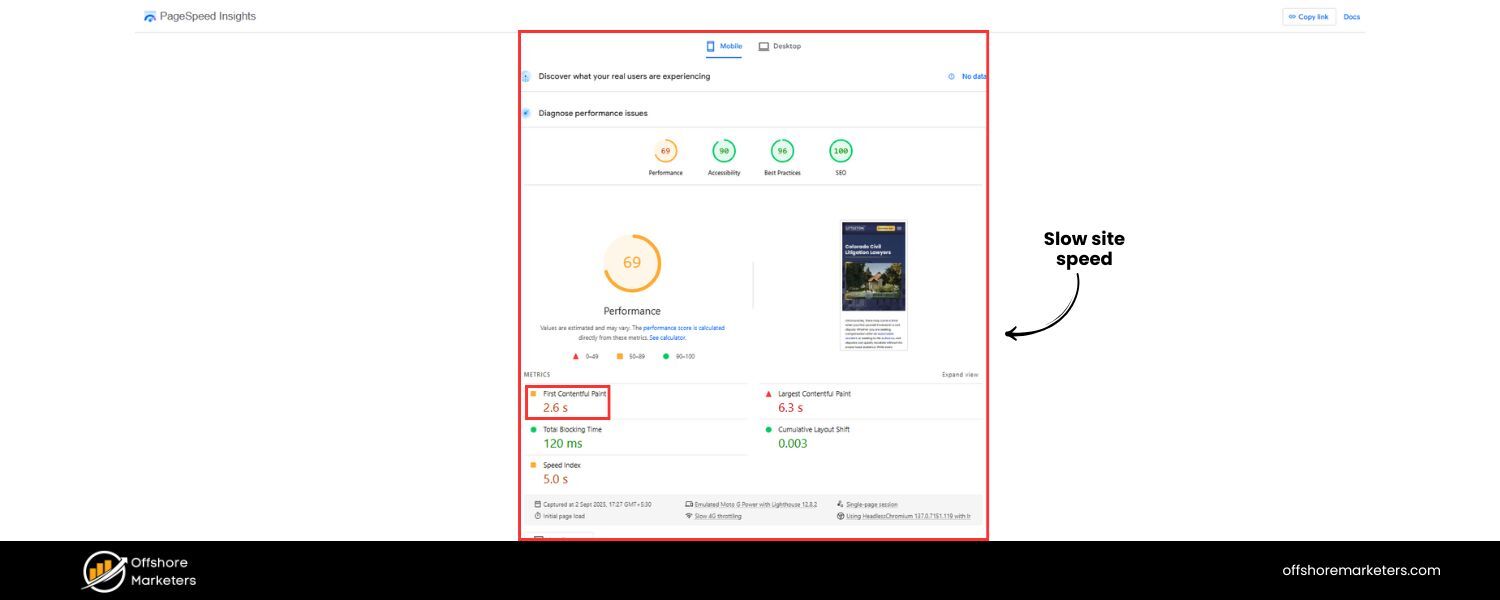
Why it’s a mistake
Today’s internet users are impatient – and so is Google. If your site loads slowly, users will bounce and Google’s algorithm takes notice. In fact, 53% of visitors will leave if a page takes more than 3 seconds to load.
Site speed is a confirmed ranking factor, especially on mobile. Google’s Core Web Vitals (Largest Contentful Paint, Cumulative Layout Shift, First Input Delay) are specific page experience metrics introduced to quantify speed and usability. A slow, laggy website not only frustrates visitors (hurting conversion rates) but also risks lower search rankings due to poor page experience scores.
Impact
High load times lead to higher bounce rates – users simply abandon your site, often before even seeing your content.
As load time goes from 1s to 5s, the probability of bounce increases dramatically (research by Google showed a “few seconds” delay can drastically raise bounce rate). From an SEO perspective, Google will rank a faster site above a slower one if content quality is similar.
Mobile speed is especially crucial, as Google uses mobile-first indexing and many searches occur on slower connections. If your site is slow on mobile, you may be effectively invisible.
Moreover, slow speed can reduce crawling efficiency (Googlebot has only so much time per site; if each page is slow, it crawls fewer pages).
How to avoid/fix: Optimize your site’s performance:
A. Measure
First, diagnose your current speed. Use tools like Google’s PageSpeed Insights, Lighthouse, or GTmetrix to see your load times and Core Web Vitals scores. These tools will highlight specific issues (e.g., large images, render-blocking scripts).
B. Optimize Assets
Compress and resize images (an oversized image can dramatically slow a page). Enable text compression (GZIP/Brotli) for your resources. Minify CSS and JavaScript files (remove unnecessary whitespace/comments) and combine files if possible to reduce requests. Use modern formats like WebP for images when appropriate.
C. Improve Server Response
Consider fast hosting and use caching. A good caching plugin or service will serve static versions of your pages so that each user isn’t generating a page from scratch. Use a Content Delivery Network (CDN) to deliver content faster to global users.
D. Eliminate Render-Blocking Resources
Ensure critical content loads first. Defer non-critical JS, load CSS asynchronously if possible, and consider removing heavy third-party scripts that aren’t essential.
E. Core Web Vitals
Address specific CWV issues: e.g., lazy-load offscreen images to improve Largest Contentful Paint, reserve space for images/iframes to prevent Layout Shift, and optimize scripts to improve First Input Delay.
Improving from, say, an 8-second load to under 3 seconds can vastly improve user satisfaction and SEO. Not only will you likely see better rankings, but faster sites also tend to have higher conversion rates.
Google has made it clear: performance is a central ranking factor because it’s crucial for user experience. Don’t give users (or Google) a reason to leave your slow site for a faster competitor.
10. Not Mobile-Friendly (Poor Mobile Optimization)
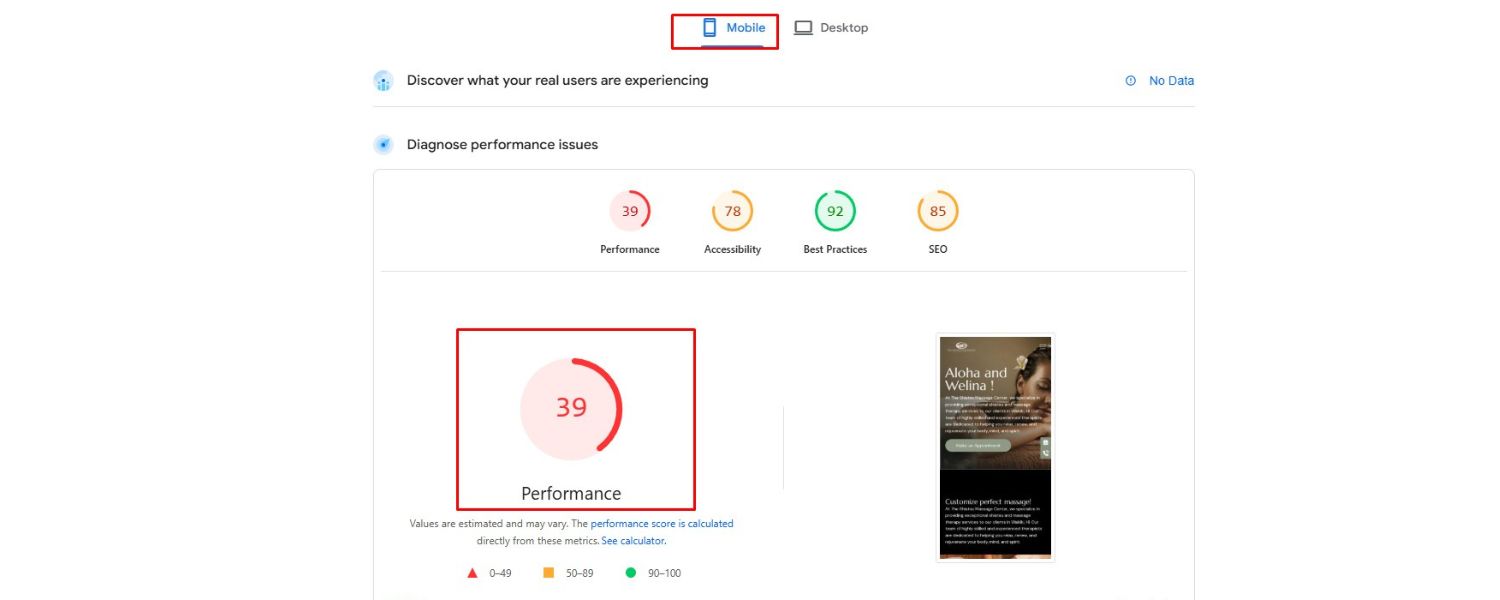
Why it’s a mistake
With mobile devices driving over 60% of web traffic and Google using mobile-first indexing (meaning Google predominantly uses your site’s mobile version for ranking), a site that isn’t mobile-friendly is making a major SEO mistake. Mobile optimization isn’t just about responsive layout; it’s about ensuring fast loading, easy navigation, and readable content on small screens.
SEO mistakes include using old desktop-only layouts that require pinch-zoom, having buttons or links too small to tap, content wider than the screen, or blocking mobile CSS/JS so the layout breaks. If users on phones have a hard time, Google will know (via metrics and direct indexing).
Impact
An unoptimized mobile experience can tank your rankings and user engagement.
Google’s index now effectively ignores your desktop site if a mobile version is available or assumes mobile is primary. So if your mobile site is lacking content or functionality that your desktop site has, you’ll rank poorer for it.
Also, mobile users who find your page but can’t navigate or read it will bounce immediately – a lost opportunity and a negative signal. “Mobile-first indexing is no longer a trend—it’s the standard,” as one SEO agency points out. Thus, ignoring mobile is essentially ignoring the majority of your audience and Google’s primary criteria.
How to avoid/fix: Optimize for mobile systematically:
A. Responsive Design
Use a responsive web design that automatically adjusts layout to screen size. Test how your pages render on various devices (phones, tablets). There should be no horizontal scrolling. Tools like Google’s Mobile-Friendly Test can flag issues.
B. Mobile Page Speed
As discussed in Mistake #9, speed is even more crucial on mobile. Optimize images, enable AMP (Accelerated Mobile Pages) for content if appropriate, and minimize heavy scripts. Google’s mobile PageSpeed Insights will show mobile-specific suggestions.
C. Touch-Friendly UI
Make sure links and buttons are large enough and spaced apart for finger taps. Avoid pop-ups or interstitials that cover the screen (Google may penalize sites with intrusive mobile pop-ups). Use legible font sizes that don’t require zooming.
D. Content Parity
Ensure the content on your mobile site is equivalent to desktop. In the past, some mobile versions were stripped down – but under mobile-first indexing, that content needs to be present. So if you use dynamic serving or separate mobile URLs, double-check that headings, text, and structured data are consistent.
E. Core Web Vitals on Mobile
Pay attention to mobile CWV scores – e.g., optimize for a fast Largest Contentful Paint on mobile (which might involve different bottlenecks than desktop).
By providing a smooth mobile experience, you not only satisfy Google’s requirements but also cater to users on the go. This can improve engagement metrics like time-on-site and reduce bounce rate, further benefiting SEO.
Remember, Google now primarily uses the mobile version of your site for indexing and ranking – so treat your mobile site as the primary face of your business online.
11. Bad Internal Linking & Site Structure
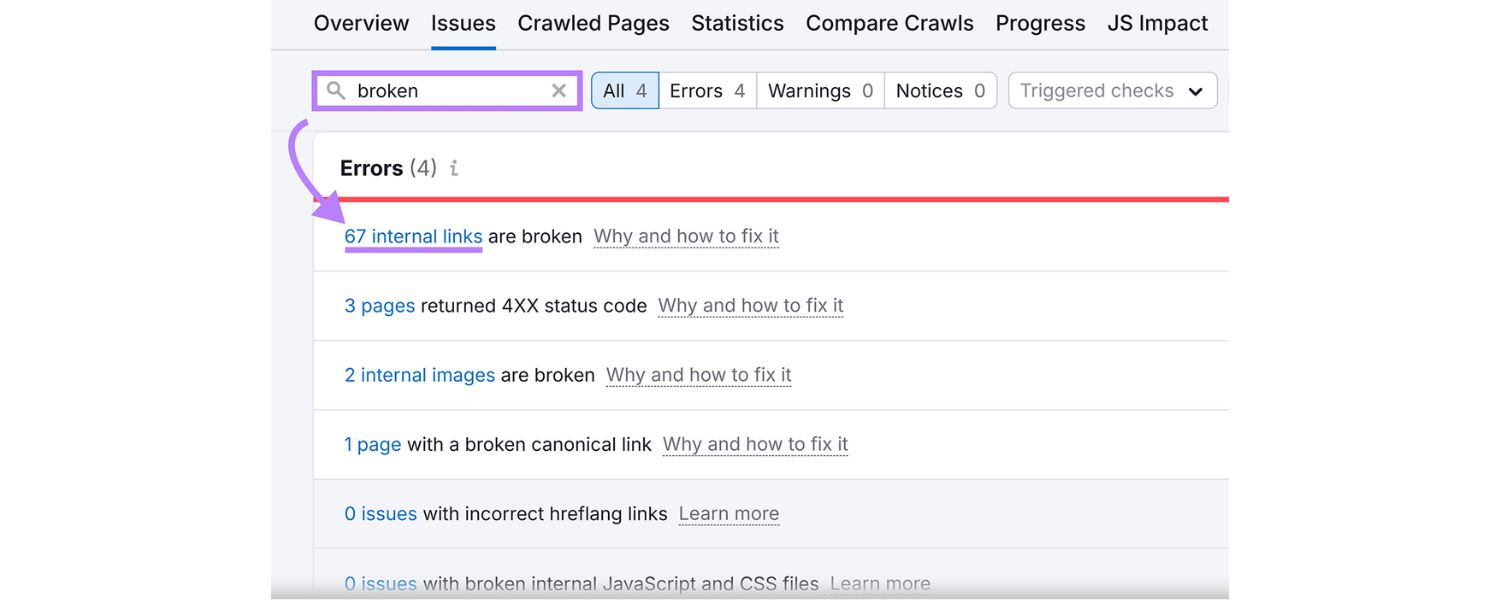
Why it’s a mistake
Internal links – links between pages on your own site – are the arteries that help distribute ranking power (and guide users) throughout your content. A poor site structure with few internal links or a illogical hierarchy means some pages are hard for both users and crawlers to find.
SEO mistakes include: not linking from your blog posts to relevant older posts (or vice versa), having orphan pages (no links pointing to them), using only top-level navigation without contextual links, or dumping every post in one giant category without sub-structure.
If your site isn’t organized, Google may struggle to understand which pages are most important, and users will struggle to navigate – both harming SEO.
Impact
Sites with bad internal linking often see uneven indexation and ranking. Important pages might not rank as well because you haven’t signaled their importance via internal links (Google uses internal link structure to determine page importance). Also, with no or poor internal links, crawlers may not discover all your content – especially on larger sites.
A user perspective: they land on one blog post but have no clear path to related content, so they leave instead of engaging further. This leads to higher bounce rates and lower session duration.
On the flip side, strategic internal linking can boost a page’s rank: for example, linking to a new article from your homepage or other high-authority pages on your site helps Google find and value it more quickly. Neglecting this is leaving SEO opportunity on the table.
How to avoid/fix: Impose a logical structure and link generously (but meaningfully) within your site:
A. Hierarchy
Organize content into categories or silos. For instance, if you have a “SEO” category on a blog, ensure there’s a hub page or category page that links to all SEO articles.From each article, link back to the category or related hub if applicable. This way, no page is more than a few clicks from the homepage (a good rule is 3 clicks max to reach any page).
B. Contextual Links
Within your content, whenever you mention a topic that you have another article about, link to it. For example, this article might link internally to a “How to do keyword research” guide when discussing that concept. Use descriptive anchor text for these links (avoid generic “click here”) – this gives Google context about the destination page.
C. Avoid Orphans
Make sure every important page has at least one internal link from another page. Periodically audit for orphan pages (tools or Search Console coverage report can help). If found, incorporate them into your site’s linking structure or navigation.
D. Site Navigation
Use clear menu navigation for main sections, and include breadcrumb navigation if it fits your site (breadcrumbs help both users and search engines understand site structure, and Google often shows breadcrumbs in search results).
E. Link Depth
Identify your top-performing or most valuable pages and ensure they are linked site-wide or from many relevant pages. Conversely, don’t bury an important page six levels deep in a menu without any additional internal links.
By improving internal linking, you effectively guide Google’s crawl and concentrate link equity on your key pages. An SEO analogy: internal links are like votes of confidence from your own site.
Utilize them to signal which pages are most valuable. A strong site structure not only boosts SEO but also makes for a better user experience – visitors will find more of your content and stay longer, which is a positive signal in itself.
12. Broken Links and Redirect Chain Issues
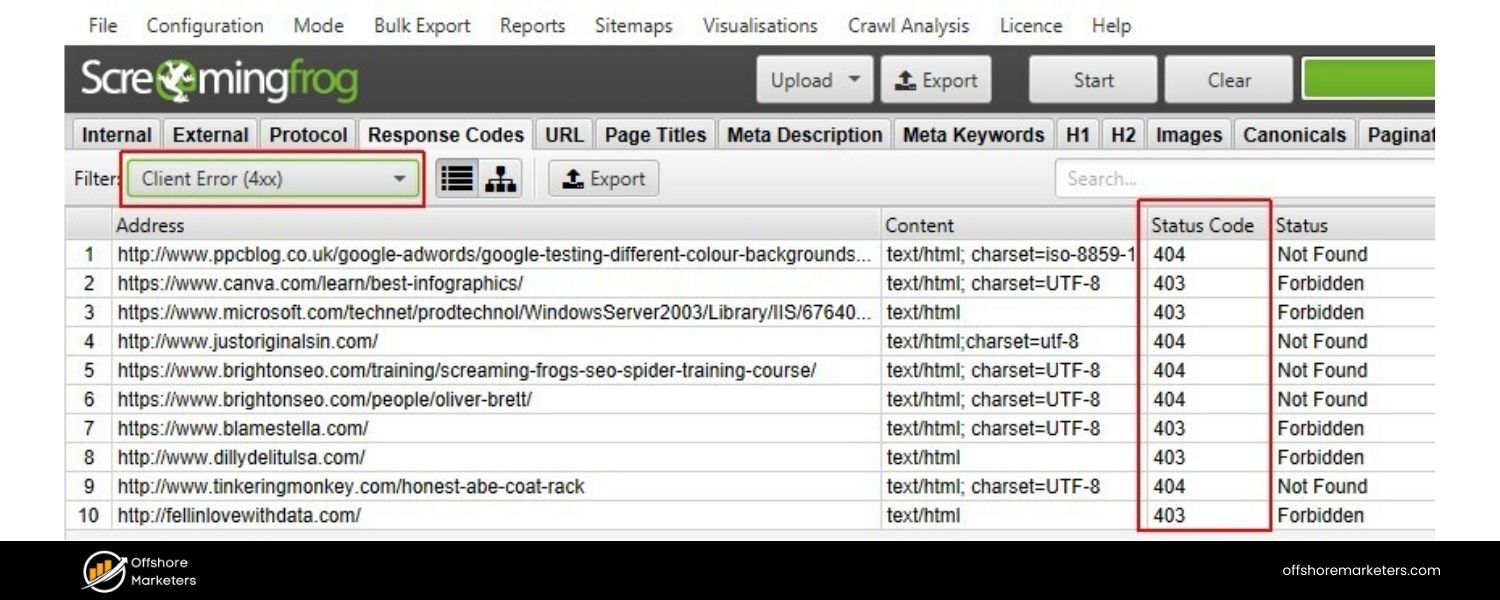
Why it’s a mistake
Broken links (links that lead to non-existent pages, a.k.a. 404 errors) are bad for both users and SEO. They often arise when pages are deleted or URLs change without proper redirects.
SEO mistakes like redirect chains (where URL A redirects to B, which redirects to C, etc.) and redirect loops are technical snags that waste crawler time and can hurt page load speed. If your site has many broken links (internal or external), it signals poor maintenance. And if search engine bots hit a broken link, they may not find the content that used to be there or waste crawl budget retrying those URLs.
Impact
Broken links create a frustrating user experience – a visitor clicks a link expecting content and gets an error page. Many will drop off.
For SEO, broken internal links mean Google can’t access some content (thus it can’t index or rank it). Broken external links (outgoing) don’t directly hurt your SEO, but they can diminish user trust and experience.
Google has stated that having some 404s is normal, but a pattern of many broken links can be seen as a sign of a neglected site. As for redirect issues: a long redirect chain slows down crawling and may not pass full link equity to the final page.
In some cases, a chain or loop might prevent Google from indexing a page at all. Google doesn’t like dead ends – a sentiment echoed by SEO pros – so a site riddled with dead links will not perform optimally.
How to avoid/fix: Regularly scan your site for broken links and fix them:
A. Use Tools
Free tools like Xenu, Screaming Frog, or online validators can crawl your site and report 404 errors and redirects. Google Search Console also lists crawl errors for broken pages that it tried to fetch.
B. Fix Internal Broken Links
If an internal link is broken because the target page moved, set up a 301 redirect from the old URL to the new URL. Also update the link in your content to point directly to the correct URL (to remove the reliance on a redirect).
If the page was deleted and there’s no direct replacement, consider restoring it or redirecting to the closest related page (or your homepage as a last resort).
C. Fix External Broken Links
For outbound links in your content that are dead (perhaps the referenced site moved or went offline), update them. Find an alternative reputable source to link to, or remove the link if it’s not crucial.
D. Minimize Redirects
While some redirects (especially after site changes) are inevitable, don’t let them accumulate unnecessarily. For example, if page A -> B and B -> C, update A to point directly to C (and remove the intermediate redirect if possible).
Keep your .htaccess or redirect rules tidy. Google will follow a few hops, but each hop can slightly diminish ranking signals and slow the user’s request.
E. Custom 404 Page
Have a helpful 404 error page for the broken links that do occur. Include navigation or a search bar so users can find what they need. This doesn’t fix SEO per se, but it can reduce user frustration and keep them on your site.
Staying on top of link health is part of good site maintenance (which also reflects on your professionalism). As part of your SEO routine, consider a quarterly link audit to catch broken links and repair them. This ensures that both users and crawlers have a smooth journey through your site without hitting dead ends.
13. Neglecting Image Optimization
Why it’s a mistake
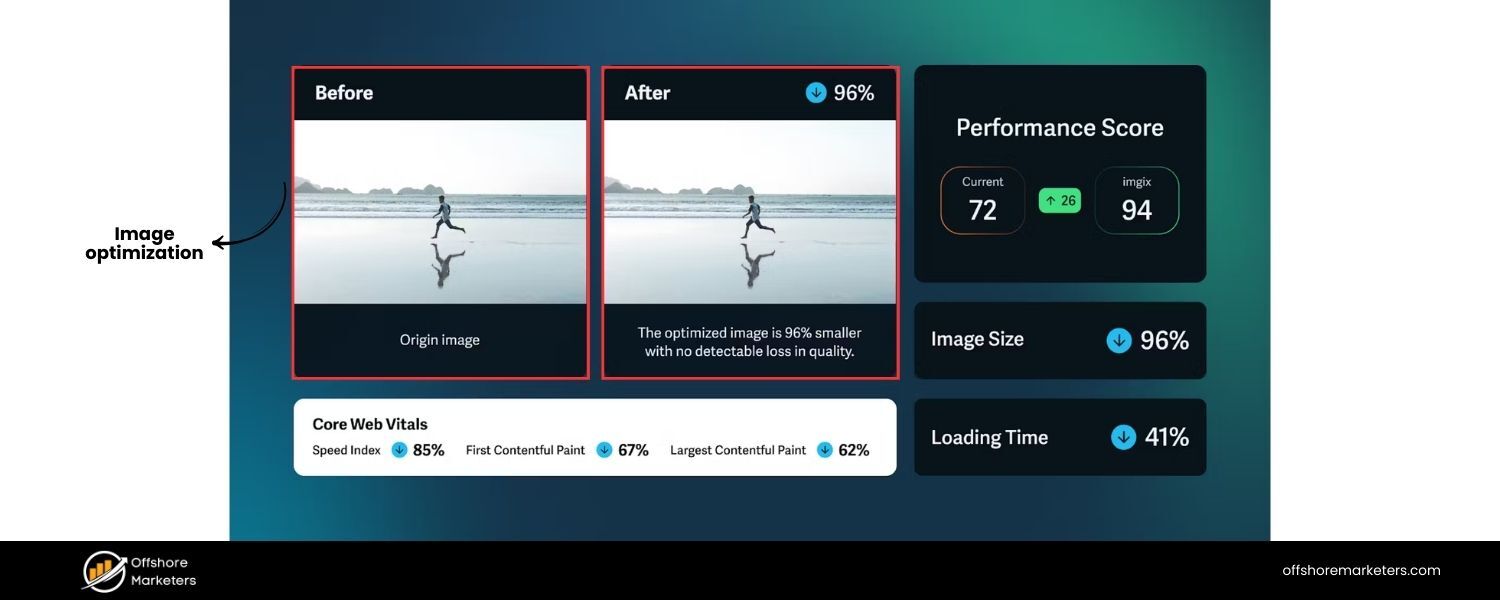
Images can greatly enhance content, but if not optimized, they pose SEO and accessibility issues.
Two common seo mistakes: using large, uncompressed images that slow down your site (as discussed earlier, site speed suffers), and missing alt text for images. Alt text (“alternative text”) is the HTML attribute that describes the image content – crucial for screen readers (visually impaired users) and for Google’s understanding of the image.
Without alt tags, you miss out on the chance to have your images rank in Google Images, and you exclude a portion of users from understanding your content. Other mistakes include using non-descriptive file names (e.g., IMG_00123.jpg instead of red-running-shoes.jpg) and not leveraging modern formats.
Impact
Oversized images can significantly slow page load, hurting your Core Web Vitals and ranking (as noted, images are often a top cause of slow LCP).
For instance, an image-heavy page that isn’t optimized can cause half your visitors to abandon if it crosses that 3-second mark. Meanwhile, no alt text means lost SEO opportunities – Google’s algorithms use alt text to index and rank images.
If you have an e-commerce or recipe site, for example, missing alt text could mean your products or photos never appear in image search results. Also, Google values accessibility; sites that ignore basic accessibility (like alt tags) might indirectly signal lower quality.
Plus, a user on a slow connection or a broken image link will only see the alt text – if it’s missing, they get no information.
How to avoid/fix: Optimize your images on both the performance and metadata fronts:
A. Right-size & Compress
Scale images to the maximum size they’ll be displayed (no need to use a 2000px wide image if it’s shown as 500px).Use compression tools or formats (JPEG for photographs, PNG for graphics, or new formats like WebP/AVIF which often reduce file size considerably). Many CMS plugins can automate image compression on upload.
B. Use Descriptive File Names
Name your image files with keywords relevant to the image content (and the page topic). E.g., red-running-shoes.jpg is informative, whereas image1.png is a missed opportunity.
C. Write Alt Text for Every Image
Alt text should succinctly describe the image for someone who cannot see it. For example: (img src=“red-running-shoes.jpg” alt=“A runner tying bright red running shoes before a race”). This description helps search engines understand the image, and it will be read by screen readers for accessibility. Avoid stuffing keywords here; be genuine and descriptive – if it naturally fits a keyword, great, but the priority is clarity.
D. Lazy-Load Below-the-Fold Images
For pages with many images, implement lazy loading (so images load only when they scroll into view). This improves initial load time. Native HTML lazy loading (loading=“lazy”) or JavaScript libraries can handle this easily.
E. Image Sitemap (if applicable)
If images are a big part of your site (photography or e-commerce), consider an image sitemap to let Google know about image URLs specifically.
By optimizing images, you’ll often see a dual benefit: faster page loads (users love this, and thus so does Google) and potentially increased traffic via image search. Plus, you ensure your content is accessible to all users. It’s a win-win that addresses both technical SEO and user experience.
14. Overlooking Structured Data and Rich Snippets
Why it’s a mistake
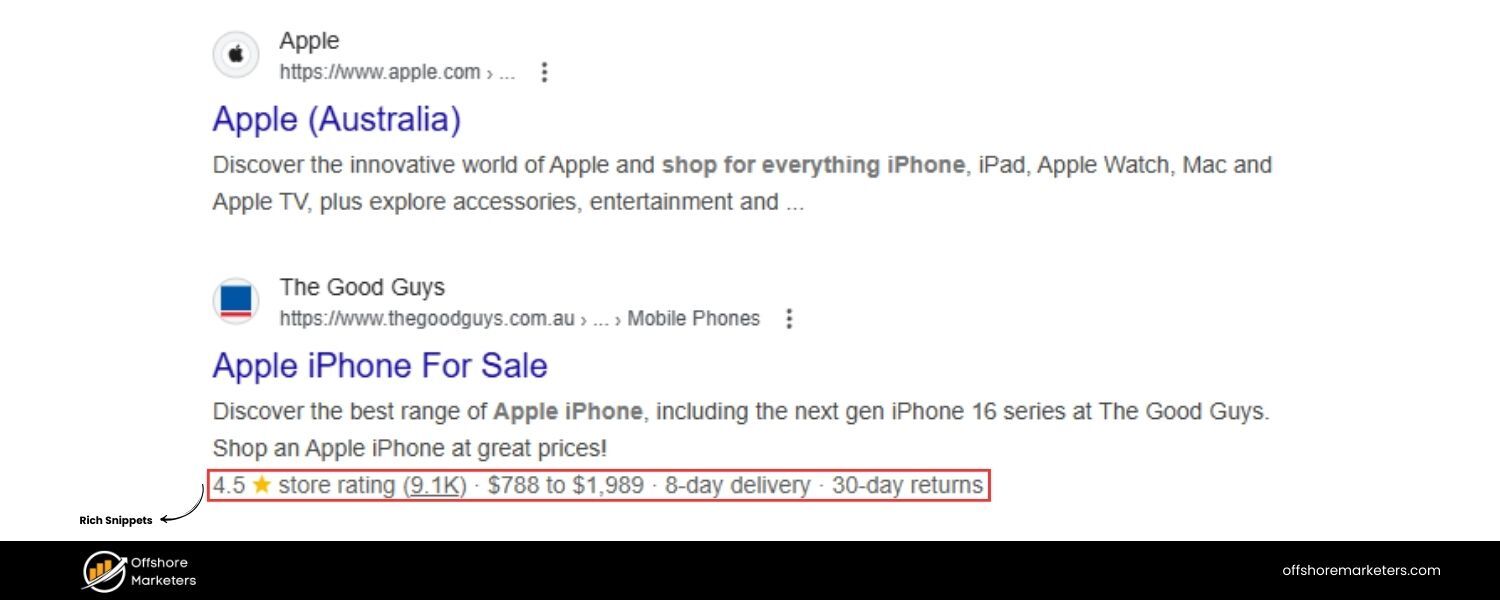
Structured data (Schema markup) is extra code you add to your pages to help search engines interpret content and potentially display rich snippets (enhanced search results with star ratings, FAQs, events, etc.). While not having schema markup won’t directly penalize you, it’s a missed opportunity and a major SEO mistake that prevents you from standing out in SERPs.
Many sites neglect to implement even basic schema (like Article, Recipe, Product, FAQ schemas) that could improve how their listing appears.
Also, structured data can feed into new SEO paradigms – for example, voice search and assistant devices often rely on structured data to answer queries. If you ignore this, competitors who do use schema may leapfrog you with more eye-catching results or voice answer presence.
Impact
Without structured data, your pages might show up as plain results when they could have rich elements.
For instance, a product page with no schema will just display title and description, whereas a competitor with Product schema might show star ratings, price, and availability right on Google’s results – drawing clicks away from you.
Similarly, a Q&A or FAQ page marked up properly can appear in Google’s FAQ rich result format, taking up more real estate on the page.
Rich snippets aren’t guaranteed, but you’re not even in the running if you lack schema. Additionally, as search evolves into answer engines (conversational AI like Google’s MUM or Bing’s AI answers), having your content structured can help these systems parse and potentially feature your information.
Overlooking schema is effectively ignoring an SEO best practice that can improve click-through rate and relevance.
How to avoid/fix: Implement structured data relevant to your content:
A. Identify Applicable Schemas
Common types include Article/BlogPosting (for general articles), Product (for product pages), Recipe, FAQPage, HowTo, Organization, LocalBusiness (for local SEO), etc.Google’s Search Gallery provides a list of schema types they support for rich results. Choose types that match your content.
B. Add Schema Markup
You can add schema in JSON-LD format (recommended) in your page’s HTML. Many CMS platforms have plugins (like Yoast SEO, RankMath, or others) that simplify adding schema without coding.For example, you could mark up an FAQ section of your page with FAQPage schema so that the question/answer pairs are understood by Google.
C. Validate and Test
Use Google’s Rich Results Test or Schema.org’s validator to ensure your structured data is error-free. Even a small syntax error can invalidate your schema.
D. Monitor Search Console
If you add schema, Search Console will report any errors or enhancements under the Enhancements section (e.g., “Review snippets”, “FAQ”, “Breadcrumblist”, etc.). Fix any issues flagged.
E. Keep It Relevant
Only mark up content that is actually present on the page and complies with Google’s guidelines. Don’t mark up fake reviews or content that violates their spam policies – that can lead to manual penalties. Structured data should supplement quality content, not substitute for it.
Adopting structured data can be seen as speaking Google’s language. It might not directly boost your rankings, but it can boost your visibility and click-through rate by making your results more informative and attractive.
In competitive niches, having rich snippet features can be a deciding factor in winning traffic. Don’t let this advanced but increasingly standard SEO technique pass you by.
15. Ignoring Local SEO (for Local Businesses)
Why it’s a mistake
If your business serves a specific geographic area (e.g., a brick-and-mortar store or service area business), ignoring local SEO means missing out on high-intent traffic.
Local SEO involves optimizing for location-based searches (“near me” queries, city-specific keywords) and managing your presence on Google Maps and business directories. The biggest component is Google Business Profile (formerly Google My Business) – many small businesses fail to claim or optimize their listing.
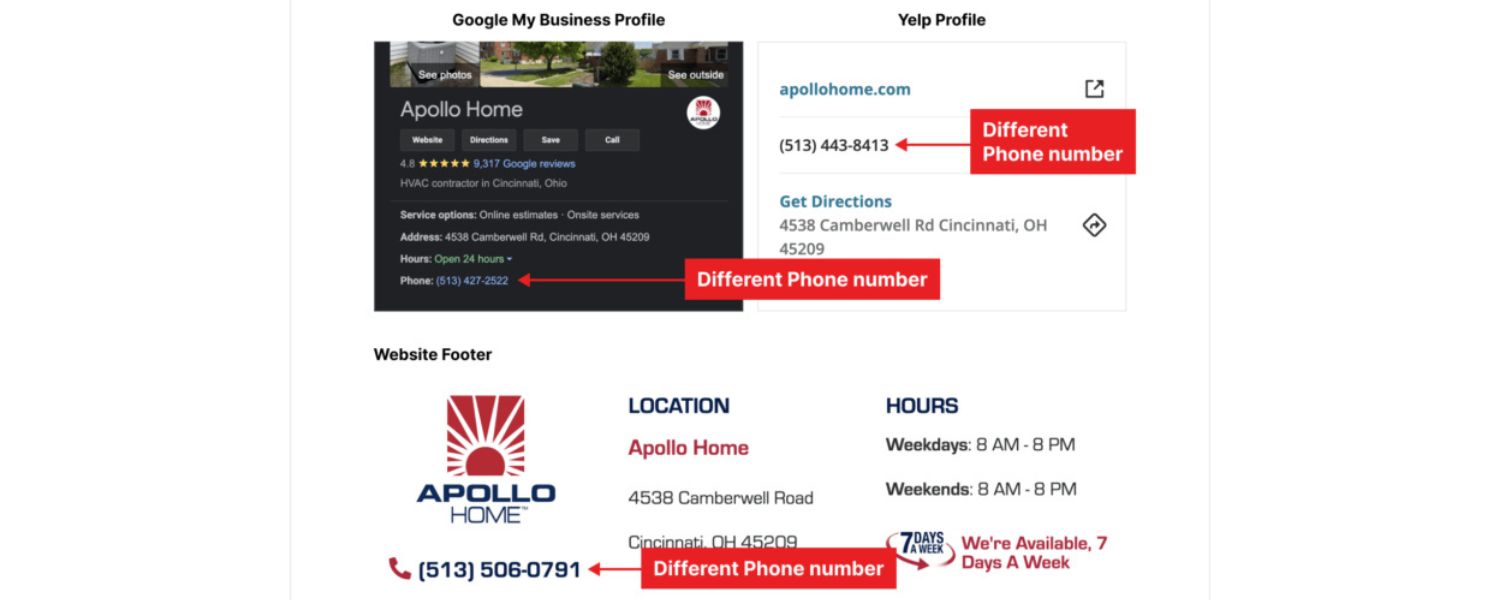
Other seo mistakes include inconsistent NAP (Name, Address, Phone) information across directories, no customer reviews strategy, and not using local keywords on the site.
Google’s algorithm treats local searches differently, often showing a “local 3-pack” map result. Not appearing there means losing customers to competitors who do.
Impact
If you operate locally, a huge portion of relevant searches likely have local intent (e.g., “plumber in [town]”, “best coffee shop near me”). By not optimizing for these, you essentially surrender those leads. For example, 46% of all Google searches are seeking local information. If your Google Business Profile is absent or incomplete, you won’t show up in Google Maps or the local pack, ceding visibility.
Moreover, local customers rely on reviews – 95% of online shoppers read reviews before buying – if you have none or poor reviews unaddressed, it harms trust. Ignoring local SEO can literally cost foot traffic and sales, even if your website itself is fine for generic SEO.
How to avoid/fix: For any local or regional business, implement a local SEO strategy:
A. Claim & Optimize Google Business Profile
Verify your business on Google and fill out all details (address, hours, website, attributes). Choose the correct categories. Post updates or offers periodically.Add photos – businesses with photos tend to get more clicks and direction requests. This profile is key to showing up on Google Maps and local packs.
B. Consistent NAP
Ensure your business name, address, and phone are identical across your website and all listings (Yelp, Yellow Pages, Facebook, etc.). Inconsistency can confuse Google or cause duplicate listings.
Include your address and phone on your website, preferably on a Contact or footer section (use schema LocalBusiness markup if possible to highlight it).
C. Local Keywords on Site
Incorporate local terms naturally into your content – mention your city/region in your homepage title tag, in headings or body text where relevant (“proudly serving the Denver area since 1995…”).
Create location-specific landing pages if you serve multiple areas, ensuring each page has unique, useful info about services in that area (avoid boilerplate duplicate pages).
D. Encourage Reviews
Ask happy customers to leave reviews on Google, Yelp, and Facebook. Respond to reviews – both positive and negative – professionally. A steady flow of genuine positive reviews will boost your local rankings and provide social proof to searchers.
E. Local Backlinks/Citations
Get listed in local directories or chambers of commerce sites. Local backlinks and citations signal to Google that you’re part of the local community.
F. Optimize for Local Pack
Factors like proximity, reviews, and category relevance affect the local 3-pack. While you can’t change where a user is searching from, you can ensure you have a strong profile and good reviews to maximize your chances.
By focusing on local SEO, you connect with nearby customers at the moment they’re searching for what you offer. It’s one of the highest-converting search segments – someone searching “near me” often intends to act quickly (visit or call).
Don’t let that business go to a competitor simply because your SEO was too globally oriented. If you’re local, be local online too.
16. Shady or Low-Quality Backlink Practices
Why it’s a mistake
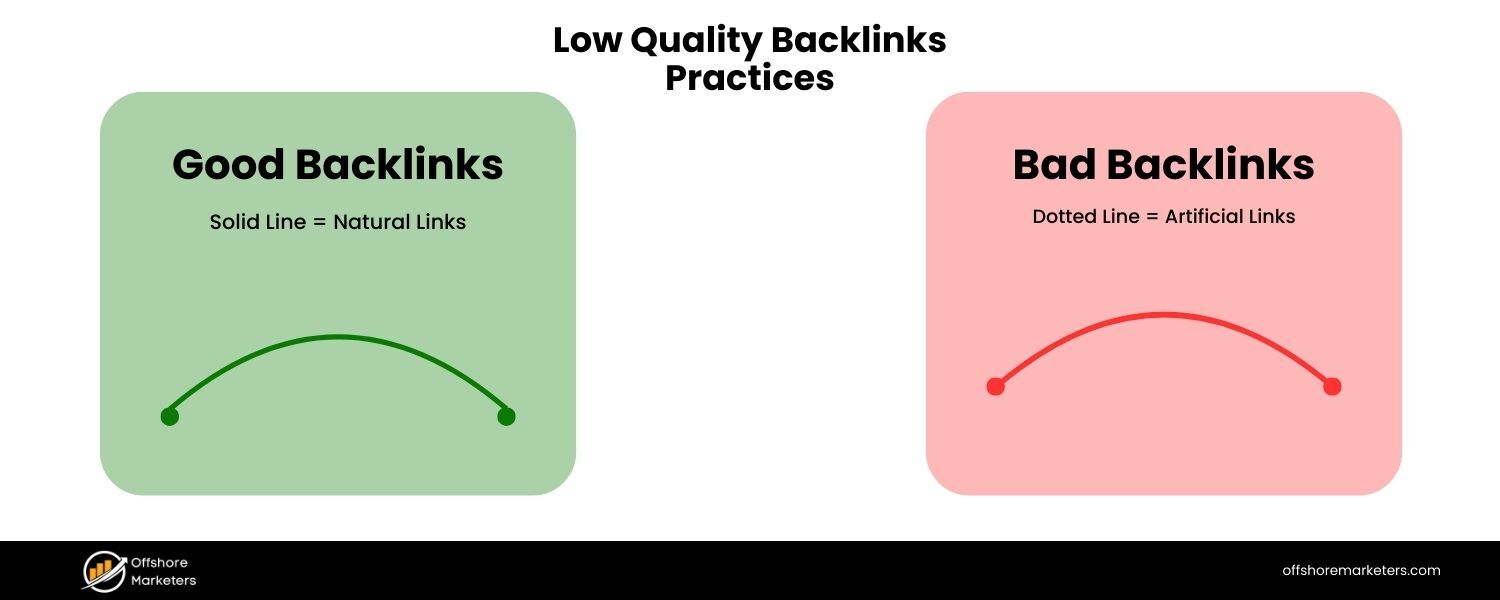
Backlinks (links from other sites to yours) remain a core ranking factor – but quality far outweighs quantity. Resorting to black-hat link schemes is a major SEO mistake that can lead to penalties.
This includes buying links from link farms, participating in spammy link exchanges, using Private Blog Networks (PBNs), or spamming forums/comment sections with your links. Also, chasing a high number of low-quality directory links or exact-match anchor text links can do more harm than good.
Google’s Penguin algorithm and manual review team target unnatural linking patterns aggressively. On the flip side, completely ignoring backlinks isn’t wise either; “build it and they will come” often doesn’t apply to SEO. You need backlinks, but they must be earned naturally or built within Google’s guidelines.
Impact
Engaging in manipulative link-building can yield a quick boost, but it’s short-lived and risky. When Google catches on (and they have sophisticated ways to detect paid or spam links), your site could be hit with a ranking drop or even a manual penalty.
A penalty can cause your organic traffic to plummet overnight, and it’s painstaking to recover (requiring a disavow file, reconsideration requests, etc.). Even without a formal penalty, low-quality backlinks (from unrelated or spammy sites) might simply be ignored by Google’s algorithms, contributing nothing to your SEO while risking your reputation.
Conversely, if you neglect link building entirely, you’ll have a hard time competing in niches where others naturally accrue links – backlinks are among Google’s most important ranking factors, after all.
How to avoid/fix: Adopt white-hat link building and monitor your backlink profile:
A. Earn Links with Great Content
The best long-term strategy is creating link-worthy content – resources, infographics, research, valuable tools – that others in your industry naturally want to reference. Promote this content via outreach or social to get it in front of those who might link.
B. Guest Posting (Quality > Quantity)
Contributing guest articles to reputable publications in your niche can earn you authoritative backlinks. Focus on sites that are relevant and have real traffic (and avoid any that openly advertise “write for us, include your links” for a fee – those are likely link farms).
C. Avoid Link Schemes
Steer clear of buying links. If an “SEO service” promises hundreds of backlinks for $50, it’s a scam that will post your site on spam directories or PBNs, which can lead to a penalty.Also, avoid excessive cross-linking schemes (e.g., you link to me, I’ll link to you) beyond natural partnerships. Google’s webmaster guidelines explicitly forbid manipulative linking.
D. Diversify Anchor Text
If all your backlinks have the exact same anchor (especially a commercial keyword), it looks unnatural. Natural links will include your brand name, URL, or a variety of phrases. Don’t over-optimize anchors.
E. Monitor Links
Use tools (Ahrefs, Semrush, Google Search Console’s link report) to keep an eye on new backlinks. If you notice a spike of spammy links (perhaps from a negative SEO attack or bad past activity), you can consider using Google’s Disavow Tool to ask Google not to count those. Do this carefully, primarily if you have a manual penalty or clear evidence of harmful links.
F. Build Relationships
Sometimes the best links come from building real relationships – engage with your community, partner with other businesses for content collaborations, sponsor local events (often yields a link on their sites), etc. These are legit ways to garner links that reflect real-world trust.
In summary, focus on earning links, not manipulating them. A single link from a high-authority, relevant website can outweigh 100 links from low-quality domains.
Think in terms of building your site’s reputation – just as in real life, a recommendation from a respected source is gold, while 100 fake testimonials mean nothing (or worse, signal fraud). Google’s link algorithms strive to make the same distinction.
17. Using Generic Anchor Text for Links
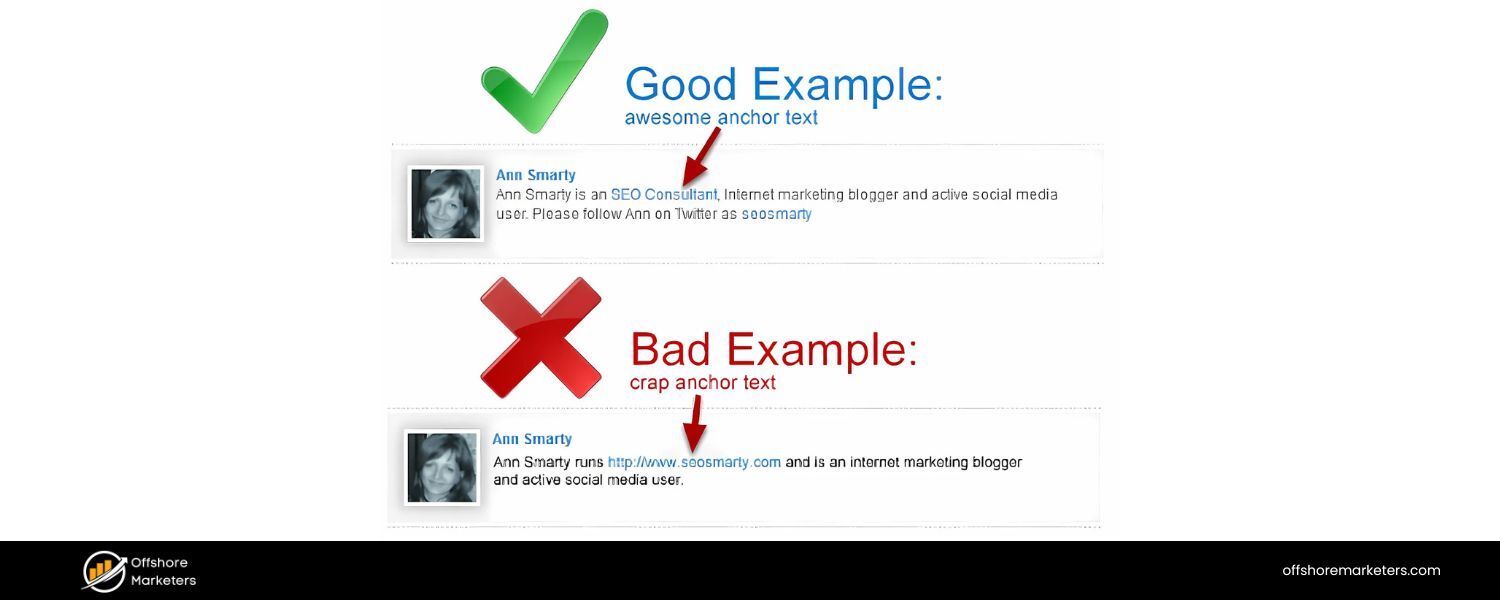
Why it’s a mistake
Anchor text is the clickable text of a link, and it provides context to users and search engines about the linked page. If you overuse generic anchors like “click here” or “read more” for your internal links (or even incoming external links), you’re making a critical SEO mistake and wasting an opportunity to signal relevance.
Likewise, using totally off-topic or repetitive anchor text isn’t helpful either. For internal linking especially, if all your links say “see more” or are buried in buttons like “learn more,” Google loses the topical hint of what that next page is about. It’s a subtle SEO mistake, but it can have cumulative effects.
Impact
Generic anchor text doesn’t harm you outright, but it represents a missed optimization. Descriptive, keyword-rich anchor texts can help improve the relevance between pages. For example, an internal link saying “SEO audit checklist” is far more informative than “click here”.
Users also benefit – descriptive anchors tell them what they’ll get if they click, which can improve click-through and time on site. In contrast, a page full of “click here” links forces users (and Googlebot) to infer context from surrounding text, which is not always clear.
For external links pointing to you, you don’t have full control, but a natural variety is best. Historically, over-optimized exact-match anchors from external sites was a bigger concern (see Mistake #16), but here we’re focusing on under-optimized anchors, especially internally.
How to avoid/fix: Be intentional with anchor text:
A. Make Anchors Descriptive
In your internal linking, use anchor phrases that reflect the content of the target page. E.g., instead of “Read more” as a link to an article about site speed, make the anchor “improve site speed” or “site speed optimization tips.” This provides context.
B. Keep It Natural
Ensure the anchor flows in the sentence and isn’t just a string of keywords. It should make sense to a human. For example: “learn how to optimize your website’s speed” is user-friendly.
C. Audit and Update
Go through key pages and see if there are generic anchors you can update. Navigational elements like menu buttons might be fine as one word, but within content, there’s usually room to be more specific. If you have blog posts with “click here for details” repeatedly, edit those to something like “see our technical SEO guide for details.”
D. Accessibility Note
Clickable text should be meaningful in isolation because screen reader users sometimes navigate by links. If all they hear is “click here, click here, click here,” that’s a poor experience. Descriptive anchors improve accessibility as well.
E. Balance External Anchor Variety
While you can’t rewrite other sites’ links, you can influence it by how you publish content.For instance, if you provide outreach content or press releases, don’t always hyperlink exact keywords – use your brand or a descriptive variation. Aim for a natural mix (some brand anchors, some “learn more at [Brand]” and some keyword-rich ones).
By paying attention to anchor text, you strengthen the interconnectedness of your content. Think of anchors as signposts: “this way to [destination].” Vague signposts aren’t helpful.
Clear ones guide both readers and crawlers more effectively, reinforcing your topical relevance and site architecture understanding.
18. Disregarding User Experience (UX) and Engagement
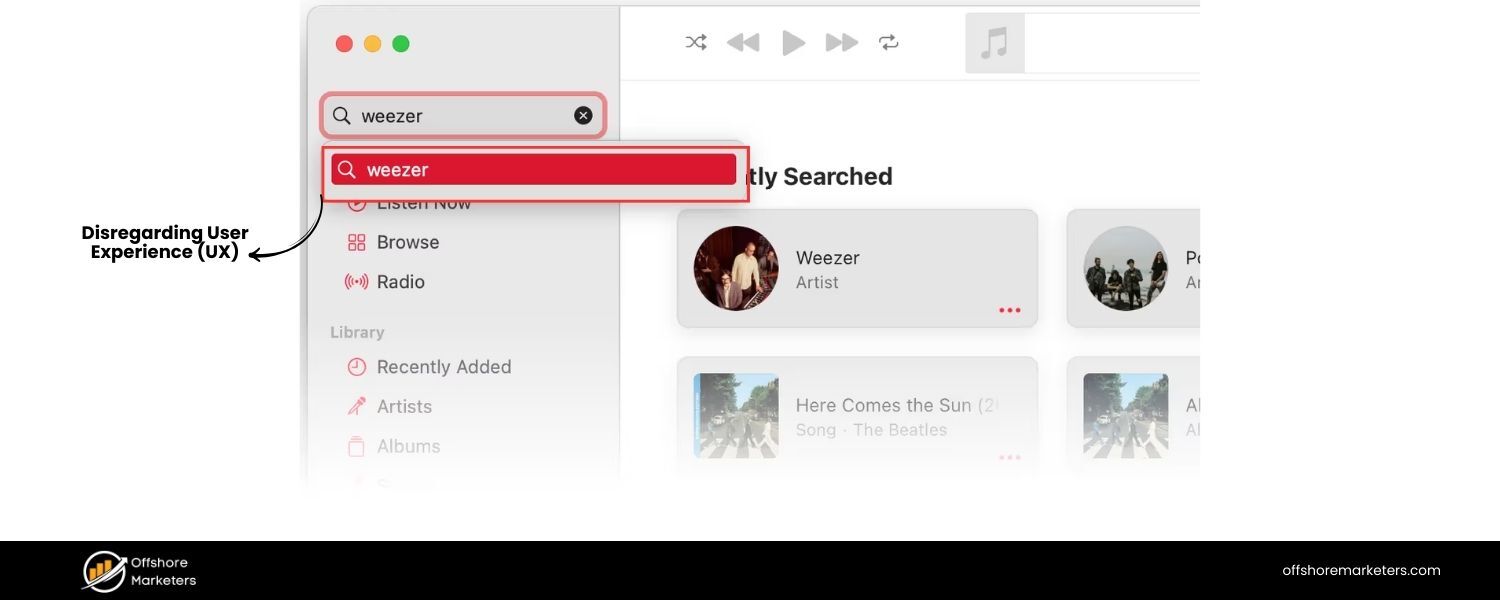
Why it’s a mistake
Google’s ultimate goal is to satisfy users. So user experience signals – while indirect – have become increasingly important to SEO. If your site is technically optimized but offers a poor experience, users won’t stay… and high bounce rates or low dwell time can correlate with lower rankings.
Common SEO mistakes include:
intrusive pop-ups or interstitials (especially on mobile), hard-to-read text (tiny font, poor contrast), obnoxious ads, autoplay videos, or simply a confusing layout/navigation.
Also, not having a clear call-to-action or next step can waste the traffic you do get – leading to poor conversion, which in turn means your site isn’t fulfilling user needs as well as it could.
Remember, Google can measure user engagement to some extent (Chrome usage data, pogo-sticking back to search results, etc.), and it certainly measures whether you have mobile-friendly layouts and no intrusive interstitials (the latter is actually a ranking factor for mobile).
Impact
Ignoring UX creates a disconnect: you might get traffic, but users leave unsatisfied, which can eventually hurt your SEO performance.
For example, suppose your page ranks but is cluttered with pop-ups – many users might “pogo-stick” (bounce back to Google and click a different result). That behavior tells Google your page might not be the best result for that query. Over time, you could lose ranking to a competitor with a smoother UX.
Google’s algorithm updates (like Core Web Vitals in 2021, and the earlier Page Layout algorithm) explicitly target bad user experiences – such as pages with too many ads in the above-the-fold area or slow, janky interfaces.
A site that’s difficult to use is essentially telling both users and Google that it doesn’t put visitors first.
How to avoid/fix: Optimize the on-page experience just as you optimize the content and code:
A. Improve Readability
Use a clean design with plenty of white space. Ensure font sizes are legible on all devices (generally 14px+ for body text on desktop, larger on mobile).
Break up long paragraphs. Use bullet points or numbered lists for clarity (like this list!). Basically, make consuming your content easy on the eyes and brain.
B. Minimize Intrusive Elements
If you have pop-ups, ensure they are timely and easy to close. Google penalizes mobile sites that show intrusive interstitials (e.g., a full-screen signup ad) on page load.
Consider removing or delaying such pop-ups. Cookie notices or legally required pop-ups should be as small as possible. For email capture, try less invasive slide-ins or banners rather than blocking the content immediately.
C. Navigation & Layout
Have a logical menu structure and site search so users can find what they need. For long content, a table of contents (with jump links) can improve UX (and even earn a sitelinks snippet in Google).
Check that important buttons or links are easily identifiable and not hidden. On e-commerce product pages, for instance, the “Add to Cart” button should be prominent.
D. Ad Experience
Ads can be a necessary revenue model, but too many ads, especially up top or interspersed in a way that disrupts reading, will annoy users. Google’s “Top Heavy” update demotes sites with excessive ads above the fold.
So, keep ad placements reasonable – and never have elements that cover content as the user scrolls (unless it’s user-initiated).
E. Engagement Signals
While you can’t directly control metrics like dwell time or bounce rate, you can indirectly improve them by providing ways to engage. Include related article links or “further reading” at the end to give users a next click on your site instead of returning to search.
Ensure pages load fast and are interactive quickly (we addressed speed earlier). Consider interactive elements or multimedia if they add value (like an explainer video, or tool) – these can increase time on page.
By making your site pleasant to use, you’re more likely to convert visitors into customers, subscribers, or repeat readers. Google’s own documentation emphasizes making pages for users, not just for bots. A seamless UX reinforces that you’re doing exactly that. In the long run, what’s good for the user is good for SEO. When users love your site, positive rankings usually follow.
19. Not Utilizing Analytics and Failing to Adapt
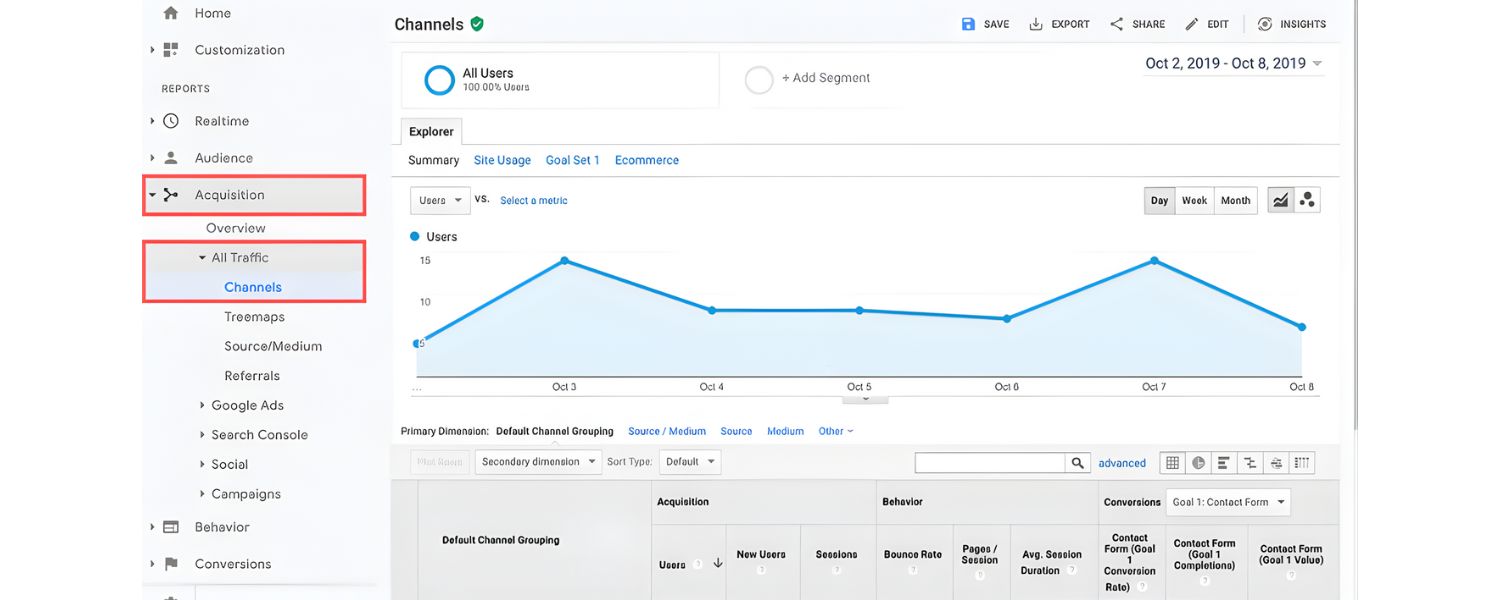
Why it’s a mistake
SEO isn’t a “set and forget” project – it requires ongoing monitoring and adjustment. Not using analytics or tracking means you’re flying blind, making a critical SEO mistake.
If you’re not reviewing data from Google Analytics (or a similar analytics platform) and Google Search Console, you won’t know what’s working or where issues lie.
For instance, you might not realize a particular page’s traffic dropped due to a Google update, or that users leave one page almost immediately (indicating a problem).
Similarly, failing to keep up with SEO trends and algorithm changes can leave you using outdated tactics that no longer work – or worse, incur penalties. Many businesses also make the SEO mistake of not setting up conversion tracking, so they can’t tie SEO efforts to actual business outcomes (leads, sales).
Impact
Lack of analytics means missed opportunities and undiagnosed problems. If you never check Search Console, you might not notice crawl errors, mobile usability issues, or security problems that Google has flagged. You also won’t see the search queries that are bringing people to your site, losing a chance to refine your keyword targeting.
Not adapting to algorithm changes can cause slow slides in rankings – for example, sites that didn’t adapt to Google’s core updates focusing on content quality or the Helpful Content Update may have seen traffic declines and not understood why.
In a dynamic field like SEO (where Google makes thousands of tweaks per year), staying static is effectively falling behind. Finally, without tracking conversions, you might focus on vanity metrics (like just increasing traffic) rather than the traffic that actually converts – which could misguide your SEO priorities.
How to avoid/fix: Leverage data and stay current:
A. Set Up Analytics & Goals
Ensure you have Google Analytics (GA4 as of 2023) or an equivalent installed. Configure goals or e-commerce tracking so you know which organic visits turn into sign-ups, purchases, etc. This helps evaluate ROI and focus on pages/keywords that drive business value.
B. Regularly Review Search Console
GSC is a treasure trove for SEOs. Check the Performance report to see queries, CTR, and positions – look for keywords where you rank just off page 1 and could optimize content to bump up.
Use the Coverage report for index issues, the Experience/Security reports for Core Web Vitals or HTTPS issues, and the Link report to see new backlinks. GSC will also message you about manual actions or other critical issues – don’t miss those.
C. Monitor Key Metrics
Keep an eye on organic traffic trends overall and by landing page. A sudden dip might coincide with an algorithm update – if you see one, investigate (SEO news outlets can confirm if a known update happened).
Monitor bounce rate, time on page, and conversion rate for top pages – if one page has an abnormally high bounce, find out why (maybe the content isn’t matching what users expected, or there’s a UX issue).
D. Stay Educated
Follow reliable SEO blogs, Google Search Central blog, or communities to hear about important changes (e.g., a new “Page Experience” signal or a major core update rollout).
Google often gives guidance – like when they introduced mobile-first indexing or Core Web Vitals – so you can prepare. Also read Google’s Quality Rater Guidelines summary and their SEO starter guide (official documentation) to align with best practices.
E. Iterate and Improve
Use data to refine your content. For example, if Analytics shows people spend very little time on a page that you expected to perform well, consider improving that content (maybe it’s not as useful or engaging as you thought).
If Search Console shows a keyword you aren’t targeting is bringing in impressions, maybe you should expand on that topic on the page. SEO is iterative – continuously optimize based on feedback from the data.
By treating SEO as an ongoing process rather than a one-time task, you can respond to changes promptly and capitalize on new opportunities. In essence, data should drive your SEO decisions.
The best marketers test, measure, and refine. With 25 years in marketing, I can say the companies that thrive are those that adapt quickly based on analytics insights – and that applies just as much to SEO.
20. Treating SEO as a One-Time Task (Lack of Ongoing Strategy)
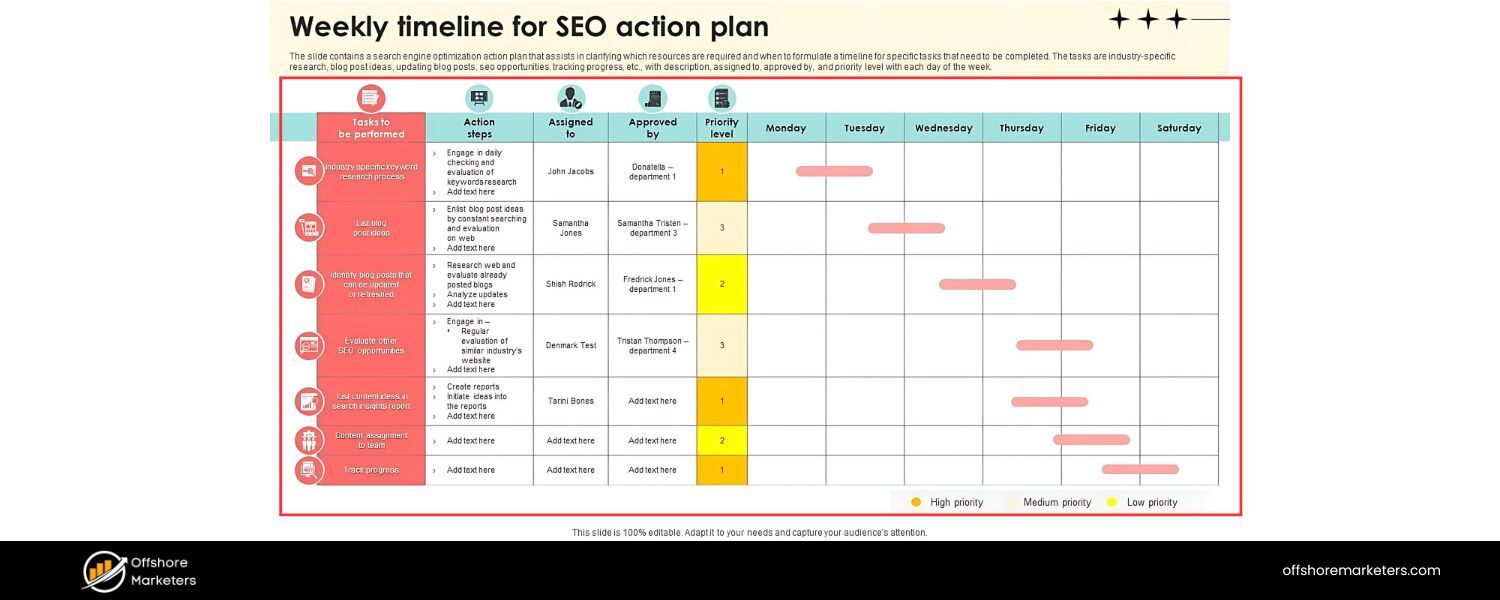
Why it’s a mistake
SEO is not a checklist you do once when launching a site and then forget. It’s an ongoing, long-term endeavor.
Search algorithms evolve, competitors produce new content, and user behavior shifts – all of which means your SEO needs continuous attention. Many businesses make the SEO mistake of doing a “set-up” SEO (fixing tags, adding keywords) and then expecting lasting results without further effort.
Similarly, some might see initial success and then neglect adding fresh content or updating the site. But over time, content can stagnate (as discussed in Mistake #3), and new competitors can outrank you if you’re not improving. In short, resting on your laurels in SEO means eventually losing ground.
Impact
A stagnant SEO strategy often leads to plateaued or declining rankings. For example, if you haven’t published anything new or updated your site in a year, Google might favor fresher sites that appear more active and relevant.
Not keeping up with best practices can also leave you vulnerable – e.g., sites that ignored the push to mobile-friendly designs found themselves dropping off the mobile SERPs around 2018.
Also, if you don’t periodically revisit your keyword strategy, you might miss out on new terms people are searching (or old keywords might gain new SERP features you could optimize for). Essentially, failing to continuously optimize is like sailing without adjusting course – you might end up off track or behind the fleet.
How to avoid/fix: Embrace SEO as an ongoing part of your digital strategy:
A. Continuous Content Creation
Regularly publish high-quality content. This could be new blog posts, updated service pages, case studies, etc. Consistent output not only gives search engines more to index, but signals that your site is alive and authoritative. Aim for content that answers new questions or dives deeper than your older pieces.
B. Content Maintenance
Revisit existing pages on a schedule (e.g., every 6-12 months) to refresh them. Update stats to 2024/2025 data where possible, improve sections that are thin, and adjust for any changes in your industry. This guards against content decay and can boost rankings for aging posts.
C. Ongoing Learning and Audits
Periodically audit different facets of SEO – maybe a quarterly technical audit (to catch new errors), a content audit (to prune or improve low performers), and a link audit (to disavow spam and identify outreach opportunities).
Keep learning about new SEO developments: for instance, the rise of AI search assistants means you might consider how to optimize for featured snippets (so your content is more likely to be voice-answered by an AI).
The SEO landscape in 2025 may emphasize things like experience (E-E-A-T) or new schema types – staying informed lets you proactively adjust.
D. Monitor Competitors
SEO is competitive. If your rivals all implement something new (say, a buying guide section with comparison charts) and you don’t, you could fall behind. Regularly check what top competitors in your niche are doing: What new topics are they covering? How are they improving site speed or UX? This isn’t to copy them exactly, but to ensure you’re not missing a crucial trend. Then aim to do it better or find a unique angle.
E. Strategic Updates
Align SEO efforts with business goals. Launching a new product line? Plan SEO content around it. Seeing a shift in customer questions? Update your FAQ or create content to address it. SEO should be integrated with your marketing calendar (seasonal trends, campaigns, etc.) rather than an isolated task.
Think of SEO as “site health and growth maintenance.” Just like you wouldn’t skip maintenance on a store or stop developing products, you shouldn’t ignore your website’s optimization. Those who continuously refine and invest in SEO often dominate the results over those who do a one-off optimization.
As a marketing veteran, I’ve seen time and again that persistence pays off – the sites that treat SEO as an ongoing priority consistently reap the rewards of sustained (and growing) organic traffic.
Conclusion & Key Takeaway
SEO success comes from doing many things well – and avoiding the SEO mistakes we’ve outlined. It may seem overwhelming, but remember that every mistake you fix is an opportunity to boost your visibility and traffic.
Start by addressing the most critical issues (for example, technical crawl errors or painfully slow speed), then work your way through content and off-page improvements.
Each improvement, however small, can compound into significant gains over time. Most importantly, keep the user’s experience and intent at the center of your SEO strategy.
Google’s algorithm updates in recent years (and likely future ones) all trend toward rewarding sites that deliver value, relevance, and a great experience to users. By avoiding common SEO mistakes, you’ll improve your chances of ranking higher, increasing organic traffic, and satisfying user intent.
Avoiding these common SEO mistakes will put you on the right path to doing exactly that.
Finally, SEO is a journey, not a destination. Stay curious, keep learning, and adapt as search evolves. If you do, you’ll not only avoid costly SEO mistakes – you’ll turn SEO into one of the most powerful, sustainable growth engines for your business.
Here’s to climbing those rankings and outshining your competitors with better SEO and content that truly earns the top spot!
Call to Action
Need help auditing or improving your SEO strategy?
Consider performing a comprehensive SEO audit of your site or consulting with an SEO professional to identify specific gaps.
By proactively fixing these issues and focusing on best practices, you can secure better rankings, more organic traffic, and ultimately more customers. Don’t let your website’s potential go unrealized – take action on these SEO insights today, and watch your search performance soar!

Why Roseville Startups are Choosing Offshore Marketers to Scale Smarter
Roseville is no longer just a quiet suburb of Sacramento;...

What Is PPC? A Practical Guide to Pay‑Per‑Click Advertising
Pay‑per‑click (PPC) is the “pay only when someone clicks” branch...

Google Search Issues Affecting Results in Some Regions
Google has confirmed a problem with one of its data...

Keyword Counts Dropped After Google’s num=100 Change
In September 2025, Google stopped supporting the &num=100 parameter. This...

Image SEO: Optimize Images for Higher Rankings & Traffic
Introduction Images make your website more engaging, but they can...


.png)
.png)
.png)
.png)
.png)

2024 ALL RIGHTS RESERVED MADE IN INDIA
.png)