
Blog SEO: How to Optimize Your Blog for Search Engines
September 9, 2025
Blogging isn’t just about sharing thoughts, it’s a powerful tool to drive traffic and leads when optimized for search. In fact, 56% of consumers have made a purchase from a company after reading its blog, and 10% of marketers say blogging delivers their biggest ROI.
Such stats make it clear: Blog SEO is a big deal for anyone looking to grow their online presence. This comprehensive guide (backed by 25+ years of marketing experience) will show you how to turn your blog into an SEO powerhouse.
From keyword strategy and content optimization to technical tweaks and analytics, you’ll learn step-by-step how to make your blog rank higher on Google, and keep it there.
What is Blog SEO?
Blog SEO is the practice of optimizing your blog’s content and structure to improve its visibility in search engine results. It involves refining on-page elements (like keywords, headlines, and HTML tags), enhancing site architecture, and continually updating content to align with what search engines prioritize.
In simple terms, Blog SEO means creating and maintaining blog posts in a way that helps Google understand, index, and rank your pages for relevant searches.
This typically includes keyword research, quality content writing, image optimization, internal linking, and even link-building efforts. If done right, blog SEO ensures that when your target audience searches for answers or solutions, your blog appears as a relevant, authoritative result.
Why Blog SEO Matters
Search engines are one of the most important traffic sources for blogs. A well-optimized blog can significantly increase your organic (non-paid) traffic, often far beyond what social media or email alone can achieve.
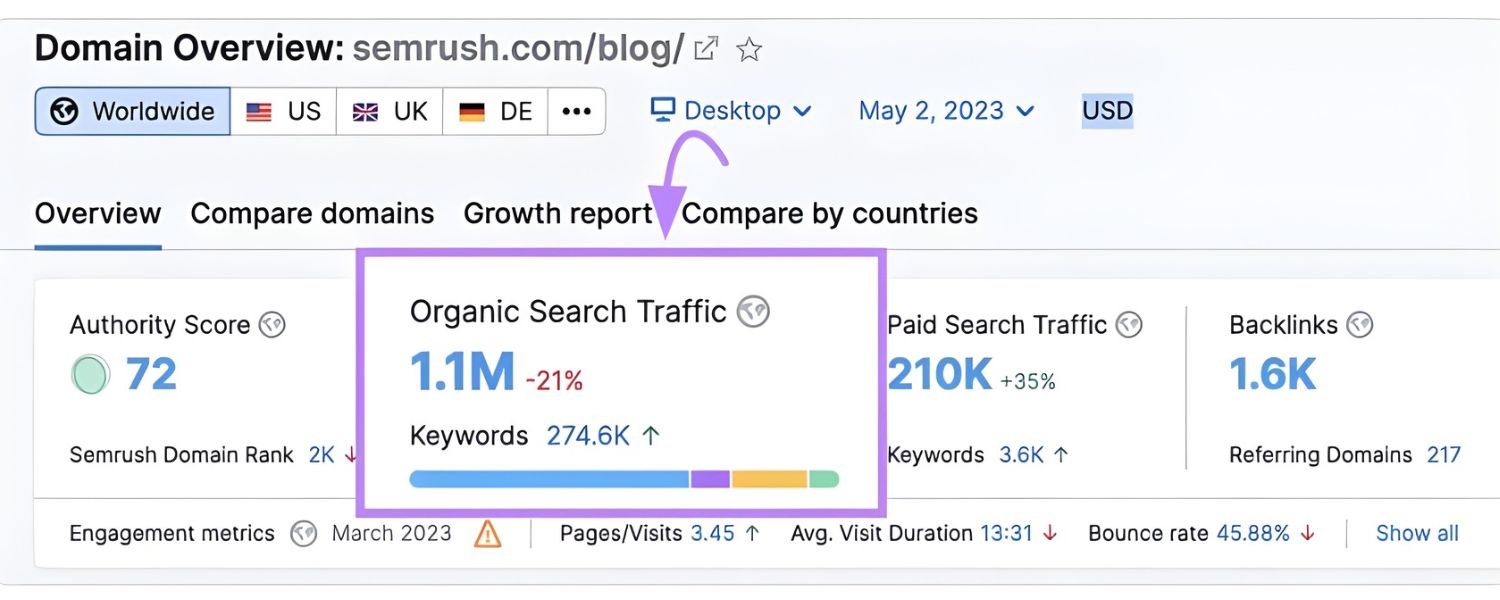
For example, top industry blogs get hundreds of thousands of visitors from Google each month. Backlinko reports that Google sends them over 396,000 monthly visitors; without blog SEO their growth “would have been much slower”.
There are several reasons blogging boosts your site’s SEO:
1. More Indexed Content

Every new blog post is a fresh page for search engines to index. Regularly publishing useful posts encourages Google to crawl your site more frequently. A blog gives you a steady stream of content, increasing the chances that your pages get indexed and shown in search results.
2. Targeting More Keywords

Blog posts let you target a wide variety of keywords, especially informational queries. Unlike product or landing pages, blogs can answer questions and cover topics your audience searches for.
By addressing informational, navigational, and even transactional queries via blog content, you multiply your opportunities to rank. This often leads to a higher organic click-through rate (CTR) as your site becomes relevant to more searches.
3. Authority & Backlinks

High-quality blog articles naturally attract backlinks from other websites (people link to valuable content as a reference). These backlinks signal to Google that your content is useful and authoritative, acting like “peer reviews.”
The more respected sites linking to your blog, the more trust search engines place in it. In Google’s eyes, a blog post that earns backlinks is providing value worth sharing, which can boost its ranking.
4. Improved Internal Linking

With a blog, you can interlink posts and pages on your site in a logical way. Effective internal linking guides readers to related content and helps search engine crawlers understand your site structure.
For example, if you mention a concept you’ve written about before, you can link to that post, keeping visitors on your site longer and helping Google discover all your content. This also spreads “link equity” (SEO value) throughout your site, strengthening your overall authority.
5. Enhanced User Engagement

Great blog content engages readers, leading to longer dwell time (the time a visitor spends on your page). Dwell time is an indirect ranking factor – it reflects user satisfaction. If visitors stay on your blog and don’t “pogo-stick” back to search results immediately, it tells Google that your page answered their query well.
By satisfying search intent, giving the user exactly what they searched for, your blog can send positive signals to search engines, improving your rankings over time.
In short, a consistently updated, well-optimized blog can make your website more visible and credible. It positions your site as a relevant answer hub for your customers’ questions. Now, let’s dive into how to actually achieve that.
Keyword Research and Search Intent
Every successful SEO strategy starts with understanding what your audience is searching for. Keyword research is the process of finding the specific search terms (keywords) people use that relate to your niche.
For effective Blog SEO, focus on finding 1-2 primary keywords for each post, ideally long-tail keywords that closely match a specific intent.
Long-tail keywords are longer, more specific phrases (often questions) that typically have lower competition but strong intent. For example, “how to write a blog post that ranks” is a valuable long-tail keyword compared to just “blog post”. Targeting these gives you a better chance to rank and attract readers who exactly seek what you offer.
How to find the right keywords? Start by brainstorming topics relevant to your business and audience. Then use tools or methods like:
1. Autocomplete and People Also Ask
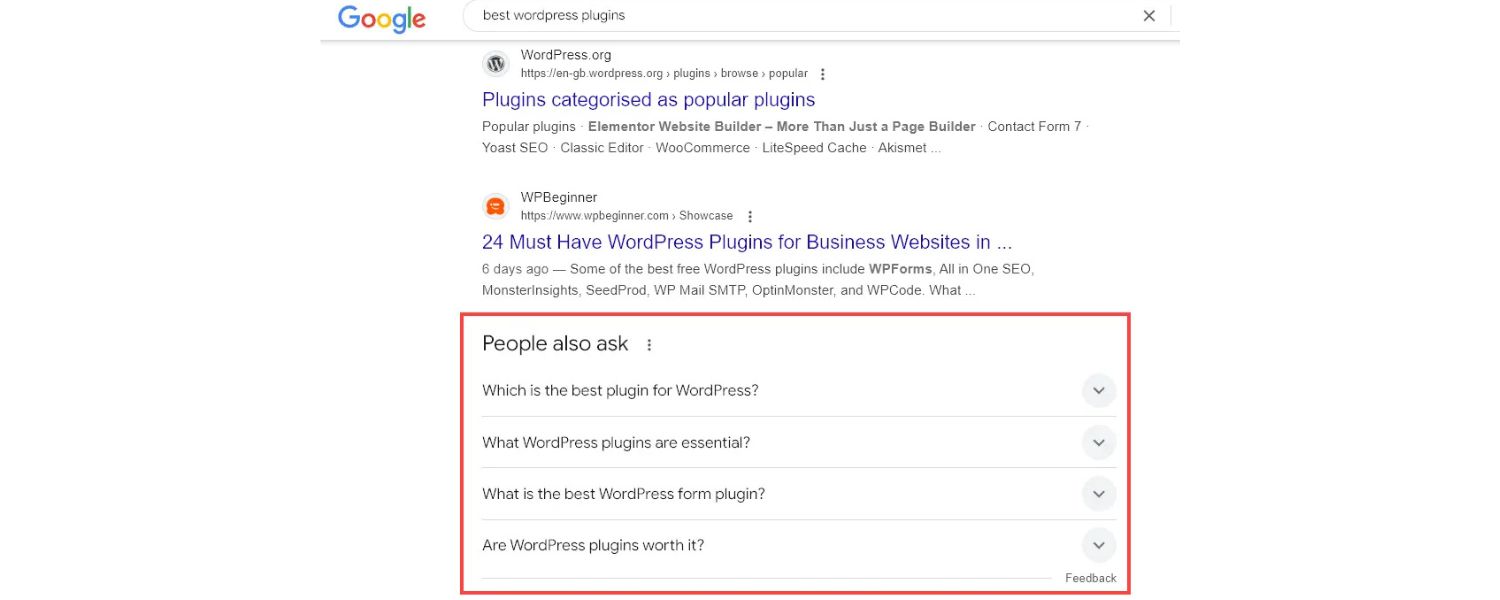
Type a seed topic into Google and note the auto-suggestions and related questions. These are real queries users have. Google’s suggested phrases under the search bar can reveal popular long-tail variations.
2. Free Keyword Tools

Try tools like AnswerThePublic, which generates a list of common questions people ask around a keyword. There are also many SEO tools (free and paid) that show search volumes and difficulty for keywords.
3. Competitor Blogs
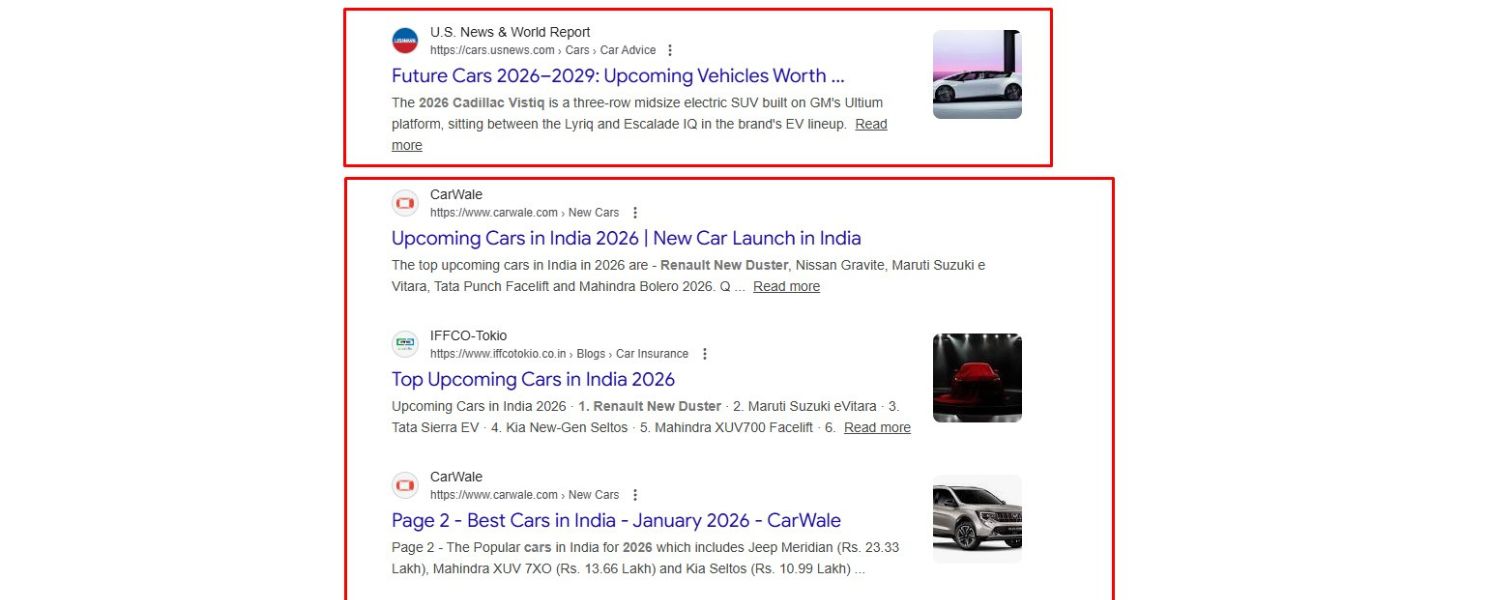
Look at topics your competitors cover, or use SEO tools to see what keywords their blog posts rank for. This can inspire ideas for keywords and content gaps you can fill.
While choosing keywords, always consider search intent – the why behind the query. Ask yourself: is the searcher looking to learn something (informational intent)? Compare options (investigative intent)? Solve a problem or buy something (transactional intent)? Aligning your content with the intent is crucial.
For instance, someone searching “best budget smartphones 2025” expects a comparative list, not a generic definition of smartphones.
Understanding search intent ensures your blog post delivers exactly what the user is looking for, which is key to ranking. If your content doesn’t match intent, visitors will quickly bounce and Google will notice that mismatch.
Additionally, consider creating SEO personas for your readers. Much like buyer personas, SEO personas represent the search behaviors and needs of your target audience.
What questions do they ask? Which forums or social media do they use? By researching your audience’s habits, you can tailor content to their needs and the language they use in searches. This data-driven approach helps in choosing the right keywords and crafting content that resonates and ranks.
On-Page Optimization: Content, Titles, and Metadata
Once you have your target keyword(s) and a clear intent in mind, it’s time to create an optimized blog post. On-page SEO refers to all the things you can do within your blog content and HTML to signal relevance to search engines. Here are the on-page best practices to follow:
1. Craft a Compelling Title (H1) with Your Keyword

Your blog post’s title is often the first thing both readers and search engines see. Make it count. Include your primary keyword in the title naturally, preferably towards the beginning if possible.
For example, if your keyword is “blog SEO Tips,” a title could be “10 Essential Blog SEO Tips for Higher Rankings.” The title should be catchy and promise value (to entice clicks) while clearly indicating the topic.
Also note, your page’s title tag (the meta title shown in search results) is crucial for SEO, Google gives extra weight to keywords in the title tag. Most blogging platforms will use your post title as the title tag automatically, but double-check this in your SEO settings or plugins.
2. Use Headings and Subheaders Wisely

Break your content into sections with descriptive headings (H2, H3, etc.), and try to incorporate keywords or variations in at least a couple of these subheaders.
This not only organizes your article for readers but also helps search engines grasp the structure and main points of your content.
For instance, in an article about “blog SEO,” H2s might include “Keyword Research for Blog SEO,” “On-Page Optimization Techniques,” and so on – signaling the subtopics covered. Clear headings improve readability and SEO.
3. Write High-Quality, Relevant Content
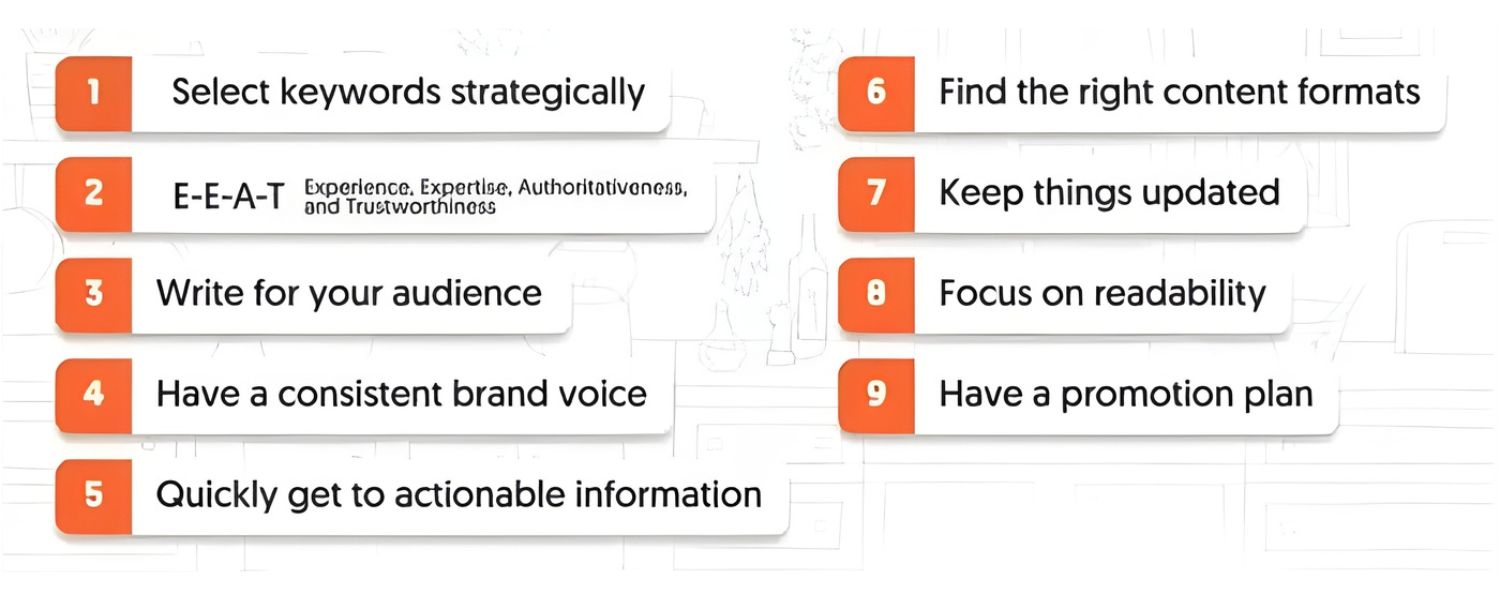
This is non-negotiable, content quality is king. Your blog post should thoroughly answer the reader’s query and provide unique value or insights that set it apart. Aim to “end the search journey” for your reader by covering everything they hoped to find.
This means being comprehensive but also staying on-topic. Use your primary keyword and related terms naturally throughout the post (especially in the introduction and conclusion, where a brief mention can help affirm relevance).
Avoid keyword stuffing, which is the outdated practice of cramming the keyword in every other sentence, that hurts readability and can actually harm your SEO.
Instead, focus on synonyms and answering common questions around the topic (which helps you rank for those queries as well). Keep paragraphs short and to the point, and use examples or stats to back up claims (with citations or data when available).
4. Optimize Meta Description

The meta description is the snippet of text searchers see below your title in Google results. While not a direct ranking factor, a well-written meta description can improve your click-through rate.
Summarize the post in 1–2 enticing sentences (include your keyword or a synonym) to convince searchers that your page has what they need. For example: “Learn 10 proven blog SEO techniques to boost your Google rankings and get more organic traffic.
From keyword tips to site speed, this guide covers it all.” A compelling meta description with a call-to-action can increase the chances of users clicking your result, indirectly boosting your SEO via higher CTR.
5. Image Alt Text and Optimization
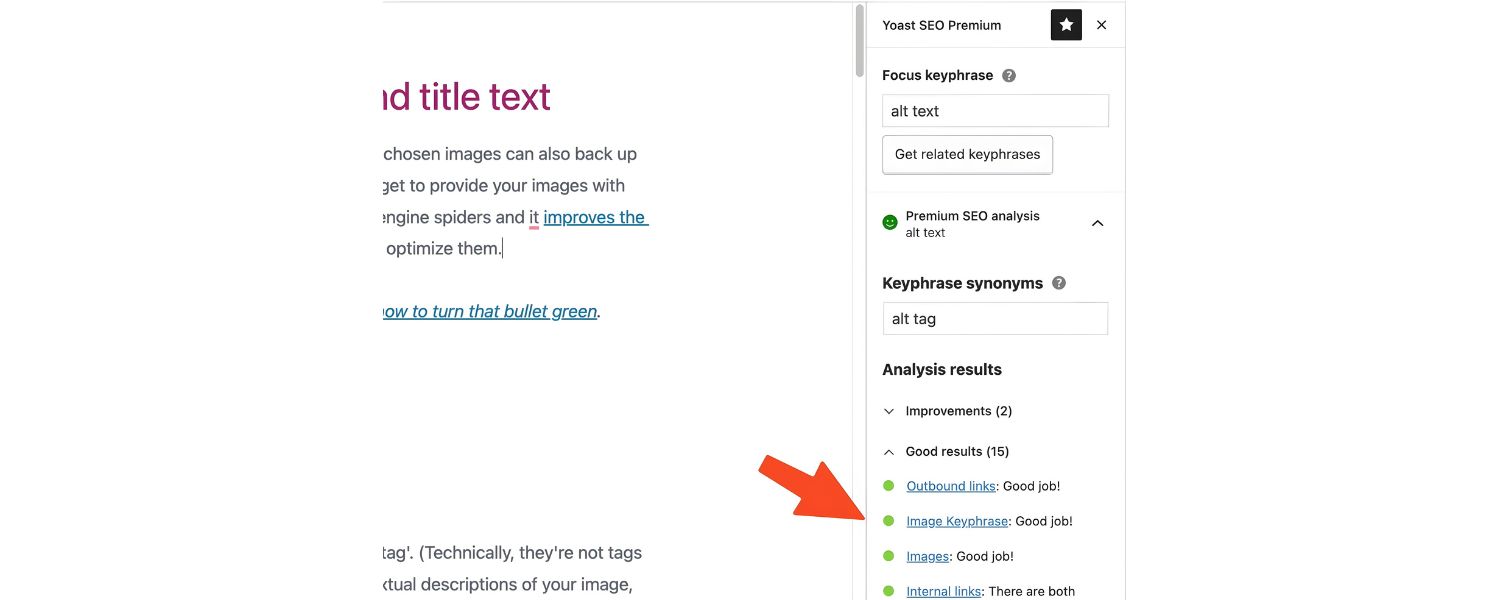
Images can enrich your blog content and SEO when used correctly. Use relevant images (screenshots, graphics, infographics) to illustrate points. For each image, fill out the alt text attribute with a brief description of the image that ideally includes a keyword if relevant.
Alt text helps visually impaired users and also gives Google context about the image content (which can aid image search rankings).
Additionally, compress your images to ensure they don’t slow down your page, page speed is a minor ranking factor and definitely a user experience factor. Tools or CMS plugins can help compress images without quality loss. Fast-loading, mobile-optimized images keep readers happy and engaged.
6. Readability and Formatting

Even the most informative post will fall flat if it’s hard to read. Format your posts for scannability. Use bullet points or numbered lists for steps and key takeaways (like we’re doing here) to break up long text blocks.
Write in a clear, conversational tone and avoid unnecessary jargon. Use short sentences and paragraphs. According to experts, making content easy to digest not only improves user experience but also can impact SEO, since Google’s algorithms increasingly prioritize content that satisfies readers.
Good readability can also make your content more suitable for voice search results or AI-based summaries. In short, format your blog such that someone can quickly skim and still grasp the main points – many readers will do exactly that.
By implementing these on-page optimization tactics for every blog post, you’re sending strong relevance signals to search engines while delighting your human readers. It’s a win-win: search-friendly and user-friendly content tends to rank higher over time.
Technical SEO for Your Blog
Beyond content itself, there are technical factors that can significantly influence your blog’s SEO performance. You don’t need to be a developer or SEO guru to get these right – just pay attention to a few key areas:
1. Mobile-Friendly Design
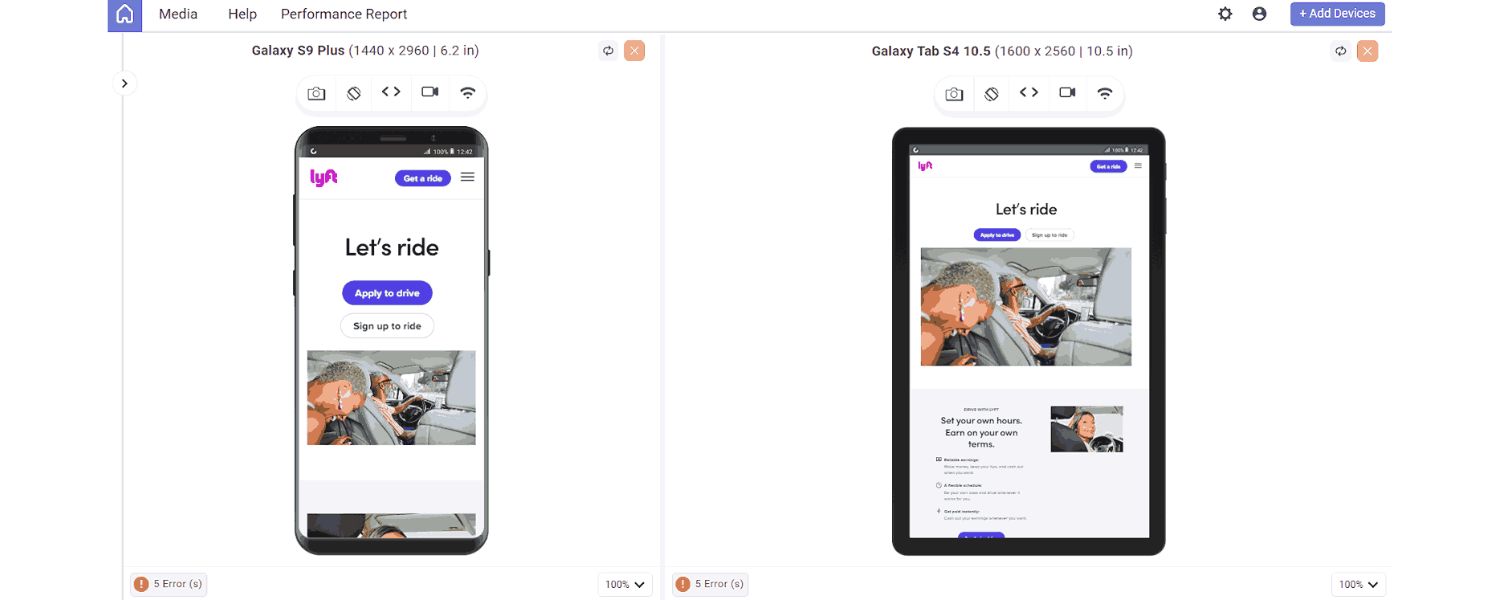
More than half of all search traffic now comes from mobile devices, so Google uses mobile-first indexing (meaning it primarily evaluates the mobile version of your site). Ensuring your blog is mobile-friendly is critical. Use a responsive design that automatically adapts to different screen sizes.
A responsive blog has one URL for both desktop and mobile, which consolidates SEO authority (all backlinks go to the same URL, for example) and avoids splitting signals. If your site isn’t mobile-optimized, not only will users struggle, but Google may rank you lower in mobile search results.
Pro tip: Stay updated on Google’s changes, for instance, since 2015 Google has officially favored mobile-friendly sites. Subscribing to [Google’s official Search blog] can keep you informed on such updates.
2. Site Speed and Performance

Fast-loading pages provide a better user experience and can positively affect SEO. While speed is generally a minor ranking factor, it can influence dwell time and bounce rates (users leave if a page is too slow).
Optimize your blog’s performance by using caching, compressing files, and choosing a reliable host. Minimize heavy scripts and consider using a Content Delivery Network (CDN) if your audience is global.
Core Web Vitals (Google’s page experience metrics) like loading speed, interactivity, and visual stability are worth monitoring – Google Search Console has a Core Web Vitals report to help with this. In short, a snappy blog keeps both readers and search engines happy.
3. URL Structure

Use clean, descriptive URLs for your blog posts. Ideally, your URL should include your post title or main keyword (e.g., yourblog.com/marketing-blog-seo-tips rather than yourblog.com/post?id=123).
Shorter URLs that reflect content are better for SEO and usability. Avoid using tons of parameters or stop-words (like “and”, “the”, etc.) that make the URL long and irrelevant.
For example, a URL like /blog/seo-tips/ is preferable to /blog/2025/09/07/123456 or a convoluted string. Organized URL structures (using subfolders like /blog/category/post-name) can also help indicate the site hierarchy.
And once a post is published, do not change the URL – changing it can cause you to lose any SEO equity that page built up. If you must change it, implement proper 301 redirects, but it’s best to get the URL right from the start.
4. Use SEO Plugins/Tools

If you’re using a platform like WordPress or another CMS, leverage SEO plugins and built-in tools. Plugins like Yoast SEO, All in One SEO, or RankMath can guide you in optimizing meta tags, generating sitemaps, and more.
These tools often provide checklists for each post (e.g., checking if you used the keyword in the title, meta description, alt text, etc.) and can even analyze readability. The exact plugin matters less than making sure you cover key technical needs:
A. Title & Meta Description Editing
So you can customize how your snippet appears on Google.
B. XML Sitemap Creation
A sitemap helps search engines find all your blog pages easily. Submit this sitemap in Google Search Console for faster indexing.
C. Robots.txt and Noindex Control
Sometimes you might want to noindex certain pages (e.g., admin or tag pages). Good SEO tools let you mark pages as “noindex” so Google doesn’t waste crawl time on them.
Image Compression: Some plugins optimize images for you, or you can use external services, to maintain site speed.
5. Secure and Accessible Website

Ensure your blog uses HTTPS (secure protocol), as Google gives a slight ranking boost to secure sites and users trust them. Most modern blog platforms make this easy with SSL certificates.
Also make sure your site is easily crawlable: check in Google Search Console for any crawl errors or indexing issues. Use the URL Inspection tool in Search Console to see how Google views your page and to request indexing of new/updated posts.
Search Console will also alert you via email if there are serious issues (like pages not indexable, server errors, security issues, etc.), so it’s like having Google’s diagnostic report for your site – use it!
By getting these technical aspects right – mobile optimization, speed, URLs, plugins, and site security – you create a strong foundation for your excellent content to shine. Think of technical SEO as removing any roadblocks that might prevent your blog content from being discovered and appreciated by search engines.
Content Strategy: Evergreen Topics and Topic Clusters
Posting random articles once in a while isn’t enough. To truly excel at blog SEO, you need a content strategy that guides what you write and how you organize it. Two key concepts here are creating evergreen content and using topic clusters.
1. Publish Evergreen Content

Evergreen content stays relevant and valuable to readers over a long time (as opposed to news or trends that fade quickly). Examples include how-to guides, tutorials, FAQs, and comprehensive industry primers.
Evergreen posts are SEO gold because they can keep attracting traffic for years with minor updates. They steadily build backlinks and search equity over time.
For instance, an evergreen post like “Beginner’s Guide to SEO” can rank and bring traffic long after publication, especially if you update it with the latest insights. The benefits of evergreen content include:
A. It can rank steadily or even improve over time, rather than spiking once and dying off.
B. It provides a continuous stream of traffic (and leads) without needing a brand-new post every week.
C. Each update can give it a new boost in rankings (Google loves fresh, relevant info on an already authoritative page).
Aim for the majority of your blog posts to be evergreen or at least have evergreen elements. Even if you cover something timely, find an angle that remains useful (for example, a “2025 SEO Algorithm Changes” post could be made evergreen by updating it as algorithms evolve, turning it into a historical timeline plus current guide).
2. Organize Content with Topic Clusters
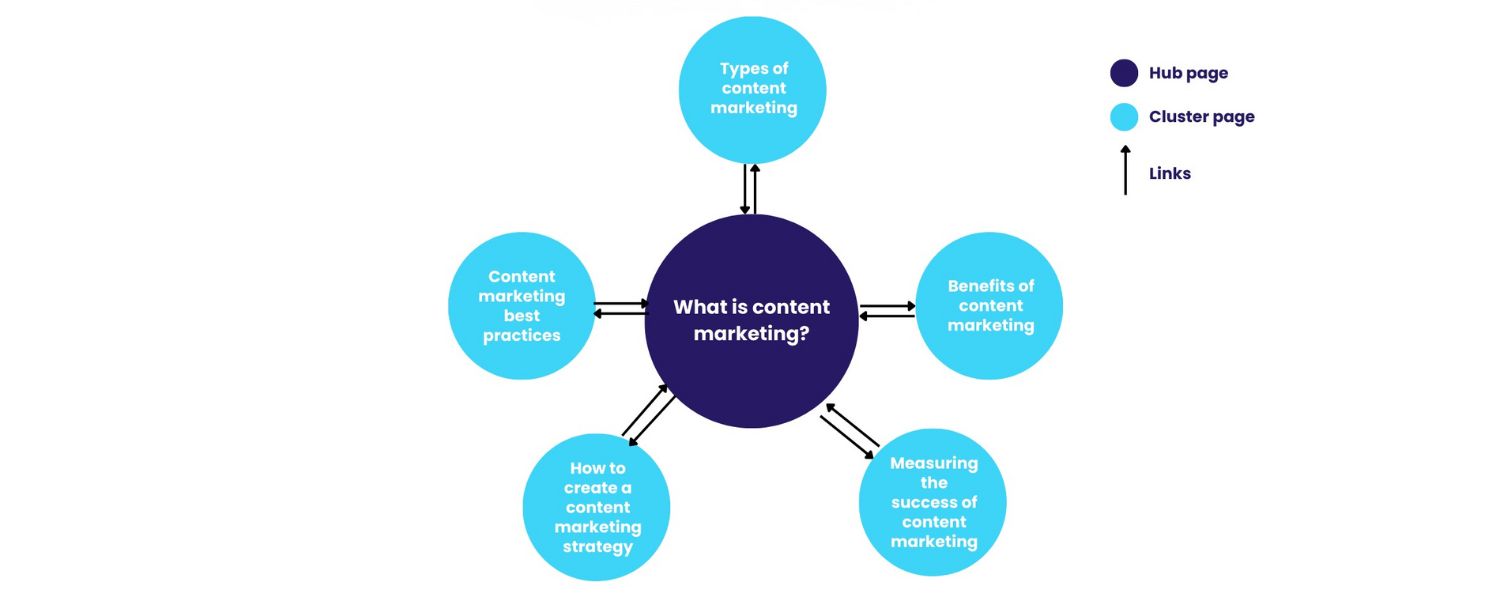
Modern SEO has shifted from focusing solely on individual keywords to covering broader topics comprehensively. The topic cluster model is a way to organize your content that signals depth and authority to search engines. Here’s how it works:
A. Pillar Content
Create a broad, authoritative piece on a core topic (your pillar). For example, a pillar page might be “Complete Guide to Digital Marketing.” Pillar pages are usually longer and provide an overview with some detail, targeting a high-level keyword.
B. Cluster Content
Write multiple blog posts that delve into subtopics related to that core topic – for instance, “SEO for Beginners,” “Content Marketing Strategies,” “Social Media Advertising Tips,” etc., each targeting more specific keywords. These are your cluster posts.
C. Interlink Them
Link each cluster post to the pillar page and vice versa, as well as linking related cluster posts to each other where it makes sense. This interlinking creates a web of content around that topic.
This structure helps visitors easily navigate all your related content, and it helps Google understand that you have a rich library on that subject. Instead of your pages competing with each other, they now support each other’s rankings.
Many blogs have restructured using topic clusters and seen improvements in rankings for those topics as a whole. Think of it as building topical authority: you’re showing search engines you’re an expert in not just one keyword, but an entire subject area.
3. Limit Duplicate Content and Tags

As you produce lots of content, be careful with how you tag and categorize posts. Using too many similar tags (e.g., “SEO”, “SEO tips”, “Search Engine Optimization” on the same post) can confuse things and even appear as duplicate pages to Google if each tag has its own archive page.
Choose a set of consistent categories or tags (HubSpot suggests ~15-25 core topic tags) and stick with them. This way, you avoid diluting SEO signals or triggering duplicate content filters. The goal is a clean site architecture where each post fits into a logical category.
4. Update and Repurpose Old Posts

A smart content strategy isn’t just about new content – it’s also about improving what you already have. Regularly audit your past blog posts to see if they can be updated, expanded, or repurposed.
Updating old content with fresh information, new examples, and current stats can significantly boost its rankings and traffic quickly, since the page may already have some authority and just needs a refresh.
Perhaps your blog wrote about “SEO trends for 2023” – you can update that post for 2025 with new sections rather than starting from scratch.
Many successful bloggers allocate time each month to updating older posts, because it often yields a higher ROI than only writing new articles.
Additionally, if some old posts are very short or outdated, consider consolidating or pruning them (merge with other posts or remove if no longer relevant). Quality over quantity is key; a smaller number of high-performing, up-to-date posts is better than hundreds of outdated ones.
In summary, approach your blog as an ever-growing library of knowledge. Plan content around evergreen themes and clusters, and keep your library fresh through updates.
This strategic approach ensures that over time, your site becomes an authoritative destination that search engines and readers recognize as the go-to for your topic area.
Internal Linking and Navigation

We touched on internal linking in both on-page tips and content strategy, but it’s important enough to emphasize on its own. Internal links are hyperlinks that point from one page on your site to another page on your site. While simple in concept, they carry a lot of SEO value:
1. Improved Crawlability
Internal links create pathways for search engine bots to discover your content. If your blog post A links to post B, Google’s crawler follows that link, which helps B get indexed (especially if B was newly published). A well-internally-linked site ensures no orphan pages are left unseen.
2. Hierarchical Signals
The way you link pages can indicate their importance. For example, if your homepage or pillar pages link out to certain posts, those obviously are key content pieces. Using a logical hierarchy (pillars linking to clusters, category pages linking to recent posts, etc.) makes your site structure clear to bots.
3. Distributing Link Equity
Every page that has backlinks or high PageRank can pass some of its SEO “juice” to other pages via internal links.
So, if you have one blog post that’s ranking well or has strong backlinks, linking from it to another relevant post can give that second post a little boost. This is why linking related articles in your content (e.g., “Also read: [Relevant Topic]”) is a good practice.
4. Better User Engagement
From a user perspective, internal links keep readers on your site longer by offering them additional relevant content. If someone reading about “content marketing strategy” sees a link to “SEO copywriting tips,” and that interests them, they may click and continue their journey on your site.
This lowers bounce rate and increases dwell time, which, as mentioned, are positive signals.
When doing internal linking, make the anchor text descriptive (avoid generic “click here” links). Use anchor phrases that indicate the topic of the page you’re linking to, like “SEO copywriting techniques” as the hyperlink text when linking to a post about that.
This not only tells the reader what to expect, but also gives search engines context about the linked page’s content.
Also, be mindful not to overdo it – dozens of internal links in every post might come off as spammy or just confusing. Link when it’s relevant and helpful. A few well-placed internal links can do more than a barrage of them.
Finally, ensure your blog has clear navigation menus or widgets for recent posts, popular posts, or category archives. Many blogs have a sidebar or footer with links to top content or categories, which is great for both UX and SEO.
The idea is to make it easy for both visitors and crawlers to find all your important content in just a few clicks from the homepage.
E-A-T and Content Quality Signals

Google’s algorithms increasingly emphasize E-A-T: Expertise, Authoritativeness, Trustworthiness. While E-A-T is not a single algorithm or score, it’s a set of criteria Google’s quality evaluators use and it indirectly influences rankings.
For a blog to rank well, especially in YMYL (Your Money, Your Life) niches like health, finance, etc., establishing E-A-T is crucial. Here’s how you can nurture these signals:
1. Show Your Expertise
Write about what you know (or thoroughly research). If you have credentials or 25 years of experience (like this article), make it known in your author bio or within the content.
Cite credible sources to back up facts or statistics – this not only improves trust with readers but also demonstrates to search engines that your content is well-founded. High expertise content tends to get referenced by others, earning backlinks and mentions.
2. Build Authoritativeness
This grows over time as you publish quality content consistently. Guest posting on reputable sites, getting mentioned or linked by industry experts, and even user engagement (like people sharing your posts on social media) contribute to your authority.
Internally, cover topics comprehensively (as discussed with clusters) so that your site becomes an authority on those subjects. For example, a blog that has 20 in-depth articles on various SEO subtopics will be seen as more authoritative on SEO than one with just one or two posts on it.
3. Ensure Trustworthiness
Trust signals include having accurate content (no misleading info), updating posts regularly (showing you care about correctness), and maintaining a professional site design (a site that looks spammy or is littered with ads can erode trust).
If applicable, include trust badges or privacy statements. Encourage real engagement – comments, reviews, testimonials – which show that a community trusts and interacts with your content.
Technical trust elements matter too: use HTTPS, have a clear about/contact page, and avoid overly aggressive pop-ups or tactics that might be seen as deceptive.
By focusing on content quality and user trust, you align your blog with Google’s goal of providing helpful, reliable information to searchers.
Google’s recent “helpful content updates” specifically target sites that appear to be writing for search engines rather than humans. To stay on the right side of this, always prioritize the reader’s experience and needs. If you provide genuine value, the SEO benefits will follow.
Measuring and Improving Your Blog SEO Performance
SEO isn’t “set and forget.” To continuously grow your blog’s traffic, you need to measure results and adjust strategy based on data. Here are the key steps and tools for monitoring your Blog SEO success:
1. Google Analytics

Set up Google Analytics (or a similar analytics platform) to track your site’s traffic. This will tell you how much of your traffic comes from organic search, which blog posts are getting the most views, how long people stay, and what the conversion rates are (if you have goals like sign-ups or sales).
Pay attention to metrics like bounce rate (percentage who leave after viewing one page), average time on page, and pages per session – these can indicate how engaging your content is. For example, a blog post with a very high bounce rate might not be satisfying visitors’ intent, suggesting it needs improvement.
2. Google Search Console

This is an indispensable free tool from Google that directly shows how your site is performing in search. In Search Console, you can see which queries your blog pages are ranking for, how many impressions and clicks they get, and your average position for those queries.
This data can be a goldmine: you might discover keywords you weren’t intentionally targeting that you rank on page 2 for – optimizing those pages a bit more could bump them to page 1.
Search Console also flags any indexing issues: for instance, if a blog post isn’t indexed, it will show up in Coverage errors, and you can then troubleshoot why.
You can submit your sitemap here, and even request a fresh crawl of updated pages. Essentially, Search Console helps you measure your search traffic and fix issues to make your site shine in Google results.
3. SEO Audit Tools

Consider running periodic audits using tools like SEMRush, Ahrefs, or free SEO checkers. These can identify on-page problems (missing meta tags, broken links, slow pages) or off-page issues (toxic backlinks, etc.).
Some free tools (like Seoptimer, SEO Site Checkup) will give you an SEO score and list of recommendations – useful for a quick health check on your blog’s SEO. Many of these overlap with what we discussed, but they can catch small things you might overlook, like a missing alt tag or a page that’s not mobile-friendly.
4. Monitor Rankings and Traffic Trends
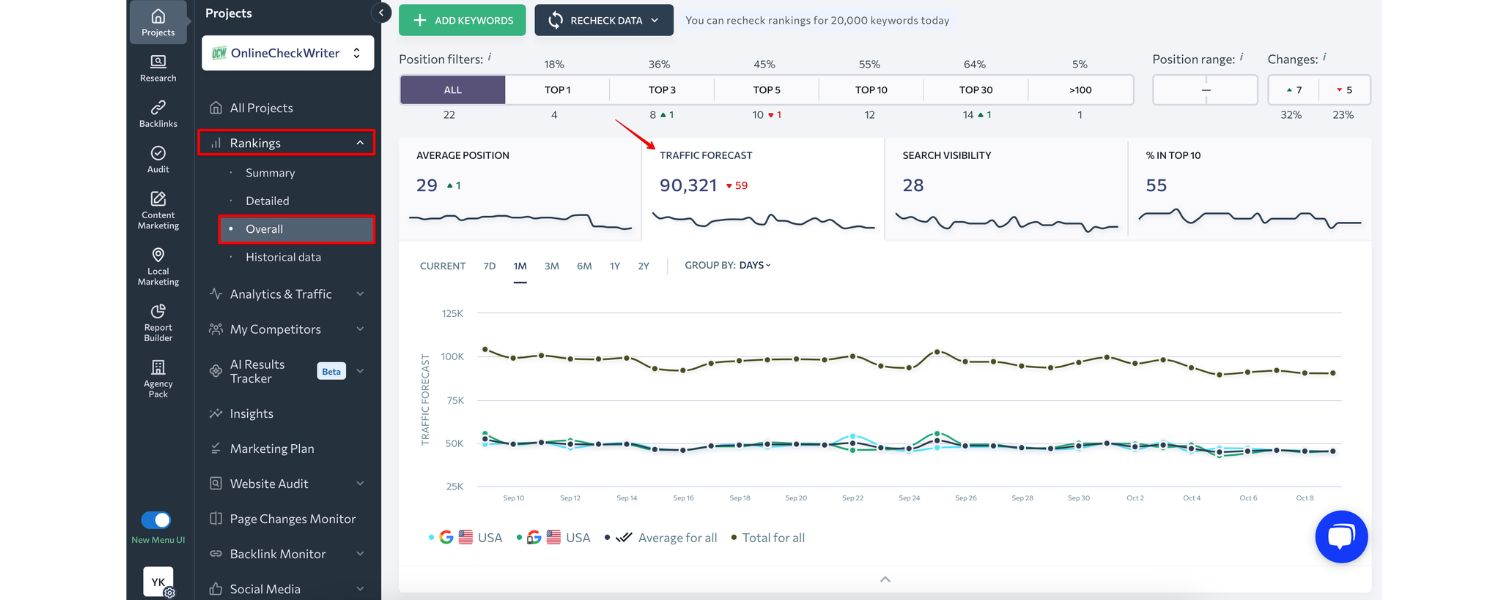
Over time, keep an eye on how your rankings change for your main keywords. You can do this manually or with rank tracking tools.
If you notice a particular post’s ranking dropping, investigate: Did competitors publish something newer? Is your information getting outdated? Perhaps it’s time to refresh that content (remember to note the update date on the post, as fresh timestamps in search results can improve click-through too).
Conversely, if you see a nice boost in traffic after an update or new post, analyze what you did right so you can replicate it.
5. User Feedback and Engagement
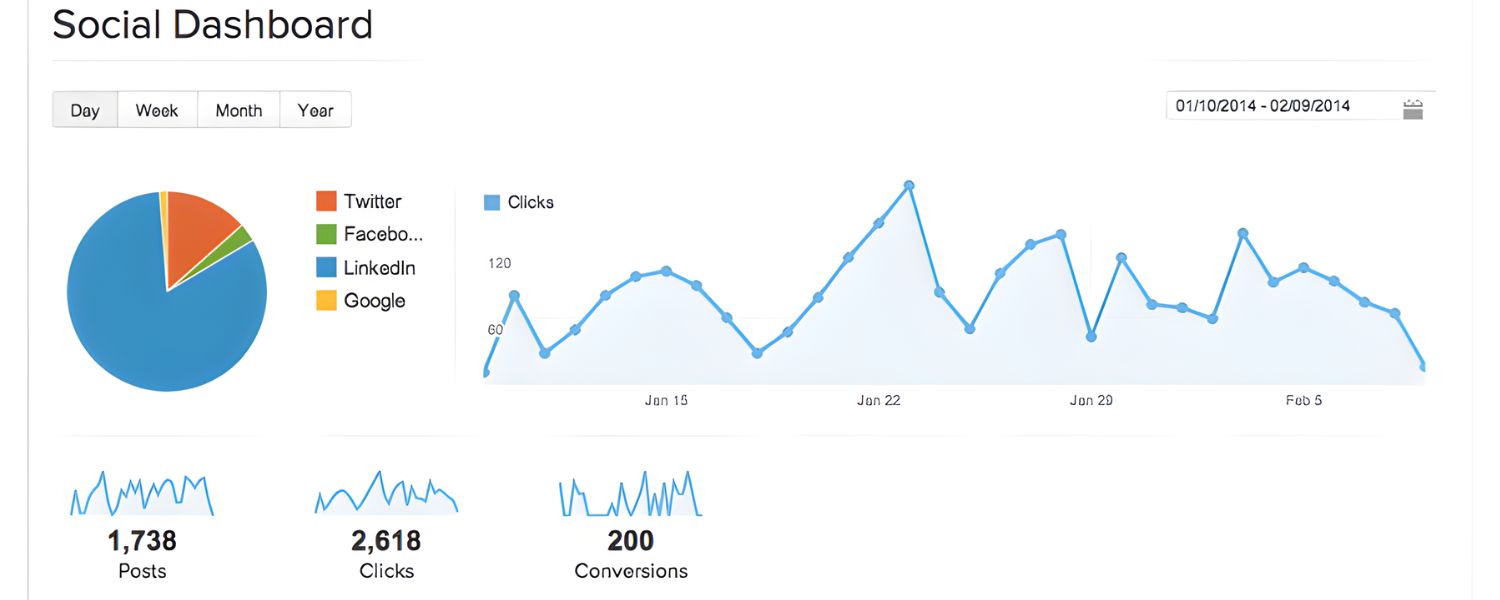
Don’t ignore qualitative data. Comments on posts, social media shares, or feedback can tell you a lot. If readers ask questions in comments, that might reveal subtopics you didn’t cover – an opportunity to update the post or write a new one.
High engagement on certain topics indicates what resonates with your audience (make more of that!). If people spend a long time on a page or scroll deeply, that’s a sign the content is holding attention – try to emulate that structure or depth in other posts.
6. Refine Your Strategy
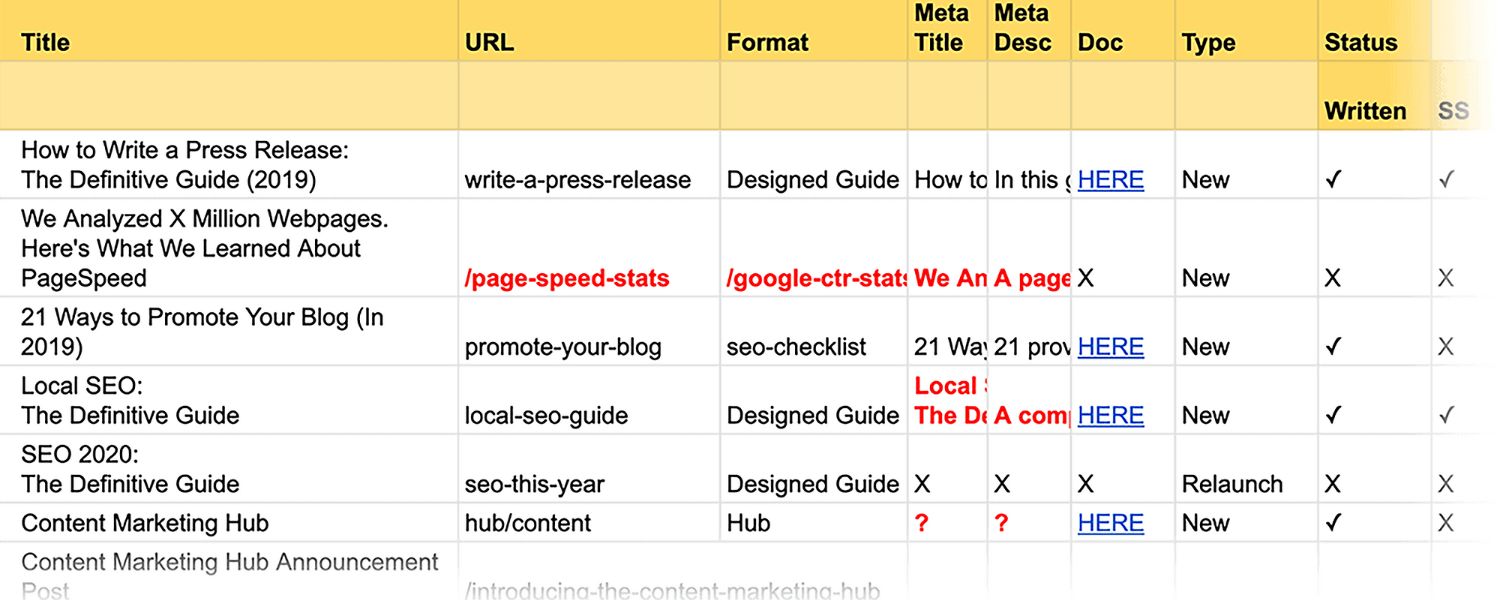
Use the data you gather to refine your content calendar and SEO focus. For example, if your analytics show that posts about “SEO tools” get twice as much traffic as those about “social media tips,” and they convert better, you might decide to double down on SEO-focused content.
Or Search Console might reveal that while you rank #5 for “email marketing guide,” you’re only #15 for “blog SEO guide” – which might prompt you to improve the latter content or build some links to it. SEO is iterative; the best practitioners constantly tweak their approach based on what the metrics tell them.
Remember, the goal of measuring is not just to admire your traffic graphs (as fun as that is), but to find actionable insights. SEO success is a moving target, algorithms update, new competitors emerge, and audience interests evolve.
By staying data-driven, you’ll be able to adapt your blog SEO tactics and maintain an upward trajectory in your rankings and traffic.
FAQ: Blog SEO
Q1: How long does it take for a new blog post to rank on Google?
It typically takes 3 to 6 months for a new blog post to gain significant ranking on Google. This timeline can vary depending on your site’s authority, the competitiveness of the keywords, and how effectively you optimize and promote the post.
New websites might experience a “sandbox” period where rankings are suppressed initially. Be patient and keep publishing quality content regularly, as Google indexes your content and sees user engagement, rankings often improve over time.
Q2: How often should I blog for better SEO?
Consistency is key. There’s no strict rule, but many experts suggest aiming for at least one quality post per week if possible. Fresh content keeps your site active in Google’s eyes and gives you more opportunities to rank.
HubSpot’s data indicates companies that blog more frequently (16+ posts per month) got significantly higher traffic than those blogging less. However, never sacrifice quality for quantity.
A well-researched, comprehensive post once a week will likely outperform thin daily posts. Find a sustainable schedule where each article is valuable.
Q3: Do I need backlinks for my blog posts to rank?
While it’s possible to rank for very low-competition queries without backlinks, for any moderately competitive topic backlinks are crucial. Backlinks from other websites act as votes of confidence.
They remain “one of the strongest ranking signals for Google”. Focus first on creating link-worthy content (original research, in-depth guides, infographics, etc.), then promote it.
You can reach out to other bloggers, get active on relevant forums or communities, or even write guest posts to earn links. Remember, quality matters more than quantity – a single link from a reputable site in your niche can far outweigh 50 links from low-quality sites.
Q4: What is the ideal length for a blog post in terms of SEO?
There’s no perfect word count mandated by Google, but studies have shown that longer, comprehensive posts (e.g., 1,500+ words) often rank better. This is likely because longer content can cover a topic in greater depth, include more relevant keywords, and keep readers engaged longer.
Brian Dean’s analysis, for example, found the average Google first page result was around 1,447 words. That said, word count alone won’t guarantee rankings, relevance and quality do. It’s better to fully answer the query in 800 words than to ramble for 2,000. Use length as needed to create value. A mix of short and long posts is fine, but make sure your key pillar content is very thorough.
Conclusion: Elevate Your Blog with SEO
In today’s digital landscape, simply pressing “Publish” isn’t enough. To unlock the full potential of your blog, you need to weave smart SEO practices into your content creation process.
By researching what your audience is searching for, optimizing your posts from title to conclusion, and fortifying your site with solid technical SEO, you set the stage for search success.
Blog SEO is an ongoing journey – one that involves creating valuable content, monitoring performance, and continuously refining your strategy. But the payoff is worth it: higher Google rankings, more organic traffic, and a blog that genuinely resonates with readers (and turns them into customers).
Now that you’ve armed yourself with these strategies and tips, it’s time to put them into action. Pick your next blog topic and apply what you’ve learned – from keyword research all the way to promoting the finished piece.
Stay patient and persistent; SEO results won’t appear overnight, but with consistent effort, you’ll start to see your blog climb the search rankings.
Keep learning, keep adapting, and soon you’ll find your content not only ranking higher but also delivering real business results. Happy blogging, and here’s to your SEO success!

.png)
Shopify SEO: Guide to Ranking Your Store and Driving Sales
Most Shopify store owners set up their store, list their...

Content Marketing : Definitive Guide to Strategy, Content Types, and Measurable ROI
Content marketing generates 3x more leads than outbound marketing at...

Above the Fold: Guide to Conversions, Rankings and Faster Pages
Above the Fold in 2026: The Complete Guide to Conversions,...

Off-Page SEO Checklist: Guide to Building Real Authority
Most websites spend months creating great content, only to wonder...

What Is Keyword Bidding? The Complete Strategy Guide for Smarter Ad Spend
Most advertisers believe the highest bid wins the auction. It...

What Is Google Trends? The 2026 Marketer’s Complete Guide
If you are not already pulling weekly insights from Google...
If you want a growth partner who will get to know every aspect of your business and treat your budget like their own — we are the right fit.
.png)


.png)
.png)
.png)
.png)
.png)
.png)
2026 ALL RIGHTS RESERVED MADE IN INDIA
