
How to Disavow Backlinks & Know If You Should
September 8, 2025
Introduction
Worried that spammy backlinks could be dragging down your Google rankings? You’re not alone. Many site owners face a “disavow dilemma”, unsure whether those bad links are actually harming their SEO or if Google is simply ignoring them.
In this comprehensive guide, we’ll leverage 25+ years of marketing experience to demystify the disavow process. You’ll learn what disavowing backlinks really means, when it’s truly necessary, and how to use Google’s Disavow Tool step-by-step. By the end, you’ll know how to protect your site’s search visibility from toxic links without hurting your hard-earned rankings.
What Does It Mean to Disavow Backlinks?
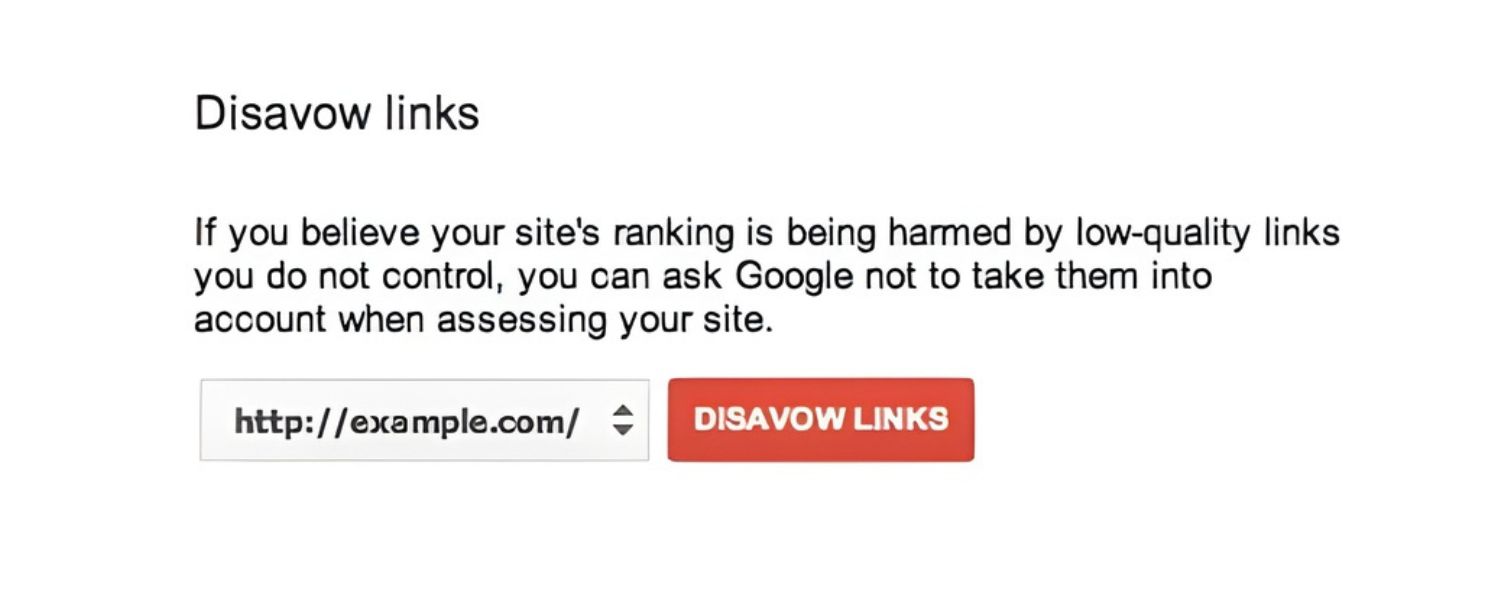
Disavowing backlinks means telling Google to ignore certain incoming links to your website. You do this by submitting a special “disavow file” – a simple text document listing the spammy or unwanted URLs (or domains) that link to you.
Once processed, Google will essentially neutralize those links so they don’t count toward your site’s ranking. It’s important to note that disavowing does not remove the links from the web, those backlinks will still exist and even appear in reports.
However, Google will stop factoring them into your site’s reputation, preventing them from harming your SEO. Think of it as adding bad links to an “ignore list” for Google’s algorithms.
Google introduced the Disavow Tool to help webmasters deal with toxic or manipulative backlinks that could hurt their site’s credibility. In essence, it’s a defensive tool, a way to distance your site from link spam or SEO tactics that violate Google’s guidelines.
When you disavow a backlink, you’re admitting to Google, “I don’t trust this link, please don’t count it when assessing my site.” This can be a lifesaver if your site is suffering from a link-related penalty or if someone (perhaps a previous SEO or a malicious competitor) built many spammy links to your site.
Why Would You Need to Disavow Links?
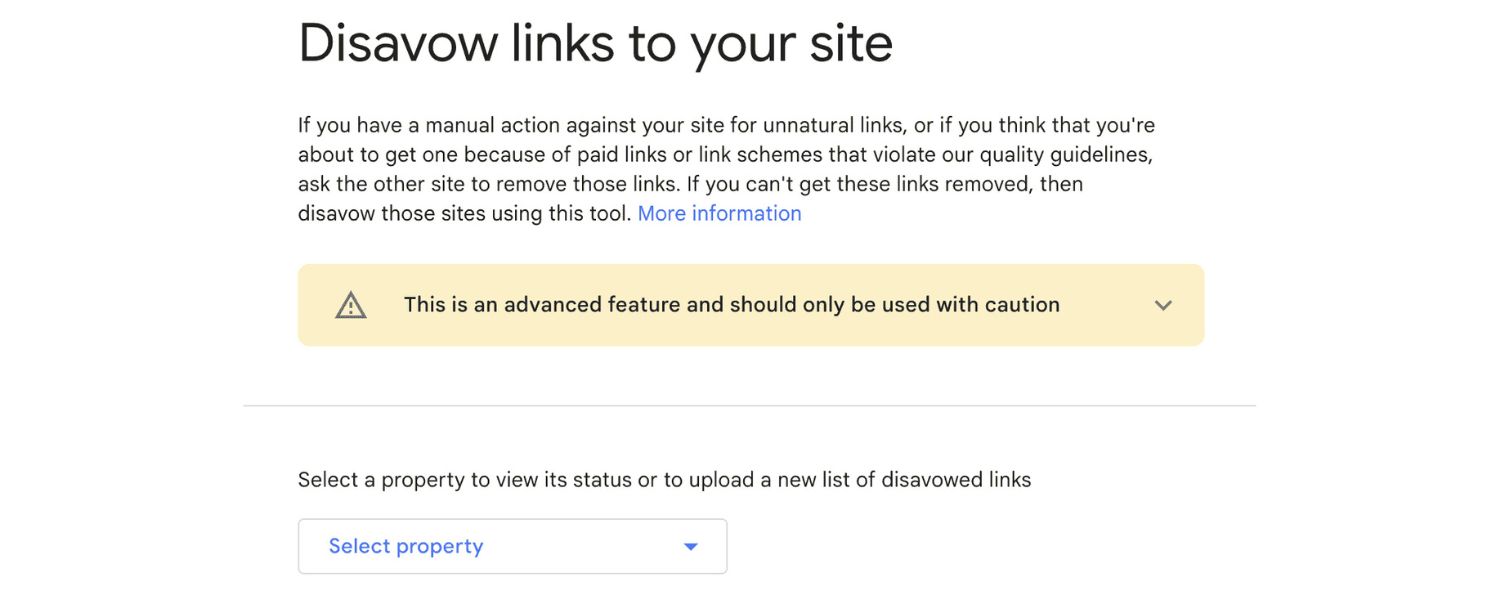
Most websites will never need to use the disavow option, and that’s actually good. Google’s algorithms are very effective at automatically filtering out low-quality or spam links.
Google itself notes that in most cases it can assess which backlinks to trust without any extra input, so using the disavow tool is typically unnecessary. In fact, Google’s official documentation calls the disavow feature an advanced tool to be used with caution.
So, why does the tool exist at all? Here are the specific scenarios when disavowing backlinks might be warranted:
1. Manual Penalty for Unnatural Links
If you’ve received a manual action notice in Google Search Console for “unnatural links” pointing to your site, it’s a clear sign you need to take action. A manual penalty means Google has reviewed your backlink profile and found serious violations (like paid link schemes or spam networks).
In this case, disavowing the offending links (after trying to remove them) is part of the cleanup process to restore your site’s standing.
2. Previous Participation in Link Schemes
Maybe in the past you (or an SEO agency you hired) engaged in risky link-building tactics, buying links, excessive link exchanges, private blog networks (PBNs), or other schemes against Google’s rules.
Those manipulative backlinks could put you at risk of a penalty. If you know your site has a history of such links, disavowing them proactively (along with stopping those practices) can be a wise defensive move.
3. Overwhelming Amount of Spammy Links
Sometimes websites attract a large number of spammy or irrelevant backlinks over time; for example, scrapers, spam directories, or autogenerated sites that link to everyone.
In general, Google ignores these, but if your backlink profile is flooded with hundreds or thousands of obviously spam links, you might worry about algorithmic impacts. Disavow can be used in extreme cases to prune away the “noise” if you have evidence those links are causing issues.
4. Negative SEO Attacks
Although it’s rare, there are cases where competitors attempt “negative SEO” – blasting a site with toxic backlinks hoping to hurt its rankings. Google claims to neutralize such tactics in most cases.
However, if you suspect a deliberate attack and notice unusual backlink spikes from shady websites, you can consider disavowing those hostile links as a precaution.
In short, you should only consider disavowing backlinks when they present a clear danger to your site’s search performance. It’s a last-resort, emergency measure for bad link situations that you cannot remedy by simply deleting or asking for removal.
As Google’s Search Advocate John Mueller has emphasized, the disavow tool is “not something you’d ever need on a regular basis.” It’s meant for exceptional cases, mainly sites that are guilty of serious link spam or under penalty.
Most normal websites with a few random “ugly” backlinks have nothing to worry about; Google will just ignore those by itself.
Risks of Unnecessary Disavowing
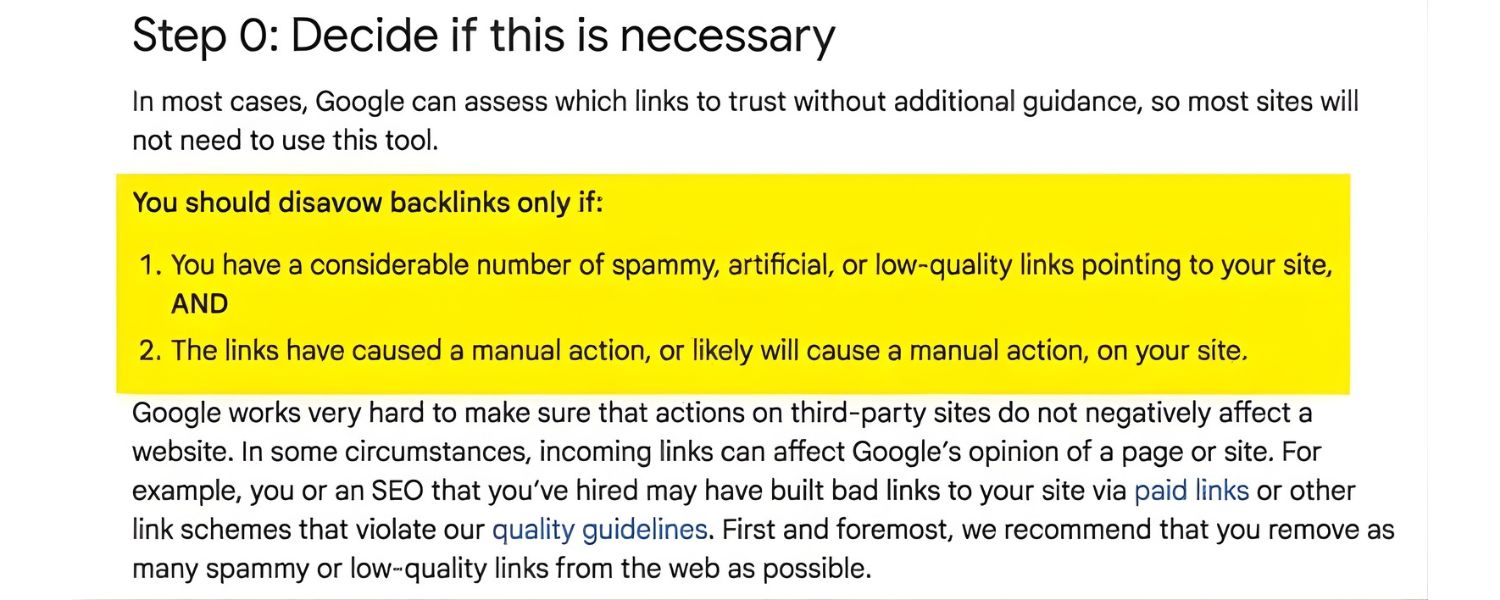
Before rushing to disavow every less-than-perfect backlink, be aware that using the disavow tool when you don’t need to can backfire. Google explicitly warns that incorrect use of this feature “can potentially harm your site’s performance.” Here’s why overusing the disavow tool is dangerous:
1. Loss of Legitimate Link Equity
If you mistakenly disavow good backlinks (or domains that actually benefit your site), you’ll throw away hard-earned SEO value. This can lower your rankings, as you’ve told Google to ignore links that were helping your credibility.
It’s not always obvious which links are harmless vs. harmful. Many webmasters have disavowed links out of caution, only to later realize they hurt their own SEO by removing genuine “juice” from real sites.
2. Wasted Time and Resources
Auditing and disavowing links can be a time-consuming process. If your site isn’t actually at risk, that’s time better spent creating content, earning quality backlinks, or improving your website.
Google’s John Mueller even noted that obsessively cleaning up “toxic” links when you have no penalty is like busywork, at one point he quipped that watching TV might be more productive! The takeaway: don’t fix what isn’t broken.
3. Ignoring the Root Cause
Often, bad backlinks are a symptom of past SEO tactics. If you focus only on disavowing links without correcting the underlying issue (say, discontinuing a shady link-building practice or improving your content quality), you’re treating the symptom, not the cause.
Unnecessary disavowing can create a false sense of security, meanwhile, the real SEO improvements (better content, organic link earning) get neglected.
4. Minimal (or No) Benefit Without Penalty
If your site hasn’t been penalized and Google isn’t actively distrusting your backlinks, disavowing won’t give you a ranking boost. It’s not an SEO trick to gain traffic; it’s a protective measure.
In fact, Google’s algorithms now automatically ignore most spam links. So, you gain little by disavowing what Google is already filtering out. Instead, you risk removing some borderline links that might actually count in your favor.
Bottom line
Don’t use the disavow tool as a routine “cleanup” for every site. It’s not part of normal site maintenance for the vast majority of websites. Save it for genuine problem scenarios, such as known bad link campaigns or an explicit warning from Google.
If you’re unsure, err on the side of caution: when in doubt, do NOT disavow. Focus on building a strong, natural backlink profile, and Google will typically take care of the rest.
How to Disavow Backlinks (Step-by-Step)
If you’ve determined that you truly need to disavow some backlinks, for example, you’ve been hit with a manual link penalty or you uncovered a trove of clearly toxic links from your site’s past, it’s critical to do it correctly. Disavowing requires precision and care. Follow these steps to safely disavow backlinks without accidentally harming your site’s SEO.
Step 1: Audit Your Backlink Profile
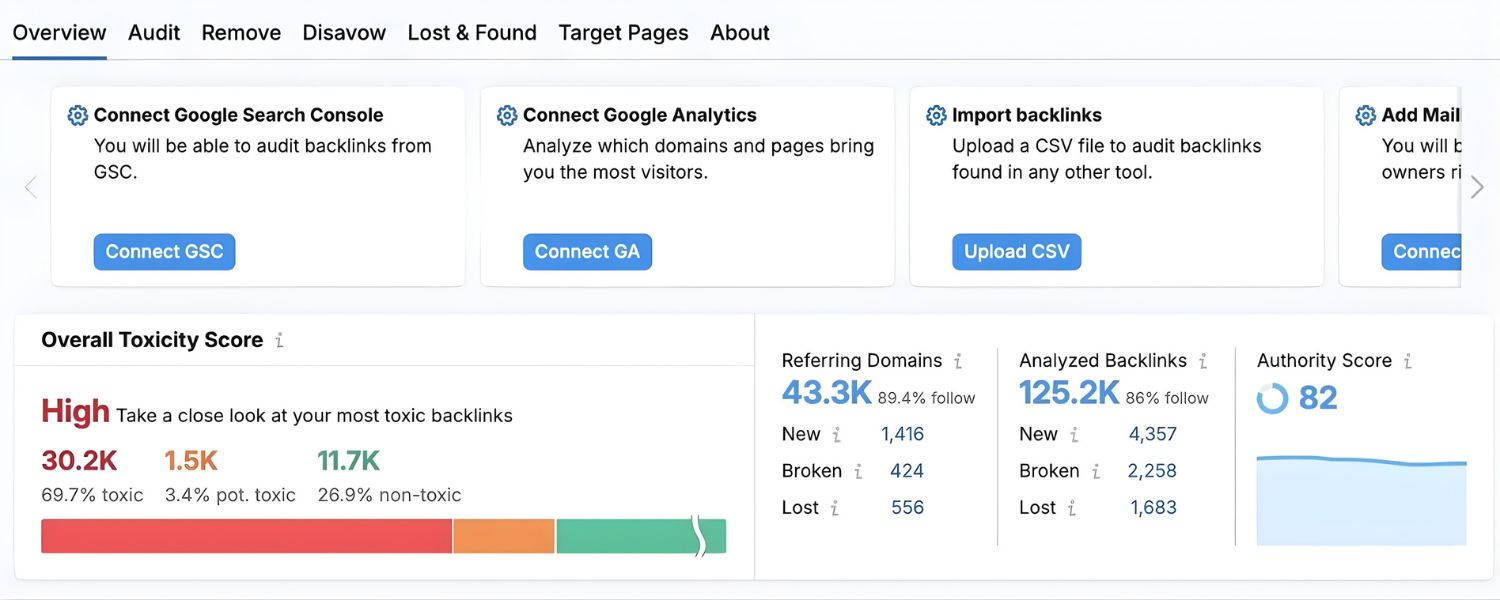
The first step is to take a close, objective look at your site’s backlinks. You need to identify which links are actually harmful. Start by checking Google Search Console for any manual actions: log in and navigate to “Security & Manual Actions” > “Manual actions.”
If you see a message about unnatural links, that’s your confirmation. If it says “No issues detected,” you have no manual penalty, but you might still proceed if other signs point to risky links (just be very careful).
Next, analyze your backlink profile using available tools and data. Google Search Console’s Links report can be a good starting point, it shows sites linking to you. You may also use SEO tools like Semrush, Ahrefs, or Moz, which often flag “toxic” or suspicious backlinks.
Export a list of all referring domains and backlinks for review. Keep in mind that third-party “toxicity” scores are just algorithms’ guesses, don’t blindly trust that every link labeled “toxic” is truly bad.
Many benign links (e.g. from low-authority sites or strange domains) might get flagged by automated tools even though they aren’t actually harming you.
Go through the list and pinpoint links that violate Google’s guidelines or are clearly not natural. Here are some red flags to look for:
1. Links from obvious spam websites (e.g. gibberish content, pure link directories, or sites filled with ads/malware).
2. Paid links or link exchanges set up purely for SEO. If you recognize networks of sites that exist to sell links, those are prime candidates.
3. Links coming from private blog networks (PBNs) or networks of sites with identical content/design (a sign of manipulative linking).
4. Backlinks embedded in spammy blog comments or forum posts that have nothing to do with your site’s topic.
5. A high volume of links from irrelevant or foreign-language sites that you have no real business with (for example, a random casino or pharma site linking to your corporate blog).
6. Sitewide footer or widget links that were placed for SEO rather than genuine partnership (especially if they use keyword-rich anchor text).
7. Any links you know were artificially created as part of past SEO work (link-buying, low-quality directory submissions, etc.).
This auditing step can be tricky. It’s better to be conservative, only mark links as “bad” if you have a strong reason. If you’re on the fence about a link, it might be safer to leave it be.
Remember, Google is pretty good at ignoring random junk links; your goal is to catch the truly egregious ones that could be weighing you down. If possible, have an experienced SEO specialist double-check your list to avoid mistakes.
Step 2: Attempt to Remove Bad Links Manually
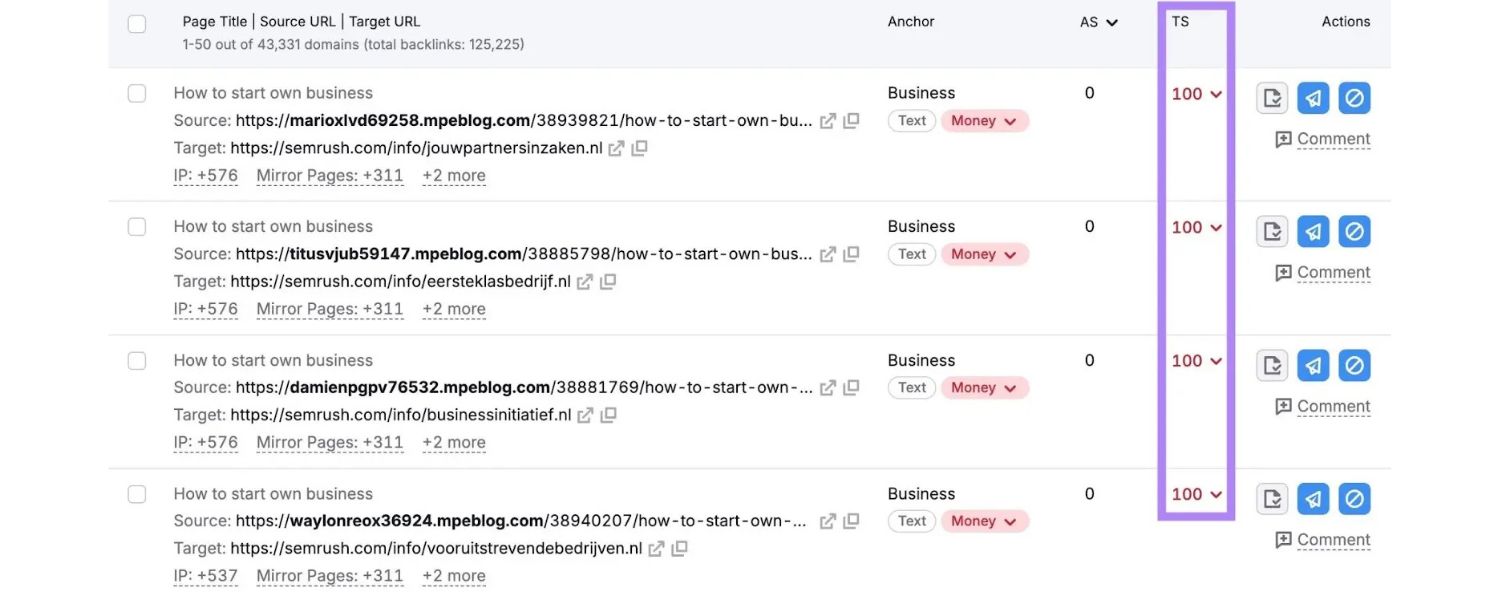
Before jumping to disavow, Google recommends trying to remove the problematic backlinks at the source. This means reaching out and contacting the webmaster or site owner who controls the link, and politely asking them to take it down.
It may sound tedious, but it’s the safest route: if a bad link can be deleted completely, that’s better than disavowing (which only asks Google to ignore it). Plus, demonstrating to Google that you made an effort to clean up can strengthen your case if you’re dealing with a manual penalty.
Start with the links you have control over. Did you or your team build any of these questionable links? For example, if you find spammy forum posts or old directory submissions that you created, go back and delete them if you can. Remove or edit any links within your power (like links you added in old guest posts, profiles, etc.).
For links on third-party sites, find a contact. Visit the website that’s linking to you and look for an email address or contact form. Many sites list a webmaster contact, or you might find an “About us” page with details. In some cases, a WHOIS lookup could provide an email (for smaller sites).
If direct contact info isn’t obvious, you could try messaging them on social media or even leaving a (polite) comment on the site asking the owner to get in touch.
When you reach out, be professional and courteous. Explain that you noticed a link from their site to yours and that it may be harmful to your site’s Google rankings. Kindly request that they remove the link or nofollow it.
Keep the tone friendly; you’re asking for a favor, after all. You might be surprised, some webmasters will comply, especially if the link was user-generated or placed without their knowledge.
Realistically, many spammy sites won’t reply or have no one to contact (they might even be defunct). Do what you can, document your efforts (this is useful evidence if you later file a reconsideration request to Google).
After a reasonable effort, if you cannot get certain links removed, you’re justified in proceeding to disavow them. The key is to show that disavowal is your last resort, not first instinct.
Step 3: Create a Disavow File
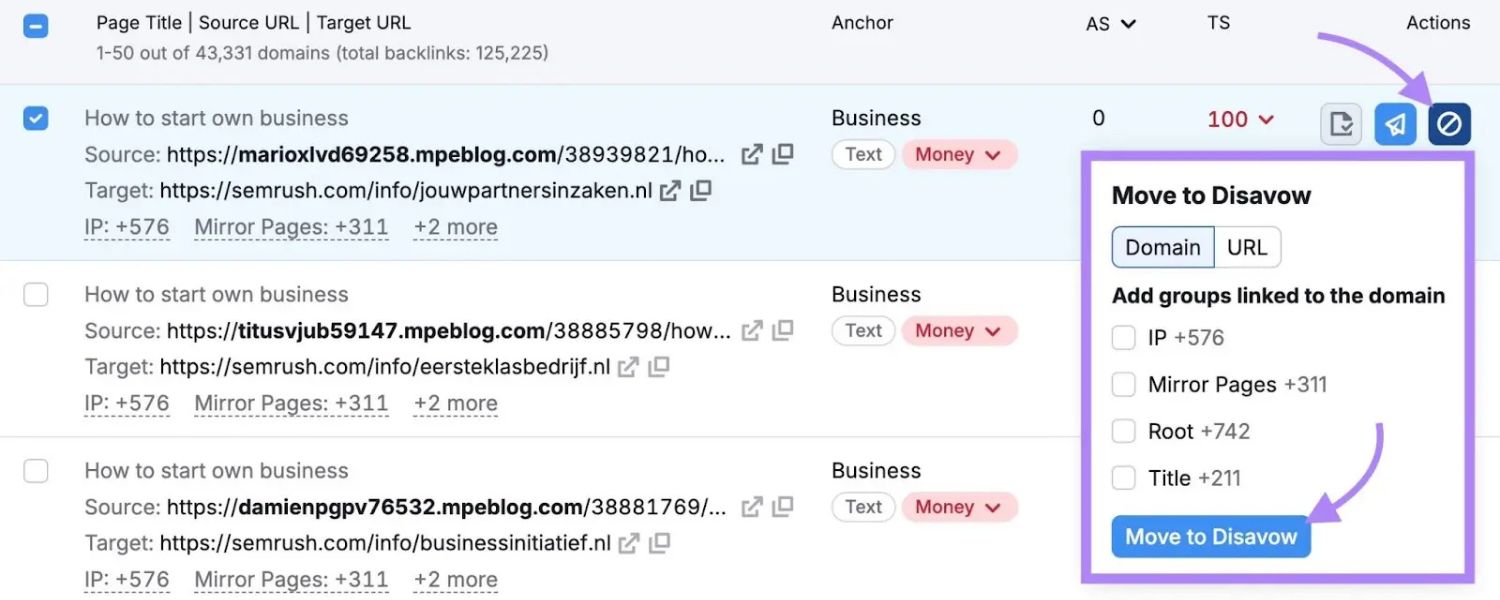
Now comes the core step: compiling the list of links (or domains) you want Google to ignore. This list will be saved as a disavow file. It’s essentially a text (.txt) file containing the URLs or domain names of the bad backlinks you identified. Getting the format of this file correct is crucial, a formatting error could make it ineffective or cause you to accidentally disavow more than intended.
Follow these formatting rules for your disavow file:
1. One entry per line: Each line should contain one link you’re disavowing. It can be a full page URL (e.g. http://spamwebsite.com/bad-page.html) or an entire domain.
2. Use the domain: prefix for domains: If you want to disavow all links from a particular site, you can disavow the whole domain. For example, to disavow everything from shadyseo.com, your line would be domain:shadyseo.com. (This covers any and all pages on that domain.) Use this carefully, only for sites that are completely spammy.
3. Don’t include anything else on a line: No extra text beyond the URL or domain:example.com format. Each line is processed separately.
4. Comments are allowed: You can add notes to yourself in the file by starting a line with #. Google will ignore any line that begins with #. For instance, you might begin the file with a comment like # Disavow file created Nov 2025 or annotate groups of links with # Links from spam forum to keep things organized. Comments are optional but helpful for record-keeping.
Here’s a quick example of what a disavow file might look like:
# Example disavow file
# Spammy pages to disavow
http://spamwebsite.com/buy-links.html
http://anotherdodgysite.com/unnatural-link-page.php
# Entire domains to disavow
domain:linkfarm.com
domain:freelinks.example
Save your compiled list as a text file (UTF-8 encoding). A good practice is to name it clearly like disavow-domain.txt (replace “domain” with your site name). Make sure the file extension is .txt and not something else. Also, be mindful of limits: Google allows up to 100,000 lines and a file size of 2MB for disavow files – plenty for most cases, but worth noting if you somehow have an enormous list.
URL vs. Domain disavow
If you’re unsure whether to list individual URLs or an entire domain, consider the pattern of the links. If a single reputable site has just one bad link to you (for example, a legitimate site where a user dropped a spammy link in a comment), you should only disavow that specific URL, not the whole domain.
You don’t want to throw away the good just to remove one bad page. On the other hand, if a domain is entirely composed of spam or has many pages all linking to you in manipulative ways, it’s more efficient to disavow the domain. This ensures you catch everything from that site, present and future. When in doubt, lean toward the narrower option (URL-level) to avoid overreach.
Double-check every entry in your file. It’s wise to cross-verify that you haven’t accidentally included your own domain (it happens!) or other innocent sites. One typo in a domain name could mean disavowing the wrong site – so be meticulous here. When you’re confident the list is accurate and complete, you’re ready to send it to Google.
Step 4: Submit the Disavow File in Google Search Console
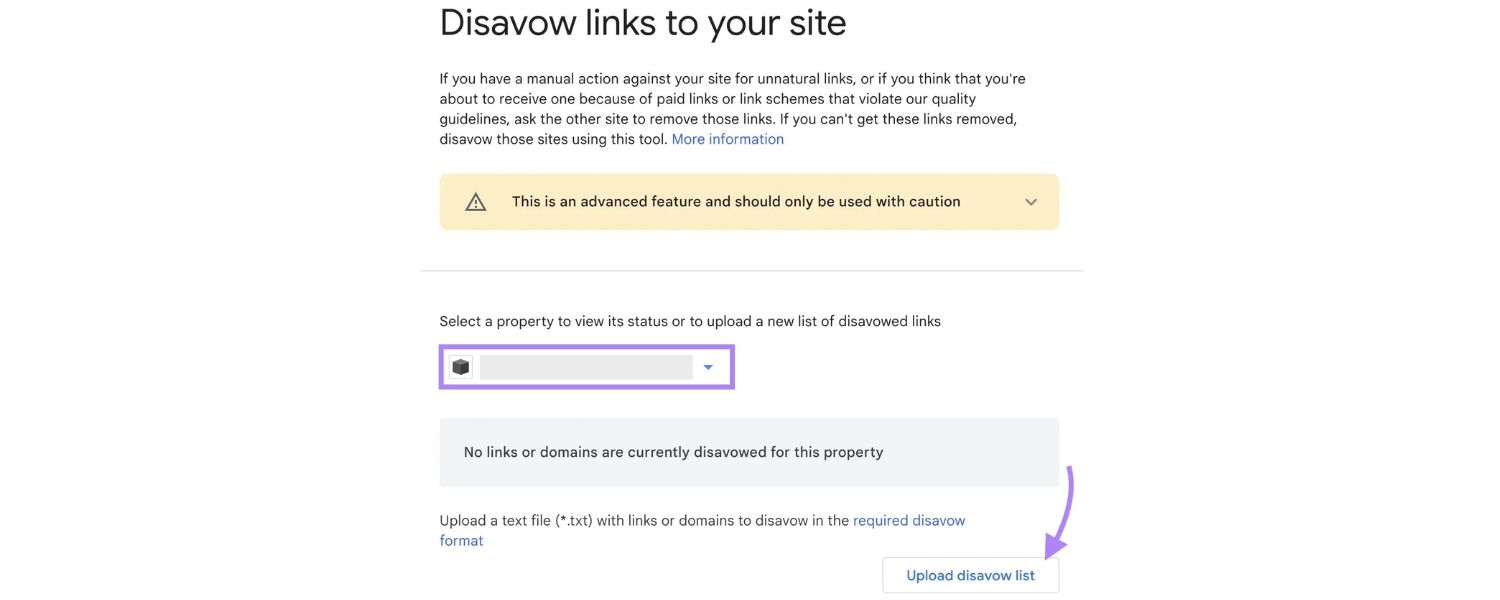
With your disavow file prepared, the next step is to upload it to Google via the Search Console’s Disavow Links tool. Notably, the disavow tool is a bit hidden – it’s not directly listed in the main Search Console interface.
You typically have to navigate to a special page (often accessed via Google’s Search Console Help documentation or a direct link) to use it. Don’t be alarmed if you’ve never seen it in your Search Console dashboard; that’s by design (Google doesn’t really want casual users stumbling on it).
Here’s how to submit your file:
1. Access the Disavow Tool
Go to the Google Disavow Links Tool page (you can search for “Google Disavow Tool” or use the direct URL provided in Google’s help center). It will prompt you to select your website.
2. Select your site
Choose the property (website) for which you want to disavow links. Important – you must have that site verified in Search Console. If you have both http:// and https:// versions, or a “www” vs non-“www” version, be sure you select the correct one. (You may need to upload files separately for different properties if your site’s split – ideally consolidate your properties in GSC beforehand.)
3. Upload your disavow file
Click the “Disavow Links” button for your chosen site, then you’ll see an option to upload your file. Locate the .txt file you created and upload it. Google will then process the file.
4. Review any errors
If the file has formatting errors, Google will report them immediately instead of accepting the file. Common errors might be things like an invalid URL format or a line that’s too long. If you get errors, fix your file and try again. Until a correct file is uploaded, the previous disavow (if any) remains in effect.
5. Confirm submission
Once the file is accepted, Google will show you a summary – e.g. “X domains and Y URLs disavowed.” There will also be a big warning message reminding you that disavowing is serious (Google wants to make sure you know what you’re doing). Confirm that you want to proceed.
After a successful upload, your new disavow list replaces any previous one for that site. Google only keeps one active disavow file per site, so if you had an older file and are updating it, remember that the old entries need to be included in the new file too (unless you intentionally want to let some links count again).
A best practice when updating is to download your current disavow file first, add any new links to it, and then re-upload the combined file. If you ever need to remove all disavows, you can upload an empty file or use the “Cancel disavowals” option in the tool – but do this only if you’re sure, as it will make Google start counting all those links again over time.
Step 5: Monitor Results and Follow Up
Submitting the disavow file is a quick process, but the impact is not instant. After you upload, Google will gradually incorporate your requests during its regular crawling and indexing cycle. It might take a few weeks for Google’s bots to recrawl the disavowed links and fully discount them. In the case of a manual penalty, you might need to wait for a reconsideration review. Here’s what to do post-disavow:
1. Be patient and track performance
Keep an eye on your Google Search Console metrics and organic traffic over the next several weeks to months. If you disavowed links to recover from a penalty or ranking drop, you hopefully will see improvements once Google processes the changes. Recovery isn’t overnight – some site owners report it can take a few months for rankings to rebound if a severe penalty was involved.
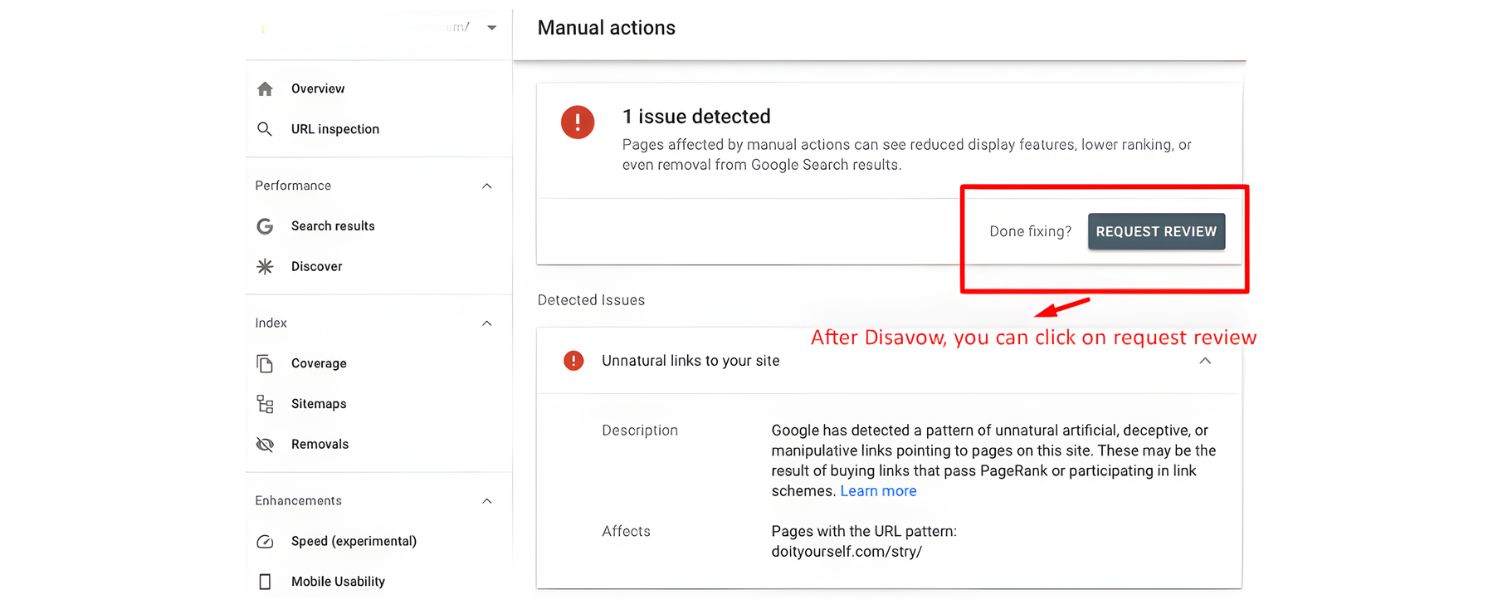
2. Submit a reconsideration request (if applicable)
If you had a manual action for unnatural links, disavowing alone isn’t enough. You must inform Google that you’ve cleaned up. In Search Console’s Manual Actions section, there will be an option to “Request Review” or submit a reconsideration request.
In that request, politely explain that you identified and disavowed spammy backlinks (and removed what you could manually) and ask Google to lift the penalty. Detail some of the efforts you took – this transparency can help.
Then await Google’s reply (you’ll get an email response in a couple of weeks typically). If you did everything right, Google will revoke the manual action, and your site can slowly regain trust.
3. Understand what changes (and what doesn’t)
When disavow is effective, Google will stop counting the specified links in ranking calculations. You likely will not receive any confirmation from Google beyond the upload success message.
Those links will still appear in tools like GSC’s link report or third-party backlink tools. This is normal – disavow doesn’t delete links, so data sources will continue to list them. Don’t be alarmed if you see the same spam domains in your reports after disavow; it only matters that Google is now ignoring them internally.
4. Avoid reintroducing bad links
If the reason you had to disavow links was self-inflicted (e.g. you or a past SEO built bad links), make sure you stop those practices entirely. Disavowing is not a free pass to continue spamming – Google expects you to learn and improve.
Clean up any ongoing link scheme. Going forward, focus on earning quality, natural backlinks by publishing great content and engaging in legitimate marketing. A strong natural link profile will outweigh a handful of spam links and make your site more resilient.
5. Keep your disavow file updated (only if needed)
In the future, if you encounter new troublesome backlinks (for instance, a new negative SEO attempt or discovery of old spam links you missed), you can add them to your disavow file. Remember, you shouldn’t have to do this often.
Some SEO professionals check their backlink profile periodically, but most clean, reputable sites can go without ever using disavow. If you do update the file, follow the same process – combine with the existing list and upload again. It’s also wise to keep a local copy of your disavow list and date it, so you have a record of what you’ve disavowed and when.
By now, you should see that disavowing backlinks is a serious task but manageable when done methodically. For many, it’s a once-in-a-blue-moon activity, if it’s needed at all. The ultimate goal is to have a backlink profile that you don’t need to worry about – one built on genuine endorsements of your content, not on manipulative tactics.
Frequently Asked Questions about Disavowing Backlinks
Q1: Does disavowing backlinks remove them from Google or the internet?
No, disavowing only tells Google not to count those links for ranking purposes. The backlinks themselves still exist on the web and may still show up in Google’s Link report or SEO tools.
Disavowed links are basically ignored by Google’s algorithm, but they aren’t “deleted.” If you want a link completely gone, you’d have to get it removed at the source. Disavow is simply a way of saying “don’t trust this link.”
Think of it as noise-cancelling headphones for your backlink profile, the noise (bad links) is still out there, but Google won’t listen to it.
Q2: Will using the disavow tool improve my SEO or boost my rankings?
Disavow is not a tool for improving rankings in the absence of a penalty. If your site hasn’t been penalized or suffering due to bad links, disavowing links won’t make your rankings suddenly rise – there’s no positive ranking gain from disavow alone.
It’s a protective measure, not an optimization tactic. The exception is if your site was being actively held down by a manual or algorithmic penalty related to spammy links. In that case, successful disavowal and cleanup can help you recover lost rankings over time.
But again, that’s restoring your rightful position, not giving you a new “boost.” The best way to improve your SEO is by earning high-quality backlinks and creating valuable content, not by disavowing links that weren’t causing harm to begin with.
Q3: How often should I use the disavow tool on my site?
For the majority of site owners, the answer is “never” or at most very rarely. Disavow is not a routine maintenance tool. You shouldn’t schedule regular disavow uploads or constantly purge links just because some SEO tool flagged them.
Google’s own representatives have said that if you find yourself disavowing links frequently, it’s a red flag that you might be focusing on the wrong things. Ideally, you only use it in those special cases we discussed (e.g. you got a penalty, or you know there’s a cluster of bad links from an old campaign).
Many healthy sites go their whole life without a disavow file. If you do need to disavow, it’s often a one-time project or something you revisit maybe once a year or when a specific issue arises – not a monthly chore.
Q4: Can bad backlinks from other websites really hurt my site if I don’t disavow them? (What about negative SEO?)
Under normal circumstances, occasional bad backlinks will not hurt your site, because Google is pretty good at recognizing and ignoring spammy links automatically. Google doesn’t want your site to be harmed just because some random site linked to you without your control.
The term “negative SEO” refers to malicious attempts to create lots of bad links to hurt a competitor. Google’s algorithms have safeguards against that, and in most cases those spam links won’t count.
Only in extreme situations – like an overwhelmingly large attack or if you also had involved yourself in link schemes – might those bad backlinks have an effect. If you suspect negative SEO, you can monitor it, but don’t rush to disavow unless you see a tangible impact (such as a warning in Search Console or a ranking drop coinciding with the bad links).
In summary: one or two shady links are nothing to lose sleep over. Focus on building positive signals for your site rather than chasing every bad link.
Conclusion and Next Steps
Backlinks remain a cornerstone of SEO, and the quality of sites linking to you can strongly influence your search rankings. The Disavow Backlinks tool is a powerful option, but as we’ve stressed, it should be used sparingly and wisely.
For most webmasters, the best “next step” is to cultivate a healthy backlink profile by creating content people naturally want to link to and by building genuine relationships in your industry. That organic approach will far outweigh a handful of spam links in the long run.
If you do find yourself dealing with a barrage of toxic links or a Google penalty, don’t panic. Take a systematic approach: audit your backlinks, remove what you can, and disavow the truly harmful ones.
Always double-check your work – the goal is to cut out the cancerous links while keeping the healthy ones intact. Once you’ve cleaned house, give Google time to re-evaluate your site, and keep pushing forward with positive SEO efforts.
Remember, the ultimate cure for bad backlinks is to drown them out with good ones. Rather than fixating too much on disavowing, invest your energy in earning endorsements from reputable, relevant websites. Over time, a few spammy links will be mere background noise against a strong chorus of quality links pointing to your site.
Ready to safeguard your site’s SEO? Start by assessing your backlink profile today. If you identify any truly harmful links, you now know how to disavow them safely. Otherwise, focus on what really moves the needle: great content and authentic connections.
By staying proactive and informed, you can ensure your website’s link profile remains an asset to your business, not a liability. Here’s to a clean, resilient backlink profile and continued growth in your search rankings!

Why Roseville Startups are Choosing Offshore Marketers to Scale Smarter
Roseville is no longer just a quiet suburb of Sacramento;...

What Is PPC? A Practical Guide to Pay‑Per‑Click Advertising
Pay‑per‑click (PPC) is the “pay only when someone clicks” branch...

Google Search Issues Affecting Results in Some Regions
Google has confirmed a problem with one of its data...

Keyword Counts Dropped After Google’s num=100 Change
In September 2025, Google stopped supporting the &num=100 parameter. This...

Image SEO: Optimize Images for Higher Rankings & Traffic
Introduction Images make your website more engaging, but they can...


.png)
.png)
.png)
.png)
.png)

2024 ALL RIGHTS RESERVED MADE IN INDIA
.png)