
On-Page SEO Checklist to Optimize Your Website Effectively
July 3, 2025
Introduction: Why On-Page SEO Matters?
Ranking at the top of Google is not just luck – it’s the result of systematic on-page SEO optimizations. On-page SEO (also called on-site SEO) refers to all the measures you can take on your webpage to improve its ranking on search engines.
This includes optimizing visible content and HTML source code elements, ensuring that each page is relevant, user-friendly, and easily understood by search engines.
A well-optimized page boosts your content’s relevance, improves user experience (UX), and signals to search engines that your page is valuable.
In recent years, Google’s algorithms have evolved to reward “people-first content” – content created for users rather than just for search engines.
That means simply stuffing keywords or using old-school tricks isn’t enough. You need to cover topics comprehensively, provide genuine value, and deliver a great page experience.
In fact, Google’s systems are designed to surface helpful, reliable information that benefits users first and foremost. So, optimizing your on-page elements is as much about quality and relevance as it is about technical tweaks.
This on-page SEO checklist for 2025 will walk you through all the essential steps – from targeting the right keywords to improving page speed.
Follow these proven tips (and a few advanced techniques) to ensure every page on your site is primed to rank higher and attract more organic traffic. Let’s dive in!
What Is On-Page SEO? (On-Page vs. Off-Page vs. Technical SEO)
On-page SEO encompasses any SEO improvements made directly on your webpages. This contrasts with off-page SEO, which covers factors outside your site (like backlinks and social signals), and technical SEO, which deals with site-wide technical factors (like site speed, indexing, and security).
Think of on-page SEO as everything within your control on the page – content, HTML tags, multimedia, internal links, and more – to make that page as relevant and user-friendly as possible for a given keyword.
1. On-Page SEO

Optimizing page content and HTML elements (e.g. headings, text, images, meta tags) to align with target keywords and provide value to users.
2. Off-Page SEO
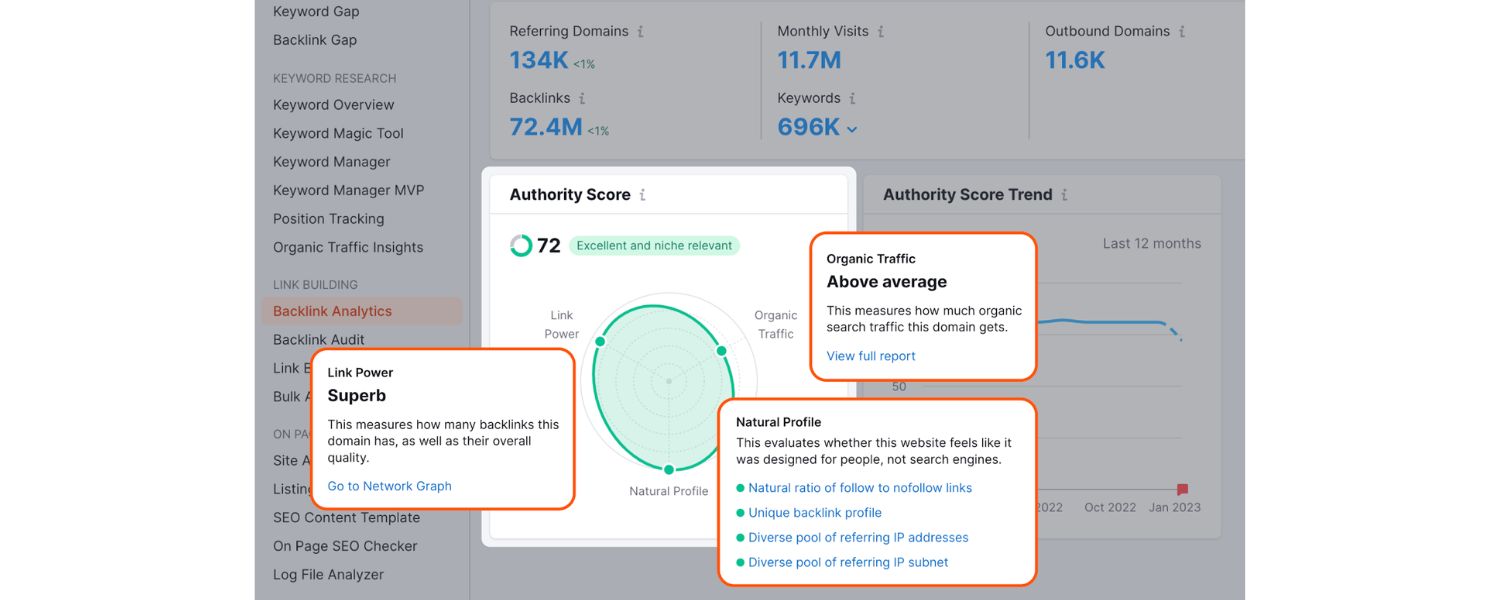
Building your site’s reputation and authority through external means like earning backlinks, social media marketing, and brand mentions.
3. Technical SEO
Enhancing the website’s backend structure and performance – ensuring crawlability, fast loading, mobile compatibility, proper indexing, etc…
All three work together, but this guide focuses on on-page factors. Mastering on-page SEO lays the foundation for any successful SEO strategy – after all, you won’t get backlinks (off-page) if your on-page content isn’t high quality, and technical fixes like faster loading amplify the benefits of your on-page efforts.
The Complete On-Page SEO Checklist
Below is an 11-point on-page SEO checklist covering the must-do items for each page, followed by additional technical and advanced tips.
Use this as a step-by-step guide or a handy reference to ensure you don’t miss any opportunities to optimize your pages.
(Pro tip: You can even print this checklist or keep it open while optimizing your content, and tick off each item as you go.)
1. Perform Keyword Research with Search Intent in Mind

Every successful page optimization starts with choosing the right target keyword. You need to understand what search terms your potential visitors are using – and which of those keywords you can realistically rank for.
Start by brainstorming topics related to your page, then use keyword research tools (like Google Keyword Planner, Semrush’s Keyword Magic Tool, or Ahrefs Keywords Explorer) to find specific phrases. When evaluating keywords, consider three main factors:
A. Search Volume

How many people search for that term monthly? (Higher volume means more potential traffic.)
B. Keyword Difficulty

How competitive is the keyword? (Higher difficulty means it’s tougher to rank on page 1.)
C. Search Intent

Why are people searching that term? Are they looking to learn (informational), to find a specific site (navigational), to compare options (commercial), or to buy something (transactional)?
Choosing keywords that match your page’s purpose is crucial. For example, if you run an e-commerce page, a purely informational high-volume keyword might not convert well.
A classic example: the keyword “blue flowers” gets ~60k searches a month, but it’s largely informational – searchers see encyclopedic results and aren’t necessarily looking to buy.
Targeting “buy blue hydrangeas online” (transactional intent) could be far more effective for a product page. Always ask: Does this keyword align with what I offer and what the searcher wants?
Action steps: Use your chosen keyword research tool to generate keyword ideas from a seed topic. Filter results to find a balance of decent volume and manageable difficulty.
Prioritize keywords that match your content’s intent (e.g. how-to keywords for a guide, product keywords for a product page).
It’s often wise to target a long-tail keyword (a more specific 3+ word phrase) for each page – these tend to have clearer intent and lower competition, making it easier to rank.
Once you’ve identified your primary keyword (and a few closely related secondary keywords), you’re ready to optimize your page around them. Want to dive deeper into SEO? Check out our Ultimate Keyword Research Checklist: Step-by-Step Guide to SEO Success for more insights.
2. Craft an SEO-Optimized Title Tag (Meta Title)

Your title tag is one of the strongest on-page ranking signals – it’s the clickable headline that appears for your page in search results (and the text shown at the top of browser tabs).
An optimized title tag helps search engines understand your page and entices users to click through. Here’s how to perfect your title tags:
A. Include your primary keyword
Ideally near the beginning. For example, if your keyword is on-page SEO checklist, a title like “On-Page SEO Checklist: 21 Tips for Higher Rankings” puts the keyword right up front.
B. Keep it around 50–60 characters
(under ~600 pixels) so it doesn’t get cut off in Google’s results. (Google doesn’t have a hard character limit, but titles beyond ~60 chars often truncate with “…”.)
C. Make it clear and descriptive
The title should accurately reflect the content on the page. Avoid clickbait or overly gimmicky titles that might mislead readers or get rewritten by Google.
D. Make it compelling to users
Treat the title as an ad for your page – use power words or a unique value proposition to improve click-through rate (CTR). For instance, “… – Complete Step-by-Step Guide” adds a timely angle and suggests thoroughness.
E. Avoid keyword stuffing
It’s fine to include a secondary keyword if it fits naturally, but don’t cram in multiple variations of the same term. A title like “On-Page SEO Checklist, On-Page Optimization Guide, On-Page SEO Tips” looks spammy. One primary keyword (and maybe a synonym) is enough.
Remember, even if you optimize perfectly, Google may sometimes replace your title tag in SERPs based on the query.
Common reasons are if your title is too long, too short/vague (e.g. “Home”), or if Google thinks a different snippet of text (like an H1) is more relevant.
To minimize this, follow the best practices above – a relevant, concise title that matches search intent is less likely to be rewritten.
(Bonus tip: Ensure each page on your site has a unique title tag. Duplicate titles confuse search engines and users, so avoid using the same title on multiple pages.)
3. Use One Clear H1 Heading (Page Headline)

On your actual webpage, the H1 tag is the main heading that visitors see, usually at the top of your content.
It often mirrors or complements the title tag, but doesn’t have to be identical. Every page should have one H1 tag that clearly describes the content – this helps both users and search engines understand the page’s topic immediately. Think of the H1 as the on-page headline of your article or product.
Best practices for H1:
A. Include your primary keyword in the H1 (it signals relevance), but make sure the heading reads naturally.
B. Make the H1 descriptive and aligned with the title/tag. For example, if the title tag is “21 On-Page SEO Tips for 2025,” your H1 might be “The Ultimate On-Page SEO Checklist for 2025.” They’re slightly different in wording, but both convey the same topic.
C. Use an H1 that hooks the reader. It should be interesting and promise value. Phrases like “Ultimate Guide,” “Step-by-Step,” “Checklist,” or a question can draw readers in – as long as it matches the content you deliver.
D. Only use one H1 per page. Using multiple H1s can confuse crawlers about the main topic hierarchy. Save secondary points for H2s and H3s (more on that next).
Keep in mind, the H1 is usually a large, prominent text on the page. It improves user experience by setting the context.
From an SEO perspective, it’s not a magic ranking factor by itself, but a well-written H1 that includes the keyword can reinforce topic relevance (and often correlates with better rankings when combined with good content).
4. Structure Your Content with Header Tags (H2, H3, H4…)

A clear content structure isn’t just great for readers – it also helps search engines crawl and understand your page hierarchy.
Header tags (HTML through tags) are used to organize content into sections and sub-sections. This makes your page scannable and signals what’s most important.
For example, use H2 tags for main subheadings (key sections of your page), H3 for sub-points under those, and so on, in a logical nested order.
Don’t jump randomly from an H2 to an H4 without an H3 in between – maintain a hierarchy to avoid confusing search engines.
Here’s how to optimize your use of header tags:
A. Use descriptive, keyword-rich subheadings
(H2s for main topics). Each H2 should encapsulate a core subtopic or step from your checklist.For instance, in this article, sections like “Perform Keyword Research” or “Optimize Title Tags” would be H2. Including relevant keywords or synonyms in H2s can provide additional SEO context, but always ensure they make sense to the reader.
B. Use H3s (and H4s if needed)
for supporting points. If under “Images Optimization” (H2) you have sub-points like “Compress images” or “Write alt text,” those can be H3 subheadings.
C. Keep sections focused
A good rule of thumb is that each section under an H2 should cover one main idea or checklist item.If you find a section getting too lengthy or covering divergent topics, break it into multiple sections with appropriate subheadings.
D. Make it user-friendly
Consider turning some subheadings into questions (which could target People Also Ask queries) or directives (for a checklist-style feel).For example, an H2 saying “How to Improve Page Speed” or “Step 5: Improve Page Speed” directly tells readers what to expect.
Using headers effectively will improve the user experience and readability of your content. Search engines appreciate this too: a well-structured page is easier to crawl, and header tags give additional context about your content’s key themes.
Ultimately, a page with clear headings and sections tends to keep visitors engaged longer (nobody likes walls of text), which can indirectly benefit your SEO through better engagement metrics.
5. Write a Compelling Meta Description for Each Page

The meta description is the snippet of text (usually 1–3 sentences) that appears below your title in search result listings.
While Google has stated that meta descriptions aren’t a direct ranking factor, they heavily influence whether users click on your result or not.
Higher click-through rates can lead to more traffic and potentially improved rankings over time. A well-crafted meta description acts as a mini ad, convincing searchers that your page has what they need.
Tips for optimizing meta descriptions:
A. Include the primary keyword (and possibly a synonym). When the search query matches text in your meta description, Google will often bold it, drawing the eye. This can reassure searchers that your page is relevant to their query.
B. Summarize the content and highlight a benefit. In ~1-2 brief sentences, tell people what they’ll get from your page. For example: “Learn 20+ on-page SEO techniques to boost your rankings, improve site speed, and deliver a better user experience. Step-by-step checklist included.”
C. Use a clear call to action or value proposition. Words like “learn how,” “find out,” “step-by-step,” or “get the ultimate guide” can entice clicks. You might also include a CTA like “Read more to discover…” or an enticing detail like “…#5 will surprise you.”
D. Keep it around 150–160 characters. Most meta descriptions get truncated beyond roughly 155 characters. Make sure the most important information and your keyword appear before the cut-off. It’s usually safe to aim for 1–2 full sentences.
E. Ensure it’s unique for each page. Avoid duplicate meta descriptions across your site (just as with titles). Each page’s description should be tailored to that page’s content.
For example, a meta description for this post might be: “Boost your Google rankings with our ultimate on-page SEO checklist for 2025. Learn how to optimize titles, content, site speed, mobile-friendliness, and more in this step-by-step guide.” Notice it’s realistic, includes the keyword “on-page SEO checklist,” and gives a broad overview of what’s inside.
Remember, Google won’t always use your provided meta description; it sometimes generates its own snippet from the page content if it thinks it’s more relevant to the user’s query.
However, by writing a high-quality meta description, you increase the chances that Google will use it, and you ensure that if it’s shown, it will encourage the right users to click through. Don’t miss this easy opportunity to improve your snippet’s attractiveness on the SERP!
6. Optimize Your URL Slug (Short, Descriptive & Keyword-Rich)

The URL of your page is another small but significant on-page factor. A clean, keyword-rich URL slug helps users and search engines understand what the page is about at a glance.
It can also appear in search results, just above the title. For example, seeing …/on-page-seo-checklist in the URL reinforces relevancy to the search query.
URL optimization guidelines:
A. Keep it short and descriptive A concise URL is easier to read and less likely to be cut off. For instance, yoursite.com/on-page-seo-checklist is preferable to yoursite.com/2025/07/blog/entry123?id=56.
B. Include the primary keyword or topic This often happens naturally if your page title is descriptive. If the title is “On-Page SEO Checklist for 2025,” a good slug is on-page-seo-checklist-2025.Avoid long stop-words; something like on-page-seo-checklist-2025 is better than the-complete-on-page-seo-checklist-for-2025 (too long).
C. Use hyphens to separate words (standard practice) and use lowercase letters. Most CMSs do this automatically.
D. Avoid special characters or spaces. Stick to alphanumeric and hyphens. No need for underscores, percent signs, etc., which can complicate things.
E. Don’t keyword-stuff or repeat words. One mention of your main keyword is enough. A URL like /on-page-seo-checklist-tips-on-page-seo is unnecessary and looks spammy.
If you’re optimizing an existing page with a poor URL, be cautious: changing URLs can break links. It’s best to set up a 301 redirect from the old URL to the new one if you do change it.
For new pages, get the URL right from the start. A good URL is permanent, memorable, and helps establish relevance (both to Google and to users who see it on social media or elsewhere).
7. Publish High-Quality, Relevant Content (Avoid Thin or Duplicate Content)

Content is the heart of on-page SEO. You can do all the technical tweaks in the world, but without valuable content that satisfies the user’s query, you won’t rank for long (or at all).
Google’s mission is to provide the most relevant, high-quality results for each query, so your page’s main content needs to demonstrate expertise, depth, and relevance to the topic.
Here’s what that entails:
A. Cover the topic in-depth:
Aim to provide a substantial, comprehensive resource on the subject. Answer the common questions someone might have. For a checklist like this, that means not just listing tips but explaining how to implement them and why they matter.
B. Make sure your content is original:
Don’t just copy or rehash what’s already out there. Add unique insights, examples, or up-to-date information that sets your content apart. (For instance, this guide includes the latest 2025-specific insights and combines learnings from multiple experts.)
C. Match the search intent:
If someone searches “on-page SEO checklist,” they likely want a step-by-step list of tips (not a philosophical essay on SEO).Ensure your format and angle match what users expect to see for that keyword (often, analyzing the current top results can hint at this).
D. Avoid “thin” content:
Google defines thin content as content with little value, such as auto-generated text or pages that merely duplicate information available elsewhere.Each page should have a meaningful amount of unique content that provides value. For example, a 50-word blurb jammed with keywords won’t cut it – that could be seen as thin or even doorway content.
E. Demonstrate E-E-A-T:
This stands for Experience, Expertise, Authoritativeness, and Trustworthiness. In practical terms, write in an authoritative tone, cite reputable sources for facts (like we’re doing in this article), and if applicable, provide author info or credentials. Show that you know the topic. High-quality content often earns more trust from both users and Google.
F. Provide a great user experience:
Use short paragraphs, clear fonts, and supporting elements (such as images, charts, and examples) to make the content easy to consume. A well-structured, easy-to-read page tends to keep visitors longer, reducing bounce rates.
Also, ensure every piece of content on your site is unique – avoid duplicate content issues. If two pages have very similar text, consider consolidating them or using canonical tags. Duplicate content can confuse search engines about which page to rank, and could even lead to neither page ranking well.
The same goes for keyword cannibalization: don’t target the exact same keyword on multiple pages, causing them to compete with each other. Instead, merge overlapping content or differentiate the targeting.
In short, prioritize quality over quantity. A 2,500-word article that is fluff-free and extremely useful will outperform a 5,000-word article that rambles.
Ask yourself: Would I bookmark this page? Would I share it with a friend? If yes, you’re on the right track.
8. Use Your Target Keywords Strategically (and Naturally) in Body Text
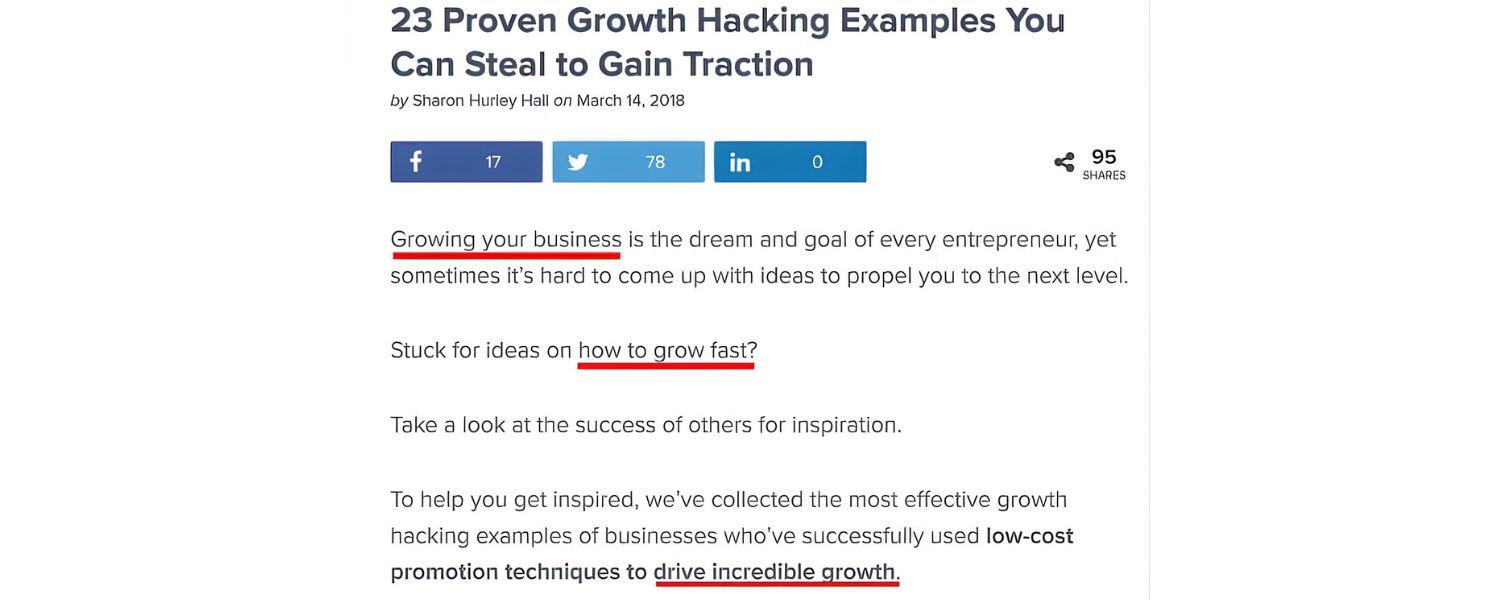
Now that you have great content, make sure you’re integrating your target keywords and related terms effectively.
In the past, on-page SEO focused primarily on keyword placement and density. Today, it’s more nuanced – you want to include keywords in key spots for relevance, but also use a lot of natural language and semantically related terms so that Google fully understands your topic.For a deeper dive into this concept, see Mastering On-Page SEO.
Here’s a mini-checklist for keyword usage on the page:
A. Use the primary keyword in the first 100-150 words
This helps signal early on what the page is about. For example, this article mentioned “on-page SEO checklist” right in the opening lines of the introduction.Don’t force it if it doesn’t fit; however, you can typically mention the topic upfront in a natural way.
B. Sprinkle the keyword
(and variants) throughout the content, where relevant. Aim for a natural frequency – there’s no perfect number, just ensure it doesn’t feel forced or “stuffy.”If you write comprehensively, the keywords and synonyms will appear frequently. A good practice is to use a few exact matches in crucial places (e.g., the introduction, a header, the conclusion) and related terms elsewhere.To learn more about the best strategies for keyword placement, check out SEO Strategies and Services.
C. Include related keywords and LSI terms
These are words and phrases that are contextually related to your main keyword. For example, for “on-page SEO,” related terms might be “meta tags,” “internal links,” “content quality,” “search engine rankings,” etc.Using these in your content helps cover the topic breadth and signals relevance. Modern search engines use semantic analysis, so covering subtopics and related concepts can improve your page’s comprehensiveness.
D. Use keywords in anchor text
(when linking internally), image alt text, and title/meta as already discussed. These all reinforce context. But again, ensure it’s relevant e.g., alt text should describe the image, not just be a list of keywords. For more information on internal linking strategies, refer to Link Building Strategies.
E. Write for humans first
Never sacrifice readability for the sake of a few extra keyword mentions.Google’s algorithms can detect unnatural language. A good rule: if you read the page aloud, does it sound like a normal explanation of the topic? If certain keyword mentions seem awkward when reading, consider rewriting them.
Avoid the trap of “keyword stuffing,” which is explicitly against Google’s guidelines and can harm your rankings. For instance, don’t repeat the same phrase back-to-back (“on-page SEO checklist best on-page SEO checklist tips for on-page SEO”).
Use pronouns, use variations (“on-page optimization checklist,” “SEO tasks on the page,” etc.), and focus on clarity. As long as your page is clearly about the topic and you’ve touched on all the main subtopics, you’re likely using plenty of relevant keywords naturally.
(Hint: Tools like Google’s NLP API or on-page content analyzers can show you which entities and terms your content highlights, but using common sense and thorough writing often suffices.)
9. Enrich Your Content with Visuals (Optimize Images & Media)

Blocks of text can be daunting, so incorporating visual content, such as images, diagrams, infographics, or videos, can make your page far more engaging. Engaged readers stay longer, reducing bounce rate and signaling to Google that your page is valuable.
Visuals can also convey information in ways that text cannot (such as a chart for data or a screenshot for a tutorial). However, it’s not enough just to slap some images on the page; you need to optimize them for SEO and performance:
A. Use relevant images that enhance understanding. An illustration of an on-page SEO checklist, for example, can provide a quick visual summary of the key points. Ensure any graphics or videos you include are directly related and helpful to the content (not just decorative stock photos).
B. Add alt text to every image. Alt text is an HTML attribute that describes the image for visually impaired users and search engines.Write a concise description of what the image shows, and include a keyword if it’s naturally part of that description.For instance: alt=“On-page SEO checklist infographic showing 10 steps”.Keep alt text under ~125 characters and focus on accuracy – remember, alt text is first and foremost for accessibility (screen readers).
C. Optimize image file sizes and formats. Large images can slow down your page (hurting user experience and rankings). Compress images to reduce file size without compromising quality. As a guideline, Shopify recommends product images around 300 KB for a good balance of quality and speed.Tools like TinyPNG or image editing software can help compress images. Also, consider modern formats like WebP for better compression.
D. Use descriptive file names. Instead of IMG_001.png, name your image file something like on-page-seo-checklist.png. While a minor factor, it can provide some additional context.
E. Implement lazy loading for images and videos if you have a large number of them on a single page. This means images load as the user scrolls, rather than all at once, improving initial load speed.
If using video, consider providing a brief textual summary or transcription below it (for SEO and accessibility purposes), and use an optimized thumbnail image.
Optimized images not only make your page more attractive but also can rank in Google Images (another potential traffic source).
Plus, proper alt text ensures your site is accessible to all users – a win-win. Always balance visual appeal with performance: visuals should enhance content, not slow it down.
We’ll address speed more in a moment, but keep in mind that huge or uncompressed media files are common culprits for sluggish pages.
10. Add Internal Links (and Relevant External Links)

Linking is a crucial aspect of on-page SEO that enhances navigation and context. When you add internal links from one page of your site to another, you accomplish several things: you guide users to related content, you help search engine crawlers discover and index those pages, and you distribute “link equity” (ranking power) throughout your site.
Likewise, linking out to authoritative external resources can enhance the credibility of your content (and offer additional value to readers seeking more information).
Best practices for linking:
A. Include internal links to related pages on your site
As you write content, look for opportunities to reference other relevant articles or pages you’ve published.For example, in a section about technical SEO, you might link the anchor text “technical SEO guide” to a comprehensive post on your site about technical SEO.Each page should have at least a few internal links pointing to other pages and, ideally, some pages linking to it as well (so it’s not an orphan page).This helps users explore and signals to Google which pages are related. Strategically placed internal links can give other pages a nice SEO boost.
B. Use descriptive anchor text
The clickable text of the link (anchor) should clearly indicate what the user will get if they click.Avoid non-informative anchors like “click here” or overly generic ones like “article”. Instead, something like “on-page vs off-page SEO” as anchor tells both the reader and Google what the linked page is about.
C. Link to authoritative external sources
when it adds value. If you cite a statistic or refer to Google’s guidelines, link out to the source (as we’ve done throughout this article).This can build trust with readers and also shows search engines that you’re not afraid to reference quality sources.For example, linking to Google’s official SEO guide or a research study can be beneficial for user trust.Outbound links won’t directly boost your rankings, but they can indirectly help by improving user experience and establishing your site as a hub of useful information.
D. Avoid overusing links and steer clear of spammy sites
Quality over quantity. A few relevant internal links and external citations are far more effective than dozens of random links. Too many links can be distracting or look manipulative.Also, only link to reputable external sites – linking to low-quality or irrelevant sites can harm your credibility (and possibly your SEO if it appears to be a spam pattern).
E. Check and fix broken links regularly
Nothing’s worse than clicking a link that leads to a 404 error. Use crawling tools or plugins to scan your pages for broken links and update or remove them as needed. This is part of good site maintenance.
Internal linking is one of the easiest wins in on-page SEO – it costs nothing and can significantly improve how search engines crawl your site and how users navigate it.
As one SEO expert quips, adding well-placed internal links is like giving your other pages a “well-deserved on-page SEO boost”. As you create new content, always consider its placement within your site structure and link it accordingly.
(Quick note: In this very checklist, we would naturally link internally to any terms or concepts we have dedicated posts for – e.g., a mention of “keyword research” might link to a detailed keyword research guide on our site. Consider doing the same on your website.)
11. Implement Schema Markup (Structured Data)

Schema markup is a form of structured data you add to your page’s HTML that helps search engines understand the context of your content. It’s like giving Google a cheat sheet about what your content means (e.g. “this number is a rating out of 5” or “this text is a recipe ingredient”).
Using schema can make your search listings eligible for rich results – those enhanced search snippets with star ratings, images, FAQs, etc., which greatly increase visibility and click-through rates.
Why bother with schema? Two big reasons: rich snippets and relevance. Rich snippets (like review stars, event dates, FAQs) make your result stand out and can directly drive more clicks.
Even if a schema type doesn’t produce a visible change on the SERP, providing structured data helps search engines index and rank your content more confidently for relevant queries.
Common schema types to consider adding (if applicable):
A. Article or BlogPosting schema for blog posts and news articles.
B. FAQPage schema if you have a Q&A format or an FAQ section (which can generate expandable questions in your Google result).
C. HowTo schema if your page is a step-by-step tutorial.
D. Product schema for product pages (enables rich snippets like price, availability, and ratings).
E. Recipe schema for recipe pages (enables cooking time, ingredients, and ratings).
F. Review/Rating schema if you display reviews or ratings.
G. Organization/LocalBusiness schema for your About/Contact pages (not on-page content related, but good for your site’s knowledge panel info).
Implementing schema might sound technical, but there are tools and plugins that help. Google offers a Structured Data Markup Helper to generate code for you, and many SEO plugins (Yoast, All in One SEO, etc.) or CMS platforms allow you to fill in fields for structured data.
Adding the schema code (usually JSON-LD format) to your page’s or appropriate area is the final step.
For example, on this checklist page, we could add an Article schema with details such as the title, author, publication date, and a brief description.
If we had an FAQ section, marking it up with the FAQPage schema could make those questions appear directly on Google’s results for extra visibility.
While schema markup isn’t a direct ranking factor, it does enhance how your listing appears and can improve your perceived relevance.
It’s an advanced on-page optimization technique that can give you a competitive edge over those who aren’t using it. In SEO, every advantage helps!
12. Boost Page Speed and Core Web Vitals

Users hate slow websites – and so does Google. Page speed has been a confirmed ranking factor for years, and with the introduction of Core Web Vitals, performance optimization is now a firmly established on-page SEO concern.
A faster site leads to better user satisfaction, longer dwell times, and higher conversion rates. In fact, research shows a 1-second delay in page load can result in a 7% drop in conversions, and 40% of visitors will abandon a site that takes more than 3 seconds to load.
Google has increasingly incorporated speed and experience metrics into its ranking algorithms because it wants to deliver content that users can access quickly and smoothly.
How to optimize your page speed:
A. Measure your current speed:
Use tools like Google PageSpeed Insights, GTmetrix, or Pingdom to get a baseline. These tools also give specific recommendations.
B. Optimize images and media:
(As mentioned in section 9) compress images, use next-gen formats, and consider lazy loading. Oversized images are a top cause of slowness.
C. Minimize and combine files:
Reduce the number of HTTP requests by minifying CSS and JavaScript files and combining them where possible. Remove any unnecessary scripts or plugins. Enable gzip compression on your server to shrink file sizes.
D. Use browser caching and CDN:
Ensure your server has caching enabled so repeat visits load faster. A Content Delivery Network (CDN) can serve content from a location closer to the user, speeding up global access.
E. Eliminate render-blocking resources:
Move critical CSS to the top and defer non-essential JavaScript to load later (or at least place scripts at the end of the HTML). This prevents the page from stalling while loading external files.
F. Consider your hosting:
A slow server or shared hosting plan might be a bottleneck. If your site is growing, consider investing in a quality host or additional resources (CPU/RAM) to handle traffic efficiently.
G. Optimize Core Web Vitals:
Focus on improving Largest Contentful Paint (how quickly the main content loads), First Input Delay (how quickly your site responds to user interaction), and Cumulative Layout Shift (avoid elements shifting around unexpectedly).
Techniques include preloading key resources, removing or deferring third-party scripts, and reserving space for images and ads to prevent layout jank. Even milliseconds matter for page load times. Not only will a fast page rank better, but it will keep users on your site longer and improve conversion chances.
Google’s PageSpeed Insights and Lighthouse will give you a score and specific fixes – use them as a guide.
H. And don’t forget mobile speed:
ensure your mobile pages are just as optimized, since Google primarily indexes the mobile version of sites (mobile-first indexing).
13. Ensure Mobile-Friendliness (Responsive Design)

With the majority of web traffic now on mobile devices, having a mobile-friendly site is essential.
Google uses mobile-first indexing, meaning it primarily uses the mobile version of your content for indexing and ranking purposes.
If your page doesn’t work well on a phone, it will hurt your SEO. Mobile-friendly design is a key part of on-page optimization and overall user experience.
Checklist for mobile optimization:
A. Responsive design:
Your page should automatically adapt to different screen sizes. Text, images, and layouts should scale and reflow so that users don’t need to pinch to zoom.If you’re using a modern CMS theme, it is likely responsive out of the box. Always choose a responsive template or framework (or use CSS media queries) to ensure that one site works everywhere.
B. Readable text and tap targets:
On mobile devices, font sizes should be large enough to read without requiring zooming. Buttons and links should be spaced out so that they can be tapped with a finger without accidentally hitting another element.
C. Mobile page speed:
Mobile devices often operate on slower networks, making page speed (section 12 above) even more critical.Accelerated Mobile Pages (AMP) are one approach, but even without AMP, focus on lightweight design for mobile. Use efficient code and consider removing heavy elements on smaller screens.
D. No mobile-only errors:
Sometimes, content can be accidentally hidden or cut off on mobile due to CSS issues.Test your pages on a variety of devices or use Chrome’s Device Mode to simulate. Ensure that all important content and features (navigation, images, etc.) are accessible on the mobile view.
E.Use Google’s Mobile-Friendly Test:
Google offers a free tool where you can input your URL and receive a quick answer on whether the page is mobile-friendly, along with suggestions for any issues. It’s a good sanity check after you think you’ve optimized.
Google’s emphasis on mobile usability is huge – if your on-page SEO checklist had to start somewhere, it might even be here.
A poor mobile experience can undermine all other efforts, causing high bounce rates and lost rankings. Conversely, a slick mobile experience can improve engagement and signal to Google that users are happy with your page. In short: design for mobile first, and your on-page SEO will be future-proof.
14. Make Sure Your Page Is Crawlable and Indexable

Even if you perfect every on-page element, it won’t matter unless Google can find, crawl, and index your page. Ensuring crawlability is a foundational step of on-page (and technical) SEO.
Here’s what to check:
A. No indexation blockers:
Verify that your page isn’t accidentally tagged with a noindex meta tag or disallowed in your robots.txt file. For example, a line in robots.txt disallowing a directory, or a in the HTML, would prevent indexing. Your content should be open for search engines to crawl.
B. Proper internal linking (again):
Is this page linked from elsewhere on your site? A page that isn’t linked (or is only accessible via search or a specific path) is called an orphan page and may not be discovered easily. Include at least one internal link from a relevant page or your sitemap to ensure crawlers find it.
C. XML Sitemap:
Create and update an XML sitemap that lists the important URLs on your site, and ensure it’s submitted to Google Search Console. While not specific to one page, a sitemap overall helps Google discover your pages, especially new ones.
D. Use canonical tags if needed:
If this page has similar or duplicate versions (e.g., a printable page or URL parameters creating duplicates), use the canonical link tag pointing to the main URL. This tells Google which version to index and consolidates ranking signals.
E. Structured navigation:
Breadcrumbs or a clear site structure can help spiders understand the site hierarchy. For example, breadcrumbs on the page (with schema markup, ideally) provide additional internal links up the chain.
F. Fix crawl errors:
Check Google Search Console for any crawl errors related to this page. If you see “Page not found” or other errors, address them. Perhaps a previous URL changed and needs a redirect, or the page was unintentionally removed from the index.
A quick test: go to Google and search for site: yourdomain.com “exact title of your page”.
If your page doesn’t show up, it may not be indexed yet, or there might be an indexation problem to troubleshoot. After publishing or updating content, you can use the URL Inspection tool in Search Console to request indexing, which often speeds up the discovery process.
Essentially, make it effortless for search engines to access your content. If Google’s crawlers encounter dead ends or are blocked, your on-page optimizations won’t see the light of day.
Once you’ve ensured crawlability, Google’s indexing systems will analyze your content, and that’s where all the optimizations from points 1–13 above really count.
15. Keep Content Up-to-Date (Content Freshness)
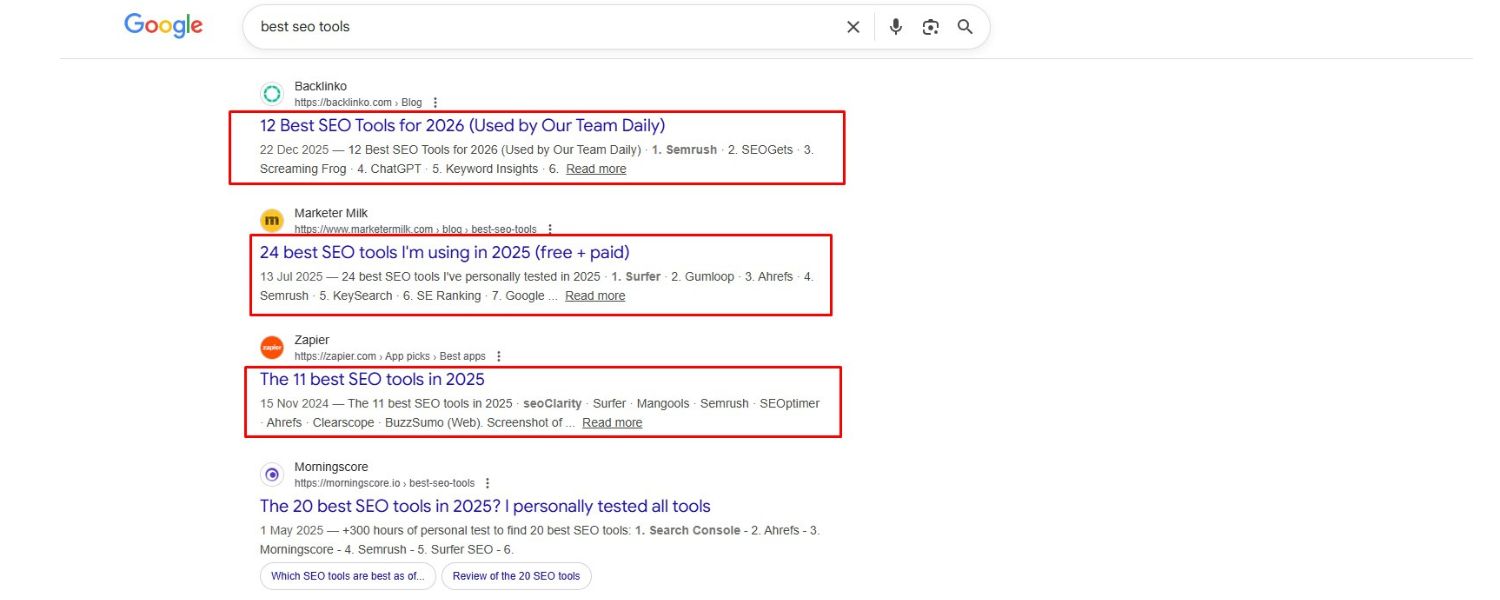
Lastly, remember that SEO is not a one-and-done effort. Content freshness can impact rankings, especially for topics that evolve over time. For more on how fresh content boosts SEO, check out Mastering Content Updates for SEO.
Google tends to favor content that is updated when freshness is relevant to the query (for example, a search for “SEO checklist” in 2025 might favor a 2025-updated article over one from 2019).
It’s essential to periodically review and update your pages to ensure they remain accurate and current.
How to leverage content freshness:
A. Update statistics
Examples, and references. If you have a line that says “In 2022, X was…”, consider updating it if newer data is available for 2023 or 2024. Outdated info can hurt your credibility and rankings. To see how to keep your data fresh, refer to On-Page SEO Checklist.
B. Add new insights or sections
If industry best practices change or a new on-page SEO factor emerges (for instance, Google releases a new algorithm or a new schema type becomes relevant), update your checklist to include it. This very guide, for instance, is labeled 2025 and includes the latest tips (like Core Web Vitals and E-E-A-T) that might not have been in older checklists. For more on how to include new insights, see Guide to SEO Best Practices.
C. Fix any broken or outdated links
Ensure any external links still point to relevant, alive content. Replace or remove those that don’t. Check out the Backlink Audit Guide for tips on auditing and fixing links.
D. Consider the last updated date
If appropriate, display a “Last updated on [date]” on the page. Users appreciate knowing content is maintained.Also, Search engines sometimes show the last updated date in results if they detect it, which can improve click-through (users often prefer fresh content).Learn more in the Guide to Content Marketing Strategy.
E. Don’t fake it
Only update when you have something useful to add or change. Simply changing the date without meaningful updates (or adding fluff content to seem fresh) won’t fool Google. In fact, artificially manipulating dates is explicitly discouraged.
By keeping your content fresh, you not only potentially boost SEO but also provide a better experience to readers.
They’re getting the latest information and techniques. Aim to do a content audit on key pages at least once or twice a year. For a blog post like this, maybe a big annual update (e.g., “Checklist for 2026”) with minor tweaks in between is a good strategy.See more tips on Content Optimization Strategies.
Remember, your competitors are likely updating their content too – don’t let a great piece of content stagnate and lose its edge.
16. (Bonus) Encourage Social Sharing and Engagement

While social media signals (likes, shares, tweets) aren’t direct ranking factors for Google, social sharing can amplify your content’s reach, indirectly benefiting SEO.
If your on-page content is highly shareable, more people will see it, link to it, and drive traffic – all of which are positive for SEO. For more about how social media can boost SEO, check out this guide: Mastering Social Media Strategies.
Consider adding prominent social sharing buttons (for platforms relevant to your audience, e.g., Twitter, LinkedIn, Facebook) on your pages.
For instance, a “Share this checklist” prompt could encourage readers to post it to their networks. When implementing social buttons, ensure they load asynchronously (so they don’t slow your page), and test them on mobile as well.
Beyond buttons, engagement elements like comment sections or discussion prompts can keep users on the page longer. If users leave comments or questions, be sure to respond – this not only improves user experience but can add additional relevant content to the page over time. To see more on this, check out Mastering On-Page SEO.
If users leave comments or questions, be sure to respond – this not only improves user experience but can add additional relevant content to the page over time.
Finally, promoting your content on your own social channels can kickstart the sharing cycle. The easier you make it for readers to share your article, the more likely they will.
Think of social shares as a way to earn natural backlinks and traffic, which absolutely do help SEO.
(Just remember: focus on content quality first – people share content that is useful or interesting. This checklist, loaded with actionable tips, is designed to be worth sharing!)
Conclusion: Turn This Checklist into Action
Optimizing a webpage for SEO might seem like a hefty hustle, but with this step-by-step on-page SEO checklist, you can tackle it systematically and thoroughly.
We covered everything from preliminary keyword research to the nitty-gritty of meta tags, content optimization, user experience enhancements, and more. Now it’s your turn: put these steps into practice for your own website.
Remember, on-page SEO is an ongoing process. Keep monitoring your pages with tools (Google Analytics, Search Console, etc.) and be ready to refine as needed.
The payoff for meticulous on-page optimization is a page that not only ranks higher but also delights your visitors – which is the ultimate goal.
Use this checklist as your companion each time you publish or revamp a page. As you complete each item, you’ll know you’re building a strong foundation for search success.
With higher rankings will come more traffic, and more traffic can mean more conversions and growth for your business.

.png)
Shopify SEO: Guide to Ranking Your Store and Driving Sales
Most Shopify store owners set up their store, list their...

Content Marketing : Definitive Guide to Strategy, Content Types, and Measurable ROI
Content marketing generates 3x more leads than outbound marketing at...

Above the Fold: Guide to Conversions, Rankings and Faster Pages
Above the Fold in 2026: The Complete Guide to Conversions,...

Off-Page SEO Checklist: Guide to Building Real Authority
Most websites spend months creating great content, only to wonder...

What Is Keyword Bidding? The Complete Strategy Guide for Smarter Ad Spend
Most advertisers believe the highest bid wins the auction. It...

What Is Google Trends? The 2026 Marketer’s Complete Guide
If you are not already pulling weekly insights from Google...
If you want a growth partner who will get to know every aspect of your business and treat your budget like their own — we are the right fit.
.png)


.png)
.png)
.png)
.png)
.png)
.png)
2026 ALL RIGHTS RESERVED MADE IN INDIA
