







On this page
An SEO audit checklist turns a vague worry (“why is our traffic down?”) into a list of things you can check and fix. This one is built for 2026 and 2027: it covers the basics that never change plus the newer checks for Core Web Vitals, AI answers and Google’s latest rules.
Use the interactive checklist below to tick items off as you go. Your progress is saved in your browser, so you can audit in stages. Each step also explains what to look for and which free tools to use.
- Start with a baseline: export 16 months of Search Console data before changing anything.
- Indexing problems come first. A page Google cannot index cannot rank.
- Core Web Vitals targets: LCP 2.5s or less, INP 200ms or less, CLS 0.1 or less.
- FAQ rich results stopped showing in Google on 7 May 2026, so do not count on them.
- Check how AI Overviews and ChatGPT describe your brand as part of every audit.
What is an SEO audit?
An SEO audit is a structured check of everything that affects how your site performs in search: technical health, content, links and how search engines and AI tools see your brand. It ends with a list of issues ranked by impact.
You should run a full audit once a year, a lighter check every quarter, and an extra audit after any big site change or traffic drop. Google released its November 2026 core update on 10 November, so if your traffic moved this month, note the date before you start.
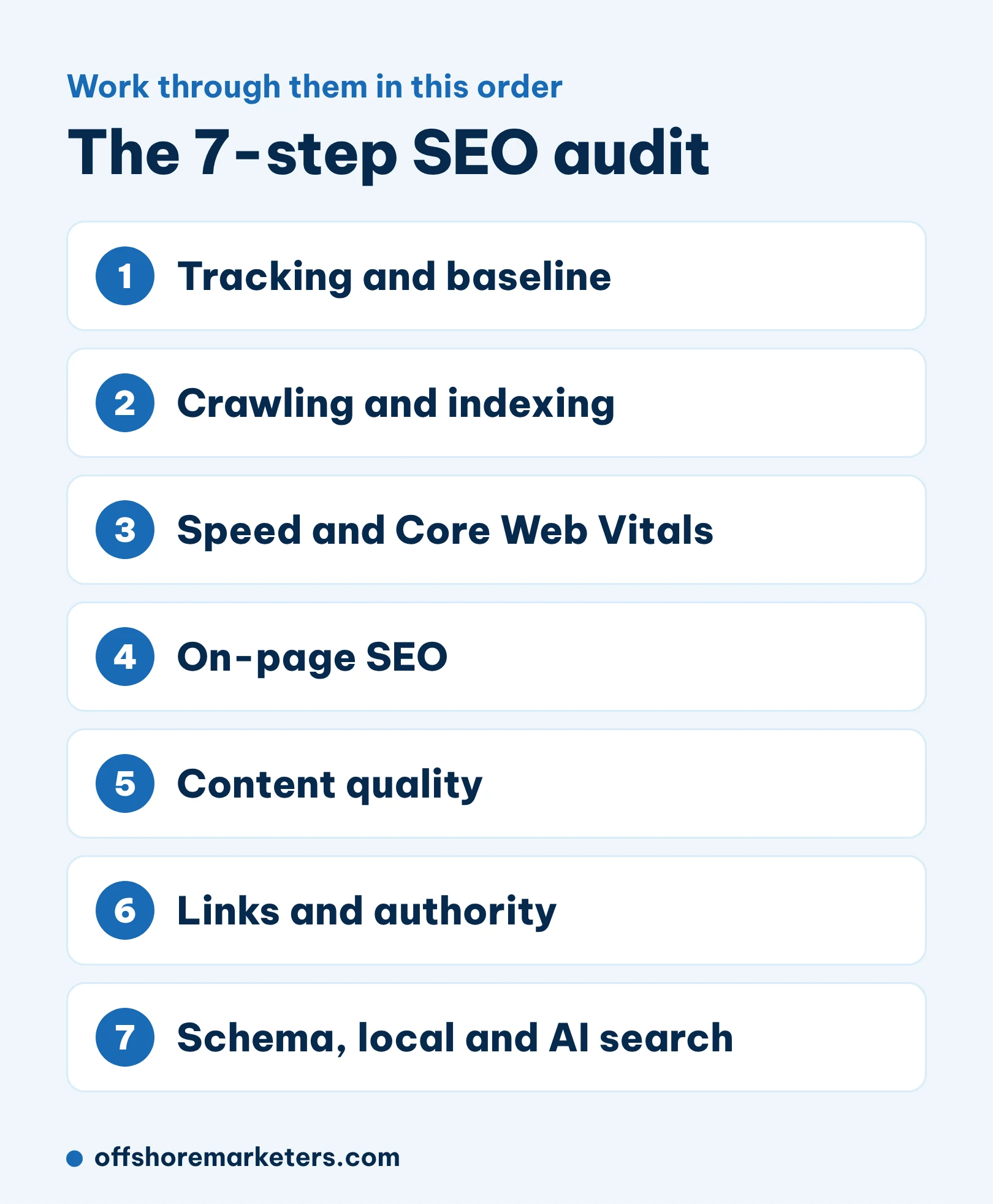
The interactive SEO audit checklist (45 checks)
Open a section, tick what you have checked, and use the progress bar to see how far you are. The sections below the checklist explain each step.
SEO audit checklist 2026-27
45 checks in 7 steps. Your ticks are saved in this browser.
1. Tracking and baseline0 / 5
2. Crawling and indexing0 / 8
3. Speed and Core Web Vitals0 / 6
4. On-page SEO0 / 8
5. Content quality0 / 6
6. Links and authority0 / 5
7. Schema, local and AI search0 / 7
Step 1: Set up tracking and a baseline
Before you change anything, record where you stand. Export the last 16 months of clicks, impressions, top queries and top pages from Search Console. Without a baseline you cannot prove what your fixes did.
Also set up Bing Webmaster Tools if you have not. ChatGPT search has used Bing as one of its search sources, so Bing matters more now than it did a few years ago. Our guide to how ChatGPT search works explains the link.
Step 2: Check crawling and indexing
This is the most important step. If Google cannot crawl or index a page, nothing else on this list matters for that page.
- Open Indexing > Pages in Search Console. Look at every reason pages are not indexed and decide if it is intended.
- Use URL Inspection on your 10 most important pages. Each should say “URL is on Google”.
- Check your robots.txt file and XML sitemap. The sitemap should list only live pages that return a 200 status.
- Crawl the site with a tool like Screaming Frog (free up to 500 URLs) to find redirect chains, broken links and missing canonicals.
A real example: a UK watch store we work with lost 22% of its sales after a website update in February 2025. The audit found which pages and keywords had dropped. Once those were fixed, sales were above the old level within two months. Read more in our guide to Google indexing.
Step 3: Test speed and Core Web Vitals
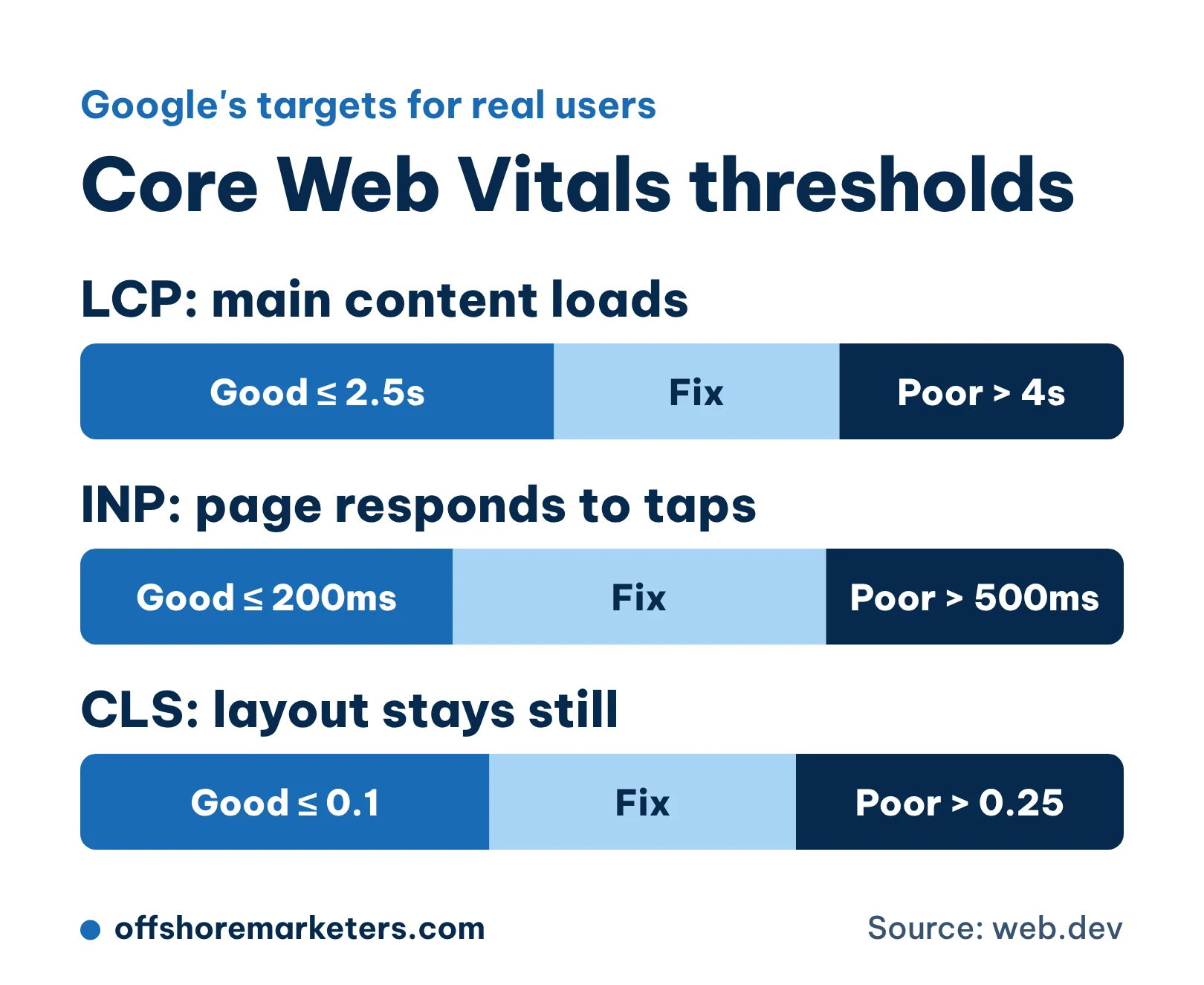
Core Web Vitals measure how real visitors experience your pages. Google’s targets are an LCP of 2.5 seconds or less, an INP of 200 milliseconds or less and a CLS of 0.1 or less. INP replaced the older FID metric in March 2024, so any audit template that still mentions FID is out of date.
Use the Core Web Vitals report in Search Console for field data across your site, and PageSpeed Insights to test single pages. Fix the biggest issues first: oversized images, too many scripts and layout shifts from ads or late-loading elements. Our page speed guide goes deeper.
Step 4: Review on-page SEO
On-page issues are usually the quickest wins in an audit. Export every title, meta description and H1 from your crawl and look for:
- Missing, duplicate or very long titles.
- Pages with no H1 or several H1s.
- Pages that target the same keyword as another page.
- Important pages with few or no internal links.
- Images with no alt text.
Search Console helps here too. Sort pages by impressions and look for ones with a low click rate. A better title can often lift clicks without any change in ranking. For a page-by-page approach, see our on-page SEO checklist.
Step 5: Judge content quality
Google’s core updates reward pages that are genuinely helpful and written from real experience. In this step, review your content honestly:
- Does each page answer its main question clearly, near the top?
- Does it include something only you can offer, such as real data, examples or photos?
- Are years, prices and facts still correct?
- Are there thin or duplicate pages that should be merged?
Our content audit guide explains how to decide whether to keep, update, merge or remove each page.
Step 6: Check links and authority
Look at your referring domains over the last 12 months in a tool like Ahrefs or Semrush. A sudden drop can explain a traffic fall. Then find pages with backlinks that now return a 404 and redirect them to the closest live page, so you keep that value.
Do not rush to disavow links. Google says it ignores most spammy links on its own. Disavow only if you have a manual action or know of paid links that were built for the site. Our guide on toxic backlinks explains when it is worth it.
Step 7: Schema, local SEO and AI search
This is the step that has changed most. Three things to know for 2026 and 2027:
- FAQ rich results are gone. Google stopped showing them on 7 May 2026. FAQ markup does no harm, but do not count it as a ranking or click win.
- Core schema still matters. Organization, LocalBusiness, Product, Article and Review schema help Google understand your site. Test them in the Rich Results Test.
- AI answers are part of search now. Ask Google AI Overviews, ChatGPT and Gemini about your brand and your main services. Note whether you are mentioned and whether the facts are right.
For local businesses, check that your Google Business Profile is complete and that your name, address and phone number match everywhere. Our local SEO checklist covers this in detail.
How to prioritise what you find
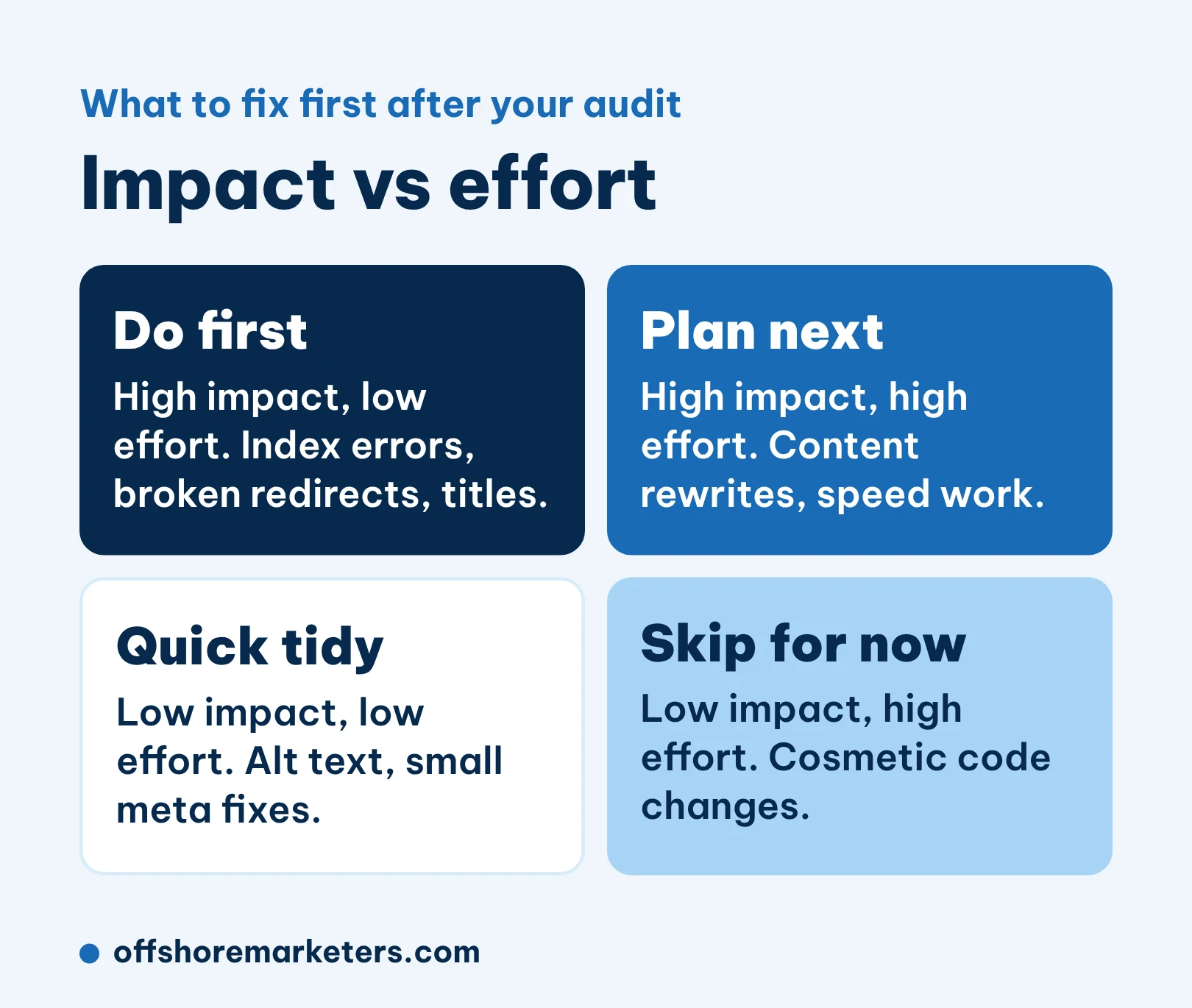
An audit often turns up 50 or more issues. Do not fix them in the order you found them. Score each one for impact and effort, then start with high impact, low effort: indexing errors, broken redirects, missing titles. Plan the bigger jobs, such as content rewrites or speed work, for the following weeks.
Free and paid SEO audit tools
| Tool | What it checks | Cost |
|---|---|---|
| Google Search Console | Indexing, queries, Core Web Vitals, manual actions | Free |
| PageSpeed Insights | Speed and Core Web Vitals for one page | Free |
| Rich Results Test | Structured data errors | Free |
| Bing Webmaster Tools | Bing indexing and search data | Free |
| Screaming Frog | Full site crawl: titles, redirects, broken links | Free up to 500 URLs |
| Ahrefs or Semrush | Backlinks, keywords, site audit | Paid |
How often should you run an SEO audit?
- Full audit: once a year.
- Quick check: every quarter, focused on indexing and top pages.
- Extra audit: after a redesign, migration, CMS change or sudden traffic drop.
If your traffic dropped and you are not sure why, our technical SEO team can run the audit for you and hand over a prioritised fix list.



.png)


.png)
.png)
.png)
.png)

.png)
