
SEO Monitoring: Top Metrics, Best Tools & Proven Strategies
August 7, 2025
Introduction: Why SEO Monitoring Matters
Imagine investing time and resources into SEO, only to have no idea whether those efforts are paying off. This is where SEO monitoring comes in. SEO monitoring is the process of tracking and measuring your website’s SEO performance through key metrics.
In other words, it’s how you keep a finger on the pulse of your search rankings, traffic, and other vital indicators of success. By regularly monitoring SEO results, you can see which tactics are driving growth and which areas need improvement, enabling you to make data-driven decisions.
In today’s dynamic search landscape, effective SEO monitoring is more crucial than ever. Google’s algorithms and SERP features are constantly evolving – from core updates to the rise of AI-driven search results. Without continuous tracking, you might miss critical changes that impact your visibility.
A well-planned SEO monitoring regimen helps you catch technical issues early (before rankings drop), understand what content resonates with your audience, and even keep tabs on competitors for new opportunities.
Simply put, if you can’t measure it, you can’t improve it. Monitoring your SEO performance shines a light on what’s working and what isn’t, so you can refine your strategy and maximise your return on investment (ROI) in SEO.
In this guide, we’ll cover:
1. What is SEO Monitoring? (A clear definition of SEO monitoring and its benefits)
2. Why SEO Monitoring is Important (The business case for tracking your SEO efforts)
3. Top 10 SEO Metrics to Track (Essential performance metrics like traffic, rankings, etc.)
4. Best SEO Monitoring Tools (Free and paid tools to track SEO and build reports)
5. How to Implement an SEO Monitoring Strategy (Step-by-step best practices)
6. Conclusion & Next Steps (Key takeaways and a call to action to start monitoring)
Let’s dive into the details of how to monitor SEO effectively to ensure your website stays ahead in the rankings game.
What Is SEO Monitoring?
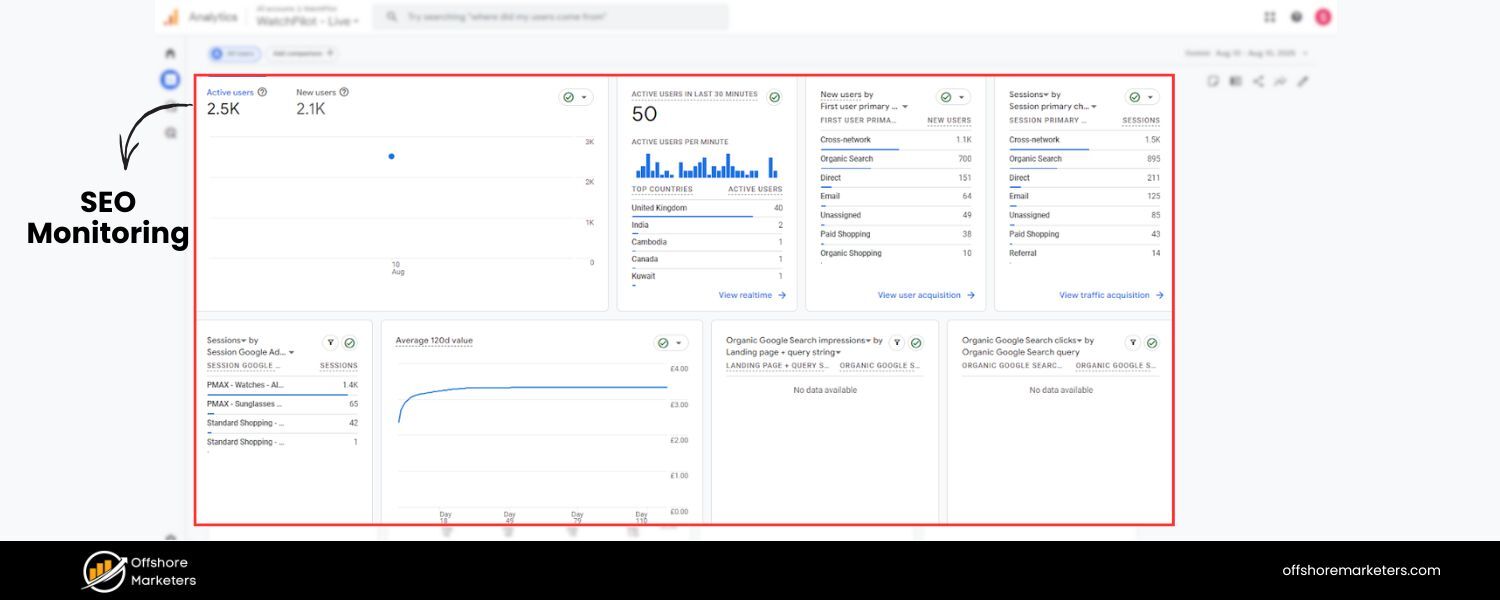
SEO monitoring refers to continually tracking and analyzing a website’s performance in organic search through a set of key SEO metrics. It involves gathering data on how visible your site is on search engines (like Google), how much organic traffic you’re receiving, and how users engage with your site.
The goal of SEO monitoring is to understand whether your optimization efforts are yielding results and to identify areas of opportunity or concern. It’s an ongoing process of measuring what’s happening with your SEO so you can respond proactively.
At its core, SEO monitoring answers questions like: How prominently does my site appear in search results? Are we getting more (or fewer) visitors from search this month? Which keywords are driving traffic? Are those visitors converting?
This process typically involves tracking metrics such as your organic traffic, keyword rankings, click-through rates, conversion rates, and more (we’ll discuss these in detail shortly). It also may include watching out for technical SEO issues (like crawl errors or slow pages) that could hurt your visibility.
In essence, SEO monitoring gives you a real-time report card on your site’s search performance. By monitoring SEO consistently, you create a feedback loop to inform your strategy.
For example, you might discover that a certain blog post suddenly dropped in rankings – prompting you to investigate and fix any issues before your traffic suffers. Or you might find that a new batch of backlinks boosted your domain authority, correlating with improved rankings.
In the fast-paced world of search, staying informed through SEO monitoring is the only way to adapt and keep improving.
Why Monitoring Your SEO Performance Is Important
If you’re serious about SEO, monitoring your performance isn’t optional – it’s essential. Here are a few key reasons why regular SEO monitoring is so important:
1. Measure ROI and Success
Monitoring shows the direct outcomes of your SEO efforts. By tracking metrics like organic traffic, rankings, and conversions, you can prove the ROI of SEO to stakeholders and make informed decisions on where to focus.
For instance, showing that organic leads increased 30% after a content overhaul can justify further investment in content SEO.
2. Spot Problems Early
SEO monitoring allows you to catch issues before they become disasters. Sudden drops in traffic or rankings might signal technical problems (e.g. pages getting deindexed, site errors) or a Google algorithm update impact.
By keeping an eye on your metrics, you can identify technical problems early to prevent losses in search visibility. It’s much easier to fix a broken link or a slow page now than to win back lost rankings later.
3. Understand What Works
Regular tracking helps illuminate which SEO tactics are effective. You’ll see which content pieces are bringing in the most organic visits, which keywords you’re gaining or losing ground on, and which landing pages convert best.
These insights show which content or strategies perform best so you can create more of what works. Monitoring turns raw data into guidance for optimizing your content strategy and SEO approach.
4. Stay Ahead of Competitors
SEO doesn’t happen in a vacuum – your competitors are vying for the same rankings. Monitoring your SEO can include keeping an eye on competitor metrics (like their estimated traffic or keyword rankings) to spot new opportunities for growth.
If a competitor surges in rankings for a valuable keyword, you’d want to know and respond. Some SEO tools even let you compare your performance against competitors’ to benchmark your progress.
5. Data-Driven Strategy Adjustments
Perhaps most importantly, SEO monitoring enables data-driven decision-making. Instead of guessing what might improve your SEO, you have real data to guide you. If a particular keyword’s rankings are plateauing, you might decide to build more links to that page or update its content.
If organic conversions are low, you might refine your on-page calls-to-action. Continuous monitoring means you’re basing changes on evidence, not hunches.
In summary monitoring your SEO is like having a dashboard for your website’s health and progress in search. It provides accountability for your SEO work and ensures you can react quickly to changes.
As SEO starter guide emphasizes, regularly measuring your site’s search performance and user experience (like Core Web Vitals) is key to a successful optimization program.
In the next sections, we’ll look at exactly what you should be monitoring.
10 Key SEO Metrics to Track for Success
Not everything in SEO can be boiled down to a number, but there are several metrics that serve as strong indicators of your SEO performance. Focusing on these key SEO metrics will give you a comprehensive view of your organic visibility and help diagnose issues or opportunities.
Below are 10 essential metrics (both short-term and long-term) you should monitor regularly:
1. Organic Traffic
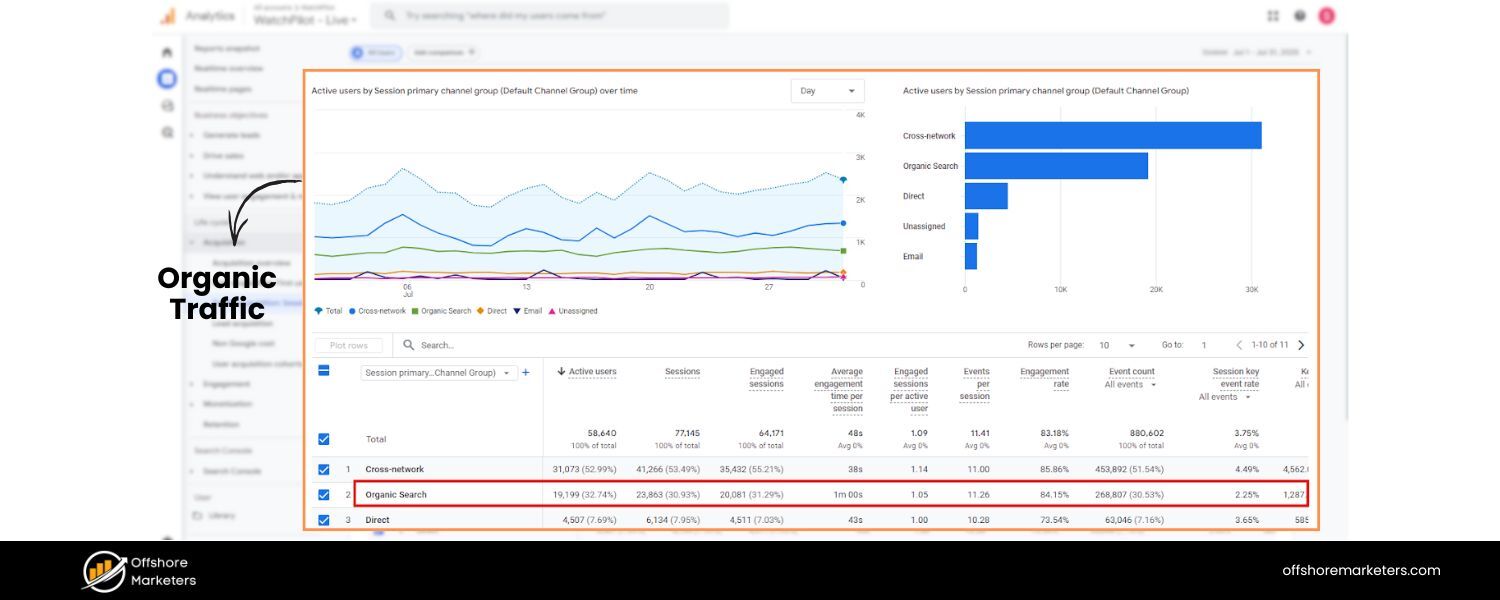
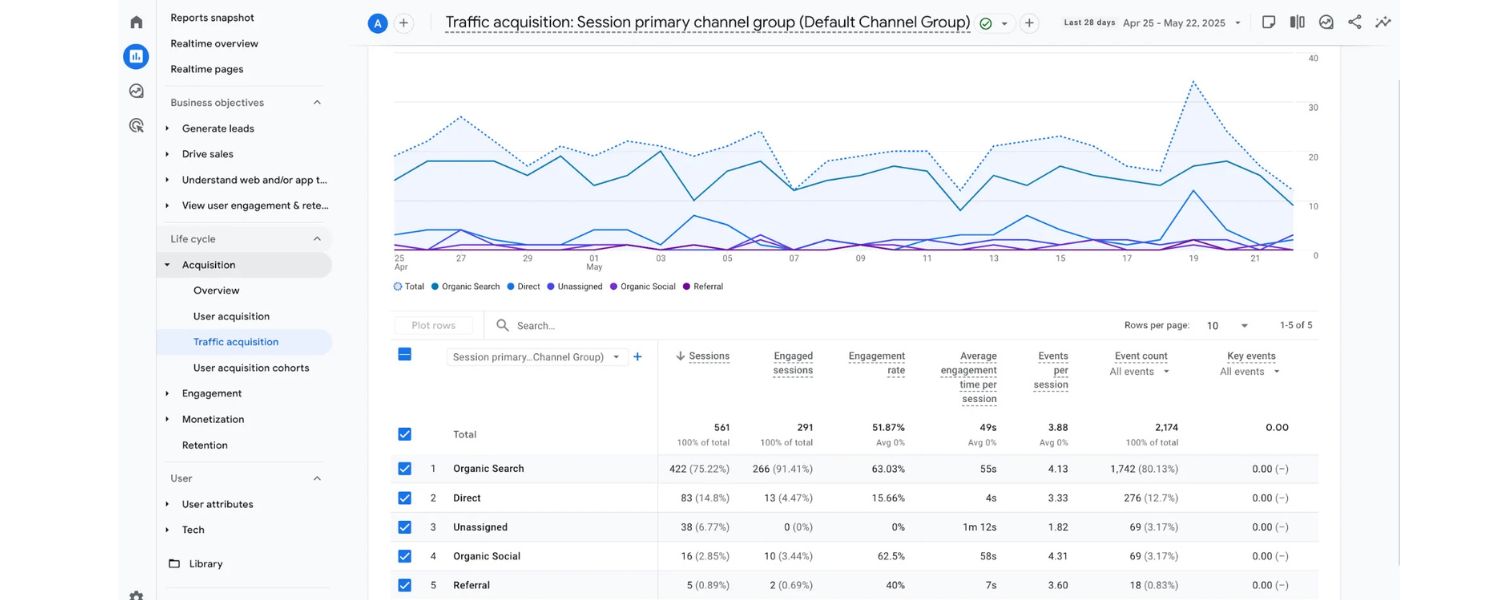
Organic traffic is the number of visitors coming to your website from unpaid (organic) search results. This is often the north-star metric for SEO success – after all, the primary goal of SEO is to increase relevant traffic from search engines.
Healthy organic traffic growth indicates that your site’s visibility on search engines is improving and you’re attracting more visitors via search queries.
Monitoring organic traffic involves looking at overall trends (Is your search traffic increasing month-over-month? Are there any sharp drops or spikes?) as well as drilling down into specifics. Google Analytics 4 (GA4) provides this data under the “Acquisition > Traffic acquisition” report – filter by the Organic Search channel to see how many sessions are coming from search.
Consistent growth in organic sessions is a strong sign your SEO efforts (content creation, link building, technical fixes, etc.) are paying off. Conversely, a decline might signal issues that need attention (for example, a Google algorithm update or increased competition).
It’s also useful to segment organic traffic by landing page and by geographic region. Which pages are the biggest drivers of search visits? That can highlight your top-performing content (so you can learn from it or update it) and pages that might need optimization if they aren’t pulling their weight.
Additionally, consider the quality of that traffic: how is the engagement and conversion from organic users? A rise in organic traffic is only valuable if those visitors are relevant and taking actions (see Conversion Rate metric below).
Overall, organic traffic is your broadest measure of SEO performance, telling you whether your search presence is expanding or contracting over time.
2. Keyword Rankings
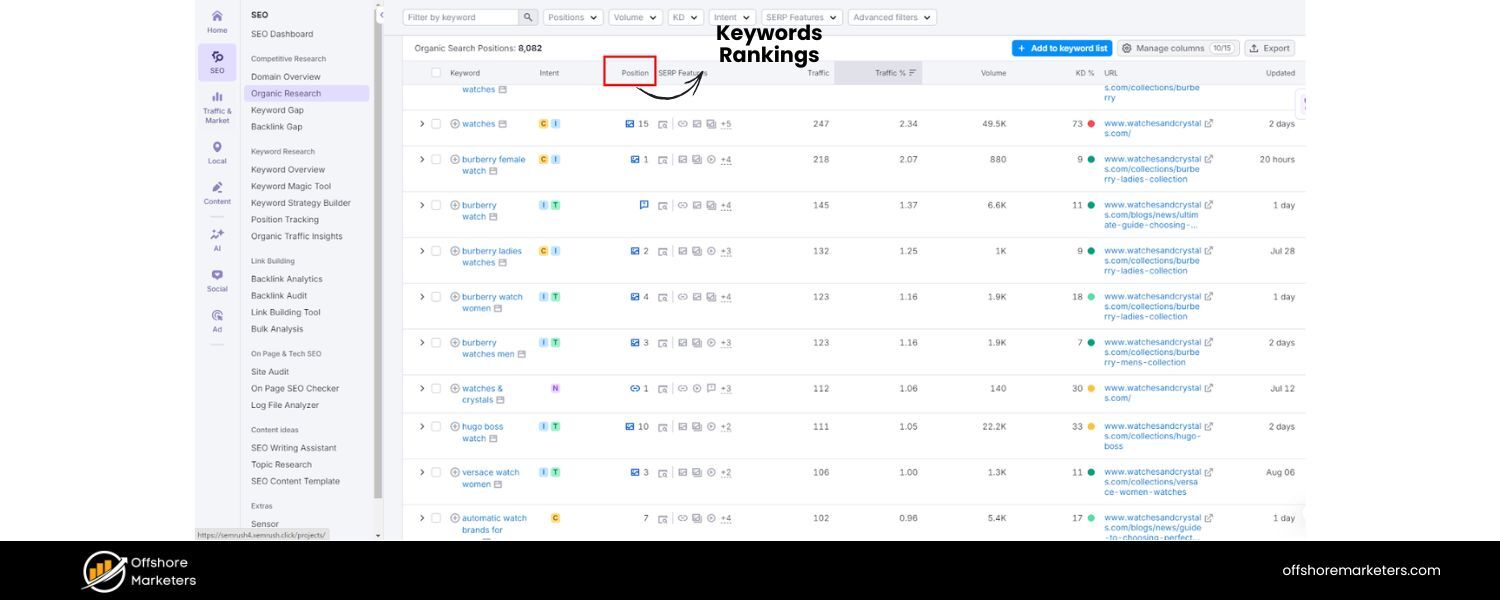
Your keyword rankings are the positions your webpages hold in search engine results pages (SERPs) for specific search queries. Tracking keyword rankings is fundamental to SEO monitoring because it directly reflects your visibility for important terms.
Higher rankings (especially on page 1 of Google results) generally mean more traffic – in fact, the #1 organic result gets an average ~31% click-through rate, which is 10× higher than the CTR for the #10 result. That dramatic drop-off shows why moving up just a few positions can massively increase traffic.
Regularly monitoring your keyword positions lets you respond quickly to changes. Rankings can fluctuate due to algorithm updates or competitor actions, so you want to know immediately if a critical keyword falls from (say) position 3 to 10. By keeping an eye on rank tracking reports, you can catch sharp drops and investigate the cause (content issues, new competition, lost backlinks, etc.) before your traffic suffers.
On the flip side, tracking rankings also helps you spot new opportunities – for example, if you see a keyword climbing from position 11 to 6, you might give it an extra push (perhaps updating the page or building a couple of links) to break into the top 3 where the majority of clicks occur.
It’s important to monitor a representative set of keywords that align with your SEO goals. This includes your target SEO keywords (the terms you intentionally optimize for) and variations, as well as emerging keywords that you discover via Search Console or SEO tools.
A good rank tracking tool will show you not only your current position, but also trends over time and comparisons to competitors. Remember, rankings are a means to an end – improved rankings should correlate with more traffic – but they’re a fast indicator of your SEO trajectory.
As one expert notes, ranking shifts are immediately perceivable and reflect your visibility on SERPs right now, whereas traffic changes take longer to materialize. So use rankings as an early warning system and a way to gauge the impact of your optimization efforts in near-real-time.
3. SERP Feature Visibility
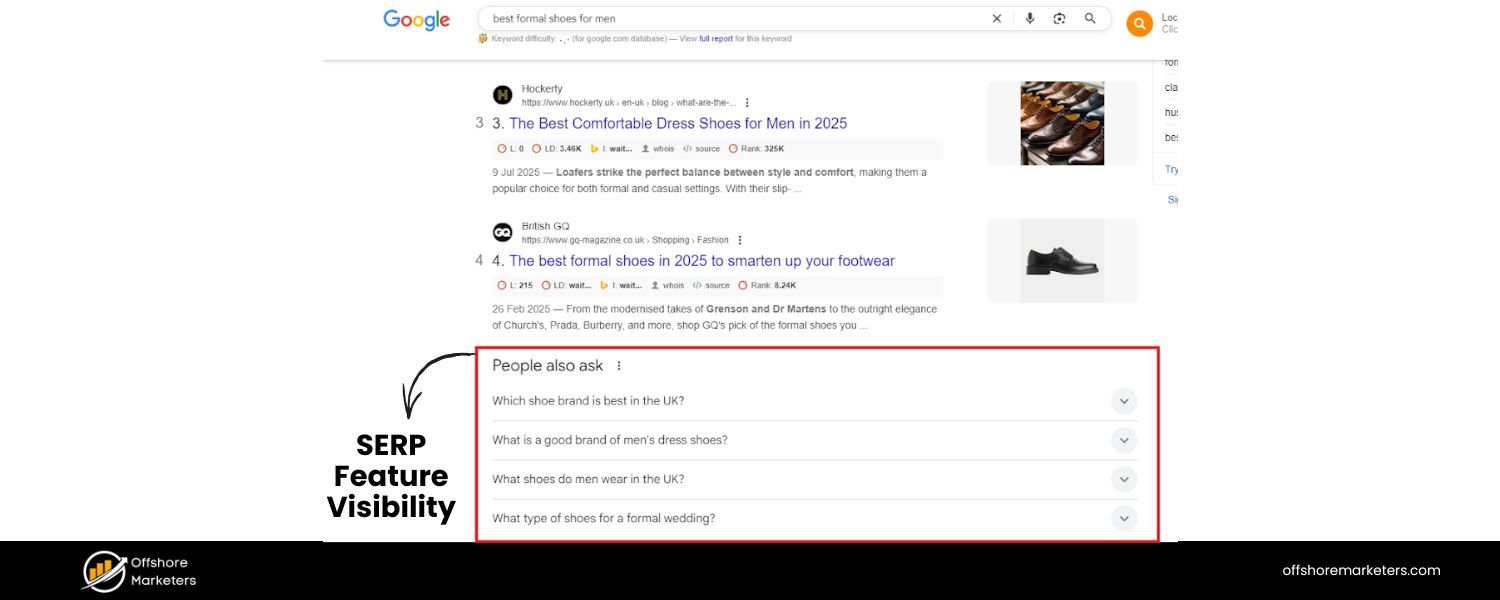
Modern Google SERPs are rich with features beyond the traditional 10 blue links. SERP features include things like Featured Snippets, People Also Ask boxes, Local Map packs, Image or Video carousels, Knowledge Panels, and the new AI-generated overview (in results that have Google’s SGE).
Ranking in these special SERP features can significantly boost your visibility and click-through rate, often even more than a regular #1 ranking. For example, capturing a Featured Snippet (position 0) or appearing in the “People Also Ask” box can put your content front-and-center to users, driving brand exposure and traffic.
It’s important to monitor which SERP features your site is appearing in. Google Search Console gives some data on this (e.g., showing if a page was featured as a rich result), and many SEO tools provide SERP feature tracking in their rank reports. Keep an eye on metrics like “Featured Snippet wins” or how often you show up in image results, news results, the local pack, etc. One particularly new area to watch is AI-driven search results.
As Google integrates AI overviews (SGE) into search and users turn to large language model answers (like ChatGPT or Bing’s AI) for information, you’ll want to track your presence there as well. Forward-thinking SEOs are beginning to monitor rankings on ChatGPT and other AI search platforms in addition to traditional Google rankings.
In fact, some tools (e.g., Semrush) now allow position tracking across Google’s AI results and even ChatGPT queries. The landscape is evolving, and while reliable tracking of AI-driven SERPs is still emerging, it’s wise to start paying attention to how these features might be affecting your organic visibility.
Why does SERP feature visibility matter?
Aside from the traffic benefits of occupying these prominent positions, they also relate to the zero-click search phenomenon. Sometimes, if your content is featured directly on the SERP (say in a snippet or an Instant Answer), users might get their answer without clicking through, which can affect your traffic. Monitoring these instances helps you understand the full picture of your search presence.
Aim to optimize for and track relevant SERP features: if you have a lot of how-to content, for instance, measure how many Featured Snippets or “People Also Ask” answers you’ve captured. If local SEO is important, track your Google Maps 3-pack rankings. Visibility index metrics (offered by some tools) can combine all your keyword rankings and their CTR weights into one score to show overall search visibility.
Ultimately, tracking SERP features ensures you’re capitalizing on every opportunity to stand out on the results page.
4. Backlinks (Link Profile)
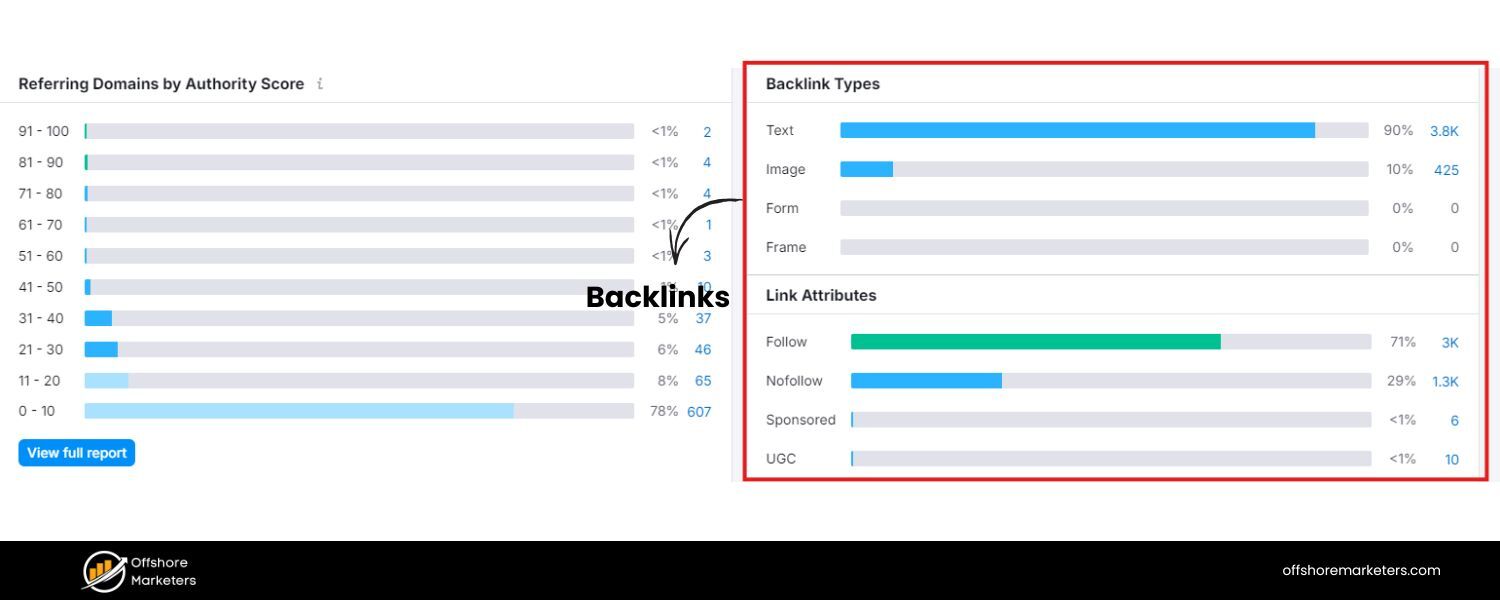
Backlinks – links from other websites pointing to yours – remain one of the most influential factors in SEO. A strong backlink profile signals to search engines that your site is authoritative and trustworthy. Thus, monitoring backlinks is a key part of SEO tracking.
This includes keeping tabs on both the quantity and quality of your inbound links. A growing number of backlinks from reputable, high-authority sites is generally a positive sign and can boost your rankings. Conversely, losing important backlinks or acquiring a bunch of spammy links could hurt your SEO and might even warrant a cleanup (disavow) if it’s severe.
Use an SEO tool (such as Ahrefs, Moz, or Semrush) to track metrics like your total referring domains, new links acquired, lost links, and your domain’s authority score.
Pay particular attention to the quality of links: one link from a respected site in your industry can be more valuable than 100 low-quality directory links. Many tools provide a Domain Authority or Domain Rating metric (more on DA in a moment) which gives a rough score of your site’s overall link-based authority.
Tracking this over time, and relative to competitors, is useful. Additionally, monitor your anchor text distribution (to ensure a healthy mix and no obvious spam signals) and check for any toxic or suspicious links that might appear, so you can address them proactively.
Backlink monitoring isn’t just about watching numbers go up; it’s also about gleaning opportunities. For example, if you notice a competitor gained several new backlinks from a guest post or mention on a certain site, you might pursue a similar opportunity. Or if one of your content pieces naturally earned many links, that’s a clue to produce more content of that type or update that piece to maintain its value.
In summary, backlinks are a cornerstone of SEO authority, and tracking them helps you measure the impact of your link-building efforts and maintain a healthy link profile. Be sure to also track internal links on your site and fix any broken links (internal or external) – those can affect user experience and crawling, indirectly impacting SEO.
5. Organic Click-Through Rate (CTR)
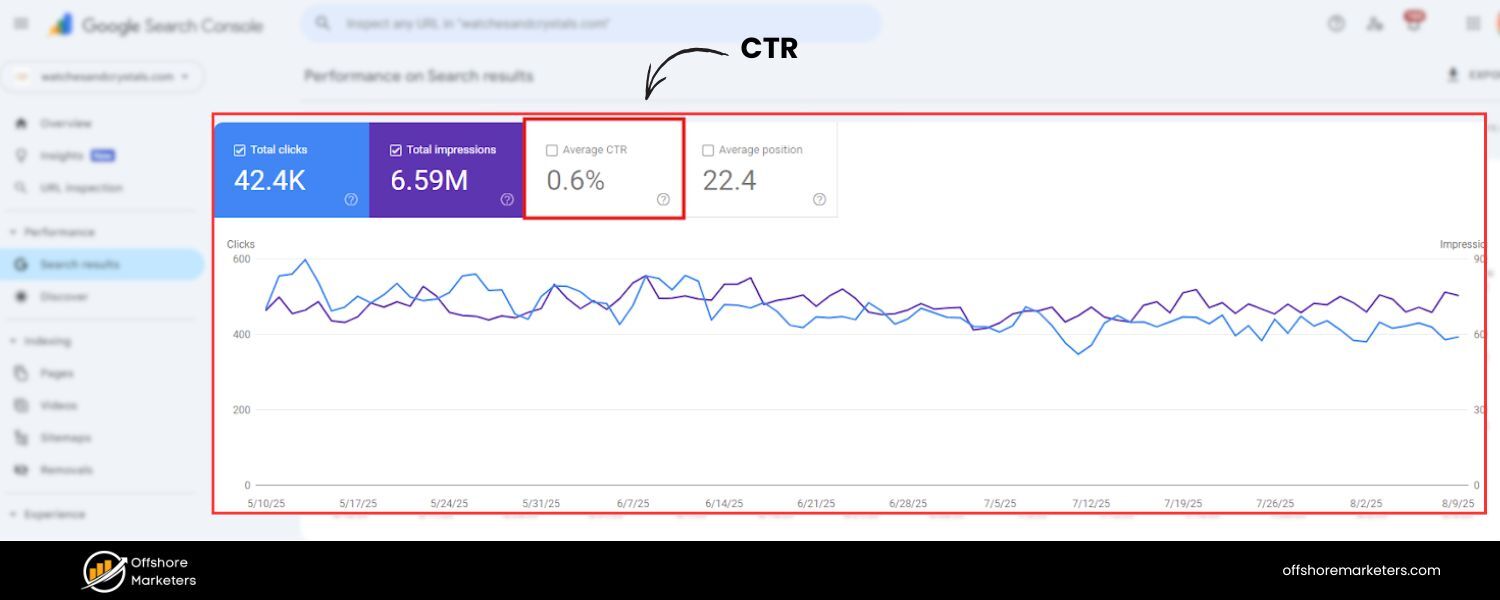
Click-through rate (CTR) in SEO refers to the percentage of searchers who click on your site’s listing after seeing it in the search results. It is essentially a measure of how compelling your search snippets (title, meta description, rich results) are to users.
For example, if your page is shown 1,000 times in a month and receives 100 clicks from those impressions, the CTR is 10%. Monitoring organic CTR is important because it connects ranking visibility to actual traffic. A page might rank high and get lots of impressions, but if the snippet doesn’t entice clicks (or a SERP feature steals attention), you could be losing out on potential visitors.
Google Search Console is the go-to source for CTR data. In the Performance report, you can see the average CTR for your site as well as the CTR for each page and query. Low CTRs might indicate that your title tag or meta description isn’t resonating with searchers, or perhaps the query has a lot of ads and features competing for attention.
By monitoring CTR, you can identify under-performing pages – for instance, a page that ranks in top 5 but has a below-average CTR might need an updated title/meta to match search intent better or stand out. Improvements in CTR can directly translate into more traffic without any rank change.
In fact, optimizing CTR is often a quick win in SEO: if you boost a page’s CTR from 2% to 4% at the same ranking, you just doubled its traffic.
CTR can also reveal search intent mismatches. If a page is ranking for queries that aren’t quite what users are looking for (so they see your result but don’t click), it may indicate a need to adjust content.
Additionally, a sudden drop in CTR could be a sign of a SERP layout change – for example, if Google introduced a featured snippet or additional ads on a query, your organic listing might get fewer clicks.
Thus, keep an eye not only on absolute CTR, but how it changes over time for key pages/keywords. As part of SEO monitoring, use CTR as a supporting metric alongside rankings and traffic .
A healthy organic CTR means your pages are attracting interest in the SERPs, which is a good complement to rising impressions or positions.
6. Conversion Rate from Organic Traffic
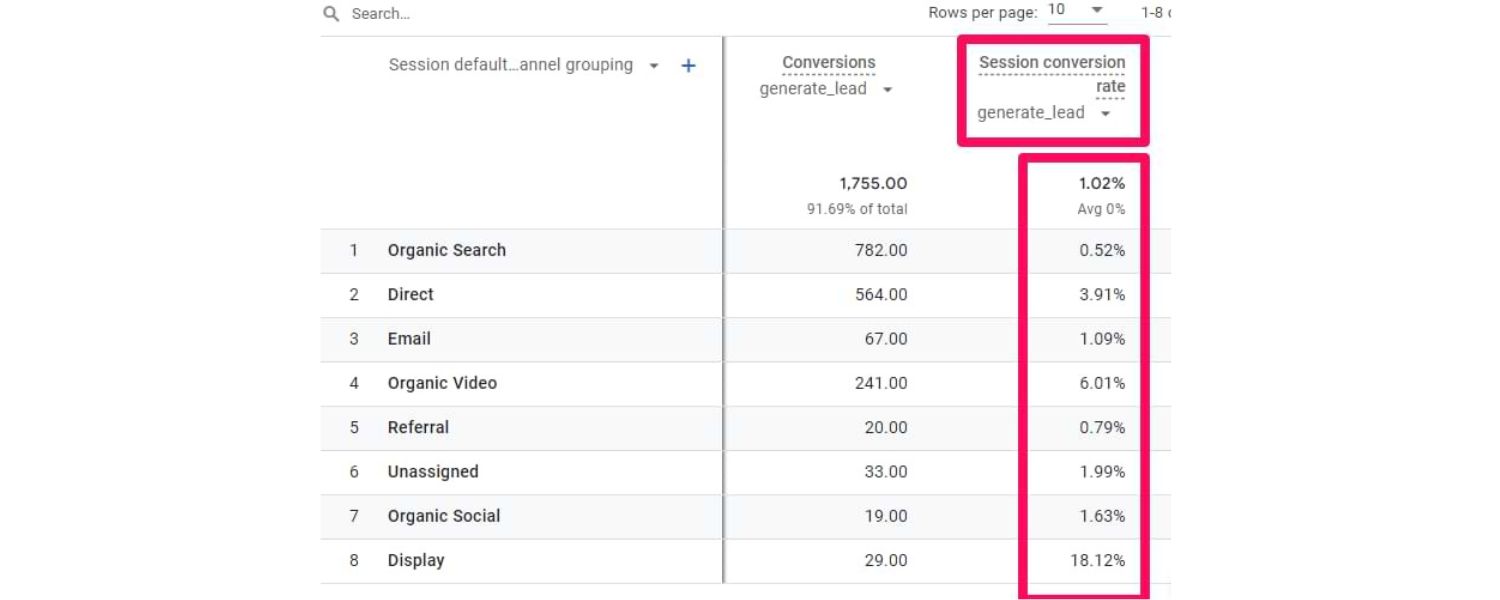
Ultimately, the success of SEO isn’t just about getting visitors – it’s about what those visitors do on your site. That’s why tracking conversion rate from organic traffic is crucial. Conversion rate is the percentage of users who complete a desired action (a “conversion”) out of the total users who visited.
Depending on your site, a conversion could be a purchase, a form submission, a newsletter signup, a download, etc. Monitoring the conversion rate of your organic search visitors tells you the quality of the traffic you’re attracting and how well your site engages that traffic to achieve business goals.
For example, if you have 1,000 organic visitors and 50 of them make a purchase, that’s a 5% conversion rate. If next month you still get 1,000 organic visitors but 80 purchases, the conversion rate improved to 8% – indicating either you attracted more qualified traffic or improved your site’s ability to convert (or both).
On the other hand, if organic traffic is growing but conversions aren’t, you might be pulling in visitors who aren’t your target customers, or your landing pages might need optimization.
Use Google Analytics 4 to monitor conversions by channel. In GA4, you can mark key events as “conversions” (for instance, a successful checkout or lead form completion).
Then in reports, filter for Organic Search traffic and see the conversion rate and number of conversions. Pay attention not just to aggregate conversion rate, but conversion rate per landing page or per keyword (if you can connect that data).
For instance, you may find that traffic coming from certain informational queries has a low conversion rate – which is expected if those users are in research mode – whereas branded or product-focused queries convert higher. These insights can guide your content strategy (balancing informational content with conversion-focused content) and your optimization efforts (maybe adding clearer CTAs on high-traffic blog pages to capture leads).
Monitoring organic conversion rate is also how you tie SEO to business outcomes. It allows you to demonstrate that “SEO brought X conversions or Y revenue this month,” which is often more meaningful to stakeholders than clicks or rankings alone.
If you run an e-commerce site, track revenue from organic traffic as well. And if increasing conversions is a goal, consider CRO (conversion rate optimization) techniques on your pages and then monitor if the organic conversion rate improves. In summary, don’t stop at traffic – track what that traffic does.
A modest amount of highly converting organic traffic can be more valuable than heaps of unengaged visitors. By keeping an eye on conversion metrics, you ensure your SEO efforts align with broader business objectives.
7. User Engagement Metrics (Bounce Rate & Dwell Time)
User engagement metrics tell you how visitors from search interact with your site, which can indirectly affect SEO. Two commonly watched metrics are bounce rate and dwell time (or average time on page/session).
Bounce Rate:
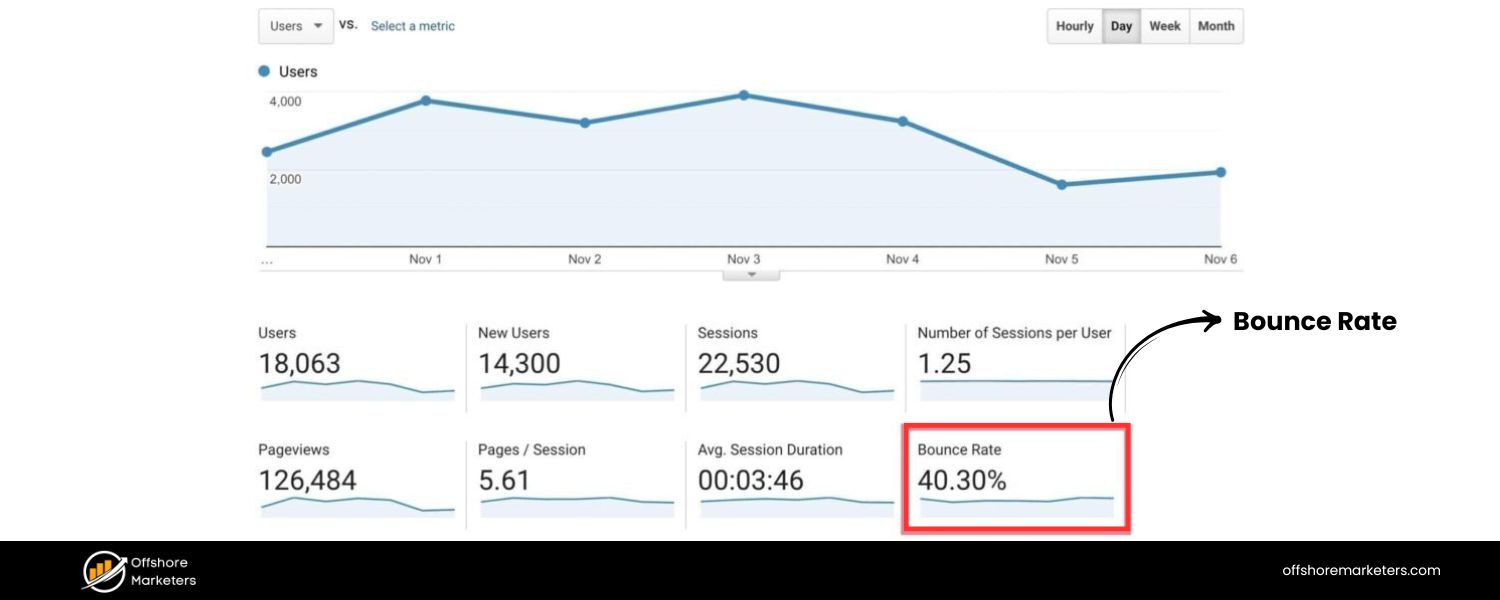
This is the percentage of visitors who leave your site after viewing only one page (i.e., they “bounce” without further interaction).
A high bounce rate on a page means many users aren’t clicking to any other page – which could imply that they either found what they needed on that page or, less optimistically, that they didn’t find it engaging or relevant. As a rough benchmark, bounce rates between 40-60% are typical for many sites; significantly higher might be a red flag depending on context.
If your organic bounce rate is very high, investigate the cause: Is the content matching the intent of the keyword that brought them in? Is the page user-friendly and fast? Are there clear next steps for the user? Keep in mind that not all bounces are bad (someone might read one blog post thoroughly and leave, which could be fine), but a trend of high bounce could indicate issues in content relevance or site experience.
Dwell Time / Time on Page:
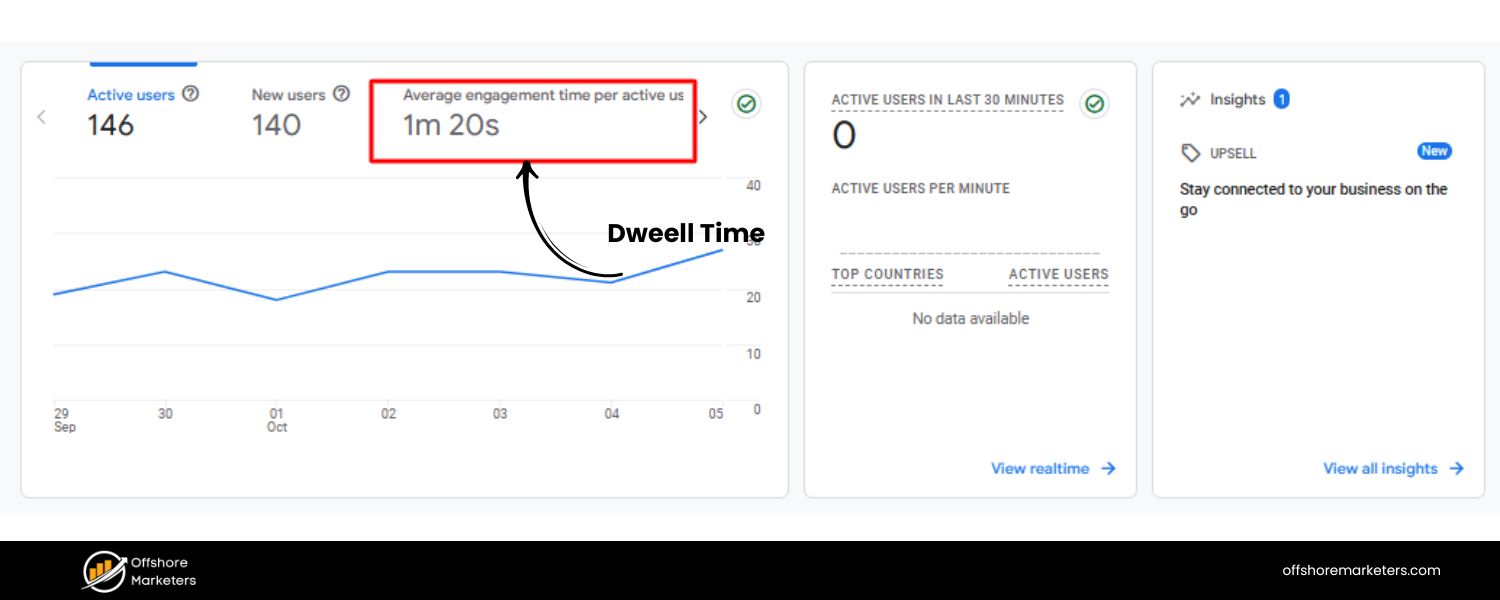
Dwell time is the amount of time a user spends on your page before returning to the search results. It’s closely related to average time on page or session duration that you see in analytics. If users coming from search spend a decent amount of time on your content, it’s a signal that they found value in it (they “dwelt” to consume it).
Short time-on-page coupled with a return to SERPs might indicate the page didn’t satisfy their query. Track the average time organic visitors spend on key pages. For instance, if your long-form article has an average time on page of 3 minutes, that’s a good sign of engagement; if it’s 30 seconds, people might be skimming and leaving – perhaps because the content isn’t what they expected or is hard to read.
Dwell time reflects the value searchers get from your page, so it can highlight content that may need improvement in depth or clarity.
Monitoring these engagement metrics helps you gauge user experience, which is increasingly important. Google’s algorithm takes into account user behavior signals to some extent (though exactly how is debated), and certainly poor engagement will hurt your conversion goals.
If you find, for example, that organic visitors have a much higher bounce rate on mobile than desktop, that could flag a mobile usability issue. Or if a particular page has a much lower time-on-page than similar pages, it might need a content refresh.
Aim to improve engagement by providing valuable, easily digestible content and a smooth UX. Also, track engagement rate in GA4 – this is essentially the opposite of bounce rate, measuring the percentage of sessions that lasted over 10 seconds or had multiple page views or a conversion event. GA4’s engagement metrics can be more insightful than the old bounce rate, focusing on positive engagement.
One more metric to watch is scroll depth on long pages (GA4 can track this as a custom event). If people only scroll 25% down your article on average, perhaps your introduction isn’t compelling enough.
In summary by keeping an eye on bounce rate and dwell time, you can ensure that the traffic you worked so hard to get is actually sticking around – and take action if it’s not. A low bounce rate and high average time on page generally indicate a good user experience and content that resonates with your search audience.
8. Page Speed & Core Web Vitals
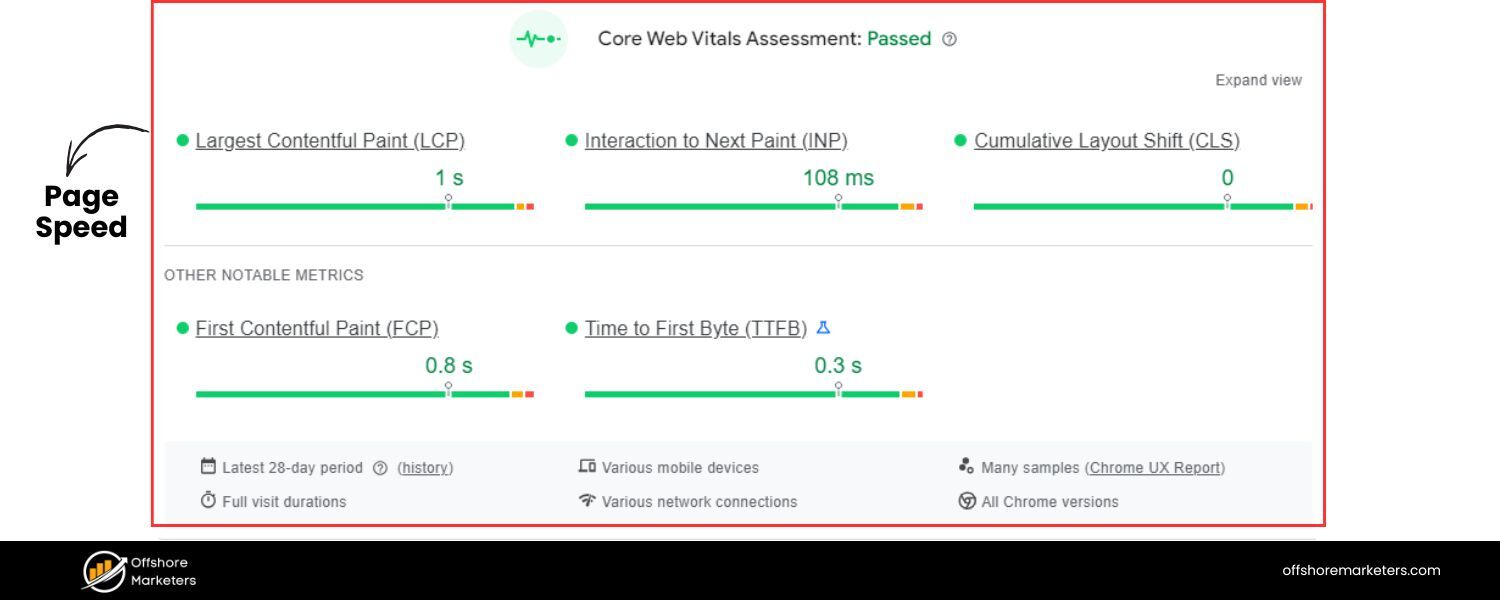
The speed and responsiveness of your website have a direct impact on user experience and, increasingly, on SEO. Google’s Core Web Vitals (CWV) are a set of performance metrics that measure page loading speed, interactivity, and visual stability.
Specifically, they include Largest Contentful Paint (LCP), First Input Delay (FID), and Cumulative Layout Shift (CLS). In short, these metrics gauge how quickly users can see and interact with your content and whether the page is stable while loading.
Google has incorporated Core Web Vitals into its ranking algorithm as part of the “Page Experience” update, meaning a slow or jittery site can hurt your SEO rankings.
When monitoring SEO, it’s important to track your site’s performance on these page experience metrics. Google Search Console provides a Core Web Vitals report under the Experience section, highlighting pages that need improvement for mobile and desktop users. You can see how many URLs have “Good,” “Needs Improvement,” or “Poor” status for CWV.
Additionally, tools like Google’s PageSpeed Insights or Lighthouse can give you specific load time stats and suggestions for each page. Key things to watch include: time to first byte, LCP (should ideally be under 2.5 seconds for good UX), FID (under 100ms), and CLS (score below 0.1 for minimal layout shift).
Beyond CWV, also monitor general page speed metrics like total page load time and size. Large images, unminimized scripts, or lack of caching can slow down pages.
A fast site keeps users engaged (reducing bounce rates) and is particularly crucial on mobile where connections can be slower. If you spot pages with poor CWV or slow speeds, it’s a priority to optimize them – compress images, enable browser caching, use a CDN, remove render-blocking resources, etc.
Improvements in page speed can lead to better user engagement and potentially higher rankings, especially now that page experience is officially a ranking factor for Google.
In your SEO monitoring routine, make it a habit to check the technical health of your site. This includes crawl error reports and index coverage (to ensure search engines can properly access all your important pages) and page speed metrics for UX.
A holistic monitoring approach covers content, backlinks, user behavior, and technical performance. For instance, if you notice organic traffic to a page dropping, checking its load speed and CWV status might reveal the page became slower after an update, affecting its ranking.
By tracking and optimizing Core Web Vitals and page speed, you not only please the search algorithms but more importantly provide a better experience to your users – which is the ultimate goal. Fast, smooth pages keep visitors happy and converting, reinforcing all your other SEO efforts.
9. Indexing & Crawl Errors
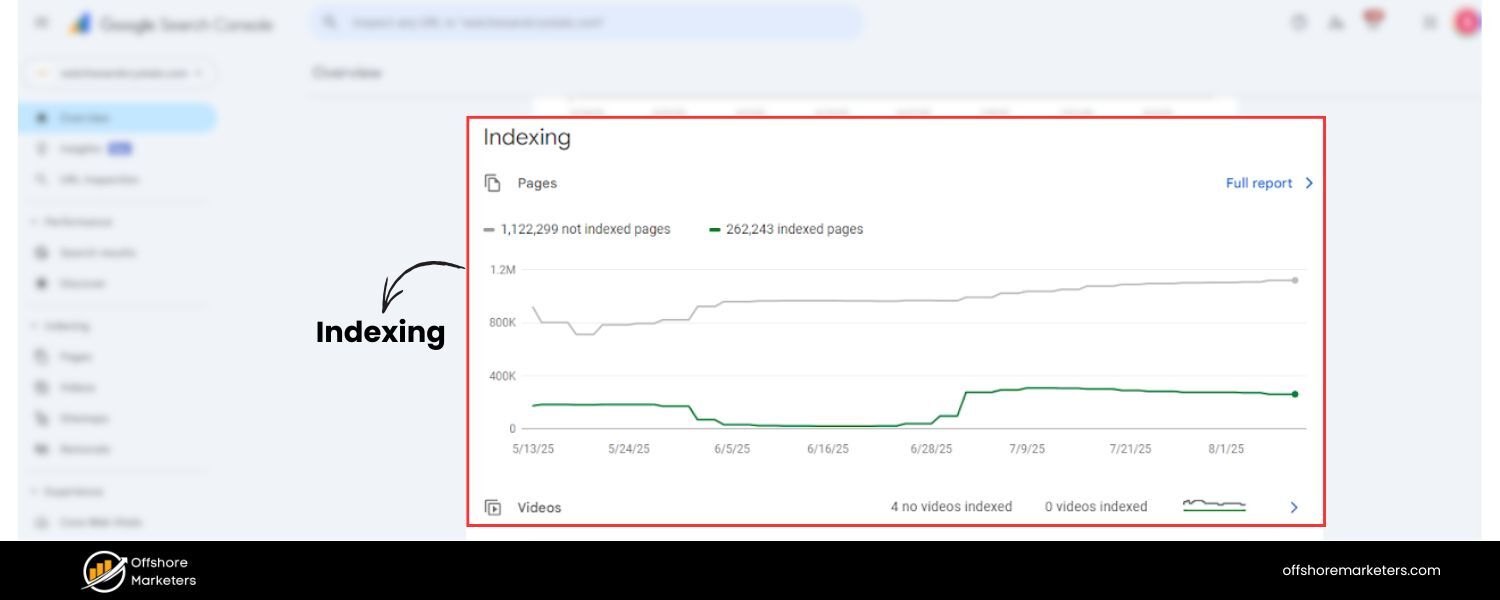
Even the best content won’t rank if search engines can’t properly crawl and index it. That’s why an often-overlooked aspect of SEO monitoring is keeping track of your site’s indexation status and crawl health.
Google Search Console’s Coverage report is extremely useful here – it shows which URLs on your site have been indexed, and alerts you to any pages that were discovered but not indexed due to errors or exclusions.
Regularly check this report for issues like pages with server errors (5xx), not found errors (404), or pages blocked by robots.txt, etc… Each error means a page that might not be appearing in search results as expected.
Crawl errors can arise from broken internal links, misconfigured URL parameters, or site changes (like removed pages without proper redirects). If, for example, you see a spike in 404 errors for important URLs, you should implement 301 redirects to appropriate new URLs so that link equity and users are properly sent to the right place.
Monitoring crawl errors ensures you maintain a healthy site structure from the search engine’s perspective. Additionally, keep an eye on index bloat (too many low-value pages indexed) and index coverage warnings (like “Indexed, though blocked by robots.txt” or “Duplicate content” issues) in Search Console. These can inform you of technical SEO fixes needed.
Another thing to track is your site’s XML sitemap status and whether all pages listed are getting indexed. If certain sections of your site aren’t indexed, it could be due to crawl depth issues or lack of internal links.
Monitoring indexation is especially vital after posting new content – you want to ensure Google picks it up (you can use the URL Inspection tool in GSC to check specific pages). Also, when you prune or noindex content, verify those pages indeed drop out of the index over time.
In sum, make technical SEO monitoring a part of your routine. A quick look at Search Console’s pages/indexing reports can save you from nasty surprises where a portion of your site vanishes from Google due to a preventable error. By catching and resolving crawl errors and indexing problems early, you ensure all your on-page SEO and content efforts aren’t wasted.
As one SEO playbook put it bluntly: the only way to avoid SEO issues is to never do SEO – but since we must, the next best thing is to audit and fix issues regularly. Proactive monitoring of your site’s technical health (site audits, crawl stats, index status) will keep the foundation of your SEO strong.
10. Domain Authority (Overall Site Authority)
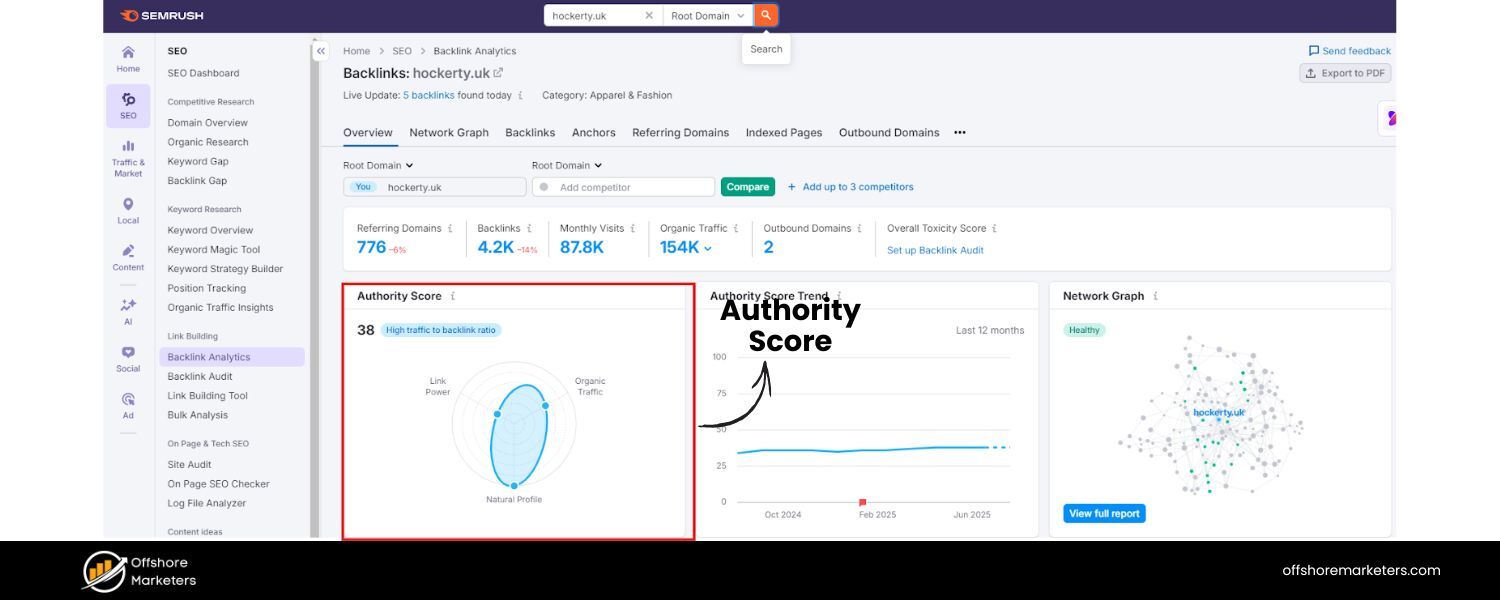
Domain Authority (DA) is a metric (popularized by Moz, but similar concepts exist in Semrush’s Authority Score and Ahrefs’ Domain Rating) that predicts how likely a website is to rank in search engines based on its overall backlink profile and other factors.
It’s typically a score from 1 to 100 – the higher, the better. Monitoring your domain’s authority score can give you a broad sense of your site’s SEO strength and how it’s improving over time relative to competitors.
For example, a new website might start with DA 10-20, whereas a well-established site like Wikipedia is 95+. A growing DA generally comes from earning high-quality backlinks and building a solid reputation.
While Domain Authority itself is not used by Google, it’s a useful comparative metric. If your DA is significantly lower than that of your main competitors, it suggests you might need to focus on acquiring more quality backlinks and building your brand’s authority.
On the flip side, if you see your DA steadily increasing, it’s a sign that your link-building and content marketing efforts are strengthening your site’s competitive position.
It can also explain why certain competitors outrank you (they simply have more authority). Keep in mind that DA is logarithmic – improving from 20 to 30 is much easier than from 70 to 80.
Use the tools at your disposal: Moz’s Link Explorer can track your DA, and other tools have their equivalents (Ahrefs’ DR, etc.). Many SEO professionals will periodically log these scores and the number of referring domains to gauge progress.
DA is best used as a relative metric – compare your site’s authority to others in your niche. If you notice a competitor’s DA shooting up, check what they’re doing (perhaps a viral campaign or major press mentions). Also, monitor Page Authority (PA) for your important pages, if available, which is a similar metric at the page level.
Remember that a DA score is a composite – you can’t directly “optimize” it except by doing all the good SEO practices (earning links, creating content, fixing technical issues) that also help your real Google rankings. It’s more of a health indicator.
However, some use cases include measuring the impact of algorithm updates or major site changes on overall authority. If a Google update hit many of your backlinks or something caused link loss, your DA might drop, reflecting a loss of SEO equity.
Also, when prospecting for backlinks, you might choose target sites with high DA to get more value.
In short, track Domain Authority as a big-picture metric of your SEO status. It’s best used in comparison with your past performance and your competition. But don’t obsess over it in isolation – it should complement the other metrics above, especially the ones tied to actual traffic and conversions.
A high DA with low traffic means you have untapped potential, whereas a lower DA site with great content can still outrank a higher DA site for specific topics. Use the metric wisely as part of your monitoring toolkit.
Best Tools and Techniques for SEO Monitoring
Tracking all these metrics might sound daunting, but thankfully there are powerful tools (many of them free) to help automate and visualize your SEO monitoring. To effectively monitor SEO, you’ll likely use a combination of: Google’s free tools for basic data, and specialized SEO platforms for deeper insights and convenience.
Here are some of the essential tools and methods for SEO monitoring:
1. Google Search Console (GSC) – Your SEO Data Hub
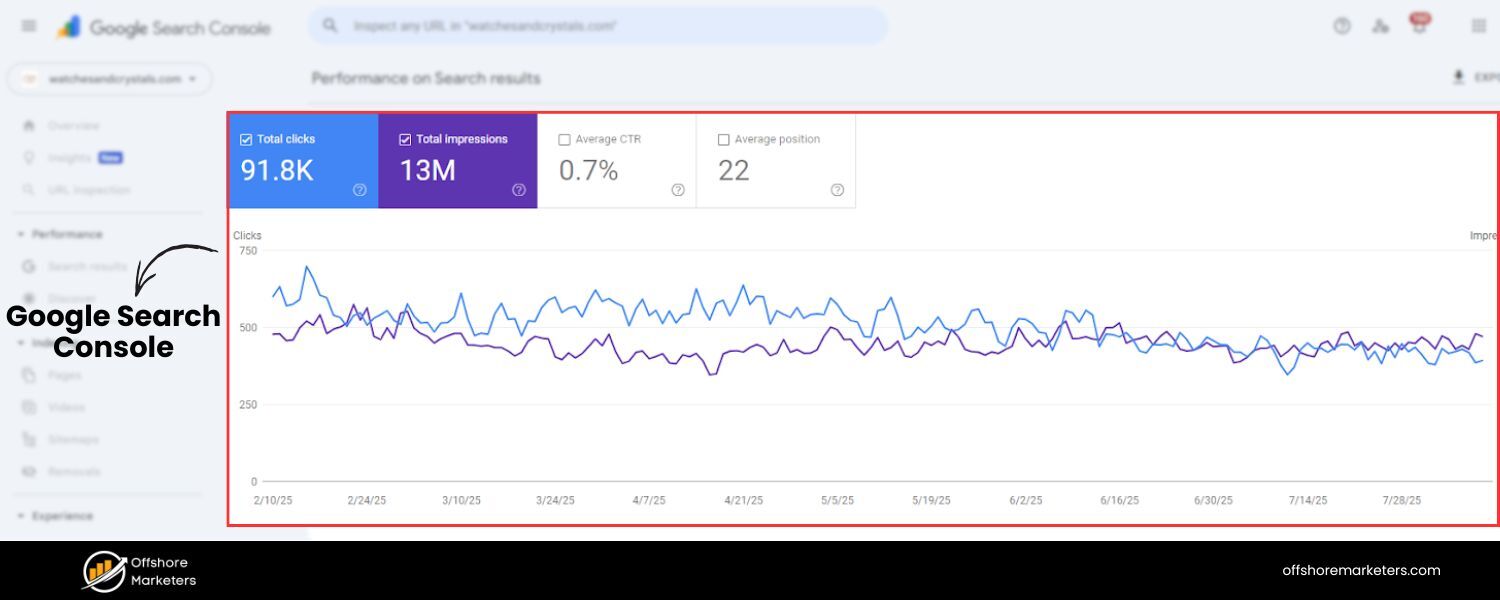
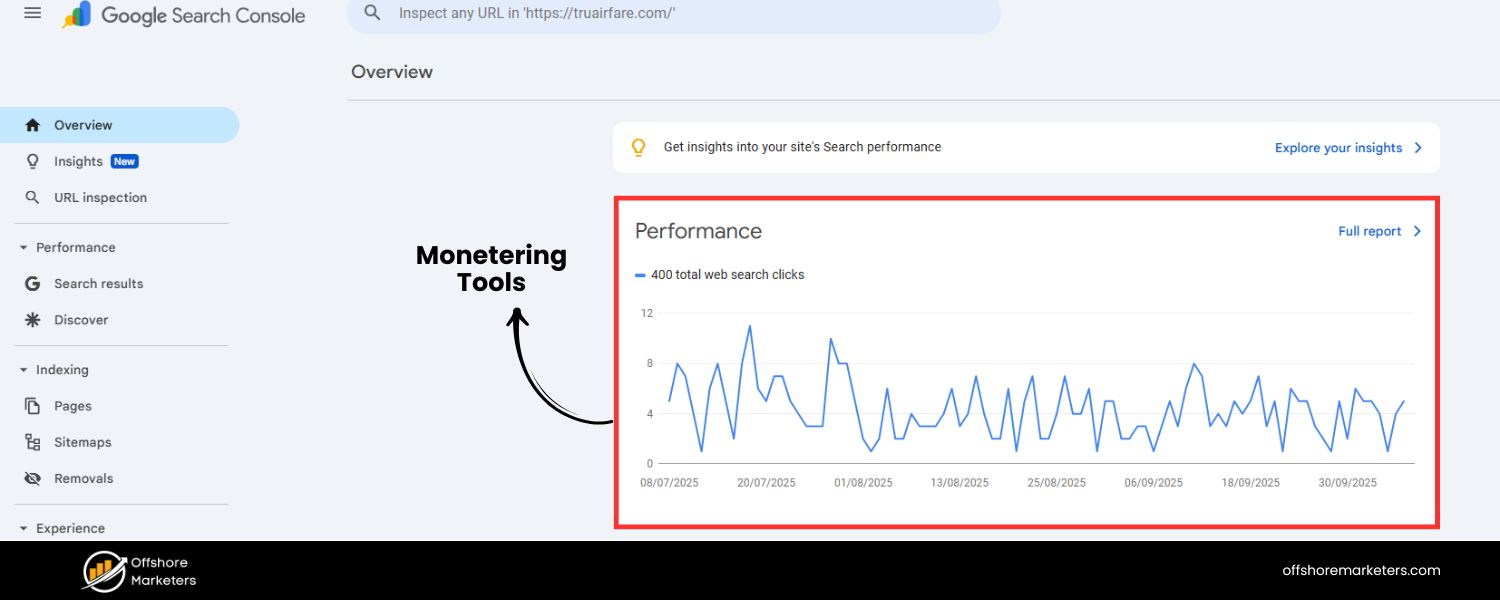
Google Search Console’s “Performance on Search results” report shows key metrics like total clicks, impressions, average CTR, and average position over time. Monitoring this report helps you spot traffic trends, keyword performance, and any sudden changes in your SEO metrics.
Google Search Console is arguably the most important free SEO monitoring tool. It provides direct insights from Google on how your site is performing in search.
Once you verify your site, GSC lets you track: impressions, clicks, CTR, and average position for all the queries and pages on your site (in the Performance report). It also shows indexing and coverage issues, mobile usability, Core Web Vitals reports, and more.
For monitoring your rankings and CTR, GSC is invaluable – for example, you can filter the Performance report to see how your average position and CTR changed over the last 3 months, or which queries gained/lost the most positions. Make sure to highlight all metrics (clicks, impressions, CTR, position) to get the complete picture.
GSC also allows you to inspect individual URLs to see if they’re indexed and how they appear to Google. The Pages (Coverage) report in GSC will alert you to any crawl errors or indexing issues (e.g., “Page not indexed: Duplicate without canonical”).
Meanwhile, the Experience reports cover Core Web Vitals and Mobile Usability, helping you monitor technical SEO aspects over time. For example, if the Core Web Vitals report shows many URLs need improvement, you can take action and later verify from the same report if those pages turned “Good” after fixes.
Another useful feature for monitoring is setting up email alerts from GSC – Google will notify you if it detects a spike in errors or other abnormalities.
In summary Google Search Console is your daily dashboard for SEO health. It’s the most reliable source for data like search queries, average ranking, and click-through rates because it comes straight from Google.
Incorporate GSC checks into your routine: look at performance trends, check for new issues, and use the URL inspection for any page you’re uncertain about. Best of all, it’s completely free.
2. Google Analytics 4 (GA4) – Traffic and Engagement Tracking
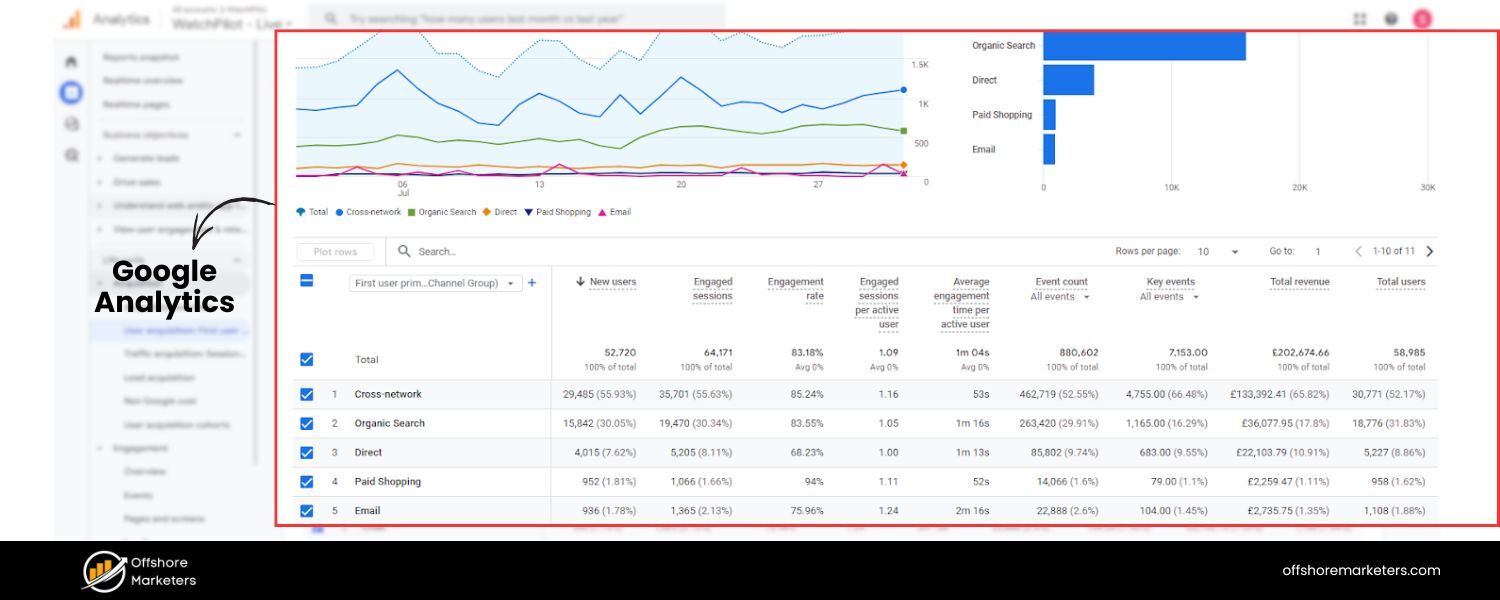
Google Analytics 4 complements Search Console by telling you what happens after visitors land on your site. It’s essential for monitoring organic traffic volume, user behavior, and conversions.
In GA4, you can easily see how much traffic comes from Organic Search (via the Acquisition reports) and assess engagement metrics for those visitors. For instance, you might look at Engaged Sessions and Engagement Rate for organic users, which GA4 now emphasizes instead of the old bounce rate.
Engagement Rate is basically the percentage of sessions that were not bounces, so a high engagement rate indicates that your SEO traffic is interacting with your site content.
GA4 also allows you to set up conversion tracking (like form submissions, sales, etc.) and attribute those conversions to channels, including organic search. This means you can regularly monitor how many leads or sales you’re getting from SEO and the conversion rate.
The Landing Pages view is very useful – it shows which pages organic visitors arrive on and how those pages perform (users, engagement time, conversions). If you see a particular landing page has a high bounce rate or low engagement from organic users, it may need improvement to better satisfy what those searchers are looking for.
For deeper analysis, GA4’s exploration reports or funnels can help you see user paths, which can be insightful (e.g., organic visitors often go from the blog to a product page and then drop off – maybe add clearer CTAs).
Also, GA4 tracks Average Engagement Time which is akin to how long users actively spent on the site – a modern replacement for “time on site”. Monitoring this for your organic segment can signal content effectiveness (longer engagement generally means the content was valuable).
In summary Google Analytics is your main tool for measuring the quantity and quality of traffic from SEO. It’s free and incredibly powerful. Make sure you’ve linked GA4 with Search Console as well, so you can see search query data in GA and conversion data in GSC.
By using GA4 in tandem with GSC, you cover both ends of the SEO journey – from the search impression to the on-site behavior. This combination answers, “Are we getting organic visitors?” and “What are those visitors doing on our site?”. For a holistic SEO monitoring approach, you need both pieces of information.
3. All-in-One SEO Monitoring Platforms (Semrush, Ahrefs, Moz, etc.)
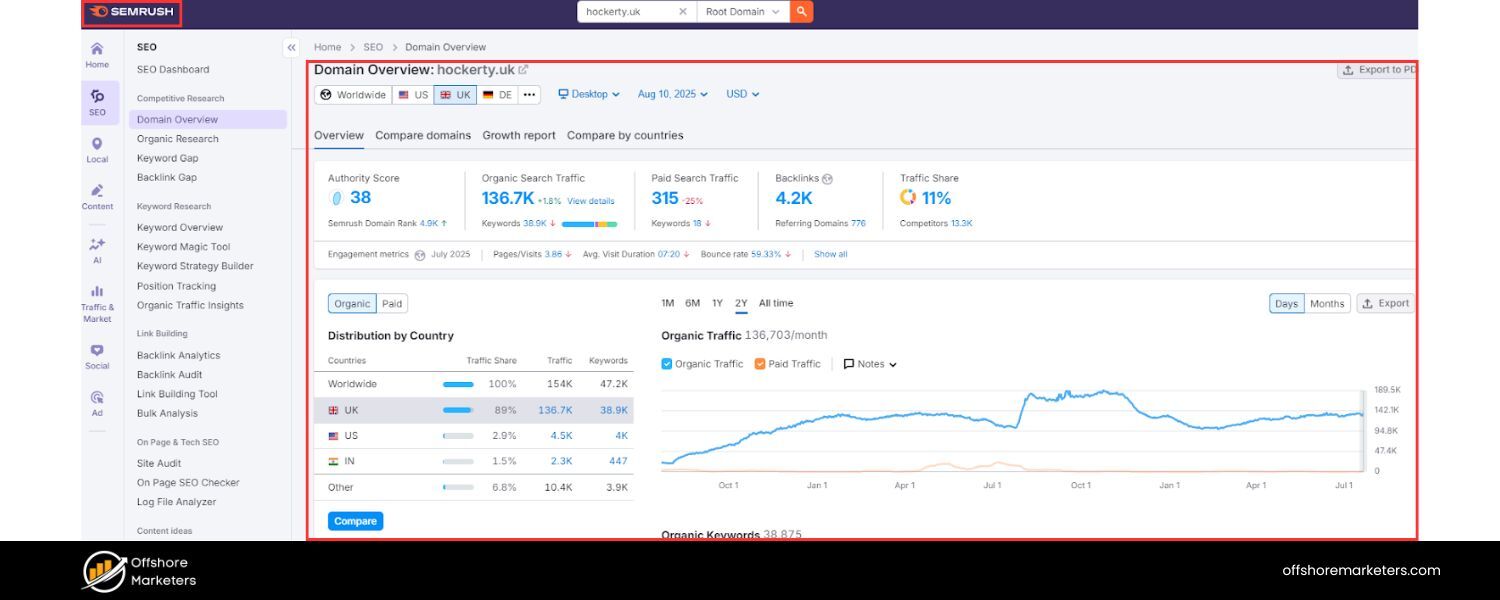
Beyond the Google-provided tools, there are many excellent SEO software platforms that aggregate and expand on SEO data. Tools like Semrush, Ahrefs, Moz Pro, SEOmonitor, and others can greatly streamline your monitoring process by providing a one-stop dashboard for various metrics.
These platforms typically offer: rank tracking, backlink tracking, site audits, and competitive analysis features all in one place.
For example, Semrush’s Position Tracking tool lets you monitor daily keyword rankings and even see which SERP features you’ve captured.
Ahrefs provides alerts for new or lost backlinks and keyword movements. Moz Pro can track your rankings and show changes in Domain Authority.
The advantages of using such tools include data visualization, historical tracking, and the ability to consolidate data from multiple sources. They often have features like:
A. Keyword Rank Tracker
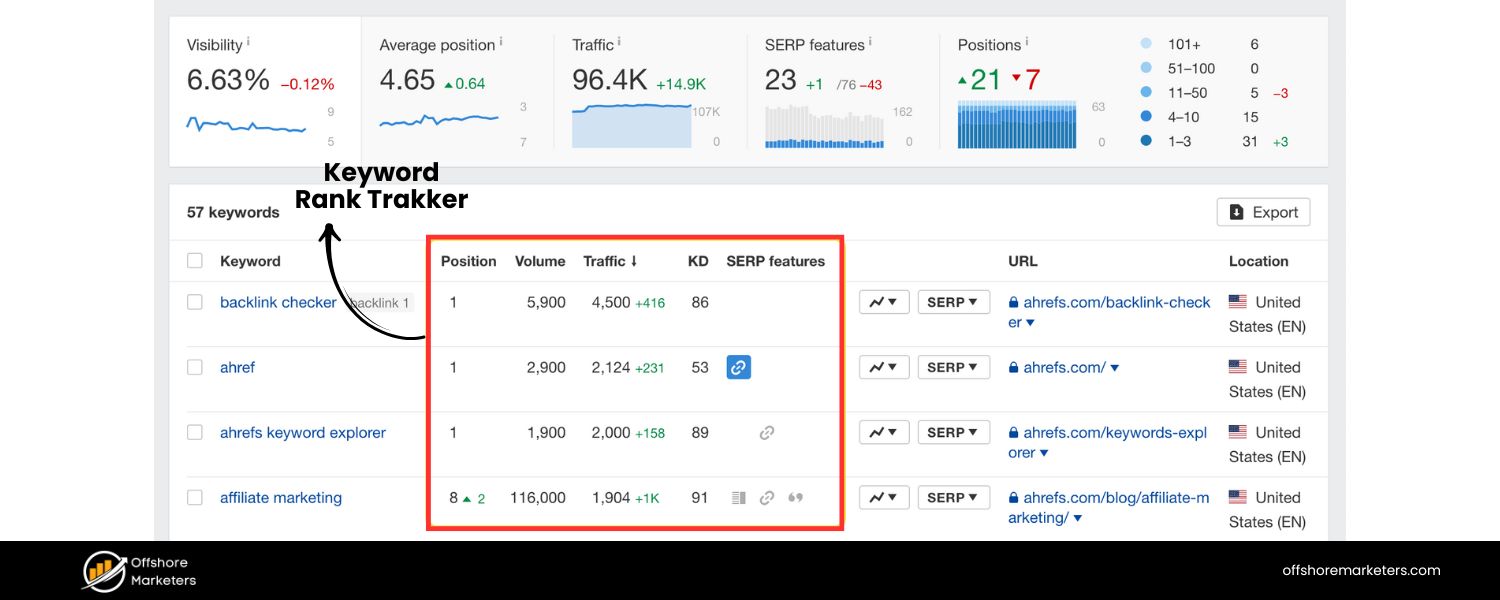
Enter your target keywords and the tool will update daily or weekly with your ranking positions, visibility score, and any SERP features present. This saves you from manually Googling terms or relying only on the 28-day delayed GSC data.
B. Backlink Analysis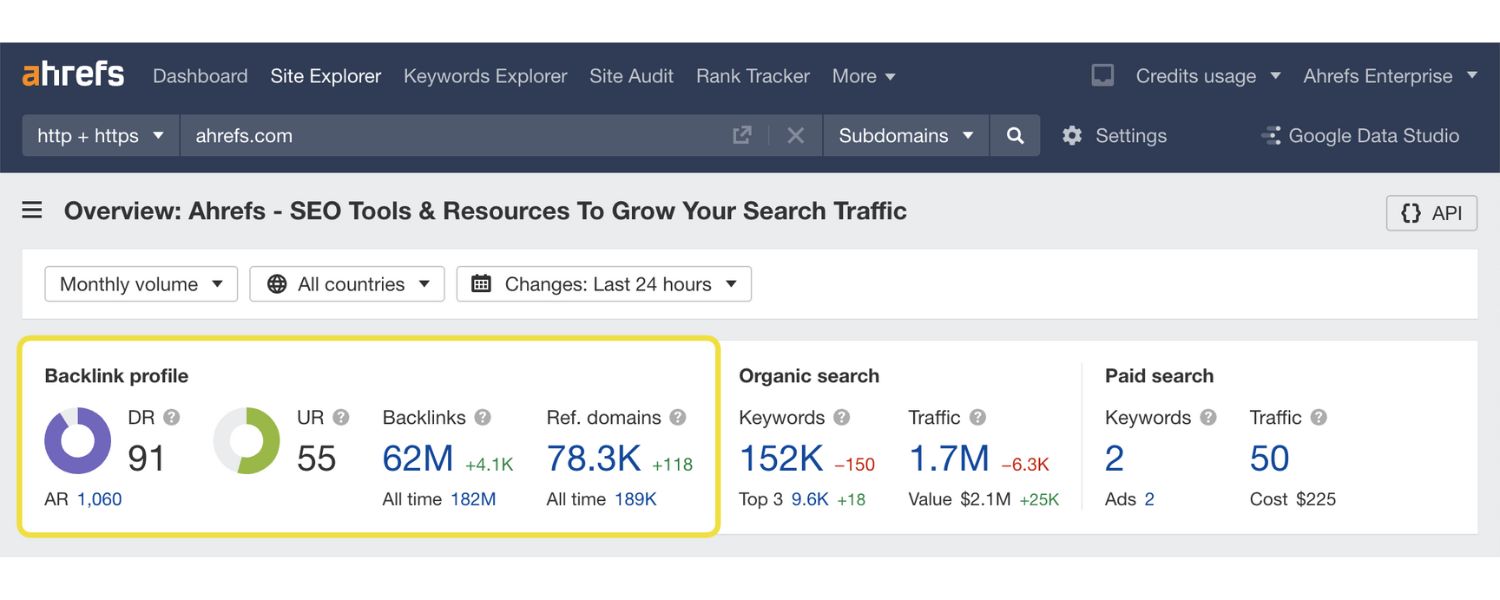
See your total backlinks, referring domains, new/lost links, and get an authority score for each link source. You can set up alerts for when a high-value link is gained or lost, which is great for timely reactions.
C. Technical Site Audits
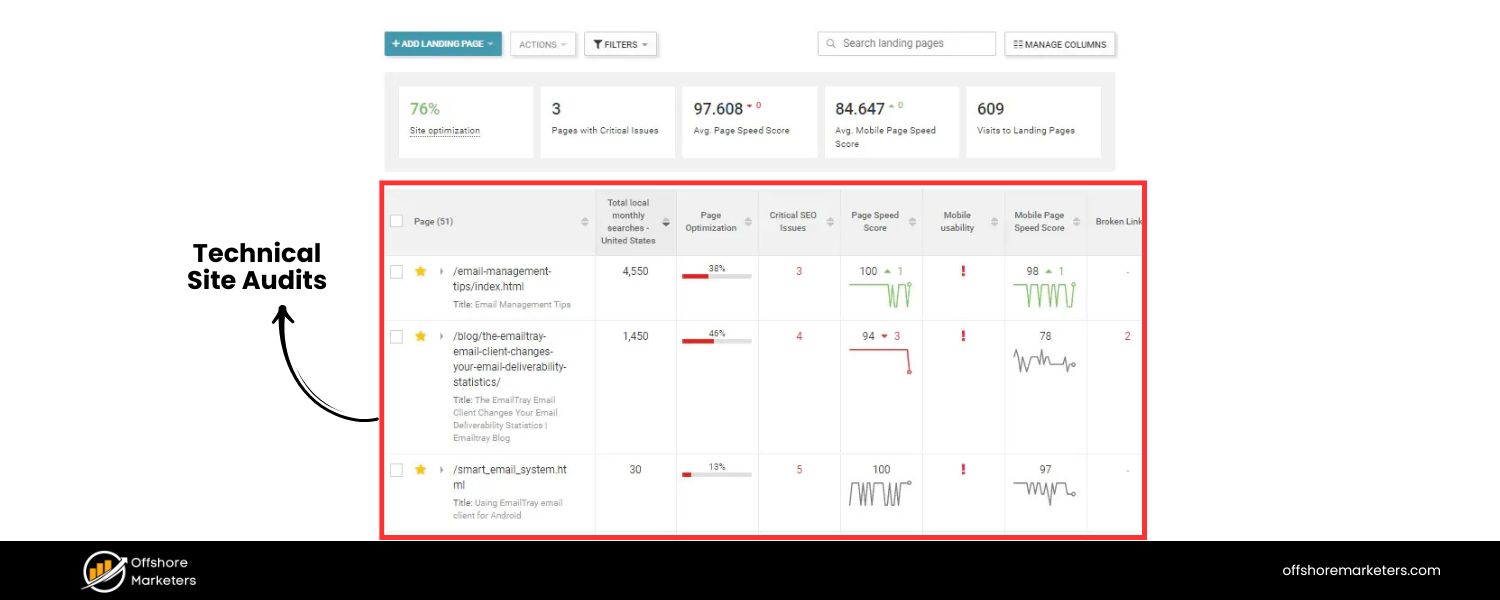
These scan your site for SEO issues (broken links, missing meta tags, slow pages, etc.) on a schedule. Regular audit reports will feed into your monitoring so you can fix issues promptly.
D. Competitor Tracking
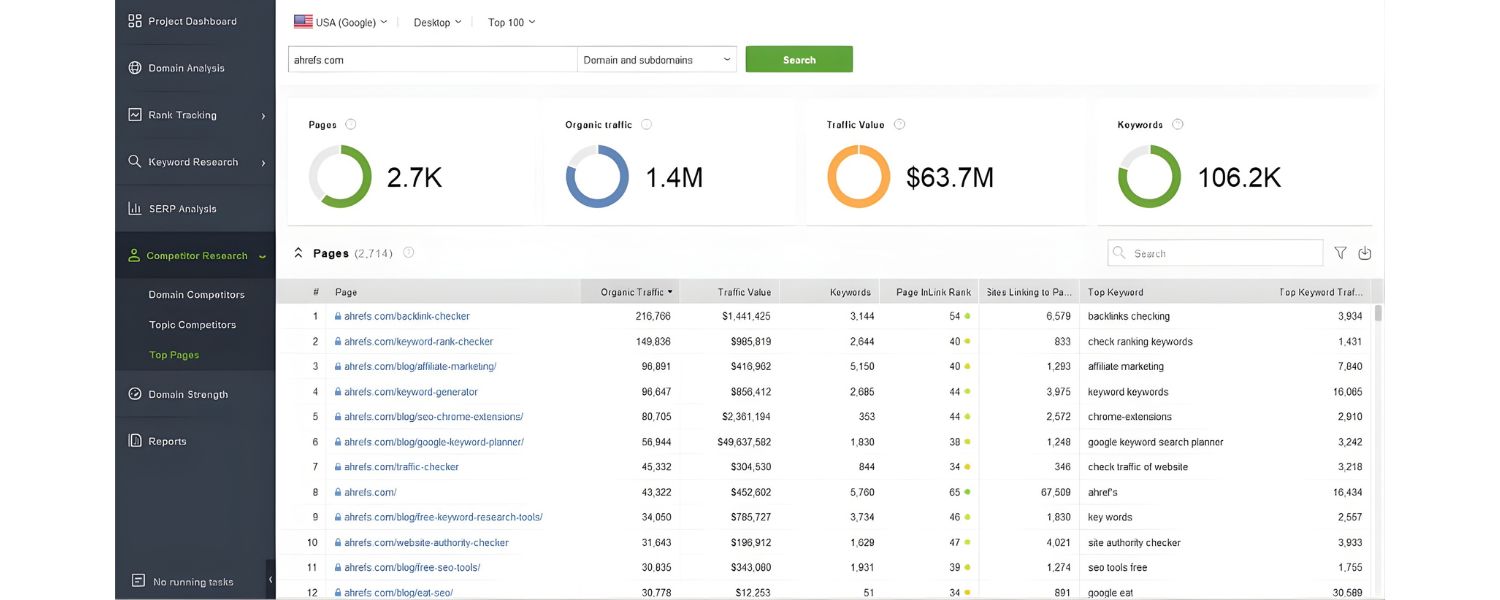
Many tools let you add competitors to compare metrics – for instance, tracking how your share of voice for a set of keywords changes vs. competitors, or comparing backlink profiles. This ties into SEO monitoring for staying competitive.
E. Reporting and Dashboards
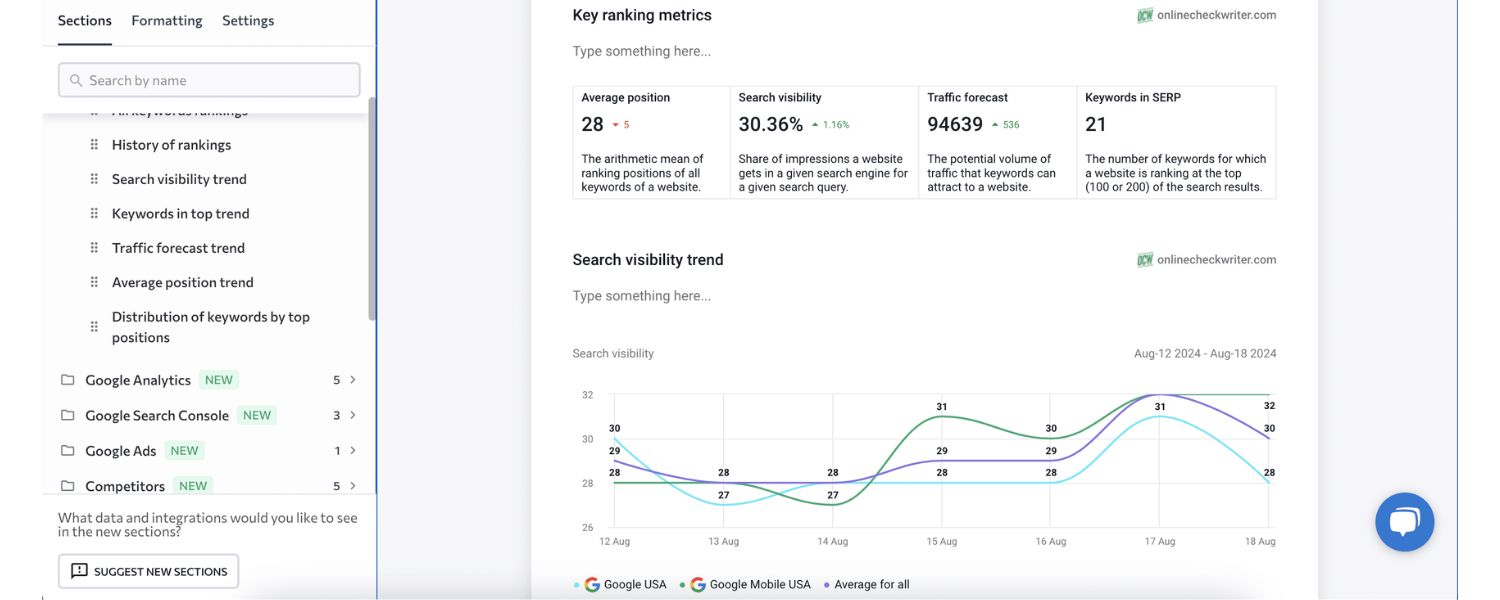
You can often customize dashboards or automated PDF reports. This is helpful if you need to report SEO progress to a client or boss. For example, AgencyAnalytics or DashThis are platforms geared towards pulling data from various SEO tools into one report automatically.
Some of the top all-in-one SEO platforms (paid) include Semrush, Ahrefs, and Moz, as mentioned. They each have strengths: Ahrefs is renowned for backlink data, Semrush for its breadth of competitive data and keyword research, Moz for its user-friendly interface and community.
These tools usually have subscription costs (often starting around $99/month and up), but they can be worth it if you manage a serious SEO campaign. They save time and provide insights you might miss with manual methods.
For instance, an SEO platform can detect and track SERP features you rank for, such as if you gained a Featured Snippet or lost one, which GSC only partially indicates. Or they can show your visibility index – a weighted metric of how visible your site is across all your tracked keywords.
Tools like SEOmonitor even focus on data quality with daily desktop/mobile rank tracking and SERP feature detection with high accuracy.
Ultimately, while you can do basic monitoring with free tools alone, using a comprehensive SEO tool can supercharge your monitoring routine. They bring convenience, depth, and pro-level analysis.
If budget allows, consider integrating one into your workflow for tasks like rank tracking, backlink monitoring, and ongoing site audits.
Many offer free trials – for example, Semrush often has a trial, and SEOmonitor and others do as well – which you can use to see which fits your needs.
(Pro Tip: DashThis and similar reporting tools can integrate with Google Analytics, Search Console, and these SEO platforms to create a single dashboard. This can make your life easier by putting all key SEO metrics in one view, updated automatically.)
4. Specialized Rank Trackers and Monitoring Alerts
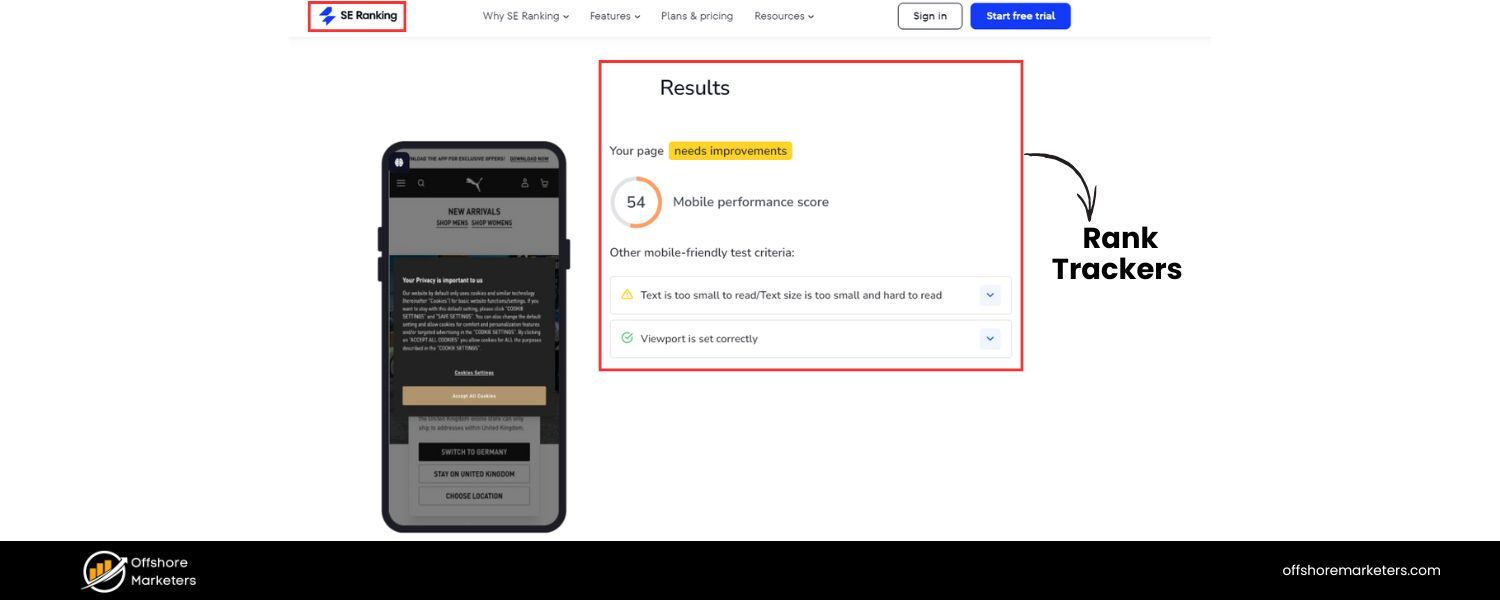
If your focus is primarily on tracking rankings (especially at scale or with high frequency), there are specialized rank tracking tools like Nightwatch, SE Ranking, Advanced Web Ranking, and others.
For instance, Nightwatch provides daily rank tracking with options for local (geo-specific) results and even has features to track Google’s AI results and other search engines. SE Ranking is another affordable tool that gives you daily keyword rank updates, backlink monitoring, and social visibility tracking.
These can be very useful if you need granular control, such as checking rankings in multiple cities or tracking hundreds/thousands of keywords reliably.
Another helpful tactic is setting up monitoring alerts. Many SEO tools and even Google Analytics can send alerts when certain thresholds are met.
For example, you can configure alerts for: a significant drop in organic traffic week-over-week, a certain keyword falling off the first page, or a new high-authority backlink gained. Google Analytics Intelligence, for instance, could notify you if organic traffic drops more than 20% compared to the previous week.
Third-party tools might alert you if your site’s uptime goes down (downtime can obviously impact SEO if prolonged).
Additionally, keep an eye on Google Search Console messages and the Google Search Status Dashboard for any widespread issues (like crawling bugs or indexing issues on Google’s side). And consider subscribing to SEO news/update sources (e.g., Search Engine Land, Google’s Search Liaison on Twitter) – while not exactly “tools,” staying informed on algorithm updates or trends (like the rollout of a core update or the introduction of a new SERP feature) is part of proactive SEO monitoring. It prepares you to correlate any traffic fluctuations with larger events.
In summary, choose the tool stack that fits your needs: at minimum GSC + GA4, and then one or more specialized SEO platforms for deeper monitoring of rankings, backlinks, and competitors.
Most importantly, use these tools regularly – build a dashboard or routine so that important SEO metrics are front-and-center. Whether it’s a Monday morning report email or a real-time dashboard in your office, make it easy to see your SEO KPIs at a glance. That way you can act quickly when something needs attention.
Implementing an Effective SEO Monitoring Strategy
Having the right metrics and tools is vital, but you also need a solid plan to tie everything together. An effective SEO monitoring strategy establishes how and when you check on your SEO health, and what actions you take based on the data. Here’s a step-by-step approach to develop your monitoring regimen:
1. Define Your Goals and KPIs
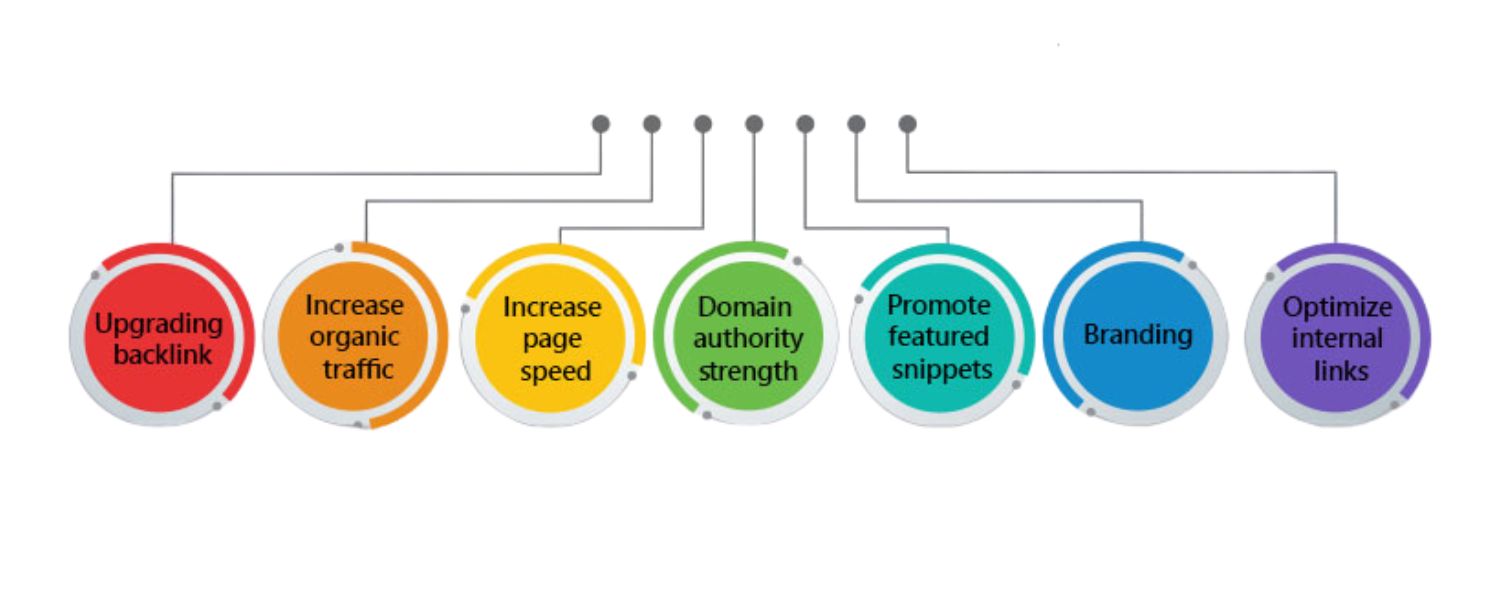
Start by clearly outlining what you want to achieve with SEO. Are you aiming to increase organic traffic by 50% this year? Improve conversions from search by a certain amount? Rank top 3 for specific high-value keywords? Defining goals will make it easier to choose which metrics matter most.
Based on your goals, identify the Key Performance Indicators (KPIs) you’ll track. For example, if lead generation is the goal, organic conversion rate and form fill counts are key. If brand visibility is a goal, total impressions and branded keyword rankings might be KPIs. Focus on a handful of metrics that best reflect success for your business or client.
2. Choose Your Monitoring Tools
Assemble the toolkit that will help you track those KPIs. This usually includes connecting your site to Google Search Console and Google Analytics 4 (if not done already) for baseline monitoring. Then decide on any additional SEO platform or rank tracker to use for more detailed insights.
Ensure all tools are properly configured – for instance, set up GA4 conversion tracking, add key competitors to your rank tracking tool, integrate GSC data wherever possible, and create any custom dashboards or reports you need.
The goal is to have a reliable system in place so data collection is automated. Many SEO tools integrate with Google Data Studio (Looker Studio) or have their own dashboards, which can be handy for consolidating data. Pick tools that fit your workflow and budget, and set them up to monitor the chosen metrics on a regular schedule.
3. Schedule Regular Check-ins
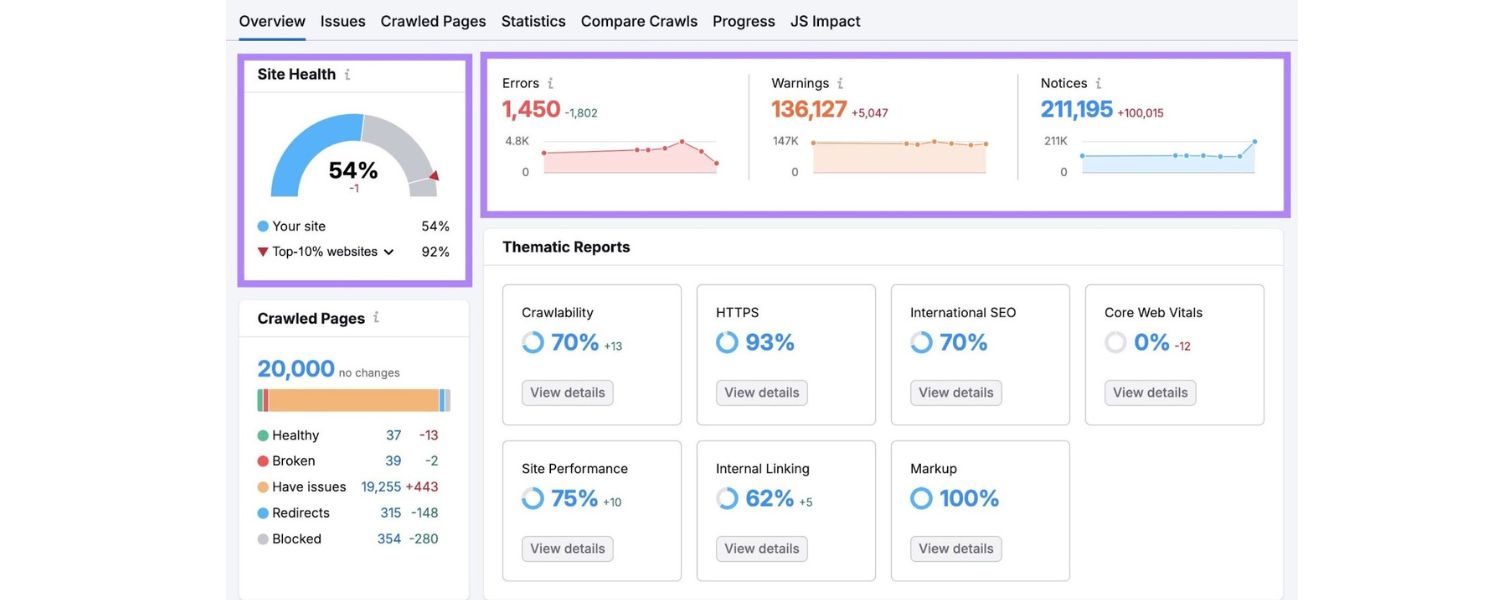
SEO monitoring should be a continuous process, but the frequency of in-depth reviews may vary. Establish a routine – for example, daily quick checks, weekly analysis, and monthly deep dives. Daily, you might glance at your key dashboards to catch any abrupt changes or issues (like a sudden traffic drop or a site outage).
Weekly, review ranking changes for your main keywords, new backlinks, and any GSC coverage or performance issues.
Monthly, do a more comprehensive report: look at month-over-month and year-over-year trends, see which content pieces improved or declined, and evaluate progress towards your goals.
Also consider different cadences for different metrics: technical issues and rankings might be checked more frequently, whereas something like overall domain authority might be assessed monthly. The important thing is consistency – create a monitoring calendar and stick to it. This way, you maintain a continuous understanding of your website’s performance and can spot trends or anomalies early.
4. Create a Monitoring Dashboard or Report
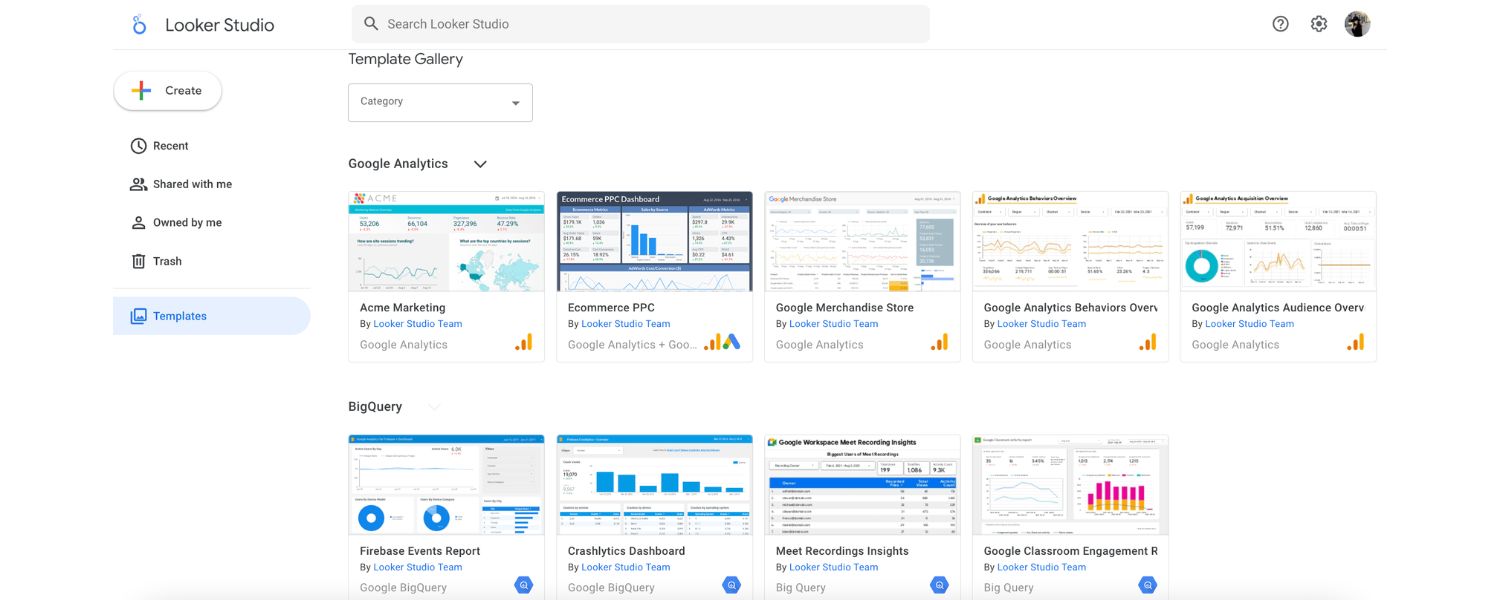
To make monitoring efficient, compile your key metrics into one dashboard or report. You might use a tool like Looker Studio (formerly Data Studio) to pull data from GA4, GSC, etc., into a single view. Or leverage built-in SEO tool dashboards.
For example, SEO platforms often let you customize a dashboard with widgets for traffic, rankings, backlinks, etc., so you don’t have to check 5 different places. If you’re reporting to others, an automated monthly SEO report can be generated to share results.
Some tools (like Semrush’s My Reports or DashThis) even allow scheduling PDF reports to email automatically. An effective dashboard will visualize data (graphs of traffic over time, ranking distributions, pie chart of top traffic sources, etc.) so you can absorb information at a glance. Make sure your dashboard highlights any critical KPI and uses comparisons (e.g., vs last period) to provide context.
5. Analyze and Extract Insights
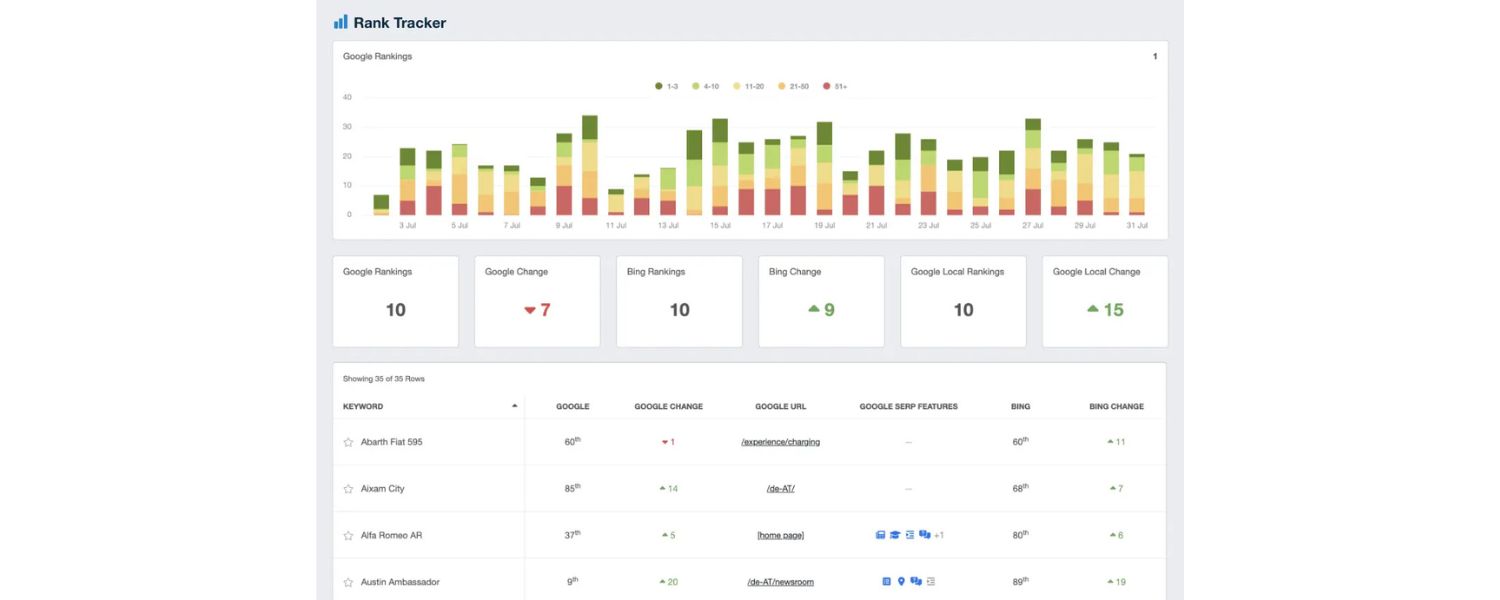
Data by itself isn’t useful unless you interpret it. As you monitor, always ask “Why?” and “So what?”. If organic traffic went up 20% this quarter, dig in to see what caused it – was it a specific page or keyword? Did a recent content update help? Or a competitor’s downturn? If a key ranking fell, investigate what changed on that page or in that SERP.
Focus on actionable insights – don’t just note that “CTR is 3%”; consider what you can do about it if that CTR is subpar. It helps to annotate significant events: for example, mark on your timeline when you launched a new site section or when Google released a known algorithm update. That way, when analyzing, you can correlate metric changes with those events.
Additionally, tailor your analysis to your audience. If you’re reporting to executives, highlight business metrics (conversions, revenue) and high-level trends. For the SEO team, get into the weeds of which keywords moved and technical issues found. Regular analysis ensures you’re not just collecting data but actually learning from it and demonstrating the value of SEO efforts.
6. Respond and Optimize Based on Findings
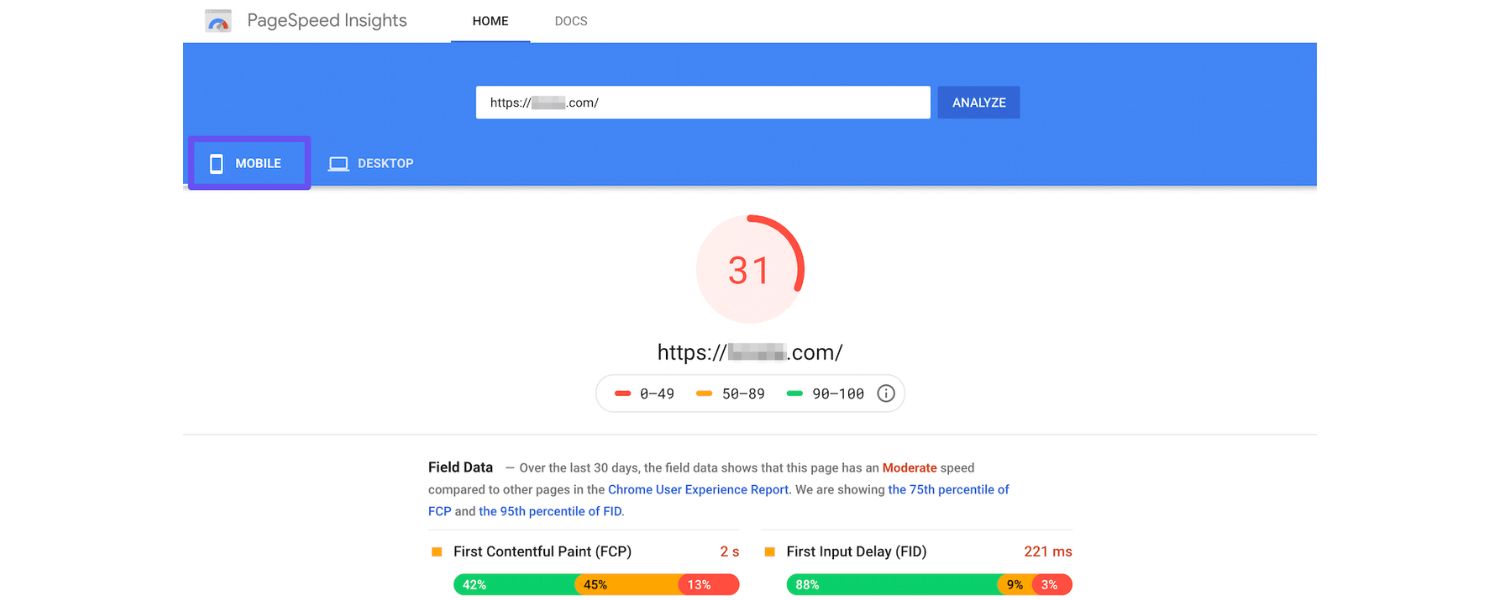
The point of monitoring is to enable timely reactions. Set up a workflow for acting on the insights you gather. For instance, if monitoring reveals a drop in page speed scores for some pages, assign those to developers to fix.
If a blog post is trending up in impressions but CTR is low, work with your content team to rewrite the meta title/description to be more compelling. If competitor analysis shows a gap (like a keyword you’re not targeting but they are), plan content to fill that gap.
Essentially, close the loop by optimizing your SEO strategy based on what you monitor. This could involve content optimizations (using ranking data to improve or expand underperforming content), technical fixes (from audit and CWV monitoring), or off-page strategies (like seeking new backlinks if you notice competitors pulling ahead in referring domains). Monitoring should feed directly into an ongoing SEO action plan.
7. Keep Adapting and Improving
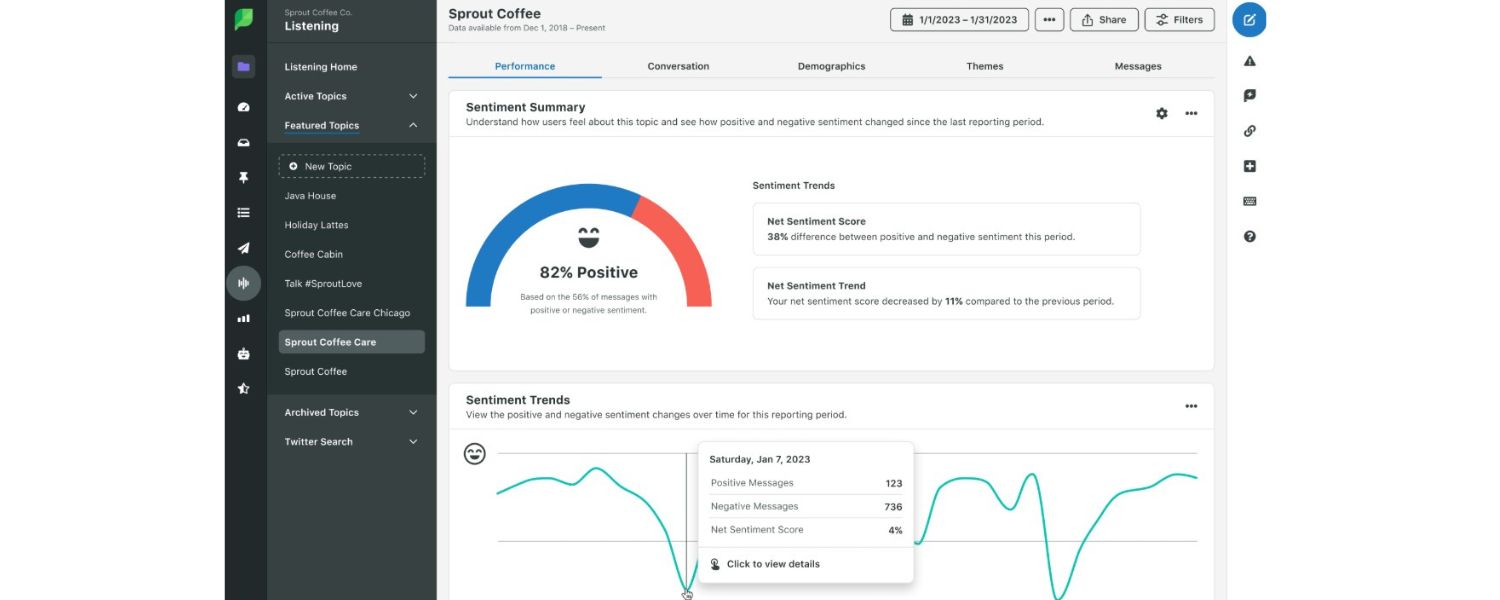
SEO is not a one-time project but an ongoing process. Be prepared to adapt your monitoring strategy as needed. Over time, you might add new metrics (perhaps you start monitoring brand mentions or social signals as your content marketing grows) or new tools (if Google releases a new helpful dashboard, incorporate it). Also, as your site grows, scale your monitoring.
For example, a site that expands into multiple countries might start tracking international versions of metrics (Google has country-specific Search Console profiles, etc.).
Always be learning – if an algorithm update hits, refine what you monitor (e.g., maybe add E-E-A-T related checks or content quality reviews).
Consistency and adaptability are key. As one SEO expert put it, staying agile and data-driven in your approach will position you to maintain strong performance over time.
By following these steps, you create a robust SEO monitoring system: one that not only checks the boxes of looking at numbers, but truly integrates those numbers into your decision-making. The payoff is a more responsive and effective SEO strategy. Instead of guessing or reacting late, you’ll proactively steer your SEO efforts using real data.
Conclusion & Next Steps: Stay Ahead with Continuous SEO Monitoring
In the ever-evolving world of search, SEO monitoring is your early warning system and your roadmap for improvement. By now, you should have a clear understanding of what SEO monitoring entails – from tracking essential metrics like organic traffic, rankings, CTR, and conversions to leveraging the right tools and establishing a regular review process.
The key takeaway is that successful SEO isn’t set-and-forget; it’s an ongoing cycle of tracking, analyzing, and optimizing. The insights you gain from monitoring form the foundation of a smarter SEO strategy: you’re basing decisions on real performance data rather than hunches.
As you implement the techniques from this guide, remember these final tips:
1. Be Consistent
Make SEO monitoring a habit. Small daily or weekly check-ins can prevent big problems down the line. It’s much easier to course-correct when you catch an issue early.
2. Stay Updated
The SEO landscape can shift quickly (think Google core updates or new features like SGE). Monitoring helps you stay informed on how these changes impact your site specifically. Also, keep learning – the metrics or tools that matter today might evolve tomorrow (for example, engagement rate in GA4 has taken prominence over bounce rate).
3. Focus on the Big Picture
Individual metrics are important, but always tie them back to your overarching goals. Celebrate the wins (like improved conversion rates or a new #1 ranking) and investigate the losses. Use a holistic approach: technical health, content quality, user experience, and authority all intermingle in SEO success.
4. Iterate and Improve
Use the data to continuously refine your SEO efforts. If monitoring shows certain content is driving results – double down on that type of content. If it shows weaknesses (say, slow mobile speed), invest in fixes. Over time, these incremental improvements add up to significant gains in traffic and rankings.
Finally, don’t be intimidated by the process. Start with the basics: set up Search Console and Analytics, track a handful of core metrics, and build from there. The beauty of SEO monitoring is that it provides clarity. No more operating in the dark or wondering if your work is making a difference – you’ll see it right in the numbers.
Now it’s your turn Put this guide into action. Begin monitoring your SEO performance using the steps outlined, and make it a cornerstone of your digital strategy. Whether you’re a business owner, marketer, or SEO professional, having a finger on the pulse of your search presence will pay dividends. With diligent monitoring and optimization, you can stay ahead of competitors and adapt quickly to search engine changes, ensuring your website continues to climb in visibility.
Are you ready to elevate your SEO to the next level? Start tracking those metrics and refining your approach today. The sooner you begin, the more data you’ll have – and the faster you can boost your rankings, traffic, and success in the organic search game. Good luck, and happy monitoring!
Call to Action
If you found this guide helpful, subscribe to our newsletter for more advanced SEO tips and monitoring insights. Have questions or want to share your own SEO monitoring experiences? Drop a comment below – let’s keep the conversation (and your rankings) moving upward!

What Is PPC? A Practical Guide to Pay‑Per‑Click Advertising
Pay‑per‑click (PPC) is the “pay only when someone clicks” branch...

Google Search Issues Affecting Results in Some Regions
Google has confirmed a problem with one of its data...

Keyword Counts Dropped After Google’s num=100 Change
In September 2025, Google stopped supporting the &num=100 parameter. This...

Image SEO: Optimize Images for Higher Rankings & Traffic
Introduction Images make your website more engaging, but they can...

Share of Voice: Definition, Measurement & Boosting Brand
Share of Voice (SOV) is a key marketing metric that...


.png)
.png)
.png)
.png)
.png)

2024 ALL RIGHTS RESERVED MADE IN INDIA
.png)