
SEO Tracking: How to Measure and Monitor Your Website’s Performance
July 9, 2025
One of the most significant advantages of search engine optimization (SEO) is that you can measure almost every aspect of your efforts.
With hundreds of Google ranking factors in play, however, it’s crucial to zero in on the metrics that matter most. SEO tracking is the practice of analyzing these key SEO metrics over time to understand how well your strategy is working and to make data-driven adjustments for better results.
In this comprehensive guide, we’ll explain what SEO tracking entails, highlight the essential metrics you should monitor, discuss useful tools for tracking SEO performance, and share best practices to ensure your SEO efforts translate into sustainable success.
What Is SEO Tracking (and Why It Matters)?
SEO tracking is the process of evaluating the performance of your website’s SEO campaigns by analyzing quantifiable metrics.
In simpler terms, it means monitoring how your site ranks, the amount of organic traffic you’re attracting, how users engage with your content, and ultimately how these factors contribute to your business goals.
By monitoring SEO metrics, businesses can assess the effectiveness of specific strategies and make informed adjustments to achieve improved results.
Tracking SEO performance is important for several reasons. First, it provides clear evidence of ROI – you can demonstrate how increased rankings and traffic result in conversions or sales.
Second, regular monitoring enables you to identify issues or opportunities early. For example, if you notice a sudden drop in organic traffic or rankings, you can investigate and address it (such as fixing a technical problem or countering a competitor’s move) before it causes long-term damage.
On the flip side, spotting an upward trend in impressions or clicks can alert you to content that’s gaining traction, so you can capitalize on it.
Lastly, SEO tracking keeps your strategy data-driven. Rather than guessing which tactics work, you’ll rely on hard numbers – whether it’s click-through rates or bounce rates – to guide your SEO decisions.
In short, SEO tracking gives you the insight needed to continuously refine your approach and stay competitive in search results. Now, let’s dive into the key metrics you should be measuring.
Essential SEO Metrics to Track
Not all SEO metrics are created equal. While it’s tempting to track everything, focusing on the core indicators of SEO performance will make your tracking efforts more insightful and manageable.
Below are some of the most important SEO metrics (or Key Performance Indicators, KPIs) you should monitor regularly as part of your SEO tracking process:
1. Organic Traffic
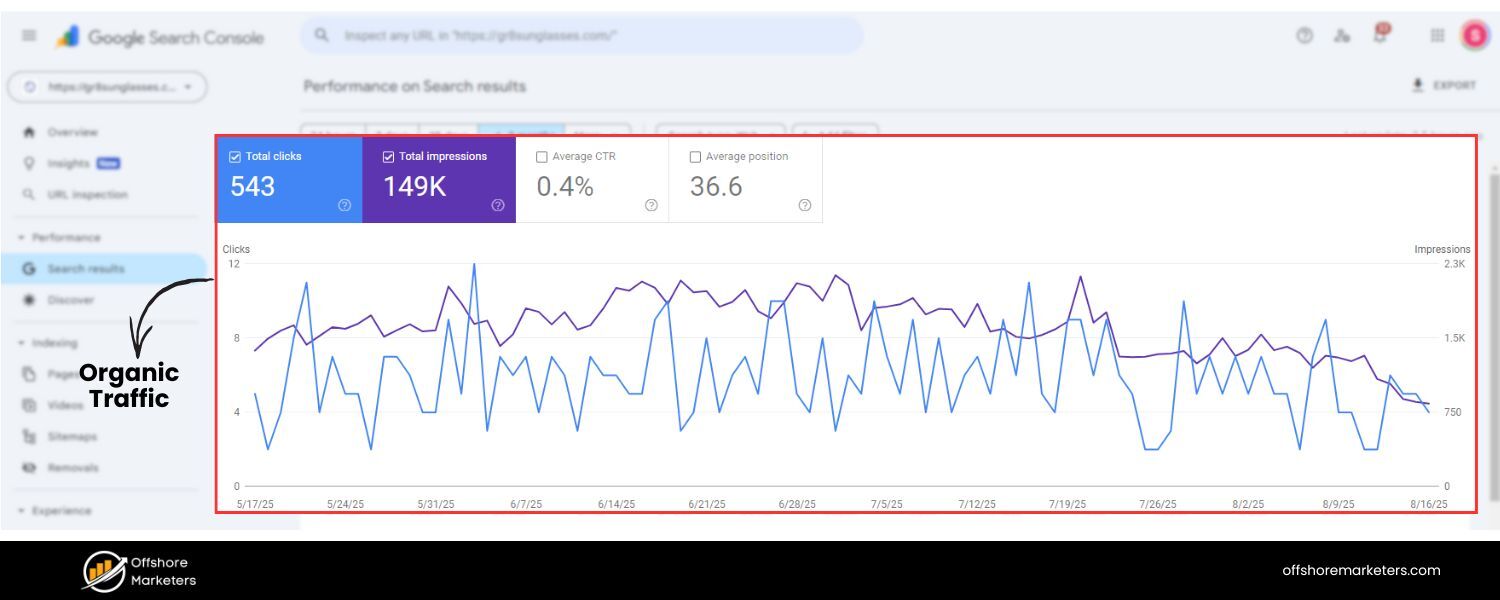
Organic traffic refers to the number of visitors coming to your website through unpaid search engine results. It is one of the clearest indicators of SEO success – if your SEO efforts are effective, you should see an upward trend in organic visits over time.
Monitoring organic traffic helps you understand how well your content is ranking for relevant keywords and whether you’re attracting more potential customers via search.
If organic traffic is rising, it’s a positive sign that your visibility on search engines is improving.
On the other hand, stagnant or declining organic traffic can signal issues (like loss of rankings or technical problems) that need attention.
To track it, the go-to tool is Google Analytics 4 (GA4). In GA4, navigate to the “Acquisition > Traffic Acquisition” report to see how many sessions or visits are coming from Organic Search.
This report will display the volume of organic sessions for your selected timeframe. It’s wise to compare organic traffic month-over-month and year-over-year to account for seasonality.
Additionally, consider benchmarking against competitors – for example, Semrush’s Traffic Analytics tool can estimate competitors’ organic traffic, allowing you to see how you stack up.
2. Keyword Rankings (Search Positions)
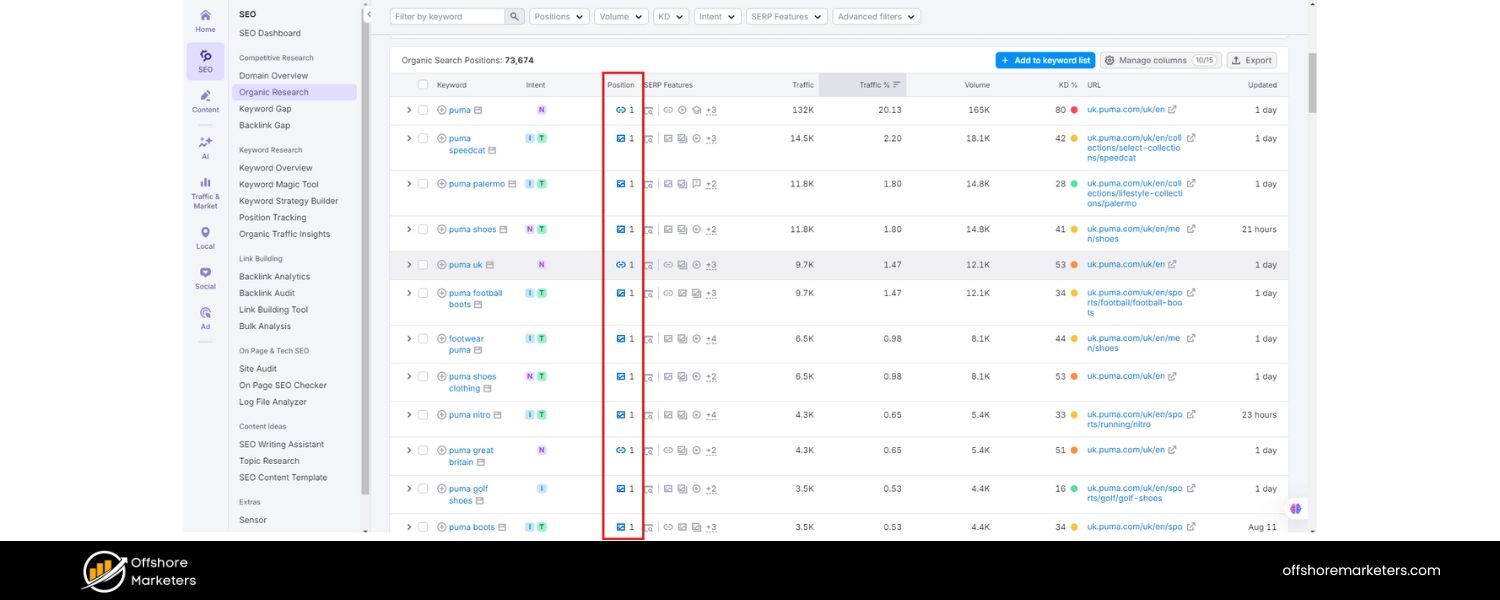
Your keyword rankings denote where your site appears in search engine results pages (SERPs) for specific search queries.
Higher rankings (closer to position #1) generally mean more visibility and traffic, as the top organic result in Google earns a vastly higher click-through rate than results lower on the page.
Tracking keyword positions over time is fundamental to SEO tracking because it shows whether your optimization efforts are improving your visibility for target keywords or if you’re losing ground to competitors.
It’s normal for rankings to fluctuate due to algorithm updates or competitors’ actions, so regular monitoring is key.
If you see a keyword dropping in rank, you can react by improving the content, building links, or addressing on-page SEO issues. Conversely, rising rankings might indicate your recent optimizations are working.
How to track it: Google Search Console provides a basic view of your average positions for various queries (in the Performance report) and is free to use.
For more detailed and automated tracking, SEO professionals rely on dedicated rank tracking tools.
For example, Semrush’s Position Tracking tool allows you to monitor your website’s daily rankings for a set list of keywords and even compare your positions with competitors.
Similarly, SE Ranking’s Rank Tracker or other all-in-one SEO platforms can continuously track keyword positions on Google (and other search engines) and alert you to significant changes.
The primary goal is to consistently track your most important keywords and note any substantial changes in their rankings.
3. Search Visibility (Impressions & Share of Voice)
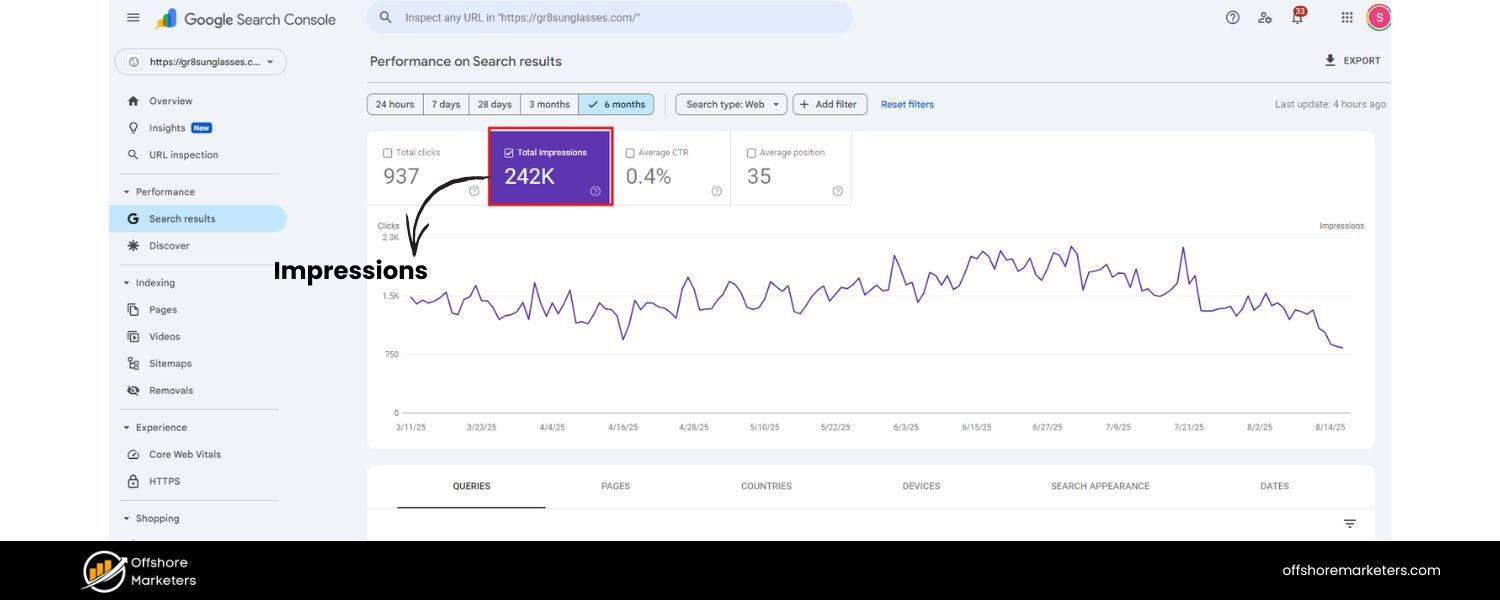
Search visibility is an aggregate metric that reflects how prominently your site appears across all relevant searches.
Often expressed as a percentage, it takes into account the rankings and click-through rates of all your tracked keywords to estimate the portion of total possible clicks you’re capturing.
A related metric is impressions – the number of times any page from your website was shown in search results for a given period.
Impressions and visibility are important because they indicate your potential reach on the SERPs. In fact, an increase in impressions is often the first sign of SEO success, even before clicks start to rise.
If your pages begin appearing for more queries (resulting in higher impressions), it means your SEO optimizations are leading Google to serve your site more frequently.
Ideally, higher visibility and impressions will translate into more clicks and traffic; however, if they don’t, that may indicate a low click-through rate (more on that next).
To track it, Google Search Console is beneficial. Its Performance report shows your total impressions and the average position for queries and pages.
You can filter by page or query to see where you’re getting the most impressions. Additionally, some SEO tools compute a visibility score or share of voice for your keyword set.
For instance, Semrush’s Position Tracking dashboard displays a “Visibility %” that indicates how visible your site is in the top 100 results for your tracked keywords.
As you work on SEO, you want to see your visibility percentage climb closer to 100%, meaning you hold more top positions across your keyword spectrum.
4. Click-Through Rate (CTR)
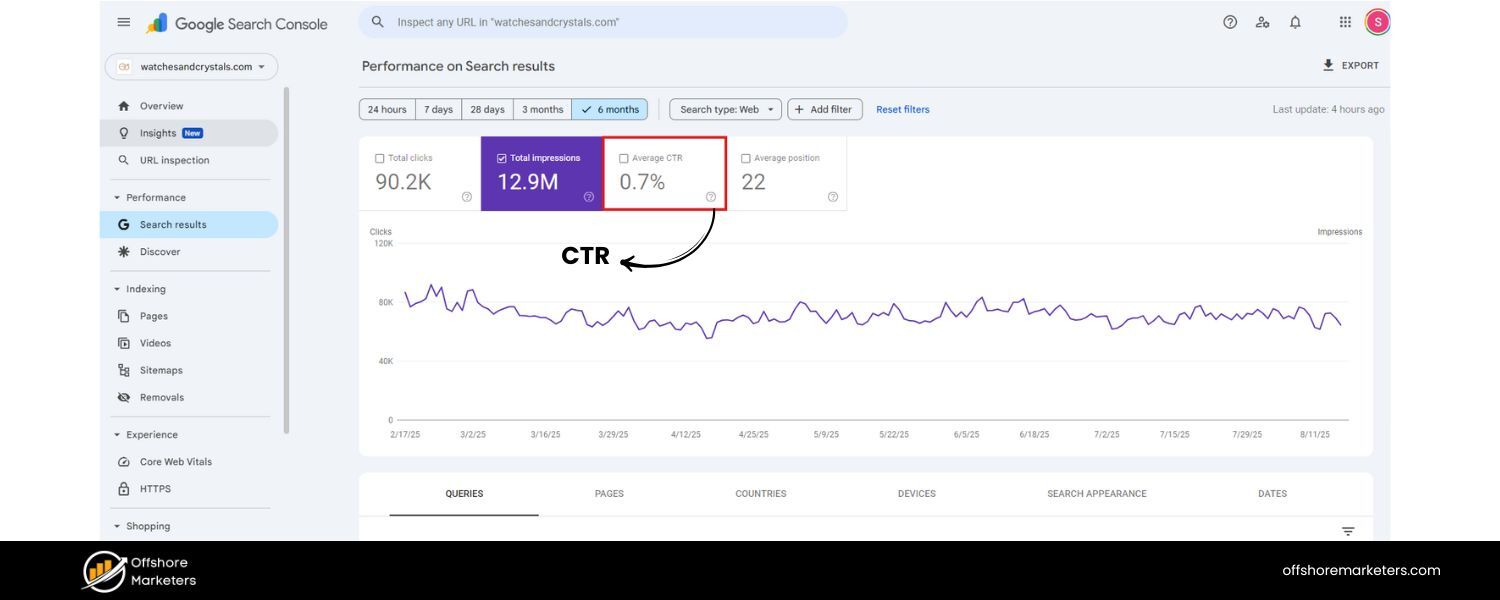
Click-through rate (CTR) is the percentage of search impressions that result in a click to your site.
In formula terms, if your page was shown 100 times in Google results and 5 people clicked it, the CTR is 5%. This metric measures the effectiveness of your search snippets (title and meta description) in attracting users’ attention and convincing them to click.
A high CTR means that your page listing is compelling to searchers, whereas a low CTR may indicate that your title or description isn’t appealing, or that it isn’t matching search intent well.
CTR is important because even if you rank well, you can miss out on traffic if nobody clicks your result.
By tracking CTR, you can identify pages or keywords where your ranking is good but your CTR is below average – these are opportunities to optimize your meta titles and descriptions.
Minor tweaks, such as adding power words, numbers, or clarity to your titles and descriptions, can significantly improve CTR, thereby capturing more traffic without even changing your rank.
How to track it: In Google Search Console’s performance report, you can see the average CTR for your site, and you can drill down to CTR by query and by page.
Sort queries by impressions to find high-impression keywords with a below-average CTR – those are prime candidates for snippet optimisation. Many third-party tools also report on organic CTR for your keywords.
For practical tips, remember to keep titles around 50–60 characters and descriptions under ~155 characters to avoid truncation. Ensure they entice the reader while accurately reflecting your content.
Monitoring CTR alongside impressions provides a more comprehensive view of your performance: impressions indicate visibility, while CTR reveals the attractiveness of your results. Both together influence the next metric, clicks/traffic.
5. Conversion Rate
Ultimately, SEO is not just about traffic – it’s about what that traffic does for your business. Conversion rate measures the percentage of visitors who complete a desired action on your site, such as making a purchase, filling out a form, or signing up for a newsletter.
This is a critical metric because it reflects the quality of your organic traffic and how well your site content and UX are driving outcomes. A high conversion rate from organic visitors indicates that you’re attracting the right audience and effectively meeting their needs.
A low conversion rate might suggest a mismatch – perhaps your content is ranking for irrelevant queries, or users aren’t finding what they expected on your page.
For example, if you notice that you’re getting a lot of organic visits but few conversions, you may need to reevaluate whether the keywords you rank for align with your product or offer.
Sometimes, content can attract visitors who are just looking for information (informational intent) when your goal is to get sign-ups or sales (transactional intent).
In such cases, adjusting your keyword targeting or improving on-page calls-to-action can help. Monitoring conversion rate in tandem with traffic can reveal these insights.
To track it, in GA4, you can set up specific conversion events (goals) for actions such as purchases, form submissions, etc. The Traffic acquisition report in GA will show you the conversion count and rate for organic search traffic specifically.
If conversion rate (as a percentage) is hard to interpret alone, also keep an eye on the absolute number of conversions from organic traffic – both are valuable.
Many SEO reporting dashboards (like DashThis) pull this data automatically so you can see, for instance, Organic Traffic vs. Conversions in one view. The key is to tie your SEO efforts to tangible business outcomes by tracking how much value organic traffic is bringing.
6. Bounce Rate and Dwell Time (User Engagement)
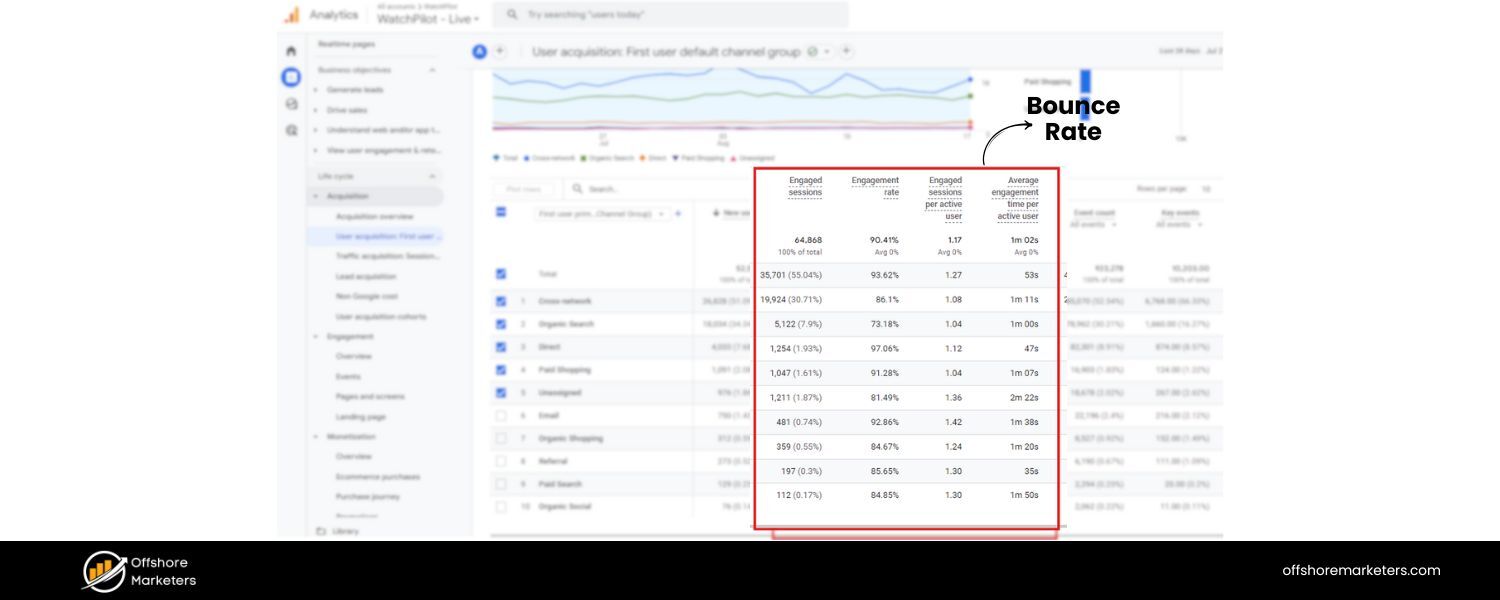
Bounce rate is the percentage of visitors who land on a page and leave without taking any further action (no clicks to other pages, no interactions).
Dwell time, also known as Average Time on Page (now measured as Average Engagement Time in GA4), indicates the average amount of time a visitor spends actively on your page.
Both metrics shed light on user engagement and content satisfaction. Generally, if people spend very little time on a page and leave immediately (high bounce rate, low time on page), it could mean the page didn’t meet their expectations or wasn’t user-friendly.
This may indicate issues such as slow loading speed, a poor mobile experience, an unappealing layout, or content that doesn’t align with the search intent.
A low bounce rate and longer dwell time are often positive signs that visitors find your content useful and engaging. For instance, a well-structured blog post that directly answers the query and provides value tends to keep users engaged and reading for longer.
Do note that what’s considered a “good” bounce rate or time on page can vary by page type – a blog article might naturally have longer engagement time, whereas a quick FAQ page might fulfil the need in seconds.
However, tracking these metrics over time can help you identify anomalies (e.g., if a page’s bounce rate suddenly spikes after a redesign, or if certain content consistently underperforms in terms of engagement).
How to track it: In GA4, Bounce rate is available (it’s now defined slightly differently than the classic GA – GA4’s bounce rate is the inverse of “engagement rate”).
You can add Bounce Rate as a metric in your GA4 Pages and Screens report to see it per page. The average engagement time per page is displayed in the same report by default.
In Google Search Console, you won’t find the bounce rate, but you can identify pages with high impressions but low average position or CTR, which may merit a closer look at engagement.
High bounce rates can be addressed by ensuring your content is relevant, well-formatted, and loads quickly, and by providing clear next steps or internal links to encourage users to explore your site further.
7. Backlinks (Inbound Links)
In Google’s eyes, backlinks – links from other websites pointing to yours – are a significant vote of confidence and remain one of the most important ranking factors.
Tracking the quantity and quality of backlinks to your site is a crucial part of SEO monitoring. A healthy backlink profile can significantly boost your site’s authority and help improve rankings. In contrast, a loss of backlinks or a spike in low-quality links could negatively impact your SEO.
By keeping an eye on your backlinks, you can measure the impact of link-building campaigns and also ensure you quickly disavow any spammy links that might harm you.
Important metrics related to backlinks include the total number of backlinks, the number of referring domains (i.e., the number of unique sites linking to you), and the authority of those linking sites.
It’s also helpful to track new links gained and links lost over time. For instance, if you publish a high-value piece of content, you might see an influx of new backlinks – tracking these can validate the success of your content marketing.
Conversely, noticing that you lost some links (perhaps a page that linked to you was removed) can prompt you to reach back out or replace those links elsewhere.
How to track it: Google Search Console’s Links report gives a basic overview of your top linked pages and sites, but for comprehensive tracking, specialised SEO tools are invaluable.
Platforms like Semrush, Ahrefs, or SE Ranking offer robust backlink analytics. For example, Semrush’s Backlink Analytics will show your total backlinks and referring domains, along with charts of how these grow over time.
You can also view new versus lost links within a given period. Make it a habit to review your backlink profile at least once a month. Notice your referring domains count plateauing. It may be time to initiate new link-building initiatives, such as creating linkable content assets, conducting outreach, or pursuing guest posting, to maintain the momentum of those backlinks.
8. Domain Authority (Website Authority)
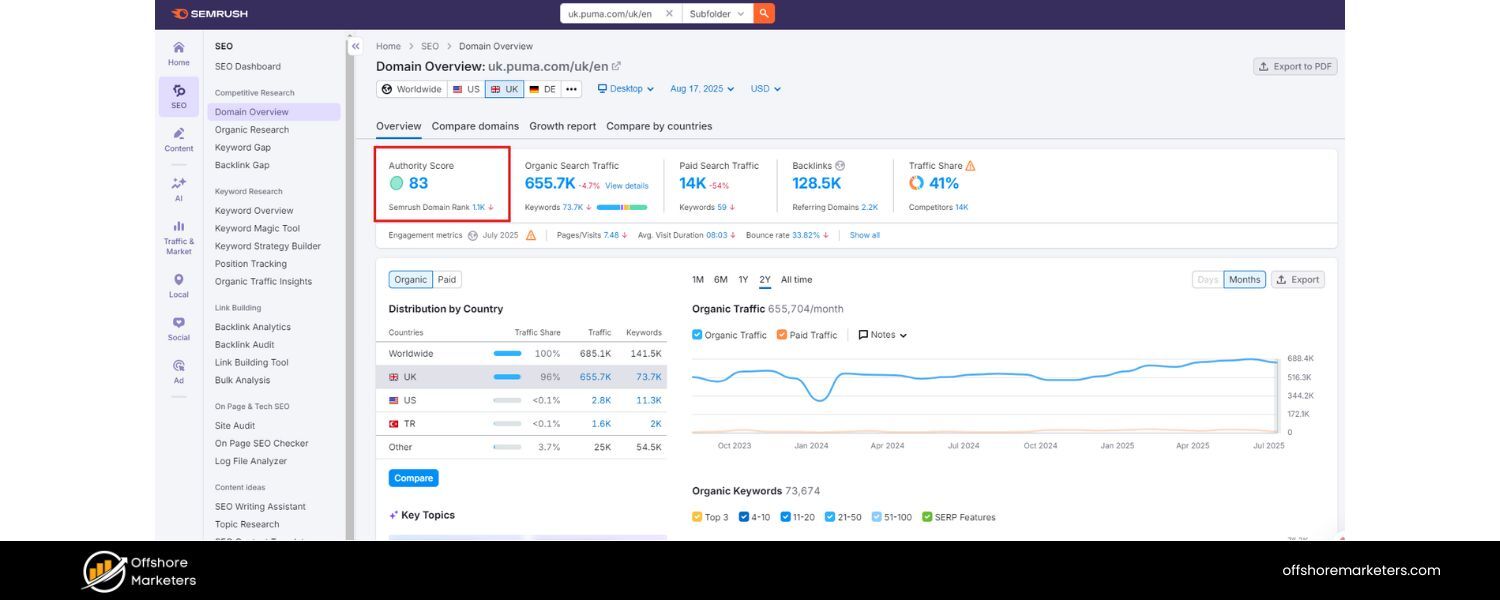
Domain Authority (DA) – or similarly named scores like Domain Rating or Authority Score – is a metric developed by SEO software companies (Moz, Ahrefs, Semrush, etc.) to predict how well a domain can rank on search engines.
It’s usually scaled from 1 to 100, with higher scores indicating a stronger, more authoritative site. While not a direct Google metric, your site’s authority score is a useful composite indicator of your overall SEO health, factoring in things like backlink quality and organic search performance.
Generally, as you earn more high-quality backlinks and grow your organic presence, your authority score will increase.
Monitoring your domain authority over time and comparing it against competitors can provide a quick benchmark of where you stand.
For example, if your DA is 30 and a top competitor is 50, you know there’s a gap in authority that might translate to them outranking you, and that closing this gap with more quality links and content should be part of your strategy.
However, don’t obsess over the exact number – instead, look at the trend (is it going up?) and relative differences with competitors.
How to track it: Tools like Moz’s Link Explorer, Ahrefs, or Semrush can all provide an authority score for your domain. Semrush, for instance, refers to it as the Authority Score, which is accessible in their Domain Overview or free Authority Checker.
You can easily check this periodically. Many tools also let you compare multiple domains side by side – take advantage of that to see how your score stacks up against industry rivals.
If you improve other metrics (like backlinks and content quality), your authority score will naturally improve over time. Just remember, domain authority is a directional guide, not an absolute truth – use it in conjunction with the other metrics here for a holistic view.
9. Technical Site Health (SEO Audit Score & Core Web Vitals)
An often-overlooked aspect of SEO tracking is the technical health of your website. Even if you have great content and plenty of links, technical issues can impede your SEO performance.
Key technical metrics include things like: crawlability and indexation (are search engines able to find and index all your important pages?), site speed and Core Web Vitals (how fast and stable your pages load), mobile usability, and the absence of errors like broken links or duplicate content.
Many SEO tools provide a site health score – essentially an SEO audit score out of 100 – that summarises how technically sound your site is. Maintaining a high site health score means search engines can easily access and rank your content, and users are likely to have a good experience.
For example, if your site’s health score is, say, 70%, an audit might reveal issues such as missing meta tags, slow-loading pages, or broken internal links, which can drag it down.
By addressing these issues (improving site speed, adding meta descriptions, fixing broken links, etc.), you not only enhance the score but also lay a better foundation for all your other SEO efforts. Google has made it clear that page experience and technical excellence significantly impact rankings, making it essential to track these factors.
To track it, use a website audit tool to regularly scan your site. SEO Site Checkup, for instance, can conduct a rapid audit of your site and identify any errors or missing tags that require correction. Other popular options include Semrush’s Site Audit, Ahrefs Site Audit, or free tools like Google’s PageSpeed Insights and Mobile-Friendly Test for specific aspects. These tools often generate an overall health score and list of issues.
Semrush Site Audit, for example, provides a percentage “Site Health” score and details each error with guidance on how to fix it. Track this score over time – your goal should be to raise it by resolving issues, and keep it high (80% or above, ideally).
Additionally, monitor Core Web Vitals (Largest Contentful Paint, Cumulative Layout Shift, etc.) using either Google Search Console’s Core Web Vitals report or PageSpeed tools, as these performance metrics are directly tied to SEO outcomes in terms of user experience.
By keeping an eye on these nine metrics – from traffic and rankings to engagement, conversions, and technical health – you’ll gain a 360° view of your SEO performance. Next, let’s look at tools that can help streamline the tracking of these metrics.
Best Tools for SEO Tracking
Tracking SEO metrics is much easier when you leverage the right tools. Luckily, there are numerous SEO tools and platforms (including free ones) that can collect and report data for you, saving you from the need for manual analysis. Here are some of the top tools and software to help with SEO tracking:
- Google Analytics 4 (GA4)
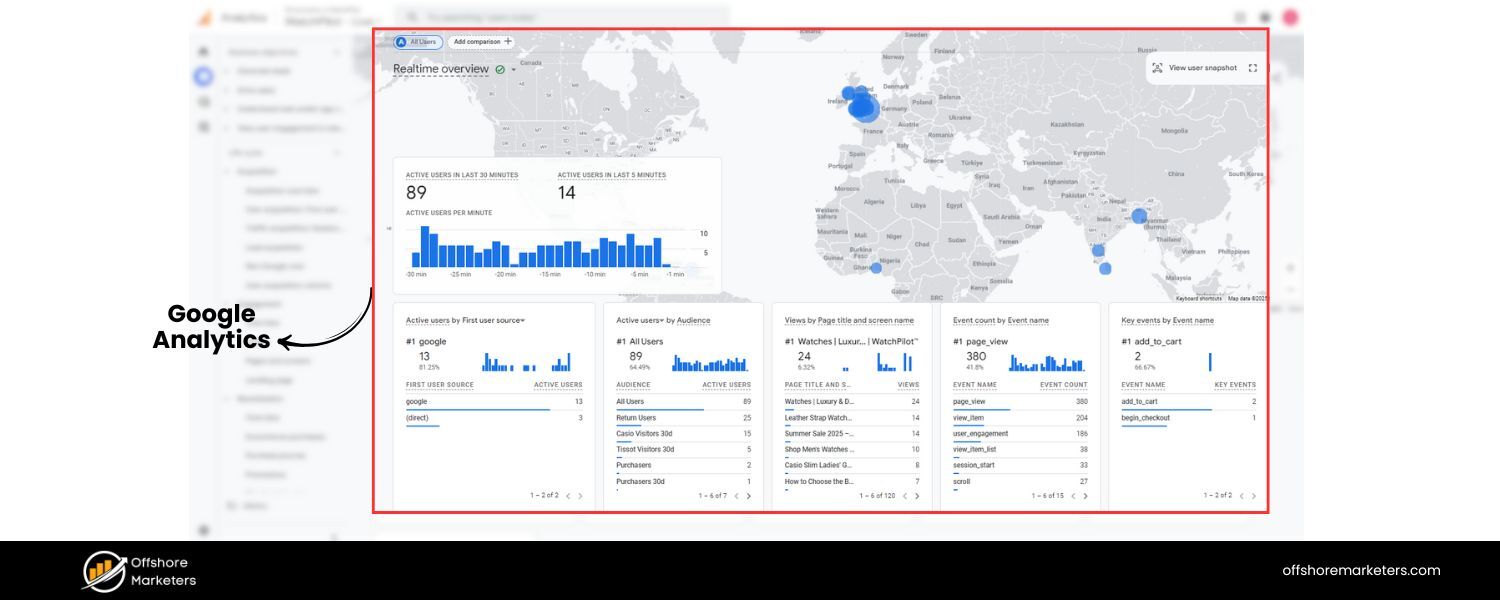
 A free, must-have tool for understanding user behaviour on your site. GA4 lets you monitor organic traffic volume, user engagement (e.g., average engagement time, bounce rate), and conversion events.By filtering reports to show Organic Search traffic, you can see how SEO-driven visitors interact with your site compared to other channels. GA4’s extensive metrics make it indispensable for tracking the on-site performance of SEO efforts.
 - Google Search Console (GSC)
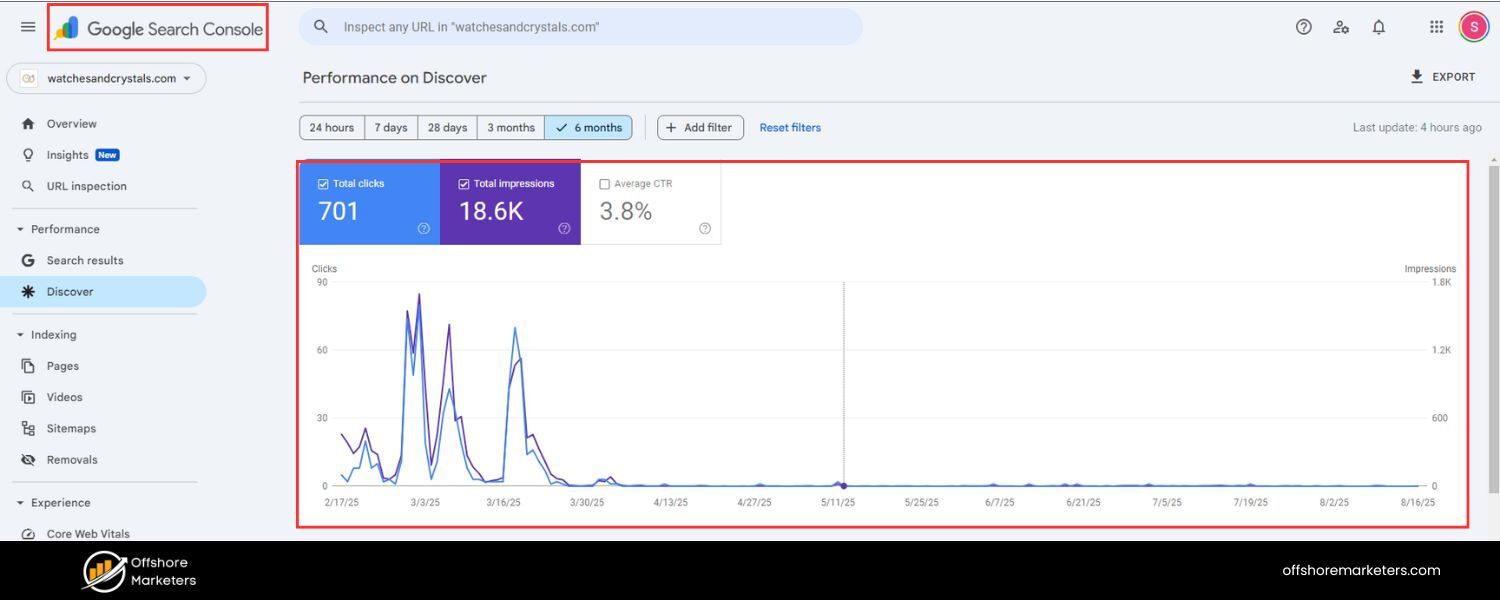 Another free essential tool from Google, GSC focuses on your site’s presence in Google’s search results. It provides data on impressions, clicks, CTR, and average position for your pages and keywords.GSC also alerts you to technical issues, such as indexing errors or mobile usability problems. You can use it to see which queries drive traffic, how your click-through rates vary, and even to submit sitemaps and monitor Core Web Vitals.As a direct line of communication with Google, GSC is invaluable for SEO tracking.
 - All-in-One SEO Platforms (Semrush, Ahrefs, Moz, SE Ranking, etc.)
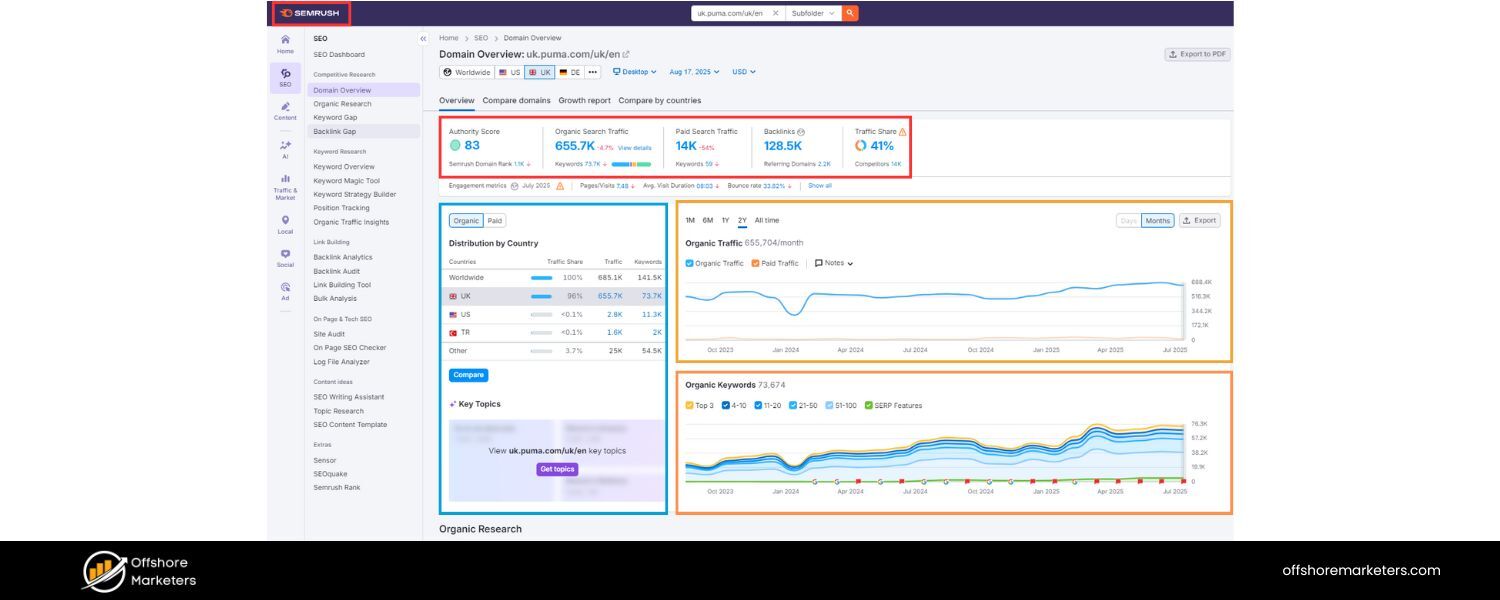 These paid tools consolidate multiple SEO tracking functions into one platform. For example, Semrush offers rank tracking, backlink analytics, organic traffic estimates, on-page audits, and more. Ahrefs is well-known for its backlink index and competitor research features.
Moz Pro provides rank tracking and its proprietary Domain Authority metric. SE Ranking similarly covers keyword tracking, site audits, traffic analysis, and even has a handy reporting toolkit.Such platforms can be a one-stop solution to monitor all your SEO KPIs – from keyword positions to site health – and often allow scheduling automated reports.While they come at a cost, their comprehensive data and convenience can be worth it, especially if you manage SEO for multiple sites or clients. - SEO Audit and Monitoring Tools –If you specifically want to keep an eye on technical SEO, tools like SEO Site Checkup or Screaming Frog SEO Spider are excellent. SEO Site Checkup, for instance, runs a fast audit of your site to check for proper tags, broken links, sitemap status, and other SEO issues, bringing any errors to your attention.Screaming Frog crawls your site like a search engine would, reporting on things like missing meta tags, duplicate content, or redirect chains.Incorporating these tools into your routine (e.g., running a crawl every month) ensures you catch technical problems early and keep your site optimised for crawling and indexing.
- SEO Dashboards and Reporting Tools –To streamline monitoring, consider using a dashboard that aggregates data from multiple sources. Tools like DashThis (an SEO reporting dashboard) can integrate with GA, GSC, and others to display all your key metrics in one customizable report.This is particularly useful for agencies or anyone who needs to present SEO results to stakeholders. Instead of juggling between platforms, a dashboard can pull in your organic traffic, rankings, conversions, etc., into one view.Not only does this save time, but it also makes it easier to spot correlations between metrics (for example, seeing a chart of organic traffic alongside a chart of conversion rate).Even a simple spreadsheet that you update regularly can serve as a “tool” for tracking – the important thing is to centralise your data for a clear overview.
Each of these tools has its strengths, and in practice, you may use a combination of them. For example, a common stack is: use GSC and GA4 for baseline data, plus a tool like Semrush or SE Ranking for more advanced tracking and competitor insights.
The good news is that the basic metrics we discussed can all be tracked with free tools (GA4, GSC) if you’re on a tight budget. As you expand, the paid tools can provide depth and efficiency.
The goal is to make SEO tracking as streamlined as possible – the less time you spend pulling data, the more time you can spend analysing and optimising.
SEO Tracking Best Practices and Tips
Tracking the right metrics and using the right tools will set you on the correct path, but to truly get the most out of SEO tracking, keep these best practices in mind:
- Align Metrics with Business Goals:Focus on the KPIs that matter most to your objectives. For example, if your goal is lead generation, then organic traffic and conversion rate are critical metrics to watch.If you run a content site that earns via ad impressions, you might emphasise organic pageviews and dwell time. Don’t get distracted by vanity metrics – track what moves the needle for your business.
- Don’t Track Everything (Choose 2–3 Key Metrics to Prioritise):It might seem counterintuitive, but tracking too many metrics can lead to analysis paralysis. It’s often recommended to zero in on a handful of core metrics at a time so you can truly focus on improving them.That doesn’t mean you ignore the others, but perhaps in a given quarter, you might prioritise improving CTR, conversion rate, and site health while simply maintaining others. A focused approach yields clearer insights and results.
- Monitor Your Focus Keywords and Segments:If you have specific high-value keywords (or groups of keywords) that you’re targeting, make sure to pay special attention to their performance. Track rankings for those focus keywords in the locations or regions that matter to you.For instance, if you operate in two countries, monitor your SEO metrics separately for each locale – differences can be significant. Similarly, keep an eye on different sections of your site (e.g., blog vs. product pages) to ensure they serve distinct purposes.
- Leverage Dashboards and Automation:Save time by using dashboards or automated reports for your SEO tracking. As mentioned, tools can pull data from various sources and present it in easy-to-digest formats.This not only speeds up your workflow but also makes it simpler to communicate results to others. For example, set up a weekly email report that summarises your key SEO metrics, so you’re always aware of changes without manually checking multiple tools each time.
- Adjust Tracking for Audience vs. Clients:If you’re reporting to clients or non-SEO stakeholders (like upper management), remember that less can be more. Internally, you might scrutinise detailed metrics daily, but for clients or bosses, focus on high-level outcomes and trends.Provide concise, clear reports that highlight overall traffic growth, key ranking improvements, and ROI (e.g. conversions or revenue from SEO). They’re more interested in the results than the nitty-gritty.Meanwhile, for yourself or your SEO team, maintain the detailed tracking and diagnostic metrics so you can troubleshoot and strategise effectively.
- Be Consistent and Timely:Make SEO tracking a routine. Whether you check your dashboard daily or pull reports monthly, consistency is key to recognising patterns.Regular checks help you catch sudden spikes or drops in metrics (perhaps due to a Google algorithm update or a site issue) so you can react promptly.Also, track over sufficiently long periods. SEO improvements often take weeks or months to take effect, so use month-over-month and year-over-year comparisons to account for short-term fluctuations.
By following these practices – aligning your metrics with goals, focusing on what matters, using tools wisely, and keeping stakeholders in mind – you’ll make your SEO tracking both effective and efficient. Remember that SEO is a long game; tracking helps ensure you stay on course and make data-backed decisions along the journey.
Conclusion
In the ever-evolving world of SEO, tracking your performance is not optional – it’s essential. By measuring the right SEO metrics and monitoring them consistently, you gain actionable insights into what’s working and what isn’t.
This allows you to refine your strategy, capitalise on new opportunities, and fix problems before they undermine your hard work. From organic traffic and rankings to backlinks, conversions, and technical health, each metric we’ve discussed provides a piece of the puzzle.
Using analytics and SEO tools, you can assemble those pieces into a clear picture of your SEO progress and overall success.
SEO tracking is an ongoing process that pays dividends over time. As you track and tweak, you’ll see your visibility grow, your traffic increase, and most importantly, your business goals (leads, sales, or engagement) improve as a result of your SEO efforts.
Stay committed to measuring and learning from your data, and you’ll be well on your way to SEO success. Happy tracking!

.png)
Shopify SEO: Guide to Ranking Your Store and Driving Sales
Most Shopify store owners set up their store, list their...

Content Marketing : Definitive Guide to Strategy, Content Types, and Measurable ROI
Content marketing generates 3x more leads than outbound marketing at...

Above the Fold: Guide to Conversions, Rankings and Faster Pages
Above the Fold in 2026: The Complete Guide to Conversions,...

Off-Page SEO Checklist: Guide to Building Real Authority
Most websites spend months creating great content, only to wonder...

What Is Keyword Bidding? The Complete Strategy Guide for Smarter Ad Spend
Most advertisers believe the highest bid wins the auction. It...

What Is Google Trends? The 2026 Marketer’s Complete Guide
If you are not already pulling weekly insights from Google...
If you want a growth partner who will get to know every aspect of your business and treat your budget like their own — we are the right fit.
.png)


.png)
.png)
.png)
.png)
.png)
.png)
2026 ALL RIGHTS RESERVED MADE IN INDIA
