
Keyword Cost: Master How to Calculate and Optimize CPC
September 2, 2025
Introduction
Keyword cost can make or break your online advertising budget. Imagine paying over $50 for a single click on a Google ad, it happens in competitive industries. In fact, certain niche keywords (like some insurance terms) have been reported to cost over $300 per click!
Understanding keyword cost, the amount you pay each time someone clicks your ad, is crucial for any marketer. In this guide, we’ll demystify keyword costs, show you how to estimate them, and share seasoned strategies (from 25+ years of marketing experience) to optimize your pay-per-click (PPC) spend for maximum return.
What Is Keyword Cost in PPC and Why Does It Matter?
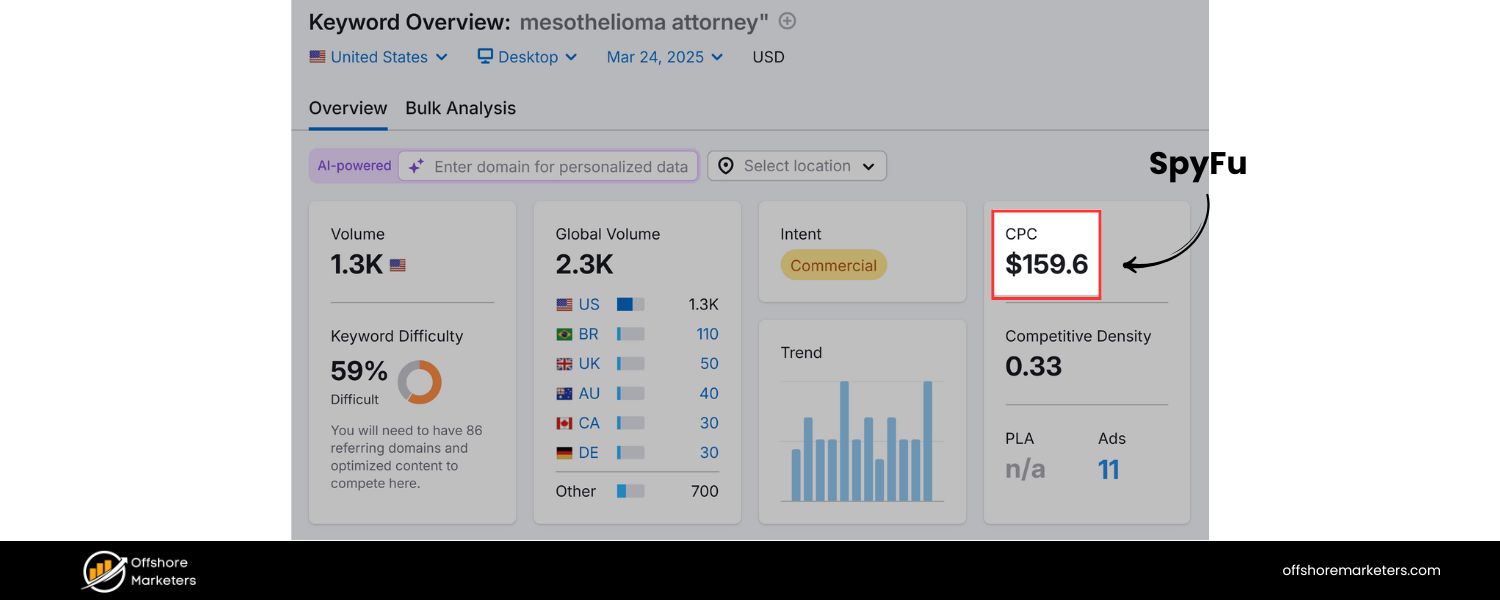
Keyword cost refers to the price you pay each time someone clicks your pay-per-click ad for a given keyword. It’s essentially your cost-per-click (CPC) for that keyword. For example, if a keyword has a $2.50 CPC, you’ll be charged about $2.50 every time someone searches that term and clicks your ad.
Keyword cost matters because it directly affects your ad budget and ROI, higher costs mean fewer clicks for your budget, while lower costs let you reach more people for the same spend.
Different keywords have different costs depending on their competitiveness and value. Across all industries, the average CPC in Google Ads was about $2.69 on search and $0.63 on display a few years ago.
Today, those averages have risen, the overall average CPC in 2024 is around $4.66 on Google search ads. This jump reflects increasing competition (and even inflation in advertising costs).
Some sectors are far above average: for instance, legal-related keywords have an average CPC close to $9, and many financial or professional service keywords range from $5 to $7. On the other hand, less competitive niches (like certain arts or travel keywords) might cost under $2 per click.
Why does knowing this matter? Because with insight into keyword costs, you can manage your ad campaign budget effectively and optimize performance.
If you ignore keyword prices, you might blow through your budget on just a few expensive clicks. But if you plan with costs in mind, you can choose keywords that fit your budget and deliver a solid return. In short, understanding keyword cost helps you make every click count, getting the most visibility and conversions for each dollar spent.
How to Find Out a Keyword’s Cost (Keyword Cost Research Methods)
Before you launch a campaign, you’ll want to research how much your target keywords might cost. Fortunately, there are reliable tools and techniques to estimate keyword CPC:
1. Using Google Keyword Planner to Estimate Keyword Cost
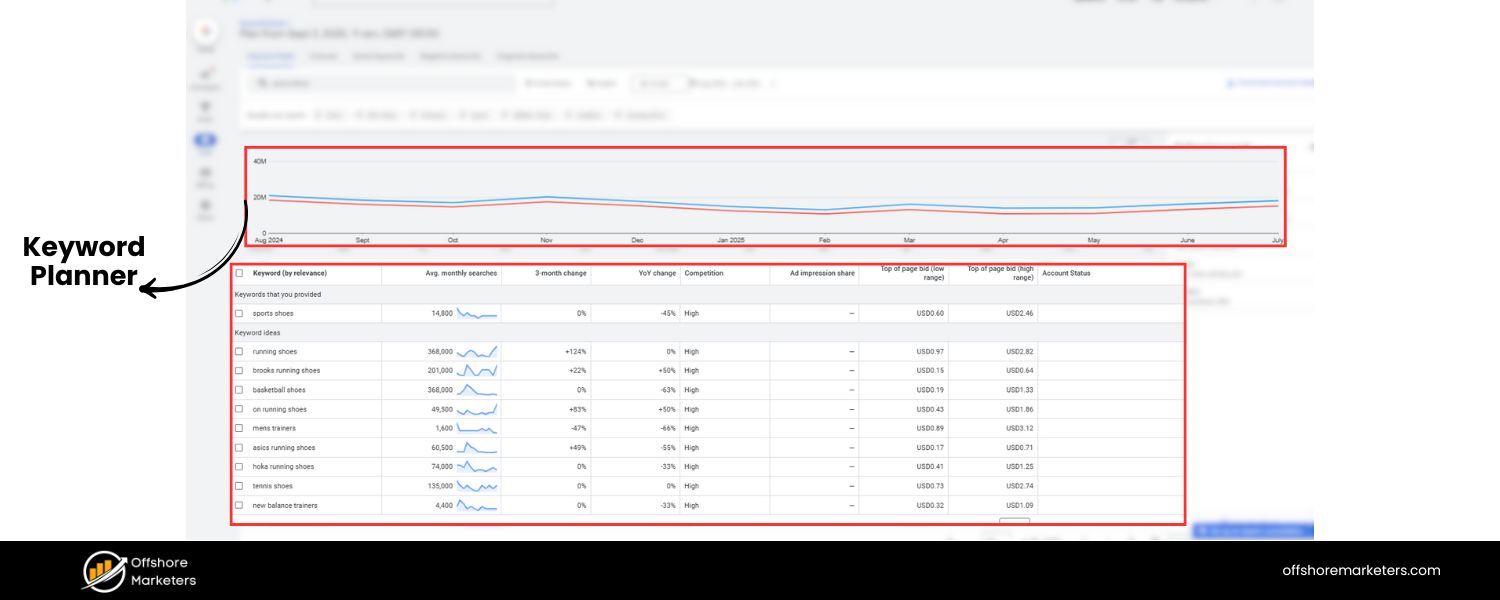
Google’s own Keyword Planner (available in any Google Ads account) is one of the best free ways to check keyword costs. Follow these steps to get cost estimates:
A. Open Keyword Planner
Log in to your Google Ads account and navigate to Tools & Settings > Keyword Planner (under “Planning”). If you’re new to Google Ads, you may need to set up an account first.
B. Choose a function
In Keyword Planner, select either “Discover new keywords” (to find new ideas) or “Get search volume and forecasts” (to get data on specific keywords you already have in mind). For cost estimates, the “Get search volume and forecasts” option is very handy.
C . Enter keywords
If you have a list of keywords, paste them into the planner and click “Get started.” If not, you can use “Discover new keywords” by entering a broad term or your website URL to get suggestions (which will include cost data).
D. Review cost estimates
Look at the columns labeled “Top of page bid (low range)” and “Top of page bid (high range).” These show the historical low and high CPC ranges advertisers pay for the first page ad slot for that keyword.
For example, you might see a keyword with a low-range bid of $1.00 and high-range of $4.00 – meaning most advertisers pay somewhere in that range per click. These ranges vary by location and network settings, so try filtering for your target location to get realistic numbers.
E. Interpret the data
The planner might show, for instance, that “project management software” has a top-page bid range from $8 to $20, indicating it’s highly competitive.
Meanwhile, a longer-tail term like “free project management tool for freelancers” might show a much lower range. Use these estimates as a guide for which keywords you can afford.
Remember, your actual true CPC may vary slightly, but the planner’s numbers are a solid starting point.
Pro tip: When using Keyword Planner, also pay attention to the search volume and competition level (often labeled as “Competition” or shown as a density metric).
Keywords with very high search volume and high competition tend to lean toward the higher end of the bid range (expensive), whereas niche keywords with lower volume usually have lower costs.
For example, “real estate agent” in a large city might show a steep cost due to many advertisers, while “commercial real estate leasing in [your city]” could be cheaper.
2. Leveraging Other Tools for CPC Estimates
Beyond Google’s planner, many third-party keyword research tools can help you find keyword cost information:
A. Semrush Keyword Overview or Magic Tool
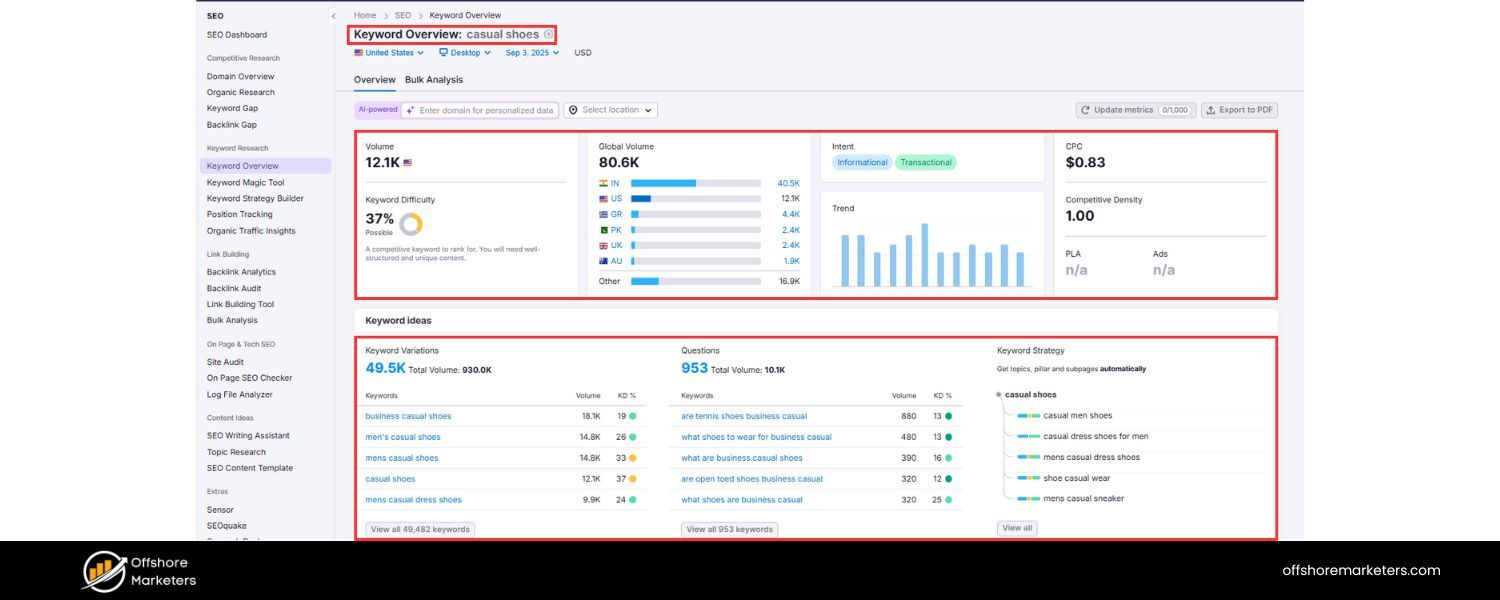
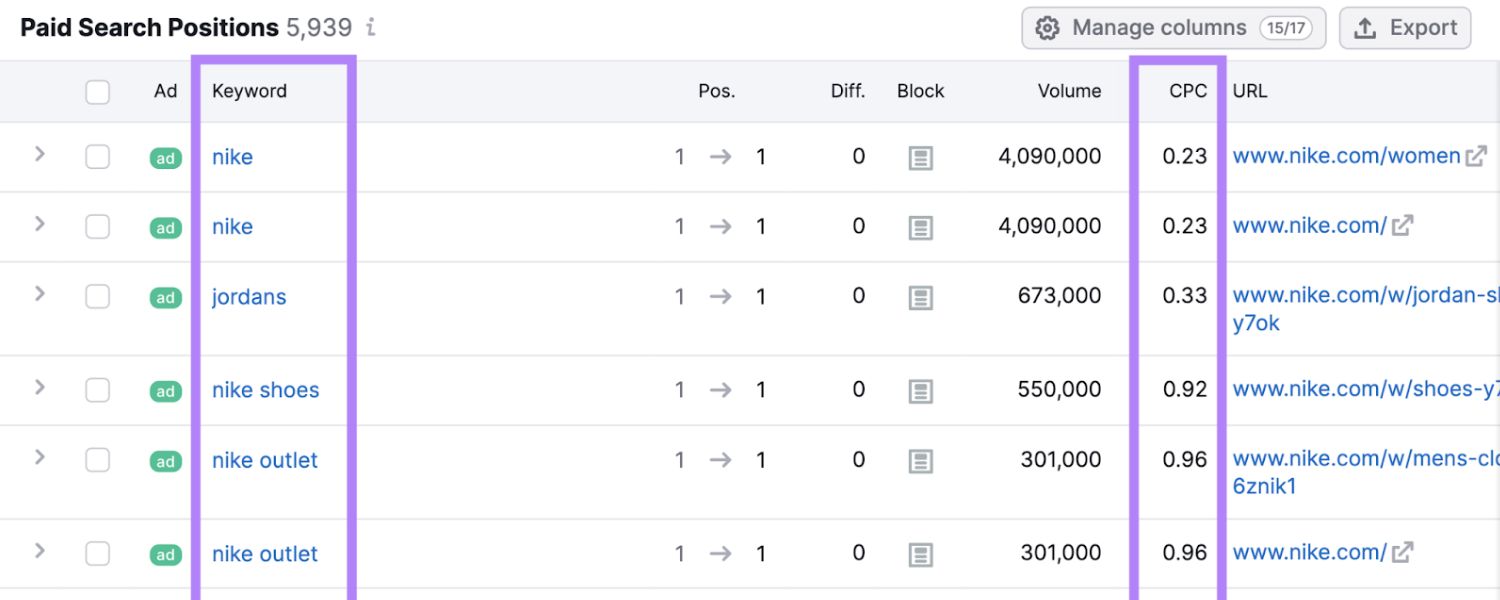
Platforms like Semrush allow you to enter a keyword (or a batch of keywords) and see the average CPC for each, along with other metrics. This can be useful to get cost data at scale and even see trends over time. For example, Semrush’s tools will show you a keyword’s average CPC in USD and let you sort or filter keywords by cost.
B. SpyFu
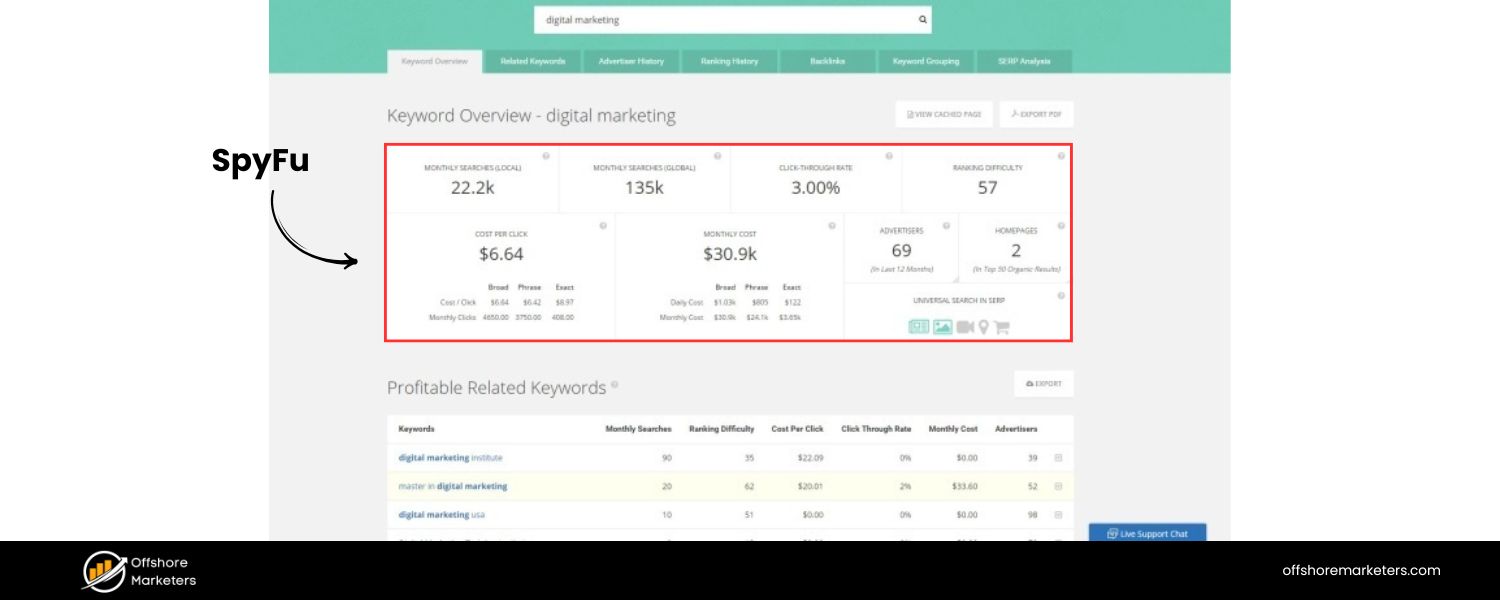
SpyFu is geared toward competitive research. You can input a keyword to see its estimated CPC and even find which competitors are bidding on it. SpyFu also lets you spy on a competitor’s keywords – revealing what they pay for top terms, which helps gauge cost in your niche.
C. WordStream Free Keyword Tool
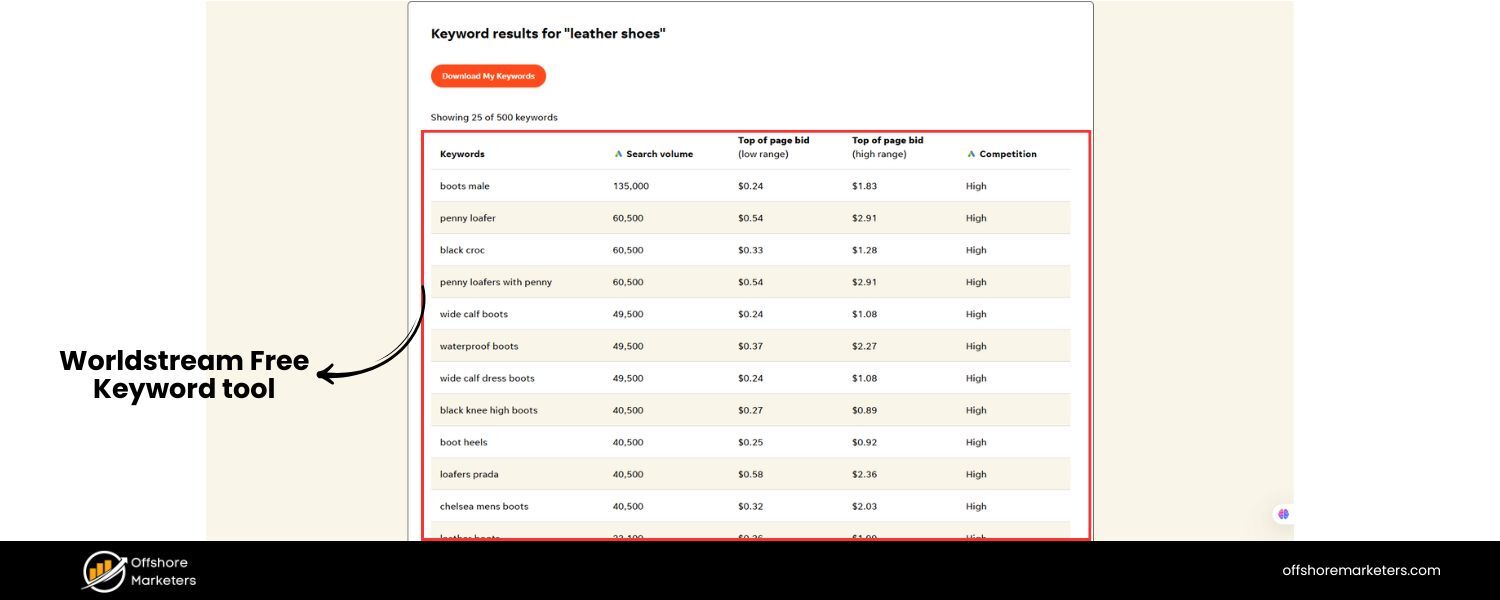
WordStream offers a free keyword research tool that provides keyword suggestions along with their approximate CPC. It also allows filtering by industry. For instance, their data shows that legal keywords average around $6–$7 per click and insurance keywords around $50 per click on average, with some higher outliers. Tools like this are handy for quick checks without a Google Ads login.
D. Wordtracker and Ubersuggest
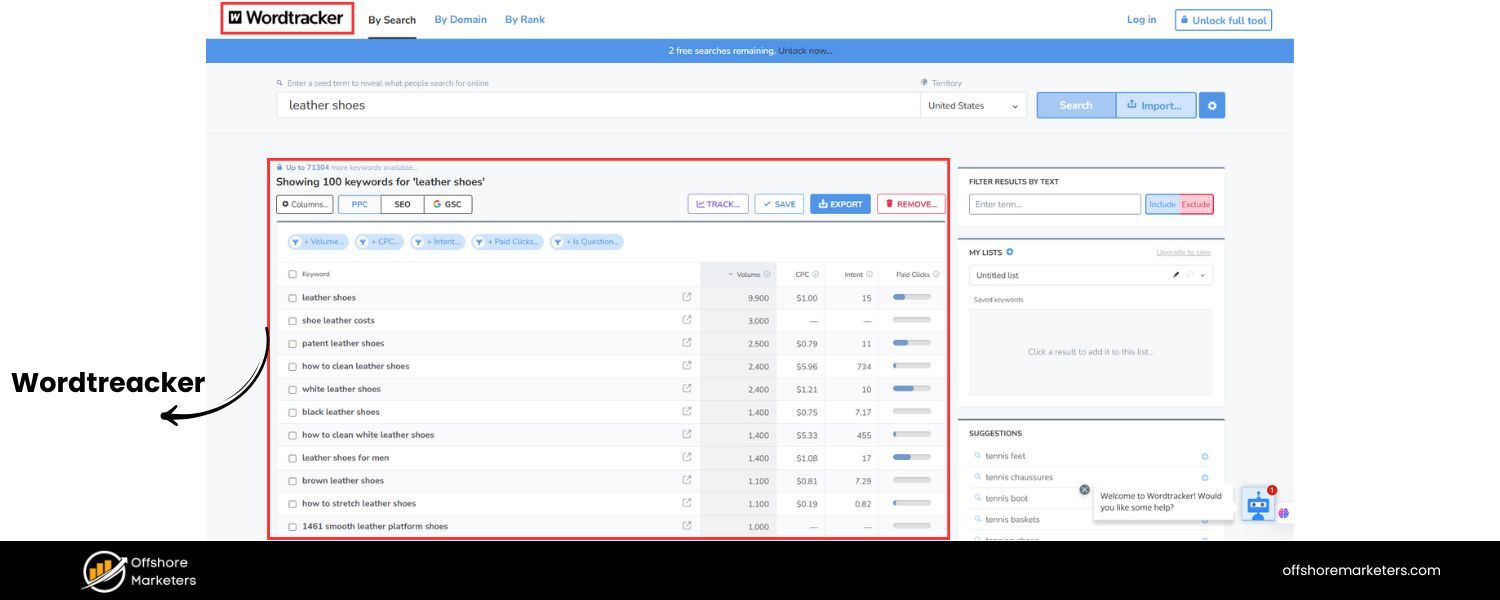
These are other popular tools. Wordtracker can generate keyword ideas with competition and cost metrics. Ubersuggest (by Neil Patel) similarly shows an estimated CPC for each keyword suggestion and is known for being beginner-friendly (with a mix of free and paid features).
E. Other Google Ads data
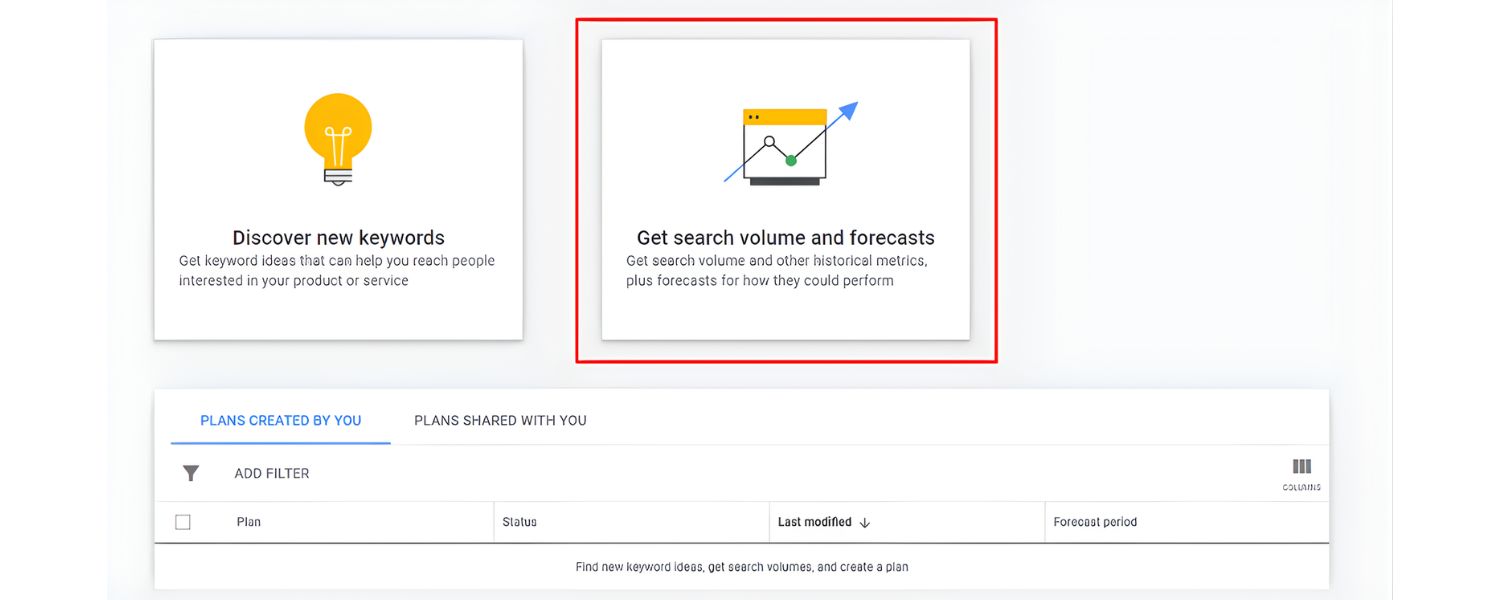
Google Ads itself provides forecasting if you set up a draft campaign. By entering a daily budget and keywords, Google can forecast how many clicks and impressions you might get – indirectly showing costs.
This can be advanced, but it’s another way to sanity-check how costs might accumulate for a set of keywords.
Each tool may give slightly different numbers (data sources and timing differ), but they all revolve around the same concept: estimating the price advertisers pay per click.
If one tool shows a keyword CPC of $5 and another says $4.50, you can assume it’s in that ballpark – likely a moderately expensive term. Use these tools to build a list of target keywords that fit your budget and goals.
Factors That Influence Keyword Cost
Why do some keywords cost $0.50 and others $50? Several key factors determine how pricey a keyword will be:
1. Competition (Bid Density)
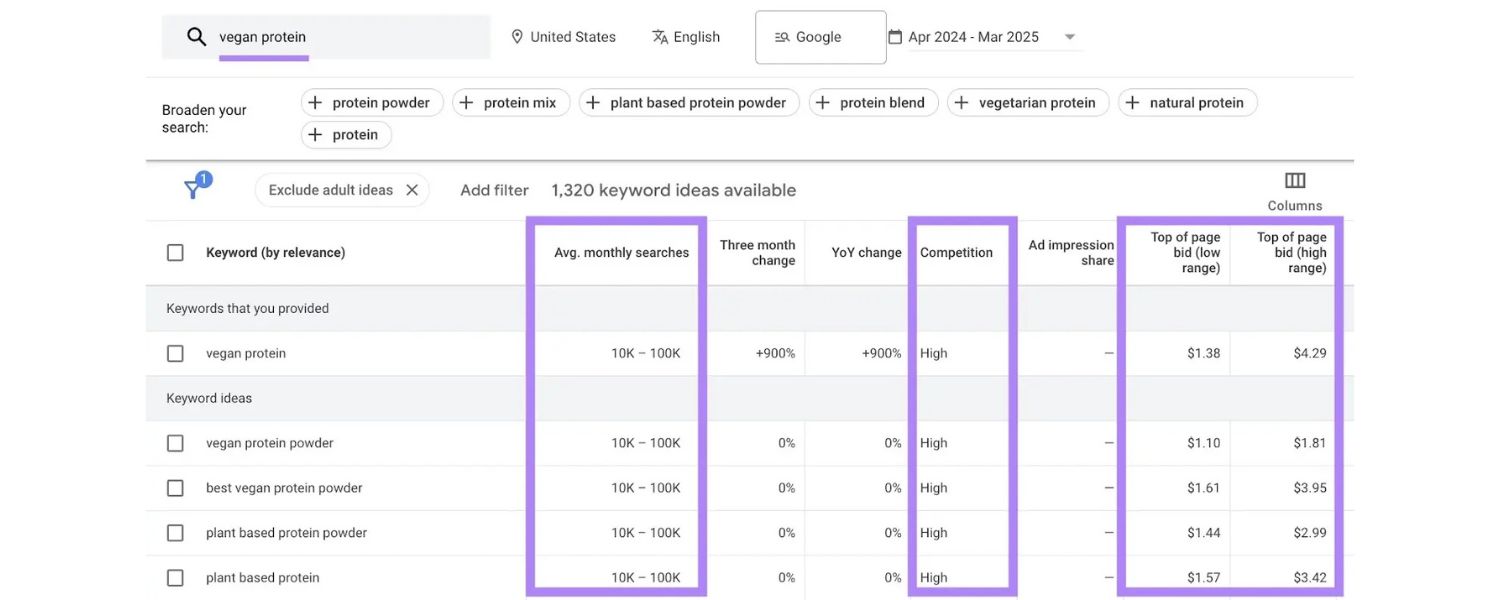
The number of advertisers bidding on a keyword is a major driver of cost. Popular, high-demand keywords with many advertisers will have higher CPCs, since everyone is bidding against each other for visibility.
For example, dozens of insurance companies might bid on “best car insurance,” driving the price up, whereas a niche term like “antique car insurance appraisals” might have few bidders and a lower cost.
2. Industry Value
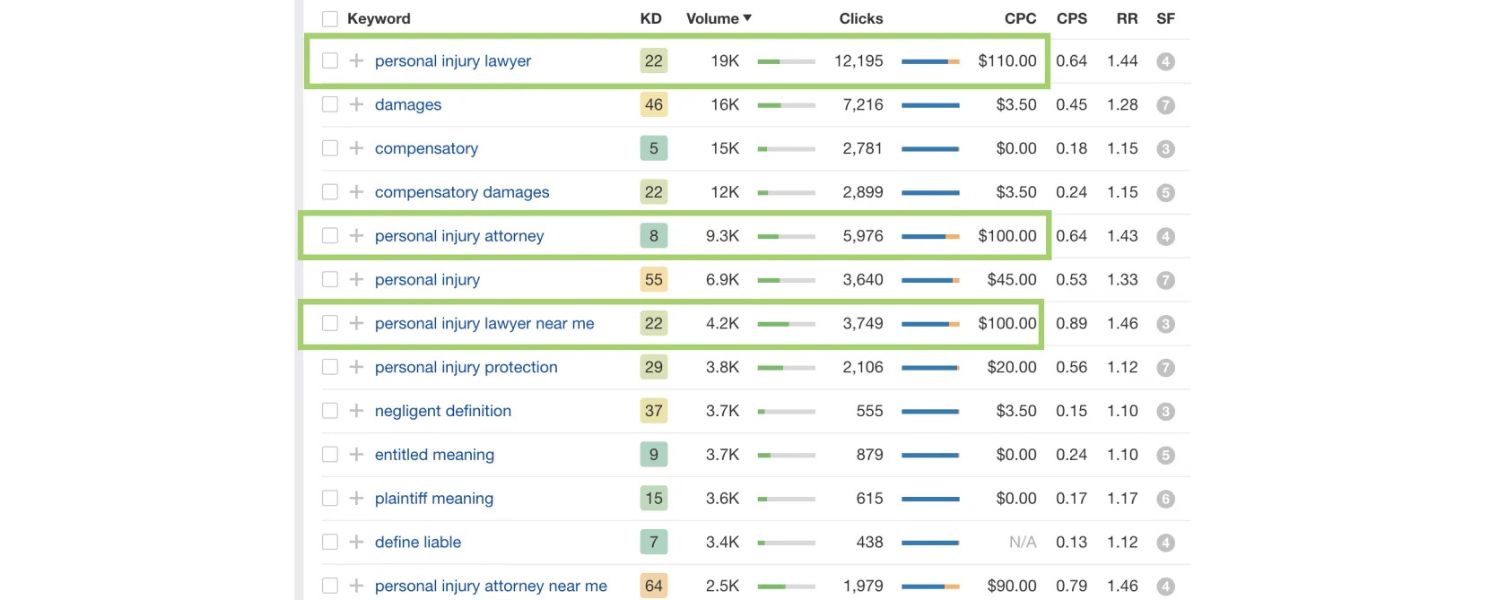
Some industries inherently tolerate higher costs per click because the customer value is high. Legal services, financial products, and B2B software are known for expensive keywords – advertisers can justify paying $50 for a click if a single sale is worth $5,000.
Keywords related to lawyers, bail bonds, or software can be among the most expensive (often tens of dollars per click) because the stakes and lifetime value of a customer are high. Conversely, industries like arts and crafts or small retail have lower margins, so their keywords tend to be cheaper.
3. Quality Score
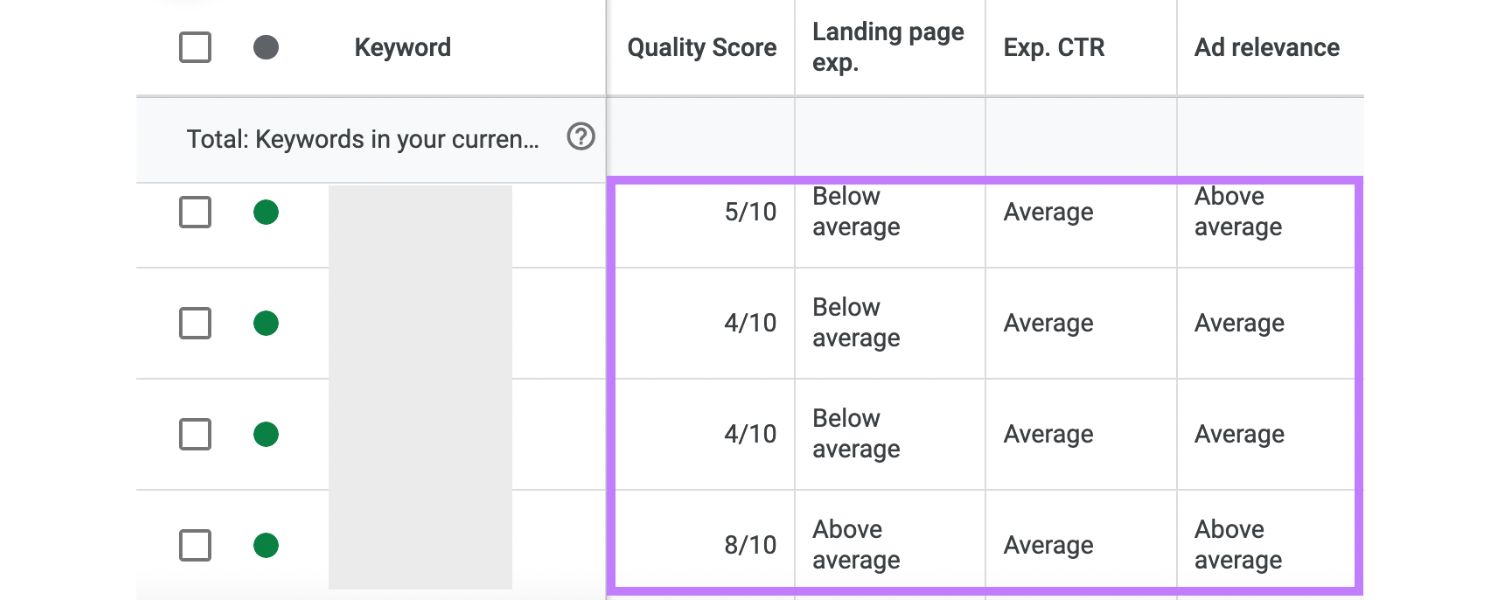
Google uses a Quality Score metric to rate the quality and relevance of your ads and landing pages for the keyword. A higher Quality Score can effectively lower the cost you pay per click.
In Google’s ad auction, the actual CPC you pay is influenced by your Quality Score – advertisers with the best Quality Scores are rewarded with the lowest CPC for a given position.
This means if your ad is highly relevant and well-crafted, you might pay, say, $1.80 per click while a competitor with a poorer ad pays $2.50 for the same keyword position.
4. Search Volume & Demand
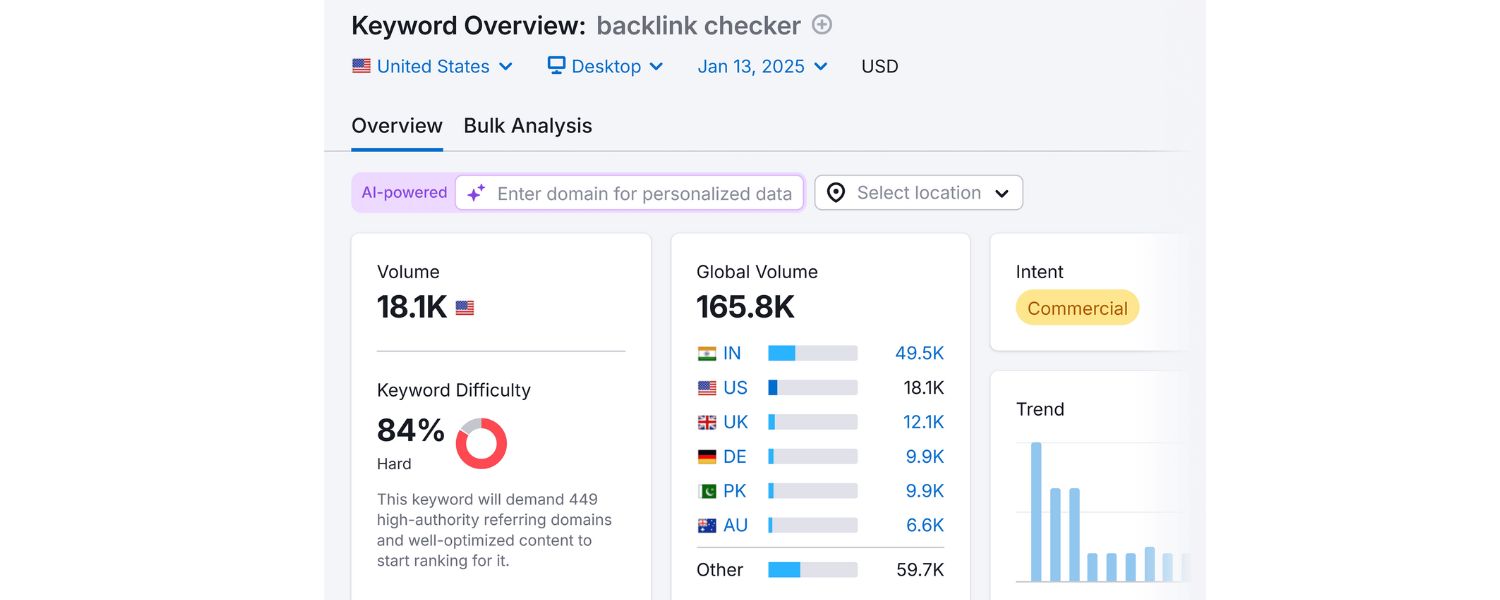
Keywords that a lot of people search for (high volume) can be double-edged. High search volume often attracts more advertisers, raising competition and cost. However, if demand is high but competition isn’t proportionally high, sometimes volume can dilute cost.
Generally, though, expect high-volume generic terms (e.g. “insurance quote”) to command higher CPCs than very specific terms, simply because they can drive significant traffic and leads.
5. User Intent and Keyword Relevance
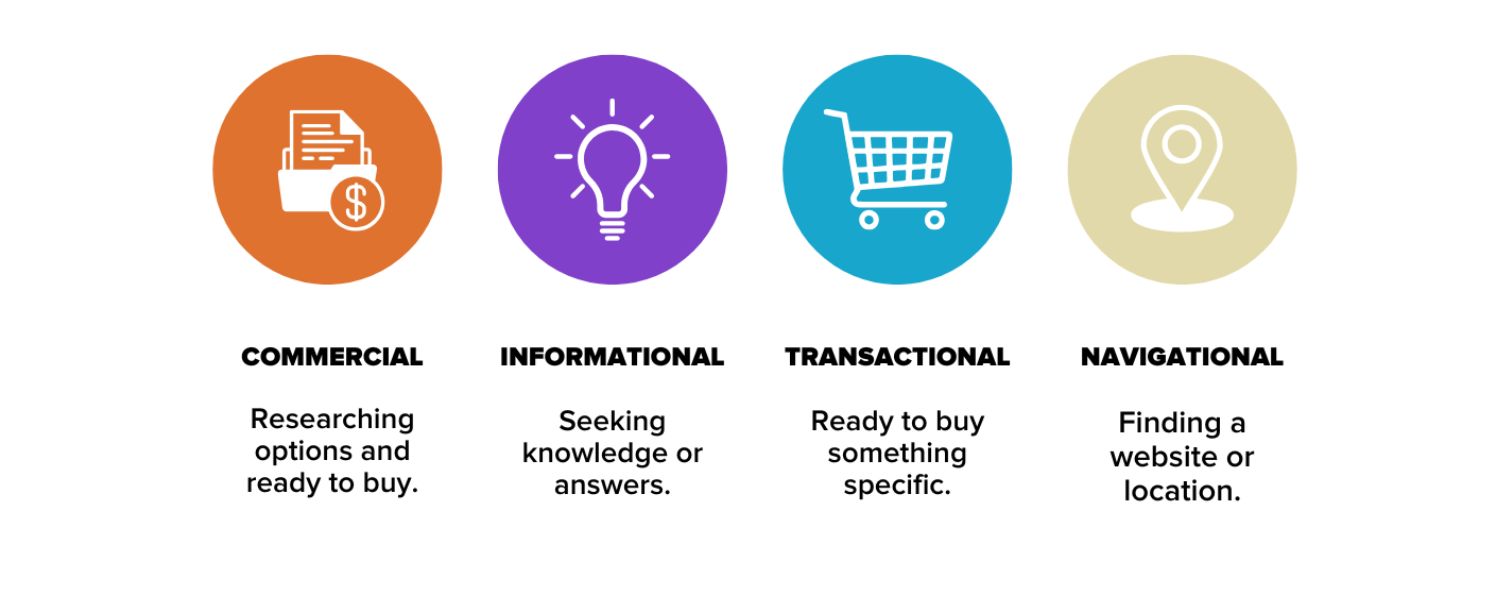
Keywords that signal strong commercial intent (like “buy”, “services”, or specific product names) often cost more than informational queries. For instance, “buy CRM software online” may cost more per click than “what is CRM software” because searchers looking to buy are more valuable to advertisers.
Ensuring your keyword is tightly relevant to your offering also affects cost via Quality Score – if your ad and landing page directly answer what the user is searching, your Quality Score goes up and cost goes down.
6. Ad Network & Placement
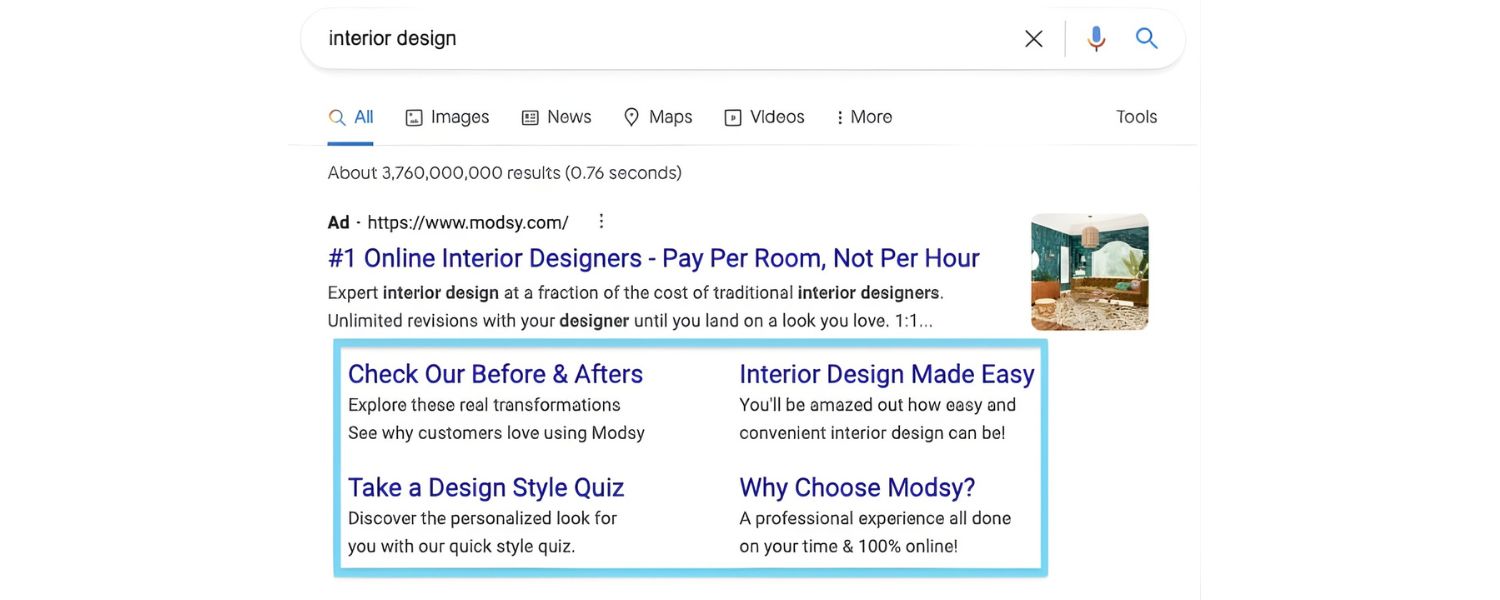
Where your ad appears plays a role. Search Network ads (the text ads shown on Google search results) typically have higher CPCs because they catch users actively searching and ready to click.
Display Network ads (banner/text ads on websites) usually cost much less per click (often a fraction of search CPC), since they are more about passive visibility and have lower click-through rates.
Similarly, different platforms (Google vs. Bing vs. social media) have different cost dynamics – but in this article we focus on Google, where most keyword-based ads happen.
7. Geographic Location
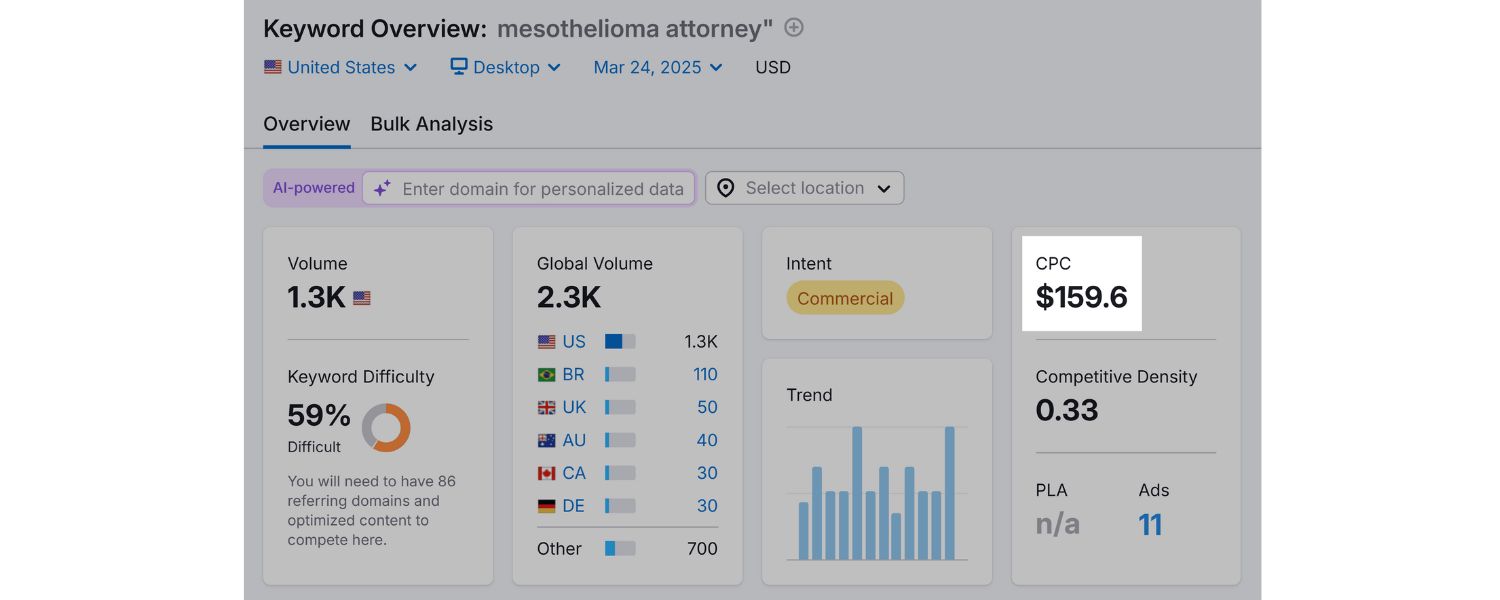
Keyword cost can vary by location. A keyword like “plumber” might have a higher CPC in a big city (more plumbers competing for customers) and a lower CPC in a small town.
Advertisers in lucrative markets are willing to bid more, so local market competition affects the price. Always consider setting location targeting appropriately – there’s no sense paying for clicks in regions you don’t serve.
8. Seasonality and Trends
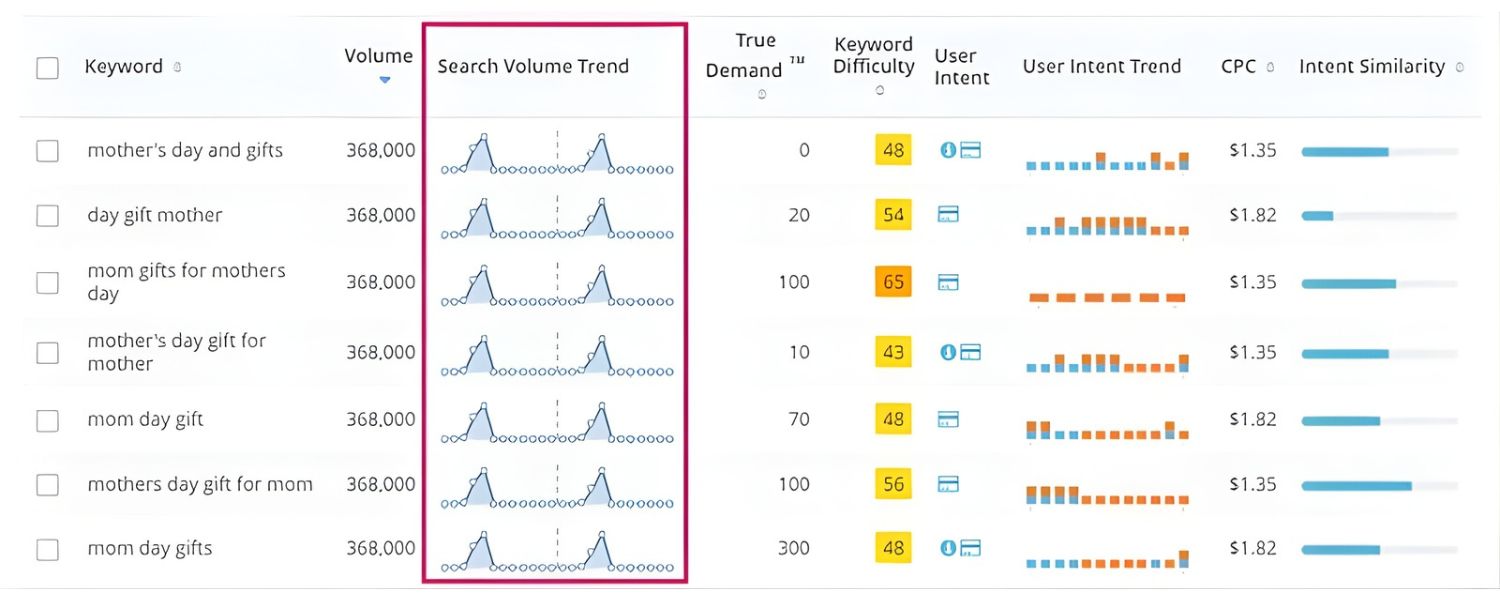
Timing can spike costs. Around peak seasons or trending events, certain keywords get more competitive. For example, searches for “flower delivery” become much more expensive around Valentine’s Day, and “tax preparer” clicks cost more in the lead-up to tax season.
If many businesses suddenly bid on a trending keyword (like a new popular product or a viral news topic), the CPC can shoot up temporarily. Being aware of seasonal fluctuations helps in budgeting – you might accept higher costs during your peak sales season and pull back during off-peak times.
9. Bidding Strategy
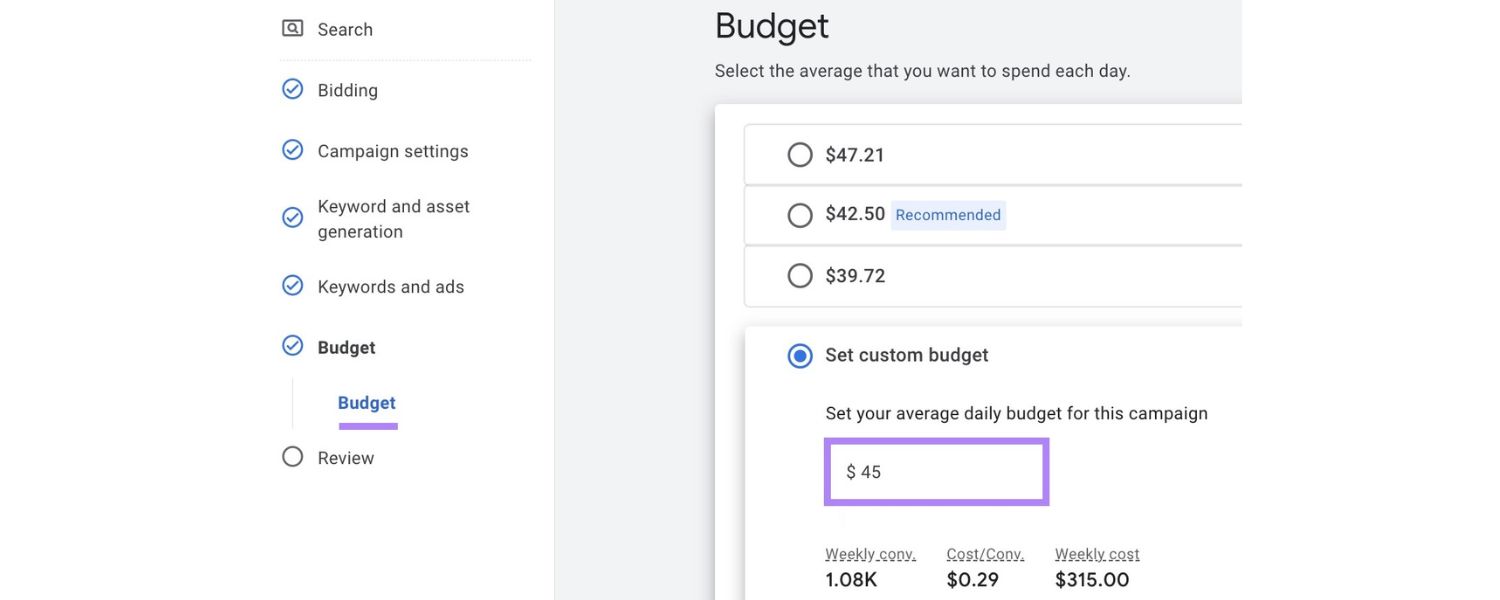
How you bid in Google Ads can influence your costs. Automated bidding strategies (where Google’s algorithms set your bids to maximize results) might raise bids to win more clicks, sometimes leading to higher average CPC – especially in competitive auctions.
Manual bidding, where you set maximum CPCs yourself, gives more control to cap bids, though it requires more management. For newcomers, manual bidding can prevent overspending, whereas automated strategies can be useful once you have solid conversion data to let Google optimize.
The key is that your approach to bidding (target CPA, maximize clicks, etc.) will impact the cost you end up paying per click.
Understanding these factors will help you make sense of why a keyword costs what it does. Many of these elements are intertwined – for example, more competitors (competition) during holiday season (timing) will drive up bids, but you can mitigate that with better ads (quality score) or by focusing on niche long-tail terms (lower competition).
Next, let’s look at how you can actively use this knowledge to reduce your keyword costs and improve your ROI.
How to Reduce Keyword Costs and Improve Your ROI
High keyword costs aren’t a fait accompli – you can take action to bring your costs down or ensure you’re getting more value for what you pay. Here are some expert strategies to optimize your campaigns and make every click as cost-effective as possible:
1. Improve Quality Score through Relevance
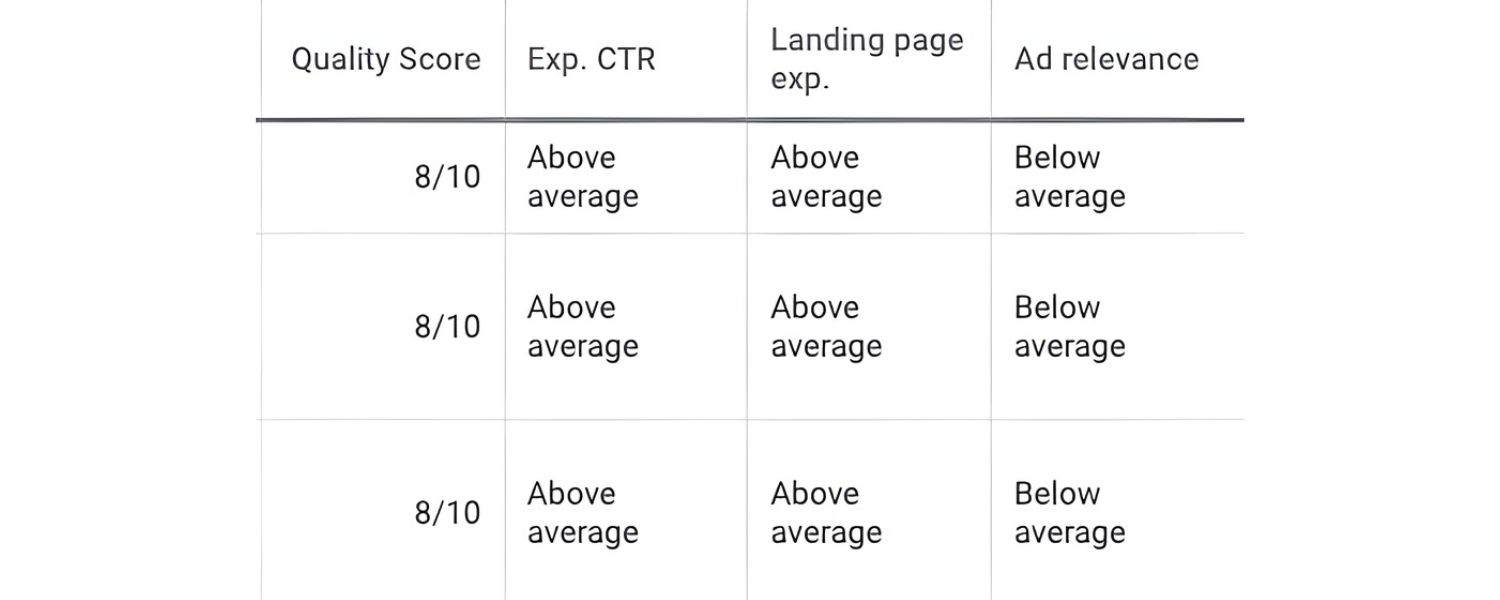
One of the most powerful levers for lowering CPC is improving your Google Quality Score. Remember, Google rewards relevancy – the more relevant your ad and website are to the keyword, the less you’ll likely pay per click. To boost Quality Score, start by optimizing your ad copy and landing pages:
A. Align ad text with keywords
If you bid on “eco-friendly office supplies,” make sure your ad headline and description explicitly reference eco-friendly office supplies.
When searchers see exactly what they queried, they’re more likely to click (raising your click-through rate, or CTR). A higher CTR signals to Google that your ad is helpful, improving Quality Score.
B. Ensure landing page quality
The page your ad leads to should directly address the keyword and offer a good user experience (fast load time, mobile-friendly, relevant content).
For example, for the “eco-friendly office supplies” ad, the landing page could showcase your sustainable products category with information on their eco-certifications.
Google evaluates landing page relevance and user experience as part of Quality Score. A better landing page means you could pay less for the same keyword position.
By honing in on Quality Score, advertisers often see a win-win: lower costs and better ad performance. In Google’s formula, if your ads are top-notch, you might outrank competitors while paying less per click. It may take effort to tweak ads and webpages, but the payoff is long-term savings and higher ROI.
2. Target Long-Tail, High-Intent Keywords
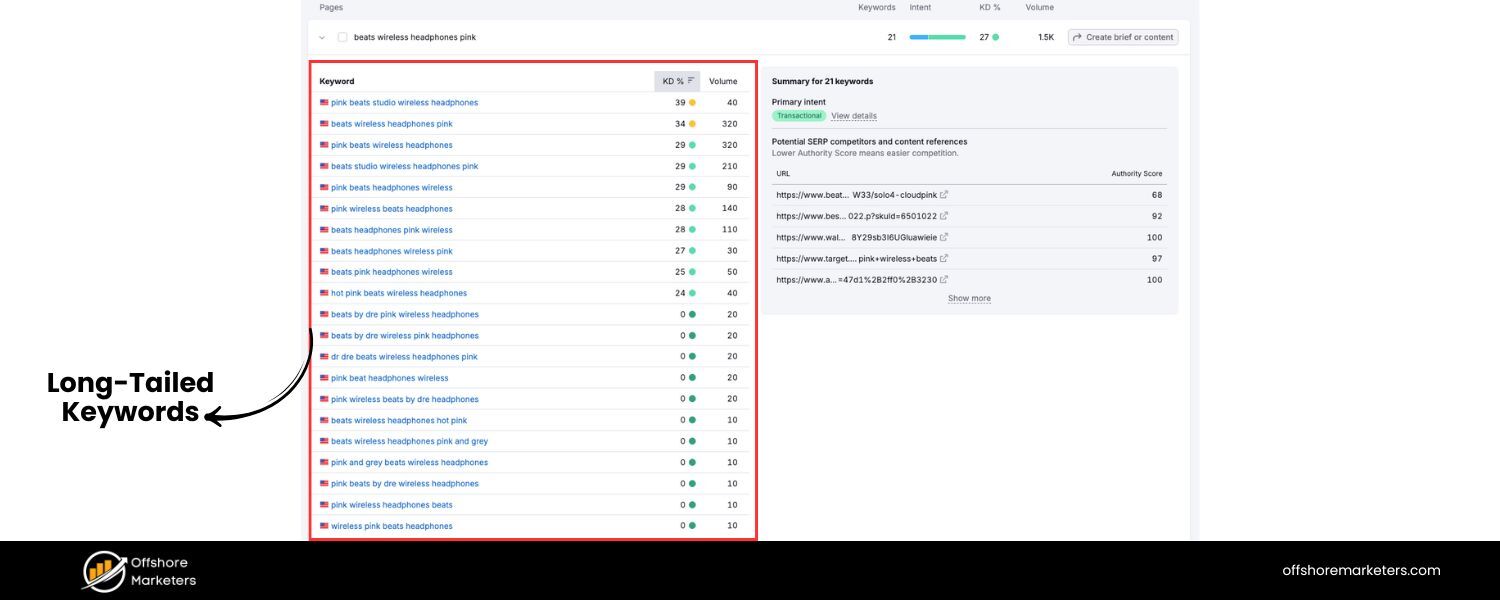
Long-tail keywords – longer, more specific search phrases – are typically less expensive and can be more effective. Instead of spending big on a single broad term like “software,” you might target a phrase like “project management software for marketing teams.”
Long-tail terms usually have lower search volumes, but also lower competition and cost, since not every advertiser is bidding on those exact phrases. They also often indicate a more ready-to-act user (high intent), which can mean better conversion rates.
For example, a broad keyword “running shoes” will be costly and bring all sorts of clicks. A long-tail keyword “best running shoes for marathon training” will have fewer searches, but someone typing that is further along in their research and closer to purchase – and fewer competitors are vying for that precise term.
You can likely bid on the long-tail term at a fraction of the cost of the broad term. By capturing lots of specific, intent-driven searches, you reduce wasted spend and often get more qualified traffic. Plus, if each of those clicks converts more frequently, your cost per conversion plummets, improving ROI dramatically.
When building your keyword list, brainstorm specific queries your ideal customer might type, and use tools to find related long-tail suggestions. These gems can keep your average CPC low.
3. Use Negative Keywords and Refine Targeting
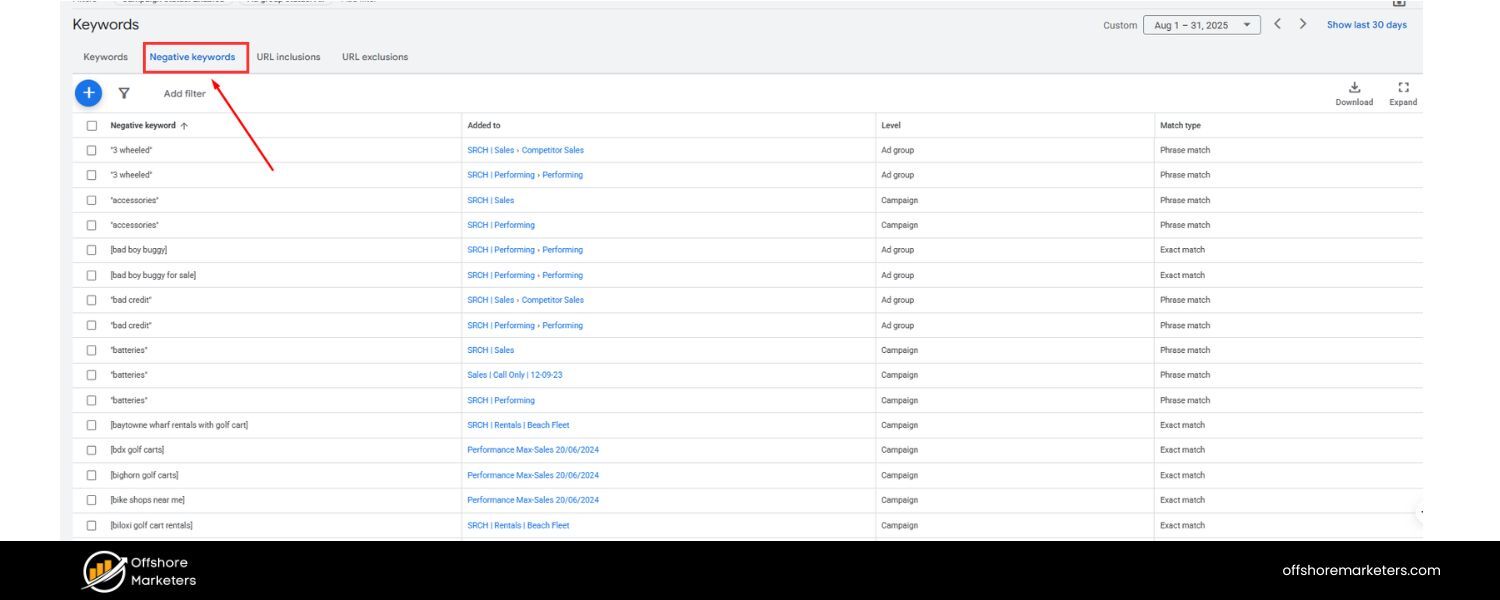
Sometimes saving money is about avoiding the wrong clicks. This is where negative keywords come in. A negative keyword is a term you exclude from triggering your ads, so you don’t pay for irrelevant traffic.
For instance, if you sell premium furniture and bid on “office chairs,” you’d want to add a negative keyword for “free” or “cheap” – users searching “cheap office chairs” likely aren’t your target, and if they click your ad, it’s wasted spend. Adding “cheap” as a negative keyword prevents your ad from showing on that query, saving you from paying for that click.
Over time, build out a negative keyword list for terms that often crop up but aren’t relevant to your business (like job searches, DIY queries, or unrelated product categories). This focuses your budget only on searches that matter, effectively lowering your cost per qualified click.
Additionally, refine your targeting settings to avoid spending on less valuable clicks:
A. Geographic targeting
Show your ads only in locations you serve or where you get profitable business. If you only sell in one country or city, limit your ads to that area – clicks from elsewhere won’t convert and will drain budget.
B. Ad scheduling
If you notice your conversions mostly happen during business hours, you might restrict ads to those times, so you’re not paying for late-night clicks that never convert.
C. Device targeting
In some cases, you might find mobile clicks are cheaper but convert less (or vice versa). You can adjust bid modifiers to bid lower on devices that perform poorly.
By smartly excluding unproductive traffic and focusing on your core audience, you reduce unnecessary costs and improve the efficiency of your ad spend.
4. Focus on ROI (Track Conversions, Not Just Clicks)
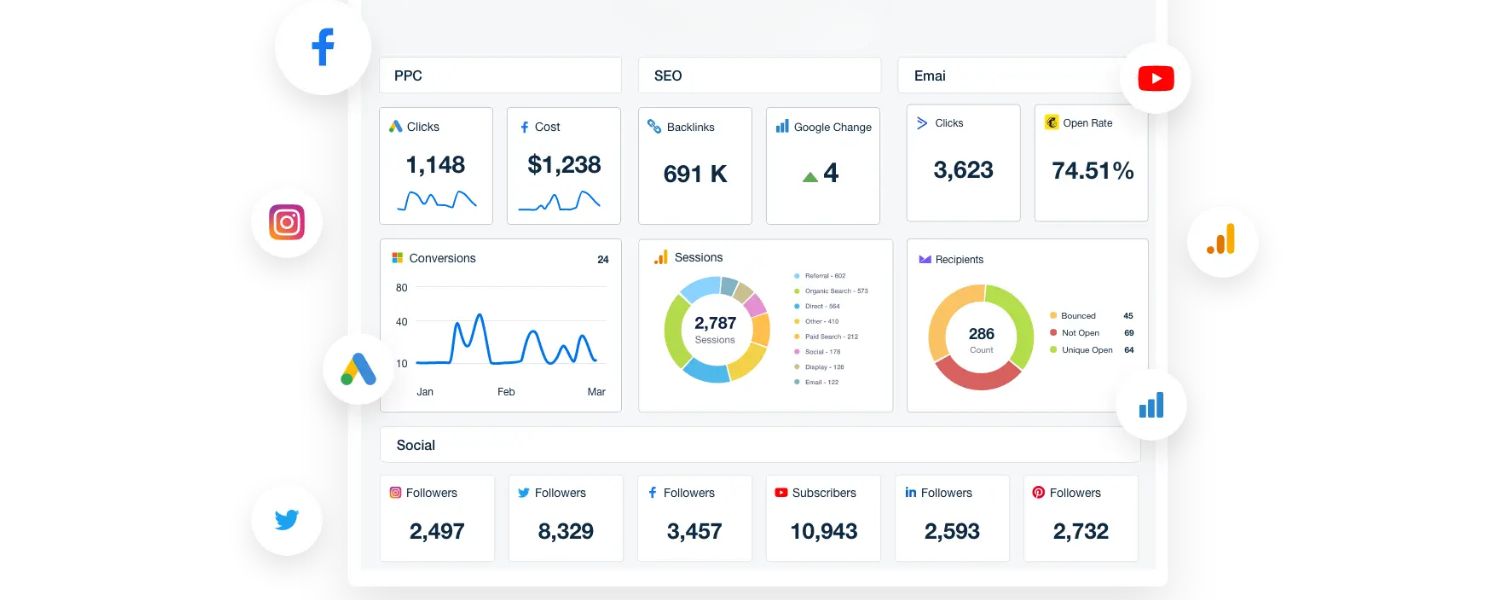
While it’s great to lower your CPC, the ultimate goal is to increase return on investment (ROI). Sometimes a higher-priced keyword is actually a better investment if it brings revenue. For example, if you pay $10 per click but those clicks often turn into $1,000 sales, that’s money well spent.
On the other hand, a $1 click that never converts is money wasted. So, always evaluate keyword cost in context of its conversion rate and value. Calculate your cost-per-conversion (CPA) for each keyword or ad group – this is how much you spend in clicks to get one sale or lead.
If a keyword has a tolerable CPA that yields profit, it might be worth its high CPC. If not, consider pausing it and reallocating budget to keywords with better ROI.
An expert strategy is to segment your keywords by performance: identify which keywords are driving conversions at a reasonable cost and which are just eating budget.
You can then bid more aggressively on the winners (even if their CPC is higher, because they’re “worth it”) and bid down or drop the poor performers.
Over time, this optimization means your average cost per conversion drops and your marketing dollars go further. The key takeaway: don’t chase low CPC for its own sake – chase low CPC on effective keywords and maximize every dollar spent by focusing on results (sales, sign-ups, etc.).
This mindset will naturally guide you to refine keywords, ads, and landing pages in pursuit of better ROI, which usually correlates with controlled costs.
5. Experiment and Continuously Refine
The world of keyword costs isn’t static. Competitors come and go, user search trends evolve, and Google makes changes. To stay ahead, adopt a mindset of continuous improvement. Regularly review your campaign data and experiment with adjustments:
A. A/B test your ad copy
To improve CTR and Quality Score – even small tweaks can bump your score and slightly lower CPC.
B. Try different match types
Broad match gives more volume but can sometimes waste spend on loosely related searches; exact match targets very precisely but might miss some traffic. A mix (with phrase and broad match modifiers) often balances volume and relevance, impacting cost efficiency.
C. Monitor competitor movements
If a new competitor starts bidding aggressively on your top keywords, you might see your CPC rise. You could respond by focusing on alternative keywords or improving your ads to maintain your position without overspending.
D. Leverage the Google Display Network or remarketing
As WordStream’s research suggested, if you’re in an ultra-expensive niche (say, certain law or insurance terms), you can offset costs by also using the Display Network for awareness at a lower CPC. This way, you’re not solely relying on high-cost search ads to drive every stage of the customer journey.
Make it a habit to prune what isn’t working and expand what is. Pause keywords that underperform or become too costly, and funnel those funds into new opportunities (perhaps a promising new long-tail term you discovered, or a different marketing channel temporarily). By staying agile and data-driven, you’ll ensure you’re always getting the best bang for your buck in terms of keyword cost.
FAQs
Q1. What is a “good” cost per click in Google Ads?
There isn’t a one-size-fits-all “good” CPC, it really depends on your industry and what a conversion is worth to you. A good benchmark is to compare against industry averages.
As noted, the average CPC across industries in 2024 is around $4–5 on search ads. If you find your average CPC is significantly higher than your industry peers, that might indicate room to optimize (or that you’re in an exceptionally competitive space like legal or insurance).
Ultimately, a “good” CPC is one that yields a profitable conversion. If you spend $10 per click but typically earn $500 per sale from those clicks, that $10 is good in context. Conversely, even a $1 CPC is not good if those clicks never convert. Focus on cost per acquisition alongside CPC.
Aim for a CPC that allows you to meet your target ROI or profit margin. As you optimize, you’ll develop a sense of what a reasonable CPC is for your specific business – it could be $2 or $20, depending on the value generated. The key is that it’s sustainable and returns more value than it costs.
Q2. Why do keyword costs change over time?
It’s common to see keyword prices fluctuate over weeks or months. The primary reason is changes in advertiser competition. If more advertisers start bidding on a keyword, the increased competition can drive up the auction bids, raising CPC. If some advertisers drop out or reduce bids, costs might drop.
Seasonality also plays a big role: businesses ramp up advertising during peak seasons or events (retailers before holidays, tax services before tax day, etc.), which can cause temporary spikes in CPC for related keywords. Broader economic trends and consumer behavior changes can have an impact too.
For example, if a product suddenly surges in popularity, lots of companies may bid on those keywords, increasing costs. Google’s own system updates (like algorithm changes in how ads are displayed or new features) can subtly affect costs as well – e.g. if new ad formats increase competition for top-of-page spots.
The bottom line: keyword cost is dynamic, not fixed. That’s why it’s important to monitor your campaigns regularly. If you notice your average CPC creeping up, investigate if there’s new competition or if you need to adjust your strategy (perhaps raise Quality Scores or find alternate keywords).
Conversely, if costs drop, it might be an opportunity to capture traffic more cheaply. Staying alert to trends ensures you can respond to changes proactively.
Q3. Are expensive keywords worth the cost?
They can be. Expensive keywords are usually those with high commercial intent and high competition, which also means they may bring valuable traffic. The question of worth comes down to profitability. An expensive keyword (say $15 per click) is worth it if it results in conversions that justify that cost.
For example, many attorneys willingly pay $50 per click for “personal injury lawyer [city]” because one client won from that click could be worth thousands of dollars in legal fees.
On the other hand, if you have a small budget and sell a low-cost product, bidding on a $15 keyword that doesn’t convert until 1 in 100 clicks might sink your budget quickly.
A good approach is to test expensive keywords carefully. Allocate a portion of your budget to try a high-CPC term that you suspect has big payoff potential, and track the results.
You might find that even though it’s costly, it brings in a few high-quality leads, then you can decide if the cost per lead is acceptable.
Sometimes you can also find alternatives to ultra-expensive keywords: long-tail variations or different phrasing that users search for, which carry a lower price tag.
For instance, instead of fighting over the keyword “CRM software” at $20 a click, you might bid on “CRM software for nonprofits” at $5 a click – more niche, but also more affordable and targeted.
In summary, expensive keywords are worth it only if the math works out in your favor. Always measure the return (in sales or conversions) against the ad spend for those keywords.
If the ROI is positive, they’re worth it; if not, it’s better to refine your strategy and focus on more efficient keywords.
Q4. Ready to Optimize Your Keyword Costs?
Managing keyword costs is a balancing act, it requires research, strategic thinking, and ongoing refinement. The good news is that with the tips and insights from this guide, you’re well-equipped to take control of your Google Ads spending.
From using the right tools to estimate costs to honing your Quality Scores and targeting, you now know how to calculate, evaluate, and optimize keyword costs like a pro.
It’s time to put this knowledge into action. Start by reviewing your current campaigns or planning your next one with cost in mind.
Bid smarter, choose your keywords wisely, and don’t shy away from pausing what isn’t working. Every dollar saved on an unproductive click is a dollar you can invest in a click that converts.

.png)
Shopify SEO: Guide to Ranking Your Store and Driving Sales
Most Shopify store owners set up their store, list their...

Content Marketing : Definitive Guide to Strategy, Content Types, and Measurable ROI
Content marketing generates 3x more leads than outbound marketing at...

Above the Fold: Guide to Conversions, Rankings and Faster Pages
Above the Fold in 2026: The Complete Guide to Conversions,...

Off-Page SEO Checklist: Guide to Building Real Authority
Most websites spend months creating great content, only to wonder...

What Is Keyword Bidding? The Complete Strategy Guide for Smarter Ad Spend
Most advertisers believe the highest bid wins the auction. It...

What Is Google Trends? The 2026 Marketer’s Complete Guide
If you are not already pulling weekly insights from Google...
If you want a growth partner who will get to know every aspect of your business and treat your budget like their own — we are the right fit.
.png)


.png)
.png)
.png)
.png)
.png)
.png)
2026 ALL RIGHTS RESERVED MADE IN INDIA
