
App Store Optimization: Boost Your App’s Visibility and Downloads
July 9, 2025
Introduction: Standing Out in a Crowded App Market
With millions of apps available on the Apple App Store and Google Play Store, getting your app discovered is a significant challenge.
As of mid-2024, Google Play hosts over 3.2 million apps while Apple’s App Store offers nearly 2 million apps for iOS users.
In such a crowded marketplace, even a brilliant app can go unnoticed without proper optimisation. This is where App Store Optimisation (ASO) This is where App Store Optimization (ASO) strategies comes into play.
ASO, often referred to as app store SEO, is all about enhancing your app’s visibility in app stores, so that more people discover it in search results and decide to download it.
Why is ASO so critical? Consider this: over 70% of App Store visitors use search to discover new apps. Apple revealed that 65% of all app downloads happen right after a search query on the App Store.
Users tend to type keywords (like “fitness tracker” or “budget app”) into the store’s search bar, and then download one of the top results.
If your app isn’t appearing near the top for relevant search keywords, you’re missing out on the largest source of organic installs.
A solid ASO strategy helps ensure your app ranks highly for relevant keywords, gets featured in top charts or categories, and converts store visitors into users.
In this comprehensive guide, we’ll explain what App Store Optimization is and why it’s essential, then dive into how app store algorithms work and the key factors they consider.
We’ll compare ASO for Apple vs. Google Play, and most importantly, break down proven ASO strategies: from keyword research and optimising your app listing (titles, descriptions, icons, and screenshots) to encouraging reviews, leveraging localisation, and more.
By the end, you’ll have a step-by-step plan to enhance your app’s ranking and increase downloads. Let’s get started on unlocking your app’s full potential!
What Is App Store Optimisation (ASO)?

App Store Optimisation (ASO) is the process of improving a mobile app’s visibility and appeal within an app store, such as Apple’s App Store for iOS or Google Play for Android, to increase organic downloads.
In simple terms, it’s like SEO for mobile apps: just as search engine optimisation helps websites rank higher on Google, ASO helps your app rank higher in app store search results and charts.
The ultimate goal of ASO is to drive more traffic to your app’s page and convert that traffic into installs.
There are two core components to ASO:
1. Visibility Optimization:
Ensuring your app shows up in relevant searches and charts. Apps that rank highly for popular keywords or get featured on the store’s homepage are much more visible to potential users.
This involves keyword optimisation (choosing the right keywords that users search for) and improving all the metadata that the app stores index (like your app’s title, subtitle, description, and tags) so that the algorithm understands what your app is about and deems it relevant for those searches. Higher visibility means more people will find your app.
2. Conversion Optimization:
Convincing users to actually download once they find your app. This means optimizing the visuals and messaging on your app’s product page, your app icon, screenshots, preview videos, description, and even the rating and reviews – to make a great first impression.
The aim is to turn those impressions into installs, improving your conversion rate (the percentage of store visitors who click “Download”).
Conversion optimisation is crucial because higher conversion rates not only yield more downloads but also send positive signals to the app store algorithms about the quality of your app.
In essence, ASO covers all the on-page factors of your app listing that you can control (keywords, title, description, visuals) and some off-page factors (like user ratings) to maximise both discoverability and appeal.
You may also hear terms like “mobile app SEO” or “app store marketing” – these all refer to the same concept of ASO. It’s an iterative and ongoing process of testing and refining various elements of your app’s listing to enhance performance. Just as you continuously update an app with new features, you should constantly update your ASO strategy based on data and trends.
Benefits of ASO
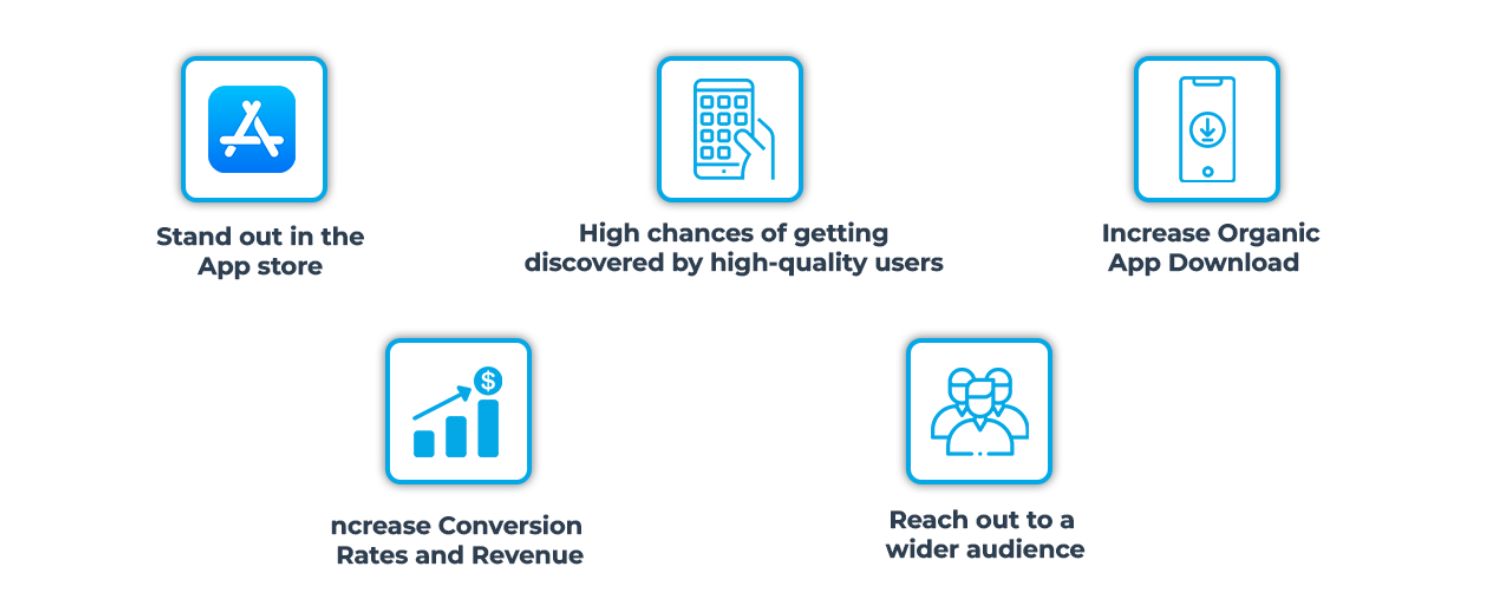
Investing in App Store Optimisation yields several important benefits:
A. Improved Visibility & Discoverability:
Simply put, users can’t download your app if they can’t find it. ASO helps your app appear in more searches and rank higher for relevant keywords, so that you’re not hidden at the bottom of the results.
Higher visibility means a wider audience reach, you’re putting your app in front of more potential users who are actively looking for solutions like yours.
B. More Organic (Free) Downloads:
By increasing your search rankings, ASO drives organic downloads, users naturally find you without paid advertisements.
This can significantly lower your customer acquisition cost (CAC), since these installs are free compared to ad-driven installs.
Over time, a strong ASO foundation can consistently drive downloads without requiring additional marketing spend.
C. High-Intent Users:
If your app is optimised for keywords closely related to its function, you’ll attract users who are searching for exactly what your app offers.
These users tend to be high-quality and more likely to become engaged, loyal customers.
For example, someone who finds your fitness app by searching “home workout tracker” clearly wants that functionality, ASO ensures you show up for that query and meet their need, leading to better retention.
D. Higher Conversion Rates:
Optimizing your app page (through compelling descriptions, screenshots, etc.) improves the percentage of visitors who install.
Even small tweaks like a clearer icon or a more captivating first screenshot can boost your conversion rate significantly.
More conversions not only mean more users but also further improve your app’s ranking (since app stores monitor how well listings convert).
E. Trust and Credibility:
Apps that rank at the top of search results or charts appear more trustworthy to users, people assume the top apps are the best.
Additionally, a well-optimized listing with a high star-rating and plenty of positive reviews builds confidence that your app is high quality.
In contrast, a poorly optimized listing might look unprofessional or unreliable, causing users to scroll past it.
F. Long-Term Growth:
ASO is a sustainable strategy. Unlike paid campaigns which stop delivering once your budget runs out, the improvements from ASO (better keywords, better conversion) can keep generating downloads long-term.
An app that steadily accumulates organic users will climb in rankings, which brings even more users in a positive feedback loop. Over time, this can snowball into substantial growth.
By achieving these benefits, App Store Optimization works hand-in-hand with your other marketing efforts.
For instance, if you run paid user acquisition campaigns, those users will still visit your app’s product page – a strong ASO ensures that page converts well, maximizing ROI on your ads.
Conversely, if your ASO is effective, it can reduce the amount you need to spend on ads by supplying a baseline of organic growth.
In today’s competitive app environment, ASO isn’t optional – it’s essential for any app developer or marketer looking to maximize their app’s success.
How App Store Algorithms Work (and What They Look For)

Both Apple’s App Store and Google Play Store use complex search algorithms to determine which apps to show for a given query and in what order.
While the exact algorithms are proprietary and continually evolving, the key app store ranking factors are well understood.
Understanding these factors is crucial to effective ASO. In general, we can group them into two categories:
Relevance & Discovery Factors – These determine if your app matches a user’s search query. They are mostly metadata elements that you provide on your app listing.
Quality & Performance Factors – These indicate whether your app is of high quality and popular, which in turn influences its ranking relative to others.
Let’s break down the most important factors across both Apple and Google app stores:
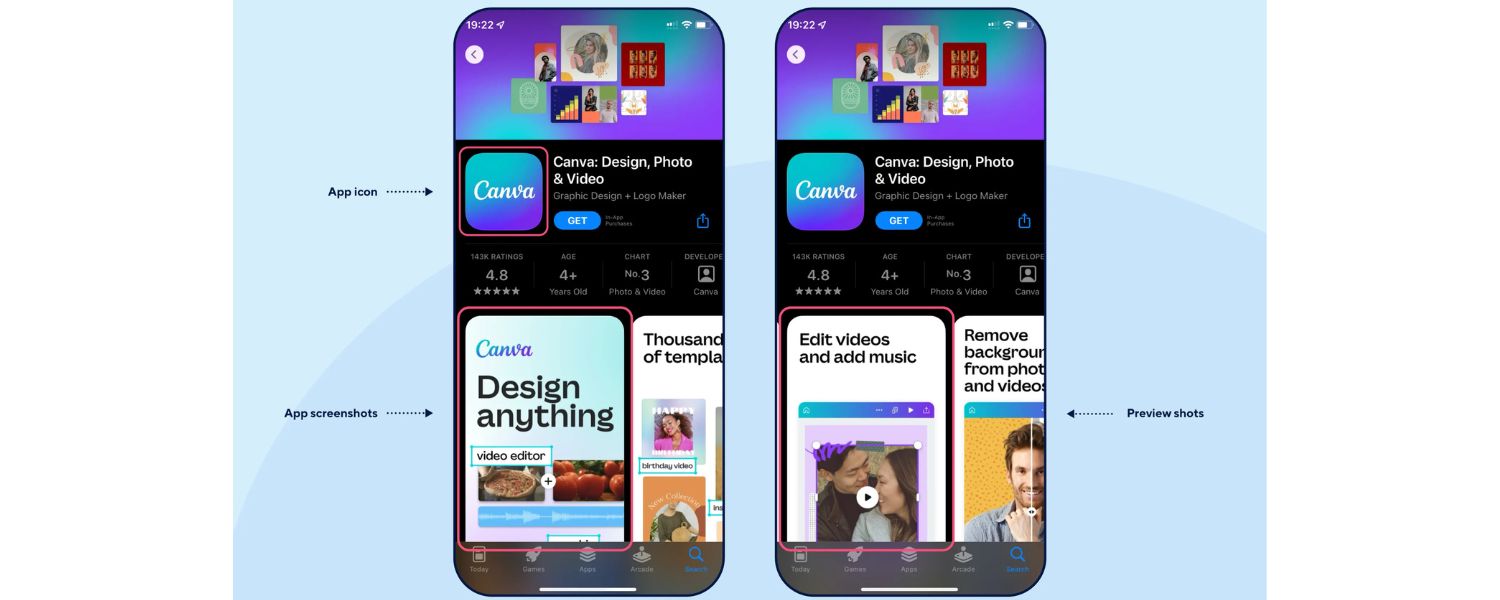
An app listing example highlighting key elements that impact ASO: app name/title, subtitle/short description, icon, screenshots, ratings, and more.
Optimising these elements improves your app’s search ranking and conversion rate.
1. App Name/Title & Subtitle
The app title (called App Name on iOS and App Title on Android) is the most critical piece of metadata. It should clearly convey what your app does and ideally include a couple of your top keywords for maximum search visibility.
For example, a meditation app might be named “Calm Mind: Meditation & Sleep” – combining branding with the keyword “meditation”.
Apple allows up to 30 characters for the app name (and a 30-char Subtitle), while Google Play also allows 30 characters for the title.
Use this space wisely: place your primary keyword in the title, as it carries significant weight in search rankings. The subtitle (iOS) or short description (Google Play) further supports additional keywords and gives a brief tagline of your app’s value.
Keeping titles and subtitles accurate and keyword-rich (without feeling like spam) will help the algorithms surface your app for relevant queries.
2. Keywords & Description
Beyond the title, app stores index other textual fields. Apple’s App Store has a dedicated 100-character Keyword field (not visible to users) where you should list relevant keywords separated by commas.
You don’t need to repeat words from your title or subtitle here; instead, add complementary terms and long-tail phrases. Apple’s search algorithm will match user searches against the title, subtitle, and this keyword list.
It’s crucial to choose keywords thoughtfully – think of words your target users would search for, and consider both their popularity and level of competition. Avoid using irrelevant or trademarked terms (Apple will reject apps that do so).
On Google Play, there is no separate keyword field; instead, Google indexes all text in your app’s short description (up to 80 characters) and long description (up to 4,000 characters).
This means you should naturally weave essential keywords into your descriptions. However, be cautious: stuffing keywords unnaturally can harm conversion and may be flagged by Google’s algorithms.
Focus on a clear, user-friendly description that repeats key terms a few times in context. Google is believed to use keyword density (the frequency at which a term appears) as one factor, whereas Apple relies more on the explicit keywords field.
In both stores, keywords are king for discoverability, they directly impact whether your app appears in search results. We’ll discuss keyword research tactics in the next section.
3. Categories & Tags
Both platforms allow you to categorise your app. Choosing the right category (and subcategory, if available) is essential for two reasons: (a) it helps users browsing by category find you, and (b) Apple’s search algorithm in itself indexes the category.
For instance, if your app is a budgeting tool, being in the “Finance” category will make you eligible to show up when users filter or browse Finance apps, and it signals relevance for finance-related searches.
Google Play similarly uses categories and may also utilise tags (Google allows developers to add specific tags to describe the app’s content).
Select the category that best fits your app’s primary purpose; being in an irrelevant category can backfire and even lead to rejection.
Remember, users also often navigate by category (e.g. “Top Charts” of Games, or “New in Productivity”), so proper categorisation is another avenue for visibility.
4. App Icon
Your app’s icon is the first visual element users see in search results and on the app page. While the icon image itself doesn’t contain keywords, it has a dramatic influence on click-through rates.
A distinctive, high-quality icon can attract more clicks and downloads, which in turn boosts your ranking (due to higher CTR and conversion).
Google Play explicitly counts “Listing CTR” (click-through rate on your listing) as a ranking factor, meaning that if users consistently click your app when it appears in search results, the algorithm interprets that as a positive signal.
Apple doesn’t state this openly, but a compelling icon certainly improves your chances of converting impressions to installs.
Design an icon that is clean, professional, and representative of your app’s core function or brand. Avoid too much text or tiny details. Using bold colours or shapes that stand out can help – remember that in a sea of app icons, you want yours to catch the eye.
Consider A/B testing different icon designs (more on A/B testing later) to see which one yields a higher conversion rate.
5. Screenshots & Videos
The screenshots (and preview video) showcased on your app page are critical conversion drivers and can even impact search indirectly. On Apple’s App Store, up to 3 screenshots or an app preview video may appear right in the search results for some queries, giving users a sneak peek.
On Google Play, a feature graphic or video can appear in search ads or curated sections. While visuals themselves aren’t parsed for keywords, they significantly influence whether a user decides to tap on your listing and download it.
Compelling visuals = higher downloads = better rankings (since downloads and engagement are ranking factors). Ensure your screenshots effectively showcase your app’s best features and include descriptive captions or overlays to tell a story at a glance.
Many top apps design screenshots not as raw app screen grabs, but as polished slides that convey use cases or benefits (e.g., “Track your habits – Beautiful charts to monitor progress” overlayed on the app screen image).
Include at least 5–8 screenshots (Apple allows up to 10, Google up to 8) to showcase different aspects of the app. If possible, add a short preview video demonstrating the app in action – especially for games or interactive apps, videos can significantly boost conversion by letting users see the experience.
Google Play now allows replacing the static feature graphic with a video. Ensure your video is engaging in the first few seconds, as users may not watch for long.
Overall, visual asset optimisation is a big part of ASO’s conversion optimisation side. (Tip: Use all available slots for images and localise them for different languages if applicable.)
6. Ratings and Reviews
Both Apple and Google heavily factor in an app’s user ratings and reviews as indicators of quality. A higher average rating (4.5+ stars) and a steady flow of positive reviews can improve your app’s ranking and certainly influence users to choose your app over a competitor’s.
Conversely, a poor rating (e.g., three stars or below) can hinder your visibility. App stores want to surface apps that users love. In search results on both stores, the star rating is prominently displayed, and many users filter out apps with low ratings.
User reviews also indirectly contribute: the volume and recency of reviews show engagement. Both platforms consider ratings/reviews in their algorithms, and Apple explicitly notes that user behaviour signals like ratings and downloads influence search placement.
It’s crucial to encourage satisfied users to rate and review your app (for example, via a gentle in-app prompt after a positive user action). Additionally, promptly respond to reviews, especially negative ones, in a professional manner – this can turn a bad experience into a good review and shows others that you are active and care about users.
Never attempt to fake or incentivise reviews; both Apple and Google strictly prohibit this practice and can penalise or ban apps for it. Genuine positive reviews are ASO gold: they enhance conversion and serve as a strong trust signal to both users and the algorithm.
7. Download Volume & Velocity
The number of installs your app has is both a result of ASO and a factor that can further boost ASO. Apps with high download volumes and strong download momentum (velocity) tend to rank higher because popularity breeds more popularity.
When an app quickly gains downloads, it often rises to the top of the charts, which increases visibility even further. Both stores account for downloads in their ranking formula, and particularly recent install trends (e.g., downloads in the last week) may carry weight.
This is why launch strategy is essential: a burst of downloads and user engagement in the first few weeks can put your app on the map. To improve this factor, beyond organic ASO tactics, many developers use marketing and advertising (like social media promotion, press coverage, or Apple Search Ads/Google Ads) to drive an early wave of downloads.
This isn’t “pure” ASO, but it complements ASO by feeding the algorithm the data it wants to see (that users are downloading and enjoying the app).
We’ll discuss some paid strategies and how they intersect with ASO later. Keep in mind that the uninstall rate is also monitored – if many users download your app but quickly uninstall it, that’s a negative signal, especially on Google Play. This ties back to ensuring your app delivers on what’s promised so that users stick around.
8. Engagement & User Behaviour
Beyond the initial download, app stores assess how users interact with your app. High user engagement, frequent usage, and good retention (users keeping the app installed and active over time) suggest that an app is high quality and fulfilling its purpose.
These factors are more complex to influence directly via your store listing, but they are worth mentioning. Google Play, for instance, considers “Android Vitals” and engagement metrics – apps that crash frequently, drain battery, or have other performance issues (which lead to poor user experience) may be ranked lower.
Google also watches metrics like DAU/MAU (daily active users) and uninstall rates, as well as if users are spending time in the app. Apple’s algorithm likely takes into account retention and engagement as well (Apple calls these “hidden factors” – not openly confirmed but inferred).
The takeaway is that a well-performing, engaging app creates a virtuous cycle: good engagement leads to higher rankings, which leads to more downloads, and so on.
From an ASO perspective, this means your job isn’t done after optimising the listing – you also need to ensure the app itself meets user expectations (so the promises made in your description/screenshots result in satisfied users).
If you notice high uninstall rates, it could indicate a mismatch between what your store listing portrays and what the app delivers.
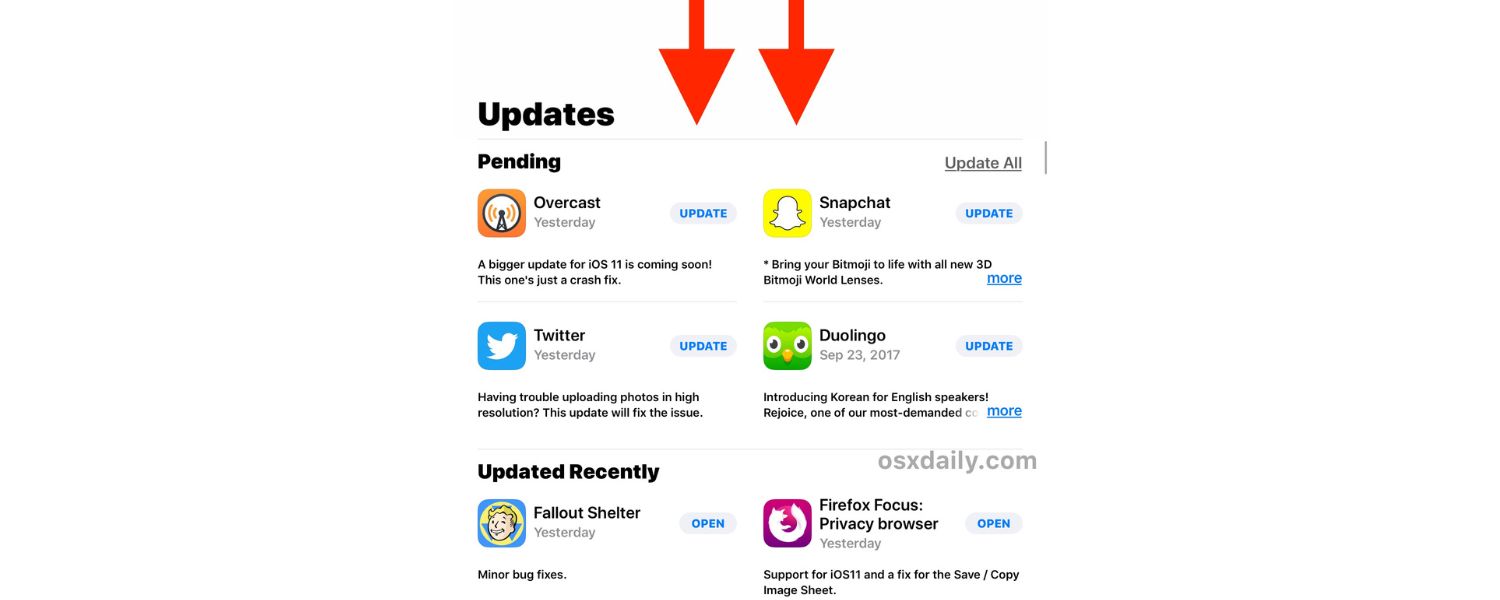
9. App Updates
Regularly updating your app can positively impact ASO. Frequent updates (bug fixes, new features, improved UI, etc.) signal that the app is actively maintained and improving over time.
Both stores want to provide fresh, up-to-date apps to users. Moreover, each update is an opportunity to refresh your ASO elements, you can tweak your title/keywords, experiment with new screenshots, or reset your ratings count if you had issues.
Apple and Google do consider update recency; for example, an app that hasn’t been updated in over a year might be deemed less relevant in fast-changing categories.
Also, when you update, users who haven’t enabled automatic updates will see your app in the Updates list, potentially re-engaging lapsed users. Changelog notes (the “What’s New” text) don’t directly affect search rankings but can influence users checking your app page (it shows you’re improving the app actively).
In summary, keep your app fresh – not only for the algorithm’s sake, but because a better app will yield better reviews and engagement, which, as we discussed, feed back into ASO success.
These are the primary factors that app store algorithms evaluate. We can summarise them in terms of the ASO funnel:
A. Discovery Optimization (Getting Found):
Keywords, title, subtitle/short description, and category selection make sure the app store connects your app to relevant user searches. If you nail this, you’ll appear in more search results.
B. Conversion Optimization (Getting the Download):
Icon, screenshots, video, description, rating count/score, all convince the user to hit “Download” once they’ve found you. Higher conversion means the store is likely to rank you even higher (since it sees users prefer your app).
C. Post-Download Validation (Proving Your App’s Quality):
Engagement, retention, reviews, and continued downloads indicate to the app store that users are satisfied after downloading. Positive signals here reinforce your app’s ranking and can lead to featuring opportunities.
Understanding these factors guides our ASO strategy. In the following sections, we’ll explore specific steps and best practices to optimise each of these areas.
However, before that, it’s essential to note some key differences between how Apple and Google handle ASO, as this will inform our approach depending on the platform.
Apple App Store vs. Google Play: Key Differences in ASO

Both Apple and Google share the goal of connecting users with apps they’ll love, and as we saw, the ranking factors are broadly similar (relevance, quality, popularity).
However, there are some critical differences in how ASO works on the App Store versus Google Play.
Here’s what you need to know:
1. Keyword Indexing:
The Apple App Store and Google Play differ most in how they handle keywords. Apple’s App Store has a separate 100-character keyword field and does not index the long description text for search.
This means on iOS, your keyword strategy focuses on the app name, subtitle, and keyword bank. In contrast, Google Play indexes virtually all text you provide – including the app title, short description, long description, and even the developer name and in-app product names in some cases.
Google’s algorithm is more similar to a web search engine, looking at keyword frequency and context across the description. As a result, keyword placement in descriptions is more critical for Google Play, whereas keyword selection (ensuring you use the best 100 characters) is critical for Apple. For a guide on selecting the right keywords, see mastering keyword research.
Also, Google Play allows up to 8 user-defined tags for your app, which can help categorisation; Apple doesn’t have an equivalent tag feature aside from categories. For more on optimizing tags for ASO, check out Optimizing Your App Description for SEO.
2. App Title & Length:
Both platforms now limit app titles to 30 characters (Google used to allow 50 until mid-2021, but now it’s 30 to prevent spammy titles).
Apple gives you an extra 30-character Subtitle field. Google Play’s equivalent of a subtitle is the 80-character short description, which serves a similar purpose of tagging a concise pitch + keywords.
Practical tip: On iOS, don’t duplicate words between the title, subtitle, and keyword field – use each space for unique terms (Apple ignores duplicate keywords across these fields).
On Android, front-load important terms in the title and short description, as those are weighted more strongly than the long description.
3. Description Influence:
As noted, Apple’s long description is primarily for conversion, not search indexing (Apple has stated that the description is mostly ignored for search rankings, focusing instead on title/subtitle/keywords).
That said, a well-written description on iOS can still indirectly help by improving conversion and providing context to Apple’s reviewers (and possibly for ad hoc relevance, like for editorial features).
Google’s description, on the other hand, directly influences search ranking based on keyword relevance. Therefore, you might take slightly different approaches: for iOS, you can be more marketing-focused and narrative in the description (since stuffing it with keywords won’t help ranking), whereas for Android, you should be sure to incorporate relevant keywords throughout the text naturally.
Example: a travel app might ensure words like “flights,” “hotels,” “itinerary” appear multiple times in the Google Play description, but on iOS that same app’s description might focus more on selling the benefits with fewer repetitions of those terms.
4. Visual Assets & Guidelines:
Apple and Google allow different numbers of screenshots (Apple up to 10, Google 8 as of writing) and have slightly different requirements for icon sizes, feature graphics, etc.
Apple lets you upload App Preview videos (max 3, up to 30 seconds each) that autoplay muted on the product page. Google Play uses a Feature Graphic (a banner image) which appears at the top of the listing and can be replaced by a video (YouTube link) that auto-plays.
One key difference: Google’s feature graphic or video can appear in places like search ads or “Recommended” sections, making it an essential asset for grabbing attention.
Apple’s previews show in search for users who have already installed the app (via in-app events or update previews).
In terms of guidelines, Apple is generally more strict about what you can or cannot include (e.g., no mention of pricing or “free” in the screenshots, no irrelevant keywords, etc.); otherwise, your app might get rejected.
Google Play is a bit more flexible but still enforces quality guidelines (e.g., it also forbids specific deceitful metadata).
The takeaway: optimise visuals for both, but be mindful of Apple’s stricter review process. If you meet Apple’s guidelines, you’re likely fine on Google.
5. External Factors & Algorithm Transparency:
Google, being a search company, has historically been more open about factors like app performance metrics. For example, Google Play Console provides Android Vitals data (crash rate, ANR rate, etc.) and explicitly states that bad performance can affect visibility.
Google also appears to incorporate signals such as backlinks to your app’s Play Store page or mentions on the web (there’s speculation that Google indexes Play Store pages in web search, which could indirectly influence Play Store search rankings).
Apple’s approach is more self-contained within the App Store ecosystem. Apple introduced things like In-App Events and Promoted In-App Purchases, which can appear in search results, adding new dimensions to ASO on iOS.
For example, run an in-app event (such as a live event, challenge, or promotion within your app). That event can have its own card in App Store search results, potentially increasing your visibility to users who already have your app or follow events.
Google doesn’t have a direct equivalent, but it has LiveOps (a limited release program for promotional content in Play). These are advanced tactics, but keep an eye on platform-specific features that can boost visibility.
6. Featuring and Editorial:
Outside of search rankings, being featured by the App Store/Play Store editors can skyrocket downloads. Apple’s App Store has a whole editorial team curating apps (Today tab stories, App of the Day, etc.).
While you can’t ASO your way into being featured, following best practices (a beautiful app, a great story, high-quality design, using the latest iOS features, etc.) can increase your chances.
Google’s Play Store also features apps (e.g., in categories like “New & Updated” or seasonal collections). In terms of ASO, the relevant part is that if you do get featured or hit a Top Chart, your app’s visibility multiplies, which then feeds into more downloads and reviews, which then helps your search rankings.
So, ASO and featuring can be interrelated. Apple’s editorial feature is more about relationships and pitching your app to Apple; Google’s is more algorithmic (top downloads in a category might show in Top Charts).
In summary, the key differences between Apple ASO and Google ASO can be boiled down to the following: Apple is keyword-focused and conversion-focused, with strict guidelines, while Google is search-term and performance-focused, placing more emphasis on full descriptions and technical quality. However, on the whole, the strategies for both overlap significantly.
For best results:
-
Optimise for Apple’s requirements first (short, punchy title/subtitle, strong keyword list, great visuals) – because if you satisfy Apple’s quality bar, you likely have covered the basics for Google.
-
Then adjust for Google’s specifics (ensure your description is rich in keywords, monitor your Android vitals, and add a feature graphic or promotional video).
Next, let’s get into the actionable part – how to do ASO step by step, incorporating these principles.
We’ll cover keyword research, optimising each element of your app listing, and other techniques to maximise your app’s visibility and downloads.
Top ASO Strategies and Best Practices to Rank Higher

Now that we know what factors matter for App Store Optimisation, let’s walk through how to optimise your app listing step by step.
The following strategies will help your app rank higher in searches, attract more potential users, and convert them into downloads. These are the ASO best practices for 2025 and beyond:
1. Conduct Thorough ASO Keyword Research
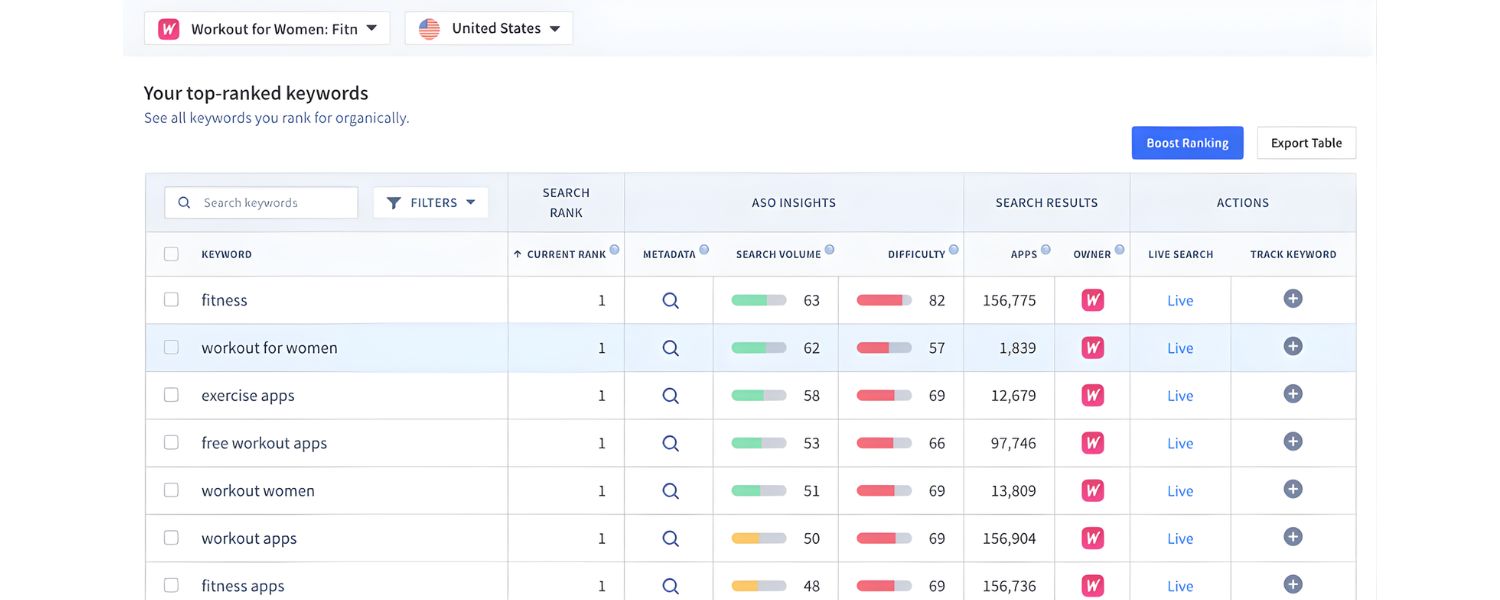
Every great ASO strategy starts with keyword research. Keywords are the search terms users type in (e.g., “language learning app”, “budget tracker”).
You need to figure out which keywords are most relevant to your app and popular among users, and then target those in your metadata.
Here’s how to approach ASO keyword research:
A. Brainstorm Seed Keywords:
Begin by listing out words that describe your app’s core functionality and purpose. Think like a user: how would you search for an app like yours?
For example, if you have a language learning app, seed keywords might be “learn Spanish”, “language practice”, “Duolingo alternative”, etc. Include various terms: features, problems solved, and even competitor app names (competitors can hint at keywords, though don’t use their brand names in your listing as that’s not allowed on Apple and not ethical).
B. Use Keyword Research Tools:
Leverage ASO and SEO tools to expand your list. Tools like AppTweak, App Radar, Sensor Tower, MobileAction, or Semrush (which now has mobile app data) can provide suggestions and data on keyword volume.
These tools often show how many searches a term gets per month and how difficult it is to rank for. For example, the Semrush ASO tool or App Radar will show search volume and competition level for each keyword.
Aim for keywords that have a decent search volume but aren’t dominated by extremely powerful apps. Long-tail keywords (longer, specific phrases) usually have lower volume but also lower competition – they can be your foothold.
For instance, “learn Spanish free” might be easier to rank for than just “learn Spanish”.
C. Examine Competitor Keywords:
Look at the top apps in your category or niche. What keywords might they be targeting? Some ASO tools can show the keywords that a specific app ranks for (or at least estimate them).
You can also manually observe competitor titles and descriptions for recurring phrases. If you have a budget, tools like App Radar’s Competitor Analysis or Sensor Tower can reveal which keywords drive downloads for your competitors. This can uncover terms you hadn’t thought of.
D. Evaluate Keyword Metrics: For each keyword on your list, consider:
-
-
Search Volume:
How many users search for it (often given as an indexed score or exact number per country). High volume is attractive but also potentially very competitive.
-
Relevance:
Is the keyword truly relevant to your app? It’s better to rank #5 for a highly relevant term (which will convert well) than #1 for a misleading term. Irrelevant traffic won’t convert or engage, which can hurt your app in the long run.
-
Difficulty/Competition:
How hard will it be to rank? If the top results for a keyword are giant apps with millions of downloads, you might struggle to break in initially. Include some niche keywords where you have a better chance of ranking high.
-
Current Ranking (if your app is live):
See where you already rank. If you’re ranking #20 for a keyword with some volume, that might be a good target to optimise for – a bit of effort could bump you into the top 10.
Also, use tools or App Store Console/Play Console to see which keywords you currently get installs from (Google’s Search Console for Play and Apple’s App Analytics can give some insight).
For example, Semrush’s AI Keyword Inspector or App Radar can show terms your app is ranking for but not fully capitalising on.
-
E. Build Your Final Keyword List:
After research, narrow down to a set of primary keywords (the main ones you’ll put in the title/subtitle or repeat in description) and secondary keywords (additional ones for the keyword field or to sprinkle in description).
Prioritise relevance and “achievability.” It often helps to have a mix of short-tail (broad terms, e.g., “budget”) and long-tail (specific, e.g., “budget app for couples”) keywords.
Long-tails might have fewer searches, but users searching them are highly likely to install if your app fits, plus you can rank more easily. Over time, as you gain users, you can aim for bigger keywords.
F. Don’t Forget Localisation:
If you plan to launch in multiple languages/countries, do separate keyword research for each locale. Users in different countries use different terms (even UK vs US English: “cashback” vs “cash back”, etc.).
Both Apple and Google allow you to localise keywords/metadata for different languages, which can dramatically improve your reach in those markets.
By the end of this process, you should have a clear idea of which keywords you’re targeting. This research is the foundation for how you’ll craft your app’s title, subtitle, description, and keyword field.
Pro Tip: According to Apple Search Ads data, “70% of users use search to find new apps, and 65% of downloads come from search.”
This underscores the importance of choosing the right keywords – it directly affects your share of the search-driven traffic.
Now, armed with your keyword strategy, let’s move on to optimising the specific elements of your app listing.
2. Optimise Your App Title (Name) and Subtitle/Short Description
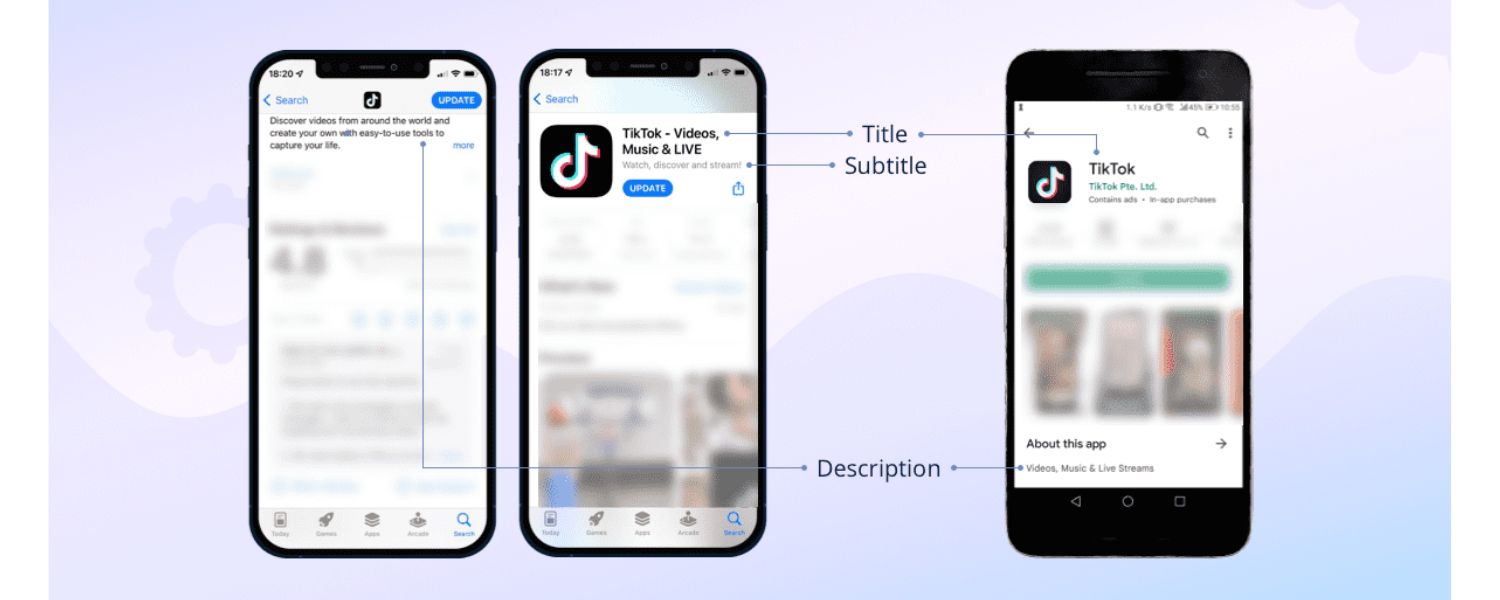
Your app’s title is prime real estate for ASO. It’s the first text users see and the most heavily weighted element in search algorithms. Here’s how to make it count:
A. Include Your Primary Keyword:
Try to work in one of your top keywords into the app name, as long as it still reads naturally. For example, if your app’s brand name is unique or not descriptive (e.g., “Zylo”), consider a descriptive suffix after a dash or colon, like “Zylo – Budget Planner”.
This way you get the keyword “budget planner” in the title while still branding your app. Both Apple and Google allow a delimiter in titles (colon, dash, vertical bar) which many apps use to include keywords.
Just don’t stuff a list of keywords; make it a coherent phrase that helps users understand what the app does.
Apple’s guidelines discourage overly long or keyword-stuffed names, and Google may reject titles that are just a comma-separated list of terms.
B. Keep It Short & Punchy:
Although you have up to 30 characters, shorter is often better for user experience. A concise name is easier to remember and won’t get truncated on smaller screens.
If you can say it in 15–20 characters, great. But if you need those keywords, use them – just avoid hitting the limit just to cram more words. Accuracy and clarity trump gimmicky keywords.
Also, ensure the title is legible at a glance – avoid unnecessary punctuation or all-caps (unless your brand is an acronym).
C. Use the Subtitle (iOS) or Short Description (Android) Wisely:
On Apple App Store, the Subtitle appears under the title and is also indexed for search. Use it to support your title with secondary keywords or a tagline. For instance, a subtitle for a finance app could be “Personal Expense Tracker & Budgeting”.
This adds keywords like “expense tracker” and “budgeting” that maybe weren’t in the title. Don’t repeat the exact title words here – use this space to cover additional relevant terms.
On Google Play, the Short Description (the first line of the description, ~80 characters) is super important: it often shows above the fold on the app page and is indexed.
It should convey your app’s unique value or feature in one sentence and include a strong keyword if possible.
Example: “Manage money effortlessly – track expenses, bills, and savings in one app.” This hits “track expenses” (keyword) and gives a quick value pitch.
D. Avoid Keyword Spam or Irrelevant Words:
Both stores will penalize or reject apps with misleading titles. Don’t include “free” or “best” repeatedly, or unrelated popular keywords (you might laugh, but some devs used to put trending words or celebrity names in their metadata, that’s a quick way to get kicked out).
Also, Apple forbids using other brand names in your keywords (don’t put “Netflix” if your app isn’t Netflix, etc.). Keep it highly relevant and honest.
E. Localization in Titles:
If you localize your app listing for other languages, translate or adapt the title and subtitle to include keywords in that language.
For example, your French listing title could use French keywords. This way you rank in local language searches too.
Apple actually lets you have a different app name per language listing, and Google provides a translated title field for each language.
F. Test Different Title Formats (If Possible):
Changing your app’s title frequently isn’t advisable (you want to build brand recognition), but sometimes you might test a slight variation if you’re not seeing results.
Especially for new apps, you might do an update to adjust the title/subtitle based on initial data (perhaps adding a keyword that you realise is trending).
Just remember that any title change for an established app might confuse existing users, so balance the ASO benefit with branding consistency.
In summary, make your app name work hard for you. It should brand your app and describe it with a keyword if possible.
The subtitle or short description then adds context and additional keywords. Together, these are the first impression in search results and heavily influence whether a user taps your app (and whether the algorithm deems it relevant).
3. Craft an Engaging, Keyword-Rich Description
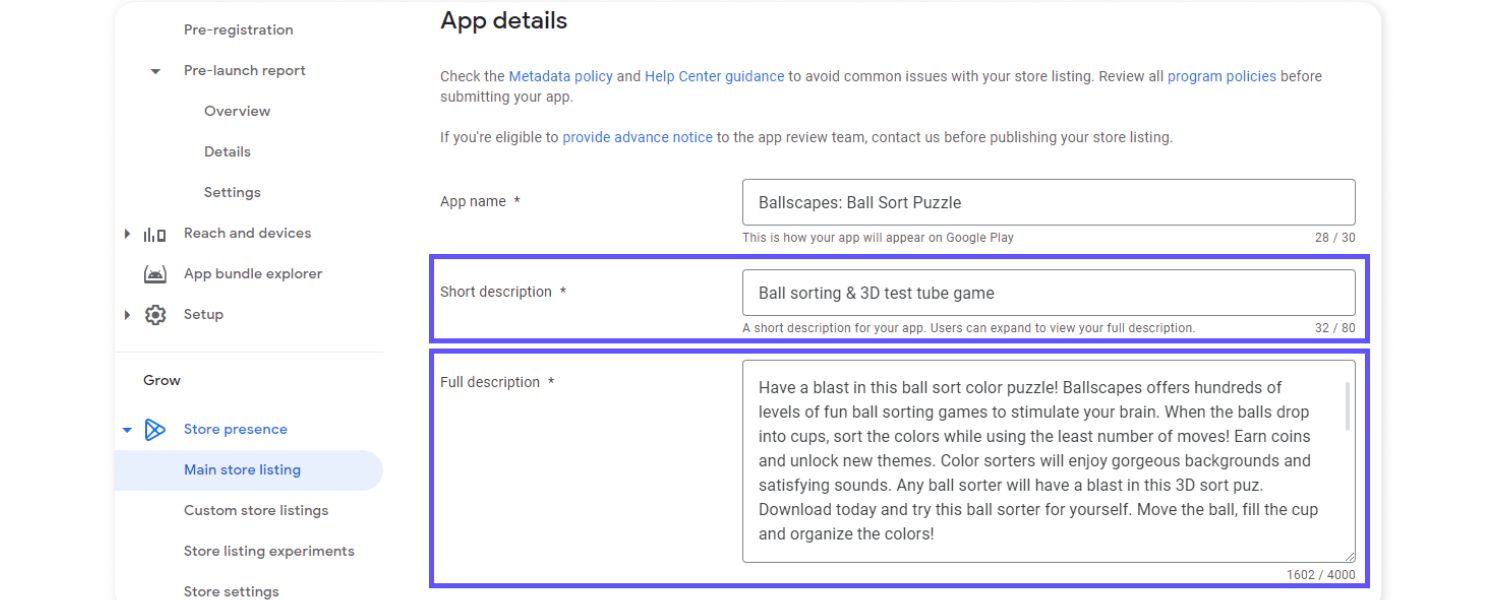
The app description (especially the long description on Google Play) is where you convince users to download and also signal relevancy to the algorithms. Here’s how to optimise it:
A. Lead with a Strong Opening:
The first sentence or two of your description is critical. On Google Play, users see the first 80 characters (short description) before clicking “Read more”.
On Apple, while the description isn’t indexed for search, users will only see the first few lines before having to tap to expand. So start with a compelling summary of your app’s main benefit or USP (unique selling proposition). Mention your app’s purpose and perhaps a primary keyword here for Android.
For example: “Organize your tasks and boost productivity with TaskMaster, the smartest to-do list app for busy people.” This opening hits what, why, and has “to-do list app” as a keyword.
B. Highlight Key Features & Benefits:
Use the rest of the description to detail what makes your app valuable. A good approach is to use short paragraphs or bullet points (yes, you can use bullet lists in app descriptions) to call out features. For instance:
-
-
Organize tasks with projects and due dates
-
Set reminders and never miss a deadline
-
Collaborate by sharing tasks with others
-
Sync across all your devices, even offline
-
This formatting makes it easy for a quick-reading user to scan and see if your app meets their needs. Aim for a balance of feature highlights and benefit statements (“what the feature does” + “how it helps the user”). Keep paragraphs under 3-4 lines for readability on mobile screens.
C. Naturally Integrate Keywords (for Google Play):
Since Google indexes the full description, ensure that your important keywords appear multiple times throughout the text – but in a natural, meaningful way. Do not just list keywords separated by commas in the description (Google could consider that spam). Instead, weave them into sentences.
For example, if targeting “meal planner” and “calorie counter,” your description might say: “This meal planner app helps you track calories with an integrated calorie counter and nutrition database.”
Try to cover all variations from your keyword list at least once. A common tactic is to have a “keywords bank” sentence toward the end of the description on Google Play, something like: “Whether you need a meal tracker, calorie counter, food diary, or diet planner, our app has you covered.”
This type of sentence can pack in synonyms in a user-facing way. On iOS, since description keywords don’t affect search, you can be more free-form, but it’s still wise to include keywords because if Apple ever considers description or for the sake of consistency (and if you run Apple Search Ads, having relevant text might help ad relevance).
Apple also warns against keyword stuffing in descriptions – they want it user-focused. So, write for the user first, then tweak for keywords on Android.
D. Emphasize What’s New (when applicable):
Users often check the “What’s New” section for updates, but you can also mention recent improvements or updates in the full description like “New in 2025: Completely redesigned interface and dark mode support!”
This shows the app is actively maintained, which can improve user confidence (though it doesn’t directly impact search rank except possibly via user engagement).
E. Call-to-Action at the End:
Consider ending your description with a gentle call-to-action (CTA), encouraging the reader to download or highlighting a final benefit.
E.g., “Download TaskMaster now and achieve more every day, your organized, stress-free life awaits!” It’s a marketing touch that can nudge someone who read till the end.
F. Formatting and Emoji:
Both stores allow basic text formatting like line breaks, and Google Play even supports limited HTML markup (like bold or italic via HTML tags).
Use line breaks to avoid a wall of text. Some developers use emojis as bullet points or to draw attention (like ✅ or 🚀) – use them sparingly and only if it matches your app’s tone. Too many can look unprofessional, but a few can make the text more lively.
G. Localize Descriptions:
If you offer your app in multiple languages, translate the description accordingly. Localized descriptions can dramatically improve conversion in non-English countries because users feel more comfortable when information is in their language. Google’s algorithm will then index the foreign language keywords for searches in that language as well.
Remember, the description’s primary job is to convince the user. For Apple, that’s its only job (plus giving reviewers context).
For Google, it has a dual role of convincing and improving discoverability. It’s a fine line: optimize for keywords without reading like a robot.
A good rule of thumb is if a human reader would find the description helpful and compelling, you’ve done it right. Always proofread for spelling and grammar – errors can turn off potential downloaders.
4. Choose the Right Category (and Subcategory)
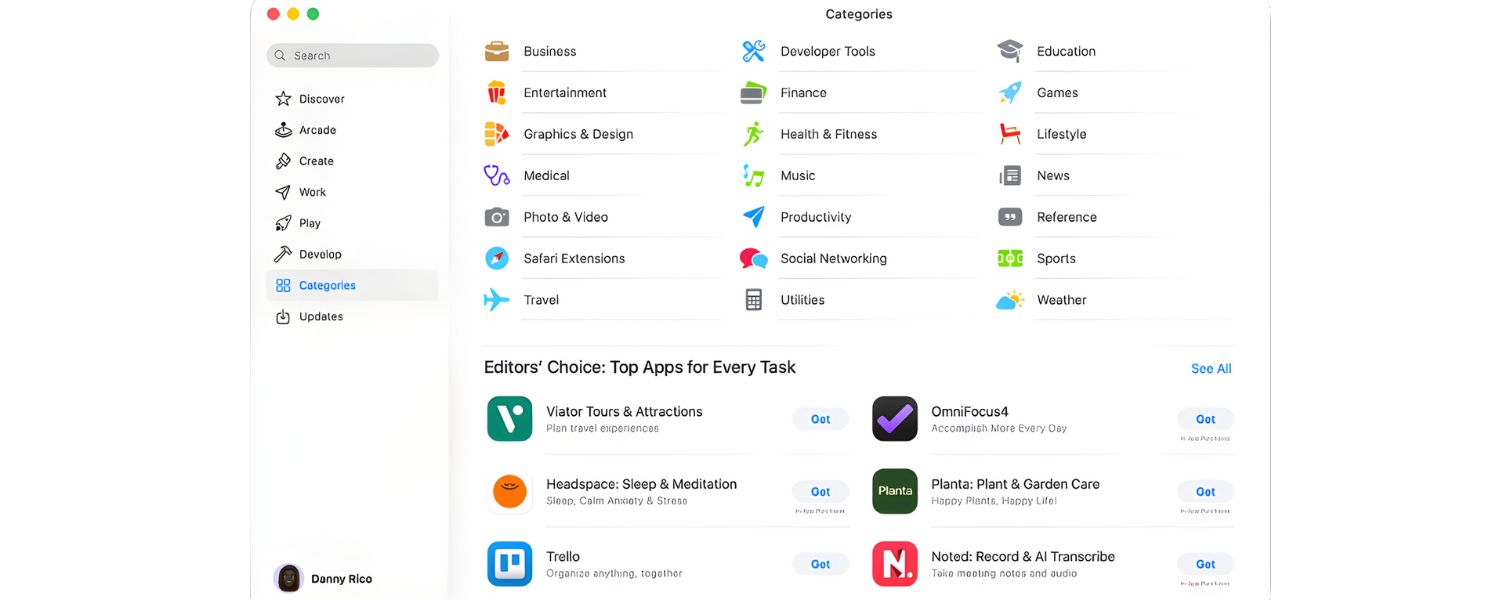
When setting up your app in the store, you must pick a category (and on some platforms a subcategory). This might seem straightforward, but it can impact your ASO:
A. Relevance is Key:
Always choose the category that best reflects your app’s main purpose. If your app fits into multiple categories, think about where users are more likely to look for it.
For example, a calorie counter app could arguably be “Health & Fitness” or “Food & Drink”. If it’s primarily for personal health tracking, Health & Fitness is the better fit; if it’s more about recipes and eating, maybe Food & Drink. Check the app stores to see where similar apps are categorized.
B. Competition in Category:
Some developers try to pick a less competitive category to increase chances of charting. For instance, Games categories are notoriously competitive.
However, being in an inappropriate category will confuse users and can hurt discoverability for the right audience.
Apple might also reject an app if the category is clearly misaligned. It’s generally best to stick to the appropriate category even if competition is high; you’ll just need to excel in ASO to stand out.
C. Subcategories (Apple):
Apple’s App Store for games has subcategories (like Puzzle, Action, etc.), and for non-games you can set a primary and secondary category.
The primary category is most important (indexed in search and determines where you appear). If you have a secondary category, it can give you some additional exposure, but it’s not indexed for search the same way.
Still, you might show up in secondary category charts. Only choose a secondary if it genuinely makes sense.
D. Browsing/Charts Visibility:
Many users browse apps by category (like tapping “Top Charts” or exploring category tabs). If you optimize well and get enough downloads, you could rank in the top charts of your category which significantly boosts visibility.
It’s often easier to chart in a narrower category (e.g., “Education” might be easier than “Games” in terms of needed downloads). But again, only target categories that make sense. Also be aware: some categories have different user demographics and expectations.
E. Category Keywords:
As mentioned earlier, Apple indexes the category name for search. So if someone searches “finance app” and your app is in Finance, that can help slightly. Don’t rely on this though – it’s a minor factor compared to title/keywords.
F. Monitor Category Rankings:
If your goal is also to climb category charts, note that those charts are influenced by downloads (especially recent downloads and velocity).
To climb, you might use bursts (like promotions or ads) to spike downloads. Being featured in a category page by Apple/Google can also happen if you’re trending there.
In essence, set your app up in the store aisle where your target shoppers go. It helps the algorithm and it helps users find you.
Once you’ve chosen the right spot, focus on being one of the best in that section through your ASO efforts and user satisfaction.
5. Use Eye-Catching Icons and High-Quality Screenshots
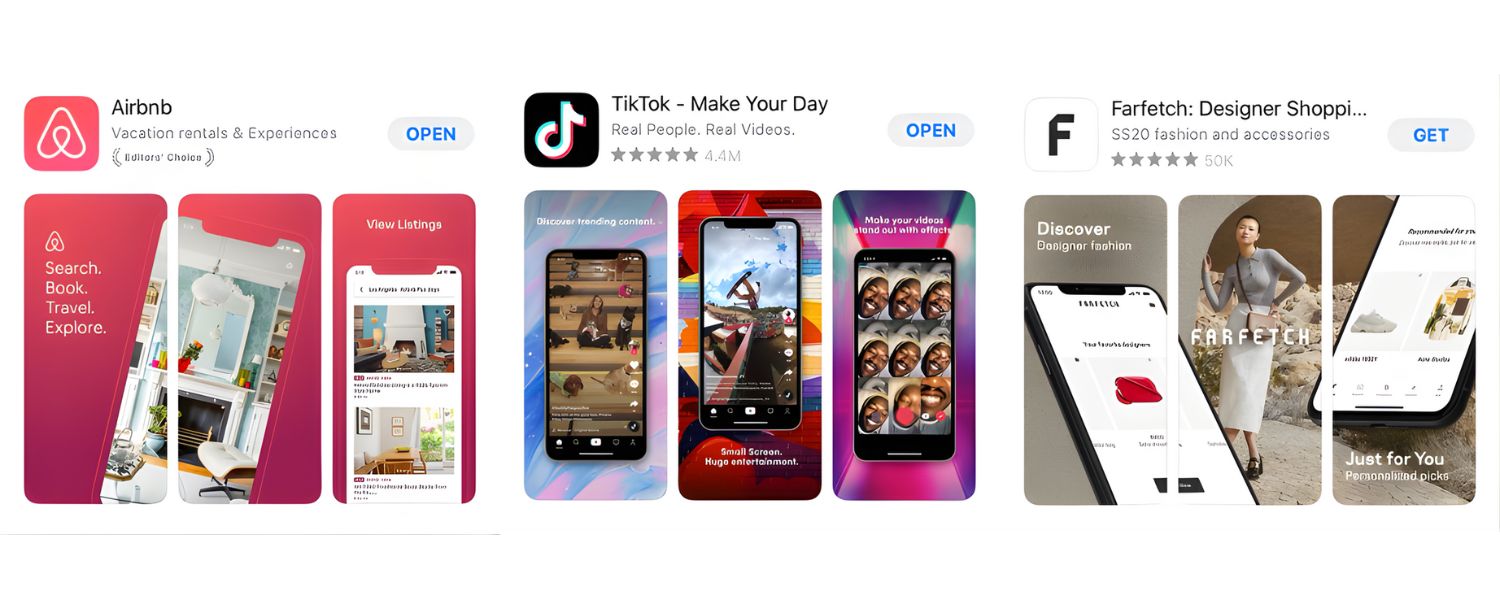
Visuals play a huge role in converting store views into installs. They also contribute indirectly to ASO by improving click-through and conversion rates (which the algorithms notice).
Here’s how to optimize your app’s visuals:
App Icon Best Practices:
A. Make It Stand Out:
Your icon appears in search results lists and top charts, usually quite small. It should be simple and recognizable at a glance.
Use a distinct shape or central graphic so it doesn’t blur into the background. Strong contrast helps – e.g., a bright icon on a light background or vice versa. Avoid too much tiny detail; it won’t be visible in thumbnail size.
B. Reflect Your App or Brand:
Ideally, the icon should hint at what the app does or align with your brand logo. E.g., a camera app might incorporate a camera lens icon.
But many successful apps use abstract or character logos (think Twitter’s bird or Instagram’s camera outline) – what matters is that it’s memorable.
If your brand is well-known, lean on that. If not, consider imagery that conveys the category (like a dollar sign for finance, dumbbell for fitness, etc., in a novel way).
C. Stay Consistent with App Design:
The icon should feel like it belongs to your app. Colors and style that match your app’s UI can create a cohesive impression.
However, also check what competitor icons look like: you might choose a different color scheme to differentiate. For instance, if all to-do apps are blue with checkmarks, maybe your icon can be orange with a checkmark to catch the eye.
D. Test Variations:
You can A/B test icons to some extent. Google Play allows experiments where you upload alternate icons to see which performs better in terms of installs (this is built into the Play Console’s Store Listing Experiments tool).
Apple introduced Product Page Optimization which lets you test up to 3 variants of icons (along with other assets) to a subset of users. Use these tools! Sometimes a small change (different color, adding a border, simplifying an element) can raise conversion by a noticeable percentage.
For example, one developer found that an icon with a brain graphic outperformed one with a robot for their brain-training app, the test data showed an 8% increase in conversion with the better icon.
E. Follow Guidelines:
Ensure your icon meets the required size and format standards (1024×1024 PNG for Apple, etc.).
Don’t put text in the icon (unless it’s a stylized single letter or so) – it usually looks bad when scaled down and Apple might reject icons with words (plus it’s redundant with your title text).
Screenshot Best Practices:
A. Showcase Key Features First:
You have multiple screenshot slots – put the most compelling, feature-defining screenshots in the first few slots because users will see those first (and on Apple, the first 1–3 might show in search results).
If possible, make the very first screenshot a “wow” image that captures your app’s main appeal. For a game, that could be an exciting gameplay scene; for an app, maybe a clean UI shot highlighting a killer feature.
Many apps use the first screenshot as a quasi-poster with a tagline – e.g., a productivity app might show a screen of the app alongside text like “Master Your Day with Smart Tasks.” This can quickly communicate value while showing the interface.
B. Use Captions or Text:
Don’t assume users will understand every screenshot. Adding a short caption or title on each image can make a huge difference.
For example, label your screenshots with phrases like “Track Your Workouts”, “Analyze Detailed Progress Charts”, “Join a Community of Athletes” on each respective screenshot.
These act like mini-advertisements highlighting benefits. Use a legible font and ideally the same style across all shots for consistency.
C. Design for Mobile Viewing:
Remember that people are seeing these on small screens. Use portrait orientation screenshots for apps (unless your app is landscape by nature). Portrait usually shows larger in the app store display.
Ensure any text in the screenshot (either your app’s or your caption) is large enough to read on a phone screen without zooming. High-contrast text (light on dark or vice versa) is easier to read.
Also, consider the color composition: the screenshots should look good as a set – some apps even make the screenshots flow together visually or have a common background theme across them.
D. Show Actual App UI (with enhancements):
It’s important to give an accurate sense of your app’s interface, but feel free to enhance screenshots with device frames or illustrative backgrounds.
For example, placing your app’s screen inside an iPhone outline with a nice background can look professional. Just don’t obscure the app UI – users should get a feel for what they’ll be using.
If your UI is a bit bland but your results are impressive (e.g., a weather app UI might be simple but the data is the selling point), you can use creative graphics around it to spice it up. Apple allows adding graphic elements to screenshots as long as they don’t misrepresent the app.
E. Use All Slots & Video If Available:
It’s generally beneficial to provide the maximum number of screenshots (unless you truly run out of meaningful things to show). A fuller gallery gives users (and the algorithms) the impression of a robust, feature-rich app. For games, definitely fill all slots with different scenes/levels.
If your app supports iPad or tablets, include those screenshots in their respective sections too. Also, consider adding an App Preview video (on iOS) or a Promo Video (on Google Play via YouTube link).
Videos can significantly boost conversion by demonstrating how the app works or how fun the game is. Keep the video short (~30 seconds) and put the most exciting elements in the first 10 seconds to hook viewers.
Note: The presence of a video will make it the first image users see (especially on Google Play), so ensure the video thumbnail is enticing.
F. Localize Screenshots:
Just like text, screenshots can be localized. This is often overlooked, but if your app supports multiple languages, showing screenshots with the app UI in the user’s language (and translated caption text) can greatly improve their engagement.
Apple and Google let you upload different screenshots per locale. It’s extra effort but worth it for major markets.
Quality visuals not only increase downloads but also can lead to better user reviews (since expectations are set correctly) and even attract featuring attention (Apple’s team loves well-designed apps and might feature an app partly because of its polished marketing assets). So invest the time in your icons and screenshots, think of them as billboards for your app.
6. Encourage and Manage User Ratings & Reviews
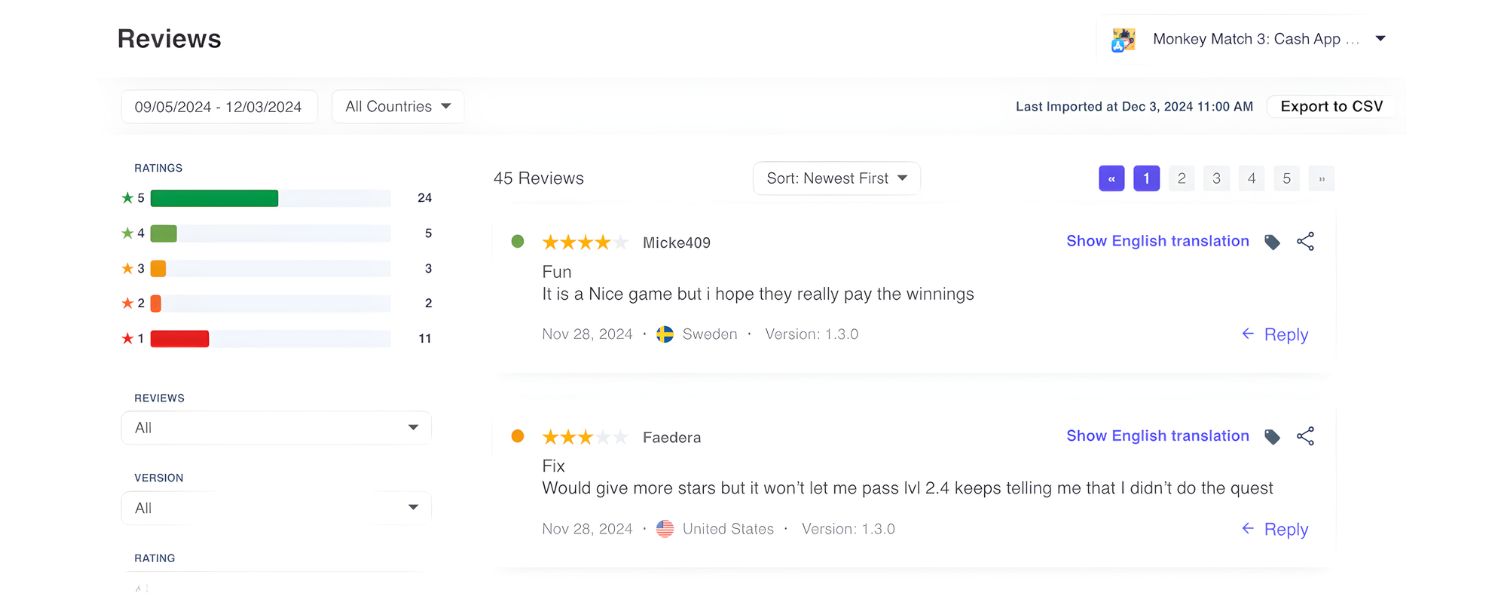
As discussed, ratings and reviews are vital for both ASO and conversion. Here’s how to get more positive reviews and handle them effectively:
A. Implement Smart Review Prompts:
Don’t be shy about asking satisfied users for a review. Both iOS and Android provide in-app review prompt APIs (Apple’s SKStoreReviewController, Android’s In-App Review API) that allow users to rate your app without leaving the app.
Use these wisely: trigger the prompt after a positive user experience or milestone. For example, after a user completes a task, levels up, or indicates happiness (like sharing something).
Timing is key – never prompt on first launch or when a user is in the middle of something. A common best practice is to wait until the user has used the app a few times or accomplished something significant.
When the moment is right, a gentle message like “Enjoying the app? Tap to rate us!” can lead to a boost in 5-star ratings. Apple forbids pestering users repeatedly, so their API limits how often the prompt appears (maximum 3 times a year and only after some interactions). Use the official API so that the user isn’t forced to navigate away.
B. Ask for Feedback, Not Just Ratings:
Sometimes, prompting for a rating might not capture issues. Some apps implement a smart funnel: if a user seems to have a negative experience, instead of asking for a public review, they show a feedback form or contact option (“Tap here to send us feedback”).
This way you can handle complaints privately and hopefully fix issues, before they turn into 1-star reviews on the store. Conversely, if the user is clearly happy (say they keep coming back), that’s a good time to encourage a review.
C. Respond to Reviews (Especially Negatives):
Both Apple App Store and Google Play Console allow developers to respond publicly to user reviews. Take advantage of this. Respond to critical reviews promptly and professionally.
Apologize for any issues, offer help or a workaround, and mention if a fix is coming. Often, users appreciate the acknowledgment and might even update their review to a higher rating.
Plus, new potential users read these reviews – seeing a developer respond positively to problems increases trust (“okay, if I have an issue, they’ll help”).
Also respond to positive reviews occasionally – a simple “Thanks for your support!” shows you’re engaged (though you may prioritize your limited time on critical ones). Keep responses short, helpful, and polite. Never argue or get defensive; remember, your replies are public.
D. Utilize Reviews for Keywords:
Here’s a hidden ASO tip – user reviews themselves can contain keywords. Google, for example, has been experimenting with using review text to help rank apps (and they surface common words in reviews on the Play Store page as tags like “mentions: easy to use, graphics,” etc.).
You obviously can’t control what users write, but by providing a great app that genuinely addresses certain needs, you hope users will mention features or use cases that align with your keywords.
For instance, many users might comment “best budgeting app I’ve used” – that’s great because it reinforces to the algorithm that your app is about budgeting.
This is an indirect factor, but interesting to note. Do not ever post fake reviews to stuff keywords, that’s unethical and against store policies.
E. Avoid Gating Features for Reviews:
In earlier days, some apps would only give full functionality if you left a review. This is a big no-no now – both platforms will ban apps that incentivize reviews with rewards or force positive reviews.
You can politely ask, but you cannot say “Get 100 coins for a 5-star review!” That will backfire legally and reputation-wise.
F. Monitor Feedback for ASO Clues:
Reviews are a goldmine of feedback. Pay attention to what users like and dislike. Maybe several reviews mention a missing feature, that might be a good update to do.
Or they praise a certain aspect – make sure you highlight that aspect in your screenshots or description.
Also, if you fix an issue that many 1-star reviews complained about, consider adding a note in “What’s New” and maybe responding to those reviews to inform them it’s fixed; they might change the rating.
G. Keep Ratings High During Updates:
Note that on the Apple App Store, you have the option to reset your rating when you release an update (i.e., only show reviews for the new version). This can be useful if an older version had issues that brought your average down.
However, a sudden lack of older reviews can also appear suspicious to some users. Use with caution, it’s there so that if you had 2-star average but you did a massive overhaul, you can start fresh.
If you do this, try to get a lot of happy users to rate the new version to quickly establish a good average. On Google, the rating displayed is a cumulative (recent ratings are weighted more though).
Google does show a “Top positive/negative” review snippet; a recent influx of good reviews can push a positive snippet to appear.
In short, happy users = good reviews = better ASO. Engaging with your user base and building a quality app will naturally lead to better ratings.
And a high average rating (4.5 or above) significantly improves conversion: many users filter out or avoid apps below 4 stars.
So this is both an ASO factor and a general success metric. Make it a habit to check your reviews regularly and treat user feedback as part of your ASO improvement cycle.
7. Drive More Downloads with External Marketing (Boosting ASO Impact)
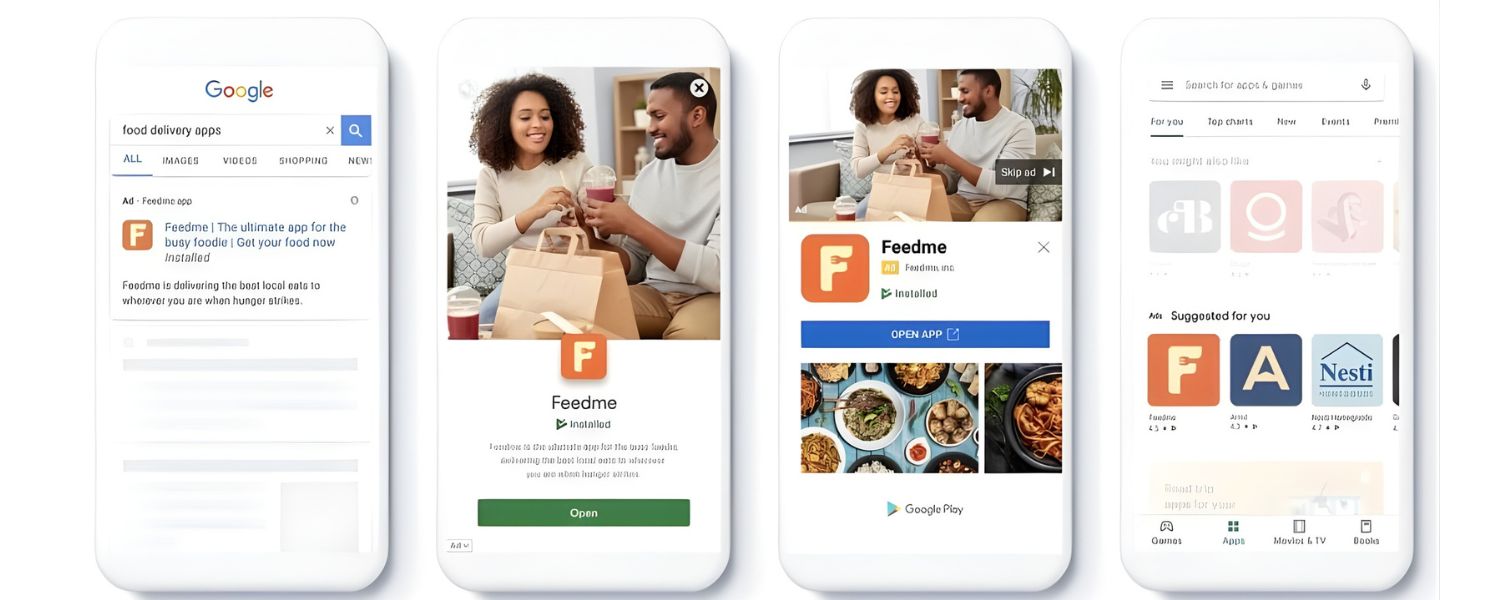
While ASO focuses on optimizing within the app stores, you can amplify its effect by driving external traffic to your app listing.
More downloads, especially in short time frames, can boost your app’s ranking. Here are ways to do that (and simultaneously enhance your ASO):
A. Leverage Social Media and Content Marketing:
Promote your app on platforms where your target users hang out. This could mean showcasing your app on YouTube, Instagram, TikTok, Twitter (X), or LinkedIn, depending on the niche.
For example, if you have a photography app, share tips and beautiful photos on Instagram with a link to your app. If it’s a B2B productivity app, write articles on LinkedIn or Medium about productivity hacks, subtly plugging your app.
Every user you bring in from outside is an incremental download that can improve your rankings and reviews.
Encourage your existing community to share the app with friends (perhaps via an in-app referral program). These word-of-mouth and social shares are free and effective.
B. App Store Badges on Your Website:
If you have a website (and you should consider at least a landing page or support page for your app), include the official “Download on the App Store” and “Get it on Google Play” badges with direct links to your app pages.
A surprising number of users still discover apps through web search. Ensure your site is SEO-optimized for queries like “YourAppName app” and appears when people search for your app or related terms on Google.
Not only does this drive direct downloads, but Google might also index and show your Play Store listing in web results (which can indirectly help).
C. Press Coverage and PR:
Getting tech blogs, influencers, or news outlets to cover your app can create spikes in traffic. A single mention on a popular site can lead to thousands of downloads.
When launching new features or around a major update, consider sending out a press release or reaching out to relevant bloggers/journalists.
If you get featured in a “Top 10 Apps for X” article on a credible site, not only do you get downloads, but that article might link to your app which could be a signal to Play Store’s algorithm (since Google’s web search might associate those backlinks with app authority).
Apple’s algorithm doesn’t consider backlinks, but Apple’s editorial team might discover apps to feature from buzz generated externally.
D. Paid User Acquisition (Ads):
Running paid campaigns can accelerate your download growth, which in turn helps ASO by boosting your ranking and social proof. Two particularly effective channels:
Apple Search Ads (ASA):
These are ads that appear at the top of App Store search results for chosen keywords. They allow you to capture high-intent users right when they search (even if your organic rank is low).
In fact, ASA can be a great way to test and find converting keywords: you bid on keywords and see which bring installs.
Apple states that combining ASO with Search Ads can improve overall results, many top apps use ASA to complement ASO.
One stat: 70% of App Store visitors use search to find apps, so Search Ads give you a way to tap into that flow above your rivals.
The bonus? Users acquired via search ads still count as organic downloads in terms of algorithm signals (a download is a download).
Google App Campaigns:
Google’s Universal App Campaigns (UAC) can display your app ads across search, YouTube, Gmail, and the Display Network.
You provide text, images, video, and Google auto-optimizes. These can drive Android installs (and even iOS, if you allow) at scale. If you rank higher on Play due to more installs, you then get more organic installs – synergy.
Social Media Ads:
Platforms like Facebook/Instagram, TikTok, Twitter, and Snapchat offer app install ad formats.
These can be targeted to your audience demographics. They won’t directly influence algorithm (since those downloads are not from store search), but they increase total download volume and can kickstart word-of-mouth.
E. The key is to monitor your CPI
(cost per install) and LTV (lifetime value of users) so you spend wisely.
But even a short burst campaign around launch or major updates can seed the app with enough users to trigger organic uplift.
Just remember to keep an eye on quality, tons of paid users who uninstall quickly won’t help ASO much (the algorithm might notice high uninstall rate).
F. Cross-Promotion:
If you have multiple apps, you can cross-promote within them (e.g., “Check out our new app” banners). Or partner with other developers to exchange promotions if your audiences overlap but apps don’t compete.
There are also communities and forums (like certain subreddits, product hunt, etc.) where you can showcase your app – sometimes offering a limited promotion or just announcing it to enthusiasts can get you initial traction.
G. App Referrals and Incentives:
Consider adding referral mechanisms in your app – e.g., “Invite a friend and you both get a free month of premium.”
This turns your users into a marketing force. It indirectly helps ASO by bringing in more downloads and engaged users (if they invite friends, they likely use the app more too). Just ensure any such incentive doesn’t lead to fake accounts or abuse.
H. Seasonal or Event-based Promotions:
Tie your marketing to events. If your app is a workout app, run a New Year’s campaign (“New Year, New You, download to start your fitness journey”).
Seasonal spikes in interest can be leveraged (and also consider updating your screenshots or icon during holidays for a festive touch – even that can attract attention).
Why are we discussing external marketing in an ASO guide? Because ASO and external marketing are interconnected: a boost in downloads from outside improves your app’s ranking inside the store, leading to more organic downloads (the “flywheel effect”).
Conversely, a well-optimised app page (ASO) means that any external traffic you drive is more likely to convert since the page is persuasive and relevant.
It’s a symbiotic relationship. In 2024 and beyond, savvy app marketers use a mix of ASO + paid UA + other channels to maximize growth.
One caution: make sure your tracking is set up (use App Store Analytics, Google Analytics for Firebase, or other mobile analytics) to see how users are finding you and what they do after installation.
This can inform future ASO (e.g., if external users bounce off after one use, maybe your store listing overpromised something).
8. Keep Your App Updated and Maintain Quality
Both app stores favor apps that are actively maintained and deliver good user experience. Here’s how to ensure you meet those expectations:
A. Regular Updates:
Plan to release app updates on a consistent basis, perhaps every 2-4 weeks for rapid development apps, or at least every couple of months for slower cycles. Updates need not always be huge feature additions; they can be bug fixes, performance improvements, or minor tweaks.
The point is to show the app is alive and improving. Apple’s algorithm doesn’t explicitly say “this app updated last week so rank it higher,” but there is anecdotal evidence that regular updates correlate with better store visibility (and Apple’s editorial team certainly notices apps that use new iOS features or regularly polish their app).
Google Play does take into account app stability and performance, which often improve with updates, so indirectly, yes, updating helps.
Moreover, each update gives you a chance for a “What’s New” note that re-engages users and perhaps encourages lapsed users to open the app again (improving engagement metrics).
B. Listen and Improve:
Utilise feedback from reviews, support emails, and analytics to identify and resolve issues that users encounter. If users report crashes or bugs, fix them ASAP, crash-free apps will rank better than crash-prone ones (Google’s Android Vitals can even lower the visibility of apps with poor crash rates).
If a feature is heavily requested, implementing it can turn unhappy users into promoters. Show that you care by often saying in release notes, “Thank you for the feedback! In this version, we fixed X…”
Many users read release notes and appreciate when their complaints are addressed, which can translate to better reviews.
C. Optimise Performance and Size:
App stores consider technical quality. For Google, Android Vitals (including battery usage, render times, and permissions) are part of their evaluation.
Apple also values performance – an app that is smooth and integrates well with iOS features might attract editorial eyes and retain users better.
Keep your app size reasonable; large apps may see fewer installs (some users avoid big downloads, and Google has a 150MB over mobile data warning unless using app bundles).
Use tools like Firebase Performance Monitoring or Xcode Instruments to find slow parts and optimise them. A snappier app = happier users = better retention = ASO gains.
D. Security and Compliance:
As part of quality, ensure your app complies with all platform guidelines (privacy policy, data usage, etc.). If Apple or Google ever temporarily remove or flag your app for an issue, you’ll lose all the momentum (and your listing might lose ranking).
So keep everything above board. Also, adapt to new OS changes promptly (e.g., when Apple required privacy labels, many apps that delayed saw a dip in trust).
Embracing new iOS/Android features (like widgets, dark mode, etc.) can sometimes get you featured under “Apps that support [new feature]”.
E. A/B Test Listing Elements:
Quality maintenance isn’t just code – it’s also your store presence. We mentioned A/B testing icons; you can also test screenshots, videos, and even descriptions.
Google Play’s experiments allow testing variants of text and visuals to see which yields better conversion. Apple’s Product Page Optimisation allows testing different screenshots or app previews against your baseline.
Continuously testing and optimizing ensures your listing stays effective as trends change. For instance, a style of screenshot design that worked in 2022 might become stale by 2025 – testing keeps you updated on what appeals to users now.
F. Monitor ASO Metrics:
Keep an eye on your app store analytics: impressions, conversion rate, keyword rankings, etc. If you see a drop in any metric, investigate. Maybe a competitor did a big update or ASO push and out-ranked you for a keyword – you might need to respond with your own improvement.
Maybe your conversion rate fell after you changed screenshots – perhaps revert or try a new approach. ASO is an ongoing process of refinement. Set aside time each month to review your ASO KPIs (Key Performance Indicators) – downloads, category ranking, average rating, etc.
There are third-party dashboards (App Annie/Data.ai, Sensor Tower, etc.) that make tracking easier, but you can gather a lot from free tools like App Store Connect and Google Play Console as well.
G. Seasonality and Trends:
Update your keywords and content as needed for seasonal trends. If you have a shopping app, for example, ramp up holiday-related keywords or screenshot themes during Q4.
If a new slang or concept appears in your app’s domain, consider working that into keywords (as long as it’s not fleeting).
Some apps even do seasonal icon changes (like adding a Santa hat to the icon in December) – this can be fun for users and shows attentiveness, though be careful not to change icons too often or drastically outside of relevant context.
The bottom line is, an optimised app listing can only do so much if the app itself isn’t up to par.
App Store Optimisation doesn’t end at the store page – it continues into how you run your app’s development and user support. The best ASO is to have an app that people love, which results in strong engagement and advocacy.
The app stores are continuously watching how users interact with your app (download, open, keep, delete, review). By keeping the app updated, fast, and user-centric, you’ll naturally improve those signals and thus your rankings.
9. Localise Your App Listing for Different Markets
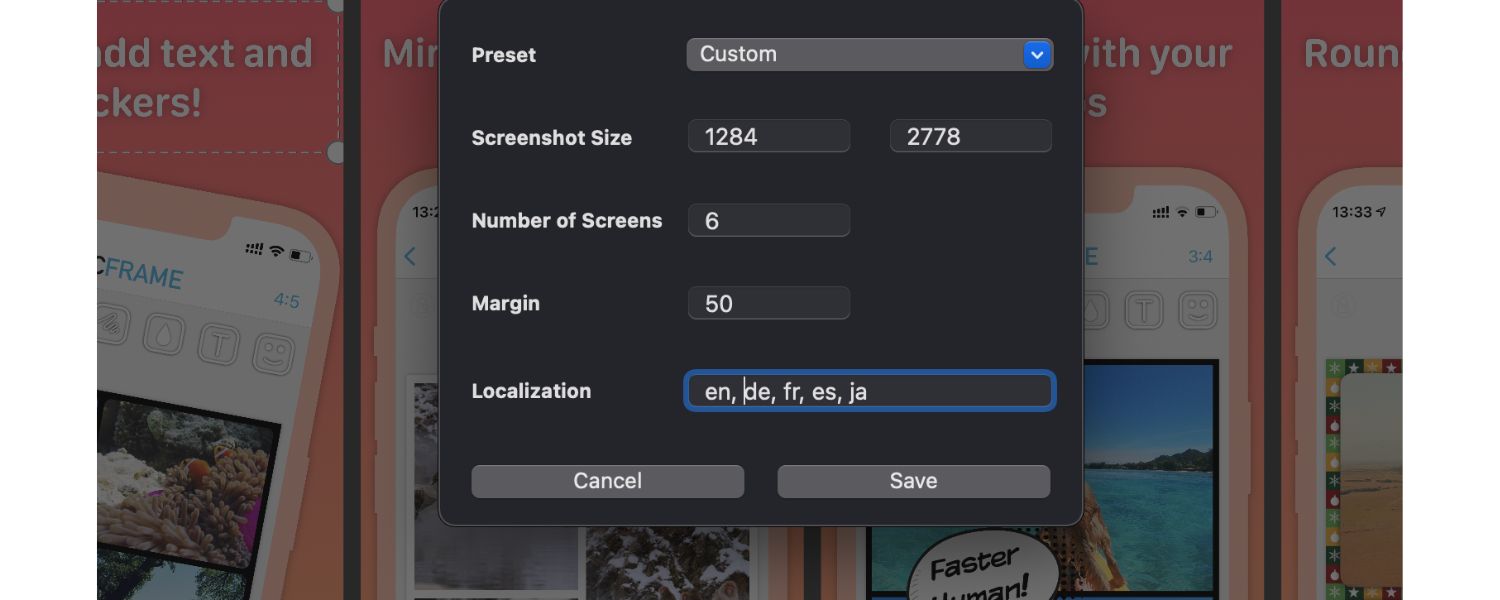
We touched on localisation a few times, but it deserves its own emphasis. Localization means adapting your app and its App Store/Play Store listing for different languages and regions. This can significantly expand your reach and downloads:
A. Localize App Store Text:
Both Apple and Google allow you to provide translated app names, subtitles, descriptions, and keywords (for Apple) for dozens of languages. If you have the resources, translating your app store listing into major languages (Spanish, French, German, Chinese, Japanese, etc.) can open you up to more users.
Many users are far more likely to download an app if the store page is in their native language, even if the app itself is in English (though ideally, you localise the app UI too).
For instance, someone searching the App Store in Spanish for “organizador de gastos” could find your finance app only if you’ve added a Spanish localisation with those keywords, even if they wouldn’t see it when it’s only in English.
B. Localise In-App Content:
If possible, localise the app’s content and UI as well. The app stores indicate on your listing which languages the app supports.
Supporting popular languages not only improves user experience but can boost your app’s ranking in those locales’ charts (because you’ll get more downloads there if non-English speakers can use it).
It’s a big project to localise an app, but even starting with a few key languages and then expanding can deliver a good ROI in user growth.
For example, adding support for Chinese (Simplified) could open your app to a massive user base on iOS (in China or among Chinese speakers globally) – but remember, China’s App Store has separate requirements and a huge market.
Do market research to decide which locales make sense for your app’s topic and usage.
C. Culturalization of Visuals:
If you localize to certain regions, consider if your screenshots and marketing should change for cultural relevance. For example, certain imagery or color meanings differ by culture.
Or if you have people in screenshots, users might relate more if those look like local users. At minimum, translate any text in your screenshots or video captions to the local language.
It’s a bit of work to produce separate assets per language, but it can pay off in improved conversion rates. If resources are limited, prioritize doing this for languages that drive the most traffic.
D. Leverage Custom Store Listings (Google Play):
Google Play has a feature for custom store listings by country. You can create a custom listing with different screenshots or promo text for specific countries (even if they share the same language).
This is useful if, say, you want a different marketing angle in Japan vs. the US for the same English app, or if your app’s value prop differs by region.
Also, Google allows store listing experiments by country, so you can test how different local approaches perform.
E. Consider Regional Trends & Keywords:
The most searched keywords may differ in other countries. Even between British English and American English, word choice can vary (“holiday planner” vs “vacation planner”). If you localize to UK English, optimize with UK terminology.
If localizing to Spanish, decide between European Spanish and Latin American Spanish nuances or do both.
App Store Connect actually lets you target certain locales separately (e.g., Mexican Spanish vs. Spain Spanish keywords can be distinct).
Try to get input from native speakers or local ASO experts for keyword research in each language – there might be nuances you’d miss with direct translation.
F. Don’t Use Auto-Translate:
While services like Google Translate have improved, the app store listing is too important to risk sounding awkward.
If you can, hire a professional translator or a native-speaking friend to translate and localize (transcreation is even better – adapting the copy to sound natural and appealing).
The investment can be worthwhile because a poorly translated description might turn off users or even be nonsensical.
Localization can dramatically increase downloads in those markets. For example, App Radar noted that localized listings can boost rankings and downloads among diverse audiences significantly.
If your app has any global appeal, ignoring localization is leaving a lot of opportunity on the table.
One case: Spotify’s listing in Brazil has Portuguese screenshots and description tailored to local culture, which helped it grow in that market.
You might not be Spotify with resources for every language, but even adding 2-3 top languages could increase your user base by a large percentage.
Additionally, Apple allows up to 35 custom product pages for different purposes (like seasonal promotions or specific audiences) and Google up to 50 custom store listings.
These can be leveraged not only for localization but also for targeted marketing campaigns (like having a special App Store page for a Facebook ad campaign vs. an Instagram campaign, each highlighting something slightly different).
While advanced, such segmentation can improve conversion for those user segments, indirectly boosting overall performance.
In summary: speak your users’ language – literally. By localizing and tailoring your ASO to each major region, you make your app accessible and appealing to a much larger audience, which in turn drives more downloads, better ratings (since people understand your app), and higher rankings globally.
10. Perform A/B Testing and Continuous Optimization
App Store Optimization is not a one-and-done task. The app marketplace and user preferences are always evolving, so continuous optimization is key.
One of the best ways to optimize is through A/B testing (also called split testing), where you try different versions of your app listing elements to see which performs better.
Here’s how to implement a culture of continuous ASO improvement:
Both major platforms have introduced built-in tools for testing store listing variants. Google Play’s “Store Listing Experiments” lets you test variants of your app title, icon, screenshots, and description text with a percentage of Google Play visitors.
For instance, you could test Icon A vs Icon B, or Description version 1 vs version 2. Google will show each variant to a portion of users and then report which variant led to higher conversion (installs).
Follow Google’s guidance to run tests for at least 1-2 weeks (or longer if you need more data) to reach statistical significance.
Apple’s Product Page Optimization (PPO) similarly allows you to create up to 3 alternative product page versions to test against your original for iOS 15+ users.
You can test different icons, screenshots, and app previews on Apple’s PPO. Apple suggests running tests long enough to gather meaningful data (they often recommend at least 90% confidence over a couple of weeks, but it depends on your traffic).
A. Test One Element at a Time:
To get clear insights, change only one type of element per test. For example, test two different icons while keeping everything else the same.
Or test a set of screenshots against a different set (ensuring each set has a consistent style internally). If you change multiple things between variants, you won’t know which element drove the difference.
It’s a systematic process. Over time, you might run dozens of micro-experiments: icon, then screenshots, then video on/off, then short description phrasing, etc.
B. Focus on Impactful Elements:
Usually, the icon and first screenshot have the biggest impact on conversion (they are seen first). So those are great candidates to test.
Also, the short description (on Google) or subtitle (Apple) – sometimes a rephrasing can yield better results. For example, an app improved conversion by rewording its short description to ask a question instead of a statement.
Test things like: listing features vs. emphasizing a value proposition; using different tone (fun vs. professional); highlighting awards or not, etc.
C. Incorporate Results and Iterate:
When a test concludes, implement the winning variant as your default. Then consider the next test. A/B testing is an ongoing cycle – there’s always room to try new ideas.
However, don’t feel compelled to test something just for the sake of it if you’re already at a very high conversion rate (if it ain’t broke…).
But since user preferences change, revisiting elements every 6-12 months isn’t a bad idea.
D. Seasonal Testing:
You might find that certain visuals work better during holiday season vs. off-season. Or certain words resonate at different times. Keep note of seasonal patterns and possibly schedule tests around those periods.
E. Competitive Analysis:
Pay attention to what your competitors are doing too. If a top competitor suddenly changed their icon or screenshots and they seem to be doing well, analyze that.
They may have data-driven reasons. It doesn’t mean copy them, but it might inspire tests. Also, if you see all competitors highlighting a specific feature in screenshots that you’re not, maybe test adding that.
F. Holistic View:
While testing store listing elements, don’t forget to monitor the broader context – like user quality. A certain variant may get more installs but are those users sticking around?
Ideally, higher conversion means more interested users, but it’s possible to “overpromise” in marketing assets and attract people who churn.
Avoid deceptive optimizations; aim for those that bring in right users who will engage. Keep an eye on retention stats alongside install stats when evaluating success.
G. Experiment with Pricing and Monetization (if applicable):
Indirectly related to ASO – if you have a paid app or in-app purchases, the way you present pricing can affect conversion.
On Apple, you can test price points by releasing an update with a new price and seeing how conversion/downloads respond (no native A/B for price, unfortunately, you have to measure sequentially).
Similarly, test free trial offers, etc. But be cautious as users generally like free; any move from free to paid can tank conversions.
H. Track and Learn:
Document the outcome of each test. Over time, you’ll build a knowledge base of what kind of messaging or design resonates best with your audience.
For example, you might find bright-colored screenshots consistently outperform dark-themed ones for your app, or vice versa. This can guide your overall design/branding decisions too.
Continuous optimisation means your ASO is constantly improving or at least adapting to current trends.
The top-ranking apps in each category are often those that never complacently say “good enough” – they keep fine-tuning their approach to maintain their edge.
By using A/B testing and keeping an experimental mindset, you can discover the most effective combination of app name, icon, screenshots, and description that yields the maximum downloads and user satisfaction.
With all these strategies, from keyword research to testing, you are essentially covering every angle of App Store Optimisation.
Mastering ASO is a gradual process of implementation, measurement, and refinement. Next, we’ll summarise these best practices and wrap up with how you can put them into action and stay ahead of the competition.
Conclusion: Winning with ASO in 2025 and Beyond
In today’s fiercely competitive app landscape, App Store Optimisation is not optional, it’s a must for any app developer or marketer aiming for growth.
By now, you’ve learned that ASO is both an art and a science: it requires creative marketing savvy (to craft compelling listings) and data-driven strategy (to align with algorithms and user search behaviour).
Let’s recap the key takeaways:
A. ASO is the SEO of the app world
It’s about boosting your app’s visibility in the stores and improving conversion so that more people find and download your app. With millions of apps available, ASO is essential for standing out. Learn more in Mastering ASO.
B. Keyword optimisation is the foundation
Conduct thorough research to identify relevant, high-value keywords and strategically incorporate them into your title, subtitle, keyword field (iOS), and description (Android). Continuously refine your keywords as trends evolve or new use cases emerge.
C. Compelling listings drive downloads
Optimise your app name, icon, screenshots, and description to instantly communicate your app’s value and appeal to users’ needs. Use visuals and copy that resonate with your target audience, and don’t forget to update them for seasons or new features.
D. Quality and engagement are critical
The app store algorithms favour apps that users love. High ratings, positive reviews, strong retention, and regular updates are signals that your app is worthwhile. Encourage happy users to leave reviews, respond to feedback, and keep improving your app’s performance and content.
E. Apple and Google have differences
But their core principles remain the same. Tailor your approach slightly for each platform (such as using the keyword field on Apple and keyword-rich descriptions on Google), while remembering that both reward relevance and user satisfaction. Use platform-specific tools like Apple’s Product Page Optimisation and Google’s Store Listing Experiments to your advantage for testing.
F. Leverage every channel to boost ASO
Don’t silo ASO from your broader marketing. Utilise social media, content marketing, and paid advertising campaigns to increase traffic to your app. The more quality downloads you generate, the higher your app can rank, creating a virtuous cycle of growth.
G. Localise to unlock new markets
If your app serves a global audience, invest in localising your app store listing (and ideally the app itself). Speaking users’ language can dramatically increase downloads and user satisfaction in those regions.
H. ASO is ongoing
The top apps consistently iterate. Analyse your metrics, A/B test new ideas, and stay updated on app store algorithm changes or new features (like Apple’s app tags or new search ad placements). What works today might need tweaking tomorrow, so approach ASO as a continuous process of optimisation.
By applying the strategies outlined in this guide, you’ll be well on your way to mastering app store optimisation. Not only will your app climb higher in search results for relevant keywords, but it will also convert more store visitors into loyal users, which is the ultimate goal.
Remember, ASO isn’t about “gaming the system” or overnight success. It’s about making your app the best it can be and communicating that to users when they’re browsing the app stores.
It’s a marathon, not a sprint. But with persistent effort, the impact on your app’s visibility and downloads can be game-changing.
Now it’s time to put this knowledge into action:
Audit your current app listing – identify weak spots (such as outdated screenshots or neglected keywords that haven’t been revisited in a year).
Research your competitors – identify the keywords and messaging they use, and discover your unique differentiators.
Implement changes step by step – maybe start with optimising your title and screenshots for a quick win, then move to a deeper keyword overhaul and new experiments.
Monitor results – give it a few weeks and track the changes in your downloads and rankings. ASO improvements can sometimes take time to take effect, especially in terms of search rankings fully.
Iterate – based on data, keep refining. Celebrate the wins (e.g., a jump from rank #50 to #20 for a key term, or a boost in conversion rate from 25% to 35%) and learn from the losses (a test that didn’t pan out is still valuable knowledge).
With dedication, you’ll see your app growing and climbing the charts. The users who need your app will be able to find it more easily, and your download numbers will thank you.

What Is PPC? A Practical Guide to Pay‑Per‑Click Advertising
Pay‑per‑click (PPC) is the “pay only when someone clicks” branch...

Google Search Issues Affecting Results in Some Regions
Google has confirmed a problem with one of its data...

Keyword Counts Dropped After Google’s num=100 Change
In September 2025, Google stopped supporting the &num=100 parameter. This...

Image SEO: Optimize Images for Higher Rankings & Traffic
Introduction Images make your website more engaging, but they can...

Share of Voice: Definition, Measurement & Boosting Brand
Share of Voice (SOV) is a key marketing metric that...


.png)
.png)
.png)
.png)
.png)

2024 ALL RIGHTS RESERVED MADE IN INDIA
.png)