
Google Local Pack: Everything You Need to Know About
August 12, 2025
Introduction
If you’ve ever searched for a service “near me” and noticed a map with three business listings at the top of Google, you’ve seen the power of the Google Local Pack. Appearing in this coveted “3-pack” can skyrocket a local business’s visibility, driving foot traffic and sales almost overnight.
This guide explains what the Google Local Pack is, why it matters, and how you can rank your business in it, drawing on 25+ years of marketing know-how and the latest SEO insights.
What Is the Google Local Pack?
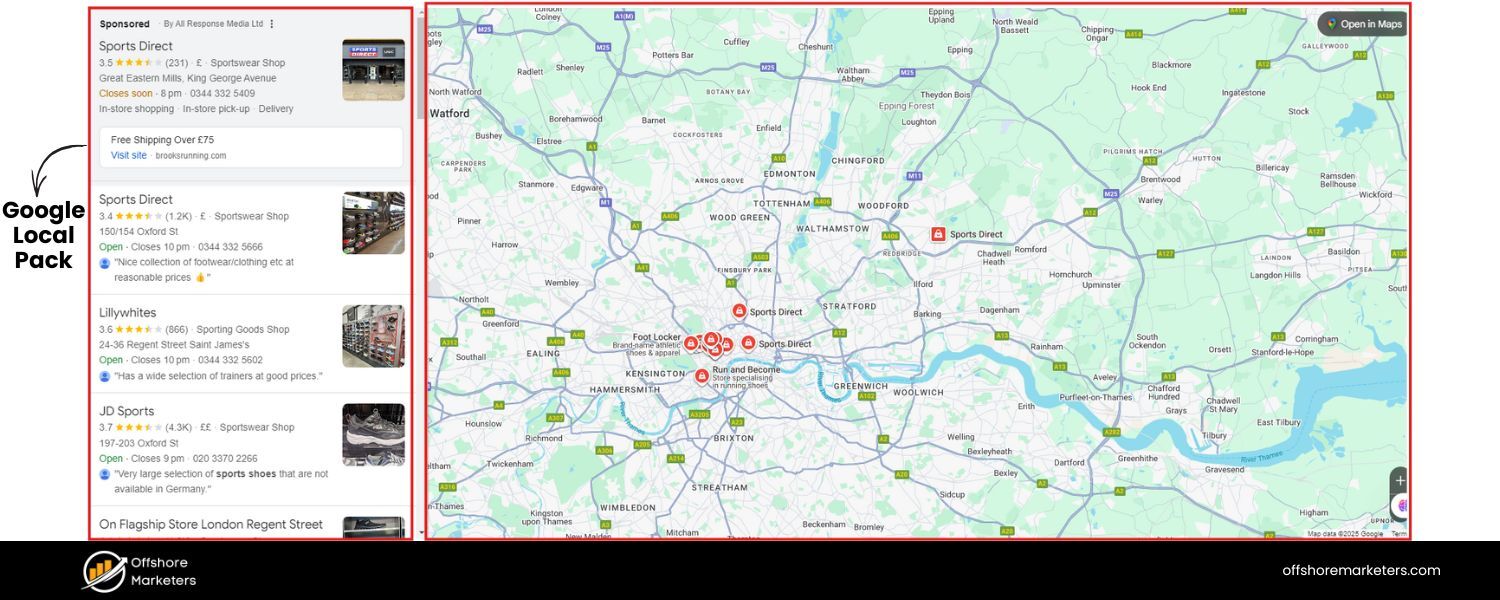
The Google Local Pack (also known as the Local 3-Pack, Google Map Pack, or even the “Snack Pack”) is a prominent feature of Google’s search results for queries with local intent.
It typically appears at the very top of the search results page, above the regular organic links, whenever Google determines that the searcher is looking for local information (e.g. searches including a city name or “near me”).
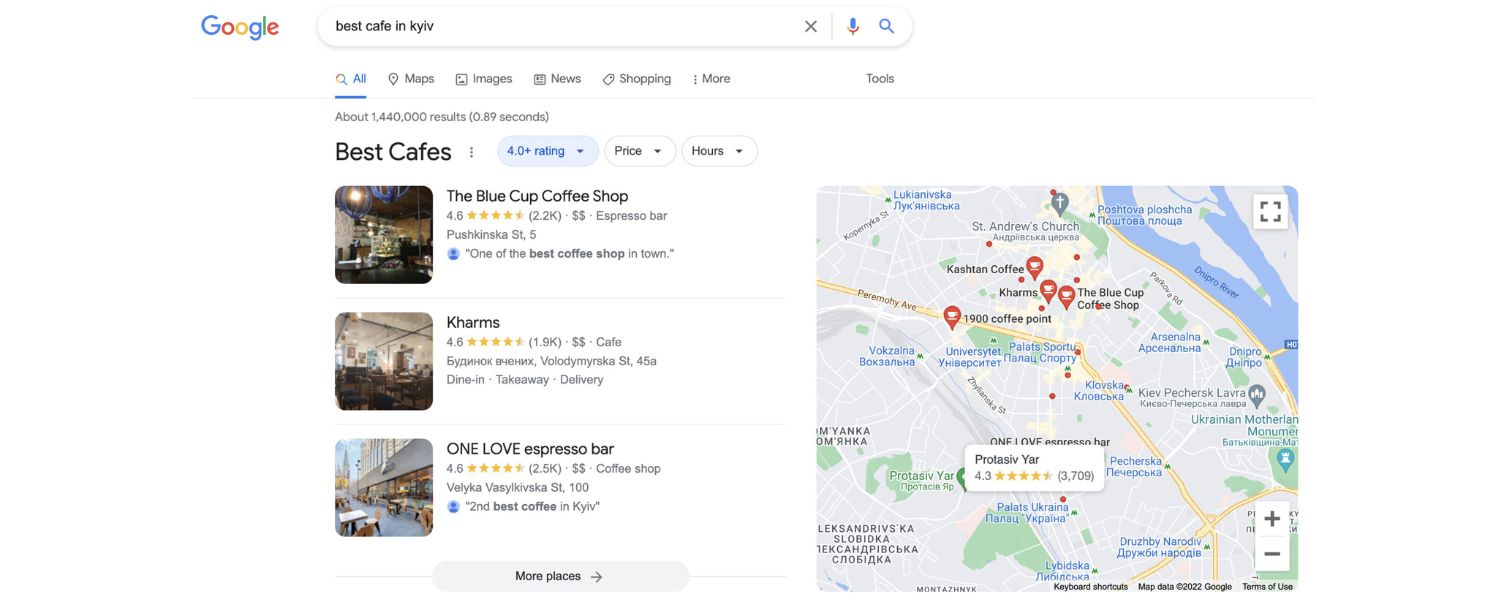
In its standard form, the Local Pack displays a map with pushpins alongside three local business listings relevant to the query.
Each listing shows key details at a glance: the business name, star rating (average review score), number of reviews, address, phone number, and sometimes operating hours or price range.
There are also direct calls-to-action, such as buttons to visit the website, get directions, call the business, or even order online, which makes it extremely convenient for users.
Example of a Google Local Pack for “vegan restaurants in New York City,” showing a map and three local business listings with ratings, addresses, and hours.
Brief History:
Google hasn’t always shown a “3-pack.” In fact, prior to mid-2015 the Local Pack often contained seven listings (a “7-pack”) without a map.
Google streamlined this to three results in August 2015 to improve the mobile user experience and clarity of results. Since then, the local results interface has continued to evolve.
For example, some Local Packs now include photos next to each listing or snippets of review text (known as local justifications) that highlight why a result is relevant.
Certain categories have specialized pack layouts, a search for hotels might show availability and prices, while a search for local schools may omit reviews entirely due to Google’s policy changes. (In the Hotels pack, for instance, Google displays room rates and a booking module instead of a typical website link.)
In short, the Google Local Pack is Google’s way of showcasing the top local business results for a location-based query. It’s highly prominent on both desktop and mobile, often the first thing users see – making it prime real estate for local businesses.
How Does Google Determine a “Local” Search?
Google doesn’t show the Local Pack for every query, it appears when Google interprets that local intent is present. There are a few common signals of local intent:
A. Explicit location in query 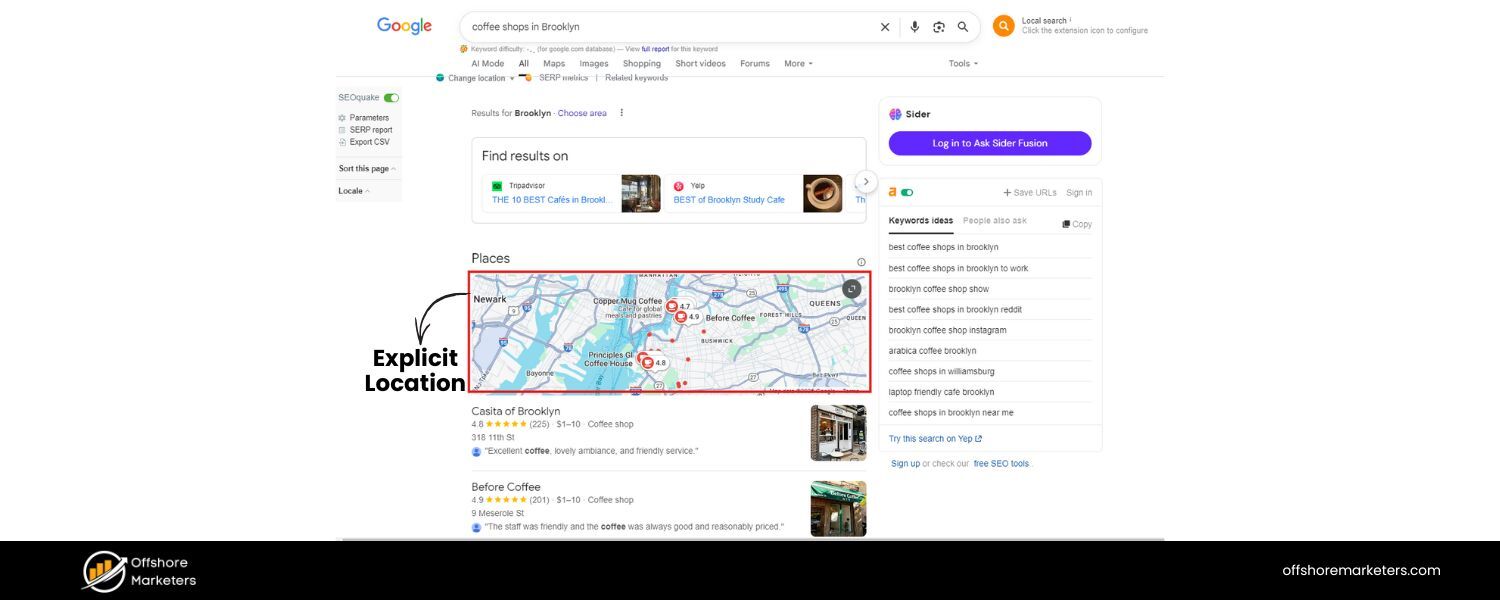
If someone includes a city, neighborhood or phrase like “in [Town Name]” (e.g. “coffee shops in Brooklyn”), Google knows to return local results for that area.
B. “Near me” searches 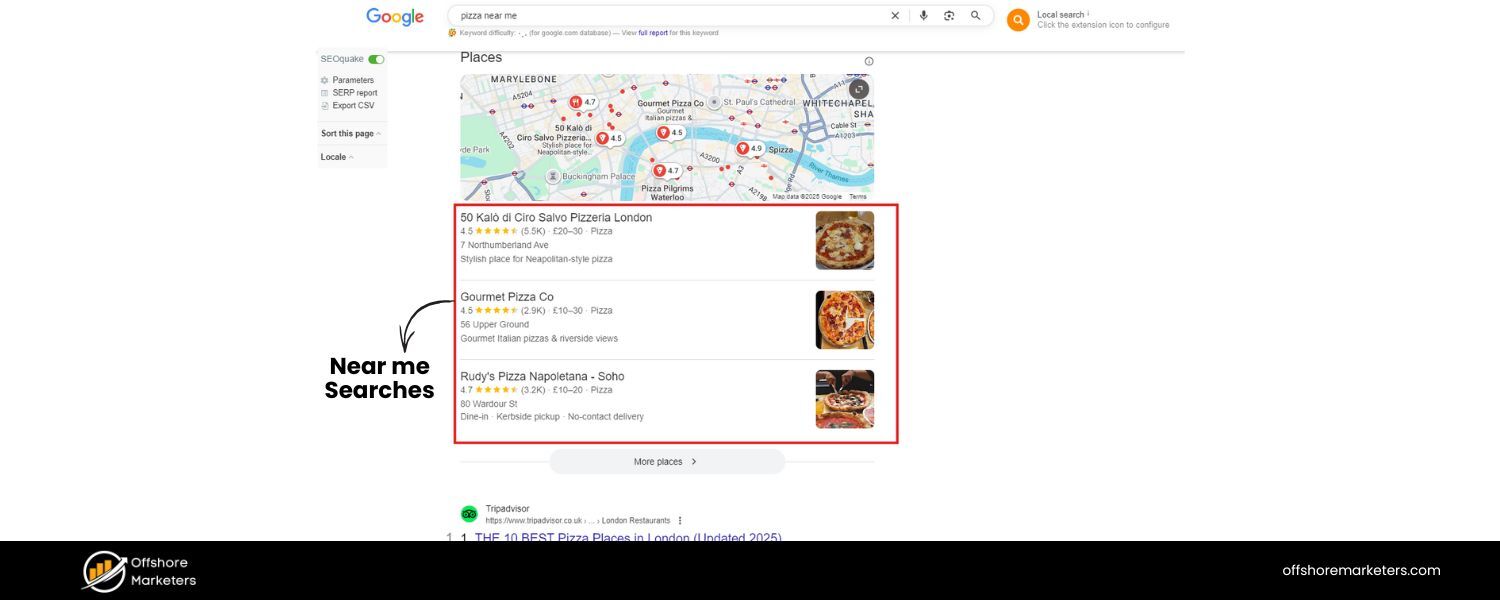
Phrases like “near me” or “closest” trigger local results. For example, searching “pizza near me” will prompt Google to use your device location (via GPS or IP address) and show nearby pizza places.
C. Implicit local intent
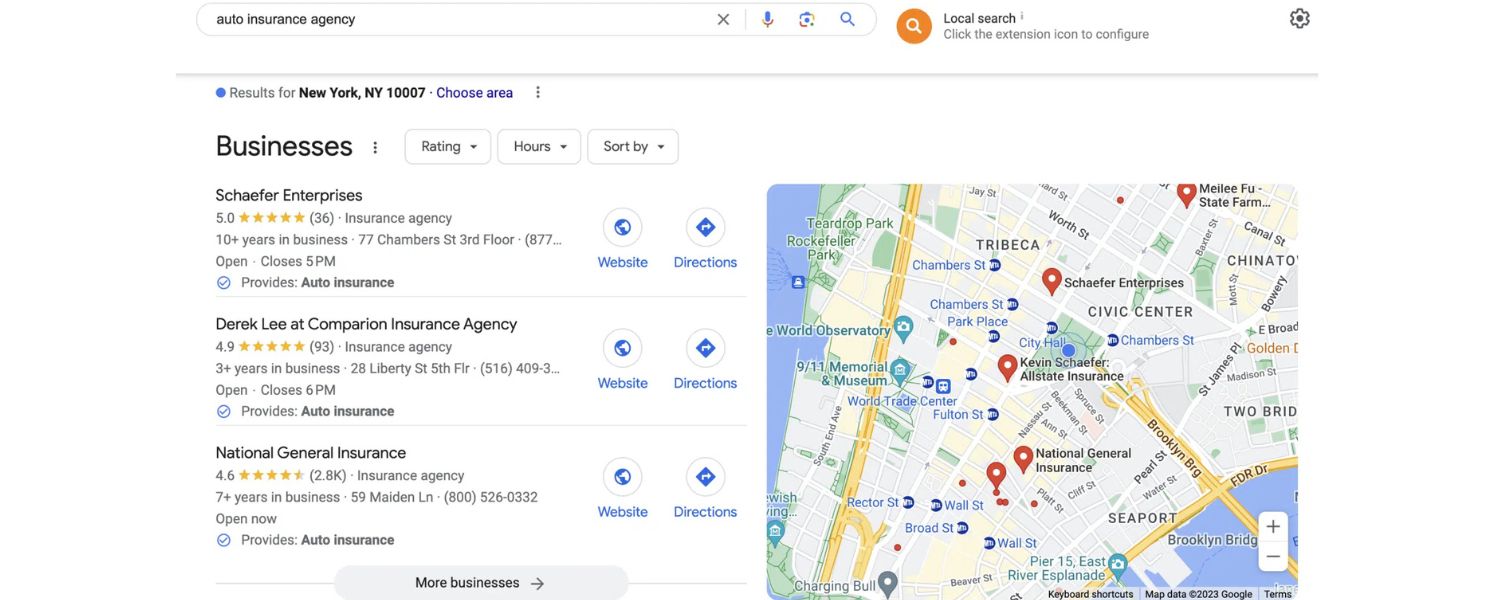
Even if you don’t specify a location, certain queries imply it. If you just search “plumber” or “best restaurant”, Google assumes you likely want nearby options and will factor in your current location to show a Local Pack relevant to you.
In essence, Google is very good at reading query context. By analyzing the words and your location, it can tell when you probably want local recommendations. When that happens, the Local Pack is usually triggered at the top of the results.
It’s worth noting that the Local Pack is closely tied to Google Maps and the Local Finder. The map and listings you see are drawn from Google Maps data (Google Business Profiles).
If you click the “More places” link (or “See more”) under the three pack results, Google will expand to the full list of local results in the Local Finder interface or Google Maps, where you might see 10–20+ additional businesses relevant to your search. This expanded list is essentially an extension of the Local Pack results beyond the top three.
Also, Google may sometimes alter the format: occasionally only 2 results are shown (especially if one is an ad), or up to 4 if one spot is taken by a paid listing.
Yes, Google can include Local Pack Ads – these are advertisements via Google Ads (with location extensions) that appear in the Local Pack, marked with a small “Ad” label.
For example, a local service provider who runs ads might secure a spot above or among the three organic local results. However, aside from these clearly labeled ads, the regular Local Pack results are earned placements, governed by Google’s local search algorithm, not by payments.
Why Is the Local Pack So Important?
Getting featured in the Local Pack can be a game-changer for a local business. Consider these points:
A. Top-of-Page Visibility 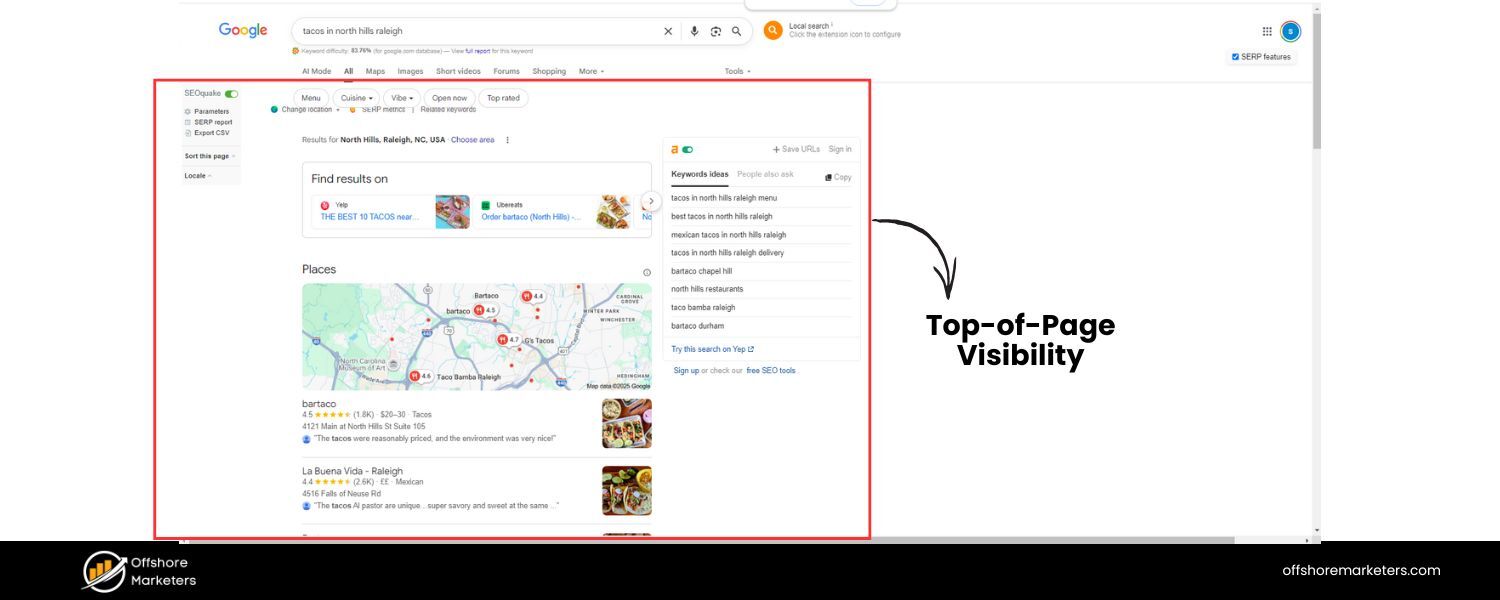
The Local Pack dominates the screen, especially on mobile devices where it often occupies the entire initial view. Users see it before any organic web results.
This prominence leads to high click-through rates – the #1 local pack position gets the most clicks of any local search result.In fact, one analysis found that 42% of searchers click on a result in the Local Pack when local results are shown. If your business is listed there, you’ve got a huge head-start over competitors stuck below.
B. Increased Website Traffic and Calls
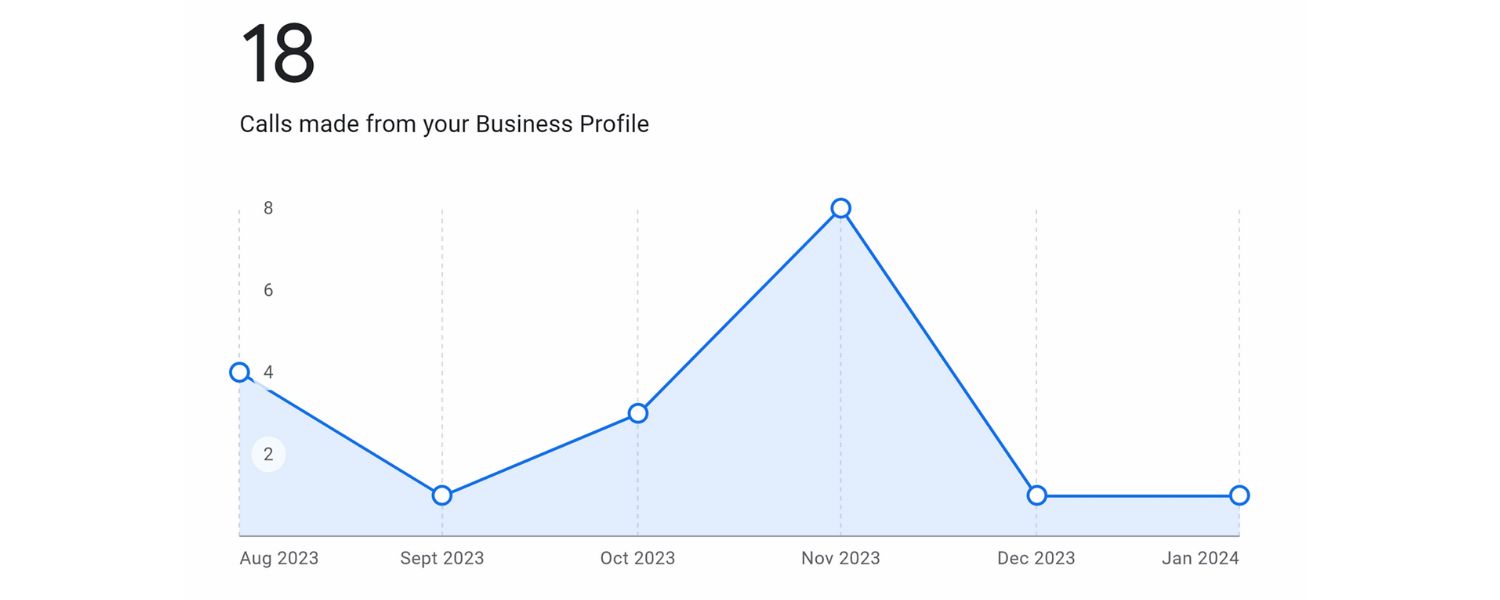
By virtue of being highly visible, Local Pack listings drive more traffic and leads. Studies show that businesses in the 3-pack get 126% more traffic and 93% more customer actions (calls, clicks, direction requests) than those ranking 4th-10th on the page.
Users often don’t feel the need to scroll further, everything they need (phone, address, reviews) is right there. Why scroll and sift through regular websites when the Local Pack provides quick answers?
C. Better User Experience
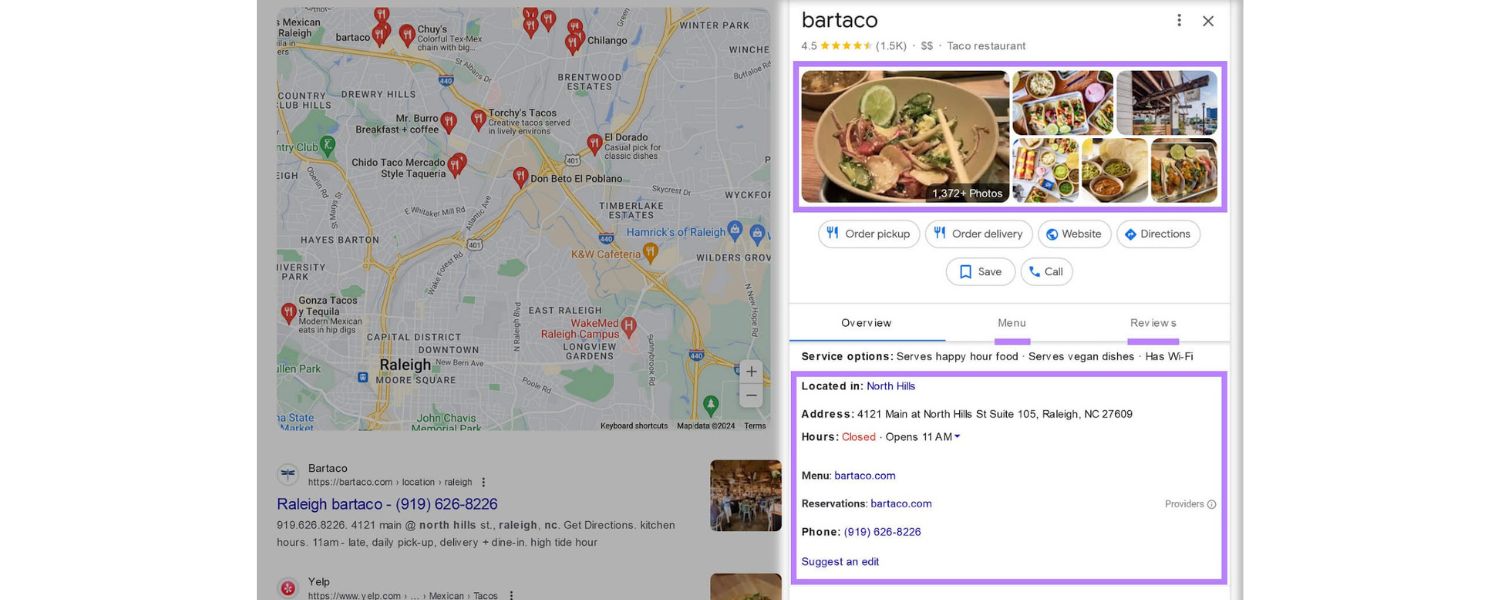
The Local Pack is designed for convenience. Users can instantly see a business’s rating, open hours, price range and even photos without clicking through to a website. It also provides immediate CTAs like “Call” or “Directions,” enabling quick action.
This one-stop-shop approach means users find what they need faster, and businesses benefit from lower friction in customer interactions.
D. Drives Foot Traffic & Offline Sales

Local searches often correspond to immediate needs. Google found that 50% of mobile users who perform a local search visit a store within one day.Moreover, 78% of local mobile searches lead to an offline purchase within a short time. Showing up in the Local Pack means your business is likely to get that visit.
For example, appearing in a search for “coffee shop near me” means the user is very likely to actually walk into one of those top 3 shops.
In one survey, 42% of millennial consumers who perform a local search actually visit the business most of the time. These stats underscore that Local Pack visibility translates directly into real-world customers.
E. Builds Trust and Credibility 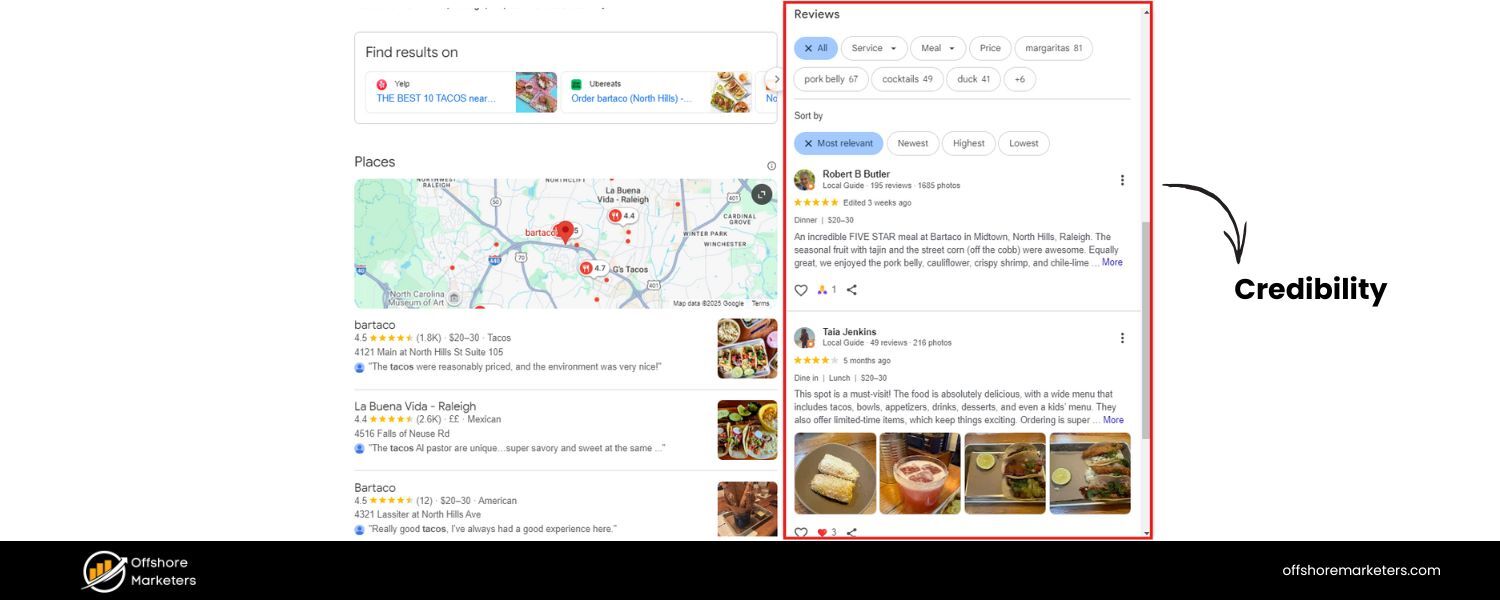
Being featured prominently, with a good star rating visible, lends immediate credibility. Consumers tend to trust Google’s recommendations.A BrightLocal survey found that 99% of people use the internet to find local businesses and 94% say positive reviews make them more likely to choose a business.
The Local Pack highlights ratings and reviews front-and-center, which can strongly influence decisions. A great average rating next to your name is as good as a personal recommendation.In fact, customers are 2.7 times more likely to consider a business reputable if its Google Business Profile is complete and appears in search.
F. Competitive Advantage
Many local searches have a “winner takes all” dynamic – users often choose from the first few results they see. If your business is in the Local Pack and competitors aren’t, you’ve effectively leapfrogged them.
Even if they rank #1 organically, a Local Pack listing above that can steal the show. This advantage tends to snowball: more visibility brings more customers and reviews, which in turn further boosts local ranking and reputation.According to data, local businesses that optimize for the pack gain momentum over those that don’t – for multi-location brands, fully optimizing profiles nearly doubled their 3-pack visibility year-over-year.
In short, the Local Pack matters because it captures the majority of local search attention and clicks. It connects online searches to offline action with unprecedented efficiency.
For a small business on a tight marketing budget, appearing in these top 3 results is free exposure that can outperform expensive ads.
It’s no wonder that local SEO experts rank the Local Pack as one of the most valuable aspects of search results for businesses. If you care about getting customers from Google, you should care about the Local Pack.
Local Pack vs. Organic Results: What’s the Difference?
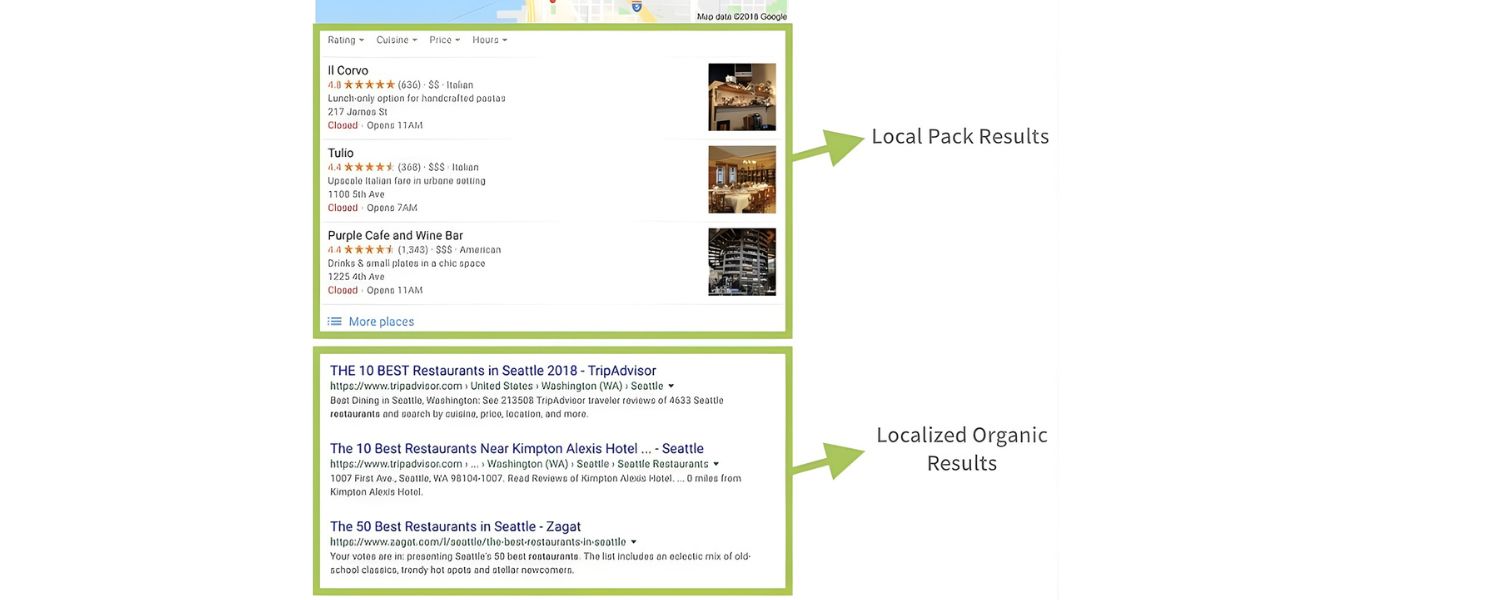
It’s important to understand that ranking in the Local Pack is a different game than traditional organic SEO. While both appear on the same search results page, they rely on different signals and serve different user needs. Here are key differences:
A. Data Source
Local Pack listings are primarily pulled from Google Business Profiles (GBP) (formerly Google My Business). That means the information shown – name, address, phone, reviews, photos – comes from a business’s Google listing, not its website.In contrast, organic results are based on Google’s index of webpages and their content. So, having a well-optimized website alone won’t get you in the 3-pack – you need a Google Business Profile.
B. Ranking Algorithm
Google uses a specialized local algorithm for the Local Pack, emphasizing factors like relevance to the query, geographic proximity, and business prominence (more on these shortly).
This differs from the general algorithm for organic results, which heavily weighs webpage content, keywords, and backlinks. In practice, a business could rank #1 in the Local Pack even if its website isn’t #1 organically, and vice versa.
Google itself has stated that local results are based on “relevance, distance, and prominence” rather than just traditional SEO factors.
C. Visual Appearance
The Local Pack is visually distinct. It includes a map thumbnail, star ratings, and often images – elements that stand out compared to plain text web results. It also includes interactive elements (click-to-call, directions, etc.) within the result snippet.
Organic results, on the other hand, are mostly text-based (title, URL, snippet) unless a special SERP feature is present. The rich visuals and CTAs in local results tend to grab user attention and make it easier for them to act immediately.
D. User Intent and Behavior
People use the Local Pack to evaluate businesses at a glance – comparing ratings, distances, or hours quickly. It serves an intent to find and go (or call) rather than to read long information.
Organic results often cater to those researching or needing detailed info from a website. This is why the Local Pack includes things like review counts and snippets (e.g., “Affordable prices and friendly service!”) – to aid quick decision-making. For businesses, this means your online reputation (reviews) and accurate info are crucial right on the search page.
E. Updates and Edits
The content in a Local Pack listing can be influenced by public contributions or algorithmic pulls (like popular times, questions & answers, etc.), and is updated by interacting with Google’s interface (Google Business Profile dashboard).
By contrast, organic result content (title/meta description) is updated by changing your website and waiting for Google to re-crawl.
In summary, the Local Pack is more than just another search result – it’s an interactive, trust-oriented feature built from Google’s local business data. To succeed there, you must focus on your Google Business Profile and local signals, rather than relying solely on your website’s SEO. Of course, website quality matters too (especially for local organic results right below the pack), but it’s only one piece of the puzzle.
How to Rank in the Google Local Pack (3-Pack)
Getting into the Local Pack isn’t guaranteed, there are often dozens of local competitors, but only three slots available. However, by following best practices, you can dramatically improve your chances.
Google’s own help documentation confirms that relevance, distance, and prominence are the three key factors for local ranking. Let’s break down what that means and the concrete steps you should take:
1. Create and Verify Your Google Business Profile
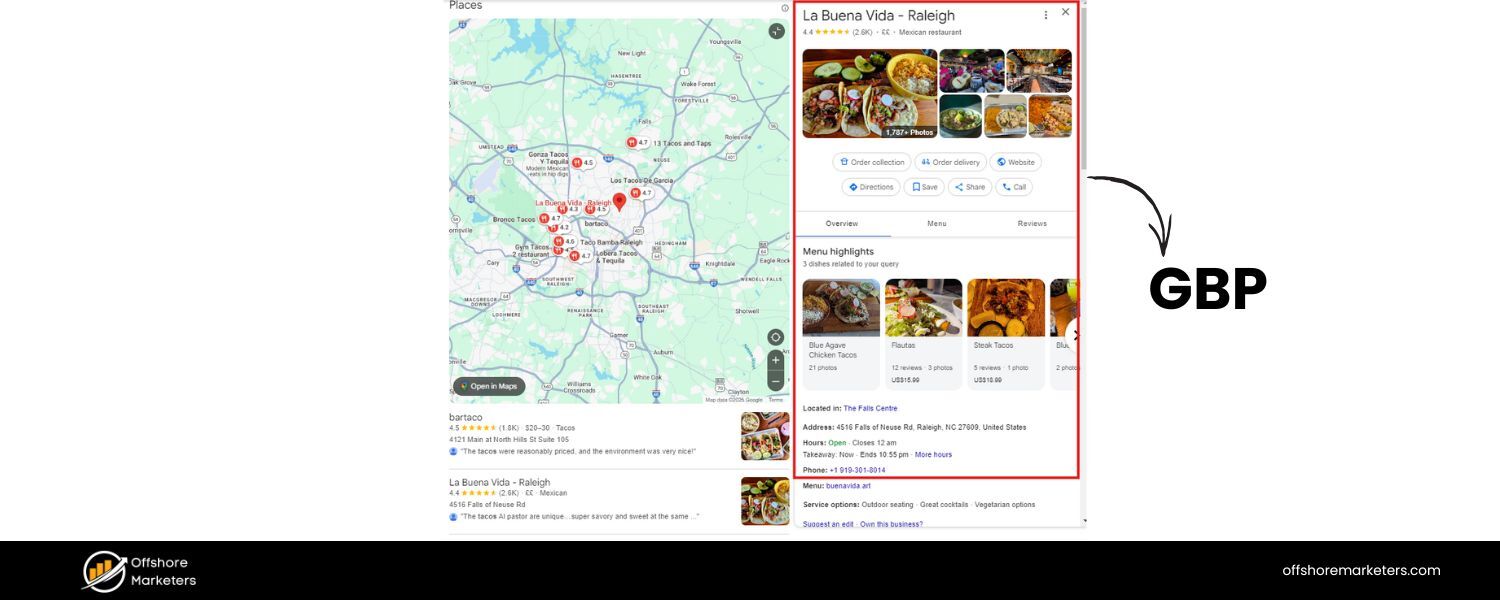
First and foremost, you must have a Google Business Profile (GBP) listing to appear in the Local Pack. If you haven’t claimed or created your business’s profile yet, that’s step one. Go to the Google Business Profile page and sign in to add your business.
Fill out your business name, address, phone, category, etc., and initiate the verification process. Google typically will send a postcard with a verification code to your address (or offer phone/email verification in some cases) to confirm that your business is real and you are authorized.
Verification is crucial, an unverified listing won’t rank well (or sometimes won’t show at all) in Google’s local results.
This step tells Google you are a legitimate business owner. Once verified, you can manage your listing details and respond to reviews.
Tip:
While waiting for the postcard, don’t leave your profile half-done; you can still enter all your information, description, hours, photos, so that when it’s verified, your listing is complete.
2. Optimize Your Google Business Profile Listing
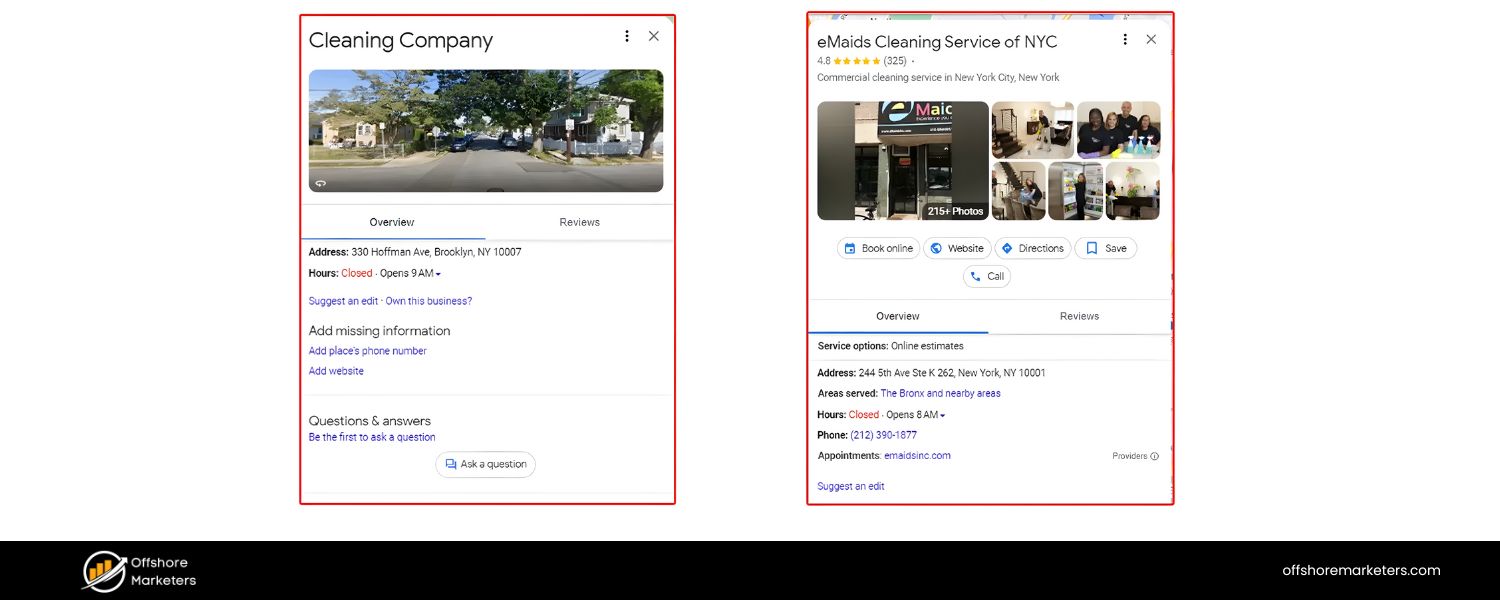
Simply having a profile isn’t enough; you need to fully optimize it with accurate, comprehensive information. Google favors listings that are complete and active, because they provide better user experience.
Here’s what to do:
A. Fill Out Every Detail
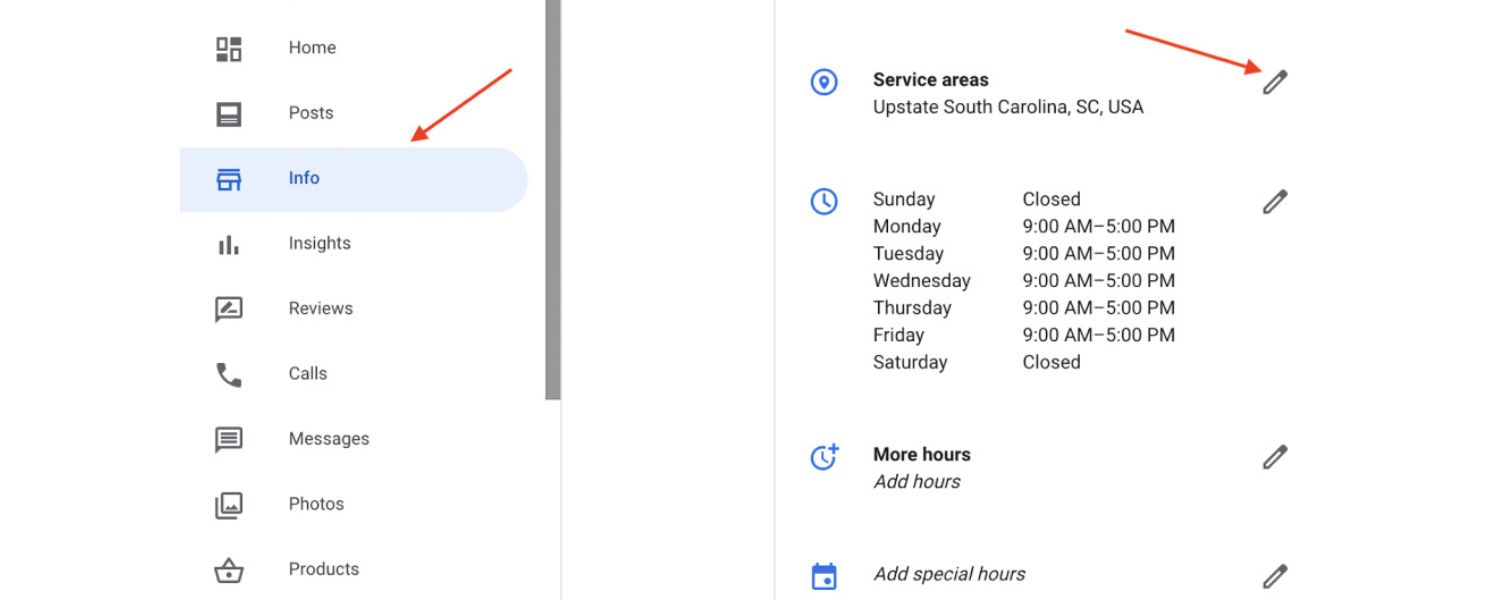
Ensure your NAP (Name, Address, Phone) info is exact and formatted consistently with how it appears on your website and other listings. Select the most appropriate business categories (primary and secondary) – this helps Google understand your relevance to various searches.
Write a clear business description that highlights your services and location (you can include keywords naturally here, but avoid spammy stuffing).Add your website URL and any other applicable attributes (e.g., amenities like “Free Wi-Fi”, service options like “Dine-in/Takeout” if relevant).
The goal is to make your listing as informative as possible. Google explicitly states that complete and detailed business info makes it easier to match your profile to relevant searches.
B. Business Hours and Info 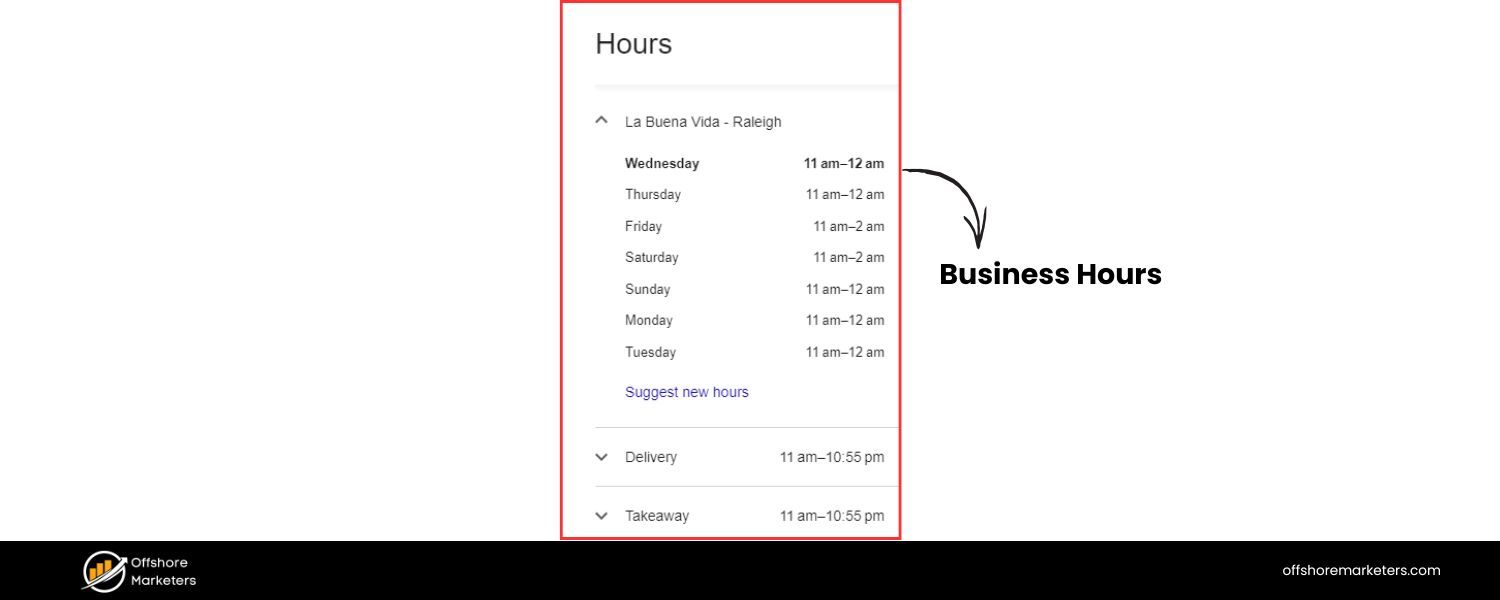
Enter your hours of operation and keep them updated (including holiday hours). Nothing frustrates customers more than outdated hours. Also, ensure your address pin on the map is in the right spot.
If you serve customers at their location (service-area business), set your service areas and mark “I deliver goods and services to my customers” in your profile (and if you work from home with no storefront, you can hide your exact address).
C. Photos & Media 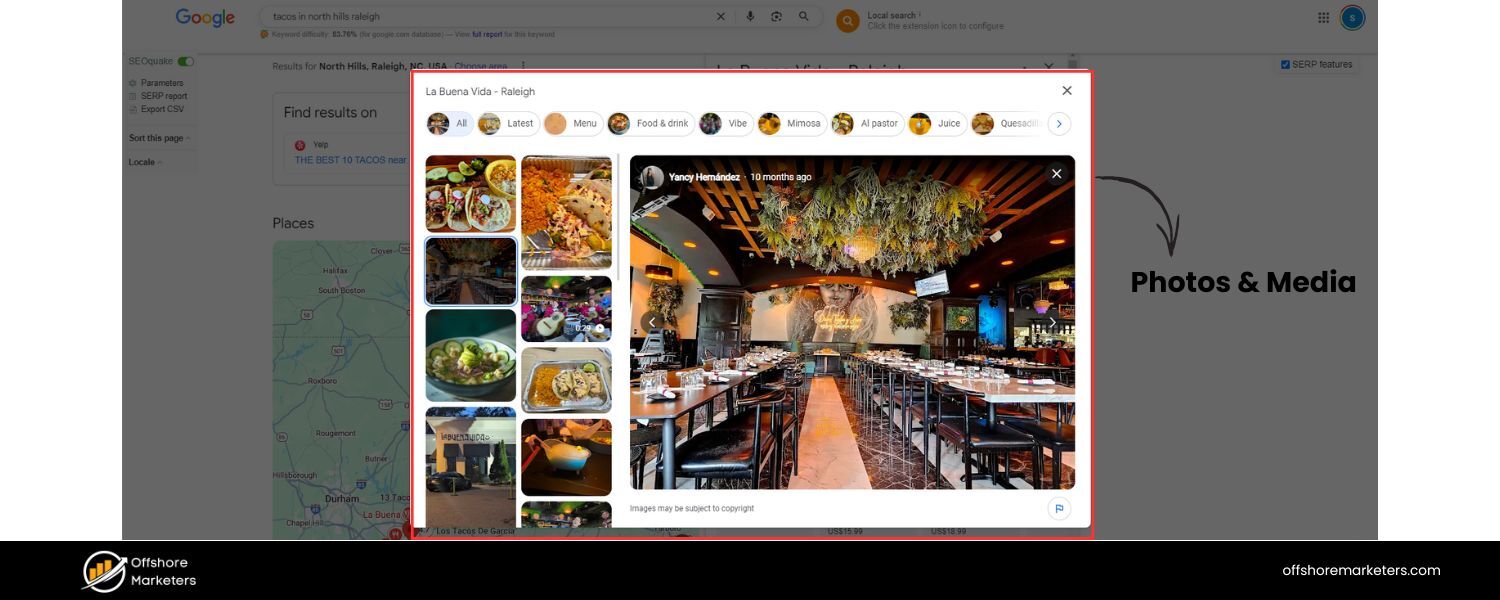
Upload high-quality photos of your business – interior, exterior, products, team, etc. Listings with photos are far more engaging and are perceived as more trustworthy.
According to Google, businesses with photos receive more clicks for directions and more website clicks than those without. In fact, one study found 44% of local listing results contain a photo, indicating Google often prefers to show listings that have imagery.
Add videos if applicable (a 30-second intro video, for instance). Visuals not only attract customers but also signal to Google that you are an active business.
D. Regular Posts & Updates
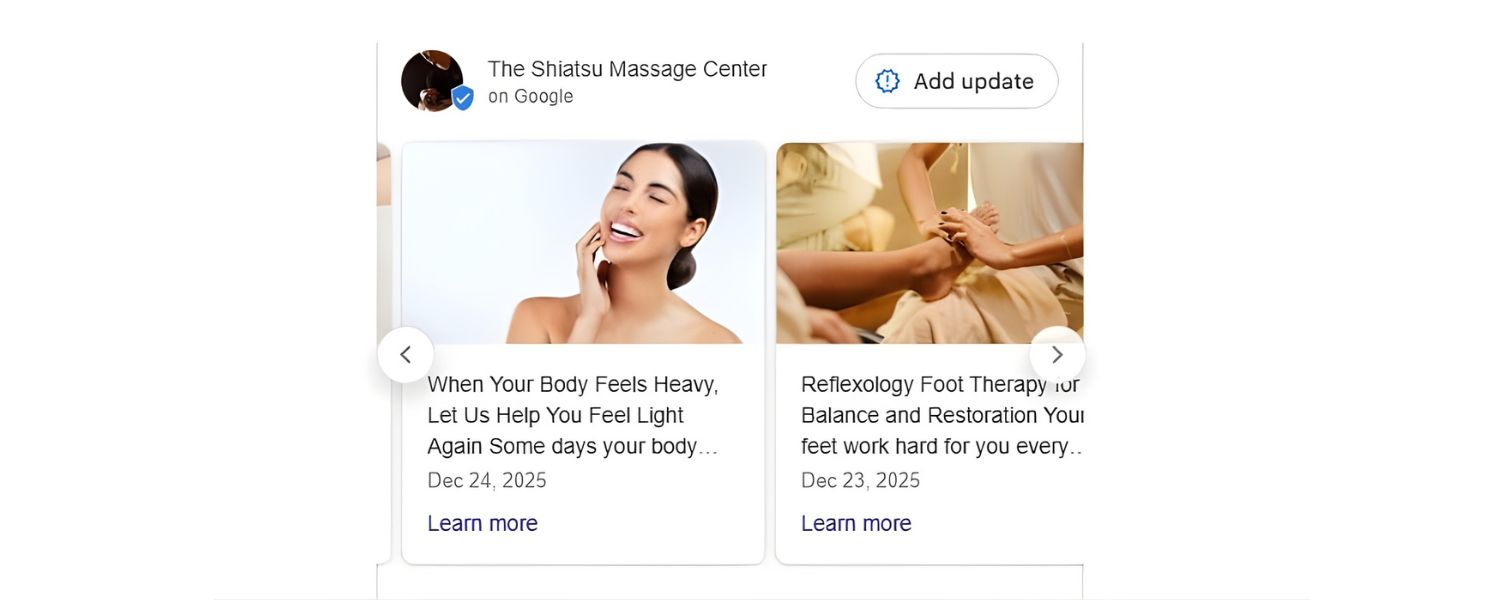
Use Google Posts (the updates you can publish via your GBP dashboard) to share news, offers, or events. While Posts themselves might not directly boost your ranking, they make your listing look fresh and can increase user engagement (which indirectly could help).
Additionally, ensure to answer any Q&A that users submit on your profile, and consider populating common questions with helpful answers yourself. An active, up-to-date profile shows Google that your business is engaged and relevant.
All these optimizations contribute to relevance and prominence. Relevance is boosted because Google has more data about what you do, where you are, and who might be a good match for you.
Prominence is boosted because a well-filled out profile, with lots of photos and reviews, indicates to Google that you’re a popular and trustworthy business.
3. Manage and Encourage Customer Reviews
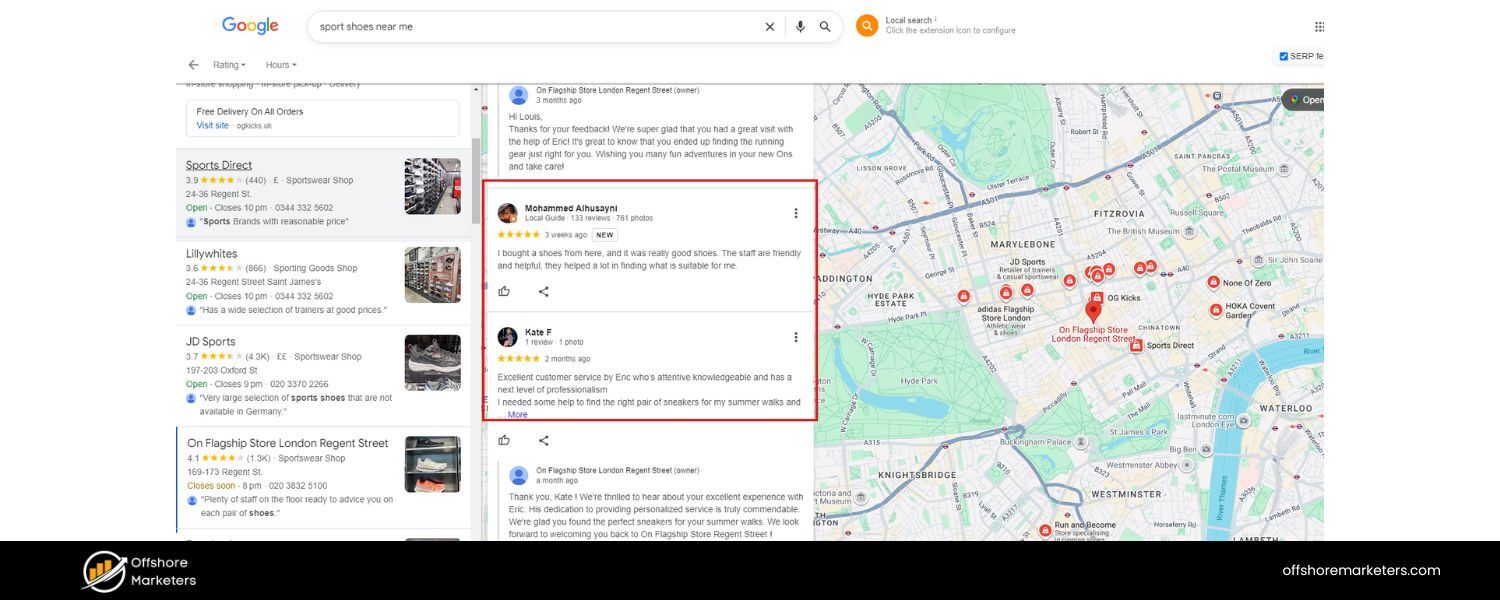
Reviews are a make-or-break factor for Local Pack rankings and click-throughs. They fall under “prominence” in Google’s eyes – lots of positive reviews suggest your business is well-known and well-regarded.
The Local Pack heavily features star ratings and even snippets of review text because Google knows users rely on these signals. Here’s how to leverage reviews:
A. Ask for Reviews
Proactively encourage your happy customers to leave a Google review. Many will gladly do it if asked – in fact, 7 out of 10 customers will leave a review if you simply ask them, according to industry research.Don’t buy or fabricate reviews (that can get your listing suspended), but do remind customers in person, via email follow-ups, or on receipts with a short link. Over time, build a steady flow of new reviews.
B. Quality and Quantity
Google’s algorithm looks at both the number of reviews and the average rating. A business with 100 reviews at 4.5 stars is generally going to outrank one with 5 reviews at 5.0 stars, because of the greater volume and confirmation from more people.Strive for as many 5-star reviews as you can get, of course, but know that having a robust review profile (lots of honest positive feedback) is most important.According to one study, after a business enters the Local Pack, each additional 0.1 star rating increase can boost conversion rates – consumers really gravitate to the highest rated options.
C. Respond to Reviews
Don’t just collect reviews – respond to them, good and bad. Thank happy customers for their feedback. For the occasional negative review, respond professionally and try to address the issue.Public responses show potential customers (and Google) that you care about customer service. Google has hinted that active management of reviews can positively impact your local ranking.Plus, responses can turn a negative into a positive perception for onlookers, and sometimes even prompt an unhappy customer to update their review.
D. Third-Party Reviews
Be aware that Google also aggregates ratings from the web in some cases (e.g., Facebook, Yelp, industry-specific sites), shown as “Reviews from the web” on your profile. Having a good reputation across the web helps your prominence. While Google’s own reviews carry the most weight, a well-rounded rating profile everywhere reinforces your credibility.
Remember, reviews not only influence ranking, they influence users’ choices. A higher-rated business in position #2 can still get the click or visit over a lower-rated #1. So aim to be both ranked and well-reviewed.
Google’s own survey data showed consumers are 70% more likely to visit and 50% more likely to consider purchasing from businesses with a complete, positive Google Business Profile. The Local Pack puts your reputation front and center, so make sure it shines.
4. Ensure Consistent Citations (NAP) and Local Links
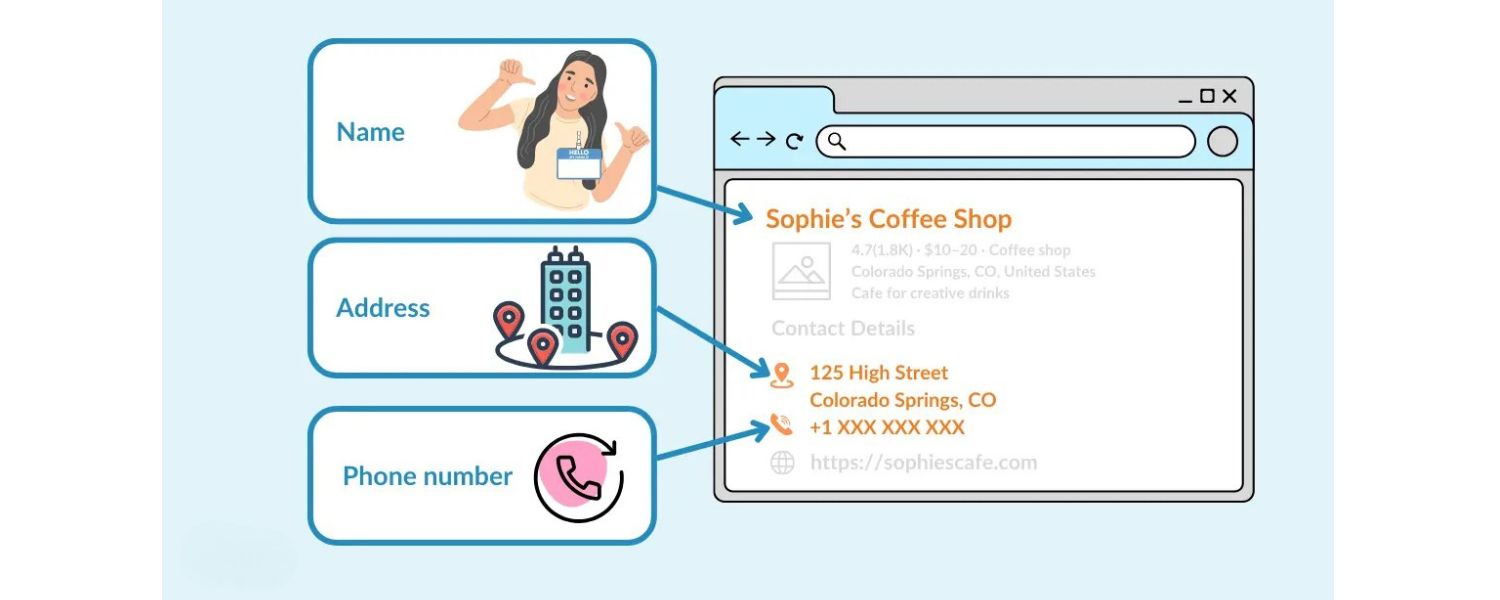
Outside of Google’s own platform, a big part of local SEO is managing your business’s citations across the web. A “citation” is any mention of your Name, Address, Phone number on other websites – commonly online directories like Yelp, Yellow Pages, TripAdvisor, Facebook, Apple Maps, Bing Places, etc… Google cross-references these to gauge your business’s legitimacy and consistency.
A. NAP Consistency
Make sure your core details (NAP) are consistent everywhere. If your address is listed as “123 Main St. Suite #5” in one place, don’t list it as “123 Main Street, Ste 5” in another – minor variations are okay, but drastically different info (or old addresses/phone numbers) can confuse Google.
Consistency across numerous sources validates the accuracy of your business information. Use the same business name (avoid using “LLC” or keywords in some listings and not others). This also prevents duplicate listings issues.
B. Claim Key Listings
Ensure you’ve claimed or created listings on major platforms: Bing Places, Yelp, Facebook, Apple Maps, TripAdvisor (if relevant), plus any prominent local directories or industry-specific sites (e.g., HomeAdvisor or Angi for contractors, Zomato for restaurants, etc.). Fill those out similarly to your Google profile.
While Google’s own listing is most important, being present and active on others can indirectly help your Local Pack rankings (by boosting prominence and providing backlinks/mentions). It also means more ways customers can find you.
C. Local SEO Citations Tools
If this sounds like a lot of work, there are tools and services (Moz Local, Yext, BrightLocal, etc.) that help distribute your info to dozens of directory sites and keep them in sync. These can save time and ensure breadth of coverage. But you can also do it manually, focusing on the most influential sites.
D. Local Backlinks
Earning backlinks from local websites is another strategy to boost your prominence. While traditional SEO backlinks help your organic rankings, they also indirectly help local by increasing your site’s authority (which can be a factor in prominence).
Consider sponsoring local events or charities (often yields a link on their site), joining your city’s Chamber of Commerce or business association (member directories often link out), or getting featured in local news or blogs. A link from the town newspaper or a local blogger that mentions your business can signal to Google that you are a reputable player in the community.
One case study noted that building local backlinks improved organic rankings significantly and even correlates with better local pack positioning (though local pack is more GBP-driven, strong website signals can give you an edge when other factors are equal).
In essence, consistent citations and local links fortify Google’s confidence in your business’s existence and credibility. They feed into that “prominence” factor – the more your business is mentioned and linked around the web (in a consistent, positive way), the more important it appears to Google’s local algorithm.
5. Optimize Your Website for Local SEO
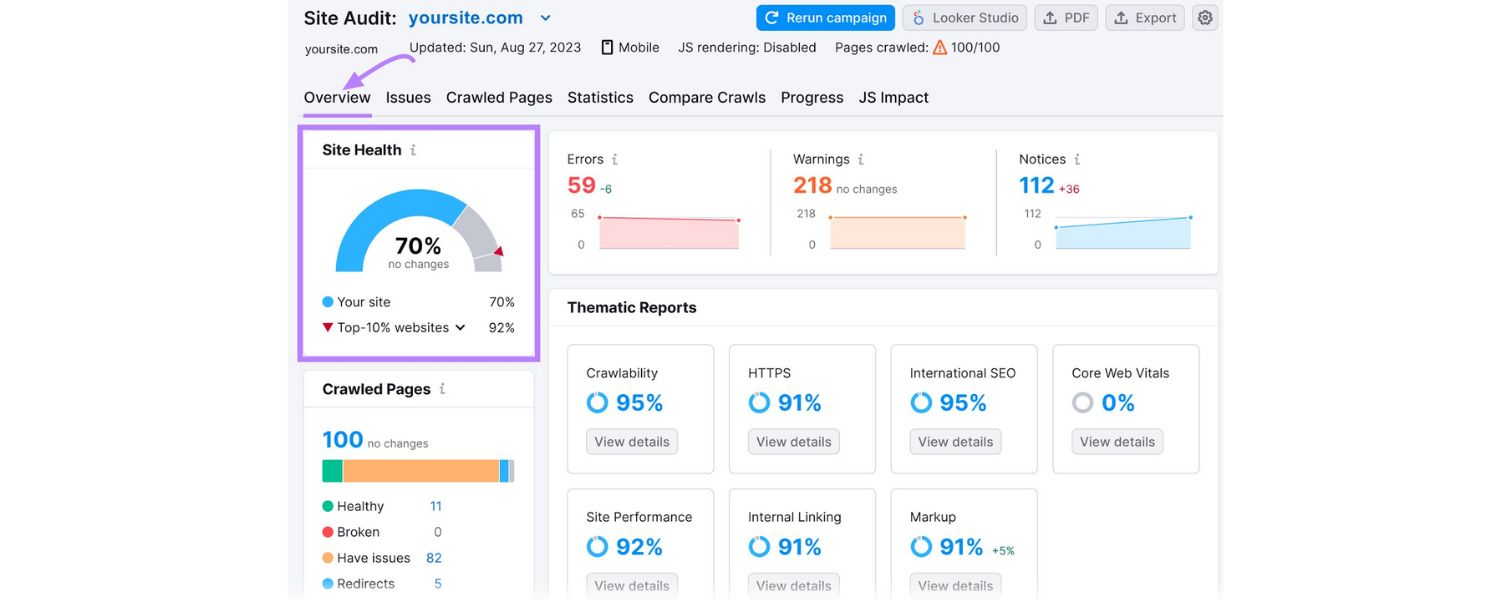
While the Google Business Profile does the heavy lifting for Local Pack, your website still matters. Google often looks at the content on the website linked from your GBP to gather additional signals of relevance and quality. Plus, implementing technical SEO best practices can strengthen your organic visibility and indirectly help local rankings.
Here’s what to do on your site:
A. Local Content and Keywords
Make sure your website clearly indicates what you do and where you do it. Include your city or region naturally in your page titles, headings, and content where appropriate (especially on your homepage and contact page).
Create a dedicated contact/about page with your NAP and an embedded Google Map of your location (embedding a Google Map of your business is a good practice; it can slightly help Google associate your website with your location).
If you have multiple locations, create a page for each location with localized content (address, location-specific testimonials, etc.).Also consider writing blog posts or local guides that tie your business to the community (e.g., “How to Choose a Plumber in [City]” or “[City] Neighborhood Guide from Our Real Estate Team”). This not only targets long-tail keywords but reinforces your local relevance.
B. On-Page SEO Basics
General SEO best practices apply: use descriptive title tags and meta descriptions that include your business and location (“Dentist in Dallas – [Clinic Name]”). Ensure your site is mobile-friendly and fast, since a lot of local searches happen on mobile devices.
Implement LocalBusiness schema markup on your site – this structured data (a snippet of code) can highlight your business’s name, address, phone, hours to search engines in a standardized way.
While schema isn’t a direct ranking factor, it can sometimes enhance how your listing appears (and ensures Google consistently understands your business details).
C. Landing Page Alignment
When your website is linked from your Google profile (it is, via the website URL you set), Google will sometimes check that landing page for content related to the query. For example, if someone searches “vegan lunch New York”, Google might favor a restaurant whose website (or GBP description) mentions vegan options and lunch.
So, tailor your site’s content to reflect the services/products you want to be found for. Make sure important keywords (services + location) are visible on the page.
D. Engagement and Behavior Signals
Though not fully transparent, there’s evidence that user behavior on your website can impact rankings. If people click your Local Pack listing, then quickly “pogostick” back to search and choose another, that could signal dissatisfaction.
Conversely, if they click through to your website and maybe spend time or convert, that’s positive. While you can’t directly control this from Google, having a user-friendly website that matches what people expect to find (consistent info, easy contact, etc.) will help convert those clicks into customers, which is the ultimate goal anyway.
In summary, think of your website as the anchor to your local online presence. A well-optimized site, combined with a robust Google Business Profile, creates a one-two punch: Google trusts your listing more and users get the detailed info they need if they click through.
Plus, if for any reason you’re not in the 3-pack, you can still aim to rank on page 1 organically; many page-1 organic results (right under the pack) are often local directories or the businesses’ own sites. Cover all bases for maximum exposure.
6. Leverage Additional Google Features and Maintain Your Presence
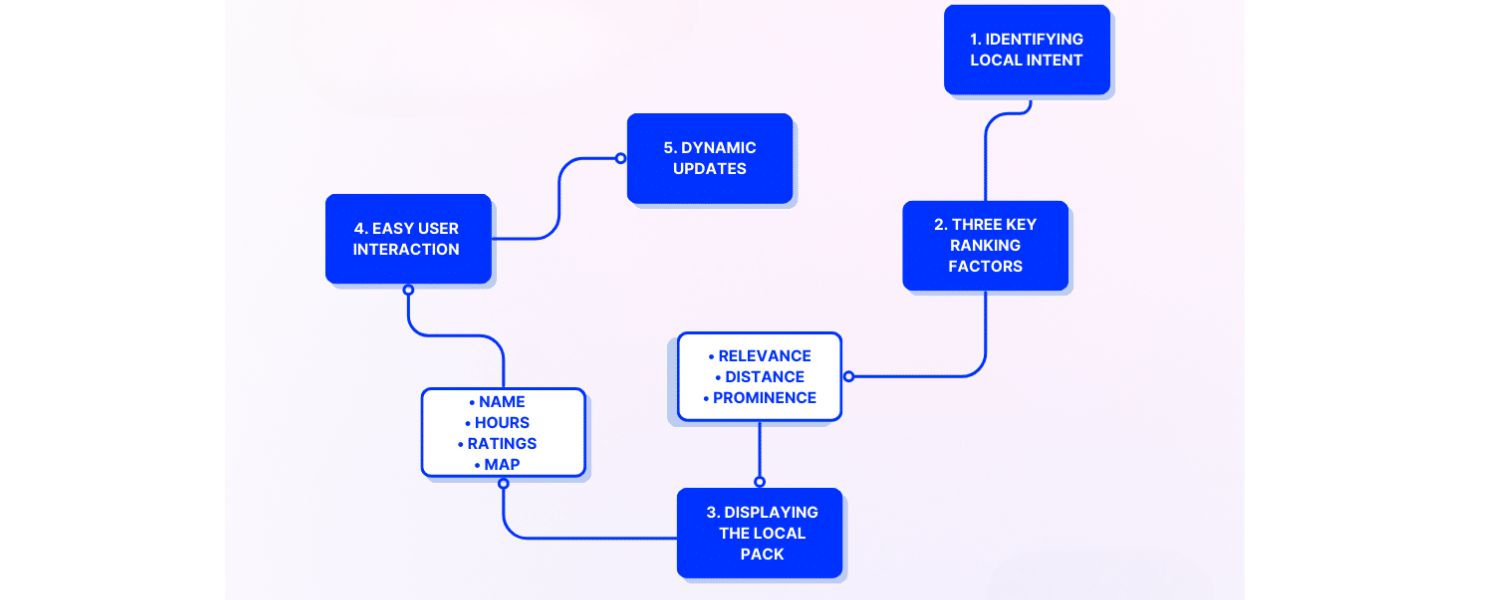
To truly stand out and maintain a top Local Pack position, you should make use of the extra features Google provides and be vigilant about your information and reputation.
Consider these tips as ongoing efforts:
A. Google Messaging
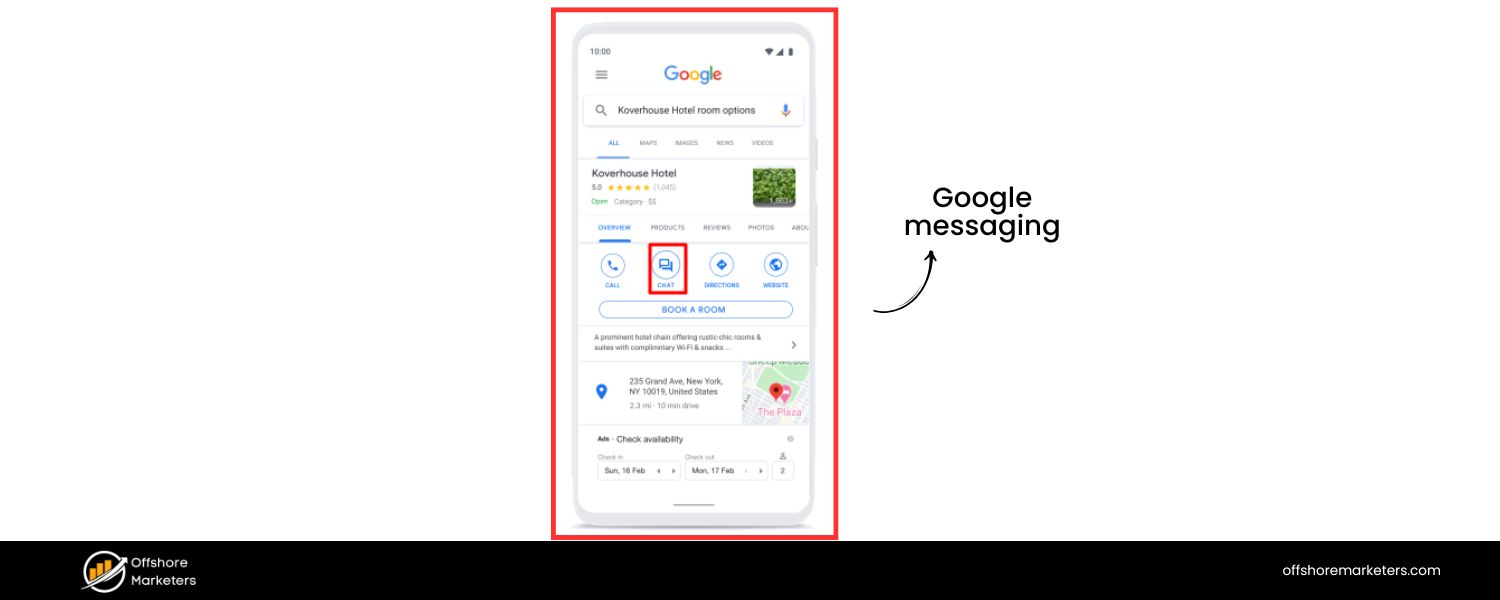
Through your Business Profile, you can enable a feature that allows users to message you directly from your listing. If it makes sense for your business (and you can manage responding quickly), this can be a convenient way for prospects to reach out.
Quick responses might even earn you a “Responds quickly” badge. It’s all about removing friction for customers.
B. Google Q&A 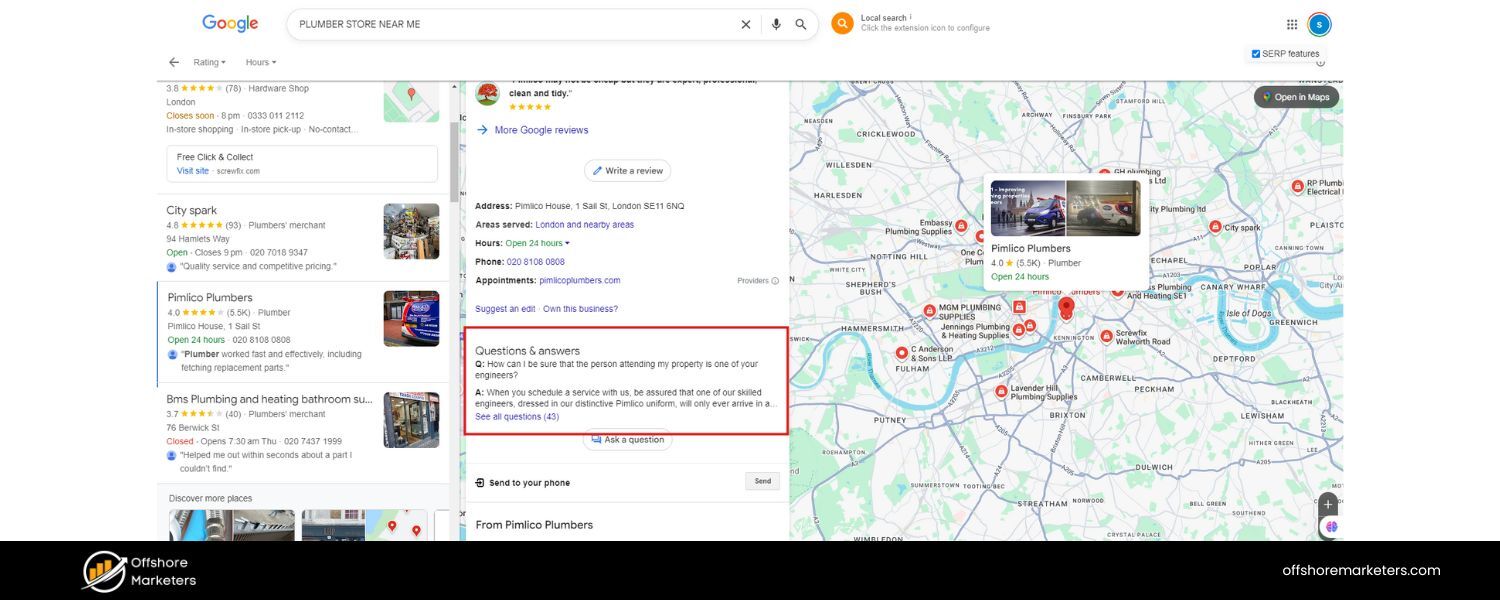
Monitor the Q&A section on your Google listing. Anyone can post a question there, and anyone can answer – which means misinformation can appear if you’re not paying attention.
Provide authoritative answers to common questions (consider seeding a few Q&As yourself by having a friend ask a question and then answering it). This not only preempts customer doubts but also prevents someone else from chiming in inaccurately.
C. Google Posts & Updates 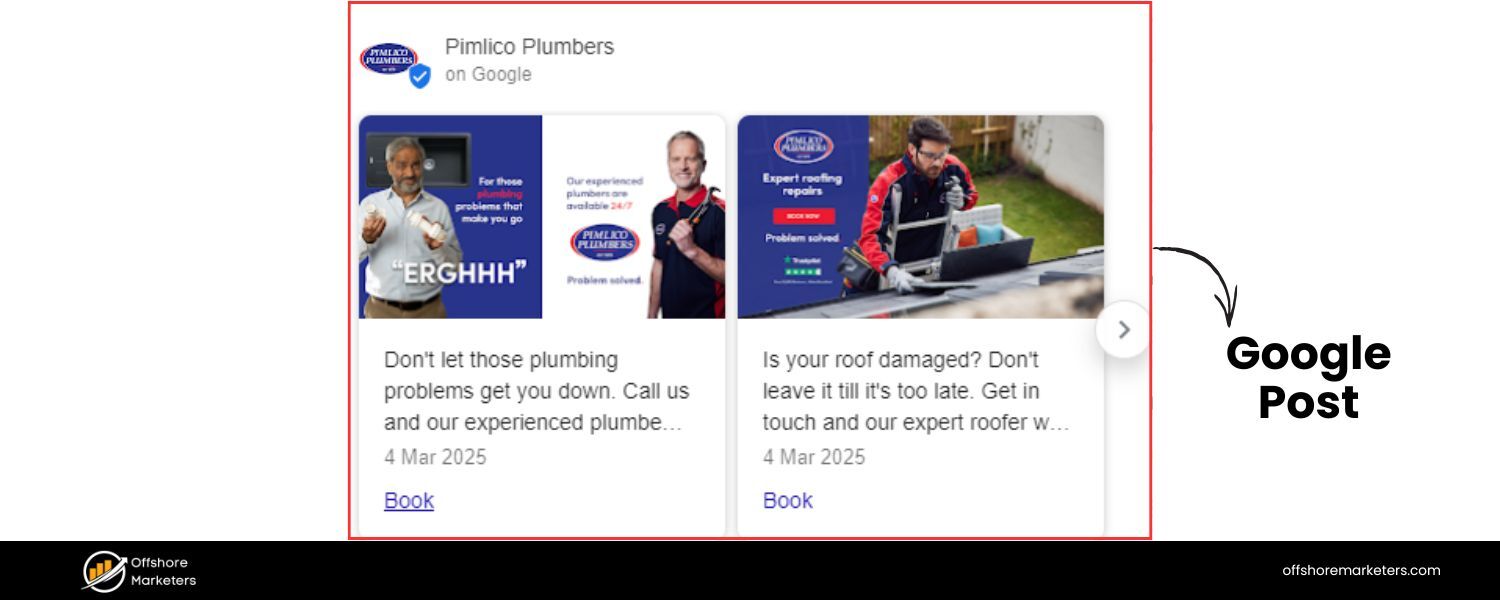
As mentioned, regularly posting updates (special offers, events, new products) via Google Posts keeps your profile fresh. These posts show up when someone clicks your listing or sometimes even in the Local Finder view. It keeps customers engaged and could set you apart if competitors have stale or no posts.
D. Monitor Edits
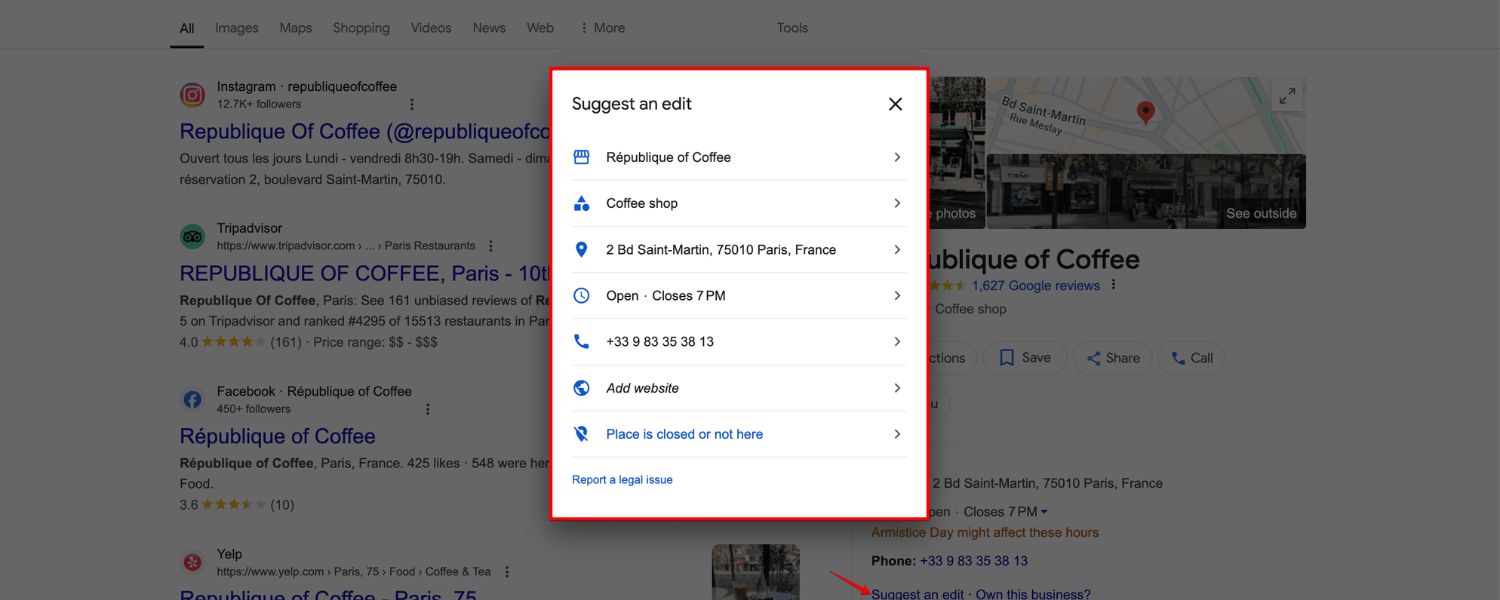
Google’s local listings can be edited by the public (suggest an edit) and Google might auto-apply changes if it crawls different info (say, a different phone number on another site).
Periodically log in to your GBP dashboard and check if there are any suggested updates or fields marked in orange (which indicates Google updated something, like hours, based on user input). Make sure your info stays correct.
For example, if your store hours change seasonally, update them, don’t give Google a reason to doubt your info’s accuracy.
E. Stay Compliant with Guidelines

Avoid any tactics that violate Google’s guidelines, like creating fake listings, keyword stuffing your business name (“Bob’s Plumbing Best Cheap Plumber in Chicago” – this could get flagged), or generating fake reviews.
Those might work short-term but risk suspension, which is far worse. Google’s algorithm and manual reviewers are increasingly cracking down on spam in local results. It’s better to have a solid, guideline-compliant listing that won’t suddenly disappear due to a suspension.
F. Ads in Local Pack
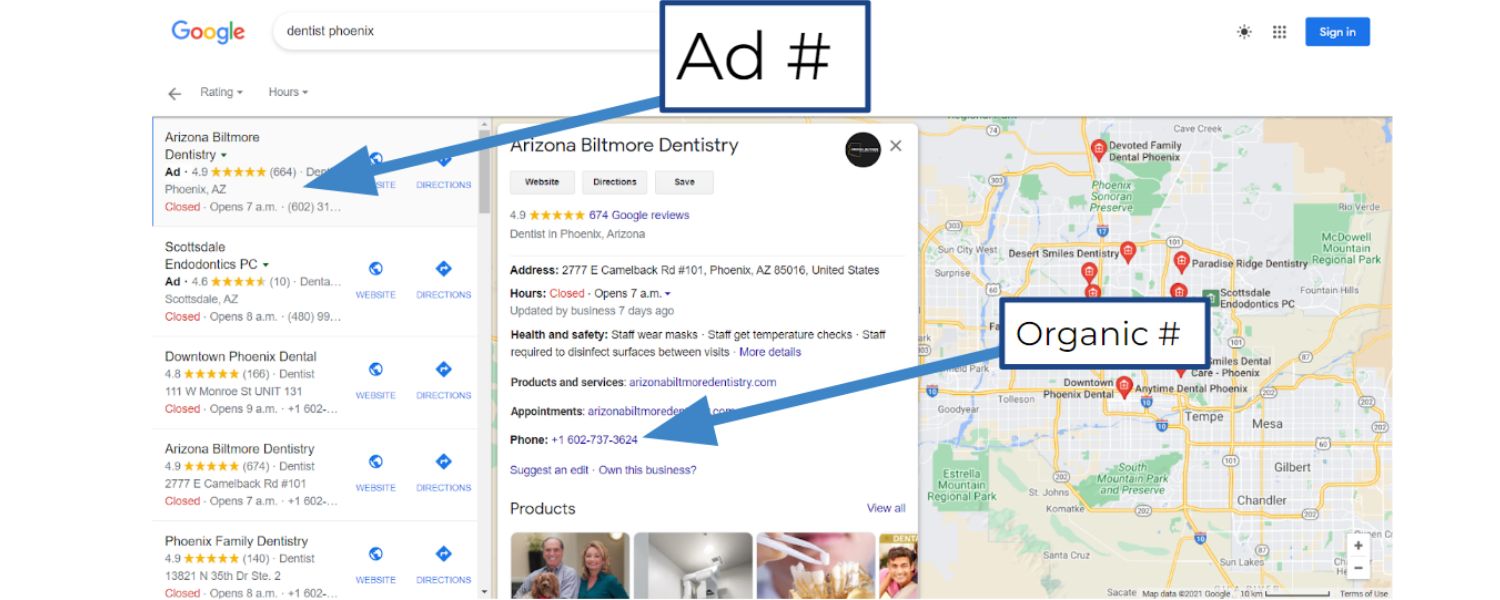
If you have some budget, you could experiment with Local Services Ads or running Google Ads with location extensions. Local Services Ads (for certain industries like locksmiths, plumbers, etc.) can show up even above the Local Pack with a “Google Guaranteed” badge. While this is paid and separate from the organic 3-pack, it’s another way to gain prime visibility.
Traditional Google Ads can also show on the map if you enable location extensions. Paid routes aren’t necessary to rank, but they’re worth knowing as an option to supplement your presence.
Finally, monitor your results and keep optimizing. Use Google’s Performance (Insights) data in your Business Profile dashboard to see how many searches your listing is appearing in, how many people call or visit your website from it, etc.
This data can guide you – for instance, if you notice a lot of searches for a certain service you offer, make sure that service is mentioned prominently on your profile and website. You can also track your Local Pack rankings using SEO tools (some tools let you check rankings at specific geographic locations or use a “grid” to see how you rank across different parts of town).
Local SEO can be a dynamic field – Google rolls out updates and tests (like favoring slightly different layouts, or changing how they weigh reviews). Staying informed via reliable SEO news sources will help you adapt your strategy.
FAQs about Google Local Pack
Q1. How long does it take to rank in the Local Pack for a new business?
A: There’s no fixed timeline – some businesses can appear in the Local Pack within weeks of optimization, while others in competitive markets might take months. Google doesn’t impose a strict “age” requirement; a brand-new business can enter the 3-pack shortly after verification if it’s highly relevant and there’s little competition.
Focus on getting your profile optimized and gather a few reviews as soon as possible. Typically, you might see improvement in local ranking within 4–8 weeks of serious optimization, but competitive city niches might take longer. Patience and consistency are key.
Q2. What if I operate a service-area business (SAB) without a storefront? Can I still get in the 3-pack?
A: Yes. Service-area businesses (like plumbers, delivery services, home-based businesses) can appear in the Local Pack. When setting up your GBP, you’ll list your service areas and can choose to hide your physical address.
Google gives SABs an equal opportunity in theory. The caveat is that proximity is a factor – if you don’t physically reside in the city you serve, you might be at a slight disadvantage compared to businesses located in-town (since Google uses the address centroid for distance calculations).
However, many SABs do rank well by focusing on relevance and prominence: choose the right categories, include service-area keywords in your description, and absolutely nail the other factors (reviews, website content, etc.).
Also, make sure to follow Google’s guidelines for SABs, such as not creating listings for areas where you don’t have a real presence. A common issue is SABs getting filtered out if they try to list a virtual office or co-working space just to have an address in a city – Google has mechanisms to detect and filter those.
Q3. Can I pay to be in the Local Pack?
A: Not for the organic 3-pack slots. You can’t pay Google to put your business in the Local Pack rankings – those are earned via the algorithm (relevance, distance, prominence).
Google even states there’s no way to request or purchase a better local ranking. The only exception is the ad spots we discussed: you can run Google Ads and sometimes appear as a sponsored listing in or above the pack (with an “Ad” label).
Also, certain industries have Local Services Ads which appear in a special unit above the pack. But again, the three main Local Pack results are not for sale.
Be wary of any SEO or marketing person who “guarantees” they can get you in the 3-pack for a fee – they don’t control it, Google’s algorithm does. Instead, invest in the best practices we’ve covered.
Q4. Why isn’t my business showing up in the Local Pack even when I search my exact business name?
A: If you search your exact business name + city, you should ideally see your own Knowledge Panel (business profile) or be in the pack.
If not, possible reasons include: your Google Business Profile is not verified or is suspended, check your dashboard for any alerts. Or, your name is similar to another business and Google’s mixing results.
If you’re searching from a distant location, Google might not show the local pack (it tends to show when you’re physically near the location or explicitly search “[biz name] [city]”).
Another reason could be filtering: Google might be filtering your listing out if it’s too similar to another (for instance, multiple listings at the same address or same phone – often an issue if you have duplicates).
Lastly, if you only just claimed the profile, it might need some time or more info (like reviews) to appear prominently. Always ensure you fill out the profile completely and use a unique business name (not a generic like “Coffee Shop”) to avoid confusion in search.
Q5. What’s the best way to track my Local Pack rankings or performance?
A: Besides manually searching (which can be inconsistent due to personalization and location bias), use tools and analytics:
A. GBP Insights (Performance)
Your Google Business Profile dashboard shows how many times you appeared in search and maps, and what actions users took (calls, website clicks, direction requests). This is a direct measure of how visible and engaging your listing is.
B. Local Rank Trackers
Tools like BrightLocal, Whitespark, SEMrush, SE Ranking, etc., offer local rank tracking. Some provide a map grid, showing your ranking at various points around your area (since moving a mile away can change results). This can help you see where you’re strong or weak geographically.
C. Google Search Console
If you link your GBP to your website and have UTM tracking on the website URL, you can see traffic coming from Google Maps or Local in your analytics. Google Analytics with UTM parameters (like utm_source=google&utm_medium=organic&utm_campaign=localpack) on your profile link can separate website visits from the Local Pack.
Combine these to get a full picture. For example, an increase in driving direction requests in Insights likely means your Local Pack visibility improved. Regularly tracking ensures you notice any dips – if you drop out of the pack, you can audit what changed (did you lose reviews? Did a competitor suddenly gain 100 reviews? Did your listing get edited? etc.) and take action.
Conclusion & Next Steps
Ranking in the Google Local Pack can catapult your local marketing to the next level. It puts your business front-and-center when nearby customers are actively searching for what you offer.
By now, you’ve learned that success in the 3-pack comes down to optimizing your Google Business Profile, cultivating great reviews, ensuring consistent local presence, and providing relevant content – all centered around making your business the most relevant and trusted choice for local searchers.
Putting these steps into action is absolutely worth it. Imagine more calls coming in, more people walking through your door saying “I found you on Google,” and ultimately more sales – those are the rewards of a strong Local Pack presence. And unlike paid ads, this visibility is earned with effort, not bought, and can provide long-term benefits once established.
As a 25-year marketing veteran, I can attest that local SEO is one of the highest-ROI moves a local business can make today. So, take a look at your current Google listing, does it truly reflect your business at its best? If not, roll up your sleeves and start optimizing using the tips from this guide.
Monitor your progress, stay engaged with your customers online, and keep your information fresh.
Finally, remember that local SEO is an ongoing process. Competitors will be vying for those top spots too, and Google’s algorithms can change. Stay informed on local marketing trends and be ready to adapt.
If you need extra help or a second pair of eyes, consider reaching out to a local SEO expert or using reputable tools to audit your presence.

Why Roseville Startups are Choosing Offshore Marketers to Scale Smarter
Roseville is no longer just a quiet suburb of Sacramento;...

What Is PPC? A Practical Guide to Pay‑Per‑Click Advertising
Pay‑per‑click (PPC) is the “pay only when someone clicks” branch...

Google Search Issues Affecting Results in Some Regions
Google has confirmed a problem with one of its data...

Keyword Counts Dropped After Google’s num=100 Change
In September 2025, Google stopped supporting the &num=100 parameter. This...

Image SEO: Optimize Images for Higher Rankings & Traffic
Introduction Images make your website more engaging, but they can...


.png)
.png)
.png)
.png)
.png)

2024 ALL RIGHTS RESERVED MADE IN INDIA
.png)