
Meta Tags: What They Are & How to Use Them for SEO
August 11, 2025
Introduction: What Are Meta Tags and Why They Matter
Meta tags are snippets of HTML code that provide information about a webpage’s content to search engines and browsers. Unlike visible page content, meta tags reside in the HTML section and aren’t seen by users on the page itself.
In essence, they are metadata – data about the data on your page. By conveying a page’s topic, description, or instructions, meta tags help search engines understand what your page is about and influence how your site appears in search results.
In 2025’s SEO landscape – where “content is king” and search algorithms prioritize quality and user experience – meta tags still play a pivotal role. They won’t magically skyrocket a low-quality page to rank #1, but strategic meta tag optimization can improve your click-through rates, control how your content is indexed, and enhance user engagement, all of which indirectly boost your SEO performance.
This guide will walk you through the most important meta tags, how to use them, and best practices to ensure your pages stand out in search results.
What Are Meta Tags? (Definition and Basics)

Meta tags are HTML elements that live in a page’s and communicate metadata about the webpage. Think of them as hidden labels or notes to search engines and browsers. For example, a meta tag can provide a summary of the page (meta description) or instructions for search engine crawlers (robots meta tag).
Here’s a simple example of a meta tag in HTML
In the above snippet, the meta tag is specifying a description of the page. Meta tags do not alter the visible content of the page; instead, they affect how the page is processed or displayed by external services (like search engines or social networks).
According to Mozilla’s Developer Network, the <meta> element represents metadata that cannot be represented by other HTML elements like <title>, <link>, <script>, or <style>. Metadata provides additional information about the page, such as its author, the character encoding, keywords for search engines, and viewport settings.
Why Meta Tags Are Important for SEO
Not all meta tags are equally important, but the right meta tags used correctly can have several benefits for your website’s SEO and visibility:
1. Improve Search Snippets & Click-Through Rates 
Meta tags like the title tag and meta description directly influence how your page appears in search engine results pages (SERPs). The title tag becomes the headline of your result, and the meta description is often used as the snippet text below it.
A compelling title and description can entice more users to click your link, boosting your organic click-through rate (CTR). Higher CTR can indirectly signal to Google that your result is relevant, potentially helping rankings over time.
2. Provide Instructions to Search Engines

Certain meta tags give crawlers directions on how to treat your content. For example, the robots meta tag can tell search engines whether to index a page or follow its links.
Using noindex on thin or duplicate pages keeps them out of search results, concentrating authority on your important pages. This level of crawl control via meta tags is more precise than relying on a robots.txt file. In short, meta tags help ensure search engines index what you want indexed and skip what you don’t.
3. Enhance User Experience & Mobile SEO

Meta tags like viewport are essential for mobile usability. The viewport tag instructs browsers on how to scale the page on mobile devices, ensuring your site is mobile-friendly and responsive.With Google using mobile-first indexing, a proper viewport meta tag can directly impact your rankings on mobile searches by signaling that your site is optimized for smartphones.Other tags like charset (character set declaration) ensure correct text rendering, which improves user experience and accessibility across different languages and regions.
4. Boost Social Media Sharing

While not directly affecting Google rankings, social meta tags (such as Open Graph tags for Facebook/LinkedIn and Twitter Card tags) control how your content looks when shared on social platforms.They let you specify the shareable title, description, and image. Optimizing these can lead to more attractive social media posts – which means more clicks and traffic coming to your site from those platforms.For example, using an Open Graph image tag ensures the perfect thumbnail is shown when someone shares your blog post on Facebook. Better previews = higher likelihood of engagement.
5. Facilitate Site Verification & SEO Tools

Some meta tags serve administrative or tooling purposes. The google-site-verification meta tag helps verify site ownership with Google Search Console. Other specialized meta tags can indicate things like content ratings (e.g., marking adult content) or prevent automatic translation or text-to-speech on your page. These may not boost rankings, but they ensure your site’s integration with search engines and browsers works as intended.
In summary, meta tags are a small piece of the SEO puzzle, but an important one. They make sure your first impression in search results is strong, and they give you control over how search engines handle your pages.
Next, we’ll explore the key meta tags and related tags you should know about, which to focus on, and which old ones to ignore.
Key Types of Meta Tags (and Related SEO Tags)
Not all meta tags are created equal. Some are critical for SEO, some improve usability, and others have become obsolete.
Below we break down the most important meta tags (and a couple of other must-know HTML tags) for SEO in 2025:
1. Title Tag (Meta Title)

The title tag is technically not a tag (it’s an HTML element) used to define the title of a webpage. It is placed within the <head> section of an HTML document and is important for both SEO and user experience.
Best practices for title tags:
A. Keep it around 50–60 characters
Google typically displays the first ~60 characters of a title before truncating. Titles within this length tend to show up completely on both desktop and mobile results. For example, a title tag like is short enough to display fully.
B. Include your target keywords naturally
Use primary keywords near the beginning of the title if possible. This improves relevance and if the user’s search query matches your title, Google will bold those terms in the results, making your listing more eye-catching. But avoid keyword stuffing! Ensure the title reads organically and describes the page accurately.
C. Make it descriptive and unique
Every page on your site should have its own unique title that tells users and search engines what’s special about that page. Avoid duplicate title tags across different pages. Also, steer clear of clickbait – a title should accurately preview the content to avoid high bounce rates.
A compelling and keyword-optimized title tag can significantly improve your CTR, which is why the title tag is often considered the most important on-page SEO tag.
2. Meta Description

The meta description is an HTML meta tag that provides a brief summary of a webpage’s content. It often appears as the snippet of text under your title in Google’s search results.
While Google has stated that meta descriptions do not directly influence rankings, they are extremely important for user engagement and CTR. A convincing meta description can be the deciding factor that makes a user click your result over a competitor’s.
Best practices for meta descriptions:
A. Optimal length ~150–160 characters
Aim for roughly 1-2 concise sentences (about 155 characters) for your meta description. If it’s too long, Google will truncate it with an ellipsis. Staying within this range helps ensure your full message is shown. _(Note:_ Google may sometimes show a longer snippet or even use other text from the page if it deems it more relevant to a query, but it’s still best to craft a good within-limit description.)
B. Incorporate the target keyword (naturally)
If the user’s search query matches words in your meta description, Google will highlight them in bold in the snippet. This can draw the eye. So include your primary keyword or a close variant in a natural way.For example: “Learn what meta tags are and how to use them to improve your SEO in this comprehensive guide.” – if someone searched “meta tags SEO guide,” those words would be bold.
C. Make it compelling and accurate
Think of the meta description as a mini ad for your content. Clearly convey what the page is about and why it’s valuable. Include a call-to-action (CTA) or incentive when appropriate (e.g., “Learn how…”, “Get tips on…”, “Find out…”). However, avoid “clickbait” descriptions that don’t match the page content – if users feel misled and bounce, it could hurt your performance.
D. Ensure uniqueness for each page
Just like titles, each page’s meta description should be unique. This uniqueness helps both search engines and users by preventing confusion about which page is which. If many pages share the same meta description, it’s a missed opportunity and may be flagged in SEO audits as an issue to fix.
Remember, Google may choose to rewrite your meta description (or parts of it) in the SERP depending on the search query and content.
In fact, Google dynamically adjusts snippets quite often to better match user intent. But providing a well-written meta description still gives you the best chance to control the narrative of your search snippet and entice clicks.
3. Meta Keywords (Outdated)

The meta keywords tag is a relic of SEO past. It allowed site owners to list keywords they deemed relevant to the page: e.g. . Decades ago, this tag was used by search engines to understand page content. Today, however, meta keywords are effectively useless for major search engines.
Google officially does not use the meta keywords tag as a ranking signal. This has been the case since at least 2009, due to abuse by keyword stuffing (people would cram irrelevant keywords to try to rank for everything).
Bing and Yahoo also ignore this tag for ranking purposes. The consensus in 2024 and beyond is that meta keywords have no impact on SEO and can be safely left out.
In short, adding a meta keywords tag will not help your Google rankings at all. If anything, it may signal to savvy users or competitors what terms you’re targeting, or clutter your code unnecessarily.
Focus your optimization efforts on visible content and other meta tags instead. Meta keywords are a “bad meta tag” to avoid in modern SEO practice.
4. Robots Meta Tag (Indexing Controls)

The robots meta tag gives instructions to search engine crawlers (robots) on how to index or crawl a specific page. It looks like: and is placed in the head. Common values for the content attribute include:
- index or noindex – Index tells crawlers they can include the page in search results; Noindex tells them to exclude this page from search results.
- follow or nofollow – Follow allows crawlers to follow the links on the page; Nofollow instructs them not to follow any links on the page (so no link equity is passed).
- Other directives like noimageindex (don’t index images on the page), noarchive (don’t show cached copy), etc.
By default, if you don’t use a robots meta tag, search engines assume index, follow (i.e., index the page and follow its links). So you add a robots tag mostly when you want to restrict something.
For example, to prevent indexing of a thank-you page or a duplicate content page, you’d use: . This keeps that page out of search results and also conserves crawl budget by telling bots not to bother with its links.
Some tips for using the robots meta tag effectively:
A. Be precise with directives
A common mistake is accidentally blocking pages that you meant to have indexed. Always double-check noindex usage.For instance, adding a global noindex to your template could de-index your whole site – a disastrous error! Ensure you only use noindex on specific pages that truly need to stay out of SERPs (e.g., login pages, internal search results pages, admin pages, or thin content).
B. Use nofollow sparingly
You generally want crawlers to follow links to discover content. Only nofollow links if there’s a specific reason (like untrusted user-generated links or paid links to comply with Google’s guidelines).It’s usually not necessary to put a nofollow on an entire page via meta tag, unless perhaps the page is noindexed and you want to conserve crawl of its links too. Also, Google’s John Mueller has noted that if a page is noindex, it doesn’t really matter if you put follow or nofollow – since the page won’t be indexed, the main concern is whether you want its outgoing links crawled or not.
C. Googlebot vs. robots
By default, <meta name=“robots”…> directives apply to all search engines. You can also target Google specifically with which accepts the same values.In the absence of a specific googlebot tag, Google just follows the general robots tag. Usually, you won’t need separate directives unless you want to give Google different instructions than other engines (a rare case).
The robots meta tag is a powerful tool for technical SEO to control crawling and indexing on a page-by-page basis. Just use it carefully – a misplaced noindex can quietly kill your traffic if not noticed. Tip: regularly audit your site (with tools or Search Console) for unexpected noindex or nofollow tags, especially after site updates.
5. Meta Viewport (Responsive Design Tag)

The viewport meta tag is key for mobile SEO and responsive design. It’s written as: . This tag tells mobile browsers how to adjust the page’s dimensions and scaling to fit small screens. In essence, it ensures your website displays nicely on mobile devices without users having to pinch-zoom.
A proper viewport tag typically does two things:
- width=device-width instructs the layout viewport to match the device’s screen width (so the page will scale to device width).
- initial-scale=1.0 sets the initial zoom level (1.0 means no zoom).
Without a viewport meta tag, mobile browsers might assume a desktop width, causing your site to appear zoomed out and tiny on phones – a poor user experience. Given that Google prioritizes mobile-friendly sites, having a viewport tag is practically mandatory now.
In fact, the presence of <meta name=“viewport”…> is interpreted by Google as a sign that your page is mobile-friendly, which can impact your rankings on mobile searches.
Best practices for the viewport tag:
A. Always include it on responsive pages. Nearly all modern websites should include a viewport meta tag in their head. It’s a one-liner that dramatically improves mobile usability.
B. Don’t use it on non-responsive (fixed-width) pages. If your page isn’t mobile-optimized at all, a viewport tag could actually make the experience worse by squeezing a fixed layout into a tiny screen. But the real solution in 2025 is to make your site responsive, since non-mobile-friendly sites will struggle in search.
C. Typically, use width=device-width, initial-scale=1. You can add additional parameters like maximum-scale or user-scalable=no in specific cases, but generally the simplest form is enough for most uses.
D. Test on real devices. After adding a viewport tag, test your page on a phone or using Chrome’s device emulator to ensure it looks correct.
In summary, the viewport meta tag doesn’t directly affect keywords or content, but it dramatically affects user experience on mobile – which indirectly affects SEO (through mobile-first indexing and users staying on your page). It’s an essential meta tag for any modern website.
6. Social Media Meta Tags (Open Graph and Twitter Cards)

Beyond the standard meta tags for search engines, there’s a set of meta tags designed for social media integration. These don’t impact your Google ranking, but they’re vital for controlling how your content appears when shared on platforms like Facebook, LinkedIn, X (Twitter), and others. A well-formatted, attractive link preview on social media can increase clicks to your site and broaden your audience.
The two main protocols are:
A. Open Graph (OG) tags
Originally created by Facebook, Open Graph meta tags are recognized by many platforms (Facebook, LinkedIn, Pinterest, etc.). They use the property attribute instead of name. Key OG tags include:
1. The title of the content (e.g., blog post title) to display in the snippet.
2. Similar to a meta description, but for the social snippet.
3. URL of an image to show. This is very important: a good image greatly increases engagement.
4. The canonical URL of your page.
5. There are others (og:type, og:site_name, etc.), but the above are the core ones for most content sharing.
B. Twitter Card tags
Twitter uses its own meta tags (though it will fall back to Open Graph tags if Twitter-specific tags aren’t present). Examples:
1. This defines the card type. “summary_large_image” is commonly used to show a large thumbnail.
2. Card type: “summary_large_image” shows a large image preview
3. Your Twitter username (optional, but improves branding)
4. The creator’s Twitter username
5. Title for the content (max ~70 characters for best display)
6. Short description of the content
7. Full URL of the preview image
8. Text alternative for accessibility
Using these tags, you can ensure that when someone shares your page, it’s accompanied by a catchy title, a descriptive blurb, and a beautiful image, rather than a random or cut-off snippet. This can dramatically increase click-through and share rates on social platforms.
For example, an Open Graph title tag might look like: . Paired with a great image (e.g., a custom graphic or relevant photo) specified in og:image, your link will take up more space in feeds and attract attention.
Keep in mind:
1. Always use high-quality images for social previews (minimum recommended 1200×630 pixels for Facebook/Li and 1200×600 for Twitter large image).
2. Ensure the content in the OG/Twitter tags matches the actual page content to avoid misleading users.
3. Test your pages with tools like Facebook’s Sharing Debugger and Twitter’s Card Validator to see how the snippet appears and fix any issues.
While these social meta tags might not influence Google’s algorithm, they influence real humans who see your content on social media, which in turn can lead to more traffic, backlinks, and brand visibility – all beneficial to SEO in the big picture.
7. Canonical Tag (Duplicate Content Consolidation)

The canonical tag isn’t a tag – it’s an HTML tag – but it’s critical to mention in any discussion of SEO and meta data. A canonical tag looks like this in your page head:
The canonical tag tells search engines which URL is the “preferred” or canonical version of a page among a set of duplicates. In cases where the same or very similar content is accessible via multiple URLs (due to query parameters, session IDs, print versions, http vs https, etc.), canonical tags help consolidate those pages into one for ranking purposes.
Why canonical tags matter
1. They prevent duplicate content issues. Instead of search engines indexing multiple copies of the same page (and splitting ranking signals between them), the canonical signals which one to index.
2. They consolidate SEO value (link equity, content relevance) to the canonical page. For example, if both example. com/page?ref=facebook and example. com/page show the same content, setting the canonical to the latter means any links to the ?ref=facebook URL will count towards the main page’s SEO strength.
3. They give you control over which URL shows up in search results. This is useful if you have, say, an “ugly” URL and a clean URL for the same content – you can canonicalize to the clean one that you want users to see.
Best practices for canonical tags
1. Always point the canonical tag to the primary version of the content (usually the clean, full version of a page). It should be a fully qualified URL (including http/https and domain).
2. Use canonical tags on all pages that have near-duplicates or multiple access paths. For instance, an e-commerce site might have the same product in multiple categories (hence multiple URLs) – canonicalize them all to one product URL.
3. Self-canonicalize all primary pages. It’s a common practice to put a canonical tag on every page pointing to itself. This way, if anyone scrapes your content or if accidental duplicates pop up, search engines already know the original.
4. Don’t canonicalize pages with significantly different content to the same URL (that could confuse search engines). Canonical is for same or very similar content only.
5. Remember that canonical is a hint, not a directive – but generally, Google respects it when used correctly.
By implementing canonical tags, you ensure that your SEO efforts aren’t diluted by duplicate content. It’s essentially insurance for your content’s ranking power, especially on larger sites with complex URL structures.
8. Alt Text (Image Alt Attributes)

The alt text (alternative text) on images is another non-meta HTML attribute that has SEO significance. Alt text is the text description for an image, added as the alt=”” attribute in an tag . It was originally intended for accessibility – screen readers read the alt text to visually impaired users so they know what an image contains. But alt text also provides search engines information about the image’s content.
Why alt text matters for SEO and UX
1. Accessibility
Visually impaired users rely on alt text to understand images. Good alt text improves your site’s accessibility, which is not only socially responsible but also increasingly considered by search ranking algorithms as part of page quality/usability.
2. Image SEO
Search engines index images and use alt text as a major clue when determining what an image is about. If you want your images to appear in Google Images (and potentially drive traffic), descriptive alt text is key. For example, an image with alt=“Meta tags HTML code example” could show up for queries about HTML code examples.
3. Fallback content
If an image fails to load, the alt text is displayed in its place, so it’s a chance to convey content even when the media can’t be seen.
Best practices for alt text
1. Describe the image accurately and succinctly. Imagine reading the page aloud – what would you say to describe the image to someone who can’t see it? For instance, for a chart image, alt=“Bar chart showing meta tag usage statistics in 2024”.
2. Include relevant keywords if they naturally fit the description. Do not stuff keywords. The priority is clarity and relevance. If the page is about SEO and you have an image of a Google search results page, an alt could be “Google search results showing meta title and description snippet” – this naturally includes “meta title” and “description” which are keywords, but they make sense in context.
3. Keep it relatively short. A good rule of thumb is no more than ~125 characters, as some screen readers cut off around that length. But it can be shorter; just ensure it’s specific.
4. Don’t use alt text for decorative images (use an empty alt alt=”” for purely decorative or spacing images, so screen readers skip them).
Bonus: The title attribute on images is separate and not used for SEO – it just shows tooltip text on hover. Don’t confuse it with alt text.
Using alt tags on images is an easy win: it enhances accessibility and can give your site a slight SEO boost (especially if images on your site garner backlinks or traffic via image search). Plus, it’s often an overlooked area, so doing it consistently sets you ahead of less thorough competitors.
Those are the major meta and meta-related tags you should focus on. There are many other meta tags out there, but a lot of them have little to no effect on modern SEO. In the next section, we’ll highlight some tags and practices you can safely ignore or that might even harm your SEO if misused.
Meta Tags to Avoid or Use with Caution (Common Mistakes)
Just as important as knowing what to do is knowing what not to do. Here are some meta tags and usage mistakes that you should avoid in 2025:
1. Meta Keywords Tag

As discussed, this tag is obsolete for SEO. Google completely ignores . Don’t waste time on it, and definitely do not stuff a bunch of keywords into it thinking it will help – it won’t. Focus on your on-page content and other tags instead.
2. Multiple Title or Description Tags

Each page should have one unique title and one unique meta description tag. Having multiple title or description tags on a single page can confuse search engines and result in poor SEO performance. Ensure that each tag is relevant, concise, and accurately reflects the content of the page.
3. Outdated Meta Tags
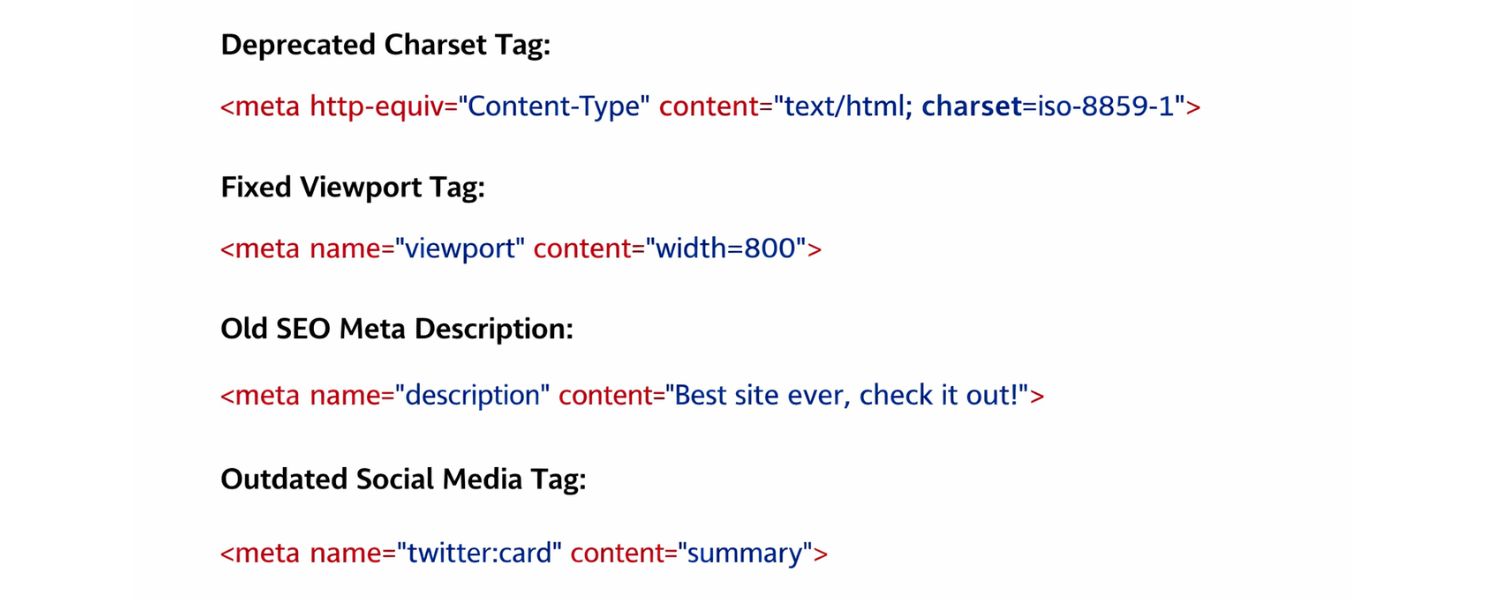
There are a number of meta tags that used to be proposed for various purposes but are now either deprecated or ignored by major browsers/search engines. For example:
A. meant to tell crawlers when to come back. **Ignored by Google**; search engines decide when to crawl on their own.
B. intended to mark page expiration date. Not useful for SEO; better managed via HTTP headers if at all.
C. not used in rankings; if you want to show copyright info, put it in the visible footer.
D. just states what software made the page (e.g., WordPress). It has no SEO value.
E. e.g., “Global”. This was supposed to indicate who the page is for; it’s redundant (a public webpage is global by nature).
F. Meta tags for specific search engines optimization services that are now defunct or no longer honored. For instance, the Yahoo! robots like meta name=“slurp” (Slurp was Yahoo’s crawler) – Yahoo uses Bing now. Or pragma cache control meta tags (manage via server instead).
4. Meta HTTP-Equiv for Refresh/Redirect

As mentioned earlier, will refresh or redirect the page after a delay. This is generally a bad practice – it can hurt user experience and is not SEO-friendly (use a 301 server redirect instead).
A. In general, if a meta tag is not on Google’s supported list or documented by major browsers, it likely does nothing useful. Adding too many irrelevant meta tags can bloat your code and potentially confuse older browsers. Stick to the known important ones.
B. Incorrect Robots Meta Usage: This bears repeating – a small mistake here can deindex critical pages. Avoid using noindex on pages that you actually want to rank. Also, avoid blanket nofollow on your site’s internal pages; you typically want search engines to crawl your internal links to discover all your content.If you need to nofollow specific links (like untrusted links), do it on a link-by-link basis (e.g., ). A common error is copying meta tags from a template and forgetting to remove a noindex that was meant for a different section or a staging site – always audit your live pages!
C. Meta Tag Stuffing & Irrelevant Tags: Don’t try to stuff content into meta tags thinking you can manipulate rankings. For example, putting a huge paragraph of text or a list of keywords into a meta description will not improve SEO – the meta description isn’t used for ranking and should be short.Likewise, adding a bunch of meta tags for things unrelated to your content (e.g., meta tags for topics you wish to rank for but aren’t actually on the page) is ineffective. Google’s advanced algorithms focus on page content quality and relevance, not secret meta tricks.
D. JavaScript-Injected Meta Tags: Relying on JavaScript to add or alter meta tags dynamically can be risky. Google advises caution here – while Google can execute JS to see content, there’s a chance your JS-altered meta tags might not be read in time or consistently.It’s best to output critical meta tags in the server-side HTML. If you must use JS (for A/B testing titles or dynamic descriptions, etc.), test thoroughly and use server-side rendering or dynamic rendering if possible.
By avoiding these missteps, you’ll keep your on-page SEO signals clean and effective. Now that we’ve covered the “don’ts,” let’s move on to how you can efficiently manage and optimize your meta tags across your website.
Best Practices and Pro Tips for Meta Tag Optimization

To ensure your meta tags are helping (not hurting) your SEO, follow these best practices:
1. Map Meta Tags to User Intent
When crafting titles and descriptions, consider what search query you’re targeting on that page and what the user is looking for. Make sure your meta tags address that intent. For example, if your page targets “HTML meta tag tutorial,” a title like “HTML Meta Tags Tutorial – Learn to Optimize Your Site’s SEO” and a description that mentions “step-by-step guide to meta tags for better SEO” will align with what the searcher wants, increasing relevance and CTR.
2. Keep Critical Meta Content Up-To-Date
Review your titles and descriptions periodically, especially if your content gets updated. If in 2024 your title was “Top Meta Tag Tips for 2024” and now it’s 2025, update the title to keep it current and enticing (e.g., “…for 2025”).Freshness can improve the appeal of your snippet (users are drawn to current dates) and avoid users thinking the content is outdated.
3. Leverage Tools for Scale
For large websites, it’s impractical to hand-check every meta tag. Utilize SEO tools:
A. Google Search Console
Look at the Coverage and Enhancements (or specific reports like HTML Improvements in older versions) to catch missing or duplicate meta descriptions and titles.The URL Inspection Tool also shows the rendered title and description Google saw for a page – helpful to verify if Google picked up your changes.
B. SEO Audit Crawlers
Tools like Semrush Site Audit, Screaming Frog SEO Spider, or Ahrefs Site Audit can crawl your site and report meta tag issues (too long/short titles, missing descriptions, multiple title tags, etc.). They often flag pages with identical metas or ones exceeding length recommendations.
C. Browser Extensions
There are SEO browser extensions that let you view a page’s meta tags with one click (e.g., MozBar, SEO Meta in 1 Click). Handy for spot-checking your pages or competitor pages.
4. Use SEO Plugins or CMS Features
If you’re on a CMS like WordPress, take advantage of plugins like Yoast SEO or All in One SEO Pack (both highly recommended) to easily edit meta tags for each post/page. These plugins also often give you a snippet preview and warnings if your title/description are too long, missing focus keyword, etc. They can also help auto-generate meta tags based on templates, which is useful for large sites (e.g., product pages pulling from product name and category automatically into a title template).
5. Test and Iterate
SEO isn’t set-and-forget, and neither are meta tags. For important pages, you can A/B test different title tags or descriptions (using tools like Google Optimize or simply measuring before-and-after performance when you make tweaks).See how changes in phrasing or adding a CTA impact your click-through rates. For example, one month you might try adding “(2025 Update)” to your title and see if impressions-to-clicks improve. Just be cautious not to make too frequent changes without data, as consistency also helps in establishing relevance.
6. Follow Official Guidelines
Google’s own documentation provides guidance on title and snippet best practices (like Google’s guide on writing title links and meta descriptions). Key pointers include: avoid ALL-CAPS titles, don’t use misleading or extremely lengthy titles, and don’t stuff meta descriptions with only keywords. When in doubt, refer to these guidelines or credible SEO resources.
By implementing these practices, you’ll ensure your meta tags are in top shape – sending clear, positive signals to search engines and drawing users in from the search results.
Conclusion: Mastering Meta Tags for SEO Success
Meta tags may be “behind the scenes” elements of your website, but their impact on how your content is discovered and perceived is front and center. By now, you should understand what meta tags are and why they remain a cornerstone of on-page SEO.
From the ever-important title tags and meta descriptions that serve as your calling card in the SERPs, to robots tags that keep unwanted pages out of search indices, to viewport tags that guarantee a mobile-friendly experience – using meta tags wisely is all about improving how both search engines and users interact with your site.
Remember, quality content and user satisfaction are paramount in 2025, but meta tags provide the supporting framework to showcase that quality content effectively. A page with great content but a poor title/description can be overlooked on Google.
Likewise, a well-optimized page can falter if a stray noindex meta accidentally removes it from search results. It’s this interplay of content and meta data where successful SEO happens.
As a final call to action:
take a few minutes to audit your own website’s meta tags. Pick a few important pages and check their titles, descriptions, and other meta tags against the best practices from this guide. Are they unique, compelling, and optimized? If not, now is the perfect time to update them.
Small tweaks to your meta tags can lead to noticeable improvements in traffic and engagement – sometimes faster than waiting for a full content overhaul.
Stay updated with the latest SEO developments (search engines do evolve their handling of snippets and tags), but rest assured that the fundamental meta tags covered here have stood the test of time.
By mastering meta tag optimization, you’re adding a powerful tool to your SEO toolkit that can help drive more clicks, more visitors, and ultimately more success for your website.
Optimize your meta tags today, and let your content shine in the search results!

Google Search Issues Affecting Results in Some Regions
Google has confirmed a problem with one of its data...

Keyword Counts Dropped After Google’s num=100 Change
In September 2025, Google stopped supporting the &num=100 parameter. This...

Image SEO: Optimize Images for Higher Rankings & Traffic
Introduction Images make your website more engaging, but they can...

Share of Voice: Definition, Measurement & Boosting Brand
Share of Voice (SOV) is a key marketing metric that...

Programmatic SEO: Ultimate Guide to Scaling Organic Traffic
Programmatic SEO is an automated SEO technique that uses templates...


.png)
.png)
.png)
.png)
.png)

2024 ALL RIGHTS RESERVED MADE IN INDIA
.png)