
SEO Landing Pages: Dominate rankings and boost conversions
September 2, 2025
Introduction
Imagine turning your landing pages into lead-generating powerhouses without spending a dime on ads. SEO landing pages make this possible by attracting people through Google and other search engines.
In this guide, we’ll explore what SEO landing pages are, why they matter, and how to create landing pages that rank high and drive conversions. By the end, you’ll know how to get steady organic traffic and more customers, all by optimizing your landing pages.
What Are SEO Landing Pages?

An SEO landing page is a landing page designed specifically to rank well in search engine results and capture organic (unpaid) traffic. In other words, it’s a highly targeted page optimized around certain keywords and search intent, with the goal of converting that search traffic into leads or sales.
Unlike a generic homepage (which covers a broad overview of your business), an SEO landing page zeroes in on a specific topic or offer that people are actively searching for.
These pages still look and function like normal landing pages, they focus on a single offer or call-to-action (CTA), but they also contain the elements that search engines love: relevant keywords, quality content, and a great user experience. The result is a page that appeals to both search engine algorithms and human visitors.
For example, if you sell email marketing software, you might create an SEO landing page targeting “best email automation tools” so that when someone searches that phrase, your page can appear and then persuade them to sign up.
Key difference: SEO landing pages often have more informative content than typical pay-per-click (PPC) campaign pages. A traditional PPC landing page is usually very minimal, just a headline, some bullet points, and a form, because it’s focused on immediate conversion.
An SEO-focused landing page, by contrast, usually provides more depth and useful information (while still encouraging a conversion) so that Google sees it as valuable for searchers. In short, content quality is a big part of an SEO landing page’s DNA.
Why SEO Landing Pages Matter
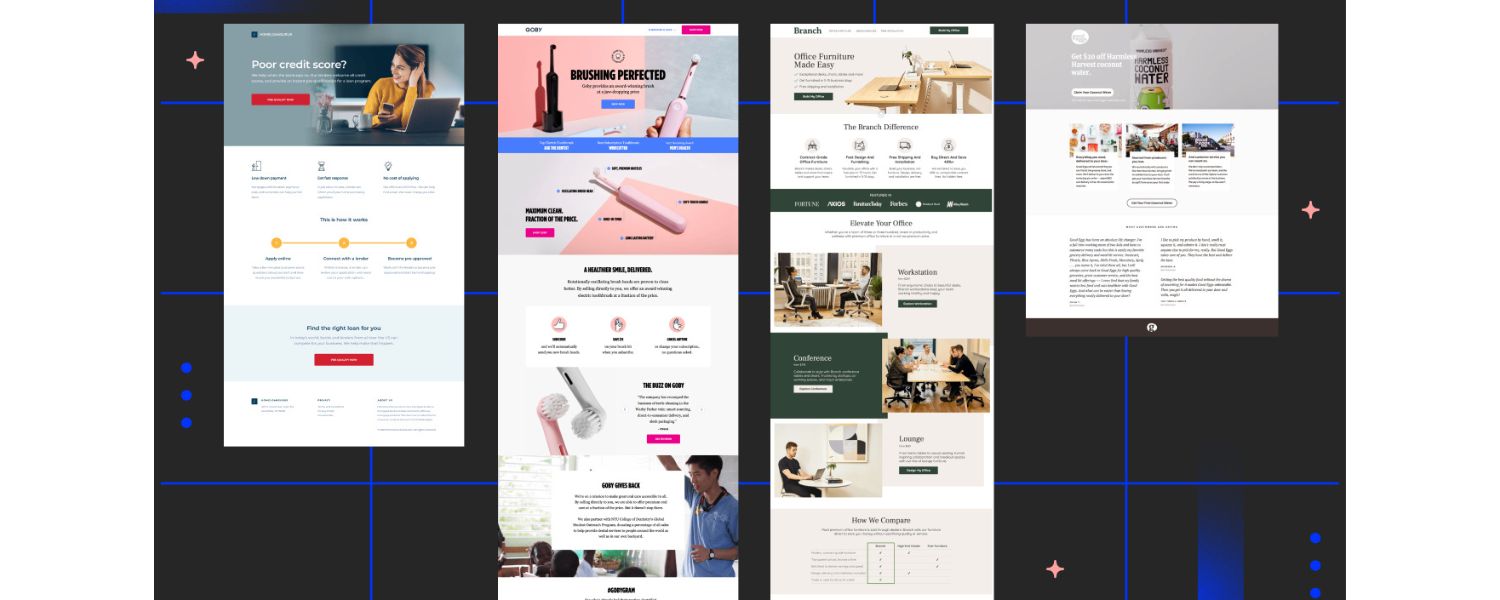
If you’ve been relying only on paid ads or email campaigns, you might wonder: Why invest time in SEO for landing pages? The simple answer is that SEO can deliver free, continuous traffic and leads to your business. Here are some specific benefits of SEO landing pages:
1. Precision targeting of niche keywords
Landing pages let you target very specific search queries that your audience is using. You can create multiple pages, each aligned with a particular keyword or phrase. This precision boosts your relevance in the eyes of search engines.
2. Enhanced user experience
A well-crafted landing page provides exactly what a visitor is looking for. By aligning the page content with a specific search term, you improve user engagement and reduce bounce rates.
Users find their answers quickly, which is great for SEO (and your brand reputation).
3. Higher conversion potential
Because each landing page is purpose-built around one offer or topic, visitors are more likely to take the desired action (sign up, request a quote, purchase, etc.).
When you bring in qualified organic traffic to a focused page, those visitors can turn into conversions at a healthy rate.
4. Long-term, cost-effective results
Optimizing a landing page for SEO is often a one-time effort that keeps paying off. Once your page ranks well, it can continue to bring in traffic for months or even years with minimal maintenance.
Unlike PPC ads, where traffic stops as soon as you stop paying, an SEO landing page can keep generating leads without ongoing ad spend.
5. Supports site-wide SEO
Every SEO-friendly landing page you add is another asset that can boost your overall website authority. Over time, a network of well-ranked landing pages can elevate your whole site’s presence in search results.
In essence, SEO landing pages combine the conversion focus of traditional landing pages with the visibility of high-ranking organic content. For businesses that have multiple products, services, or target locations, they are a no-brainer.
(For example, a local services company might create separate SEO landing pages for each city + service combination they offer. A San Diego personal injury lawyer could have one page targeting “San Diego personal injury attorney” and another for “California personal injury attorney,” each optimized to capture those distinct searches.)
Who benefits most? Virtually any business wanting more organic leads can use SEO landing pages, but they’re especially useful if you: have several offerings or categories, serve different regions, or run recurring promotions. Each distinct theme is an opportunity for a dedicated landing page to grab searchers.
Even if you’re a content creator or blogger offering an e-book or course, an SEO landing page can funnel search traffic into your sign-up or sales funnel.
SEO vs. PPC Landing Pages (Organic vs. Paid)
It’s important to distinguish SEO landing pages from PPC landing pages (the kind used in Google Ads or other paid campaigns). While they share the goal of conversion, they differ in approach:
1. SEO Landing Pages (Organic Traffic)
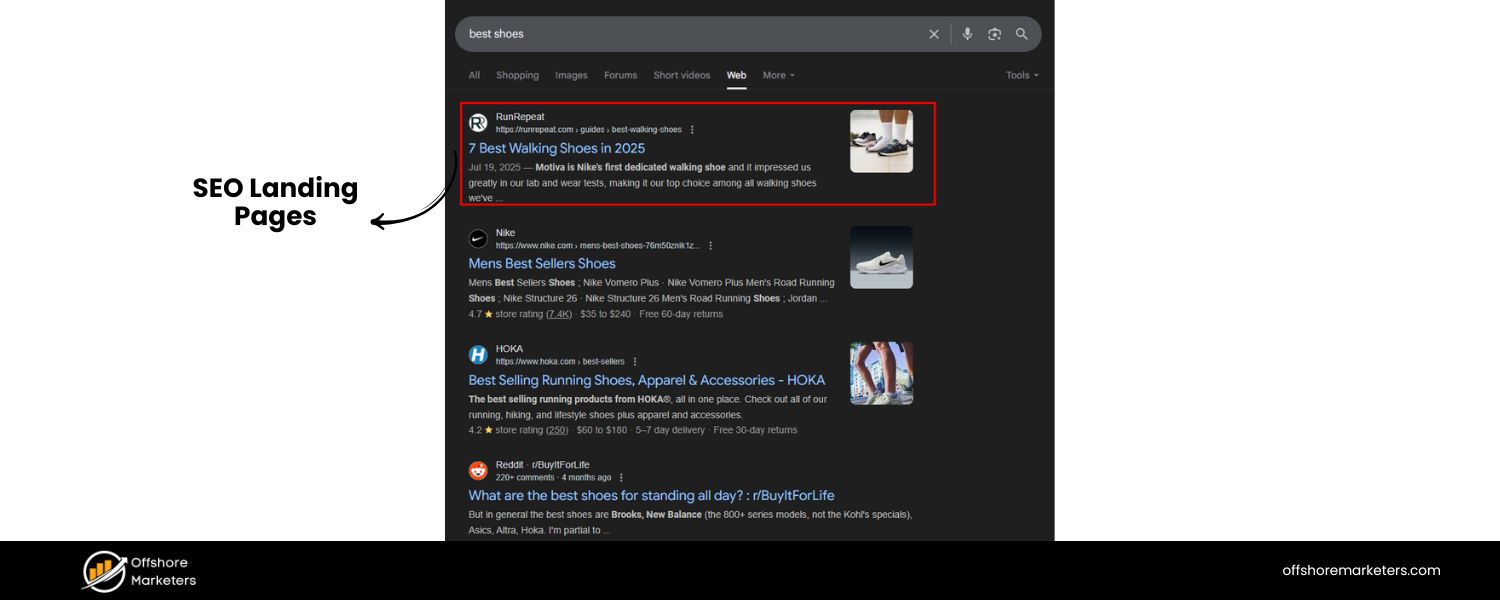
These pages are built to attract visitors from organic search results. They typically contain more informative text, answer common questions, and include keywords naturally in the content.
SEO pages might be slightly longer or more content-heavy because search engines tend to rank in-depth, relevant content higher.
They focus on satisfying the visitor’s search intent first, and then gently guide the visitor to take action. The design is often clean and user-friendly, but may include more context, images, or even an FAQ section to cover everything a searcher wants to know. While they do have CTAs, they avoid looking spammy, a balance that keeps both Google and users happy.
2. PPC Landing Pages (Paid Traffic)
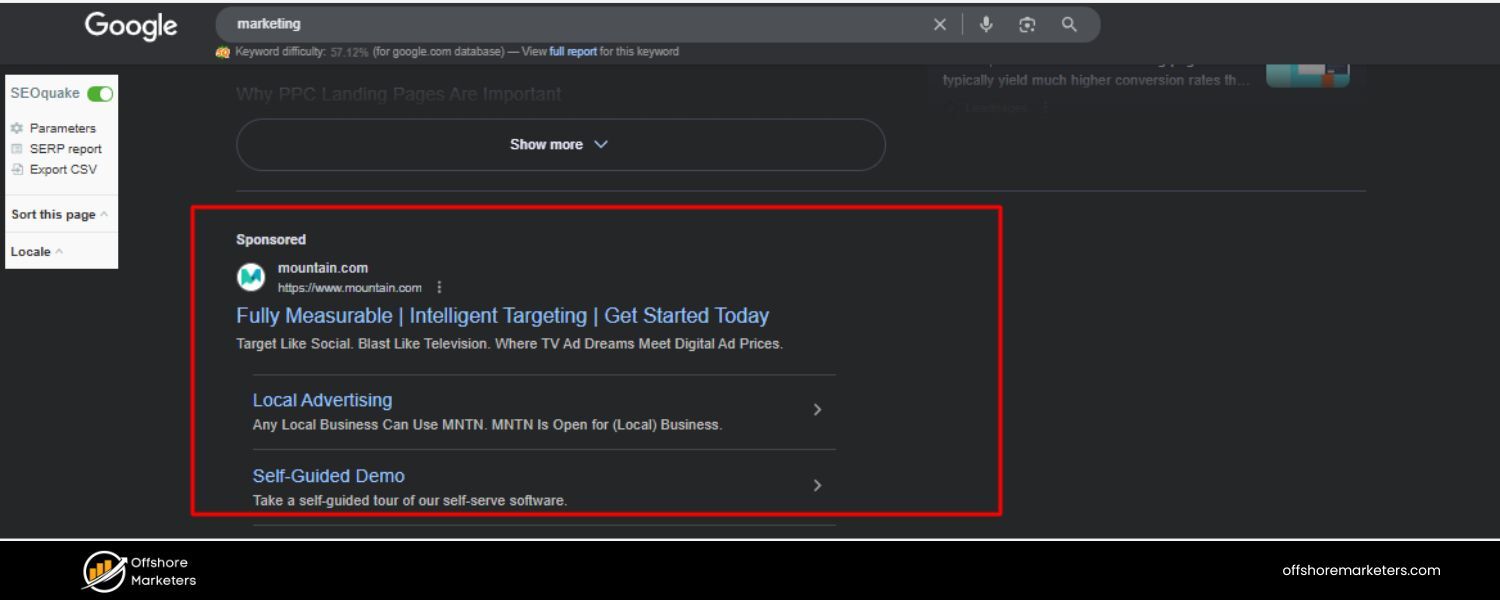
These pages are used in paid advertising campaigns and are often laser-focused on conversion. Since you’re paying for each visitor, you usually strip a PPC page down to the bare essentials to push the user to convert quickly.
That means minimal navigation (often no menu at all), a bold headline, brief copy highlighting an offer, trust badges or testimonials, and a prominent CTA (like a signup form or “Buy Now” button).
PPC landing pages generally don’t need to rank in search, so they might have very little text (which wouldn’t rank well organically).
They rely on persuasive design and copy, assuming the visitor already clicked an ad showing interest. In many cases, PPC landing pages are not even indexed by Google (or are hidden from search) because their content is too thin for SEO purposes.
The challenge: If you try to use one single landing page for both PPC and SEO, you might hit a compromise that satisfies neither fully. A common scenario is a beautifully designed PPC page that fails to rank organically due to lack of content.
In fact, some marketers on industry forums note that simply “adding SEO” to a classic PPC page is an uphill battle, the page structure and intent are just so different. For this reason, it’s wise to decide the primary purpose of your landing page.
If organic traffic is a key goal, be prepared to add more substance and SEO elements to the page. If immediate paid conversions are the only goal, you can keep it brief, but understand that such a page probably won’t rank well in Google’s unpaid results.
Can you have both? Yes – you can maintain separate pages or hybrid approaches. One effective strategy is to create an in-depth SEO landing page (to capture searchers researching a topic) and then within that content, guide users toward your conversion-focused page (perhaps a simpler sign-up page or product page).
For example, if you sell software, you might have a long-form SEO page targeting “How to improve team productivity” which educates readers (and ranks on Google), and that page includes a CTA to start a free trial (linking to your pure signup page). This way, you capture both informational and transactional intent, but each page is optimized for its own role in the user journey.
Common Reasons Landing Pages Don’t Rank

Before we dive into how to optimize, it’s helpful to know what not to do. Many landing pages struggle to rank, or perform poorly in SEO, due to a few common pitfalls:
1. Thin or insufficient content
If your landing page only has a slogan and a few bullet points, Google likely won’t consider it very useful for searchers. Pages with very little text or substance tend to get outranked by more comprehensive pages that actually answer the user’s query.
It’s a fine line – you don’t want to bore readers with walls of text, but you do need enough relevant content to signal value to search engines.
Solution: Add genuinely helpful information to your page (e.g. a short paragraph answering key questions, or a brief guide) below your main offer section.
2. Ignoring search intent
A page might target the wrong intent for its keyword. For instance, if people search “best email marketing software review” and land on your page, but your page is just a generic product sign-up with no comparison or review content, they will bounce (leave) quickly.
Google will see that behavior and assume your page isn’t meeting the need, hurting your rankings.
Solution: Make sure the content and format of your page align with what the searcher is looking for (informational vs. transactional intent, etc., which we’ll cover shortly).
3. Lack of SEO elements
Sometimes a landing page isn’t ranking simply because basic on-page SEO elements are missing or poorly done. This includes things like not having the target keyword in the title tag, no meta description, missing header tags, or not using the keyword (and related terms) in the body at all. Without these clues, search engines might not understand what your page is about.
Solution: Optimize the technical on-page elements (we’ll detail this in the next section).
4. No internal links pointing to the page
If your landing page is completely orphaned (meaning no other pages on your site link to it), Google might have a hard time discovering it or may see it as less important.
This is often the case when landing pages are created for campaigns and not linked in the main site navigation.
Solution: Add a few internal links from relevant pages or the site footer, so search crawlers and users can find the page easily.
5. Poor page experience
Slow loading times, not mobile-friendly, or confusing layout, all these can hurt both conversion and SEO. Google’s algorithm now considers Core Web Vitals (page speed and stability metrics) and mobile usability as ranking factors.
If your page frustrates users (e.g., loads too slowly or isn’t readable on a phone), they leave quickly, which in turn sends negative signals to Google.
Solution: Ensure a fast, responsive page (more on this later).
6. Overemphasis on conversion (at the expense of content)
A landing page that’s “all sales, no substance” can rank poorly. For example, having too many aggressive pop-ups or very little informational content might make Google perceive the page as just an ad, not a helpful result. If the page looks spammy or is stuffed with keywords unnaturally, that can also trigger penalties.
Solution: Focus on helping the visitor first, then converting. Balance your persuasive elements with genuine value.
The bottom line is that a landing page will only rank if it provides real value to users and follows SEO best practices. With that in mind, let’s move on to creating SEO-friendly landing pages step by step.
How to Create an SEO-Friendly Landing Page (Step-by-Step)
Ready to optimize your landing page for search success? Below are the key steps and best practices. Follow these, and you’ll set up your landing pages to climb the search rankings and delight your visitors.
Step 1: Conduct Strategic Keyword Research
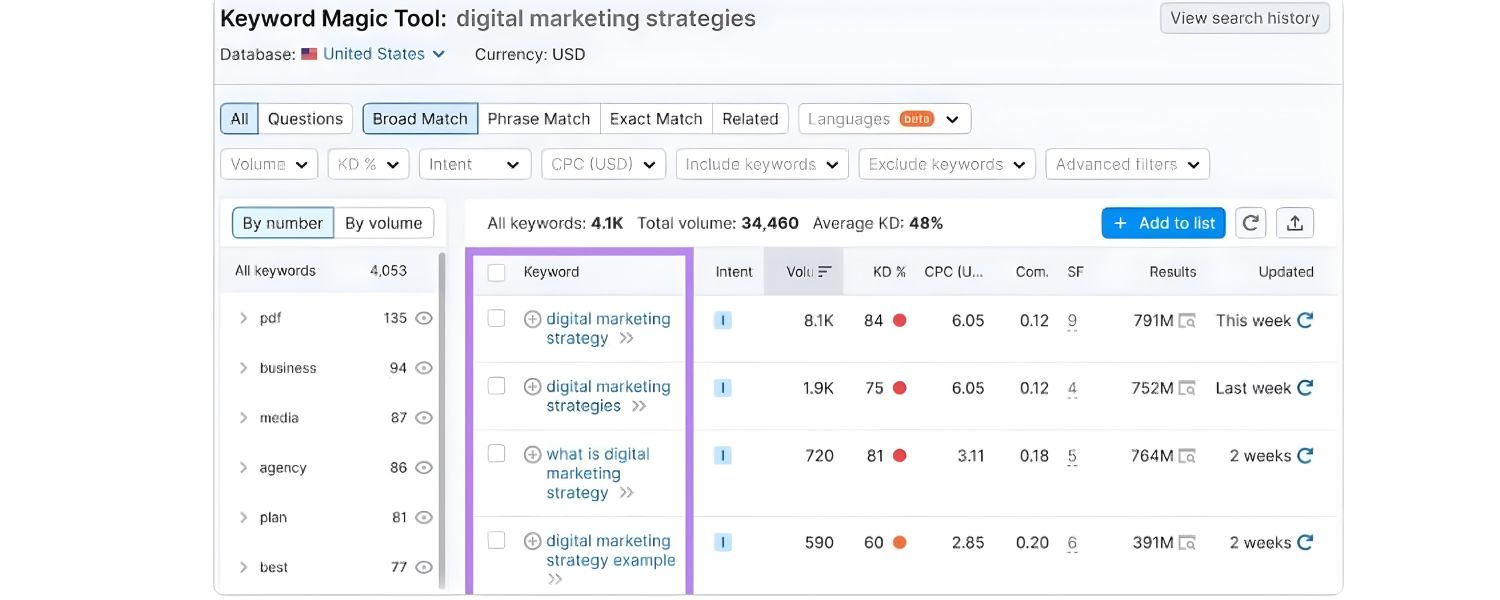
Every great SEO landing page starts with choosing the right keywords. Keyword research is the process of finding out what terms your ideal customers are typing into Google.
You’ll want to identify a primary keyword (or phrase) that is highly relevant to your offer, and preferably one that indicates a readiness to act (if conversion is your goal).
1. How to find the right keywords
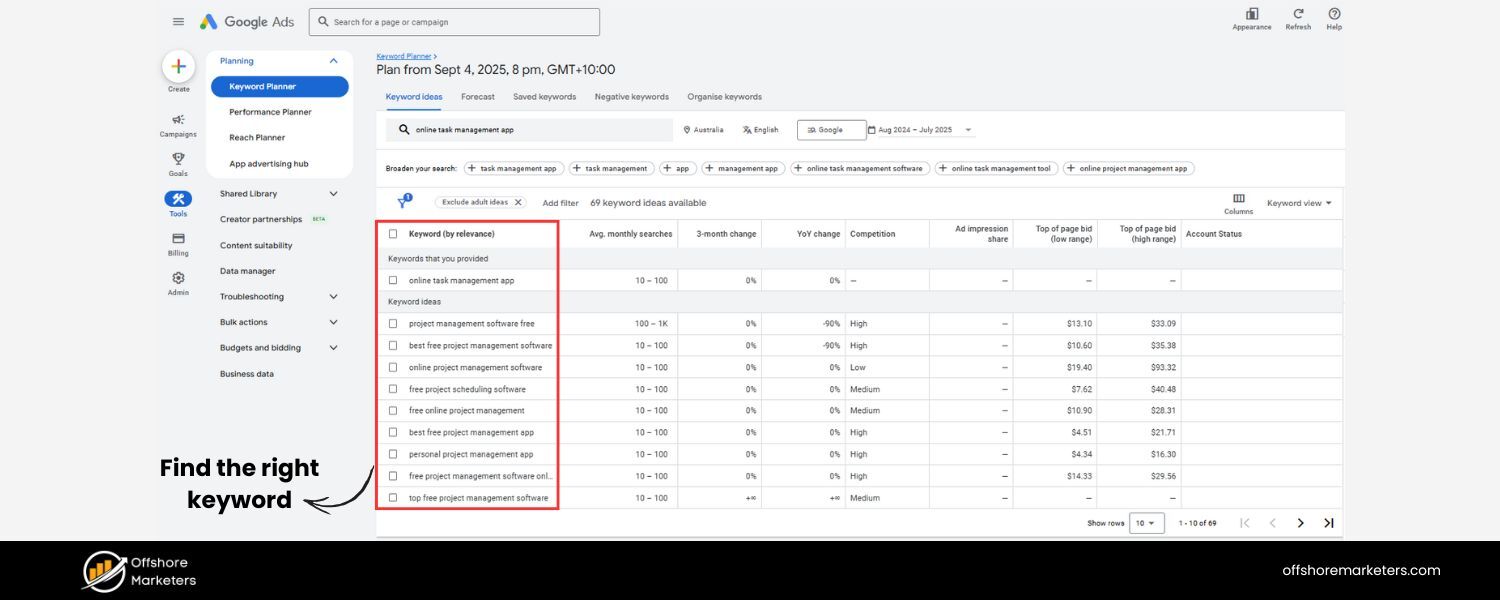
Brainstorm phrases related to your product or service. For example, if you offer a project management tool, potential keywords might be “project management software for small teams” or “online task management app”.
Use tools like Google’s Keyword Planner, Semrush, or Ahrefs to check how often people search those terms and to discover related keywords.
Look for keywords that have a decent search volume but aren’t overly competitive (long-tail keywords with 3-5 words often work well, like “affordable project management tool”).
Equally important is understanding search intent behind each keyword. Search intent means why the person is searching that term – are they looking to learn something, to compare options, or to buy? The major intent categories are:
A. Informational: The user wants information or answers (e.g. “how to manage projects effectively”).
B. Navigational: The user is trying to find a specific site or page (e.g. “Asana project management login”).
C. Commercial investigation: The user is researching products or services, maybe before purchase (e.g. “best project management software 2025”).
D. Transactional: The user intends to make a purchase or take an action now (e.g. “buy project management tool online”).
For an SEO landing page, you typically target commercial or transactional keywords if you want conversions, because those searchers may be ready to sign up or buy.
However, purely transactional one-word terms are very competitive (you likely won’t rank for “software” or “laptop”).
Instead, a smart approach is to target more specific keywords that show intent plus context – for instance, “free project management software for nonprofits” could be an excellent long-tail keyword for a landing page offering a free trial for nonprofit organizations.
Such a term indicates the user is looking for a solution and is quite specific, meaning you can tailor the page exactly to that need.
Pro tip: It’s often beneficial to include secondary keywords on your page as well. These are related terms or synonyms that users might also search.
Using our example, if primary keyword is “project management software for small teams,” secondary terms could be “team project tracking tool” or “manage team tasks online.” Sprinkle these naturally in your content.
They help search engines understand the context and can broaden the page’s ranking potential. Just avoid keyword stuffing (overusing keywords in an unnatural way) – always write with a human reader in mind.
By the end of this step, you should have one primary keyword and a handful of related terms to target. You’ll use these in the next steps to shape your page’s content and SEO elements.
Step 2: Align Your Content with Search Intent
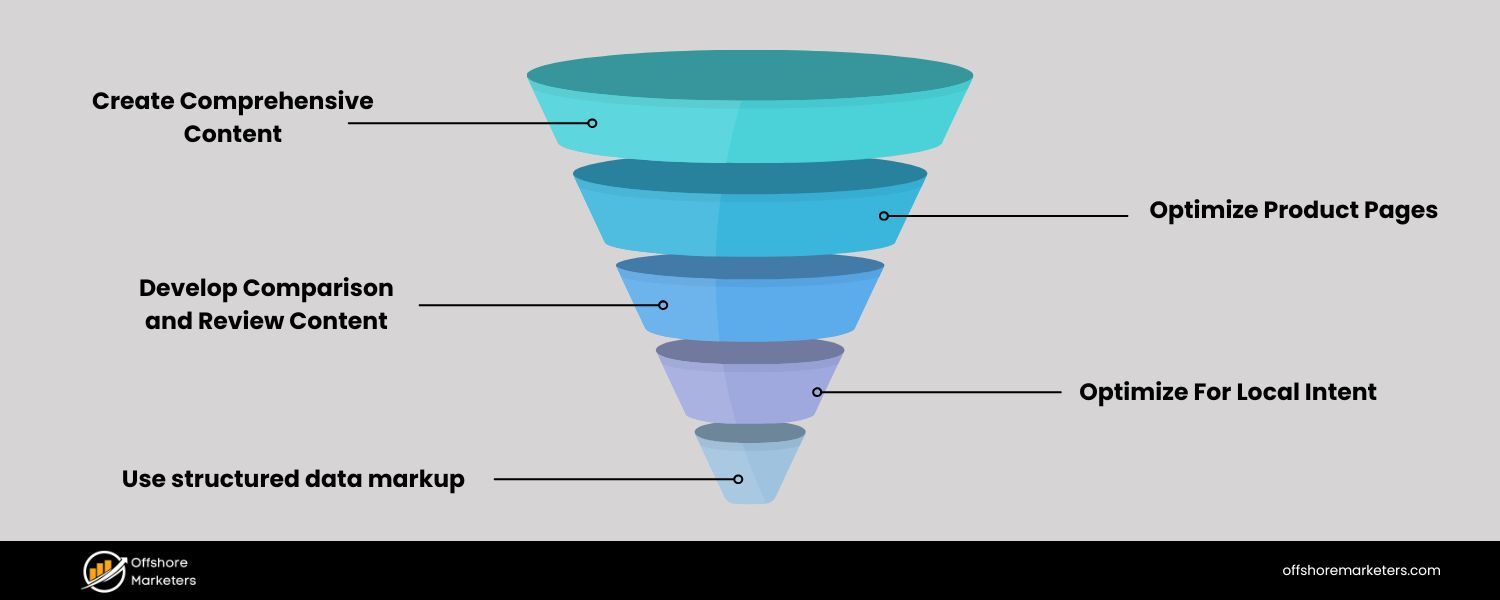
Once you know your target keyword and its intent, make sure your landing page delivers exactly what those searchers want. This step is critical: even if you get visitors to the page, you need to satisfy them (and keep them engaged) if you want to rank and convert.
Start by asking: “What would someone searching <your keyword> expect to see or do on this page?” For instance, if the keyword is “compare email marketing services,” an informational blog-style list might be expected.
But if the keyword is “sign up for X email marketing service,” the searcher likely wants a quick route to a signup form and maybe some trust indicators (like reviews or security badges).
For an SEO landing page, you often have to balance giving information and prompting action. A good strategy is to provide the most important info up front (so the visitor immediately sees they’re in the right place), and then go deeper into details or questions below the fold (further down the page).
For example, your page might open with a clear headline, a brief value proposition, and a strong CTA (much like a standard landing page).
Then, as the user scrolls, you can include sections that educate: explain features and benefits, address common questions, maybe compare your solution to others, etc.
This way, both types of visitors are satisfied, the ready-to-act folks have the CTA visible at top, and the researching folks have content to read.
Here are some content tips to meet search intent:
1. Answer key questions
Think about common questions related to your product or keyword. It helps to actually Google your keyword and see what comes up. Look at the “People also ask” questions in the search results – can your page address those?
By answering popular queries on your landing page, you not only please readers but also increase your chances of appearing for those questions in search.
For instance, an SEO landing page about “VPN software” might include a brief Q&A on “Is using a VPN legal?” or “How does a VPN protect my data?” if those are common curiosities.
2. Provide valuable info, not just a sales pitch
Remember, an SEO landing page often doubles as a mini-resource. If your page only says “We’re #1, sign up now!” without any substance, many organic visitors will leave.
Instead, include data, examples, or brief explanations that educate the reader. For example, you could mention an industry statistic or a short case study: “Companies that implemented a project management tool saw a 30% increase in team productivity on average.”
Backing up your claims with data or quotes from reputable sources makes your page more credible (which can improve conversions) and more relevant (which can improve SEO). If you cite an impressive stat, consider attributing it to the source (e.g., “according to [Source Name]”).
3. Use an easy-to-read format
Large chunks of text can be intimidating, especially on a landing page. Break content into short paragraphs, bullet points, or concise sections with subheadings.
This not only helps readers scan and find what they need, but search engines also appreciate well-structured content. For example, bullet-point lists can be featured in search snippets if they directly answer a query (“top 5 benefits of X” might show up as a list in Google results).
By aligning your content with the searcher’s intent, you increase the chance that visitors stick around, engage with the page, and eventually convert. And when users spend more time on your page (and don’t bounce back to Google immediately), it’s a positive signal that can boost your rankings.
Step 3: Craft Compelling Meta Tags and Headings
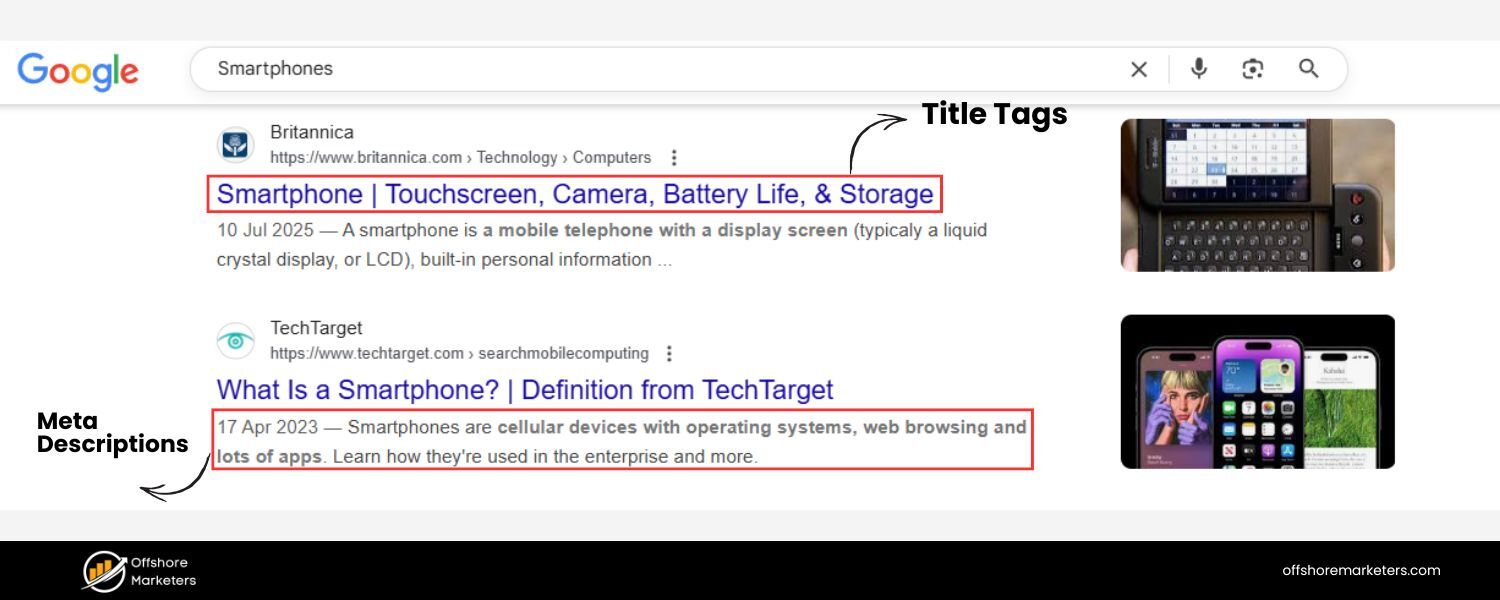
Now let’s get technical – but not too technical. Some of the most important SEO elements on your landing page are the meta title, meta description, and heading tags (H1, H2, etc.).
These may sound geeky, but they have a big impact on how search engines interpret your page and how users see your page in search results.
1. Title Tag (Meta Title)
This is the title that appears in the search engine results page (the big blue link on Google). It’s also often the same text as your on-page headline (though it doesn’t have to be identical).
A good title tag for an SEO landing page should include your primary keyword, ideally towards the beginning, and also be enticing enough to get a click.
Keep it around 50–60 characters so it doesn’t get cut off. For example, if our keyword is “free CRM tool for startups,” a title tag might be: Free CRM Tool for Startups, Organize Your Contacts & Grow Faster.
This has the keyword up front and a compelling promise. Remember, the title tag serves two audiences: search engines (for relevance) and humans (for click appeal).
2. Meta Description
This is the snippet of text (about 1-3 sentences) that appears below the title in search results. While not a direct ranking factor, a well-written meta description can improve your click-through rate – and a better CTR from search can indirectly help your rankings.
Use the meta description to summarize the value of your page and include the keyword or a close variation (Google will bold it in the results if it matches the search query, drawing attention). Aim for roughly 130–155 characters. For example: “Looking for a cost-effective CRM?
Discover how our free CRM tool helps startups manage leads and boost sales, no credit card required.” This description is actionable and contains related terms like “free CRM tool” and “startups manage leads.” It makes a promise and invites the user to click.
3. H1 Heading
On your actual landing page, the main headline is usually wrapped in an <h1> tag in the HTML. It’s often similar to the title tag, but it could be shorter or punchier for design purposes.
The key is that your H1 should clearly indicate what the page is about and ideally contain the primary keyword or its variant. For instance, an H1 on the page could be “Free CRM for Startups” or “Organize Your Startup with a Free CRM Tool” – something that a user immediately understands and that relates to the keyword. Only use one H1 per page (since it’s the top-level heading).
4. H2, H3 Subheadings
These are sub-sections in your content, and they help structure the page. Use them to break up different topics or steps. For an SEO landing page, you might have H2s like “Features of Our CRM” or “Why Small Businesses Choose Us,” etc., depending on what content you included.
Incorporate secondary keywords in some subheadings if relevant (for example, an H2 could be “Project Tracking and Team Collaboration Features” if “project tracking” is a related term you want to emphasize).
The subheadings not only make it easier for visitors to scan the page, but search engines also use them to grasp the content hierarchy.
5. URL
Don’t overlook the URL of your landing page. A short, descriptive URL that includes the main keyword can slightly help SEO and certainly helps with user trust.
For example, yourwebsite.com/free-crm-startup is better than yourwebsite.com/page?id=123. It signals what the page is about. Once you set a URL, try not to change it later (changing URLs can lead to lost traffic unless proper redirects are done).
In summary, optimize these on-page elements as follows: place your target keyword in the title tag, H1, URL, and meta description (if it fits naturally), and use headings to scaffold the content.
Also, make sure each page on your site has a unique title and meta description, duplicate meta tags can confuse search engines. By checking these off, you’re making it crystal clear to Google what your landing page is targeting, and you’re increasing the likelihood that searchers will click through to your page.
Step 4: Provide High-Quality, Relevant Content
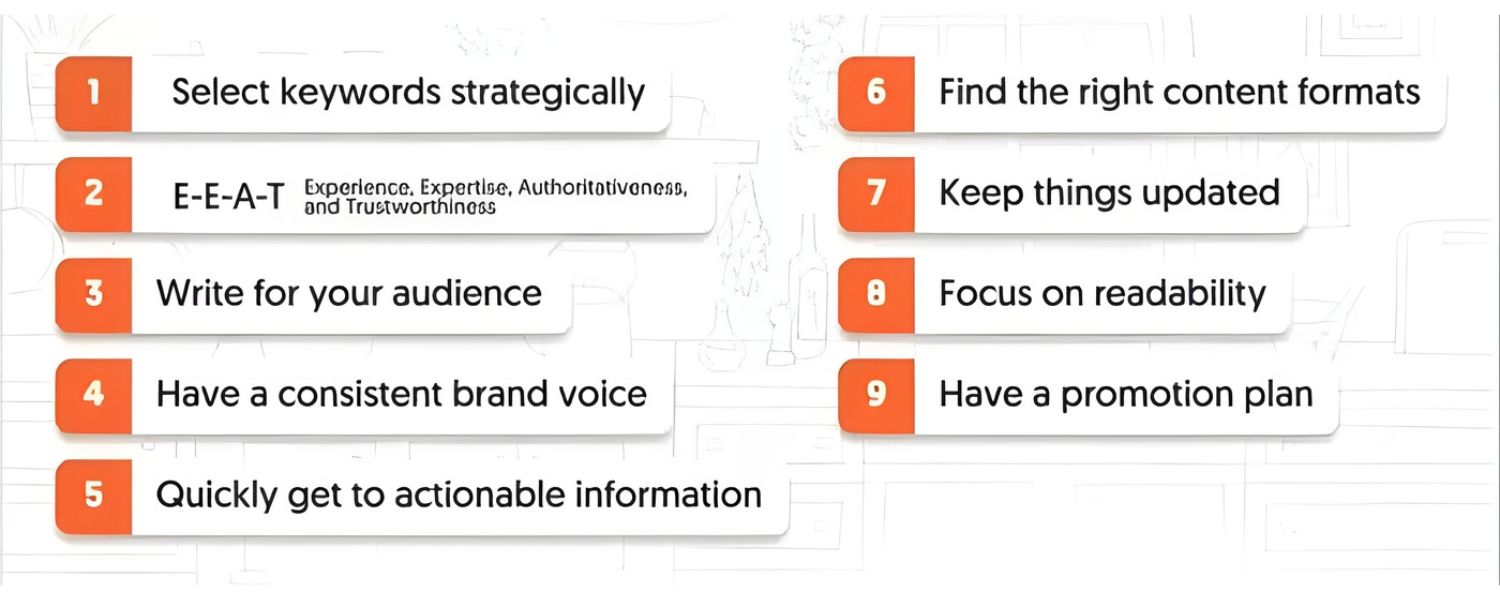
We’ve touched on content when discussing intent, but it’s worth emphasizing as its own step: content quality is king for SEO. Google has continuously updated its algorithm to reward pages that offer useful, trustworthy information to users.
Even for a landing page that’s essentially marketing a product or service, quality content can be the differentiator that pushes you to page one of the search results.
Here’s how to ensure your landing page content meets high standards:
1. Keep it relevant and focused
Stay on the topic your keyword implies. If your landing page is about “email marketing automation tool,” all the text and sections should revolve around email marketing and how your tool helps with that.
Tangents or fluff not only dilute your SEO relevance but can also distract or confuse readers. Before adding any paragraph, ask “Does this help answer the visitor’s needs or persuade them toward my CTA?”
2. Use clear, jargon-free language
Write in a way that your target audience will understand. If technical terms are necessary (say you’re writing about cybersecurity software), provide brief explanations in simple words. Avoid corporate buzzwords that don’t mean much. Simplicity and clarity build trust and keep users engaged.
3. Highlight benefits, not just features
A classic marketing rule that holds true on SEO pages as well. Explain how your offer solves a problem or improves something for the user.
For example, instead of just saying “Our CRM has XYZ feature,” you could say “With our CRM’s XYZ feature, you’ll save hours each week on data entry – giving you more time to close deals.” Such content is inherently more valuable to a reader, and it differentiates you from pages that might just list features without context.
4. Include social proof or credibility elements
While this might not directly change SEO, it can greatly affect conversion – and indirectly, conversion success can help SEO (through user engagement metrics). If possible, add a customer testimonial, case study, rating, or trust badge to your landing page.
For instance, a short quote from a happy client or a mention of “500+ businesses use this tool” adds credibility. It addresses the searcher’s unspoken question: “Can I trust this?” Satisfied visitors are more likely to stay longer and take action, which is a win-win for SEO and sales.
5. Cite facts or statistics (and their sources)
If you mention any data (e.g., “68% of shoppers abandon their cart on mobile”), try to reference the source or at least ensure it’s accurate and up-to-date. You might incorporate a line like, “According to a 2024 study, 68% of online shoppers abandon their carts on mobile devices – a reminder of how crucial mobile-friendly design is.”
Credible statistics can make your content more persuasive. (Even without linking out, naming the source like “a 2024 study by [Company/Publication]” can bolster trust.)
6. Length: right-sized content
There’s no absolute rule on length, but as a guideline, an SEO landing page often falls somewhere between a short product page and a long-form blog post.
You want enough content to cover your topic thoroughly (and include various related keywords naturally), but not so much that it overwhelms or bores the reader.
Many top-ranking landing pages end up being 800-1,500 words or more, but structured in sections so it doesn’t feel like an essay.
Don’t add content just to hit a word count; add it because it adds value. If your page is too short (say under 300 words of actual copy), you likely need to beef it up for SEO.Quality content not only boosts your ranking potential but also ensures that once people arrive on the page, they get value from it.
Google’s own guidelines emphasize E-E-A-T (Experience, Expertise, Authoritativeness, Trustworthiness) for content, basically, show that you know your stuff and that users can trust your page. By writing a clear, helpful landing page, you’ll naturally demonstrate expertise and trustworthiness.
Step 5: Optimize for Mobile and Page Speed
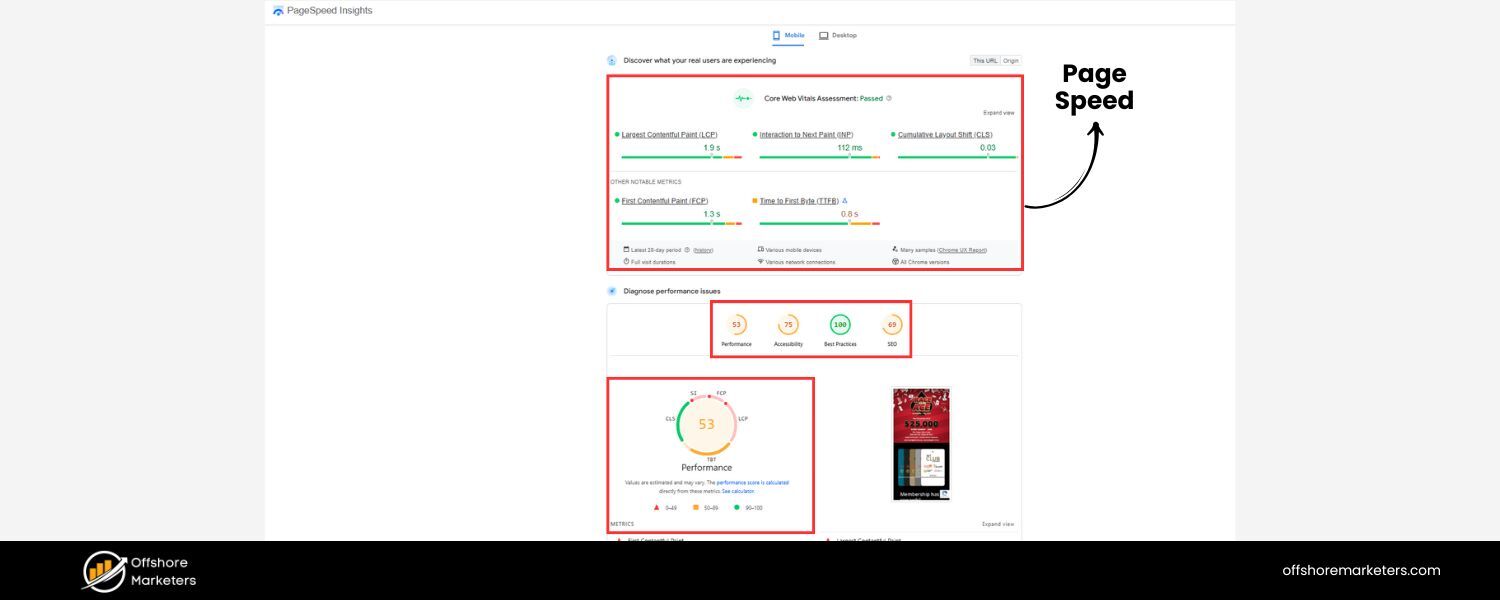
Did you know that the majority of web searches happen on mobile devices? In fact, recent industry data shows nearly 70% of Google searches come from mobile devices.
Google has even shifted to a “mobile-first indexing” approach, meaning it primarily uses the mobile version of a page for ranking and indexing. This makes it absolutely essential that your landing page works flawlessly on mobile phones and loads quickly.
Here’s how to ensure a smooth user experience (UX):
1. Responsive Design
Your landing page should automatically adapt to different screen sizes. Test your page on a smartphone and a tablet. Is the text readable without zooming? Are buttons easily tappable? Does the layout make sense when stacked vertically?
If any element is hard to use on mobile (for example, a wide table that requires side-scrolling), fix it or remove it. Most modern landing page builders and CMS themes are responsive by default, but always double-check the actual page.
2. Fast Loading Time
Online, every second counts – literally. A slow page can frustrate users into leaving, and Google’s algorithm does consider page speed. To speed up your landing page:
A. Compress and optimize images
Large, uncompressed images are a common culprit for slow pages. Use compressed image formats (JPEG for photos, PNG for graphics with transparency, or even next-gen formats like WebP) and scale images to the maximum size they’ll be displayed.
For example, if an image will only ever appear at 800px width on your page, don’t load a 3000px wide image scaled down with HTML.
B. Minimize scripts and heavy elements
Fancy animations, auto-playing videos, or bloated scripts can drag down speed. Use only what’s necessary.
If you have a video, consider using a thumbnail image and loading the video player only when clicked (to avoid loading it for users who might not watch it).
C. Use a reliable host/CDN
Ensure your web hosting is up to par – cheap or overcrowded servers can slow you down. A Content Delivery Network (CDN) can also help serve your content faster globally by caching it on servers closer to the user’s location.
D. PageSpeed insights
Use free tools like Google PageSpeed Insights or GTmetrix to analyze your landing page.
They will identify specific issues (like “eliminate render-blocking resources” or “defer offscreen images”). You don’t need a perfect score, but address any major red flags those tools highlight.
3. Avoid intrusive interstitials
This is a fancy term for things like pop-ups or banners that cover the content, especially on mobile. Google can penalize pages that show a giant popup (like a newsletter signup or ad) immediately when a mobile user lands, because it impedes the user experience.
If you use a popup, configure it to appear at an appropriate time (not instantly and not covering the whole screen on mobile), or use more subtle slide-in banners.
4. Keep it clean and navigable
While a landing page usually has no top navigation menu (to keep users focused on the CTA), consider adding easy navigation within the page itself.
For instance, a simple table of contents for a very long landing page (with anchor links to sections) can help users jump around. At the very least, provide a clear path to the next step (the CTA button should be prominent, maybe repeated in a few places as they scroll).
Also, ensure any forms on the page are mobile-friendly (fields should be large enough, and using mobile-friendly input types like email, number, etc., can bring up the appropriate keyboard).
Optimizing for mobile and speed not only helps SEO but also directly boosts conversions, mobile visitors are more likely to stay and take action if the page is fast and easy to use.
Think of it this way: if someone is searching on their phone and clicks your result, you have a very short window to impress them. If the page loads slowly or looks broken, they’ll hit “back” and try a competitor’s site. Don’t give them a reason to leave – make the experience seamless.
Step 6: Leverage Internal Links (and Sitemaps)
To get the most SEO benefit from your landing page, you can’t let it exist in isolation. Internal linking is the practice of linking from one page on your website to another. It’s like creating roads between pages, helping both users and search engine crawlers navigate your site.
For landing pages, here’s how to leverage internal links smartly:
1. Link from relevant high-traffic pages
Do you have a blog post on a related topic that gets good traffic? Or maybe a resources page or an overview page on your site? Edit those pages to include a contextual link to your new SEO landing page.
For example, if you wrote an in-depth blog article about “10 email marketing tips” and now you’ve created a landing page for your email automation tool, you can add a sentence like, “Looking to put these tips into action? Check out our Email Automation Toolkit for a free solution.”
That link guides interested readers to your landing page and also passes SEO value. Search engines see that link and associate the anchor text (“Email Automation Toolkit”) with your landing page, reinforcing its relevance.
2. Add the landing page to your site’s navigation or footer (if appropriate)
This depends on your site design, but consider giving the page some presence. If the landing page targets an important keyword for your business, you might link it in your main menu or drop-downs.
If that’s too aggressive (maybe it’s a very niche page), at least put a link in the website footer or in a “Related Resources” section site-wide. The more accessible it is, the more traffic (and link equity) it can receive internally.
3. Use keyword-rich anchor text
The anchor text is the clickable text of a link. Instead of linking from generic text like “click here” or “learn more,” use a phrase that includes the page’s keyword when possible.
For instance, “learn more about our free project management software” is better than just “learn more,” when linking to a landing page about free project management software.
This practice gives search engines a hint about the content of the linked page. However, keep it natural and don’t overdo it; forced or repetitive exact-match anchors across your site could look spammy. Just use descriptive text that fits contextually.
4. Ensure the page is in your XML sitemap
Most sites have an XML sitemap file that lists all important URLs to help search engines discover them. If yours is generated automatically (by a plugin or CMS), make sure the new landing page isn’t excluded.
If you maintain one manually, add the page URL to it. This way, even if the page isn’t linked much, search engines are formally notified of its existence.
Proper internal linking does two big things: it helps crawlers find and index your landing page faster, and it can boost the page’s authority by passing on some SEO strength from your other pages. Think of each internal link as a little vote of confidence or a breadcrumb leading Google to your content.
Plus, from a user perspective, internal links integrate your landing page into the broader user journey, someone reading related content might click through and convert on your landing page, which is exactly what you want.
(A quick note on external backlinks: Getting other websites to link to your landing page can significantly improve its ranking potential, because backlinks from reputable sites act as strong “votes” in Google’s eyes.
We won’t dive deep into link building here, but as you publish your SEO landing page, consider if there are opportunities to share it or have it mentioned on partner sites, industry forums, or press releases. Even one or two good backlinks can give a new landing page a nice boost in SEO.)
Step 7: Include a Clear Call-to-Action (CTA) and Trust Signals
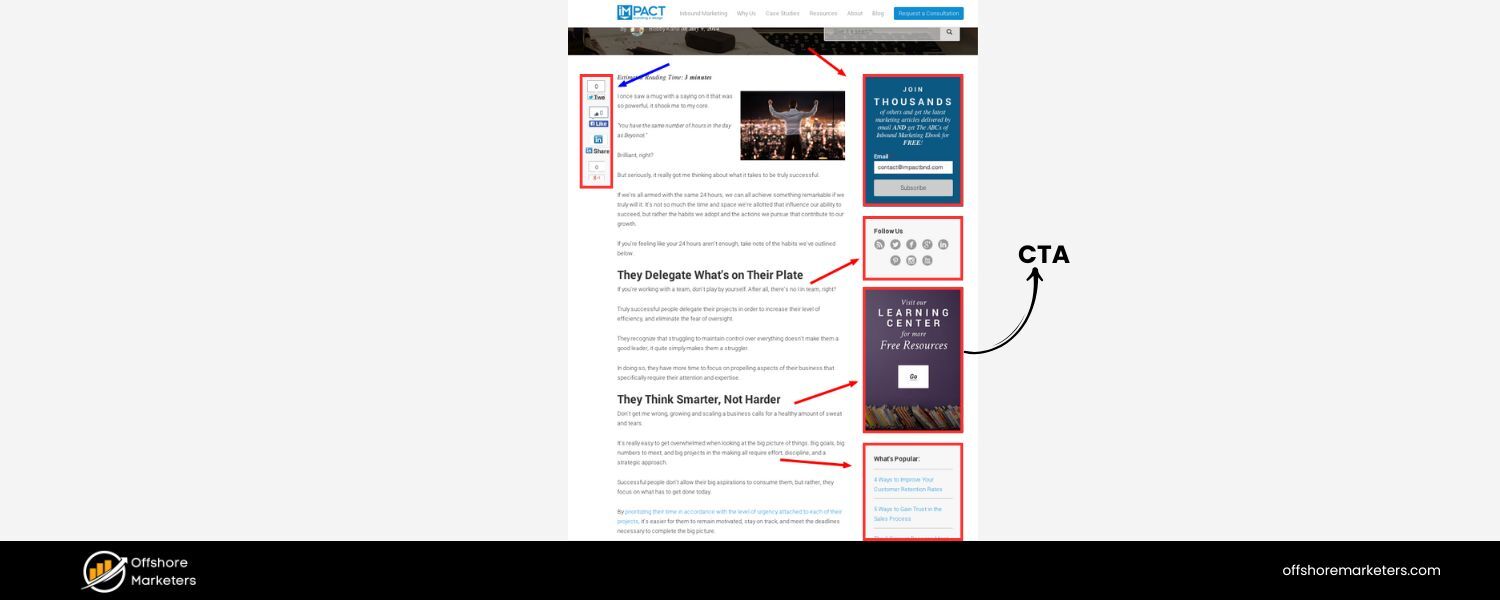
Driving organic traffic is only half the battle – the page also needs to convert visitors into leads or customers. Even though we’re focusing on SEO, never lose sight of the landing page’s conversion goal. After all, the endgame is not just to get traffic, but to get that traffic to take action.
Make sure your SEO landing page features a prominent, compelling call-to-action. This could be a signup form, a “Get a Quote” button, a “Start Free Trial” link – whatever single action you want users to do. Here are some best practices around CTAs and building trust:
1. Keep the CTA visible and straightforward
Typically, you want your main CTA “above the fold”, meaning, visible on the screen without scrolling (especially on desktop). Many high-converting landing pages have the form or button right under the headline.
Use an eye-catching color that contrasts with the rest of the page, and use action-oriented text (“Download the Guide,” “Start My Free Trial,” “Get Started Now” etc.).
If your page is long, consider repeating the CTA in a few sections or having a sticky header/footer button on mobile so that the option to act is always accessible. The key is to reduce friction – once a visitor is convinced, nothing should hinder them from converting immediately.
2. One primary CTA
Don’t confuse people with multiple different offers on one landing page. Stick to one primary goal. It’s okay to mention secondary actions (like “Contact us for more info” in the footer or a live chat option), but the page should clearly be centered around one thing.
If you have multiple offers, make multiple landing pages instead. A focused page converts better and is easier to optimize for a specific keyword/intent.
3. Show trust and credibility
People arriving from search might not know your brand yet. To feel comfortable converting (especially if it involves giving contact info or making a purchase), they need to trust you. Incorporate trust signals near your CTA or sprinkled throughout:
A. Testimonials
A short quote from a happy customer, ideally with a name and maybe a company or title, can reassure visitors that others have had a good experience.
B. Reviews or ratings
If applicable, mention if your product is rated highly on a third-party platform (e.g., “★ 4.8/5 average rating from 500+ users”). Social proof like this can tip the scales.
C. Security badges or certifications
For example, if you’re asking for credit card info on a purchase page, showing badges like “SSL Secure” or payment processor logos (Visa, Mastercard, PayPal verified, etc.) can reduce anxiety.
Or if you comply with regulations (like GDPR, or have a BBB accreditation), those symbols can impart trust.
D. Notable clients or media mentions
“Trusted by 1000+ companies, including [Big Name Client]” or “As seen on [Media Outlet]” can also build credibility quickly, if you have those bragging rights. Keep it subtle and relevant.
4. Address objections
Through either your copy or a tiny FAQ section, preempt common objections or concerns. For instance, if the CTA is “Start free trial,” one common concern is “Will I be charged after the trial?” You could add a note in fine print or a tooltip that says “No credit card required” or “Cancel anytime, no auto-billing.”
If the page is asking someone to schedule a demo, maybe clarify “It’s a no-pressure 15-minute demo, just to show you the product.” By anticipating questions, you again build trust and nudge the user closer to conversion.
Remember, a great SEO landing page marries content and conversion. You might attract visitors with top-notch content and SEO, but it’s the CTA and trust factors that will determine if those visitors actually convert.
From Google’s perspective, a page that users interact with and find useful (e.g., filling a form or spending time reading) is a page worth ranking.
In fact, conversion and SEO can positively feed each other: if a page converts well, it likely means users are happy with what they found, which can translate into better SEO performance over time.
Step 8: Monitor Performance and Continuously Improve
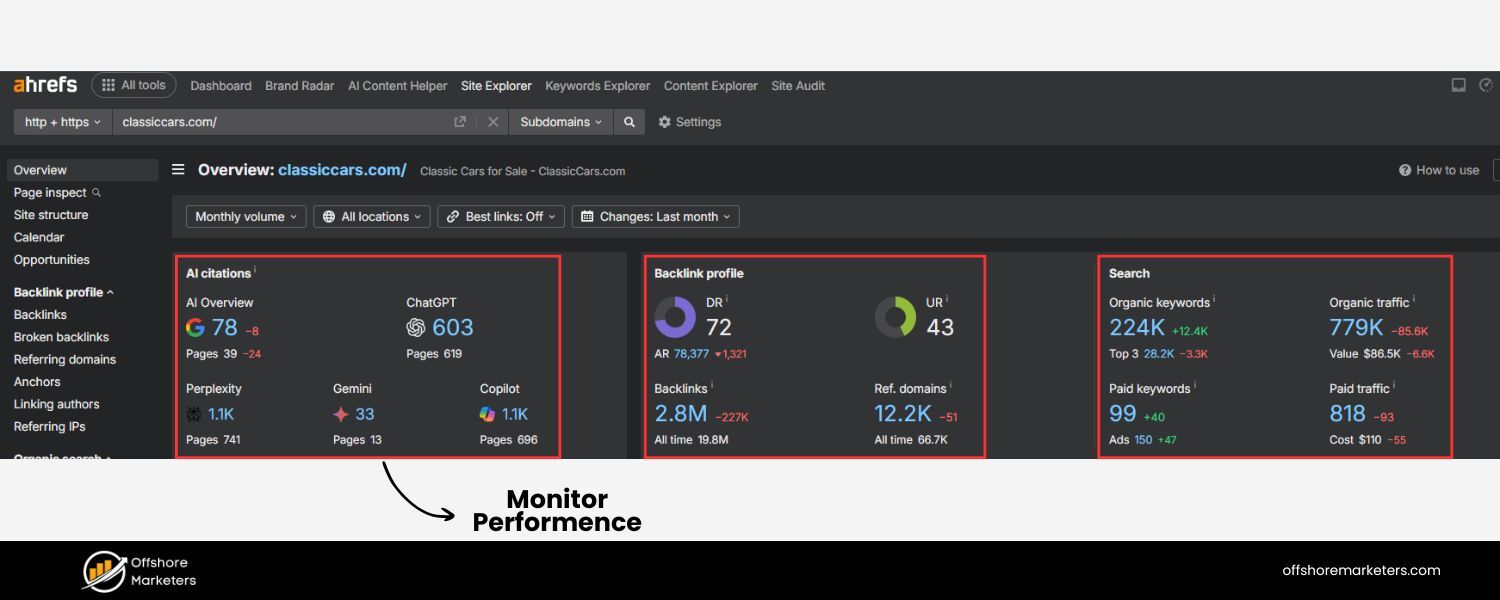
Launching your SEO landing page is just the beginning. To ensure long-term success, you need to track how it’s performing and be ready to tweak and improve it.
The digital landscape (and search algorithms) change, and user behavior can provide you insights to refine your page.
Here’s an ongoing game plan:
1. Track rankings and traffic
Use an SEO tool or even just Google Search Console to see how your page is ranking for your target keyword (and variations). Is it climbing up the search results over a few weeks? Holding steady?
If after a couple of months you’re still not ranking as desired, you may need to revisit your keyword choice (perhaps it was too competitive?) or further optimize content. Also, in Google Analytics or similar, watch the organic traffic trend to that page. A steady increase is a good sign.
2. Analyze user behavior on the page
Dive into your analytics to see metrics like bounce rate, average time on page, and conversion rate for the landing page. A high bounce rate (users leaving without interacting) could indicate the page isn’t meeting their needs or expectations.
If time-on-page is very low, maybe the content isn’t engaging or the page is too slow. On the flip side, if you see visitors spending several minutes, that’s good – as long as they convert eventually.
You might find, for example, that lots of people click to your page but few fill the form. That’s a red flag on the conversion aspect, maybe the form is too long, or the offer not compelling enough.
3. A/B test elements
You can run experiments on your landing page to improve performance. For instance, try two different headlines, or two different CTA button colors, and see which yields better conversion rates.
There are tools that allow A/B testing even on SEO pages (just be careful to use proper setup so Google doesn’t see it as duplicate content; most A/B tools handle this by splitting traffic). Even a small lift in conversion rate (say from 5% to 7%) can mean a lot more leads or revenue.
Test one thing at a time – perhaps start with the headline text, then maybe test the CTA text, or adding a second testimonial, etc. Over time, these refinements can significantly optimize your results.
4. Check the queries bringing traffic
In Google Search Console, you can see the actual search queries for which your landing page is appearing. This can be enlightening. You might discover related keywords that you didn’t intentionally target but are bringing people in.
For example, your page on “free CRM for startups” might also be getting impressions for “best free sales tracking tool.” If that query is relevant, consider subtly adding that phrasing into your content or addressing it.
Understanding how people find you also helps ensure you’re delivering what they need. If you find a lot of irrelevant queries, that might mean you need to clarify your content or retune your SEO targeting.
5. Keep content fresh
Every so often, review the page content to make sure it’s up-to-date. If you mention any year or version, update it when a new year/version comes. If new competitors or trends emerge, you might want to incorporate or address those.
Freshness can impact SEO for certain topics. Even if your landing page is mostly evergreen, a periodic refresh (adding a new testimonial, updating a statistic, etc.) can signal that the page is maintained. Plus, it provides returning visitors or late adopters with the most current info.
6. Maintain the page live (even after campaigns)
One mistake some companies make is taking down a landing page after a promotion ends. If your SEO landing page was tied to a specific campaign or offer that’s now over, don’t delete it without a plan!
If it’s ranking and bringing traffic, you can update the page to reflect the new reality (e.g., “this offer has ended, but check out our current XYZ here”) or do a 301 redirect to a relevant page. Deleting an SEO page that has built up traffic and links is like throwing away hard-earned equity. Instead, leverage it.
For instance, if you had a holiday sale page that ranked, you can reuse and optimize it for the next holiday, or redirect it to a general “special offers” page off-season.
By monitoring and iterating, you essentially future-proof your SEO landing page. Consider this a cycle: publish -> measure -> tweak -> repeat.
Over time, you’ll hone the page to both stay high in the rankings and maximize the percentage of visitors who convert. This adaptive approach is what turns a good landing page into a great, high-performing asset for your business.
Conclusion
SEO landing pages are where search engine visibility meets conversion-focused design. By following the steps outlined above, from smart keyword research and intent-driven content to on-page optimization and UX improvements, you can transform simple landing pages into organic traffic magnets.
Remember, it’s not just about ranking high; it’s about delivering real value to the visitor so that they trust your page and feel confident taking the next step with you.
In an era where customers are actively researching before they buy, having dedicated landing pages that capture those searches is a powerful strategy.
You’ll attract a steady stream of interested prospects without paying for each click, and by optimizing the page for conversion, you’ll turn a good portion of that traffic into leads or sales.
Now that you know the blueprint, it’s time to put it into action. Take a look at your current landing pages (or pages you plan to create) and apply these SEO best practices. Monitor the results, keep refining, and you’ll likely see your pages climb in rankings and your conversion numbers rise.
With consistent effort, your SEO landing pages can become 24/7 salespeople for your business, bringing in qualified visitors and guiding them to become customers, all on autopilot.
Ready to boost your visibility and conversions? Start optimizing your landing pages for SEO today. By investing a bit of effort now, you set yourself up for long-term rewards, more traffic, more customers, and more growth for your business. Good luck, and happy optimizing!
FAQs
Q1: How is an “SEO landing page” different from my website’s homepage?
A homepage is typically a broad introduction to your company, it links to many sections and is designed for general brand engagement. An SEO landing page, on the other hand, is a highly focused page targeting one specific topic or keyword for the purpose of ranking in search results.
Unlike a homepage, an SEO landing page usually has a single call-to-action and very tailored content. It’s not meant to be a navigation hub, but rather a destination for a particular search query.
For example, your homepage might say “Welcome to ABC Software, we do X, Y, Z.” But an SEO landing page would zero in on “X software for small businesses,” containing info only about X and trying to convert visitors interested in X.
Think of it this way: users often find SEO landing pages through Google search, whereas they find your homepage by intentionally searching your brand or clicking your site logo.
Q2: Can I use the same landing page for both SEO and PPC campaigns?
You can, but it’s usually not optimal. The ideal configuration is to have separate versions or at least tailor the page dynamically. PPC landing pages tend to be more stripped down, assuming the visitor has already been somewhat pre-sold by the ad they clicked.
SEO pages need more meat to rank and to satisfy an organic visitor who might be in research mode. If you use one page for both, you might have to compromise: either the page has “too much” content from a PPC perspective (which could distract ad-driven visitors), or “too little” content from an SEO perspective (which could hurt rankings).
Some businesses find a middle ground by adding an FAQ accordion or extra info that is collapsible, so PPC visitors aren’t overwhelmed but SEO still sees content.
However, a safer approach is to maintain a robust SEO page and create a simplified variant for ad traffic (or vice versa, and noindex the PPC page so it doesn’t interfere with SEO).
Many companies mark their pure PPC pages as noindex (telling Google not to list them in search) to avoid any SEO issues like duplicate content or poor-quality pages on the site. In summary: dual-purpose is possible, but separate tailored pages often perform best for each channel.
Q3: How long does it take for an SEO landing page to rank on Google?
It varies. In general, you should expect to wait a few weeks to a few months to see significant ranking movement, especially for a new page. Google needs time to discover the page, crawl it, index it, and then assess where it fits in the ranking among other pages.
If your website already has high authority and you target a low-competition keyword, you might see your landing page ranking on page 1 within a couple of weeks. But for more competitive terms, it could take longer and may require building some backlinks or iterating the content.
Using Google Search Console, you can monitor when the page gets indexed and what queries it’s showing up for. Keep in mind, SEO is a long game, but the traffic payoff is worth it.
A common timeline is: indexation in a few days, initial rank in a couple of weeks (often not high up), then gradual climbing as you refine the page and maybe gain links. Patience and consistency are key.
If after a few months you’re still not seeing results, it’s time to re-evaluate the keyword difficulty or look at competitor pages to identify what you might be missing.
Q4: Do SEO landing pages have to be long?
Not necessarily long, but they do need to be comprehensive. There’s a difference. Google doesn’t have a hard rule like “a page must be 2,000 words to rank.” However, the content should adequately cover the topic or answer the query. Some topics can be answered in 500 words, others might require 1,500.
It’s true that many top-ranking pages for competitive keywords tend to be longer-form, because they cover more subtopics, include more keywords, and generally deliver more value.
But you should focus on quality over quantity. A tightly written 800-word landing page that nails the user intent can outrank a rambling 2,000-word page that’s full of fluff.
From a conversion standpoint, very long pages can also deter users unless the content is engaging and well-structured. A good practice is to see what the top-ranking pages for your target keyword look like, do they have lots of content? Are they in-depth guides, or short landing pages? Use that as a benchmark.
If all the page-one results are in-depth, you’ll likely need to match that depth (or find a different, more specific angle for your page). Also, consider using expandable sections or tabs to manage content on the page.
Ultimately, measure user engagement on your page: if people are spending time and scrolling through a long page, great. If they drop off early, you might need to trim or reorganize content.

Why Roseville Startups are Choosing Offshore Marketers to Scale Smarter
Roseville is no longer just a quiet suburb of Sacramento;...

What Is PPC? A Practical Guide to Pay‑Per‑Click Advertising
Pay‑per‑click (PPC) is the “pay only when someone clicks” branch...

Google Search Issues Affecting Results in Some Regions
Google has confirmed a problem with one of its data...

Keyword Counts Dropped After Google’s num=100 Change
In September 2025, Google stopped supporting the &num=100 parameter. This...

Image SEO: Optimize Images for Higher Rankings & Traffic
Introduction Images make your website more engaging, but they can...


.png)
.png)
.png)
.png)
.png)

2024 ALL RIGHTS RESERVED MADE IN INDIA
.png)