
SERP Explained: What It Is & Why It Matters for SEO
August 13, 2025
Introduction
If you’ve ever Googled something, you’ve encountered a SERP, the search engine results page that lists answers to your query. This page is where websites rise or fall, as appearing prominently on the SERP can make the difference between getting tons of traffic or none at all.
In today’s digital landscape, filled with ads, answer boxes, maps, and more, understanding how SERPs work is critical. Let’s dive into what a SERP is, the features it contains, and why it’s so important for search engine optimization (SEO).
What Exactly Is a Search Engine Results Page (SERP)?
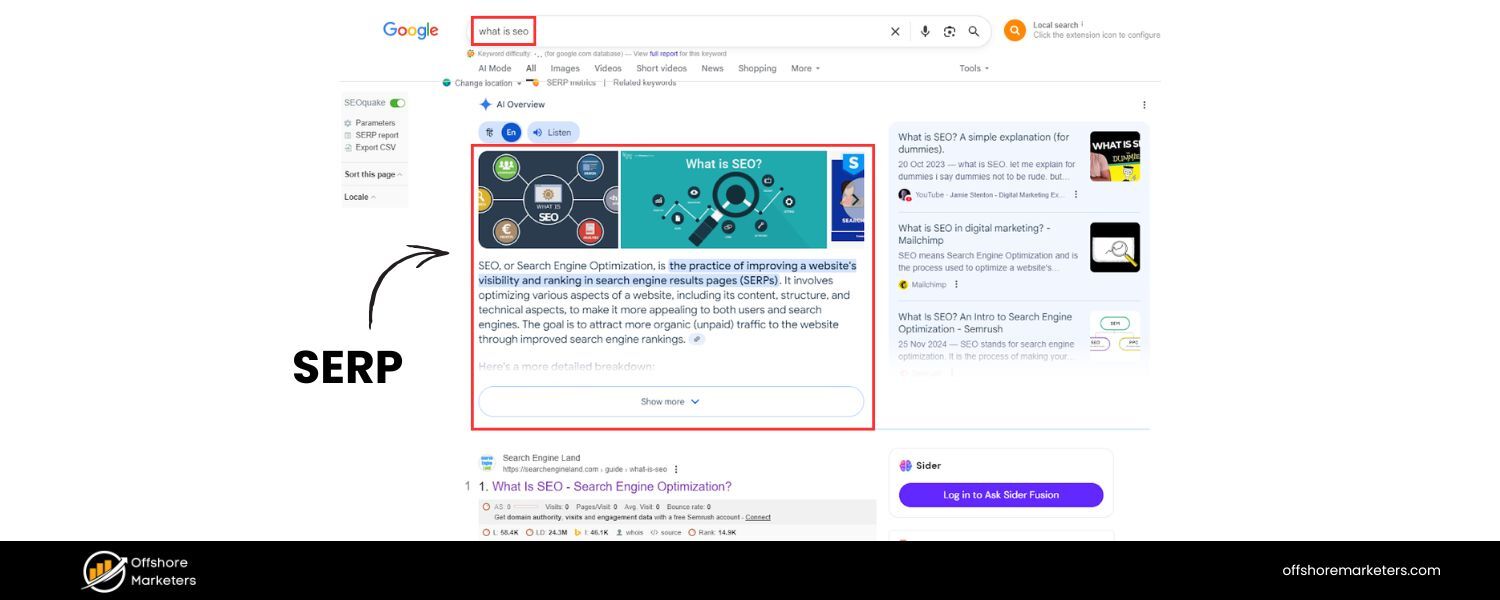
A search engine results page (SERP) is the page that a search engine displays in response to a user’s search query. In simple terms, it’s the list of results you see after you type a query into Google, Bing, DuckDuckGo, or any other search engine.
The SERP typically includes a variety of results, traditional text-based organic listings, paid advertisements, images, videos, and special information boxes, all tailored to answer the user’s query. In other words, you ask a question or enter some keywords, and the search engine returns a SERP with what it believes are the most relevant answers.
Each search engine might format its results pages a bit differently, but the core idea is the same. For example, Google’s SERP may show not only a list of blue link results but also things like featured snippets, Knowledge Panels, People Also Ask questions, maps for local searches, etc. (more on these special features shortly).
The goal is to provide you, the searcher, with the information you need as quickly and conveniently as possible on that results page.
Quick note: Don’t confuse the term SERP (search engine results page) with the act of searching itself. The SERP is what you see after you search.
Also, note that the acronym SERP can refer to something entirely different in other contexts (specifically a type of retirement plan, we’ll address that later). But in the SEO world, SERP almost always means the search results page.
Key Components of a SERP: Organic vs. Paid Results
When you look at a typical SERP, especially on Google, you’ll notice there are two main types of results on the page: organic search results and paid search results. Understanding the difference is fundamental to grasping how SERPs work:
Illustration of a Google SERP highlighting Paid results at the top and Organic results below. Paid listings are marked and usually appear before the organic “blue link” results.
1. Organic Search Results (Natural Listings)
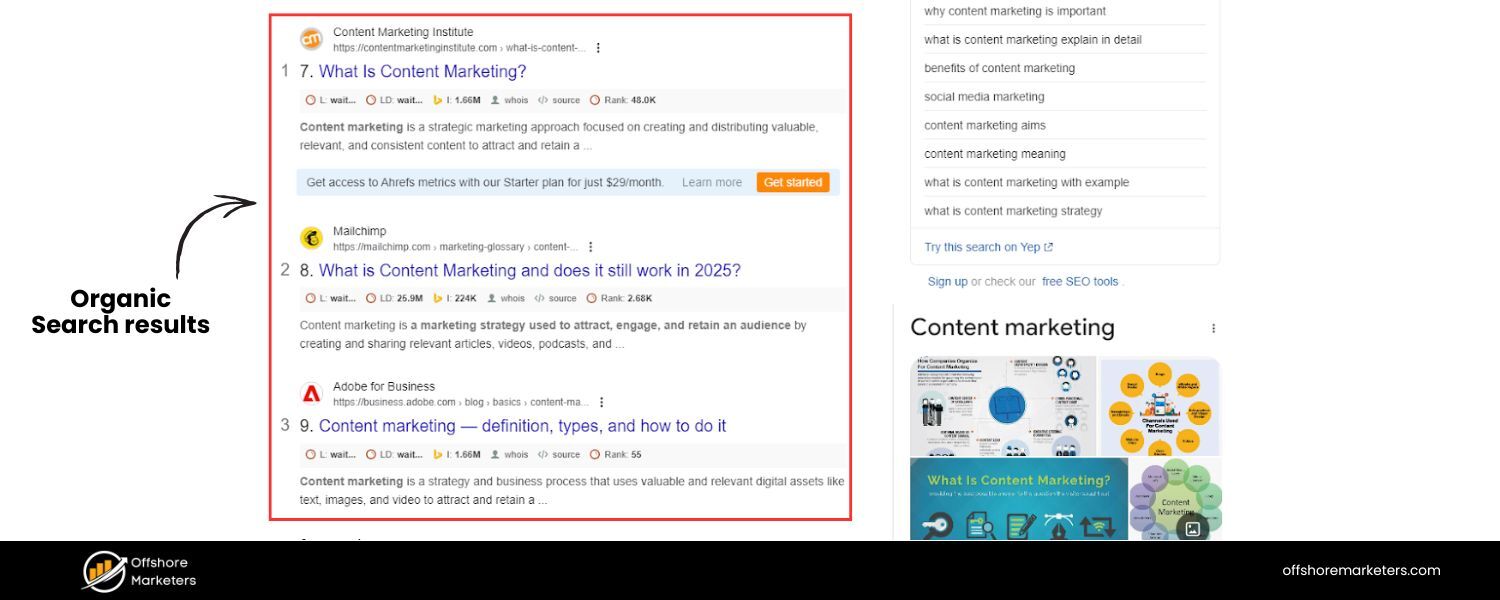
Organic results are the natural search listings that search engines rank using their algorithms. These are not advertisements, websites earn these positions by being relevant and authoritative for the query. Google’s complex algorithm considers hundreds of ranking factors to determine which pages appear first.
Some known factors include on-page relevance (does the page’s content match the keywords searched), quality and expertise of content, the number and quality of other websites linking to the page (backlinks), website usability (e.g. mobile-friendly design, fast loading speed), and more.
In short, the highest-ranking organic result is what Google (or another search engine) deems the best answer for your query based on merit.
Each organic result on a SERP is typically displayed as a snippet that includes the page title, URL, and a brief description (often taken from the page’s meta description or content). For example, an organic snippet might show:
- Title: How to Start a Vegetable Garden – 10 Easy Steps
- URL: example.com/start-garden
- Description: “Learn how to start a vegetable garden from scratch in 10 simple steps. This beginner’s guide covers planning, soil preparation, planting, and more…”
Search engines sometimes enhance organic snippets with additional info. For instance, Google may show the publication date, breadcrumb paths, or sitelinks (extra links to key pages of the same site) under a result.
If a page uses structured data (Schema markup), the snippet might even display rich results like star ratings, product prices, recipe calories, etc., making the result more eye-catching. All these elements aim to help users decide which result to click.
It’s important to note that organic rankings are “earned” – you can’t pay for these placements. Webmasters use SEO techniques to improve their chances of ranking well in organic results.
Users also tend to trust organic results more than paid ads; in fact, studies show users are often more likely to click on organic listings because they see them as more credible or relevant.
2. Paid Search Results (Ads)

Paid results on a SERP are advertisements – typically displayed through platforms like Google Ads or Bing Ads. These appear because advertisers bid on keywords related to the search query. If your search matches an advertiser’s keywords, the ad can show up on the results page.
Paid results are usually labeled with a small “Ad” icon or the word “Sponsored” to distinguish them from organic results.
On Google, paid ads often appear at the very top of the SERP, above the organic results, and sometimes at the bottom of the page as well. For example, if you search for “car insurance,” the first few listings might be paid ads from insurance companies, before you see the regular organic listings. Ads can also appear in other forms (like shopping product listings or map ads), but text ads are common on many queries.
How do these ad placements get decided?
Essentially, advertisers enter an auction: they bid money for their ad to show on certain searches. The highest bidders (with relevant ads) get the top slots. However, it’s not just about money – search engines also consider ad quality and relevance.
Google uses a system called Ad Rank, which takes into account your bid and factors like the relevance of your ad/landing page and the expected click-through rate. In short, the ad that wins might not be the absolute highest bid, but the one that’s high bidding and very relevant to the user’s search.
From a user perspective, paid results are useful when they match what you need – but many users scroll past ads instinctively, looking for the “real” results. In fact, on many SERPs, ads are present on a majority of pages (one analysis found ads in about 51.6% of Google page-one results). Still, they typically get fewer clicks per result than top organic listings.
WordStream data shows that the average click-through rate (CTR) for a Google search ad is around 3%. That’s much lower than what the top organic result often gets, but advertisers are willing to pay for those clicks because they can be highly targeted and valuable (someone searching “buy iphone 13” is probably ready to purchase, making an ad worth the cost).
Paid results can “crowd out” the organic results – for instance, if there are many ads, a user might have to scroll to see the first organic hit.
Despite that, it’s usually not wise to ignore keywords with lots of ads if you’re doing SEO; the presence of ads signals those keywords have commercial value.
As an experienced marketer would note, if advertisers are paying big bucks to appear for a keyword, it means that traffic is valuable. You might get slightly fewer clicks on your organic result, but the clicks you do get could convert well.
Bottom line:
On a SERP, organic results are the free listings you earn with good SEO, while paid results are the ads you pay for. Both have their place in a search marketing strategy. Next, let’s look at what else you might see on modern SERPs beyond just ads and links.
Beyond 10 Blue Links: Common SERP Features and Enhancements
Modern search results pages often contain far more than the classic “10 blue links.” Over the past decade, Google (and other engines) have introduced many SERP features, special elements that provide additional information or interactive functionality on the results page.
These features are designed to help users find answers faster within the SERP, sometimes eliminating the need to click through to a website. While they greatly enhance the user experience, they also make the SEO landscape more challenging, since websites must compete or cooperate with these features to get visibility.
Some of the most common SERP features you’ll encounter include:
A. Featured Snippets 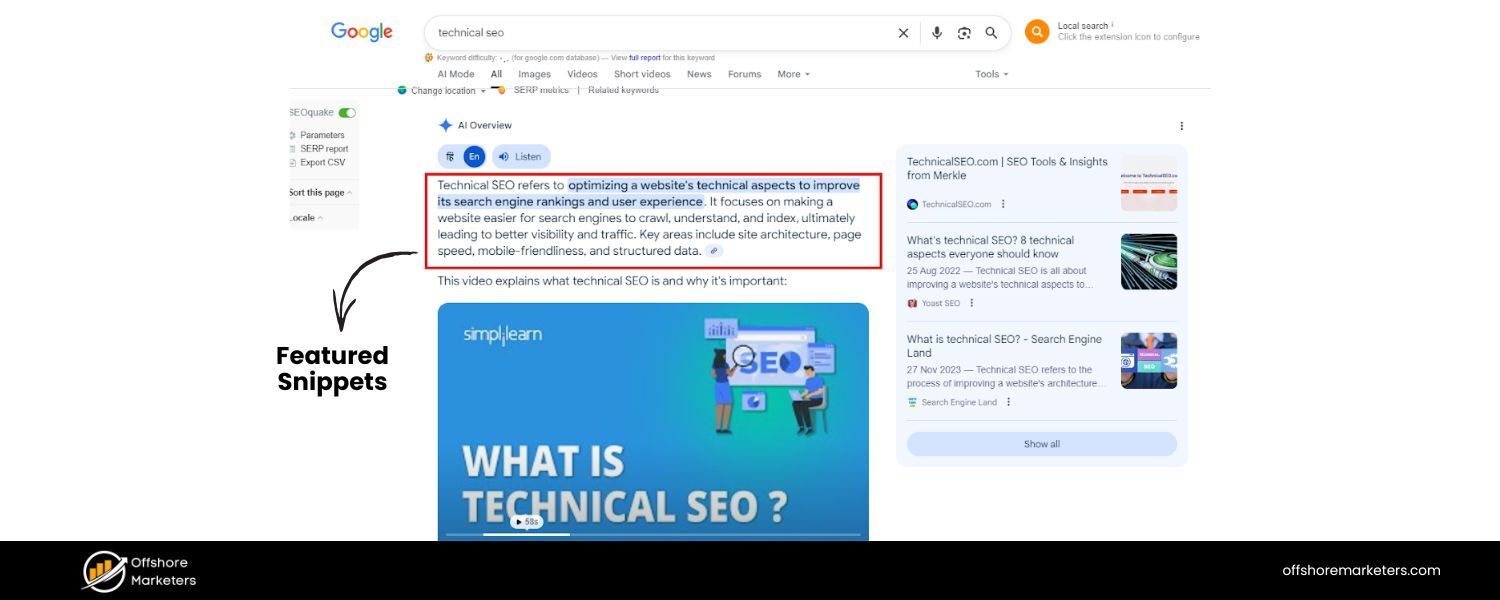

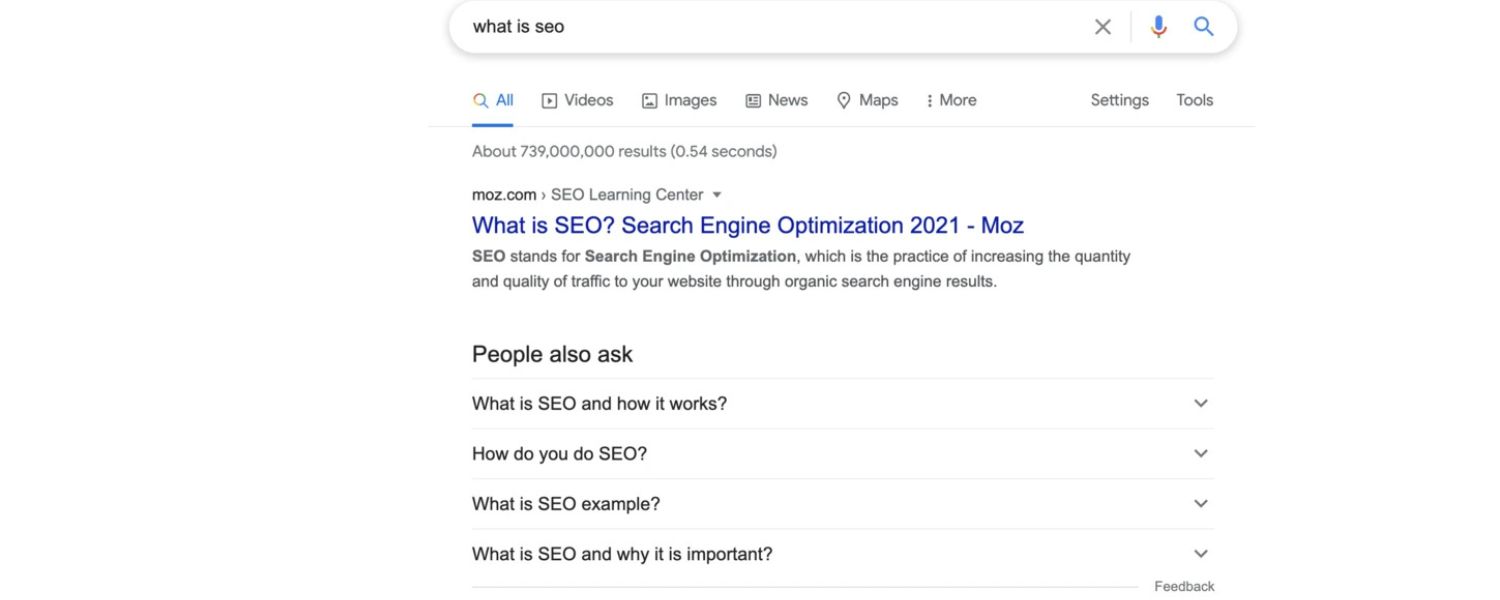
A Featured Snippet is a highlighted answer box that appears at the top of some search results (often above all organic listings). It extracts a chunk of content from a relevant webpage – typically to directly answer a question.
For example, if you search “how to boil an egg,” you might see a box at the top of the Google SERP with step-by-step instructions pulled from a cooking site. Featured snippets can be in paragraph format, bullet/numbered lists, or tables.
They’re sometimes called “Position Zero” because they show up before the #1 result. About 12% of all Google searches have a featured snippet, making this a significant feature. Getting your content into a featured snippet can significantly boost your visibility (often yielding a high CTR), even if your page wasn’t ranking #1 initially.
B. People Also Ask (PAA) 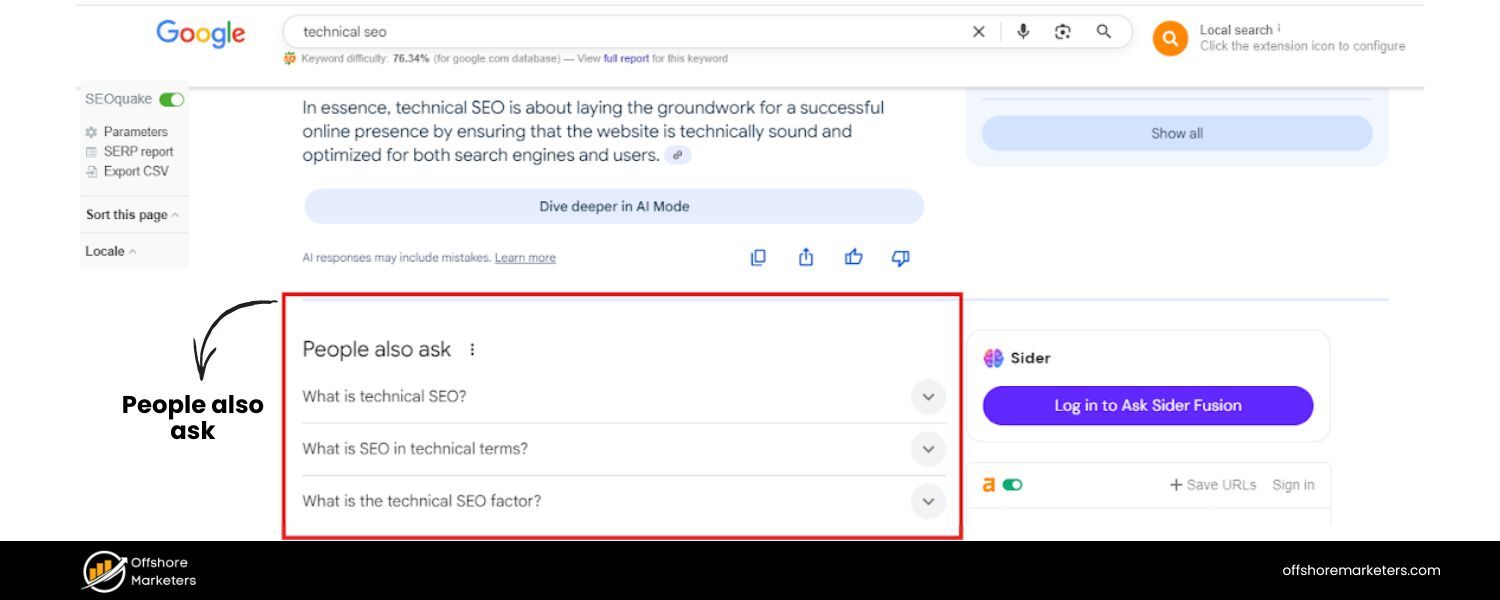
These are the expandable question-and-answer boxes that often appear in the middle of the results. A PAA box will list a few related questions (e.g., “How long do boiled eggs last?” if you searched “how to boil an egg”), and when you click a question, it expands to reveal a short answer (usually sourced from another website) along with a link to that source.
This feature is extremely common – around 58% of Google searches show a “People Also Ask” section. The PAA questions can keep expanding with more suggestions as you click, almost creating an interactive FAQ on the SERP. For SEO, PAA boxes represent both an opportunity (another place your site can appear) and a threat (they can draw clicks away if the answer is fully given on the SERP).
C. Knowledge Panel 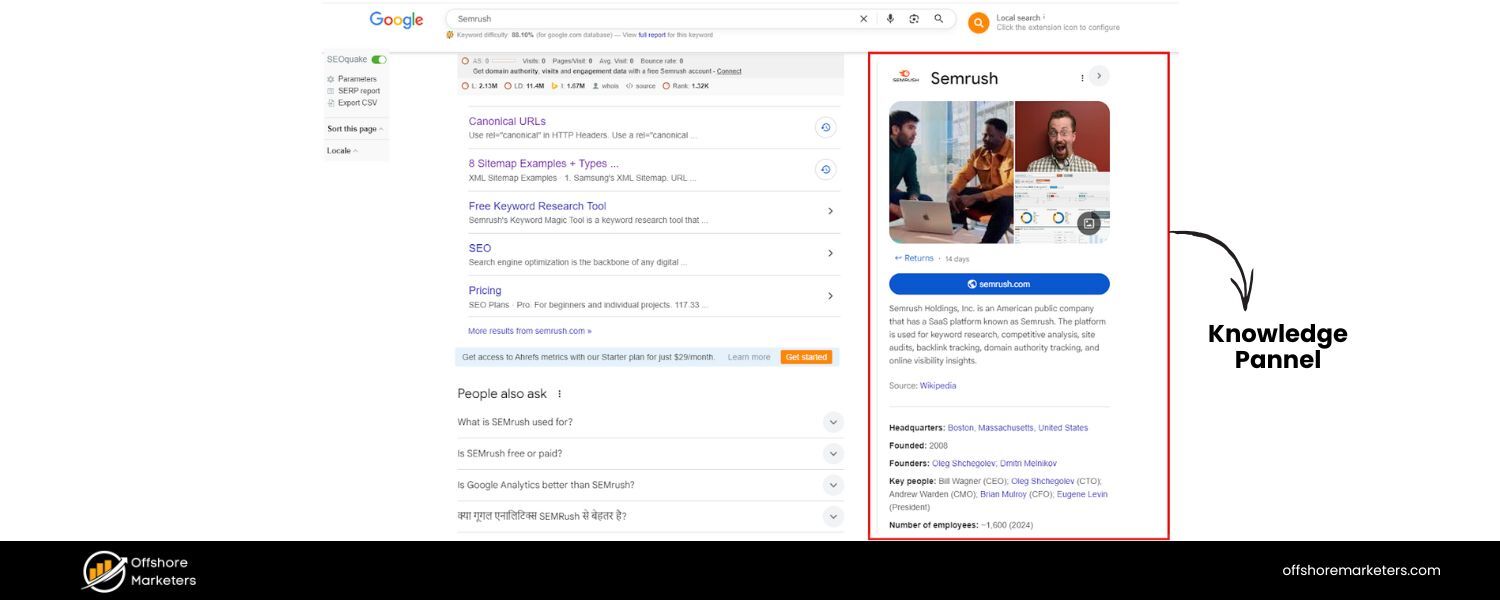
A Knowledge Panel is the info box that appears on the right side of the desktop SERP (or at the top on mobile) for certain searches – usually for known entities like businesses, famous people, movies, etc.
For instance, Googling a celebrity or a company often triggers a knowledge panel with a summary, images, and key facts (sourced from Wikipedia, official databases, or the entity itself).
These panels are powered by Google’s Knowledge Graph, which aggregates trusted information from sources like Wikipedia and other data providers. The Knowledge Panel gives you a quick overview of the topic without needing to click any result.
From an SEO standpoint, you can’t directly create a knowledge panel (Google auto-generates it), but claiming and optimizing your business’s Google My Business profile or ensuring your Wikipedia data is accurate can influence what shows up here.
D. Local Pack (Map Pack) 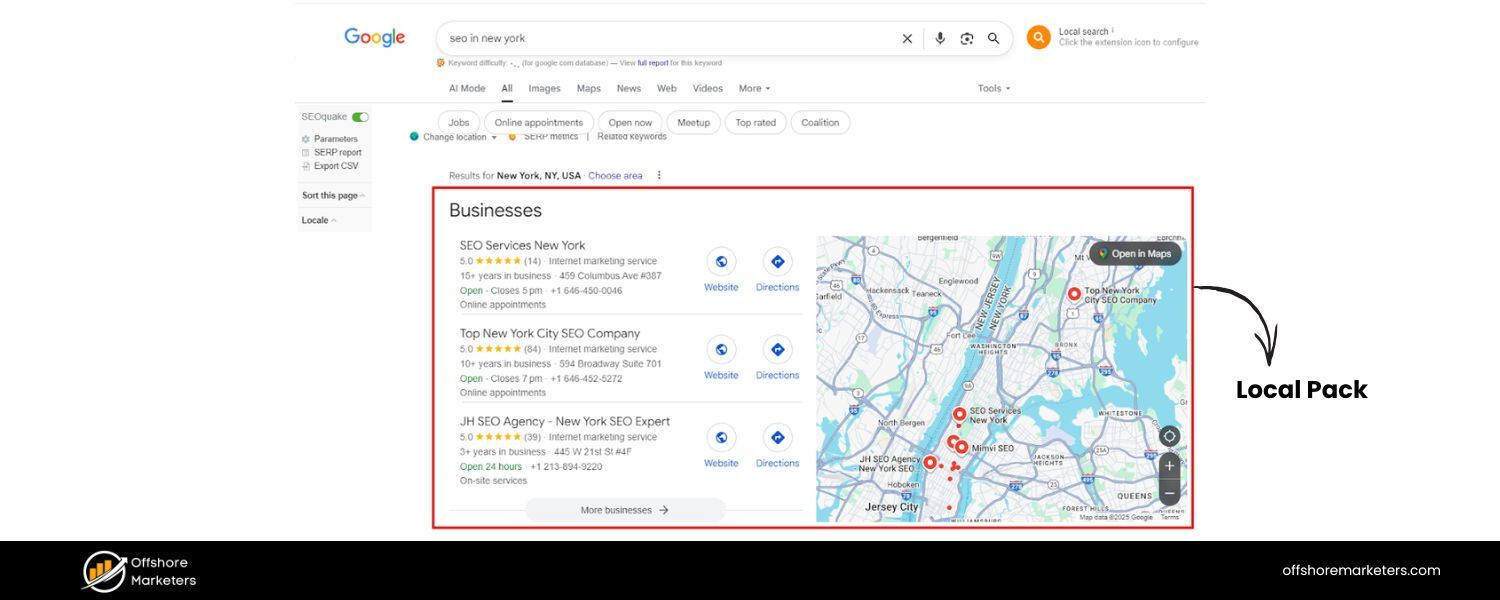
If you search for something that has local intent (e.g., “coffee shop near me” or “plumbers in Denver”), Google will likely show a local pack: a map with a few business listings.
The Local Pack typically displays three local businesses relevant to the query, along with their ratings, address, and hours. You can click to see more or go to Google Maps for additional results.
Local Packs are incredibly important for local SEO, they get prime real estate on SERPs for location-based queries. Appearing in the local pack requires good Google My Business optimization, reviews, and proximity/relevance to the searcher.
Google decides what to show in local packs based on relevance, distance, and prominence of businesses.
E. Image Pack 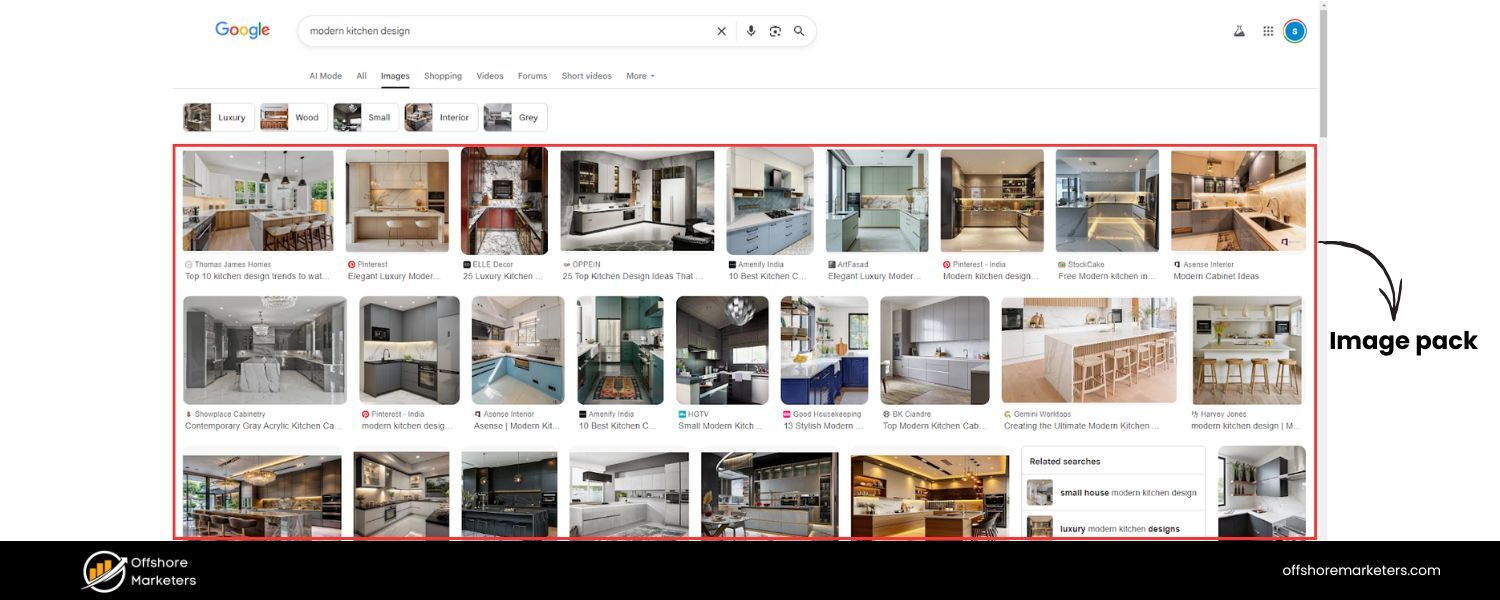
For searches where visuals are helpful, Google may include an image pack – a row or block of images that link to Google Images results.
For example, a search for “modern kitchen designs” might show an image pack of appealing kitchen photos. Clicking an image opens a larger view via Google Images, from which you can visit the originating site. Image packs are Google’s way of saying “pictures might be what you’re looking for.”
If your content is image-centric (like recipes, design, fashion), optimizing images (with good alt text, etc.) can sometimes get you featured here. The image pack is often a sign that visual content is important for that query.
F. Video Results
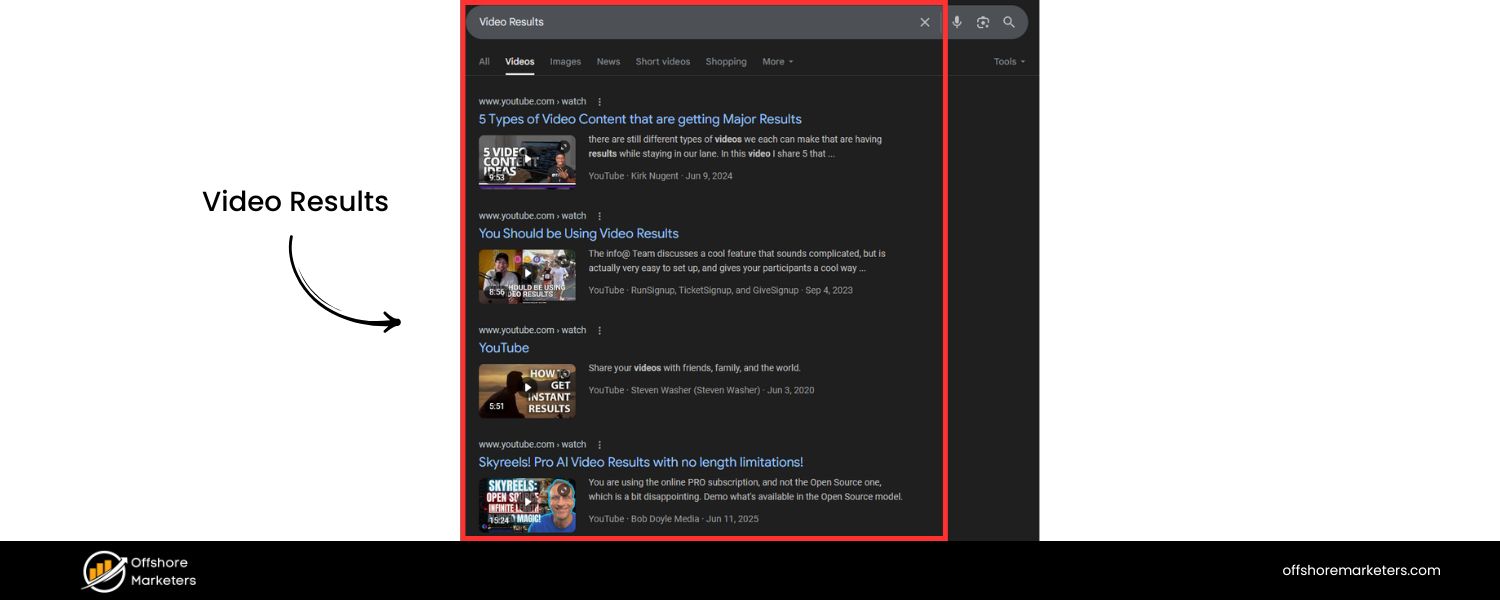
Similar to images, Google may show a carousel of videos for certain queries – typically how-to queries, tutorials, or anything where a video could be the best answer (e.g., “how to tie a tie” often shows video clips).
These video results often come from YouTube (in fact, 88% of video results on Google are from YouTube, since Google owns YouTube). The video carousel allows you to scroll through suggested videos without leaving the SERP.
For SEOs, creating video content (and optimizing it on YouTube with the right title/description) can help capture these spots. Google might even timestamp a specific part of a video to answer a query (key moments).
G. Top Stories (News)
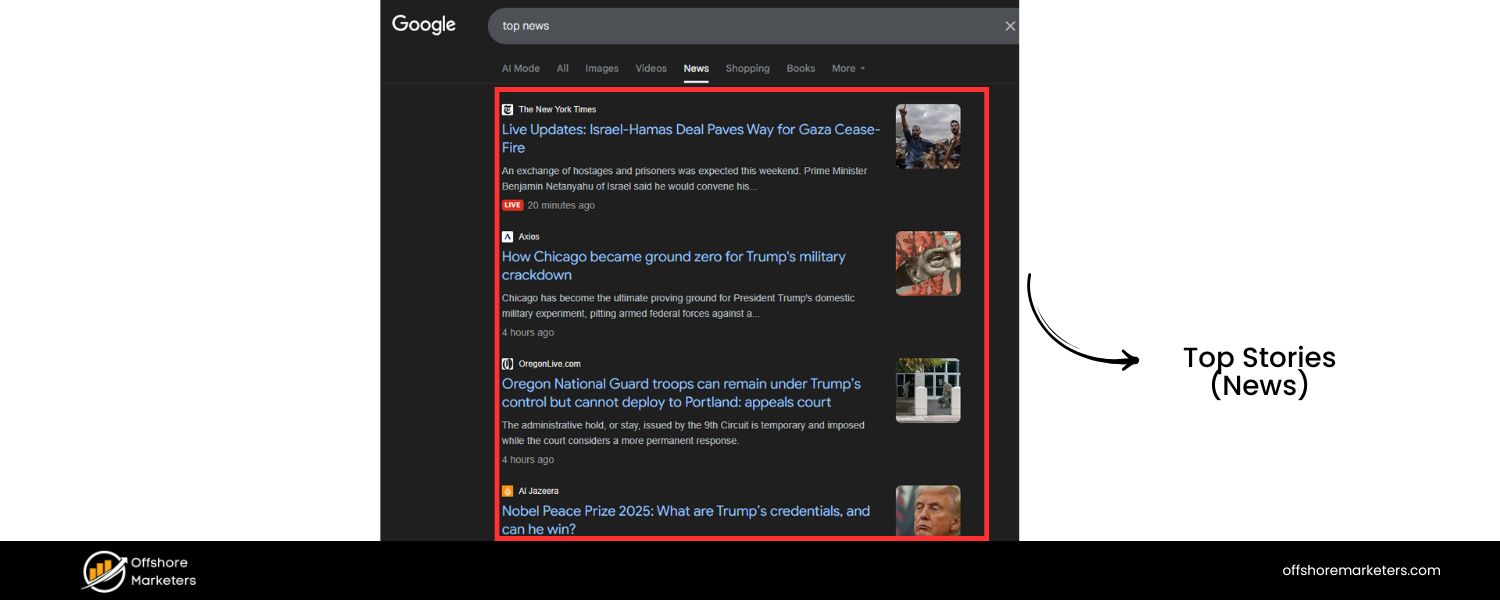
For newsworthy or trending topics, you might see a “Top Stories” section – a carousel or list of recent news articles related to your search.
For example, a search on a current event or a famous person might trigger Top Stories showing headlines from news sites. These results are often AMP pages (accelerated mobile pages) and come from Google News approved publications.
If you run a news site or blog that covers trending topics, appearing in Top Stories can give a surge of traffic. However, it’s competitive and generally limited to timely, news-oriented queries. (Note: a site needs to be indexed as a news source by Google to consistently show up here.)
H. Shopping Results (Product Listings) 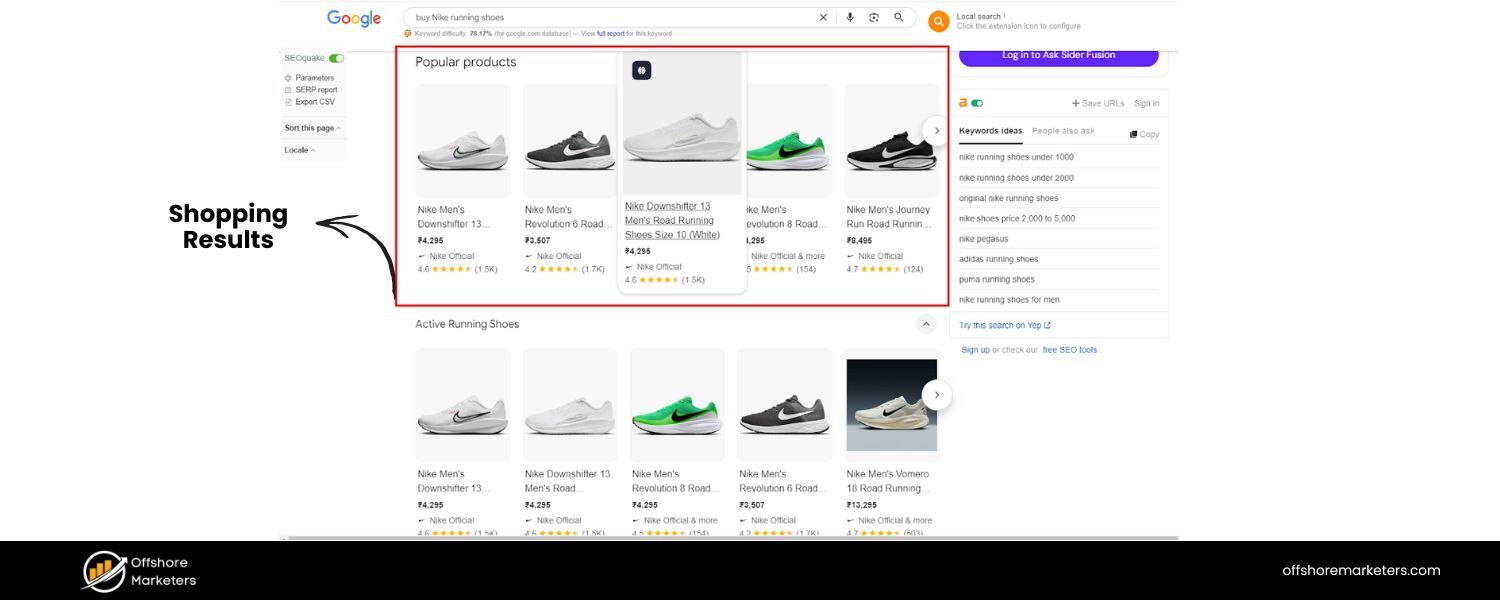
For product and e-commerce queries (e.g., “buy Nike running shoes”), Google often shows Shopping results – also called Product Listing Ads.
These are typically image-based ads showing specific products with prices and ratings, usually above or beside the regular results. They are a form of paid result, but very distinct visually (product image + price). While mostly ads, Google Shopping results can include some free listings from merchants as well.
If you run an online store, you’d want to consider Google Shopping ads to appear here, since they appear at the very top for many purchase-intent searches.
I. AI-Powered Answers
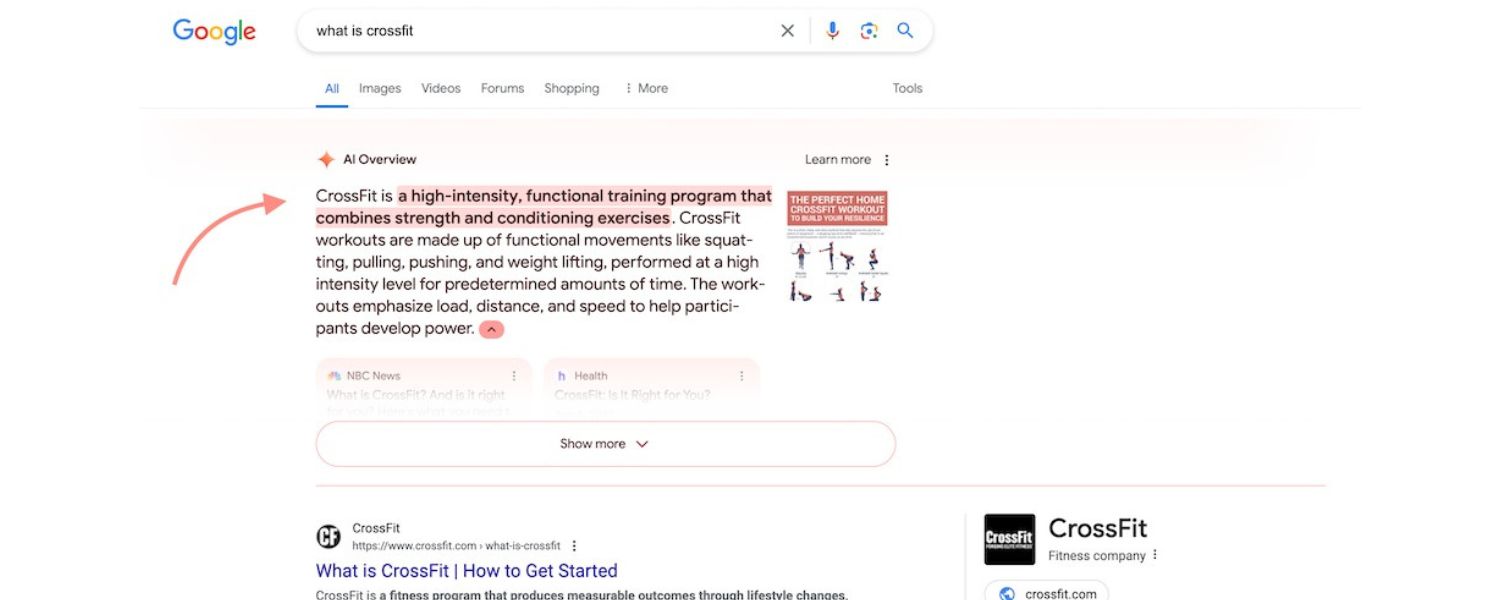
In recent developments, search engines are experimenting with AI-generated answers on the SERP. Google’s Search Generative Experience (SGE), for example, can produce an AI Overview – a synthesized answer to your query drawn from multiple sources, shown above the regular results.
These AI summaries (flagged as experimental) attempt to give a direct, conversational answer on the SERP itself. Similarly, Bing integrates with ChatGPT-like responses for some queries. While not yet on every query, these are a glimpse into the future of SERPs.
The AI overview includes citations or links to sources, but it potentially reduces the need to click multiple results. As of 2024, AI answers are not extremely common on the main Google SERP, but it’s a space to watch because it could redefine how users interact with search results (and how websites get traffic from search).
(There are many other minor features and variations – for example, Twitter card boxes showing latest tweets, featured snippets for definitions vs. tables vs. lists, “Related Searches” suggestions at the bottom, etc. But the list above covers the major SERP features most users and SEOs should know about.)
From a user perspective, these features mean you often get your answer directly on the results page. From a website owner/SEO perspective, these features mean you have to strategize for more than just “rank #1.”
It’s now about earning spots within these SERP features too. For instance, you might aim to get your content selected for a featured snippet or ensure your business appears in the local pack. It adds complexity: sometimes a #1 organic ranking might get fewer clicks than a lower result that’s highlighted in a snippet or with review stars.
Notably, it’s rare nowadays to find a Google results page with no special features at all. One analysis in August 2024 found that only about 1.5% of Google’s first-page results lack any SERP features.
Nearly every search shows some mix of the above elements. So, to compete in SEO, you have to consider what the SERP for your target keywords typically contains, and optimize accordingly. Are there lots of ads? A featured snippet? A PAA box? Knowing this helps you understand how users see the results and where the opportunities lie.
Why SERPs Matter for SEO (and Your Business)?
By now it should be clear that SERPs are the battleground for online visibility. But let’s emphasize why mastering the SERP is so crucial for SEO and digital marketing:
A. Visibility = Traffic (and Trust)
The higher and more prominently your site appears on the SERP, the more likely people will click through to your site. Studies have consistently shown that the majority of users click one of the top few results on the first page.
In fact, being on page 1 is essential – very few users venture to page 2 or beyond. If your site isn’t showing up on the first page for important searches, it might as well be invisible.
This is why businesses invest heavily in SEO (to improve organic rankings) and search ads (to secure paid spots) – the SERP is prime real estate. Appearing at the top not only drives traffic but also lends credibility; users often equate higher rank with being a more authoritative or trustworthy source on that topic.
B. Impact of SERP Features on Clicks
The rise of SERP features has changed user behavior. Often, users get what they need without clicking any result (for example, Google might directly show the weather, a dictionary definition, a calculator, or a featured snippet answer).
According to a 2024 study by SparkToro, almost 60% of Google searches in the US ended without any click to an external website. In other words, a majority of searches are “zero-click searches” where the user found their answer on the SERP itself.
This is a dramatic shift from the early days of Google, and it underscores how much info Google now serves upfront. For website owners, it means you might be getting fewer clicks even if you’re ranking, especially if a featured snippet or knowledge panel satisfies the query.
It’s a double-edged sword: if your site is the one featured in a snippet or PAA, you might still get the click (or at least some branding), but if not, the presence of that feature might be taking away potential visitors.
Example – Above the Fold Matters:
Imagine you worked hard to rank #1 for a high-volume keyword, only to find that on the actual SERP, your result is pushed below the fold (not immediately visible) because of a big featured snippet, a “People Also Ask” box, and maybe a few ads on top. This isn’t a hypothetical – it happens frequently.
An example cited in an SEO study: one SERP had so many elements that even the top organic listing appeared well down the page. If users have to scroll to find the traditional results, the #1 ranking won’t deliver as many clicks as it would on a cleaner page.
In contrast, a less crowded SERP (maybe just 10 blue links and nothing else) gives the top result a much bigger slice of attention. As an SEO or marketer, you must evaluate the SERP for your target queries: Is it “busy” with maps, images, and snippets? If so, the strategy might shift to getting into those features or adjusting expectations for click-through rates.
C. User Intent and SERP Content
The makeup of the SERP often reveals what users want. If Google’s showing a video carousel, the user probably wants to see videos. If there’s a shopping ad block, the query likely has commercial intent. This is why analyzing the current SERP is a key part of keyword research – it tells you what content format might perform best.
For instance, if you aim to rank for “how to tie a tie” but all the top results are videos, you might really need a video to compete. Or if you want to rank for a broad informational query that has a featured snippet, you might structure your content to directly answer that question concisely (to have a shot at that snippet). In essence, the SERP gives real-time feedback on user intent and preferred content types.
D. Brand Presence and Competition
SERPs are also where you go head-to-head with competitors. It’s not just about ranking #1 for a vanity term; it’s about occupying as much space as you can.
For example, a search for your brand name might show your website, but it could also show your Wikipedia, social media profiles, maybe a knowledge panel with your company info, maybe some ads from competitors (!). Yes, competitors can bid on your brand keywords to show ads above your organic result.
This means businesses need to be aware of what appears for their key searches and branded terms. Owning more elements (like having FAQ schema on your site that generates a rich snippet, or running an ad for your own product keywords to block competitors) can be a defensive and offensive strategy.
In summary, SERPs matter because that’s where the traffic is. Great content or a great website won’t help your business if nobody finds it. And people find websites through search engines (among other channels).
So understanding how your audience sees the search results – and what you can do to show up prominently – is fundamental to online success.
From an SEO perspective, studying the SERP is step one when targeting any keyword. You’d ask: What currently ranks? What features are present? How strong are the competitors? This is often called SERP analysis, and it helps you gauge how hard it might be to rank and what approach to take.
Tools can even simulate SERPs and show you which features appear for certain keywords, so you can plan your content strategy accordingly.
Finally, consider the psychology of trust: Many users inherently trust Google to surface the “best” answers first. So a top presence on a SERP not only brings traffic but can enhance your brand’s perceived authority. Conversely, not appearing at all for topics in your niche might make your brand seem less established.
This is why savvy businesses care about multiple SERP appearances – e.g. getting an article ranking, a YouTube video visible, maybe a Google My Business listing in the local pack, etc., for the same query. Each is a touchpoint on that results page.
How to Improve Your SERP Visibility and Ranking
Now that we know what a SERP is and why it’s important, the next big question is: How do you get your website to show up prominently on the SERPs? This is the essence of SEO and search marketing. As someone who’s been in marketing for 25 years, I’ve seen strategies evolve with each change in search algorithms and SERP layout.
Here are some battle-tested ways to improve your visibility on search engine results pages:
A. Optimize Your Site for SEO Fundamentals
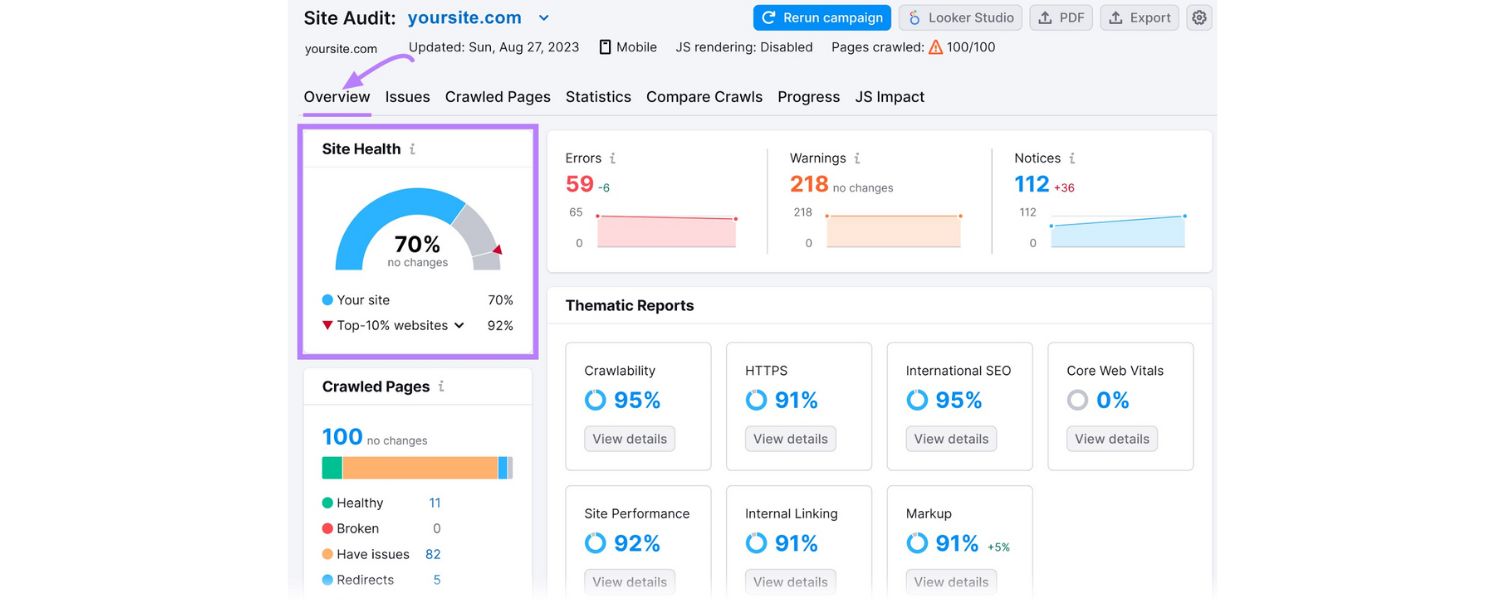
Appearing in top organic results starts with solid SEO practices. Ensure your website is crawlable and fast, and that your content is high-quality and relevant to the keywords you target. This includes on-page SEO – using the right keywords in your titles, headings, and content naturally – as well as off-page SEO like earning quality backlinks.
Google’s algorithm looks at factors like relevance, content quality, and website usability when ranking pages. Focus on creating valuable, authoritative content that satisfies the searcher’s intent. For example, if you want to rank for “best budget smartphones,” provide a thorough, well-structured article comparing phones, with original insights or up-to-date info.
Over the long term, also work on gaining backlinks from other reputable sites (perhaps through content marketing or outreach) – backlinks remain a significant trust signal in SEO. And don’t forget technical aspects: a secure (HTTPS) site, mobile-friendly design, and fast loading times all contribute to better rankings and user experience.
B. Aim for SERP Features (Featured Snippets, etc.)
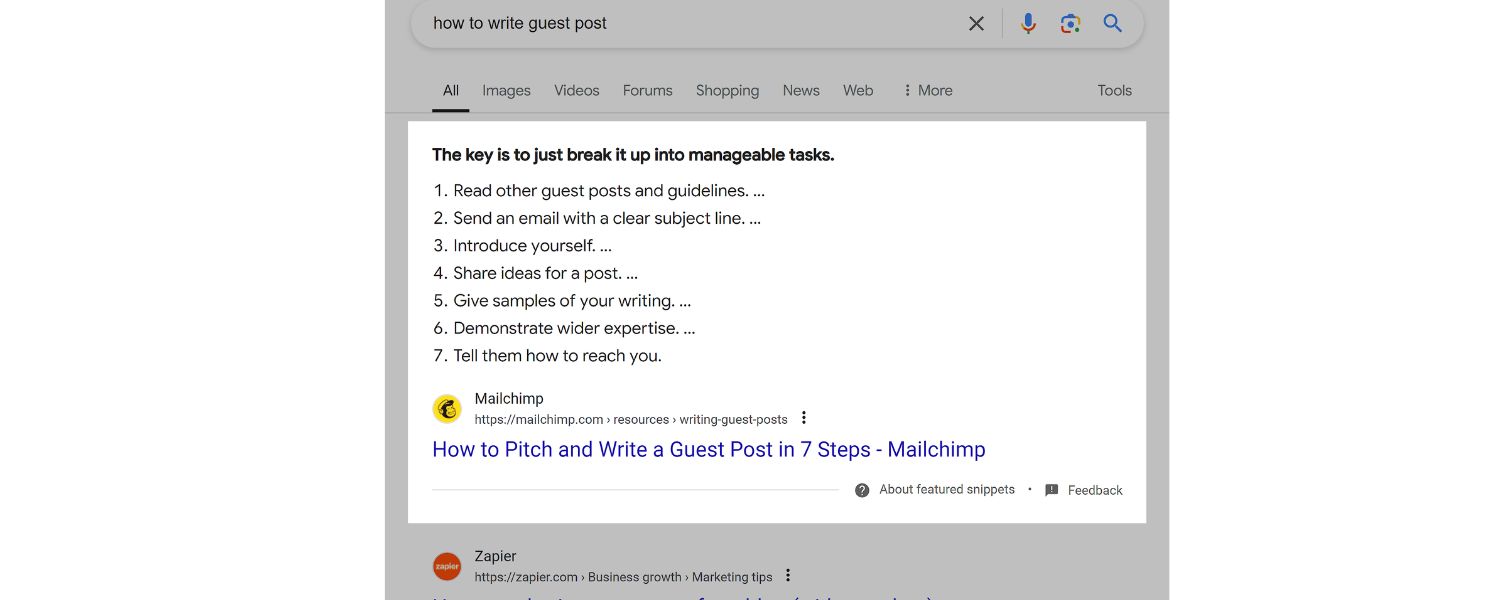
Given the prevalence of SERP features, tailor some of your content to capitalize on them. For featured snippets: identify common questions in your niche and answer them clearly and succinctly in your content.
Use heading tags for the question and follow with a concise paragraph or list answer – this format increases your chances of being picked up as a snippet.
Similarly, include FAQs on your site (which you can mark up with FAQ schema) to possibly appear in the “People Also Ask” or generate a rich FAQ snippet under your listing. If images or videos are important on the SERP, optimize your images (good filenames, alt text) and consider creating short videos for YouTube on key topics (since those might show up in video carousels).
Schema markup can also help for certain features – e.g., adding Recipe schema, How-To schema, or Q&A schema to your pages can make you eligible for rich results like star ratings or step-by-step instructions on the SERP.
These enhancements make your result more noticeable and can improve click-through rates even if your ranking position is the same. Keep in mind, getting featured often requires being on page 1 already (Google usually pulls snippets from top-ranking pages), so this goes hand-in-hand with overall SEO efforts.
C. Leverage Local SEO (if applicable) 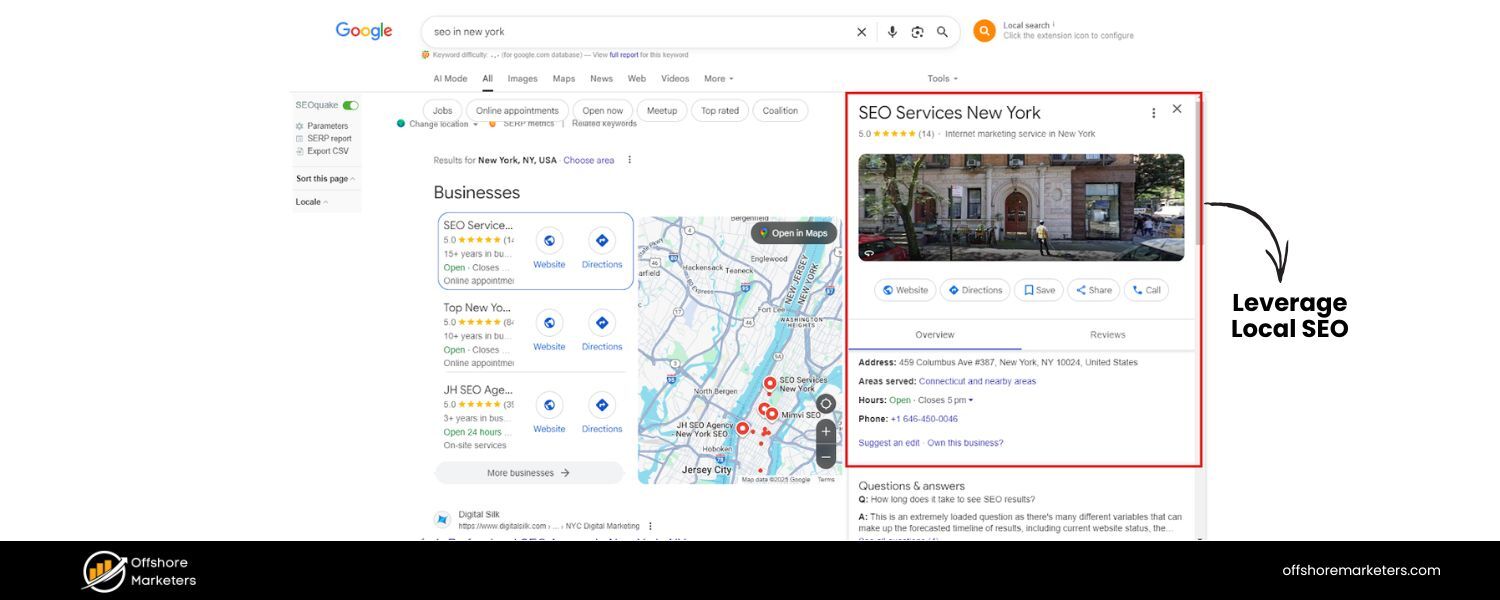
If you have a local business, optimize for the local pack. Claim and complete your Google Business Profile (formerly Google My Business) with accurate information, engage by collecting reviews, and use local keywords on your site (like your city name).
Local SEO also means ensuring your NAP (Name, Address, Phone) data is consistent across directories and your site. The goal is to signal to Google that you are a relevant result for local searches in your area of service.
For example, a dentist in Phoenix should have a page on their site optimized for “Phoenix dentist” and actively gather Google reviews – this boosts the chances of showing up in the 3-pack map results. Being in the local pack can drive significant foot traffic and leads because those results are often the first thing users see for local queries.
D. Use Paid Search for Immediate Visibility

While SEO is vital, it can take time to climb the organic rankings (especially for competitive terms). If you need immediate exposure on a SERP, consider running pay-per-click (PPC) search ads.
Platforms like Google Ads allow you to bid on keywords so that your ad appears in the sponsored section of the results. This is especially useful for new websites that haven’t built up SEO strength yet, or for promoting time-sensitive offers.
For example, an e-commerce store running a holiday sale might use Google Ads to ensure they appear at the top for “holiday laptop deals” searches, rather than waiting to rank organically. PPC and SEO often work best in tandem – PPC gives instant results and coverage for competitive terms, while SEO builds long-term authority and free traffic.
Plus, data from your PPC campaigns (like which keywords convert well) can inform your SEO strategy. Just remember to make your ads compelling and your landing pages highly relevant to the keywords (quality score matters for ad ranking).
E. Monitor and Adapt with SERP Analytics 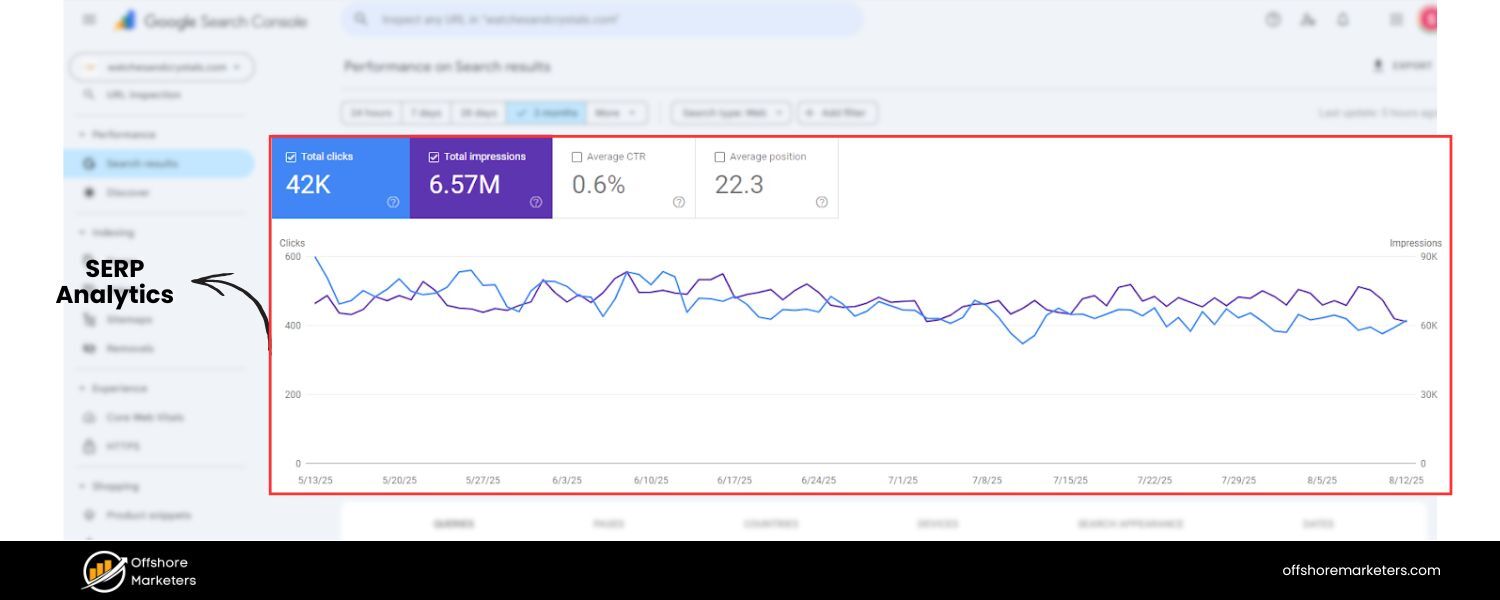
Improving SERP visibility isn’t a one-and-done task – you need to track your performance and adapt. Use tools (like Google Search Console, Google Analytics, or SEO platforms) to monitor which queries are bringing you traffic and where you rank for your target keywords.
Pay attention to your click-through rates (CTR) – if you rank well but have a low CTR, perhaps your title or description isn’t enticing enough, or a SERP feature is stealing attention.
You might tweak your meta titles to be more click-worthy (without being misleading). Also, track the appearance of new SERP features. Google’s always experimenting; for instance, if they introduce an AI answer on a SERP where you used to get a lot of clicks, you might see a dip and need to adjust strategy.
There are rank tracking tools that show not just your position but also whether things like snippets or PAA are present, which can be very insightful.
By continually analyzing this data, you can refine your SEO tactics, maybe targeting more long-tail keywords if the head terms are dominated by ads and features, or doubling down on content that’s performing well. In SEO, agility is key because the search landscape (and your competition) is always evolving.
F. Deliver Quality and Relevance (User Experience)

At the end of the day, search engines want to satisfy the user. All the algorithms and SERP tweaks are aimed at that goal. So, one timeless piece of advice: make sure your website truly satisfies your visitors.
If people click your result and quickly bounce back to Google because they didn’t find what they needed (or your site was too slow, or bombarded them with pop-ups), it can indirectly hurt your rankings.
Google’s algorithms measure signals of user satisfaction (dwell time, bounce rate, etc., in aggregate). Ensure that when someone lands on your site from a SERP, they get a good experience – the page matches what was promised by the snippet, the content is easy to read, and it provides value.
This not only helps with SEO but also turns more of that traffic into actual customers or loyal readers, which is the ultimate goal.
By implementing the above strategies, you position your website to earn more real estate on those precious search engine results pages. It’s a mix of art and science: writing and designing content that users love and search engines understand. Remember, SEO is a long game.
It might take a few months to see significant moves in rankings, but the payoff – sustained, high-quality traffic – is worth it. And if you pair SEO with smart search advertising when needed, you can capture both organic and paid opportunities on the SERP.
Now, let’s address a couple of frequently asked questions about SERPs to clear up any remaining doubts.
FAQs about SERPs
Q1: How do I rank higher on SERPs (get my website to the top of Google)?
A: Ranking higher on SERPs requires a combination of good content, technical optimization, and authority building. First, ensure your site is technically sound – it loads quickly, is mobile-friendly, and is well-structured for search engines to crawl.
Next, create high-quality, relevant content around the topics/keywords you want to rank for. Your content should answer the searcher’s intent better than other available pages. Incorporate important keywords naturally in your title, headings, and body text (for example, include “best budget laptops 2025” in the title if that’s your topic).
At the same time, work on off-page SEO: this means earning backlinks from other reputable sites, which signal to Google that your site is authoritative. You can earn links by producing shareable content (like infographics, research, or valuable guides) or through outreach and PR efforts.
Also, consider user experience – a low bounce rate and longer time spent on your page can indicate to Google that users find your content helpful. There’s no overnight trick (beware anyone promising quick #1 rankings), but following SEO best practices consistently will improve your rankings over time.
And remember, focus on specific keyword niches where you can be an expert. It’s easier to rank #1 for a narrow topic (like “best budget gaming laptop under $500”) than a broad one (“best laptop”), especially as a newer site.
Q2: What are SERP features and how can I get them for my site?
A: SERP features are special results on a search page that go beyond the normal text links – such as featured snippets, People Also Ask boxes, image/video carousels, local map packs, knowledge panels, etc. They often appear because Google is trying to directly answer questions or present information in a richer format. To get your site featured in these, you need to optimize your content accordingly.
For featured snippets, target question-type queries and provide concise answers. For instance, you might write a Q&A style section in your blog post addressing common questions; if you clearly answer a question in a paragraph or list, Google may use that as a snippet. Using proper formatting (like headings for the question, followed by a succinct answer) can help.
For People Also Ask, it’s similar – having Q&A content on your site that matches those related questions can make you the source when those are expanded. For image or video features, ensure your images have descriptive file names and alt text, and consider uploading content to platforms like YouTube (with good titles/descriptions) for video visibility. For local packs, you’ll need a Google Business listing and good local SEO practices (addressed earlier).
Some features, like knowledge panels, are drawn from external data (e.g., Wikipedia or Google’s business listings), so optimizing those sources is key (ensuring your business info on Google is accurate, or that Wikipedia has up-to-date facts about your brand, etc.). Finally, implement structured data on your pages for applicable content types – for example, Recipe schema for recipes, FAQ schema for Q&A content, How-To schema for instructional steps.
This markup helps search engines understand and potentially showcase your content as rich results. While there’s no guarantee you’ll get a SERP feature, these steps significantly improve your chances. And because SERP features often appear at the very top or prominently on the page, earning one can dramatically increase your visibility and click-through rate.
Q3: What is a Supplemental Executive Retirement Plan (SERP)?
A: Aside from the search engine term, SERP is also an acronym for Supplemental Executive Retirement Plan in the finance and corporate world. This is completely unrelated to search engines. A supplemental executive retirement plan is a specialized retirement savings plan offered by some companies to their key executives or highly compensated employees.
It’s a type of deferred compensation plan – essentially an extra retirement benefit promised to the executive, on top of the standard retirement plans like 401(k)s. Companies use SERPs to attract and retain top talent by offering them additional income in retirement if they meet certain conditions (like staying with the company for a number of years).
These plans are usually “non-qualified,” meaning they don’t have the same tax restrictions as regular 401(k) plans and can be offered selectively to individuals (not all employees). Typically, the company sets aside funds (or uses life insurance policies) to fund the future payouts.
When the executive retires, they receive the benefit (often a set percentage of their salary, or a fixed sum) which then becomes taxable to them and tax-deductible for the company.
In short, in a financial context, a SERP is a way for companies to provide extra retirement money to important executives beyond the normal retirement plans. Important: This meaning of SERP has nothing to do with search engines.
If you encounter the term in an investing or corporate benefits discussion, it likely refers to the retirement plan, whereas in a marketing or tech discussion, SERP will almost always mean search engine results page.
Conclusion
Mastering SERPs is at the heart of succeeding in SEO and online marketing. The search engine results page is where your content meets its audience – or not, if it’s buried beyond view.
We’ve explored how SERPs work, from the basics of organic and paid results to the myriad of special features that dominate modern search pages. We’ve also looked at why these results pages are so pivotal for driving traffic and credibility, and how you can optimize your website to stand out.
As a marketing expert with decades of experience, one truth stands out: search is always evolving. Ten years ago, SEO was mostly about getting to “#1” for a keyword. Today, it’s about capturing multiple spots on a dynamic SERP and providing real value so that when users find you, they stick around.
Google and other engines will continue to refine how they deliver information – perhaps with more AI-driven answers or new interactive features – but the core principle remains: the sites that best serve the searcher’s needs will win the top real estate.
Now it’s your turn to put this knowledge into action. Focus on creating content that truly helps your audience, follow SEO best practices, and pay attention to the landscape of the SERPs in your industry. With persistence and smart strategy, you can climb those rankings and maybe even snag a featured snippet or two.
Ready to climb higher on the SERPs and get your business noticed? Our team of SEO and marketing experts is here to help.
We’ve helped countless businesses optimize their websites and content to dominate search results. Don’t let your competitors grab all the online visibility – reach out to us today and let’s boost your search presence, step by step. Here’s to seeing your site at the top of the next SERP!

.png)
Shopify SEO: Guide to Ranking Your Store and Driving Sales
Most Shopify store owners set up their store, list their...

Content Marketing : Definitive Guide to Strategy, Content Types, and Measurable ROI
Content marketing generates 3x more leads than outbound marketing at...

Above the Fold: Guide to Conversions, Rankings and Faster Pages
Above the Fold in 2026: The Complete Guide to Conversions,...

Off-Page SEO Checklist: Guide to Building Real Authority
Most websites spend months creating great content, only to wonder...

What Is Keyword Bidding? The Complete Strategy Guide for Smarter Ad Spend
Most advertisers believe the highest bid wins the auction. It...

What Is Google Trends? The 2026 Marketer’s Complete Guide
If you are not already pulling weekly insights from Google...
If you want a growth partner who will get to know every aspect of your business and treat your budget like their own — we are the right fit.
.png)


.png)
.png)
.png)
.png)
.png)
.png)
2026 ALL RIGHTS RESERVED MADE IN INDIA
