
HTML Tags for SEO: Competitor Analysis of Top Blogs
August 26, 2025
1. Link-Assistant (SEO PowerSuite Blog) – “15 Essential SEO Tags You Can’t Afford to Ignore”
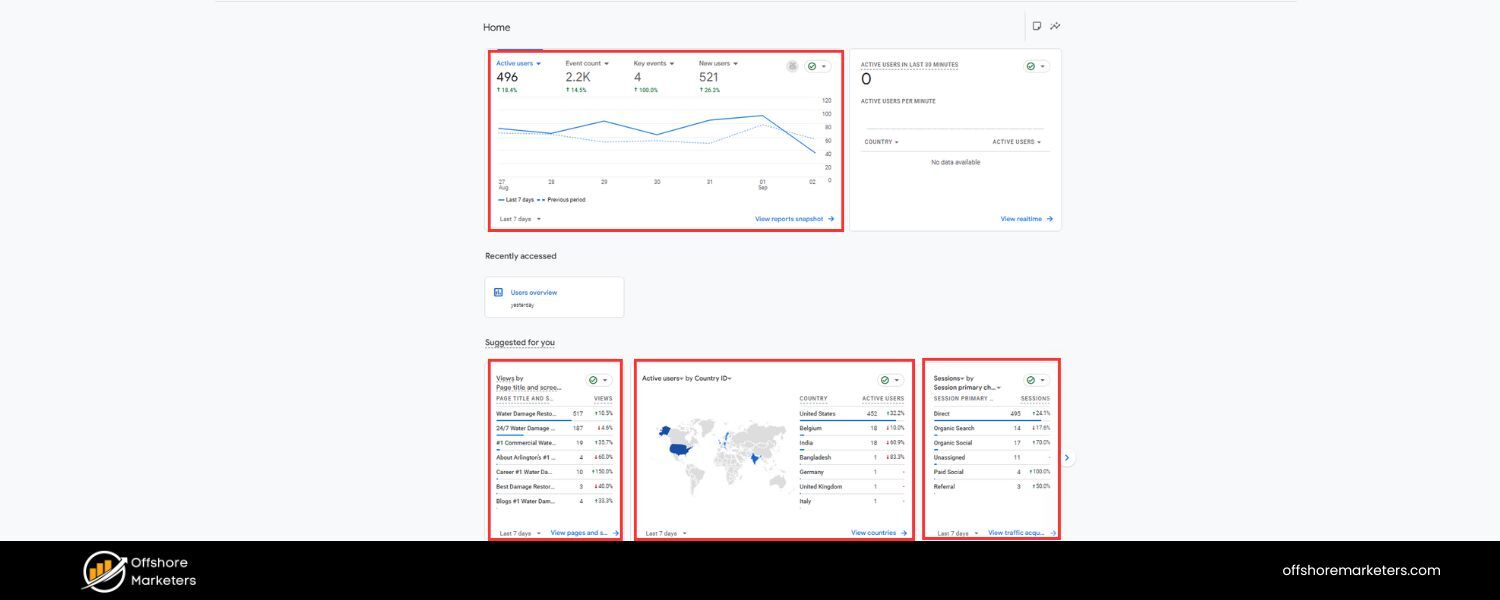
A. Content Structure & Headings
Extremely well-structured with clear hierarchy. H1 is the catchy title, followed by an interactive table of contents. The article uses H2 for intro sections (“What are HTML tags for SEO?”, “Do HTML tags still matter…”), then H2 for each of 15 numbered tags, each with nested H3/H4 subheadings (e.g. “SEO value”, “How to optimize”, and specific tips like Title length, Title keywords, etc.). This deep nesting makes the content easy to navigate and very skimmable despite its length.
B. Keyword Usage
Heavily targets “HTML tags for SEO” and variations. The exact phrase appears in the title and early paragraphs, and synonyms like “HTML SEO tags” and “SEO tags” are used throughout. Each tag section’s heading pairs the tag name with an SEO benefit (e.g. “Title tag: A fundamental SEO tag”), reinforcing relevant keywords. The density is high but contextual – nearly every section ties the tag back to SEO value, ensuring key terms like “SEO”,“search engines”,”SEO services” , “snippets”, etc., recur frequently in a natural way.
C. Coverage Depth & Recency
Very comprehensive and up-to-date (published Jan 15, 2025). It covers 15 HTML/SEO tags, more than any other competitor, including common ones (title, meta description, headings, alt text) and advanced or newer tags. Notably, it goes beyond basics to include modern items like Open Graph tags, Schema markup, hreflang, robots meta, canonical, nofollow/sponsored link attributes, responsive meta (viewport), geo-location meta tags, and even a special section on additional snippet-control tags (e.g. data-nosnippet, max-video-preview, max-image-preview, noarchive).
This breadth shows excellent coverage of both classic and cutting-edge SEO HTML elements. Each tag section provides examples and the latest best practices (e.g. guidance on title length, the fact that Google often rewrites meta descriptions, etc.). It even cites a Google Webmaster Trends Analyst confirming the importance of specialized tags, adding credibility.
D. Use of Schema, Visuals, Bullets, CTA
The post itself doesn’t embed structured schema markup (that we can see), but it dedicates a section to Schema markup for rich results and emphasizes structured data’s SEO value. Visuals are used liberally, code snippets and screenshots accompany many tags (e.g. showing how a title displays in SERPs). It employs bullet lists within each tag’s “How to optimize” sub-section, making tips like optimal title length, keyword usage, etc., very digestible.
There are prominent CTAs: for example, a free WebSite Auditor tool download is plugged under the Alt-text section as a way to find missing tags. They also mention the AIOSEO plugin for WordPress as a pro-tip for managing title tags. These CTAs tie the content to actionable solutions (often the company’s own tools), without overshadowing the informational value.
E. Areas Lacking or Outdated
Hardly any – this article is very thorough and up-to-date. It even addresses FAQs and debunks misconceptions (e.g. confirming meta keywords tag isn’t used by Google). One minor gap is that it’s so extensive it might overwhelm beginners. Implementation steps are sometimes tool-specific (favoring their tools). Also, while it mentions social tags (Open Graph) and geo meta tags, it doesn’t deeply explore how critical those are today (OG tags are useful for social media rather than SEO per se). But overall, there are few content gaps – it sets a high bar for thoroughness.
2. Semrush Blog – “12 SEO HTML Tags You Need to Know”
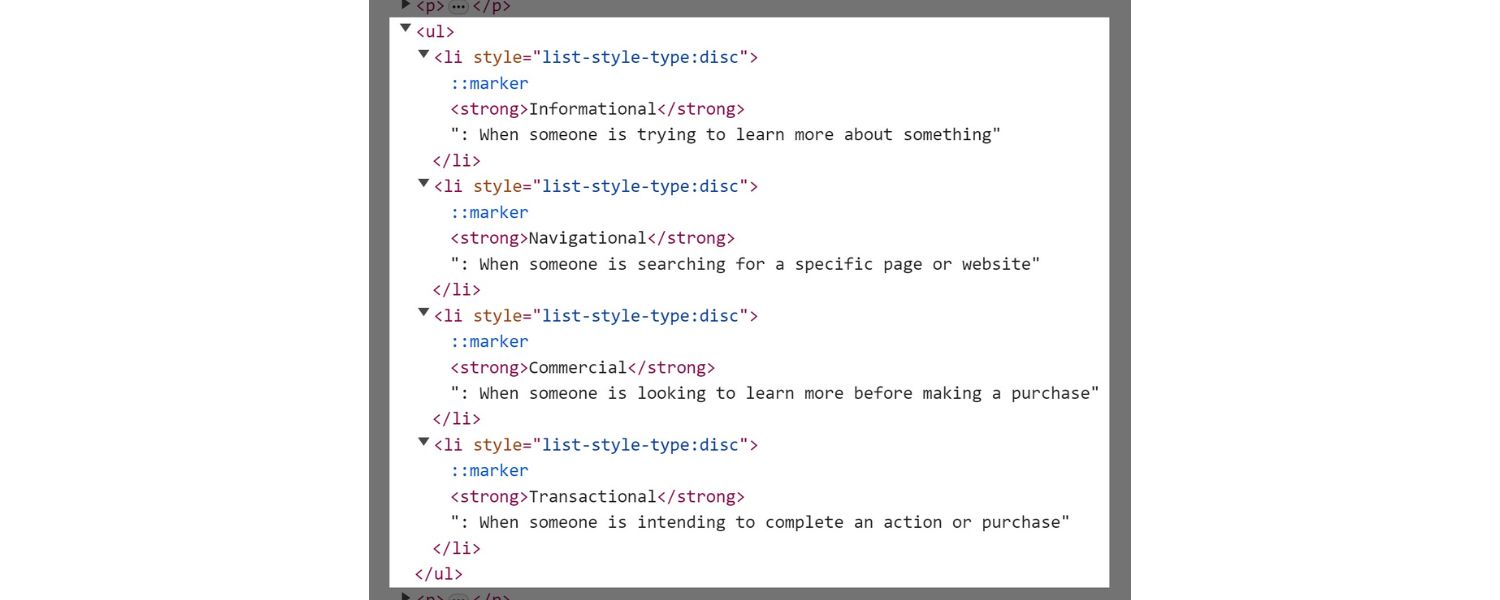
A. Content Structure & Headings
Organized with a clear flow from basics to specifics. It opens with an H1 title and intro, then H2 sections for “What Are HTML Tags?” and “Why Are HTML Tags Important for SEO?”, each of which includes multiple H3 subpoints (like Structure, Understanding, Readability, Keyword Optimization, explaining the benefits of HTML tags).
The main list of tags is introduced under an H2 (“12 Essential SEO HTML Tags and Attributes…”), and each tag is presented as an H2 as well (numbered 1 through 12) with the tag name in angle brackets for clarity. Within each tag section, they often include an H3 for “Best Practices” or similar guidance (for example, Title Tag Best Practices). This hierarchy makes the post easy to navigate.
B. Keyword Usage
The title directly targets “SEO HTML tags”. Throughout the content, the phrase “HTML tags” and “SEO” appear frequently, especially in the explanatory sections (e.g. “HTML tags are beneficial…here’s how:”). They also use variations like “SEO tags” and mention specific keywords like title, meta, alt, etc.
The language is beginner-friendly, defining terms like HTML itself and emphasizing how tags help “search engines determine what your site is about”. There’s a balance between short-tail terms (“HTML tags”, “SEO”) and longer phrases (“most important HTML tags for SEO”, “optimize HTML tags properly”). The keyword distribution feels natural thanks to the educational tone – they aren’t stuffing, but the core terms repeat in each relevant section.
C. Coverage Depth & Recency
Quite comprehensive, covering 12 tags/element types, updated as of May 7, 2024. It includes all the classic SEO tags (title, meta description, headings, alt text, canonical, robots meta, schema markup) and also some general HTML elements that influence SEO or user experience (they list tags, list tags, embeds, and hyperlinks as items, which is somewhat unique). Notably, they bundle Open Graph and Twitter Card tags together as one item (number 12), acknowledging social meta tags.
The breadth is good, though a few specialized tags are missing: they do not explicitly cover hreflang for multilingual SEO or newer meta directives like max-snippet or indexifembedded. The examples and advice are up-to-date for 2024 (e.g. acknowledging Google often rewrites meta descriptions, and highlighting schema’s role for rich results). They also address pros/cons, such as how iframes can slow pages and that content in iframes doesn’t count for your site’s SEO.
D. Use of Schema, Visuals, Bullet Points, CTA
The article does cover schema markup as one of the items (with a layman explanation of structured data and its SEO benefit). It’s rich in visuals: nearly every item has an accompanying image, whether it’s an example of HTML code or a screenshot of how a snippet looks in SERPs (e.g. images show a meta description in code and how it appears on Google, and a list snippet example for list tags). The post uses bullet points generously, especially under “Best Practices” subheads, for instance, how to craft title tags (length, uniqueness, keyword usage, etc.) and meta descriptions. These bulleted tips add practical value.
As for CTAs, there’s a section “Check Your Site’s HTML Tags with Semrush” near the end encouraging readers to use Semrush’s Site Audit tool. They also mention tools like Yoast and RankMath for implementing meta tags in CMS, and even Google Tag Manager as a way to manage tags. The CTAs and tool mentions support the content without feeling too promotional (until the final nudge toward Semrush’s own platform).
E. Areas Lacking or Outdated
This post is strong, but there are a few gaps relative to newer developments. It doesn’t mention hreflang tags at all, a notable omission for an advanced SEO audience. It also doesn’t discuss the newer rel=”sponsored” or rel=”ugc” link attributes (it only briefly notes “nofollow” under the robots meta tag section presumably). Topics like “data-nosnippet”, max-image-preview, or Google’s newer indexing directives aren’t covered, whereas competitors like Link-Assistant do cover those.
Additionally, while they include general HTML elements (tables, lists), they could have stressed how those help with featured snippets, they hinted at it (e.g. list items can become featured snippets) but not in great depth. Overall, it’s very beginner-friendly; an opportunity is to provide more cutting-edge or technical insights (for example, they mention schema but don’t give examples of JSON-LD or how to test it). Nonetheless, for 2024 standards it remains authoritative and well-rounded.
3. Google Search Central Documentation – “Meta Tags and HTML Attributes that Google Supports”
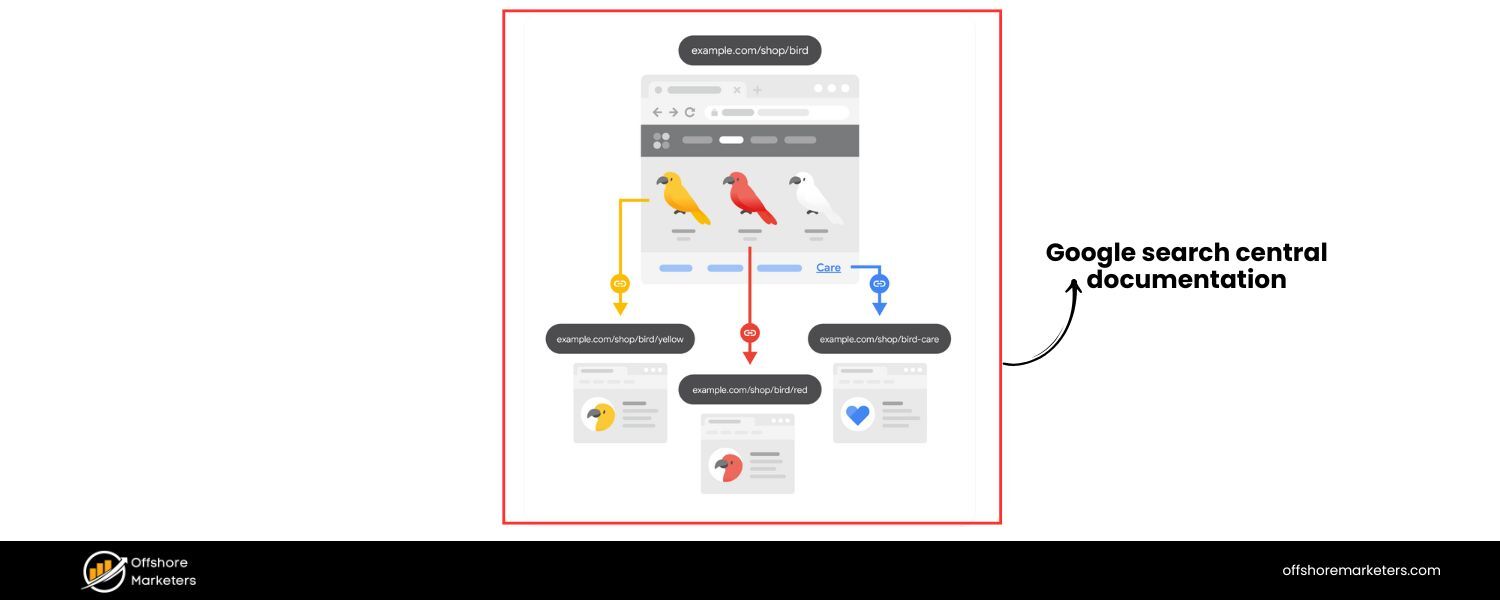
A. Content Structure & Headings
As an official Google doc, it’s structured as a reference page. The main content focuses on meta tags in a list format, not a narrative blog. It starts by explaining what meta tags are and then lists supported tags with subheadings for each specific tag name or attribute (e.g. description, robots and googlebot, notranslate, viewport, etc.). Each tag has a brief description and example code snippet.
There are no flashy headings or “tips” sections; instead, it’s organized by tag categories (page-level meta tags, then a section on HTML attributes, and finally notes on unsupported tags). The hierarchy is shallow (mostly H3s under a broad “Meta tags” H2), making it more of a list than a guided article.
B. Keyword Usage
Being a documentation page, it isn’t keyword-optimized for “HTML tags for SEO” in the way blog posts are. The language is factual and uses terms like “meta tags”, “HTML attributes”, “Google Search” frequently (since it’s about what Google supports). It doesn’t use marketing phrases like “SEO tags” at all – instead it refers to specific tags by name. For example, it explains that ` “in some situations, this description is used in the snippet shown in search results.” The tone is technical, aiming to inform rather than target search rankings.
C. Coverage Depth & Recency
It is highly authoritative and up-to-date (last updated Feb 4, 2025). The page provides a definitive list of what Google does and does not support in terms of meta tags. Depth-wise, it covers all major meta tags Google cares about: e.g. description, robots/googlebot directives (with details on all values like noindex, nosnippet, max-snippet, etc.), notranslate, nopagereadaloud (for TTS), viewport, refresh redirects, content-type, rating (adult content), etc. It also touches on important attributes like data-nosnippet (noting that this attribute on certain HTML tags lets you exclude content from snippets).
Uniquely, it has a section explicitly listing tags/attributes that are ignored by Google, for example, it states meta keywords are not used at all by Google, the HTML lang attribute is not used for indexing, and that Google no longer honors for pagination. This kind of “myth-busting” information is extremely valuable and up-to-date. However, the doc does not discuss non-meta HTML tags like headings or alt text (those are outside its scope). It’s laser-focused on indexing/crawling-related tags and attributes.
D. Use of Schema, Visuals, Bullet Points, CTA
The doc does mention structured data tangentially (linking out to Google’s structured data guidance) but doesn’t list “Schema.org” as an HTML tag, it’s considered separately under structured data, so it’s not detailed here except implying Google supports JSON-LD etc. As for visuals, the page mostly uses code blocks and small examples. For instance, it shows a sample with a title and various meta tags for illustration. There are no decorative images or videos.
Bullet points are used sparingly – mainly to list notes or unsupported elements. For example, a bullet list enumerates guidelines (like “letter case is generally not important in meta tags”) and lists unsupported tags in a table form. For a CTA, the page isn’t marketing anything, though it does encourage using tools like the URL Inspection Tool to check your meta tags. The only “CTA” is an invitation to send feedback on the doc.
E. Areas Lacking or Outdated
Being an official reference, it’s authoritative but narrow in focus. It doesn’t teach “SEO best practices” or how to use these tags strategically, it just states what they do. So, it lacks the practical guidance and narrative that the blog competitors provide (no advice on how to craft a good title or that alt text helps image SEO, etc.). Also, it doesn’t cover header tags, bold text, Open Graph, etc., because those aren’t about Google’s crawling/indexing per se. This means a comprehensive blog post can outperform it by combining this factual accuracy with broader SEO guidance.
Another gap: while it lists values like max-snippet or noimageindex, it doesn’t give real-world context (e.g., when to use those). And obviously it doesn’t mention anything about user experience or emerging trends like AI search. In summary, the Google doc is a valuable fact-check resource (e.g. to confirm that meta keywords are useless and next/prev are deprecated), but it’s not a holistic “guide” in the way the competitor blogs are. There’s an opportunity to translate these dry facts into actionable insights for readers.
4. SiteGround Knowledge Base – “10 Most Important HTML Tags for SEO”
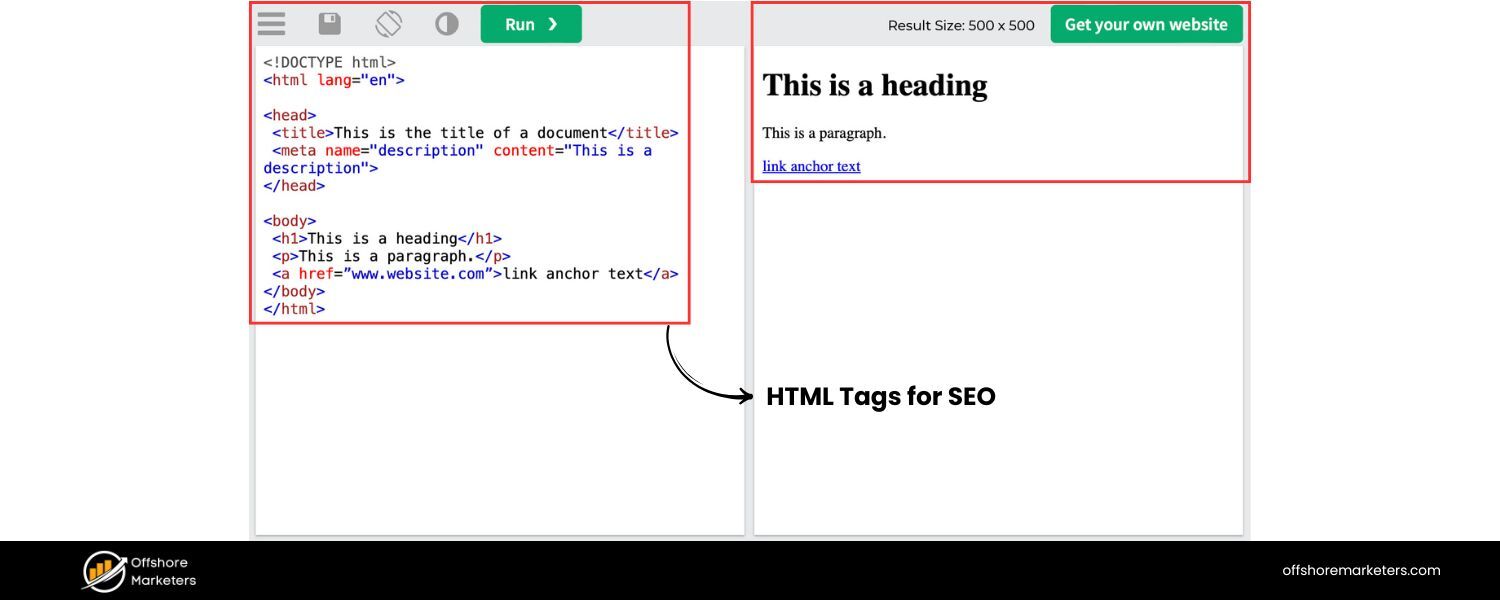
A. Content Structure & Headings
This piece appears in Q&A or tutorial format (as a knowledge base entry). It likely starts with a question (“Which are the most important SEO HTML tags?”) and then answers with a list. Based on the title and snippets, the structure enumerates 10 HTML tags important for SEO. Each tag is probably introduced with a heading or bolded subheading (e.g. 1. Title Tags, 2. Meta Description, etc.).
The heading hierarchy is simpler than the big blog articles, possibly an H2 for each tag under the main question. There might not be a detailed table of contents given the short length. (The site navigation shows it’s under an “SEO Basics” guide.)
One thing to note: the snippet we found suggests a bit of confusion or shorthand in headings, it says “title tags (H1)” implying they might be conflating the title tag with the H1 tag. This suggests the headings in the content might read like “Title Tags (H1)” which is slightly misleading (title tags are not the same as H1, though both are important).
B. Keyword Usage
The title itself includes “SEO HTML tags”, ensuring it targets that query. In the content, they list each important tag by name, so keywords like “title tag”, “meta description tag”, “header tags H2, H3, H4”, “alt tags”, etc., all appear in one concise list. The phrasing “most critical HTML tags for SEO include…” in the intro hits both “HTML tags” and “SEO” for relevance. They probably don’t use much fluff – it’s likely a straightforward enumeration, so the keyword density is moderate. One potential issue is the mention of “title tags (H1)” – if that’s verbatim, it might mistakenly equate the page’s H1 heading with the HTML element. This could confuse readers (and indicate the piece might not be written by an SEO specialist).
C. Coverage Depth & Recency
It covers 10 tags, presumably the basics: title, meta description, header tags, image alt, canonical, hreflang, etc., as indicated by the snippet. The list we gleaned includes everything up to hreflang. It likely also mentions robots meta or schema within those 10. Given SiteGround’s hosting audience, the content is probably a bit older or at least not as frequently updated as the dedicated SEO blogs. The exact publish date isn’t shown, but it appears as part of an SEO guide section. By context, it includes canonical and hreflang, which shows some currency (hreflang became standard a few years ago).
However, it might omit newer items like rel=”sponsored” links or Open Graph tags (the snippet didn’t show OG, and if only 10 slots, they may prioritize core on-page tags over social tags). The examples and depth per item are likely minimal – perhaps a sentence or two explaining each tag’s purpose. This is a high-level overview intended for beginners.
D. Use of Schema, Visuals, Bullet Points, CTA
From what we can infer, schema markup might have been mentioned (possibly as “Schema markup” or “structured data tags”) if it fit into their ten. The snippet doesn’t explicitly show it, so it may or may not be included. Visuals: being a KB article, it’s probably light on images, possibly none, or maybe an illustrative screenshot for one or two tags. More likely, it’s mostly text with perhaps a code snippet or icon.
Bullet points: the content itself might be essentially a bullet or numbered list (1 through 10). Each item might be a brief paragraph. There is no evidence of lengthy bulleted best practices under each; it’s probably concise bullet enumeration by itself. As for CTAs, SiteGround often has a sidebar or footer prompting to chat or view hosting plans, but within the article text, there might not be a direct CTA.
They might link to related KB articles (for example, linking “How to set meta tags in WordPress” if such exists, or their SEO tool integration if any). The search results show a “Share This Article” and a “Chat” button on the page, but that’s more site UI than content CTA.
E. Areas Lacking or Missing Info
This article is relatively surface-level. Likely gaps include the finer details and up-to-date nuances. For instance, if they truly equated Title tag with H1, that’s an inaccuracy – modern SEO guides emphasize both are needed but distinct. It also might not mention that Google rewrites titles or how to handle multiple H1s, etc. Newer tags like viewport (important for mobile SEO) or charset aren’t mentioned in the snippet – presumably they stuck to what’s traditionally talked about in SEO contexts.
Schema markup might be absent or too briefly touched. And although canonical and hreflang are mentioned (good), something like robots.txt or XML sitemap is outside HTML but related – not sure if they’d mention it as a “tag” (probably not, since it’s not an HTML tag). The depth per tag is a weakness; e.g., just saying “alt tags – provide image descriptions” without guidance on writing good alt text or noting it helps accessibility.
In short, this SiteGround entry can be outperformed by providing more detail, correctness, and currency. It serves as a basic checklist but doesn’t dive into implementation or recent changes. A more comprehensive post could easily expand each of those 10 points with up-to-date insights (which SiteGround’s audience would appreciate beyond the cursory definitions).
5. W3Schools Reference – “HTML <meta> Tag”
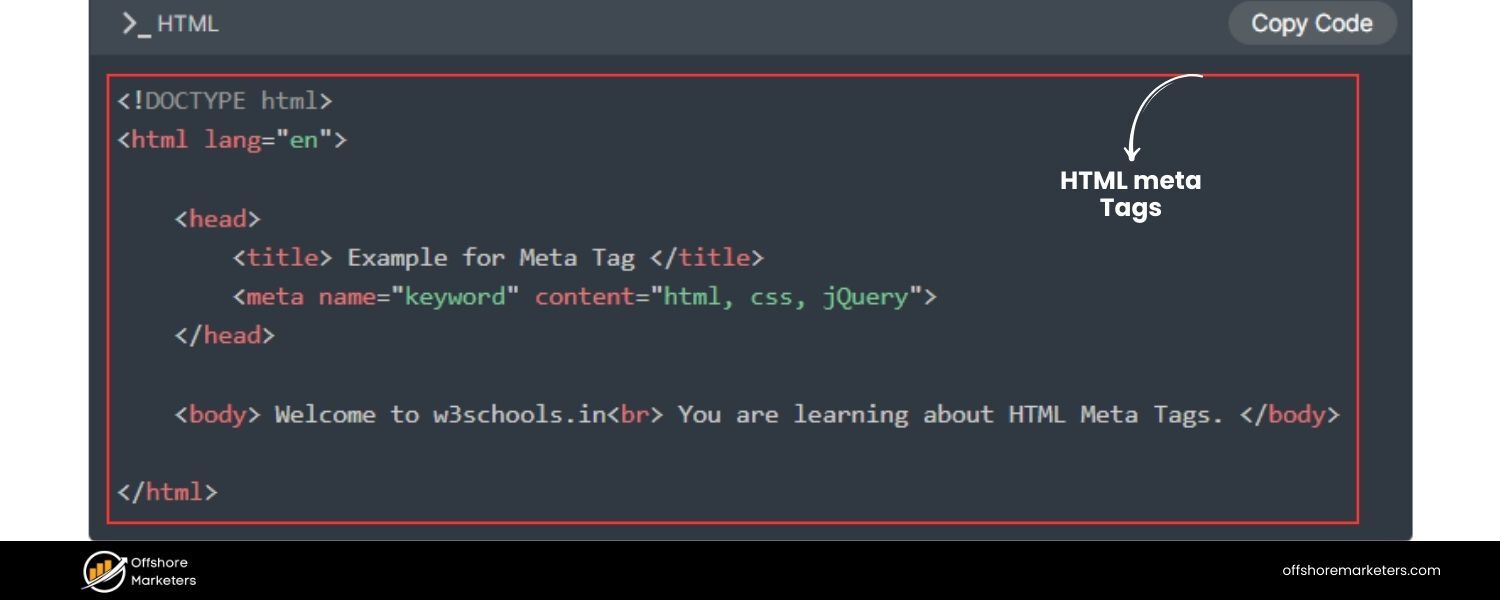
A. Content Structure & Headings
This is not a traditional article but a reference page for the <meta> tag on W3Schools. It has a consistent format: an initial Definition and Usage section explaining what the tag does, followed by tables of attributes, example code blocks, and brief notes. Headings on the page include things like Browser Support, Attributes (with a table listing charset, name, http-equiv, etc.), Global Attributes, Examples, and a special section on Setting the Viewport. The content is segmented by these subtopics rather than narrative flow. It’s essentially a quick lookup page.
B. Keyword Usage
W3Schools optimizes for people searching specific HTML tag syntax. So the page is titled “HTML <meta> Tag” and repeatedly uses the word “meta” and “HTML” but not in an SEO context. There is no mention of “SEO” on the page. Instead, it generically says “Define keywords for search engines” with an example of the meta keywords tag, or “Define a description of your web page” with a meta description example.
These examples do incidentally cover SEO-related meta tags (keywords, description) but without commentary on their importance or obsolescence. The language is kept simple and generic for a global audience of learners. It lists attribute names like “keywords”, “description”, “viewport” – hitting those terms as keywords, but not from a marketing angle. Essentially, it’s covering meta tag usage for web development, not explicitly saying “for better SEO” anywhere.
C. Coverage Depth & Recency
The W3Schools page covers all common uses of <meta> but from an HTML perspective. It shows examples for meta keywords, description, author, refresh, and viewport, among others.
One notable issue: it still includes the <meta name="keywords"> example as a way to “define keywords for search engines”. This is technically how the tag works, but it does not mention that search engines (Google in particular) ignore it. This suggests the content isn’t updated with SEO best practice context.
However, they have updated some things: there’s a detailed explanation of the viewport meta tag and how crucial it is for responsive design, reflecting modern mobile web needs. The presence of content-security-policy and other http-equiv values in the attribute table also shows an updated view of meta usage. So, as an HTML reference, it’s current (includes HTML5-related meta types), but it doesn’t date or contextualize the advice. Recency is mostly reflected in technical content (e.g., mentioning that viewport is a “should include” for all pages).
There is no date, but W3Schools content is continuously tweaked. For SEO-specific new tags (like robots values max-image-preview or indexifembedded), they are not mentioned – likely because those are covered in Google-specific docs rather than general HTML references.
D. Use of Schema, Visuals, Bullet Points, CTA
This page does not discuss schema markup or any SEO meta tags beyond description/keywords/author. (Schema would be a separate topic, possibly they have a tutorial but not on this page.) Visuals are minimal – primarily the page uses formatted example code and maybe a link to a “Try it Yourself” editor. For instance, they provide a link to test viewport vs no-viewport live.
Bullet points are used for listing Related Pages or quick tips, not for explanatory content. They have a “More Examples” section where each example (like meta refresh or viewport) is separated by a brief description line, effectively like bullet points.
CTAs on W3Schools are usually for their own services – e.g., prompts to log in, sign up for courses, or their “Try It” editor. At the bottom, they have links to their certification and a “Report Error” option. These aren’t CTAs in the content but part of the site framework. There’s no marketing CTA; the page is purely educational/technical.
E. Areas Lacking or Outdated
From an SEO viewpoint, the lack of context is a major gap. For example, it tells how to specify <meta name="keywords"> but doesn’t warn that Google ignores meta keywords. A novice could be misled into thinking keywords meta is important.
Similarly, it doesn’t mention the robots meta tag at all on this page, presumably because W3Schools might treat that under a separate “SEO” tutorial or simply omitted it. Not covering robots meta, canonical link tags, or others means this reference alone is insufficient for SEO guidance.
Also, it doesn’t tie together how meta tags influence search snippets or crawling. It’s strictly “here’s how to use it.” So, while it’s a high-authority domain likely ranking for queries, the content lacks SEO strategy, and some information (like promoting meta keywords) is outdated.
Opportunity:
A blog post can easily outperform by acknowledging these nuances – e.g., explaining that meta keywords are ignored (citing Google) and focusing effort on meta description and others that matter. Essentially, W3Schools covers the “how to set a tag” but not “which tags truly matter for SEO today.” This gap can be filled with an up-to-date, SEO-focused explanation, turning simple reference info into actionable advice backed by current best practices.
6. SE Ranking Blog – “Must-Know HTML Tags for SEO and Digital Marketing”
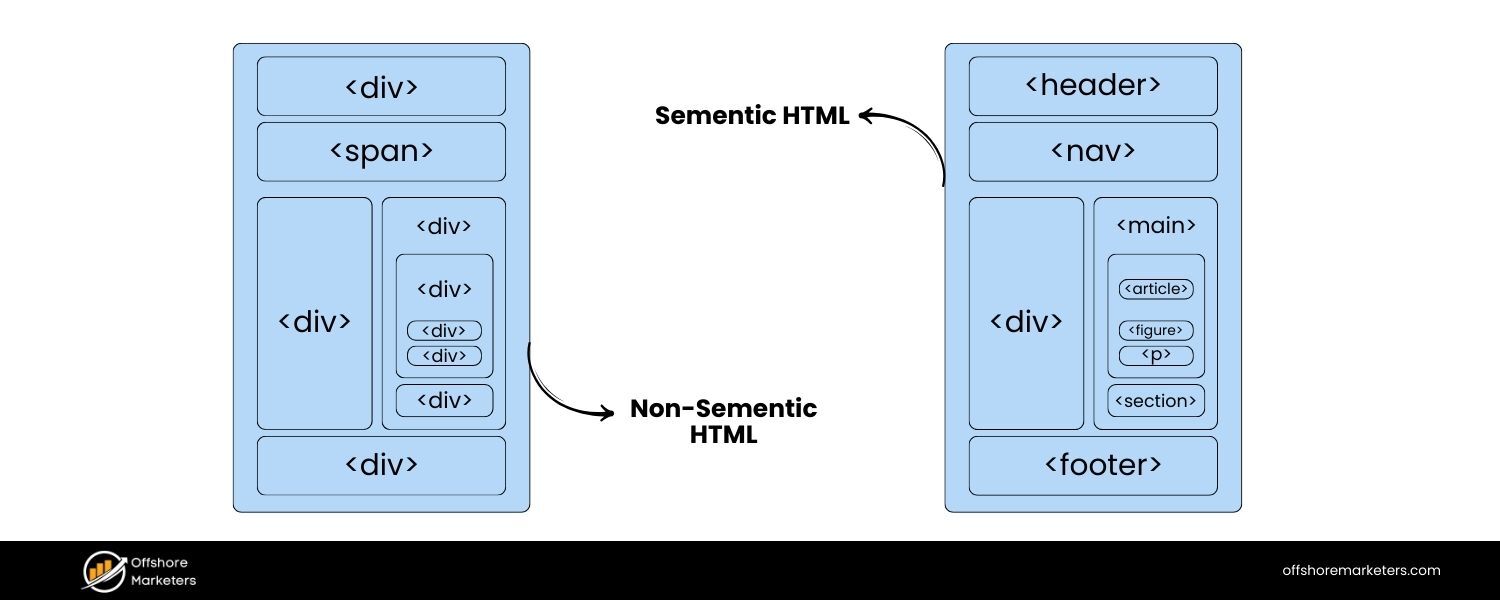
A. Content Structure & Headings
(From references and context) This article is structured as a comprehensive guide, likely similar to others with an introduction followed by a list of important tags. The title suggests it covers not just SEO but also digital marketing implications of HTML tags, meaning it might touch on things like social tags or tracking. The headings probably enumerate each “must-know” tag.
We know from a snippet that it discusses semantic HTML5 tags (“Semantic HTML tags like <article>, <section>, <nav>… help search engines understand the meaning…”), implying it has a section on HTML5 semantic structure. Each tag or category of tags is likely an H2 or H3 heading. Since SE Ranking’s content often mirrors other SEO blogs, it probably has headings like “Title Tag”, “Meta Description”, “Header Tags”, etc., each with explanations, and possibly sub-bullets for tips. The tone is educational, possibly with a table of contents at top.
B. Keyword Usage
The title itself includes “HTML Tags for SEO” which covers the main keyword. They also incorporate “Digital Marketing” in the title, targeting a slightly broader audience. Throughout the text, they likely use terms like “SEO tags”, “HTML elements”, and each tag’s name frequently. For instance, a snippet from an external reference shows they advise on title tag length (“Keep it at around 55-60 characters to ensure search engines…”).
This indicates they use common SEO advice phrases. Keywords like title, H1, meta description, nofollow, etc., will appear in relevant sections. The snippet also reveals an example of a conversational Q&A style in the content (there’s a mention of “Do you still use meta keywords tags…?” presumably quoting a tweet). This suggests they engage with SEO community questions, enriching keyword variety (mentioning “meta keywords” explicitly to debunk it). Overall, expect a thorough coverage of SEO terminology in a natural way.
C. Coverage Depth & Recency
The SE Ranking blog post appears to have been updated in 2023 (the Instapage PAA snippet called it “SEO HTML Tags You Can’t Do Without in 2023”). So it’s relatively recent. It likely covers around 10–15 tags or topics. We can infer it covers all standard tags: the snippet suggests it covers title tags (with usability/SEO emphasis), heading tags basics (there’s a separate SE Ranking post on H1 tags, but in this guide they likely summarize headings), canonical tags, robots meta, alt text, etc. We know it covers HTML5 semantic tags in detail (which not all competitors did), indicating good depth on structural tags that improve context. It likely includes Open Graph/Twitter as well given “digital marketing” scope (social sharing).
The snippet referencing a Bill Slawski tweet about meta keywords shows they keep content up-to-date with industry consensus (meta keywords not used since 2009). Additionally, their title hints at marketing, so they might mention tags like Google Analytics tracking code (though that’s not HTML tag per se, but could be touched on). SE Ranking likely ensures their guide references current best practices (perhaps referencing Google documentation similarly to others). They may not list the extremely niche ones (like indexifembedded) explicitly, but will cover everything that’s broadly important by 2023.
D. Use of Schema, Visuals, Bullet Points, CTA
Schema markup is almost certainly covered – either as its own section or within a broader point (e.g. “Structured Data Tags”). They might encourage using schema for rich results. Visuals: SE Ranking’s blog often includes screenshots or illustrative graphics. For example, they might show code snippets, or images of SERP features that result from certain tags (similar to Social Media Today’s approach).
Bullet points are used for lists of tips (e.g., they likely have bullet lists of “Best practices” under the Title tag section, similar to others, and maybe lists of supported values for robots tag). Given we saw them mention keeping title length ~60 chars, that was likely in a bulleted tip or a highlighted note.
CTAs
As a SaaS, SE Ranking may plug their tool features subtly – perhaps mentioning how their site audit can check for missing tags or their on-page SEO tool can help optimize tags. And at the end, a CTA could be to try SE Ranking or sign up for a free trial, typical of their blog. They often include a gentle promo within content (like “Our tool can quickly find pages missing H1 or meta tags”).
E. Areas Lacking or Missed
Without the exact text, one possible gap is that SE Ranking’s post, while broad, might not go into as extreme detail as Link-Assistant or Mangools on every single tag. For instance, do they cover viewport meta? Many SEO blogs omit it, but it is important for mobile SEO – if they focused purely on SEO, they might skip it, whereas Mangools did include it.
Also, SE Ranking may not emphasize newer link attributes (sponsored, ugc) unless they refreshed it – those came in 2019, so hopefully they did mention them as Link-Assistant and Mangools did. Another gap could be in actionable examples; some blogs give explicit HTML examples for each (we saw Mangools do that). If SE Ranking’s is more narrative, it might not show as many code samples or real-life snippet screenshots.
There is an opportunity to outdo them by providing more visual examples and perhaps incorporating the absolute latest 2024/2025 changes (like Google’s August 2023 guidance on title rewrites or the impact of helpful content update on tags – things a 2023 post might not have).
Overall, SE Ranking’s guide is likely solid, but a 2025 updated article could surpass it by adding the next layer of detail (e.g. discussing AI search implications or brand new meta directives) and by being more tool-agnostic in advice (SE Ranking might lightly favor their own toolset).
7. Mangools Blog – “11+ SEO HTML Tags (& Attributes) You Should Know ”
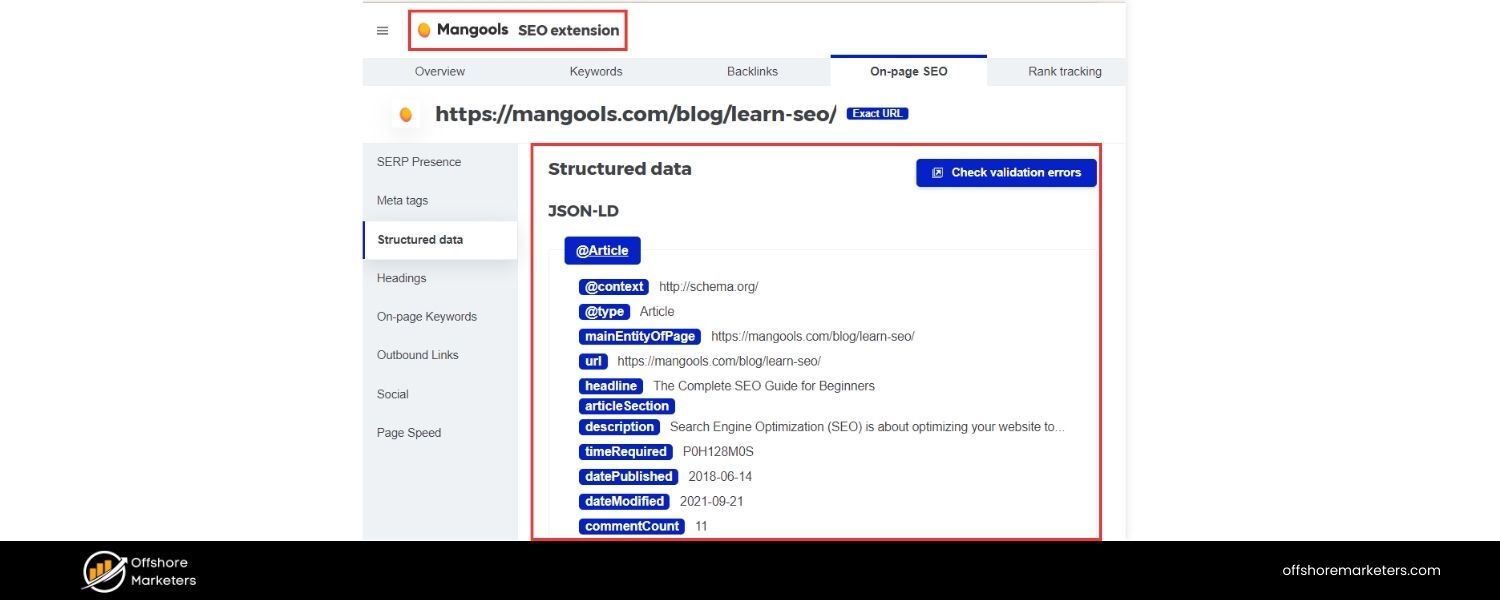
A. Content Structure & Headings
This is a very comprehensive, long-form guide (36 min read), structured with multiple layers of headings. It starts with an introduction covering what HTML tags are and why they matter, including sub-sections like “What are HTML tags in SEO?” and “Why are HTML tags important?”. It then clearly outlines the “Top 11 SEO HTML tags” (the main list) in its table of contents. Each of the 11 tags is presented as a section with an H3 heading numbered 1 through 11 (e.g., “### 1. Title tag”, “### 2. Meta description tag”, … up to “### 11. Hreflang Tag”).
Within each section, the article is further broken down into very digestible parts: they include code examples, quotes, and bullet lists of best practices or tips. Mangools also adds bonus content after the main list – for instance, a short list of additional useful tags like <table>, <ol>, <ul> for featured snippets (called out as “Bonus tags”), and a section addressing “What about keywords meta tag?” (debunking it).
There’s even an FAQ-esque approach to common misconceptions (they quote an industry tweet about meta keywords and cite that Google hasn’t used them since 2009). Overall, the structure is very user-friendly: clearly labeled sections, numbered lists, and supportive subheadings (e.g., within the Robots tag section they explain the name/content attributes and list the values like noindex, nofollow, etc. with bullets).
B. Keyword Usage
The focus keyword “SEO HTML tags” is in the title and appears throughout (especially in headings and intro). They also frequently mention “HTML and meta tags,” “tags in the HTML document,” and individual tag names with “SEO” in context (e.g., “focus keyword” in title tags, or “SEO benefits” of headings). There’s a conscious effort to address variations: the intro uses phrases like “HTML tags are small bits of code that play a crucial role in SEO,” hitting on “HTML,” “tags,” and “SEO” together.
They distinguish between HTML tags vs. meta tags vs. attributes in a section, which naturally brings in related terms. Throughout, they weave in long-tail keywords by explaining concepts (e.g., “title tag ranking factor,” “mobile-friendly tag,” “rich snippets”). The language is very inclusive of the key concepts so it likely ranks for many tag-related queries.
For example, they explicitly mention each tag’s name and context: “<h1> tag – is the main headline…should contain your focus keyword” or “Open Graph & Twitter Card tags… although not necessary for SEO, these tags can lead to more traffic.” This broad usage of relevant terminology (including “focus keyword,” “mobile-friendly,” “rich snippet,” “crawling and indexing”) ensures it covers both short-tail and long-tail keywords in the SEO tags niche.
C. Coverage Depth & Recency
This guide is extremely in-depth and up-to-date (as of Aug 31, 2024). It covers 11 main tags/attributes: Title, Meta Description, Heading tags, Image Alt attribute, Link attributes (nofollow, sponsored, ugc), Robots meta tag, Canonical tag, Meta viewport, Structured Data (schema), Open Graph & Twitter Cards, and Hreflang. This is one of the broadest scopes, rivaling Link-Assistant’s 15 but structured slightly differently (Mangools combined OG & Twitter into one point and added Viewport, which Link-Assistant covered under “Responsive meta”).
Mangools’ depth is noteworthy: each section doesn’t just define the tag but gives practical guidance. For example, the Title tag section explains its dual role (SEO and user experience in browser tabs), shows a code snippet, cites Google’s stance that title is a ranking factor, provides WordPress implementation tips (using Yoast plugin), and lists four best practice bullets (optimal length, include focus keyword, compelling copy, add brand).
Similarly, the Heading tags section includes a quote from John Mueller about headings as a strong signal, and even notes that pages with a rich heading hierarchy tend to perform better (implying they might be referencing an internal or external study). Importantly, they cover modern developments: e.g., explaining the 2019 nofollow policy change (that nofollow/sponsored/ugc are now hints), advising on mobile-friendly (viewport meta) significance since Google’s 2015 update, and urging structured data usage for rich results with multiple implementation methods (manual, Google’s helper, plugins).
They also directly tackle outdated tags: an entire section disclaims meta keywords as unused by Google and even notes Bing’s stance. This currency and thoroughness ensure nothing important is missing. Perhaps the only tiny thing not explicitly singled out is those additional Google-specific meta values like max-snippet – but they did cover major ones under robots meta (noindex, nofollow, noarchive). If anything, Mangools could be the benchmark for up-to-date coverage going into 2025.
D. Use of Schema, Visuals, Bullet Points, CTA
Schema markup gets its own section (#9 Structured Data) where they explain its purpose (with an image example of markup) and benefits (rich snippets). They even mention using the Mangools SEO browser extension to inspect competitors’ schema – a clever soft CTA for their tool. The article is rich with visuals: numerous code snippet images (e.g., HTML head example, Yoast plugin screenshots for title/meta editing, a featured snippet example from headings, Google’s mobile-friendly test screenshot for viewport, and comparative images of rich snippet vs regular snippet for schema).
These visuals reinforce the text and break up the long content nicely. Bullet points are heavily used for lists of tips and important points. Every major section has bullet lists of either best practices or key attributes/values. For instance, title tag best practices (5 bullets), meta description tips (4 bullets), heading tag hierarchy guidelines (bulleted by each H1, H2, H3… tag), link attribute definitions (bulleted each attribute), robots meta values (bulleted list), structured data implementation options (3 bullets), and social tags documentation links (bullets). This makes it very skimmable and actionable.
Regarding CTAs:
Mangools sprinkles gentle calls-to-action related to their products. The top banner invites running an AI Search audit (tied to their new AI Search Grader). In content, they link their free SERP Simulator tool to test snippets, mention their SEO extension as a tip to analyze structured data, and link several times to their own blog guides for further reading (e.g., full guide on Title tags, on Meta descriptions, on nofollow vs dofollow, etc.).
These internal links act as CTAs to deepen engagement, and at the very end they likely prompt newsletter sign-up or trial (the snippet we have doesn’t show the very end, but line 712 onward likely transitions to conclusion or CTA). All CTAs feel helpful rather than purely promotional, since they either solve a problem (simulators, extensions) or offer more knowledge.
E. Areas Lacking or Outdated
It’s difficult to find shortcomings here; this post is one of the most exhaustive and up-to-date. One small area is that because it’s so detailed, a reader might get overwhelmed – but that’s a high-quality problem. Possibly, the inclusion of viewport as a key “SEO tag” could be debated (viewport is more about usability/mobile friendliness, though they justify it’s tied to Google’s mobile-friendly ranking boost).
They did not explicitly mention some fringe cases like the new indexifembedded meta or priority hints for loading (which is fair, those are very niche). Also, while they touched on AI by promoting an “AI search grader,” they did not discuss how tags might influence AI-generated search results – which is an emerging question. That is a potential angle to add. But in terms of covering current SEO tags, Mangools left almost no stone unturned.
To outperform this, one would need to incorporate even more cutting-edge trends (like AI, voice search) or perhaps present the info in an even more user-friendly format (like an infographic or interactive checklist) because the factual content is top-tier. In summary, Mangools’ guide is a gold standard for late 2024, matching or exceeding it requires not only updating any new info from 2025 but also offering unique insights or formats (since pure content gaps are minimal).
8. Social Media Today – “8 of the Most Important HTML Tags for SEO”
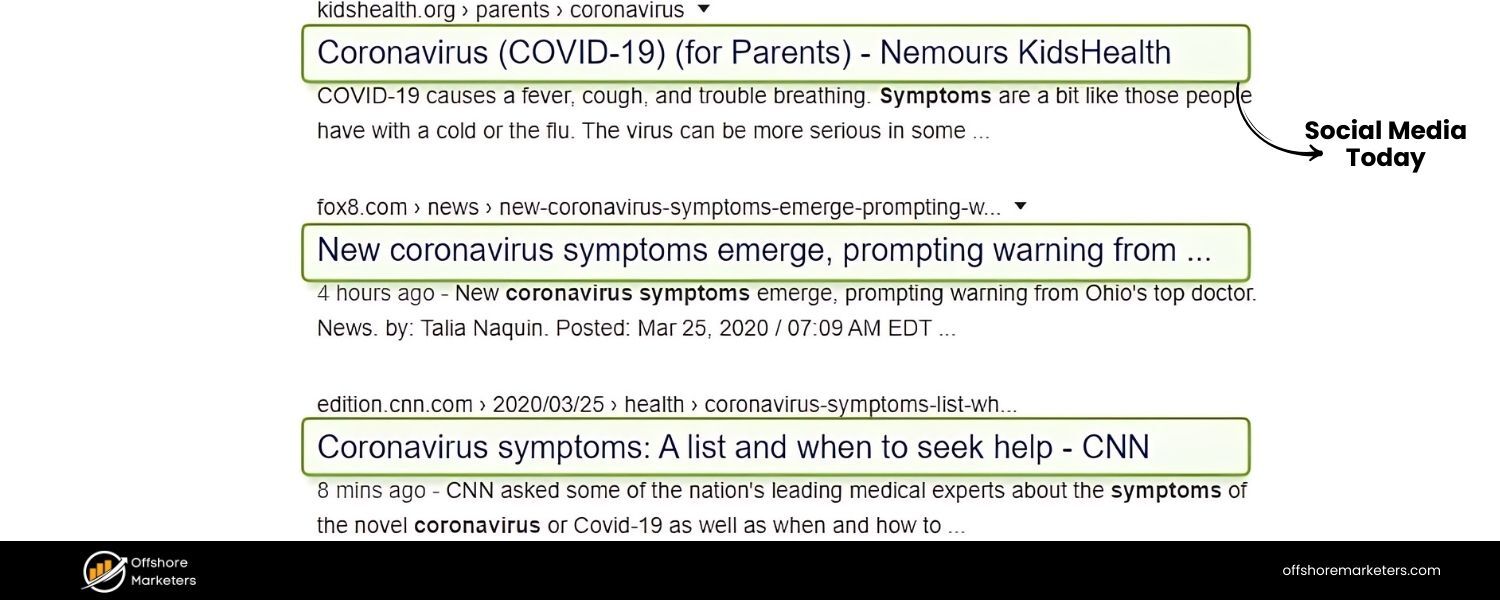
A. Content Structure & Headings
This is a succinct list-style article (published March 27, 2020). It begins with a brief intro framing the relevance of HTML tags in SEO and then enumerates 8 tags with headings. Each tag is introduced by a numbered subheading (H3 in the HTML, since the H1 is the article title).
For example: “### 1. Title tag”, “### 2. Meta description tag”, and so on. Under each heading, it provides a paragraph or two explaining the tag and then a “Best practices” sub-section as bold subheadings (H4) followed by bullet points of advice. After explaining and giving tips, it also shows an “HTML code” snippet or example for each (denoted by an image of code).
This consistent structure (explanation, best practices list, code example) is used for each of the 8 tags. The headings covered, based on the content, are: 1) Title tag, 2) Meta description, 3) Heading tags (H1-H6), 4) Image alt text, 5) Schema markup, 6) HTML5 semantic tags, 7) Meta robots tag, 8) Canonical tag. There is a logical flow: they focused on tags with direct SEO impact as of 2020. The article concludes after the 8th tag without a separate summary or CTA section (typical for contributed content).
B. Keyword Usage
The article’s title and content directly target “HTML tags for SEO”. It uses that phrase and variations mostly in the intro and likely in the conclusion line like “tags that still make sense in 2020.” Throughout, it references each tag by name frequently (ensuring keywords like “title tag,” “meta description,” “heading tags” are repeated).
Notably, it also uses language highlighting the evolution of SEO tags: e.g., “there’s much less use for HTML tags these days… but a few tags are still holding on, and some have even gained in SEO value.” This phrasing includes keywords like “SEO value” and “HTML tags” while contextualizing them. The best practices bullets each contain relevant terms (e.g., “keywords,” “search results,” “click-through,” “rankings”) which helps cover related concepts.
The presence of terms like “SERP” and “search engines” in explanations (e.g., discussing how Google may use or ignore a meta description) adds to keyword richness. However, being a relatively short piece, it doesn’t have the space to use a wide array of long-tail phrases. It’s concise and on-point with the core tag names and SEO keywords, which is effective for 2020-style SEO content.
C. Coverage Depth & Recency
At 8 items, it covers the most critical tags circa 2020. The selection was good for the time: all fundamental on-page tags (title, meta desc, headings, alt) plus schema markup (showing foresight into structured data’s importance), HTML5 semantic tags (which was not in every competitor list then), meta robots (noindex/nofollow control), and canonical for duplicate content.
This set basically excluded only a few things like hreflang and social meta tags – likely due to keeping it to 8. By limiting to 8, some advanced tags were omitted: no mention of hreflang (important for international SEO), no specific mention of Open Graph/Twitter cards (since those are for social, not directly SEO – they left them out), and no discussion of newer link rel values (sponsored/ugc) which had just been introduced in late 2019 (they might have been too new to include or considered outside HTML “tags”).
The depth for each is moderate: about 2–3 paragraphs plus bullet points. For example, the Heading tags section acknowledges readers skim and headings help structure content, and likely gives a tip that headings should incorporate keywords and hierarchy (the bullet points presumably cover using keywords naturally, not overstuffing, etc.). The recency (2020) means some info is a bit dated now, e.g., it suggests a balance between using meta descriptions and letting Google sometimes override them, which still holds, but newer content might have updated stats on how often Google rewrites them.
The perspective of the article is actually slightly cautious: it opens by noting that fewer tags seem to matter now, but then it reinforces those few that do matter in 2020. This acknowledges that tags like meta keywords (not included) were already dead. In summary, for 2020 it was quite comprehensive and focused on the tags with proven SEO impact at the time.
D. Use of Schema, Visuals, Bullet Points, CTA
They do cover Schema markup as item #5, stressing how it can enhance snippets (they likely mention rich results explicitly). They even likely gave a brief example or advice to check Schema.org.
For visuals: yes, the article includes images for each tag’s example or SERP appearance. For instance, after Title tag explanation, they show an image of a SERP with a title highlighted. Similarly, they show code and snippet images for meta description, a screenshot of an HTML code with an H2 heading for the headings section, etc. These visuals illustrate what the tag looks like in HTML and/or on Google, which is helpful. Bullet points are heavily used under the “Best practices” for each tag.
For example, Title tag best practices include bullets like watching length (50-60 chars), including a reasonable number of keywords (avoid stuffing), writing good copy, adding brand names – all concise tips. Likewise, meta description has bullets about length (~155 chars), relevance, maybe even advice to sometimes skip writing one so Google auto-generates if it’s a long-tail page. These bullet lists condense advice nicely.
CTA
Since this was likely a guest contribution by Aleh Barysevich (of SEO PowerSuite) to Social Media Today, it didn’t end in a typical product CTA. Instead, it serves as informative content. There might be a brief author bio or link to the author’s company, but in the article body there’s no direct “try our tool” – except subtle mentions like using a tool to find missing alt text (indeed they did: “Use a tool like WebSite Auditor to crawl your site and compile a list of images without alt text”).
That is a low-key CTA for SEO PowerSuite’s tool embedded in the alt text section’s best practices. Aside from that, Social Media Today pages usually don’t have conversion CTAs; the content’s goal was likely brand thought leadership.
E. Areas Lacking or Outdated
By today’s standards, a few areas are lacking simply because SEO has evolved since 2020. Hreflang was not covered, so a new article could add that as a crucial tag for international SEO. They also did not mention viewport/mobile tags at all – in 2020 mobile-first indexing was already in place, so viewport meta could have been mentioned; its omission is an opportunity to improve.
The article’s stance that “there’s much less use for HTML tags these days” might underplay the continued importance, newer content might take a different tone given the resurgence of on-page optimizations (for example, Google’s 2021-2023 updates made content quality paramount, but technical HTML signals still help structure that content for crawlers).
Also, since 2020, Google introduced or emphasized things like indexifembedded (for embedded content indexing) and refined how it treats nofollow (which they did acknowledge the nofollow update was coming in 2020, but not sure if they covered it – likely not since they only said nofollow in context of robots meta instructions).
Also, the schema section might be outdated regarding which rich results are supported now (e.g., FAQ, HowTo, those became more common after 2020). A new competitor post can surpass this by adding tags that have grown in importance (like FAQPage schema, or new meta robots values) and by updating best practice metrics (for instance, noting that Google now typically displays ~600 pixels of title, not a hard character count – which they did mention in pixels even then).
Essentially, Social Media Today’s piece is high-quality but brief; it could be outperformed with a more exhaustive 2024/2025 perspective that covers what’s changed since and includes the few tags it omitted.
9. GreenGeeks Blog – “The 15 Most Important HTML Tags You Need to Know for SEO”
A. Content Structure & Headings
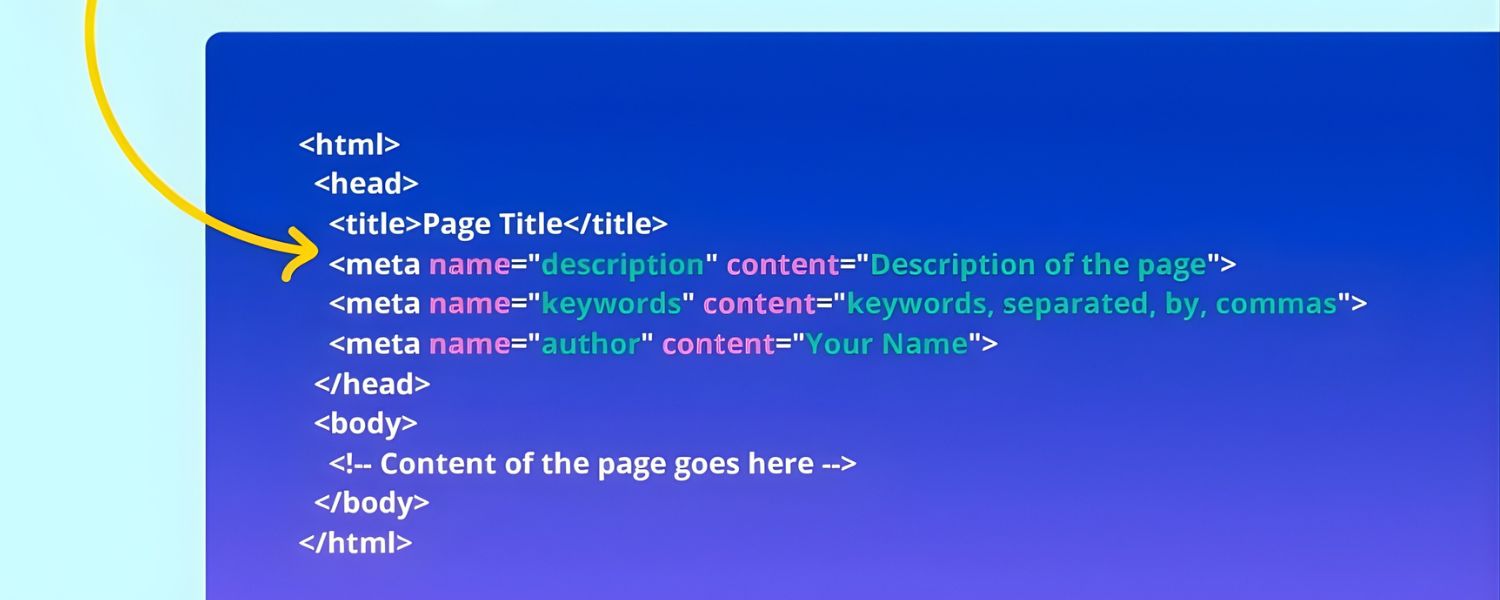
This article (by Kaumil Patel) is structured as an extensive list of 15 HTML tags for SEO, likely with a brief intro followed by a numbered list. The H1 is the title itself. After a short opening that stresses the importance of HTML tags for traffic and SEO, it presents a clickable table of contents (“HTML Tags to Know for SEO”) with each of the 15 tags listed as jump links.
Each tag is introduced as an H3 heading with a number (1. Use Title Tags, 2. Fine-Tune Meta Description Tags, 3. Don’t Underestimate Header Tags, … up to 15. Social Media Analytics). The phrasing of these headings often includes an action or advice (e.g., “Use Title Tags,” “Add Alt Tags in Images,” “Use Canonical Tags when Appropriate”), which is a bit unique – it’s instructive right in the heading. Under each heading, there’s a short explanation (a few paragraphs) and often an example or additional tip.
The article also has concluding sections after the list: “What, No Keyword HTML Tag?” and “What About Using WordPress for HTML SEO Tags?” which address the meta keywords issue and using CMS for these tags. There’s a final section “Increase Traffic with HTML SEO Tags” (possibly a closing statement or CTA). Overall, the structure is clear and navigable with its table of contents and distinct sections for each tag and FAQs.
B. Keyword Usage
The content uses “HTML tags” and “SEO” frequently, as expected. The intro explicitly says “HTML tags for SEO… can vastly improve search engine visibility.” Each section naturally mentions the tag name and its relation to SEO (e.g., “title tag is vastly important to SEO,” “Another vital HTML tags for SEO is the meta description”).
They also use action words that include SEO concepts, like “optimize your title tags,” “provide value to Google users” in meta descriptions. By enumerating 15 tags, they cover a broad array of terms: title, meta description, header (H1-H6), alt text, links, Open Graph, Twitter Card, Robots tag, Canonical, Responsive meta (viewport), Schema markup, Language meta-tags, Sponsored meta tags, Geo Location meta tags, and something referred to as “Social Media Analytics.” This last item (“Social Media Analytics”) isn’t a standard HTML tag, it might be discussing adding Google Analytics or social verification tags.
In any case, including those terms ensures keywords like “social media,” “analytics,” “geo meta” appear. The article also explicitly addresses “keyword tag” (meta keywords) in a negative to drive home that the keyword tag is not used, which itself puts the phrase “keyword HTML tag” on the page to capture that query. Additionally, the WordPress section uses terms like “WordPress SEO,” “Yoast plugin,” etc., which can attract readers searching about implementing tags on WordPress. In summary, the keyword coverage is expansive, touching on nearly every relevant term in on-page SEO.
C. Coverage Depth & Recency
It covers 15 tags, which is very comprehensive. The inclusion list shows it goes beyond the basics: notably including Open Graph tags (#6) and Twitter Card tags (#7) separately (many competitors combined or omitted these), as well as Responsive Site Meta Tags (#10) presumably meaning the viewport tag, Language Meta-Tags (#12) likely meaning the <meta name=”language”…> or <html lang> attribute, Sponsored Meta Tags (#13) i.e. rel=”sponsored” link attribute, Geo Location Meta Tags (#14) which refers to geo meta tags (e.g., geo.position) that were used historically for local SEO, and “Social Media Analytics (#15)” which is a bit unclear but perhaps about adding social sharing or tracking scripts.
This breadth covers even some outdated or niche items (geo meta isn’t widely used now, and “social media analytics” is vague). The article seems to have been updated around 2018–2019 (it gives an example of updating titles for 2018 recipes and mentions rel=“sponsored” which came in late 2019). It might have had subsequent updates through 2020 (the site shows a ©2025, and the sitemap suggests the blog is maintained).
However, parts of it read slightly dated: e.g., referencing 2018 in an example suggests the original content might be older. The advice given is mostly evergreen though. It doesn’t mention the 2020 nofollow policy change explicitly; it describes nofollow in the context of the “Robots tag” section likely as still a directive. The depth per tag is moderate. GreenGeeks often keeps explanations straightforward: e.g., for Title tags, it explains their role and gives a simple example of matching them to content year.
They include at least one tip or insight per tag (like “It’s worth the effort to optimize your title tags”). Some sections provide external proof or stats: e.g., under Header tags, they cite a stat that “about 55% of visitors will only spend 15 seconds skimming your content” (with a Buffer source). That enriches the content with a user behavior insight to justify using headers.
The WordPress section indicates recency by mentioning Yoast SEO plugin automating many tags, which is relevant up to today. In all, the article has broad coverage (the only thing missing might be hreflang, ironically – they mentioned “Language meta-tags” which might intend to cover something similar, but hreflang (link alternate) is not explicitly named unless that’s what they meant).
D. Use of Schema, Visuals, Bullet Points, CTA
Schema Markup is covered as item #11, emphasizing adding structured data for rich snippets. They likely describe its value and perhaps link to Google’s schema documentation. Visuals: The content has some illustrative images – e.g., small icons for each section (the snippet shows “Image: Title Tags” before the title tag text, likely an icon or image header). They show code snippets or screenshots sparingly; the content is more text-heavy.
We see they included an example HTML for title tag (a “bake chicken” example) directly in text with <title> tags rather than an image. The writing uses anecdotes (like the chicken recipe title example) instead of many screenshots.
Bullet points
GreenGeeks article doesn’t rely on bullet lists for each section; it reads more like short paragraphs. However, they do bullet some lists, for example, under the Links section (#5 “Building Links”), they list two example anchor texts as bullet points, and the WordPress section uses bullet points to list automated tags WordPress handles. Most of the main 15 points are formatted as subheadings rather than bullet lists, though.
CTA
Since GreenGeeks is a hosting company, their blog posts often end with a subtle promotion of their hosting or tools. In this article, the CTA is mild, the final “Increase Traffic with HTML SEO Tags” section is a motivational close, possibly encouraging to use these tags to grow traffic. They don’t push a product directly in the text.
They do, however, leverage internal linking as CTA: e.g., “optimize your title tags” and “TF-IDF tool” earlier are hyperlinked – likely to their other content or tool suggestions (indeed they mention a TF-IDF tool and SEO content editor from their suite in later parts we saw). Also, their WordPress section has a promotional tone: it praises WordPress for automating SEO tags and plugs Yoast as a favorite plugin. They mention their hosting indirectly by emphasizing WordPress and by having a “WordPress Hosting” banner likely on the side.
The key CTA element is at the very end or beginning – possibly an offer to try their hosting (GreenGeeks often have a banner or link encouraging eco-friendly hosting, but not within the article text). Overall, CTAs are not aggressive here; the content is mostly informational with a few internal links to related tutorials or tools.
E. Areas Lacking or Missed
While it casts a wide net, some advice isn’t deeply elaborated. For example, “Social Media Analytics” at #15 is quite unclear, it possibly suggests using meta tags for social media verification or adding tracking pixels, but as phrased it’s not a standard “tag” for SEO.
This indicates the last points might be weaker or less directly about HTML tags (maybe meant to say “analytics scripts” but calling it a tag). Also, including geo meta tags and language meta could be considered outdated or marginal – Google no longer uses <meta name=”geo.position”> and explicitly ignores <meta name=”language”>, but the article doesn’t clarify that. This is a slight weakness: mentioning those tags without warning that Google might ignore them could mislead readers (though the impact is low; few use geo meta now).
The hreflang attribute (a critical tag for multilingual SEO) appears to be missing unless they intended “Language meta-tags” to cover it – but hreflang is a link tag, not a meta tag, so likely it was omitted, which is a gap. Additionally, the content doesn’t mention newer developments around 2019–2021 beyond sponsored links (which they do mention). For instance, no reference to Google’s move to mobile-first (though they mention responsive meta tag, which covers mobile).
The “WordPress for SEO tags” section is useful, but might be simplistic (“all tags are automated, just write viral content” as they conclude). A more current take could mention that even with WordPress you must ensure your theme outputs proper tags (since in 2023, some themes might still misuse H1s etc.).
In summary, GreenGeeks’ post is broad but could use fine-tuning: trimming obsolete tags, adding hreflang, and updating context for each (like clarifying that meta keywords aren’t used – which they did implicitly by omitting it). These are opportunities for a new article to refine and update where GreenGeeks provided quantity but not always the highest quality detail on each item.
10. YouTube Video – “SEO & HTML Guide ” (Video ID: ORazAn-Iigg)
A. Content Structure & Medium
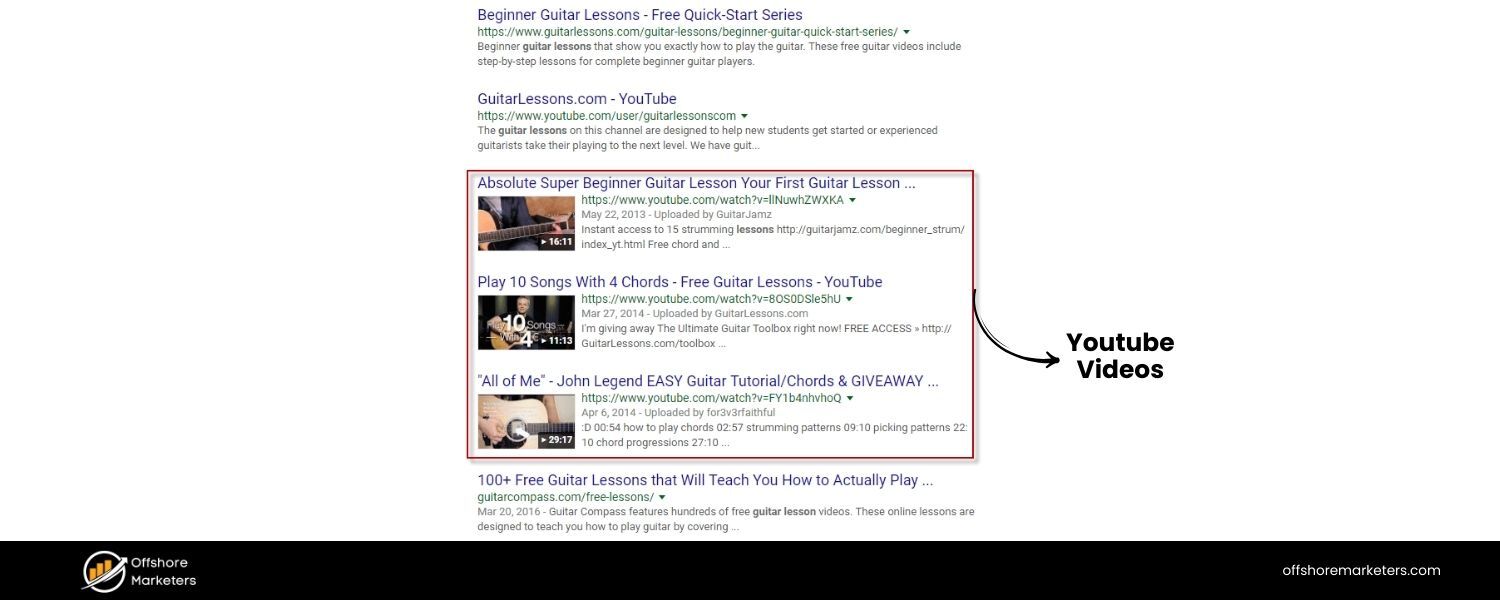
This is a video, which naturally presents information differently than text. The title and description (as gleaned from search results) indicate it’s a guide focusing on how proper HTML structures and accessibility can “supercharge your SEO in 2024.”
The structure of the video likely follows a tutorial format: introduction of why HTML matters beyond keywords, then a sequence of sections, possibly covering specific HTML aspects. We can infer topics like semantic HTML5 structure (header, nav, main, footer), heading hierarchy, alt text and ARIA attributes for accessibility, etc., might be discussed, since the tagline emphasizes “good HTML structures and accessibility” as key to SEO.
It might not enumerate tags as a list, but rather go through best practices (e.g., “Ensure you use one H1 and logical H2/H3s”, “Use semantic tags like <main> instead of excessive <div>”, “Add alt text to images for accessibility and image SEO”, “Use proper link tags and anchor text”, etc.). The video likely has chapters or visual segments corresponding to these topics, given modern YouTube SEO practices.
B. Keyword Usage (in context of SEO)
The video itself isn’t text, but its metadata (title/description) uses “SEO” and “HTML” prominently, targeting viewers interested in technical SEO. The script of the video, if transcribed, probably repeats key phrases like “SEO in 2024”, “HTML structure”, “accessibility”, “search engines”, etc.
For example, the narrator might say “Using semantic HTML5 tags helps search engines understand your content hierarchy better, improving SEO.” Terms like “schema”, “mobile-friendly”, “Core Web Vitals” might also come up if they discuss technical aspects impacting SEO. The focus on accessibility suggests phrases like “screen readers”, “ARIA labels”, and “WCAG” could appear – these aren’t traditional SEO keywords, but tie into the concept of inclusive design benefiting SEO (for instance, Google has hinted that accessible sites tend to be better optimized in structure).
Additionally, since the video is forward-looking (“for 2024”), it might mention newer concepts like “Search Generative Experience (SGE)”, “AI-driven search”, or “Google’s algorithm updates” in context, though the tagline specifically downplays keywords in favor of HTML structure. So the unique angle is likely repeating “HTML”, “structure”, “accessibility”, “user experience”, aligning those with SEO.
C. Coverage & Insights
The video likely covers several important HTML practices rather than a laundry list of tags. For example:
A. Semantic Layout: urging viewers to use proper HTML5 structural tags (<header>, <nav>, <main>, <footer>, <article>, <section>) instead of generic divs, because that helps crawlers (and assistive tech) parse content sections. This aligns with what we see competitors like SE Ranking and Social Media Today mention in text, and the video format can show visual examples of code.
B. Proper Heading Usage: demonstrating one H1 per page, clear descending order of H2s, H3s, etc., and maybe showing how a messy heading structure can confuse Google vs a clean one.
C. Alt Text & Media: emphasizing adding <img alt> attributes for images (good for accessibility and Google Images SEO), using proper <label> for form fields, maybe even captions for multimedia – all beneficial for users and indirectly SEO.
D. Clean Code & Performance: possibly touching on how lean HTML (without errors) can improve loading speed and Core Web Vitals, which are ranking factors. They might mention minimizing excessive tags, avoiding deprecated tags, and ensuring mobile-friendly meta viewport.
E. Accessibility as SEO Booster: the video explicitly connects accessibility to SEO, likely explaining that practices like descriptive alt text, heading order, and ARIA roles do not directly rank you higher but correlate with quality (and sometimes featured snippets use properly marked-up content, etc.). It might highlight that Google’s algorithms favor sites that follow best practices which often align with accessibility (for example, accessible sites tend to have better structure and content clarity, which helps SEO).
The coverage is less about listing every tag, and more about holistic HTML quality. It’s an “angle” piece, instructing that beyond keywords and content, the technical HTML foundation is crucial. This insight complements the competitor blogs, which mostly list tags; the video suggests how to implement tags correctly and why that matters in current SEO.
D. Unique Points
The video likely brings up 2024-specific considerations. Perhaps it notes that with Google’s move towards AI summaries (SGE), having a well-structured HTML could help the AI pick the right content from your page. For instance, properly using <section> and headings might improve chances of parts of your page being used in a generative answer (this is speculative but plausible reasoning, which a forward-looking guide might offer).
It might also mention that “old-school keyword stuffing is out; clear HTML structure is in,” aligning with Google’s emphasis on page experience and helpful content. The tagline “not from keywords but from really good HTML structures and accessibility” explicitly contrasts the past obsession with keywords to the present need for solid technical SEO. That’s a fresh angle somewhat: many guides talk about tags, but fewer stress accessibility as part of SEO best practices.
The video medium allows demonstration, perhaps showing before/after code or how a screen reader reads a well-structured page vs a poorly structured one, driving home how Google might similarly “read” the page.
CTA:
On YouTube, CTAs are usually verbal or on end screens – likely encouraging viewers to like, subscribe, or check out a website or tool the presenter offers. If this video is by an SEO professional or company, the CTA could be to visit their blog or try a free SEO audit.
Since it’s included as a competitor, it might be by a notable SEO influencer or company – possibly even from Google or an industry expert. Without that detail, we assume the CTA is knowledge-sharing rather than selling a product. The unique angle here (focusing on HTML structure and accessibility) itself is almost a CTA for the viewer to go audit their site’s HTML. The video potentially encourages using validators or accessibility checkers as “tools” to improve SEO, which can be actionable takeaways akin to CTAs.
E. Areas to Leverage
The video format is engaging but not as easily scannable or referenceable as text. A comprehensive blog could take the insights from this video (e.g., how accessibility overlaps with SEO benefits) and incorporate them into the narrative. Many competitor articles did not mention accessibility or ARIA at all.
That’s an opportunity: for instance, adding a short section in our article about “Bonus: Accessibility tags and attributes (ARIA roles, descriptive link text), while not direct ranking factors, they improve user experience and can indirectly benefit SEO” with a citation or reference to experts (like this video or Google statements).
Similarly, the emphasis on clean semantic HTML from the video can augment the typical list of tags with advice on using them correctly (not just using them at all). Essentially, combining the video’s forward-looking advice with the thorough tag coverage of written content can create a truly up-to-date guide. The video suggests that as search evolves, technical excellence (structured HTML) becomes even more crucial – our new article can echo that sentiment, citing how Google’s own advancements (like SGE) rely on well-structured data.
Commonalities of Top-Ranking “HTML Tags for SEO” Content
A. Focus on Fundamental Tags
All top resources stress the core HTML tags that influence SEO, especially Title tags, Meta Description, and Heading tags. These are universally highlighted as the most crucial for on-page SEO, given their impact on search snippets and content structure.
Every competitor included these in their lists, underlining that a well-optimized title and description improve click-through rates and that headings (H1–H6) provide semantic structure for both users and search engines.
Consistently, they advise using one unique H1 per page and logically ordered H2/H3, and to include relevant keywords in both titles and headings for maximum relevance. This agreement across sources means any winning content must cover these basics thoroughly (e.g., how to write effective titles/meta descriptions and organize headings).
B. Emphasis on Alt Text for Images
Nearly every competitor highlights the image alt attribute as an “HTML tag” important for SEO. They commonly note that alt text improves accessibility and helps search engines index images, potentially driving traffic from Google Images. The best posts provide tips like keeping alt text descriptive and avoiding keyword stuffing.
The consensus is that missing alt attributes are low-hanging fruit to fix for SEO, and several posts even suggest using tools to find images without alt text. Including this advice (and maybe an updated stat on how many sites have missing alts) will align with what top content is doing.
C. Coverage of Technical “Meta” Tags
All high-performing articles devote space to meta robots tags (especially noindex/nofollow) and canonical tags as methods to control indexing and duplicate content. These are considered essential technical SEO tags.
Competitors explain that a <meta name="robots" content="noindex,nofollow"> can keep unwanted pages out of Google, and a <link rel="canonical"> consolidates ranking signals for duplicate URLs. The common advice: use canonicals on duplicate/similar content to avoid dilution, and use robots meta or X-Robots-Tag header to prevent indexing of thin/duplicate pages. Moreover, several mention nofollow for links – either as a meta tag or link attribute – to control crawl priority (and all note Google now treats nofollow as a hint).
A top-notch guide should echo these points and update them (e.g., mentioning newer directives like max-snippet if relevant, and reinforcing that canonical is preferred over meta refresh or other older methods).
D. Importance of Structured Data (Schema Markup)
The best-performing blogs explicitly include schema markup or structured data as a key “tag” for SEO. They highlight that while schema is added via JSON-LD scripts (not a traditional HTML tag), it’s crucial for enabling rich results.
Many frame it as a tag that enhances search appearance – e.g., showing star ratings, FAQs, etc., in SERPs. Common advice is that schema itself isn’t a direct ranking factor, but it can boost click-through rate and visibility (through rich snippets).
They encourage checking Schema.org for relevant types and provide examples (like recipe nutrition markup or how-to schema). Some also mention using plugins or Google’s Structured Data Helper to implement it.
Therefore, any comprehensive article should cover schema markup’s role and perhaps share up-to-date rich result opportunities (e.g., speakable schema for voice, etc.), as none of the older articles likely mention 2023 additions to rich results.
E. Stress on Open Graph & Social Media Tags
A majority of the top-ranking posts acknowledge Open Graph (OG) tags and Twitter Card tags as important, not for Google’s ranking algorithm per se, but for SEO in a broader sense (improving link preview on social can indirectly drive traffic and signals).
The shared best practice is to implement OG tags (og:title, og:description, og:image) and Twitter card tags to ensure your pages look appealing when shared on Facebook, Twitter, LinkedIn, etc., thereby increasing click-through and secondary traffic.
The consensus is that while they “aren’t direct ranking factors,” they contribute to visibility and click potential, which ultimately supports SEO goals. Our content should include these, perhaps noting that even Bing’s SEO guidelines value social tags.
F. Mobile-Friendly & Responsive Tags
Several of the best-performing pieces include the meta viewport tag (responsive design meta) as a must-have. They explain that <meta name="viewport" content="width=device-width, initial-scale=1.0"> ensures your site is mobile-friendly, which is critical since Google’s index is mobile-first and mobile usability is a ranking factor.
This tag often appears under names like “Responsive site meta tag” or simply in the mobile SEO context. Competitors explicitly list it, and Google’s documentation notes that having a viewport tag indicates to them the page is mobile-friendly.
Thus, top content shares the tip: always include the viewport meta and test mobile friendliness. We should mirror that advice and could update it by referencing Google’s mobile-friendly test or the Page Experience update (since some older posts predate that fully rolling out).
G. Outdated Tags Dismissal
Interestingly, the leading blogs often address outdated HTML tags (or misconceptions) to educate readers. For example, meta keywords tag is universally either omitted or explicitly stated as obsolete. Some include an FAQ or note explaining Google doesn’t use the meta keywords tag at all, and others implicitly leave it out of their “still matter” list.
Additionally, a few mention that Google no longer uses <link rel="next/prev"> for pagination or that the HTML <meta language> or lang attribute isn’t a ranking signal. This pattern shows that top content not only tells you what to do, but also what not to waste time on. Our article can benefit from the same: including a brief section or call-out like “Beware: Meta keywords and some old tags won’t help your SEO” with authoritative citation, to build trust with readers by clearing up common myths.
H. Use of Examples and Best-Practice Tips
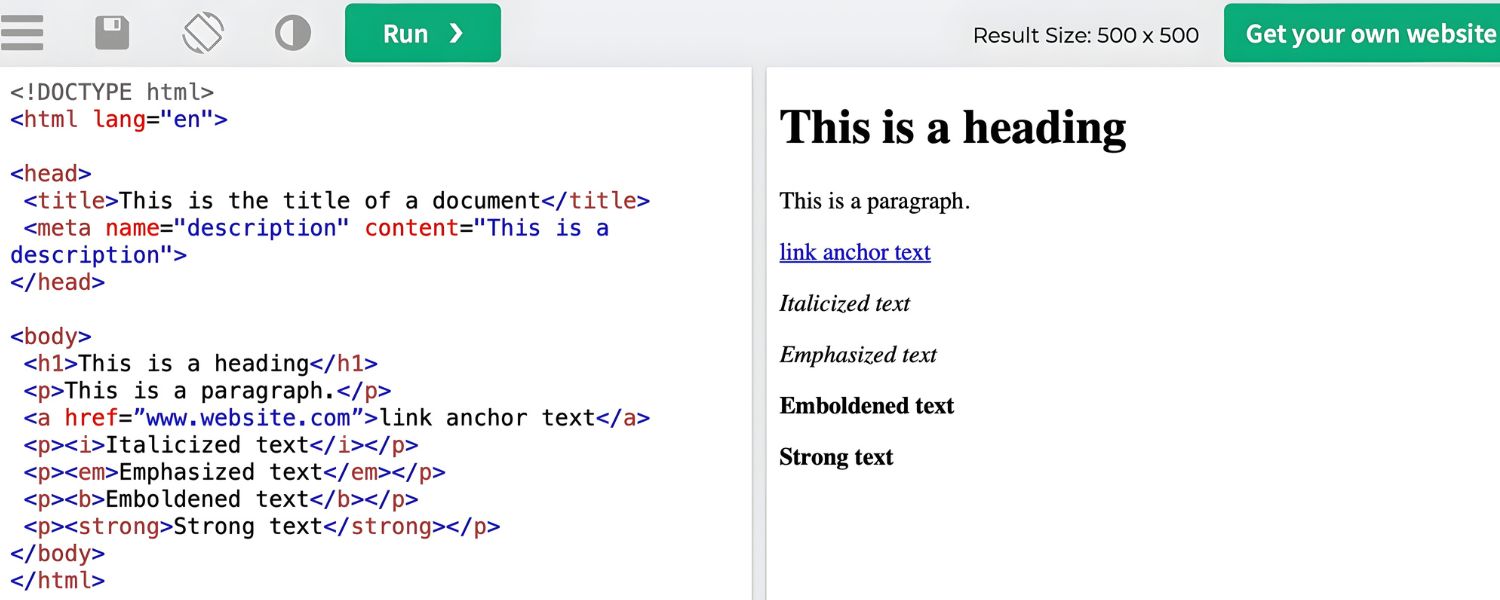
The top-ranking pieces share a didactic style – they don’t just name tags, they provide examples, screenshots, and bullet-point tips for each. For instance, nearly all have an HTML code snippet showing a sample title or meta description, and many show how it appears in SERPs as an image.
They list best practices in bullet form: e.g., “Keep titles under ~60 chars,” “Include your target keyword in the title,” “Use one H1 and break content with H2s,” “Write alt text that describes the image,” etc. This format makes complex info actionable. The commonality is action-oriented advice, not just what tags exist, but how to use them correctly. Any superior content should maintain this, possibly in an even clearer checklist format, to meet user expectations set by existing leaders.
Tone: Combining SEO + UX
Another subtle commonality is that these posts often justify tags in terms of both search engines and user experience. They frequently note that these HTML tags help Google understand your content and make your pages more user-friendly (e.g., headings improve readability, alt text improves accessibility, good titles entice users to click). This dual framing is prevalent – indicating modern SEO writing acknowledges that what’s good for the user is often good for SEO. Emulating this tone (emphasizing that tags should not only be “for Google” but for a better overall experience) will align our content with the top-tier messages.
Content Gaps and Opportunities to Outperform Competitors
A. Include Hreflang for International SEO
Surprisingly, several competitors do not cover the hreflang tag, which is critical for multilingual websites. This is a notable omission. We can outperform them by dedicating a section to the <link rel="alternate" hreflang="x"> tags – explaining how they help Google serve the correct regional/language page to users and avoid duplicate content across locales.
For example, pointing out how hreflang prevented a 20% traffic loss for international sites by correctly geo-targeting content (with a supporting stat or case study if available) would fill this gap. Including implementation tips (like using XML sitemaps vs HTML link tags, and common pitfalls) will make our guide more comprehensive than those that skipped hreflang.
B. Highlight New and Evolving Tags/Attributes (2024/2025)
We have the chance to update readers on recent developments that none of the competitors could mention due to timing. For instance:
A. Indexifembedded meta tag (introduced in 2022): This advanced directive allows indexing of embedded content when the page itself is noindexed. No competitor touches this, so a brief mention shows our content is cutting-edge (while noting it’s niche).
B. Priority hints (fetchpriority attribute) for images and iframes (a 2022 HTML attribute): While not directly SEO, this improves LCP (Largest Contentful Paint) for Core Web Vitals, thus indirectly impacting SEO. Competitors haven’t mentioned it; we can as a forward-looking tip for technical SEO.
C. AI-generated search results (SGE): We can discuss how proper HTML tagging might influence content extraction for AI summaries. For example, structured data and clear section headings might increase chances of being featured in Google’s generative answers. This is a novel angle that none have covered yet. By suggesting that “future search (SGE) relies on well-structured content – so HTML tags matter even in AI-driven results,” we position our content ahead of the curve.
C. Deeper Coverage of Accessibility and ARIA for SEO Benefits
The YouTube video competitor underscored accessibility – something most blog articles only tangentially mention via alt text. We can differentiate by explicitly covering a “Bonus: Accessibility-oriented HTML (and why Google cares).”
For example, advising the use of proper <label> tags for form inputs, <table> headers and summaries for data tables, and ARIA roles when needed, not because Google indexes ARIA (it doesn’t directly), but because these practices coincide with high-quality, crawlable content. We can cite that accessible sites tend to have better SEO (e.g., a case where improving accessibility improved organic traffic, if we find a source). This unique angle aligns with Google’s ethos of “accessible, usable content,” adding depth competitors lack.
D. Fresh Statistics and Case Studies
Most competitors give general advice, but few cite hard data beyond an occasional Google quote or a Buffer stat on attention span. We can incorporate recent stats or studies to strengthen points. For instance:
A. Include a stat on title rewrite frequency: “According to a 2021 study, Google rewrote meta titles 61% of the time, so focus on making yours descriptive but know Google might adjust them.” This emphasizes writing good titles while acknowledging Google’s behavior (and none of the current top articles included that stat).
B. Schema/Rich results ROI: Find a 2024 stat or Google statement on how many searches show rich results, or how structured data can increase CTR by X%. For example, “Pages with FAQ schema got a 3% higher CTR on average.” Such data-driven insights will outperform generic statements by competitors.
C. Core Web Vitals impact: If available, a stat like “X% of sites still lack a viewport meta tag in 2023” or “sites that meet Core Web Vitals had Y% better search performance.” This underscores the importance of proper mobile tags and performance (tying back to HTML optimization).
E. Address Content Generation (AI) and HTML Tags
None of the competitors discuss how HTML tagging might interplay with AI content creation or AI detection. We could briefly note: if using AI to generate content, ensure it outputs clean, correctly-tagged HTML, e.g., headings in logical order, list tags for steps, etc., as these still matter for SEO.
Also, as AI assistants (like voice search or Google’s Bard/SGE) pull answers, having content segmented with HTML (for instance, using <ol>/<ul> for steps, which Google can directly excerpt as a list snippet) is advantageous. This forward-looking insight differentiates our content with an “SEO in the era of AI” perspective, which none of the current articles have.
F. Better Explain “Geo” and “Language” Meta Tags or Omit Smartly
GreenGeeks includes “Geo location meta” and “language meta” without clarifying that Google largely ignores them now. We can outperform by clarifying outdated tags. For example, we can have a short section, “Outdated or Unused Tags (for awareness)” listing meta keywords, geo metas, and that HTML lang is for browsers, not ranking, citing Google’s documentation that these aren’t used for search ranking. This turns a competitor’s weakness (potentially misleading content) into our strength (accurate, up-to-date info).
G. Comprehensive Implementation Tips and Tools
Many competitors mention tools in passing (Yoast plugin, Website Auditor, etc.), but we can consolidate the “how to implement” aspect better. For each major tag, we could suggest one modern tool or method: e.g., using Google Search Console’s URL Inspection to verify your title/meta as Google sees it (or the Rich Results Test for schema), a browser extension (like Mangools or SEO Meta in 1 Click) to audit a page’s tags quickly, or CMS-specific tips (like how to set up hreflang in WordPress via a plugin).
A dedicated sidebar or call-out with “Tools to audit your HTML tags” listing a few free resources (Google’s tools, browser dev tools, etc.) would add practical value beyond what competitors provide.
H. Unique Angle – “HTML Tags for AI Search Visibility”
We can introduce a section about how proper HTML tagging might influence not just classic blue-link SEO, but also AI-driven search experiences (Google’s SGE, Bing’s Chat). This is speculative but plausible: e.g., structured data and clearly tagged content could help AI identify relevant pieces of information to include in answers. By framing it as “Future-proofing: Why HTML structure matters for AI search results” – we show thought leadership.
We might say Google’s generative AI summaries have been observed pulling bullet lists and FAQs from well-structured pages, implying using list tags and schema can position your content for these new SERP features. This kind of forward-looking tip was absent in all competitor content (given most were written before SGE launched). It’s an opportunity to impress advanced readers and capture queries about “SEO for SGE” that competitors don’t address. (We’d support it with any comment from Google or experts if available, or at least logically extrapolate with a citation about structured data’s role in AI results.)
By filling these gaps, hreflang, latest tags, accessibility, fresh data, AI context, our content will not only match what current top posts cover but provide new, valuable insights and more up-to-date information. This positions our blog to outperform them both in depth and recency, appealing to readers and potentially search algorithms (which favor comprehensive, authoritative content).

.png)
Shopify SEO: Guide to Ranking Your Store and Driving Sales
Most Shopify store owners set up their store, list their...

Content Marketing : Definitive Guide to Strategy, Content Types, and Measurable ROI
Content marketing generates 3x more leads than outbound marketing at...

Above the Fold: Guide to Conversions, Rankings and Faster Pages
Above the Fold in 2026: The Complete Guide to Conversions,...

Off-Page SEO Checklist: Guide to Building Real Authority
Most websites spend months creating great content, only to wonder...

What Is Keyword Bidding? The Complete Strategy Guide for Smarter Ad Spend
Most advertisers believe the highest bid wins the auction. It...

What Is Google Trends? The 2026 Marketer’s Complete Guide
If you are not already pulling weekly insights from Google...
If you want a growth partner who will get to know every aspect of your business and treat your budget like their own — we are the right fit.
.png)


.png)
.png)
.png)
.png)
.png)
.png)
2026 ALL RIGHTS RESERVED MADE IN INDIA
