
Content Optimization: 15 Strategies for Higher Rankings
July 14, 2025
Introduction
In the digital marketing world, “great content” alone isn’t enough, it also needs to be optimized. You might publish an amazing blog post or landing page, but without content optimization, it could languish on page 5 of Google or fail to convert readers into customers.
Content optimization is the key to bridging that gap and ensuring your content reaches the largest possible target audience.
By optimizing for both search engines and users, you can turn a good piece of content into a high-performing asset that drives consistent traffic, engages readers, and supports your business goals.
In this comprehensive guide, we’ll explain what content optimization is, why it’s so important, and 15 proven strategies to optimize your content for SEO success and user engagement.
From smart keyword usage and on-page SEO tweaks to improving readability and adding compelling calls-to-action, we’ll cover everything you need to outrank competitors and convert more readers. Let’s dive in!
What Is Content Optimization?

Content optimization is the process of refining and improving your content so that it performs well for both search engines and users.
In practice, this means ensuring your content is highly relevant, high-quality, and targeted for the topics and keywords your audience is searching.
It involves using the right keywords, crafting informative and valuable content, structuring it for readability, and optimizing technical elements (like meta tags, images, and links) to help search engines understand and rank it.
The goal of content optimization is to make your content more visible in search results, more engaging for readers, and more effective at achieving your objectives (e.g. driving conversions or shares).
In simpler terms: optimized content aligns with what your target audience wants and what search engines need.
It covers a topic in depth, answers user questions, and follows SEO best practices so that it ranks higher on Google, attracts more clicks, and keeps readers interested.
Why Is Content Optimization Important?
Investing time in content optimization can deliver huge benefits. Here are a few key reasons why optimizing your content is so important:
1. Higher Search Rankings & Visibility

Optimized content is more likely to appear on the first page of search engine results for your target keywords.
By tweaking content to meet SEO criteria (like relevance and keyword usage), you increase its chances of outranking less-optimized pages. Higher rankings mean more visibility and more organic traffic coming to your site.
2. More Organic Traffic (Long-Term)

Climbing up the search rankings naturally leads to more clicks and visitors. Importantly, content optimization isn’t a one-time spike – if you continuously optimize and update content, it can keep driving results long after it’s published.
For example, one article on Semrush was first published in 2022 but continued to attract ~4.5K monthly visitors in 2024 after periodic updates.
Optimizing old content can breathe new life into it, allowing you to get more mileage from every piece you publish.
3. Better User Engagement

When content is optimized for relevance and readability, people are more likely to find it useful and stick around. By aligning content with what users are searching for and making it easy to consume, you improve metrics like bounce rate, time on page, and engagement.
Google pays attention to these user experience signals – content that satisfies readers tends to perform better in search rankings. In short, optimization helps ensure your content actually resonates with the audience, not just exists online.
4. Higher Conversions & ROI

Ultimately, content optimization helps turn traffic into results. Whether your goal is to get newsletter signups, product sales, or other conversions, optimized content will be more persuasive in nudging users to take action.
For instance, tweaking headlines or adding a clear call-to-action can significantly boost your conversion rates. Plus, optimizing existing content often has a better return on investment than churning out brand new content – it’s usually faster and more cost-effective to refine what you already have.
In an era of tight marketing budgets, squeezing more leads or sales out of each page via optimization is a smart strategy.
In summary, content optimization dramatically improves your content’s performance and helps you meet your marketing goals.
Without it, even the best-written article may miss out on visibility, traffic, and conversions. Now that we know the why, let’s get into the how – below are 15 key strategies to optimize your content for SEO and user success.
15 Content Optimization Strategies for SEO Success
Optimizing content is part art and part science. It requires understanding your audience’s needs, following SEO best practices, and continuously refining your pages.
Use the following strategies as a checklist for optimizing new and existing content. These tips cover everything from keyword research and on-page SEO to improving content quality and user experience.
Let’s start at the beginning, choosing the right keywords.
1. Perform Keyword Research and Use the Right Keywords Strategically
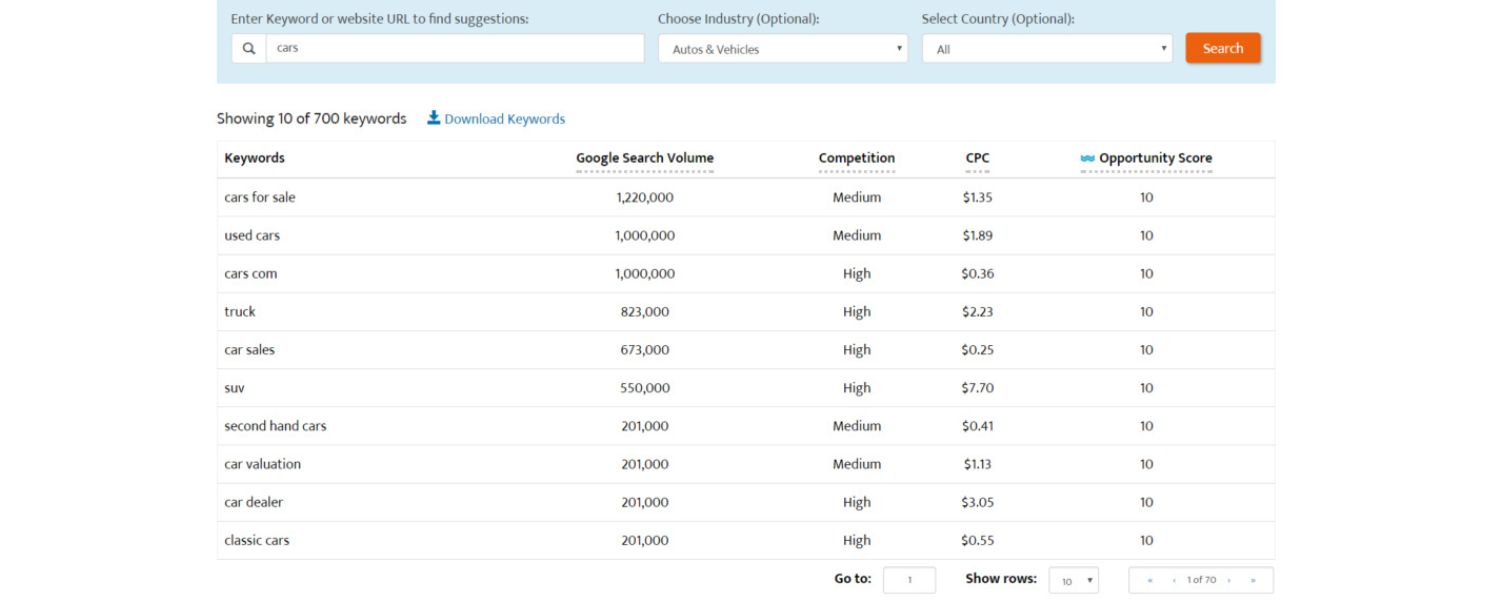
Every successful content optimization project starts with smart keyword research. Optimizing for the wrong keywords (for example, terms nobody searches for) is pointless – even if you rank #1, you’ll get no traffic.
Instead, focus on finding relevant keywords with sufficient search volume and business relevance. Look for terms that your target audience is actually typing into Google, and that align with your content and offerings.
A. Find Keywords with Traffic Potential

Use SEO tools (like Ahrefs, Semrush, or Google Keyword Planner) to identify keywords in your niche and see how many people search for them.
Prioritize keywords that have a decent monthly search volume and fit your topic. For example, if you run a marketing blog, a term like “content optimization tips” might have significant traffic potential.
Ahrefs recommends adding a “Traffic Potential” filter when researching keywords, this estimates how much traffic the #1 ranking page gets, helping you zero in on keywords that can actually bring in visitors.
B. Consider Keyword Difficulty and Competition
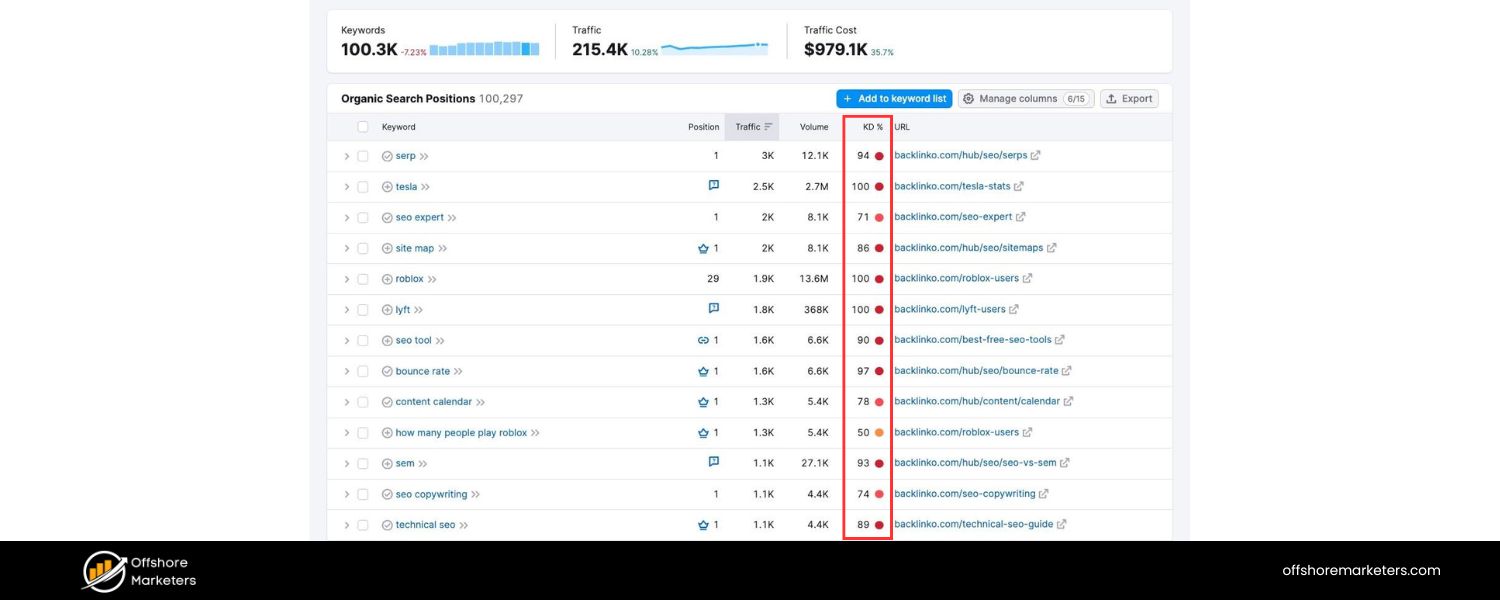
If your site is newer or less authoritative, target some low-competition keywords as well. It’s often easier to rank for longer-tail, specific phrases (e.g. “how to optimize blog content for SEO”) than very broad terms.
Many keyword tools provide a Keyword Difficulty score – try filtering for keywords with lower difficulty to find “quick win” topics.
- Use Primary and Secondary Keywords Naturally: Once you have your target primary keyword (main topic), identify a handful of secondary keywords or related terms to sprinkle into your content.
Most pages naturally rank for multiple related keywords. For example, a page targeting “content optimization” might also include phrases like “on-page SEO,” “SEO content optimization,” or “optimize website content”.
Incorporate these naturally where relevant – in subheadings, in the body text, or as variations of your main term. This helps cast a wider net and signals to Google that your content is comprehensive.
Tip: Semrush’s Keyword Magic Tool or Google’s “People also ask” suggestions are great for discovering related queries.
C. Place Keywords Strategically On-Page

Ensure your main keyword appears in critical places: the title, the URL slug, the first paragraph, at least one subheading, and naturally throughout the content.
This helps search engines immediately understand what your page is about. For instance, this article’s title starts with “Content Optimization” (the focus keyword), and we mentioned it right in the introduction.
However, avoid keyword stuffing – don’t unnaturally repeat a term over and over. Modern search algorithms are smart enough to detect and penalize that.
Aim for a natural frequency and use synonyms; if your content reads awkwardly due to keywords, scale it back. Remember, we’re optimizing for users and search engines.
By performing thorough keyword research and targeting the right terms, you lay a strong foundation for content optimization. You’ll be creating content that has built-in demand, rather than guessing.
Just as importantly, you’re matching each piece of content with the keywords that make sense for your business (what Ahrefs calls “business potential” – targeting topics that allow you to mention your product or services). In short: pick keywords that matter, and use them wisely.
2. Align Your Content with Search Intent
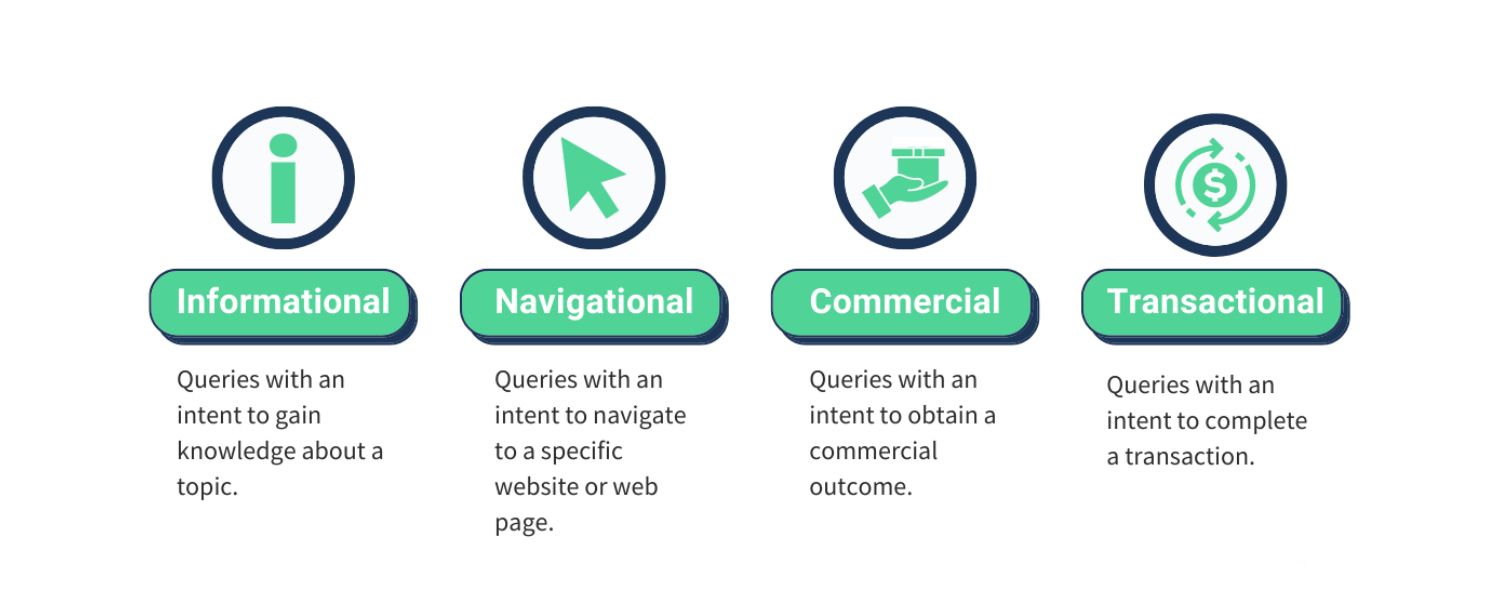
Choosing good keywords is step one; step two is making sure your content truly satisfies the search intent behind those keywords.
Search intent refers to the reason why someone searches a particular term – are they looking for information? A product to buy? A specific website? Google heavily prioritizes content that matches the searcher’s intent.
If your page doesn’t deliver what users expect to see for a given query, it’s unlikely to rank well for long.
Here’s how to align with search intent:
A. Identify the Intent Type

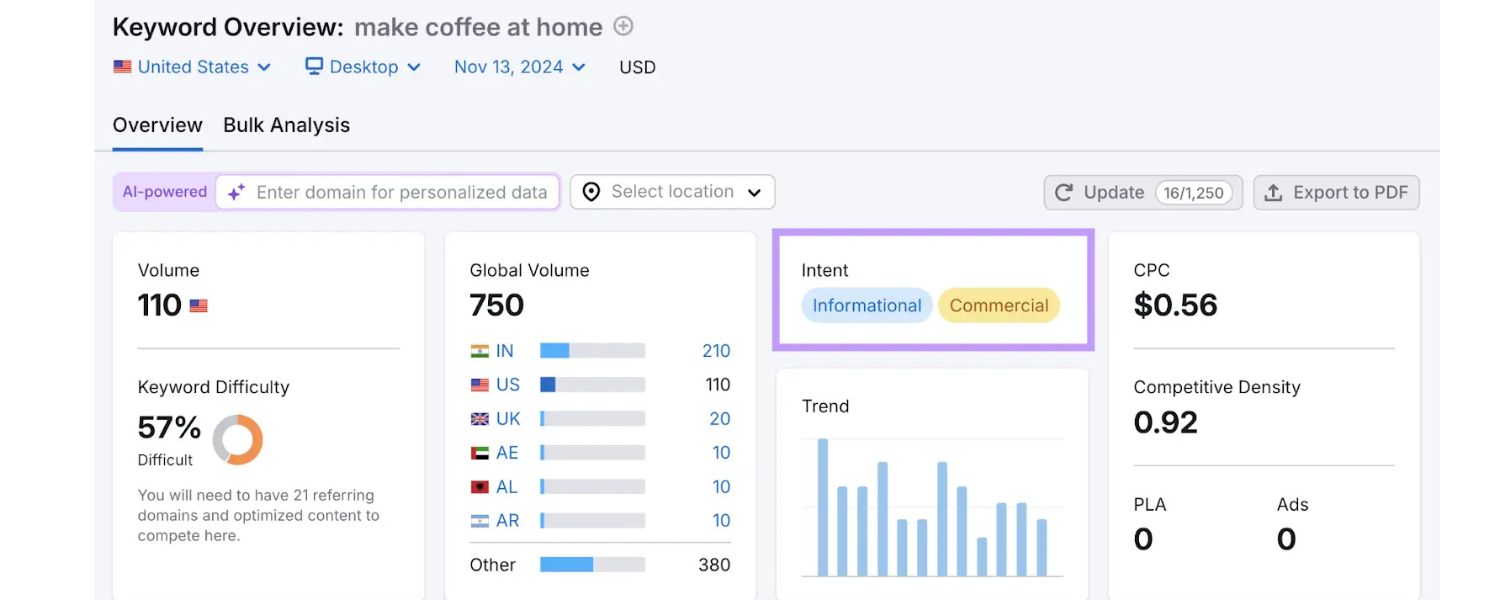
Most queries fall into one of a few categories: Informational (seeking knowledge or how-tos), Navigational (seeking a specific site/page), Transactional (looking to buy something), or Commercial Investigation (researching products or services).
Figure out which category your target keyword fits. For example, a search for “content optimization tools” is likely commercial (researching tools), whereas “what is content optimization” is informational. Knowing this guides the angle and format of your content.
B. Google Your Keyword and Study the Top Results

The simplest way to gauge intent is to search your target term on Google and analyze page one. See what types of content are ranking.
Are they blog posts, product pages, videos, or something else? What questions are they answering? The top results reveal what Google believes most users want.
For instance, if all the top results for “content optimization” are how-to guides and checklists, then an in-depth guide (like this one) is the right approach. If they were all e-commerce pages, a blog post might not cut it.
Use the top-ranking pages as a proxy for search intent. Ahrefs suggests looking at the “3 Cs of search intent”: Content type (blog post vs. product page, etc.), Content format (listicle, tutorial, review, etc.), and Content angle (the unique selling point or focus those pages have).
Try to match the common intent pattern you observe, while still making your content unique.
C. Deliver What the User Is Looking For
Once you understand the intent, make sure your content directly addresses it. If people search “how to optimize website content,” they likely want a step-by-step tutorial, so structure your page as a clear how-to guide.
If they search a question like “content optimization vs SEO,” ensure you explicitly compare and define those terms. Users shouldn’t finish reading and feel the need to hit the Back button because their main question wasn’t answered.
That kind of pogo-sticking (quickly returning to search results) is a sign of poor intent match and can hurt your rankings. Always ask yourself: What problem is the searcher trying to solve? Then make solving that problem the centerpiece of your content.
D. Cover the Expected Subtopics

Often, meeting search intent means covering certain key subtopics. For example, someone searching “content optimization” might also expect to learn about tools or examples.
Look at headings in competitor articles or the “People also ask” questions on Google for your keyword. Make sure you address those common queries within your content.
This way, readers (and Google) see that you’ve provided a comprehensive answer that matches their intent.
In short, don’t try to force a square peg into a round hole. If your page’s purpose or format doesn’t align with what people want for that query, either adjust your content or target a different keyword.
By aligning content tightly with search intent, you send a strong quality signal to search engines, and you’ll delight readers by giving them exactly what they came for.
3. Cover Topics Comprehensively and Answer User Questions
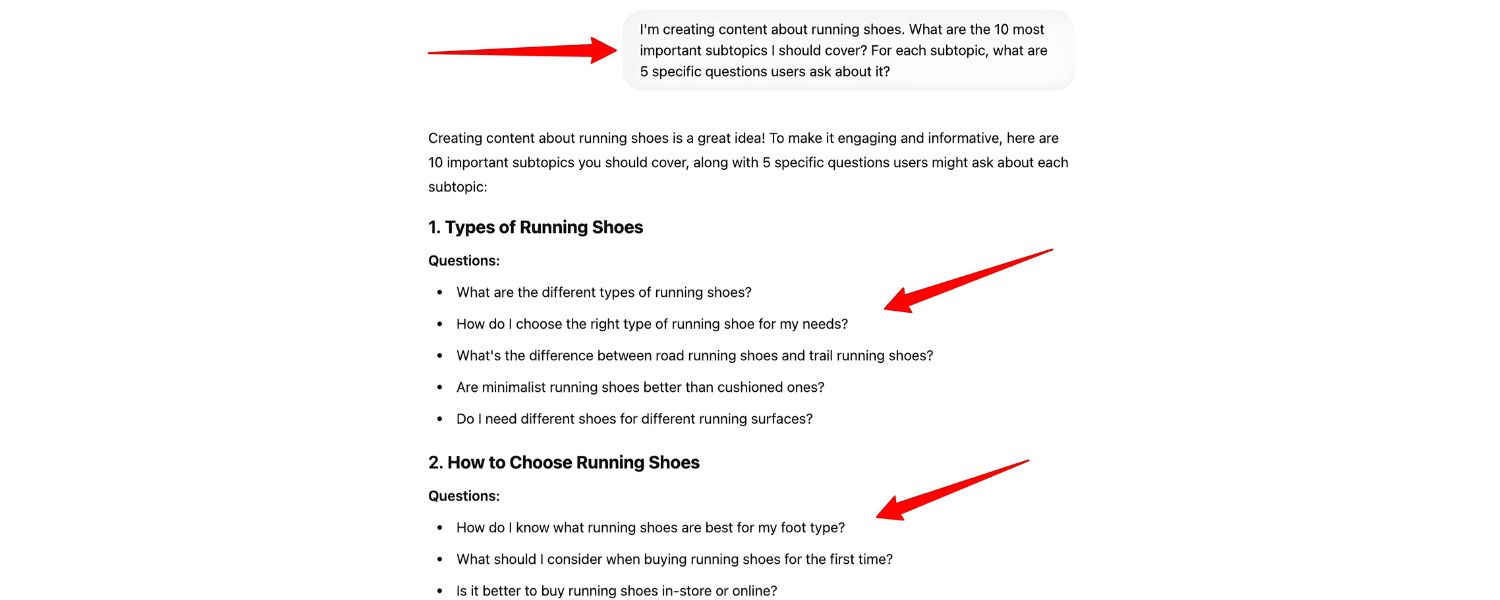
Today’s top-ranking content tends to be comprehensive. This doesn’t always mean extremely long, but it does mean thoroughly covering the topic and addressing the common questions users have.
Google’s algorithm favors content that demonstrates depth and expertise on the subject. In practice, that means your content should cover all the subtopics, related terms, and questions a reader might reasonably expect, given the main topic.
By doing so, you increase the chances that your page will satisfy users (and also show up for more long-tail keyword variations).
How to make your content more comprehensive:
A. Brainstorm Subtopics and Related Keywords

Once you have your primary topic, make a list of all the logical subtopics or angles a thorough article would include. For example, in a guide about content optimization, subtopics include keyword research, on-page SEO elements, content quality, user experience, tools, etc.
Use SEO tools or Google suggestions to find LSI keywords (related terms) and synonyms that are relevant. Tools like Dashword or Clearscope can automatically pull a list of related terms that frequently appear in top-ranking pages.
These are clues to what Google considers relevant to the topic. If those concepts make sense for your article, incorporate them.
Covering a broad range of related keywords (naturally) will help your content not only rank for the main term, but also signal that you’re providing rich information on the subject.
B. Answer Common Questions

Think about the questions your audience might ask related to the topic, and answer them in your content. Often, adding an FAQ section or dedicated subsections for these questions is beneficial.
You can find these questions by researching forums, using Google’s “People Also Ask” box, or tools like AnswerThePublic. For instance, questions for our topic might include “How do I optimize old content?”, “What is the difference between content optimization and SEO?”, or “Which tools can help with content optimization?”.
By explicitly answering these within your article, you make it more useful. Google even features Q&A content via featured snippets or the People Also Ask box, so including Q&A in your page can sometimes snag you extra visibility.
C. Conduct a Content Gap Analysis

If you’re updating an existing page, compare your content to competitors. What are they covering that you missed?
Tools like Ahrefs’ Content Gap or Competitive Analysis allow you to input competitor URLs and see keyword gaps – subtopics they rank for that you do not.
This can expose areas where your content might be lacking. As Ahrefs puts it, identify the “missing subtopics that searchers want to know” and find ways to incorporate that info. The more complete your content, the less reason a user has to look elsewhere.
D. Aim to Be the One-Stop Resource
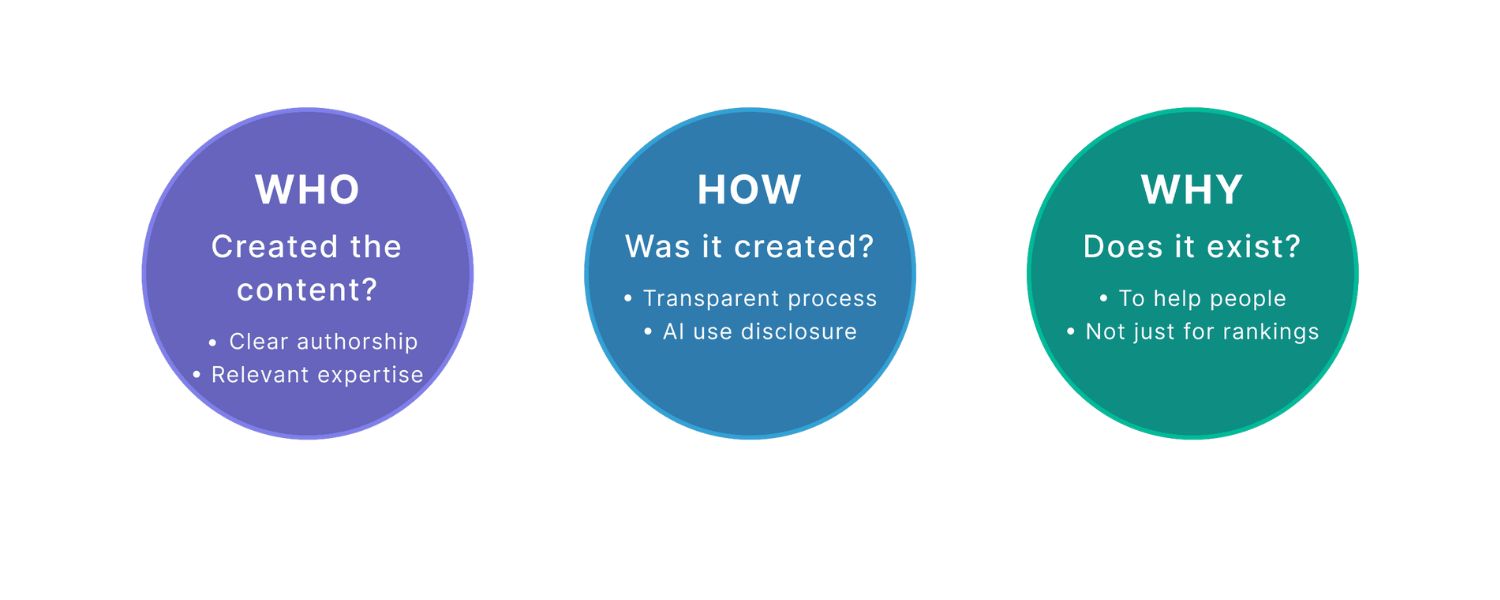
Your goal should be that when someone finishes reading your content, they have no need to return to Google for additional info. Achieve that, and not only will you satisfy readers, but you’ll also satisfy Google’s criteria for a high-quality, authoritative page.
In fact, Google’s quality raters are instructed to look for “expertise, authoritativeness, and trustworthiness” (E-E-A-T) in content, and comprehensive coverage is part of demonstrating expertise.
One of Semrush’s tips is to “include all important ideas [to give] readers a complete understanding of the topic and [reduce] the likelihood of readers going back to search engines for answers”. In other words, cover it all and keep them on your page!
By treating your content as an in-depth resource, you not only please users but also increase the topical relevance in the eyes of search algorithms.
Comprehensive content is more likely to earn backlinks, get shared, and rank for a myriad of related queries, all of which further boost its SEO performance.
Just be sure to maintain clarity and organization, breadth is good, but you still need to present information in a structured, digestible way (which leads to our next point).
4. Make Your Content Readable and Engaging

No matter how informative your content is, it won’t have an impact if visitors find it too hard to read or boring to get through. Most people scan web pages rather than reading every word.
Thus, optimizing content also means optimizing for readability, clarity, and engagement. In fact, readability has SEO implications: if your page is a wall of text and users bounce immediately, Google takes note.
On the flip side, content that’s easy to consume can keep people on the page longer, indirectly helping rankings. Here’s how to ensure your content passes the readability test:
A. Use Clear, Concise Language
Write in a conversational tone and avoid unnecessary jargon. Pretend you’re explaining the topic to a friend or a new team member. Shorter sentences and simpler words often work best for broader audiences.
(There’s even a metric called the Flesch Reading Ease score that evaluates how easy a text is to read – many top sites aim for a score that corresponds to about an 8th-grade reading level for general content.)
The bottom line: accessible language = wider reach. Complex writing might alienate readers or make them lose interest.
As one SEO specialist noted, texts that are easy to read hold the reader’s attention longer, leading to lower bounce rates – a positive signal for search ranking.
B. Break Up the Text Strategically
Avoid long blocks of text. Use short paragraphs (often 2-4 sentences each) and plenty of white space. This creates visual relief and makes scanning easier. Insert subheadings (H2, H3, etc.) to organize sections and signal what each part is about.
A user should be able to skim your subheads and get the gist of the article. Also consider using bullet points or numbered lists for steps, tips, or grouped ideas (just like we’re doing here). Lists are easier to digest than dense paragraphs.
If you have a lot of content, add a clickable table of contents at the top (as we did above) so users can jump to the sections they care about.
All these tactics can make your content “more enticing and easier to skim,” increasing the chance that visitors stick around.
C. Make It Engaging
Great content feels like a conversation. You can engage readers by asking rhetorical questions, adding brief anecdotes or examples, and using an active voice.
Where appropriate, include a bit of personality or humor to keep things interesting (while still being professional). Also, address the reader as “you” – this creates a connection and makes your content feel more personal and relevant to them.
The goal is to not just inform, but also to keep the reader hooked from introduction to conclusion. If you notice any section that feels dry or overly complex, revise it for clarity or break it into smaller parts.
D. Eliminate Fluff and Errors
Be ruthless about cutting unnecessary words or filler content that doesn’t add value. Every sentence should serve a purpose – either conveying information, answering a question, or guiding the reader.
Remove clichés and redundant phrases. Also, proofread for spelling and grammar errors; sloppy writing undermines credibility.
Consider using tools like Grammarly or Hemingway Editor to catch hard-to-read sentences and passive voice constructions. Clean, tight writing improves the overall quality and professionalism of your content.
E. Use Visual Breaks
(We’ll cover visuals more in the next tip, but it’s worth noting here.) Incorporate images, infographics, or even embedded videos to break up text.
Visual elements provide rest spots for the reader’s eyes and can illustrate points in ways text alone cannot.
Even something as simple as a relevant screenshot or diagram can enhance understanding and keep readers engaged. Just ensure any visuals are high-quality and relevant to what you’re discussing.
By making your content reader-friendly, you not only please your audience but also improve its SEO potential. Visitors will stay longer and interact more, which signals to search engines that your page is valuable.
Many of the top-ranking guides out there actively apply these readability tactics – for example, they use lots of headings, short paragraphs, and supportive visuals.
Follow the same approach: format and write your content for the web. Remember, an optimized piece isn’t just about keywords – it’s about delivering an excellent user experience through the writing itself.
5. Craft Compelling Title Tags and Meta Descriptions

Often, the first impression of your content happens off-page – specifically, on the Google search results page. There, users see your page’s title tag and meta description (the snippet text), and those largely determine whether they click through to your site or not.
Optimizing these elements is a crucial part of content optimization because they influence click-through rate (CTR) and can impact rankings (a higher CTR can be a positive signal).
Moreover, a well-crafted title and description ensure that the promise of your content is clear from the outset.
Here’s how to optimize your titles and metas:
A. Include Your Primary Keyword
Make sure your focus keyword appears in the title tag and, if possible, in the meta description. When searchers see the exact term they queried in your snippet, it reinforces that your page is relevant to their search.
Also, Google will bold matching keywords in the results, making your listing more eye-catching. In this post, for example, our title includes “Content Optimization” right at the beginning.
Aim to put the keyword toward the start of the title, as that may have a slightly stronger relevance signal.
B. Keep Titles and Descriptions Concise
There’s limited space in the SERPs. As a rule of thumb, titles should be around 50–60 characters (Google usually truncates after ~60 characters or 600px width) and meta descriptions around 120–160 characters (Google often shows ~155 characters).
If they’re too long, they’ll get cut off with ellipses. You want the important parts visible. In your title, try not to exceed 60 characters; in your meta, aim for one or two brief sentences.
It’s a good exercise to count characters – many SEO plugins or tools will show you a preview of how your snippet will appear in search results.
C. Make the Title Compelling and Descriptive
Your title tag should clearly communicate what the page is about and entice the reader. Including numbers, adjectives, or a unique angle can help. For example, compare a bland title like “Content Optimization Tips” to a more compelling one like “Content Optimization: 15 Strategies to Boost Your SEO Traffic”.
The latter is specific and promises value. If possible, highlight what’s unique about your content (e.g., “complete guide”, “checklist”, “in 2025″, “for beginners”, etc., depending on your audience).
However, avoid clickbait or misleading titles – the title should accurately reflect the content. Google’s algorithms can actually pick up on when a page title is sensational but the content doesn’t deliver (leading to short clicks). So aim for a balance: appealing but truthful.
D. Optimize the Meta Description for CTR
While the meta description isn’t a direct ranking factor, it can influence whether someone clicks on your result or the one above you.
Write a concise summary of what the user will get from your page, and consider including a call-to-action like “Learn how…”, “Find out…”, or “Get tips on…” to create interest.
Think of it as ad copy for your content. For example, a meta description for this article could be: “Learn how content optimization can boost your search rankings and conversions.
This guide covers keyword research, on-page SEO, content quality, and more – so you can get better results from every page.” – It’s informative and invites the click by promising solutions.
Also, when appropriate, highlight a unique benefit or statistic. Specifics can increase credibility (e.g., “…in 10 easy steps” or “…based on our 2025 case study results”).
E. Differentiate Your Snippet
Look at what the competing pages’ titles are and try to make yours stand out. If everyone else’s title is similar, think about adding a distinguishing element.
It could be the freshness (e.g., “…in 2025”), the format (“Guide”, “Checklist”, “Template”), or the scope (“Complete Guide”, “Top 10 Tips”).
Also, ensure your title and meta together convey a coherent message. Users should immediately grasp how your result is relevant to their query and why it’s worth clicking over others.
Optimizing title tags and meta descriptions may seem like a small detail, but it’s a vital part of SEO content optimization.
An improved CTR not only drives more traffic but can also indirectly boost your ranking (pages that get clicked more might be seen as more relevant).
Think of it this way: you’ve already done the hard work of creating great content – don’t let a poor title or snippet hold it back from getting read. As Google is essentially the “storefront” for your content, give it an inviting sign that draws people in.
6. Optimize Headings and On-Page Elements for SEO
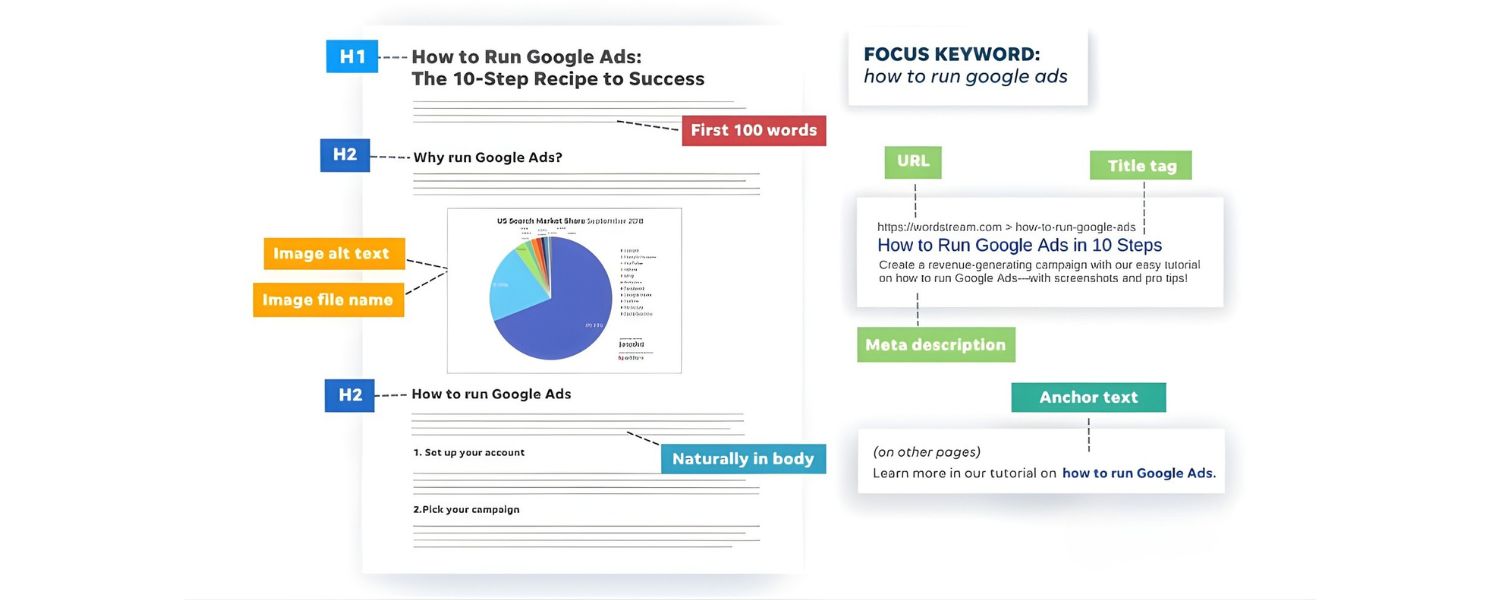
Beyond the title tag, there are several on-page elements that signal the structure and relevance of your content to search engines. Key among these are your headings (H1, H2, H3 tags, etc.) and other HTML elements like image alt tags.
Optimizing these elements makes your content more SEO-friendly and also more user-friendly. Here’s what to do:
A. Use Headings to Create a Logical Structure

Every page should have a single H1 tag, which is usually the title of the article (often the same as the title tag or very similar). Then use H2 tags for main sections, H3 for subsections under those, and so on.
This hierarchy is not just about design; it gives search engines a clue about the organization of your content and what each part is about. Many readers also use headings to navigate, especially if they’re scanning for specific info.
In this article, you can see how each major strategy is an H3 under the “15 Strategies” section (which is an H2). Ensure your headings are descriptive – they should preview what that section covers (good for readers and for SEO).
Whenever it makes sense, incorporate relevant keywords or synonyms in your headings. For example, if one of your sections is about improving page speed, a heading like “Improving Page Speed for Better UX” is clearer and more SEO-relevant than a vague “Faster Websites”. But again, maintain readability – headings should make sense at a glance.
B. Optimize Images with Alt Text and Descriptive Names
Images can help your SEO if optimized properly. Always use alt attributes on your tags to describe the image. The alt text not only helps visually impaired users (accessibility) but also gives search engines context about the image content.
If appropriate, include a keyword in the alt text but only if it naturally describes the image. For instance, an image showing a Google Analytics traffic chart could have alt text like “Organic traffic growth after content optimization”.
Also, name your image files wisely (e.g., content-optimization-checklist.png instead of IMG12345.png).
Alt text and filenames are minor ranking factors for image search and can slightly reinforce page relevance. Moreover, images can appear in Google’s image results, potentially driving more visitors.
C. Mind Your URL and Formatting
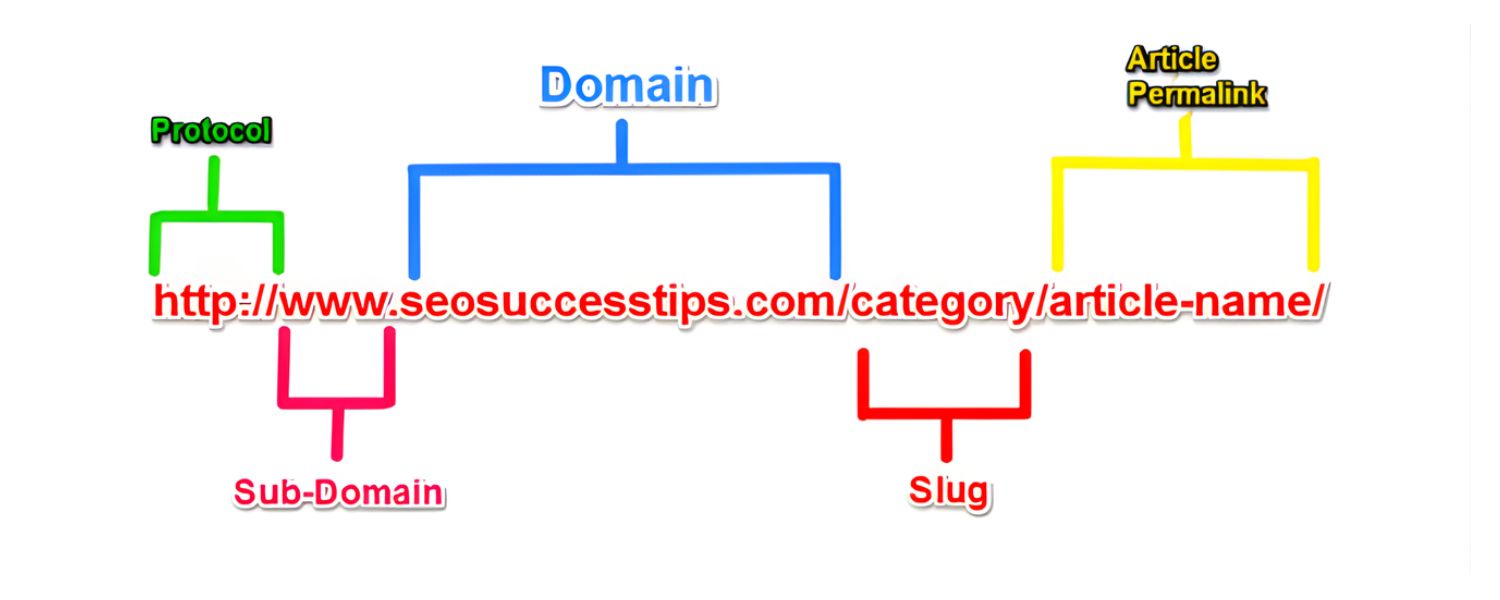
A quick on-page win is to have a clean, keyword-rich URL. If your page URL can be edited, make it concise and include the main topic (e.g., …/content-optimization-strategies instead of a long string of parameters or irrelevant words).
Once published, don’t change URLs casually (unless absolutely needed), as that can break links, but get it right initially if you can. Within your content, bold or italicize key points or terms sparingly to draw attention.
This can help readers pick out important concepts quickly. Some SEO folks believe bolding important phrases might slightly help search engines identify key topics, though it’s debatable – the main benefit is for user experience.
D. Internal Linking with Keyword-Rich Anchor Text
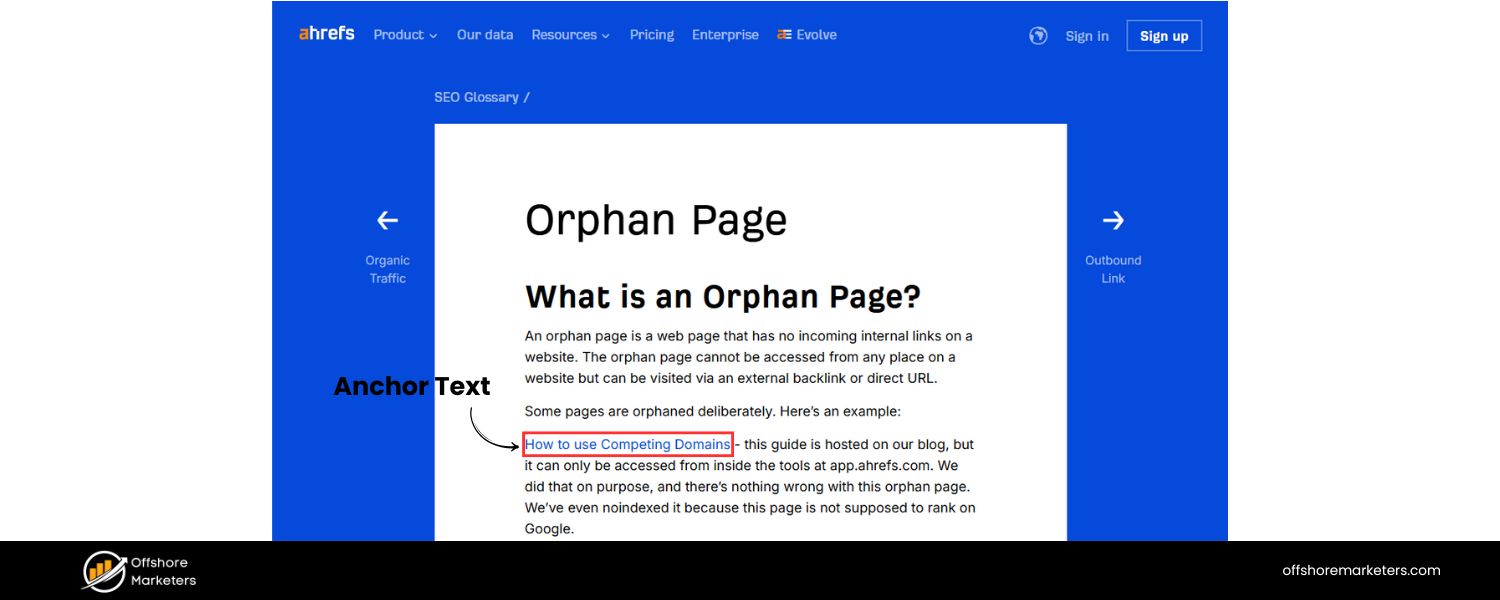
When you mention a concept that you have another article or page about, link to it (if it would be useful to the reader).
We’ll discuss internal links more in the next section, but keep in mind the anchor text you use – it’s the clickable text of the link. Using descriptive anchor text that includes relevant keywords can help Google understand what the linked page is about.
For example, linking the text “technical SEO audit guide” to an audit guide is better than linking “click here”. Just ensure the links are natural and genuinely helpful.
Optimizing these on-page elements tightens up the SEO of your content. Think of it as making sure every component of your page is pulling its weight in signaling relevance.
None of these by themselves (a heading tag here, an alt text there) will skyrocket you to #1, but combined, they contribute to a solid on-page SEO foundation.
Plus, they improve usability – clear headings and properly labeled images make for a better reader experience. It’s a win-win approach: better for search engines, better for users.
7. Add Internal Links (and Useful External Links)

Linking is a critical aspect of optimization that goes hand-in-hand with creating quality content. Two types of linking matter here: internal links (links between pages on your own website) and external links (links out to other sites). Both can enhance the value of your content when used appropriately.
Internal Linking: These are often overlooked, but internal links are incredibly important for SEO and user navigation.
An internal link from one of your pages to another can pass authority and help Google discover and index your content faster. It also signals what pages are related. Here’s how to optimize internal linking:
A. Link to Related Content on Your Site
As you create or update a piece of content, think of other pages on your site that tie in with it. Then, within your content, link to those pages at relevant moments.
For example, in this guide, if we mention a concept like “technical SEO” or “keyword research,” we might link to detailed posts we have on those topics (if they existed on our site).
This not only helps readers find more information (keeping them on your site longer), but it also distributes some SEO value to those linked pages.
It’s a bit like building a web of knowledge on your site – and search engines appreciate that structure. WordStream advises linking new content from older relevant articles and vice versa, effectively weaving each new article into your site’s link network.
B. Use Descriptive Anchor Text
The anchor text (the clickable text) of internal links should ideally include keywords or descriptive phrases related to the target page.
For example, instead of saying “learn more here,” you’d write something like “learn more in our SEO copywriting guide.”
This tells Google what the linked page is about, potentially improving its ranking for that term.
Avoid overly generic anchors or stuffing exact-match keywords unnaturally – keep it relevant and in flow with the sentence.
C. Don’t Overdo It
Quality over quantity. It’s generally a good practice to link to a few highly relevant pages rather than cluttering your content with dozens of links.
Too many links can be distracting or appear spammy. A rule of thumb might be anywhere from 2–5 internal links for a medium-length article, and perhaps more for a very long guide (like this one).
But always make sure they’re contextual and valuable to the reader. For instance, linking to “On-Page SEO Checklist” might make sense in a paragraph about meta tags, but not randomly in a paragraph about social media.
D. External Linking
Many content creators worry that linking out will send readers away, but when done right, external links can actually increase your credibility and user experience. Here’s why and how to use them:
E. Cite Reputable Sources
When you mention a statistic, a study, a definition, or anything that would benefit from backing evidence, consider linking to the source. For example, if we say “backlinks are one of Google’s top 3 ranking factors,” we could link to a credible source or study that confirms that claim.
By linking to authoritative websites (like official Google documentation, industry research, or well-known blogs), you show readers that you’ve done your homework and you’re providing them access to more information if they want it.
This builds trust. Google’s John Mueller has indicated that linking out to relevant sources is perfectly fine and can be seen as a natural part of content (plus, it aligns with E-A-T by providing proof and references).
F. Help the Reader Learn More
Sometimes an external link can help readers who might not be familiar with a term or concept.
For instance, linking the first mention of E-E-A-T to a quick explanation (on a trusted site) can be helpful for the uninitiated.
Think of external links as you curating further reading – you’re saying, “If you want to dive deeper or verify this info, here’s where to go.” Users appreciate that openness.
G. Open External Links in New Tabs
From a user experience standpoint, it’s often wise (though not mandatory) to have external links open in a new browser tab.
That way, your site stays open in the original tab, and you’re not actually sending people away, you’re just giving them an additional resource.
Many content management systems allow you to set target=”_blank” for links, which does this.
H. Avoid Linking to Low-Quality Sites
Just as you want high-quality sites linking to you, be mindful of what you link out to. Generally stick to authoritative, respected sources.
If you link to spammy or irrelevant sites, it could reflect poorly (on user trust and potentially search evaluations of your page quality).
In summary, smart linking makes your content more useful and can give you an SEO boost. Internal links can improve your site’s crawlability and share ranking strength among pages, while external links can enhance credibility and context.
Both types of links contribute to a richer experience for the reader, which is the ultimate goal of optimization.
Think of your content as part of a broader conversation on the web: link out to others where appropriate, and keep your own content interconnected.
8. Use Visuals to Enrich Your Content (and Optimize Them)

They say “a picture is worth a thousand words,” and in content optimization, a well-placed visual can certainly elevate your content.
Images, diagrams, charts, and videos make your content more engaging and digestible by breaking up text and providing alternate ways to convey information.
Moreover, visuals can improve shareability (think infographics on social media) and even help with SEO (via image search and enhancing user experience).
Here’s how to make the most of visuals in content:
A. Include Relevant Images or Graphics
Try to add images that illustrate key points in your article. This could be a screenshot (e.g., showing a tool or an example), a chart or graph (e.g., showing results of an optimization effort), or even thematic images that make the content more inviting.
For example, earlier we talked about a Semrush case where updating content led to traffic spikes – showing a graph of that traffic trend would reinforce the point visually.
If you have data, consider creating a simple chart. If you’re explaining a process, maybe include a diagram or flowchart. Visuals help readers see what you mean and can make complex info easier to grasp.
B. Optimize Image File Size and Format
Large images can slow down your page, hurting the user experience and your SEO (page speed is a ranking factor). Compress images before uploading – there are many tools that reduce file size without visible quality loss.
Aim to keep images as small as possible (while still clear); for typical blog post images, ~100 KB or less is a good target, if achievable. Use modern formats like WebP when possible, or optimized JPEG/PNG.
Also, specify image dimensions in the HTML if you can – this helps browsers load pages more smoothly. A fast site keeps users happy and is favored by Google’s Core Web Vitals metrics.
C. Use Descriptive Alt Text
As mentioned in the on-page optimization section, always fill in the alt text for each image. Make it descriptive of what the image shows.
For instance, if you have an image of a content score dashboard from an SEO tool, alt text like “Content optimization tool dashboard showing content score and suggestions” is both user-friendly and contains relevant keywords (in a natural way).
Good alt text ensures that even if the image doesn’t load, or for users using screen readers, the content isn’t lost. Additionally, Google uses alt text to understand images; this can help your images appear in image search results for relevant queries.
D. Embed Videos When Appropriate
If a video can convey something better than text or images, consider embedding one. For example, a short tutorial video on using a content editor tool, or an explainer video about SEO.
Videos can significantly increase time on page (people might watch a few minutes of video, which is great for engagement metrics). If you have your own videos (like on YouTube or Vimeo), embedding them is a great way to get more mileage out of them.
Even third-party videos (e.g., a relevant YouTube video from an authoritative source) can add value to your content.
Just be sure any video you embed is high-quality and truly relevant. Also, don’t auto-play videos (users typically hate that, and it can slow down page load).
E. Don’t Overload on Visuals
While visuals are great, balance is key. Too many images or heavy media files can bloat your page. Also, if a page has tons of images, it could impact load time despite compression.
Use visuals to enhance important points, not for the sake of having them. Each image or video should serve a clear purpose.
And if you do use many visuals, consider lazy-loading them (where images load as the user scrolls, rather than all at once), many modern website setups have this feature.
F. Create Infographics or Original Graphics
Original visuals (like custom infographics) can be a content optimization tactic on their own. A useful infographic might earn backlinks from others who share it on their sites, thus boosting your SEO indirectly.
It also gives people something to share on social media (visual content tends to get shared more).
If you have unique data or tips, presenting them as an infographic or a series of graphics can make your content stand out. Just remember to include text (or alt text) for any info conveyed in images, for accessibility and SEO.
By incorporating visuals thoughtfully, you cater to visual learners and add an extra layer of engagement to your content.
In an era of short attention spans, breaking up a 2,000-word article with some images and media can mean the difference between a reader staying or bouncing.
Plus, visually-rich content often just looks more appealing, which helps with perceived value. The key is to optimize those visuals so they add to the experience without slowing things down.
When done right, images and videos can be powerful allies in content optimization – making your piece more compelling, shareable, and user-friendly.
9. Demonstrate E-E-A-T: Experience, Expertise, Authoritativeness, Trustworthiness

Google’s search quality guidelines emphasize a concept called E-E-A-T (previously E-A-T, now with an extra E): Experience, Expertise, Authoritativeness, and Trustworthiness.
While not a direct ranking factor you can optimize for with a single tweak, E-E-A-T is a framework that Google uses to assess the overall quality of content and the creator/website behind it.
High E-E-A-T content is more likely to rank well, especially for topics that require accuracy (think health, finance, or advice – so-called “Your Money or Your Life” topics). To optimize your content in line with E-E-A-T principles, consider the following:
A. Showcase Real Experience
The first “E” (added more recently) stands for Experience. This means content that reflects first-hand experience with the topic. For example, a blog post about content optimization might mention the author’s personal results or tests they’ve run, rather than just theory.
If you have real use-cases, examples from your work, or personal insights, include them. It demonstrates that you (or the author) have actually done what you’re writing about.
Even something simple like, “In my experience of optimizing over 50 blog posts, I found that updating old articles increased organic traffic by 30% on average” – and maybe backing that with a brief case study or data, can set your content apart as experienced-based, not just rehashed tips.
B. Establish Expertise
Expertise means the content creator has the necessary knowledge or skill for the topic. One way to establish this is through a brief author bio (if appropriate for the format).
For instance, an author bio might state, “Jane Doe is an SEO strategist with 10 years of experience optimizing content for Fortune 500 companies.” That immediately signals expertise to readers (and Google’s algorithms can parse author names and possibly their reputation).
Within the content, writing with clarity and depth also showcases expertise. Use correct terminology (but explain it for novices).
Cite reliable sources and data, which a knowledgeable person would know about. If you have credentials (like certifications, degrees, awards), it doesn’t hurt to mention them either on the page or on your bio page.
C. Build Authoritativeness
Authority goes a step further, it’s not just having knowledge, but being recognized by others as a go-to source. This is something built over time (often via backlinks, mentions, and reputation).
However, in your content you can boost the sense of authority by linking to authoritative references, collaborating or quoting industry experts, and ensuring all information is accurate and up-to-date.
If your site has earned trust signals (like other experts guest-posting on it, or your content being cited elsewhere), highlight that.
For example, “As mentioned in Forbes…” or “We were cited in Google’s own starter guide,” etc., if applicable, can show readers you’re well-regarded.
Also, comprehensive content (as we’ve covered) lends authority because it shows you understand the breadth of the topic.
D. Inspire Trust
Trustworthiness is crucial, especially if your content asks readers to take some action (like sign up for something or rely on advice).
To optimize for trust: be transparent and honest in your writing. Avoid overly salesy language that can reduce trust. If you use data, cite the source so readers trust the numbers.
Ensure your site has a professional look (design matters for first impressions of trust). Also, having up-to-date content is part of trust – nobody trusts an SEO article from 2015 to be fully relevant today, for instance.
Small things like correct grammar and spelling also play a part; errors can make a page seem less trustworthy or less cared-for.
If applicable, secure your site (HTTPS is a must these days, Google even uses it as a ranking signal).
Another trust factor: user reviews or testimonials (if relevant to your content) can show that others trust your advice or product.
E. Use External Validation
Incorporate elements that increase credibility. This could be statistics from credible sources, case studies with real results, testimonials or quotes from experts, and so on.
Even linking to the official Google guidelines or industry research (as we’ve done via citations) can help show that you’re not just making claims in a vacuum – you’re supporting them with evidence.
In the eyes of readers, citing sources and providing proof increases trust in your content.
F. Maintain a Professional Tone and Accuracy
Write with a tone appropriate to your audience and topic. For a professional topic like content optimization, a friendly yet knowledgeable tone works well.
Double-check facts, and if you mention specific Google updates or algorithms, be sure to get the details right.
Inaccuracies can hurt your credibility. If you’re unsure of something, either research it or omit it rather than risking incorrect info.
By weaving E-E-A-T principles into your content optimization process, you aim to create content that both humans and search quality algorithms will value highly.
Remember, Google wants to rank pages that users can trust and find authoritative – especially when the content can impact someone’s success, money, or well-being.
Even if your topic isn’t life-or-death, following these guidelines will generally improve the quality and impression of your content.
It might not have a direct, immediate ranking boost like tweaking a title tag, but over time content that demonstrates E-E-A-T is more likely to earn backlinks, positive user engagement, and strong rankings.
Treat this as a mindset: be factual, be helpful, and be transparent – that’s optimizing for credibility.
10. Improve Page Speed and Mobile User Experience

Content optimization isn’t solely about the words and media on the page – it’s also about how the content is delivered to users.
A page that is slow to load or hard to use on mobile devices will frustrate visitors, causing them to leave before benefiting from your great content.
This is why optimizing the technical performance and user experience (UX) of your content page is essential.
Two big aspects here are page speed and mobile-friendliness (often grouped under “Core Web Vitals” and page experience signals):
Enhance Page Speed
Users expect pages to load quickly, ideally within a couple of seconds. Google’s research shows that as page load time increases, the probability of a user bouncing (leaving immediately) increases dramatically.
Moreover, Google has made page speed a ranking factor (especially for mobile searches). Use tools like Google PageSpeed Insights or Lighthouse to analyze your page’s performance.
These tools will highlight issues like large images, render-blocking scripts, or server response time problems. Some quick wins for speed:
A. Compress and Optimize Images: As discussed, keep image file sizes down and use the right formats.
B. Enable Browser Caching: Ensure your server has caching enabled so repeat visitors load the page faster.
C. Minify CSS/JS: Remove unnecessary characters/spaces in code and combine files when possible to reduce requests.
D. Use a Content Delivery Network (CDN): This can speed up global access to your content by serving it from a location nearer to the user.
E. Eliminate Slow Plugins or Scripts: If you have third-party scripts (analytics, ads, etc.), see if any are significantly slowing the page. Remove or defer them if possible.
F. The technical details
This is handled by a developer, but as a content optimizer, being aware of them is key. Even a well-written, well-optimized article will suffer if users abandon it due to slowness.
Google’s Core Web Vitals specifically measure loading performance (Largest Contentful Paint), interactivity (First Input Delay), and visual stability (Cumulative Layout Shift), all technical factors that tie into user experience. Strive to meet the recommended thresholds for these metrics (e.g., LCP under 2.5s, etc.).
Ensure Mobile-Friendliness
More than half of all web traffic is on mobile devices. Google uses mobile-first indexing, meaning it primarily evaluates the mobile version of your site for ranking.
So your content must be responsive (adjusting to different screen sizes) and easy to read on a phone or tablet. Test your pages with Google’s Mobile-Friendly Test or simply on your own phone.
Check that:
A. Text is readable without zooming (use adequate font sizes).
B. Content fits the screen (no horizontal scrolling).
C. Buttons and links are easily tappable (not too small or crowded).
D. The layout doesn’t break on smaller screens.
E. Any pop-ups or interstitials are minimal and easy to close on mobile (Google may penalize sites with intrusive interstitials that cover content on mobile).
F. If your site uses a modern CMS or theme, it’s likely already responsive, but custom designs need thorough checking. Even within your content, consider if very large tables or wide images might cause issues on mobile, and find responsive solutions for them.
G. Provide a Good Overall UX: Beyond speed and mobile, think about general user experience elements:
H. Connection Security: Make sure your site is HTTPS. Users (and browsers) may flag non-HTTPS sites as “Not secure,” which can hurt trust. Plus, HTTPS is a lightweight ranking factor.
I. Navigation and Layout: Keep your page layout clean. Important content (like the main article text) should load prominently, without users having to scroll past a huge banner or tons of ads. If your bounce rate is high, consider if the page UX is part of the issue.
J. Ads and Pop-Ups: If you monetize with ads, be cautious. Too many ads, especially if they load slowly or push content down, will drive users away. Google’s page layout algorithm can reduce rankings for pages with too much ad content at the top. Similarly, avoid aggressive pop-ups or dialogs (like newsletter sign-ups) that cover content right away – these are especially annoying on mobile.
K. Internal Search or Table of Contents: For longer content, providing a quick way for users to find what they need is good UX. A table of contents (as we included) or even a search bar on your site can help users navigate easily. Happy users are more likely to stay, reducing bounce rates and increasing engagement.
Google has explicitly stated that page experience signals (which include mobile-friendliness, HTTPS, lack of intrusive interstitials, and Core Web Vitals metrics) are part of their ranking considerations.
While content relevance still reigns supreme, these factors can be a tiebreaker in competitive rankings. More importantly, optimizing them ensures all the hard work you put into the content isn’t wasted due to avoidable technical issues.
In summary, pay attention to how your content is delivered. A fast, smooth, mobile-friendly experience is part of optimizing content in a holistic sense.
If this isn’t your area of expertise, collaborate with web developers or use tools that guide you on improvements.
By providing a good UX, you not only please Google’s crawlers but also build a positive relationship with your audience, they’re more likely to return or convert if their experience is seamless.
11. Update and Refresh Your Content Regularly

Content optimization is not a one-and-done task. The digital landscape and search engine algorithms are continually evolving, and so are users’ interests.
To maintain and improve your content’s performance, you should practice ongoing optimization, which includes updating, expanding, and refreshing your content over time.
Why and how to refresh content:
A. Content Decay is Real
Over time, even high-ranking content can start to slip in the rankings. Competitors publish newer articles, information becomes outdated, or search engines shift what they prioritize. If you let a piece of content stagnate, you may notice its traffic drop gradually.
One way to combat this is through content refreshes. By adding new information, updating statistics to the latest year, and generally ensuring the content is current, you can signal to search engines that the page is fresh and relevant. This can boost your rankings or recover ones that have dipped.
In the Semrush example mentioned earlier, they updated an article in 2023 and again in 2024, which helped it continue drawing thousands of visitors monthly. That’s the power of a refresh.
B. Regularly Audit Your Existing Content
Perform a content audit perhaps yearly (or more frequently for very active sites). List out your key pieces of content and review their performance (traffic, rankings, engagement) and their current state. Identify which ones are due for an update.
Maybe your “Ultimate Guide” from 2019 could use a 2025 makeover with the latest tips. Or maybe some advice you gave is now obsolete due to a Google algorithm update or new industry tools.
By auditing, you also find content that’s underperforming – those might need an overhaul or consolidation (more on pruning in a moment).
Conductor suggests creating a content inventory spreadsheet noting each page’s performance, target keywords, and whether it needs work.
This organized approach ensures no important content piece is left to wither.
- Add Value when You Update: When refreshing, don’t just change a few words. Look for ways to seriously add value. This could mean:
- Adding a new section to cover a trend or answer a new question readers have in the current year.
- Replacing outdated examples with timely ones.
- Updating old screenshots (for instance, interfaces of tools change over time).
- Improving the depth of content if you originally skimmed over certain subtopics.
- Including new internal links to newer content you’ve published since the article first went live.
- If the topic is evergreen but the content was thin, consider merging information from multiple posts (if you have overlapping content) to make one stronger resource.
- Essentially, treat an update like you’re making the content the best answer today, not the best answer as of a few years ago.
C. Republish or Indicate Freshness
Some websites republish content with a current date after a significant update (and may add a note like “Updated on July 2025”).
Others simply add an “Last updated” date on the page. Either approach can communicate to both readers and search engines that the content is maintained.
There’s evidence that having a recent date (even just the current year mentioned in the content) can improve click-through rate from Google, as users often prefer up-to-date information.
D. Prune Low-Value Content
Sometimes optimization means removing what isn’t working. Content pruning involves deleting or consolidating pages that offer little value or have decayed beyond repair.
For example, if you have ten short blog posts on similar subtopics, none of which rank well, you might combine them into a single comprehensive post and redirect the old URLs to the new one.
Or if you have outdated announcements or trivial posts that get no traffic, it might be better to remove them (especially if your site has hundreds of such low-value pages, they can dilute the overall quality signal of your site).
Pruning can improve your site’s overall SEO health and direct more focus to your best content.
E. Monitor Performance and Iterate
Use analytics and Google Search Console to watch how your content does over time. If you update a page, check a few weeks or months later: did the traffic improve?
Are users spending more time on it? Did the bounce rate change? Use this data to guide further tweaks. Optimization is an ongoing cycle: Optimize → Measure → Optimize again.
As WordStream aptly put it, “Optimization is a never-ending race… stay on top of your content and revisit articles when necessary.”.
By regularly updating your content, you ensure it continues to offer the best information on the topic and can compete with newer content across the web.
This not only helps maintain rankings but often improves them – search engines notice when a previously static page suddenly gains fresh life and often reward it.
Plus, your regular readers or subscribers will appreciate that your content keeps pace with the times, which boosts your authority and trustworthiness.
In summary: don’t let your great content go stale. Schedule time for content maintenance as part of your strategy.
It can be as impactful as creating new content, if not more so, because you’re capitalizing on the existing SEO equity of those pages.
Optimize, analyze results, and then optimize again – that’s the cycle for lasting content success.
12. Incorporate Clear Calls-to-Action (CTAs) to Drive Conversions

Getting lots of traffic to your content is fantastic – but for most businesses or bloggers, traffic alone isn’t the end goal.
You likely want readers to take some next step: join your email list, request a demo, share the content, or buy a product.
That’s where calls-to-action (CTAs) come in. Optimizing your content isn’t just about SEO and readability; it’s also about making sure the content serves your broader goals, which usually include conversion actions.
Here’s how to effectively use CTAs in your content:
A. Decide on the Primary Goal of the Content
Before you add CTAs, be clear on what you want to achieve. Is this blog post meant to generate leads?
Then a CTA to download a free ebook or sign up for a webinar could be appropriate. Is the content more about building brand awareness? Then maybe the CTA is to follow on social media or read another article.
Sometimes the CTA can simply be to encourage engagement (e.g., asking readers to leave a comment or share the post). Having a primary goal will help you craft a focused CTA.
B. Place CTAs Strategically
CTAs can be placed at the end of your content (a common spot, as readers who enjoyed the content are then invited to take next steps), but don’t be afraid to also integrate them mid-content when relevant.
For example, if you mention a challenge that your product solves, you could incorporate a subtle CTA like, “This is where a tool like [Your Product] can help – [link]try it free for 14 days.” Make sure CTAs stand out visually (through buttons, colored boxes, or bold text) so they catch attention.
However, they should still flow with the content; you don’t want it to feel jarring or overly salesy in the middle of an educational article.
C. Use Compelling, Action-Oriented Language
A CTA should invite and encourage action. Use verbs and speak to the reader’s benefit. Instead of a bland “Submit” on a button, say “Get My Free Audit” or “Start Your Free Trial”, for instance.
In text CTAs, instead of “You can sign up for our newsletter,” try “Sign up for our newsletter to get more tips like these.”
The latter tells them why they should do it. Also, create a sense of urgency or importance if appropriate (e.g., “Get started now,” or “Don’t miss out on…”).
D. Keep CTAs Relevant to the Content
The CTA should logically relate to what the reader just read. If someone just consumed a detailed guide on content optimization, a relevant CTA could be “Download our Content Optimization Checklist (PDF) to implement these tips” or “Watch our webinar on SEO content strategies for more insights.”
An irrelevant CTA (like promoting an unrelated product) can confuse or even annoy readers, reducing the chances they’ll click. The more your CTA feels like a natural extension of the content’s value, the better it will perform.
E. Don’t Overwhelm with Choices
While you can have multiple CTAs (maybe a primary one and a secondary one), avoid giving too many different options.
If at the end of a post you ask readers to do five things – share on social, comment, subscribe, download, buy – they might do none due to decision paralysis.
Determine the priority action and highlight that prominently. Secondary actions can be more low-key (for example, social share buttons may always be present, but they’re not as in-your-face as a “Download now” banner).
F. A/B Test Your CTAs
If conversion is a critical goal, consider testing different CTA text, colors, or placements to see what resonates with your audience.
Maybe “Get Your Free Template” works better than “Download Now”, or a red button outperforms a blue one. Over time, these optimizations can significantly increase your conversion rate.
G. Provide a Next Step Even for Non-Commercial Content
Not every piece is about selling. But you can still keep readers engaged by suggesting what they might like to consume next.
For instance, at the end of an informational blog post, a simple CTA could be “If you enjoyed this guide, check out our SEO Content Strategy 101 for more best practices.” Internally linking to another piece of content like this is both a CTA (to keep them on site) and good for SEO (as discussed in internal linking). It prevents a dead-end feeling at the article’s close.
Remember, it’s a pity to leave readers hanging after they read a post – especially when it provided massive value. A well-crafted CTA ensures that the positive momentum you built with your content carries forward into a concrete action.
It’s beneficial for your audience (they get more help or resources) and beneficial for you (you further your relationship or business goals). Essentially, CTAs make your content work harder for you.
When you review your content for optimization, always check: “What do I want a reader to do after reading this, and did I make that clear?”
If not, add or refine a call-to-action. Even a small tweak – like changing “Contact us for more info.” to a button that says “Yes, I want more traffic – Contact Us” – can elevate the response you get.
13. Leverage Content Optimization Tools and Analytics

Optimizing content can be a complex, detail-oriented process. The good news is, you don’t have to do it all manually or by intuition alone.
There’s a growing arsenal of content optimization tools powered by data and even AI that can help streamline your efforts.
Additionally, using analytics is crucial to measure what’s working and what isn’t, so you can refine your strategy.
Here’s how to make tools and data work for you:
A. Use SEO Content Optimization Software
Tools like Frase, MarketMuse, Clearscope, Surfer SEO, Dashword, and NeuronWriter are explicitly designed to assist with content optimization.
These tools can analyze the top results for your target keyword and give you insights such as:
B. Relevant Terms to Include
They’ll list common words and phrases that high-ranking content contains (essentially LSI keywords or semantically related terms).
For example, an analysis for “content optimisation” might suggest terms like “on-page SEO,” “keyword research,” “rankings,” “conversion,” etc., with an indication of how frequently to mention them.
Dashword’s content editor, for instance, shows a list of relevant terms and how often you’ve used each, helping you cover a topic more thoroughly.
- Questions to Answer: Some tools show popular questions from “People also ask” or forums that relate to your keyword. This can ensure you address those in your content.
- Content Score or Grade: Many provide an overall content “score” comparing your draft to the benchmark of competitors. While you shouldn’t chase a score blindly, it’s a helpful gauge of content depth and relevancy.
- Suggestions for Improvement: They might highlight if your content is missing a subtopic others cover, or if your readability is lower than average, etc.
- These tools can save time (no need to comb through 20 competitor articles manually) and give you confidence that you’re not overlooking something important. They can be convenient when writing about a topic that’s new to you, as they surface key points others have deemed necessary.
- Keyword Research and Tracking Tools: Beyond content-specific tools, general SEO tools like Ahrefs, Semrush, Moz, or Google Keyword Planner help you at various stages:
- In the beginning, use them to find keywords, assess their difficulty, and see what competitors rank for (we covered this in Strategy #1).
- After publishing, use them to track your rankings for target keywords. This way, you know if your optimisation efforts are paying off with upward movement.
- They can also identify featured snippet opportunities or other SERP features – e.g., Semrush might tell you if a keyword triggers a featured snippet and whether your page is close to qualifying. You can then adjust content to target that snippet better (concise definitions, bullet lists, etc., as needed).
- Use site audit features to catch technical issues that might affect content (broken links, missing alt tags, slow pages, etc.).
C. Analytics for User Behaviour
Google Analytics (GA) and Google Search Console are two free, invaluable tools for monitoring your content’s performance:
- GA will show metrics like pageviews, average time on page, bounce rate, and conversion events (if you have those set up) for each content piece. For example, if a particular post has a very high bounce rate and low time on page, that’s a signal that something might be off (maybe the content didn’t match what users expected, or it’s not engaging enough). On the other hand, a post with lots of time on page and scroll depth (you can measure scroll in GA with events) indicates readers are engaged.
- Search Console provides impressions, clicks, click-through rate (CTR), and average position for your pages in Google search. You can see which queries lead to your content and how you rank for them. This is extremely useful for optimisation: if Search Console shows your article is getting impressions for a keyword you didn’t explicitly target, consider integrating that keyword more into the content (assuming it’s relevant) to capture more traffic. Also, if your CTR is low for a query where you rank well, that’s a prompt to tweak your title/meta (as discussed) to be more appealing.
- Search Console also flags if there are any mobile usability issues or Core Web Vitals problems for your pages – those are gold for our Strategy #10 on page experience.
D. Iterate Based on Data
The mantra here is measure and adjust. Perhaps you optimised an old post and, after a month, see a moderate ranking boost but not yet page 1.
The data might show you that, say, you’re ranking page 2 for a related term that you only briefly mention.
That could inspire you to add a dedicated section for that subtopic, potentially pushing you further up.
Alternatively, analytics might reveal users drop off at a certain section of your content (if you use tools like Hotjar or GA’s scroll stats). That might mean that section is boring or irrelevant – a clue to rewrite or move it.
E. Automation and AI Helpers
Besides content analysis, consider using AI writing assistants (with caution) for specific tasks. Tools like GPT-4 (the technology behind ChatGPT) can help brainstorm titles, meta descriptions, or even generate a first draft for section,s which you can then refine.
They can also assist in simplifying text (e.g., “rewrite this paragraph at a 6th-grade reading level”). However, always review and edit AI-generated content for accuracy and tone, as AI can sometimes produce incorrect or generic info.
Google has stated it’s not against AI-generated content per se, but it insists on helpful, quality content, so human oversight is key.
E. Stay Updated on SEO Trends
Use tools to keep abreast of changes – for example, Google Alerts or subscribing to SEO newsletters can keep you informed if Google rolls out an algorithm update that might affect content (like the “Helpful Content Update”).
Some optimisation might shift with time (e.g., the rise of voice search changed how some people incorporate question keywords).
In leveraging tools and analytics, you transform content optimisation from guesswork into a more data-driven process. These tools are like having an SEO assistant by your side, highlighting opportunities and issues.
They won’t replace your human creativity and judgment, you still need to decide how to implement suggestions and ensure the content makes sense for readers – but they can certainly amplify your efforts.
As a final note, every piece of content and every audience is different. What works for one site might not for another.
So use tools to gather intelligence, but also use your analysis to understand your unique situation.
By combining the power of technology with your expertise, you’ll optimise smarter and achieve better results in the search rankings and beyond.
14. Promote Your Content and Earn Backlinks

You’ve optimised your content thoroughly on the page, but to truly dominate search rankings, off-page factors come into play as well. One of the most significant off-page factors is the acquisition of backlinks (links from other websites to your content).
While strictly speaking, promoting content and link building could be considered separate from “content optimisation,” they are so intertwined with content success that they warrant inclusion in our strategy list.
After all, even the best-optimised content may not rank if no one ever sees or links to it.
Here’s how to give your optimised content the push it needs:
A. Share Your Content via the Right Channels
As soon as you publish or update a piece, have a promotion plan.
Please share it on your social media platforms (Twitter, LinkedIn, Facebook, etc., depending on where your audience hangs out). If you have an email newsletter, feature it there – your subscribers are often your most engaged readers and might further share it.
Please post it in relevant online communities or forums (for example, a Reddit community or a niche Slack/Discord group) where the content would be genuinely helpful.
The key is to reach people who would find the content valuable, not just a generic blast. Even a well-placed mention on a community can drive initial traffic, some of whom might be bloggers or webmasters who could link to your article.
B. Outreach for Backlinks
If your content is truly high-quality and unique (say you have original research, a comprehensive guide, or a helpful infographic), consider doing some outreach.
Make a list of websites or influencers in your niche who might find your content worth referencing. Then politely reach out – perhaps via email or Twitter – to let them know about it.
For example: “Hi [Name], I enjoy your articles on [Topic]. I recently put together a comprehensive guide on [Related Topic] that includes [mention something distinctive, like data or tips]. I thought you might find it helpful, and if you ever write about something similar, feel free to use it as a resource.
Cheers!” This isn’t a guarantee of a link, but it puts your content on their radar. Even if they don’t link immediately, they might share it or remember it for a future piece.
C. Guest Posting and Content Partnerships
Another way to build links is to contribute guest articles to other sites, where appropriate, and reference your content. Or do content swaps – e.g., you mention a partner’s content in your article and they mention yours in theirs, where relevant.
Always ensure these are natural and add value (spammy link exchanges do more harm than good). The idea is to tap into existing audiences that trust those other sites, introducing them to your content.
D. Encourage Sharing and Engagement
Within your content, you can gently encourage readers to share if they found it useful. For instance, a line like “If you found these tips helpful, feel free to share this article with others or link to it – spread the knowledge!” can plant the idea.
Also make sure your site has social sharing buttons easily accessible (at the top, side, or bottom of posts), so readers can share with one click.
While social shares themselves aren’t a direct ranking factor, they can lead to more visibility and indirectly more links/traffic.
E. Monitor and Leverage Mentions
Use tools like Google Alerts or mention.com to see if your content (or brand) gets mentioned somewhere without a link.
If someone mentions your article or the topic without linking to it, you can politely ask if they would mind adding a link as a reference. Often, if your content is relevant to what they mentioned, they’ll oblige.
Additionally, if a site wrote about the same topic as your optimised content, you could approach them saying, “I noticed you covered X. I published a new in-depth guide on that topic, with [some unique angle].
It could be a helpful resource for your readers, would you consider adding it to your post?” This is a skyscraper technique: pitching your content as a superior resource to those who have linked to similar content.
F. Backlinks Benefit SEO Significantly
Why all this focus on links? Because backlinks remain one of the top ranking factors in Google’s algorithm. They’re like “votes of confidence” for your content.
If authoritative sites link to you, it boosts your credibility in Google’s eyes and can propel you up the rankings. Ahrefs’ studies have shown a strong correlation between the number of referring domains to a page and its organic traffic.
So, off-page optimisation (earning links) goes hand-in-hand with on-page optimisation. One without the other is usually not enough for competitive topics.
G. Time Your Promotion
If your content ties into a timely event or trend, capitalize on that. For instance, an article about “SEO in 2025” might get extra traction around the new year when everyone’s talking about trends.
Or if Google just released an update and your content covers it, get it out there while the topic is hot. Being first or timely can result in more shares and links because people are actively seeking info on it.
H. Be Patient and Persistent
Content promotion isn’t a one-day thing. You might share it initially, then again a few weeks later (“In case you missed it…”).
If you update the content or have new findings, that’s another reason to promote. Also, links often come over time. A journalist might find your article via search 6 months later and cite it.
Keep an eye on your backlink profile (using Ahrefs or Search Console’s links report) to see if new sites link to you. Sometimes thanking them on social media (like “Thanks @Site for mentioning our guide!”) can build relationships.
In essence, optimized content + promotion = maximum impact. You’ve already laid the groundwork by making your content awesome (with all the strategies above).
Now, ensure it doesn’t remain a hidden gem. Promotion will amplify its reach, bring in quality backlinks, and ultimately boost its SEO power. In turn, as it ranks higher due to those links, it will naturally attract even more readers and links in a virtuous cycle.
Now that we’ve gone through these strategies, you have a robust toolkit for content optimization. It’s a lot to take in, but remember, you don’t have to implement every single tactic at once.
Consider this a checklist you can return to with each piece of content you create or update. Over time, these practices will become second nature.
Conclusion
Content optimization is no longer optional, it’s a necessity if you want your content to shine on search engines and truly resonate with your audience.
The good news is that by applying the strategies outlined in this guide, you can transform underperforming pages into traffic-generating, lead-converting powerhouses.
We’ve covered everything from keyword research and on-page SEO tweaks to improving readability, leveraging multimedia, and building credibility with E-E-A-T principles.
It’s clear that effective content optimization is a holistic process: you need to align with search intent, deliver exceptional value to readers, polish the technical details, and continuously refine over time.
Remember, content optimization is an ongoing race, not a one-time sprint. The digital landscape evolves, and so must your content.
Set up a routine to revisit and update your articles, track their performance, and keep learning from the data (and from what competitors are doing).
Each tweak and improvement can bring you one step closer to that coveted #1 spot on Google, or to that extra percentage point in conversion rate.
As you implement these tips, stay patient and persistent. SEO gains often build gradually, but they are very rewarding when they come.
Keep the focus on creating content that genuinely helps and informs your readers while applying smart optimization techniques to get it in front of more eyes.
Now it’s your turn. Take these strategies and apply them to your own content. Start with one or two high-value pages that you want to improve, or plan optimization tactics into your next content piece from the outset.
By putting in this effort, you’re investing in the long-term success of your content marketing.
Finally, if you found this guide helpful, feel free to bookmark it as your content optimization checklist and share it with others who might benefit.
And don’t hesitate to reach out or comment with your questions or success stories, I’d love to hear how optimizing your content has paid off for you.
Here’s to higher rankings, happier readers, and content that truly delivers results! Now go forth and optimize your content, the rewards are waiting.

Why Roseville Startups are Choosing Offshore Marketers to Scale Smarter
Roseville is no longer just a quiet suburb of Sacramento;...

What Is PPC? A Practical Guide to Pay‑Per‑Click Advertising
Pay‑per‑click (PPC) is the “pay only when someone clicks” branch...

Google Search Issues Affecting Results in Some Regions
Google has confirmed a problem with one of its data...

Keyword Counts Dropped After Google’s num=100 Change
In September 2025, Google stopped supporting the &num=100 parameter. This...

Image SEO: Optimize Images for Higher Rankings & Traffic
Introduction Images make your website more engaging, but they can...


.png)
.png)
.png)
.png)
.png)

2024 ALL RIGHTS RESERVED MADE IN INDIA
.png)