
Internal Linking for SEO: How to Optimize Site Structure & Boost Rankings
August 12, 2025
Introduction
Internal links are an often underutilized SEO superpower hiding in plain sight. According to a recent industry survey, 78% of SEO professionals consider internal linking to be important for improving search rankings.
Why? Because smart internal linking helps search engines discover your content, understand your site’s hierarchy, and distribute “link equity” (ranking power) across your pages.
In this guide, we’ll dive deep into what internal links are, why they matter for SEO, and how to build an internal linking strategy that outperforms your competition.
What Are Internal Links (vs External Links)?
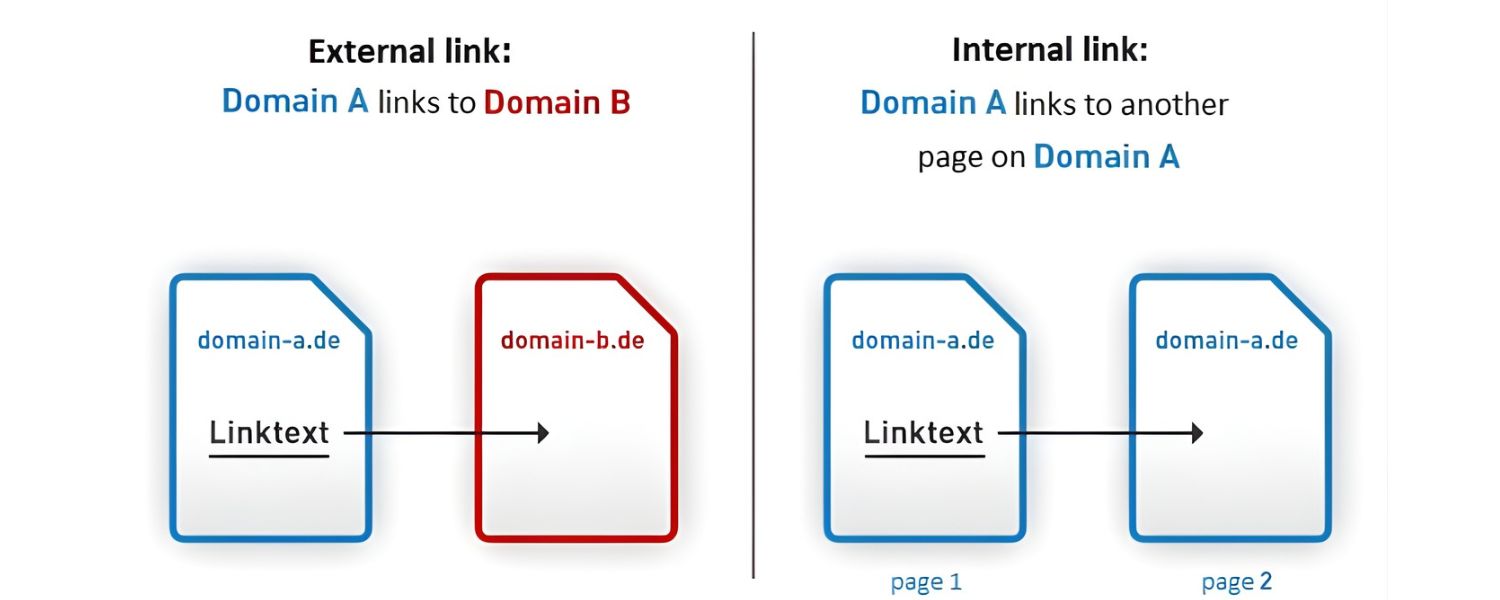
Internal links are simply hyperlinks that connect one page on your website to another page on the same website. If you click an internal link, you stay on the same domain.
These links can appear in your navigation menu, within blog content, in footer credits – anywhere on your site. They help users navigate between related content on your site and help search engine crawlers find all your pages.
In contrast, external links point from your site to a page on a different website. For example, a hyperlink to an authoritative source or reference is an external link.
Internal links keep visitors (and Google’s crawler) within your domain, while external links take them elsewhere. Both types are useful: external links can lend credibility by citing reputable sources, whereas internal links build your site’s own structure and SEO value.
The table below summarizes the key differences:
A. Destination: Internal = another page on your site; External = a page on a different site.
B. SEO Impact: Internal = improves site crawlability and distributes ranking authority internally; External = can build trust (when linking out) or confer authority to your site (when others link to you).
C. User Experience: Internal = encourages deeper exploration of your content; External = provides off-site info but may lead users away.
In short, internal links are the pathways that connect all the rooms in your website “house,” whereas external links are doors that lead visitors to other websites. Our focus here is maximizing the power of internal links for better SEO.
Why Internal Links Are Important for SEO
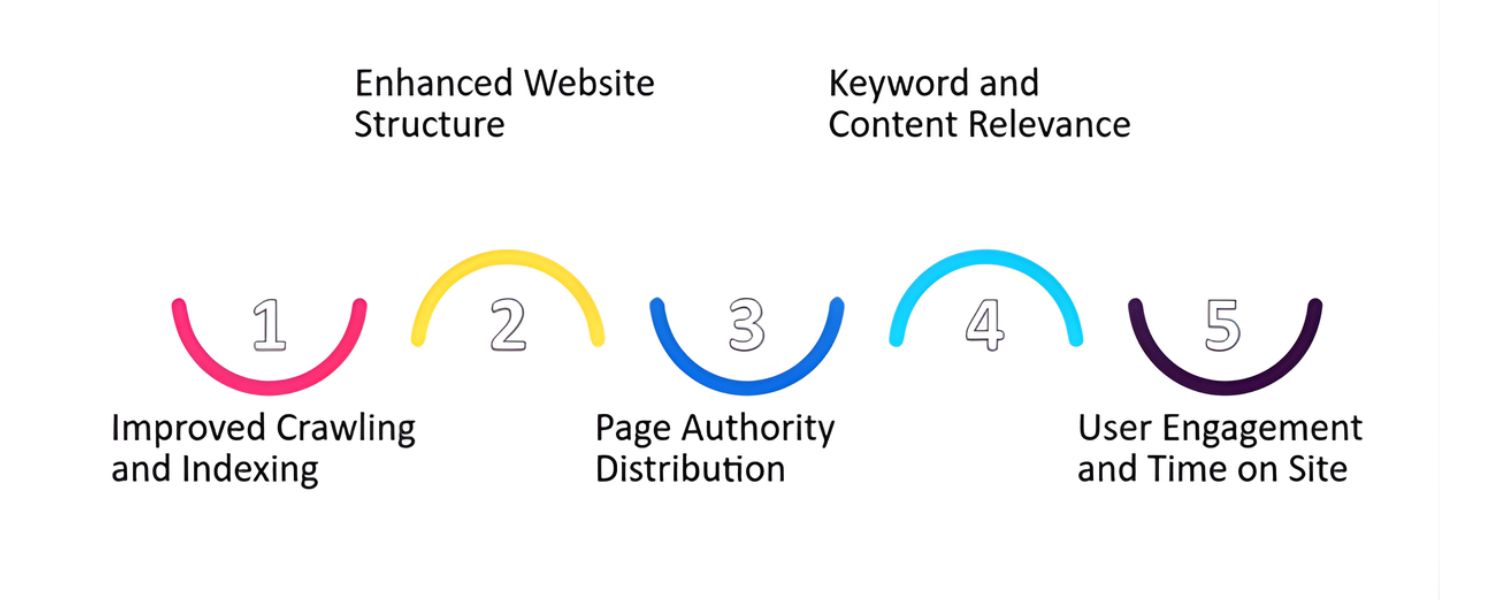
Internal linking isn’t just about website navigation – it’s a core part of SEO success. Google’s own John Mueller has emphasized that “internal linking is super critical for SEO.
It’s one of the biggest things you can do on a website to guide Google and visitors to the pages you think are important.” In other words, by thoughtfully linking your pages, you tell search engines which pages matter most and how your content is related.
Here are several reasons internal links matter for SEO, backed by expert insights and data:
1. Improved Crawlability & Indexing
Search engine bots discover new pages by following links. A well-linked site ensures Google can find (and index) all your important content. If a page has no internal links pointing to it, it’s likely to remain invisible to search engines.In fact, internal links essentially serve as a roadmap for crawlers, guiding them through your site architecture.
2. Distributed “Link Equity” (Ranking Power)
Internal links allow you to spread link equity (sometimes called “link juice”) throughout your site. When one page has lots of external backlinks (authority), internal links from it can pass a portion of that authority to other pages on your domain.
This boosts the ranking potential of those linked pages. Think of it as funneling PageRank: a top-performing page can share its strength with other pages via internal links. (The figure below illustrates how PageRank can flow from pages A and B to page C and beyond.)
Figure: Illustration of how PageRank flows through internal links. Pages A and B (with high authority from external links) pass some PageRank to page C via internal hyperlinks, which in turn can boost pages D, E, F, and G. Effective internal linking ensures link equity is shared with the pages you want to rank.
3. Stronger Topical Relevance & Site Structure
Linking related pages helps Google understand the context and relationship between your content pieces. By creating internal links within a content cluster (e.g. a broad “pillar” article linking to more detailed sub-topic articles), you signal a thematic connection.
This can reinforce your topical authority in the eyes of search engines.A clear internal link structure also establishes a hierarchy (for example, homepage → category page → subpage), which highlights your most important pages.
4. Better User Engagement and Experience
Internal links keep people on your site longer by pointing them to relevant content they might be interested in. For instance, a blog post about gardening can link to another post about pest control, giving readers a path to continue their journey.
This not only increases pageviews per visit but also sends positive engagement signals to Google (longer dwell time, lower bounce rate). When visitors easily find what they need through your internal links, it builds trust and encourages them to interact more (which can indirectly aid SEO).
5. Anchor Text as a Relevance Signal
With internal links, you have full control over the anchor text – the clickable text of a link. Descriptive, keyword-rich anchor text helps search engines understand what the linked page is about.
For example, linking the text “SEO checklist” to a page about SEO checklists is far more informative to Google than a generic “click here”. By using relevant anchors (without overdoing exact-match keywords), you can improve the thematic relevance between pages.
6. Efficient Use of Crawl Budget
Search engines have a limited crawl budget for each site – an allotted number of pages they’ll crawl in a given period.A solid internal linking structure tells crawlers which pages are most important so they don’t waste time on irrelevant or isolated pages.
In practice, this means linking high-priority content in a way that’s easy to reach. (Pro tip: aim for important pages to be no more than 3 clicks away from your homepage, to ensure they get crawled often.)
7. Faster Indexing of New Pages
When you publish a new page, adding internal links to it from existing well-linked pages can jumpstart discovery. Rather than waiting for Google to eventually find the new page on its own, an internal link from a frequently crawled page will lead Googlebot right to it. This helps new content get indexed and start ranking sooner.
As you can see, internal links impact SEO on multiple fronts – from crawling and indexation to ranking signals and user behavior metrics. Next, we’ll cover how to create an internal linking strategy that capitalizes on all these benefits.
Types of Internal Links
Not all internal links are identical. They come in various forms throughout your site, each serving a slightly different purpose. Understanding the types of internal links will help you ensure you’re using them effectively:
1. Navigational Links
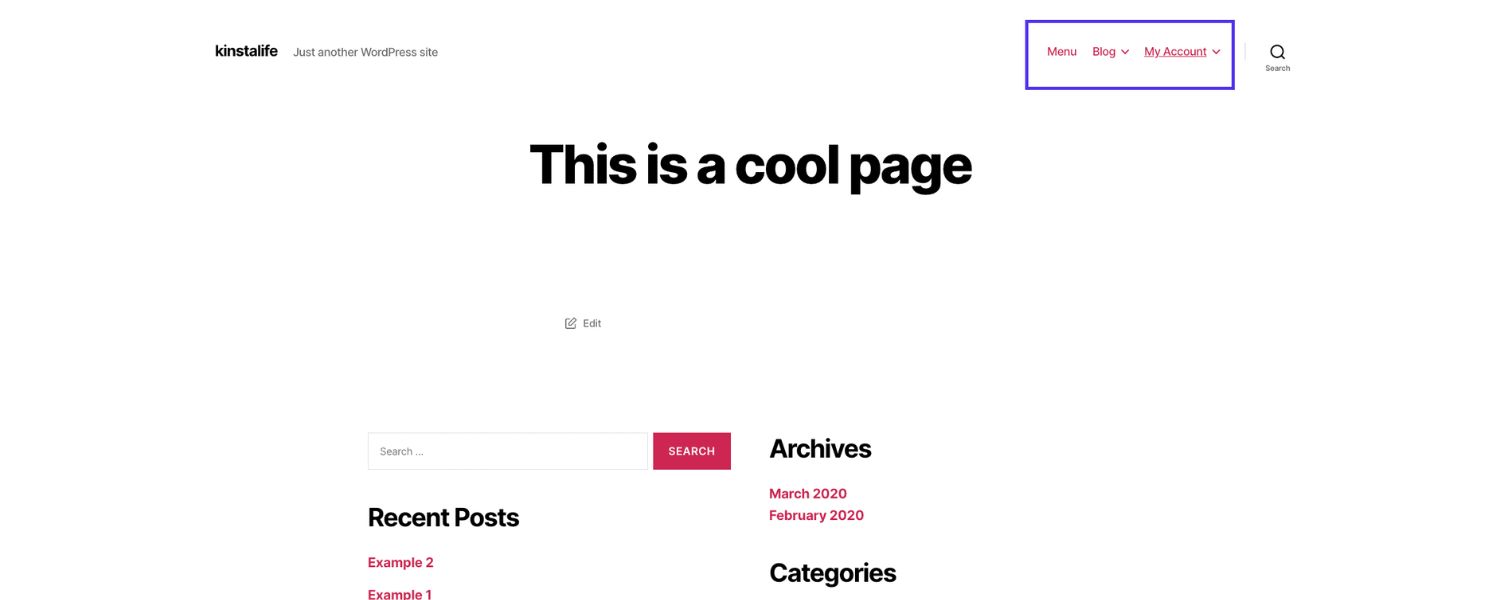
These are the menu links in your site’s header, sidebar, or footer that help users jump to key sections. For example, your top navigation bar linking to “Home,” “Products,” “About,” and “Contact” pages consists of navigational internal links. These usually point to high-level pages and are present site-wide.
2. Contextual Links
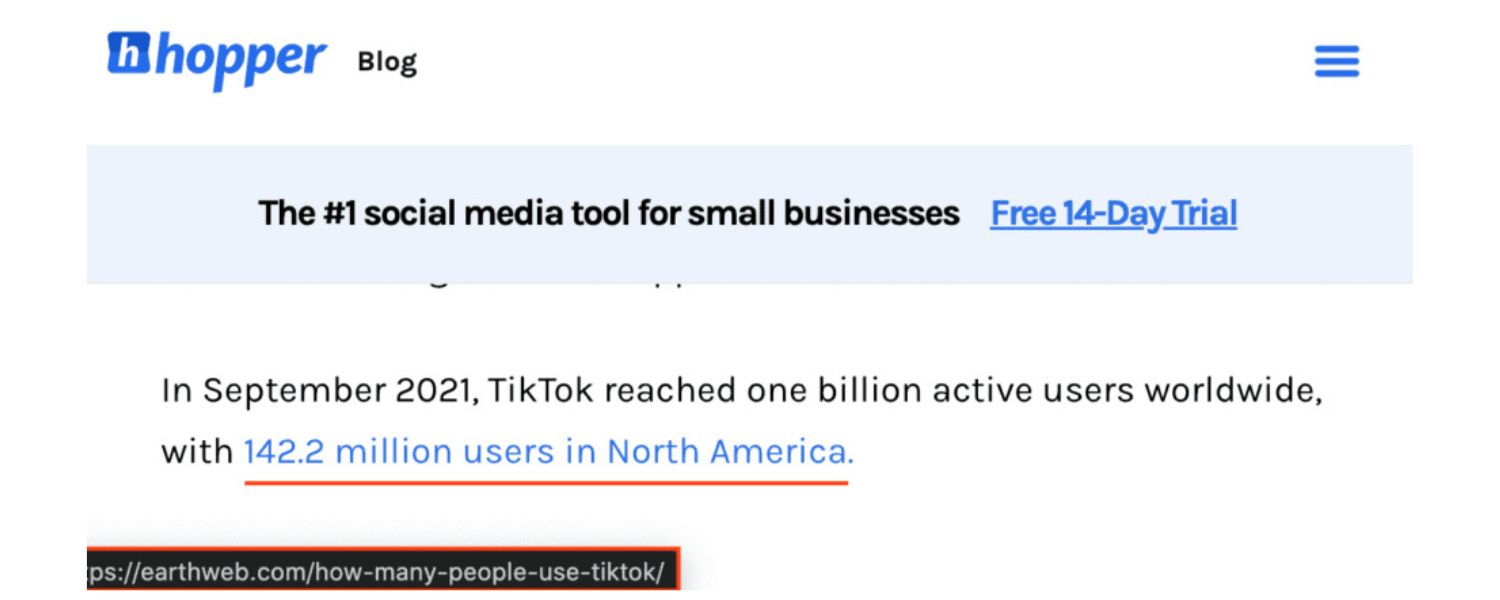
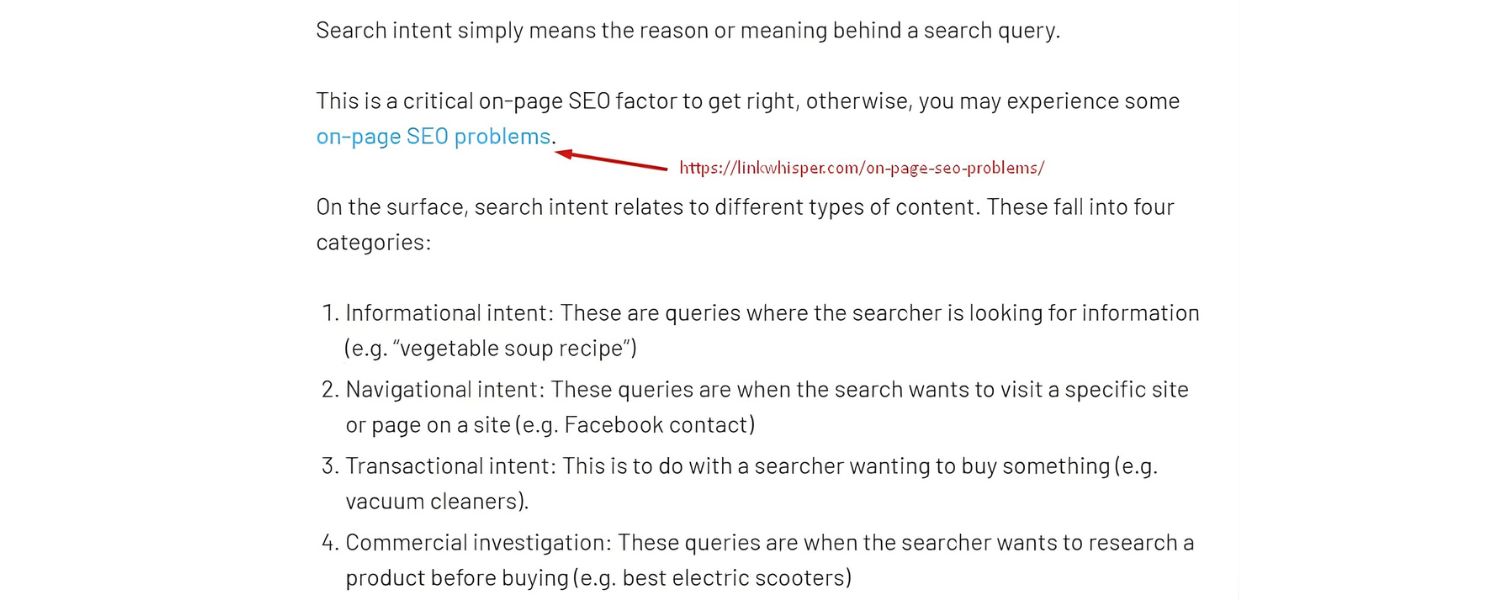
These appear within the main content of your pages or posts. They are usually anchored to relevant keywords or phrases in the text (e.g., a blog sentence that says “learn more about keyword cannibalization” with a link to a detailed guide on that topic). Contextual links are powerful because they provide both SEO context and helpful pathways for readers to dive deeper into subtopics.
3. Breadcrumb Links
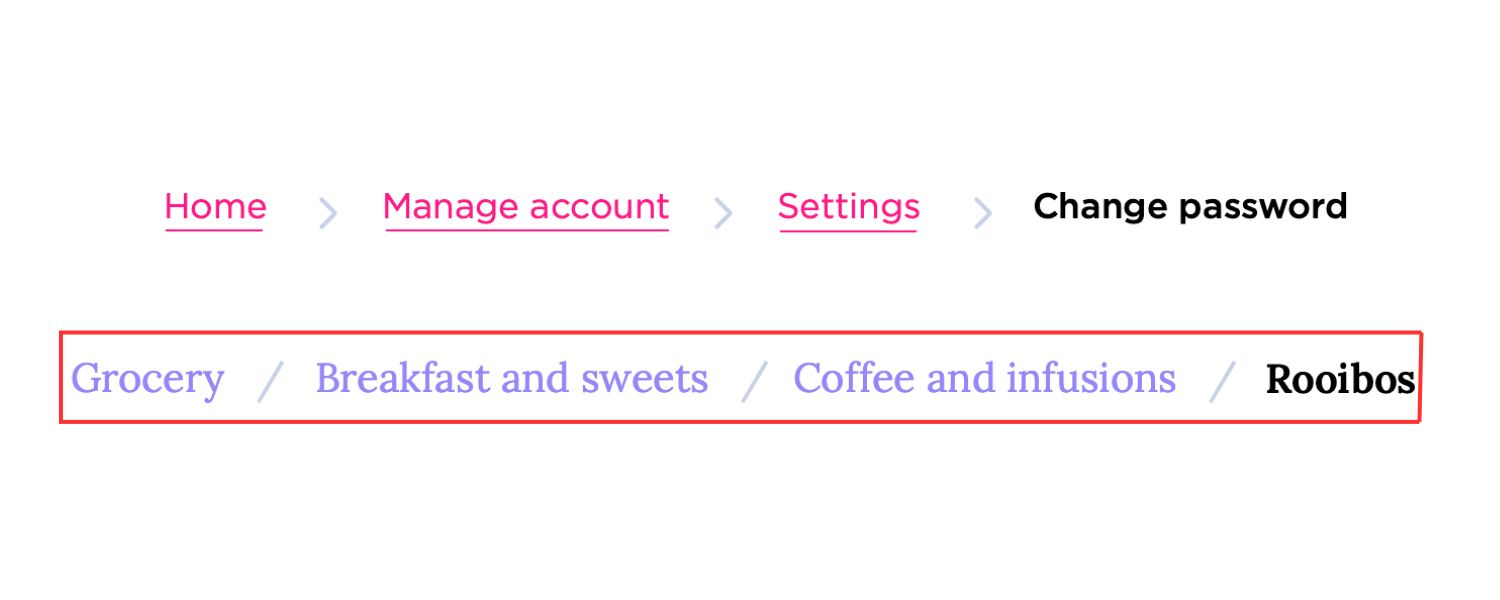
Breadcrumbs are a navigational aid showing the page’s position in your site hierarchy (usually at the top of a page). For example, a breadcrumb trail might read: Home > Blog > SEO > Internal Linking Strategy. Each part is an internal link back to those parent pages. Breadcrumb links help users retrace their steps and assist search engines in understanding your site structure.
4. Related Content Links
Many blogs and news sites feature a “Related Articles” section or “You might also like…” widget. These are internal links suggesting other content on similar topics. They keep users engaged by offering more of what they’re interested in, and they create additional internal pathways between content with thematic relevance.
5. Call-To-Action (CTA) Links/Buttons
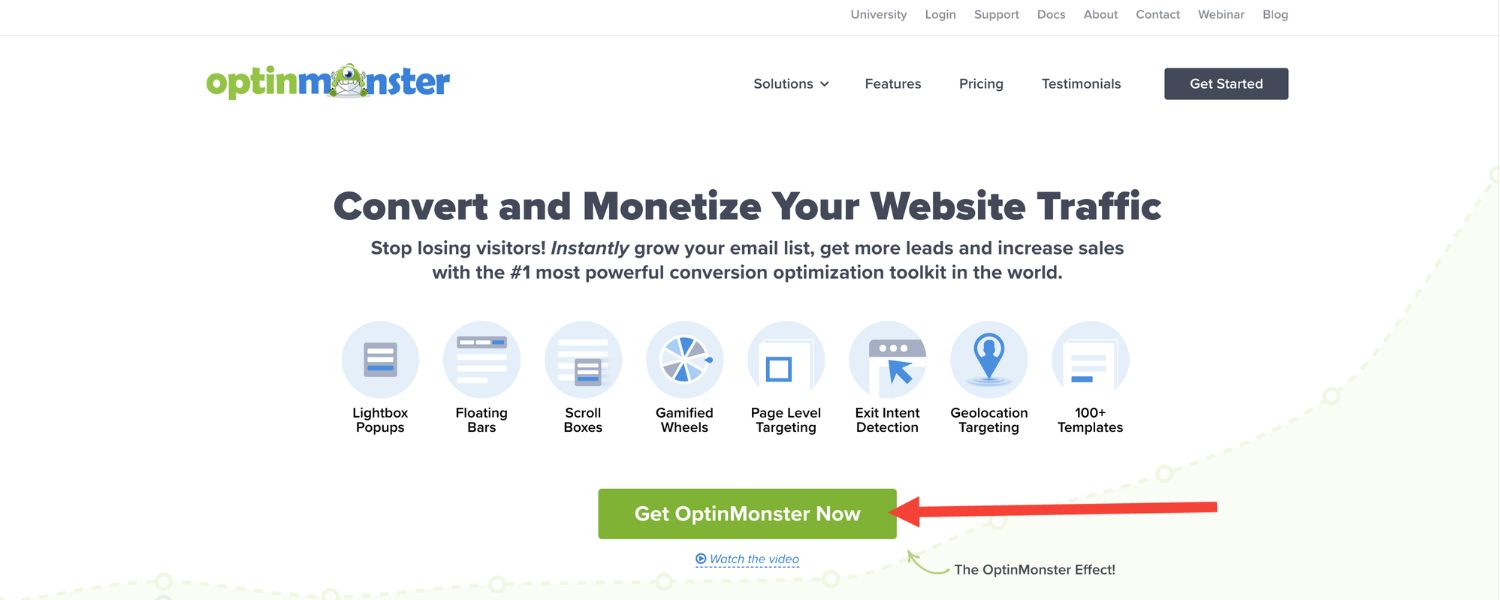
Any buttons or in-text calls to action that point to another page on your site (like “Try our free tool” or “Contact us for a quote”) are internal links as well. While their primary goal is conversion or navigation, they also contribute to your internal link web.
6. Image Links
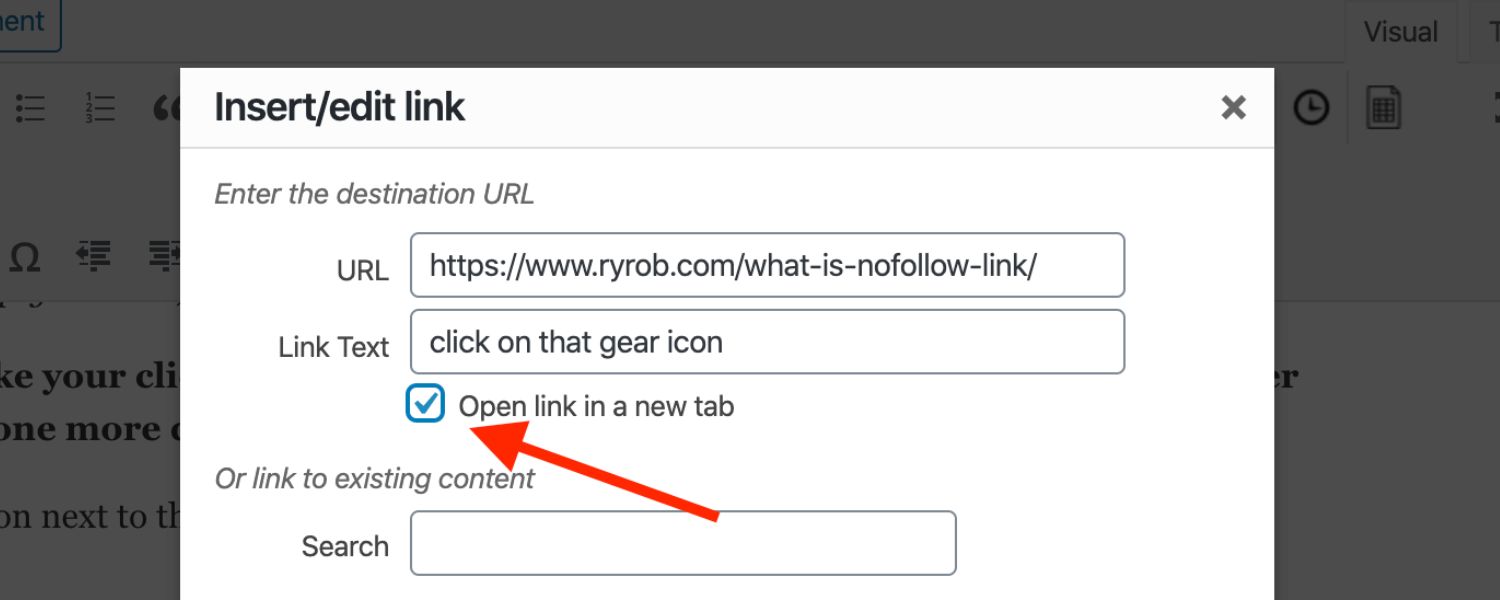
Images can be clickable links too – for instance, a banner image on your homepage that links to a key product page, or a logo that links back to the home page. Search engines do follow image links (the alt text can serve as anchor text), though textual links are generally easier for them to interpret.
7. Footer/Sidebar Links

Sites often repeat certain important links in the footer or sidebar (e.g., popular categories, recent posts, help center, etc.). These persistent internal links ensure that no matter where a user lands, they can reach those pages. However, from an SEO perspective, links embedded within the main content (contextual links) usually carry more weight than boilerplate footer links.
Tip The most effective internal links are those that feel natural and relevant, enhancing the user’s journey. If you’re linking to another page purely for SEO with no clear relevance to the reader, reconsider it. Every internal link should serve a purpose, whether it’s to help a visitor find more info or to signal semantic connections between your pages.
How to Build an Effective Internal Linking Strategy
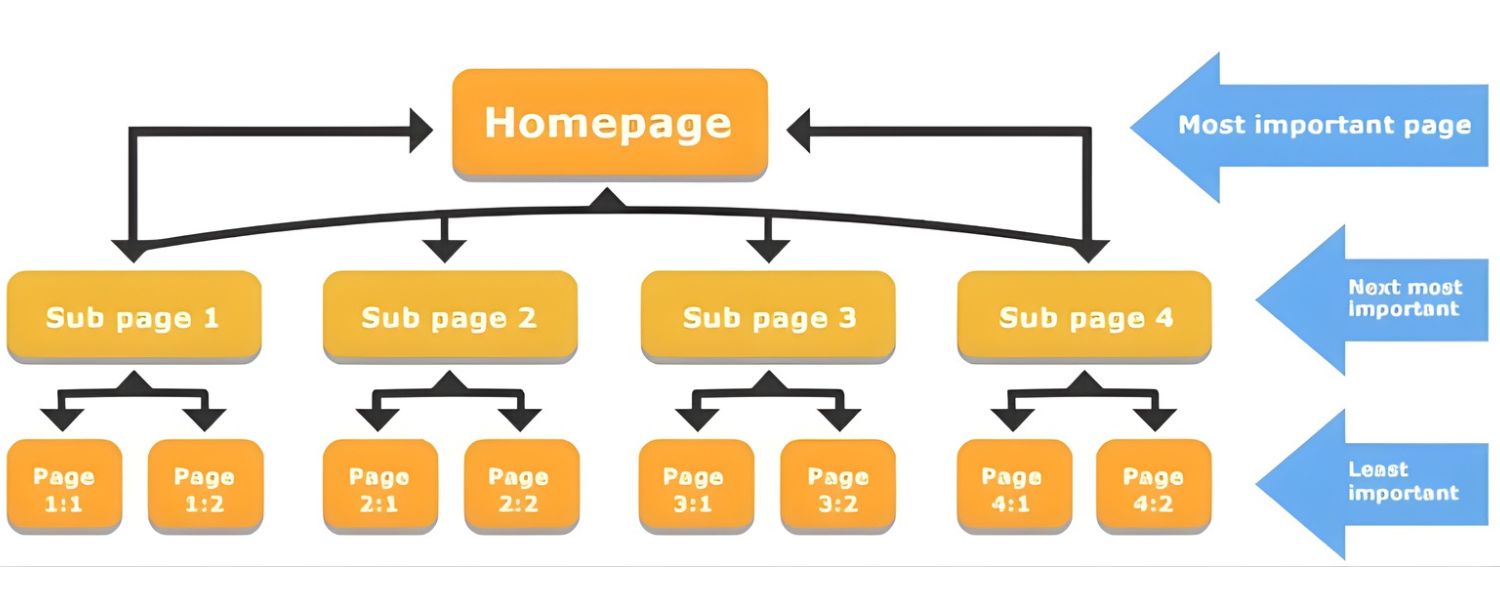
Crafting a robust internal linking strategy involves more than just tossing links around. It requires planning your site architecture, choosing the right pages to link, and maintaining your links over time. Here’s a step-by-step approach to do it like a pro:
1. Plan Your Site Structure from the Ground Up
A logical, well-organized site structure is the foundation of your internal linking strategy. Before you even think about individual links, ensure you have a clear hierarchy of pages.Many SEO experts recommend a “pyramid” structure: at the top is your homepage, below that are main category or topic pages, under each category are sub-categories or individual content pages.
Figure: Example of a website architecture. The homepage links to broad category pages (green), which branch into subcategory pages (yellow), leading to individual content pages (orange). A clear structure like this ensures users and search engines can reach any page with just a few clicks.
Organizing content into this kind of hierarchy helps distribute link authority naturally – higher-level pages will get many links from across the site (navigation menus, etc.), and those pages in turn link down to more specific pages.
It also improves user experience by preventing content from being too deeply buried. Google’s crawlers prefer “flat” site architectures (where pages aren’t too many clicks away from the home) because it improves crawl efficiency.
2. Identify Your Pillar (Cornerstone) Pages
Not all pages are created equal. Some pages on your site are especially important – for example, a comprehensive “Ultimate Guide” blog post, an important product or category page, or a high-converting landing page.
These are sometimes called pillar pages or cornerstone content. Pillar pages cover a broad topic in depth and often target high-volume keywords. They serve as hubs for their topic, linking out to more granular sub-pages (often called cluster pages).
Identify which pages on your site should be pillars. These will be the pages you want to funnel extra internal link authority to, since they are crucial for your SEO and often for conversions.
For instance, if you run an e-commerce site, a pillar page might be something like a main “Washing Machines” category page (broad topic), which then links to sub-category pages for different types or brands of washing machines.
Or if you have a blog, a pillar might be “Complete SEO Guide”, which links to narrower articles like “On-Page SEO Tips” and “Technical SEO Checklist.” Once you’ve identified pillars, make sure lots of other pages link to them.
A pillar page should never be an orphan (unlinked) – it should be one of the most internally linked pages on your site (more on linking tactics below).
3. Build Topic Clusters with Internal Links
Using the pillar pages as hubs, organize your content into topic clusters. This means all pages in a cluster interlink in a meaningful way. The pillar page links to each cluster (supporting) page, and ideally, those pages link back to the pillar or to each other where relevant. This creates a tightly-knit group of pages all related to a specific topic.
For example, your “SEO Guide” pillar could link to articles on keyword research, link building, technical SEO, etc., and each of those might link back to the main guide or to each other when context calls for it.
Topic clusters not only help users find related content easily, but also send strong signals to Google that you have depth of content in that area. It’s an excellent way to demonstrate topical authority.
To implement this, it can be helpful to make a simple outline or diagram of your clusters, or use a spreadsheet to map out which pages should link to which. This ensures you cover all connections logically.
4. Use Internal Links to Pass Authority to Key Pages
Remember those high-authority pages on your site (maybe your homepage or a few blog posts that have tons of backlinks)? Leverage them! Check which pages on your site have the most inbound external links or highest Page Authority (tools like Ahrefs or Semrush can list your pages by number of backlinks).
Then make sure those pages include internal links to other important pages that could use a boost. For example, if you have a blog post that naturally acquired many backlinks, edit that post to add links to your key service pages or other relevant content you want to rank better.
This transfers some of the link equity over. (Only do this when the link can fit naturally – don’t force unrelated links, or you’ll confuse readers and Google.)Conversely, if you have an important page that isn’t performing well, ask: Are there enough internal links pointing to it? If not, find related pages where you can add a contextual link to that underperforming page.
An internal link from a page with high authority can significantly improve another page’s visibility.
5. Add Contextual Internal Links in Your Content (Proactively)
Get into the habit of linking to other articles or pages from within your blog posts and content pages whenever it makes sense.This is where a lot of SEO value lies – those in-text links that provide additional value. For example, if you mention a concept that you’ve written about elsewhere, make it a hyperlink to that other article. Aim to include a few internal links whenever you publish new content, pointing to older relevant pages.
Also consider the reverse: when you publish a new page, go back to some older relevant pages and add links forward to the new content. This ensures the new page is woven into your site’s link graph right away.
A good rule of thumb is to have at least 2-3 internal links pointing to any new page (from other pages) soon after it’s published. This could be as simple as editing an older blog post to mention and link to the new post where the topics intersect.
6. Optimize Anchor Text Naturally
As noted earlier, anchor text is an SEO signal, so choose it wisely. The anchor text of your internal link should clearly indicate what the target page is about.Usually, this means using keywords or descriptive phrases related to the target page. For instance, “link building strategies” as an anchor to a page about link building is perfect.
Avoid non-descriptive anchors like “click here” or overly generic text, as they squander an opportunity to signal relevance. The flip side is to also avoid over-optimized or repetitive anchors that look spammy.
Since it’s your own site, you won’t be penalized for internal anchor text in the same way you could be for manipulative external link anchors, but it’s still best practice to keep them natural and user-friendly.
7. Don’t Overdo the Number of Links on a Page
There’s no hard rule from Google on the exact number of internal links per page (the old guideline was “keep it under 100 links,” which is more of a suggestion than a strict limit). But as a general principle, quality beats quantity.
A few well-placed, highly relevant internal links are better than dozens of irrelevant ones. If a page contains hundreds of links, it can dilute the value of each and make it unclear which links are most important. It can also overwhelm users.
Google’s crawlers might get “confused” or give up if a single page tries to link to every other page on the site. So be strategic: link to pages that truly add value for a reader or that fit the context.
In most cases, a sidebar menu, some contextual links, and maybe a few footer links will naturally cover what’s needed.(For example, Wikipedia pages often have 50+ internal links because of all the reference and context – that can work for a huge info site like Wikipedia, but your site’s pages likely don’t need to link to that many other pages.)
8. Use Follow Links (Avoid Nofollowing Your Internal Links)
An internal link, by default, is a “follow” link – meaning search engines will follow it to the target page and pass ranking signals. There is rarely a reason to add a rel=“nofollow” attribute to your internal links.
Nofollow tells Google “don’t crawl this” and “don’t pass any PageRank”. That defeats the purpose of internal linking for SEO. Only in very special cases, like linking to a login page or a filter page that you actively don’t want indexed, would nofollow be used internally.
Generally, keep your internal links followable so that link equity flows freely and Google can crawl the whole site. If you discover any internal links that inadvertently have a nofollow tag (some CMSs or plugins might add them, or a developer copied an external link format), remove that attribute to restore the link’s SEO value.
9. Minimize Orphan Pages and Deep Content
Earlier we mentioned “orphaned” pages – these are pages on your site that have no other pages linking to them. Orphan pages are bad for SEO because Google might never find them, or consider them unimportant if found.
Every important page should have at least one, preferably multiple, internal links from other pages. If you have orphan pages (maybe old articles or forgotten category pages), incorporate them into your internal linking by adding links from relevant pages. You can use a crawling tool (or Google Search Console’s coverage report) to identify pages that aren’t linked from anywhere.
Similarly, watch out for pages buried too deep in the site. If a user has to click through four or five levels of navigation to reach a page, that’s a sign you should surface it higher. As mentioned, aim for an important page to be reachable in about 3 clicks from the homepage. You can achieve this by adding internal links from higher-level pages or navigation menus.
1O. Audit and Update Internal Links Regularly
Websites are not static – you’ll add new content, remove old pages, redesign navigation, etc. That’s why it’s crucial to periodically audit your internal links.
Look for broken internal links (links pointing to pages that no longer exist or have moved) and fix them, since broken links can hurt user experience and waste PageRank (a broken link passes no value).
Also check for any internal redirects – if page A links to page B, but page B is now a redirect to page C, you have an unnecessary redirect hop. It’s better to update the link to point directly to C, saving crawl time and improving user experience.
Whenever you remove or move content, try to update any internal links that pointed to those pages. Many SEO professionals schedule a quarterly internal link review to catch issues like orphan pages, broken links, or pages with only one incoming link. Maintaining a healthy internal link structure is an ongoing task – but it pays off in sustaining your SEO performance.
Tools & Tips for Internal Linking Optimization
Managing internal links across a growing website can be challenging, but thankfully there are tools to make it easier:
1. Site Audit Crawlers
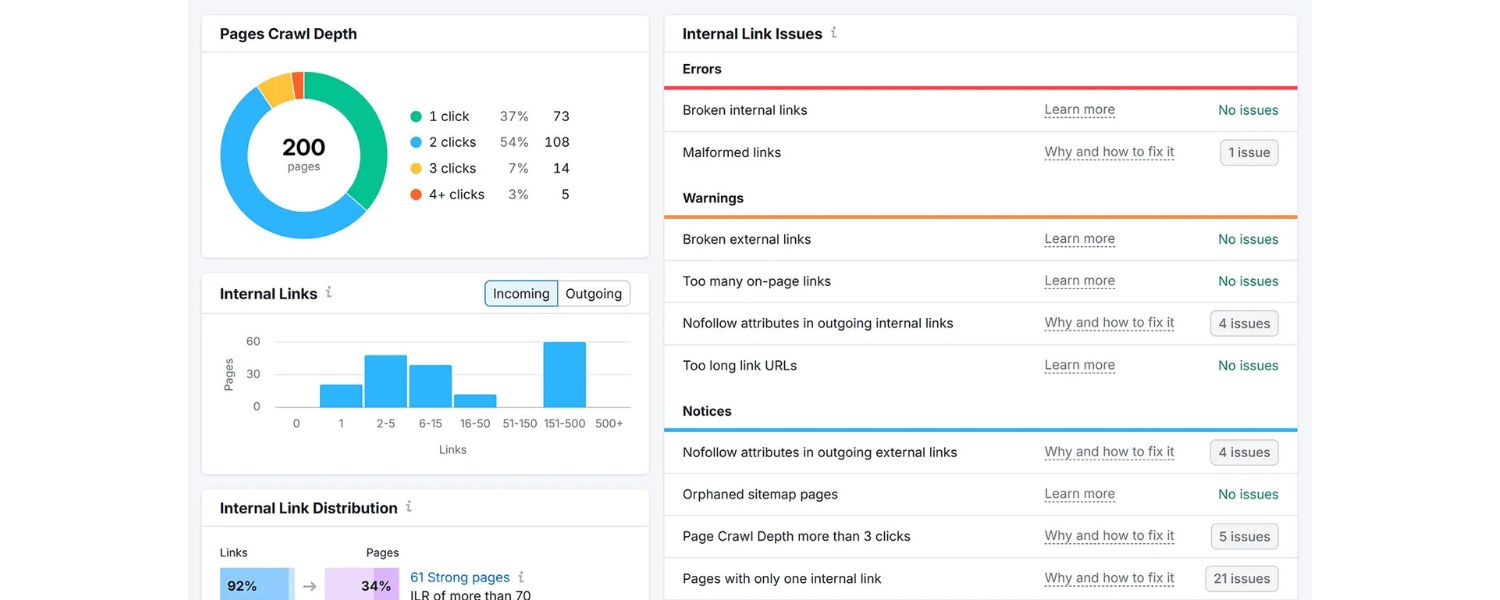
SEO audit tools like Semrush Site Audit and Screaming Frog are great for analyzing your internal link profile. They can identify issues such as orphan pages, broken links, or pages with too many/few internal links.
For example, Semrush’s audit will flag “orphaned sitemap pages” (pages in your sitemap that have no inbound links), or “pages with only one internal link” (which may need more links). By regularly crawling your site, you can spot these problems and fix them proactively.
Screaming Frog, on the other hand, allows you to crawl your whole site and then filter by “Inlinks” to see how many internal links point to each URL, find redirects, etc.
2. Content Management System (CMS) Plugins
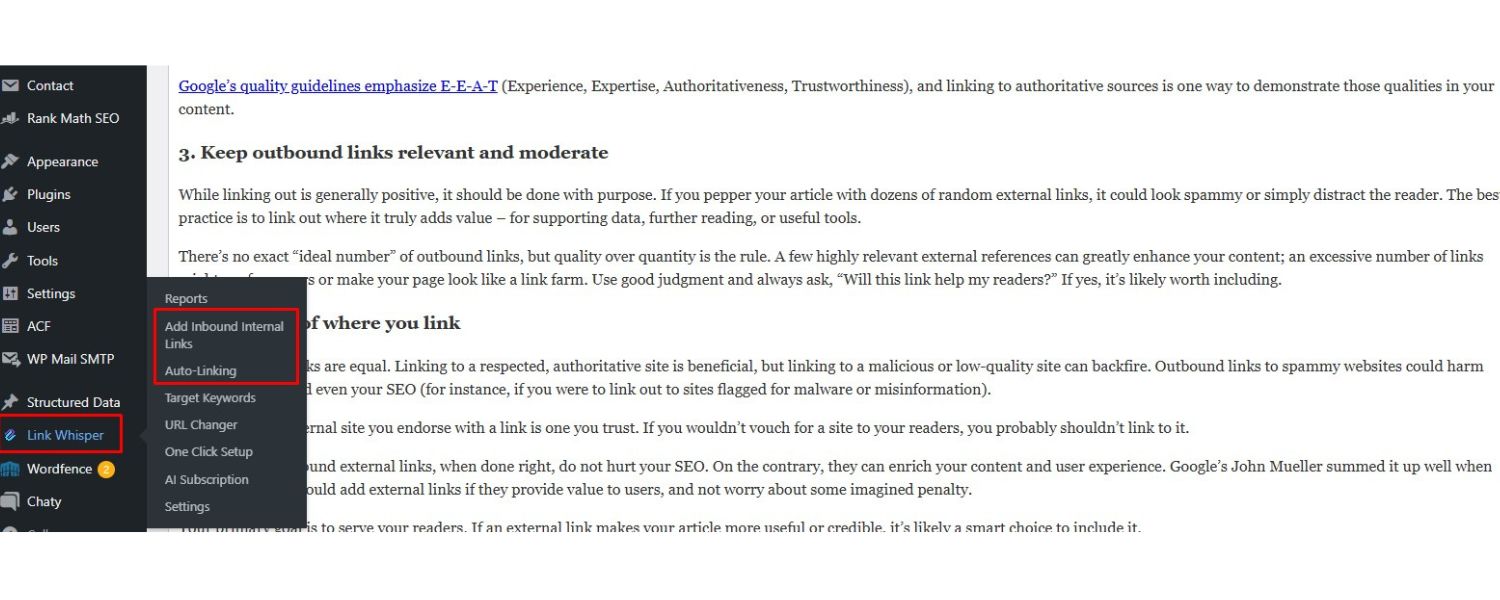
If you’re on a platform like WordPress, consider using plugins that facilitate internal linking. For instance, Yoast SEO Premium has an internal linking suggestion feature that analyzes your content and suggests related posts to link as you write. This can save time and ensure you don’t forget to link to older content.
Another popular tool is Link Whisper, which uses AI to recommend internal links in WordPress – it can automate adding lots of contextual links with minimal effort. These tools act like an internal linking assistant, though you should always review suggestions for relevance.
3. Google Search Console (GSC)
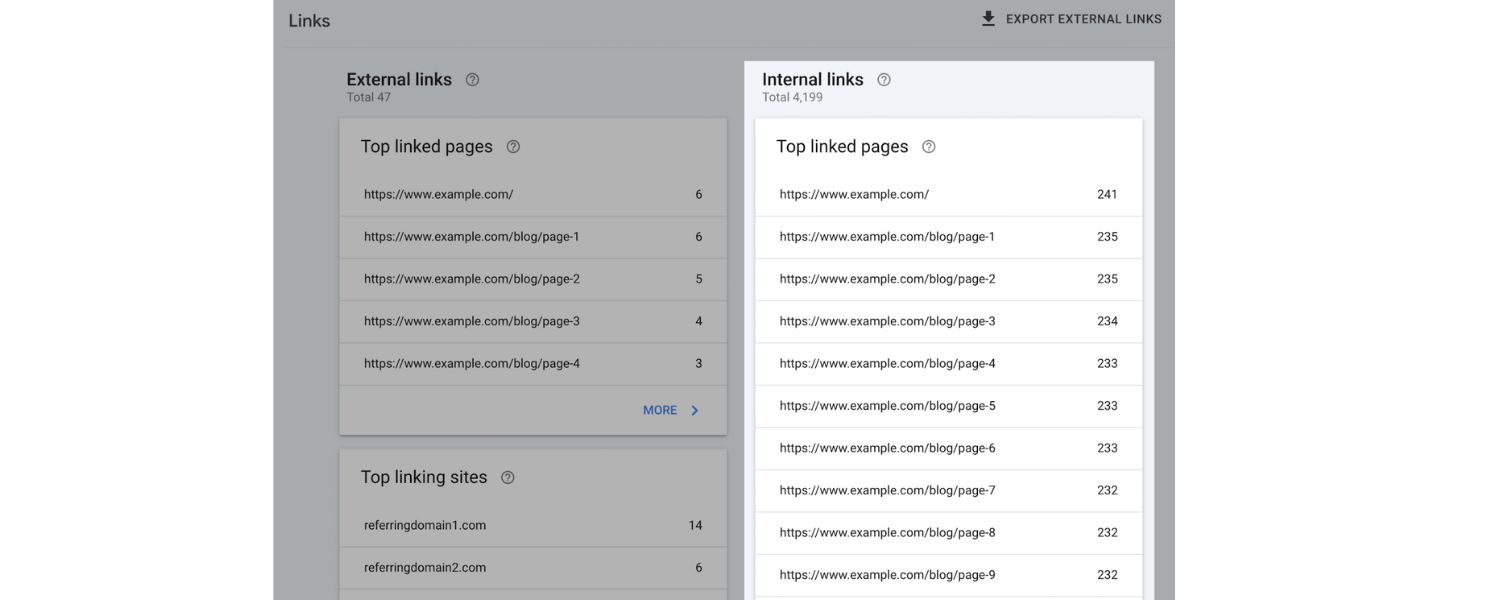
GSC has a “Links” report which includes an “Internal links” section. This shows which pages on your site have the most internal links pointing to them. It’s a quick way to see if any important pages are under-linked.
If a page you care about is not listed among top internally linked pages, you likely need to add more links to it from elsewhere. GSC won’t catch everything (it only shows counts, not details of where from), but it’s free and already at your disposal.
4. Visualization Tools
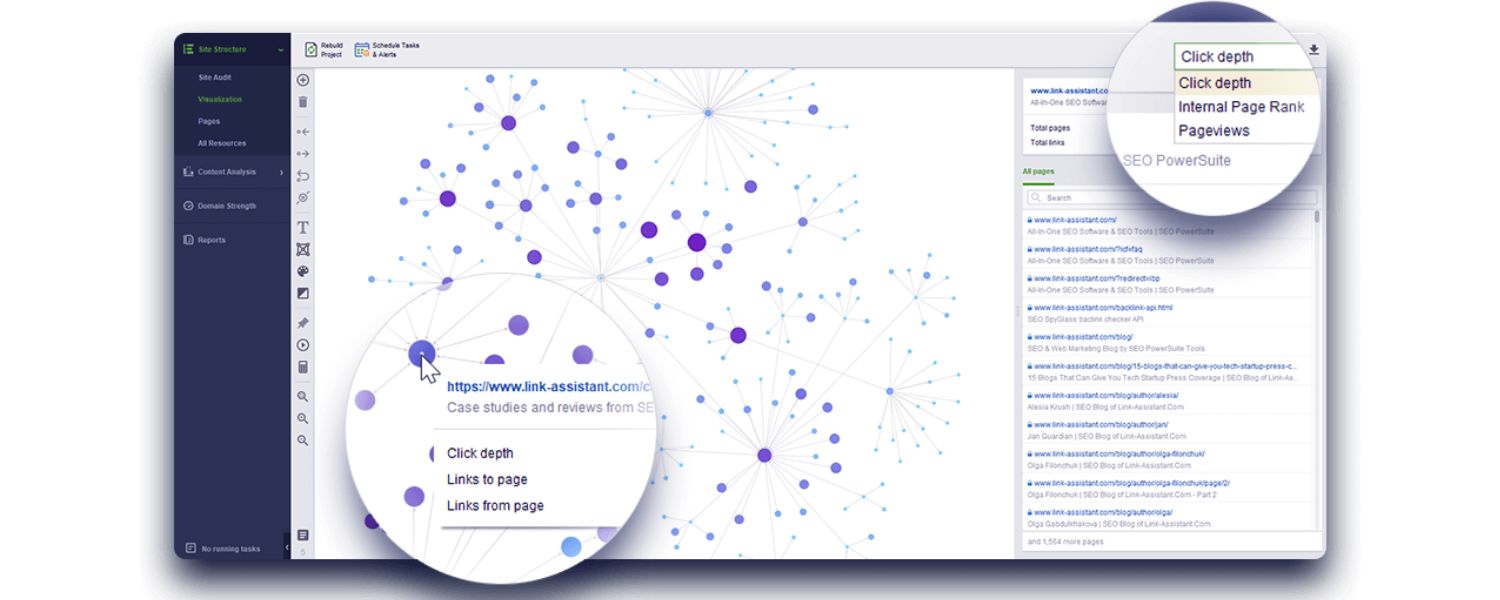
For the more technically inclined, there are tools and scripts that can visualize your internal linking structure as a graph. This can sometimes reveal interesting patterns (for example, pages that form clusters versus isolated sections of the site).
While not necessary for most, visualizing your link graph can be useful if you run a large site with complex taxonomy. Tools like Gephi or even Excel (with the right data) can help, but require exporting your link data (e.g., from Screaming Frog).
Lastly, a simple but effective tip: whenever you publish a new piece of content, take a few minutes to think of 2-3 older pages where adding a link to this new content would make sense.
Go edit those pages to include the link. This little workflow ensures every new page gets integrated into your internal link network from day one. It’s a small step that can yield faster rankings and better site cohesion.
By using the right tools and habits, you can keep your internal linking on point without feeling overwhelmed.
Frequently Asked Questions (FAQ)
A. Do internal links help improve Google rankings?
Yes – internal links absolutely can boost your Google rankings when used strategically. While external backlinks typically get more attention, internal links are a critical and direct ranking factor as well. They help Google discover your pages and understand which pages you consider important.
In fact, a study by Ahrefs found that the number of internal links to a page is among the top factors correlating with higher search rankings.
Google’s own representatives (like John Mueller) have called internal linking “super critical” for SEO. By spreading link authority to key pages and improving how users engage with your site, internal links create the conditions for better rankings. Many top-ranking pages tend to have a solid network of internal links – it’s rarely by accident.
B. How many internal links should a page have?
There isn’t a strict number, but aim for a reasonable amount that benefits the user. A good practice is to include a handful (several) of relevant internal links on each page, rather than dozens of random ones. For context, one analysis found that top-ranking pages on Google had about 50 internal links on average (often because they’re long, Wikipedia-style pages).
But that’s not a magic number – it’s just an observation. The right number of internal links depends on your content length and the number of genuinely relevant pages you can point to. You don’t want to force links if they don’t fit naturally.
At the same time, if a page has too few internal links (or none at all), it might be an opportunity to add more and improve that page’s connectivity. Google used to advise keeping it under 100 links per page as a rule of thumb, but modern pages (especially navigation-heavy or content-rich pages) can exceed that without issues.
The key is:
Every internal link should be there for a reason. If you have hundreds of links on a page, consider trimming it down – both users and crawlers prefer not to wade through a link soup.
C. Should I mark any internal links as “nofollow”?
Generally, no. Internal links should almost always be left as “dofollow” (the default behavior) so that search engines can crawl them and pass ranking signals through them. Using rel=“nofollow” on an internal link tells Google to ignore that link for ranking purposes, which usually isn’t what you want.
You want Google to follow your internal links and discover all your content. Nofollow is typically used for external links (e.g., untrusted or sponsored links) or for very specific internal cases like login pages or user-generated content that you don’t want to vouch for.
For the vast majority of your internal linking, keep them crawlable. If you find nofollow on internal links (it can happen accidentally through CMS settings or copied code), remove it. By ensuring internal links are followable, you maximize the SEO benefit of your inter-page connections.
D. What is an orphan page, and why is it bad for SEO?
An orphan page is a page on your site that isn’t linked from any other page. It’s “orphaned” in the sense that no internal links point to it, so visitors (and search engine bots) have no pathway to reach it from your site’s main navigation or content. Orphan pages are problematic because Google might not find them easily during crawling.
Even if the page is in your XML sitemap, a lack of internal links suggests to Google that the page isn’t integrated into your site structure (perhaps it’s less important or even forgotten). As a result, orphan pages can have trouble ranking – they’re essentially hidden from both users and search engines.
To fix this, you should “adopt” those orphan pages by adding internal links to them from other relevant pages. Even one good internal link from a high-traffic page can get an orphan page crawled and indexed.
Regularly using an SEO crawler to scan for orphan pages (pages with zero inbound internal links) is a good housekeeping practice. Every page that matters should be woven into your site’s internal link web.
Conclusion & Next Steps
Internal linking is one of those small hinges that swing big doors in SEO. It’s entirely under your control and can yield significant gains in crawlability, user engagement, and ranking power when done right.
The best part is that improving your internal links often costs nothing but a bit of time and foresight.
By now, you’ve learned how internal links work, why they’re vital, and how to create a strategy that leverages them better than your competitors.
So, what’s next? Put this knowledge into action: Audit your website for quick wins (like fixing broken links or adding links to underlinked pages), update your content with useful cross-links, and establish a routine for linking new content.
Remember, every internal link is an opportunity – an opportunity to guide your visitors, an opportunity to signal importance to Google, and an opportunity to boost a page’s performance.
Don’t wait for search engines or users to stumble upon your best pages by accident. Take charge of your site structure and actively link your content together. By doing so, you’ll not only improve your SEO rankings but also create a richer, more satisfying experience for your readers.
Ready to unlock your site’s full potential?
Start optimizing your internal links today and watch your SEO results grow from within!

Why Roseville Startups are Choosing Offshore Marketers to Scale Smarter
Roseville is no longer just a quiet suburb of Sacramento;...

What Is PPC? A Practical Guide to Pay‑Per‑Click Advertising
Pay‑per‑click (PPC) is the “pay only when someone clicks” branch...

Google Search Issues Affecting Results in Some Regions
Google has confirmed a problem with one of its data...

Keyword Counts Dropped After Google’s num=100 Change
In September 2025, Google stopped supporting the &num=100 parameter. This...

Image SEO: Optimize Images for Higher Rankings & Traffic
Introduction Images make your website more engaging, but they can...


.png)
.png)
.png)
.png)
.png)

2024 ALL RIGHTS RESERVED MADE IN INDIA
.png)