
Keyword Mapping for SEO: Boost Your Rankings
August 12, 2025
Introduction
Imagine having a roadmap that tells you exactly which keywords belong on which pages of your website. That’s essentially what keyword mapping provides for SEO.
Keyword mapping is the process of assigning specific target keywords to individual pages on your site and documenting this in a “keyword map”. By doing so, you create a clear plan that aligns your content with what users are searching for, ensuring each page has a distinct focus.
This technique helps structure your website around topic clusters and user intent, so that search engines can easily understand and rank your pages for the right terms.
Why is this important?
Because without a strategic keyword map, you might unknowingly have multiple pages competing for the same keyword (known as keyword cannibalization), or miss out on valuable search queries altogether.
In fact, a huge portion of web content never gets any organic traffic, one study found that 96.55% of pages get no traffic from Google. Often, that’s due to poor keyword targeting or site structure. This guide will show you how to avoid those pitfalls by mapping keywords effectively.
In this comprehensive guide, we’ll cover what keyword mapping is, why it’s crucial for SEO, and a step-by-step process to create your own keyword map. We’ll also highlight tools and best practices, and answer common questions.
By the end, you’ll have a clear strategy to map keywords to the right pages, helping boost your rankings and providing a better experience for your visitors. Let’s dive in!
What Is Keyword Mapping?
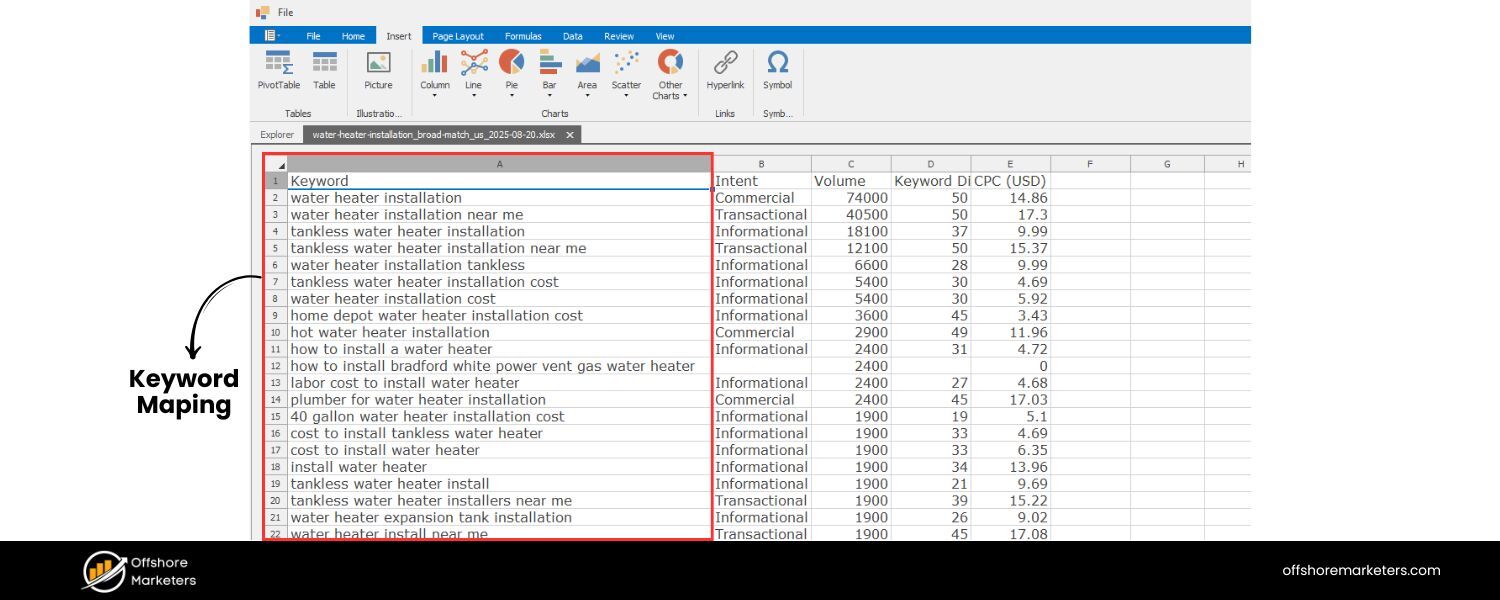
Keyword mapping is an SEO technique of strategically assigning target keywords to specific pages of your website. In simpler terms, you’re creating distinct keyword “homes” for each page.
Each page (or URL) on your site is given a primary keyword (sometimes called a focus keyword) that represents the main topic of that page.
Often, you’ll also assign a set of closely related secondary keywords to that same page, which together form a keyword cluster around the page’s topic.
The idea behind keyword mapping is one page, one topic, one primary keyword. Instead of trying to have one page rank for dozens of unrelated terms – or worse, having multiple pages targeting the same term – you map out a plan so that each important keyword in your SEO strategy has a dedicated page that best answers it. These keyword-page pairings are usually organized in a keyword mapping document or spreadsheet for easy tracking.
For example, if you run a plumbing website, you might have one page optimized for “water heater installation” and another for “fixing leaky faucet.” Through keyword mapping, you ensure those two keywords aren’t covered on the same page or scattered randomly.
Each page has its focus, and the content can be crafted to satisfy the search intent behind its target query. This way, Google can clearly see which page is most relevant for which query, improving your chances of ranking highly for that term.
In essence, keyword mapping creates a blueprint of your site’s content in terms of SEO. It connects your keyword research to your site architecture.
The result is a website where each page is optimized and relevant for a specific set of keywords, and all those pages together cover your niche’s important topics without overlapping or competing with each other.
Why Is Keyword Mapping Important in SEO?
Keyword mapping isn’t just a bureaucratic exercise, it has significant benefits for your SEO and overall website performance. Here are some key reasons why mapping your keywords to pages is so important:
1. Creates a Logical Site Structure
Mapping keywords forces you to plan and organize your site’s content in an intuitive hierarchy. It becomes clear which are your broad pillar pages (main topics) and which are supporting subpages or cluster content.
A logical site structure helps search engines understand your content relationships and helps users navigate your site easily.In other words, keyword mapping ensures you have distinct pages for each major topic, with relevant subtopics grouped appropriately – exactly what both Google and your visitors like to see.
2. Prevents Keyword Cannibalization
When two or more pages target the same keyword, they can wind up competing against each other in search results, diluting your efforts.Keyword mapping helps you avoid this keyword cannibalization by giving each page a unique primary keyword.
If your map reveals duplicate targets, you can consolidate those pages or change their focus. By mapping keywords, you make sure no two pages unintentionally go after the exact same term, so Google never has to guess which page to rank for a query.
3. Improves On-Page SEO and Relevance
With a clear keyword mapped to each page, you can better optimize that page’s content. Each page can be laser-focused on covering its target query in depth, using the keyword in the title tag, headings, meta description, and body content (naturally and in context).
This level of focus makes the page highly relevant for the topic, increasing its chances of ranking. It also means search intent alignment – your page provides the information people are actually looking for when they search that keyword, which boosts user satisfaction and SEO performance.
4. Enhances Internal Linking and Anchor Text
A good keyword map doubles as a plan for internal linking on your site. By seeing which topics are related, you can link your pages together in a sensible way (for example, linking a cluster page to its pillar page).
You can also use the mapped keywords as anchor text for those internal links, which helps search engines interpret the content relationships and context. The result is a stronger internal link structure that passes authority between pages and helps users easily find related content.
5. Identifies Content Gaps and Opportunities
Building a keyword map will highlight keywords or topics you aren’t covering yet.Perhaps during keyword research you find an important long-tail question that you have no page for – that’s a content gap.
Your keyword map document makes these gaps obvious (any important keyword without a URL assigned is essentially a to-do item for content creation). This ensures you don’t miss out on valuable keywords relevant to your business, and it guides your content planning for new pages or blog posts.
6. Streamlines Tracking and SEO Reporting
When each page has defined target keywords, it’s easier to track how well those pages are ranking for their terms.With a keyword map, you can monitor your positions and traffic for each mapped keyword and quickly spot changes.
It makes your SEO efforts more measurable – you can see which pages (and keywords) are performing well and which need more work. This organized approach leads to more persuasive reporting on SEO results and helps you react quickly if rankings drop for a specific keyword/page.
7. Facilitates Team Workflow
If you work with a content team or SEO team, a keyword map provides clear guidance on what to optimize and what content to create. Writers know the focus keyword and related terms each page should target, preventing confusion.
SEO specialists can easily delegate tasks like “optimize Page X for Keyword Y” or “create a new page targeting Keyword Z” because the map outlines these needs. It basically gives more context and direction to anyone involved in content creation or optimization, ensuring everyone is on the same page (literally!) about keyword usage.
In short, keyword mapping brings focus, organization, and strategy to your SEO program. It maximizes your site’s relevance for a wide range of keywords without overlapping pages, and builds a foundation for strong internal linking and user-friendly navigation.
By taking the time to map keywords to pages, you set yourself up to capture more search traffic and avoid many common SEO pitfalls (like cannibalization and content gaps). Now that we understand the benefits, let’s get into how to actually do keyword mapping step by step.
How to Do Keyword Mapping (Step-by-Step)
Creating a keyword map may sound complex, but it’s a straightforward process if you tackle it step by step. Essentially, you will research and list out keywords, group them by topic and intent, assign them to pages, and then optimize or create content for those pages. Below is a step-by-step guide to building your own keyword map:
Step 1: Identify Your Core Topics and Seed Keywords
Start by defining the main themes or categories for your website. These are the broad topics that are central to your niche or business. If you already have a website, think of the main sections or the primary services/products you offer – those often correspond to core topics.
For a new site, consider what broad subjects you want to cover. Your core topics will often become your “pillar” pages (high-level pages or hubs that cover a topic broadly).
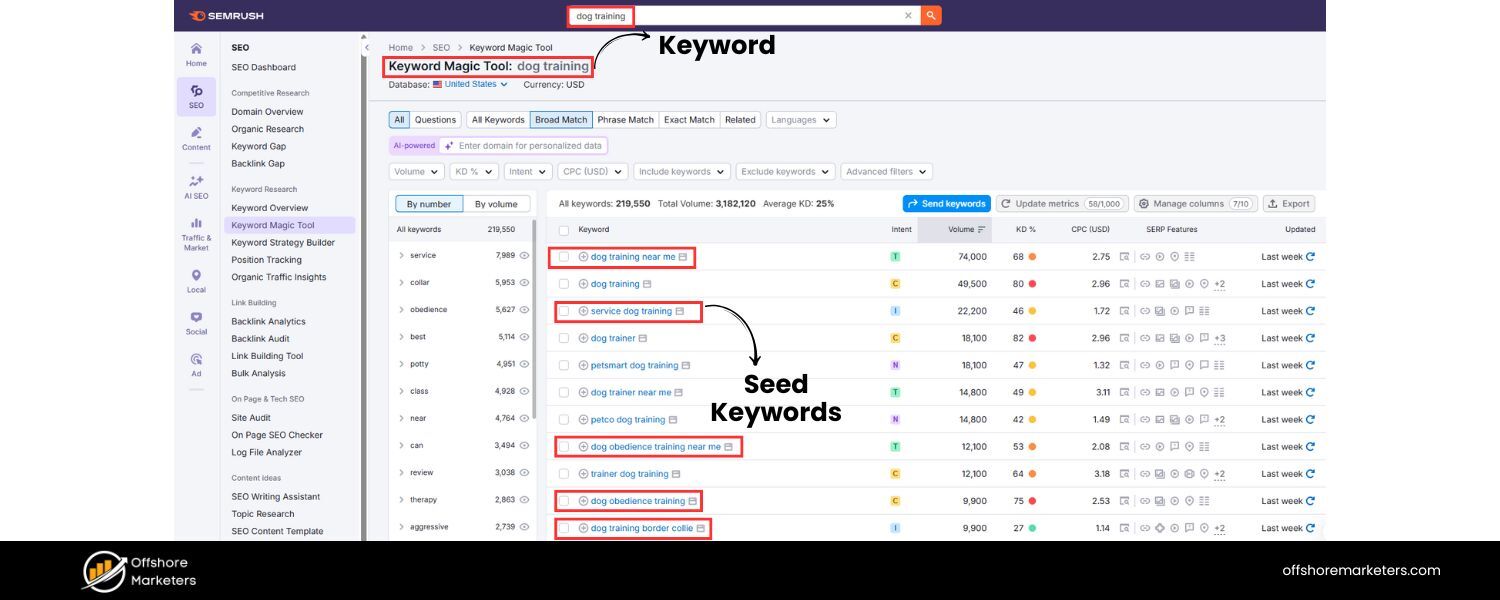
For each core topic, come up with some obvious seed keywords. These are basic terms that describe the topic. For example, if one core topic is dog training, seed keywords might include “puppy training,” “dog obedience,” or “dog training tips.”
These seeds are starting points that we will expand upon. At this stage, you’re essentially mapping out what your site is about at a high level. (If you’re working with an existing site, you can also list your most important existing pages as a starting point, such as your top products or highest-traffic topics, since those will need keywords mapped.).
Pro Tip
Align your topics with what your business offers and where you have expertise. Google’s guidelines (like the Helpful Content system) favor content that demonstrates expertise and closely matches your site’s purpose.
So choose topics that are both relevant to your audience and areas where you can provide valuable, expert information.
Step 2: Perform Keyword Research and Expand Your List
Once you know your core topics, it’s time to do in-depth keyword research for each of those areas. The goal here is to generate a comprehensive list of keywords and search queries that people use related to your topics. Start with your seed terms from Step 1 and use your preferred keyword research tools to expand them.
There are many ways to find valuable keywords:
A. Use SEO tools
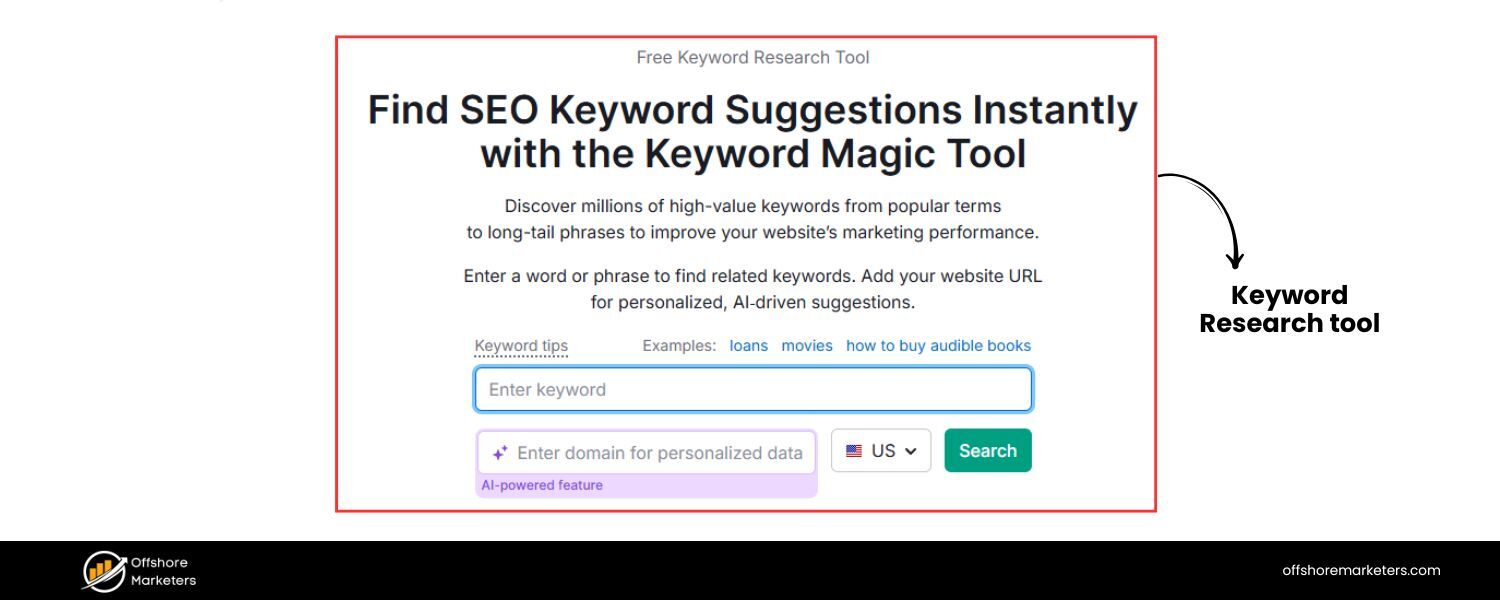
Tools like Google Keyword Planner, Semrush Keyword Magic Tool, Ahrefs Keywords Explorer, or Ubersuggest can generate hundreds of suggestions for any seed keyword. For example, enter a seed like “dog training” and these tools will show related searches, long-tail variations, questions, and more.
You can also check metrics like monthly search volume and keyword difficulty to gauge each term’s popularity and competitiveness.
B. Analyze Search Results
Simply Googling your topic and looking at People Also Ask questions or the autocomplete suggestions can reveal common queries. These are great long-tail keyword ideas that indicate what real users want to know.
C. Use Competitor Insights
Look at high-ranking pages or competitor sites that cover your topic. What keywords do they seem to be targeting? Tools can also help here (for instance, Ahrefs’ Site Explorer or Semrush’s Domain Overview can show what keywords a competitor ranks for).
D. Leverage Search Console (for existing sites)
If your site is already live, Google Search Console’s Performance report can show keywords that your pages are appearing for. This might uncover terms you hadn’t officially “targeted” yet but are relevant.
E. Use PPC data
If you run Google Ads campaigns, check the Search Terms report for queries that triggered your ads. These can be valuable organic keywords too.
As you gather keywords, make sure to capture a mix of head terms (short, broad keywords) and long-tail keywords (longer, more specific phrases).
For example, “dog training” is a head term, while “how to stop puppy biting” is a long-tail phrase. Long-tail terms often indicate specific questions or subtopics that might be perfect for blog posts or FAQ pages, and they usually have lower competition.
By the end of this research phase, you should have a large list of keywords grouped roughly by your core topics. Don’t worry if it feels like too many keywords – the next step will be about organizing them. The key is not to leave out major relevant queries.
Aim to capture all the ways someone might search for information in your topic areas, including different phrasing and questions. This comprehensive list is the raw material for your keyword map.
Step 3: Group Keywords into Topics and Clusters
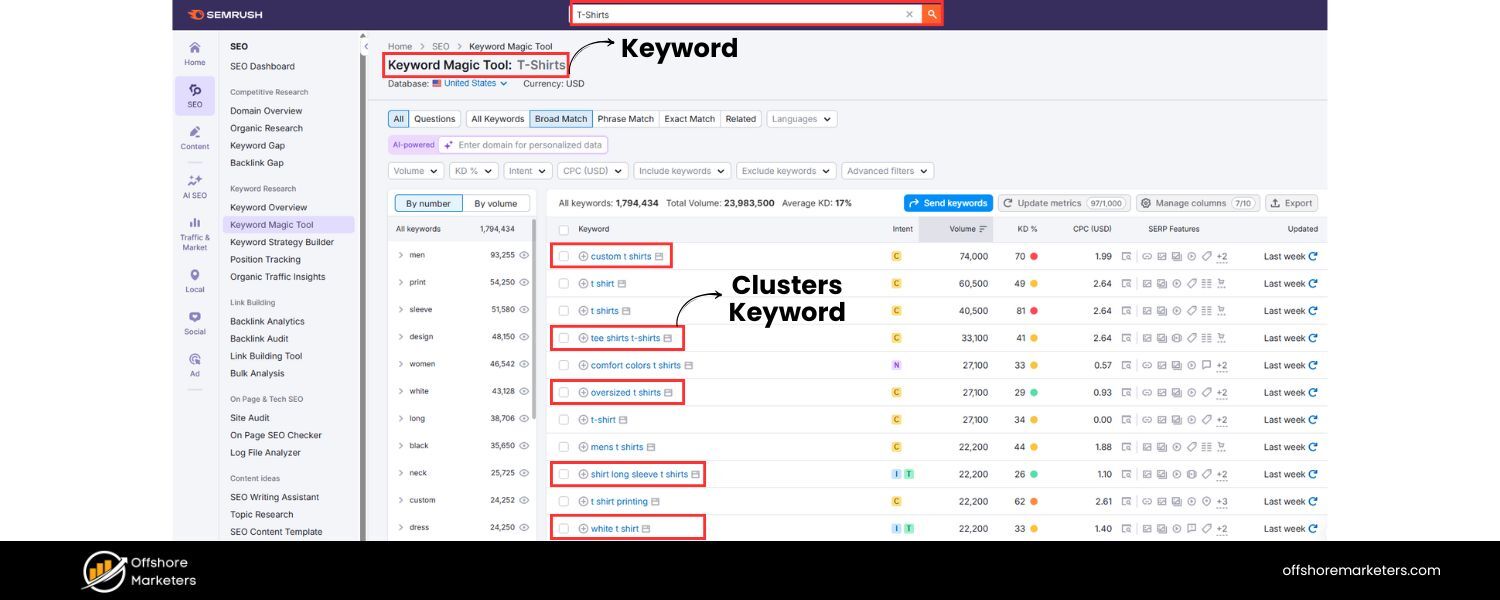
Now that you have a heap of keyword ideas, the next step is to bring order to the chaos. Grouping keywords is crucial because it helps you determine which keywords should be targeted together on the same page versus which deserve separate pages.
Remember, in SEO, multiple keywords with very similar meaning or intent can often be addressed by one piece of content (one page). You don’t need a separate page for every single keyword variation – instead, you want to create groups of keywords by topic/intent, often called keyword clusters.
Here’s how to group your keywords:
A. Cluster by Search Intent
Examine the intent behind each keyword. Are users looking for the same thing? For example, keywords like “best coffee for cold brew” and “best cold brew coffee beans” essentially have the same intent – a searcher wants to find the best coffee beans for making cold brew.Such keywords should be clustered together. A good way to check: search for each keyword and see if Google returns similar results. If two different queries show very similar top results, that’s a hint that one page could serve both (Google sees them as having the same intent).
B. Group by Topic Similarity
Sometimes, keywords are variations of the same basic idea. For example, “dog training tips” and “tips for training a dog” are phrased differently but mean the same thing. These clearly belong in one group. Also, singular/plural or slight rewordings usually go together (e.g., “garden ideas” vs “gardening ideas”).
C. Use Tools for Clustering
Some SEO tools can assist with automatic clustering. Ahrefs, for instance, offers a “Parent Topic” or cluster view that groups keywords by main topic, and tools like Surfer SEO’s Content Planner or Semrush’s Keyword Manager have clustering features. These can quickly segment your list into suggested clusters, which you can then refine manually.
As you create clusters, think in terms of what page or content piece would satisfy that cluster. Each cluster of keywords will eventually correspond to one page on your site in the keyword map.
For each group, identify what the primary keyword should be – typically the one with the highest relevance and search volume that best represents the whole cluster’s theme.
The other keywords in the cluster will be your secondary keywords (variations, subtopics, or long-tails supporting the main topic).
For example, suppose your core topic is “email marketing software.” Your research might have yielded keywords like “best email marketing software,” “email marketing tools,” “email marketing software for small business,” etc.
You might group those together because they all revolve around finding or comparing email marketing platforms (likely one pillar page or blog post can target them collectively). Meanwhile, another cluster might be “how to use email marketing software” which is a different intent (guides/tutorials on usage).
By the end of this grouping step, you should have a set of clusters. Each cluster has a primary keyword (the cluster topic) and a handful of closely related secondary keywords. Essentially, you’re mapping keywords to topics in this stage. In the next step, we’ll map those topics to actual pages/URLs on your site.
Step 4: Map Each Keyword Cluster to a Page (Building the Keyword Map Document)
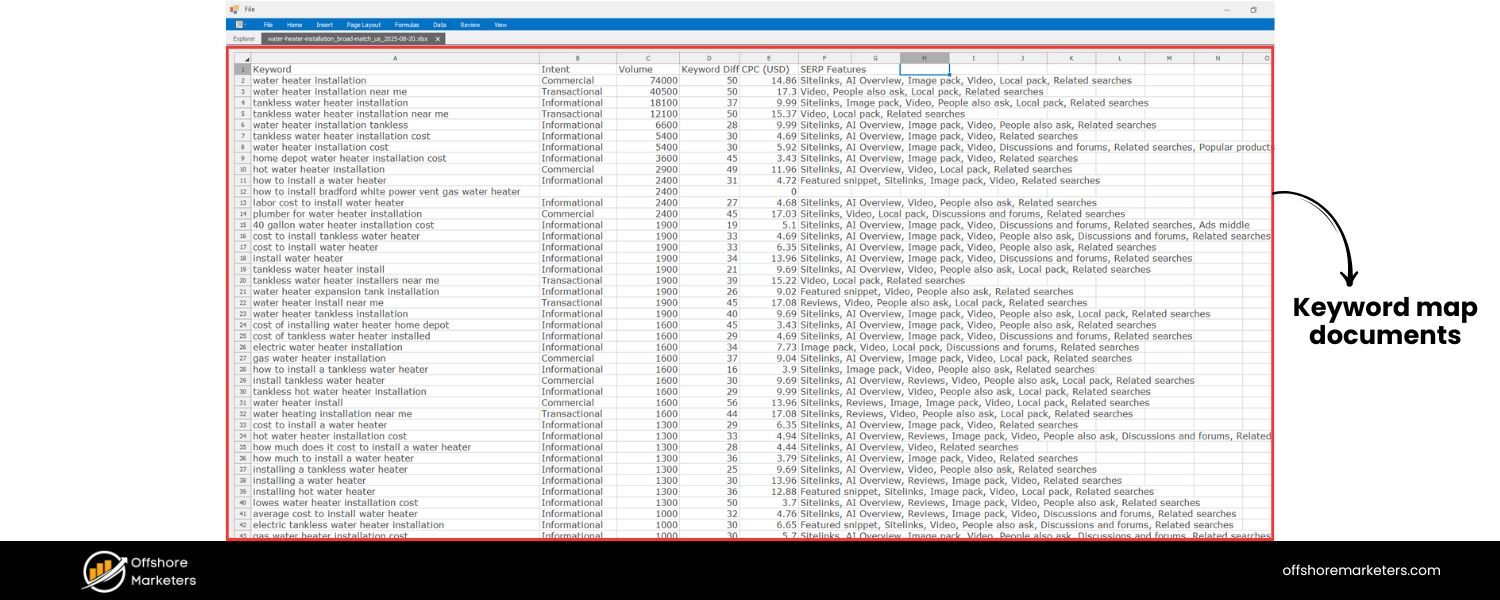
Now comes the core of keyword mapping: assigning your clustered keywords to actual pages on your website. This is where you create your keyword map document if you haven’t already.
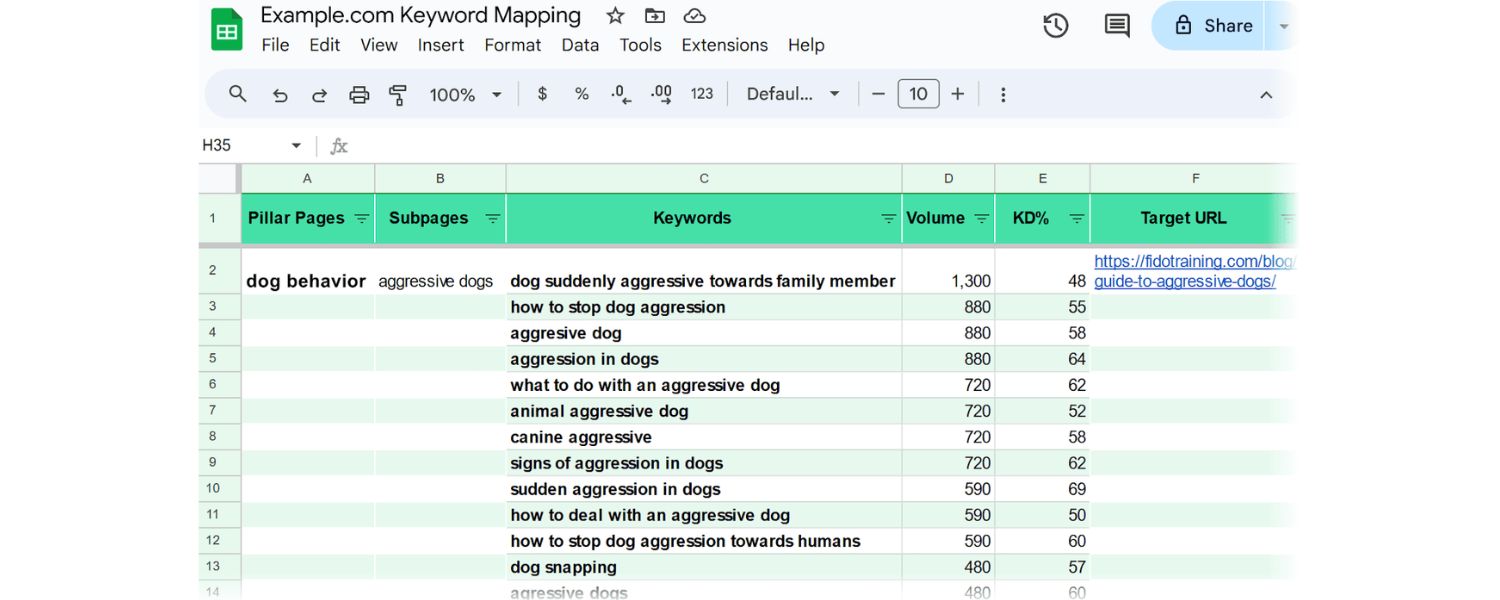
A simple way to do this is using a spreadsheet (Google Sheets or Excel) with columns for the Page/Topic, Primary Keyword, Secondary Keywords, and other useful metrics (like search volume, difficulty, and the URL).
Many SEO pros use a keyword mapping template – you can make your own or use free templates available online (for instance, templates provided by Ahrefs or Semrush).
Here’s how to fill out your keyword mapping spreadsheet:
A. List the Page or Topic
In one column, list the page name or content topic. If the page already exists on your site, you can use its title or a description (e.g., “Services – Email Marketing Software”).If it’s a new page you plan to create, just write a placeholder title for now (like “Guide: How to Train a Puppy”).
B. Assign the Primary Keyword
In the next column, write the main keyword for that page (the primary keyword from the cluster).This is the focus term that you definitely want this page to rank for. For existing pages, ideally this is a term that aligns with the page’s current content or purpose; if not, you might need to adjust the content.
C. Add Secondary Keywords
In another column, list out the secondary keywords that belong to that same cluster/topic. These are related terms or variations that the page will also target. It’s helpful to separate them by commas or put them in a bulleted list within the cell.Some people also note the search volume next to each secondary keyword in parentheses for quick reference. These secondary terms will be sprinkled into the content where appropriate, but they don’t each need their own page because their intent is satisfied by the primary keyword’s content.
D. Include Keyword Metrics
It’s wise to add columns for Search Volume (monthly searches) and Keyword Difficulty (KD) for the primary keyword, and perhaps for the cluster as a whole. This data helps in prioritizing which pages to focus on first.For example, you might create columns for “Volume” and “KD” and fill in the values for the primary term. You can also calculate a “Total Volume” by summing the volume of the primary and all secondary keywords in that cluster, giving an idea of the total potential traffic if you rank well for the whole group.
E. Assign the Target URL
If you already have a specific URL on your site for that keyword cluster, note it down (e.g., the link to a blog post or product page). Each row in your map should ideally have one unique URL. If a cluster doesn’t have an existing page, mark it as a new page to be created (you can leave the URL blank or write “New”).This part is crucial: it shows you clearly which keywords are covered by existing content and which ones will need new content.
F. Set the Action/Status
Many keyword mappers include a “Status” or “Action” column for each page/keyword group.
Here you indicate what needs to be done:
- “To Optimize” if there is an existing page that could rank better for these keywords with some updating and on-page SEO improvements.
- “To Create” if no page exists and you’ll need to create new content for that keyword cluster.
- “Optimized” or “Up-to-date” if the page exists and is already well-optimized for the target keywords. This status tracking helps you manage your workflow. For example, after mapping, you might filter the spreadsheet to show all “To Create” items and start writing those pages first.
G. Last Updated (Optional)
Another useful column is “Last Updated” where you note the last date you optimized or reviewed that page’s content for the target keywords. This helps in maintenance – if a page hasn’t been updated in a long time, you might revisit it later to freshen up.
By completing these steps, you’ve effectively built your keyword map. Each row in the spreadsheet represents a mapping of a keyword (or cluster of keywords) to a specific page on your site.
No primary keyword should appear on two different rows, if it does, you likely have overlap that needs resolving (either combine those rows into one topic or differentiate the intent better).
Keep in mind that Google ranks individual URLs, not entire websites, for specific queries. So ensuring each URL on your site has a clear, distinct keyword focus is the whole point of this exercise.
If you encounter cases where two different pages in your map seem to target very similar keywords, consider merging them into one or repositioning one page for a different nuance of the topic.
The outcome of Step 4 is a tidy keyword map document that will guide all your on-page SEO efforts moving forward.
Example: Let’s say you have an online gardening blog. After research and clustering, one row of your keyword map might look like:
- Page/Topic: “The Ultimate Guide to Gardening Tips” (pillar page)
- Primary Keyword: gardening tips
- Secondary Keywords: gardening tips for beginners; vegetable gardening tips; gardening tricks (plus their volumes in parentheses)
- Volume: 1,600 (for “gardening tips” main term)
- KD: High (e.g., 70%)
- Total Volume: 2,150 (sum of all terms in cluster)
- URL: (if you already have a page, list it, otherwise blank for new)
- Status: To Optimize (if the page exists but can be improved), or To Create (if new)
- Last Updated: (date or blank if new)
By glancing at this, you and your team immediately know what this page should focus on and what to do next.
Example of a keyword mapping spreadsheet: Each row maps a primary keyword (pillar topic) and its related secondary keywords to a specific page URL, along with search metrics and status.
Step 5: Optimize Existing Pages and Create New Content According to the Map
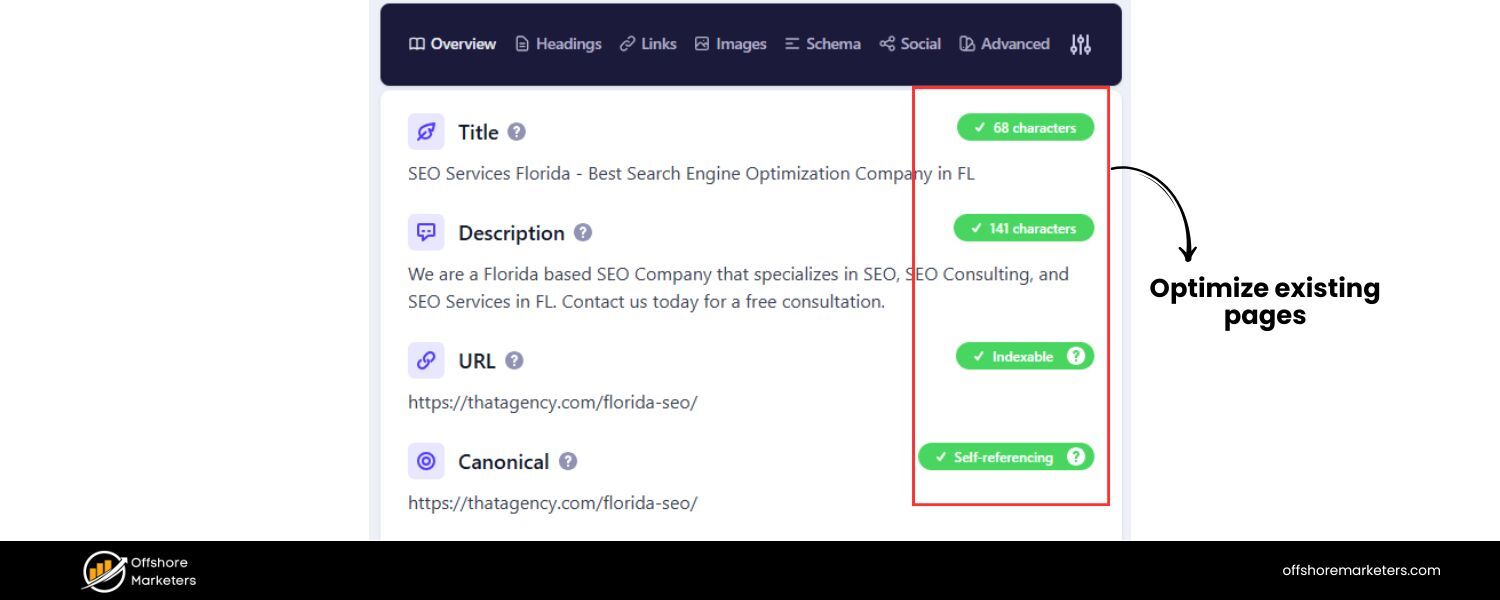
With your keyword map in hand, you now move into implementation, making sure each page on your site (or new page you plan to publish) is optimized for its mapped keywords.
This step is where you’ll do two things in parallel: optimize existing content that was marked “To Optimize,” and create high-quality new content for those keywords marked “To Create.”
Optimizing Existing Pages: For pages that already exist and have now been assigned target keywords through your map, review each page to ensure it’s fully optimized for those terms. This involves on-page SEO best practices:
A. Use the Primary Keyword in Key Elements
Update the page’s title tag to include the primary keyword (if not already). Similarly, work the primary keyword into the page’s H1 heading (usually the same or similar to the title).Include the keyword in the meta description in a natural, compelling way (this can improve click-through rates from SERPs). Also, make sure the first paragraph of the page mentions the keyword, as this can signal relevance.
B. Integrate Secondary Keywords Naturally
Within the body of the content, incorporate the secondary keywords where they fit. You might dedicate a subsection or a paragraph to certain subtopics that correspond to those secondary terms.For example, if one secondary keyword is a question (like “how to start a vegetable garden”), you could add an FAQ section or a subheading addressing that exact question.Ensure each secondary keyword appears at least once, but don’t force it if it feels unnatural, synonyms or variations are fine too. The idea is to cover the cluster’s topics comprehensively so that the page can rank for the variety of terms in that group.
C. Check Content Depth and Relevance
Does the page content truly answer what someone searching the primary keyword would want? If not, beef it up.Add examples, tips, images, or whatever is needed to fully satisfy the intent. Look at the current top-ranking pages for your keyword to gauge what content length and depth might be expected. Your page should be at least as helpful as those, if not better.
D. Optimize On-Page Elements
This includes updating or adding relevant images (with alt text that includes keywords where appropriate), using the primary keyword or synonyms in subheadings (H2s, H3s) to structure the content, and ensuring the page is user-friendly (easy to read, quick to load, mobile-friendly).Also double-check that the keyword usage isn’t overly repetitive, aim for natural inclusion. Modern SEO is about quality and relevance, not keyword stuffing.
E. Internal Linking with Anchor Text
As you optimize a page, think about where you can link to other pages on your site and vice versa. Add links from this page to related pages (especially its pillar/cluster counterparts).When linking, use descriptive anchor text that preferably includes keywords. For example, from your “gardening tips” page, you might link a mention of “vegetable gardening” to your “vegetable gardening tips” article, using “vegetable gardening tips” as the anchor text.This way, you drive internal link equity to relevant pages and help Google understand the context. Ensure your pillar page links out to all its cluster pages and that cluster pages link back to the pillar, creating a strong topical hub on your site.
F. Avoid Overlap
If during optimization you realize another page is covering similar ground, consider updating one of them to differentiate or merging them.Your keyword map should have already flagged these, but stay vigilant to avoid cannibalization. For instance, if two pages both mention “email marketing tips,” decide which page is the authoritative source for that and add a link pointing to it from the other page with clarifying context.
After optimizing, update the “Status” in your keyword map for that row to something like “Updated” or mark the date in the “Last Updated” column. This gives you a record that the page has been handled according to the plan.
G. Creating New Pages
For keywords that had no corresponding page (marked “To Create”), it’s content creation time. Prioritize which new pages to create first by considering the keyword’s search volume and business importance.
High-volume or high-opportunity keywords might be tackled sooner, but also consider “quick wins” – perhaps a slightly lower-volume term with very low competition could be an easy page to rank.
When creating new content:
A. Use the Keyword Map as a Guide
Your map tells you the primary and secondary keywords to target, so make sure the content outline you develop will cover those.For a new blog post or page, a good approach is to treat the secondary keywords as subtopics or questions to address. This ensures you naturally include them and provide comprehensive info.
B. Follow On-Page Best Practices from the Start
Just as with optimizing existing pages, ensure your new content uses the primary keyword in the title, headings, URL slug, etc.If you’re writing a new article titled “10 Essential Email Marketing Tips for Beginners,” and your primary keyword is “email marketing tips,” you’d obviously include that phrase in the title and a few times in the text (especially intro and conclusion). Work secondary terms in as you go, where relevant.
C. Link It Up
Once the new page is created, don’t leave it orphaned. Add internal links from other pages that are related. Perhaps your new page fills a content gap – now go back to an older related post and insert a link in the text pointing to the new page, to help users (and crawlers) find it.Also link from the new page back to its pillar page if it’s a cluster piece, or to other supporting pages as appropriate. In short, weave the new content into your site’s link structure.
D. Optimize Meta Tags
Craft a meta description for the new page that incorporates the main keyword and entices clicks (remember, the meta description is like an advertisement for your page in search results). While meta descriptions don’t directly influence rankings, a good one can improve your CTR, which is beneficial.
E. Publish and Index
After publishing, fetch the page in Google Search Console to get it indexed faster. You can also include it in your sitemap. Monitor its performance over the next few weeks.
Every time you create a new page from your keyword map, go back to the map and replace that placeholder (the one that had no URL) with the actual URL, and change the status to “Created” or “Updated” once done. This way your map stays current as the single source of truth for your site’s keyword strategy.
Step 6: Monitor Performance and Refine Your Keyword Map Regularly
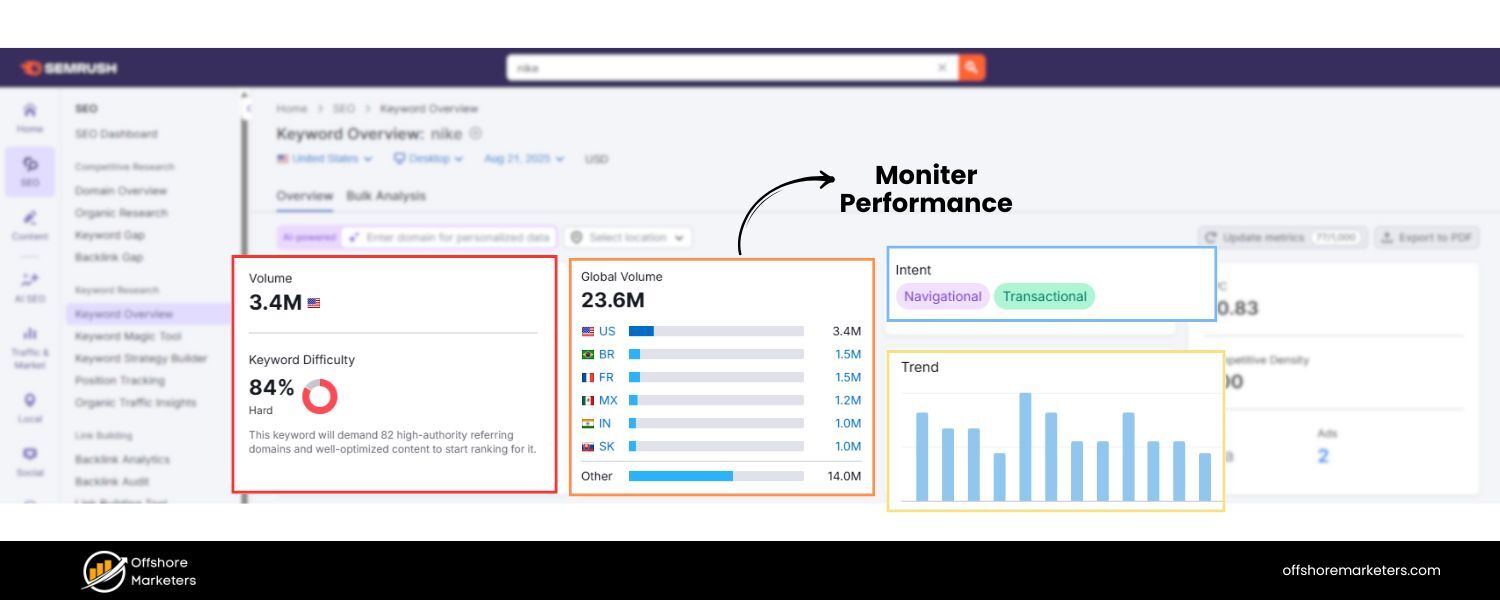
SEO is not a one-and-done effort, and neither is keyword mapping. Your keyword map should be a living document that you revisit and revise over time. There are a few ongoing tasks you should do to keep your keyword map, and your SEO strategy, up to date:
A. Track Rankings and Traffic
Use tools (Google Analytics, Google Search Console, or third-party rank trackers) to monitor how each mapped page is performing for its target keywords.Does the page appear on the first page of Google results for the primary keyword? Is it picking up traffic for the secondary keywords too? If some pages aren’t ranking as expected, it might be time to re-optimize them or assess if the content is truly meeting the searchers’ needs.Your keyword map can be annotated with notes like “currently rank #5 for KW” to keep an eye on progress.
B. Watch for Cannibalization
Even with careful planning, over time your site might accumulate some overlapping content (especially if you continuously add new content or if Google’s understanding of intent shifts).Periodically audit your rankings: if you find two of your pages ranking for the same keyword and hurting each other’s performance, update your keyword map and content to resolve it.That might mean merging one page into the other or changing the keyword focus of one page. Ensuring each keyword cluster still cleanly maps to one page will maintain your SEO health.
C. Update Content and Keywords
Industries evolve and so do search behaviors. Every few months or at least annually, review your keyword list for new opportunities.Perhaps new popular queries have emerged (for instance, sudden interest in “AI tools for yourindustryyour industry” might spark new keywords to target). Add these to your keyword research process and map them to new or existing pages as appropriate.Likewise, review existing content for freshness , if a page’s information is outdated, update it and mark the date in the keyword map’s “Last Updated” column. Fresh, relevant content stands a better chance of ranking and satisfying users.
D. Expand Your Map as Your Site Grows
When you introduce new product lines, services, or content categories, perform keyword research in those areas and extend your keyword map.It’s like adding new regions to your roadmap. This ensures from day one of a new site section, you have a clear keyword-target plan.
E. Audit and Cleanup
Over time, you might decide some pages are no longer needed or some keywords aren’t worth targeting due to low performance.Use your map to identify such cases. If a page never gained traction and isn’t crucial, you might consolidate it into another page and update the map accordingly (remove that row or merge it with another). Regular auditing keeps your site and map efficient.
F. Regularly Check Competitors
SEO is dynamic, your competitors might publish new content targeting keywords you’ve mapped, or they may be mapping keywords you hadn’t thought of.Occasionally reviewing competitor sites or using competitive research tools can reveal if there are new keywords you should add to your map or if you need to strengthen certain pages to maintain your edge.
Remember, keyword mapping has no finish line. It’s an ongoing strategy. As one expert put it, think of your keyword map as a living strategy document that needs care and feeding. By keeping it updated, you ensure your SEO efforts stay focused and you can continually harvest new search traffic as trends change.
In summary, to maintain success: continuously monitor results, adjust your keywords or content when needed, and keep seeking new keyword opportunities to map. This proactive approach will help you stay ahead of competitors and search engine algorithm changes, as your site will remain well-organized and relevant over time.
Keyword Mapping Tools and Templates
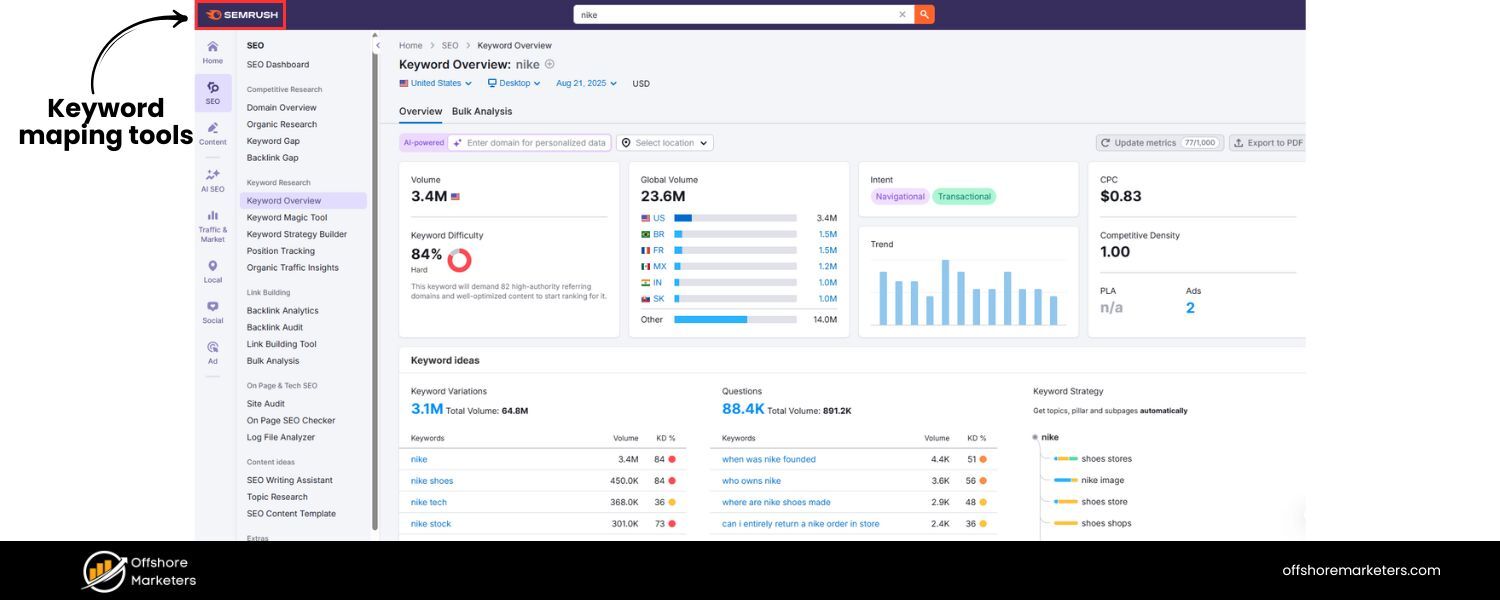
While you can do keyword mapping with just spreadsheets and your brain power, there are several tools that can greatly ease the process, from researching keywords to clustering and tracking. Here are some useful tools and resources for keyword mapping:
A. Keyword Research Tools

To build your keyword list, tools like Google Keyword Planner (free with a Google Ads account) and Google Search itself are basic but effective.Keyword Planner can suggest new related keywords for any seed term and provide rough search volume ranges.
Google’s own suggestions (Autocomplete and People Also Ask) are also great for uncovering long-tail queries.On the paid side, Semrush and Ahrefs are industry-leading tools. Semrush’s Keyword Magic Tool and Ahrefs’ Keywords Explorer both offer millions of keyword ideas with filters for volume, difficulty, intent, etc.
These tools can also show you which keywords competitors rank for, helping you find gaps. Another notable mention is Ubersuggest (by Neil Patel), which provides keyword ideas along with SEO metrics, and has a free tier. The key is to use these tools to cast a wide net in your research phase.
B. Keyword Clustering Tools
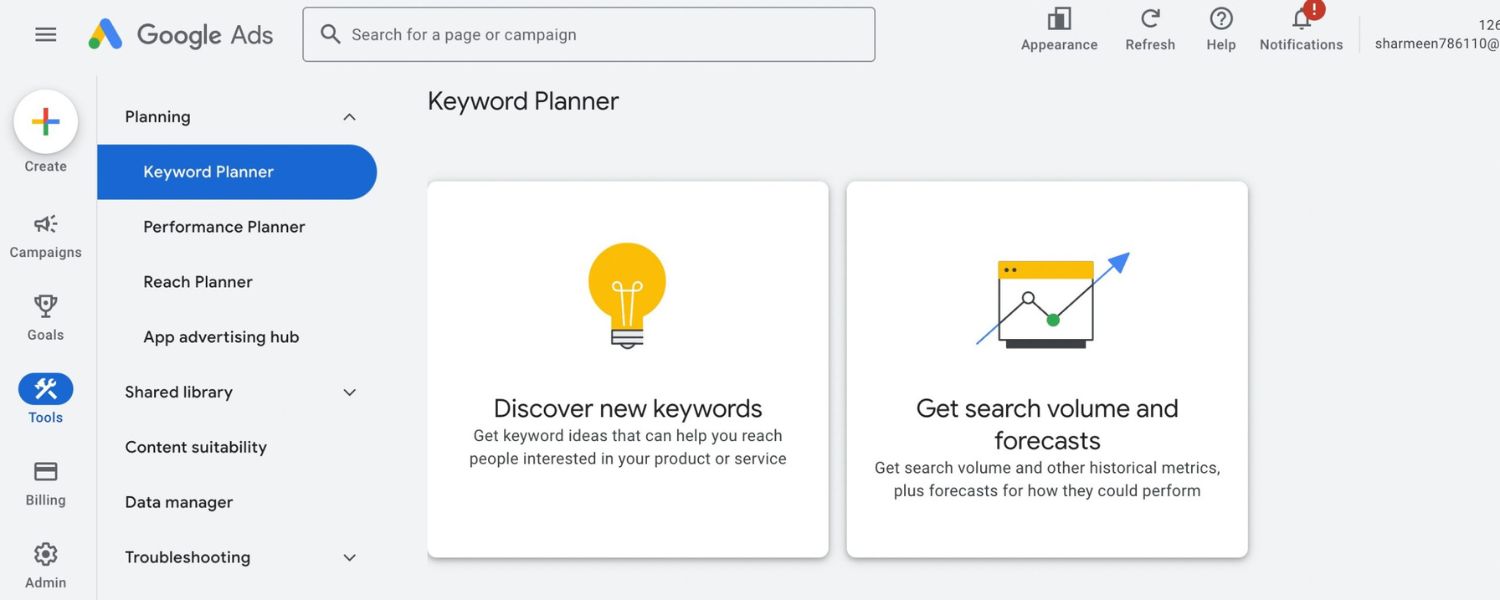
Clustering manually can be time-consuming if you have hundreds of keywords. Ahrefs has a nifty feature where it automatically groups keywords by “Parent Topic”, essentially identifying when different keywords have overlapping intent by analyzing search results.
Semrush offers a Keyword Grouping/Clustering feature in some of its tools as well. There are also dedicated clustering tools or scripts where you input a list and it groups them based on SERP similarities.
If you prefer a hands-on approach, even a simple spreadsheet filter or sort (by keyword containing certain words, etc.) can help segment lists. For example, grouping all keywords containing “for beginners” vs “best [topic]” can be a start.
C. Keyword Mapping Templates
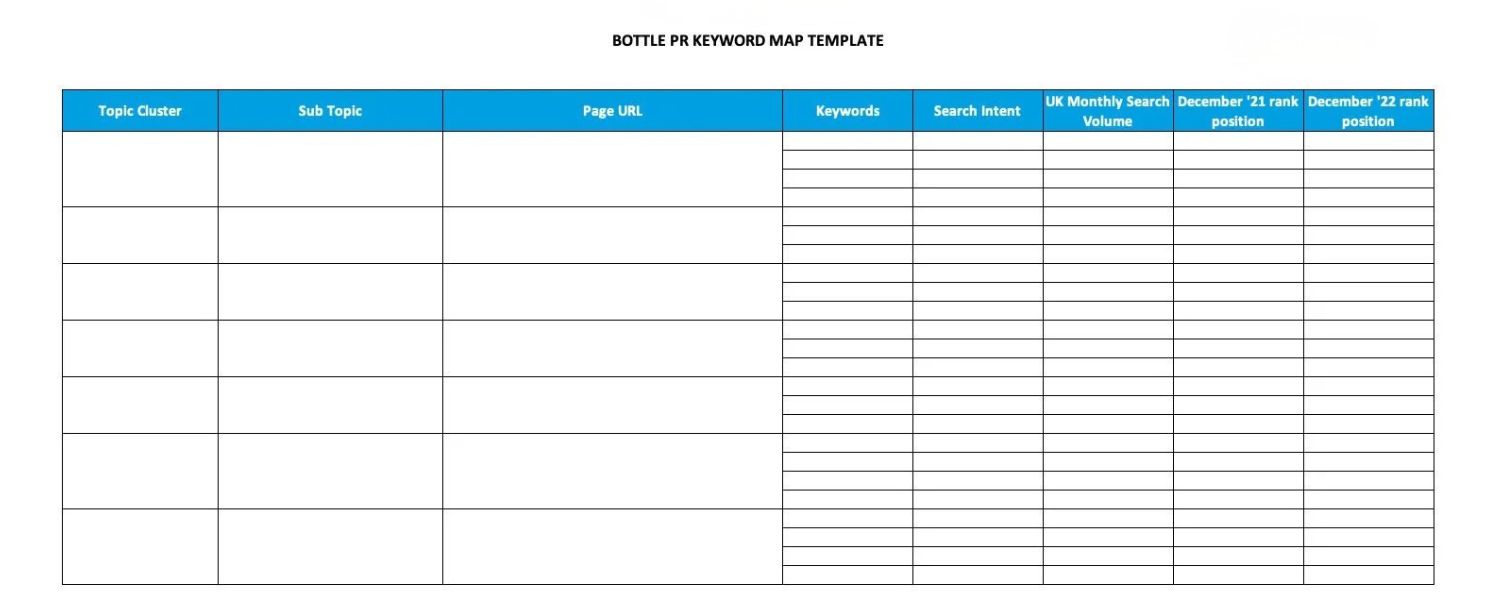
To save time, you can use pre-made keyword mapping spreadsheet templates. Semrush, Ahrefs, and other SEO blogs often provide free Google Sheets or Excel templates that have the columns and formatting ready to go. You just plug in your keywords and fill in the data.
These templates typically include sections for pillar vs cluster keywords, volumes, URLs, status, etc., like we discussed. Using a template can ensure you don’t forget any important fields.
For instance, Ahrefs’ template has columns for Traffic Potential and Business Potential in addition to just volume and difficulty, which can be helpful for prioritization. Choose a template that fits your workflow, or customize your own.
D. SEO Management Platforms
If you’re mapping keywords for a large site or multiple sites, using an SEO tool or platform might be beneficial.Semrush’s Keyword Manager/Keyword Mapping tool (often referred to as a strategy or content planner) can automate parts of the process.
They even have a Keyword Strategy Builder that, when you input some seeds, will suggest pillar and cluster groupings for you. It basically tries to create a topical map automatically – a great starting point if you’re dealing with a huge keyword universe.
Surfer SEO’s Content Planner (Topic Explorer) is another tool: you give it a main keyword and it generates subtopic clusters and content ideas, which can directly inform your keyword map (it even shows what clusters competitors cover so you can match or outperform them). These tools often require a subscription, but they can save a lot of manual effort.
E. Rank Tracking & Analytics
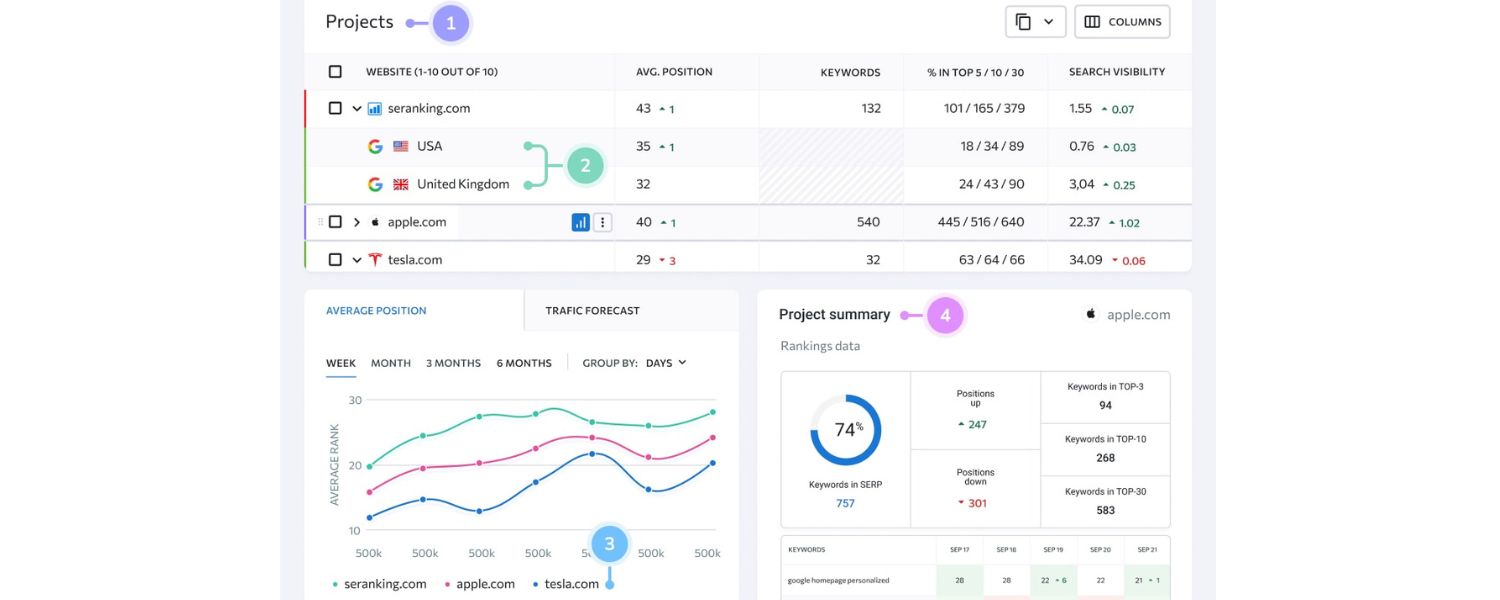
After your map is implemented, tools like Google Search Console (free) are indispensable to monitor how your pages are ranking for the mapped keywords. You can filter by query or page to see if your optimization is working. For convenience, paid tools like Ahrefs, Semrush, or Moz allow you to create projects with tracked keywords – you might input your primary keywords into a rank tracker to get regular updates on their positions.
Some people organize tracked keywords by the page or topic (mirroring the keyword map) so they can quickly see, for example, all keywords related to “Topic A” and how that page is doing.
Additionally, Google Analytics can help measure if the organic traffic to a page is increasing after optimization. There are also specialized tools like AudienceKey (as Neil Patel mentions) that focus on keyword mapping and monitoring, which can integrate multiple data points.
In practice, you might use a combination of these. For instance, use Google Keyword Planner and Semrush for research, do clustering with Ahrefs’ suggestions plus manual tweaking, record everything in a Google Sheets template, and track progress with Search Console and a rank tracker. Find a workflow that suits your budget and the scale of your project.
Remember tools are aids, not replacements for your strategic thinking. They can provide data and even recommendations, but you’ll still want to review your keyword map with a critical eye.
The goal is to ensure the keywords make sense for your specific context and that the mapped page truly can serve the intent of those queries. When used wisely, these tools can greatly enhance the efficiency and accuracy of your keyword mapping process.
Conclusion & Call to Action
Achieving better search rankings and building a robust SEO strategy starts with effective keyword mapping. By now, you’ve learned what keyword mapping is, why it’s so valuable, and how to create and use a keyword map step by step.
It’s a powerful technique to organize your content, ensure each page has a clear focus, and align your site structure with what users are searching for. In doing so, you make it easier for both search engines and readers to find the right content on your site for each query, a win-win for SEO.
Now it’s time to put this knowledge into action. Don’t let your website be part of the 96% with no Google traffic, take control by building your keyword map and optimizing your pages with purpose.
Start by mapping just a few pages and keywords, or tackle your entire site if you’re feeling ambitious. Even a small effort toward mapping can pay off with more focused content and improved rankings.
Keep your keyword map updated, revisit it as your site grows or as trends change, and you’ll have a reliable blueprint guiding your SEO efforts for the long haul. Remember, SEO success is cumulative – each well-mapped and optimized page is another step toward higher visibility and more organic visitors.
What’s next?
Grab a spreadsheet or a template and begin your keyword mapping journey. Identify those opportunities, assign them to pages, and create the best content for each.
Your future self (and your analytics reports) will thank you! If you have questions along the way or want to share your experiences, feel free to reach out or comment, let’s learn from each other’s mapping successes.
Now get out there and start mapping your keywords to the right pages, and watch your SEO results improve. Happy mapping and may your site climb to the top of the SERPs!

.png)
Shopify SEO: Guide to Ranking Your Store and Driving Sales
Most Shopify store owners set up their store, list their...

Content Marketing : Definitive Guide to Strategy, Content Types, and Measurable ROI
Content marketing generates 3x more leads than outbound marketing at...

Above the Fold: Guide to Conversions, Rankings and Faster Pages
Above the Fold in 2026: The Complete Guide to Conversions,...

Off-Page SEO Checklist: Guide to Building Real Authority
Most websites spend months creating great content, only to wonder...

What Is Keyword Bidding? The Complete Strategy Guide for Smarter Ad Spend
Most advertisers believe the highest bid wins the auction. It...

What Is Google Trends? The 2026 Marketer’s Complete Guide
If you are not already pulling weekly insights from Google...
If you want a growth partner who will get to know every aspect of your business and treat your budget like their own — we are the right fit.
.png)


.png)
.png)
.png)
.png)
.png)
.png)
2026 ALL RIGHTS RESERVED MADE IN INDIA
