
SERP Features: Ultimate Handbook for Google
August 18, 2025
Introduction
Over the past 25 years in marketing, I’ve watched Google’s search results evolve from 10 blue links into an interactive showcase of instant answers, images, maps, and more.
These enhancements, known as SERP features, now dominate most search pages, providing quick information before a user ever clicks a result. In fact, recent data shows only about 1.5% of Google’s first-page results come without any SERP features.
This prevalence means two things for marketers and SEOs: (1) you must understand these features to capture visibility, and (2) you must deliver value directly on Google to engage today’s “zero-click” searchers (studies in 2024 found nearly 58–60% of searches end without a click).
In this comprehensive SERP Features Guide, we’ll break down what SERP features are, why they matter, and how you can optimize your content to win these prominent placements – giving you an edge over competitors. Let’s dive in!
What Are SERP Features?
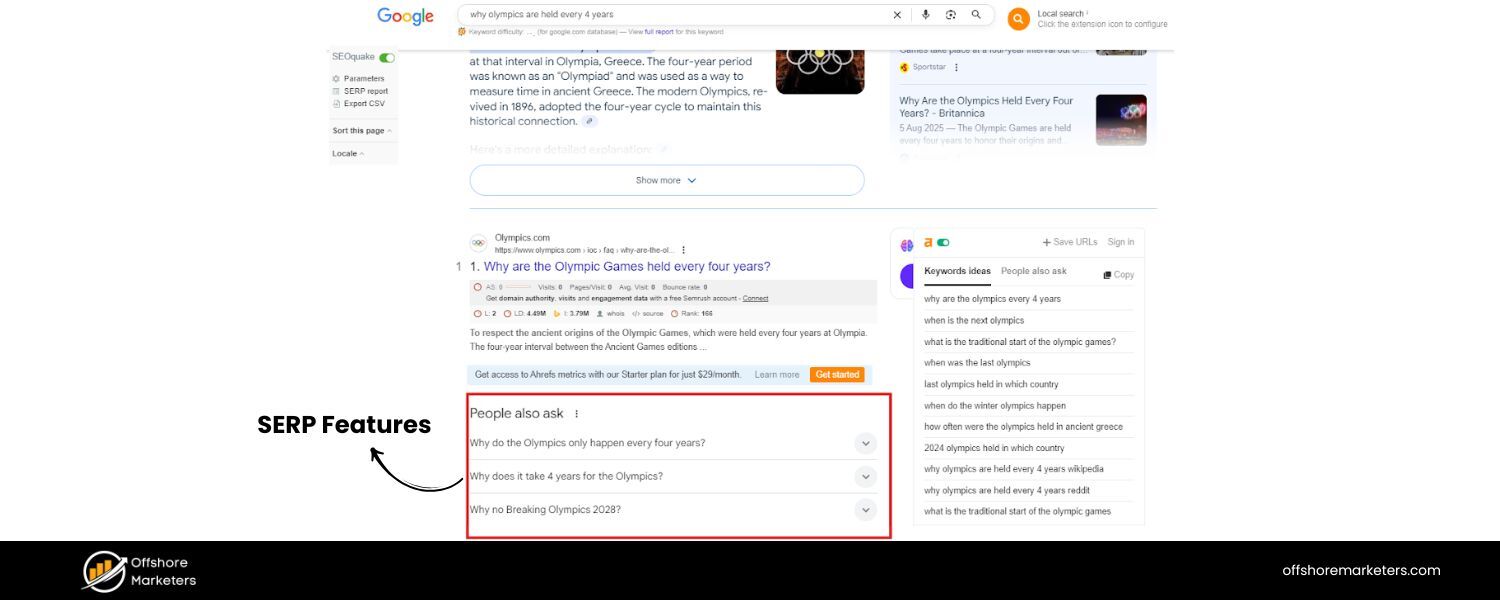
SERP features are the special results on Google’s Search Engine Results Pages that go beyond the standard organic listings.
They include things like answer boxes, image carousels, maps, and other enriched snippets that “provide quick answers and additional information directly on results pages”. In essence, these features are Google’s way of enhancing the user experience by surfacing rich, relevant content (text, images, videos, etc.) within the search results themselves. Common examples of SERP features include Featured Snippets, Knowledge Panels, People Also Ask boxes, image packs, video carousels, local map packs, and more.
Each is designed to help searchers find what they need faster, whether it’s a concise answer, a visual preview, or a list of related questions, without necessarily having to click through to a website. For businesses and content creators, SERP features represent new opportunities to gain visibility (often appearing at the very top of the page) but also new challenges since they can draw clicks away from traditional links.
In the sections below, we’ll explore why these features are so critical and then provide a detailed guide to the major SERP features and how to optimize for each.
Why SERP Features Matter for SEO
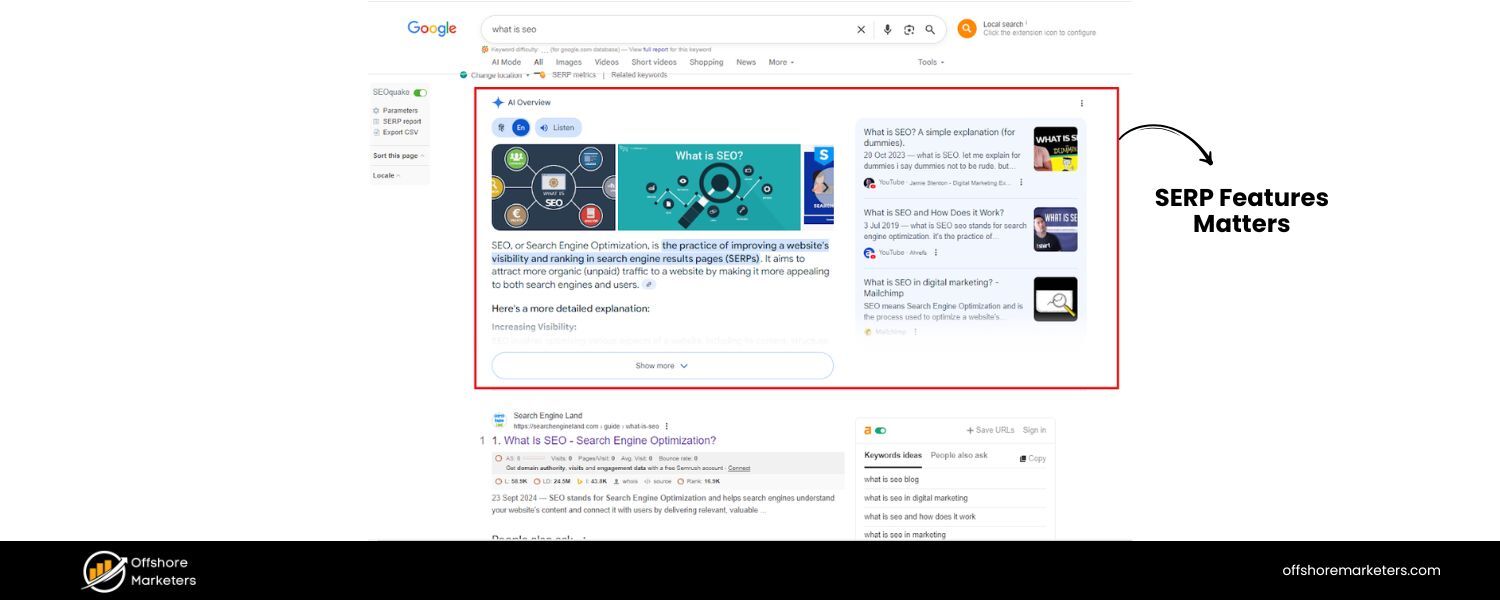
SERP features have become a game-changer in SEO – they can significantly boost your visibility, traffic, and credibility if you secure them. Because these elements often take up prime real estate on the results page (frequently above the regular listings), they naturally attract more eyes and clicks.
For example, if a search query triggers an AI Overview, a Featured Snippet, and a People Also Ask box, those will be front-and-center and far more noticeable than any standard link below. These features not only stand out visually (with images, accordions, stars, etc.), but they also implicitly signal that Google trusts the content being highlighted.
Users see pages featured in snippets or panels as authoritative and relevant, since “Google probably wouldn’t display your webpage so prominently if it didn’t view it as credible.” In short, landing a SERP feature can establish your brand as a go-to source and dramatically improve click-through rate (CTR).
However, there’s another side: SERP features contribute to the rise of “zero-click” searches, where users get their answers directly on Google.
By 2024, nearly 60% of searches, especially on mobile, ended without a click to any website. Examples include searching a definition, a math calculation, or the weather and getting an instant answer or knowledge card at the top of the page.
In fact, about 5% of queries show an instant answer from Google’s Knowledge Graph (like a quick fact or conversion). For businesses, this means that even if you rank #1, you might receive fewer clicks if a SERP feature satisfies the query.
The key is to embrace this reality and turn it into an advantage: by optimizing your content to become that featured answer or result, you still gain the user’s attention (and can earn their trust or a later visit).
Furthermore, appearing in SERP features like snippets or “People Also Ask” can drive indirect benefits – such as brand visibility, voice search presence (voice assistants often read out featured snippets), and even additional backlinks from others citing a featured answer.
Bottom line: this comprehensive SERP Features Guide explains how to succeed in search marketing today. To rank well, you need to win those features whenever possible and integrate them into your strategy.
Below, we’ll cover the major Google SERP features you should know about (as of 2025), why they’re important, and how to optimize your content for each. This guide goes deeper and more up-to-date than your average list, incorporating fresh insights and pro tips that many competitors overlook. Let’s get started with the most coveted feature of all, the Featured Snippet.
Featured Snippets: Earning the Coveted “Position Zero”
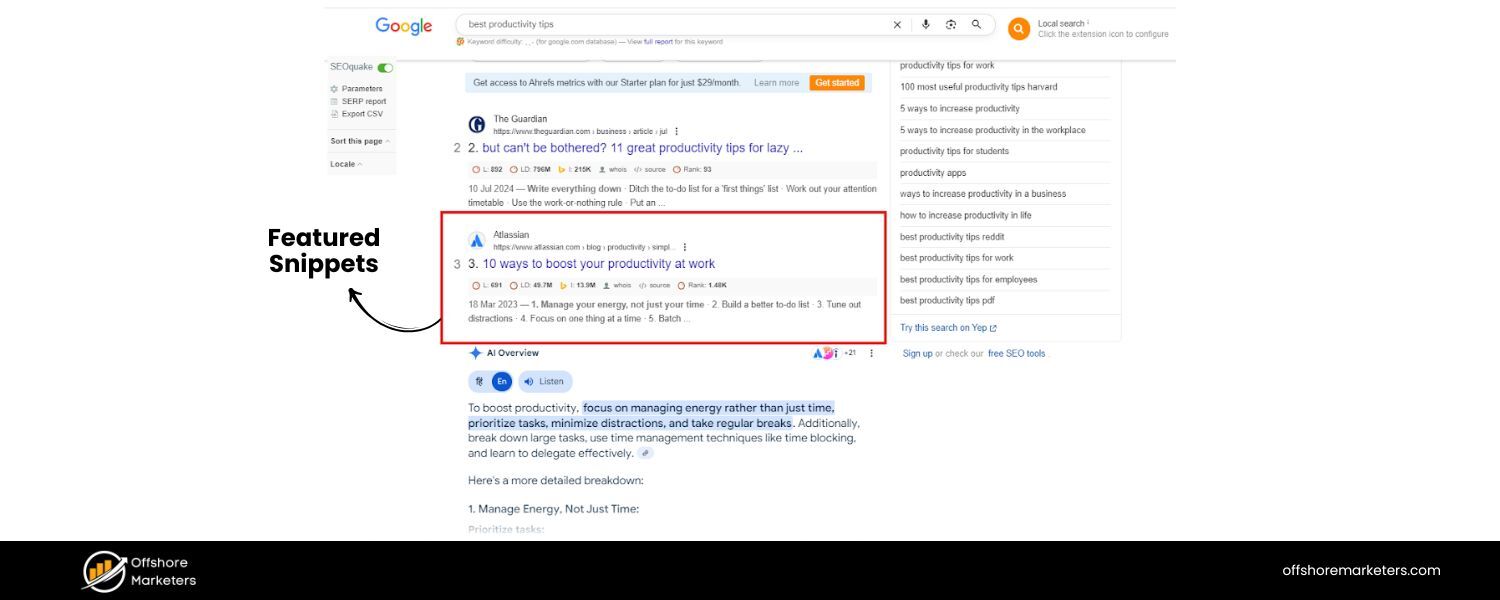
Featured snippets are the boxed answer summaries that appear above all other search results (hence the nickname “position zero”).
Google displays a chunk of content (text, list, or table) pulled from a webpage that directly answers the searcher’s query.
For example, if you Google “best productivity tips,” you might see a featured snippet listing “Top 5 Tips” with brief descriptions, right at the top of the page. This snippet includes a link to the source site, but the user can often get the core answer without leaving Google.
Featured snippets typically show up for question-like searches (how, why, what, best, etc.), comparisons (X vs Y), definitions, and other queries seeking a quick answer.
Why are featured snippets so valuable?
First, they occupy prime real estate, often stealing clicks from the #1 organic result below. Users are naturally drawn to the highlighted box, it’s designed to grab attention.
Second, being featured builds credibility: it signals that Google trusts your content enough to quote it to users. It’s also important for voice search, smart speakers and voice assistants often read out the featured snippet as the answer to a spoken query.
In fact, research shows that a large share of voice search answers (over 40% in one study) come directly from featured snippets.
How to Optimize for Featured Snippets: There’s no guarantee, but you can increase your chances by structuring your content in a snippet-friendly way:
A. Identify common snippet opportunities
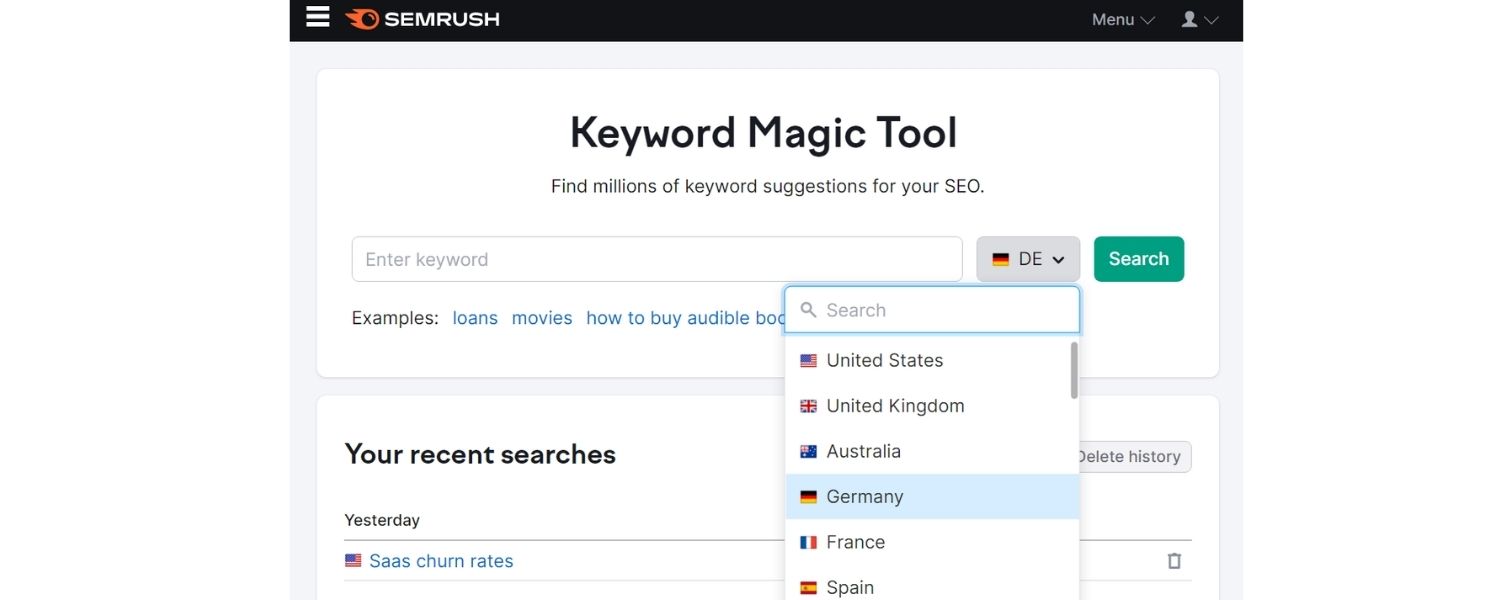
Use SEO tools or Google’s People Also Ask suggestions to find questions in your niche. Look for searches where a competitor has a snippet, which means there’s a chance for you to provide a better answer.(Tip: Tools like Semrush’s Keyword Magic can filter keywords that trigger a Featured Snippet.)
B. Answer the question directly and concisely
When you target a question, use the question as a heading (H2/H3) on your page and immediately follow with a clear, accurate answer in 1–3 sentences or a short list. Aim for ~40-60 words if it’s a paragraph. Get to the point immediately, then you can elaborate further in the next paragraph.
C. Match the format
Snippets can be paragraphs, bullet/numbered lists, or tables. See what format Google is currently showing for your target query (e.g., a list of steps, a table of data) and try to provide a similar structured answer.For instance, if “how to improve SEO ranking” yields a list snippet, format your answer as a step-by-step list. If it’s a table (say, for price comparisons), include a simple HTML table in your content.
D. Use header tags and proper formatting
Structure your page content with logical headings and subheadings. Google often pulls snippet text from h2 or h3 sections followed by a well-structured answer. Also utilize ordered or unordered lists for “listicle” queries and tables for data – Google finds it easier to extract answers from well-formatted HTML .
E. Be objective and factual
Snippet answers that do well are typically neutral and informative in tone (since Google wants an authoritative voice). Avoid fluff – deliver facts or a clear step-by-step. Including pertinent stats or definitions can help. For example: “The Eiffel Tower is 330 meters tall (1083 feet)google.com,” directly addresses a “How tall is…” query in a factual way.
F. Cover related questions
Often, grabbing one snippet (say, “What is X?”) is easier if your content also addresses closely related questions (which could appear in People Also Ask). Write an in-depth article that answers multiple common questions around the topic – this breadth can improve your overall relevance.
Keep in mind that featured snippets are dynamic. Google may change which site is featured based on content updates or user behavior. Monitor your snippet rankings and update your answers if someone else steals that spot. It’s an ongoing battle for that coveted “position zero,” but the payoff is huge in visibility and traffic.
AI Overviews (SGE): Google’s AI-Powered Answers
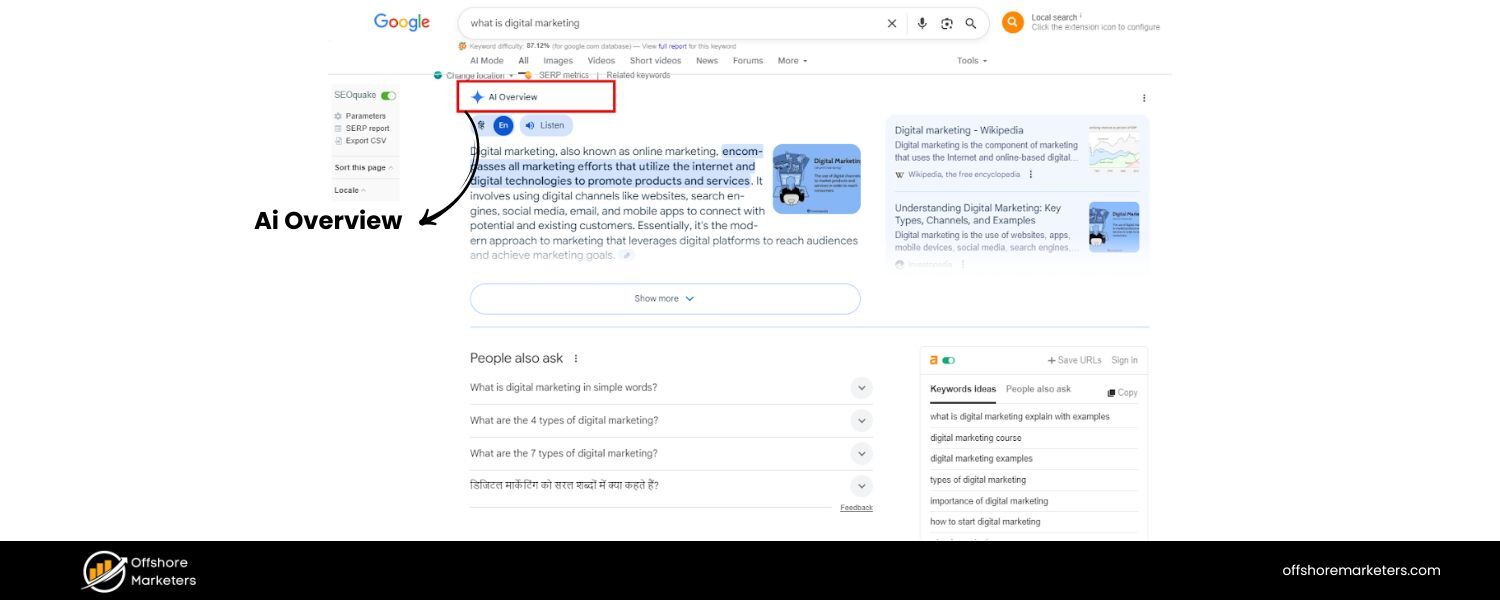
One of the newest and most talked-about SERP features is the AI Overview, part of Google’s Search Generative Experience (formerly known as SGE).
This is essentially an AI-generated summary of results for your query, appearing at the very top of the page – even above featured snippets and ads.
An AI Overview is typically a few paragraphs long, synthesizing information from various high-ranking pages into a cohesive answer, often with key points highlighted and links to the source pages. It’s Google’s attempt to answer broad or complex queries in a conversational way using AI (the interface looks like a colored box with a “chatty” answer and citations).
For example, a search for “How to improve remote team productivity” might trigger an AI Overview that summarizes tips gathered from multiple articles, saving the user from scanning through each result individually.
AI Overviews are game-changing because they can potentially keep even more users on Google. They’re “front and center” and can occupy a large portion of the screen.
Early data (from Google’s experiments) shows that when an AI Overview appears, users may scroll less and click fewer traditional results – after all, they’ve gotten a comprehensive answer at the top. For SEOs, this raises the stakes: if your content isn’t included in that AI summary, you might miss out on a lot of visibility.
On the flip side, if your page is one of the trusted sources that the AI cites, it’s a huge credibility boost and can still drive clicks (since the overview typically links out to its sources).
How to Optimize for AI Overviews (SERP Features Guide): You can’t directly mark up or claim an AI snapshot like you would a featured snippet, because Google’s AI decides dynamically what to include. However, the best practices essentially mirror holistic, high-quality SEO. Here’s what to focus on:
A. E-E-A-T – Provide high-quality, authoritative content
Google’s AI summary pulls from top-ranking, trusted pages, so your goal is to be one of them. That means ensuring your content demonstrates Experience, Expertise, Authoritativeness, and Trustworthiness (E-E-A-T). Write with depth and accuracy, cite reputable sources, and if appropriate, share first-hand expertise.
B. Cover the topic comprehensively
AI overviews tend to combine multiple aspects of a query. Aim to create definitive guides or thorough articles that answer all sub-questions a user might have.
C. Use clear structure and headings
Break your content into logical sections with descriptive headings to help both readers and Google’s AI identify relevant points.
D. Ensure crawlability and technical SEO
Make sure Google can fully crawl and index your page. Use schema where appropriate to give more context.
E. Keep content up-to-date
AI results may favor fresh information, so regularly update key pages with current statistics and examples.
F. Monitor which queries get AI Overviews
Focus on important keywords in your niche that show AI summaries and prioritize those topics in your strategy.
At the end of the day, optimizing for AI Overviews largely follows core SEO principles. By creating helpful, people-first content that answers users’ needs better than anyone else, you increase the odds that Google will choose your content as part of its aggregated answer.
This section serves as a key part of our SERP Features Guide, helping you understand and win these new AI-driven placements.
People Also Ask (PAA): Expanding Q&A Opportunities
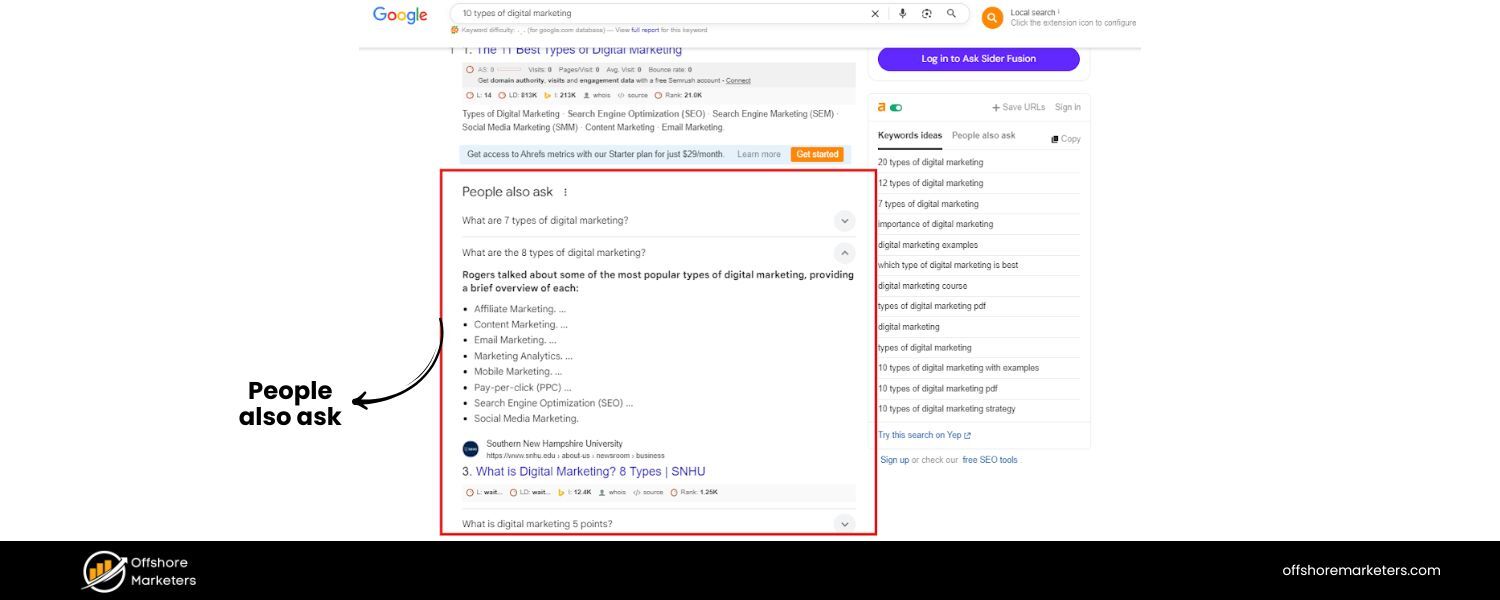
The “People Also Ask” box is a highly visible SERP feature that presents a list of questions related to the user’s original query, often in an accordion-style box. Each question can be clicked to reveal a short answer (usually an excerpt from a webpage, much like a mini-featured snippet) along with a link to the source.
PAAs are essentially an FAQ on the fly – as Google puts it, they’re “organized like an FAQ, with questions as headers and expandable answers from other sites.”
For example, if you search “digital marketing strategies,” you might see a PAA box with questions like “What are the 7 Ps of digital marketing?” or “How do you create a digital marketing plan?” Clicking one expands the answer and often causes even more related questions to dynamically appear below (drilling deeper into subtopics).
From an SEO standpoint, People Also Ask is a goldmine for two reasons: (1) it reveals popular questions users have – great insight for your content planning – and (2) it offers another way to get your content on page one, even if your page isn’t ranking in the top 3 initially.
Often, a site can rank as a PAA answer while being lower in the normal results. Also, PAAs appear on ~40–60% of searches (estimates vary), making them one of the most prevalent features. They usually show up near the top of the page, even above many organic results, so they can siphon significant traffic if your answer is featured.
Notably, PAAs never appear as the very first result (featured snippets hold that spot), but PAAs generally rank above the #2 or #3 position – prime positioning.
How to Optimize for People Also Ask (SERP Features Guide): Winning a PAA spot is very similar to winning a featured snippet, with an added emphasis on covering related questions in your content. Here’s how to approach it:
A. Research relevant questions
When creating content around a keyword, actively research what questions people tend to ask about that topic. Use Google itself – type your keyword and see the PAA questions that show up.
Also scroll to the “Related Searches” at the bottom for more ideas. There are tools (e.g., AnswerThePublic, Semrush’s Keyword Magic, AlsoAsked) that generate lists of commonly asked questions on a topic. Compile a list of these long-tail questions.
B. Incorporate Q&A into your content
Structure your blog posts or guides to include those questions as subheadings (in h2 or h3 tags) and provide direct, concise answers right below. Essentially, you’re creating an FAQ within your article.
C. Use a question-and-answer format
To further signal that you’re answering a question, you can phrase the heading as a question and follow with a brief answer in the next sentence or two, then go into detail.
D. Keep answers brief but informative
For PAA, Google often takes a snippet of about 1–3 sentences. Make sure the first part of your answer directly addresses the question.
E. Cover a breadth of questions
The more related questions you answer, the higher your chances of appearing in a PAA.
F. Leverage internal links for context
Link between related articles to establish topical authority and cover user intents at different depths.
By tailoring part of your content to answer popular questions succinctly, you not only improve your chances of showing up in PAA boxes, but you also create a better user experience on your page. Following these tips is a key part of our SERP Features Guide, helping you optimize your site for maximum visibility and engagement.
Knowledge Panels: Highlighting Key Facts about Entities
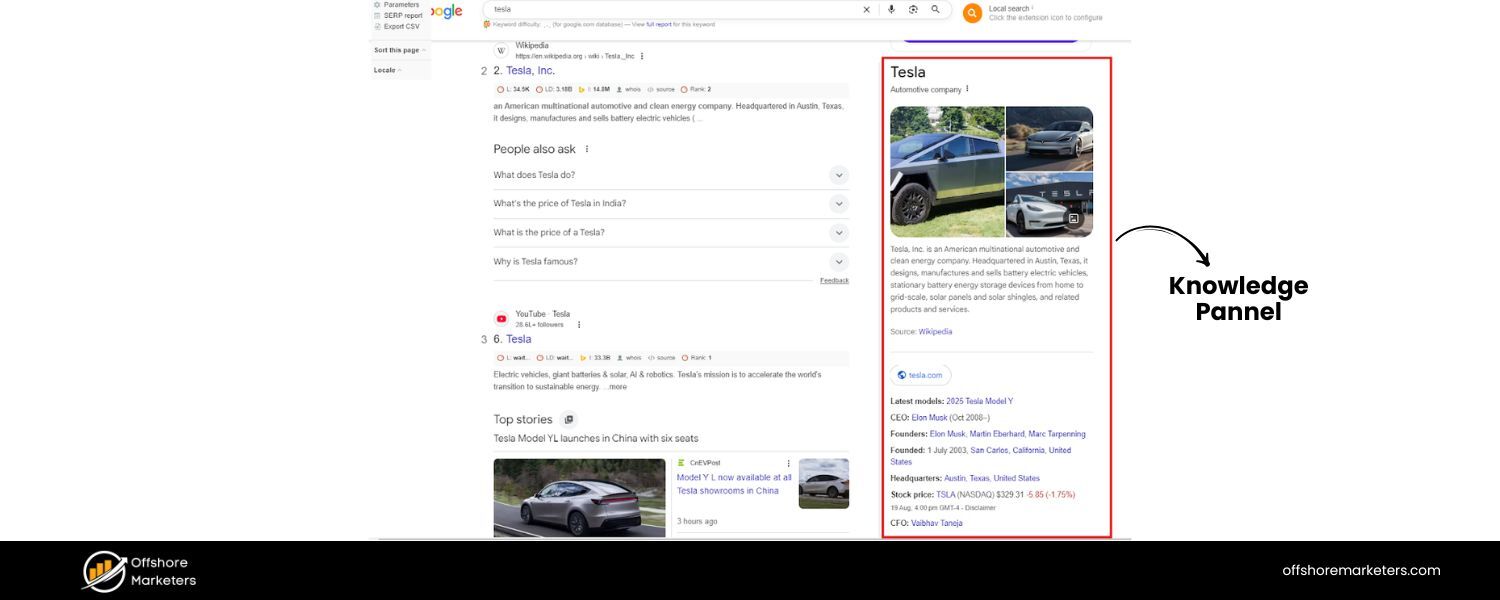
A Knowledge Panel is the information box that appears on the right-hand side of Google’s desktop search results (or top of the screen on mobile) whenever you search for a notable entity – like a famous person, organization, place, brand, or certain things.
It’s powered by Google’s Knowledge Graph, which is Google’s massive database of facts and relationships about entities in the world. The knowledge panel typically displays a summary of the entity: for a person, it might show a photo, birthdate, profession, brief bio, social media links; for a company, it could show the logo, headquarters, CEO, stock price, etc.
For example, searching “Tesla” might show a panel with Tesla’s logo, a description “American automotive and clean energy company…”, key facts like CEO (Elon Musk), founded date, and so on. The info is often sourced from places like Wikipedia, Wikidata, official databases, and the entity’s own website.
Knowledge Panels are not ads – they are organic, factual results meant to give users a quick overview without clicking anything. Appearing in a knowledge panel (for your brand or yourself) can lend huge credibility, as it looks very “official” and tends to catch the eye more than regular listings.
However, unlike snippets or PAA, you cannot simply create content to “rank” in a knowledge panel. Google generates these panels automatically if it recognizes an entity and has enough reliable data.
How to Influence Knowledge Panels (SERP Features Guide)
While you can’t force Google to show a knowledge panel, you can optimize your online presence so that if Google deems your entity notable enough, it will display accurate information. Here are strategies to increase your chances:
A. Build a strong online identity
Create a Wikipedia page (if eligible) or listings on trusted databases like Google Business Profile, Wikidata, Crunchbase, etc. Structured sources feed the Knowledge Graph.
B. Use Schema Markup
Incorporate Organization schema (for companies) or Person schema (for individuals) on your website. Schema helps Google verify and understand your entity’s information.
C. Provide accurate info on your About page
Make it detailed, factual, and neutral. Link out to authoritative profiles like Wikipedia, LinkedIn, or industry associations.
D. Verify and claim your knowledge panel
If available, claim it to suggest updates or corrections, influencing how your entity is displayed.
E. Earn media and authoritative mentions
Coverage in reputable publications, listings in databases, and citations increase Google’s confidence in your entity.
In summary, Knowledge Panels are about establishing your entity’s authority online. Unlike other SERP features focused on content quality and SEO, knowledge panels are about entity SEO. Following these steps as part of our SERP Features Guide helps ensure Google recognizes and trusts your brand, ultimately increasing visibility, credibility, and traffic.
Local Pack: Winning Local Search Visibility
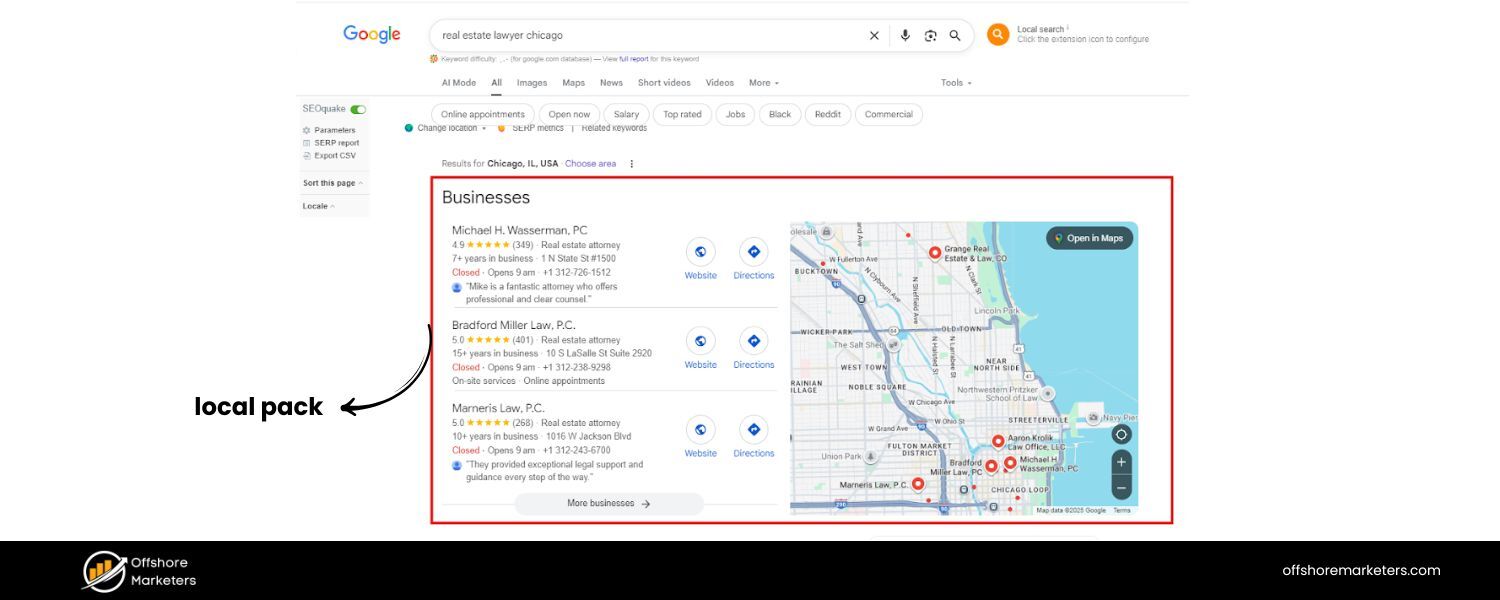
If you’ve ever searched for something like “coffee shops near me” or “plumber in [city]”, you’ve encountered Google’s Local Pack. This is the map-based SERP feature that highlights usually the top 3 local business listings related to your query, along with an embedded map.
The Local Pack (a.k.a. “Map Pack” or “3-Pack”) typically appears at the top of the results for searches with local intent. It shows the business name, review rating, address (or distance from you), perhaps a snippet of description or service, and sometimes availability info.
A user can click on a listing to get more details or on the map to see other results. For example, searching “real estate lawyer Chicago” might show a map of Chicago with three law firms listed – each with their star rating and address.
Appearing in the Local Pack is extremely valuable for any local or regional business. It’s practically the first thing searchers see, even above the normal organic results.
It also directly connects to Google Maps, meaning if someone likes what they see, they could get directions or call you immediately. Being in the top 3 (as opposed to just being somewhere on Google Maps results) can dramatically increase your click-through rate and foot traffic.
According to some industry data, roughly 19% of all search results include a Local Pack – and for those queries, if you’re not in that pack, you’re likely missing out on the majority of opportunities from that search.
Example of a Google Local Pack for the query “real estate lawyer Chicago.” Three law firms are listed with their ratings, addresses, and a map pinpointing their locations.
So how do you get your business featured here?
How to Optimize for Local Pack: Local SEO is a discipline in itself, but here are the most important steps to help your business crack the 3-pack:
A. Claim and optimize your Google Business Profile (GBP)
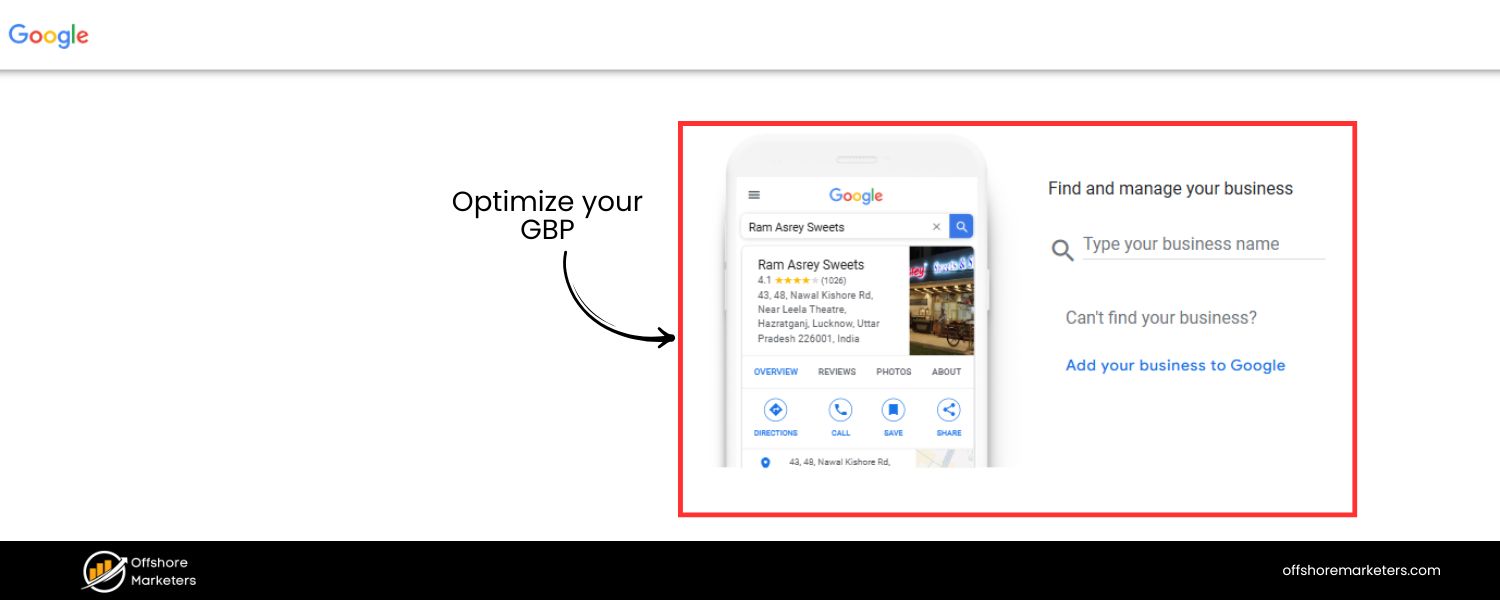
This is non-negotiable. Google Business Profile (formerly Google My Business) is the listing that feeds Google Maps and local result.If you haven’t claimed it, do so, and fill out every section: business name (must reflect your real name), address, phone, website, hours, category, and attributes.
Ensure NAP (Name, Address, Phone) is consistent with what’s on your website and other listings. Keep your GBP updated (special hours, holiday closures, etc.) – activity and accuracy can influence ranking.
B. Gather plenty of positive reviews
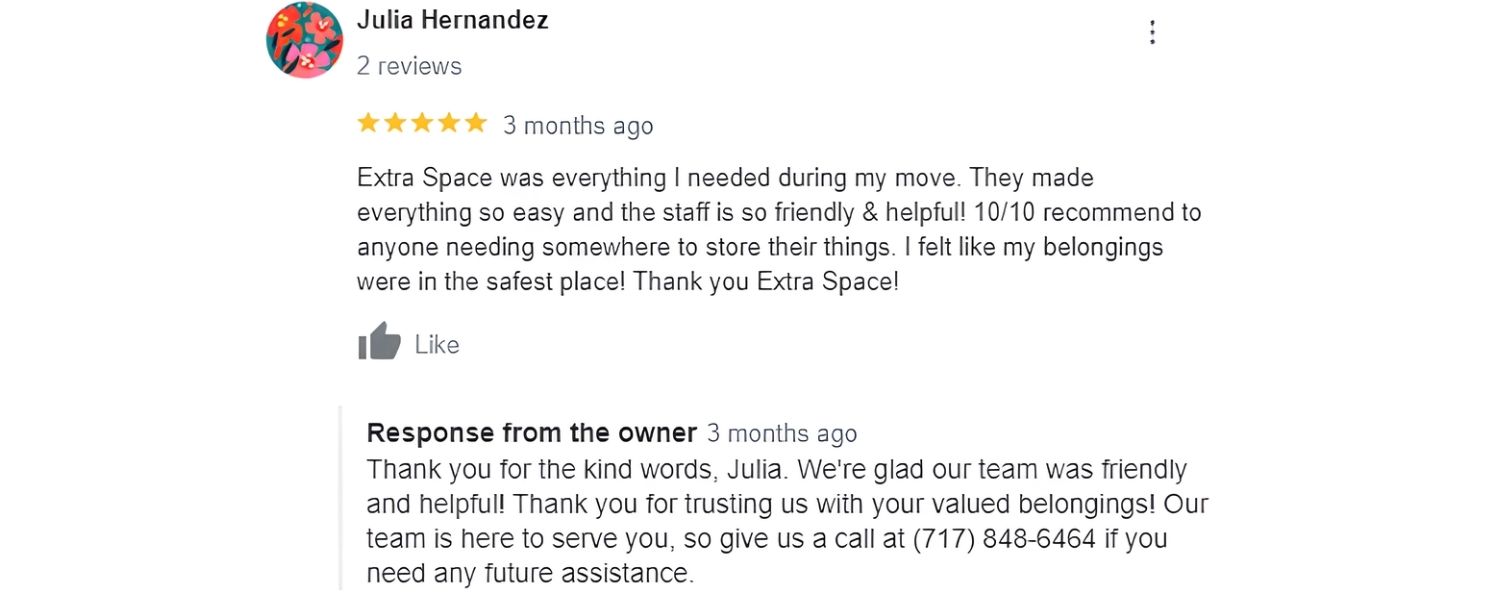
Reviews are a key factor in local pack rankings and click-through. A business with hundreds of 5-star reviews will attract more clicks than one with few or poor reviews.
Encourage happy customers to leave Google reviews (and always respond professionally to reviews, positive or negative – engagement shows you care).Google explicitly states that “review count and score are factored into local search ranking”. More reviews and high ratings can improve your prominence.
C. Optimize for relevant local keywords
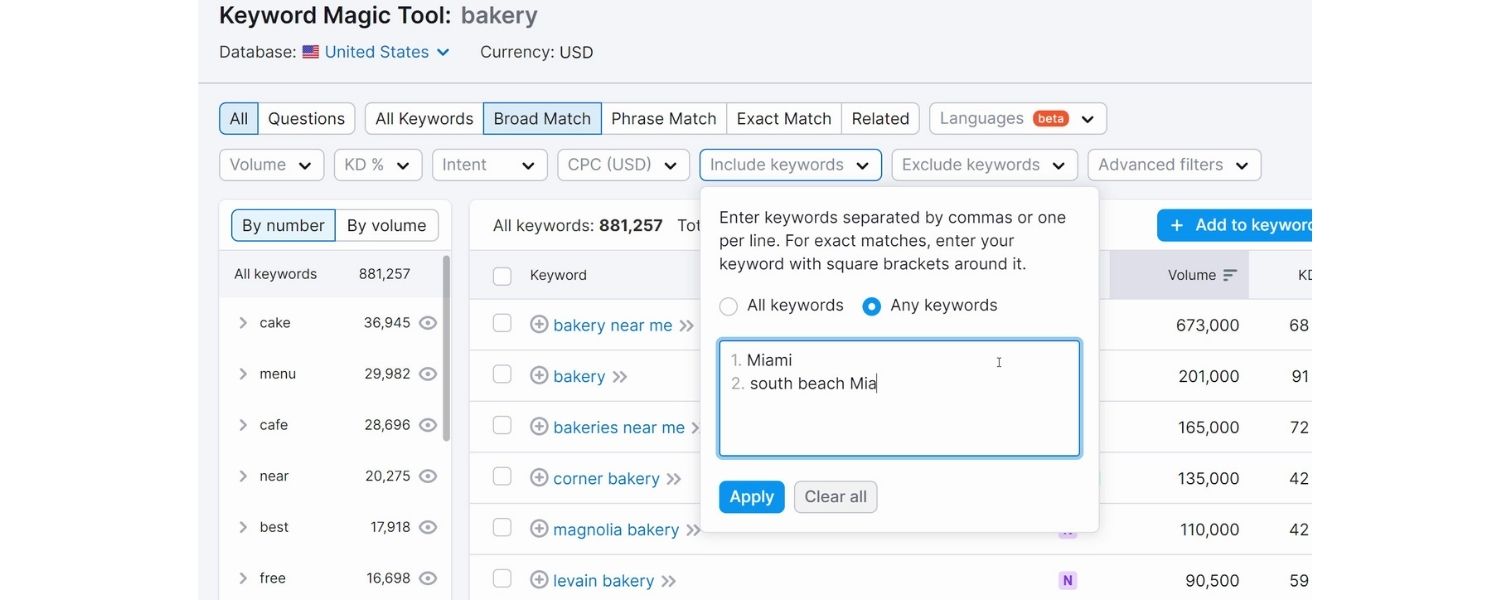
Ensure your website (and GBP) mentions the services or products you offer and your location. For example, your site’s title tags or content should include phrases like “real estate lawyer in Chicago” if that’s what you are, this improves relevance.
On GBP, choose the correct primary category (and secondary categories) that describe your business (e.g., “Real Estate Attorney”). Relevance is one of Google’s 3 main local ranking factors.
D. Localize your website content
Beyond GBP, having strong location signals on your site helps. This means a clear contact page with your address (use schema.org LocalBusiness markup if possible), embedding a Google Map of your location, and perhaps local-focused blog posts or landing pages (e.g., “Why Chicago Homeowners Need a Real Estate Lawyer”).
External local signals like being listed in city directories or chamber of commerce pages can also help establish your local presence.
E. Ensure consistent NAP across the web
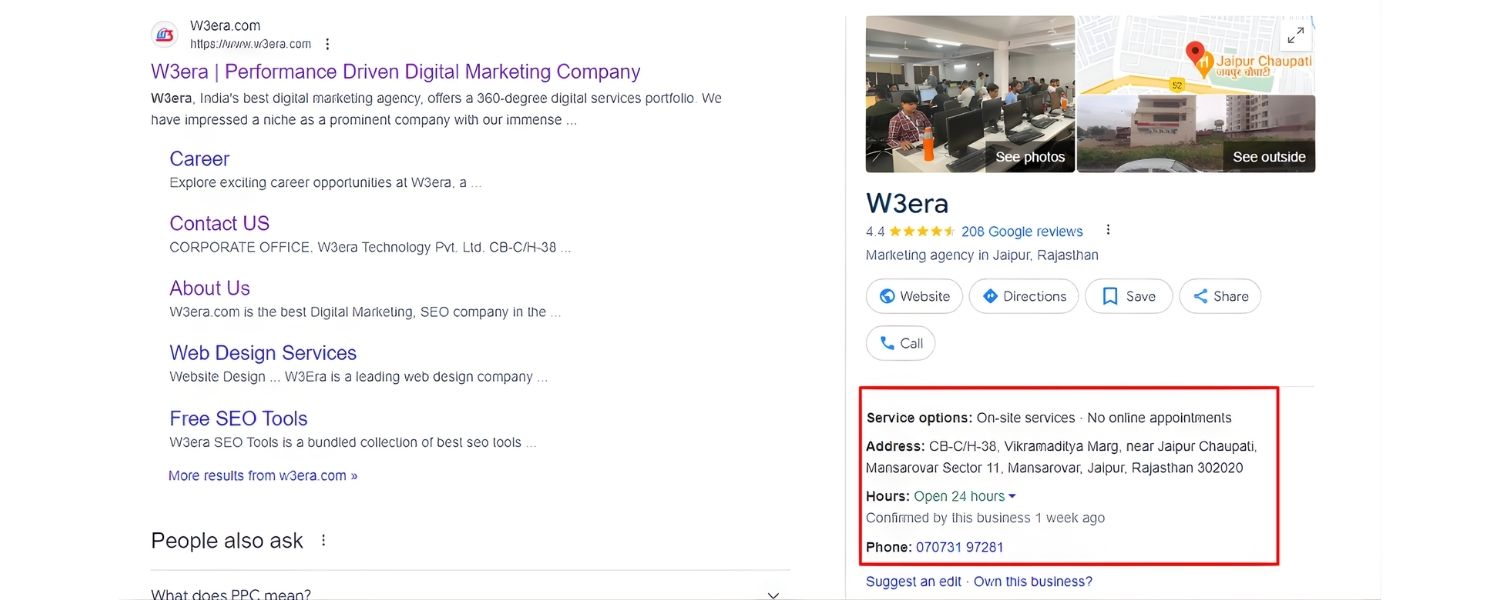
Google checks other sources (like Yelp, Yellow Pages, Facebook, etc.) to verify information. Consistency in your Name, Address, Phone across these citations boosts confidence.
Tools or services can help manage citations, but even a manual audit of top local sites is worth it. Inconsistent or duplicate listings can confuse Google – fix any discrepancies (e.g., one site saying “Ste. #200” vs another “Suite 200” – use a standard format everywhere).
F. Build local backlinks and mentions
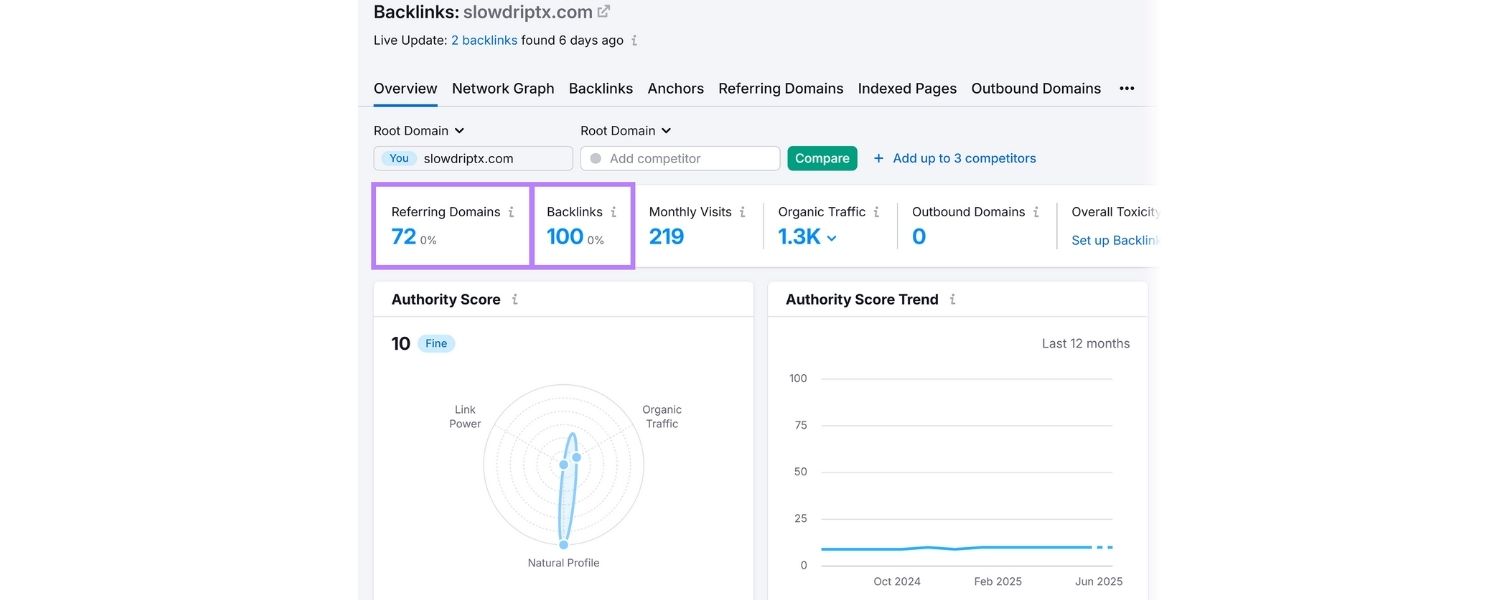
Just as general SEO values backlinks, local SEO values local links. Sponsor local events or charities (and get mentioned on their sites), get featured in local news or blogs, partner with complementary local businesses for referrals and link exchanges.
A link from a local newspaper or a mention in a “Best of Chicago Lawyers” article can boost your prominence in Google’s eyes (prominence is Google’s third factor in local rankings, encompassing how well-known you are, both offline and online). Social media buzz or check-ins can also indirectly help.
Google’s local algorithm considers Relevance, Distance, and Prominence. You often can’t change Distance (it depends on the searcher’s location or specified location), but you can influence Relevance (making sure Google knows what you do and where) and Prominence (building a strong reputation online). By doing the above, you improve your likelihood of showing up in that Local Pack.
And remember, the Local Pack can sometimes show an ad or four listings if ads are present, but typically three organic listings are shown.
If you’re just outside the top 3, the user might click “More places” – but many won’t. So aim for the 3-Pack. It can literally put you on the map for customers in your area, driving significant traffic and revenue.
Image Packs: Appearing in Visual Search Results
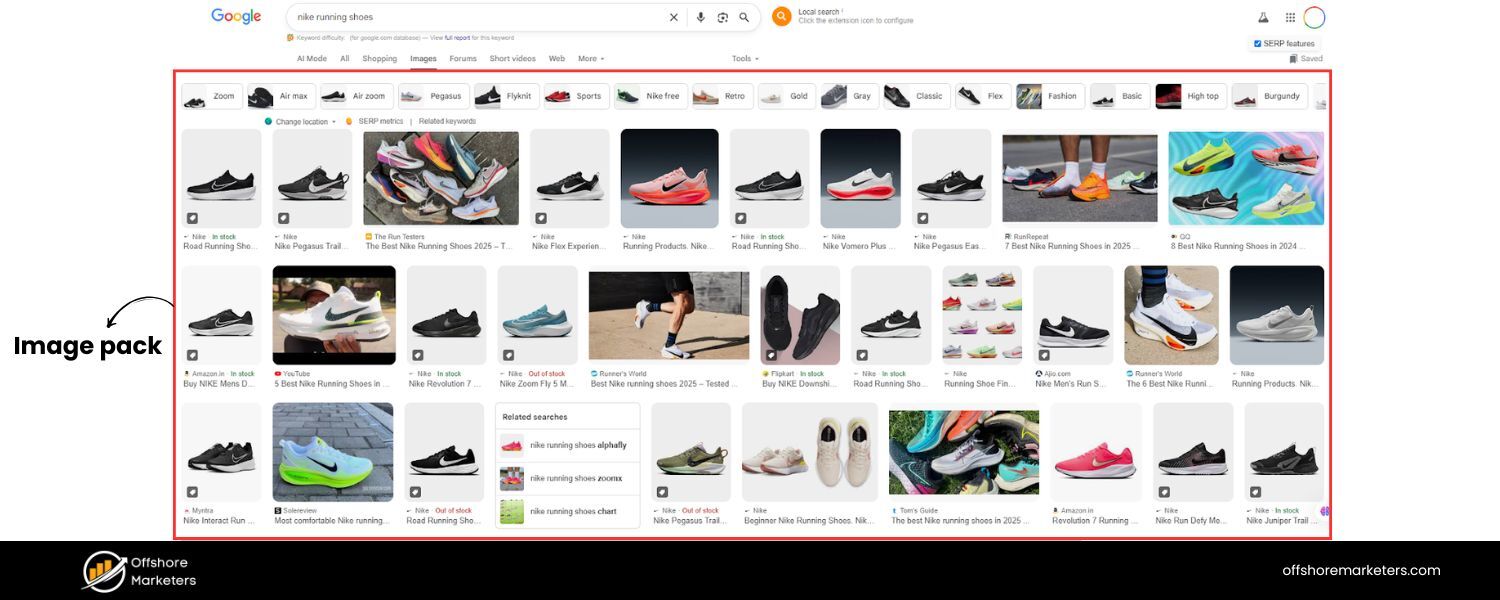
Ever notice a row of images appearing within a web search result page? That’s the Image Pack (or Image Carousel) feature – a horizontal strip of image thumbnails related to the query, which usually links to Google Images search for that topic.
For visually-oriented searches (think: “modern kitchen designs”, “cute husky puppies”, “Eiffel Tower at night”), Google often inserts an image pack near the top of the results. Each thumbnail, when clicked, opens the image viewer and shows the source website. Image packs are Google’s way of saying “pictures might be useful for this query.”
For website owners, having your image show up here can be a great source of traffic. Users might click the image, see it in Google Images, and then click through to your site (especially if the image is compelling and relevant).
It’s also a branding opportunity – even if they don’t click, your brand might be associated with that imagery or idea. Roughly a third of searches (or more) involve Google Images results, and an image pack on the main web SERP can siphon clicks away from text-only results.
How to Optimize for Image Packs (Image SEO): Getting your images to appear in these packs requires solid image optimization and relevance. Here’s what you should do:
A. Use relevant, high-quality images
This might sound obvious, but it’s foundational. Choose images that directly reflect the content of your page and the query you’re targeting. High resolution (not pixelated), clear, and attractive images stand a better chance of catching user eyes and being deemed worthy by Google.
If you have original images – even better (duplicate images that appear on many sites might not stand out). For example, a unique infographic or a high-quality photo of a product has a shot at ranking over a generic stock photo.
B. Optimize file names and alt text
Google relies on cues to understand images. Name your image files descriptively, e.g., fresh-chocolate-chip-cookies.jpg instead of IMG_00321.jpg. The alt text is even more crucial – write a concise, descriptive alt tag for each image, mentioning the keyword if appropriate (e.g., img src=”…/fresh-chocolate-chip-cookies.jpg” alt=“Freshly baked chocolate chip cookies on a tray”). This helps Google know what’s in the image, and also improves accessibility for visually impaired users – a win-win.
C. Provide context around the image
The text near the image on your page (captions, or the paragraph immediately above/below) should relate to it. If your page is about kitchen designs and you have an image of a modern kitchen, mention in the text something like “In the image above, notice the modern minimalist cabinetry and marble countertops in this kitchen design.” This contextual relevance reinforces to Google what the image represents.
D. Leverage structured data for images
Consider using Image schema or specifying an image in your page’s schema markup if applicable (for instance, in Recipe schema you can specify an image of the dish).
While not a direct ranking factor, structured data can supply Google with a higher quality version of your image and additional info. Also, image sitemaps can help – if you have a media-rich site, an image sitemap ensures Google can discover all your images and their captions/geo-info, etc.
E. Compress images and ensure fast load
Page speed matters for all SEO, and image size is usually the biggest culprit for slow pages.Compress your images (use modern formats like WebP or compressed JPEGs) so that they load quickly without noticeable quality loss.
Fast-loading pages might indirectly help your images rank (Google wants to serve content that provides a good user experience). Moreover, if your images load slowly, Google might not even index them properly.
F. Use unique images (when possible)
If everyone else is using the same stock photo for “team collaboration”, it’s harder to stand out. Creating or using unique images can give you an edge.
Also, images that have done well on Pinterest or other platforms might indicate a certain appeal – though be cautious, as very popular images might be scraped by others, causing duplicates.
G. Eye-catching visuals
While this isn’t a classic “SEO” tip, remember that even if you rank in an image pack, users choose which image to click. Bright colors, clear subject focus, and proper aspect ratio (most image pack thumbnails are square or slightly rectangular) can impact click-through.
For instance, if you run an e-commerce site, ensure your product images are high-quality, on clean backgrounds or contextually appealing settings, and not tiny or cluttered.
One more thing: track your image traffic. Google Search Console’s “Image” search tab can show you which queries bring up your images. You might find opportunities where you already rank in images but not yet in an image pack on the main web – that could be a content opportunity to target that query more directly with a page.
By treating your images as another form of content to optimize – with keywords and quality – you increase the likelihood of grabbing one of those coveted spots in an image pack. This can be especially valuable for industries like travel, food, fashion, home decor, etc., where visuals strongly influence user behavior.
Video Carousels: Capturing Video Searchers
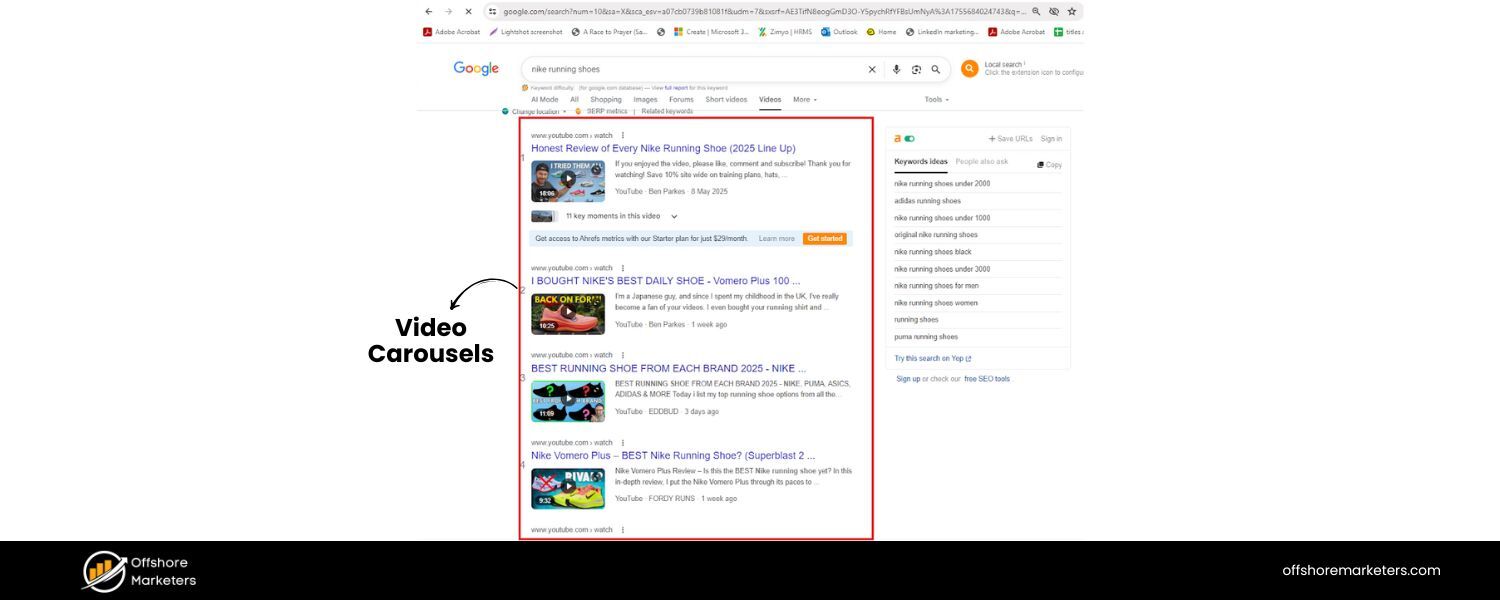
Google recognizes when a query might be better served with a video. In those cases, you’ll often see a Video Carousel on the results page: a row of playable video thumbnails (usually from YouTube, but sometimes other platforms) that users can scroll through.
Each video result shows a thumbnail, title, the video length, and the channel/source. For example, a search like “how to do a handstand pushup” will likely show a video carousel with exercise tutorial videos. The rationale is clear – watching someone demonstrate a handstand pushup is more useful than reading a description.
From a marketing perspective, video carousels are a chance to get your video content directly on page 1 of Google. With Google owning YouTube, they feature YouTube content heavily.
If your business or personal brand produces videos (tutorials, webinars, product reviews, etc.), optimizing for the video carousel can unlock a whole new audience via Google search. Even if you don’t create videos, you might consider it if your niche queries show video results frequently.
How to Optimize for Video Carousels (Video SEO): Here’s how to increase the chances of your videos appearing in Google’s search results:
A. Host videos on YouTube (and optimize them)
While Google does show some Vimeo or native-hosted videos, the vast majority in carousels are YouTube. YouTube is the world’s second largest search engine and tightly integrated with Google search.
So, create a YouTube channel for your content if you haven’t. Optimize your video’s title, description, and tags with relevant keywords – much like you would a blog post. A clear, keyword-rich title (e.g., “How to Do a Handstand Push-Up – Step by Step Tutorial”) can help your video rank for that query.
The description should be detailed (include a summary of the content, relevant links, and of course, the key terms naturally woven in). Also use tags on YouTube to give additional context (both broad tags like “fitness” and specific like “handstand pushup”).
B. Create engaging thumbnails
The thumbnail is the first thing users see in the carousel. A compelling thumbnail (clear image, maybe overlaid text or a smiling face depending on context) will attract clicks. YouTube allows custom thumbnails – take advantage of that.
From Google’s perspective, a higher click-through on your video (on both YouTube and in SERP) could signal it’s a good result. While the algorithm is complex, human appeal matters. Thumbnails that are well-designed can significantly improve CTR.
C. Ensure videos are high-quality and useful
Content is king, even for videos. Google will be more likely to show your video if it has strong engagement metrics on YouTube – i.e., high watch time, lots of likes/comments, etc.
That usually comes from the video actually satisfying viewers. So, make sure your video answers the query or provides value quickly (especially for how-tos – don’t put 2 minutes of intro).
Also consider adding chapters (timestamps) in the description for longer videos. Google sometimes shows key moments from a video on SERP (those little segment links) if you provide timestamps or if it auto-detects chapters. This not only helps viewers jump to relevant parts, but also can help Google understand the video’s content better.
D. Embed videos on your website (with Schema)
If you have a relevant page on your site, embed your YouTube video there as well. Use VideoObject schema markup on that page, which gives Google details like the video title, description, thumbnail URL, upload date, and duration.
This can allow your page to appear with a video rich snippet (a thumbnail next to your result) or even get your video into Google’s index beyond YouTube. It’s another pathway to show up. Plus, someone finding the video via Google might end up on your site instead of YouTube, which could be better for conversions.
E. Leverage YouTube SEO basics
Build your channel authority – more subscribers and consistent content can indirectly help. A channel with a track record might have its new videos indexed and surfaced faster.
Interact with your audience (comments, etc.) to boost engagement. From the Google SERP perspective, they want to show popular, relevant videos – so treat YouTube like an SEO platform in its own right.
F. Consider video length and query intent
If the top videos for “handstand pushup” are ~5 minutes, and you have a 30-second clip, yours might be seen as too short to be comprehensive – or conversely if yours is 30 minutes, maybe it’s too long.
While there’s no strict rule, try to match the intent. For quick queries, shorter is fine; for complex topics, users may prefer a detailed walkthrough. Watch some top-ranking videos to gauge what Google/YouTube seems to favor for that topic.
In summary, creating great video content and aligning it with search intent will give you a shot at the video carousel. As more of the SERP becomes rich media, having a multi-format content strategy (text, images, video) is wise.
If your competitors are heavy on blogging but not doing videos, this could be your differentiator to capture those video-inclined searchers. And with the rise of mobile, many users prefer watching to reading on their phones.
Rich Snippets (Structured Data Results): Standing Out with Extra Details
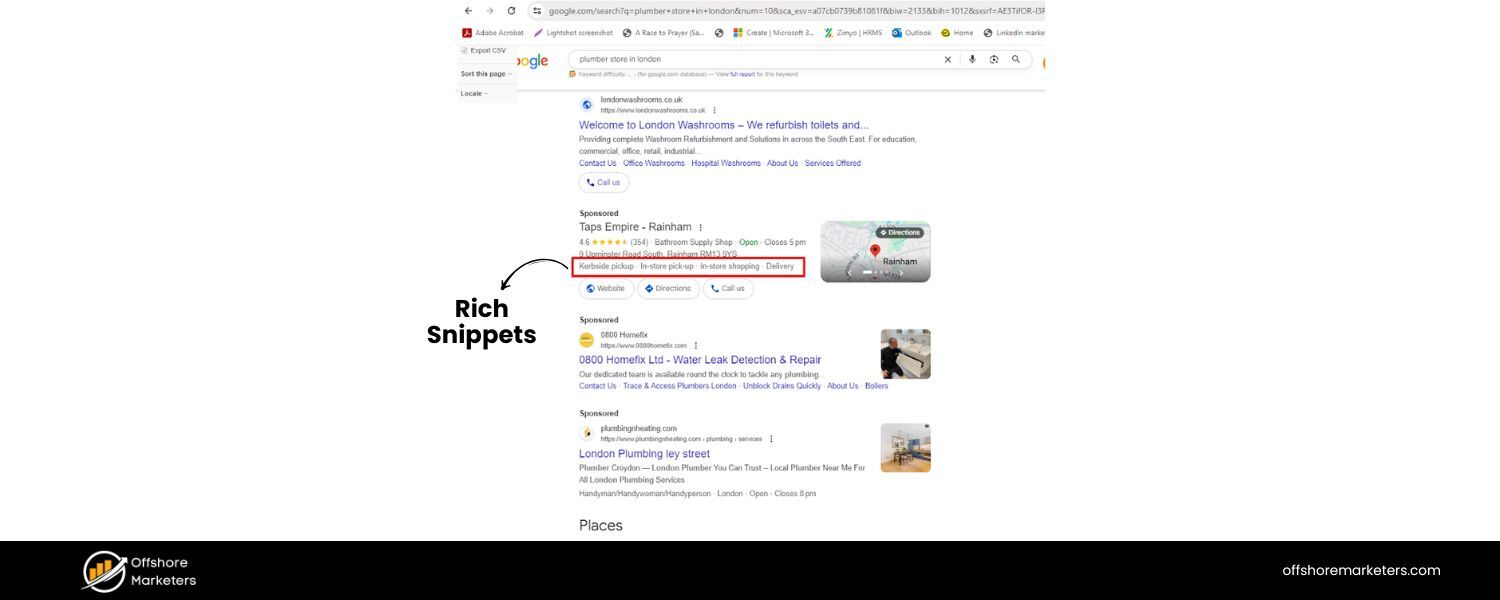
“Rich snippets” (also called rich results) refer to enhanced organic results that include extra information beyond the standard title, URL, and meta description. These are made possible by structured data markup (Schema.org tags) on webpages.
If Google understands this markup, it can display those extra details directly on the SERP. Common rich snippets include: Review stars (average rating and count of reviews) under a listing, recipe details (cooking time, calories, etc.), product information (price, availability), FAQ drop-downs, event details (dates, venue), and more.
For example, if you search for a product like “Canon EOS R5 camera”, you might see a result that not only has the page title but also shows ★★★★★ (4.8 stars from 120 reviews), price “$3899”, and “In stock” – all right on Google. These rich snippets immediately draw the eye and provide useful info.
Why do rich snippets matter?
Because they improve your visibility and click-through rate. A study by Search Engine Land found that having review stars can increase CTR significantly (users trust and gravitate toward starred results). Rich snippets also occupy more screen space, pushing competitors down.
In essence, they make your result more attractive and informative, which can mean more traffic. Importantly, rich results do not make you rank higher in terms of position (Google says structured data is not a direct ranking boost), but they can make ranking #3 look more compelling than #1 if #3 has rich snippet enhancements and #1 doesn’t.
How to Get Rich Snippets: Using Structured Data (Schema)
To earn rich snippets, you need to implement the relevant schema markup on your pages, and the content must meet Google’s eligibility criteria. Here’s how to go about it:
A. Identify which schema types are relevant for you
Not every site will use every schema. For example, if you run a recipe blog, you should absolutely implement Recipe schema (so your recipes can show ratings, cook time, etc.). If you have a product page on an e-commerce site, use Product schema (to show price, stock, reviews).
Common useful schemas: Review/Rating, Product, Recipe, FAQ, HowTo, Event, Article (for news article rich results like headline carousels), Organization (for knowledge panel information), and Sitelinks Searchbox (for your brand’s search within site).
Google’s Search Gallery lists out supported rich result types and their requirements. Pick those that match your content.
B. Add the schema markup to your HTML
You can use JSON-LD (recommended by Google) or microdata format. JSON-LD is easier – it’s a script block you add to the page with key-value pairs of data. For instance, for a product page, your JSON-LD would include fields like “@type”: “Product”, “name”: “Canon EOS R5”, “aggregateRating”: { … } etc., “offers”: { “price”: “3899”, “availability”: “http://schema.org/InStock” } and so on.
If you’re not a developer, don’t worry – there are tools like Google’s Structured Data Markup Helper to generate code, or CMS plugins (like for WordPress, Yoast/RankMath for SEO, or WooCommerce plugins for products) that can do a lot of this for you.
C. Follow Google’s guidelines to the letter
Adding schema isn’t a guarantee you’ll get a rich snippet. Google has quality guidelines – the data you mark up should be visible on the page (no sneakily adding extra keywords in schema), and it should be accurate.
For instance, if you add Recipe schema, you must include things like recipeIngredient and recipeInstructions in the markup and also have that content on the page. Or for review stars: you shouldn’t mark up third-party reviews (like Yelp reviews) as first-party – Google frowned upon some misuse of review schema and now only shows stars for specific cases (e.g., product or recipe self-hosted reviews, or certain aggregator sites).
Make sure to read Google’s documentation for the specific rich result type. They’ll tell you required and recommended fields. For example, FAQ schema is only for a list of questions and answers on your page, not to mark up questions that you don’t answer.
D. Test your structured data
Use the Rich Results Test (Google’s tool) to validate your pages. It will tell you if the JSON-LD is correctly formatted and if any required fields are missing.Also, Google Search Console will report structured data errors or enhancements – keep an eye on that. If you see errors like “Missing field X in Y schema”, fix them. An error might mean Google ignores the markup.
E. Be patient and monitor
Even after you add schema, rich snippets might not show up immediately. Google has to crawl the page, index it, and then decide to award the rich result. If everything is correct and the page is eligible, you might see the snippet in a few days or weeks.
Sometimes, Google doesn’t show a rich snippet even if you’ve done everything right – it’s never guaranteed. However, if competitors have it and you implement it better, chances are good you’ll get it too. Monitor the performance – you might notice an uptick in CTR when the rich result appears.
F. Keep schema up-to-date
If the information changes (price changes, product goes out of stock, event is rescheduled, etc.), update the markup immediately. Serving stale or wrong info in rich snippets can hurt user trust and potentially violate Google’s guidelines.
For example, if reviews change or new ones come in, periodically update the aggregateRating values. Google also periodically changes its schema requirements, so stay updated via Google Search Central posts.
By adding structured data, you’re essentially giving Google data on a silver platter about your content. This not only can win you rich snippets but also prepares your site for a more structured web (think about voice assistants – they love structured info).
Note that in mid-2023 Google reduced FAQ and HowTo rich results for most sites (to combat overuse). So you may not see those as often anymore except in special cases. But other rich snippets like reviews, products, recipes, etc., are still going strong.
In short: If you have content that matches a rich snippet format, use schema! It’s one of the best ways to stand out from the crowd on a busy results page.
Sitelinks: Navigational Shortcuts in Search Results
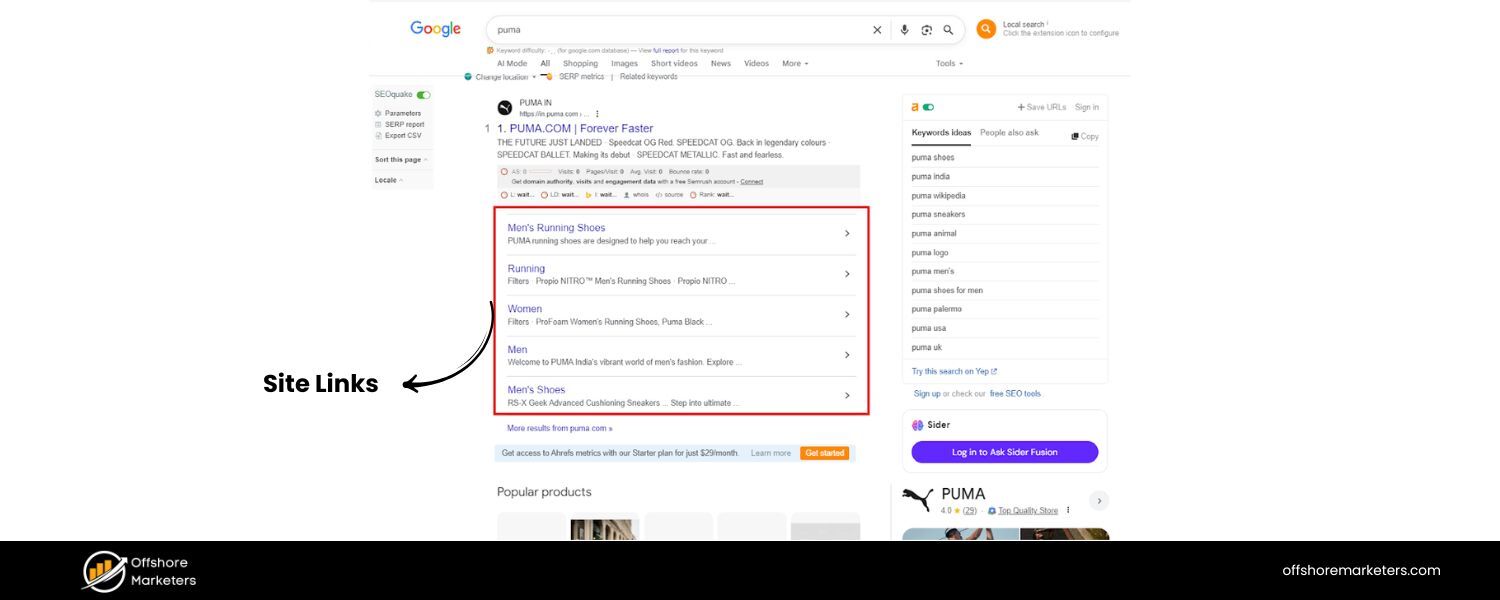
Sitelinks are the additional links that sometimes appear under a website’s main search result, especially for branded or navigational queries. For instance, a Google search for “Slack” might show the Slack homepage as the top result, and underneath it indented links like “Features,” “Pricing,” “Login,” “Download App,” etc.
These are sitelinks – they help users jump directly to specific sections or important pages of a site. Sitelinks typically show for the first result when Google deems it the clear authority (like the official site for that query). They can also appear in search ads, but here we’re focusing on organic sitelinks.
Sitelinks are great because they increase your result’s real estate (making it more noticeable) and can directly channel visitors to the parts of your site they care about. If someone searches your brand, they might have a specific intent (maybe they want pricing or support).
Sitelinks enable that without an extra click or search. And if your result has sitelinks and the others don’t, you look more established or trustworthy by comparison.
You cannot manually set sitelinks, Google’s algorithms generate them automatically by analyzing your site structure.
In years past, Google offered a “demote sitelink” tool in Search Console, but that’s gone now. It’s fully algorithmic. However, you can optimize your site in ways that influence which sitelinks might show.
How to Optimize for Sitelinks:
The key is to help Google understand your site’s structure and importance of pages. Here’s what you can do:
A. Clear site hierarchy and navigation
Organize your site logically – have a clear main menu with primary sections, use descriptive labels for your navigation links, and ensure your important pages (like product categories, about, contact, etc.) are easily reachable.
Google “analyzes the link structure of your site to find shortcuts” for sitelinks. That means if your homepage links to “Features, Pricing, About, Blog” prominently, those are candidates for sitelinks. If a page is buried four clicks deep, it’s unlikely to appear.
B. Use informative page titles & headings
Each key page should have a concise, relevant title tag that indicates its content (e.g., “Pricing – Slack” or “Slack Features: What’s Included”). Google often uses the page’s title or anchor text from your site navigation as the sitelink text.
As Google’s documentation advises, “Make sure that the text you use as your page titles and in your headings is informative, relevant, and compact.”.Avoid overly vague or identical titles for different pages. Also avoid having dozens of “click here” type navigation links – the anchor text should be specific (“Contact Us”, “FAQ”, etc.).
C. Internal linking and anchor text
Aside from top nav, use contextual internal links throughout your site to point to important pages. For example, on your homepage, you might have a section that highlights “Our Products” with links to each product page.
Use meaningful anchor text like “Project Management Tool” rather than “click here”. Google pays attention to internal link anchor text as it gives hints about the page’s content. Concise, relevant anchor text helpsdevelopers.google.com. If many pages across your site link to “Pricing” using the word “Pricing” in the anchor, Google understands that’s a key page.
D. XML sitemap & Search Console
While not directly related to sitelinks, having a comprehensive XML sitemap and submitting it in Search Console ensures Google can find and crawl all your important pages. It doesn’t hurt to do this.
Also, fix any crawl errors – if Google has trouble crawling some of your nav links due to broken links or require scripts to load, sitelinks might be affected.
E. Site search functionality
For larger sites, Google sometimes shows a search box as a sitelink (the “sitelinks search box”). To encourage this, implement the proper WebSite structured data with your site’s search URL pattern.
For example, marking up that your site supports searching, with a URL like “https://example.com/search?q={query}”. This is more technical, but if relevant, it can put a search bar right under your main result.
F. Avoid duplicate or irrelevant content
If many pages have very similar titles or if your homepage is not clearly distinguishable from an inner page (say you have two pages both titled “Home” or both effectively the main hub), Google might be less confident showing sitelinks. Each important page should have a unique purpose.
Also, if your site structure is muddled (like infinite categories with one product each, or dozens of landing pages that overlap), streamline it.
Ultimately, sitelinks reflect a well-structured, authoritative site. If your brand is the obvious result for its name, you’ll likely get sitelinks for the top sections. If someone searches a generic term, sitelinks may also show for the top result if it’s a well-structured site.
For example, searching “CSS tutorial” might show W3Schools with sitelinks to specific chapters (because W3Schools has a clear navigational structure and is authoritative in that space).
One more note: If Google ever shows a sitelink that you don’t want (perhaps a trivial page), the only recourse now is to improve your site structure or remove that page if it’s truly not important. In the past, we could demote, but now Google expects us to handle our site architecture such that the best pages naturally rise up.
So focus on clarity and quality of your site’s navigation. Make it easy for users = make it easy for Google. Sitelinks will follow.
Top Stories: Showcasing News and Fresh Content
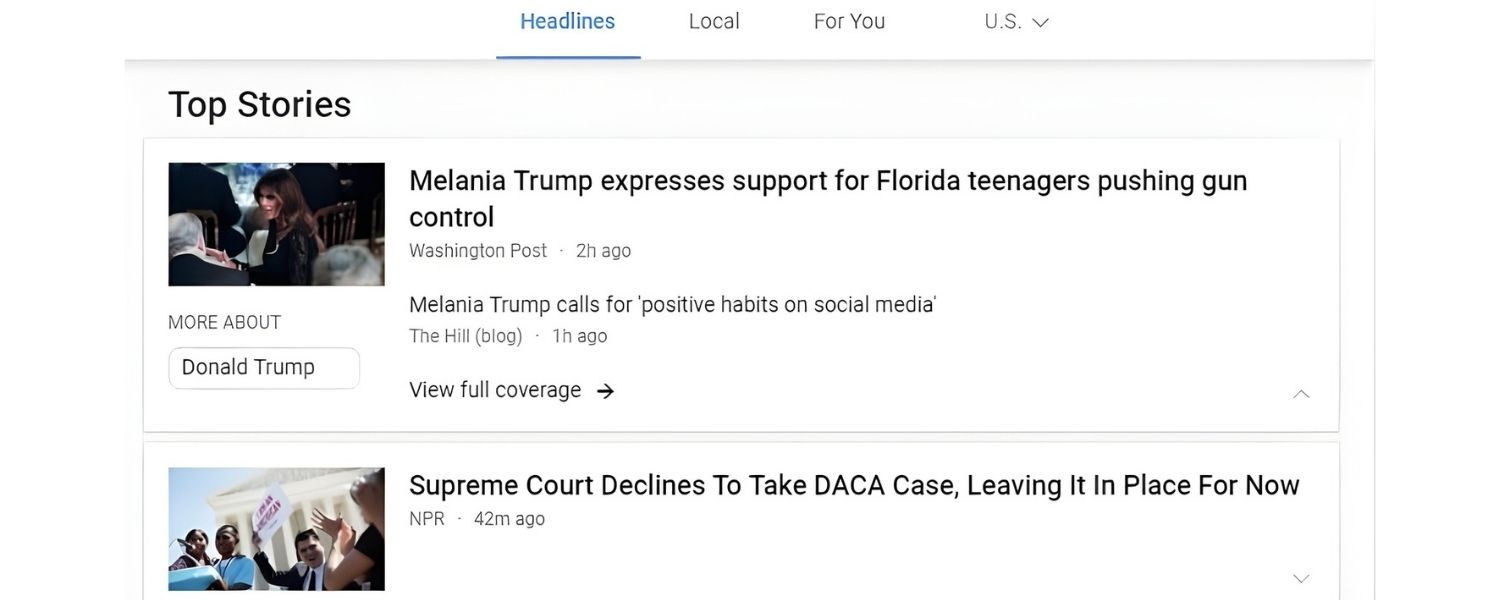
When a query is newsy or time-sensitive, Google often displays a Top Stories section, typically a carousel of recent news articles related to the search.
These usually appear for keywords about current events, famous people, companies in the news, etc., and prominently feature headlines, publisher names, publish time (e.g., “5 hours ago”), and sometimes thumbnail images.
For example, a search for a celebrity during a trending controversy might show Top Stories from sites like CNN, Variety. On desktop, this often appears as a horizontal carousel; on mobile, it might be a swipeable carousel or a vertical list.
Top Stories essentially replaces the older “News box” and is part of Google’s push to integrate Google News content into web search.
Being featured in Top Stories is mostly a concern for publishers, news sites, and bloggers who cover current topics. If your site isn’t a news-oriented site or doesn’t produce timely content, you likely won’t be in this section.
However, for content marketers, getting into Top Stories can drive massive bursts of traffic when you have relevant, breaking content.
Some key points: Google historically gave preference to sites using AMP (Accelerated Mobile Pages) for mobile Top Stories. In 2021, they dropped the AMP requirement, but AMP still can help with speed which is crucial for news.
Top Stories results are drawn from the Google News index, meaning Google generally needs to recognize your site as a news source. You often need to be producing news-type content regularly and follow Google News content policies.
How to Optimize for Top Stories:
If you have a news site or a blog that sometimes acts like one (e.g., you post updates on industry news), here are steps to get into Top Stories:
A. Get included in Google News
While you no longer have to formally apply (Google switched to an automatic inclusion model), it helps to adhere to Google News technical guidelines – like having clear publication dates on articles, author info, static URLs, and so on.
There’s a Google News Publisher Center you can use to submit your site, but even without that, focusing on newsy content with proper structure (unique articles with descriptive titles, not just thin content) is key. Being recognized as a news source increases chance of Top Stories appearance.
B. Use structured data (NewsArticle schema)
Implement Article or NewsArticle schema on your news posts. This provides details like headline, image, datePublished, author, etc., which can help Google better understand and feature your article.
It’s not strictly required, but if you want things like your larger image thumbnail to show, you should use the appropriate markup and high-resolution images. (Google’s guidelines: provide a max-image of 1200px wide and indicate it in schema).
C. Publish quickly and update
For breaking news or trending topics, there’s an advantage to being among the first to publish a quality piece. Google’s Top Stories favors fresh content – often stuff published within the last few hours for a hot story.
If you’re in a space where news happens (e.g., tech releases, industry developments), have a process to cover those rapidly.Additionally, if new details emerge, update your story – Google might rank an updated comprehensive article above earlier but thinner reports. Also use publish times clearly (and avoid artificially back-dating or anything – be honest).
D. Follow Google News content policies
Avoid overly salesy content in what you hope to be news articles. Google News wants journalism-like standards: cite sources, don’t plagiarize, avoid clickbait headlines (or at least deliver on what you promise in the headline).
Content should be original reporting or a well-synthesized piece. If you violate guidelines (e.g., misleading content, or web stories masquerading as news), Google might exclude you.
E. AMP for speed (optional but can help)
Although not mandatory now, AMP pages still often load faster on mobile and can be served from Google’s cache. Many Top Stories entries on mobile search still use AMP. If your site has performance issues, consider AMP for your news articles to ensure near-instant loading.
Alternatively, invest heavily in site speed optimization so that your normal mobile pages are extremely fast (Core Web Vitals good scores, etc.). Speed is especially critical for users clicking through Top Stories.
F. Use compelling headlines and images
In Top Stories, your headline is everything – it’s the clickable text. Craft a headline that is concise (perhaps 60-80 characters max to display fully) and clearly includes the main keyword or news angle.
But also try to make it enticing (without being misleading). Also, have an eye-catching feature image for your article, because if Google includes a thumbnail (they often do), it can draw attention.For example, an article about a product launch should have a clear image of the product or something relevant rather than a generic stock photo.
G. Build authority in your niche
If your site regularly produces quality content on a certain topic, Google will start associating you with that domain of news. That can help you outrank bigger general news sites for niche queries.
For instance, a reputable tech blog might appear above a mainstream newspaper site for a tech story because Google knows the blog is specialized and authoritative in tech. This comes over time, through consistency and perhaps backlinks and engagement.
Keep in mind, Top Stories is competitive, you’re often up against major publishers. If you’re a smaller site, focus on specific angles or less-saturated news.
You might not rank for “Olympics results” against ESPN or NBC, but you could for a unique take on “Olympics sustainable initiatives” if that’s less covered.
Lastly, news content has a short shelf life in terms of traffic spikes. Leverage that traffic by providing context, linking to evergreen resources on your site, or capturing emails, because once the news is old, the Top Stories carousel moves on. But the boost in visibility can do wonders for brand recognition and authority.
Discussions and Forums (User-Generated Content): The “What People Are Saying” Box
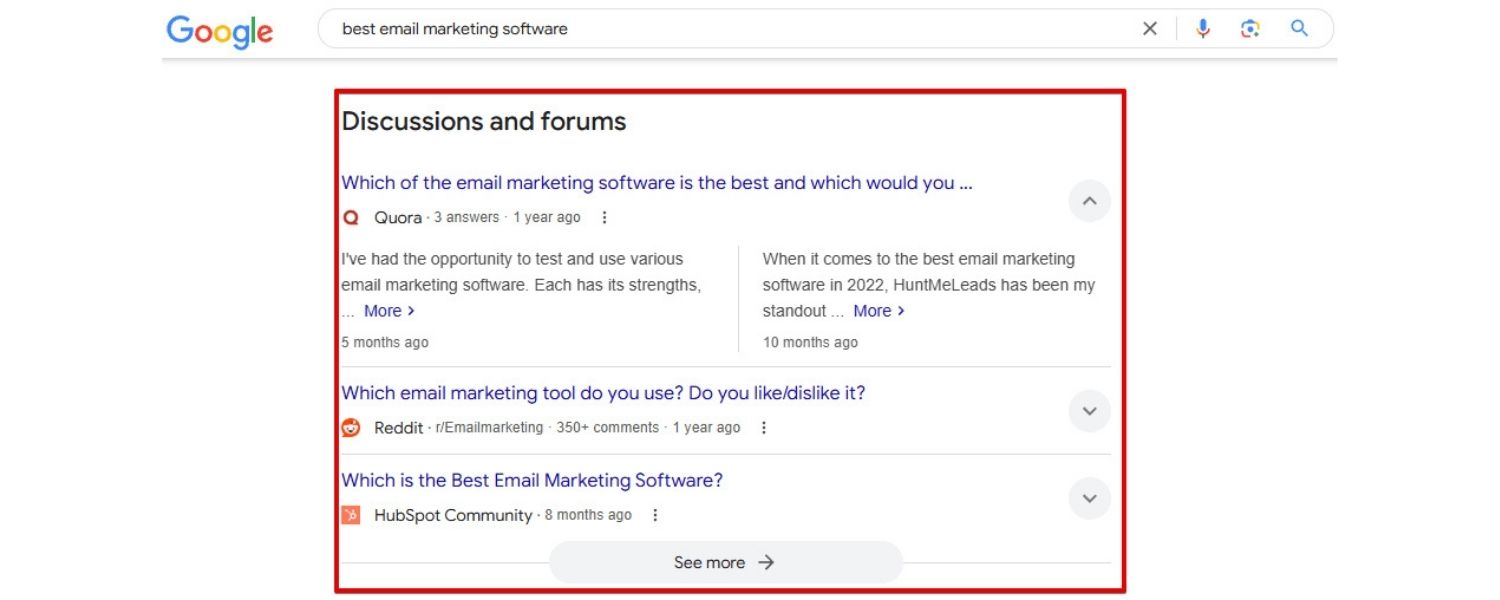
Google increasingly tries to incorporate user-generated content from forums, Q&A sites, and social media to address certain queries – especially those seeking personal experiences or opinions.
In 2023, Google introduced a feature unofficially dubbed the “Discussions & Forums” or “What people are saying” box . This SERP feature surfaces results from sites like Reddit, Quora, Stack Exchange, and other forums relevant to the query, often with a heading like “Discussion:” followed by a snippet of a forum thread. The idea is to give searchers a peek into community discussions around their query.
For example, a search for a niche question like “best running shoes for flat feet Reddit” might trigger a box listing a few Reddit threads where users discuss that topic. Or a broader query like “living in New York experiences” might show a “What people are saying” section with content from forums or social media where individuals share experiences. Google knows that for some questions, people want to hear actual user voices, not just polished articles.
For businesses, this is a tricky feature. On one hand, if you run a forum or community, you’d love to appear here.
On the other hand, if you’re just a typical site, you might not directly benefit unless you actively participate in such communities (in a genuine, non-spammy way) or host a forum.
How to Leverage Discussions & Forums:
If you have a forum on your own site, or a Q&A section, ensure it’s crawlable and well-indexed. That could get your community pages into this feature.
Use clear titles for threads (that incorporate the question or topic). Encourage robust discussion so Google sees value. There’s also structured data like QAPage schema for Q&A content which might help (Google had a QA rich result, though not sure if it ties into this box).
If you don’t have a forum, you can still take advantage indirectly:
A. Participate in relevant forums
For instance, if people often see Reddit results for “[Your industry] advice”, you might contribute quality posts or answers on Reddit or Quora. Do not do this just to drop links – that can backfire.
But by being a helpful participant and maybe mentioning your expertise or linking your site only when genuinely helpful, you build goodwill and potentially traffic. If your post is the one highlighted on Google, users might see your username/brand.
(Note: This is more of a branding play; chasing traffic from Google via forums is not very direct unless you can link out in the content and users follow it, which some forums discourage).
B. Monitor these results for research
Even if you don’t directly get traffic from them, the questions users ask on forums are content goldmines. Use the “People also ask” and forum discussions as insight into what your audience cares about.
You can then create content on your own site to answer those questions more comprehensively. Perhaps your article could outrank the forums in the main results if it’s really good, or get featured as a snippet. Essentially, treat forums as voice-of-customer research.
C. Host user discussions on your site
If it aligns with your business, consider adding a community element, maybe a comment section on blogs (with meaningful conversation), a user reviews/testimonials section, or full-blown forums.
It’s a commitment to moderate and maintain, but user-generated content can increase the long-tail queries you capture. For example, an active support forum for a software product will generate tons of Q&A pages that might rank for very specific issues (sometimes appearing in Google with a “Forums” label or in this discussion feature).
D. Stay updated on new “perspectives” features
Google has been experimenting with dedicated “Perspectives” carousels that include short-form videos (like YouTube Shorts or TikTok) and forum posts for certain queries, labeled as such.
These are geared toward giving searchers a variety of personal perspectives. If this becomes more widespread, content creators might need to optimize things like YouTube Shorts or ensure their content can be considered a “perspective.”
For now, just be aware that Google is valuing real human voices, so authenticity in your content (maybe including quotes from users, case studies, etc.) can be beneficial overall.
In short, the Discussions/Forums feature is Google acknowledging that some answers live in the minds of the masses, not in official publications.
As an SEO or content marketer, you should welcome this, because it means by tapping into or fostering user community, you can capture some of that demand.
A word of caution:
Don’t try to spam forums to get into this feature. Google’s systems and communities themselves will sniff that out. Instead, be genuinely helpful. If you find a forum thread where people are struggling with something your product solves, by all means answer helpfully and mention your product (with disclosure of affiliation).
That’s just good marketing and could earn you referral traffic regardless of Google. And if that thread becomes popular, who knows – it might show up on the SERP and indirectly put your solution in front of more eyes.
Shopping Results (Popular Products & Buying Guides): Appearing in Product Searches
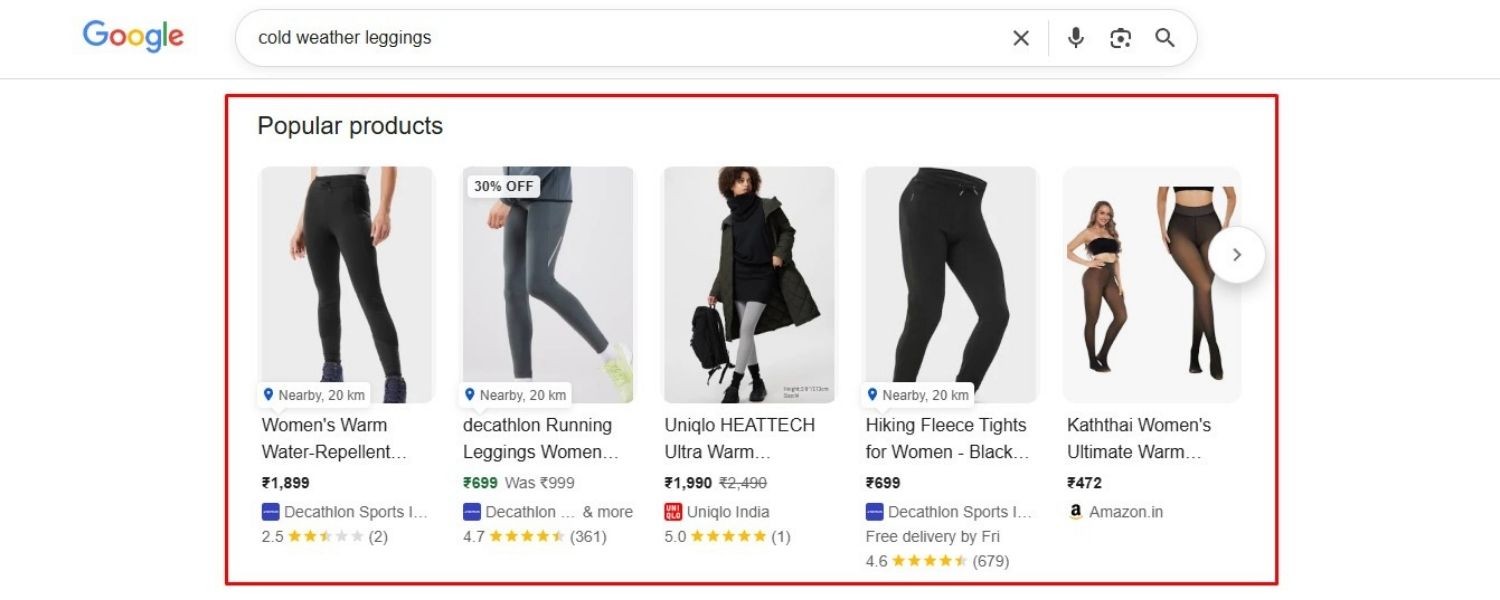
Google’s SERPs for product-related queries have gotten increasingly rich, blurring the line between organic and paid. Aside from the well-known Google Shopping Ads (product listing ads with images and prices that appear in a carousel, marked as “Sponsored”), Google also shows organic shopping features. Two notable ones are the Popular Products carousel and the Buying Guide sections for certain product categories.
A. Popular Products
This is an organic carousel that appears when you search for apparel, accessories, and other retail products (e.g., “men’s running shoes” or “best wireless earbuds”). It showcases a selection of products with images, their names, prices, star ratings, and sometimes filters (like “brand: Nike, Adidas…” to refine).
Clicking a product often brings up Google’s product detail view (where you can compare offers from different retailers). Importantly, Popular Products is free to appear in – it’s driven by Google’s product data index, often fed by Merchant Center feeds and web crawling of e-commerce sites. It’s essentially an organic product showcase.
Being featured here can drive shoppers to your site if you’re one of the retailers for that product (or if it’s your own product, even better). It’s especially prevalent in fashion and retail searches.
B. Buying Guide
For broad product searches (like “best DSLR camera” or “OLED TV”), Google sometimes shows a “Buying Guide” box with dropdown menus or expandable tabs that offer advice and key considerations for choosing a produce.
For example, a buying guide for “smartphones” might let you click to see info on “Battery life”, “Camera quality”, “Storage options” etc., right on the SERP. This content is sourced from editorial content across the web. Google introduced this feature to give searchers a quick way to educate themselves on important factors when shopping, without clicking multiple articles.
For content marketers, having your content be part of that Buying Guide is a new opportunity (and challenge). It effectively unbundles your article into Google’s own interface. If Google finds your “best DSLR cameras” article and uses it in a Buying Guide, you might get attribution (a link when they expand the section).
Let’s tackle how to optimize for each:
Popular Products (Organic Shopping Carousel):
To appear here as a retailer, you need to provide Google with your product info:
A. Submit a product feed to Google Merchant Center
Yes, Merchant Center isn’t just for ads. Google opened up free listings in 2020, meaning if you send your feed and enable Surfaces across Google, your products can show up in organic shopping results.
Ensure your feed is comprehensive and up-to-date (with prices, availability, high-quality images, GTINs or MPNs for products, etc.). This feed basically tells Google “these are the products I sell.” Google then matches those against popular product queries.
If you’re one of the merchants, your listing (with your price and site name) can show when users click a product in the carousel.
B. Implement Product schema on your pages
Aside from feeds, adding Product structured data on your product pages helps Google associate those pages with product entities.Include details like name, image, price, availability, brand, SKU, etc.
This markup makes it easier for Google’s crawler to extract your product info if you maybe don’t have a feed. It can also enable rich snippets like review stars and price in the regular results.
C. Optimize images and titles
The image in the Popular Products is critical – it should be clear, on a white background ideally (for apparel Google often likes that catalog look), and high resolution. The product title in your feed or schema should be concise and include the key attributes (brand, model, etc.).
Users do compare at a glance, so having an accurate title (not stuffed, but clear) and a competitive price can help your click-through if you appear.
D. Encourage reviews on your site (and aggregate them)
Those star ratings in product results come from review data. You can supply this via schema (AggregateRating as part of Product markup) if you collect reviews.Also, consider opting into Google Customer Reviews or integrating with third-party review aggregators that share data with Google. A high rating and number of reviews can entice clicks.
E. Stay competitive on price & availability
Google will often show multiple sellers for the same product. If you’re an e-commerce store, having competitive pricing and indicating sales or free shipping can make your listing more attractive.
Some of this is on-page (and in feed) – e.g., if something’s on sale, use the sale_price attribute. Availability is key too: if you’re out of stock, update that; otherwise, nothing worse than getting a click and not having the item. Google may actually demote OOS items in these displays.
F. Monitor performance in Merchant Center
The Merchant Center dashboard can show you clicks and impressions from free listings. Use it to identify which products are getting exposure and which are not, then adjust accordingly (maybe optimize titles, or ensure those pages are well-indexed).
Buying Guides (Editorial content integration):
Optimizing for the Buying Guide feature is more speculative since it’s newer. Essentially, Google is pulling key points from multiple articles. To increase your chances:
A. Structure your “Buying Guide” content clearly
If you write an article like “Television Buying Guide 2025 – 10 Things to Know Before You Buy a TV,” break it into sections for each major factor (e.g., “Screen Size,” “Display Technology – LED vs OLED,” “Refresh Rate,” “Smart TV features,” etc.).
Use heading tags for each. Under each, provide concise, advice-driven content (maybe a few sentences or a brief list of what to consider). This makes it easier for Google to grab that section to show in their guide growbydata.comgrowbydata.com.
Basically, each section could be a candidate for a dropdown in Google’s Buying Guide.
B. Include key terms and common subquestions
Think from a newbie shopper’s perspective – what would they ask? Ensure your guide’s sections cover those (similar to PAA research).For example, a camera buying guide should cover “Megapixels (Do they matter?)”, “Sensor size,” “Lens compatibility,” etc., because those are likely in a Google guide.
If everyone else’s guide covers 5 things, try to cover those and maybe a unique one to stand out (but only if relevant).
C. Keep it updated
If you have a buying guide, update it regularly (annually at least). Google favors fresh advice especially for tech or things that evolve yearly. Indicate the updated date.Also, update any references (like “last year’s models” or price ranges). Up-to-date guides will likely be more trusted by Google to show to users.
D. Aim for authoritative yet accessible tone
Buying guides often work best when they sound helpful, not too technical (unless for a tech-savvy audience). Google might favor content that has a clear, neutral tone and covers pros/cons.
It might even use content from multiple sources to balance perspectives. Write your guide like you’re the expert friend explaining to a novice. That way, if Google picks snippets, they’ll be easy to understand in isolation.
E. Monitor the SERP manually
If you see a Buying Guide on results you care about, click through it. See whose content is being used. This can give clues – maybe Google tends to use content from Site A for “Battery life” and Site B for “Camera quality”.
Compare their formatting or phrasing. It might be that Google trusts certain sites more for certain subtopics. If you notice gaps or weaknesses in those, adjust your content to be better.
Currently, the Buying Guide is a bit like featured snippets on steroids (multiple snippets from multiple sites). It’s competitive and you’re essentially hoping Google picks your advice to feature.
Even if they do, note that users might get their answer without clicking, similar to a snippet. But at least your brand gets exposure, and there is usually a link or source name listed which can drive some clicks from those who want more depth.
One more shopping feature to note is Highly Rated Products or “Mentioned in” snippets (like GrowByData mentioned) – but those are more niche.
“Highly rated” is essentially an ad badge (requires 50+ reviews, 4.5+ rating), which if you’re a retailer, just means try to get great reviews.
“Mentioned In” shows where a site was cited – that’s more for publishers noticing if their brand was referenced as a source elsewhere (interesting but not something you optimize for, aside from getting mentions).
Overall, e-commerce SEO now goes beyond just your website – you have to play in Google’s shopping ecosystem. Feed optimization, schema, content like buying guides, and even Google’s own “shopping graph” all matter.
The more signals you send to Google about your products and expertise, the more likely you snag one of these SERP features for shoppers.
How to Track and Leverage SERP Feature Performance
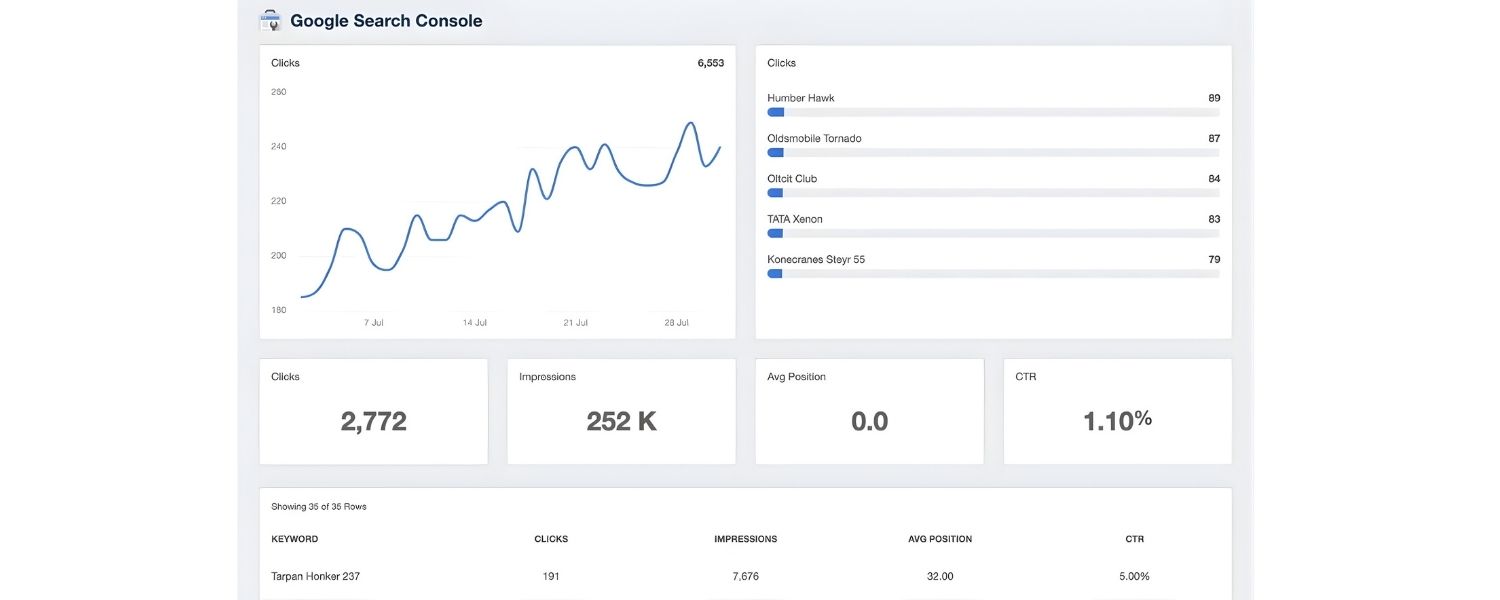
With so many SERP features in play, it’s important to measure your presence in them and adapt your SEO strategy accordingly.
Traditional rank tracking (just seeing if you’re #5 for a keyword) isn’t enough, you need to know if you’re featured in a snippet, in a local pack, etc., and how that affects traffic. Here are some tips on tracking and leveraging as outlined in this SERP Features Guide:
A. Use SEO tools with SERP feature tracking
Platforms like Semrush, Moz, Ahrefs, etc., have features in their rank tracking to show which keywords trigger which SERP features, and if you are appearing in them.For example, Semrush’s Position Tracking can report if your domain has a featured snippet for keyword X or is in the local pack for keyword .
These tools often display little icons for features (⭐ for snippet, 📍 for local, etc.). By reviewing this, you can identify new opportunities (“Oh, there’s a ‘People Also Ask’ for this term, maybe I should create content to answer it and try to get in there”) or successes (“We got a featured snippet here, let’s keep that content fresh to maintain it!”).
Some tools also let you spy on competitors, see which features they are getting, which can inform your strategy (maybe they have FAQ rich results and you don’t, meaning you could implement FAQ schema and catch up).
B. Google Search Console insights
GSC doesn’t explicitly say “you have a featured snippet”, but it does show performance by “search appearance” for some types of results. For instance, if you use FAQ schema or HowTo, there will be a filter for those impressions.
Similarly for videos (Video impressions) or Discover feed if applicable. Use these filters to gauge how those rich results are doing. Also, the queries report might hint at feature presence – e.g., if your average position is 1.0 but you still get fewer clicks than impressions suggest, it could be because you’re a snippet (users saw your info without clicking).
Google is also rolling out more insights (like in some beta Search Console reports, they mention when you got a snippet).
C. Manually monitor critical keywords
Every now and then, do a Google search (incognito or logged out) for your top keywords. See what features are showing, and if your content appears.Manual checking complements the tools because you can visually confirm, and see how your listing looks. This is especially useful for local (since location influences it) – you might need to simulate locations.
D. Optimize click-through from features
If you notice you are getting a snippet but not many clicks (common scenario), maybe your snippet content is satisfying too much (a paradox!).Consider if there’s a way to entice the click – e.g., pose a bit of a teaser in the snippet like “…read on to discover why.” (Though Google sometimes truncates, and they prefer straight answers – so this can be delicate.)
Alternatively, if it’s a snippet that lists 5 things and you have 10 on your page, ensure the snippet shows maybe 1-5 and implies more. For FAQs, maybe the first Q is intriguing enough that they want to click for the rest.
Essentially, treat the snippet as ad copy – it should inform but also invite the user in for more depth. Similarly for video timestamps, maybe optimize titles of chapters to intrigue users to click through the video.
E. Monitor traffic shifts with SERP changes
Google’s SERPs are not static. New features roll out (like the AI overviews) which could impact your traffic. Keep an eye on news from Google (follow Search Engine Roundtable, Google’s own blogs, etc.).
For instance, if Google suddenly reduces FAQ rich results (which they did in Aug 2023), and you had been getting traffic thanks to your FAQ snippets, you might see a drop – knowing the cause helps you adjust (maybe focus on other strategies). If they launch SGE widely and you see traffic changes, correlate that.
F. Leverage wins in marketing
When you do secure a high-profile feature (like a featured snippet on a big query or a knowledge panel for your brand), use that in your broader marketing. It’s a credibility marker (“As featured on Google’s answer box for [Topic]”).
You can share that internally to illustrate SEO ROI, or externally as bragging rights. It reinforces to stakeholders that SEO isn’t just about blue links now – it’s about owning prime real estate on Google.
This can help, say, convince your team to invest more in, for example, schema markup or a content initiative.Using insights from this SERP Features Guide can help communicate your successes effectively.
G. Aim for multi-feature domination
Some queries show multiple features. For example, a search might have a snippet and a PAA and images. If you can, try to appear in multiple – e.g., you have the snippet and one of the PAA answers, and an image from your site is in the image pack.
That’s a triple win. It won’t always be possible, but if you have comprehensive content with images, you increase such chances. One strategy is repurposing content: write a post (could get snippet), make a short video summarizing it (could go in video carousel), create an infographic (could go in images), etc., all targeting the same keyword. This way, your “SEO footprint” on the SERP is larger.
At the end of the day, the goal isn’t just to rank, but to feature on the SERP in as many relevant ways as possible. Measure it, celebrate it when it happens, and always look for new opportunities where competitors haven’t yet snagged a feature.
Conclusion & Next Steps
In the constantly evolving world of SEO, mastering SERP features is no longer optional, it’s essential. Google’s front page is now a rich tapestry of answers, media, and interactive elements.
To rank among competitors (and above them), you need to think beyond the 10 blue links. This means structuring your content for snippets and PAAs, marking it up for rich results, optimizing images and videos, tending to your local and product feeds, and generally delivering the kind of value that Google wants to highlight.
By following this SERP Features Guide, you’re equipped with an up-to-date understanding of the key SERP features in 2025 and actionable strategies to target each. We’ve gone deeper than most, covering not just the basics (like what a featured snippet is) but also insider tips (like using schema to influence sitelinks, or updating content to align with Google’s latest changes).
This comprehensive approach, outlined in our SERP Features Guide, ensures you’re not leaving opportunities on the table. As a marketing expert with decades in the field, I can confidently say: the sites that succeed are those that adapt and innovate.
Treat Google’s SERP as your new homepage. Optimize how your brand appears there, whether via a snippet, a knowledge panel, or a top-rated product listing. Following this SERP Features Guide will help you prioritize and implement improvements efficiently. And remember, it’s an ongoing process, monitor results, stay agile with trends (hello, AI!), and keep enriching your content.
Now it’s your turn to put this into practice. Start by auditing your current content for SERP feature opportunities: Do you have posts that could be reworked to win snippets? Product pages missing schema? Can you create a FAQ section to target PAAs? Make a plan and execute these improvements step by step, as recommended in this SERP Features Guide.
Finally, don’t be discouraged by initial setbacks – SEO is a long game, but the rewards of capturing a prime SERP feature spot (extra traffic, brand authority, leads/customers) are well worth the effort. Keep learning, keep experimenting, and you’ll stay ahead of the curve.

Why Roseville Startups are Choosing Offshore Marketers to Scale Smarter
Roseville is no longer just a quiet suburb of Sacramento;...

What Is PPC? A Practical Guide to Pay‑Per‑Click Advertising
Pay‑per‑click (PPC) is the “pay only when someone clicks” branch...

Google Search Issues Affecting Results in Some Regions
Google has confirmed a problem with one of its data...

Keyword Counts Dropped After Google’s num=100 Change
In September 2025, Google stopped supporting the &num=100 parameter. This...

Image SEO: Optimize Images for Higher Rankings & Traffic
Introduction Images make your website more engaging, but they can...


.png)
.png)
.png)
.png)
.png)

2024 ALL RIGHTS RESERVED MADE IN INDIA
.png)